1 58 Development Environment and Tizen v 2
- Slides: 64
1 58 Development Environment and Tizen v 2. 3 Platform Build SKKU Embedded Software Lab.
Contents 2 58 • Tizen v 2. 3 Development Environment – Tizen v 2. 3 Development Overview – Installation – Tizen Source Code Management • Building Total Tizen v 2. 3 Platform Projects • Building a Tizen v 2. 3 Platform Project • Making Tizen v 2. 3 Platform Image SKKU Embedded Software Lab.
3 58 1. Tizen v 2. 3 Development Environment A. Tizen v 2. 3 Development Overview B. Installation C. Tizen v 2. 3 Source Code Management SKKU Embedded Software Lab.
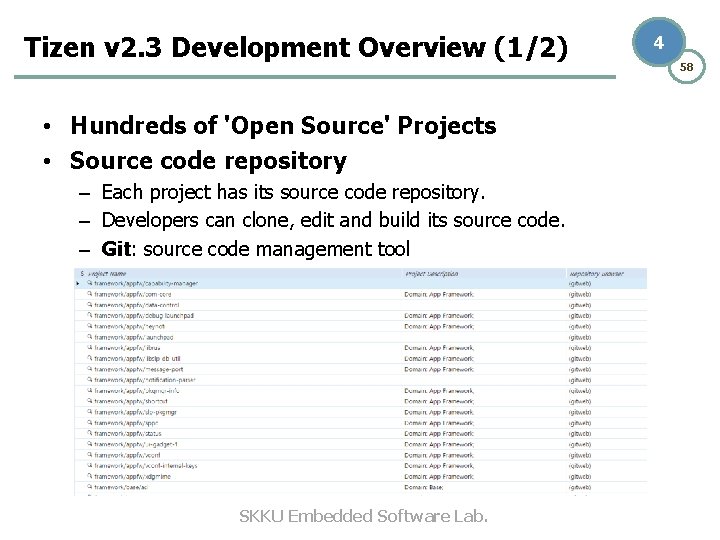
Tizen v 2. 3 Development Overview (1/2) • Hundreds of 'Open Source' Projects • Source code repository – Each project has its source code repository. – Developers can clone, edit and build its source code. – Git: source code management tool SKKU Embedded Software Lab. 4 58
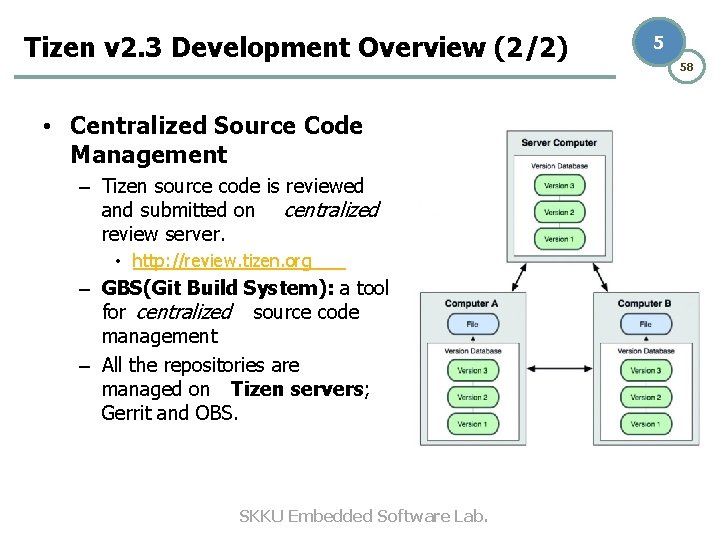
Tizen v 2. 3 Development Overview (2/2) • Centralized Source Code Management – Tizen source code is reviewed and submitted on centralized review server. • http: //review. tizen. org – GBS(Git Build System): a tool for centralized source code management – All the repositories are managed on Tizen servers; Gerrit and OBS. SKKU Embedded Software Lab. 5 58
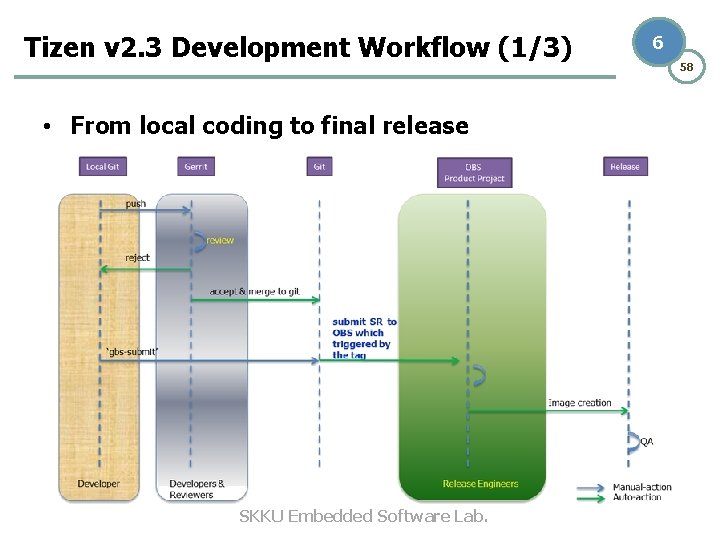
Tizen v 2. 3 Development Workflow (1/3) • From local coding to final release SKKU Embedded Software Lab. 6 58
Tizen v 2. 3 Development Workflow (2/3) 1. Local works by Developers – It will be covered in “Section 1 -C. Tizen Source Code Management”. 1. Setting up Tizen development environment 2. Cloning the source code 3. Changing and verifying local source code through local build 2. Submit & Review 1. Submission: Developer submits patches to review server for stakeholders to review 2. Verification: Tizen backend service and reviewers verify the patches through testing process and then vote based on the quality of the patches. 3. Approval and Merge: Maintainers approve the patches and then merge code changes to the review server’s SKKU Embedded Software Lab. repository. 7 58
Tizen v 2. 3 Development Workflow (3/3) 3. Release – 1. 2. 3. 4. Tizen backend service activates pre-release and normal release processes at the same time. Submission on OBS: Maintainers/Developers submit packages to the OBS by using gbs submit command. Pre-release: Tizen images that incorporates specific packages are created and submitted to release engineers to review. Final review: Release engineers accept or reject submissions based on the quality of the packages. Accepted source code is merged into the OBS repository. Release: the normal release process takes over and publishes repos together with Tizen images. SKKU Embedded Software Lab. 8 58
SCM Tools (1/3): Git • A revision control and source management tool • Features – – – Free and open source(GNU GPL v 2) Smaller and faster than other SCM tools Distributed Branching and merging Data assurance Staging area • Git in Tizen – All source code repositories of Tizen packages are managed by git. SKKU Embedded Software Lab. 9 58
SCM Tools (2/3): Repo • Repository management tool built on top of Git – Originally used in Android project – Used for managing many git repositories – Automate parts of development workflow • Repo in Tizen – Tizen platform is composed of the hundreds of projects. – Each projects are managed as a git repository. – Repo is used for managing Tizen platform repositories in batched manner. • ex. Cloning git repositories of entire Tizen platform packages SKKU Embedded Software Lab. 10 58
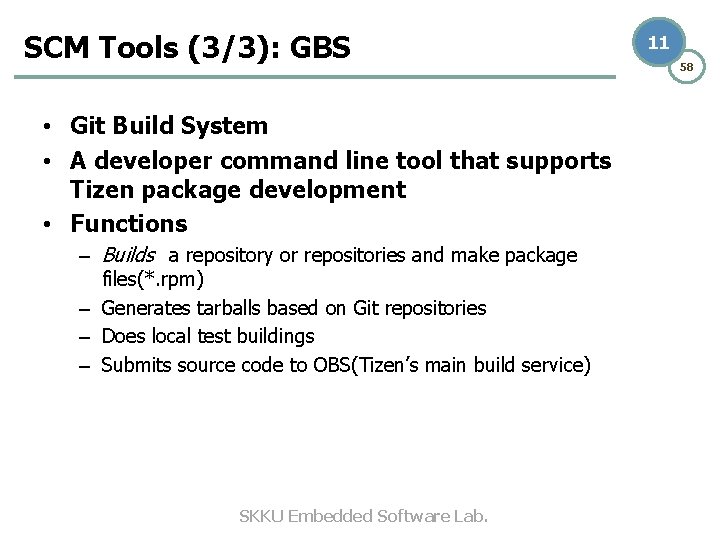
SCM Tools (3/3): GBS • Git Build System • A developer command line tool that supports Tizen package development • Functions – Builds a repository or repositories and make package files(*. rpm) – Generates tarballs based on Git repositories – Does local test buildings – Submits source code to OBS(Tizen’s main build service) SKKU Embedded Software Lab. 11 58
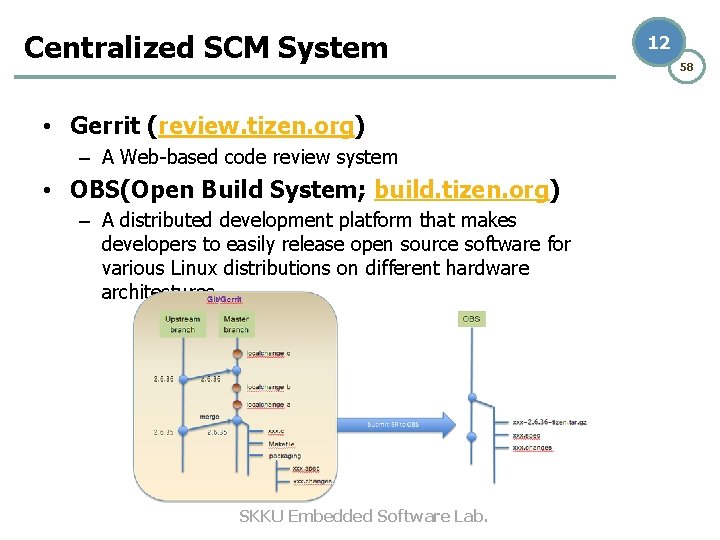
Centralized SCM System • Gerrit (review. tizen. org) – A Web-based code review system • OBS(Open Build System; build. tizen. org) – A distributed development platform that makes developers to easily release open source software for various Linux distributions on different hardware architectures. SKKU Embedded Software Lab. 12 58
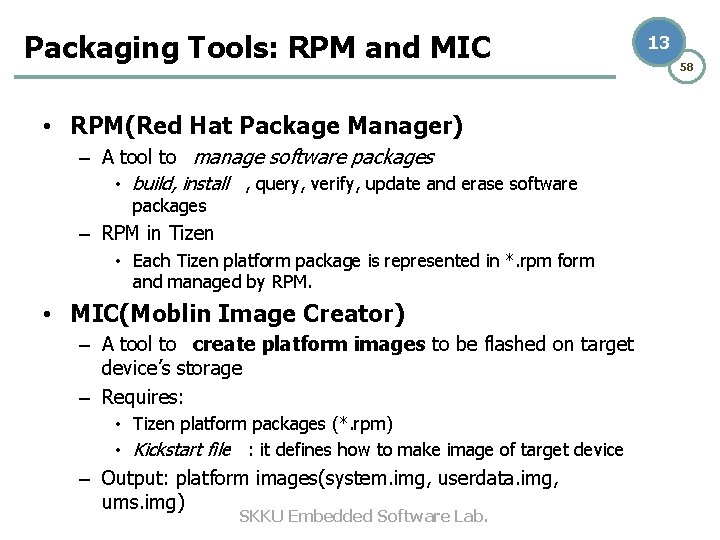
Packaging Tools: RPM and MIC • RPM(Red Hat Package Manager) – A tool to manage software packages • build, install , query, verify, update and erase software packages – RPM in Tizen • Each Tizen platform package is represented in *. rpm form and managed by RPM. • MIC(Moblin Image Creator) – A tool to create platform images to be flashed on target device’s storage – Requires: • Tizen platform packages (*. rpm) • Kickstart file : it defines how to make image of target device – Output: platform images(system. img, userdata. img, ums. img) SKKU Embedded Software Lab. 13 58
14 58 1. Tizen v 2. 3 Development Environment A. Tizen v 2. 3 Development Overview B. Installation C. Tizen v 2. 3 Source Code Management SKKU Embedded Software Lab.
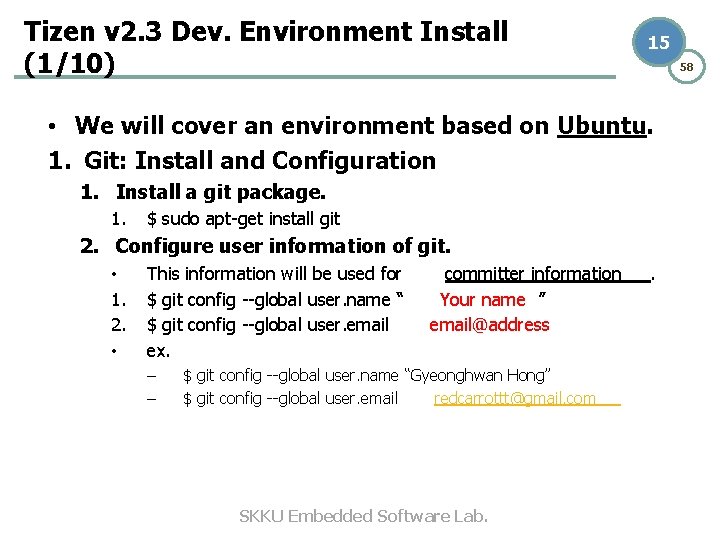
Tizen v 2. 3 Dev. Environment Install (1/10) 15 58 • We will cover an environment based on Ubuntu. 1. Git: Install and Configuration 1. Install a git package. 1. $ sudo apt-get install git 2. Configure user information of git. • 1. 2. • This information will be used for $ git config --global user. name “ $ git config --global user. email ex. – – committer information Your name ” email@address $ git config --global user. name “Gyeonghwan Hong” $ git config --global user. email redcarrottt@gmail. com SKKU Embedded Software Lab. .
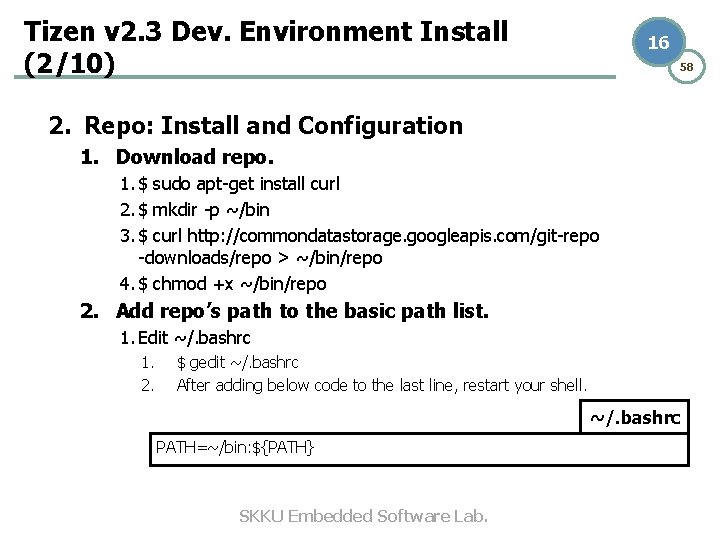
Tizen v 2. 3 Dev. Environment Install (2/10) 16 58 2. Repo: Install and Configuration 1. Download repo. 1. $ sudo apt-get install curl 2. $ mkdir -p ~/bin 3. $ curl http: //commondatastorage. googleapis. com/git-repo -downloads/repo > ~/bin/repo 4. $ chmod +x ~/bin/repo 2. Add repo’s path to the basic path list. 1. Edit ~/. bashrc 1. 2. $ gedit ~/. bashrc After adding below code to the last line, restart your shell. ~/. bashrc PATH=~/bin: ${PATH} SKKU Embedded Software Lab.
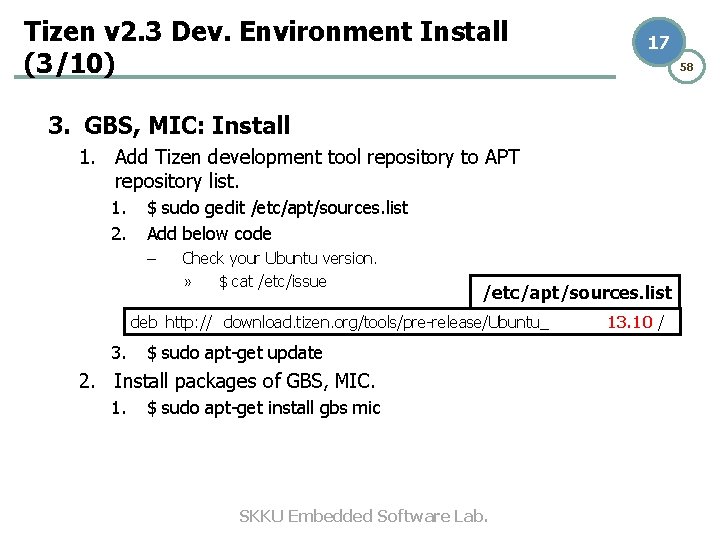
Tizen v 2. 3 Dev. Environment Install (3/10) 17 58 3. GBS, MIC: Install 1. Add Tizen development tool repository to APT repository list. 1. 2. $ sudo gedit /etc/apt/sources. list Add below code – Check your Ubuntu version. » $ cat /etc/issue /etc/apt/sources. list deb http: // download. tizen. org/tools/pre-release/Ubuntu_ 3. $ sudo apt-get update 2. Install packages of GBS, MIC. 1. $ sudo apt-get install gbs mic SKKU Embedded Software Lab. 13. 10 /
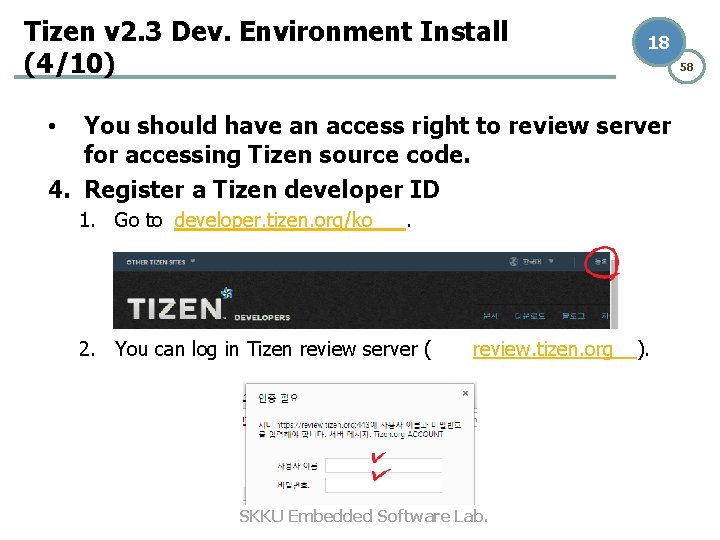
Tizen v 2. 3 Dev. Environment Install (4/10) 18 58 You should have an access right to review server for accessing Tizen source code. 4. Register a Tizen developer ID • 1. Go to developer. tizen. org/ko . 2. You can log in Tizen review server ( review. tizen. org SKKU Embedded Software Lab. ).
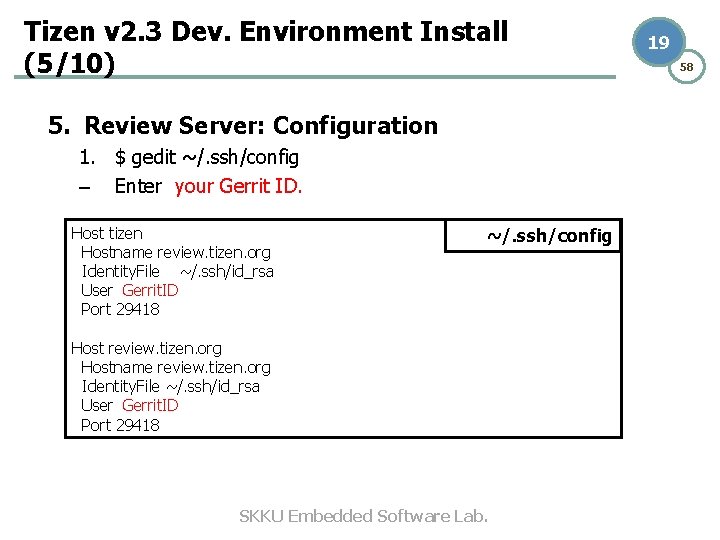
Tizen v 2. 3 Dev. Environment Install (5/10) 5. Review Server: Configuration 1. $ gedit ~/. ssh/config – Enter your Gerrit ID. Host tizen Hostname review. tizen. org Identity. File ~/. ssh/id_rsa User Gerrit. ID Port 29418 ~/. ssh/config Host review. tizen. org Hostname review. tizen. org Identity. File ~/. ssh/id_rsa User Gerrit. ID Port 29418 SKKU Embedded Software Lab. 19 58
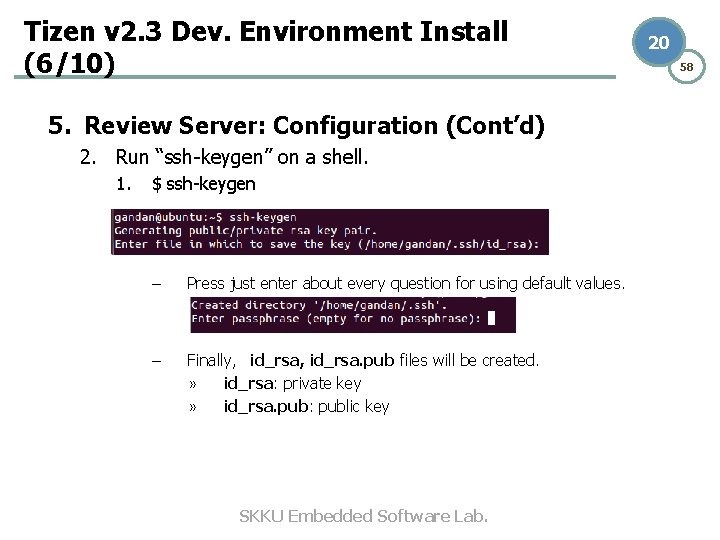
Tizen v 2. 3 Dev. Environment Install (6/10) 5. Review Server: Configuration (Cont’d) 2. Run “ssh-keygen” on a shell. 1. $ ssh-keygen – Press just enter about every question for using default values. – Finally, id_rsa, id_rsa. pub files will be created. » id_rsa: private key » id_rsa. pub: public key SKKU Embedded Software Lab. 20 58
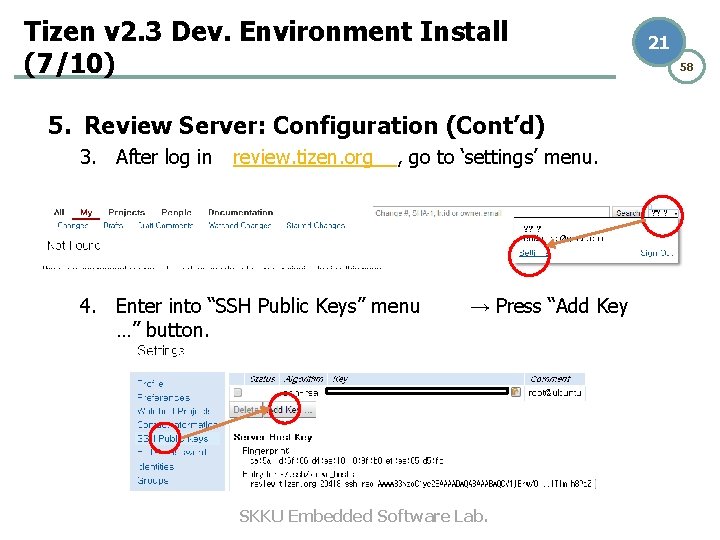
Tizen v 2. 3 Dev. Environment Install (7/10) 5. Review Server: Configuration (Cont’d) 3. After log in review. tizen. org , go to ‘settings’ menu. 4. Enter into “SSH Public Keys” menu …” button. → Press “Add Key SKKU Embedded Software Lab. 21 58
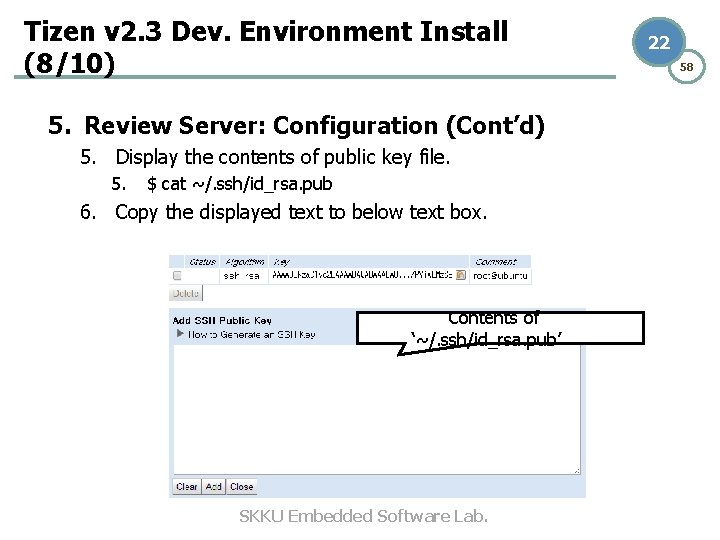
Tizen v 2. 3 Dev. Environment Install (8/10) 5. Review Server: Configuration (Cont’d) 5. Display the contents of public key file. 5. $ cat ~/. ssh/id_rsa. pub 6. Copy the displayed text to below text box. Contents of ‘~/. ssh/id_rsa. pub’ SKKU Embedded Software Lab. 22 58
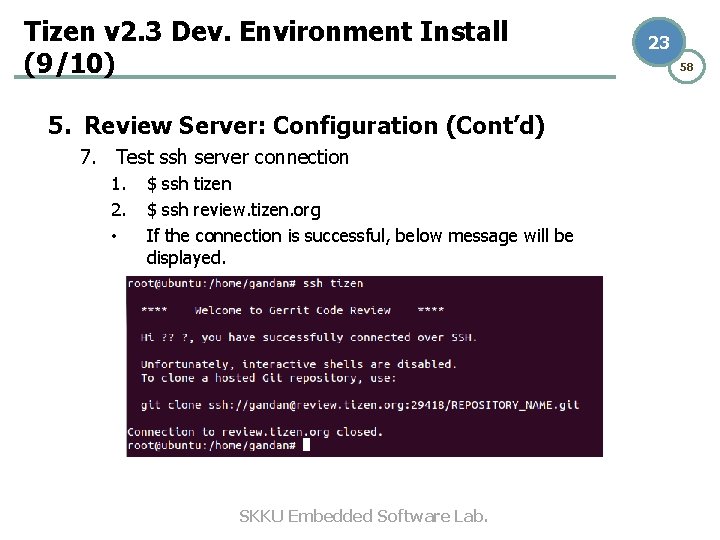
Tizen v 2. 3 Dev. Environment Install (9/10) 5. Review Server: Configuration (Cont’d) 7. Test ssh server connection 1. 2. • $ ssh tizen $ ssh review. tizen. org If the connection is successful, below message will be displayed. SKKU Embedded Software Lab. 23 58
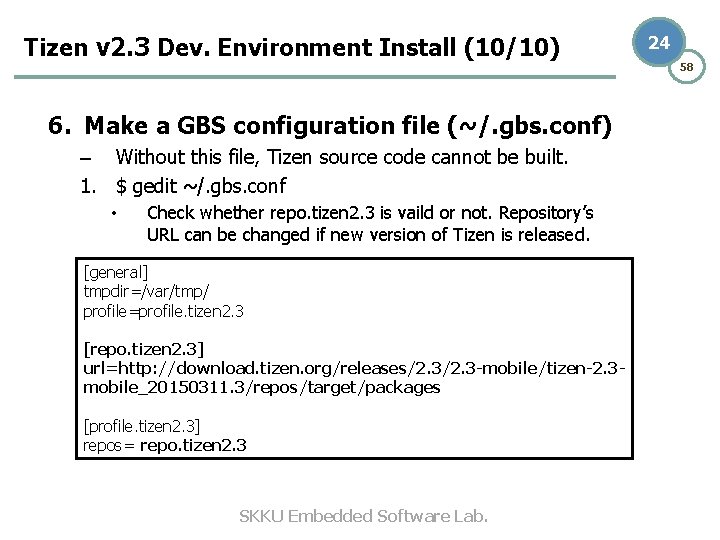
Tizen v 2. 3 Dev. Environment Install (10/10) 6. Make a GBS configuration file (~/. gbs. conf) – Without this file, Tizen source code cannot be built. 1. $ gedit ~/. gbs. conf • Check whether repo. tizen 2. 3 is vaild or not. Repository’s URL can be changed if new version of Tizen is released. [general] tmpdir=/var/tmp/ profile=profile. tizen 2. 3 [repo. tizen 2. 3] url=http: //download. tizen. org/releases/2. 3 -mobile/tizen-2. 3 mobile_20150311. 3/repos/target/packages [profile. tizen 2. 3] repos= repo. tizen 2. 3 SKKU Embedded Software Lab. 24 58
25 58 1. Tizen v 2. 3 Development Environment A. Tizen v 2. 3 Development Overview B. Installation C. Tizen v 2. 3 Source Code Management SKKU Embedded Software Lab.
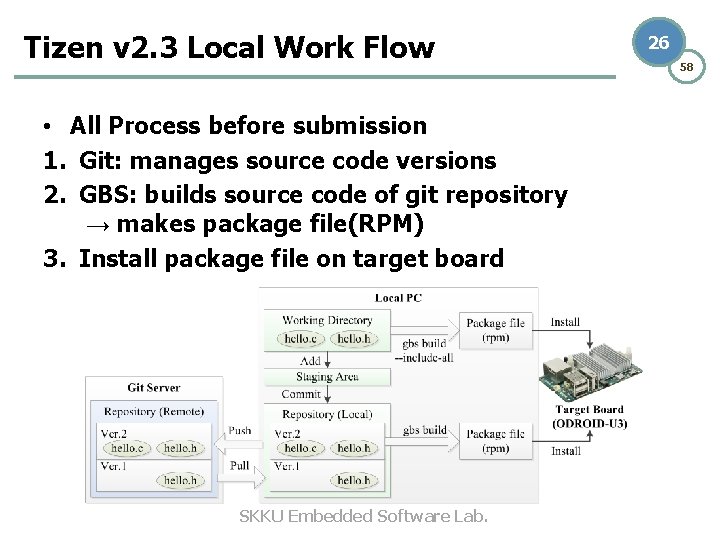
Tizen v 2. 3 Local Work Flow • All Process before submission 1. Git: manages source code versions 2. GBS: builds source code of git repository → makes package file(RPM) 3. Install package file on target board SKKU Embedded Software Lab. 26 58
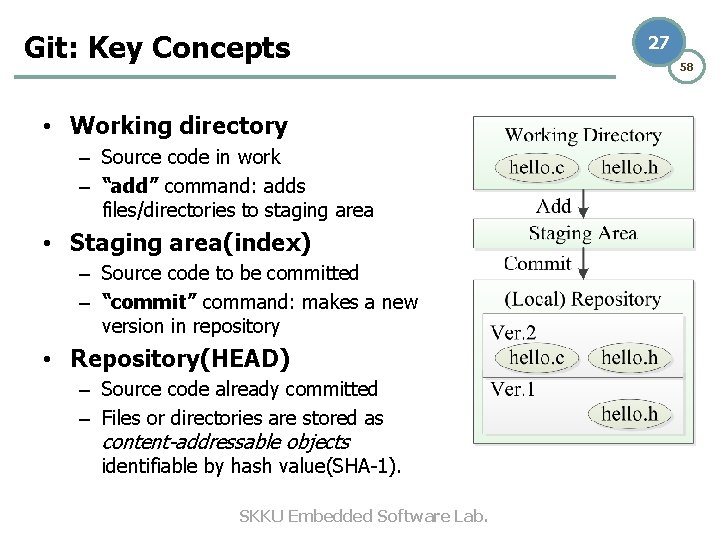
Git: Key Concepts • Working directory – Source code in work – “add” command: adds files/directories to staging area • Staging area(index) – Source code to be committed – “commit” command: makes a new version in repository • Repository(HEAD) – Source code already committed – Files or directories are stored as content-addressable objects identifiable by hash value(SHA-1). SKKU Embedded Software Lab. 27 58
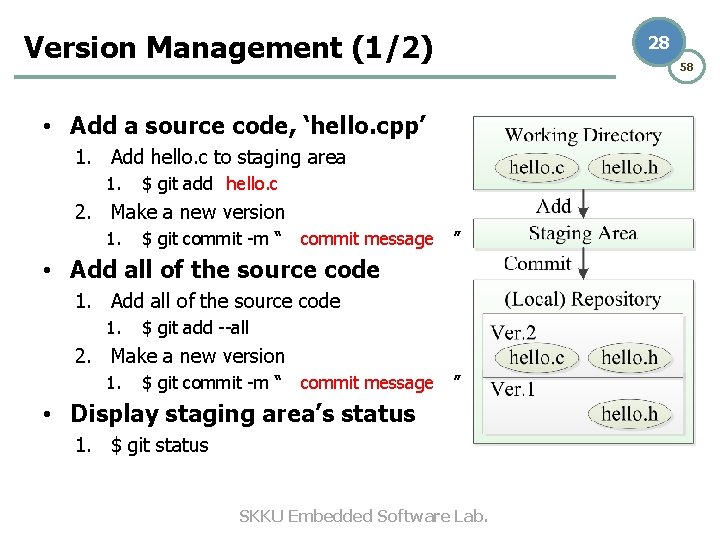
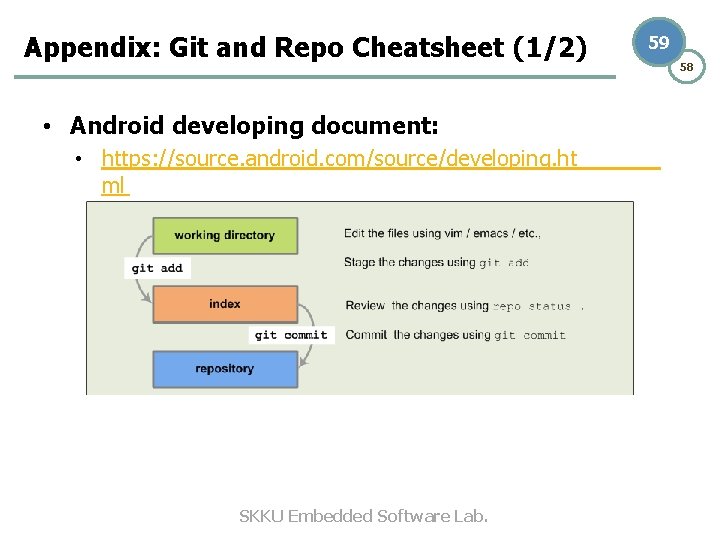
Version Management (1/2) 28 58 • Add a source code, ‘hello. cpp’ 1. Add hello. c to staging area 1. $ git add hello. c 2. Make a new version 1. $ git commit -m “ commit message ” • Add all of the source code 1. $ git add --all 2. Make a new version 1. $ git commit -m “ commit message ” • Display staging area’s status 1. $ git status SKKU Embedded Software Lab.
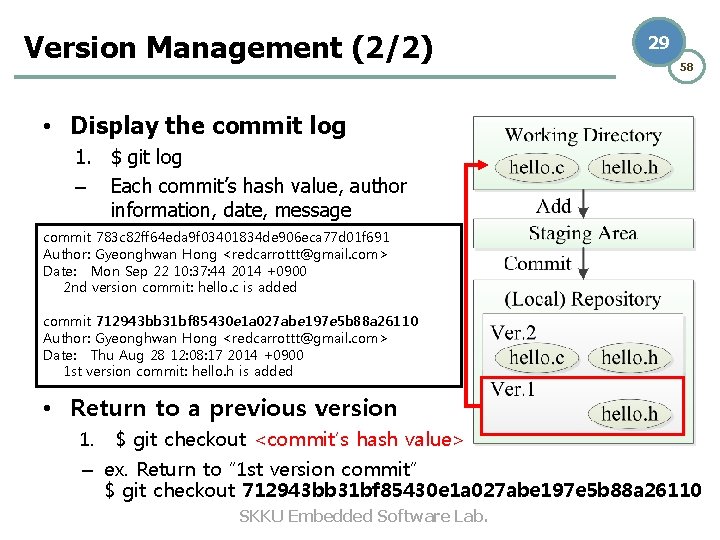
Version Management (2/2) 29 58 • Display the commit log 1. $ git log – Each commit’s hash value, author information, date, message commit 783 c 82 ff 64 eda 9 f 03401834 de 906 eca 77 d 01 f 691 Author: Gyeonghwan Hong <redcarrottt@gmail. com> Date: Mon Sep 22 10: 37: 44 2014 +0900 2 nd version commit: hello. c is added commit 712943 bb 31 bf 85430 e 1 a 027 abe 197 e 5 b 88 a 26110 Author: Gyeonghwan Hong <redcarrottt@gmail. com> Date: Thu Aug 28 12: 08: 17 2014 +0900 1 st version commit: hello. h is added • Return to a previous version 1. $ git checkout <commit’s hash value> – ex. Return to “ 1 st version commit” $ git checkout 712943 bb 31 bf 85430 e 1 a 027 abe 197 e 5 b 88 a 26110 SKKU Embedded Software Lab.
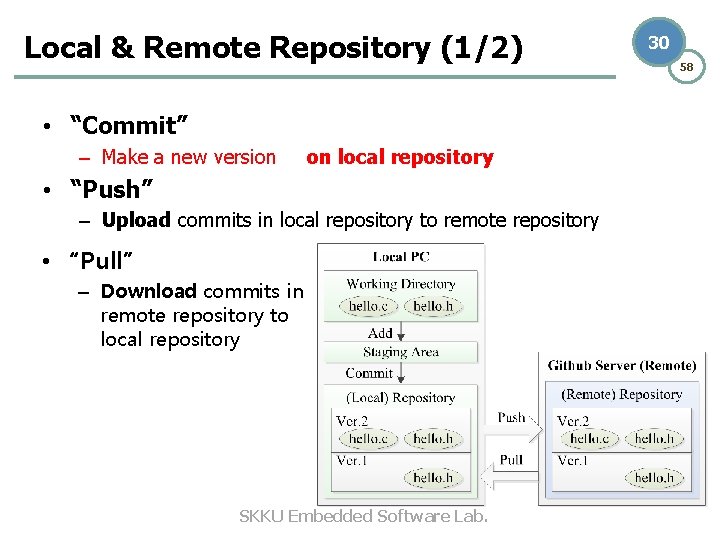
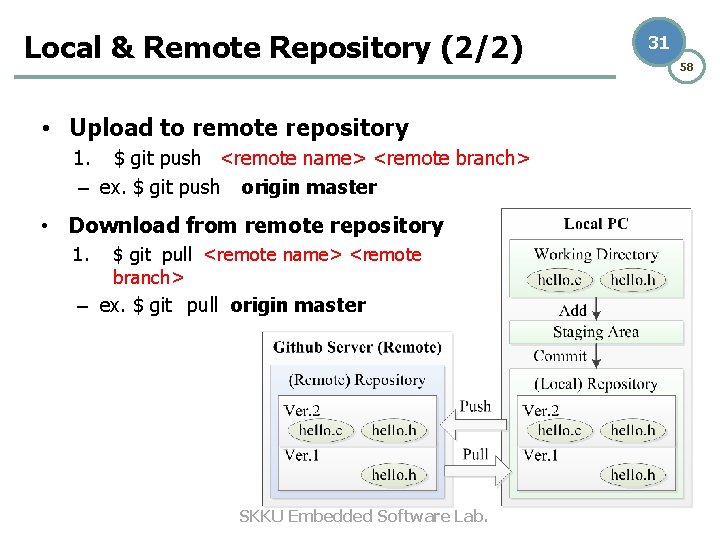
Local & Remote Repository (1/2) • “Commit” – Make a new version on local repository • “Push” – Upload commits in local repository to remote repository • “Pull” – Download commits in remote repository to local repository SKKU Embedded Software Lab. 30 58
Local & Remote Repository (2/2) • Upload to remote repository 1. $ git push <remote name> <remote branch> – ex. $ git push origin master • Download from remote repository 1. $ git pull <remote name> <remote branch> – ex. $ git pull origin master SKKU Embedded Software Lab. 31 58
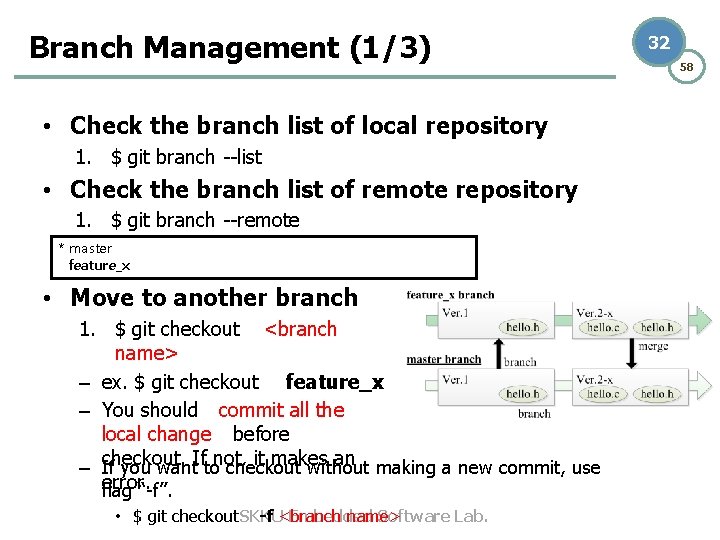
Branch Management (1/3) • Check the branch list of local repository 1. $ git branch --list • Check the branch list of remote repository 1. $ git branch --remote * master feature_x • Move to another branch 1. $ git checkout <branch name> – ex. $ git checkout feature_x – You should commit all the local change before – checkout. If not, it makes an If you want to checkout without making a new commit, use error. flag “-f”. • $ git checkout SKKU -f <branch name> Embedded Software Lab. 32 58
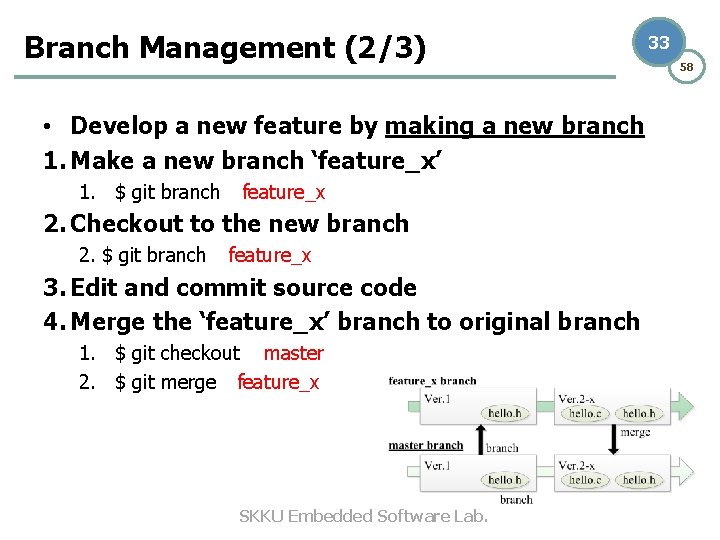
Branch Management (2/3) • Develop a new feature by making a new branch 1. Make a new branch ‘feature_x’ 1. $ git branch feature_x 2. Checkout to the new branch 2. $ git branch feature_x 3. Edit and commit source code 4. Merge the ‘feature_x’ branch to original branch 1. $ git checkout master 2. $ git merge feature_x SKKU Embedded Software Lab. 33 58
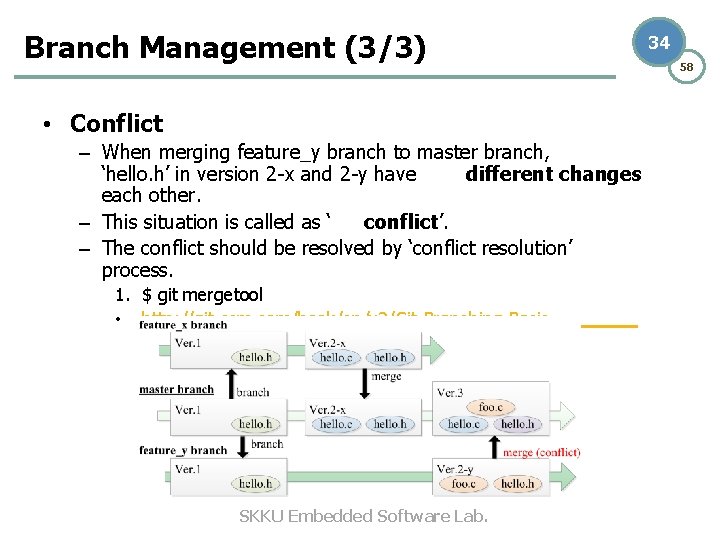
Branch Management (3/3) 34 • Conflict – When merging feature_y branch to master branch, ‘hello. h’ in version 2 -x and 2 -y have different changes each other. – This situation is called as ‘ conflict’. – The conflict should be resolved by ‘conflict resolution’ process. 1. $ git mergetool • http: //git-scm. com/book/en/v 2/Git-Branching-Basic. Branching-and-Merging SKKU Embedded Software Lab. 58
35 58 2. Building Total Tizen v 2. 3 Platform Projects SKKU Embedded Software Lab.
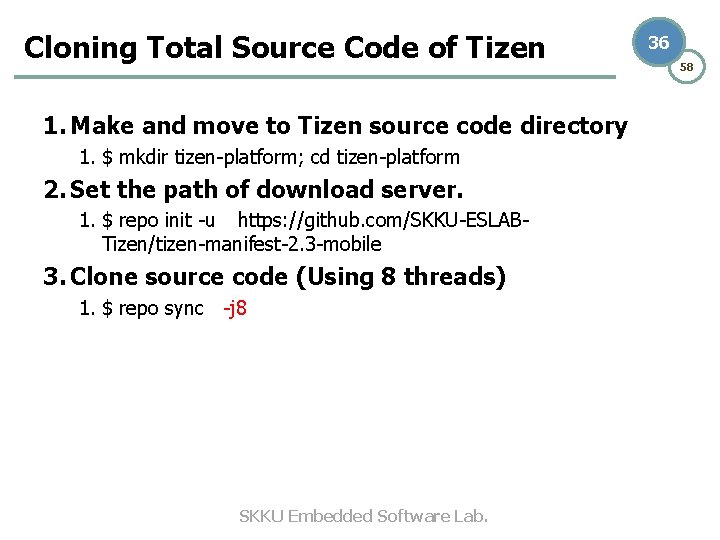
Cloning Total Source Code of Tizen 1. Make and move to Tizen source code directory 1. $ mkdir tizen-platform; cd tizen-platform 2. Set the path of download server. 1. $ repo init -u https: //github. com/SKKU-ESLABTizen/tizen-manifest-2. 3 -mobile 3. Clone source code (Using 8 threads) 1. $ repo sync -j 8 SKKU Embedded Software Lab. 36 58
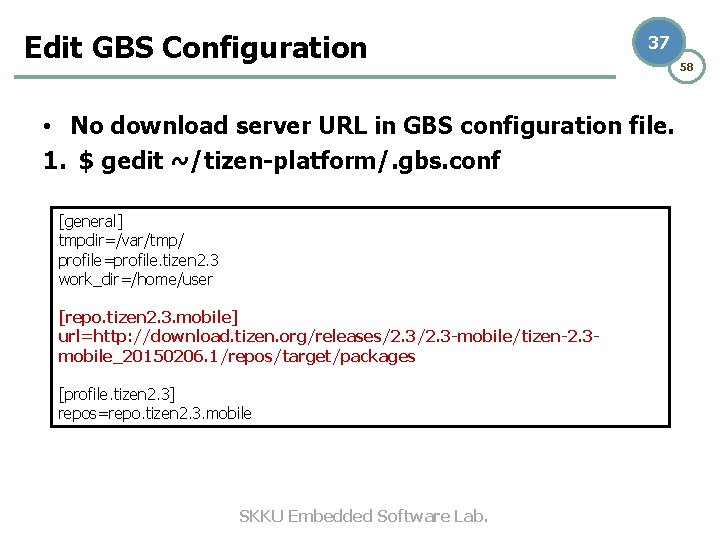
Edit GBS Configuration 37 • No download server URL in GBS configuration file. 1. $ gedit ~/tizen-platform/. gbs. conf [general] tmpdir=/var/tmp/ profile=profile. tizen 2. 3 work_dir=/home/user [repo. tizen 2. 3. mobile] url=http: //download. tizen. org/releases/2. 3 -mobile/tizen-2. 3 mobile_20150206. 1/repos/target/packages [profile. tizen 2. 3] repos=repo. tizen 2. 3. mobile SKKU Embedded Software Lab. 58
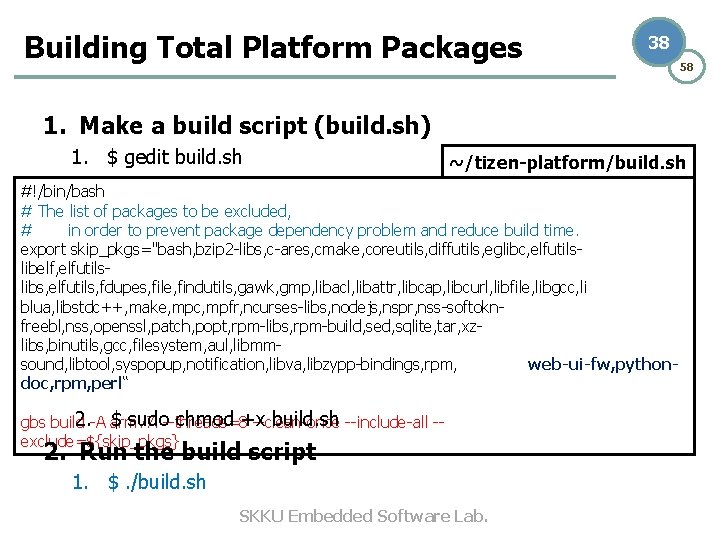
Building Total Platform Packages 38 58 1. Make a build script (build. sh) 1. $ gedit build. sh ~/tizen-platform/build. sh #!/bin/bash # The list of packages to be excluded, # in order to prevent package dependency problem and reduce build time. export skip_pkgs="bash, bzip 2 -libs, c-ares, cmake, coreutils, diffutils, eglibc, elfutilslibelf, elfutilslibs, elfutils, fdupes, file, findutils, gawk, gmp, libacl, libattr, libcap, libcurl, libfile, libgcc, li blua, libstdc++, make, mpc, mpfr, ncurses-libs, nodejs, nspr, nss-softoknfreebl, nss, openssl, patch, popt, rpm-libs, rpm-build, sed, sqlite, tar, xzlibs, binutils, gcc, filesystem, aul, libmmsound, libtool, syspopup, notification, libva, libzypp-bindings, rpm, web-ui-fw, pythondoc, rpm, perl“ 2. $ sudo chmod +x build. sh gbs build -A armv 7 l --threads=8 --clean-once --include-all -exclude=${skip_pkgs} 2. Run the build script 1. $. /build. sh SKKU Embedded Software Lab.
39 58 3. Building a Tizen v 2. 3 Platform Project SKKU Embedded Software Lab.
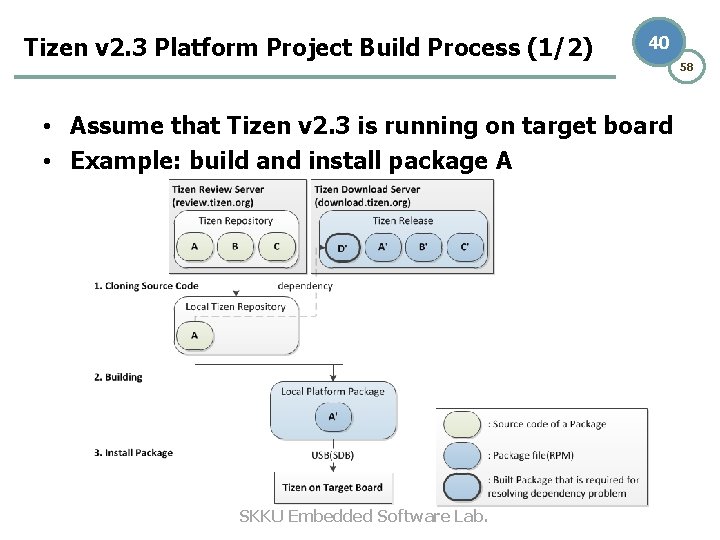
Tizen v 2. 3 Platform Project Build Process (1/2) 40 • Assume that Tizen v 2. 3 is running on target board • Example: build and install package A SKKU Embedded Software Lab. 58
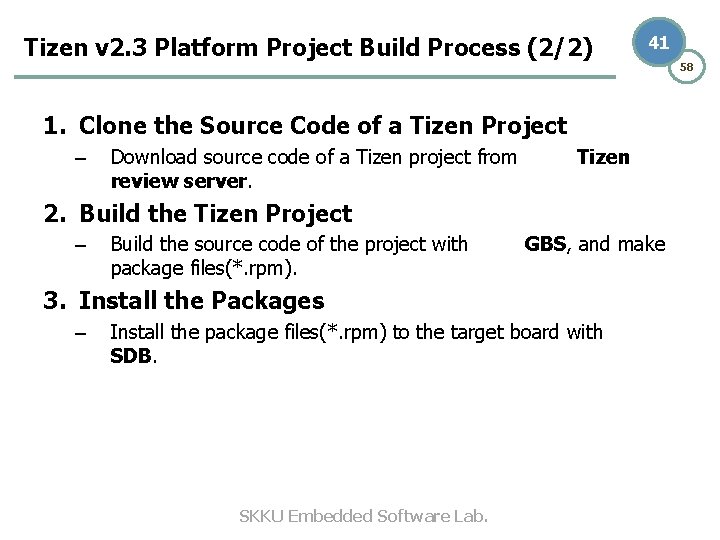
Tizen v 2. 3 Platform Project Build Process (2/2) 41 1. Clone the Source Code of a Tizen Project – Download source code of a Tizen project from review server. Tizen 2. Build the Tizen Project – Build the source code of the project with package files(*. rpm). GBS, and make 3. Install the Packages – Install the package files(*. rpm) to the target board with SDB. SKKU Embedded Software Lab. 58
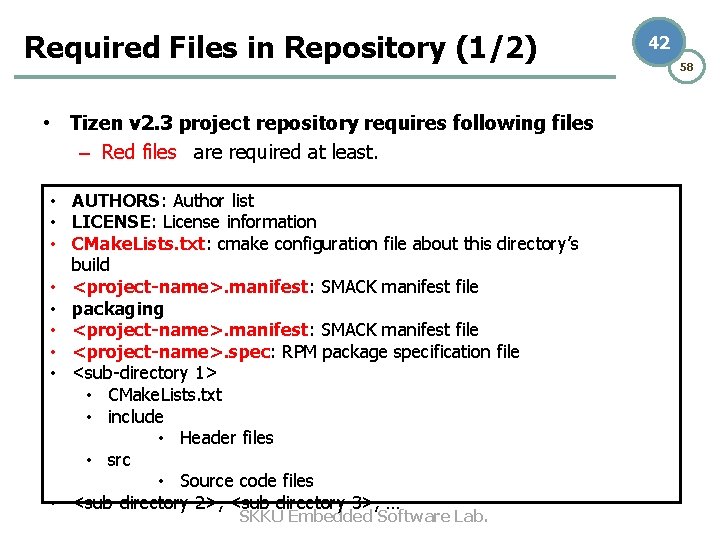
Required Files in Repository (1/2) • Tizen v 2. 3 project repository requires following files – Red files are required at least. • AUTHORS: Author list • LICENSE: License information • CMake. Lists. txt: cmake configuration file about this directory’s build • <project-name>. manifest: SMACK manifest file • packaging • <project-name>. manifest: SMACK manifest file • <project-name>. spec: RPM package specification file • <sub-directory 1> • CMake. Lists. txt • include • Header files • src • Source code files • <sub-directory 2>, <sub-directory 3>, … SKKU Embedded Software Lab. 42 58
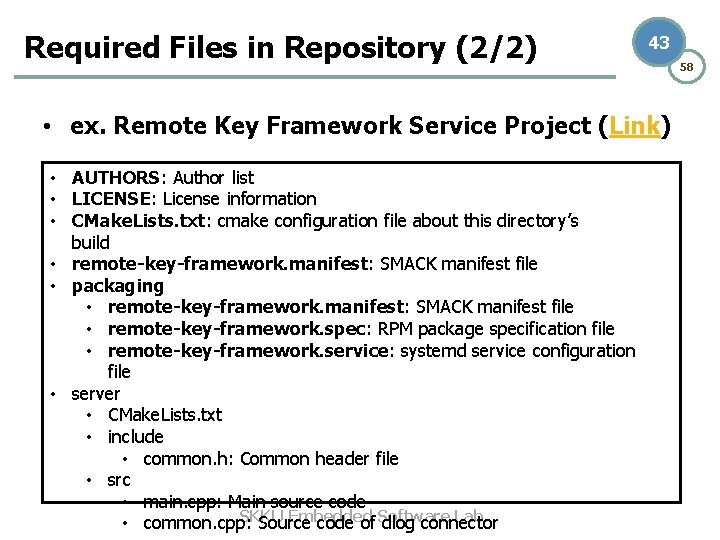
Required Files in Repository (2/2) 43 • ex. Remote Key Framework Service Project (Link) • AUTHORS: Author list • LICENSE: License information • CMake. Lists. txt: cmake configuration file about this directory’s build • remote-key-framework. manifest: SMACK manifest file • packaging • remote-key-framework. manifest: SMACK manifest file • remote-key-framework. spec: RPM package specification file • remote-key-framework. service: systemd service configuration file • server • CMake. Lists. txt • include • common. h: Common header file • src • main. cpp: Main source code SKKU Embedded Software Lab. • common. cpp: Source code of dlog connector 58
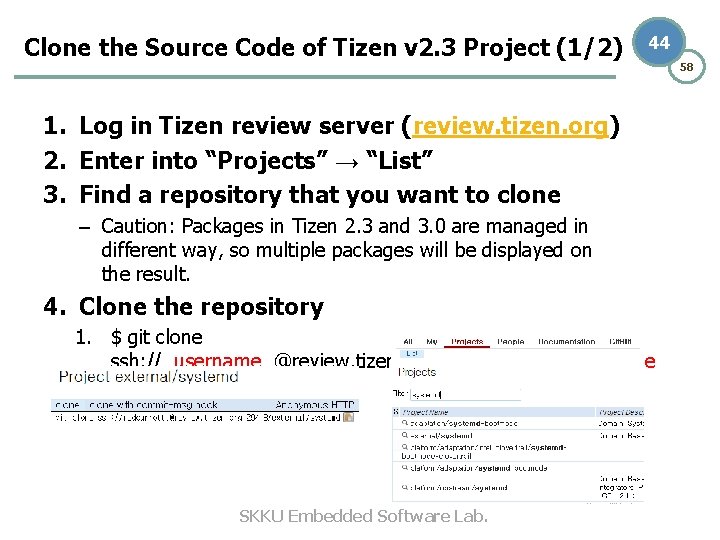
Clone the Source Code of Tizen v 2. 3 Project (1/2) 44 1. Log in Tizen review server (review. tizen. org) 2. Enter into “Projects” → “List” 3. Find a repository that you want to clone – Caution: Packages in Tizen 2. 3 and 3. 0 are managed in different way, so multiple packages will be displayed on the result. 4. Clone the repository 1. $ git clone ssh: // username @review. tizen. org: 29418/ SKKU Embedded Software Lab. project-name 58
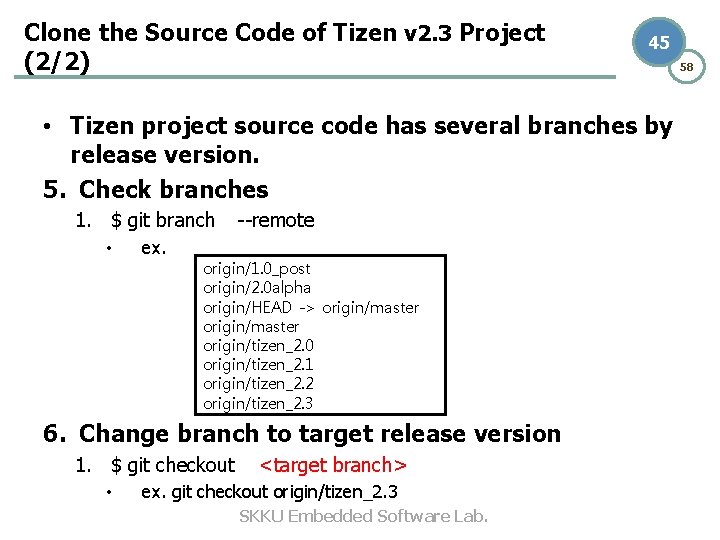
Clone the Source Code of Tizen v 2. 3 Project (2/2) 45 • Tizen project source code has several branches by release version. 5. Check branches 1. $ git branch --remote • ex. origin/1. 0_post origin/2. 0 alpha origin/HEAD -> origin/master origin/tizen_2. 0 origin/tizen_2. 1 origin/tizen_2. 2 origin/tizen_2. 3 6. Change branch to target release version 1. $ git checkout <target branch> • ex. git checkout origin/tizen_2. 3 SKKU Embedded Software Lab. 58
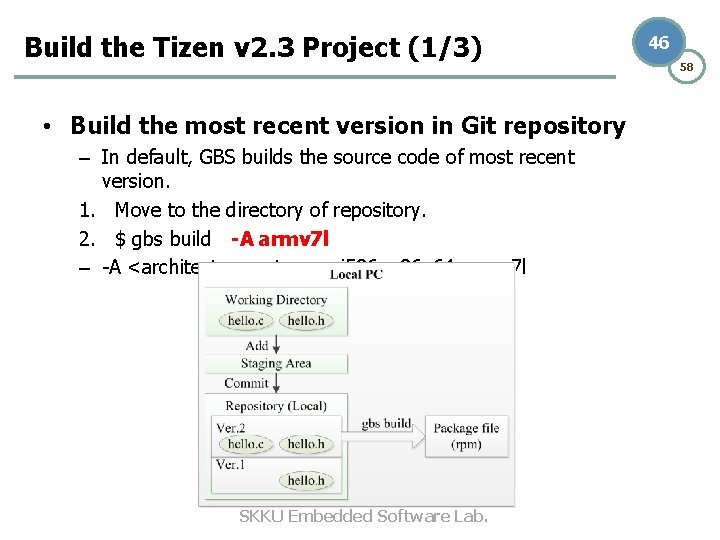
Build the Tizen v 2. 3 Project (1/3) • Build the most recent version in Git repository – In default, GBS builds the source code of most recent version. 1. Move to the directory of repository. 2. $ gbs build -A armv 7 l – -A <architecture type>: i 586, x 86_64, armv 7 l SKKU Embedded Software Lab. 46 58
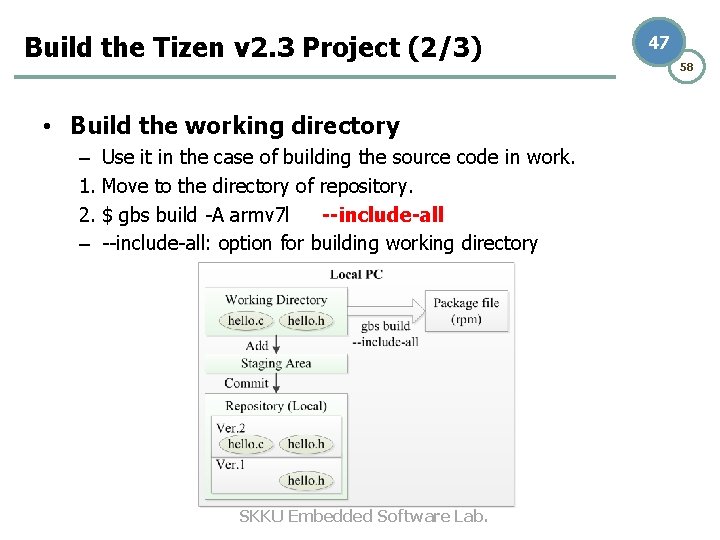
Build the Tizen v 2. 3 Project (2/3) • Build the working directory – Use it in the case of building the source code in work. 1. Move to the directory of repository. 2. $ gbs build -A armv 7 l --include-all – --include-all: option for building working directory SKKU Embedded Software Lab. 47 58
Build the Tizen v 2. 3 Project (3/3) 48 • GBS downloads dependent packages from Tizen download server on demand. – ex. wrt(Web Runtime) package depends on ewebkit 2(Web. Kit. EFL) package, so ewebkit 2 is downloaded when building wrt. • Other GBS Options – --threads <# of threads>: the number of build threads – --clean: initializes the GBS build root – --exclude=<packages>: the list of packages to be excluded • Build Result(Package Files; *. rpm) – The name of package file is dependent on the project’s RPM spec. – Typically package file is named as ‘ package_nameversion. arch. rpm’. SKKU Embedded Software Lab. • ex. remote-key-framework-1. 2. 1. armv 7 l. rpm 58
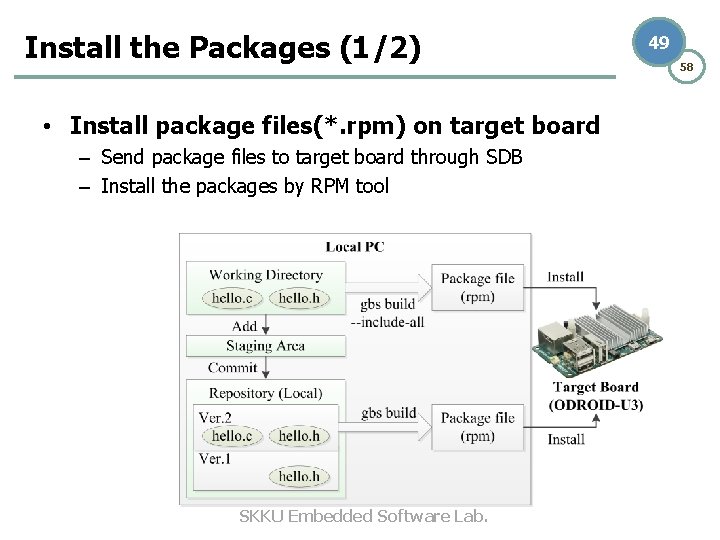
Install the Packages (1/2) • Install package files(*. rpm) on target board – Send package files to target board through SDB – Install the packages by RPM tool SKKU Embedded Software Lab. 49 58
Install the Packages (2/2) 50 58 1. Connect to ODROID-U 3 via USB – – How to check connection: $ sdb devices Caution: If you are using VMWare, check the connection of ‘removable device’ 2. Enter to SDB root mode 1. $ sdb root on 3. Send package file to target board through SDB 1. $ sdb push <package file> / 4. Install the package 1. $ sdb shell rpm -ivh --nodeps --force <package file> 5. Reboot your target board 1. $ sdb shell sync; sdb shell reboot -f SKKU Embedded Software Lab.
51 58 4. Making Tizen v 2. 3 Platform Image SKKU Embedded Software Lab.
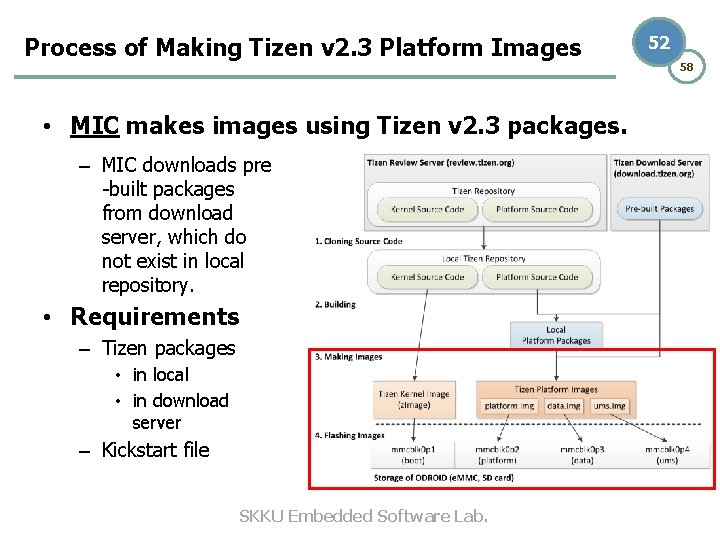
Process of Making Tizen v 2. 3 Platform Images • MIC makes images using Tizen v 2. 3 packages. – MIC downloads pre -built packages from download server, which do not exist in local repository. • Requirements – Tizen packages • in local • in download server – Kickstart file SKKU Embedded Software Lab. 52 58
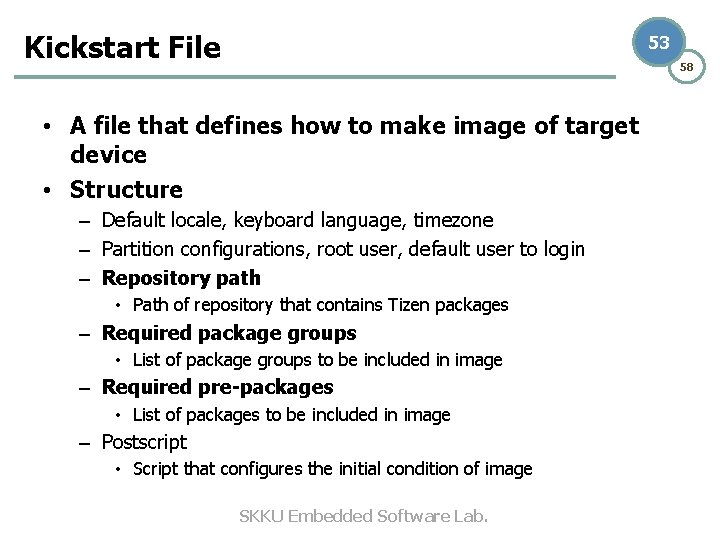
Kickstart File 53 58 • A file that defines how to make image of target device • Structure – Default locale, keyboard language, timezone – Partition configurations, root user, default user to login – Repository path • Path of repository that contains Tizen packages – Required package groups • List of package groups to be included in image – Required pre-packages • List of packages to be included in image – Postscript • Script that configures the initial condition of image SKKU Embedded Software Lab.
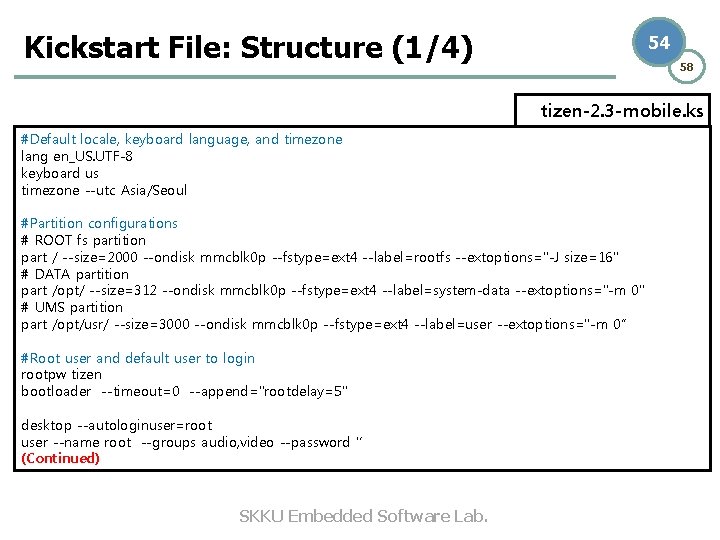
Kickstart File: Structure (1/4) 54 58 tizen-2. 3 -mobile. ks #Default locale, keyboard language, and timezone lang en_US. UTF-8 keyboard us timezone --utc Asia/Seoul #Partition configurations # ROOT fs partition part / --size=2000 --ondisk mmcblk 0 p --fstype=ext 4 --label=rootfs --extoptions="-J size=16" # DATA partition part /opt/ --size=312 --ondisk mmcblk 0 p --fstype=ext 4 --label=system-data --extoptions="-m 0" # UMS partition part /opt/usr/ --size=3000 --ondisk mmcblk 0 p --fstype=ext 4 --label=user --extoptions="-m 0“ #Root user and default user to login rootpw tizen bootloader --timeout=0 --append="rootdelay=5" desktop --autologinuser=root user --name root --groups audio, video --password '‘ (Continued) SKKU Embedded Software Lab.
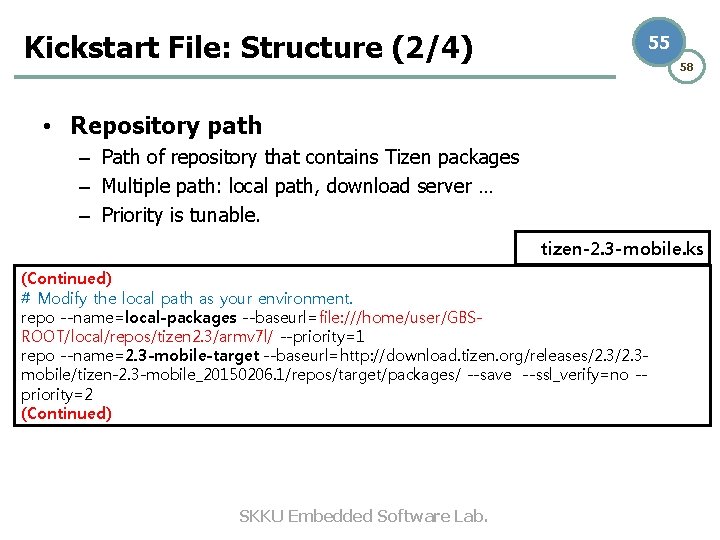
Kickstart File: Structure (2/4) 55 58 • Repository path – Path of repository that contains Tizen packages – Multiple path: local path, download server … – Priority is tunable. tizen-2. 3 -mobile. ks (Continued) # Modify the local path as your environment. repo --name=local-packages --baseurl=file: ///home/user/GBSROOT/local/repos/tizen 2. 3/armv 7 l/ --priority=1 repo --name=2. 3 -mobile-target --baseurl=http: //download. tizen. org/releases/2. 3 mobile/tizen-2. 3 -mobile_20150206. 1/repos/target/packages/ --save --ssl_verify=no -priority=2 (Continued) SKKU Embedded Software Lab.
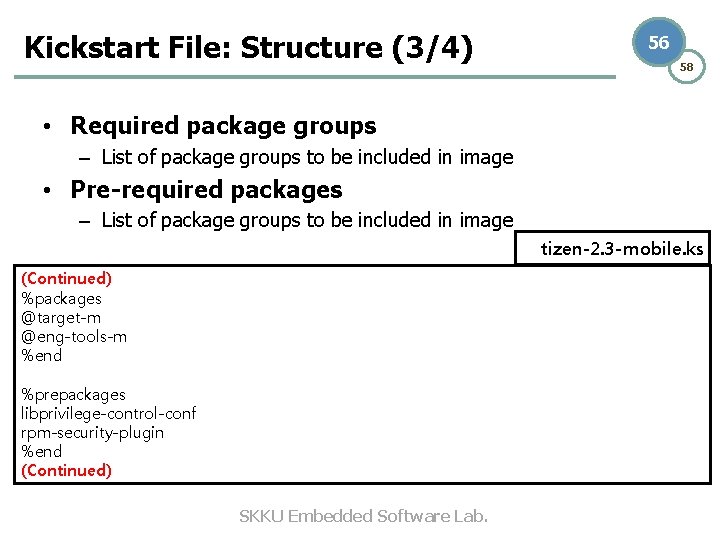
Kickstart File: Structure (3/4) 56 58 • Required package groups – List of package groups to be included in image • Pre-required packages – List of package groups to be included in image tizen-2. 3 -mobile. ks (Continued) %packages @target-m @eng-tools-m %end %prepackages libprivilege-control-conf rpm-security-plugin %end (Continued) SKKU Embedded Software Lab.
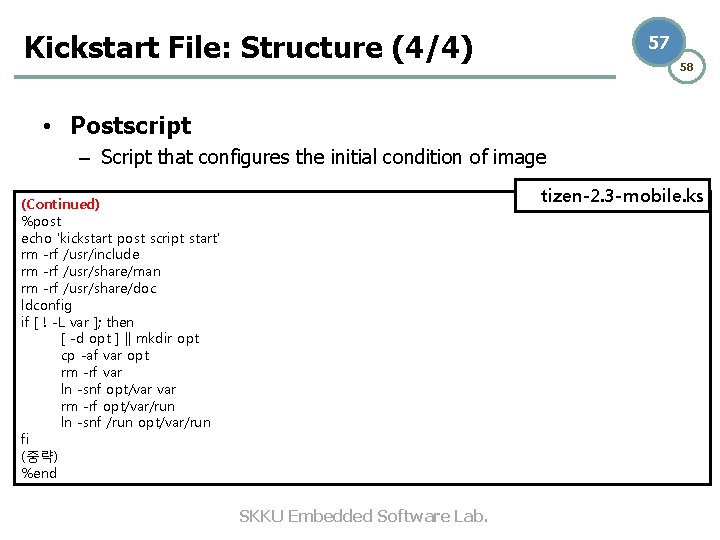
Kickstart File: Structure (4/4) 57 58 • Postscript – Script that configures the initial condition of image tizen-2. 3 -mobile. ks (Continued) %post echo 'kickstart post script start' rm -rf /usr/include rm -rf /usr/share/man rm -rf /usr/share/doc ldconfig if [ ! -L var ]; then [ -d opt ] || mkdir opt cp -af var opt rm -rf var ln -snf opt/var rm -rf opt/var/run ln -snf /run opt/var/run fi (중략) %end SKKU Embedded Software Lab.
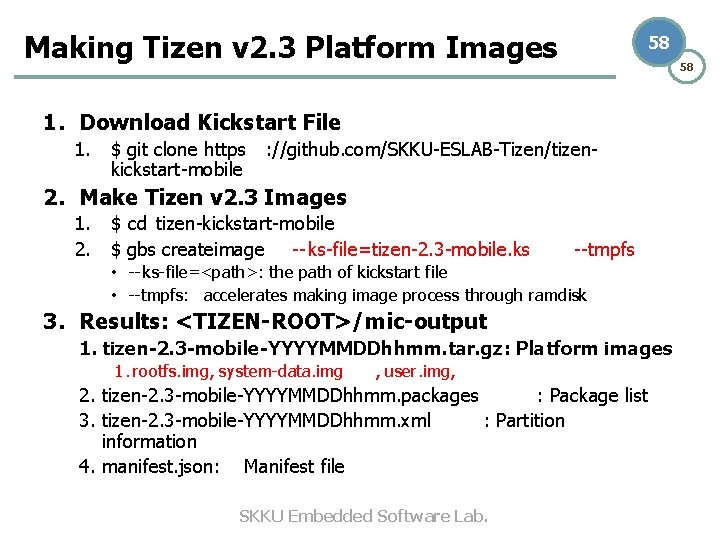
Making Tizen v 2. 3 Platform Images 58 58 1. Download Kickstart File 1. $ git clone https : //github. com/SKKU-ESLAB-Tizen/tizenkickstart-mobile 2. Make Tizen v 2. 3 Images 1. $ cd tizen-kickstart-mobile 2. $ gbs createimage -- ks-file=tizen-2. 3 -mobile. ks --tmpfs • -- ks-file=<path>: the path of kickstart file • --tmpfs: accelerates making image process through ramdisk 3. Results: <TIZEN-ROOT>/mic-output 1. tizen-2. 3 -mobile-YYYYMMDDhhmm. tar. gz: Platform images 1. rootfs. img, system-data. img , user. img, 2. tizen-2. 3 -mobile-YYYYMMDDhhmm. packages : Package list 3. tizen-2. 3 -mobile-YYYYMMDDhhmm. xml : Partition information 4. manifest. json: Manifest file SKKU Embedded Software Lab.
Appendix: Git and Repo Cheatsheet (1/2) • Android developing document: • https: //source. android. com/source/developing. ht ml SKKU Embedded Software Lab. 59 58
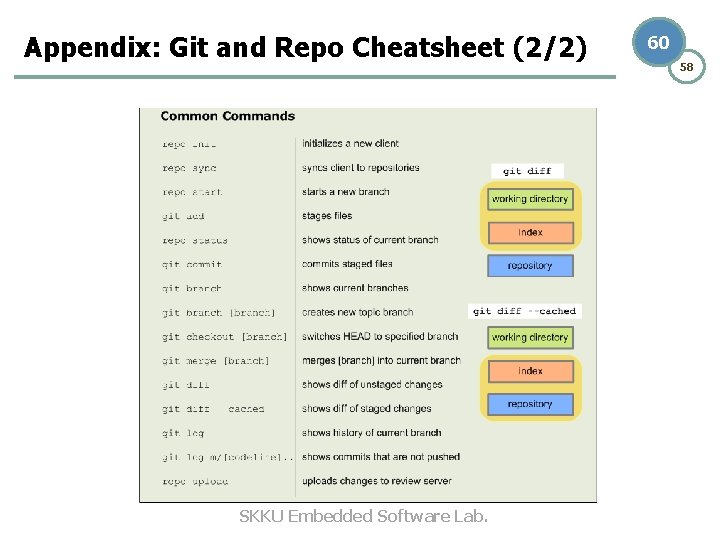
Appendix: Git and Repo Cheatsheet (2/2) SKKU Embedded Software Lab. 60 58
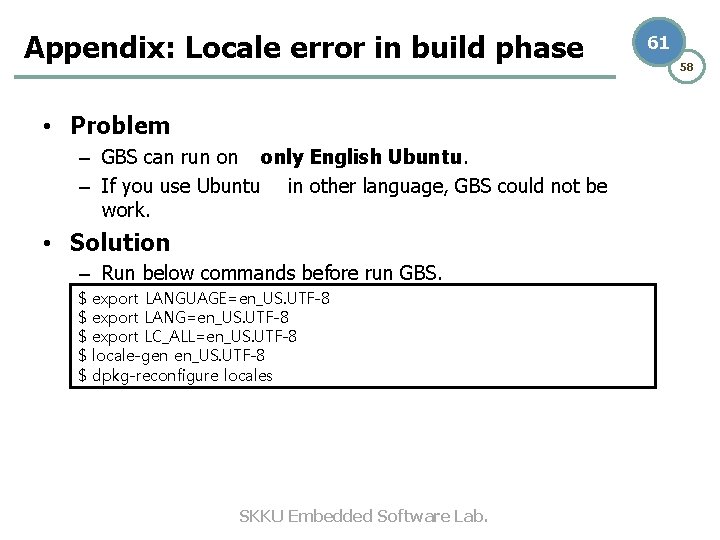
Appendix: Locale error in build phase • Problem – GBS can run on only English Ubuntu. – If you use Ubuntu in other language, GBS could not be work. • Solution – Run below commands before run GBS. $ $ $ export LANGUAGE=en_US. UTF-8 export LANG=en_US. UTF-8 export LC_ALL=en_US. UTF-8 locale-gen en_US. UTF-8 dpkg-reconfigure locales SKKU Embedded Software Lab. 61 58
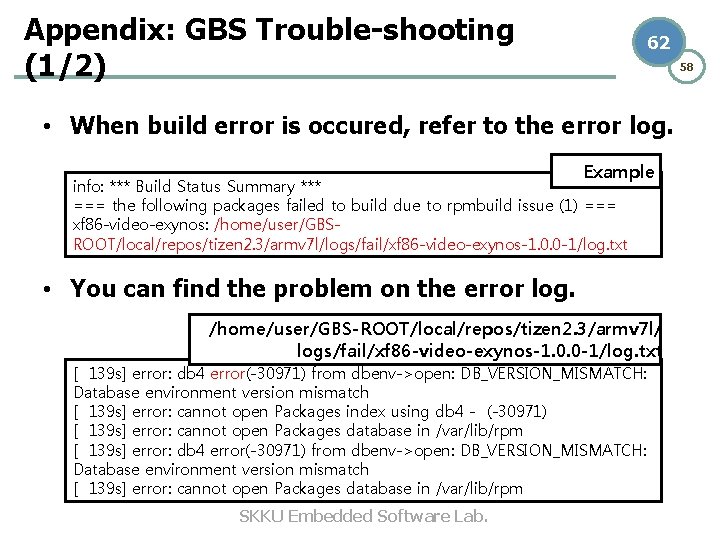
Appendix: GBS Trouble-shooting (1/2) 62 58 • When build error is occured, refer to the error log. Example info: *** Build Status Summary *** === the following packages failed to build due to rpmbuild issue (1) === xf 86 -video-exynos: /home/user/GBSROOT/local/repos/tizen 2. 3/armv 7 l/logs/fail/xf 86 -video-exynos-1. 0. 0 -1/log. txt • You can find the problem on the error log. /home/user/GBS-ROOT/local/repos/tizen 2. 3/armv 7 l/ logs/fail/xf 86 -video-exynos-1. 0. 0 -1/log. txt [ 139 s] error: db 4 error(-30971) from dbenv->open: DB_VERSION_MISMATCH: Database environment version mismatch [ 139 s] error: cannot open Packages index using db 4 - (-30971) [ 139 s] error: cannot open Packages database in /var/lib/rpm [ 139 s] error: db 4 error(-30971) from dbenv->open: DB_VERSION_MISMATCH: Database environment version mismatch [ 139 s] error: cannot open Packages database in /var/lib/rpm SKKU Embedded Software Lab.
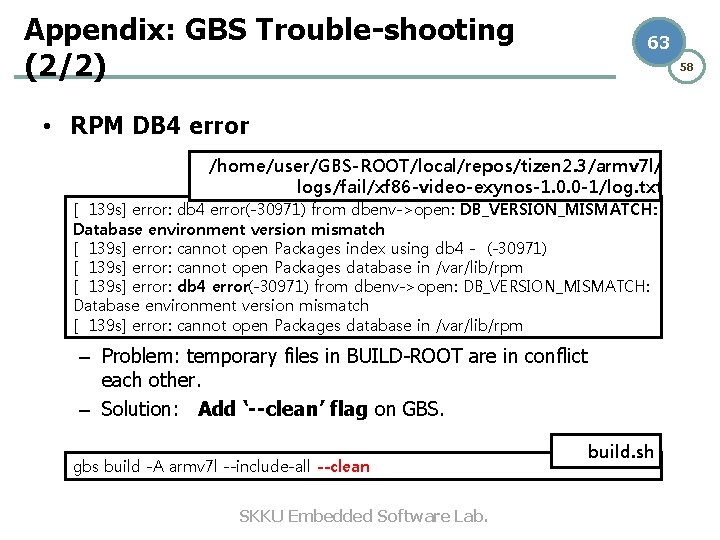
Appendix: GBS Trouble-shooting (2/2) 63 58 • RPM DB 4 error /home/user/GBS-ROOT/local/repos/tizen 2. 3/armv 7 l/ logs/fail/xf 86 -video-exynos-1. 0. 0 -1/log. txt [ 139 s] error: db 4 error(-30971) from dbenv->open: DB_VERSION_MISMATCH: Database environment version mismatch [ 139 s] error: cannot open Packages index using db 4 - (-30971) [ 139 s] error: cannot open Packages database in /var/lib/rpm [ 139 s] error: db 4 error(-30971) from dbenv->open: DB_VERSION_MISMATCH: Database environment version mismatch [ 139 s] error: cannot open Packages database in /var/lib/rpm – Problem: temporary files in BUILD-ROOT are in conflict each other. – Solution: Add ‘--clean’ flag on GBS. gbs build -A armv 7 l --include-all --clean SKKU Embedded Software Lab. build. sh
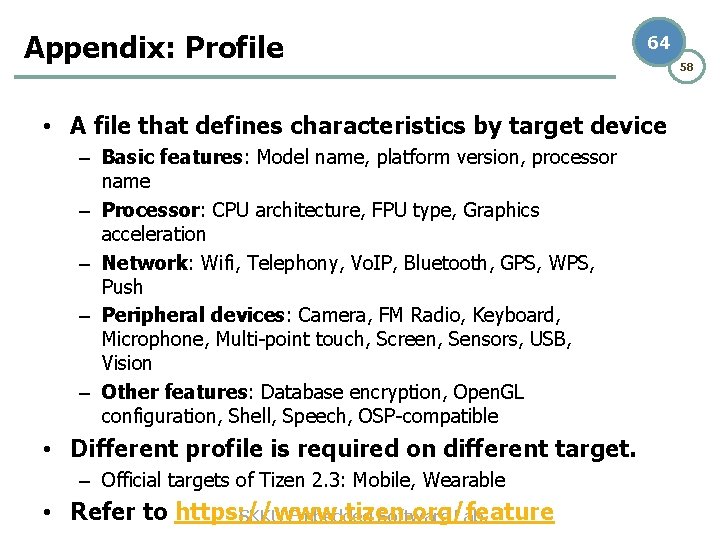
Appendix: Profile 64 • A file that defines characteristics by target device – Basic features: Model name, platform version, processor name – Processor: CPU architecture, FPU type, Graphics acceleration – Network: Wifi, Telephony, Vo. IP, Bluetooth, GPS, WPS, Push – Peripheral devices: Camera, FM Radio, Keyboard, Microphone, Multi-point touch, Screen, Sensors, USB, Vision – Other features: Database encryption, Open. GL configuration, Shell, Speech, OSP-compatible • Different profile is required on different target. – Official targets of Tizen 2. 3: Mobile, Wearable • Refer to https: //www. tizen. org/feature SKKU Embedded Software Lab. 58