Systems Engineering for Micro TCA Zheqiao Geng MTCAATCA
- Slides: 34
Systems Engineering (for Micro. TCA) Zheqiao Geng MTCA/ATCA Workshop for Research and Industry 23 -25 June, IHEP, Beijing, China
Outline ▪ Overview ▪ Introduction to Systems Engineering ▪ Some Tips in Systems Design 2
Overview 3
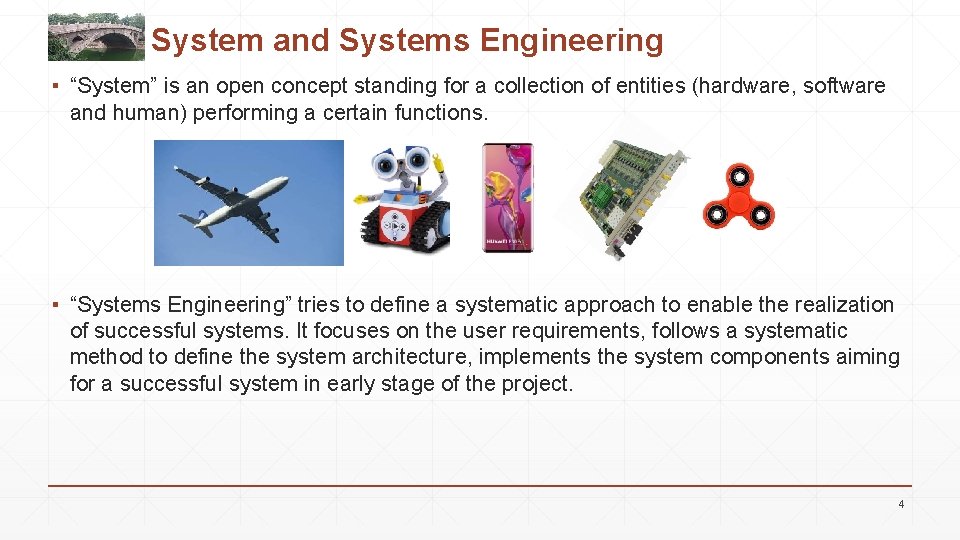
System and Systems Engineering ▪ “System” is an open concept standing for a collection of entities (hardware, software and human) performing a certain functions. ▪ “Systems Engineering” tries to define a systematic approach to enable the realization of successful systems. It focuses on the user requirements, follows a systematic method to define the system architecture, implements the system components aiming for a successful system in early stage of the project. 4
Questions for System Designers ▪ Where to start if you are asked to design a fresh system? ▪ Which procedure to follow to reach a system design from the user requirements? ▪ How to make the system provides complete and correct functions with desired performance? ▪ How to design a system to be successful at the first switch-on without redesigning the core components? ▪ How to … Systems engineering helps to answer these questions…but The systems engineering methodology is general and flexible, you need to select only necessary process steps which fit to your system, and fit to you! 5
Destination Audience ▪ System designer and integrator ▪ Persons who wants to design any components (hardware, firmware or software) in a systematic way ▪ Reading materials ▪ Cathleen Shamieh, Systems Engineering for Dummies ▪ Tim Weilkiens, System Engineering with Sys. ML/UML ▪ https: //www. incose. org/systems-engineering ▪ INCOSE Systems Engineering Handbook 6
Introduction to Systems Engineering 7
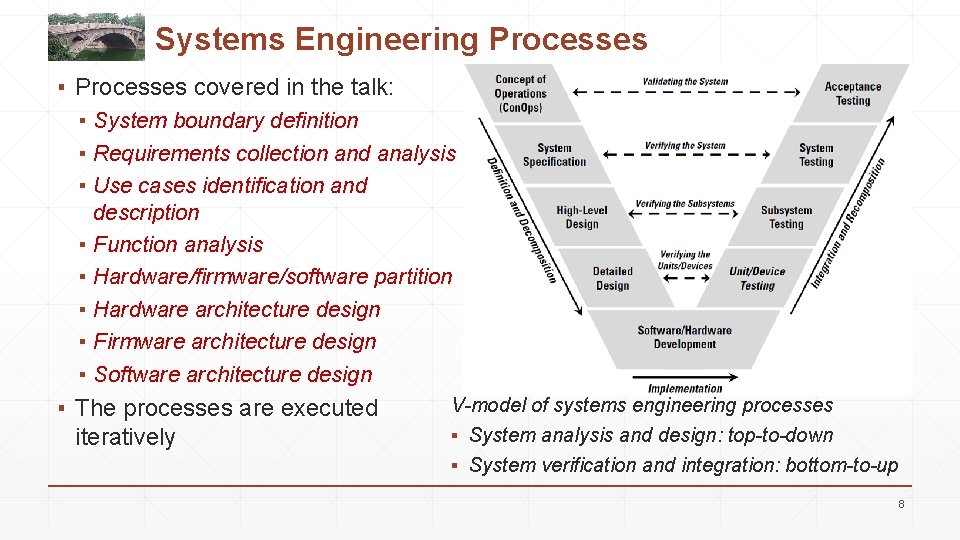
Systems Engineering Processes ▪ Processes covered in the talk: ▪ System boundary definition ▪ Requirements collection and analysis ▪ Use cases identification and description ▪ Function analysis ▪ Hardware/firmware/software partition ▪ Hardware architecture design ▪ Firmware architecture design ▪ Software architecture design ▪ The processes are executed iteratively V-model of systems engineering processes ▪ System analysis and design: top-to-down ▪ System verification and integration: bottom-to-up 8
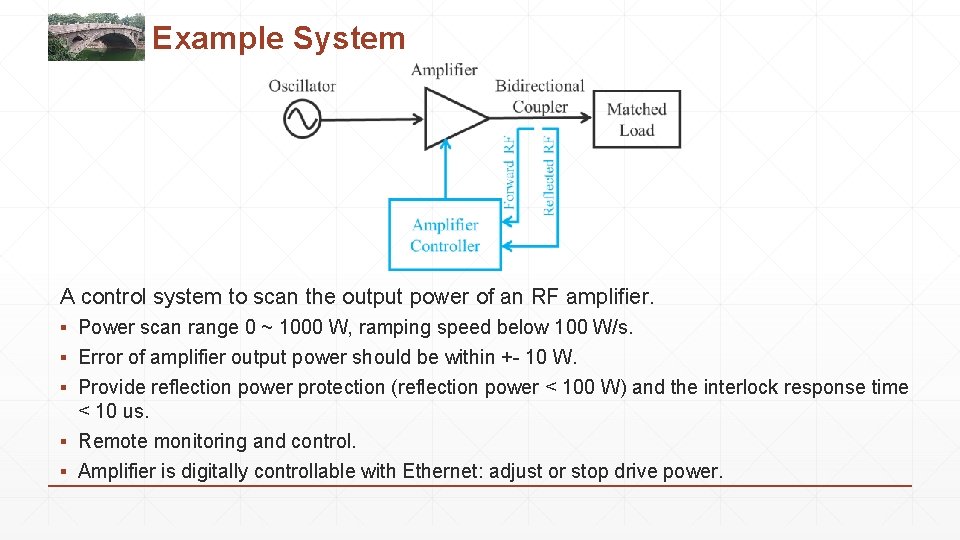
Example System A control system to scan the output power of an RF amplifier. ▪ Power scan range 0 ~ 1000 W, ramping speed below 100 W/s. ▪ Error of amplifier output power should be within +- 10 W. ▪ Provide reflection power protection (reflection power < 100 W) and the interlock response time < 10 us. ▪ Remote monitoring and control. ▪ Amplifier is digitally controllable with Ethernet: adjust or stop drive power.
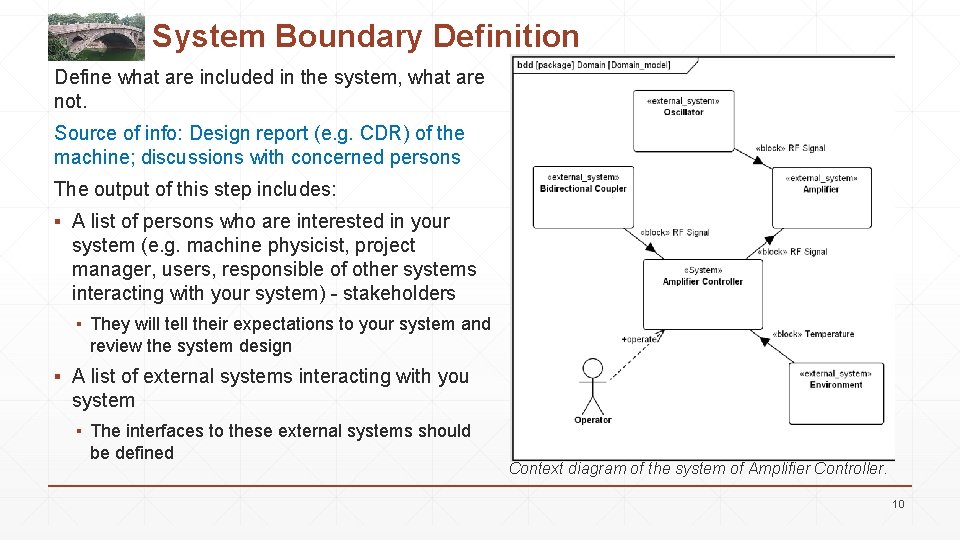
System Boundary Definition Define what are included in the system, what are not. Source of info: Design report (e. g. CDR) of the machine; discussions with concerned persons The output of this step includes: ▪ A list of persons who are interested in your system (e. g. machine physicist, project manager, users, responsible of other systems interacting with your system) - stakeholders ▪ They will tell their expectations to your system and review the system design ▪ A list of external systems interacting with you system ▪ The interfaces to these external systems should be defined Context diagram of the system of Amplifier Controller. 10
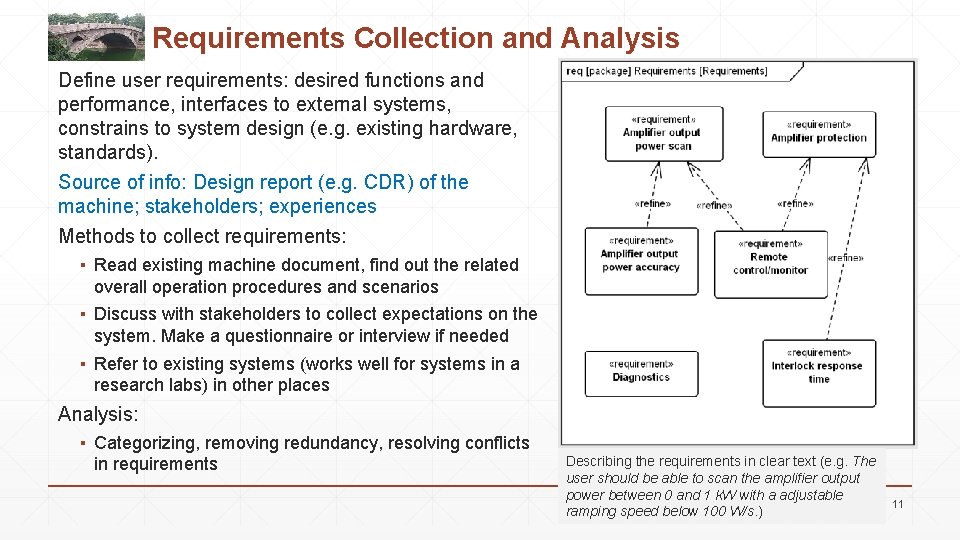
Requirements Collection and Analysis Define user requirements: desired functions and performance, interfaces to external systems, constrains to system design (e. g. existing hardware, standards). Source of info: Design report (e. g. CDR) of the machine; stakeholders; experiences Methods to collect requirements: ▪ Read existing machine document, find out the related overall operation procedures and scenarios ▪ Discuss with stakeholders to collect expectations on the system. Make a questionnaire or interview if needed ▪ Refer to existing systems (works well for systems in a research labs) in other places Analysis: ▪ Categorizing, removing redundancy, resolving conflicts in requirements Describing the requirements in clear text (e. g. The user should be able to scan the amplifier output power between 0 and 1 k. W with a adjustable ramping speed below 100 W/s. ) 11
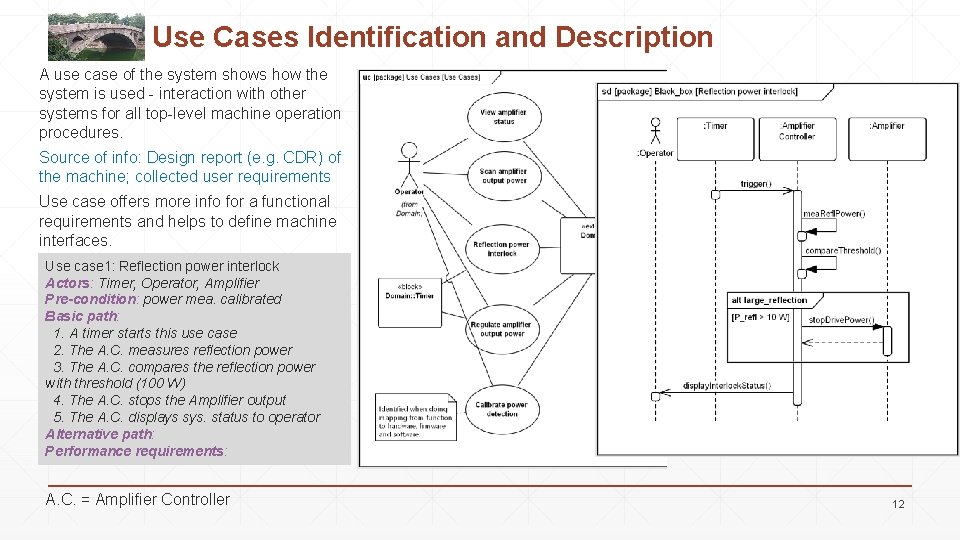
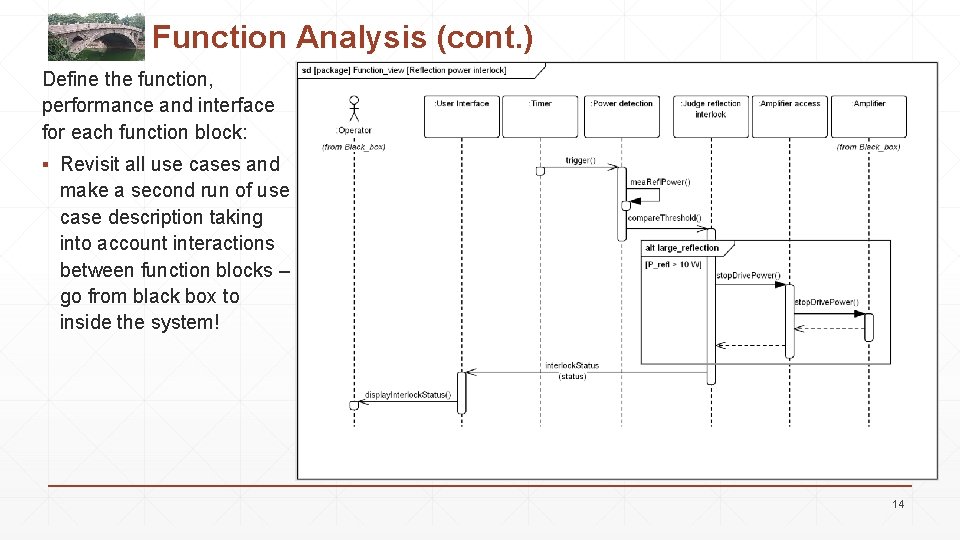
Use Cases Identification and Description A use case of the system shows how the system is used - interaction with other systems for all top-level machine operation procedures. Source of info: Design report (e. g. CDR) of the machine; collected user requirements Use case offers more info for a functional requirements and helps to define machine interfaces. Use case 1: Reflection power interlock Actors: Timer, Operator, Amplifier Pre-condition: power mea. calibrated Basic path: 1. A timer starts this use case 2. The A. C. measures reflection power 3. The A. C. compares the reflection power with threshold (100 W) 4. The A. C. stops the Amplifier output 5. The A. C. displays sys. status to operator Alternative path: Performance requirements: A. C. = Amplifier Controller 12
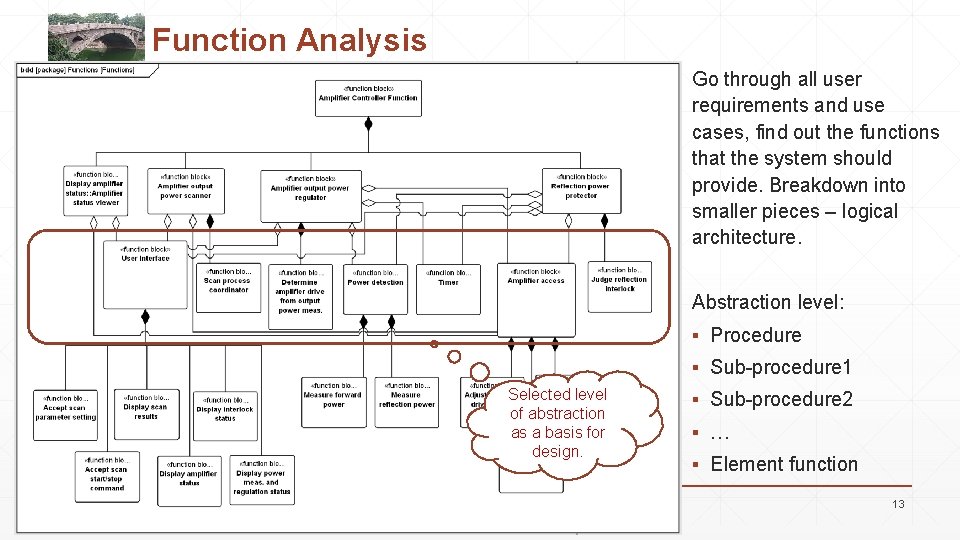
Function Analysis Go through all user requirements and use cases, find out the functions that the system should provide. Breakdown into smaller pieces – logical architecture. Abstraction level: ▪ Procedure ▪ Sub-procedure 1 Selected level of abstraction as a basis for design. ▪ Sub-procedure 2 ▪ … ▪ Element function 13
Function Analysis (cont. ) Define the function, performance and interface for each function block: ▪ Revisit all use cases and make a second run of use case description taking into account interactions between function blocks – go from black box to inside the system! 14
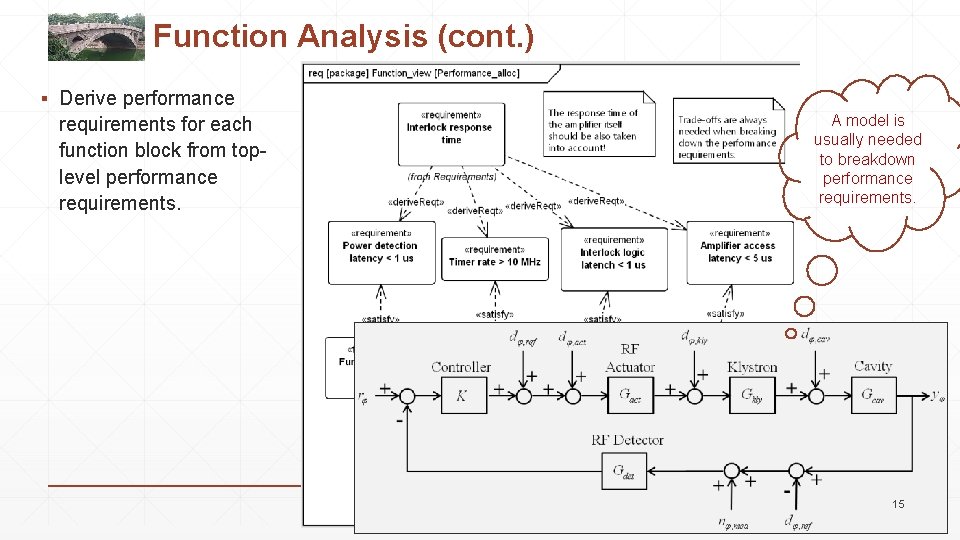
Function Analysis (cont. ) ▪ Derive performance requirements for each function block from toplevel performance requirements. A model is usually needed to breakdown performance requirements. 15
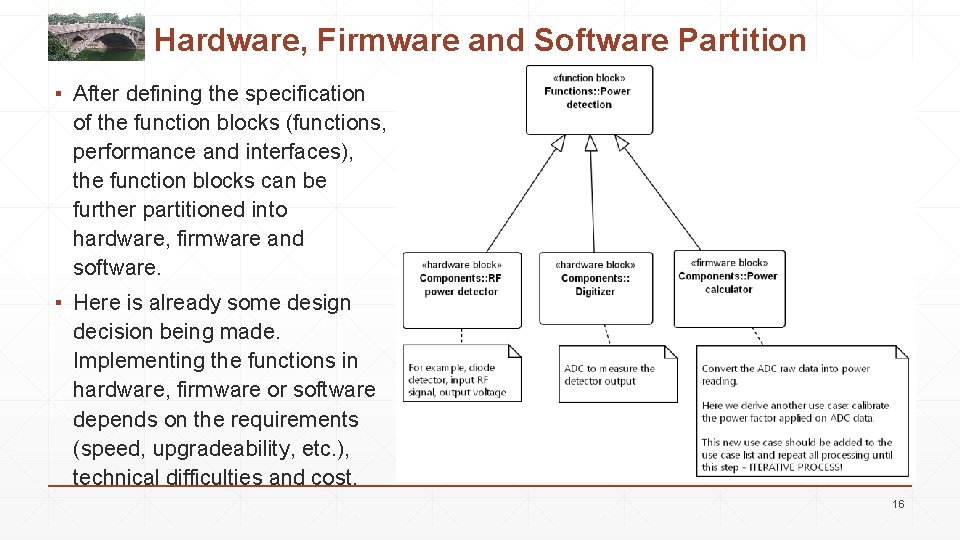
Hardware, Firmware and Software Partition ▪ After defining the specification of the function blocks (functions, performance and interfaces), the function blocks can be further partitioned into hardware, firmware and software. ▪ Here is already some design decision being made. Implementing the functions in hardware, firmware or software depends on the requirements (speed, upgradeability, etc. ), technical difficulties and cost. 16
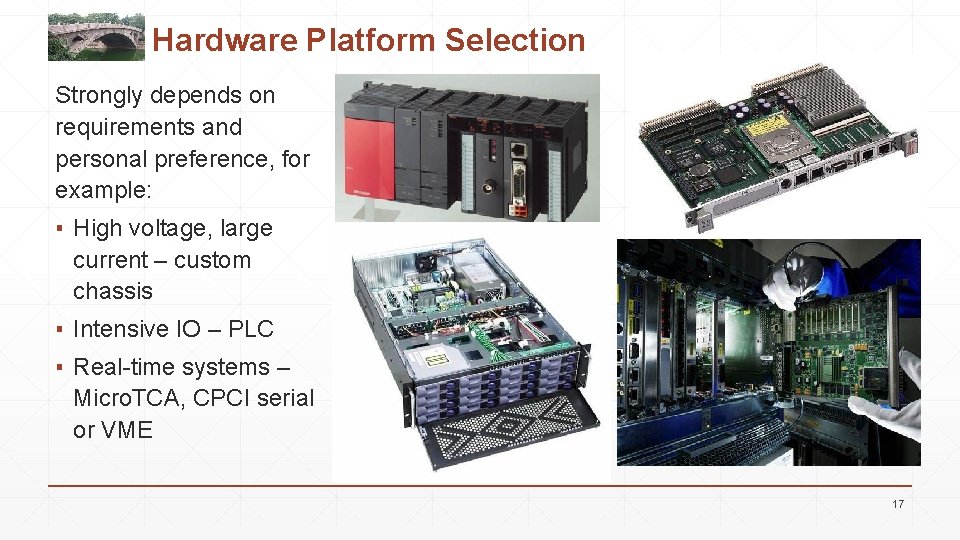
Hardware Platform Selection Strongly depends on requirements and personal preference, for example: ▪ High voltage, large current – custom chassis ▪ Intensive IO – PLC ▪ Real-time systems – Micro. TCA, CPCI serial or VME 17
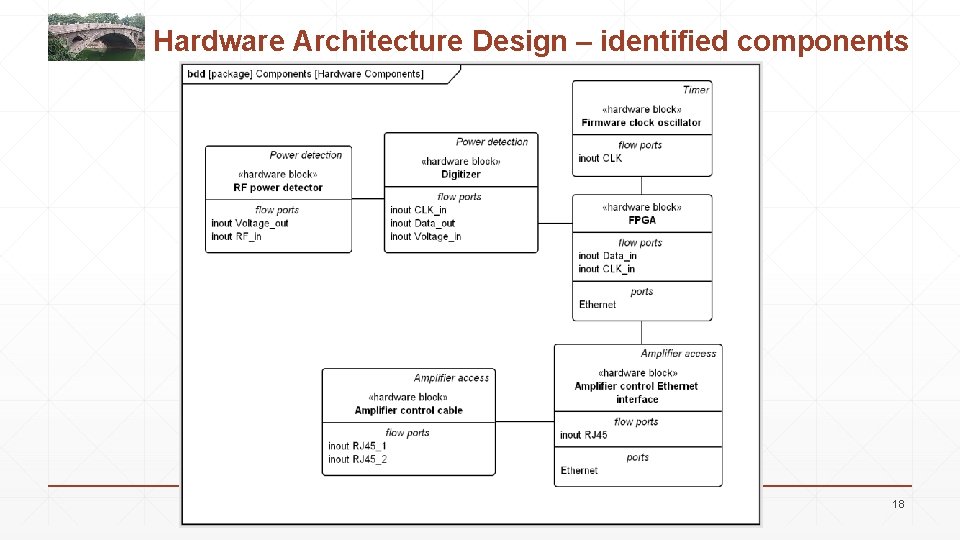
Hardware Architecture Design – identified components 18
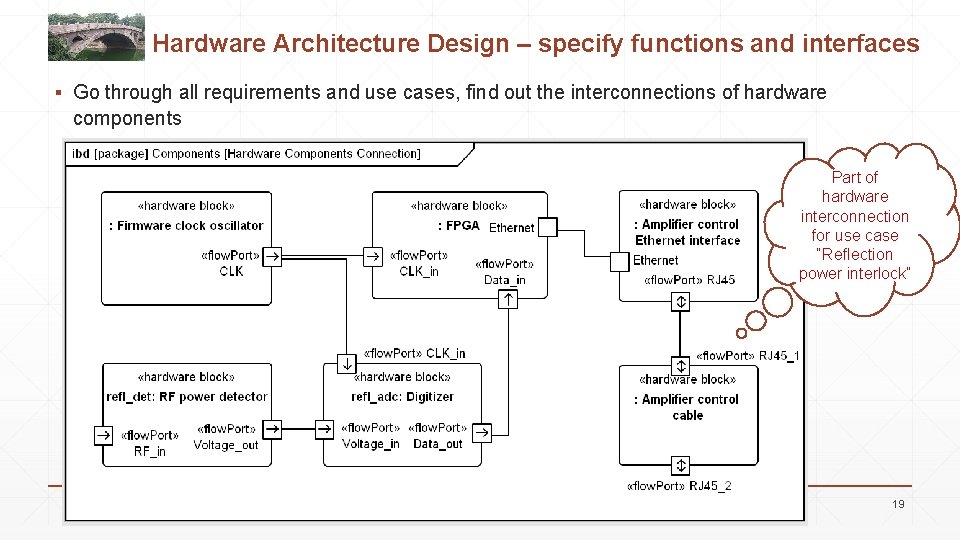
Hardware Architecture Design – specify functions and interfaces ▪ Go through all requirements and use cases, find out the interconnections of hardware components Part of hardware interconnection for use case “Reflection power interlock” 19
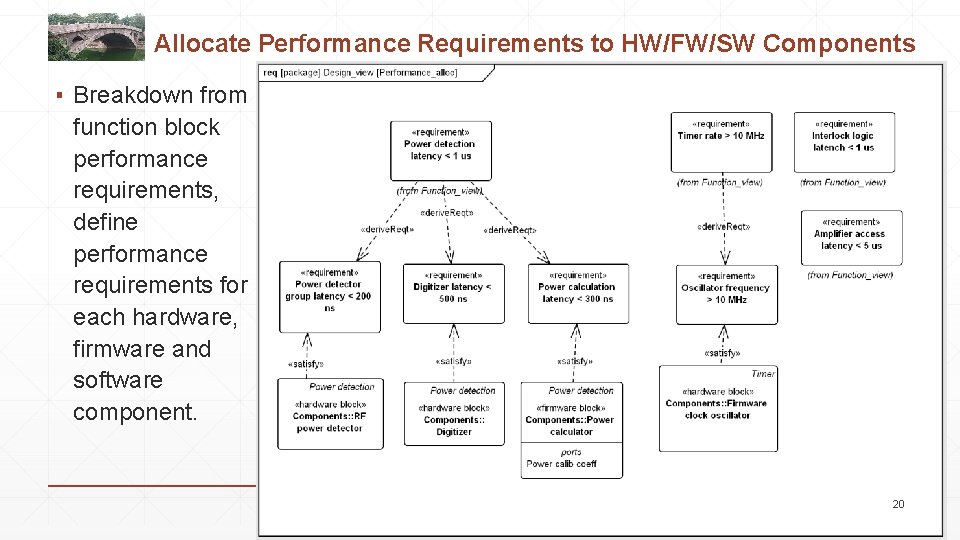
Allocate Performance Requirements to HW/FW/SW Components ▪ Breakdown from function block performance requirements, define performance requirements for each hardware, firmware and software component. 20
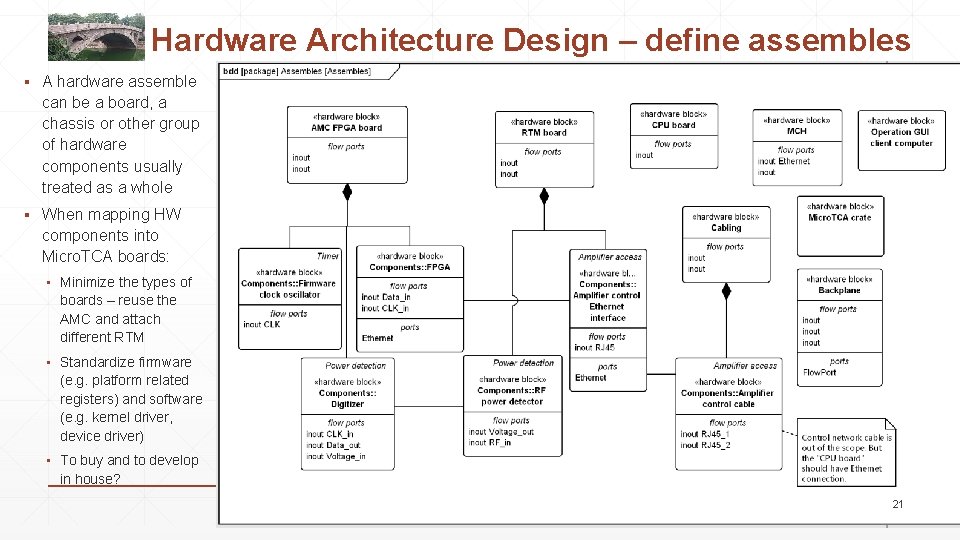
Hardware Architecture Design – define assembles ▪ A hardware assemble can be a board, a chassis or other group of hardware components usually treated as a whole ▪ When mapping HW components into Micro. TCA boards: ▪ Minimize the types of boards – reuse the AMC and attach different RTM ▪ Standardize firmware (e. g. platform related registers) and software (e. g. kernel driver, device driver) ▪ To buy and to develop in house? 21
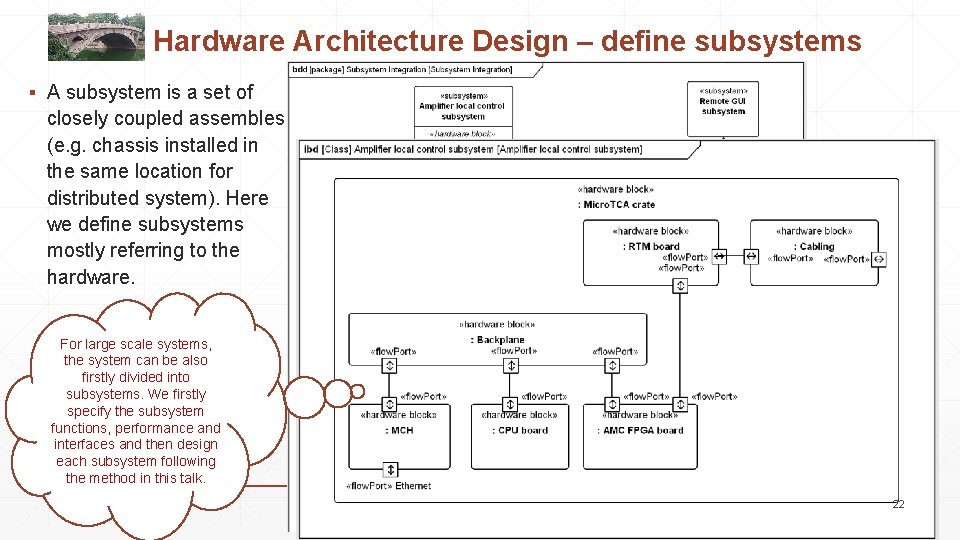
Hardware Architecture Design – define subsystems ▪ A subsystem is a set of closely coupled assembles (e. g. chassis installed in the same location for distributed system). Here we define subsystems mostly referring to the hardware. For large scale systems, the system can be also firstly divided into subsystems. We firstly specify the subsystem functions, performance and interfaces and then design each subsystem following the method in this talk. 22
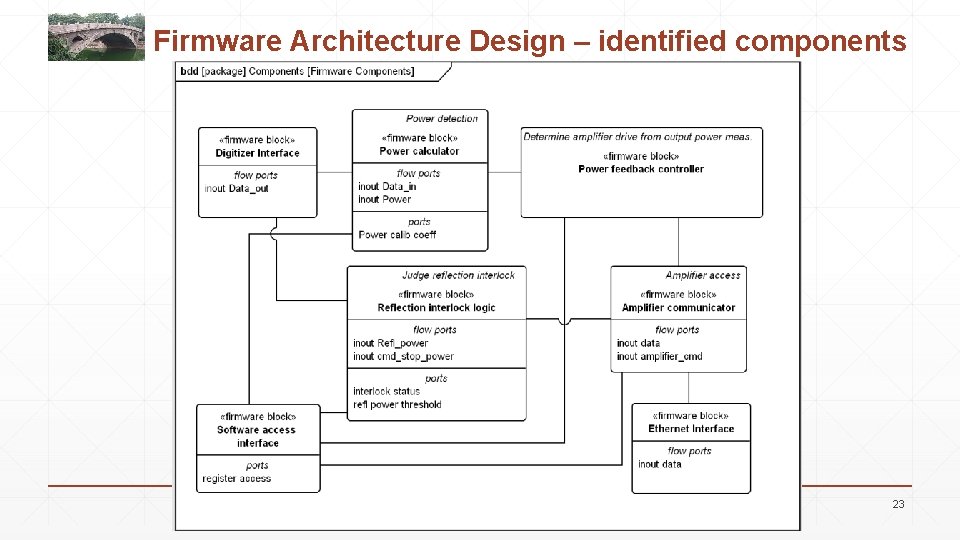
Firmware Architecture Design – identified components 23
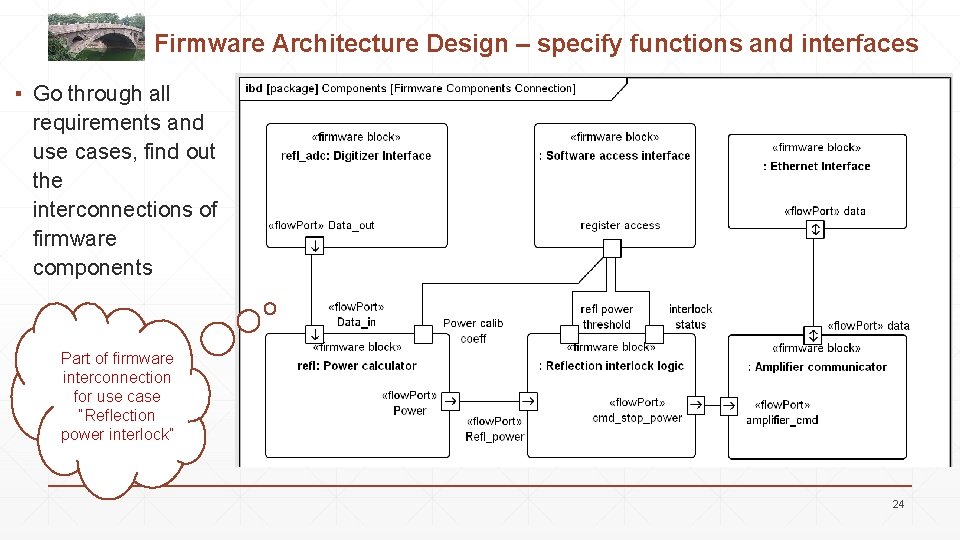
Firmware Architecture Design – specify functions and interfaces ▪ Go through all requirements and use cases, find out the interconnections of firmware components Part of firmware interconnection for use case “Reflection power interlock” 24
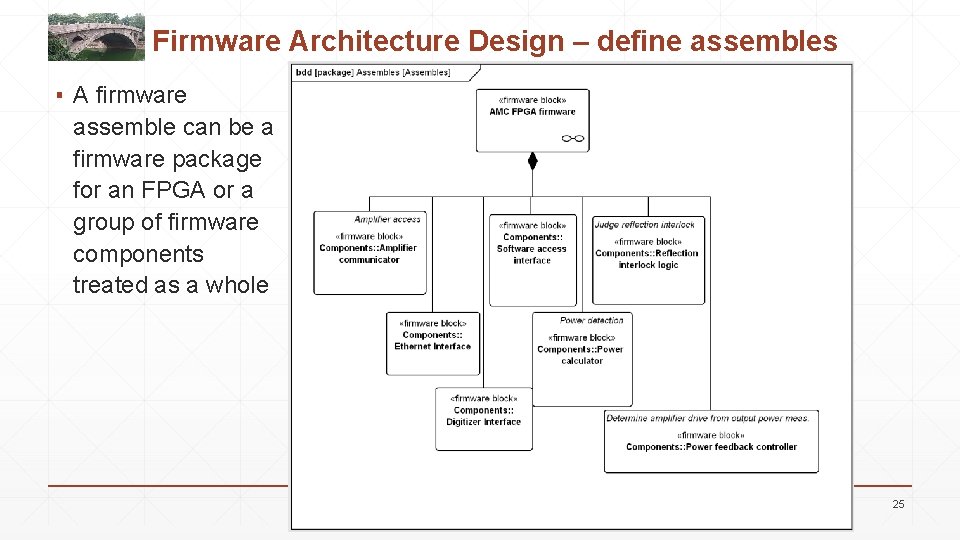
Firmware Architecture Design – define assembles ▪ A firmware assemble can be a firmware package for an FPGA or a group of firmware components treated as a whole 25
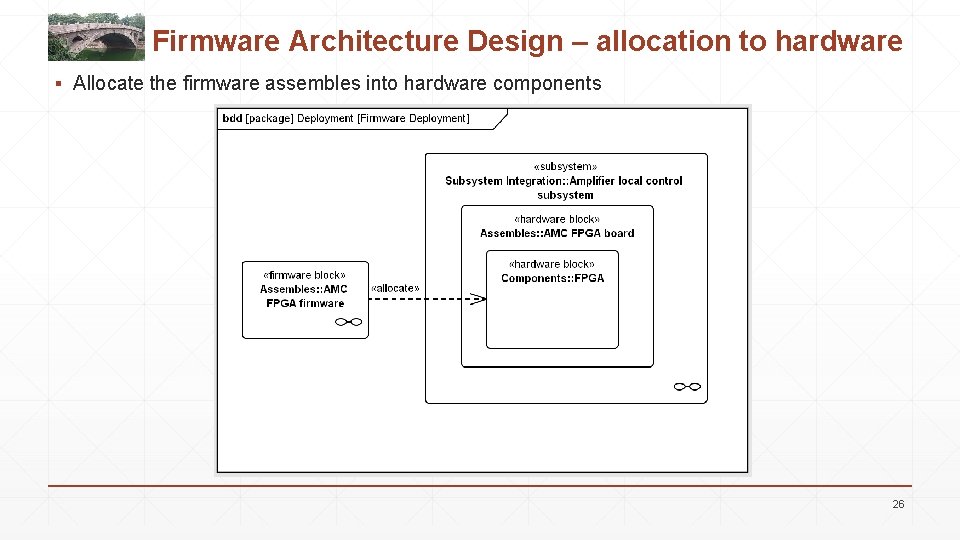
Firmware Architecture Design – allocation to hardware ▪ Allocate the firmware assembles into hardware components 26
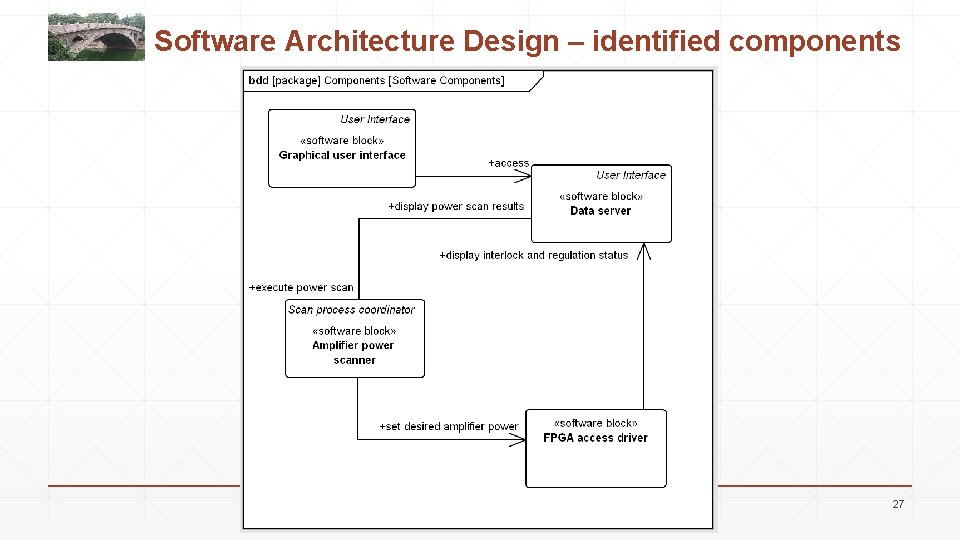
Software Architecture Design – identified components 27
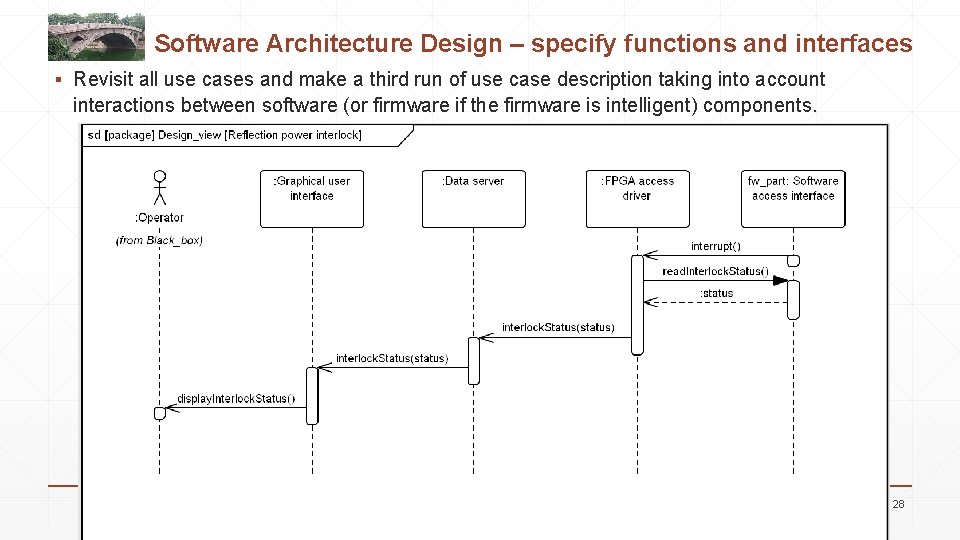
Software Architecture Design – specify functions and interfaces ▪ Revisit all use cases and make a third run of use case description taking into account interactions between software (or firmware if the firmware is intelligent) components. 28
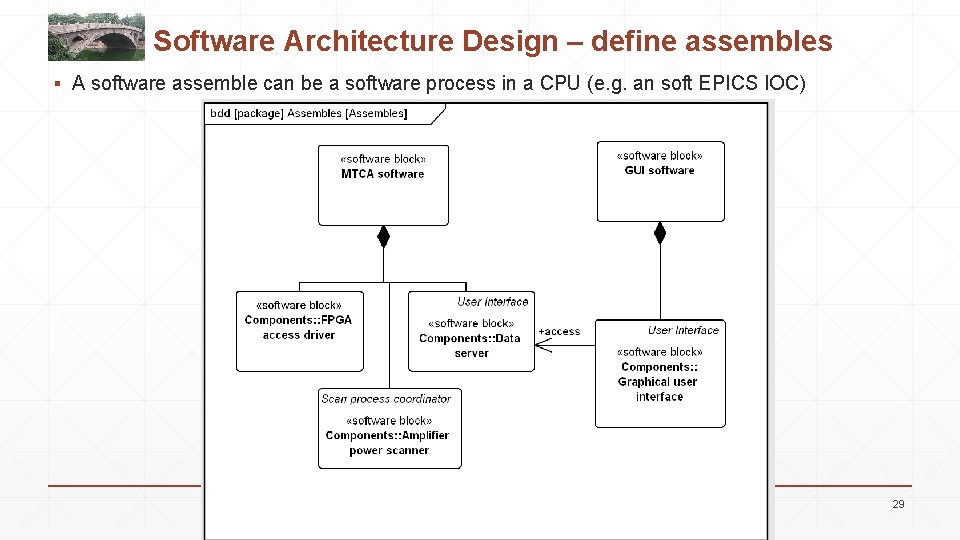
Software Architecture Design – define assembles ▪ A software assemble can be a software process in a CPU (e. g. an soft EPICS IOC) 29
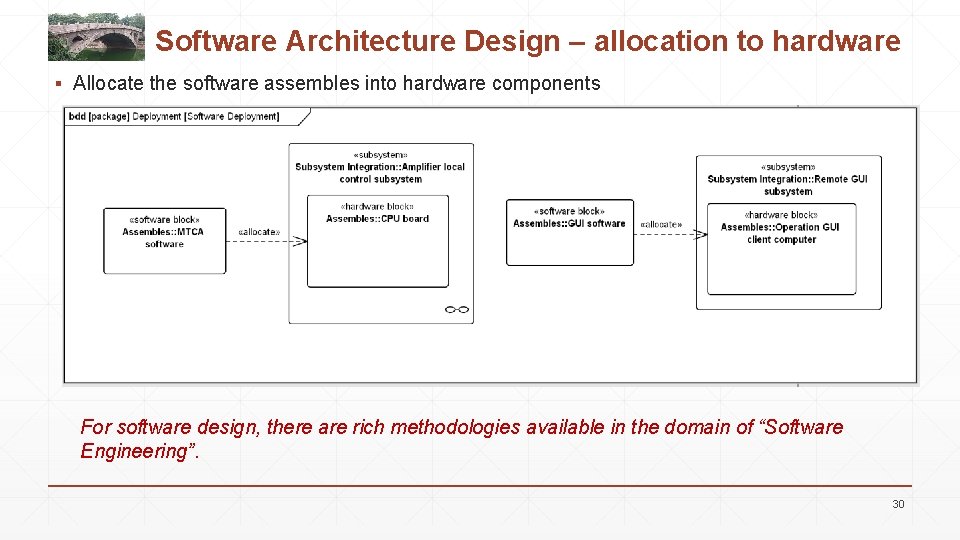
Software Architecture Design – allocation to hardware ▪ Allocate the software assembles into hardware components For software design, there are rich methodologies available in the domain of “Software Engineering”. 30
Some Tips in System Design 31
(Negotiable) Tips ▪ Documentation !!! ▪ Standardization (hardware, especially for firmware and software) ▪ Modulator design ▪ Commercially availability (especially for parts with general functions – FPGA, CPU, ADC …) ▪ Keep it simple (if a simple solution works well, do not complicate it) ▪ Loose coupling (one part fail, other parts still can function generally) ▪ Diagnostics (add enough measurements, you will benefit when doing trouble shooting) ▪ Simulation (when you have a feedback, do the full feedback control simulation homework) 32
Documentation with Text or Diagramm ▪ Documentation is necessary for a successful system design. Document any ideas, requirements, design, constraints, conflicts and all issues in a trackable document (e. g. version control). ▪ Documentation is so important that even a simple text based description is helpful. ▪ Of course, diagrams helps a lot to understand: simple diagram (e. g. MS Visio) or complex formal models – UML/Sys. ML. ▪ Usually a combination of text and diagram based documentation is a trade-off: this helps to document all information without blowing up the complexity of diagrams Anyway, make documentations, regardless any format! 33
Thank you!