Standards for Modular Electronics the past the present
- Slides: 37
Standards for Modular Electronics the past, the present and the future Markus Joos CERN • The past: • NIM • The present: • PCI and PCIe • SHB Express • The future: • Serial interconnects • VXS • ATCA • μTCA 1
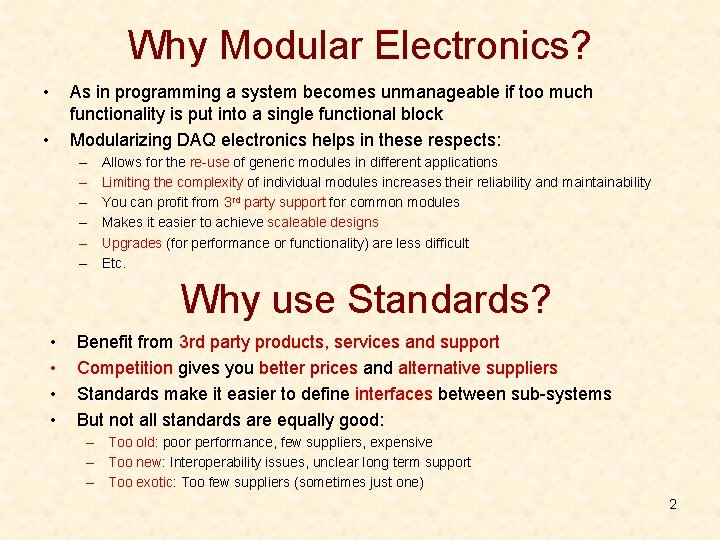
Why Modular Electronics? • As in programming a system becomes unmanageable if too much functionality is put into a single functional block Modularizing DAQ electronics helps in these respects: • – – – Allows for the re-use of generic modules in different applications Limiting the complexity of individual modules increases their reliability and maintainability You can profit from 3 rd party support for common modules Makes it easier to achieve scaleable designs Upgrades (for performance or functionality) are less difficult Etc. Why use Standards? • • Benefit from 3 rd party products, services and support Competition gives you better prices and alternative suppliers Standards make it easier to define interfaces between sub-systems But not all standards are equally good: – Too old: poor performance, few suppliers, expensive – Too new: Interoperability issues, unclear long term support – Too exotic: Too few suppliers (sometimes just one) 2
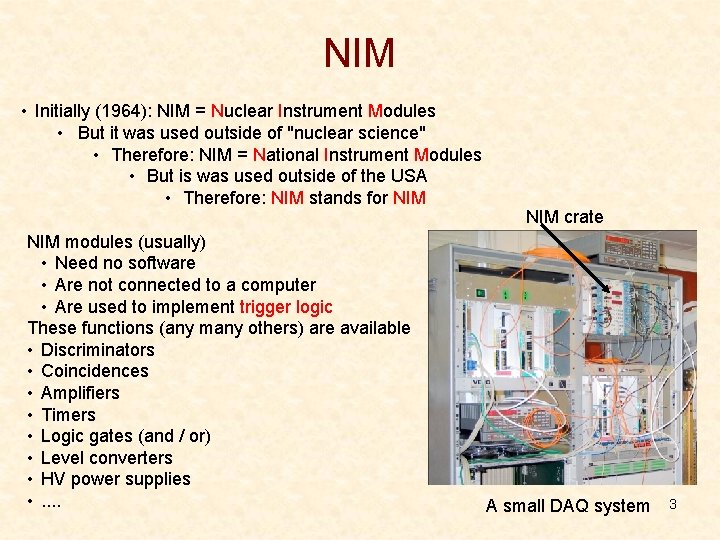
NIM • Initially (1964): NIM = Nuclear Instrument Modules • But it was used outside of "nuclear science" • Therefore: NIM = National Instrument Modules • But is was used outside of the USA • Therefore: NIM stands for NIM modules (usually) • Need no software • Are not connected to a computer • Are used to implement trigger logic These functions (any many others) are available • Discriminators • Coincidences • Amplifiers • Timers • Logic gates (and / or) • Level converters • HV power supplies • . . NIM crate A small DAQ system 3
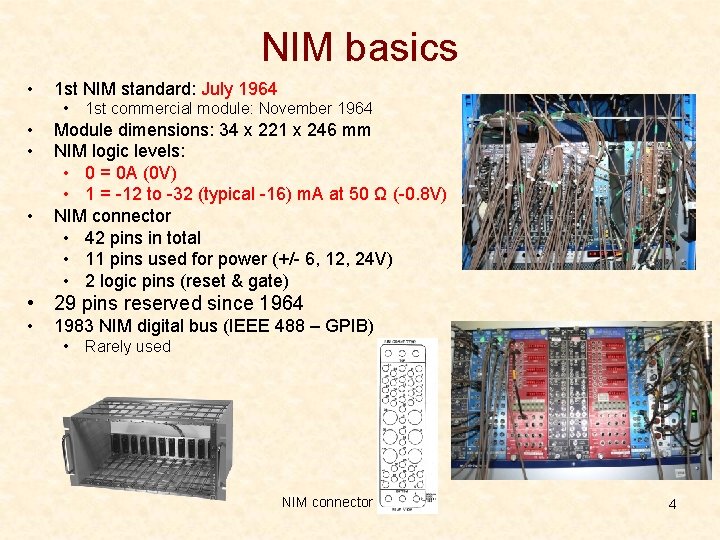
NIM basics • 1 st NIM standard: July 1964 • • 1 st commercial module: November 1964 Module dimensions: 34 x 221 x 246 mm NIM logic levels: • 0 = 0 A (0 V) • 1 = -12 to -32 (typical -16) m. A at 50 Ω (-0. 8 V) NIM connector • 42 pins in total • 11 pins used for power (+/- 6, 12, 24 V) • 2 logic pins (reset & gate) • 29 pins reserved since 1964 • 1983 NIM digital bus (IEEE 488 – GPIB) • Rarely used NIM connector 4
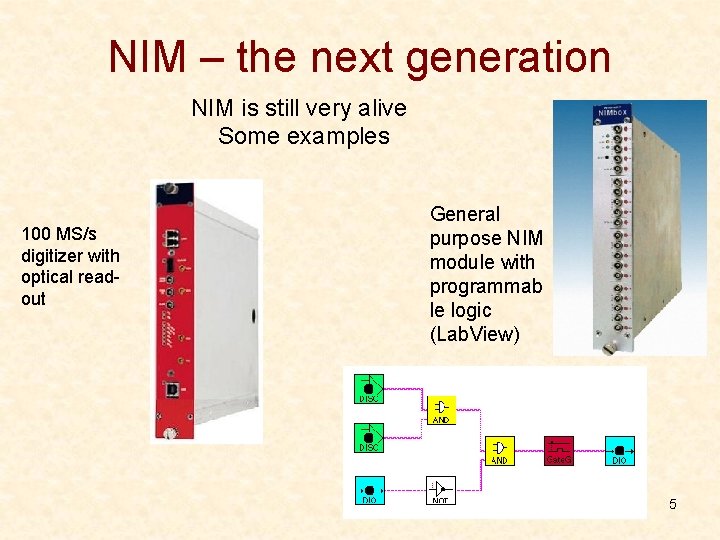
NIM – the next generation NIM is still very alive Some examples 100 MS/s digitizer with optical readout General purpose NIM module with programmab le logic (Lab. View) 5
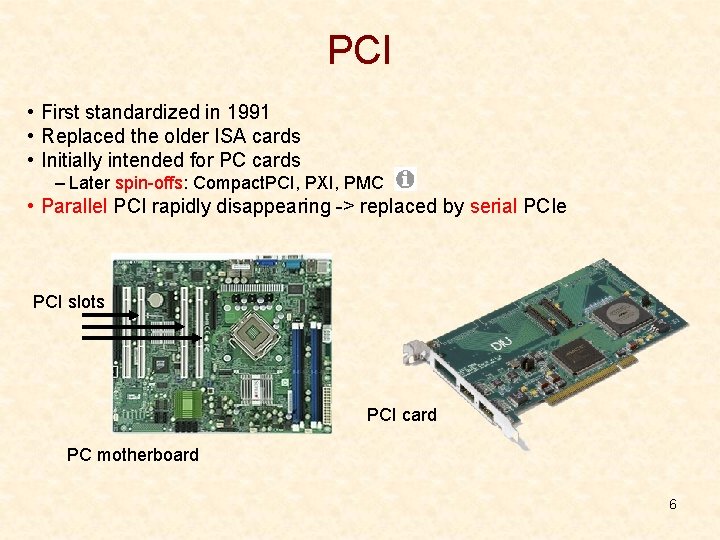
PCI • First standardized in 1991 • Replaced the older ISA cards • Initially intended for PC cards – Later spin-offs: Compact. PCI, PXI, PMC • Parallel PCI rapidly disappearing -> replaced by serial PCIe PCI slots PCI card PC motherboard 6
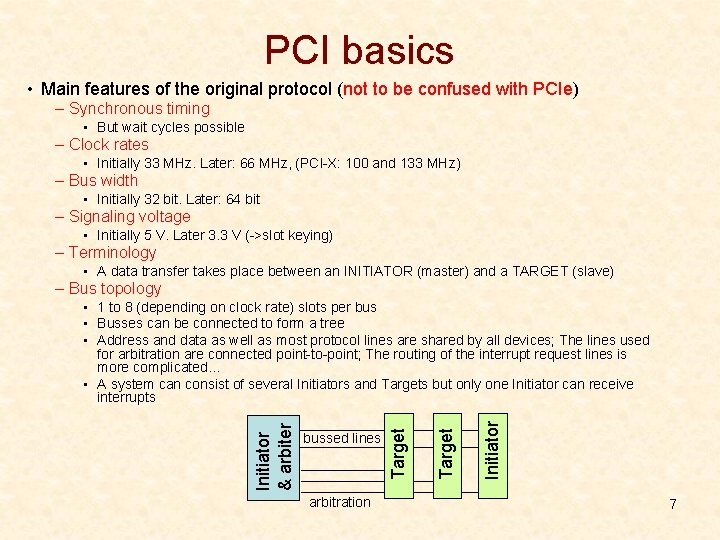
PCI basics • Main features of the original protocol (not to be confused with PCIe) – Synchronous timing • But wait cycles possible – Clock rates • Initially 33 MHz. Later: 66 MHz, (PCI-X: 100 and 133 MHz) – Bus width • Initially 32 bit. Later: 64 bit – Signaling voltage • Initially 5 V. Later 3. 3 V (->slot keying) – Terminology • A data transfer takes place between an INITIATOR (master) and a TARGET (slave) – Bus topology arbitration Initiator Target bussed lines Target Initiator & arbiter • 1 to 8 (depending on clock rate) slots per bus • Busses can be connected to form a tree • Address and data as well as most protocol lines are shared by all devices; The lines used for arbitration are connected point-to-point; The routing of the interrupt request lines is more complicated… • A system can consist of several Initiators and Targets but only one Initiator can receive interrupts 7
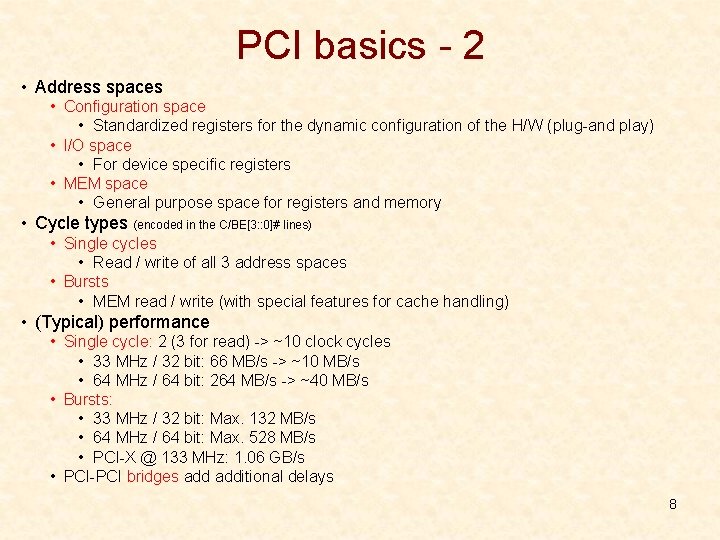
PCI basics - 2 • Address spaces • Configuration space • Standardized registers for the dynamic configuration of the H/W (plug-and play) • I/O space • For device specific registers • MEM space • General purpose space for registers and memory • Cycle types (encoded in the C/BE[3: : 0]# lines) • Single cycles • Read / write of all 3 address spaces • Bursts • MEM read / write (with special features for cache handling) • (Typical) performance • Single cycle: 2 (3 for read) -> ~10 clock cycles • 33 MHz / 32 bit: 66 MB/s -> ~10 MB/s • 64 MHz / 64 bit: 264 MB/s -> ~40 MB/s • Bursts: • 33 MHz / 32 bit: Max. 132 MB/s • 64 MHz / 64 bit: Max. 528 MB/s • PCI-X @ 133 MHz: 1. 06 GB/s • PCI-PCI bridges additional delays 8
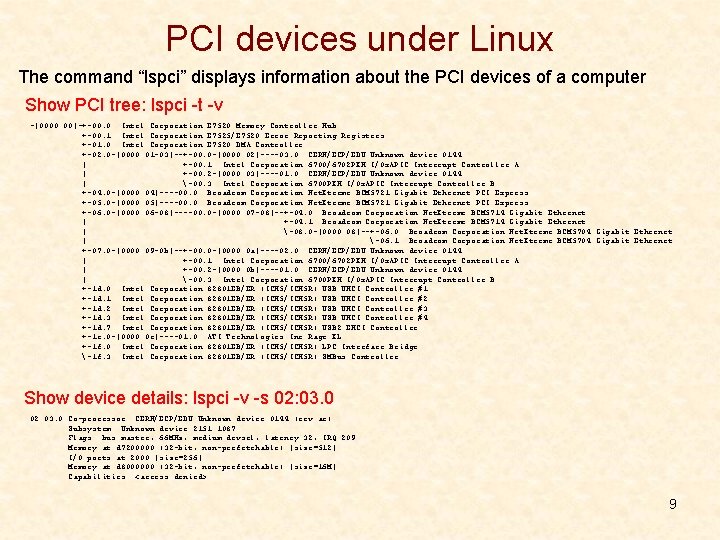
PCI devices under Linux The command “lspci” displays information about the PCI devices of a computer Show PCI tree: lspci -t -v -[0000: 00]-+-00. 0 Intel Corporation E 7520 Memory Controller Hub +-00. 1 Intel Corporation E 7525/E 7520 Error Reporting Registers +-01. 0 Intel Corporation E 7520 DMA Controller +-02. 0 -[0000: 01 -03]--+-00. 0 -[0000: 02]----03. 0 CERN/ECP/EDU Unknown device 0144 | +-00. 1 Intel Corporation 6700/6702 PXH I/Ox. APIC Interrupt Controller A | +-00. 2 -[0000: 03]----01. 0 CERN/ECP/EDU Unknown device 0144 | -00. 3 Intel Corporation 6700 PXH I/Ox. APIC Interrupt Controller B +-04. 0 -[0000: 04]----00. 0 Broadcom Corporation Net. Xtreme BCM 5721 Gigabit Ethernet PCI Express +-05. 0 -[0000: 05]----00. 0 Broadcom Corporation Net. Xtreme BCM 5721 Gigabit Ethernet PCI Express +-06. 0 -[0000: 06 -08]----00. 0 -[0000: 07 -08]--+-04. 0 Broadcom Corporation Net. Xtreme BCM 5714 Gigabit Ethernet | +-04. 1 Broadcom Corporation Net. Xtreme BCM 5714 Gigabit Ethernet | -08. 0 -[0000: 08]--+-06. 0 Broadcom Corporation Net. Xtreme BCM 5704 Gigabit Ethernet | -06. 1 Broadcom Corporation Net. Xtreme BCM 5704 Gigabit Ethernet +-07. 0 -[0000: 09 -0 b]--+-00. 0 -[0000: 0 a]----02. 0 CERN/ECP/EDU Unknown device 0144 | +-00. 1 Intel Corporation 6700/6702 PXH I/Ox. APIC Interrupt Controller A | +-00. 2 -[0000: 0 b]----01. 0 CERN/ECP/EDU Unknown device 0144 | -00. 3 Intel Corporation 6700 PXH I/Ox. APIC Interrupt Controller B +-1 d. 0 Intel Corporation 82801 EB/ER (ICH 5/ICH 5 R) USB UHCI Controller #1 +-1 d. 1 Intel Corporation 82801 EB/ER (ICH 5/ICH 5 R) USB UHCI Controller #2 +-1 d. 2 Intel Corporation 82801 EB/ER (ICH 5/ICH 5 R) USB UHCI Controller #3 +-1 d. 3 Intel Corporation 82801 EB/ER (ICH 5/ICH 5 R) USB UHCI Controller #4 +-1 d. 7 Intel Corporation 82801 EB/ER (ICH 5/ICH 5 R) USB 2 EHCI Controller +-1 e. 0 -[0000: 0 c]----01. 0 ATI Technologies Inc Rage XL +-1 f. 0 Intel Corporation 82801 EB/ER (ICH 5/ICH 5 R) LPC Interface Bridge -1 f. 3 Intel Corporation 82801 EB/ER (ICH 5/ICH 5 R) SMBus Controller Show device details: lspci -v -s 02: 03. 0 Co-processor: CERN/ECP/EDU Unknown device 0144 (rev ac) Subsystem: Unknown device 2151: 1087 Flags: bus master, 66 MHz, medium devsel, latency 32, IRQ 209 Memory at d 7200000 (32 -bit, non-prefetchable) [size=512] I/O ports at 2000 [size=256] Memory at d 8000000 (32 -bit, non-prefetchable) [size=16 M] Capabilities: <access denied> 9
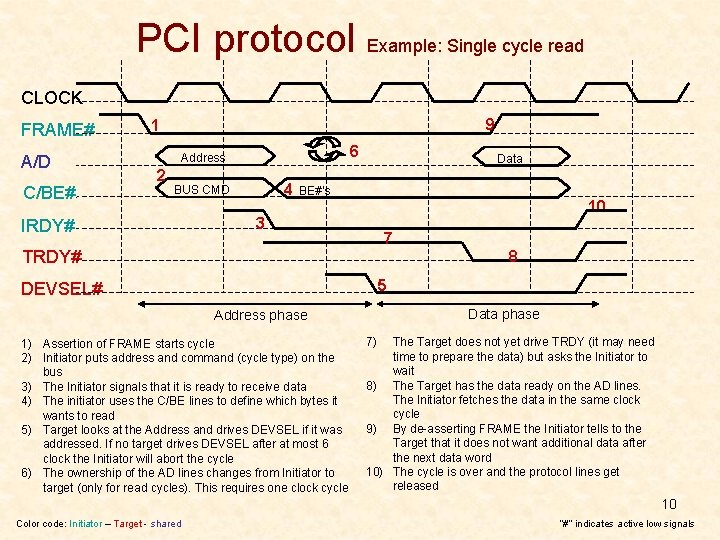
PCI protocol Example: Single cycle read CLOCK FRAME# A/D C/BE# 9 1 6 Address 2 4 BUS CMD IRDY# Data BE#’s 10 3 7 TRDY# 8 5 DEVSEL# Data phase Address phase 1) Assertion of FRAME starts cycle 2) Initiator puts address and command (cycle type) on the bus 3) The Initiator signals that it is ready to receive data 4) The initiator uses the C/BE lines to define which bytes it wants to read 5) Target looks at the Address and drives DEVSEL if it was addressed. If no target drives DEVSEL after at most 6 clock the Initiator will abort the cycle 6) The ownership of the AD lines changes from Initiator to target (only for read cycles). This requires one clock cycle 7) The Target does not yet drive TRDY (it may need time to prepare the data) but asks the Initiator to wait 8) The Target has the data ready on the AD lines. The Initiator fetches the data in the same clock cycle 9) By de-asserting FRAME the Initiator tells to the Target that it does not want additional data after the next data word 10) The cycle is over and the protocol lines get released 10 Color code: Initiator – Target - shared “#” indicates active low signals
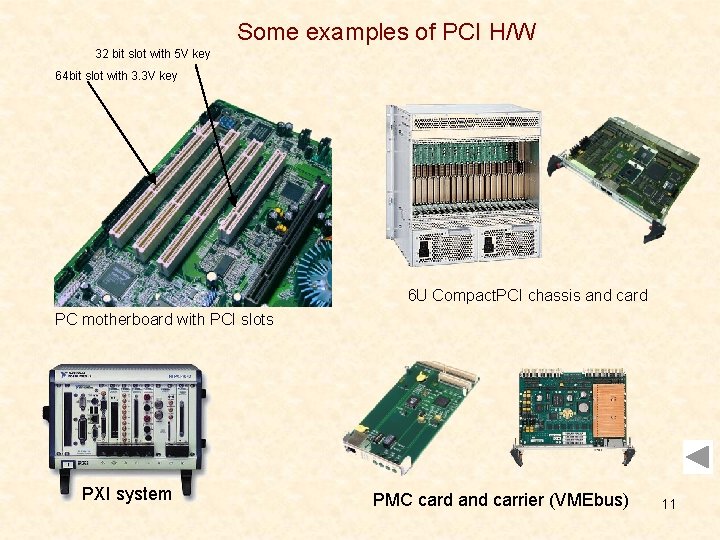
Some examples of PCI H/W 32 bit slot with 5 V key 64 bit slot with 3. 3 V key 6 U Compact. PCI chassis and card PC motherboard with PCI slots PXI system PMC card and carrier (VMEbus) 11
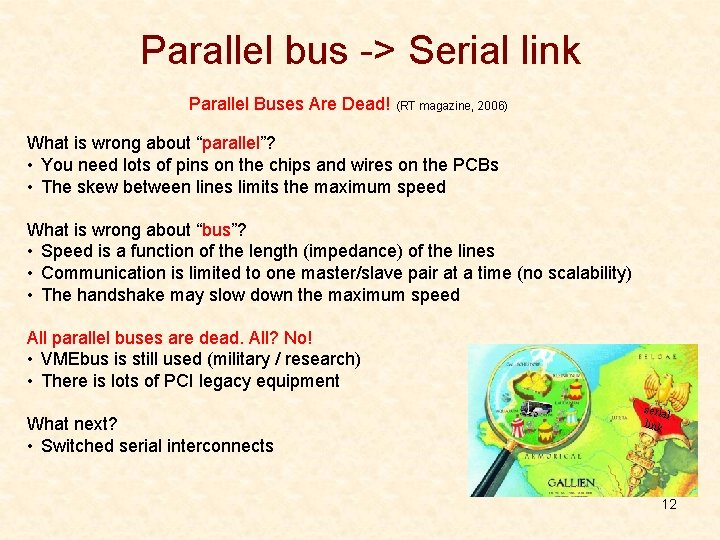
Parallel bus -> Serial link Parallel Buses Are Dead! (RT magazine, 2006) What is wrong about “parallel”? • You need lots of pins on the chips and wires on the PCBs • The skew between lines limits the maximum speed What is wrong about “bus”? • Speed is a function of the length (impedance) of the lines • Communication is limited to one master/slave pair at a time (no scalability) • The handshake may slow down the maximum speed All parallel buses are dead. All? No! • VMEbus is still used (military / research) • There is lots of PCI legacy equipment What next? • Switched serial interconnects seria l link 12
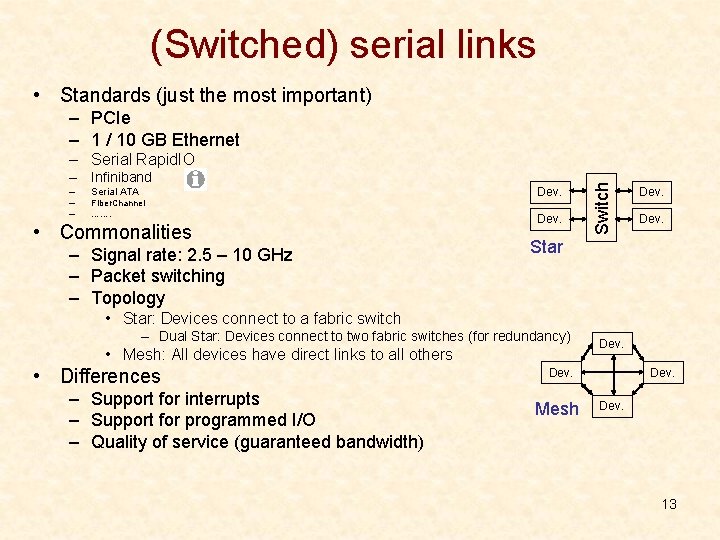
(Switched) serial links • Standards (just the most important) – PCIe – 1 / 10 GB Ethernet – Infiniband – Serial ATA – – Fiber. Channel ……. • Commonalities – Signal rate: 2. 5 – 10 GHz – Packet switching – Topology Dev. Switch – Serial Rapid. IO Dev. Star • Star: Devices connect to a fabric switch – Dual Star: Devices connect to two fabric switches (for redundancy) • Mesh: All devices have direct links to all others • Differences – Support for interrupts – Support for programmed I/O – Quality of service (guaranteed bandwidth) Dev. Mesh Dev. 13
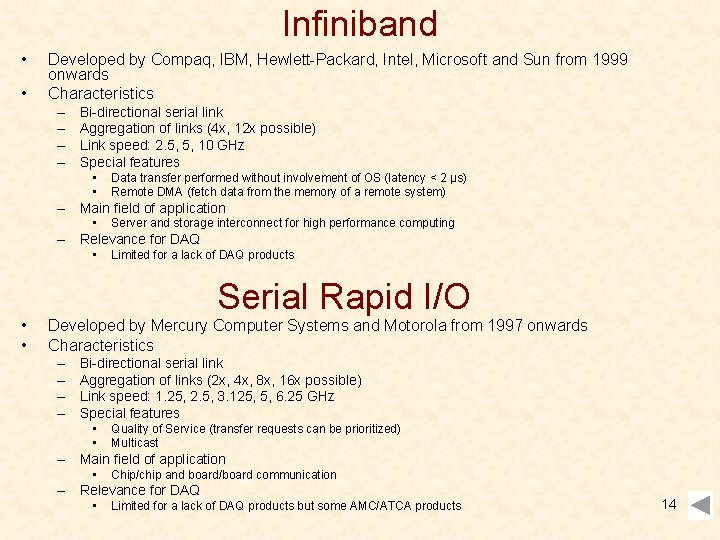
Infiniband • • Developed by Compaq, IBM, Hewlett-Packard, Intel, Microsoft and Sun from 1999 onwards Characteristics – – Bi-directional serial link Aggregation of links (4 x, 12 x possible) Link speed: 2. 5, 5, 10 GHz Special features • • Data transfer performed without involvement of OS (latency < 2 μs) Remote DMA (fetch data from the memory of a remote system) – Main field of application • Server and storage interconnect for high performance computing – Relevance for DAQ • • • Limited for a lack of DAQ products Serial Rapid I/O Developed by Mercury Computer Systems and Motorola from 1997 onwards Characteristics – – Bi-directional serial link Aggregation of links (2 x, 4 x, 8 x, 16 x possible) Link speed: 1. 25, 2. 5, 3. 125, 5, 6. 25 GHz Special features • • Quality of Service (transfer requests can be prioritized) Multicast – Main field of application • Chip/chip and board/board communication – Relevance for DAQ • Limited for a lack of DAQ products but some AMC/ATCA products 14
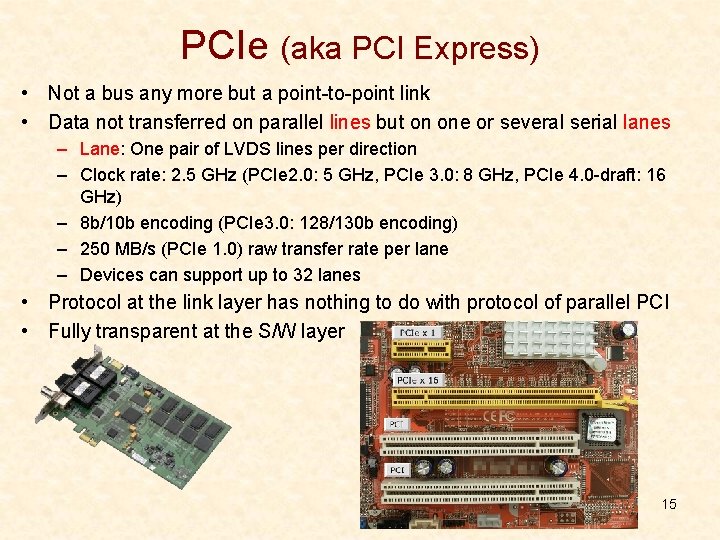
PCIe (aka PCI Express) • Not a bus any more but a point-to-point link • Data not transferred on parallel lines but on one or several serial lanes – Lane: One pair of LVDS lines per direction – Clock rate: 2. 5 GHz (PCIe 2. 0: 5 GHz, PCIe 3. 0: 8 GHz, PCIe 4. 0 -draft: 16 GHz) – 8 b/10 b encoding (PCIe 3. 0: 128/130 b encoding) – 250 MB/s (PCIe 1. 0) raw transfer rate per lane – Devices can support up to 32 lanes • Protocol at the link layer has nothing to do with protocol of parallel PCI • Fully transparent at the S/W layer 15
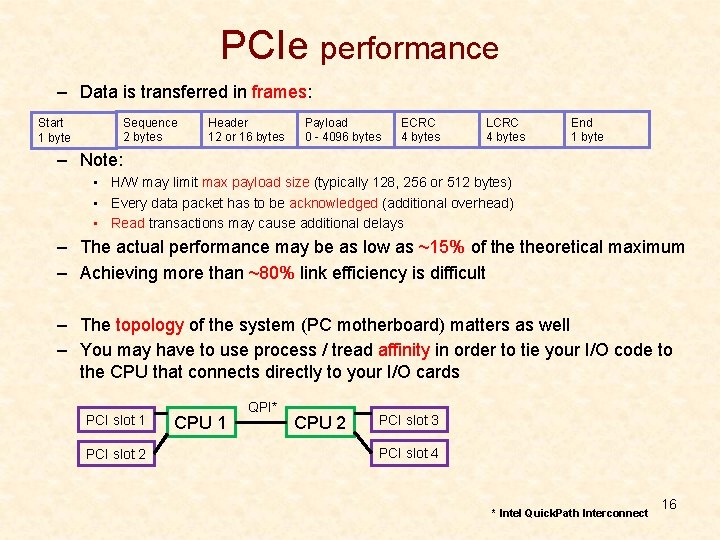
PCIe performance – Data is transferred in frames: Sequence 2 bytes Start 1 byte Header 12 or 16 bytes Payload 0 - 4096 bytes ECRC 4 bytes LCRC 4 bytes End 1 byte – Note: • H/W may limit max payload size (typically 128, 256 or 512 bytes) • Every data packet has to be acknowledged (additional overhead) • Read transactions may cause additional delays – The actual performance may be as low as ~15% of theoretical maximum – Achieving more than ~80% link efficiency is difficult – The topology of the system (PC motherboard) matters as well – You may have to use process / tread affinity in order to tie your I/O code to the CPU that connects directly to your I/O cards PCI slot 1 PCI slot 2 CPU 1 QPI* CPU 2 PCI slot 3 PCI slot 4 * Intel Quick. Path Interconnect 16
PICMG 1. 3 – The basic idea • A desk-top PC has at most 7 slots for PCI(e) cards • PC motherboards are quickly getting obsolete • Let’s design a standard that is more adapted for using PCI cards in an industrial domain • Modularize system by decupling computing core from PCI card backplane 17
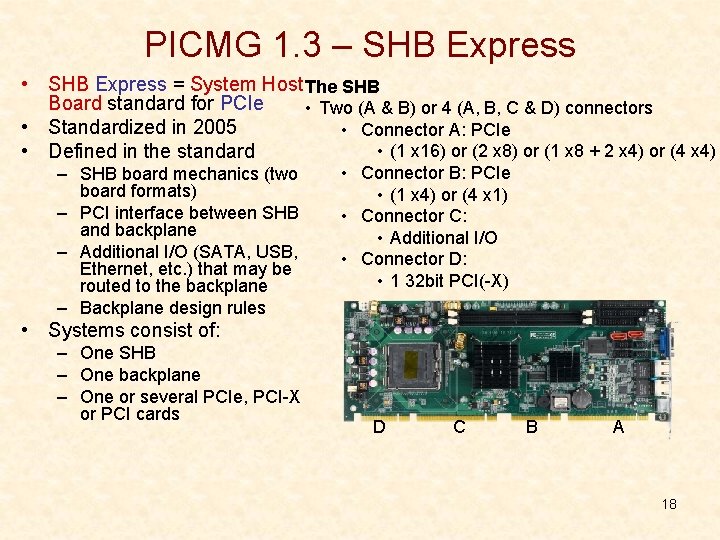
PICMG 1. 3 – SHB Express • SHB Express = System Host The SHB Board standard for PCIe • Two (A & B) or 4 (A, B, C & D) connectors • Standardized in 2005 • Connector A: PCIe • (1 x 16) or (2 x 8) or (1 x 8 + 2 x 4) or (4 x 4) • Defined in the standard – SHB board mechanics (two board formats) – PCI interface between SHB and backplane – Additional I/O (SATA, USB, Ethernet, etc. ) that may be routed to the backplane – Backplane design rules • Connector B: PCIe • (1 x 4) or (4 x 1) • Connector C: • Additional I/O • Connector D: • 1 32 bit PCI(-X) • Systems consist of: – One SHB – One backplane – One or several PCIe, PCI-X or PCI cards D C B A 18
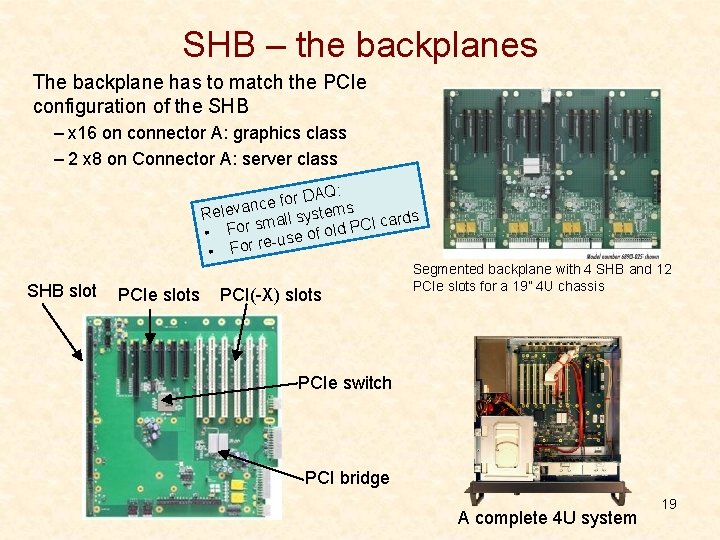
SHB – the backplanes The backplane has to match the PCIe configuration of the SHB – x 16 on connector A: graphics class – 2 x 8 on Connector A: server class r DAQ: o f e c n Releva stems y s l l a I cards sm C r P o F d l • se of o u e r r • Fo SHB slot PCIe slots PCI(-X) slots Segmented backplane with 4 SHB and 12 PCIe slots for a 19” 4 U chassis PCIe switch PCI bridge A complete 4 U system 19
The next generation What new standards are available? • VITA 41: VXS • PICMG 3. x: ATCA (Advanced Telecommunications Computing Architecture) • PICMG MTCA. x: Micro. TCA/µTCA • PICMG AMC. x: Advanced Mezzanine Card (for ATCA and µTCA) Not covered in this talk: • VITA 46: VPX • PICMG 2. x: Compact PCI (c. PCI) • PICMG EXP. 0: PCIe for c. PCI • PCIMG CPCI-S. 0: Compact. PCI serial • PICMG ATCA 300. 0: ATCA for 300 mm deep systems (no rear I/O) • And many more… PICMG: www. picmg. org PCI-SIG: www. pcisig. com VITA: www. vita. com 20
VXS – The basic idea • VMEbus mechanics is no so bad: • Let’s keep it • There is a lot of legacy equipment: • Let’s re-use it • The data transfer bandwidth could be better: • Let’s add an optional high-speed communication channel 21
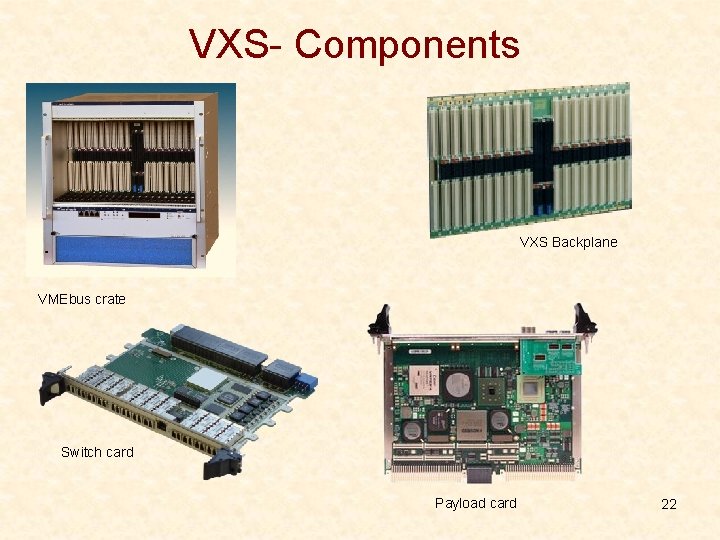
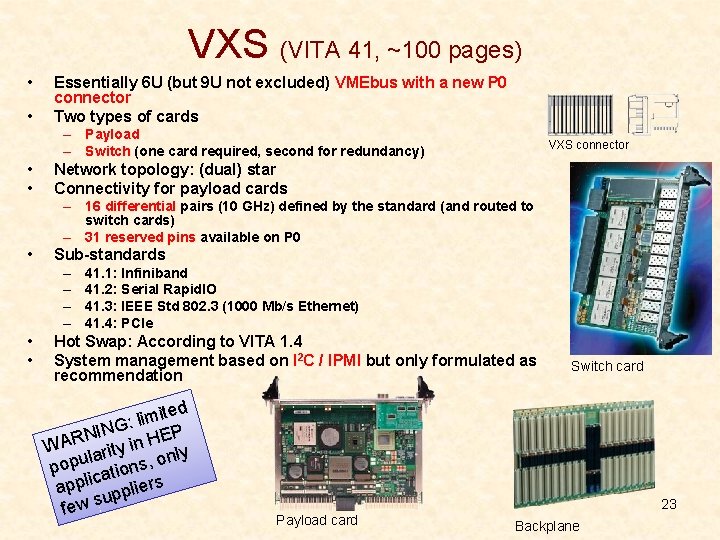
VXS- Components VXS Backplane VMEbus crate Switch card Payload card 22
VXS (VITA 41, ~100 pages) • • Essentially 6 U (but 9 U not excluded) VMEbus with a new P 0 connector Two types of cards – Payload – Switch (one card required, second for redundancy) • • VXS connector Network topology: (dual) star Connectivity for payload cards – 16 differential pairs (10 GHz) defined by the standard (and routed to switch cards) – 31 reserved pins available on P 0 • Sub-standards – – • • 41. 1: Infiniband 41. 2: Serial Rapid. IO 41. 3: IEEE Std 802. 3 (1000 Mb/s Ethernet) 41. 4: PCIe Hot Swap: According to VITA 1. 4 System management based on I 2 C / IPMI but only formulated as recommendation ited m i l G: N I N EP R H A n i W rity a l nly u o p , s o p tion a c i l app liers p p u s few Switch card 23 Payload card Backplane
Advanced TCA – the basic idea • Telecom companies are using proprietary electronics: • Let’s design a standard for them from scratch • It has to have all the features telecom companies need: • High availability (99. 999%) • Redundancy at all levels • Very high data throughput • Sophisticated remote monitoring and control 24
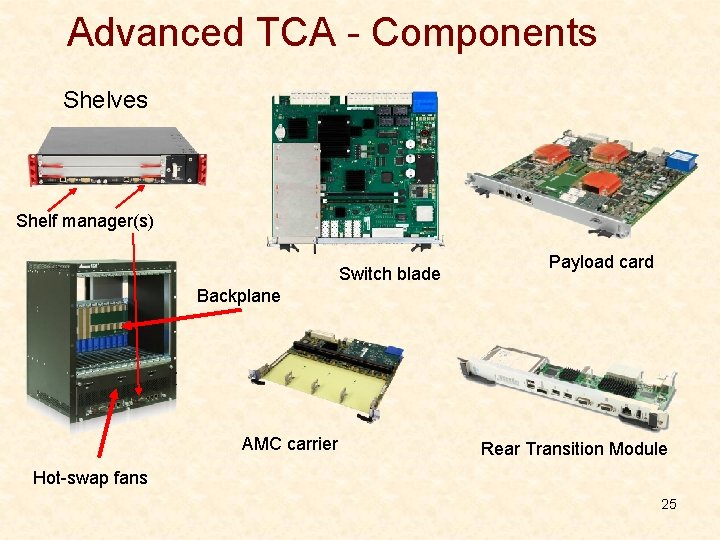
Advanced TCA - Components Shelves Shelf manager(s) Switch blade Payload card Backplane AMC carrier Rear Transition Module Hot-swap fans 25
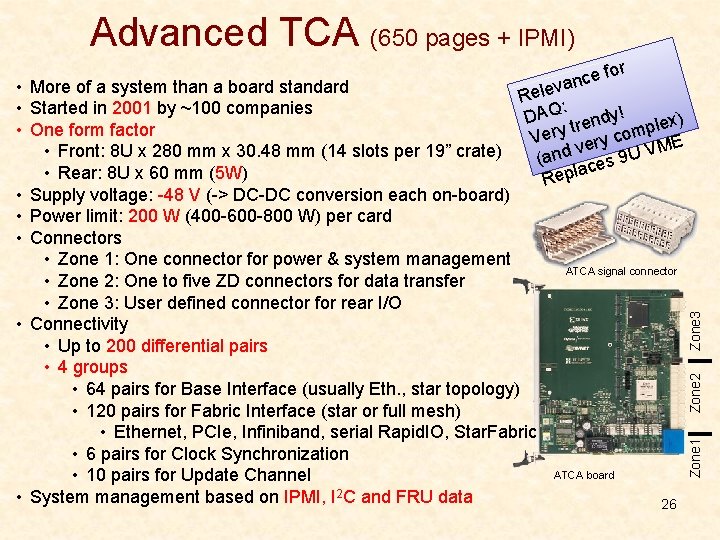
Advanced TCA (650 pages + IPMI) for e c n va Rele : DAQ rendy! lex) t p y m r Ve ry co VME e v (and ces 9 U la Rep Zone 2 Zone 3 ATCA signal connector Zone 1 • More of a system than a board standard • Started in 2001 by ~100 companies • One form factor • Front: 8 U x 280 mm x 30. 48 mm (14 slots per 19” crate) • Rear: 8 U x 60 mm (5 W) • Supply voltage: -48 V (-> DC-DC conversion each on-board) • Power limit: 200 W (400 -600 -800 W) per card • Connectors • Zone 1: One connector for power & system management • Zone 2: One to five ZD connectors for data transfer • Zone 3: User defined connector for rear I/O • Connectivity • Up to 200 differential pairs • 4 groups • 64 pairs for Base Interface (usually Eth. , star topology) • 120 pairs for Fabric Interface (star or full mesh) • Ethernet, PCIe, Infiniband, serial Rapid. IO, Star. Fabric • 6 pairs for Clock Synchronization • 10 pairs for Update Channel • System management based on IPMI, I 2 C and FRU data ATCA board 26
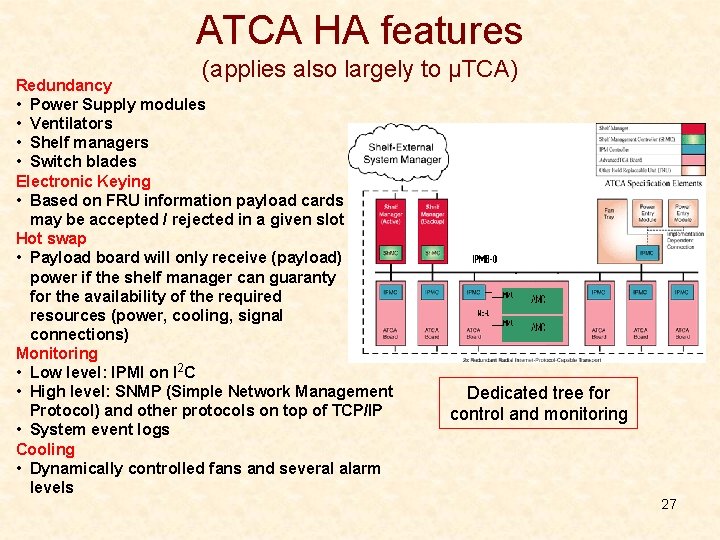
ATCA HA features (applies also largely to μTCA) Redundancy • Power Supply modules • Ventilators • Shelf managers • Switch blades Electronic Keying • Based on FRU information payload cards may be accepted / rejected in a given slot Hot swap • Payload board will only receive (payload) power if the shelf manager can guaranty for the availability of the required resources (power, cooling, signal connections) Monitoring • Low level: IPMI on I 2 C • High level: SNMP (Simple Network Management Protocol) and other protocols on top of TCP/IP • System event logs Cooling • Dynamically controlled fans and several alarm levels Dedicated tree for control and monitoring 27
AMC – The basic idea • ATCA blades are big. Small mezzanine modules could be helpful to modularize their functionality • PMC/XMC mezzanines are not hot-swappable • Let’s design a new type of mezzanine for ATCA 28
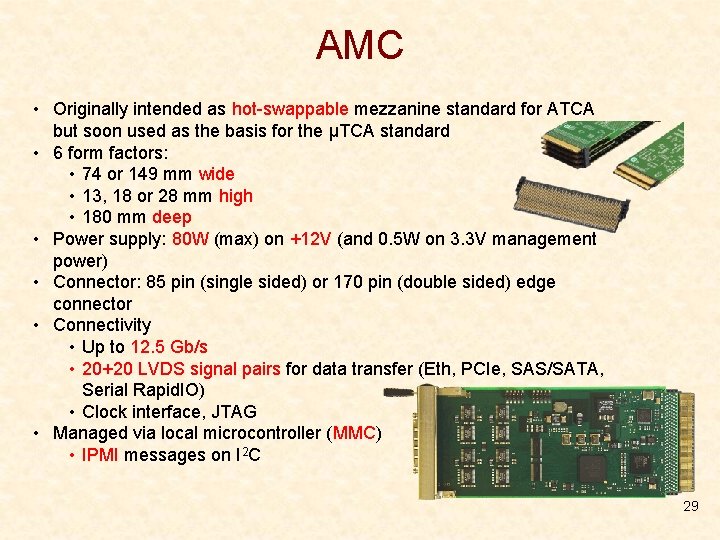
AMC • Originally intended as hot-swappable mezzanine standard for ATCA but soon used as the basis for the μTCA standard • 6 form factors: • 74 or 149 mm wide • 13, 18 or 28 mm high • 180 mm deep • Power supply: 80 W (max) on +12 V (and 0. 5 W on 3. 3 V management power) • Connector: 85 pin (single sided) or 170 pin (double sided) edge connector • Connectivity • Up to 12. 5 Gb/s • 20+20 LVDS signal pairs for data transfer (Eth, PCIe, SAS/SATA, Serial Rapid. IO) • Clock interface, JTAG • Managed via local microcontroller (MMC) • IPMI messages on I 2 C 29
μTCA / MTCA – The basic idea • AMC mezzanines are great but ATCA is a heavy standard and the H/W is expensive • Let’s define a standard that allows for using AMCs directly in a shelf (i. e. Promote the AMC from “mezzanine” to “module”) 30
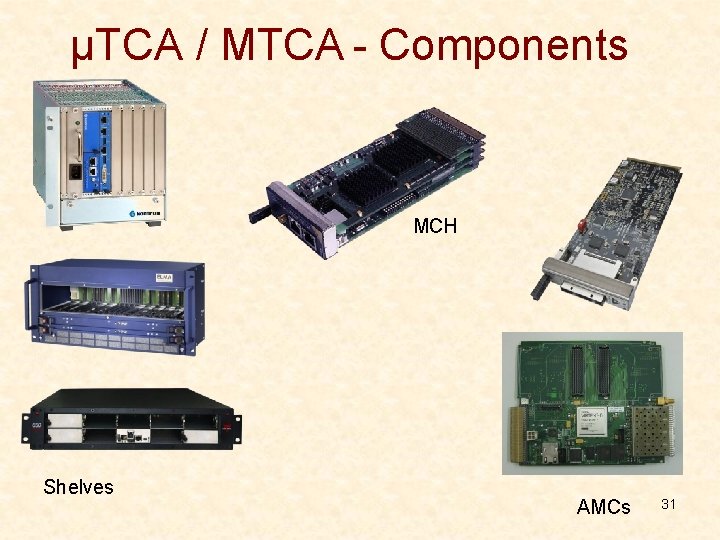
μTCA / MTCA - Components MCH Shelves AMCs 31
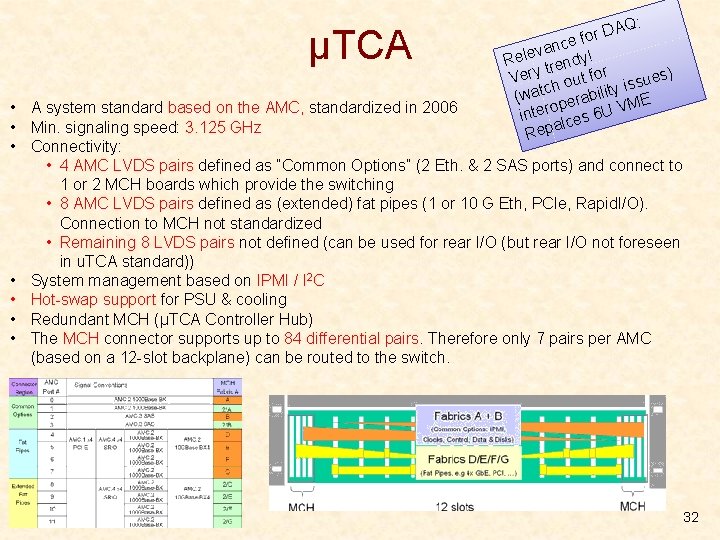
μTCA AQ: D r e fo c n a v Rele rendy! t Very h out for issues) c y (wat perabilit ME o V inter lces 6 U a Rep • A system standard based on the AMC, standardized in 2006 • Min. signaling speed: 3. 125 GHz • Connectivity: • 4 AMC LVDS pairs defined as “Common Options” (2 Eth. & 2 SAS ports) and connect to 1 or 2 MCH boards which provide the switching • 8 AMC LVDS pairs defined as (extended) fat pipes (1 or 10 G Eth, PCIe, Rapid. I/O). Connection to MCH not standardized • Remaining 8 LVDS pairs not defined (can be used for rear I/O (but rear I/O not foreseen in u. TCA standard)) • System management based on IPMI / I 2 C • Hot-swap support for PSU & cooling • Redundant MCH (μTCA Controller Hub) • The MCH connector supports up to 84 differential pairs. Therefore only 7 pairs per AMC (based on a 12 -slot backplane) can be routed to the switch. 32
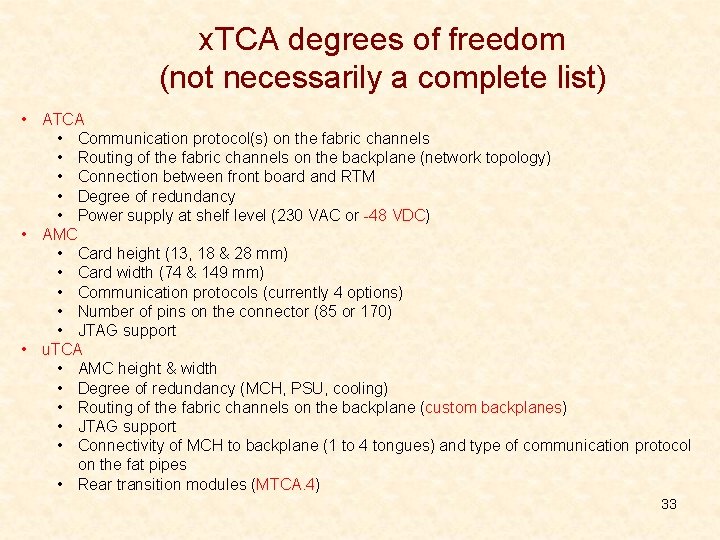
x. TCA degrees of freedom (not necessarily a complete list) • ATCA • Communication protocol(s) on the fabric channels • Routing of the fabric channels on the backplane (network topology) • Connection between front board and RTM • Degree of redundancy • Power supply at shelf level (230 VAC or -48 VDC) • AMC • Card height (13, 18 & 28 mm) • Card width (74 & 149 mm) • Communication protocols (currently 4 options) • Number of pins on the connector (85 or 170) • JTAG support • u. TCA • AMC height & width • Degree of redundancy (MCH, PSU, cooling) • Routing of the fabric channels on the backplane (custom backplanes) • JTAG support • Connectivity of MCH to backplane (1 to 4 tongues) and type of communication protocol on the fat pipes • Rear transition modules (MTCA. 4) 33
x. TCA issues • The operation of an x. TCA system requires a complex, standard compliant S/W infrastructure • Efforts to provide open source management S/W for x. TCA: Open. SAF, SAForum • As many features of the standard(s) are optional, products from different vendors may not be compatible • • Efforts to insure interoperability of x. TCA products: CP-TA, SCOPE alliance Interoperability workshops • Sub-standards for use in “physics” – ATCA 3. 8: Standardizes RTMs and clock signals – MTCA. 4: Adds RTMs (and other features) to MTCA. AMCs communicate via PCIe • The market does not yet provide lots of front end modules for physics DAQ – See: http: //mtca. desy. de/ • There is little information available about the system performance (end to end H/W performance and S/W overhead) of the data transfer links 34
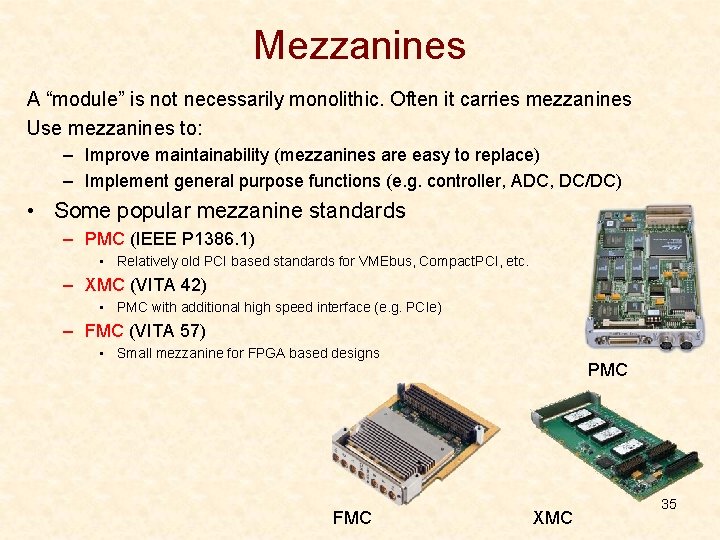
Mezzanines A “module” is not necessarily monolithic. Often it carries mezzanines Use mezzanines to: – Improve maintainability (mezzanines are easy to replace) – Implement general purpose functions (e. g. controller, ADC, DC/DC) • Some popular mezzanine standards – PMC (IEEE P 1386. 1) • Relatively old PCI based standards for VMEbus, Compact. PCI, etc. – XMC (VITA 42) • PMC with additional high speed interface (e. g. PCIe) – FMC (VITA 57) • Small mezzanine for FPGA based designs FMC PMC XMC 35
Science fiction • PICMG has announced GEN 4 – http: //www. picmg. org/gen 4 -new-high-performance-platform/ – System throughput (to hundreds of terabits/s), module bandwidth (to tens of terabits/s), and storage capacity in exabytes. – Module cooling capacity (over 2000 Watts, with fluid cooling options) – Not H/W compatible with ATCA – What I read in my crystal ball: • Don’t expect H/W before 2020 • Try not to be an early adopter • Optical backplanes – – Not a new idea Already exist for niche applications Very expensive What I read in my crystal ball: • Will come but not anytime soon • Servers – Data processing may shift from FPGA to CPU – Networks will play a more important role – Servers with custom PCIe I/O cards may become (more) attractive 36
So, what is the right standard for me? • This obviously depends on your requirements – – – Bandwidth & latency Availability of commercial products (front end) Existing infrastructure (S/W and H/W) and expertise in your experiment Start and duration of the experiment Scalability requirements • Trends in HEP – LHC & experiments @ CERN: Still VMEbus & PCI based • CMS: Several μTCA systems in operation • ATLAS: ATCA proposed as VMEbus replacement, many R&D projects • LHCb: first favored ATCA then decided to go for PCs • ALICE: Still planning to use ATCA • Beam control: μTCA for (non LHC) machine control under discussion – Control systems of new accelerators: μTCA everywhere • XFEL @ DESY, SCLS @ SLAC, FAIR @ GSI 37