Programming in Machine Language CSCI 311 Dr Frank
- Slides: 32
Programming in Machine Language CSCI 311 Dr. Frank Li 1
Index Overview ¡ Bit-wise Logical Operations ¡ 2
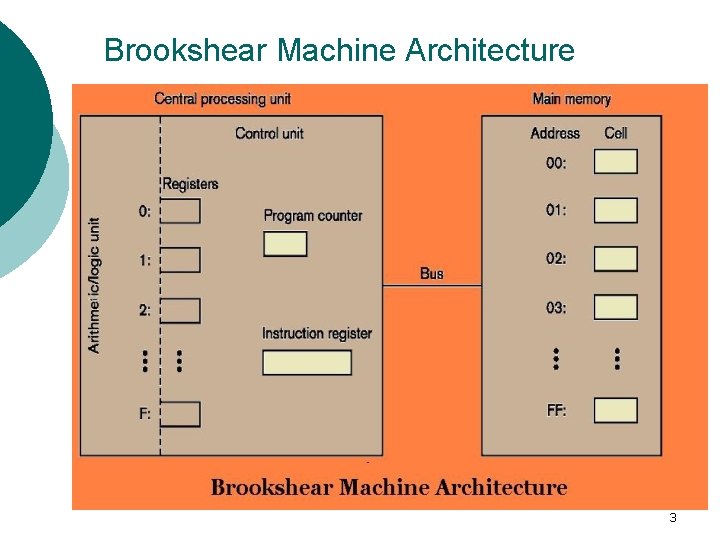
Brookshear Machine Architecture 3
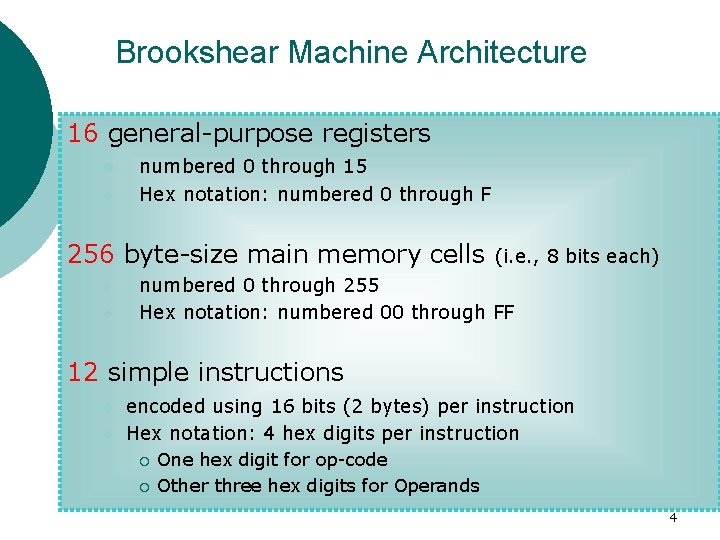
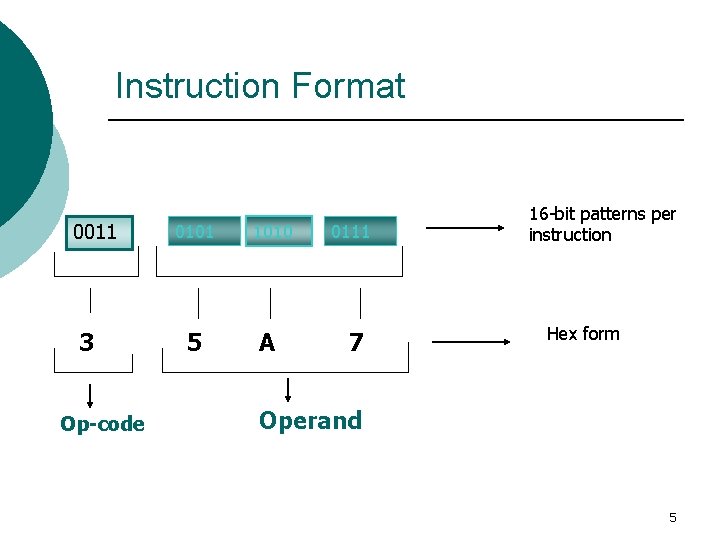
Brookshear Machine Architecture 16 general-purpose registers l l numbered 0 through 15 Hex notation: numbered 0 through F 256 byte-size main memory cells l l (i. e. , 8 bits each) numbered 0 through 255 Hex notation: numbered 00 through FF 12 simple instructions l l encoded using 16 bits (2 bytes) per instruction Hex notation: 4 hex digits per instruction ¡ ¡ One hex digit for op-code Other three hex digits for Operands 4
Instruction Format 0011 3 Op-code 0101 5 1010 A 0111 7 16 -bit patterns per instruction Hex form Operand 5
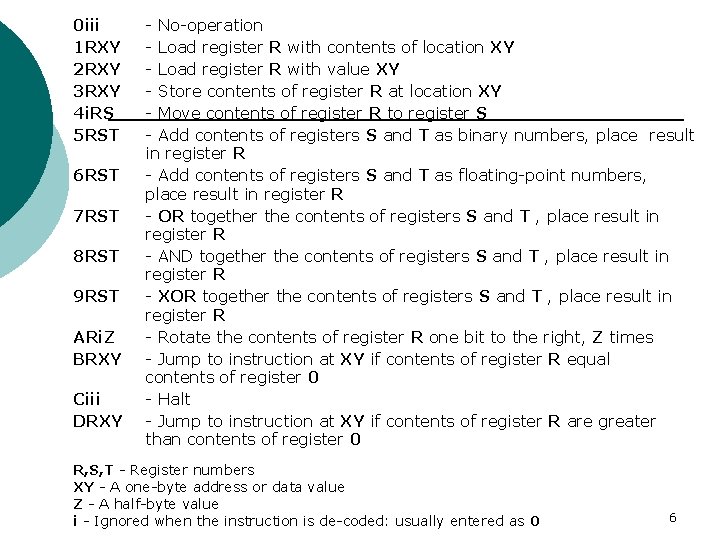
0 iii 1 RXY 2 RXY 3 RXY 4 i. RS 5 RST 6 RST 7 RST 8 RST 9 RST ARi. Z BRXY Ciii DRXY - No-operation - Load register R with contents of location XY - Load register R with value XY - Store contents of register R at location XY - Move contents of register R to register S - Add contents of registers S and T as binary numbers, place result in register R - Add contents of registers S and T as floating-point numbers, place result in register R - OR together the contents of registers S and T , place result in register R - AND together the contents of registers S and T , place result in register R - XOR together the contents of registers S and T , place result in register R - Rotate the contents of register R one bit to the right, Z times - Jump to instruction at XY if contents of register R equal contents of register 0 - Halt - Jump to instruction at XY if contents of register R are greater than contents of register 0 R, S, T - Register numbers XY - A one-byte address or data value Z - A half-byte value i - Ignored when the instruction is de-coded: usually entered as 0 6
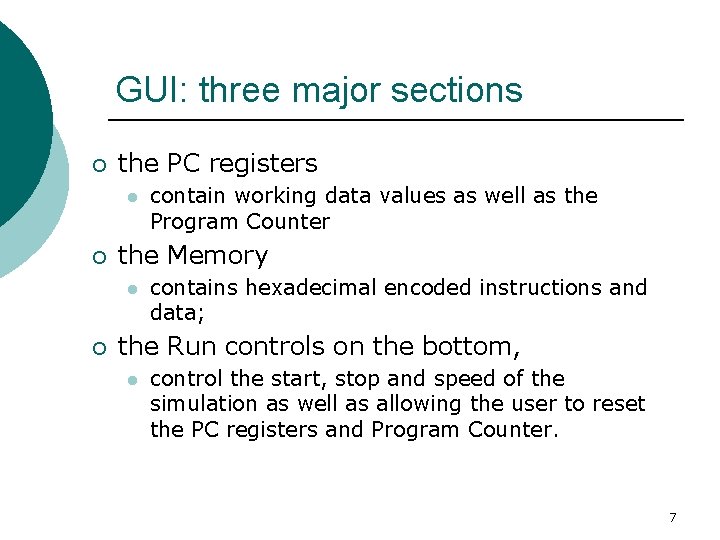
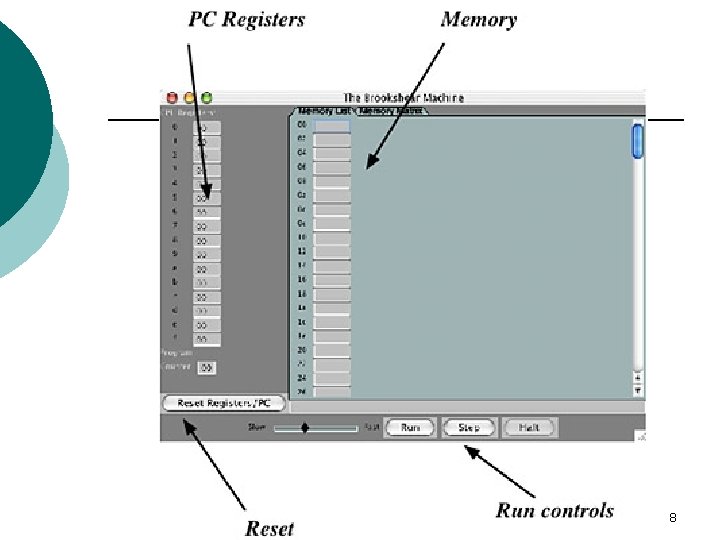
GUI: three major sections ¡ the PC registers l ¡ the Memory l ¡ contain working data values as well as the Program Counter contains hexadecimal encoded instructions and data; the Run controls on the bottom, l control the start, stop and speed of the simulation as well as allowing the user to reset the PC registers and Program Counter. 7
8
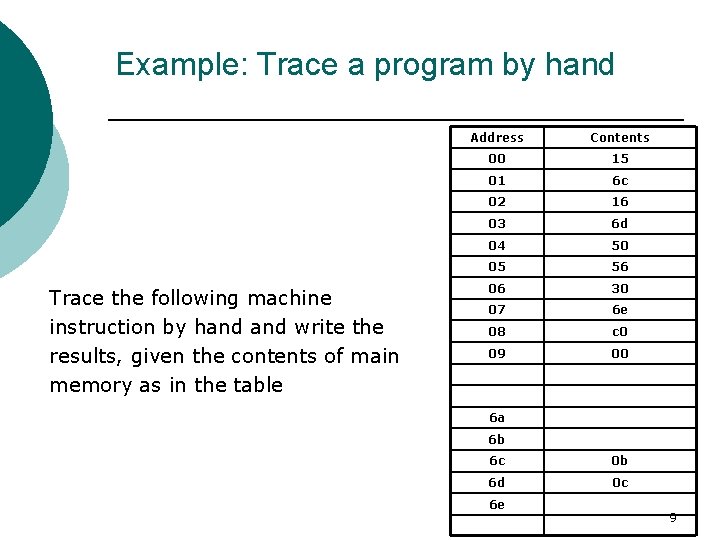
Example: Trace a program by hand Trace the following machine instruction by hand write the results, given the contents of main memory as in the table Address Contents 00 15 01 6 c 02 16 03 6 d 04 50 05 56 06 30 07 6 e 08 c 0 09 00 6 a 6 b 6 c 0 b 6 d 0 c 6 e 9
Index Overview ¡ Bit-wise Logical Operations ¡ 10
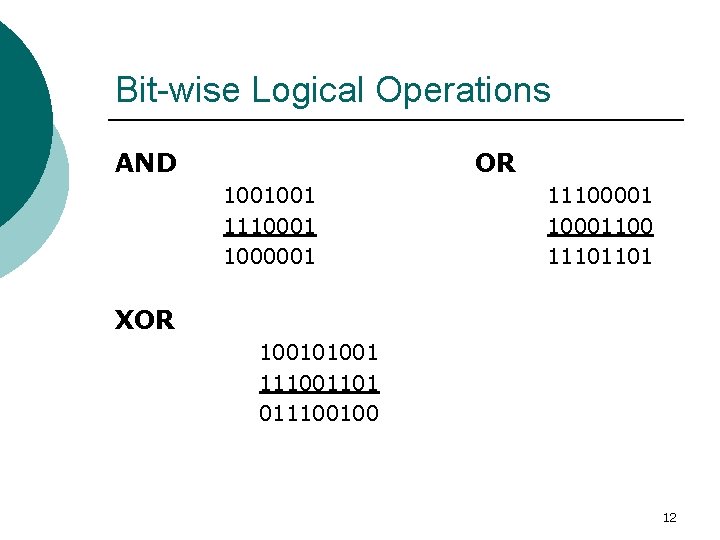
Bit-wise Logical Operations ¡ A byte can be seen as a set of 8 Boolean variables l ¡ each bit is one variable Logical instructions like AND, OR, XOR, etc. l performed by aligning the bytes and performing the logical operations on the corresponding bits, one by one. 11
Bit-wise Logical Operations AND OR 1001001 1110001 1000001 11100001 10001100 11101101 XOR 100101001 111001101 011100100 12
Masking ¡ Goal: To test the individual pattern of bits in a given string of bits l l The sequence of bits that are used to examine a particular bit is known as the mask Using Mask, along with the appropriate logical operation, a programmer can determine the values of individual bits in a byte 13
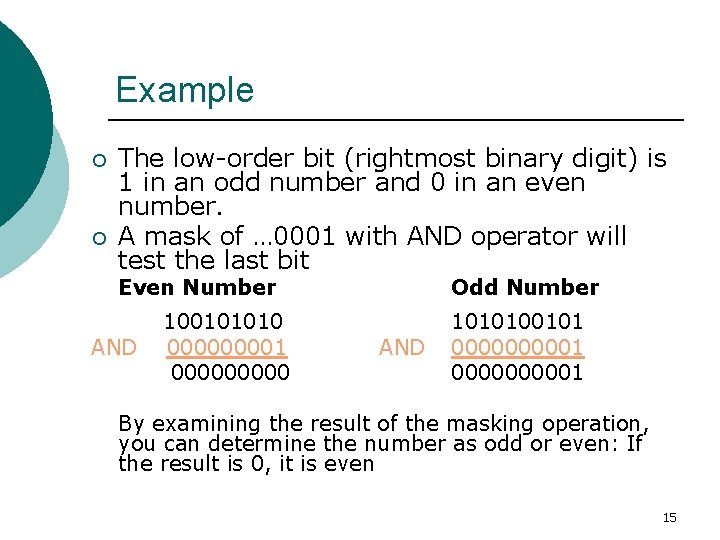
Masking Technique 1: Reading a bit in a bit string is done by masking away the bits we are not interested in: ¡ Reading AND operator along with a bit mask of 1 in the position we want to read leave the interesting bit and mask away the others l Example: Suppose you want to determine if a number is odd or even. 14
Example ¡ ¡ The low-order bit (rightmost binary digit) is 1 in an odd number and 0 in an even number. A mask of … 0001 with AND operator will test the last bit Even Number AND 100101010 00001 00000 Odd Number AND 1010100101 0000000001 By examining the result of the masking operation, you can determine the number as odd or even: If the result is 0, it is even 15
Exercise 1 ¡ Suppose you have an 8 -bit string (a byte) that is in 2’s complement notation, sitting in a memory cell. You want to determine if it represents a positive or negative number. What bit-mask would you use? What Logical operation would you use? 16
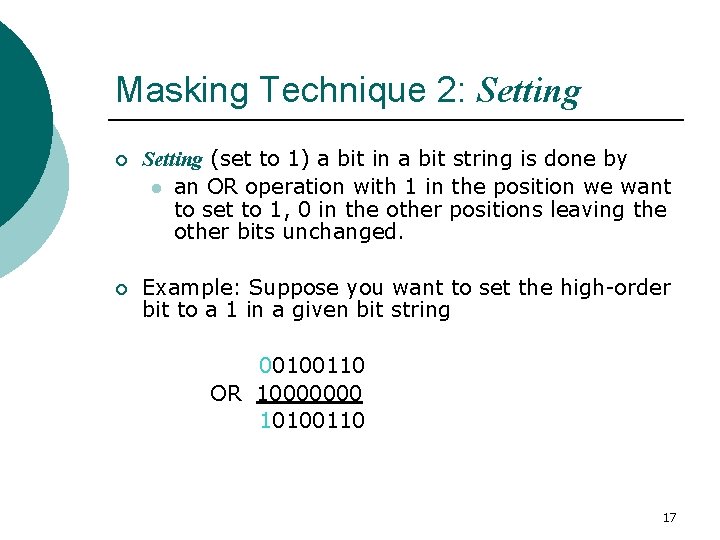
Masking Technique 2: Setting ¡ Setting (set to 1) a bit in a bit string is done by l an OR operation with 1 in the position we want to set to 1, 0 in the other positions leaving the other bits unchanged. ¡ Example: Suppose you want to set the high-order bit to a 1 in a given bit string 00100110 OR 10000000 10100110 17
Exercise 2 ¡ Suppose you want to set the 2 nd bit from left in a given bit string to 1. What is the bit mask you would use? and what is the operation to achieve the result? i. e. , given the bit string 10000010, we want the result to be 11000010. 18
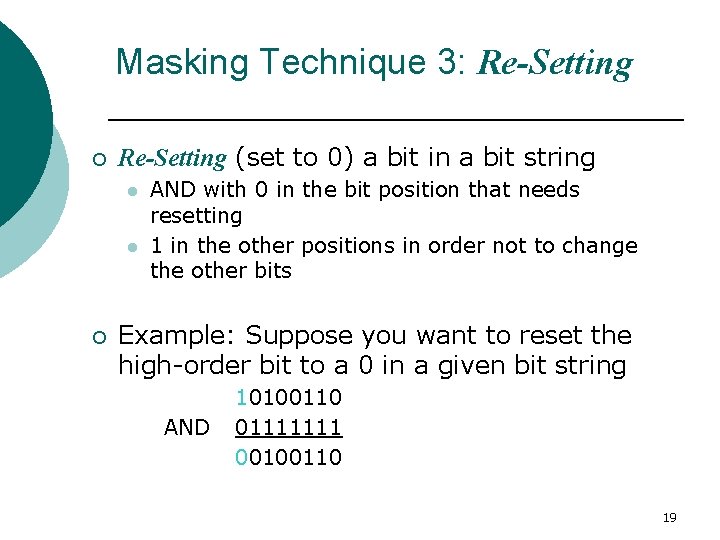
Masking Technique 3: Re-Setting ¡ Re-Setting (set to 0) a bit in a bit string l l ¡ AND with 0 in the bit position that needs resetting 1 in the other positions in order not to change the other bits Example: Suppose you want to reset the high-order bit to a 0 in a given bit string AND 10100110 01111111 00100110 19
Converting ASCII Case ¡ ¡ Develop a mask and select operator to convert uppercase ASCII characters to lowercase, e. g. “A” to “a”, “B” to “b”, etc. Product: Mask and operator. (See ASCII code at next page ) 20
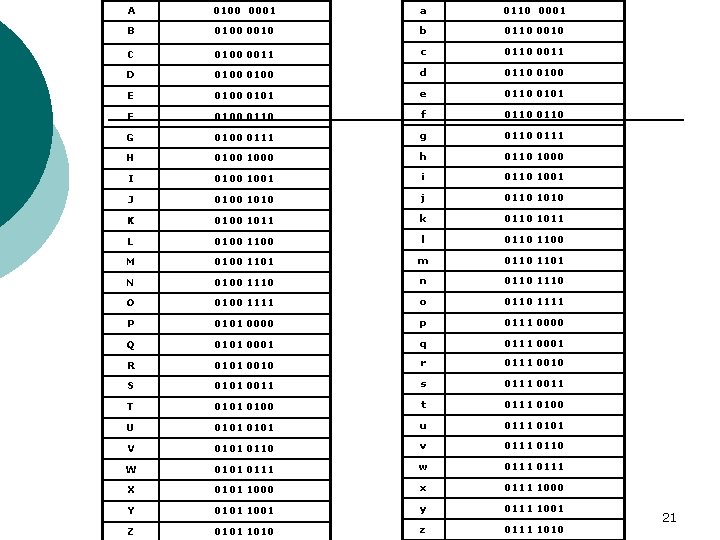
A 0100 0001 a 0110 0001 B 0100 0010 b 0110 0010 C 0100 0011 c 0110 0011 D 0100 d 0110 0100 E 0100 0101 e 0110 0101 F 0100 0110 f 0110 G 0100 0111 g 0110 0111 H 0100 1000 h 0110 1000 I 0100 1001 i 0110 1001 J 0100 1010 j 0110 1010 K 0100 1011 k 0110 1011 L 0100 1100 l 0110 1100 M 0100 1101 m 0110 1101 N 0100 1110 n 0110 1110 O 0100 1111 o 0110 1111 P 0101 0000 p 0111 0000 Q 0101 0001 q 0111 0001 R 0101 0010 r 0111 0010 S 0101 0011 s 0111 0011 T 0101 0100 t 0111 0100 U 0101 u 0111 0101 V 0101 0110 v 0111 0110 W 0101 0111 w 0111 X 0101 1000 x 0111 1000 Y 0101 1001 y 0111 1001 Z 0101 1010 z 0111 1010 21
Exercise 3: Converting ASCII Case Task: Write a program to convert uppercase to lowercase for an ASCII character stored in a memory location 30 22
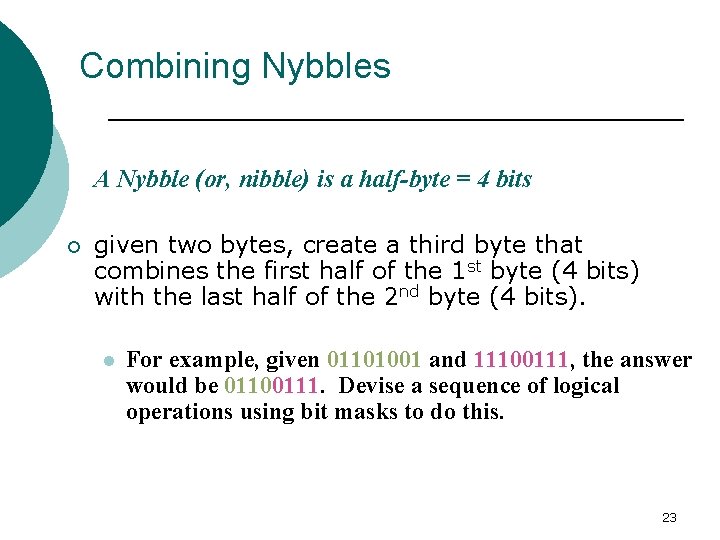
Combining Nybbles A Nybble (or, nibble) is a half-byte = 4 bits ¡ given two bytes, create a third byte that combines the first half of the 1 st byte (4 bits) with the last half of the 2 nd byte (4 bits). l For example, given 01101001 and 11100111, the answer would be 01100111. Devise a sequence of logical operations using bit masks to do this. 23
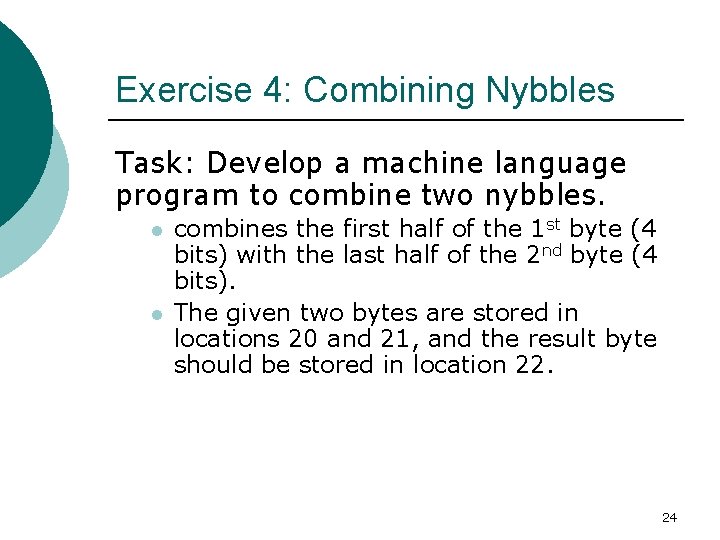
Exercise 4: Combining Nybbles Task: Develop a machine language program to combine two nybbles. l l combines the first half of the 1 st byte (4 bits) with the last half of the 2 nd byte (4 bits). The given two bytes are stored in locations 20 and 21, and the result byte should be stored in location 22. 24
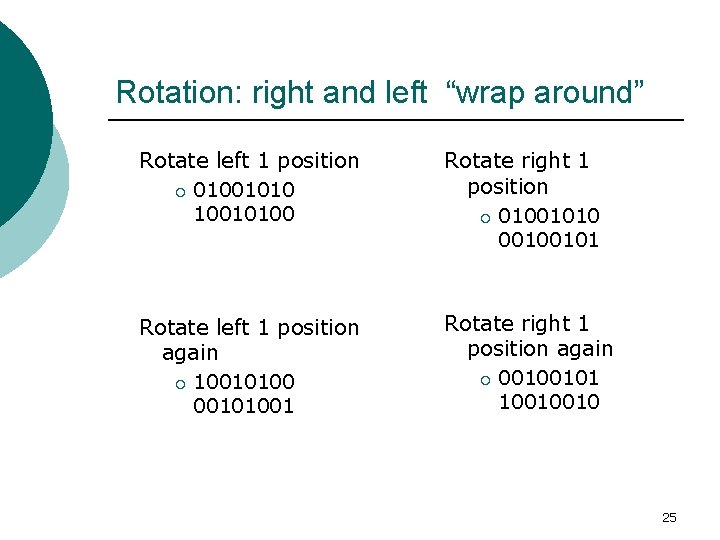
Rotation: right and left “wrap around” Rotate left 1 position ¡ 010010100 Rotate right 1 position ¡ 01001010 00100101 Rotate left 1 position again ¡ 100101001 Rotate right 1 position again ¡ 00100101 10010010 25
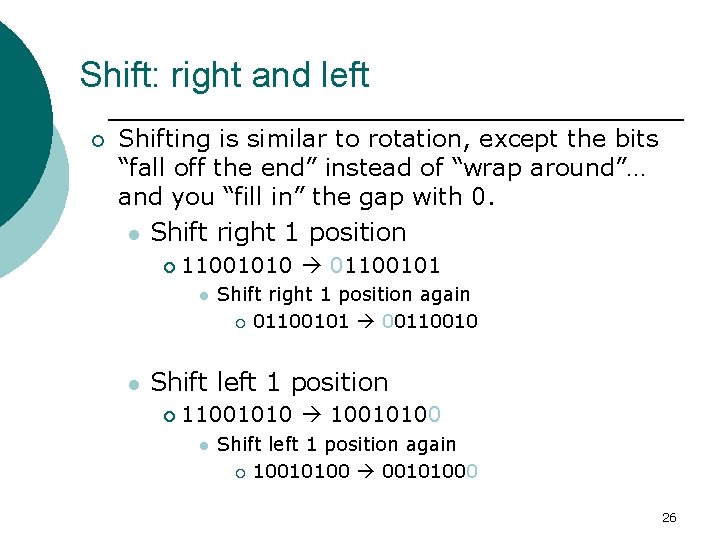
Shift: right and left ¡ Shifting is similar to rotation, except the bits “fall off the end” instead of “wrap around”… and you “fill in” the gap with 0. l Shift right 1 position ¡ 11001010 01100101 l l Shift right 1 position again ¡ 01100101 00110010 Shift left 1 position ¡ 11001010 10010100 l Shift left 1 position again ¡ 10010100 00101000 26
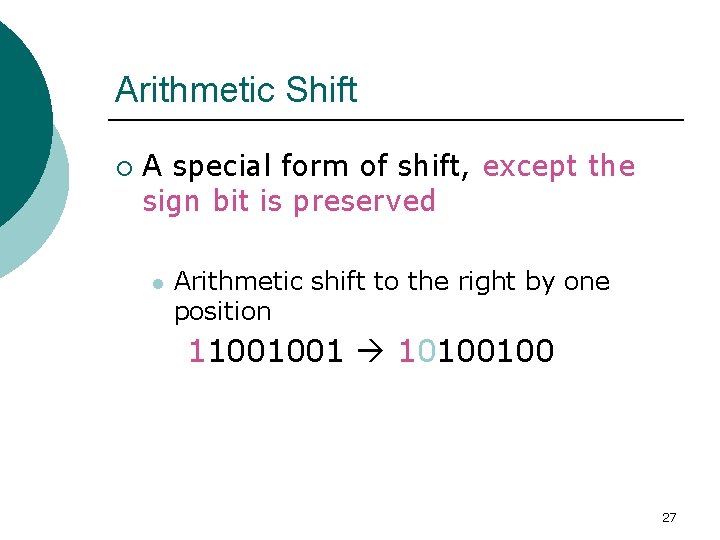
Arithmetic Shift ¡ A special form of shift, except the sign bit is preserved l Arithmetic shift to the right by one position 11001001 10100100 27
Exercise 5: No Shift Instruction? Make one ¡ The Brookshear machine does not have a SHIFT instruction, although there is a ROTATE ¡ How can a SHIFT be accomplished in the Brookshear machine? l Demonstrate your answer with two examples. 28
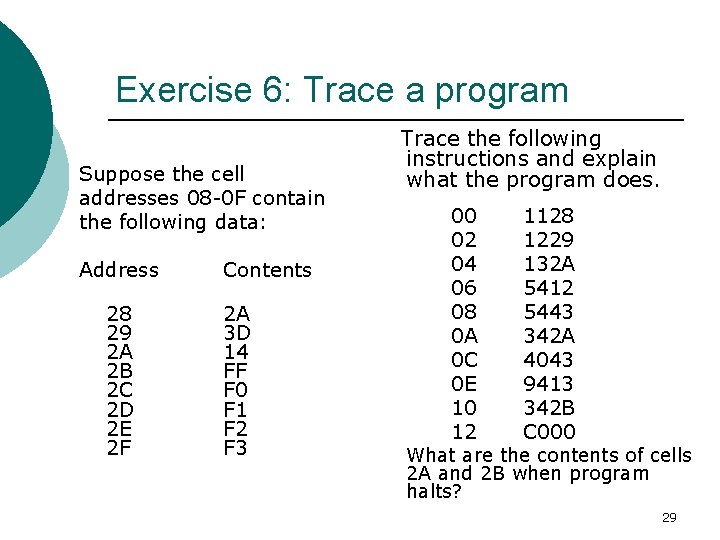
Exercise 6: Trace a program Suppose the cell addresses 08 -0 F contain the following data: Address 28 29 2 A 2 B 2 C 2 D 2 E 2 F Contents 2 A 3 D 14 FF F 0 F 1 F 2 F 3 Trace the following instructions and explain what the program does. 00 02 04 06 08 0 A 0 C 0 E 10 12 1128 1229 132 A 5412 5443 342 A 4043 9413 342 B C 000 What are the contents of cells 2 A and 2 B when program halts? 29
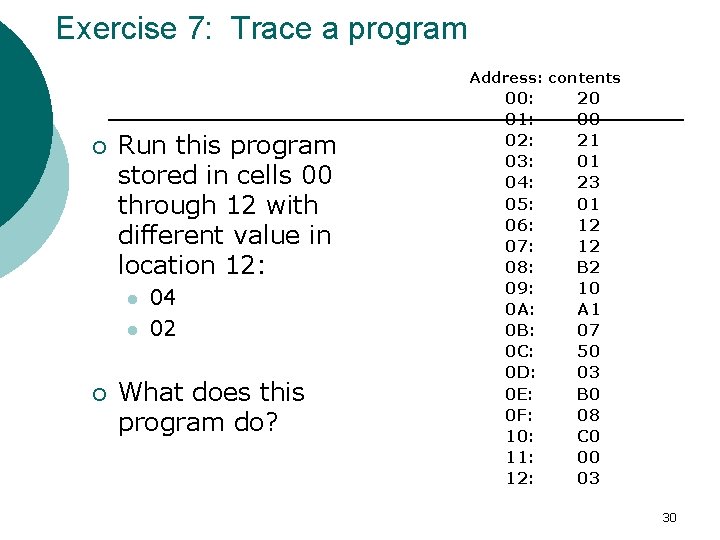
Exercise 7: Trace a program Address: contents ¡ Run this program stored in cells 00 through 12 with different value in location 12: l l ¡ 04 02 What does this program do? 00: 01: 02: 03: 04: 05: 06: 07: 08: 09: 0 A: 0 B: 0 C: 0 D: 0 E: 0 F: 10: 11: 12: 20 00 21 01 23 01 12 12 B 2 10 A 1 07 50 03 B 0 08 C 0 00 03 30
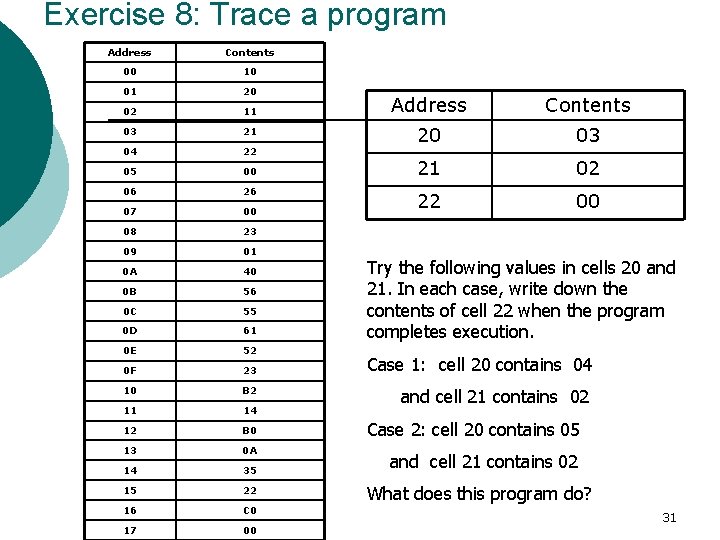
Exercise 8: Trace a program Address Contents 00 10 01 20 02 11 03 21 04 22 05 00 06 26 07 00 08 23 09 01 0 A 40 0 B 56 0 C 55 0 D 61 0 E 52 0 F 23 10 B 2 11 14 12 B 0 13 0 A 14 35 15 22 16 C 0 17 00 Address Contents 20 03 21 02 22 00 Try the following values in cells 20 and 21. In each case, write down the contents of cell 22 when the program completes execution. Case 1: cell 20 contains 04 and cell 21 contains 02 Case 2: cell 20 contains 05 and cell 21 contains 02 What does this program do? 31
Exercise 9: adding three numbers ¡ Task: Write a program to add three numbers together. The numbers are stored at memory cell locations 10, 11, and 12. The result should be stored at location 13. 32