NSW Premiers Sporting Challenge Facilitator Toolkit 2020 10
- Slides: 35
NSW Premier’s Sporting Challenge Facilitator Toolkit 2020 10 Week Challenge
NSW PSC Facilitator Toolkit – 10 week Challenge Background • The PSC 10 week Challenge encourages students and staff over a 10 week period to participate in a broad range of sport and physical activity. • The Challenge is designed for students to work together in a team with the shared goal of increasing physical activity levels. • Activities may include time spent in a broad range of sports during lunchtime, in school sport programs, class time, before or after school and on weekends. • The team aspect of the Challenge is an important element in encouraging all students to increase their physical activity levels. It is an opportunity for active students to be role models for their peers, where students can encourage each other to increase their activity levels as a collective. Teachers play an important role in fostering this positive team environment to encourage all students to move more. In 2019, 444, 928 students took part The NSW Premier’s Sporting Challenge aims to get more in the 10 week students, more active, more often. Challenge!
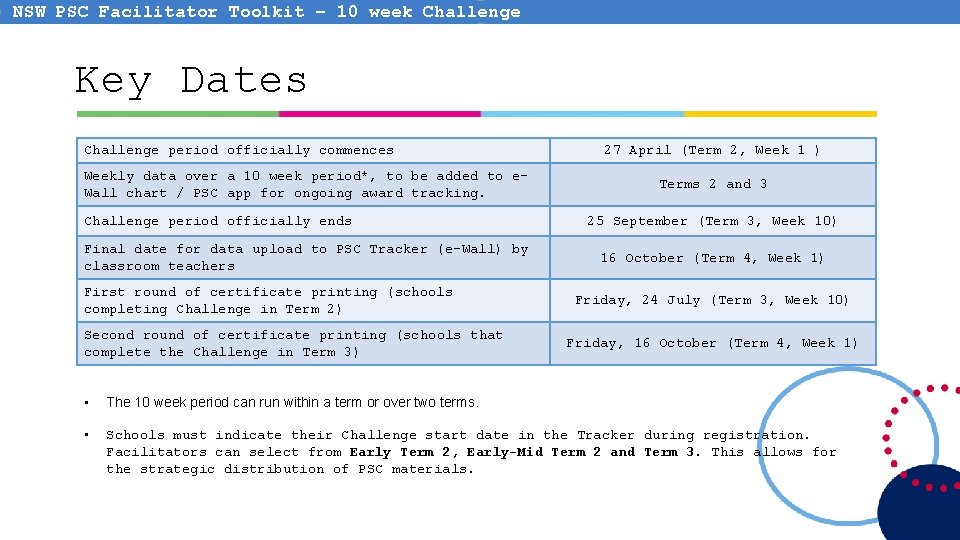
NSW PSC Facilitator Toolkit – 10 week Challenge Key Dates Challenge period officially commences Weekly data over a 10 week period*, to be added to e. Wall chart / PSC app for ongoing award tracking. Challenge period officially ends Final date for data upload to PSC Tracker (e-Wall) by classroom teachers First round of certificate printing (schools completing Challenge in Term 2) Second round of certificate printing (schools that complete the Challenge in Term 3) 27 April (Term 2, Week 1 ) Terms 2 and 3 25 September (Term 3, Week 10) 16 October (Term 4, Week 1) Friday, 24 July (Term 3, Week 10) Friday, 16 October (Term 4, Week 1) • The 10 week period can run within a term or over two terms. • Schools must indicate their Challenge start date in the Tracker during registration. Facilitators can select from Early Term 2, Early-Mid Term 2 and Term 3. This allows for the strategic distribution of PSC materials.
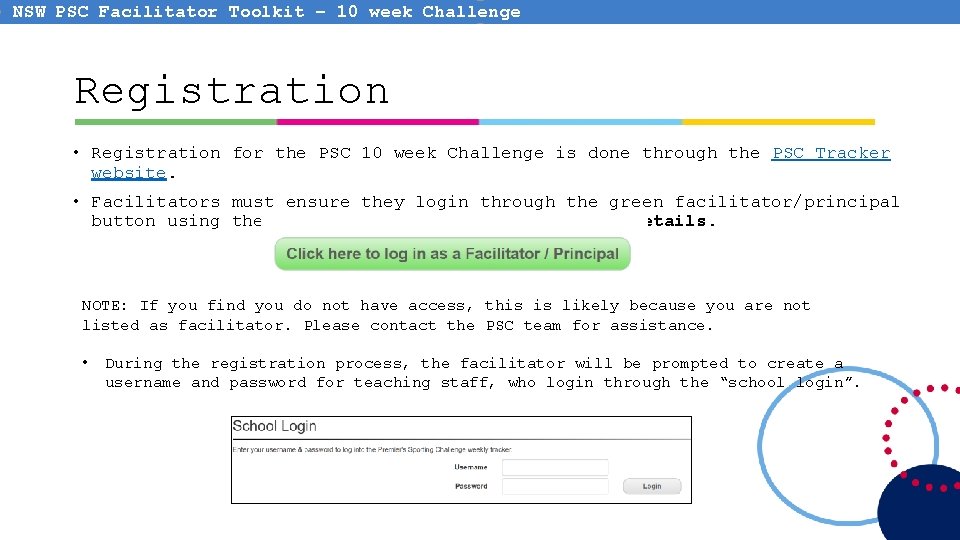
NSW PSC Facilitator Toolkit – 10 week Challenge Registration • Registration for the PSC 10 week Challenge is done through the PSC Tracker website. • Facilitators must ensure they login through the green facilitator/principal button using their current Do. E staff portal login details. NOTE: If you find you do not have access, this is likely because you are not listed as facilitator. Please contact the PSC team for assistance. • During the registration process, the facilitator will be prompted to create a username and password for teaching staff, who login through the “school login”.
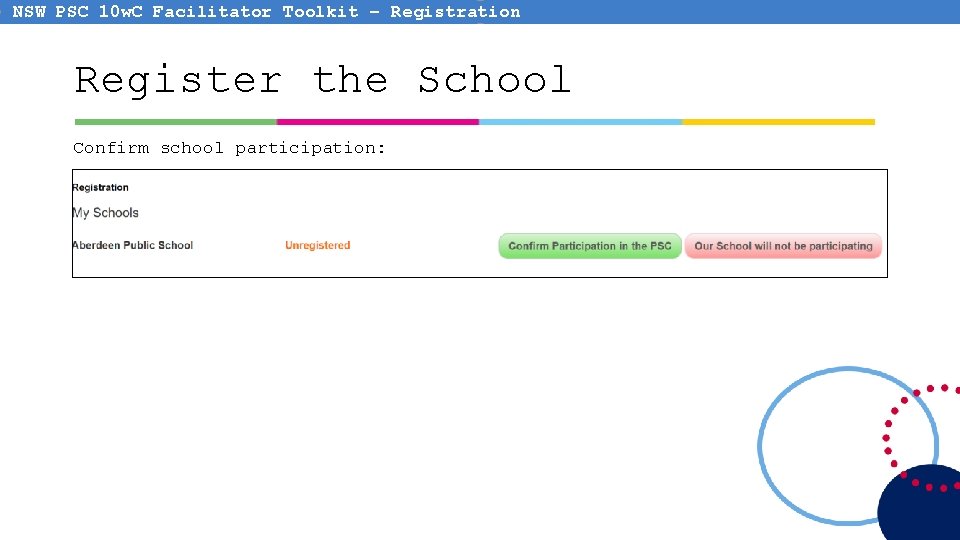
NSW PSC 10 w. C Facilitator Toolkit – Registration Register the School Confirm school participation:
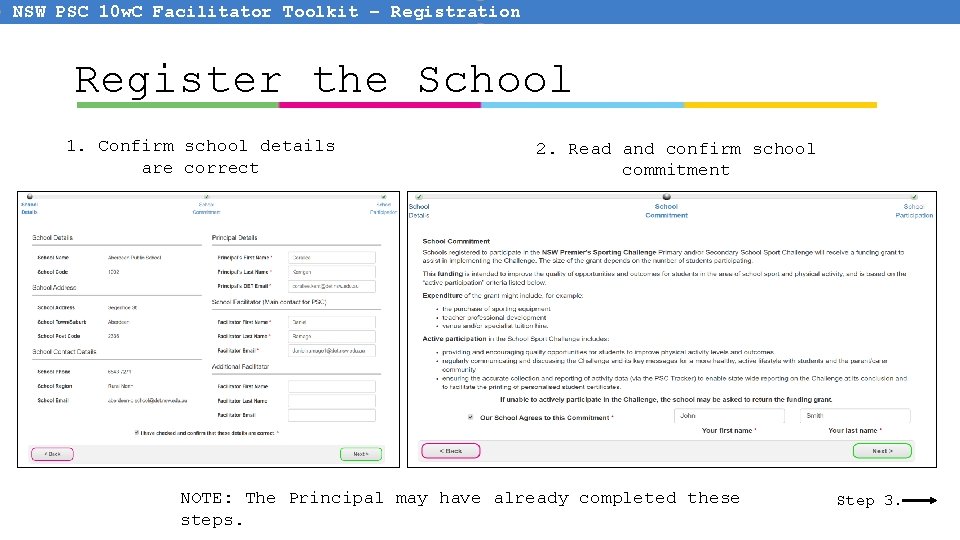
NSW PSC 10 w. C Facilitator Toolkit – Registration Register the School 1. Confirm school details are correct 2. Read and confirm school commitment NOTE: The Principal may have already completed these steps. Step 3.
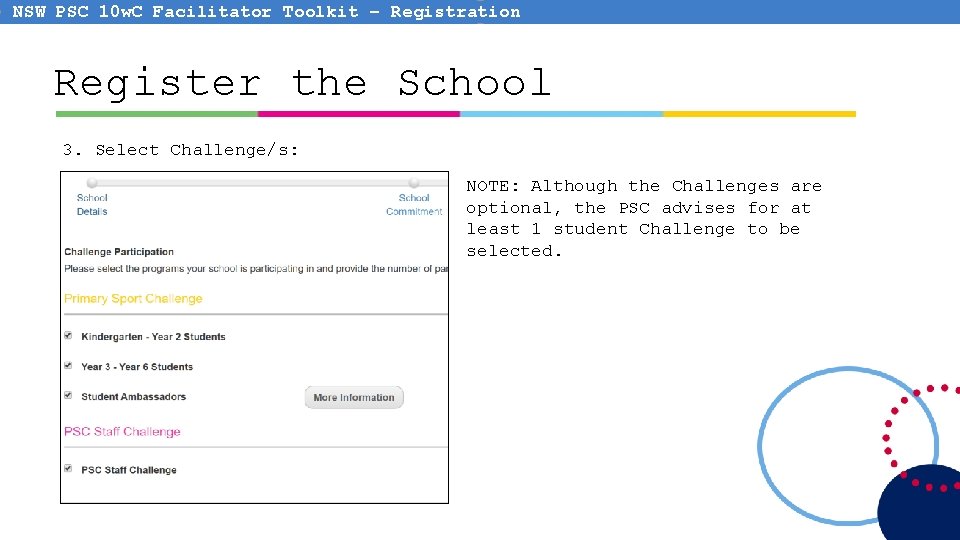
NSW PSC 10 w. C Facilitator Toolkit – Registration Register the School 3. Select Challenge/s: NOTE: Although the Challenges are optional, the PSC advises for at least 1 student Challenge to be selected.
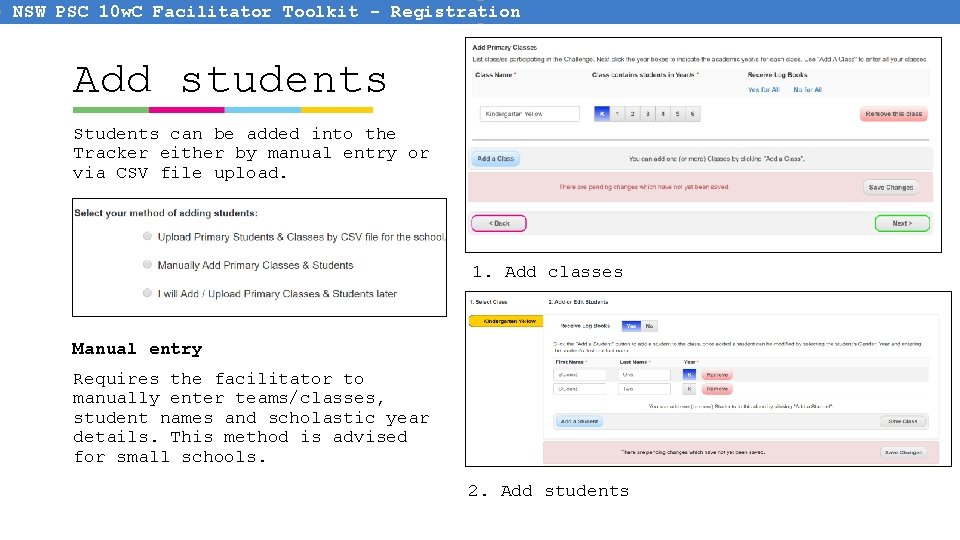
NSW PSC 10 w. C Facilitator Toolkit - Registration Add students Students can be added into the Tracker either by manual entry or via CSV file upload. 1. Add classes Manual entry Requires the facilitator to manually enter teams/classes, student names and scholastic year details. This method is advised for small schools. 2. Add students
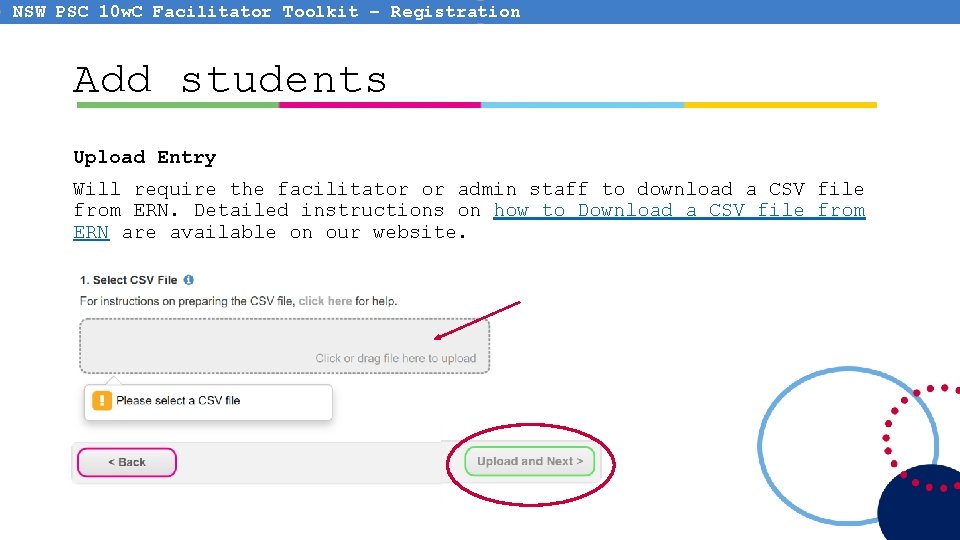
NSW PSC 10 w. C Facilitator Toolkit – Registration Add students Upload Entry Will require the facilitator or admin staff to download a CSV file from ERN. Detailed instructions on how to Download a CSV file from ERN are available on our website.
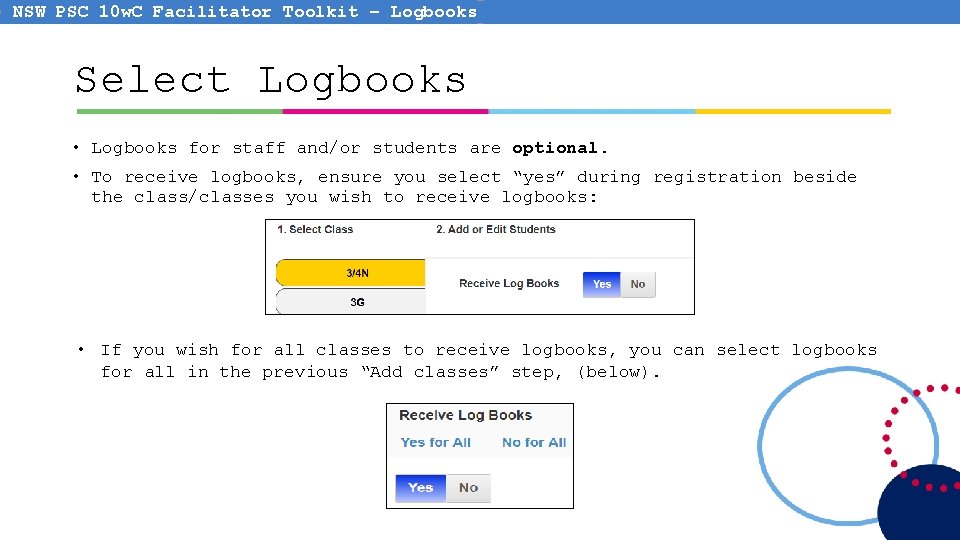
NSW PSC 10 w. C Facilitator Toolkit – Logbooks Select Logbooks • Logbooks for staff and/or students are optional. • To receive logbooks, ensure you select “yes” during registration beside the class/classes you wish to receive logbooks: • If you wish for all classes to receive logbooks, you can select logbooks for all in the previous “Add classes” step, (below).
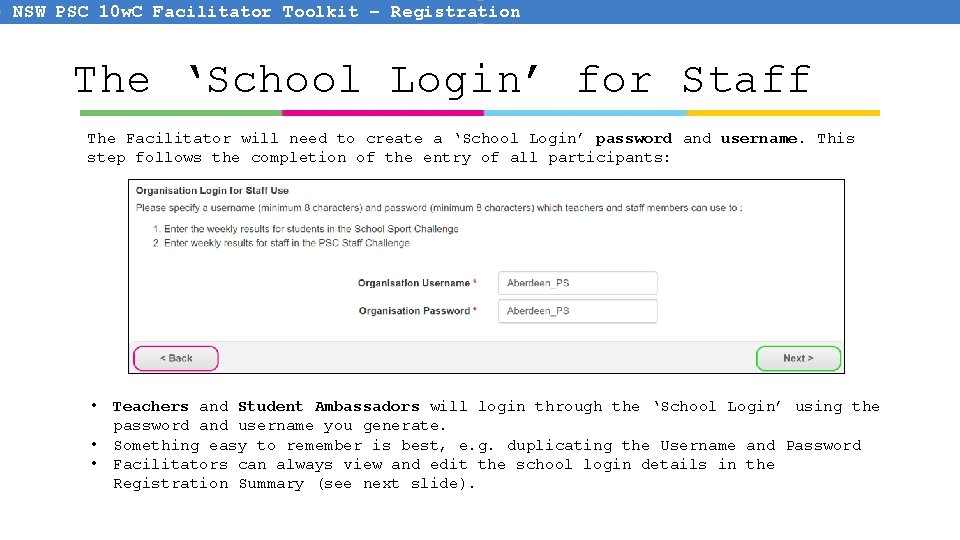
NSW PSC 10 w. C Facilitator Toolkit – Registration The ‘School Login’ for Staff The Facilitator will need to create a ‘School Login’ password and username. This step follows the completion of the entry of all participants: • • • Teachers and Student Ambassadors will login through the ‘School Login’ using the password and username you generate. Something easy to remember is best, e. g. duplicating the Username and Password Facilitators can always view and edit the school login details in the Registration Summary (see next slide).
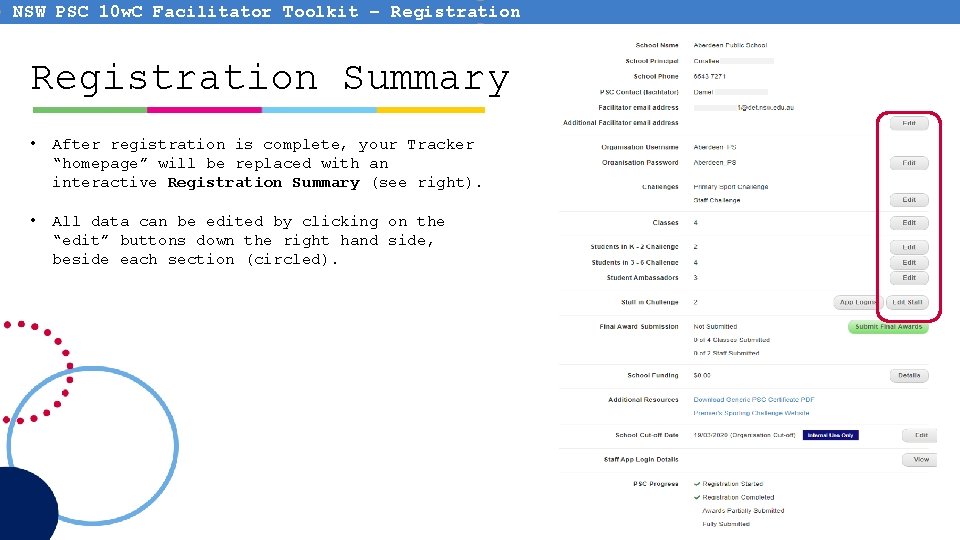
NSW PSC 10 w. C Facilitator Toolkit – Registration Summary • After registration is complete, your Tracker “homepage” will be replaced with an interactive Registration Summary (see right). • All data can be edited by clicking on the “edit” buttons down the right hand side, beside each section (circled).
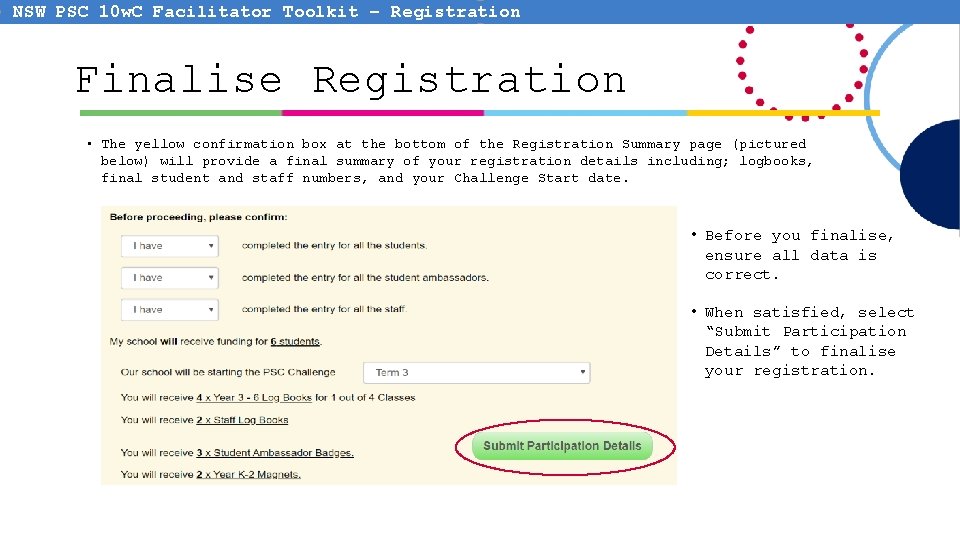
NSW PSC 10 w. C Facilitator Toolkit – Registration Finalise Registration • The yellow confirmation box at the bottom of the Registration Summary page (pictured below) will provide a final summary of your registration details including; logbooks, final student and staff numbers, and your Challenge Start date. • Before you finalise, ensure all data is correct. • When satisfied, select “Submit Participation Details” to finalise your registration.
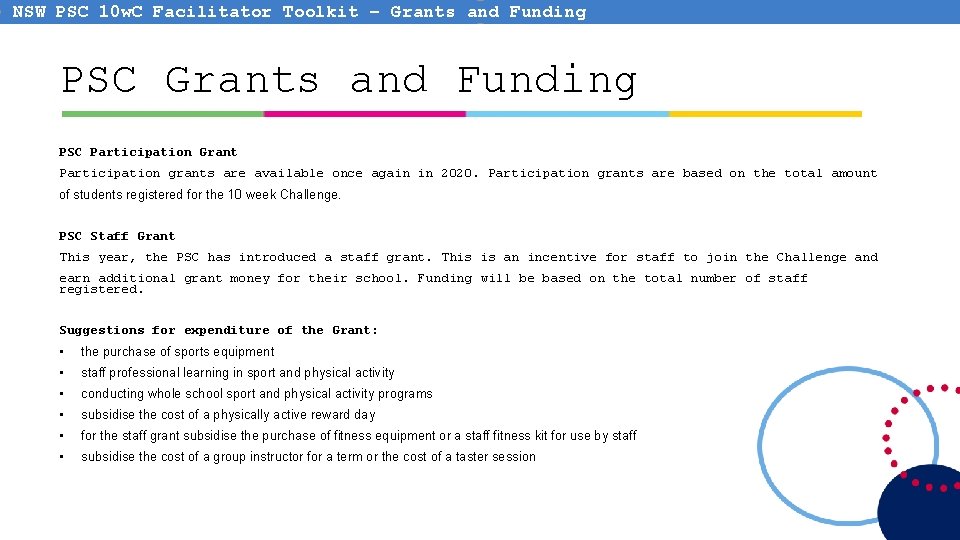
NSW PSC 10 w. C Facilitator Toolkit – Grants and Funding PSC Participation Grant Participation grants are available once again in 2020. Participation grants are based on the total amount of students registered for the 10 week Challenge. PSC Staff Grant This year, the PSC has introduced a staff grant. This is an incentive for staff to join the Challenge and earn additional grant money for their school. Funding will be based on the total number of staff registered. Suggestions for expenditure of the Grant: • the purchase of sports equipment • staff professional learning in sport and physical activity • conducting whole school sport and physical activity programs • subsidise the cost of a physically active reward day • for the staff grant subsidise the purchase of fitness equipment or a staff fitness kit for use by staff • subsidise the cost of a group instructor for a term or the cost of a taster session
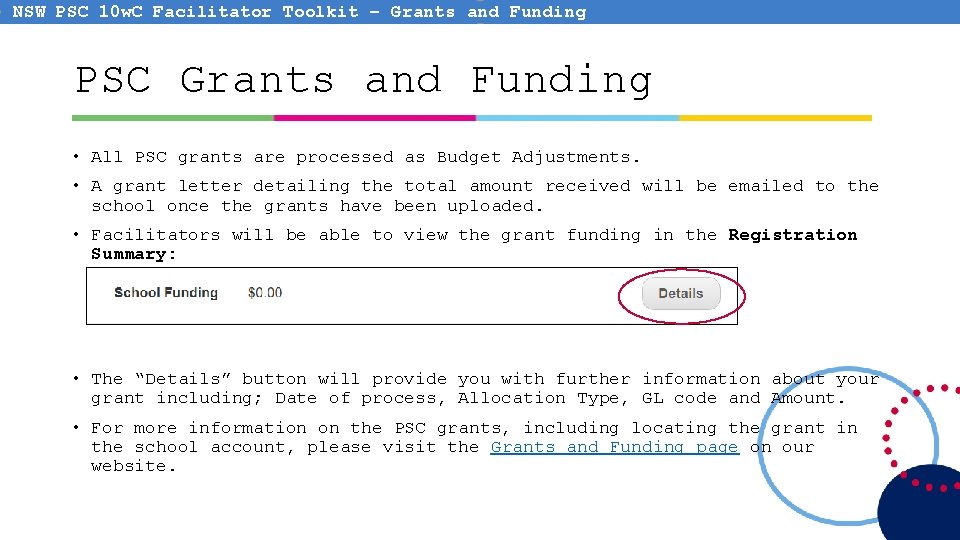
NSW PSC 10 w. C Facilitator Toolkit – Grants and Funding PSC Grants and Funding • All PSC grants are processed as Budget Adjustments. • A grant letter detailing the total amount received will be emailed to the school once the grants have been uploaded. • Facilitators will be able to view the grant funding in the Registration Summary: • The “Details” button will provide you with further information about your grant including; Date of process, Allocation Type, GL code and Amount. • For more information on the PSC grants, including locating the grant in the school account, please visit the Grants and Funding page on our website.
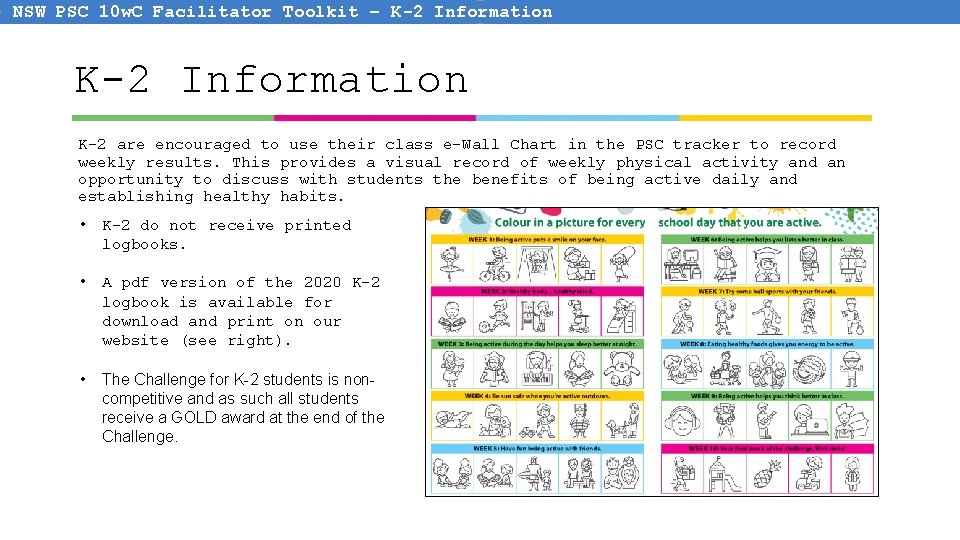
NSW PSC 10 w. C Facilitator Toolkit – K-2 Information K-2 are encouraged to use their class e-Wall Chart in the PSC tracker to record weekly results. This provides a visual record of weekly physical activity and an opportunity to discuss with students the benefits of being active daily and establishing healthy habits. • K-2 do not receive printed logbooks. • A pdf version of the 2020 K-2 logbook is available for download and print on our website (see right). • The Challenge for K-2 students is noncompetitive and as such all students receive a GOLD award at the end of the Challenge.
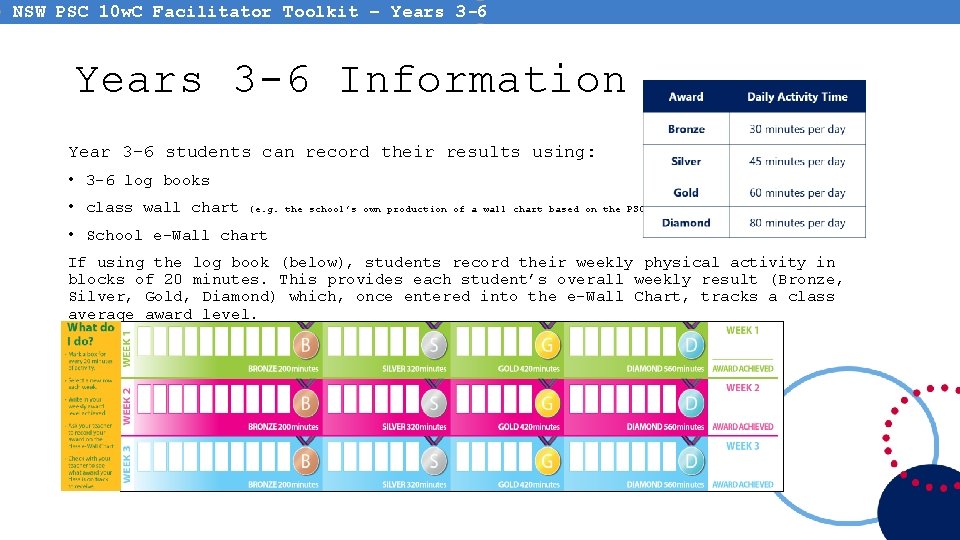
NSW PSC 10 w. C Facilitator Toolkit – Years 3 -6 Information Year 3 -6 students can record their results using: • 3 -6 log books • class wall chart (e. g. the school’s own production of a wall chart based on the PSC wall chart) • School e-Wall chart If using the log book (below), students record their weekly physical activity in blocks of 20 minutes. This provides each student’s overall weekly result (Bronze, Silver, Gold, Diamond) which, once entered into the e-Wall Chart, tracks a class average award level.
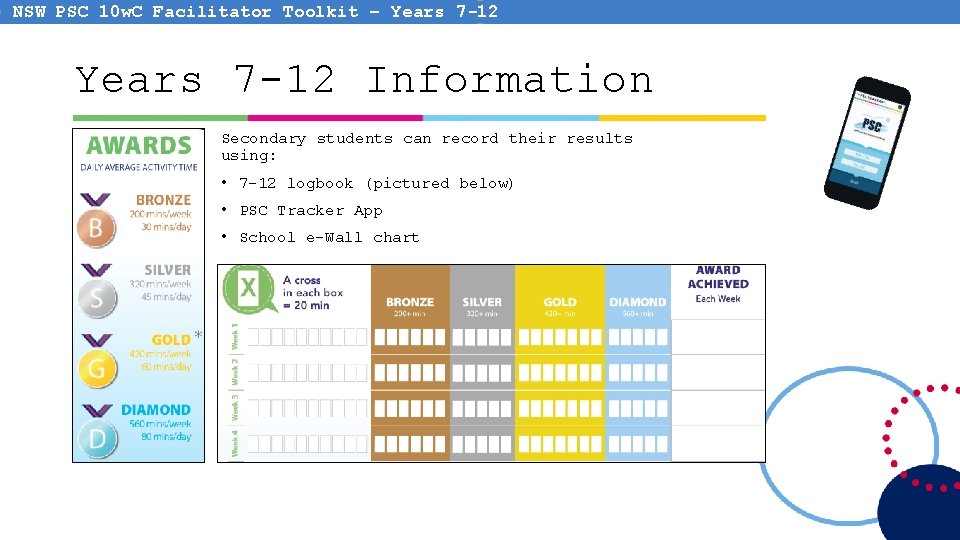
NSW PSC 10 w. C Facilitator Toolkit – Years 7 -12 Information Secondary students can record their results using: • 7 -12 logbook (pictured below) • PSC Tracker App • School e-Wall chart
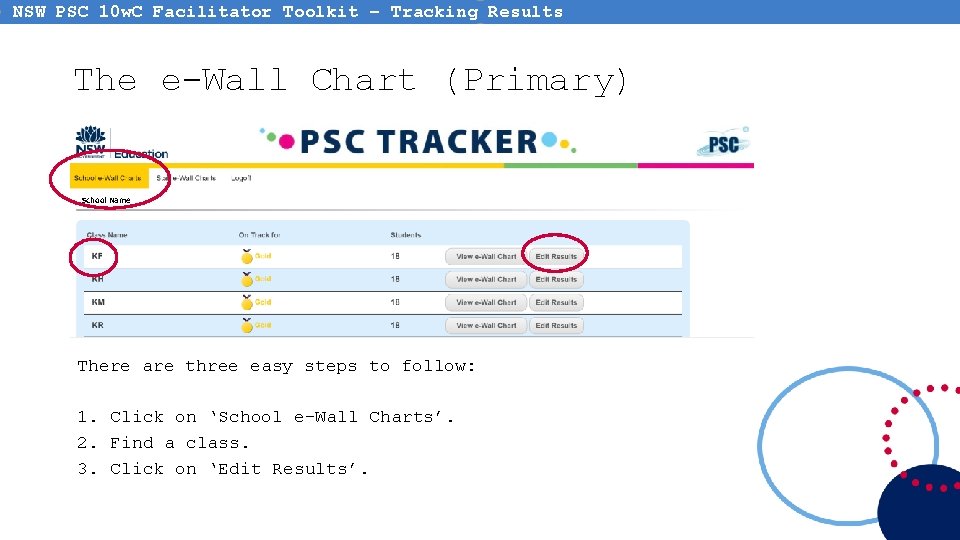
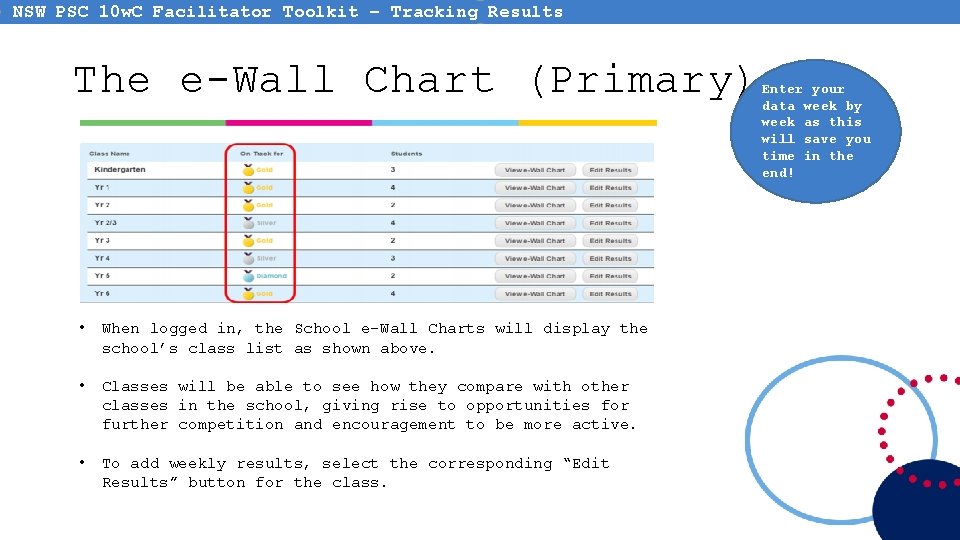
NSW PSC 10 w. C Facilitator Toolkit – Tracking Results The e-Wall Chart (Primary) School Name There are three easy steps to follow: 1. Click on ‘School e-Wall Charts’. 2. Find a class. 3. Click on ‘Edit Results’.
NSW PSC 10 w. C Facilitator Toolkit – Tracking Results The e-Wall Chart (Primary) • When logged in, the School e-Wall Charts will display the school’s class list as shown above. • Classes will be able to see how they compare with other classes in the school, giving rise to opportunities for further competition and encouragement to be more active. • To add weekly results, select the corresponding “Edit Results” button for the class. Enter your data week by week as this will save you time in the end!
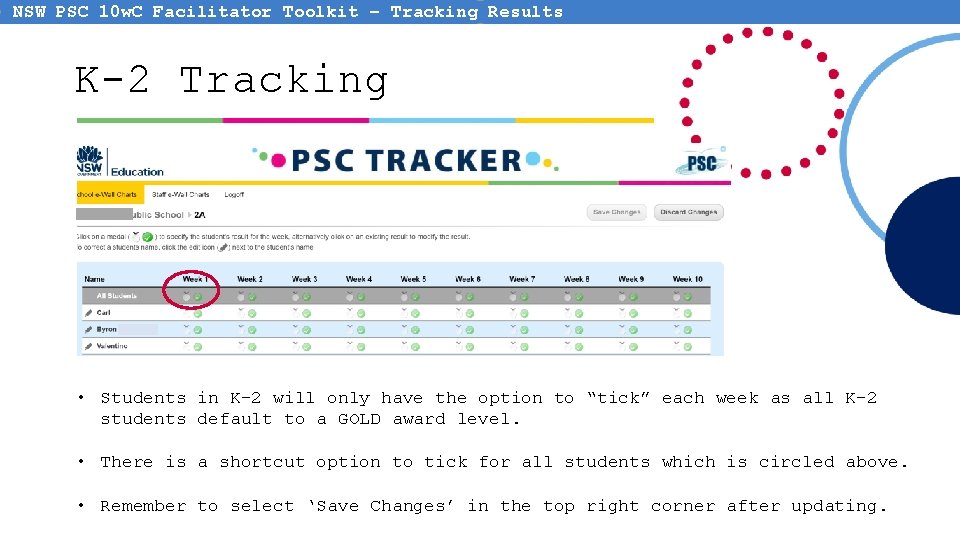
NSW PSC 10 w. C Facilitator Toolkit – Tracking Results K-2 Tracking • Students in K-2 will only have the option to “tick” each week as all K-2 students default to a GOLD award level. • There is a shortcut option to tick for all students which is circled above. • Remember to select ‘Save Changes’ in the top right corner after updating.
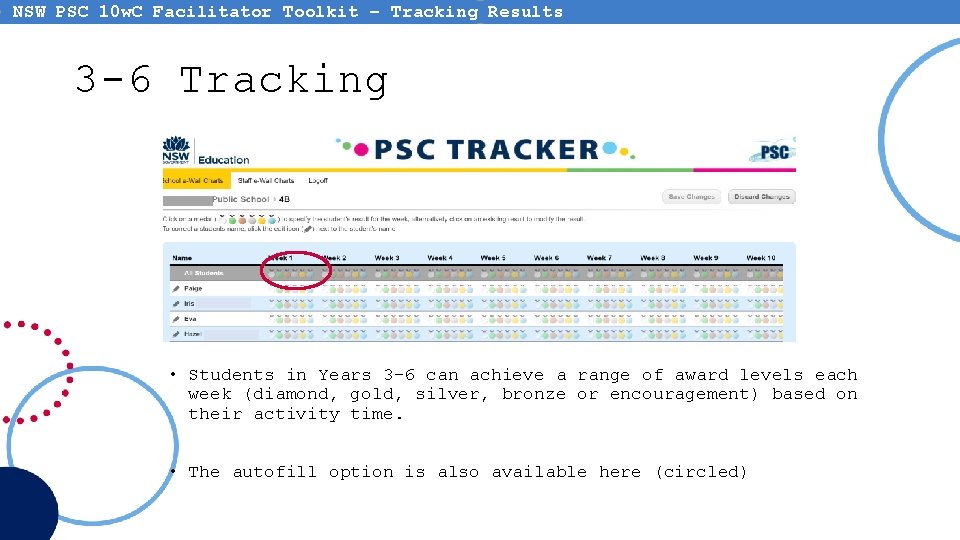
NSW PSC 10 w. C Facilitator Toolkit – Tracking Results 3 -6 Tracking • Students in Years 3– 6 can achieve a range of award levels each week (diamond, gold, silver, bronze or encouragement) based on their activity time. • The autofill option is also available here (circled)
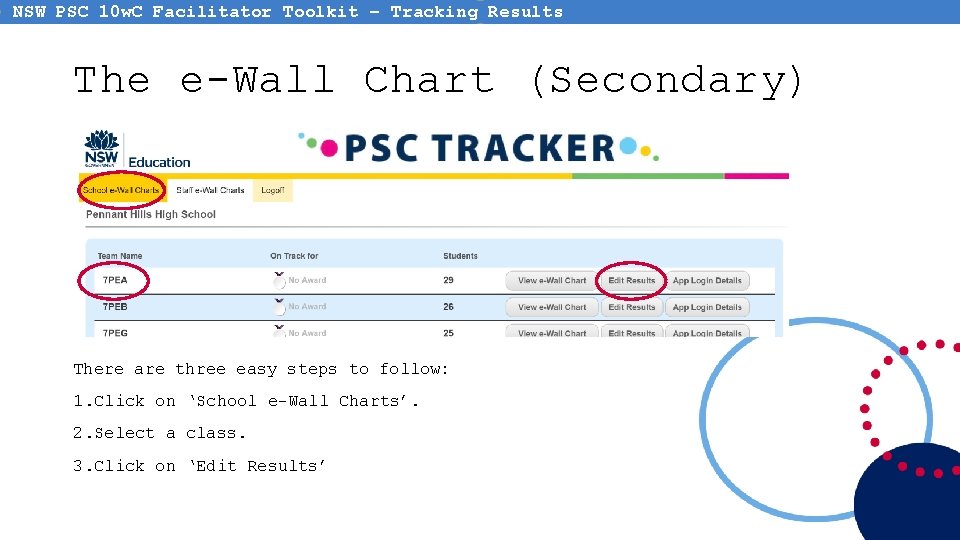
NSW PSC 10 w. C Facilitator Toolkit – Tracking Results The e-Wall Chart (Secondary) There are three easy steps to follow: 1. Click on ‘School e-Wall Charts’. 2. Select a class. 3. Click on ‘Edit Results’
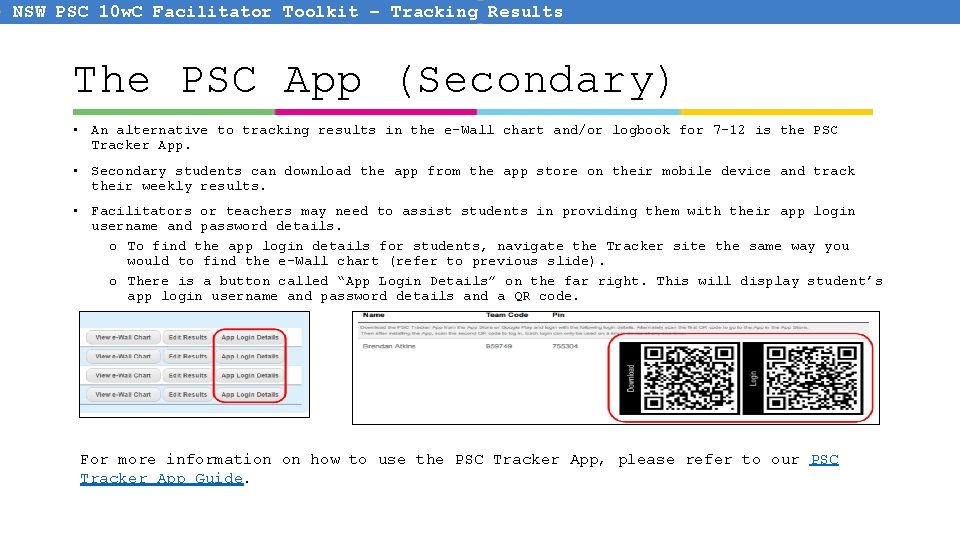
NSW PSC 10 w. C Facilitator Toolkit – Tracking Results The PSC App (Secondary) • An alternative to tracking results in the e-Wall chart and/or logbook for 7 -12 is the PSC Tracker App. • Secondary students can download the app from the app store on their mobile device and track their weekly results. • Facilitators or teachers may need to assist students in providing them with their app login username and password details. o To find the app login details for students, navigate the Tracker site the same way you would to find the e-Wall chart (refer to previous slide). o There is a button called “App Login Details” on the far right. This will display student’s app login username and password details and a QR code. For more information on how to use the PSC Tracker App, please refer to our PSC Tracker App Guide.
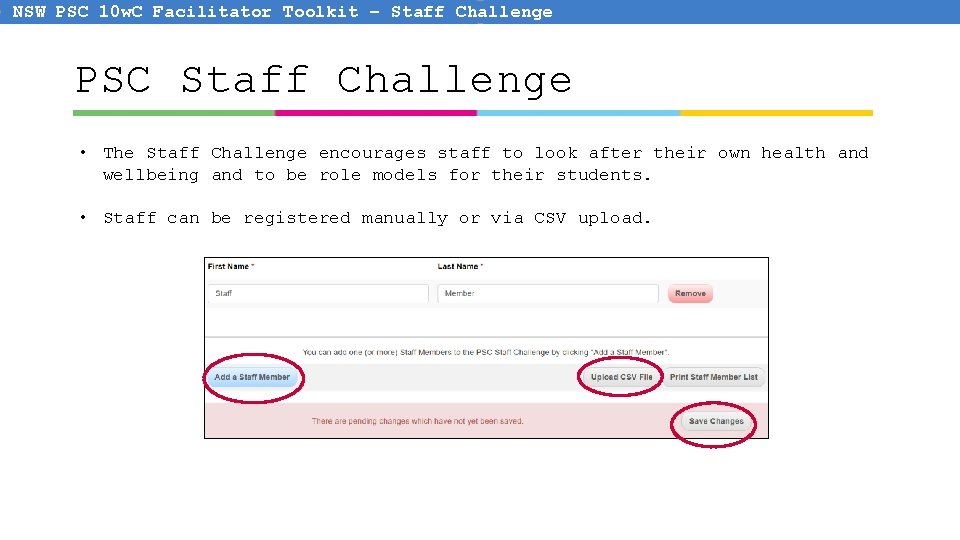
NSW PSC 10 w. C Facilitator Toolkit – Staff Challenge PSC Staff Challenge • The Staff Challenge encourages staff to look after their own health and wellbeing and to be role models for their students. • Staff can be registered manually or via CSV upload.
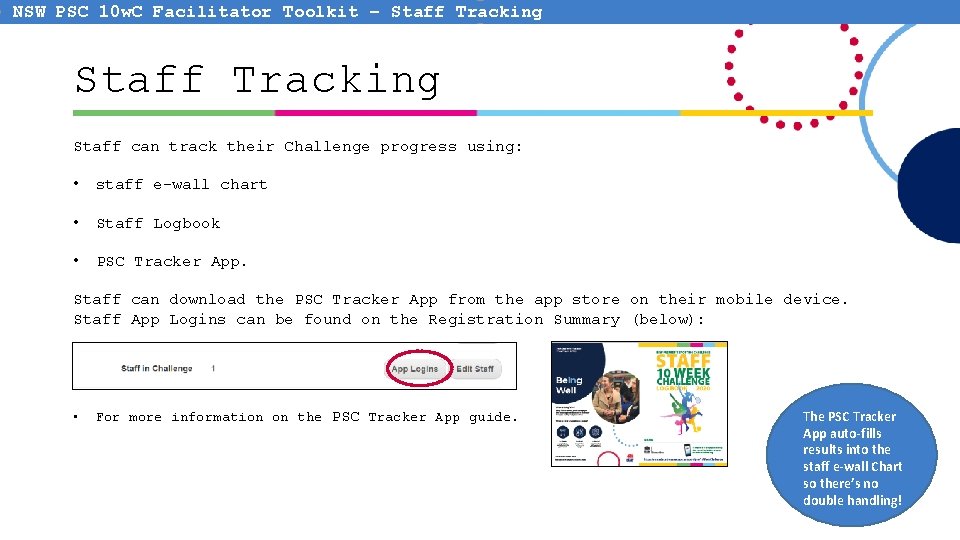
NSW PSC 10 w. C Facilitator Toolkit – Staff Tracking Staff can track their Challenge progress using: • staff e-wall chart • Staff Logbook • PSC Tracker App. Staff can download the PSC Tracker App from the app store on their mobile device. Staff App Logins can be found on the Registration Summary (below): • For more information on the PSC Tracker App guide. The PSC Tracker App auto-fills results into the staff e-wall Chart so there’s no double handling!
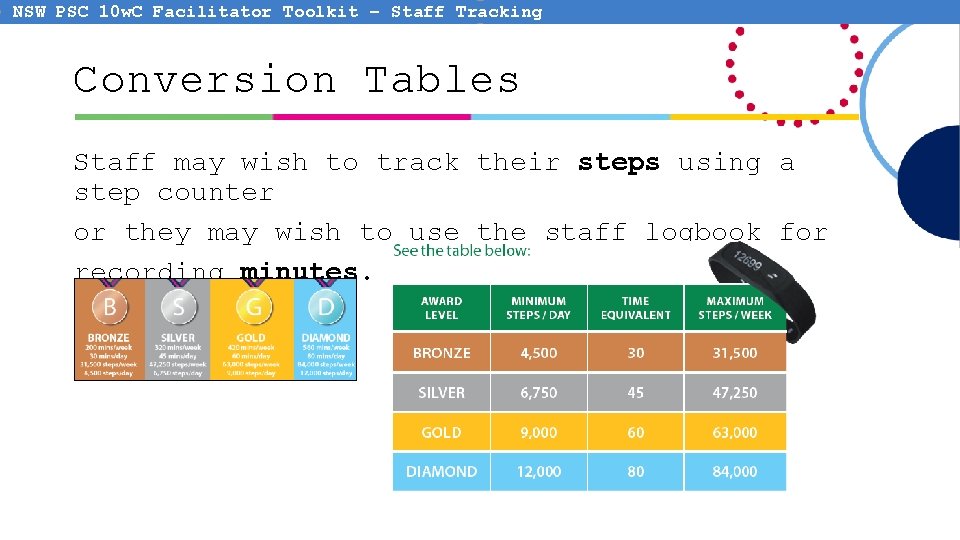
NSW PSC 10 w. C Facilitator Toolkit – Staff Tracking Conversion Tables Staff may wish to track their steps using a step counter or they may wish to use the staff logbook for recording minutes.
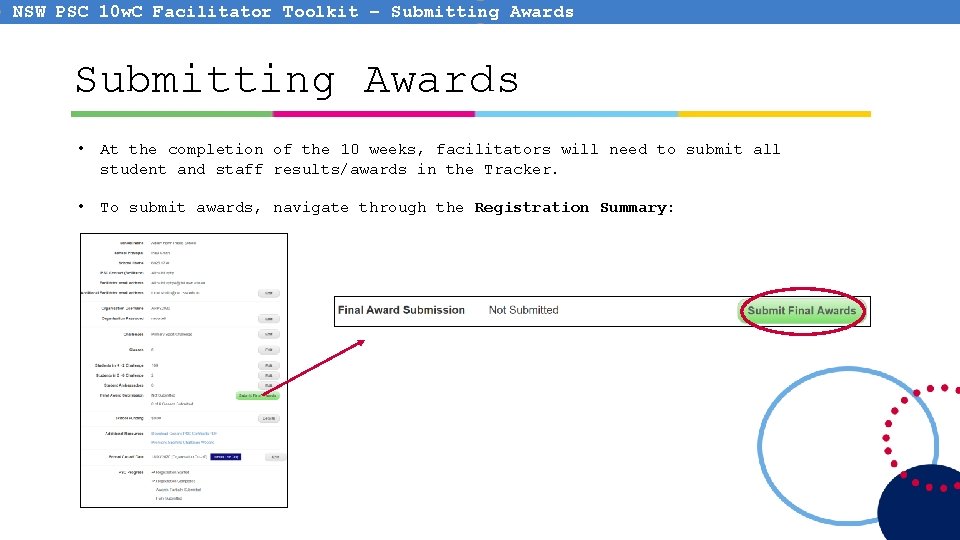
NSW PSC 10 w. C Facilitator Toolkit – Submitting Awards • At the completion of the 10 weeks, facilitators will need to submit all student and staff results/awards in the Tracker. • To submit awards, navigate through the Registration Summary:
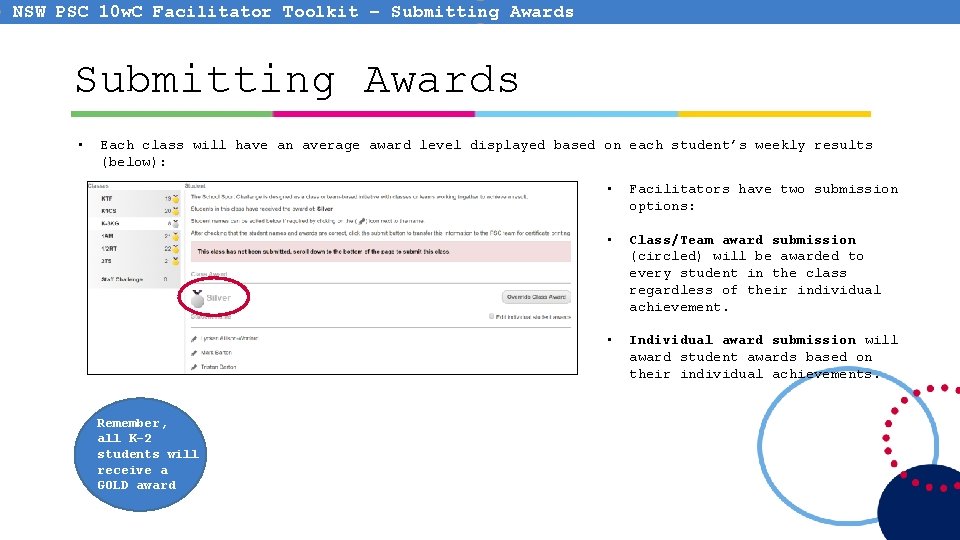
NSW PSC 10 w. C Facilitator Toolkit – Submitting Awards • Each class will have an average award level displayed based on each student’s weekly results (below): Remember, all K-2 students will receive a GOLD award • Facilitators have two submission options: • Class/Team award submission (circled) will be awarded to every student in the class regardless of their individual achievement. • Individual award submission will award student awards based on their individual achievements.
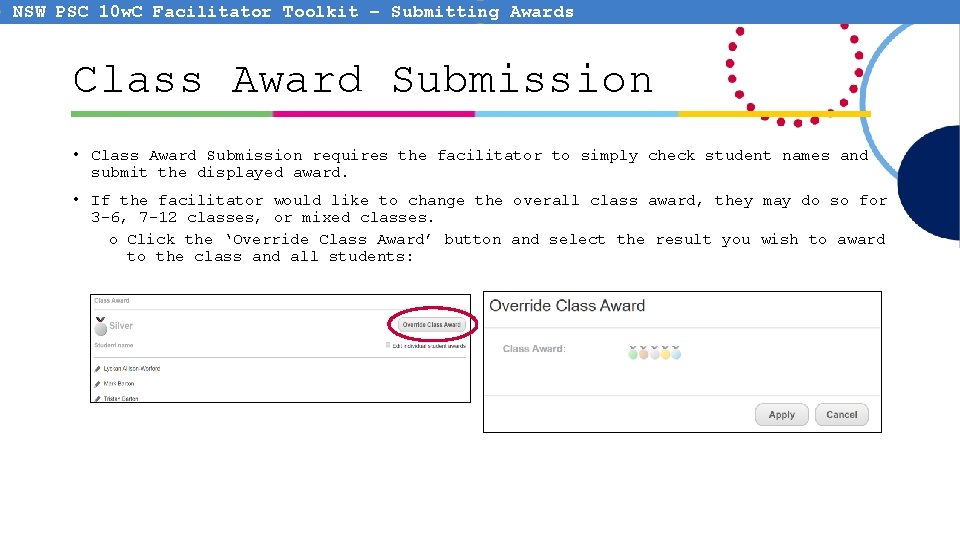
NSW PSC 10 w. C Facilitator Toolkit – Submitting Awards Class Award Submission • Class Award Submission requires the facilitator to simply check student names and submit the displayed award. • If the facilitator would like to change the overall class award, they may do so for 3 -6, 7 -12 classes, or mixed classes. o Click the ‘Override Class Award’ button and select the result you wish to award to the class and all students:
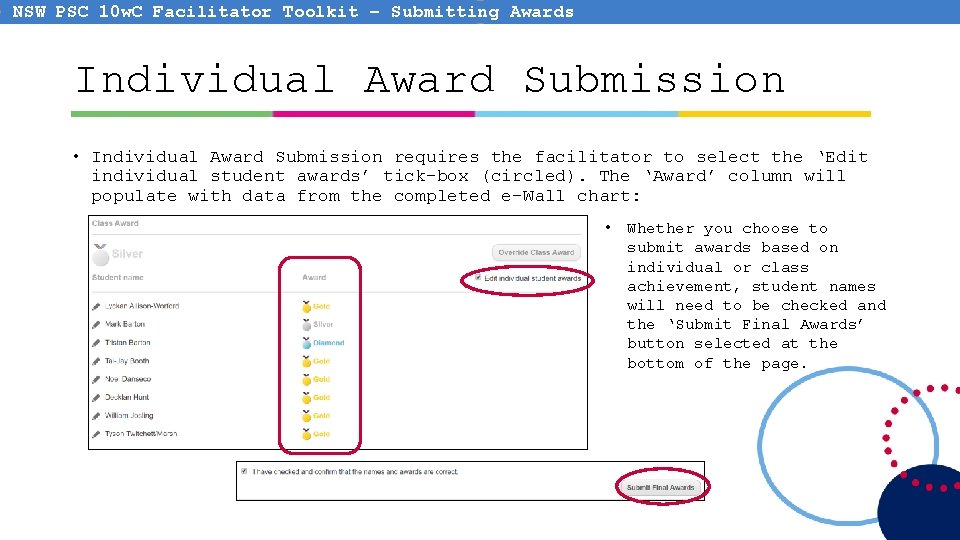
NSW PSC 10 w. C Facilitator Toolkit – Submitting Awards Individual Award Submission • Individual Award Submission requires the facilitator to select the ‘Edit individual student awards’ tick-box (circled). The ‘Award’ column will populate with data from the completed e-Wall chart: • Whether you choose to submit awards based on individual or class achievement, student names will need to be checked and the ‘Submit Final Awards’ button selected at the bottom of the page.
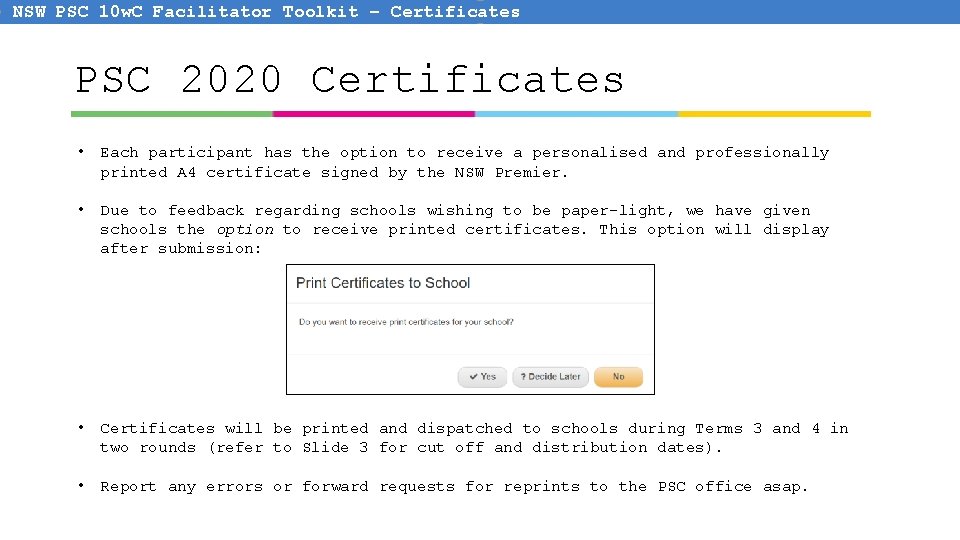
NSW PSC 10 w. C Facilitator Toolkit – Certificates PSC 2020 Certificates • Each participant has the option to receive a personalised and professionally printed A 4 certificate signed by the NSW Premier. • Due to feedback regarding schools wishing to be paper-light, we have given schools the option to receive printed certificates. This option will display after submission: • Certificates will be printed and dispatched to schools during Terms 3 and 4 in two rounds (refer to Slide 3 for cut off and distribution dates). • Report any errors or forward requests for reprints to the PSC office asap.
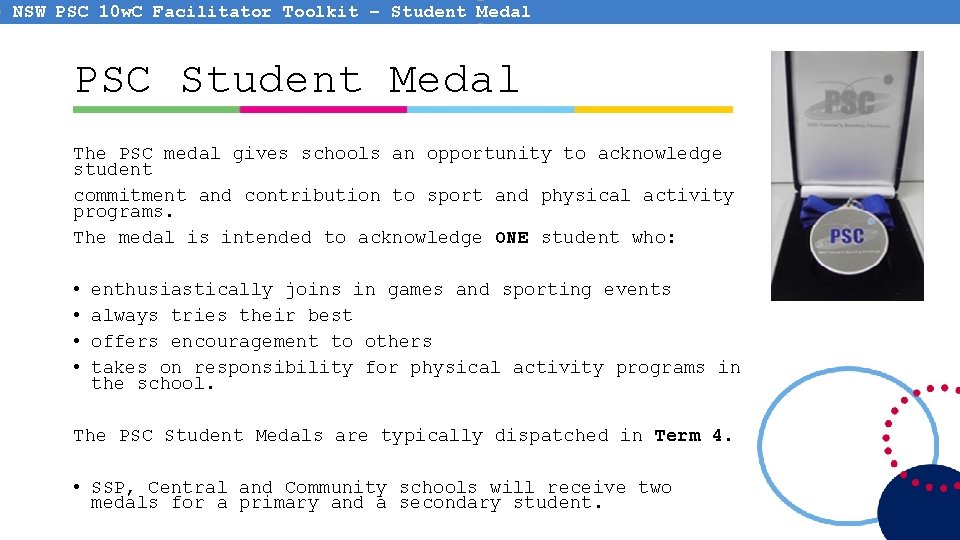
NSW PSC 10 w. C Facilitator Toolkit – Student Medal PSC Student Medal The PSC medal gives schools an opportunity to acknowledge student commitment and contribution to sport and physical activity programs. The medal is intended to acknowledge ONE student who: • • enthusiastically joins in games and sporting events always tries their best offers encouragement to others takes on responsibility for physical activity programs in the school. The PSC Student Medals are typically dispatched in Term 4. • SSP, Central and Community schools will receive two medals for a primary and a secondary student.
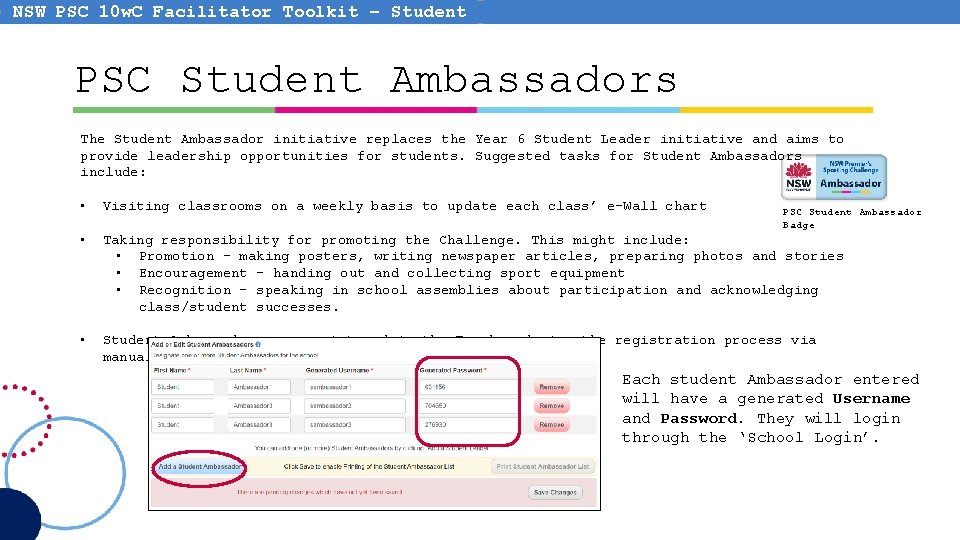
NSW PSC 10 w. C Facilitator Toolkit – Student Ambassadors PSC Student Ambassadors The Student Ambassador initiative replaces the Year 6 Student Leader initiative and aims to provide leadership opportunities for students. Suggested tasks for Student Ambassadors include: • Visiting classrooms on a weekly basis to update each class’ e-Wall chart • Taking responsibility for promoting the Challenge. This might include: • Promotion – making posters, writing newspaper articles, preparing photos and stories • Encouragement – handing out and collecting sport equipment • Recognition – speaking in school assemblies about participation and acknowledging class/student successes. • Student Ambassadors are registered in the Tracker during the registration process via manual entry: PSC Student Ambassador Badge Each student Ambassador entered will have a generated Username and Password. They will login through the ‘School Login’.
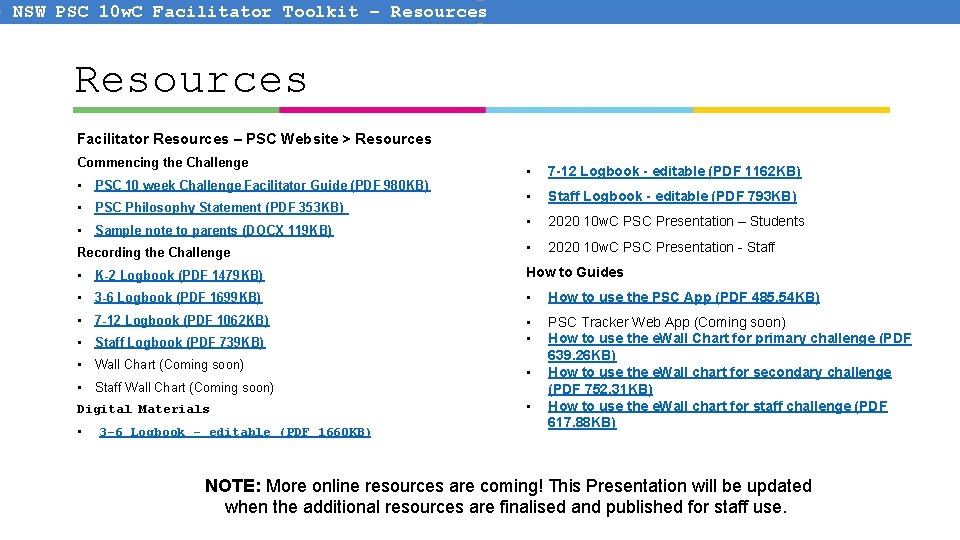
NSW PSC 10 w. C Facilitator Toolkit – Resources Facilitator Resources – PSC Website > Resources Commencing the Challenge • 7 -12 Logbook - editable (PDF 1162 KB) • Staff Logbook - editable (PDF 793 KB) • 2020 10 w. C PSC Presentation – Students Recording the Challenge • 2020 10 w. C PSC Presentation - Staff • K-2 Logbook (PDF 1479 KB) How to Guides • 3 -6 Logbook (PDF 1699 KB) • How to use the PSC App (PDF 485. 54 KB) • 7 -12 Logbook (PDF 1062 KB) • • PSC Tracker Web App (Coming soon) How to use the e. Wall Chart for primary challenge (PDF 639. 26 KB) How to use the e. Wall chart for secondary challenge (PDF 752. 31 KB) How to use the e. Wall chart for staff challenge (PDF 617. 88 KB) • PSC 10 week Challenge Facilitator Guide (PDF 980 KB) • PSC Philosophy Statement (PDF 353 KB) • Sample note to parents (DOCX 119 KB) • Staff Logbook (PDF 739 KB) • Wall Chart (Coming soon) • Staff Wall Chart (Coming soon) Digital Materials • 3 -6 Logbook - editable (PDF 1660 KB) • • NOTE: More online resources are coming! This Presentation will be updated when the additional resources are finalised and published for staff use.