Final Plans for LAO Entry Redesign Marcella Simon

- Slides: 27
Final Plans for LAO Entry Redesign Marcella Simon Lisa J. Stedge
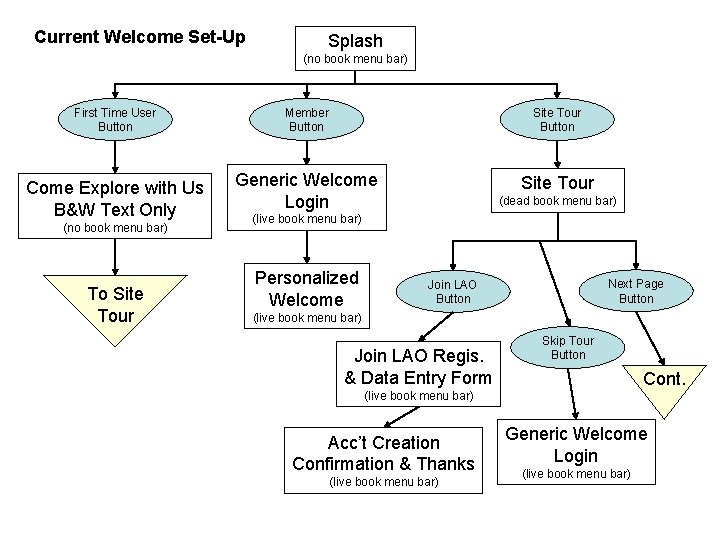
Current Welcome Set-Up Splash (no book menu bar) First Time User Button Come Explore with Us B&W Text Only (no book menu bar) To Site Tour Member Button Site Tour Button Generic Welcome Login Site Tour (dead book menu bar) (live book menu bar) Personalized Welcome Next Page Button Join LAO Button (live book menu bar) Join LAO Regis. & Data Entry Form Skip Tour Button Cont. (live book menu bar) Acc’t Creation Confirmation & Thanks (live book menu bar) Generic Welcome Login (live book menu bar)
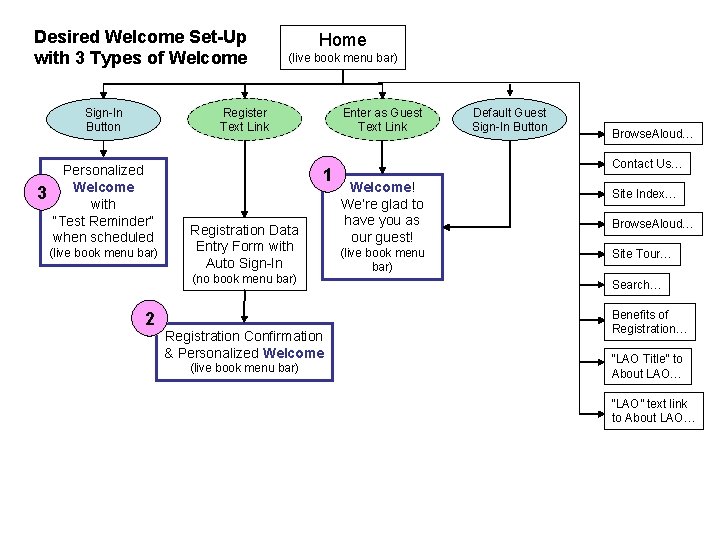
Desired Welcome Set-Up with 3 Types of Welcome Sign-In Button 3 Home (live book menu bar) Register Text Link Personalized Welcome with “Test Reminder” when scheduled (live book menu bar) Enter as Guest Text Link 1 Registration Data Entry Form with Auto Sign-In (no book menu bar) 2 Registration Confirmation & Personalized Welcome (live book menu bar) Default Guest Sign-In Button Browse. Aloud… Contact Us… Welcome! We’re glad to have you as our guest! (live book menu bar) Site Index… Browse. Aloud… Site Tour… Search… Benefits of Registration… “LAO Title” to About LAO… “LAO” text link to About LAO…
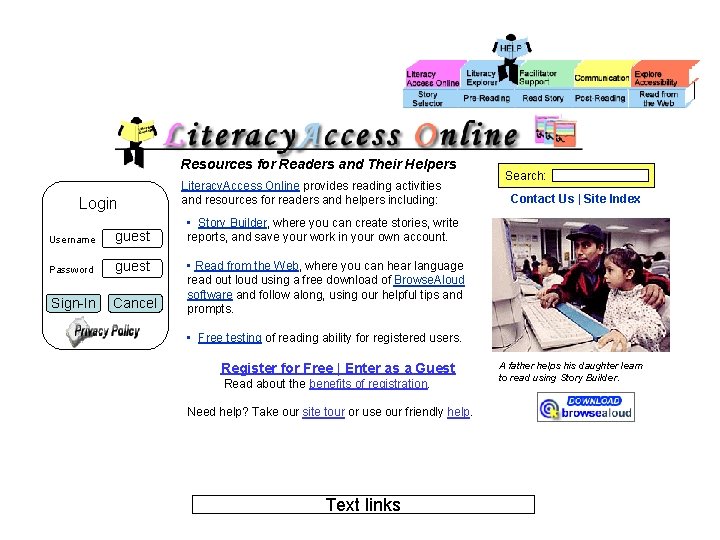
Resources for Readers and Their Helpers Login Username guest Password guest Sign-In Cancel Literacy. Access Online provides reading activities and resources for readers and helpers including: Search: Contact Us | Site Index • Story Builder, where you can create stories, write reports, and save your work in your own account. • Read from the Web, where you can hear language read out loud using a free download of Browse. Aloud software and follow along, using our helpful tips and prompts. • Free testing of reading ability for registered users. Register for Free | Enter as a Guest Read about the benefits of registration. Need help? Take our site tour or use our friendly help. Text links A father helps his daughter learn to read using Story Builder.
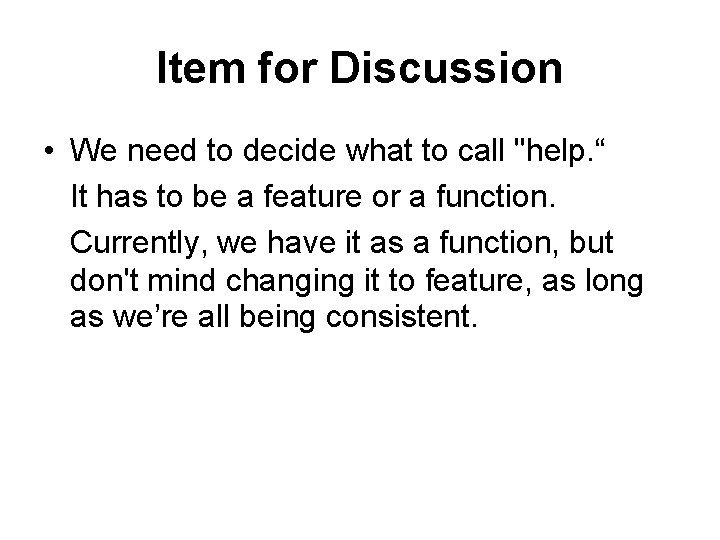
Item for Discussion • We need to decide what to call "help. “ It has to be a feature or a function. Currently, we have it as a function, but don't mind changing it to feature, as long as we’re all being consistent.
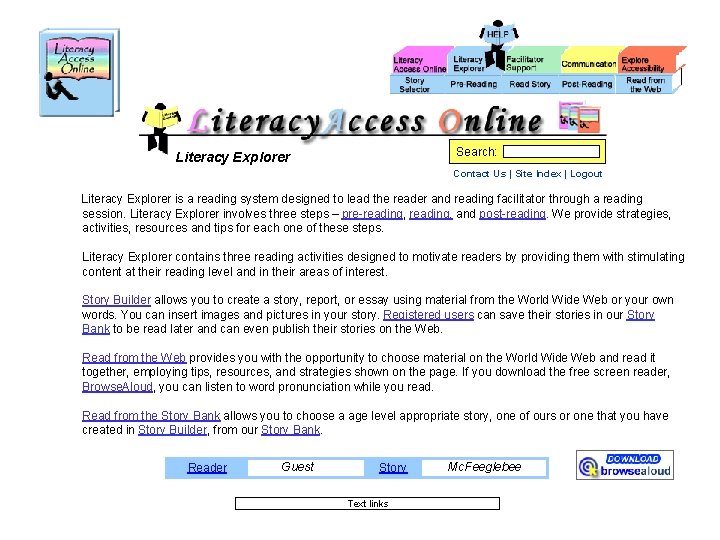
Search: Literacy Explorer Contact Us | Site Index | Logout Literacy Explorer is a reading system designed to lead the reader and reading facilitator through a reading session. Literacy Explorer involves three steps – pre-reading, and post-reading. We provide strategies, activities, resources and tips for each one of these steps. Literacy Explorer contains three reading activities designed to motivate readers by providing them with stimulating content at their reading level and in their areas of interest. Story Builder allows you to create a story, report, or essay using material from the World Wide Web or your own words. You can insert images and pictures in your story. Registered users can save their stories in our Story Bank to be read later and can even publish their stories on the Web. Read from the Web provides you with the opportunity to choose material on the World Wide Web and read it together, employing tips, resources, and strategies shown on the page. If you download the free screen reader, Browse. Aloud, you can listen to word pronunciation while you read. Read from the Story Bank allows you to choose a age level appropriate story, one of ours or one that you have created in Story Builder, from our Story Bank. Reader Guest Story Text links Mc. Feeglebee
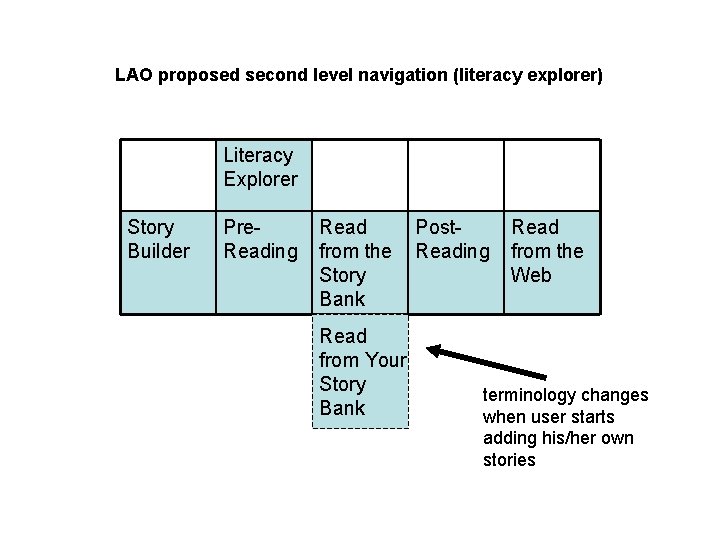
LAO proposed second level navigation (literacy explorer) Literacy Explorer Story Builder Pre- Reading Read Post- from the Reading Story Bank Read from Your Story Bank Read from the Web terminology changes when user starts adding his/her own stories
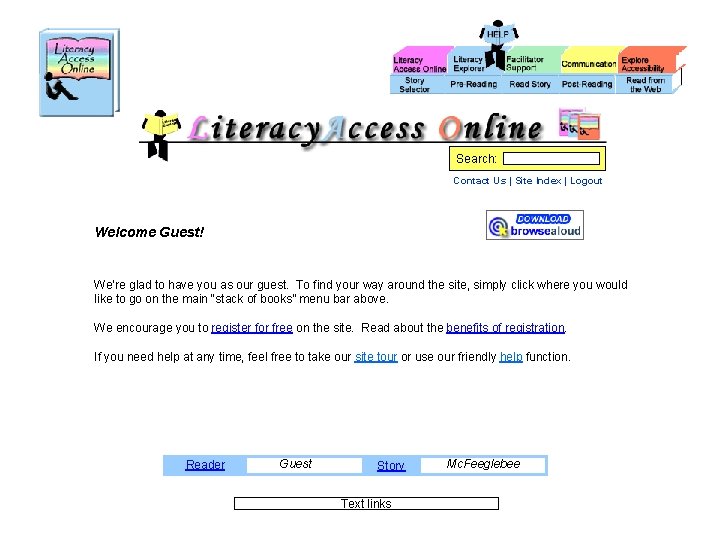
Search: Contact Us | Site Index | Logout Welcome Guest! We’re glad to have you as our guest. To find your way around the site, simply click where you would like to go on the main “stack of books” menu bar above. We encourage you to register for free on the site. Read about the benefits of registration. If you need help at any time, feel free to take our site tour or use our friendly help function. Reader Guest Story Text links Mc. Feeglebee
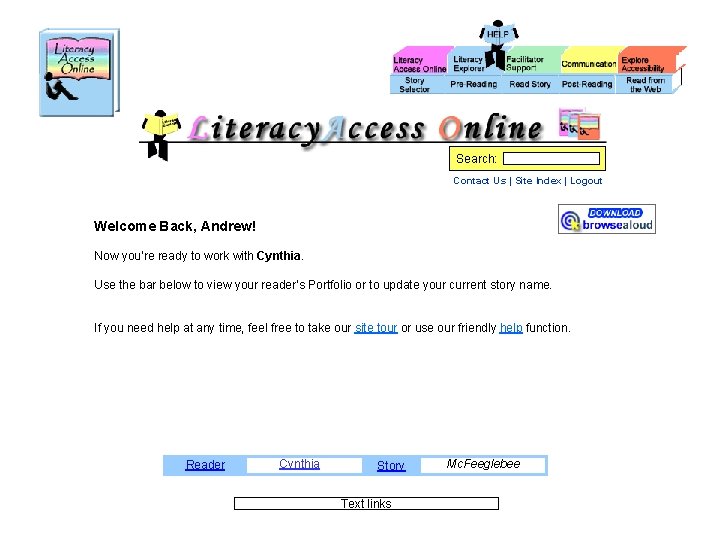
Search: Contact Us | Site Index | Logout Welcome Back, Andrew! Now you’re ready to work with Cynthia. Use the bar below to view your reader’s Portfolio or to update your current story name. If you need help at any time, feel free to take our site tour or use our friendly help function. Reader Cynthia Story Text links Mc. Feeglebee
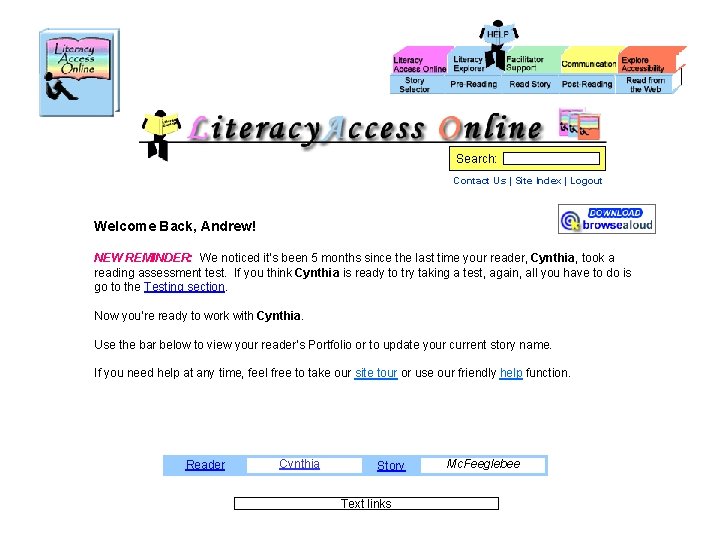
Search: Contact Us | Site Index | Logout Welcome Back, Andrew! NEW REMINDER: We noticed it’s been 5 months since the last time your reader, Cynthia, took a reading assessment test. If you think Cynthia is ready to try taking a test, again, all you have to do is go to the Testing section. Now you’re ready to work with Cynthia. Use the bar below to view your reader’s Portfolio or to update your current story name. If you need help at any time, feel free to take our site tour or use our friendly help function. Reader Cynthia Story Text links Mc. Feeglebee
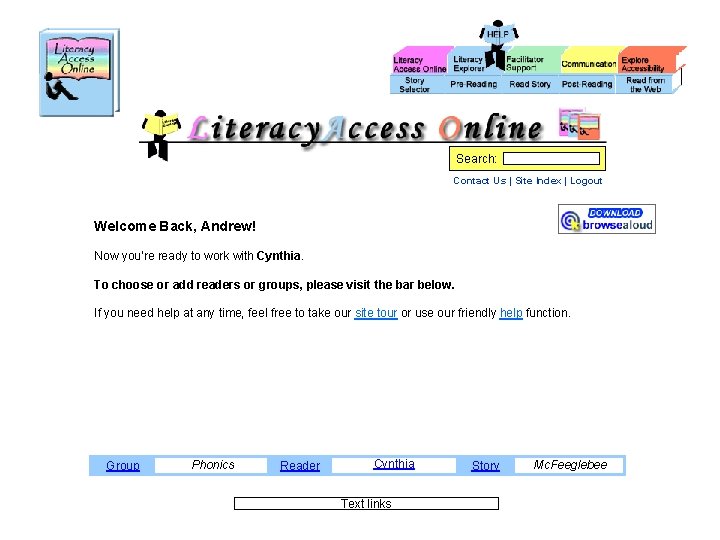
Search: Contact Us | Site Index | Logout Welcome Back, Andrew! Now you’re ready to work with Cynthia. To choose or add readers or groups, please visit the bar below. If you need help at any time, feel free to take our site tour or use our friendly help function. Group Phonics Reader Cynthia Text links Story Mc. Feeglebee
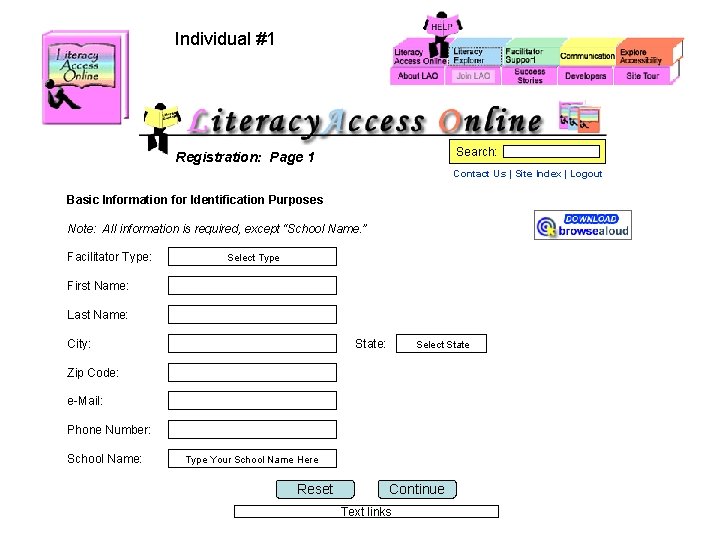
Individual #1 Search: Registration: Page 1 Contact Us | Site Index | Logout Basic Information for Identification Purposes Note: All information is required, except “School Name. ” Facilitator Type: Select Type First Name: Last Name: City: State: Select State Zip Code: e-Mail: Phone Number: School Name: Type Your School Name Here Reset Continue Text links
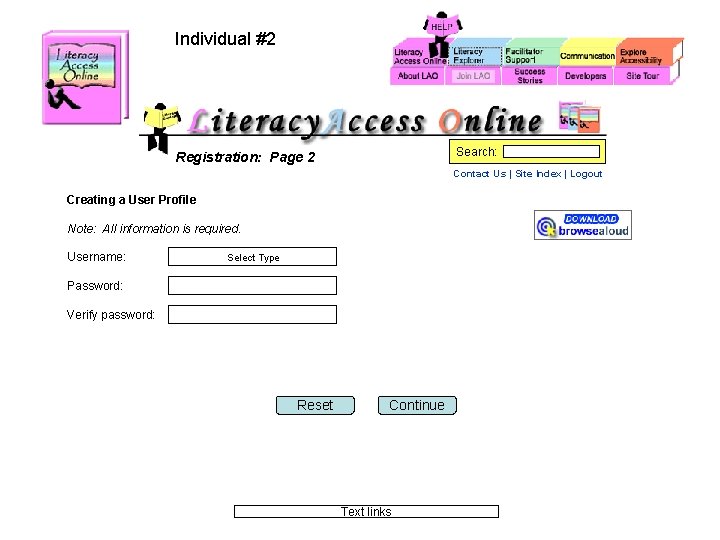
Individual #2 Search: Registration: Page 2 Contact Us | Site Index | Logout Creating a User Profile Note: All information is required. Username: Select Type Password: Verify password: Reset Continue Text links
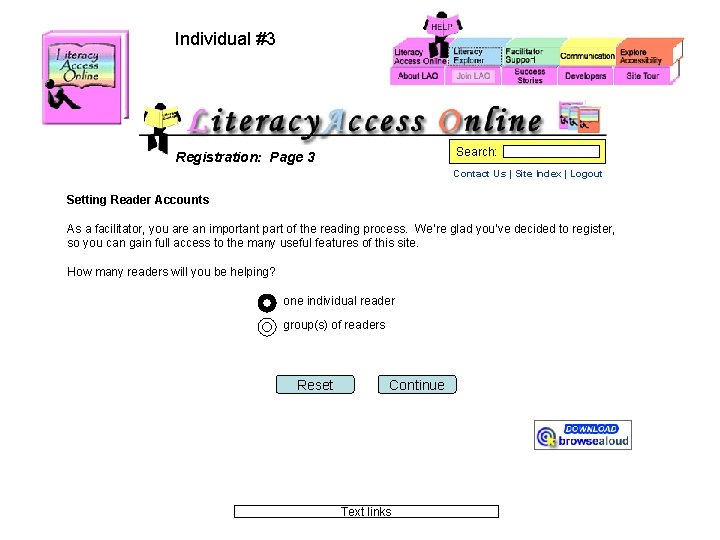
Individual #3 Search: Registration: Page 3 Contact Us | Site Index | Logout Setting Reader Accounts As a facilitator, you are an important part of the reading process. We’re glad you’ve decided to register, so you can gain full access to the many useful features of this site. How many readers will you be helping? one individual reader group(s) of readers Reset Continue Text links
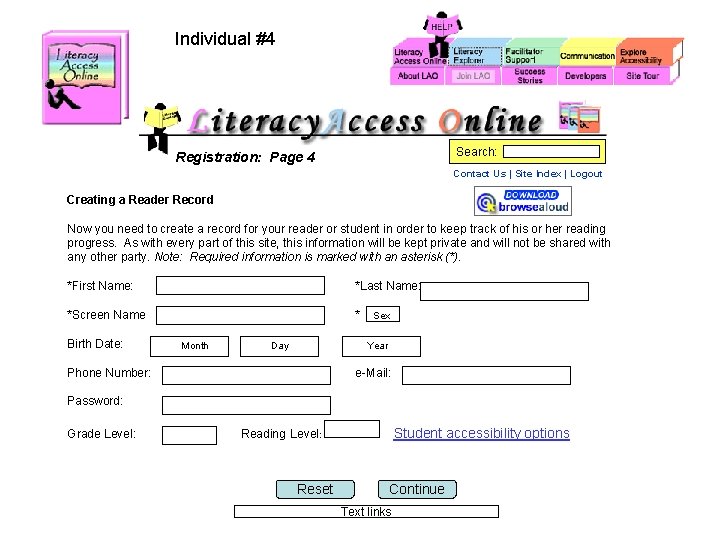
Individual #4 Search: Registration: Page 4 Contact Us | Site Index | Logout Creating a Reader Record Now you need to create a record for your reader or student in order to keep track of his or her reading progress. As with every part of this site, this information will be kept private and will not be shared with any other party. Note: Required information is marked with an asterisk (*). *First Name: *Last Name: *Screen Name * Birth Date: Month Sex Year Day Phone Number: e-Mail: Password: Grade Level: Reading Level: Student accessibility options Reset Continue Text links
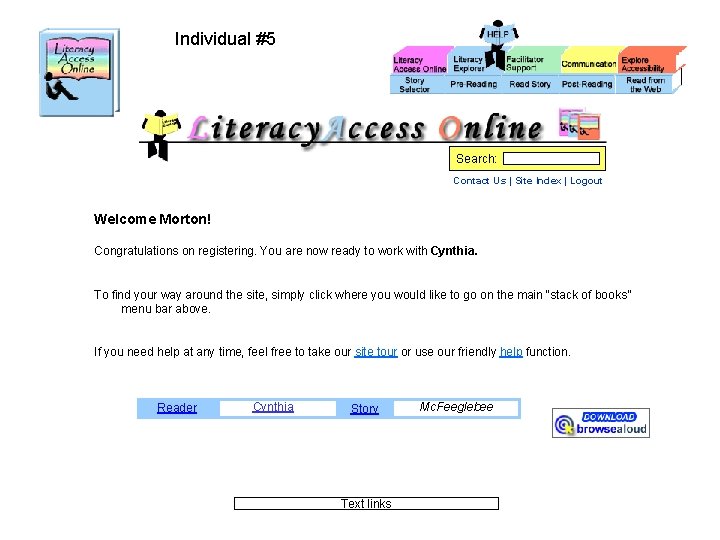
Individual #5 Search: Contact Us | Site Index | Logout Welcome Morton! Congratulations on registering. You are now ready to work with Cynthia. To find your way around the site, simply click where you would like to go on the main “stack of books” menu bar above. If you need help at any time, feel free to take our site tour or use our friendly help function. Reader Cynthia Story Text links Mc. Feeglebee
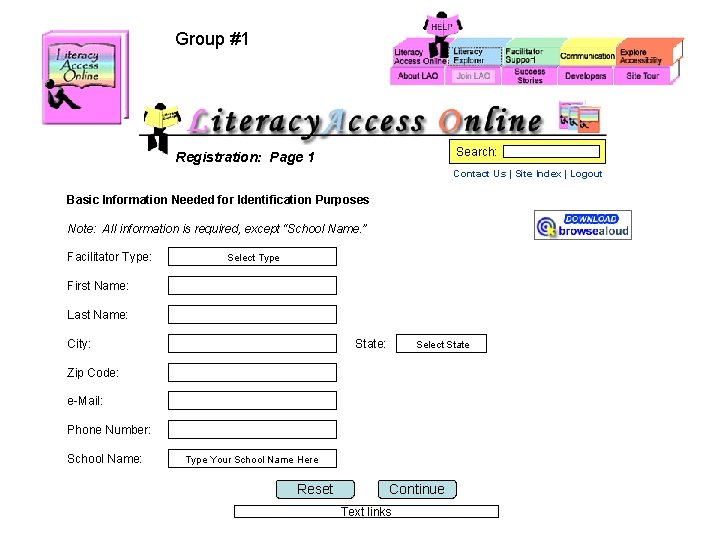
Group #1 Search: Registration: Page 1 Contact Us | Site Index | Logout Basic Information Needed for Identification Purposes Note: All information is required, except “School Name. ” Facilitator Type: Select Type First Name: Last Name: City: State: Select State Zip Code: e-Mail: Phone Number: School Name: Type Your School Name Here Reset Continue Text links
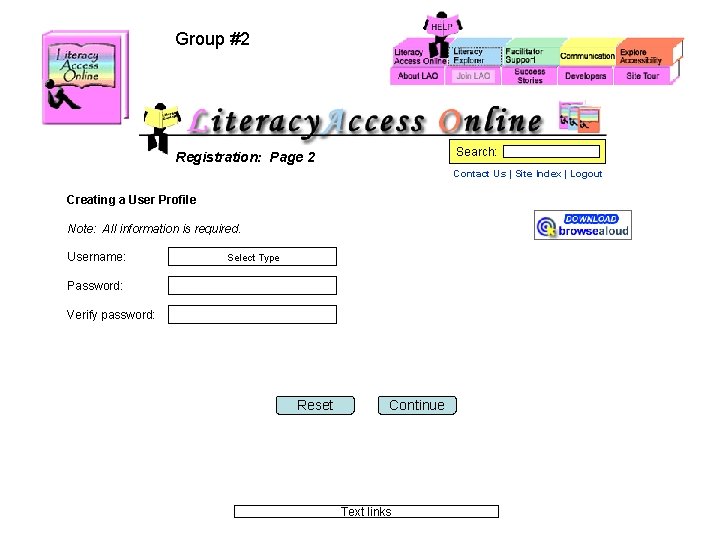
Group #2 Search: Registration: Page 2 Contact Us | Site Index | Logout Creating a User Profile Note: All information is required. Username: Select Type Password: Verify password: Reset Continue Text links
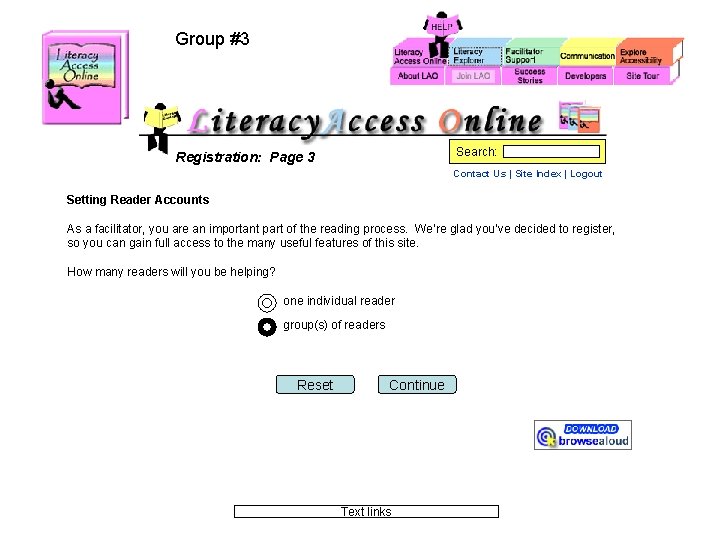
Group #3 Search: Registration: Page 3 Contact Us | Site Index | Logout Setting Reader Accounts As a facilitator, you are an important part of the reading process. We’re glad you’ve decided to register, so you can gain full access to the many useful features of this site. How many readers will you be helping? one individual reader group(s) of readers Reset Continue Text links
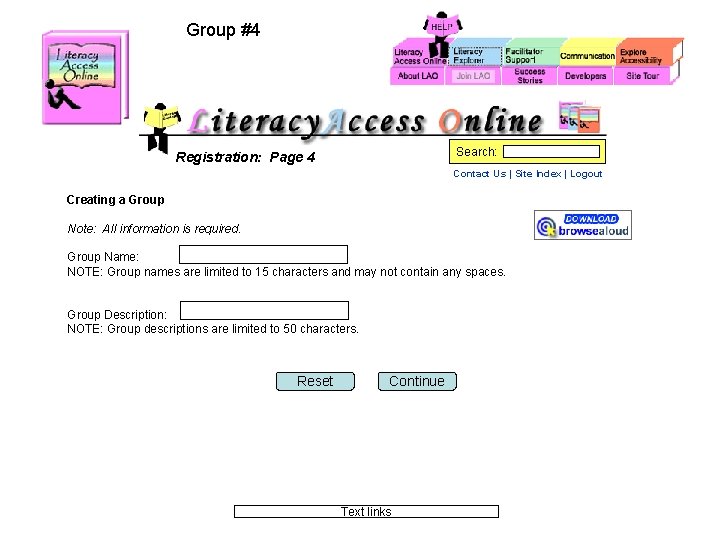
Group #4 Search: Registration: Page 4 Contact Us | Site Index | Logout Creating a Group Note: All information is required. Group Name: NOTE: Group names are limited to 15 characters and may not contain any spaces. Group Description: NOTE: Group descriptions are limited to 50 characters. Reset Continue Text links
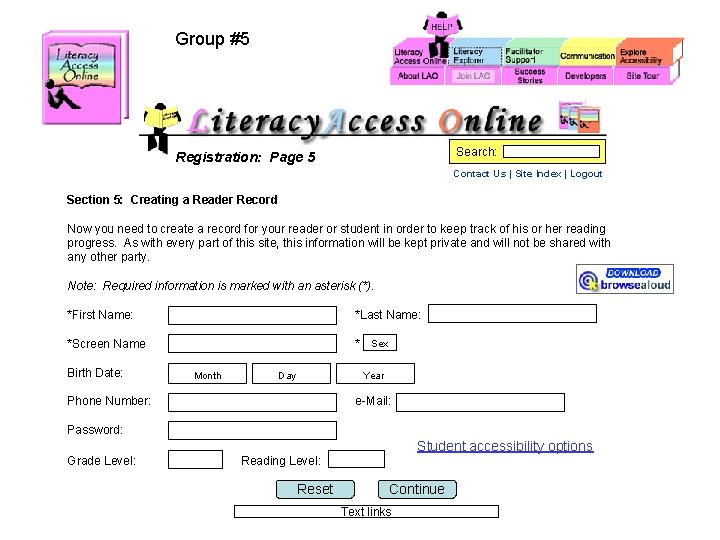
Group #5 Search: Registration: Page 5 Contact Us | Site Index | Logout Section 5: Creating a Reader Record Now you need to create a record for your reader or student in order to keep track of his or her reading progress. As with every part of this site, this information will be kept private and will not be shared with any other party. Note: Required information is marked with an asterisk (*). *First Name: *Last Name: *Screen Name * Sex Birth Date: Month Year Day Phone Number: e-Mail: Password: Student accessibility options Grade Level: Reading Level: Reset Continue Text links
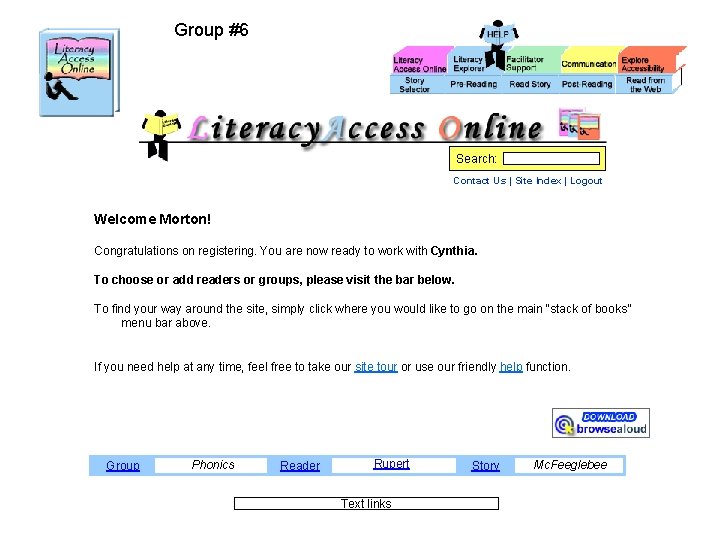
Group #6 Search: Contact Us | Site Index | Logout Welcome Morton! Congratulations on registering. You are now ready to work with Cynthia. To choose or add readers or groups, please visit the bar below. To find your way around the site, simply click where you would like to go on the main “stack of books” menu bar above. If you need help at any time, feel free to take our site tour or use our friendly help function. Group Phonics Reader Rupert Text links Story Mc. Feeglebee
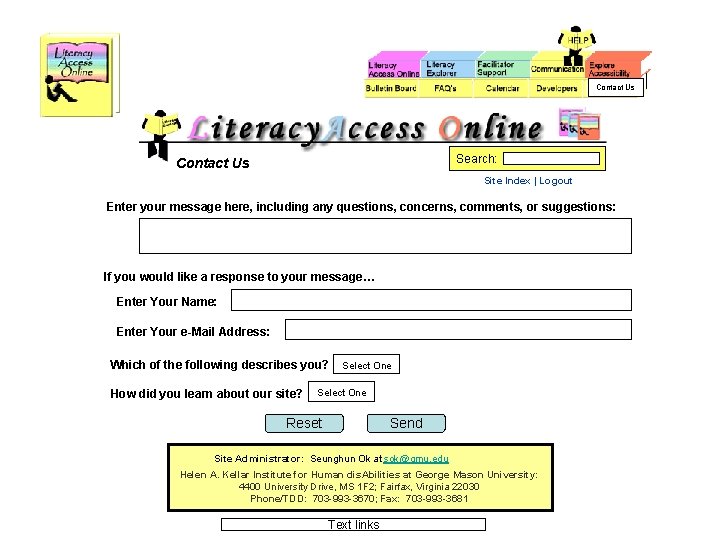
Contact Us Search: Contact Us Site Index | Logout Enter your message here, including any questions, concerns, comments, or suggestions: If you would like a response to your message… Enter Your Name: Enter Your e-Mail Address: Which of the following describes you? How did you learn about our site? Select One Reset Send Site Administrator: Seunghun Ok at sok@gmu. edu Helen A. Kellar Institute for Human dis. Abilities at George Mason University: 4400 University Drive, MS 1 F 2; Fairfax, Virginia 22030 Phone/TDD: 703 -993 -3670; Fax: 703 -993 -3681 Text links
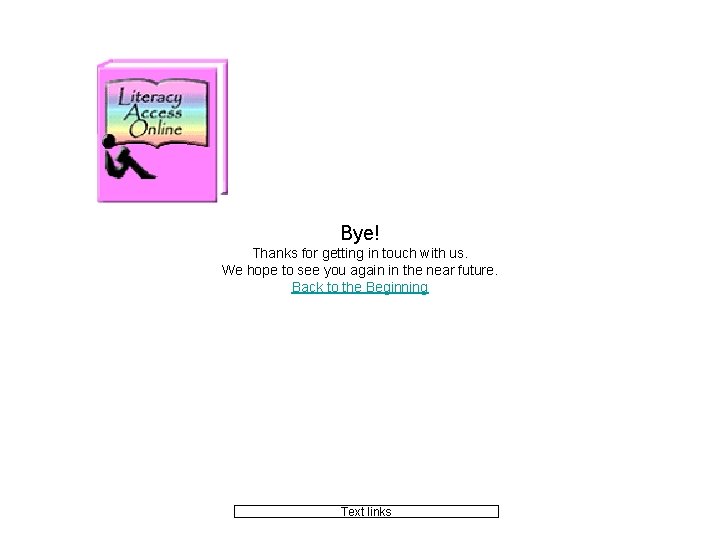
Bye! Thanks for getting in touch with us. We hope to see you again in the near future. Back to the Beginning Text links
Recommendations: • Replace the current page, http: //www. literacyaccessonline. com/Home/join/registerme. asp , with the “Congratulations on Registering” welcome pages, shown earlier in this presentation. • Since there will be “auto login, ” delete the current login welcome page, http: //www. literacyaccessonline. com/index. asp , from the LAO site. • Also, since the registration is now more complete, delete the current reminder page, http: //www. literacyaccessonline. com/Home/login/group_list. asp , from the LAO site. • Leave similar “Account Management” pages as they currently are on the LAO site. • Edit the current “Site Comments“ page on the LAO site, which is located at http: //www. literacyaccessonline. com/Comm/comments. asp , to become a “Contact Us” page, reflecting the following changes. • Edit the yellow “Site Comments“ button on the main book navigation bar to reflect the following changes, becoming “Contact Us, ” accordingly. • Edit the current “Bye” page on the LAO site, which thanks the user for his/her comments and which is located at http: //www. literacyaccessonline. com/Home/login/bye. asp? cmmt=yes , to reflect the following slight wording change. • The Home Page is the perfect place for advertisements of future LAO features. • Make sure all references to “student” throughout the site, including Help, are changed to “reader. ” • Future design team(s) should question use of student’s/reader’s “screen name” and “password” on registration. Currently, these fields are not used, but they exist in registration. • Add Phase 6 Team to Developers page at http: //www. literacyaccessonline. com/Home/developers. asp. • “Select from Story Bank” needs to be changed to “Read from the Bank, ” throughout the site. And whenever a user has added stories of his/her own to the Bank, the phrase will be changed to “Read from Your Bank. ” • If a new user clicks on any book buttons, etc. , without signing in and without officially “entering as a guest, ” he/she will be able to navigate wherever he/she wishes, without getting any additional “guest” welcome pages. Reminders of the “benefits of registration” will be provided at the location of actual activities, such as Story Builder.
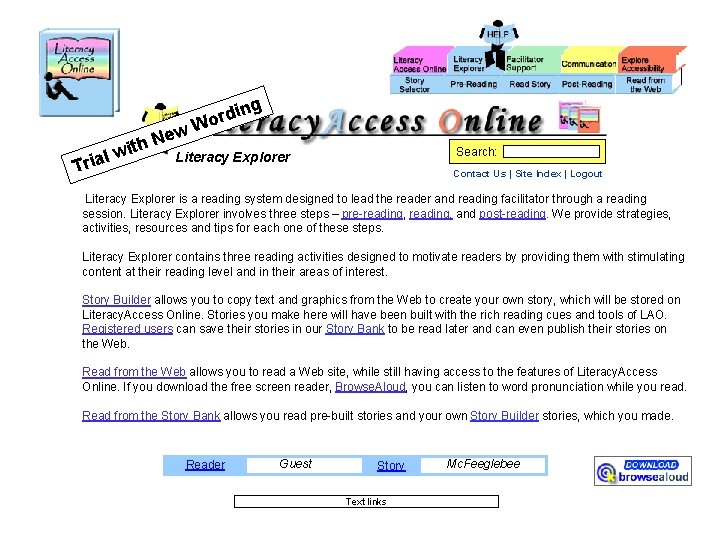
ing rd Wo ew N h wit Literacy Explorer l a i Tr Search: Contact Us | Site Index | Logout Literacy Explorer is a reading system designed to lead the reader and reading facilitator through a reading session. Literacy Explorer involves three steps – pre-reading, and post-reading. We provide strategies, activities, resources and tips for each one of these steps. Literacy Explorer contains three reading activities designed to motivate readers by providing them with stimulating content at their reading level and in their areas of interest. Story Builder allows you to copy text and graphics from the Web to create your own story, which will be stored on Literacy. Access Online. Stories you make here will have been built with the rich reading cues and tools of LAO. Registered users can save their stories in our Story Bank to be read later and can even publish their stories on the Web. Read from the Web allows you to read a Web site, while still having access to the features of Literacy. Access Online. If you download the free screen reader, Browse. Aloud, you can listen to word pronunciation while you read. Read from the Story Bank allows you read pre-built stories and your own Story Builder stories, which you made. Reader Guest Story Text links Mc. Feeglebee