Discovering Computers Enhanced Edition 2017 Tools Apps Devices
- Slides: 48
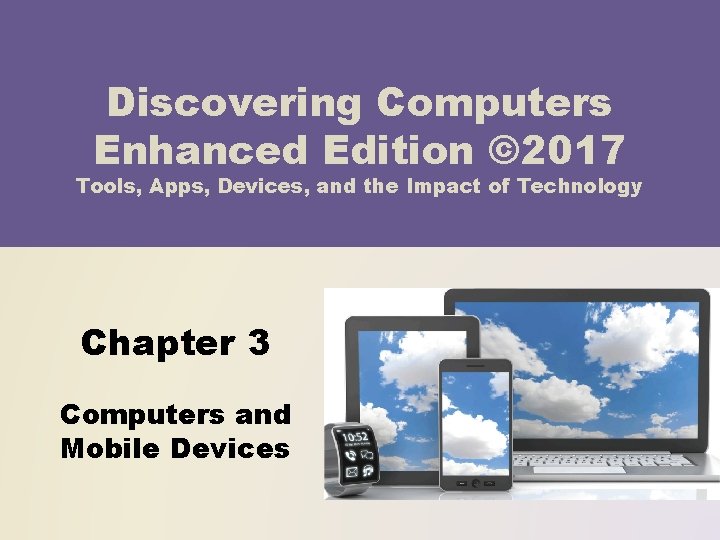
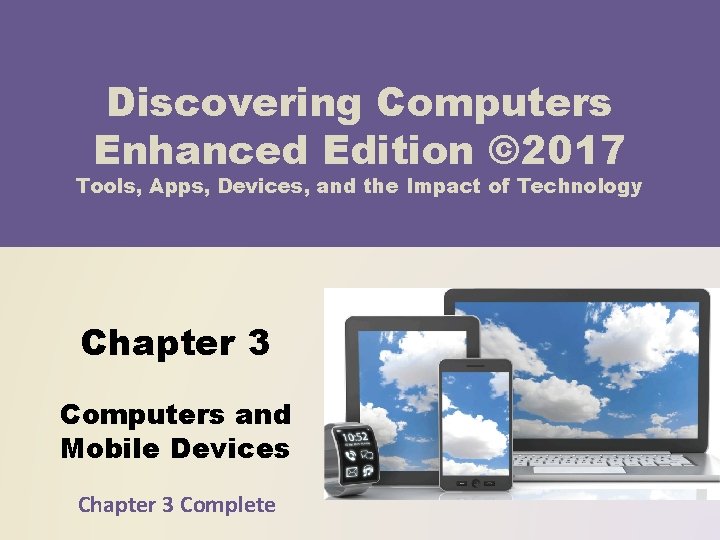
Discovering Computers Enhanced Edition © 2017 Tools, Apps, Devices, and the Impact of Technology Chapter 3 Computers and Mobile Devices
Objectives Overview Describe the characteristics and uses of laptops, tablets, desktops, and all-in-ones Describe the characteristics and types of servers Describe cloud computing and identify its uses See Page 108 for Detailed Objectives Differentiate among POS terminals, ATMs, and selfservice kiosks Describe the characteristics and uses of smartphones, digital cameras, portable and digital media players, e-book readers, and wearable devices © 2017 Cengage Learning®. May not be scanned, copied or duplicated, or posted to a publicly accessible website, 2
Objectives Overview Describe the characteristics of and ways to interact with game devices Identify uses of embedded computers Identify safeguards against hardware theft and vandalism and hardware failure See Page 108 for Detailed Objectives Differentiate a port from a connector, identify various ports and connectors, and differentiate among Bluetooth, Wi-Fi, and NFC wireless device connections Discuss ways to prevent health-related injuries and disorders caused from technology use, and describe ways to design a workplace ergonomically © 2017 Cengage Learning®. May not be scanned, copied or duplicated, or posted to a publicly accessible website, 3
Computers and Mobile Devices • Types of computers and mobile devices include: Laptops, tablets, and desktops Servers and terminals Game devices Page 108 Smartphones, digital cameras, e-book readers, portable and digital media players and wearable devices Embedded computers © 2017 Cengage Learning®. May not be scanned, copied or duplicated, or posted to a publicly accessible website, in whole or in part. 4
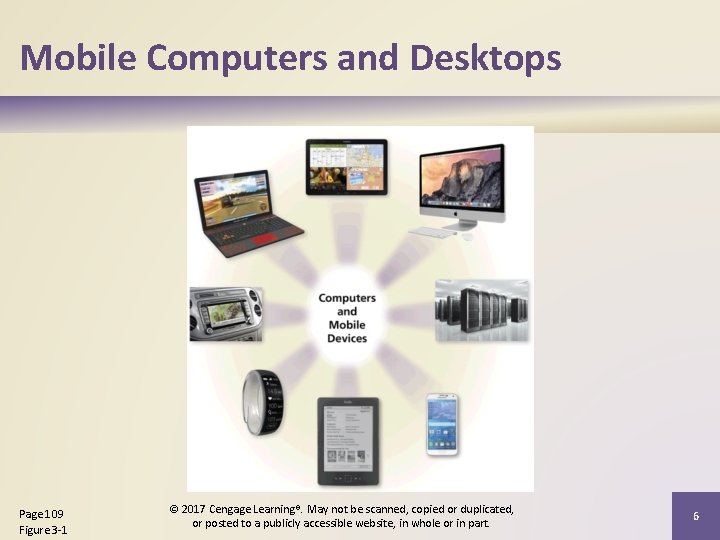
Mobile Computers and Desktops • A mobile computer is a portable personal computer, designed so that a user easily can carry it from place to place • A personal computer (PC) is a mobile computer or desktop that can perform all of its input, processing, output, and storage activities by itself and is intended to be used by one person at a time Page 108 © 2017 Cengage Learning®. May not be scanned, copied or duplicated, or posted to a publicly accessible website, in whole or in part. 5
Mobile Computers and Desktops Page 109 Figure 3 -1 © 2017 Cengage Learning®. May not be scanned, copied or duplicated, or posted to a publicly accessible website, in whole or in part. 6
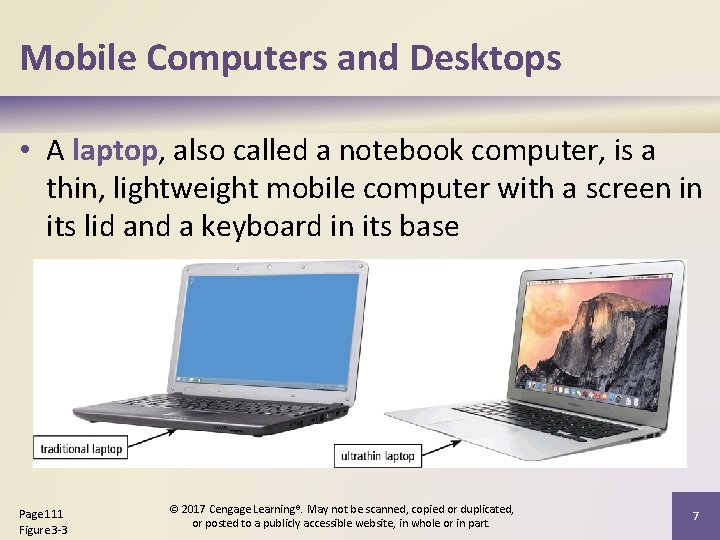
Mobile Computers and Desktops • A laptop, also called a notebook computer, is a thin, lightweight mobile computer with a screen in its lid and a keyboard in its base Page 111 Figure 3 -3 © 2017 Cengage Learning®. May not be scanned, copied or duplicated, or posted to a publicly accessible website, in whole or in part. 7
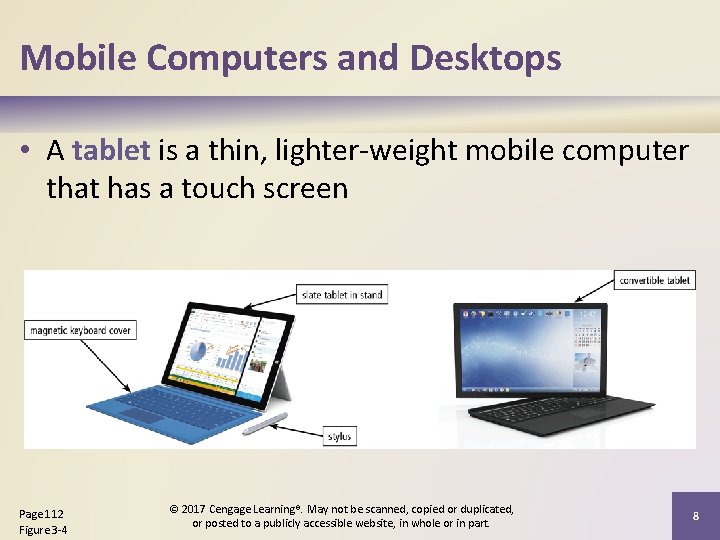
Mobile Computers and Desktops • A tablet is a thin, lighter-weight mobile computer that has a touch screen Page 112 Figure 3 -4 © 2017 Cengage Learning®. May not be scanned, copied or duplicated, or posted to a publicly accessible website, in whole or in part. 8
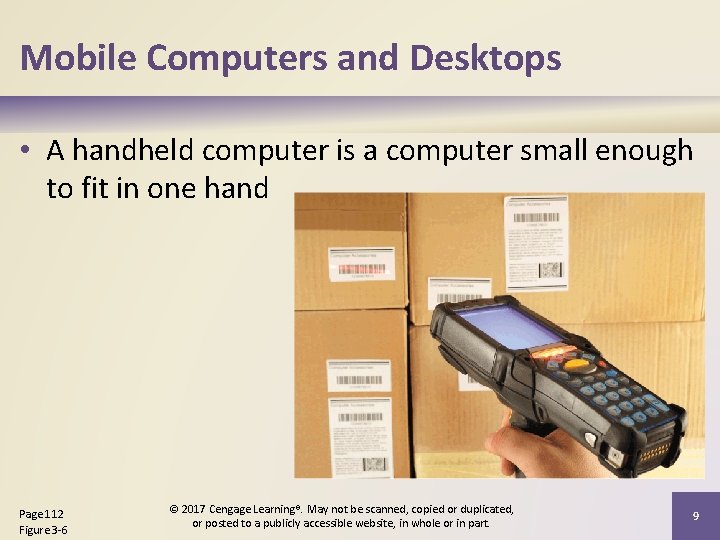
Mobile Computers and Desktops • A handheld computer is a computer small enough to fit in one hand Page 112 Figure 3 -6 © 2017 Cengage Learning®. May not be scanned, copied or duplicated, or posted to a publicly accessible website, in whole or in part. 9
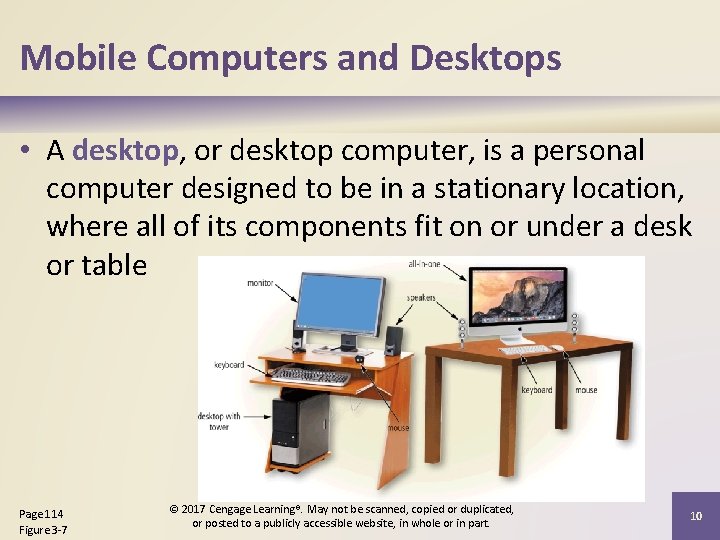
Mobile Computers and Desktops • A desktop, or desktop computer, is a personal computer designed to be in a stationary location, where all of its components fit on or under a desk or table Page 114 Figure 3 -7 © 2017 Cengage Learning®. May not be scanned, copied or duplicated, or posted to a publicly accessible website, in whole or in part. 10
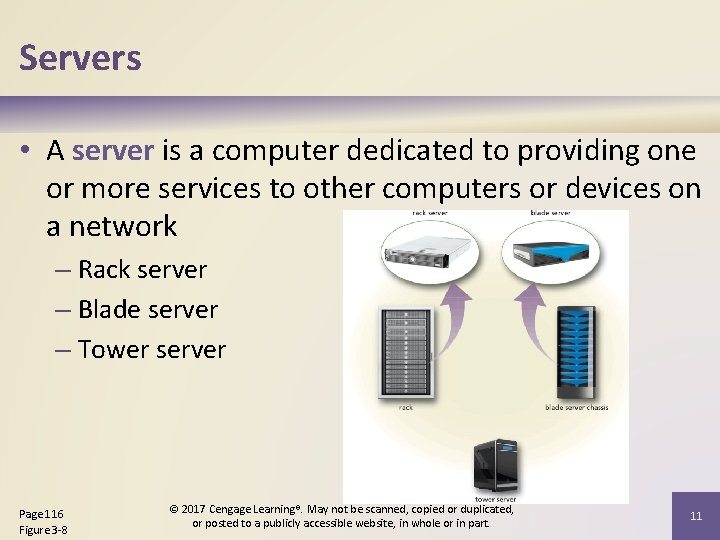
Servers • A server is a computer dedicated to providing one or more services to other computers or devices on a network – Rack server – Blade server – Tower server Page 116 Figure 3 -8 © 2017 Cengage Learning®. May not be scanned, copied or duplicated, or posted to a publicly accessible website, in whole or in part. 11
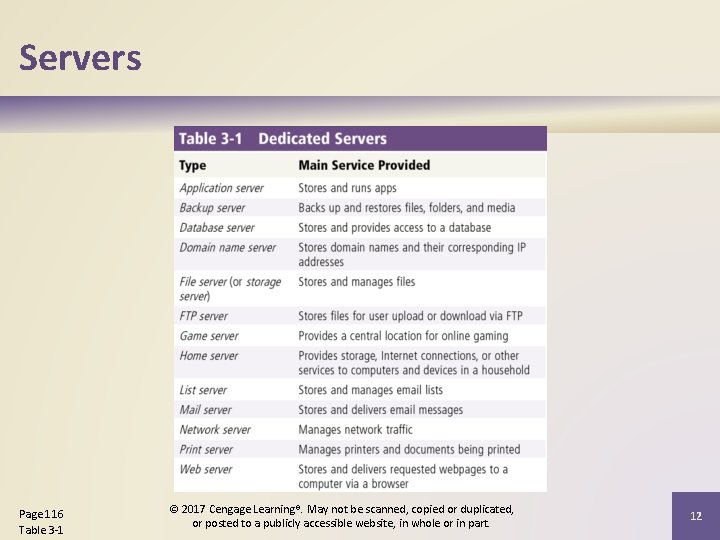
Servers Page 116 Table 3 -1 © 2017 Cengage Learning®. May not be scanned, copied or duplicated, or posted to a publicly accessible website, in whole or in part. 12
Servers • Virtualization is the practice of sharing or pooling computing resources, such as servers and storage devices – Server virtualization uses software to enable a physical server to emulate the hardware and computing capabilities of one or more servers, known as virtual servers • A server farm is a network of several servers together in a single location Page 117 © 2017 Cengage Learning®. May not be scanned, copied or duplicated, or posted to a publicly accessible website, in whole or in part. 13
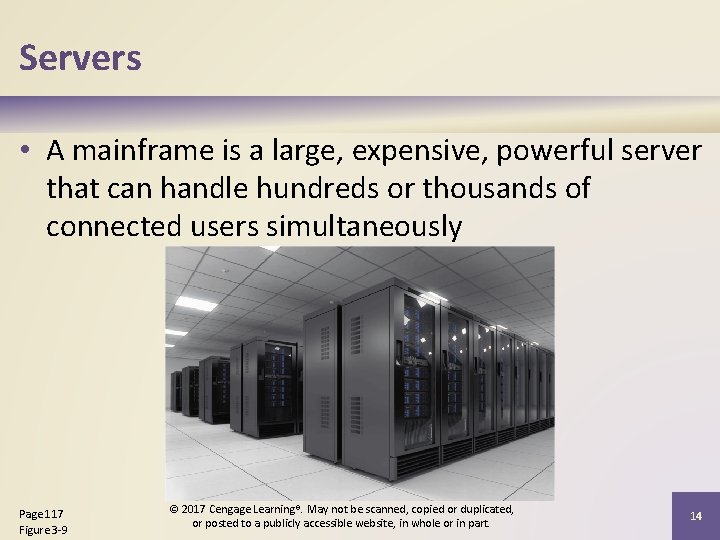
Servers • A mainframe is a large, expensive, powerful server that can handle hundreds or thousands of connected users simultaneously Page 117 Figure 3 -9 © 2017 Cengage Learning®. May not be scanned, copied or duplicated, or posted to a publicly accessible website, in whole or in part. 14
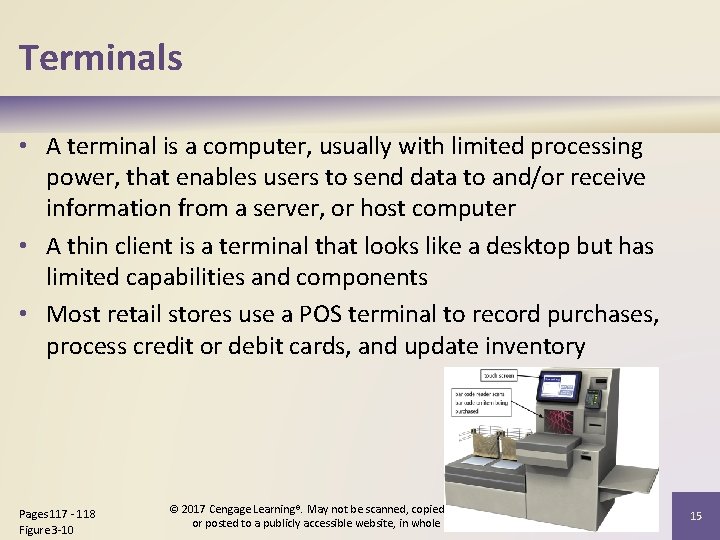
Terminals • A terminal is a computer, usually with limited processing power, that enables users to send data to and/or receive information from a server, or host computer • A thin client is a terminal that looks like a desktop but has limited capabilities and components • Most retail stores use a POS terminal to record purchases, process credit or debit cards, and update inventory Pages 117 - 118 Figure 3 -10 © 2017 Cengage Learning®. May not be scanned, copied or duplicated, or posted to a publicly accessible website, in whole or in part. 15
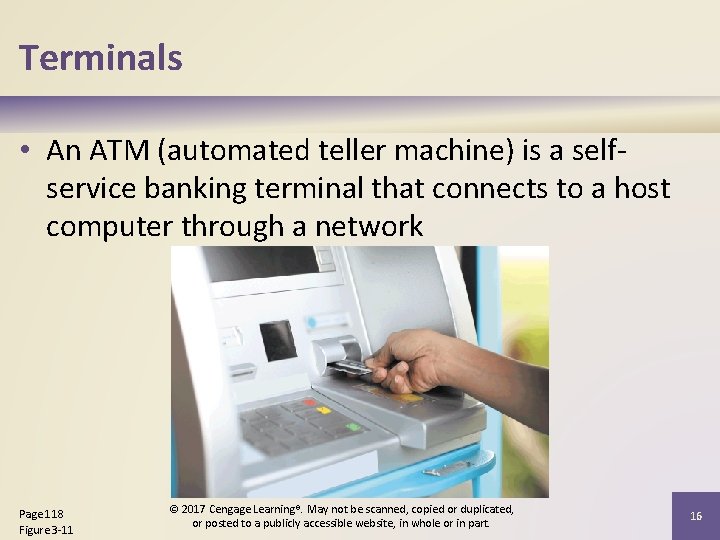
Terminals • An ATM (automated teller machine) is a selfservice banking terminal that connects to a host computer through a network Page 118 Figure 3 -11 © 2017 Cengage Learning®. May not be scanned, copied or duplicated, or posted to a publicly accessible website, in whole or in part. 16
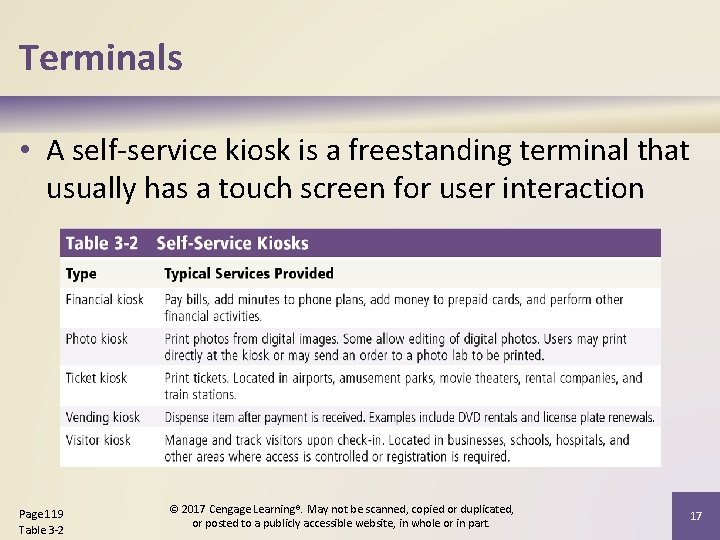
Terminals • A self-service kiosk is a freestanding terminal that usually has a touch screen for user interaction Page 119 Table 3 -2 © 2017 Cengage Learning®. May not be scanned, copied or duplicated, or posted to a publicly accessible website, in whole or in part. 17
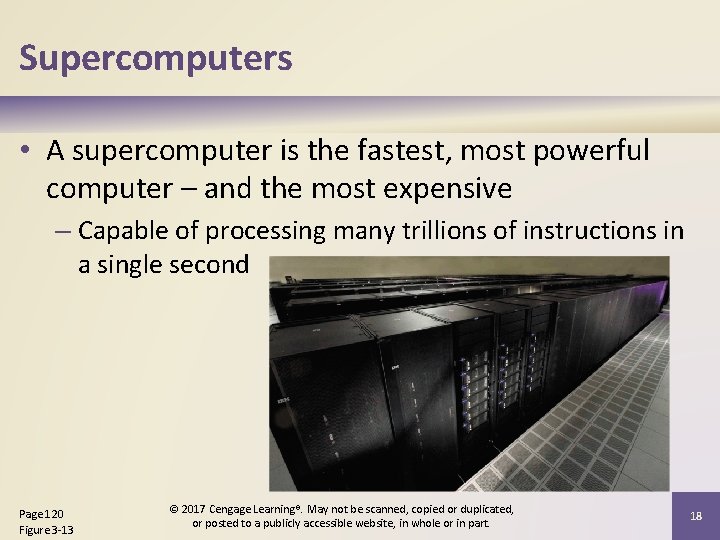
Supercomputers • A supercomputer is the fastest, most powerful computer – and the most expensive – Capable of processing many trillions of instructions in a single second Page 120 Figure 3 -13 © 2017 Cengage Learning®. May not be scanned, copied or duplicated, or posted to a publicly accessible website, in whole or in part. 18
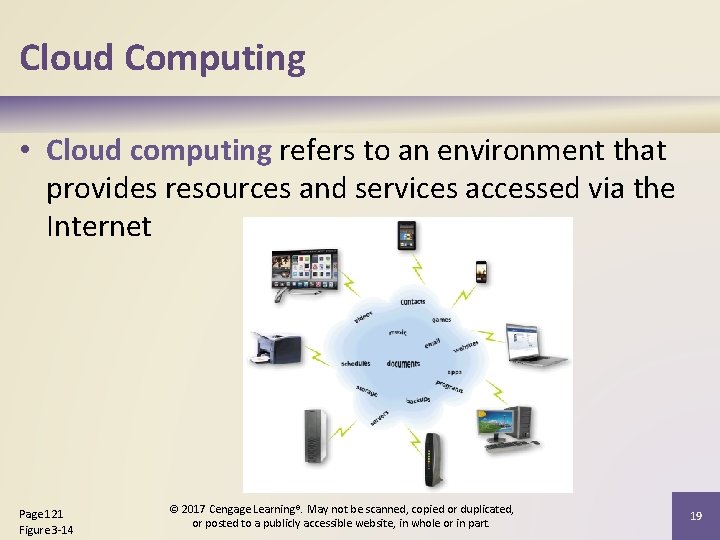
Cloud Computing • Cloud computing refers to an environment that provides resources and services accessed via the Internet Page 121 Figure 3 -14 © 2017 Cengage Learning®. May not be scanned, copied or duplicated, or posted to a publicly accessible website, in whole or in part. 19
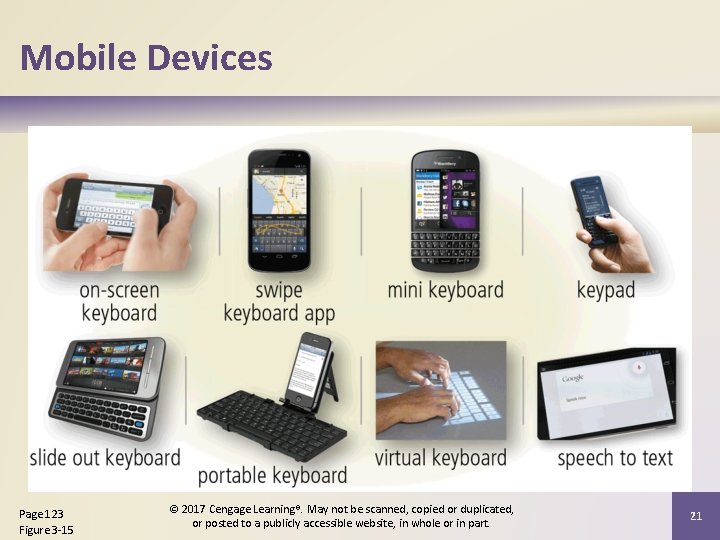
Mobile Devices • A smartphone is an Internet-capable phone that usually also includes a calendar, an address book, a calculator, a notepad, games, browser, and numerous other apps • Many smartphones have touch screens. Instead of or in addition to an on-screen keyboard, some have a built-in mini keyboard on the front of the phone or a keyboard that slides in and out from behind the phone Page 123 © 2017 Cengage Learning®. May not be scanned, copied or duplicated, or posted to a publicly accessible website, in whole or in part. 20
Mobile Devices Page 123 Figure 3 -15 © 2017 Cengage Learning®. May not be scanned, copied or duplicated, or posted to a publicly accessible website, in whole or in part. 21
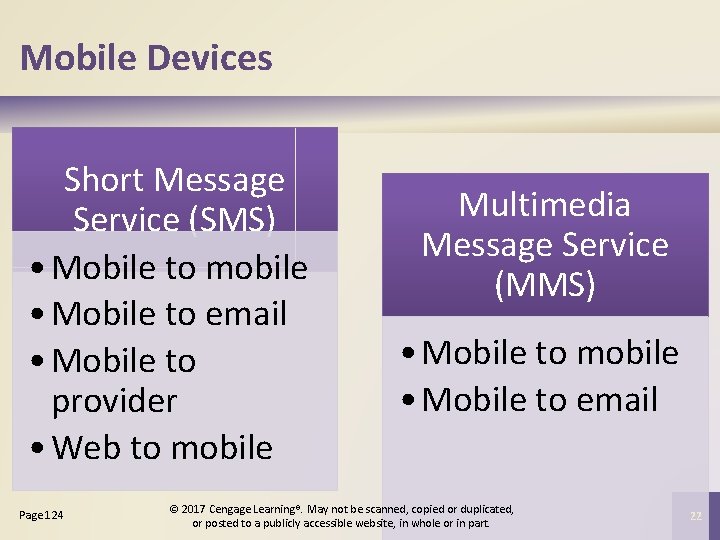
Mobile Devices Short Message Service (SMS) • Mobile to mobile • Mobile to email • Mobile to provider • Web to mobile Page 124 Multimedia Message Service (MMS) • Mobile to mobile • Mobile to email © 2017 Cengage Learning®. May not be scanned, copied or duplicated, or posted to a publicly accessible website, in whole or in part. 22
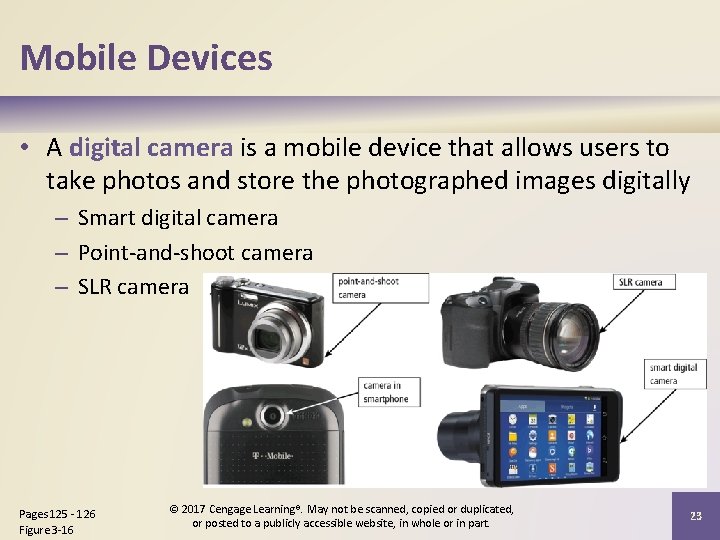
Mobile Devices • A digital camera is a mobile device that allows users to take photos and store the photographed images digitally – Smart digital camera – Point-and-shoot camera – SLR camera Pages 125 - 126 Figure 3 -16 © 2017 Cengage Learning®. May not be scanned, copied or duplicated, or posted to a publicly accessible website, in whole or in part. 23
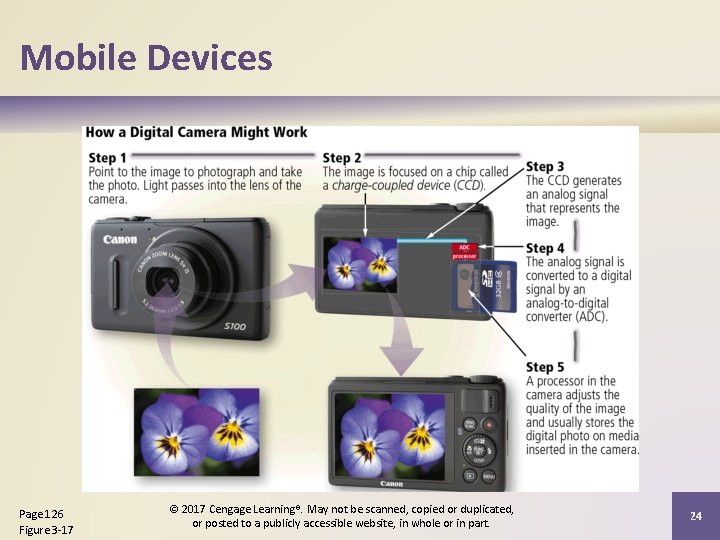
Mobile Devices Page 126 Figure 3 -17 © 2017 Cengage Learning®. May not be scanned, copied or duplicated, or posted to a publicly accessible website, in whole or in part. 24
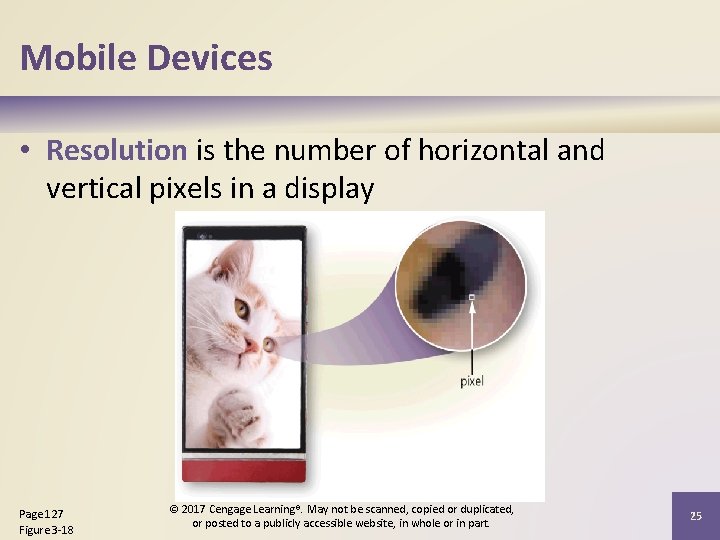
Mobile Devices • Resolution is the number of horizontal and vertical pixels in a display Page 127 Figure 3 -18 © 2017 Cengage Learning®. May not be scanned, copied or duplicated, or posted to a publicly accessible website, in whole or in part. 25
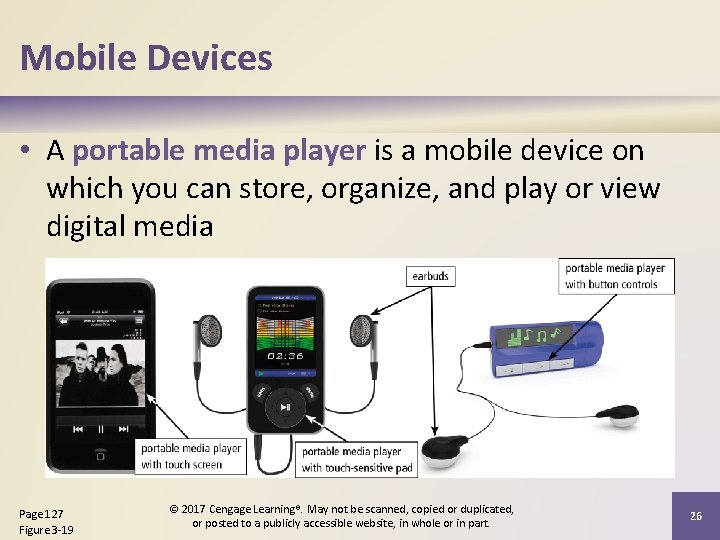
Mobile Devices • A portable media player is a mobile device on which you can store, organize, and play or view digital media Page 127 Figure 3 -19 © 2017 Cengage Learning®. May not be scanned, copied or duplicated, or posted to a publicly accessible website, in whole or in part. 26
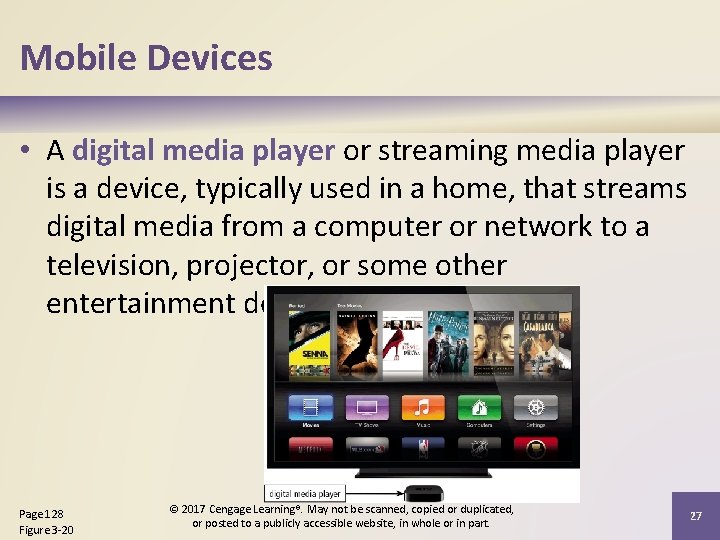
Mobile Devices • A digital media player or streaming media player is a device, typically used in a home, that streams digital media from a computer or network to a television, projector, or some other entertainment device Page 128 Figure 3 -20 © 2017 Cengage Learning®. May not be scanned, copied or duplicated, or posted to a publicly accessible website, in whole or in part. 27
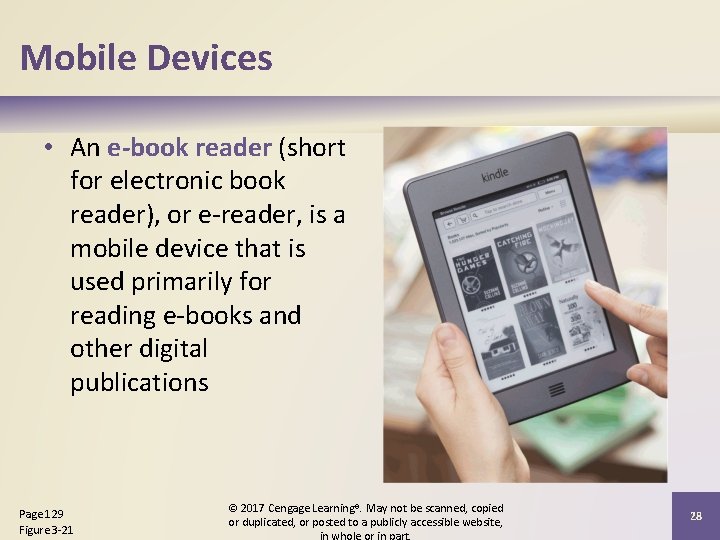
Mobile Devices • An e-book reader (short for electronic book reader), or e-reader, is a mobile device that is used primarily for reading e-books and other digital publications Page 129 Figure 3 -21 © 2017 Cengage Learning®. May not be scanned, copied or duplicated, or posted to a publicly accessible website, 28
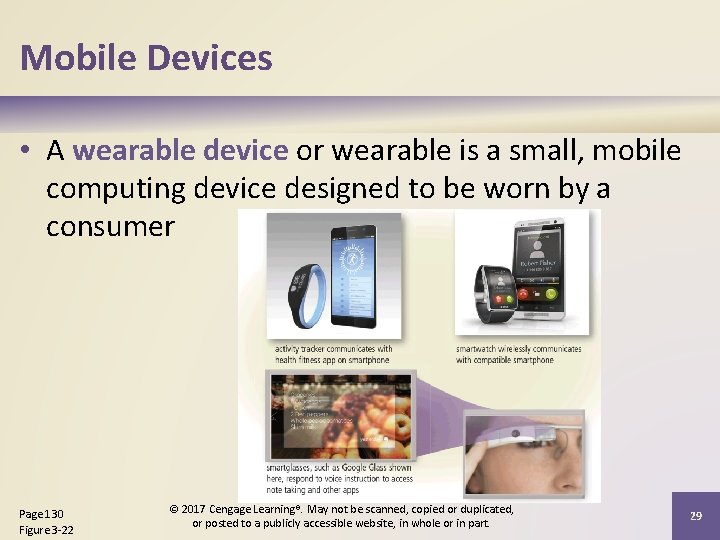
Mobile Devices • A wearable device or wearable is a small, mobile computing device designed to be worn by a consumer Page 130 Figure 3 -22 © 2017 Cengage Learning®. May not be scanned, copied or duplicated, or posted to a publicly accessible website, in whole or in part. 29
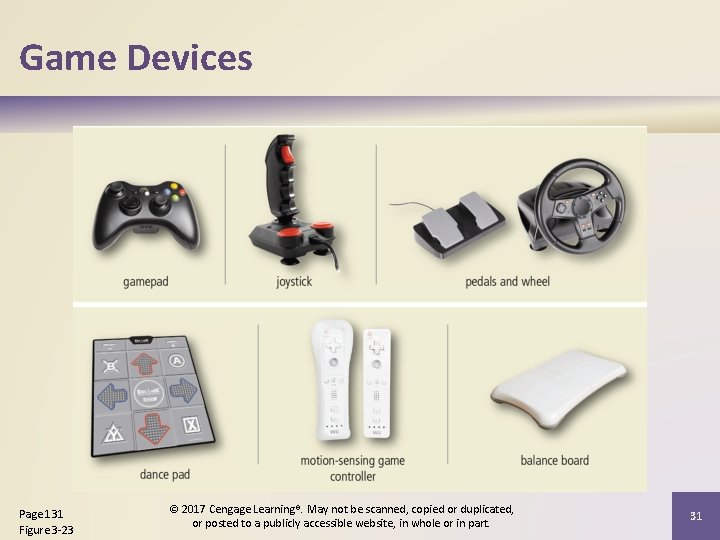
Game Devices • A game console is a mobile computing device designed for single-player or multiplayer video games • A handheld game device is a small mobile device that contains a screen, speakers, controls, and game console all in one unit • Game controllers include gamepads, joysticks and wheels, dance pads, and a variety of motionsensing controllers Page 131 © 2017 Cengage Learning®. May not be scanned, copied or duplicated, or posted to a publicly accessible website, in whole or in part. 30
Game Devices Page 131 Figure 3 -23 © 2017 Cengage Learning®. May not be scanned, copied or duplicated, or posted to a publicly accessible website, in whole or in part. 31
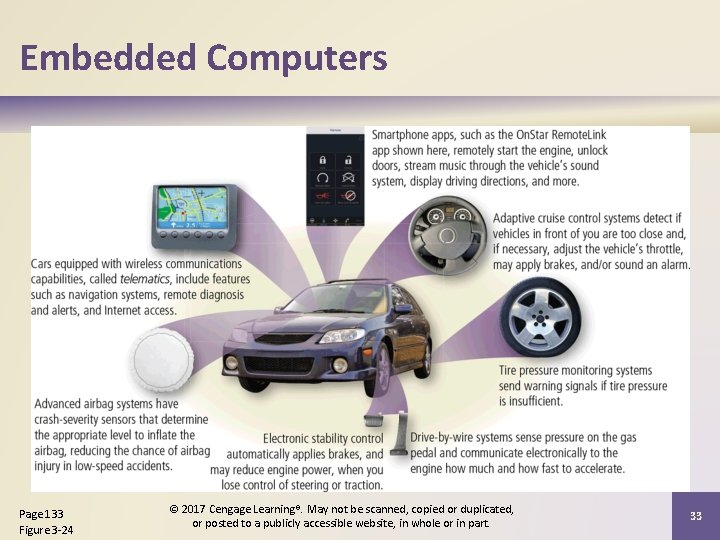
Embedded Computers • An embedded computer is a special-purpose computer that functions as a component in a larger product Consumer electronics Home automation devices Process controllers and robotics Page 132 Automobiles Computer devices and office machines © 2017 Cengage Learning®. May not be scanned, copied or duplicated, or posted to a publicly accessible website, in whole or in part. 32
Embedded Computers Page 133 Figure 3 -24 © 2017 Cengage Learning®. May not be scanned, copied or duplicated, or posted to a publicly accessible website, in whole or in part. 33
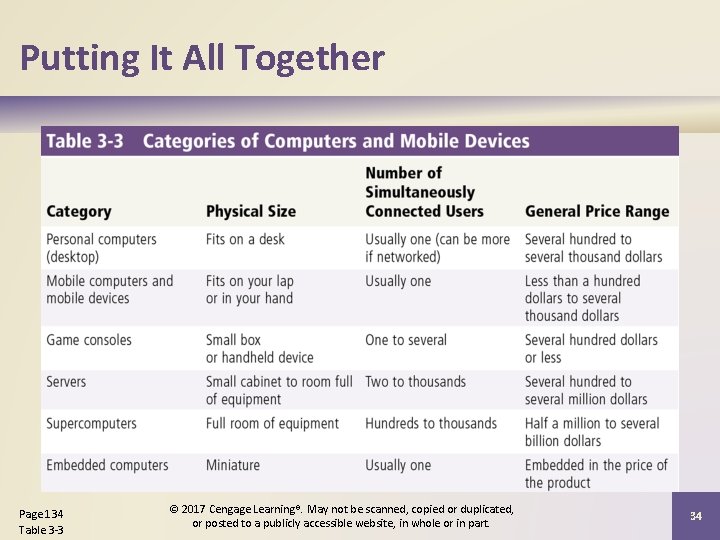
Putting It All Together Page 134 Table 3 -3 © 2017 Cengage Learning®. May not be scanned, copied or duplicated, or posted to a publicly accessible website, in whole or in part. 34
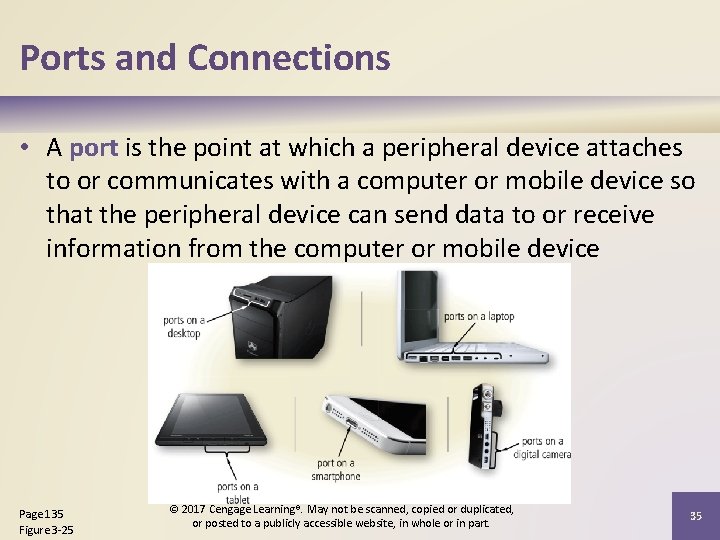
Ports and Connections • A port is the point at which a peripheral device attaches to or communicates with a computer or mobile device so that the peripheral device can send data to or receive information from the computer or mobile device Page 135 Figure 3 -25 © 2017 Cengage Learning®. May not be scanned, copied or duplicated, or posted to a publicly accessible website, in whole or in part. 35
Ports and Connections • A connector joins a cable to a port. A connector at one end of a cable attaches to a port on the computer or mobile device, and a connector at the other end of the cable attaches to a port on the peripheral device Page 135 © 2017 Cengage Learning®. May not be scanned, copied or duplicated, or posted to a publicly accessible website, in whole or in part. 36
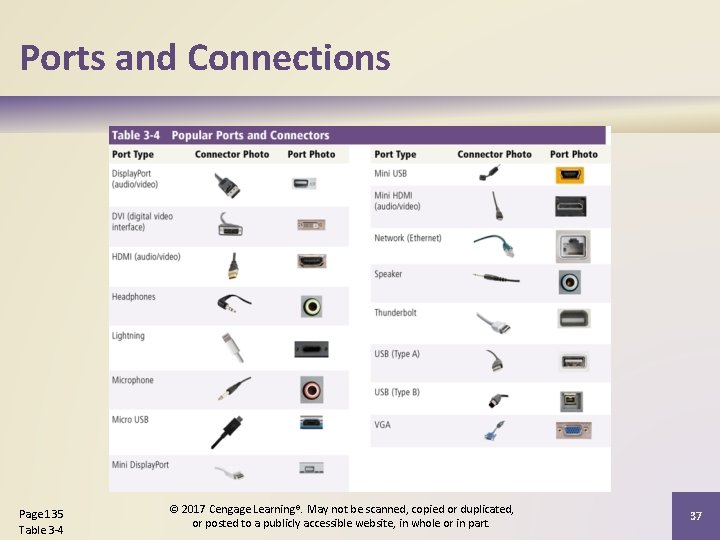
Ports and Connections Page 135 Table 3 -4 © 2017 Cengage Learning®. May not be scanned, copied or duplicated, or posted to a publicly accessible website, in whole or in part. 37
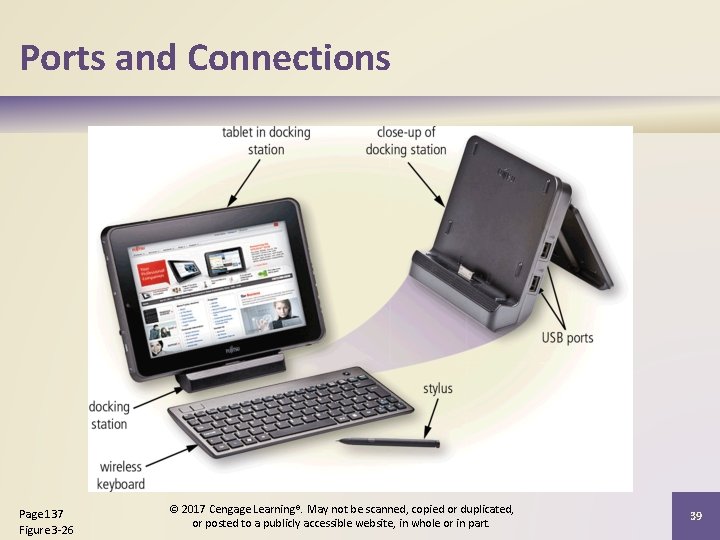
Ports and Connections • A USB port, short for universal serial bus port, can connect up to 127 different peripheral devices together with a single connector • Instead of connecting peripheral devices directly to ports on a mobile computer, some mobile users prefer the flexibility of port replicators and docking stations Page 136 © 2017 Cengage Learning®. May not be scanned, copied or duplicated, or posted to a publicly accessible website, in whole or in part. 38
Ports and Connections Page 137 Figure 3 -26 © 2017 Cengage Learning®. May not be scanned, copied or duplicated, or posted to a publicly accessible website, in whole or in part. 39
Ports and Connections • Instead of connecting computers and mobile devices to peripheral devices with a cable, some peripheral devices use wireless communications technologies Bluetooth Pages 137 - 138 Wi-Fi © 2017 Cengage Learning®. May not be scanned, copied or duplicated, or posted to a publicly accessible website, in whole or in part. NFC 40
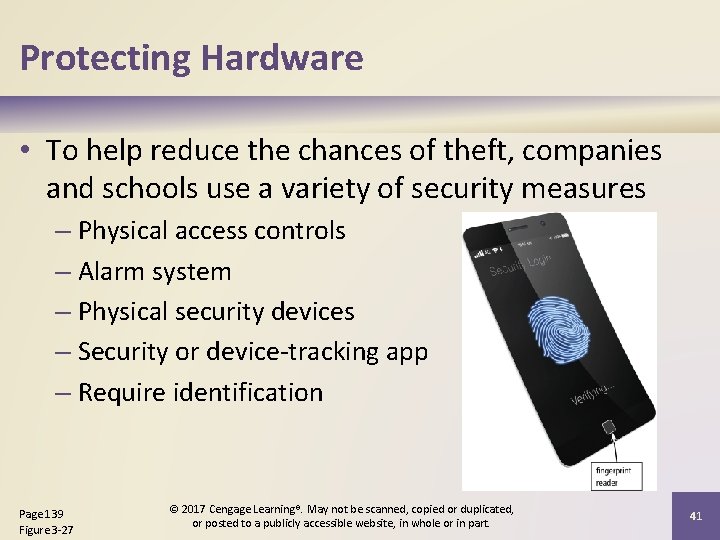
Protecting Hardware • To help reduce the chances of theft, companies and schools use a variety of security measures – Physical access controls – Alarm system – Physical security devices – Security or device-tracking app – Require identification Page 139 Figure 3 -27 © 2017 Cengage Learning®. May not be scanned, copied or duplicated, or posted to a publicly accessible website, in whole or in part. 41
Protecting Hardware • Hardware can fail for a variety of reasons: aging hardware; random events such as electrical power problems; and even errors in programs or apps – Undervoltage – Overvoltage or power surge Pages 139 - 140 © 2017 Cengage Learning®. May not be scanned, copied or duplicated, or posted to a publicly accessible website, in whole or in part. 42
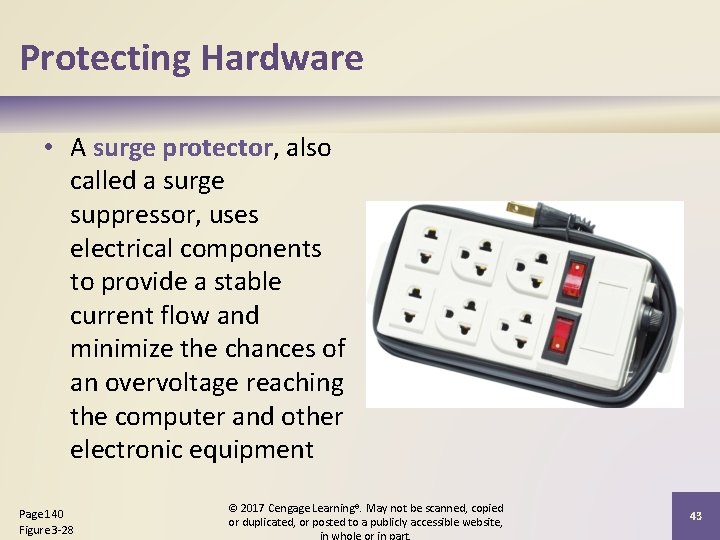
Protecting Hardware • A surge protector, also called a surge suppressor, uses electrical components to provide a stable current flow and minimize the chances of an overvoltage reaching the computer and other electronic equipment Page 140 Figure 3 -28 © 2017 Cengage Learning®. May not be scanned, copied or duplicated, or posted to a publicly accessible website, 43
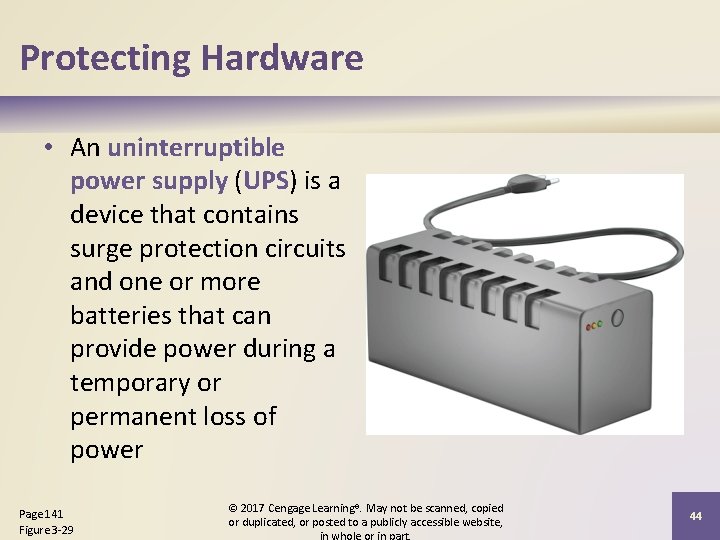
Protecting Hardware • An uninterruptible power supply (UPS) is a device that contains surge protection circuits and one or more batteries that can provide power during a temporary or permanent loss of power Page 141 Figure 3 -29 © 2017 Cengage Learning®. May not be scanned, copied or duplicated, or posted to a publicly accessible website, 44
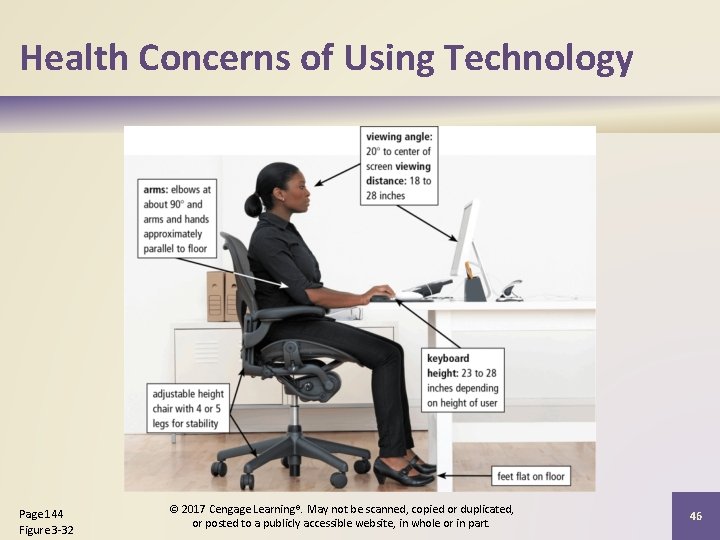
Health Concerns of Using Technology • A repetitive strain injury (RSI) is an injury or disorder of the muscles, nerves, tendons, ligaments, and joints • Computer vision syndrome (CVS) is a technologyrelated health condition that affects eyesight • Ergonomics is an applied science devoted to incorporating comfort, efficiency, and safety into the design of items in the workplace • Technology addiction occurs when the technology consumes someone’s entire social life Pages 142 - 144 © 2017 Cengage Learning®. May not be scanned, copied or duplicated, or posted to a publicly accessible website, in whole or in part. 45
Health Concerns of Using Technology Page 144 Figure 3 -32 © 2017 Cengage Learning®. May not be scanned, copied or duplicated, or posted to a publicly accessible website, in whole or in part. 46
Summary Characteristics of and purchasing guidelines for laptops, tablets, desktops, smartphones, digital cameras, and portable and digital media players Servers, supercomputers, point -of-sale terminals, ATMs, selfservice kiosks, e-book readers, wearable devices, game devices, embedded computers, and cloud computing Ways to protect hardware Page 145 Ports and connections Health concerns of using technology and preventative measures © 2017 Cengage Learning®. May not be scanned, copied or duplicated, or posted to a publicly accessible website, 47
Discovering Computers Enhanced Edition © 2017 Tools, Apps, Devices, and the Impact of Technology Chapter 3 Computers and Mobile Devices Chapter 3 Complete