www regouniversity com Clarity Educational Community Managing Data
- Slides: 26
www. regouniversity. com Clarity Educational Community Managing Data Models New Data Warehouse, Data Mart, Slices, and More Presenter : Rajini Mamidi, Sangeet Chourey Date: 04 -May-2015
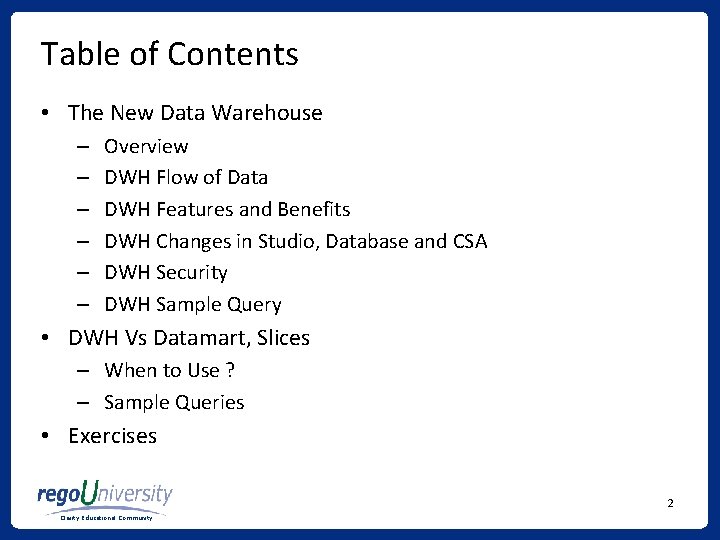
Table of Contents • The New Data Warehouse – – – Overview DWH Flow of Data DWH Features and Benefits DWH Changes in Studio, Database and CSA DWH Security DWH Sample Query • DWH Vs Datamart, Slices – When to Use ? – Sample Queries • Exercises 2 Clarity Educational Community
Overview of DWH in 14. 2 • What is Data Warehouse : Ø Separate storage of data in a easy to retrieve/ report format Ø De-normalized to place all related information together Ø Separated into dimensions and measures • Data Warehouse has been newly introduced in Clarity 14. 2. • Datamart existed for long within CA PPM, with limited set of metrics and dimensions, New Data Warehouse includes almost all of CA PPM data including Custom Objects and attributes. • Like Datamart, Data Warehouse is also populated through a nighty job 3 Clarity Educational Community
Overview of DWH in 14. 2 • What is Data Warehouse : Ø Separate storage of data in a easy to retrieve/ report format Ø De-normalized to place all related information together Ø Separated into dimensions and measures • Data Warehouse has been newly introduced in Clarity 14. 2. • Datamart existed for long within CA PPM, with limited set of metrics and dimensions, New Data Warehouse includes almost all of CA PPM data including Custom Objects and attributes. • Like Datamart, Data Warehouse is also populated through a nighty job 4 Clarity Educational Community
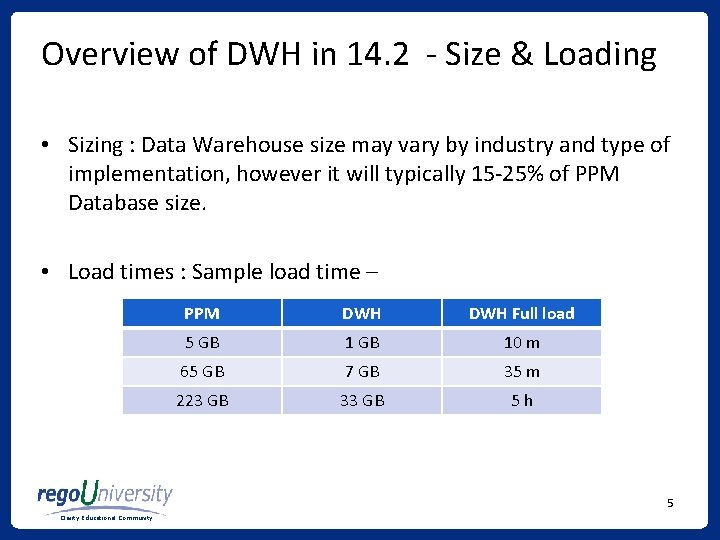
Overview of DWH in 14. 2 - Size & Loading • Sizing : Data Warehouse size may vary by industry and type of implementation, however it will typically 15 -25% of PPM Database size. • Load times : Sample load time – PPM DWH Full load 5 GB 10 m 65 GB 7 GB 35 m 223 GB 33 GB 5 h 5 Clarity Educational Community
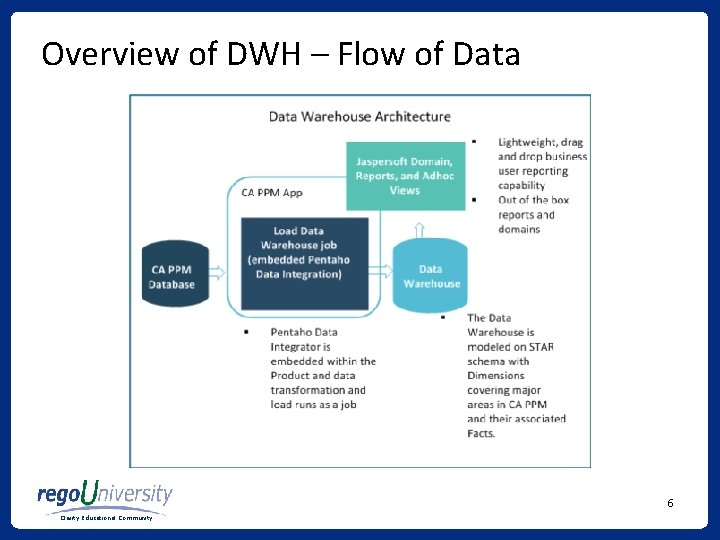
Overview of DWH – Flow of Data 6 Clarity Educational Community
DWH features and benefits … (1) • The Data Warehouse has its own database which takes stress off the transactional CA Clarity PPM database. Because the Data Warehouse database is separate from the CA Clarity PPM database, it can be tuned differently for optimal performance. • The Data Warehouse carries keys and descriptive values in the dimension tables so that fewer joins are required. Facts are combined into summary and period tables. • Data Warehouse tables are user friendly for reporting (with the exception of configuration and meta tables). • Similar tables are grouped together by the table prefix, and the names are descriptive. 7 Clarity Educational Community
DWH features and benefits …(2) • Specific time slices are set up to populate the data warehouse. Defaults are set but can be adjusted. • Columns are named consistently across tables. • The Data Warehouse is extendable without customization. A flag is added to Studio objects and attributes that tells the load job to add new objects and attributes automatically. 8 Clarity Educational Community
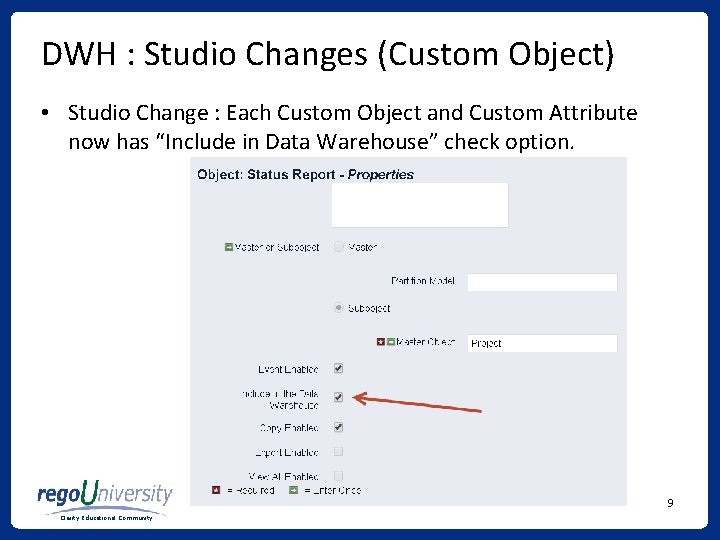
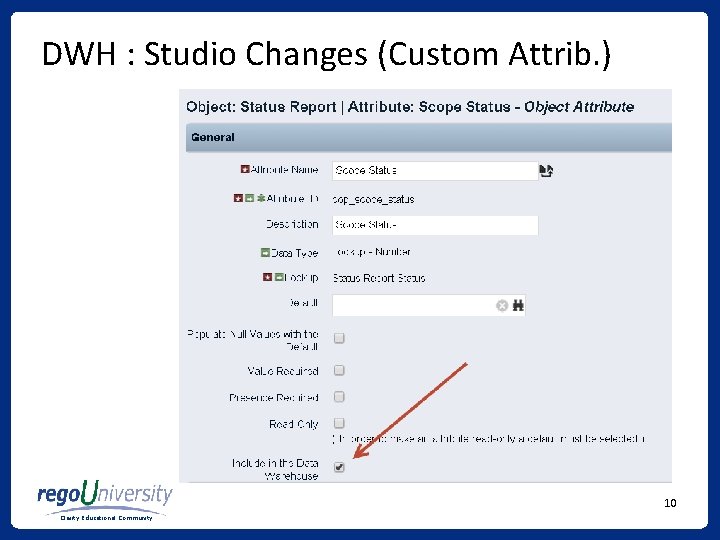
DWH : Studio Changes (Custom Object) • Studio Change : Each Custom Object and Custom Attribute now has “Include in Data Warehouse” check option. 9 Clarity Educational Community
DWH : Studio Changes (Custom Attrib. ) 10 Clarity Educational Community
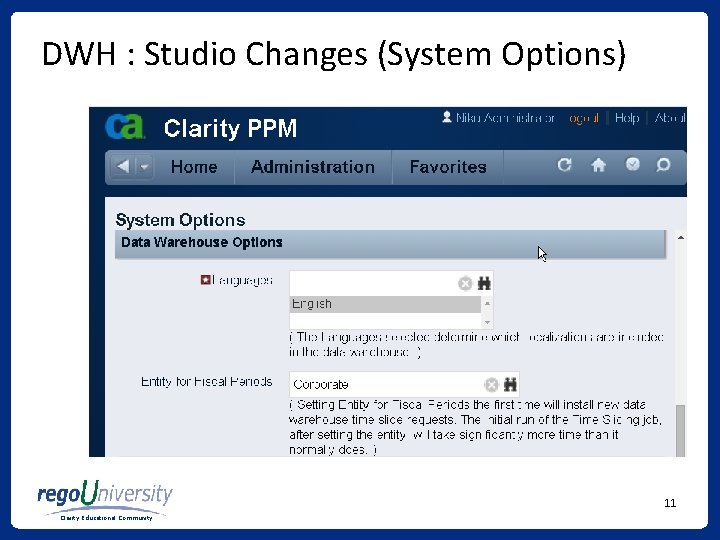
DWH : Studio Changes (System Options) 11 Clarity Educational Community
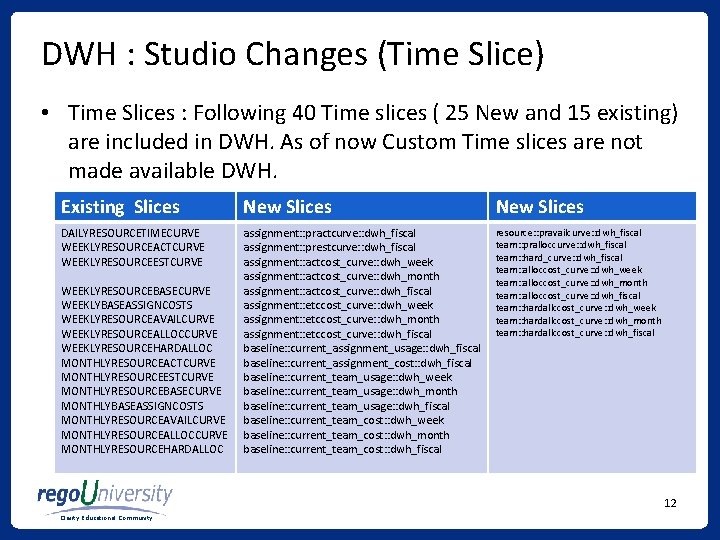
DWH : Studio Changes (Time Slice) • Time Slices : Following 40 Time slices ( 25 New and 15 existing) are included in DWH. As of now Custom Time slices are not made available DWH. Existing Slices New Slices DAILYRESOURCETIMECURVE WEEKLYRESOURCEACTCURVE WEEKLYRESOURCEESTCURVE assignment: : practcurve: : dwh_fiscal assignment: : prestcurve: : dwh_fiscal assignment: : actcost_curve: : dwh_week assignment: : actcost_curve: : dwh_month assignment: : actcost_curve: : dwh_fiscal assignment: : etccost_curve: : dwh_week assignment: : etccost_curve: : dwh_month assignment: : etccost_curve: : dwh_fiscal baseline: : current_assignment_usage: : dwh_fiscal baseline: : current_assignment_cost: : dwh_fiscal baseline: : current_team_usage: : dwh_week baseline: : current_team_usage: : dwh_month baseline: : current_team_usage: : dwh_fiscal baseline: : current_team_cost: : dwh_week baseline: : current_team_cost: : dwh_month baseline: : current_team_cost: : dwh_fiscal resource: : pravailcurve: : dwh_fiscal team: : pralloccurve: : dwh_fiscal team: : hard_curve: : dwh_fiscal team: : alloccost_curve: : dwh_week team: : alloccost_curve: : dwh_month team: : alloccost_curve: : dwh_fiscal team: : hardallccost_curve: : dwh_week team: : hardallccost_curve: : dwh_month team: : hardallccost_curve: : dwh_fiscal WEEKLYRESOURCEBASECURVE WEEKLYBASEASSIGNCOSTS WEEKLYRESOURCEAVAILCURVE WEEKLYRESOURCEALLOCCURVE WEEKLYRESOURCEHARDALLOC MONTHLYRESOURCEACTCURVE MONTHLYRESOURCEESTCURVE MONTHLYRESOURCEBASECURVE MONTHLYBASEASSIGNCOSTS MONTHLYRESOURCEAVAILCURVE MONTHLYRESOURCEALLOCCURVE MONTHLYRESOURCEHARDALLOC 12 Clarity Educational Community
DWH : DB Changes • DB Changes : • A new PPM_DWH Schema is needed to be created for Data Warehouse either in same PPM Database or separate Database on same/different server. • DWH Schema Contains approx 186 tables, 48 views, 17 Functions, 35 procedures. • PPM Schema contains DWH related 6 tables, 90 Views, 3 functions, 2 procedures. • Database link will need to be created in DWH for PPM DB. 13 Clarity Educational Community
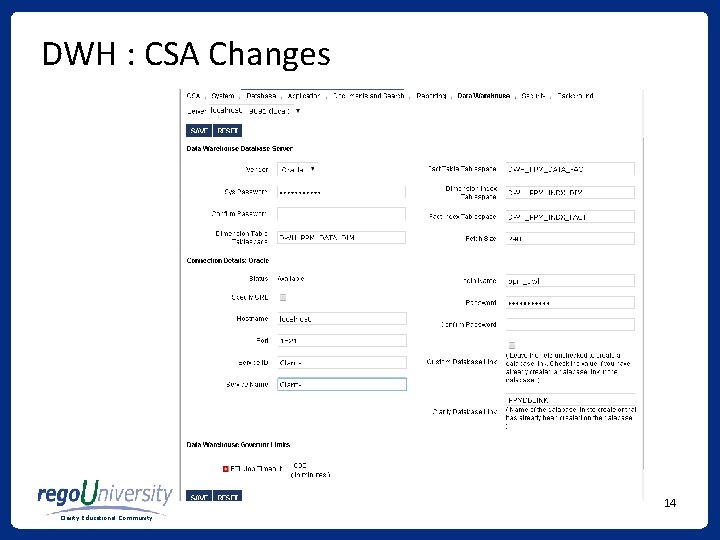
DWH : CSA Changes 14 Clarity Educational Community
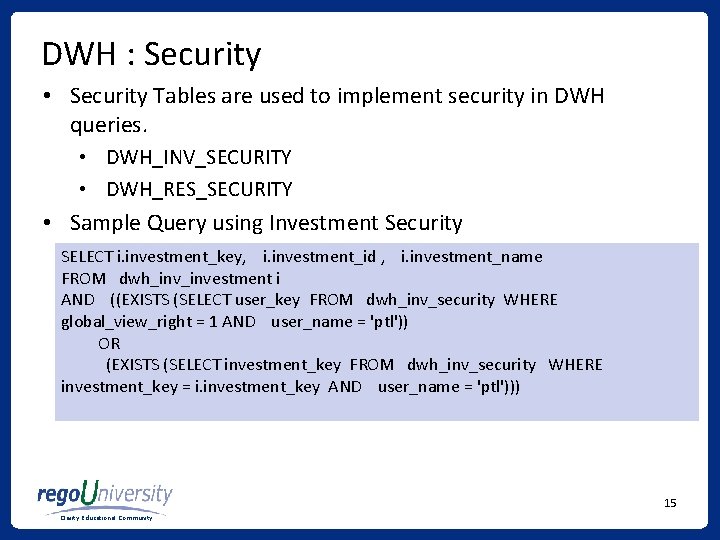
DWH : Security • Security Tables are used to implement security in DWH queries. • DWH_INV_SECURITY • DWH_RES_SECURITY • Sample Query using Investment Security SELECT i. investment_key, i. investment_id , i. investment_name FROM dwh_investment i AND ((EXISTS (SELECT user_key FROM dwh_inv_security WHERE global_view_right = 1 AND user_name = 'ptl')) OR (EXISTS (SELECT investment_key FROM dwh_inv_security WHERE investment_key = i. investment_key AND user_name = 'ptl'))) 15 Clarity Educational Community
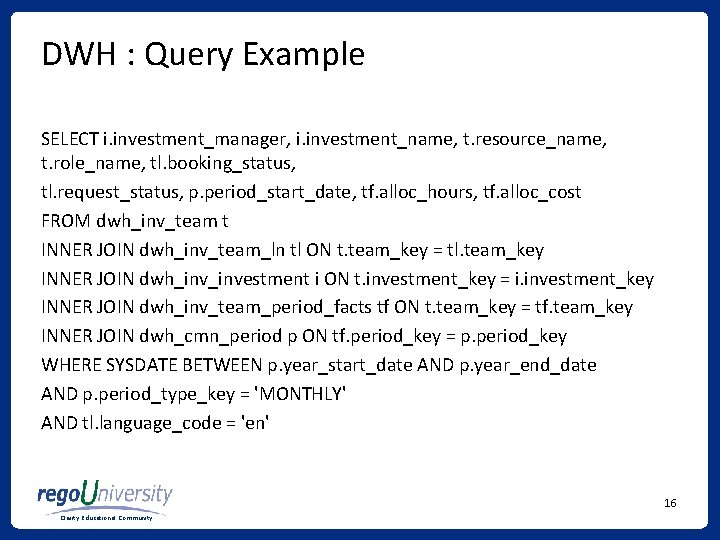
DWH : Query Example SELECT i. investment_manager, i. investment_name, t. resource_name, t. role_name, tl. booking_status, tl. request_status, p. period_start_date, tf. alloc_hours, tf. alloc_cost FROM dwh_inv_team t INNER JOIN dwh_inv_team_ln tl ON t. team_key = tl. team_key INNER JOIN dwh_investment i ON t. investment_key = i. investment_key INNER JOIN dwh_inv_team_period_facts tf ON t. team_key = tf. team_key INNER JOIN dwh_cmn_period p ON tf. period_key = p. period_key WHERE SYSDATE BETWEEN p. year_start_date AND p. year_end_date AND p. period_type_key = 'MONTHLY' AND tl. language_code = 'en' 16 Clarity Educational Community
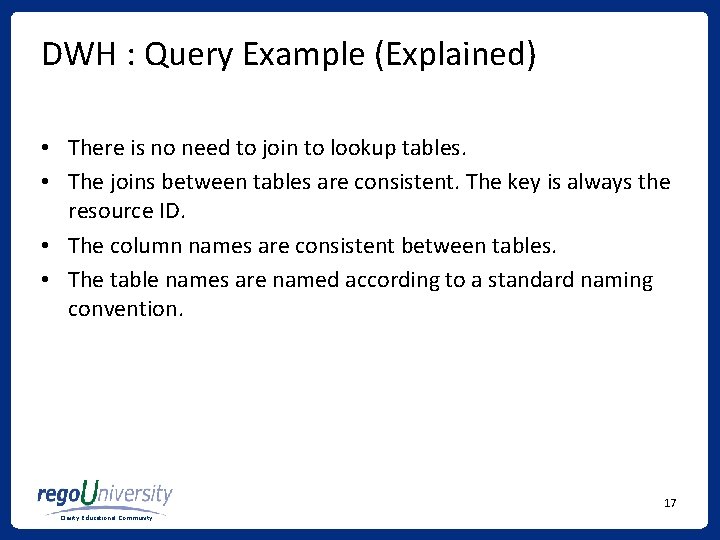
DWH : Query Example (Explained) • There is no need to join to lookup tables. • The joins between tables are consistent. The key is always the resource ID. • The column names are consistent between tables. • The table names are named according to a standard naming convention. 17 Clarity Educational Community
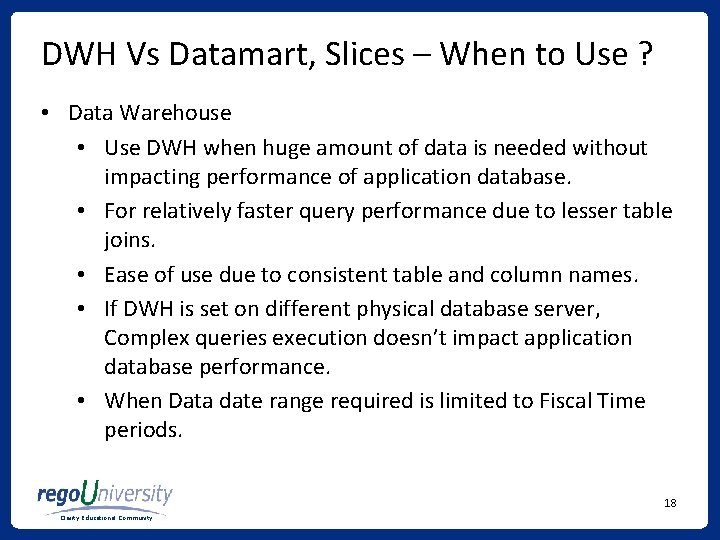
DWH Vs Datamart, Slices – When to Use ? • Data Warehouse • Use DWH when huge amount of data is needed without impacting performance of application database. • For relatively faster query performance due to lesser table joins. • Ease of use due to consistent table and column names. • If DWH is set on different physical database server, Complex queries execution doesn’t impact application database performance. • When Data date range required is limited to Fiscal Time periods. 18 Clarity Educational Community
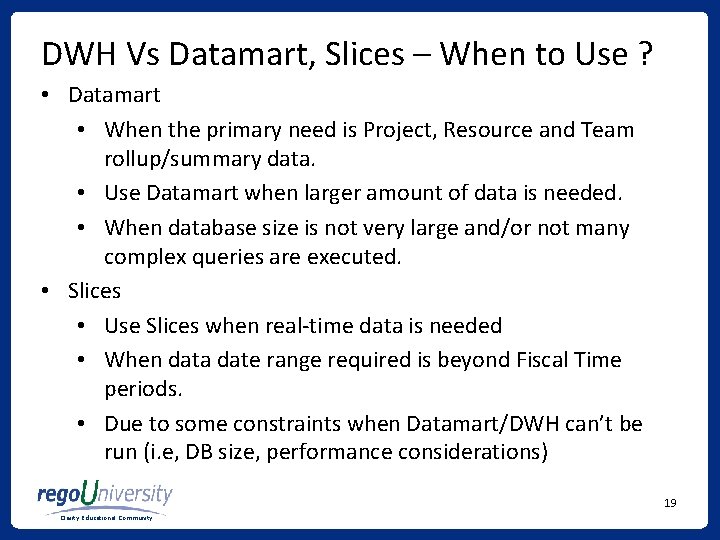
DWH Vs Datamart, Slices – When to Use ? • Datamart • When the primary need is Project, Resource and Team rollup/summary data. • Use Datamart when larger amount of data is needed. • When database size is not very large and/or not many complex queries are executed. • Slices • Use Slices when real-time data is needed • When data date range required is beyond Fiscal Time periods. • Due to some constraints when Datamart/DWH can’t be run (i. e, DB size, performance considerations) 19 Clarity Educational Community
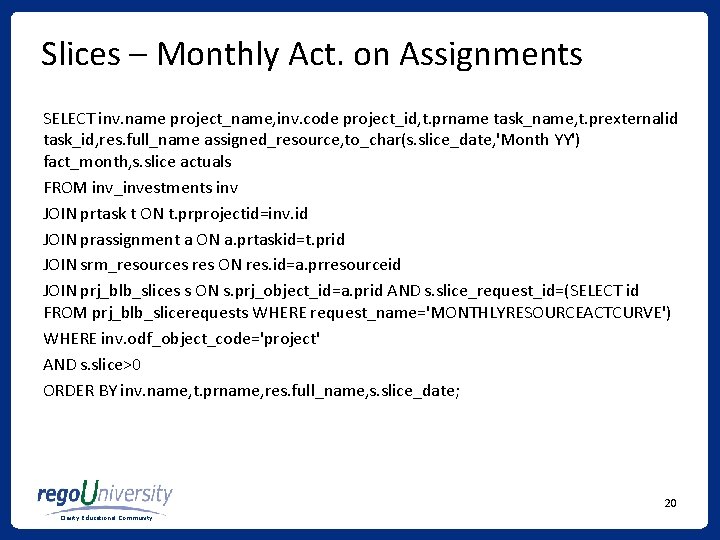
Slices – Monthly Act. on Assignments SELECT inv. name project_name, inv. code project_id, t. prname task_name, t. prexternalid task_id, res. full_name assigned_resource, to_char(s. slice_date, 'Month YY') fact_month, s. slice actuals FROM inv_investments inv JOIN prtask t ON t. prprojectid=inv. id JOIN prassignment a ON a. prtaskid=t. prid JOIN srm_resources res ON res. id=a. prresourceid JOIN prj_blb_slices s ON s. prj_object_id=a. prid AND s. slice_request_id=(SELECT id FROM prj_blb_slicerequests WHERE request_name='MONTHLYRESOURCEACTCURVE') WHERE inv. odf_object_code='project' AND s. slice>0 ORDER BY inv. name, t. prname, res. full_name, s. slice_date; 20 Clarity Educational Community
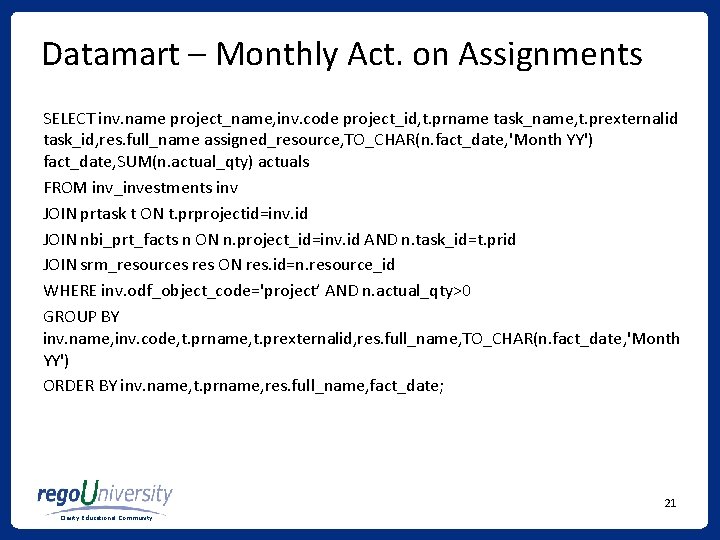
Datamart – Monthly Act. on Assignments SELECT inv. name project_name, inv. code project_id, t. prname task_name, t. prexternalid task_id, res. full_name assigned_resource, TO_CHAR(n. fact_date, 'Month YY') fact_date, SUM(n. actual_qty) actuals FROM inv_investments inv JOIN prtask t ON t. prprojectid=inv. id JOIN nbi_prt_facts n ON n. project_id=inv. id AND n. task_id=t. prid JOIN srm_resources res ON res. id=n. resource_id WHERE inv. odf_object_code='project’ AND n. actual_qty>0 GROUP BY inv. name, inv. code, t. prname, t. prexternalid, res. full_name, TO_CHAR(n. fact_date, 'Month YY') ORDER BY inv. name, t. prname, res. full_name, fact_date; 21 Clarity Educational Community
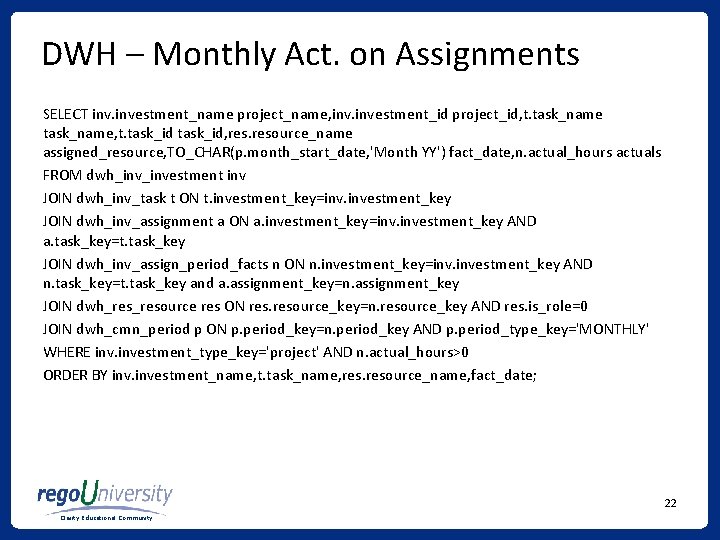
DWH – Monthly Act. on Assignments SELECT investment_name project_name, investment_id project_id, t. task_name, t. task_id, resource_name assigned_resource, TO_CHAR(p. month_start_date, 'Month YY') fact_date, n. actual_hours actuals FROM dwh_investment inv JOIN dwh_inv_task t ON t. investment_key=inv. investment_key JOIN dwh_inv_assignment a ON a. investment_key=inv. investment_key AND a. task_key=t. task_key JOIN dwh_inv_assign_period_facts n ON n. investment_key=inv. investment_key AND n. task_key=t. task_key and a. assignment_key=n. assignment_key JOIN dwh_resource res ON resource_key=n. resource_key AND res. is_role=0 JOIN dwh_cmn_period p ON p. period_key=n. period_key AND p. period_type_key='MONTHLY' WHERE investment_type_key='project' AND n. actual_hours>0 ORDER BY investment_name, t. task_name, resource_name, fact_date; 22 Clarity Educational Community
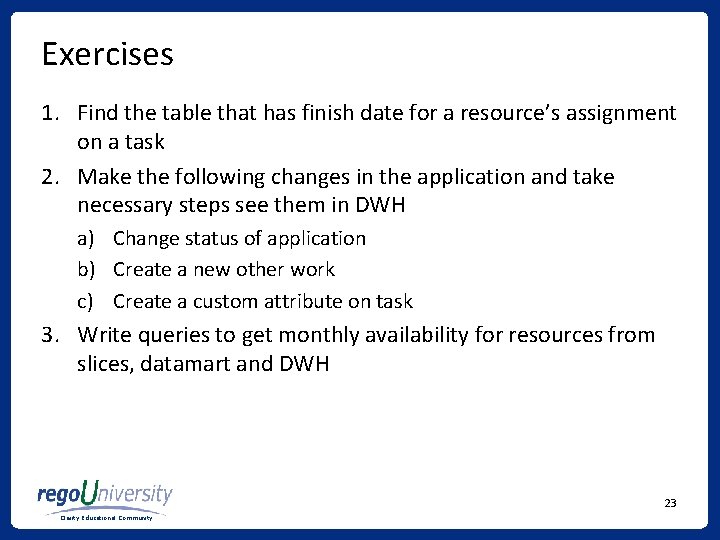
Exercises 1. Find the table that has finish date for a resource’s assignment on a task 2. Make the following changes in the application and take necessary steps see them in DWH a) Change status of application b) Create a new other work c) Create a custom attribute on task 3. Write queries to get monthly availability for resources from slices, datamart and DWH 23 Clarity Educational Community
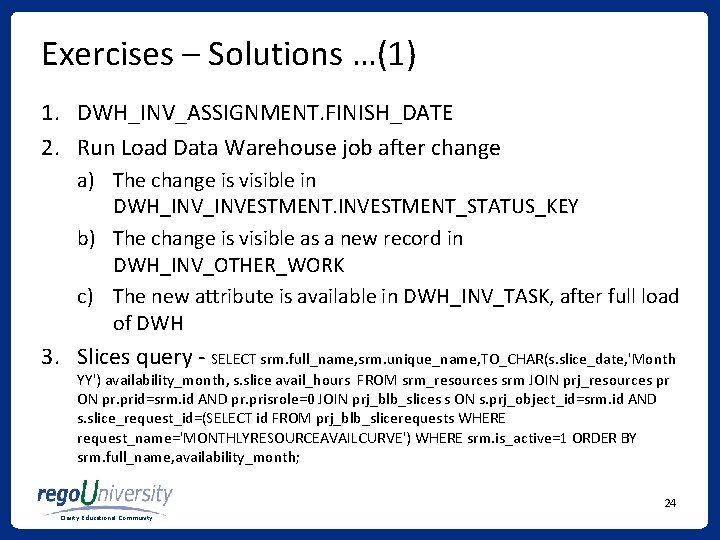
Exercises – Solutions …(1) 1. DWH_INV_ASSIGNMENT. FINISH_DATE 2. Run Load Data Warehouse job after change a) The change is visible in DWH_INVESTMENT_STATUS_KEY b) The change is visible as a new record in DWH_INV_OTHER_WORK c) The new attribute is available in DWH_INV_TASK, after full load of DWH 3. Slices query - SELECT srm. full_name, srm. unique_name, TO_CHAR(s. slice_date, 'Month YY') availability_month, s. slice avail_hours FROM srm_resources srm JOIN prj_resources pr ON pr. prid=srm. id AND pr. prisrole=0 JOIN prj_blb_slices s ON s. prj_object_id=srm. id AND s. slice_request_id=(SELECT id FROM prj_blb_slicerequests WHERE request_name='MONTHLYRESOURCEAVAILCURVE') WHERE srm. is_active=1 ORDER BY srm. full_name, availability_month; 24 Clarity Educational Community
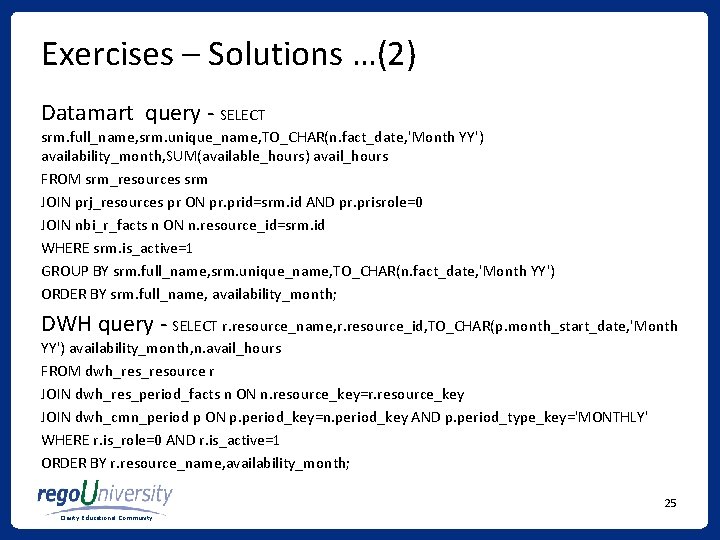
Exercises – Solutions …(2) Datamart query - SELECT srm. full_name, srm. unique_name, TO_CHAR(n. fact_date, 'Month YY') availability_month, SUM(available_hours) avail_hours FROM srm_resources srm JOIN prj_resources pr ON pr. prid=srm. id AND pr. prisrole=0 JOIN nbi_r_facts n ON n. resource_id=srm. id WHERE srm. is_active=1 GROUP BY srm. full_name, srm. unique_name, TO_CHAR(n. fact_date, 'Month YY') ORDER BY srm. full_name, availability_month; DWH query - SELECT r. resource_name, r. resource_id, TO_CHAR(p. month_start_date, 'Month YY') availability_month, n. avail_hours FROM dwh_resource r JOIN dwh_res_period_facts n ON n. resource_key=r. resource_key JOIN dwh_cmn_period p ON p. period_key=n. period_key AND p. period_type_key='MONTHLY' WHERE r. is_role=0 AND r. is_active=1 ORDER BY r. resource_name, availability_month; 25 Clarity Educational Community
Questions We hope that you found this session informative and worthwhile. Our primary goal was to increase your understanding of the topic and CA PPM in general. There were many concepts covered during the session, if you would like to contact any presenter with questions, please reach out to us. Thank you for attending rego. University 2015! Phone 888. 813. 0444 Email info@regouniversity. com Website www. regouniversity. com 26 Clarity Educational Community