Slides for Software requirements Styles and techniques Soren
![Fig 6. 3 B Planguage version of target etc. Forecast speed [Tag]: How quickly](https://slidetodoc.com/presentation_image/f4c9456a0647c41c2e702950d4e9fe94/image-13.jpg "Fig 6. 3 B Planguage version of target etc. Forecast speed [Tag]: How quickly")
- Slides: 30
Slides for Software requirements Styles and techniques Soren Lauesen 6. Quality requirements August 2006 © 2002, Pearson Education retains the copyright to the slides, but allows restricted copying for teaching purposes only. It is a condition that the source and copyright notice is preserved on all the material. These slides are updated by Enas Naffar to be used in Software requirements course – Philadelphia University
Quality Requirements • Quality requirements specify how well the system must perform its functions. • • How fast must it respond ? How easy must it be to use? How secure does it have to be against attacks? How easy should it be to maintain? • Quality requirements are also called Nonfunctional requirements
Quality Requirements • Many Quality requirements are not only software requirements, but requirements for the entire system. • Some Quality requirements are mandatory in the same sense as functional requirements. – If the system does not meet them, it is useless.
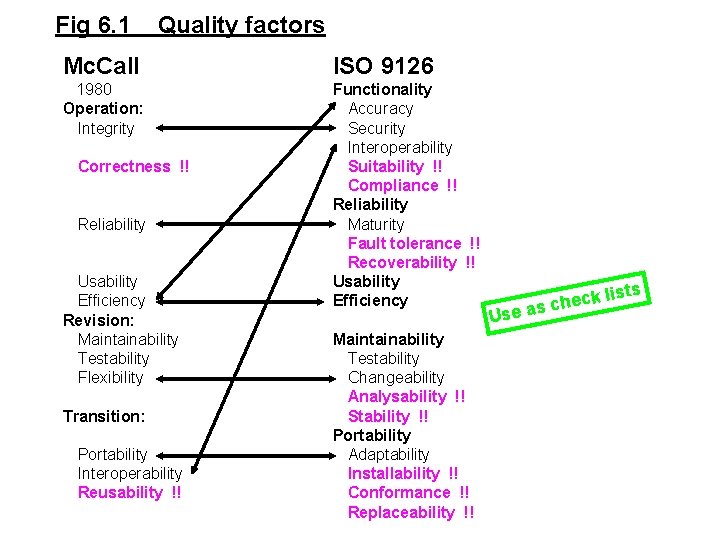
Fig 6. 1 Quality factors Mc. Call ISO 9126 1980 Operation: Integrity Functionality Accuracy Security Interoperability Suitability !! Compliance !! Reliability Maturity Fault tolerance !! Recoverability !! Usability Efficiency Correctness !! Reliability Usability Efficiency Revision: Maintainability Testability Flexibility Transition: Portability Interoperability Reusability !! Maintainability Testability Changeability Analysability !! Stability !! Portability Adaptability Installability !! Conformance !! Replaceability !! Use k lis c e h c as ts
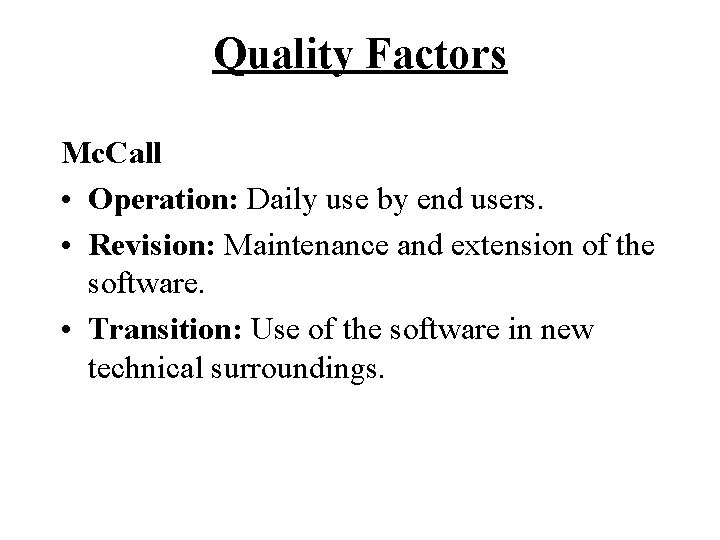
Quality Factors Mc. Call • Operation: Daily use by end users. • Revision: Maintenance and extension of the software. • Transition: Use of the software in new technical surroundings.
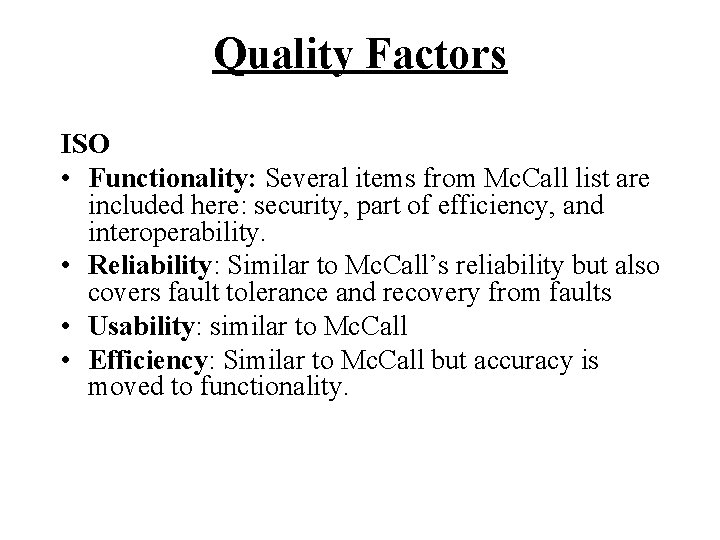
Quality Factors ISO • Functionality: Several items from Mc. Call list are included here: security, part of efficiency, and interoperability. • Reliability: Similar to Mc. Call’s reliability but also covers fault tolerance and recovery from faults • Usability: similar to Mc. Call • Efficiency: Similar to Mc. Call but accuracy is moved to functionality.
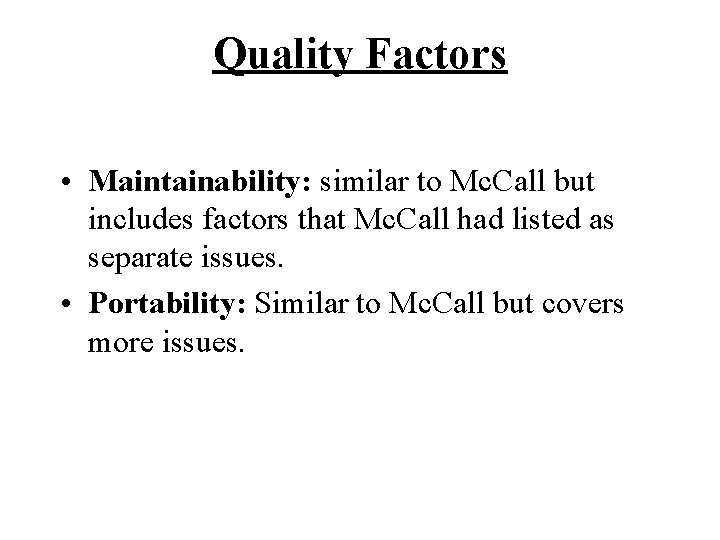
Quality Factors • Maintainability: similar to Mc. Call but includes factors that Mc. Call had listed as separate issues. • Portability: Similar to Mc. Call but covers more issues.
Quality Factors Which list should you use?
Quality Grid • • Select factors Asses importance Specify concerns Be balanced
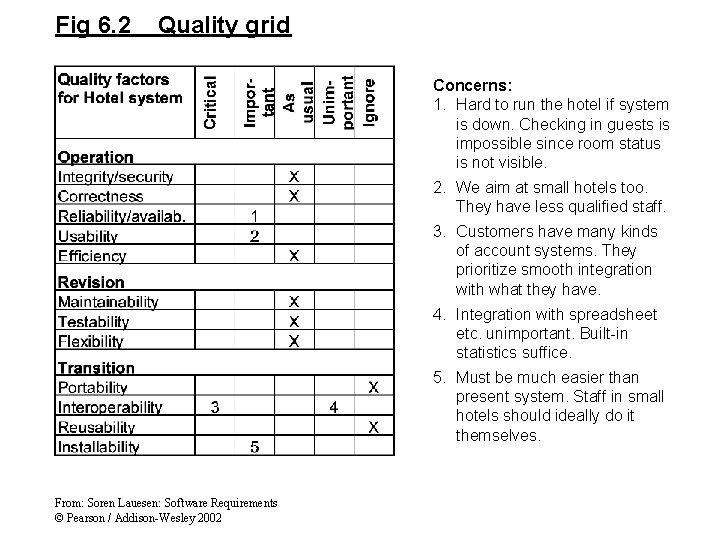
Fig 6. 2 Quality grid Concerns: 1. Hard to run the hotel if system is down. Checking in guests is impossible since room status is not visible. 2. We aim at small hotels too. They have less qualified staff. 3. Customers have many kinds of account systems. They prioritize smooth integration with what they have. 4. Integration with spreadsheet etc. unimportant. Built-in statistics suffice. 5. Must be much easier than present system. Staff in small hotels should ideally do it themselves. From: Soren Lauesen: Software Requirements © Pearson / Addison-Wesley 2002
Open metric and open target • A quality requirement will often have a numerical target to reach. • Often hard to select a metric for measuring quality. • Even harder to decide the value needed • Suggested solution: leave it to the supplier to specify it.
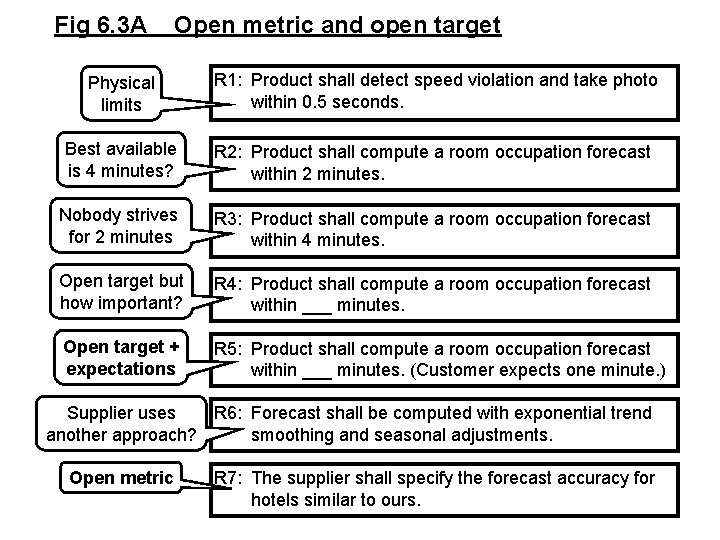
Fig 6. 3 A Open metric and open target Physical limits R 1: Product shall detect speed violation and take photo within 0. 5 seconds. Best available is 4 minutes? R 2: Product shall compute a room occupation forecast within 2 minutes. Nobody strives for 2 minutes R 3: Product shall compute a room occupation forecast within 4 minutes. Open target but how important? R 4: Product shall compute a room occupation forecast within ___ minutes. Open target + expectations R 5: Product shall compute a room occupation forecast within ___ minutes. (Customer expects one minute. ) Supplier uses R 6: Forecast shall be computed with exponential trend another approach? smoothing and seasonal adjustments. Open metric R 7: The supplier shall specify the forecast accuracy for hotels similar to ours.
Fig 6. 3 B Planguage version of target etc. Forecast speed [Tag]: How quickly the system completes a forecast report [Gist] Scale: average number of seconds from pushing button, to report appearing. Meter: Measured 10 times by a stopwatch during busy hours in hotel reception. Must: 8 minutes, because the competitive system does it this fast. Plan: ____ (supplier, please specify). Wish: 2 minutes. Past: Done as batch job taking about an hour. From: Soren Lauesen: Software Requirements © Pearson / Addison-Wesley 2002
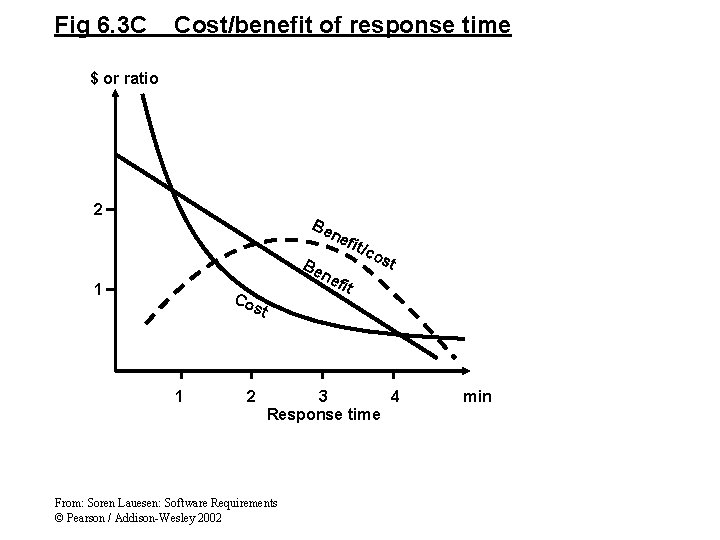
Fig 6. 3 C Cost/benefit of response time $ or ratio 2 Be ne fit/ co 1 Co st 1 2 st fit 3 4 Response time From: Soren Lauesen: Software Requirements © Pearson / Addison-Wesley 2002 min
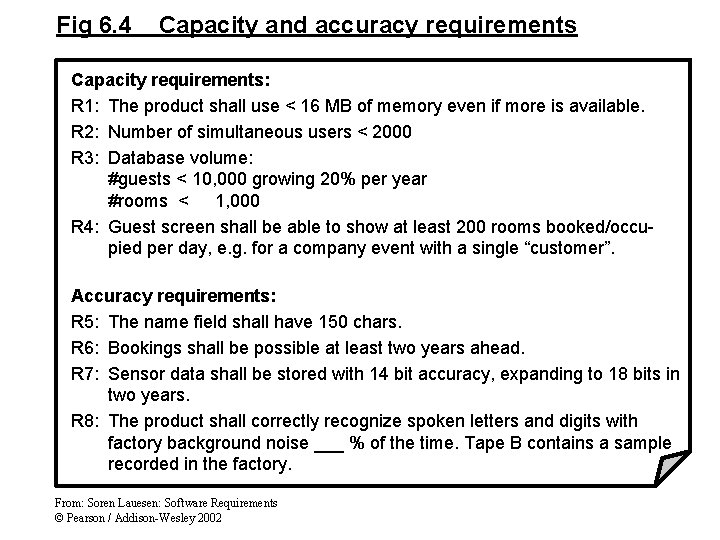
Fig 6. 4 Capacity and accuracy requirements Capacity requirements: R 1: The product shall use < 16 MB of memory even if more is available. R 2: Number of simultaneous users < 2000 R 3: Database volume: #guests < 10, 000 growing 20% per year #rooms < 1, 000 R 4: Guest screen shall be able to show at least 200 rooms booked/occupied per day, e. g. for a company event with a single “customer”. Accuracy requirements: R 5: The name field shall have 150 chars. R 6: Bookings shall be possible at least two years ahead. R 7: Sensor data shall be stored with 14 bit accuracy, expanding to 18 bits in two years. R 8: The product shall correctly recognize spoken letters and digits with factory background noise ___ % of the time. Tape B contains a sample recorded in the factory. From: Soren Lauesen: Software Requirements © Pearson / Addison-Wesley 2002
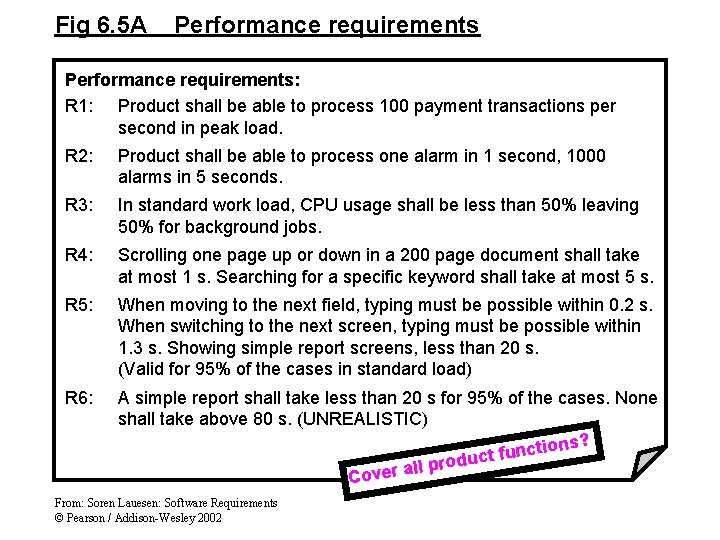
Fig 6. 5 A Performance requirements: R 1: Product shall be able to process 100 payment transactions per second in peak load. R 2: Product shall be able to process one alarm in 1 second, 1000 alarms in 5 seconds. R 3: In standard work load, CPU usage shall be less than 50% leaving 50% for background jobs. R 4: Scrolling one page up or down in a 200 page document shall take at most 1 s. Searching for a specific keyword shall take at most 5 s. R 5: When moving to the next field, typing must be possible within 0. 2 s. When switching to the next screen, typing must be possible within 1. 3 s. Showing simple report screens, less than 20 s. (Valid for 95% of the cases in standard load) R 6: A simple report shall take less than 20 s for 95% of the cases. None shall take above 80 s. (UNREALISTIC) ons? i t c n u f duct o r p l l a Cover From: Soren Lauesen: Software Requirements © Pearson / Addison-Wesley 2002
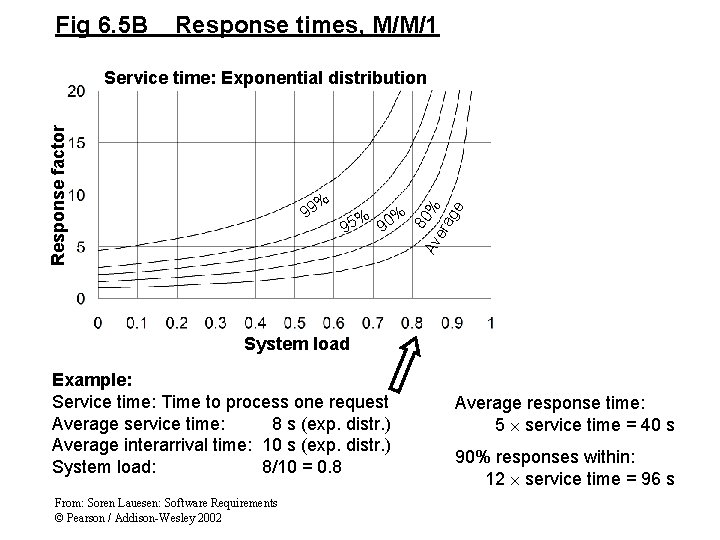
Fig 6. 5 B Response times, M/M/1 % 99 % % 95 90 8 Av 0% era ge Response factor Service time: Exponential distribution System load Example: Service time: Time to process one request Average service time: 8 s (exp. distr. ) Average interarrival time: 10 s (exp. distr. ) System load: 8/10 = 0. 8 From: Soren Lauesen: Software Requirements © Pearson / Addison-Wesley 2002 Average response time: 5 service time = 40 s 90% responses within: 12 service time = 96 s
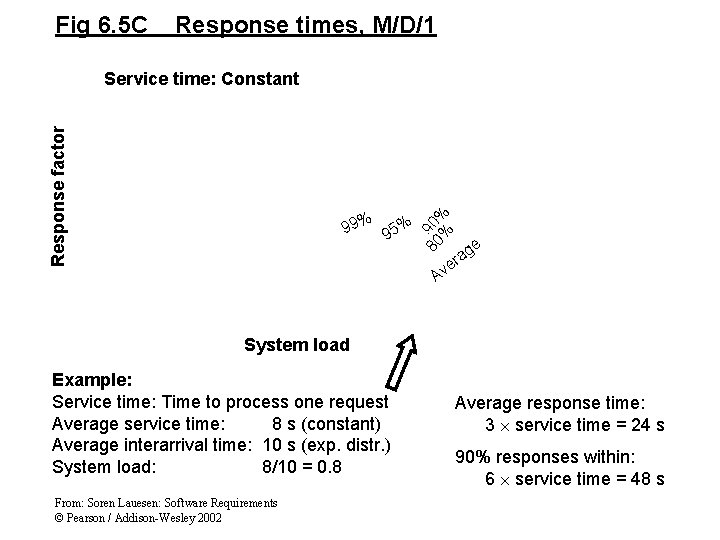
Fig 6. 5 C Response times, M/D/1 99% 95% 80 90 % % Response factor Service time: Constant e g ra e Av System load Example: Service time: Time to process one request Average service time: 8 s (constant) Average interarrival time: 10 s (exp. distr. ) System load: 8/10 = 0. 8 From: Soren Lauesen: Software Requirements © Pearson / Addison-Wesley 2002 Average response time: 3 service time = 24 s 90% responses within: 6 service time = 48 s
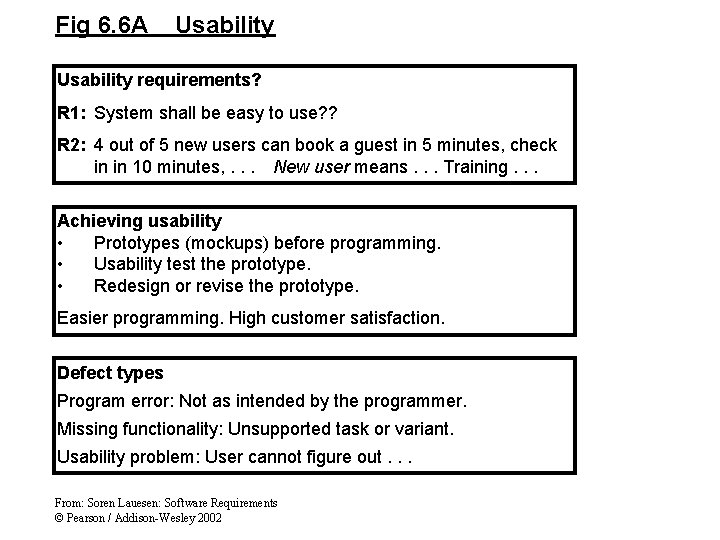
Fig 6. 6 A Usability requirements? R 1: System shall be easy to use? ? R 2: 4 out of 5 new users can book a guest in 5 minutes, check in in 10 minutes, . . . New user means. . . Training. . . Achieving usability • Prototypes (mockups) before programming. • Usability test the prototype. • Redesign or revise the prototype. Easier programming. High customer satisfaction. Defect types Program error: Not as intended by the programmer. Missing functionality: Unsupported task or variant. Usability problem: User cannot figure out. . . From: Soren Lauesen: Software Requirements © Pearson / Addison-Wesley 2002
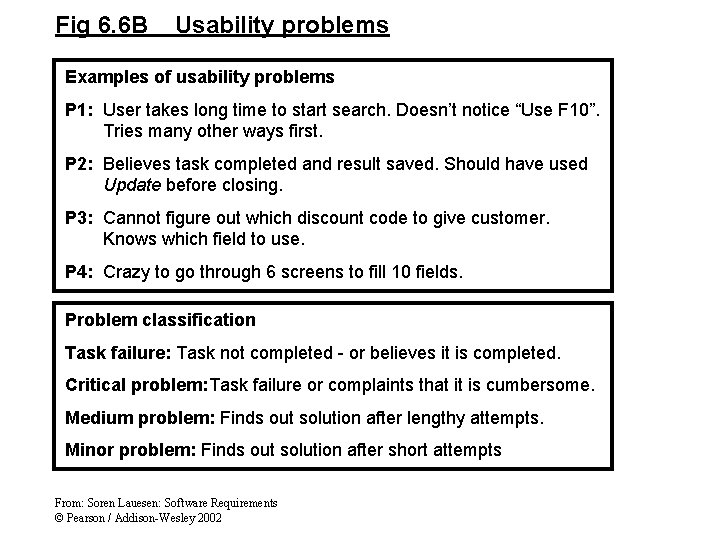
Fig 6. 6 B Usability problems Examples of usability problems P 1: User takes long time to start search. Doesn’t notice “Use F 10”. Tries many other ways first. P 2: Believes task completed and result saved. Should have used Update before closing. P 3: Cannot figure out which discount code to give customer. Knows which field to use. P 4: Crazy to go through 6 screens to fill 10 fields. Problem classification Task failure: Task not completed - or believes it is completed. Critical problem: Task failure or complaints that it is cumbersome. Medium problem: Finds out solution after lengthy attempts. Minor problem: Finds out solution after short attempts From: Soren Lauesen: Software Requirements © Pearson / Addison-Wesley 2002
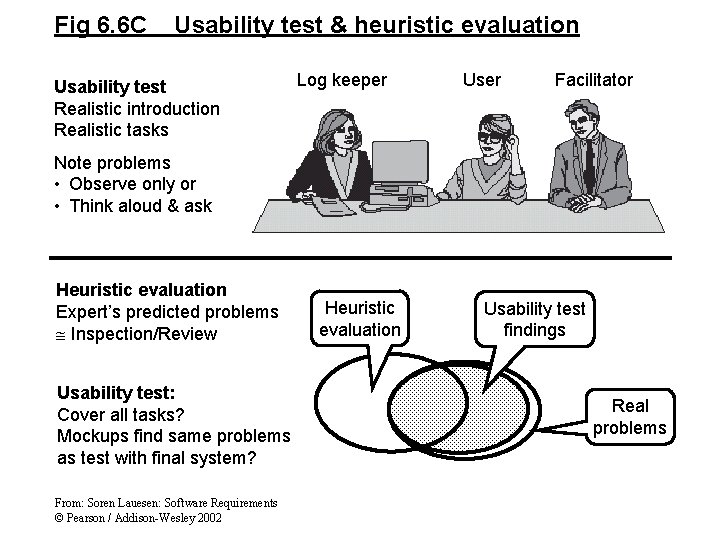
Fig 6. 6 C Usability test & heuristic evaluation Usability test Realistic introduction Realistic tasks Log keeper User Facilitator Note problems • Observe only or • Think aloud & ask Heuristic evaluation Expert’s predicted problems Inspection/Review Usability test: Cover all tasks? Mockups find same problems as test with final system? From: Soren Lauesen: Software Requirements © Pearson / Addison-Wesley 2002 Heuristic evaluation Usability test findings Real problems
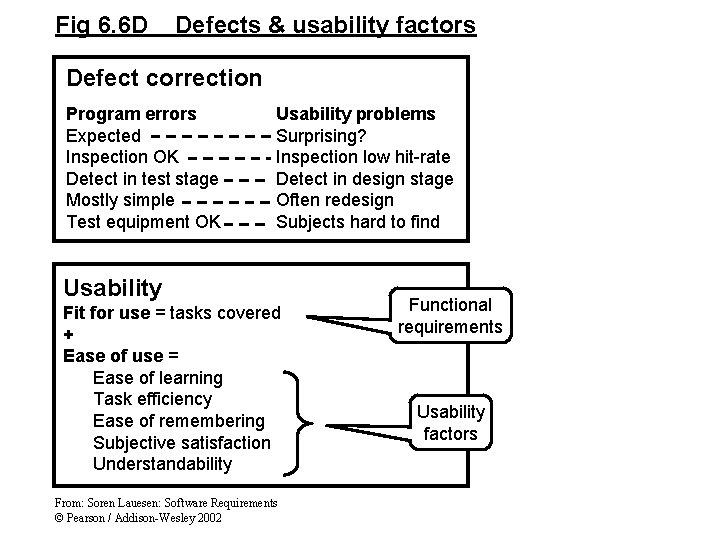
Fig 6. 6 D Defects & usability factors Defect correction Program errors Expected Inspection OK Detect in test stage Mostly simple Test equipment OK Usability problems Surprising? Inspection low hit-rate Detect in design stage Often redesign Subjects hard to find Usability Fit for use = tasks covered + Ease of use = Ease of learning Task efficiency Ease of remembering Subjective satisfaction Understandability From: Soren Lauesen: Software Requirements © Pearson / Addison-Wesley 2002 Functional requirements Usability factors
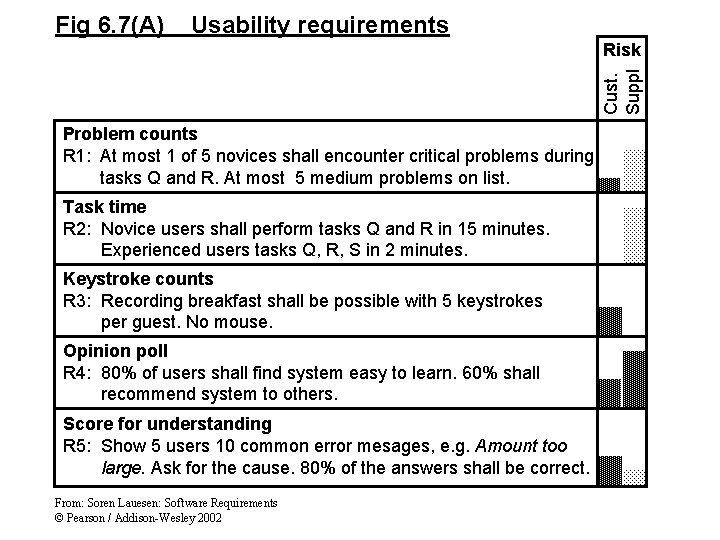
Fig 6. 7(A) Usability requirements Cust. Suppl Risk Problem counts R 1: At most 1 of 5 novices shall encounter critical problems during tasks Q and R. At most 5 medium problems on list. Task time R 2: Novice users shall perform tasks Q and R in 15 minutes. Experienced users tasks Q, R, S in 2 minutes. Keystroke counts R 3: Recording breakfast shall be possible with 5 keystrokes per guest. No mouse. Opinion poll R 4: 80% of users shall find system easy to learn. 60% shall recommend system to others. Score for understanding R 5: Show 5 users 10 common error mesages, e. g. Amount too large. Ask for the cause. 80% of the answers shall be correct. From: Soren Lauesen: Software Requirements © Pearson / Addison-Wesley 2002
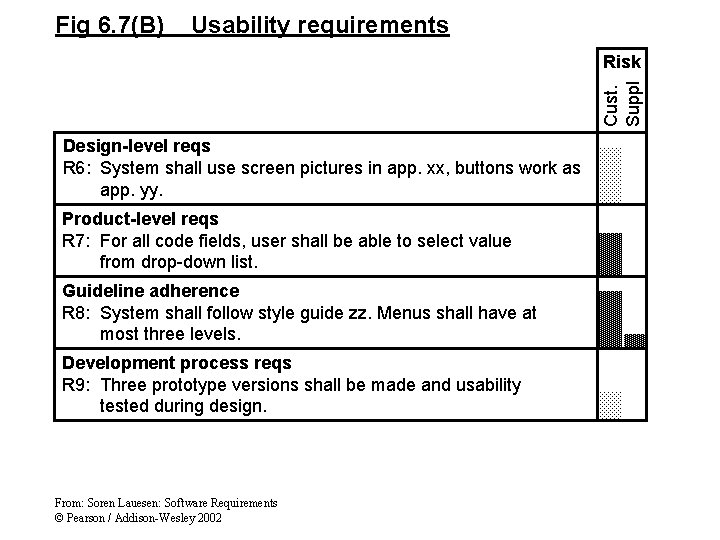
Fig 6. 7(B) Usability requirements Cust. Suppl Risk Design-level reqs R 6: System shall use screen pictures in app. xx, buttons work as app. yy. Product-level reqs R 7: For all code fields, user shall be able to select value from drop-down list. Guideline adherence R 8: System shall follow style guide zz. Menus shall have at most three levels. Development process reqs R 9: Three prototype versions shall be made and usability tested during design. From: Soren Lauesen: Software Requirements © Pearson / Addison-Wesley 2002
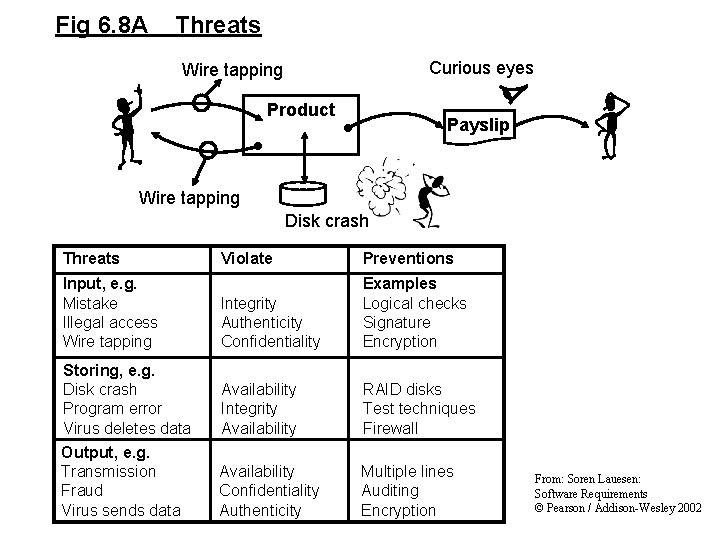
Fig 6. 8 A Threats Curious eyes Wire tapping Product Payslip Wire tapping Disk crash Threats Violate Preventions Input, e. g. Mistake Illegal access Wire tapping Integrity Authenticity Confidentiality Examples Logical checks Signature Encryption Storing, e. g. Disk crash Program error Virus deletes data Availability Integrity Availability RAID disks Test techniques Firewall Output, e. g. Transmission Fraud Virus sends data Availability Confidentiality Authenticity Multiple lines Auditing Encryption From: Soren Lauesen: Software Requirements © Pearson / Addison-Wesley 2002
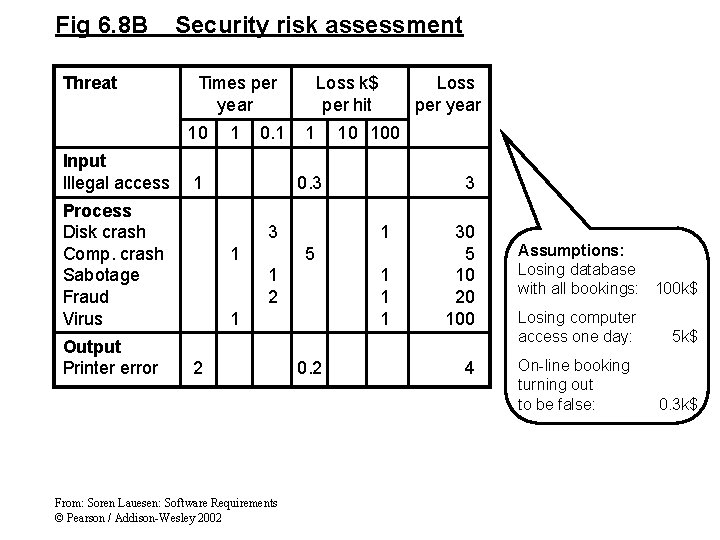
Fig 6. 8 B Threat Security risk assessment Times per year 10 Input Illegal access 0. 1 1 Process Disk crash Comp. crash Sabotage Fraud Virus Output Printer error 1 Loss k$ per hit 1 Loss per year 10 100 0. 3 3 1 5 1 2 1 1 2 From: Soren Lauesen: Software Requirements © Pearson / Addison-Wesley 2002 0. 2 30 5 10 20 100 4 Assumptions: Losing database with all bookings: 100 k$ Losing computer access one day: On-line booking turning out to be false: 5 k$ 0. 3 k$
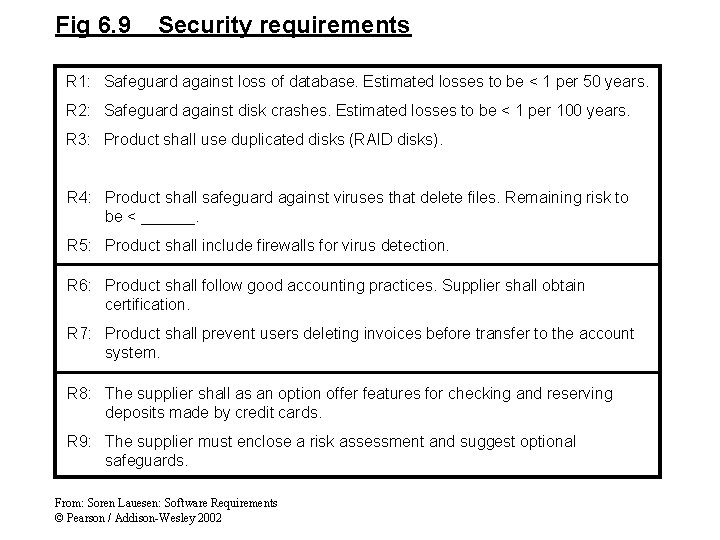
Fig 6. 9 Security requirements R 1: Safeguard against loss of database. Estimated losses to be < 1 per 50 years. R 2: Safeguard against disk crashes. Estimated losses to be < 1 per 100 years. R 3: Product shall use duplicated disks (RAID disks). R 4: Product shall safeguard against viruses that delete files. Remaining risk to be < ______. R 5: Product shall include firewalls for virus detection. R 6: Product shall follow good accounting practices. Supplier shall obtain certification. R 7: Product shall prevent users deleting invoices before transfer to the account system. R 8: The supplier shall as an option offer features for checking and reserving deposits made by credit cards. R 9: The supplier must enclose a risk assessment and suggest optional safeguards. From: Soren Lauesen: Software Requirements © Pearson / Addison-Wesley 2002
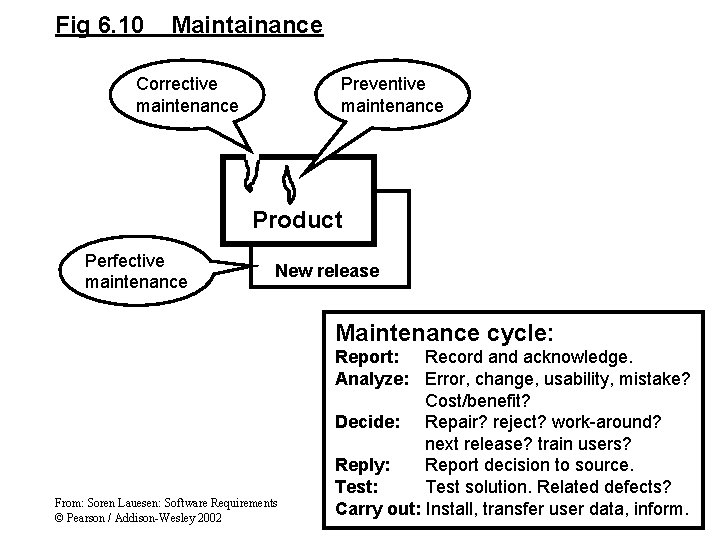
Fig 6. 10 Maintainance Corrective maintenance Preventive maintenance Product Perfective maintenance New release Maintenance cycle: From: Soren Lauesen: Software Requirements © Pearson / Addison-Wesley 2002 Report: Record and acknowledge. Analyze: Error, change, usability, mistake? Cost/benefit? Decide: Repair? reject? work-around? next release? train users? Reply: Report decision to source. Test: Test solution. Related defects? Carry out: Install, transfer user data, inform.
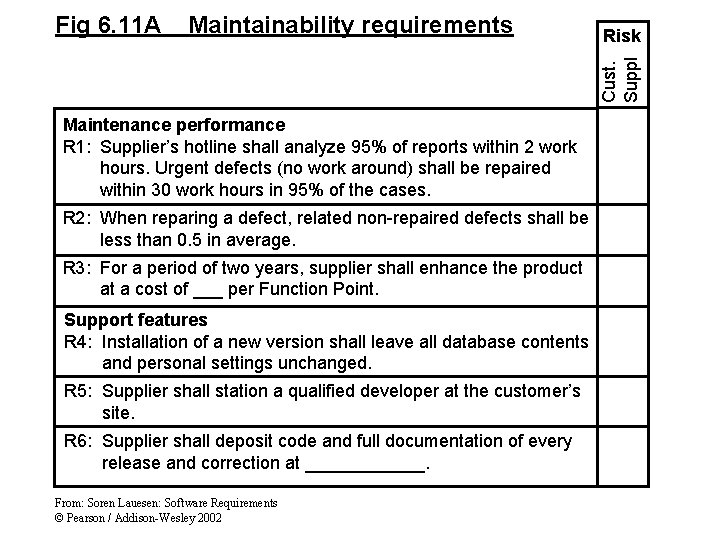
Maintainability requirements Risk Cust. Suppl Fig 6. 11 A Maintenance performance R 1: Supplier’s hotline shall analyze 95% of reports within 2 work hours. Urgent defects (no work around) shall be repaired within 30 work hours in 95% of the cases. R 2: When reparing a defect, related non-repaired defects shall be less than 0. 5 in average. R 3: For a period of two years, supplier shall enhance the product at a cost of ___ per Function Point. Support features R 4: Installation of a new version shall leave all database contents and personal settings unchanged. R 5: Supplier shall station a qualified developer at the customer’s site. R 6: Supplier shall deposit code and full documentation of every release and correction at ______. From: Soren Lauesen: Software Requirements © Pearson / Addison-Wesley 2002
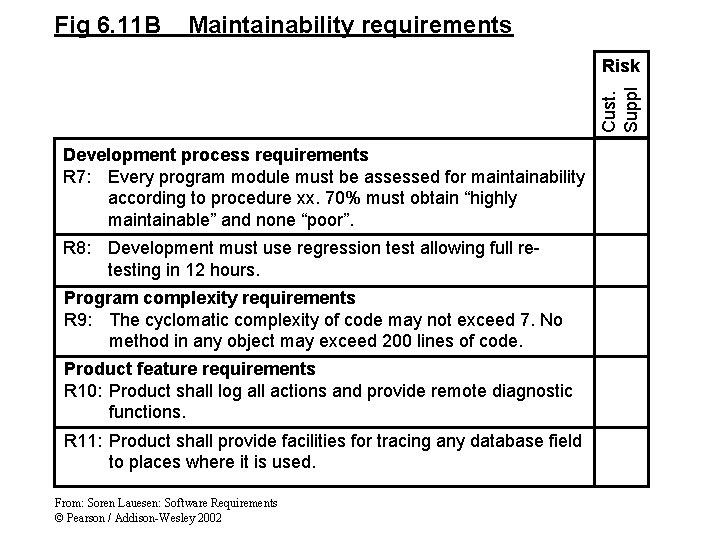
Fig 6. 11 B Maintainability requirements Cust. Suppl Risk Development process requirements R 7: Every program module must be assessed for maintainability according to procedure xx. 70% must obtain “highly maintainable” and none “poor”. R 8: Development must use regression test allowing full retesting in 12 hours. Program complexity requirements R 9: The cyclomatic complexity of code may not exceed 7. No method in any object may exceed 200 lines of code. Product feature requirements R 10: Product shall log all actions and provide remote diagnostic functions. R 11: Product shall provide facilities for tracing any database field to places where it is used. From: Soren Lauesen: Software Requirements © Pearson / Addison-Wesley 2002