CADCAE EXCHANGE OF CSG MODELS VIA ISO 10303


- Slides: 18
CAD-CAE EXCHANGE OF CSG MODELS VIA ISO 10303 STEP: Approach to alternate STEP pre-processors development Peter Shilnikov CIM department, Bauman Moscow State Technical University, Moscow, Russia Yuris Puteinis CAD Scientific-Research Center, Moscow, Russia Sergey Belogurov Institute of Theoretical and Experimental Physics, Moscow, Russia Alexander Institute of Theoretical and Experimental Physics, Semennikov Moscow, Russia Peter. Malzacher Gesellschaft für Schwerionenforschung mb. H, Darmstadt, Germany This work was supported by the INTAS grant 06 -1000012 -8778
Introduction: background of proposed solution • There exist analytical tasks which require export of the CAD models into software packages with rather different geometry representation. In some cases it also makes sense to modify and simplify these models following certain rules. In particular we deal with CATIA v. 5 CAD system and GEANT 4 Monte Carlo package developed at CERN [GEANT]. GEANT 4 is a toolkit for the simulation of the passage of particles through matter. Its areas of application include high energy, nuclear and accelerator physics, as well as studies in medical and space science.
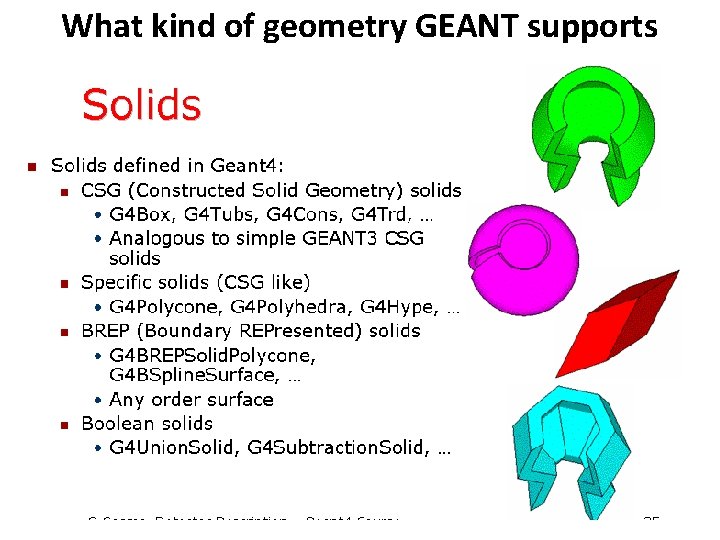
What kind of geometry GEANT supports
• Propagation of particles through materials requires a lot of geometrical calculations e. g. distance from the given point along given direction to the nearest boundary. Such calculations are fast enough only if relatively simple analytical formulae can be used. For this reason a solid body should be described as a Boolean combination of predefined primitives having analytical descriptions of all the geometrical features. Besides the CAD models have normally much more details than needed for the physical simulations. Thus our task is to develop a tool integrated into CATIA v. 5 for approximation of a part by a GEANT 4 like Boolean tree and then export the approximated model into GEANT 4. This task can be divided into two quite mutually-independent subtasks: • - to obtain GEANT relevant CAD model of design; • - to communicate this GEANT relevant model to GEANT.
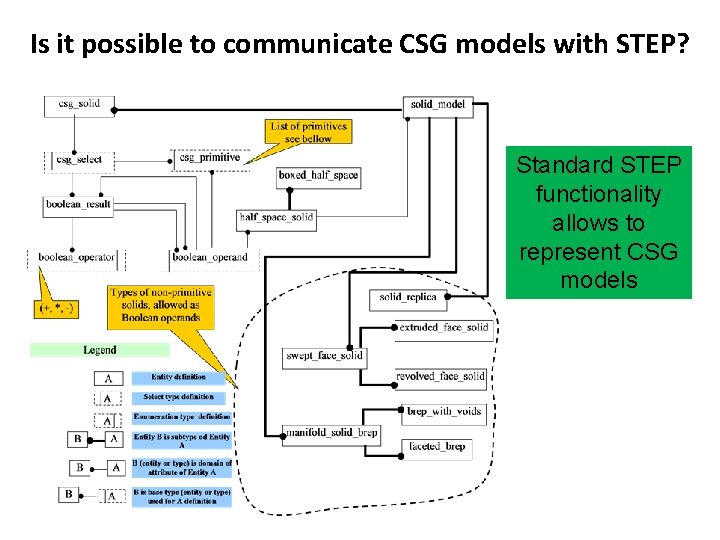
Is it possible to communicate CSG models with STEP? Standard STEP functionality allows to represent CSG models
What is a problem with CSG communicating via STEP? • The problem is in the absence of commercially available STEP converters generating geometric models represented as Boolean tree, i. e. “Constructive solid geometry” (CSG) model. Following reason of this fact can be mentioned: • • the low reliability of this geometric model: there is no warranty that receiving system will obtain exactly same result after Boolean operations executing; • • while communicating with partners users often want to send final resulting models only, hiding know-how details of model generation process; • • CAD vendors do not wish to increase openness of their software systems because it can facilitate users’ migration to software of other vendors.
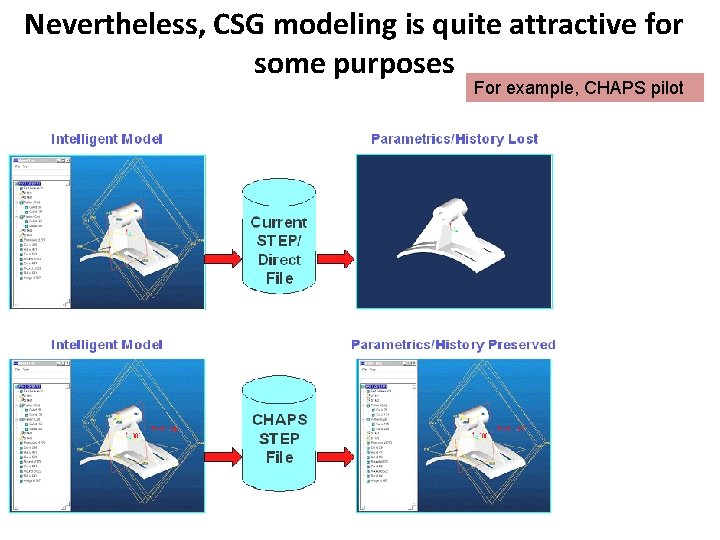
Nevertheless, CSG modeling is quite attractive for some purposes For example, CHAPS pilot
The way to compensate low realibity of CSG models – use multiple shape representation
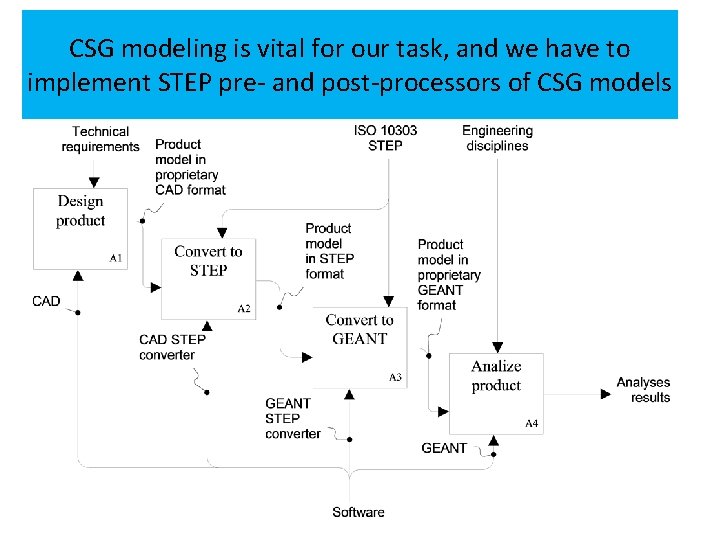
CSG modeling is vital for our task, and we have to implement STEP pre- and post-processors of CSG models
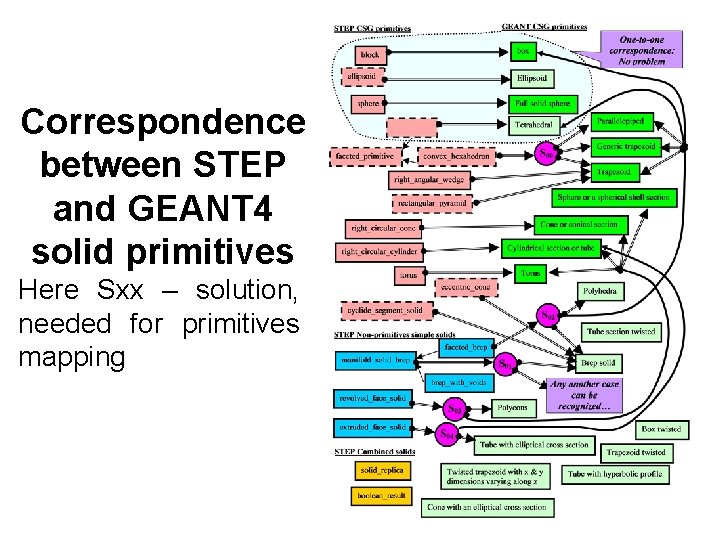
Correspondence between STEP and GEANT 4 solid primitives Here Sxx – solution, needed for primitives mapping
What implementation tool we intend to use? STEP related software tools, developed in Russia
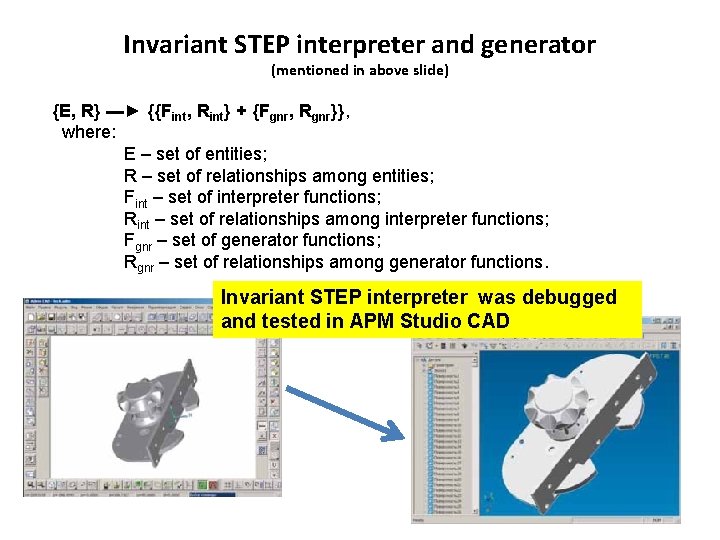
Invariant STEP interpreter and generator (mentioned in above slide) {E, R} ▬► {{Fint, Rint} + {Fgnr, Rgnr}}, where: E – set of entities; R – set of relationships among entities; Fint – set of interpreter functions; Rint – set of relationships among interpreter functions; Fgnr – set of generator functions; Rgnr – set of relationships among generator functions. Invariant STEP interpreter was debugged and tested in APM Studio CAD
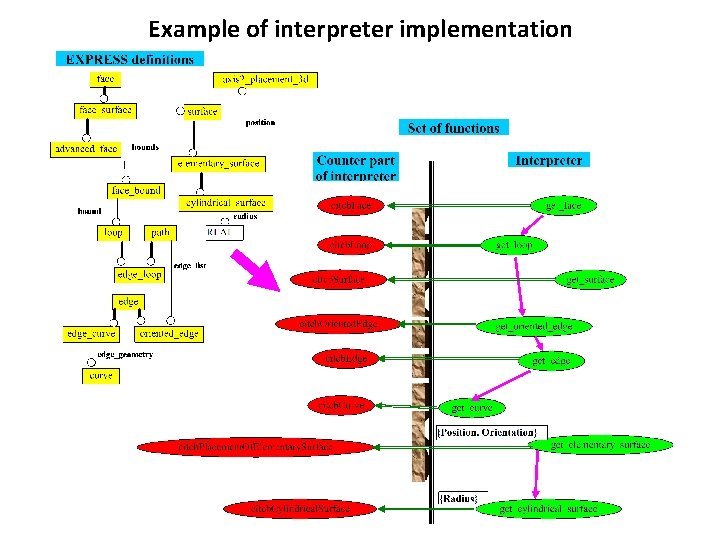
Example of interpreter implementation
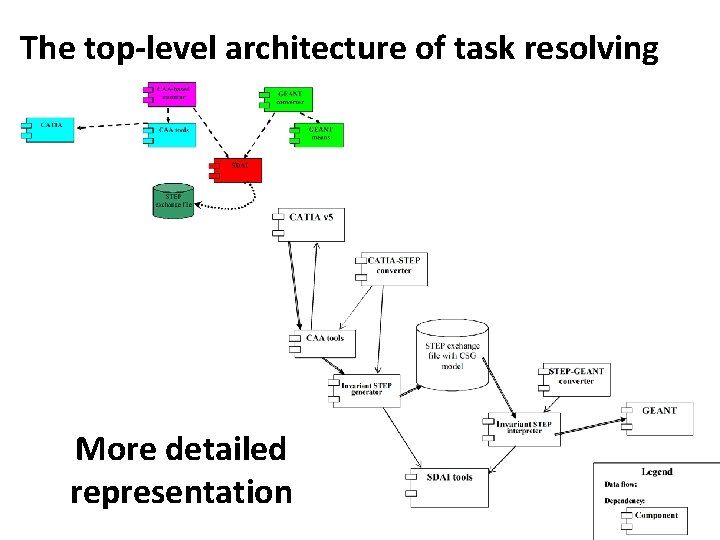
The top-level architecture of task resolving More detailed representation
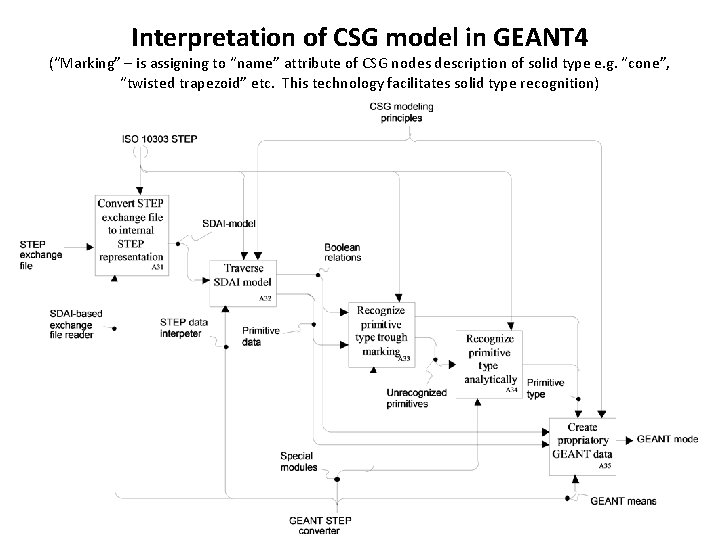
Interpretation of CSG model in GEANT 4 (“Marking” – is assigning to “name” attribute of CSG nodes description of solid type e. g. “cone”, “twisted trapezoid” etc. This technology facilitates solid type recognition)
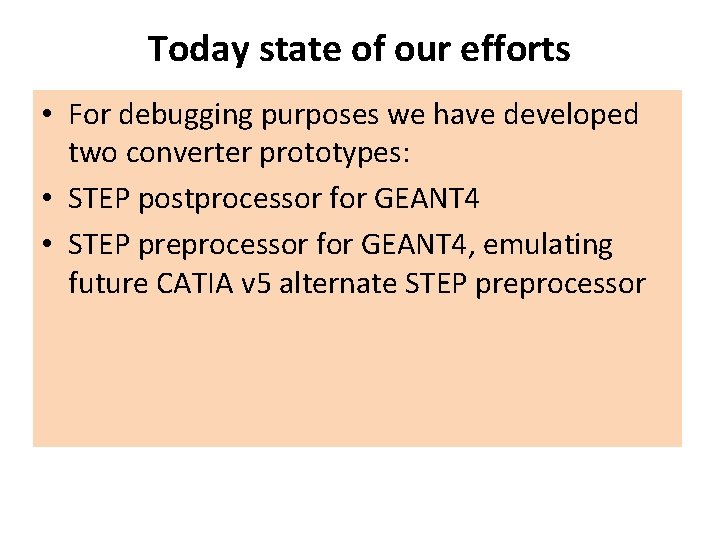
Today state of our efforts • For debugging purposes we have developed two converter prototypes: • STEP postprocessor for GEANT 4 • STEP preprocessor for GEANT 4, emulating future CATIA v 5 alternate STEP preprocessor
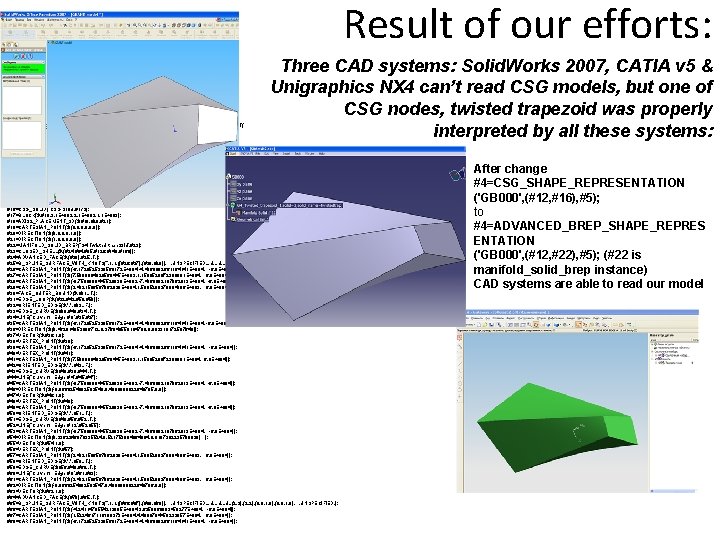
ISO-10303 -21; HEADER; FILE_DESCRIPTION(('THIS FILE CONTAINS SOME STEP INSTANCES'), '1'); FILE_NAME('S 02. stp', '2007 -11 -13 T 19: 35: 44', ('Unknown'), 'Crp STEP kit utility 1. 0', 'Crp EXPRESS compiler 1. 0', ''); FILE_SCHEMA(('AUTOMOTIVE_DESIGN')); ENDSEC; DATA; #1=PRODUCT_DEFINITION('CSG representation', $, #2, $); #2=PRODUCT_DEFINITION_FORMATION_WITH_SPECIFIED_SOURCE('0', 'no description', #3, . NOT_KNOWN. ); #3=PRODUCT('GB 000', 'GEANT model description', $); #4=ADVANCED_BREP_SHAPE_REPRESENTATION('GB 000', (#12, #22), #5); #5=(GEOMETRIC_REPRESENTATION_CONTEXT(3)GLOBAL_UNCERTAINTY_ASSIGNED_CONTEXT( (#9))GLOBAL_UNIT_ASSIGNED_CONTEXT((#6, #7, #8))REPRESENTATION_CONTEXT( 'NONE', 'WORKSPACE')); #6=(LENGTH_UNIT()NAMED_UNIT(*)SI_UNIT(. MILLI. , . METRE. )); #7=(NAMED_UNIT(*)PLANE_ANGLE_UNIT()SI_UNIT($, . RADIAN. )); #8=(NAMED_UNIT(*)SI_UNIT($, . STERADIAN. )SOLID_ANGLE_UNIT()); #9=UNCERTAINTY_MEASURE_WITH_UNIT(LENGTH_MEASURE(0. 00001), #6, 'distance_accuracy_value', 'NONE'); #10=PRODUCT_DEFINITION_SHAPE($, $, #1); #11=SHAPE_DEFINITION_REPRESENTATION(#10, #4); #12=AXIS 2_PLACEMENT_3 D($, #13, #14, #15); #13=CARTESIAN_POINT($, (0. 0, 0. 0)); #14=DIRECTION($, (1. 0, 0. 0)); #15=DIRECTION($, (0. 0, 1. 0, 0. 0)); #16=CSG_SOLID('CSG Solid', #172); #17=BLOCK($, #18, 3. 1 E+003, 2. 1 E+003, 1. 1 E+003); #18=AXIS 2_PLACEMENT_3 D($, #19, #20, #21); #19=CARTESIAN_POINT($, (0. 0, 0. 0)); #20=DIRECTION($, (0. 0, 1. 0)); #21=DIRECTION($, (1. 0, 0. 0)); #22=MANIFOLD_SOLID_BREP('G 4 Twisted trapezoid', #23); #23=CLOSED_SHELL($, (#24, #64, #95, #126, #148, #160)); #24=ADVANCED_FACE($, (#30), #25, . T. ); #25=B_SPLINE_SURFACE_WITH_KNOTS('', 1, 1, ((#26, #27), (#28, #29)), . UNSPECIFIED. , . U. , (2, 2), (0. 0, 1. 0), . UNSPECIFIED. ); #26=CARTESIAN_POINT($, (-6. 1720525339568172 E+004, -4. 4869092661164141 E+004, -6. 0 E+004)); #27=CARTESIAN_POINT($, (7. 5009984020569445 E+003, 1. 1509520672388091 E+004, 6. 0 E+004)); #28=CARTESIAN_POINT($, (-9. 7590008445528838 E+003, -7. 4869092197062913 E+004, -6. 0 E+004)); #29=CARTESIAN_POINT($, (2. 4821506567062039 E+004, 1. 5095208270884996 E+003, 6. 0 E+004)); #30=FACE_OUTER_BOUND($, #31, . T. ); #31=EDGE_LOOP($, (#32, #42, #50, #58)); #32=ORIENTED_EDGE($, *, *, #33, . F. ); #33=EDGE_CURVE($, #38, #40, #34, . T. ); #34=LINE('Curve for Edge # 9', #35, #37); #35=CARTESIAN_POINT($, (-6. 1720525339568172 E+004, -4. 4869092661164141 E+004, -6. 0 E+004)); #36=DIRECTION($, (0. 462814053606712, 0. 376946550194709, 0. 802318172597649)); #37=VECTOR($, #36, 1. 0); #38=VERTEX_POINT($, #39); #39=CARTESIAN_POINT($, (-6. 1720525339568172 E+004, -4. 4869092661164141 E+004, -6. 0 E+004)); #40=VERTEX_POINT($, #41); #41=CARTESIAN_POINT($, (7. 5009984020569445 E+003, 1. 1509520672388091 E+004, 6. 0 E+004)); #42=ORIENTED_EDGE($, *, *, #43, . F. ); #43=EDGE_CURVE($, #48, #38, #44, . T. ); #44=LINE('Curve for Edge # 4', #45, #47); #45=CARTESIAN_POINT($, (-9. 7590008445528838 E+003, -7. 4869092197062913 E+004, -6. 0 E+004)); #46=DIRECTION($, (-0. 8660254082502548, 0. 4999999922649795, 0. 0)); #47=VECTOR($, #46, 1. 0); #48=VERTEX_POINT($, #49); #49=CARTESIAN_POINT($, (-9. 7590008445528838 E+003, -7. 4869092197062913 E+004, -6. 0 E+004)); #50=ORIENTED_EDGE($, *, *, #51, . T. ); #51=EDGE_CURVE($, #48, #56, #52, . T. ); #52=LINE('Curve for Edge # 12', #53, #55); #53=CARTESIAN_POINT($, (-9. 7590008445528838 E+003, -7. 4869092197062913 E+004, -6. 0 E+004)); #54=DIRECTION($, (0. 2362246976335524, 0. 521753904664804, 0. 8197382235780929) ); #55=VECTOR($, #54, 1. 0); #56=VERTEX_POINT($, #57); #57=CARTESIAN_POINT($, (2. 4821506567062039 E+004, 1. 5095208270884996 E+003, 6. 0 E+004)); #58=ORIENTED_EDGE($, *, *, #59, . T. ); #59=EDGE_CURVE($, #56, #40, #60, . T. ); #60=LINE('Curve for Edge # 8', #61, #63); #61=CARTESIAN_POINT($, (2. 4821506567062039 E+004, 1. 5095208270884996 E+003, 6. 0 E+004)); #62=DIRECTION($, (-0. 8660254082502547, 0. 4999999922649796, 0. 0)); #63=VECTOR($, #62, 1. 0); #64=ADVANCED_FACE($, (#70), #65, . T. ); #65=B_SPLINE_SURFACE_WITH_KNOTS('', 1, 1, ((#66, #67), (#68, #69)), . UNSPECIFIED. , . U. , (2, 2), (0. 0, 1. 0), . UNSPECIFIED. ); #66=CARTESIAN_POINT($, (-4. 2411478554212095 E+004, 3. 6358866803450277 E+004, -6. 0 E+004)); #67=CARTESIAN_POINT($, (1. 5224617116199373 E+004, 4. 4000704458233857 E+004, 6. 0 E+004)); #68=CARTESIAN_POINT($, (-6. 1720525339568172 E+004, -4. 4869092661164141 E+004, -6. 0 E+004)); Result of our efforts: Three CAD systems: Solid. Works 2007, CATIA v 5 & Unigraphics NX 4 can’t read CSG models, but one of CSG nodes, twisted trapezoid was properly interpreted by all these systems: After change #4=CSG_SHAPE_REPRESENTATION ('GB 000', (#12, #16), #5); to #4=ADVANCED_BREP_SHAPE_REPRES ENTATION ('GB 000', (#12, #22), #5); (#22 is manifold_solid_brep instance) CAD systems are able to read our model
Bauman Moscow State Technical University