
More Object Representations Parametric instancing Hierarchical modeling Constructive
More Object Representations • • Parametric instancing Hierarchical modeling Constructive Solid Geometry Sweep Objects Octrees Blobs and Metaballs and other such things Production rules
Parametric Instancing • Many things, called primitives, are conveniently described by a label and a few parameters – Cylinder: Radius, length, does it have end-caps, … – Bolts: length, diameter, thread pitch, … – Almost anything you buy from a catalogue • This is a modeling format: – Provide something that knows how to draw the object given the parameters – Depends on the rendering style – Can be an exact representation
Rendering Instances • Generally, provide a routine that takes the parameters and produces a polygonal representation – May include texture maps, normal vectors, colors, etc – Open. GL utility library (GLu) defines routines for cubes, cylinders, disks, and other common shapes – Renderman does similar things, so does POVray, … • The procedure may be dynamic – Adjust the polygon resolution according to distance from the viewer
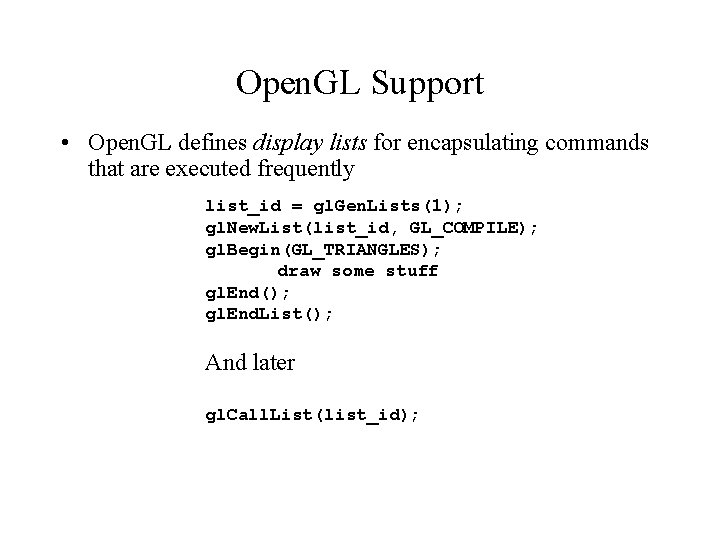
Open. GL Support • Open. GL defines display lists for encapsulating commands that are executed frequently list_id = gl. Gen. Lists(1); gl. New. List(list_id, GL_COMPILE); gl. Begin(GL_TRIANGLES); draw some stuff gl. End(); gl. End. List(); And later gl. Call. List(list_id);
Display Lists (2) • The list can be: – GL_COMPILE: things don’t get drawn, just stored – GL_COMPILE_AND_EXECUTE: things are drawn, and also stored • The list can contain almost anything: – Useful for encapsulating lighting set-up commands • The list cannot be modified after it is compiled – The whole point is that the list may be internally optimized, which precludes modification – For example, sequences of transformations may be composited into one transformation
Display Lists (3) • When should you use display lists: – When you do the same thing over and over again • Advantages: – Can’t be much slower than the original way – Can be much faster • Disadvantages: – Doesn’t support real parameterized instancing, because you can’t have any parameters! – Can’t use various commands that would offer other speedups • For example, can’t use gl. Vertex. Pointer()
Hierarchical Modeling • A hierarchical model unites several parametric instances into one object – For example: a desk is made up of many cubes • Generally represented as a tree, with transformations and instances at any node • Rendered by traversing the tree, applying the transformations, and rendering the instances • Particularly useful for rigid-body animation – Human is a hierarchy of body, head, upper arm, lower arm, etc… – Animate by changing the transformations at the nodes
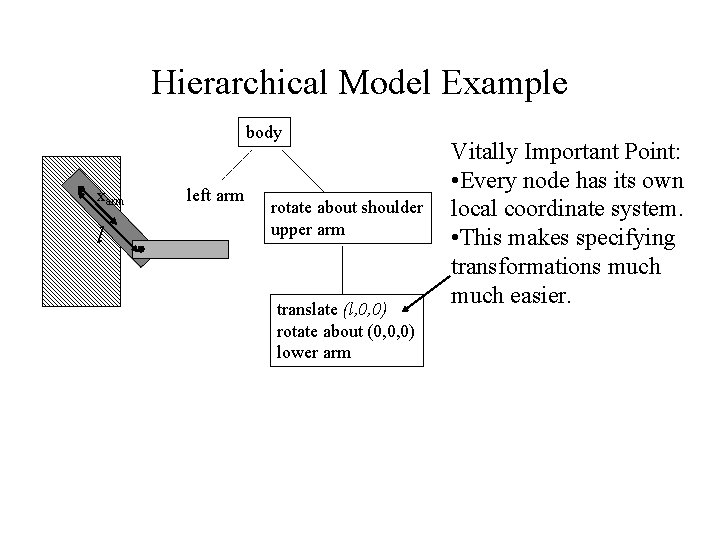
Hierarchical Model Example body xarm l left arm rotate about shoulder upper arm translate (l, 0, 0) rotate about (0, 0, 0) lower arm Vitally Important Point: • Every node has its own local coordinate system. • This makes specifying transformations much easier.
Open. GL Support • Open. GL defines gl. Push. Matrix() and gl. Pop. Matrix() – Takes the current matrix and pushes it onto a stack, or pops the matrix off the top of the stack and makes it the current matrix – Note: Pushing does not change the current matrix • Rendering a hierarchy (recursive): Render. Node(tree) gl. Push. Matrix() Apply node transformation Draw node contents Render. Node(children) gl. Pop. Matrix()
Regularized Set Operations • Hierarchical modeling is not good enough if objects in the hierarchy intersect each other – Transparency will reveal internal surfaces that should not exist – Computing properties like mass counts the same volume twice • Solution is to define regularized set operations: – Just a fancy name – Every object must be a closed volume (mathematically closed) – Define mathematical set operations (union, intersection, difference, complement) to the sets of points within the volume
Constructive Solid Geometry (CSG) • Based on a tree structure, like hierarchical modeling, but now: – The internal nodes are set operations: union, intersection or difference (sometimes complement) – The edges of the tree have transformations associated with them – The leaves contain only geometry • Motivated by computer aided design and manufacture – Difference in particular is like drilling or milling – Other operations reduce the number of primitives required – A common format in CAD products
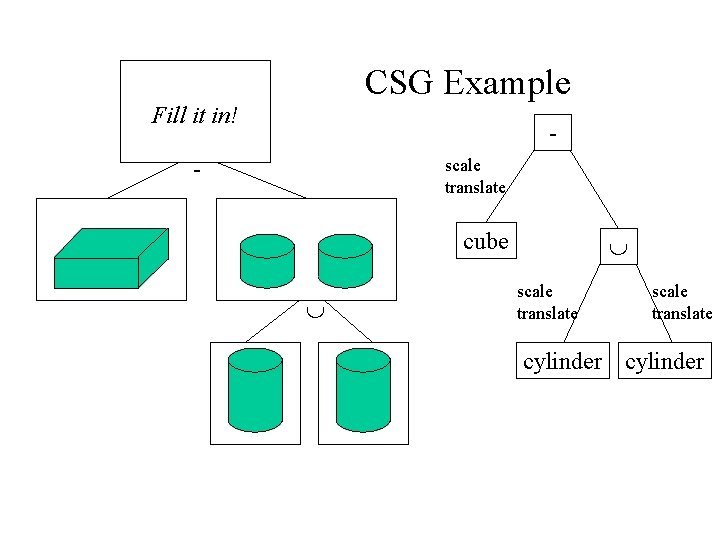
CSG Example Fill it in! scale translate - cube scale translate cylinder
Rendering CSG • Normals and texture coordinates typically come from underlying primitives (not a big deal with CAD) • Some rendering algorithms can render CSG directly – Raytracing (later in the course) – Scan-line with an A-buffer – Can do 2 D with tesselators in Open. GL • For Open. GL and other polygon renderers, must convert CSG to polygonal representation – Must remove redundant faces, and chop faces up • Basic algorithm: Split polygons until they are inside, outside, or on boundary. Then choose appropriate set for final answer. – Generally difficult, messy and slow – Numerical imprecision is the major problem
CSG Summary • Advantages: – Good for describing many things, particularly machined objects – Better if the primitive set is rich • Early systems used quadratic surfaces – Moderately intuitive and easy to understand • Disadvantages: – Not a good match for polygon renderers – Some objects may be very hard to describe, if at all • Geometric computations are sometimes easy, sometimes hard • A volume representation (hence solid in the name) – Boundary (surface representation) can also work
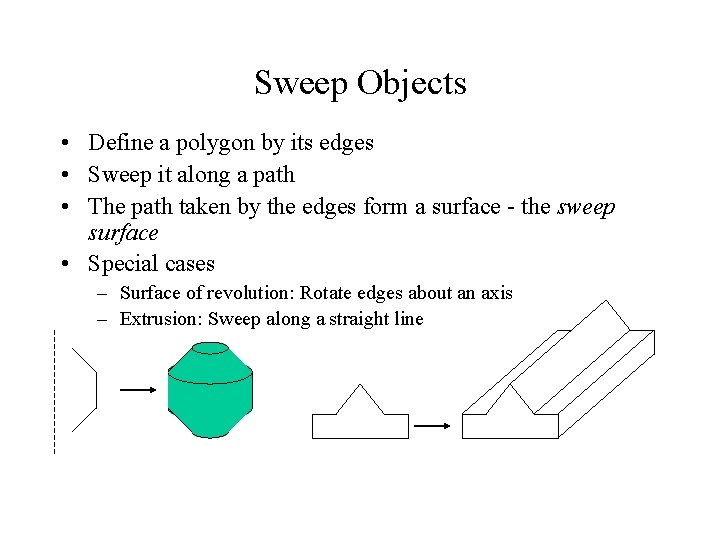
Sweep Objects • Define a polygon by its edges • Sweep it along a path • The path taken by the edges form a surface - the sweep surface • Special cases – Surface of revolution: Rotate edges about an axis – Extrusion: Sweep along a straight line
General Sweeps • The path maybe any curve • The polygon that is swept may be transformed as it is moved along the path – Scale, rotate with respect to path orientation, … • One common way to specify is: – Give a poly-line (sequence of line segments) as the path – Give a poly-line as the shape to sweep – Give a transformation to apply at the vertex of each path segment • Difficult to avoid self-intersection
Rendering Sweeps • Convert to polygons – – Break path into short segments Create a copy of the sweep polygon at each segment Join the corresponding vertices between the polygons May need things like end-caps on surfaces of revolution and extrusions • Normals come from sweep polygon and path orientation • Sweep polygon defines one texture parameter, sweep path defines the other
Spatial Enumeration • Basic idea: Describe something by the space it occupies – For example, break the volume of interest into lots of tiny cubes, and say which cubes are inside the object – Works well for things like medical data • The process itself, like MRI or CAT scans, enumerates the volume • Data is associated with each voxel (volume element) • Problem to overcome: – For anything other than small volumes or low resolutions, the number of voxels explodes – Note that the number of voxels grows with the cube of linear dimension
Octrees (and Quadtrees) • Build a tree where successive levels represent better resolution (smaller voxels) • Large uniform spaces result in shallow trees • Quadtree is for 2 D (four children for each node) • Octree is for 3 D (eight children for each node)
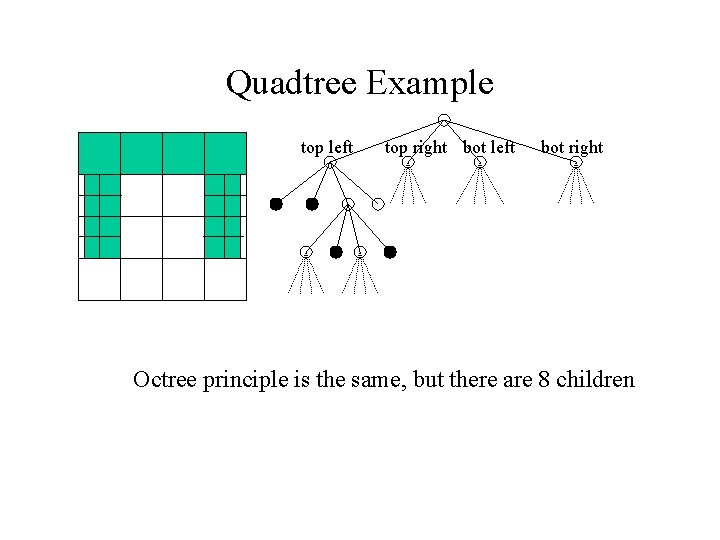
Quadtree Example top left top right bot left bot right Octree principle is the same, but there are 8 children
Rendering Octrees • Volume rendering renders octrees and associated data directly – A special area of graphics, visualization, not covered in this class • Can convert to polygons by a few methods: – Just take faces of voxels that are on the boundary – Find iso-surfaces within the volume and render those – Typically do some interpolation (smoothing) to get rid of the artifacts from the voxelization • Typically render with colors that indicate something about the data, but other methods exist
Spatial Data Structures • Octrees are an example of a spatial data structure – A data structure specifically designed for storing information of a spatial nature • eg Storing the location of fire hydrants in a city • In graphics, octrees are frequently used to store information about where polygons, or other primitives, are located in a scene – Speeds up many computations by making it fast to determine when something is relevant or not – Just like BSP trees speed up visibility • Other spatial data structures include BSP trees, KD-Trees, Interval trees, …
- Slides: 22