Poly MUMPs Design Rules Allen Cowen MUMPs Design
- Slides: 35
Poly. MUMPs® Design Rules Allen Cowen
MUMPs® Design Rules • • Mask Conventions Nomenclature Minimum Feature/Space Rules Level-Level Rules – Poly 0 – Poly 1 & Dimple – Poly 2 • Level-Level Rules (Graphic Form) • Helpful Hints
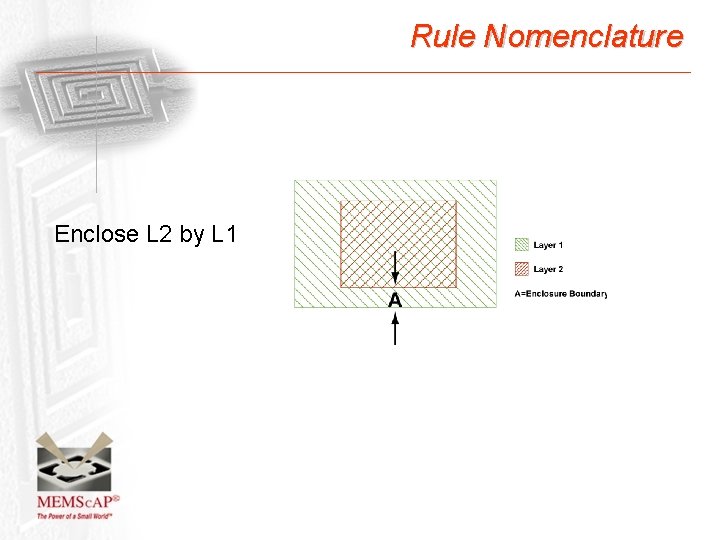
Rule Nomenclature Enclose L 2 by L 1
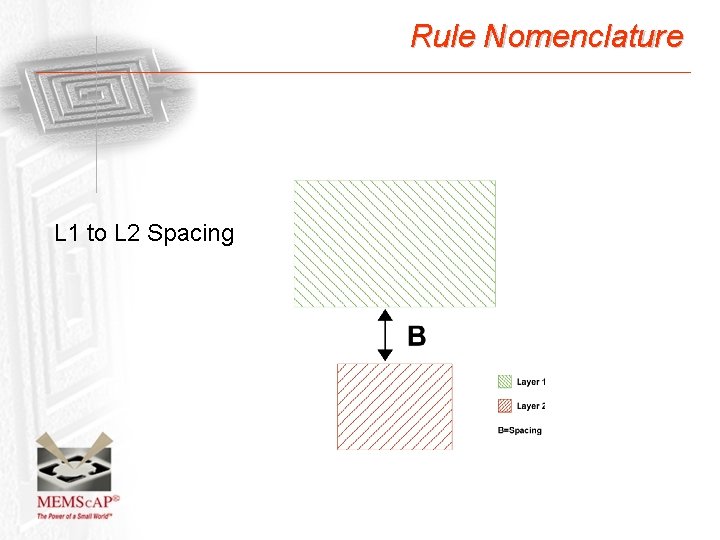
Rule Nomenclature L 1 to L 2 Spacing
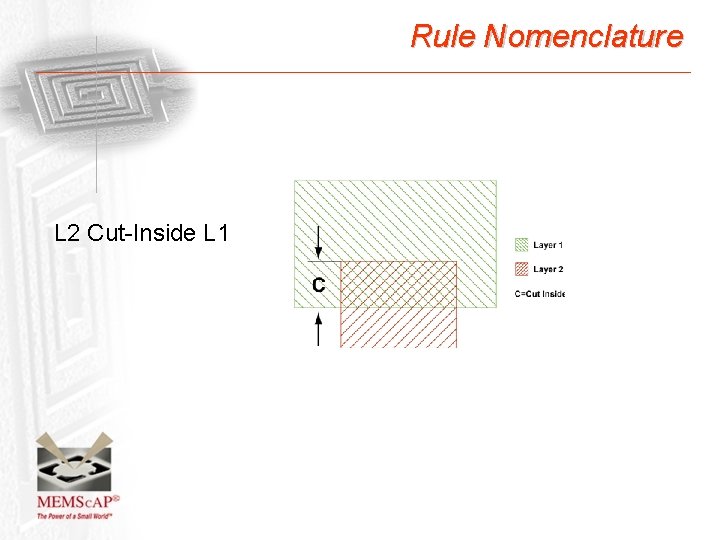
Rule Nomenclature L 2 Cut-Inside L 1
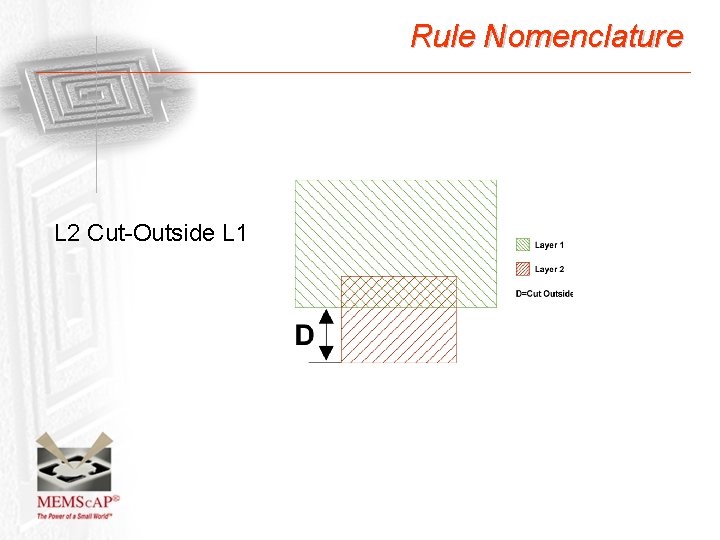
Rule Nomenclature L 2 Cut-Outside L 1
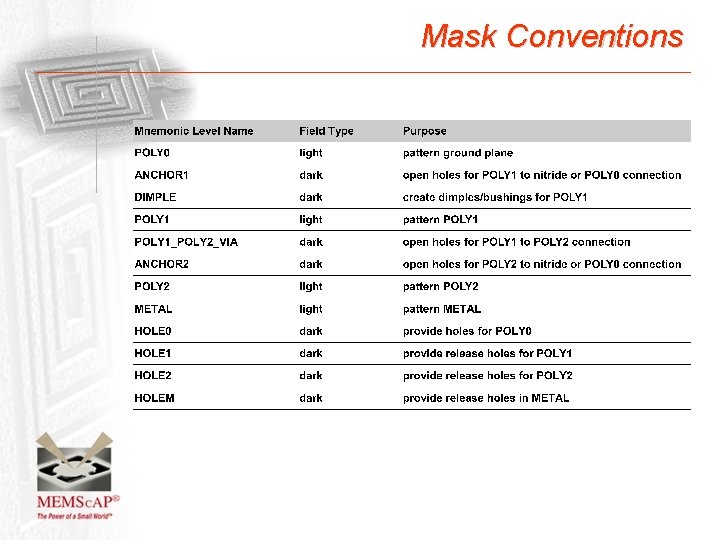
Mask Conventions
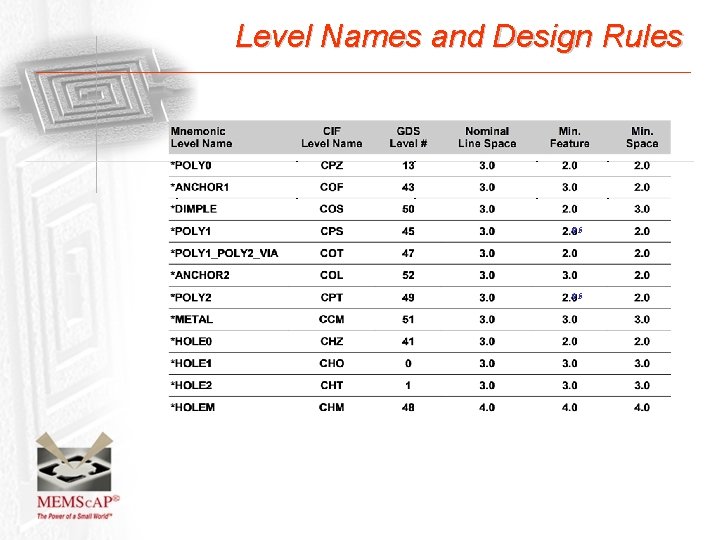
Level Names and Design Rules /2. 5
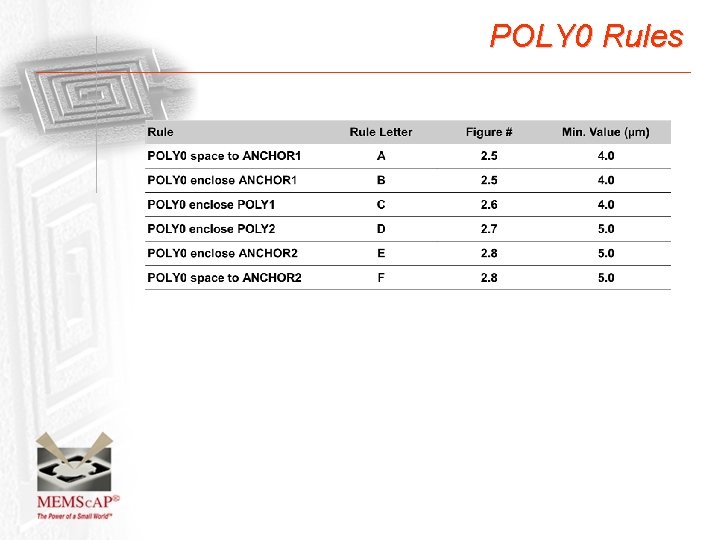
POLY 0 Rules
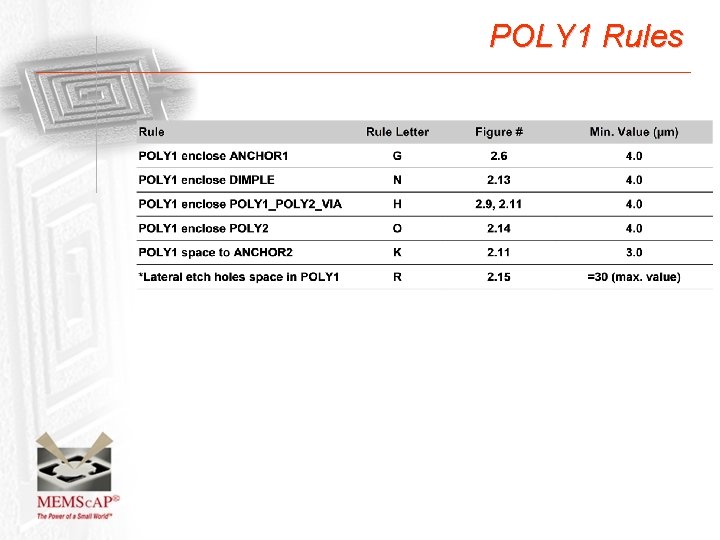
POLY 1 Rules
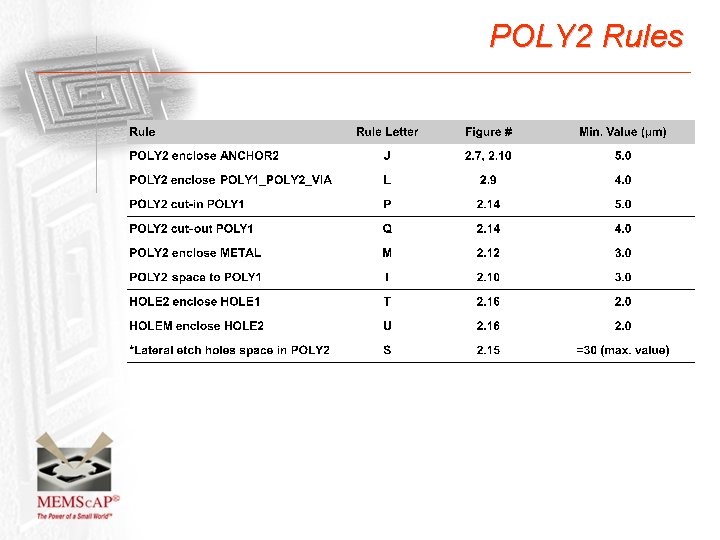
POLY 2 Rules
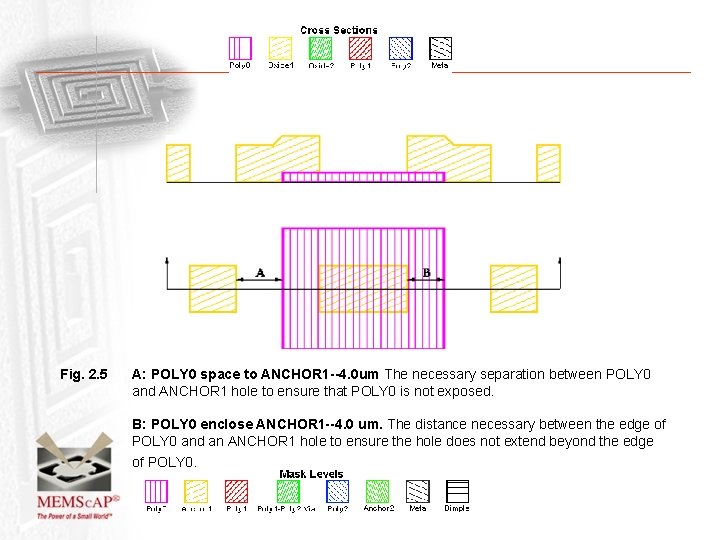
Fig. 2. 5 A: POLY 0 space to ANCHOR 1 --4. 0 um The necessary separation between POLY 0 and ANCHOR 1 hole to ensure that POLY 0 is not exposed. B: POLY 0 enclose ANCHOR 1 --4. 0 um. The distance necessary between the edge of POLY 0 and an ANCHOR 1 hole to ensure the hole does not extend beyond the edge of POLY 0.
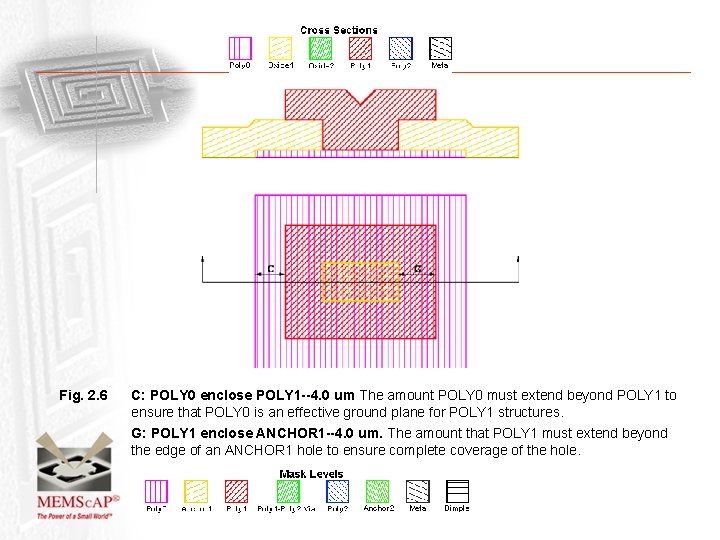
Fig. 2. 6 C: POLY 0 enclose POLY 1 --4. 0 um The amount POLY 0 must extend beyond POLY 1 to ensure that POLY 0 is an effective ground plane for POLY 1 structures. G: POLY 1 enclose ANCHOR 1 --4. 0 um. The amount that POLY 1 must extend beyond the edge of an ANCHOR 1 hole to ensure complete coverage of the hole.
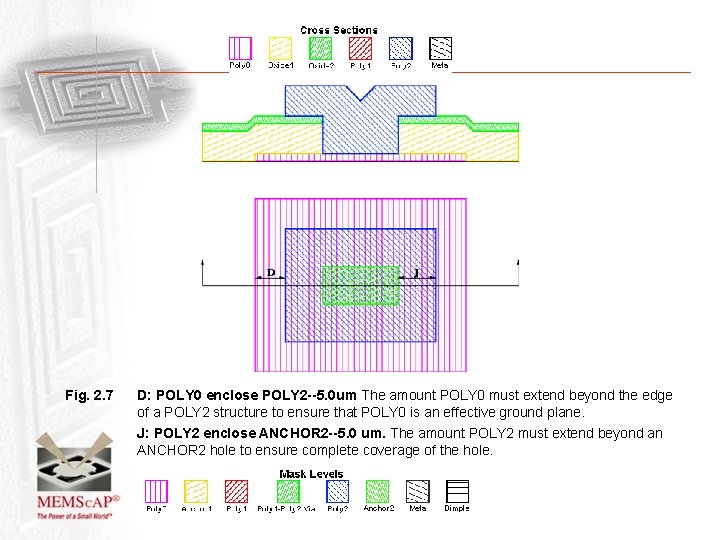
Fig. 2. 7 D: POLY 0 enclose POLY 2 --5. 0 um The amount POLY 0 must extend beyond the edge of a POLY 2 structure to ensure that POLY 0 is an effective ground plane. J: POLY 2 enclose ANCHOR 2 --5. 0 um. The amount POLY 2 must extend beyond an ANCHOR 2 hole to ensure complete coverage of the hole.
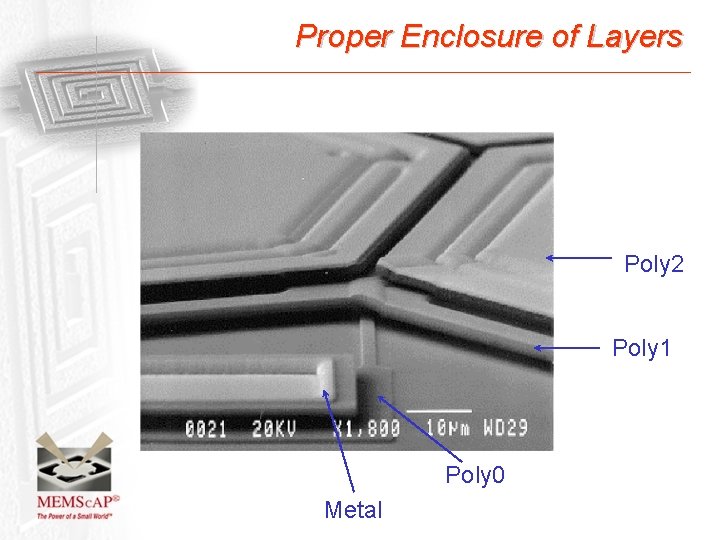
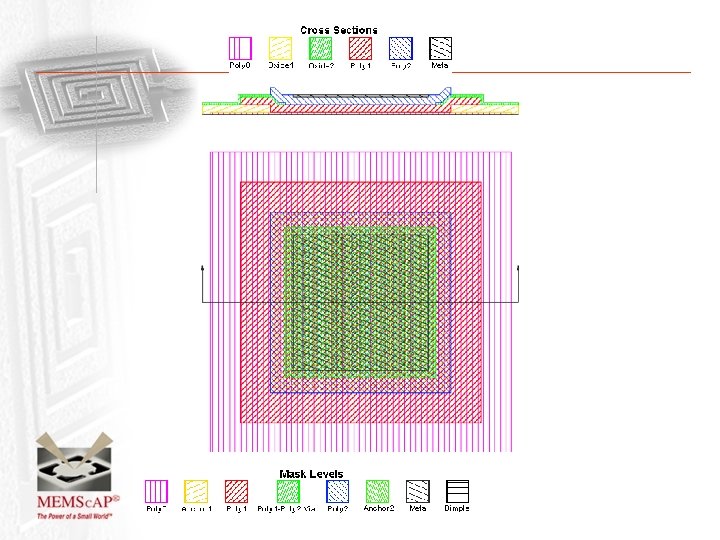
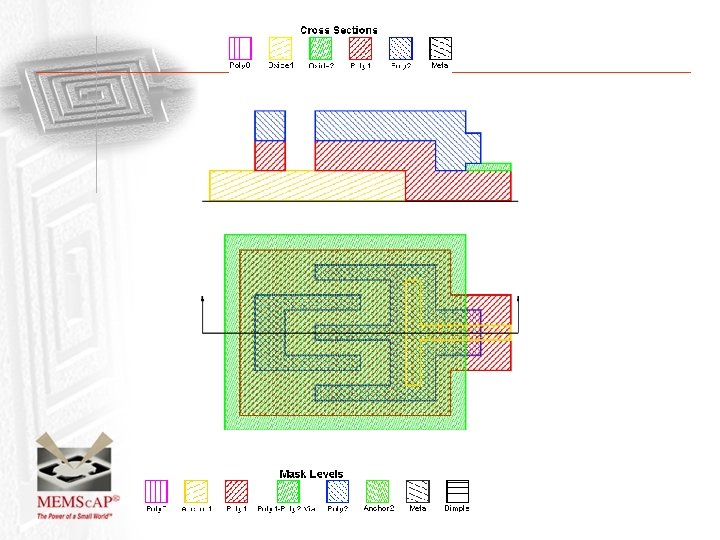
Proper Enclosure of Layers Poly 2 Poly 1 Poly 0 Metal
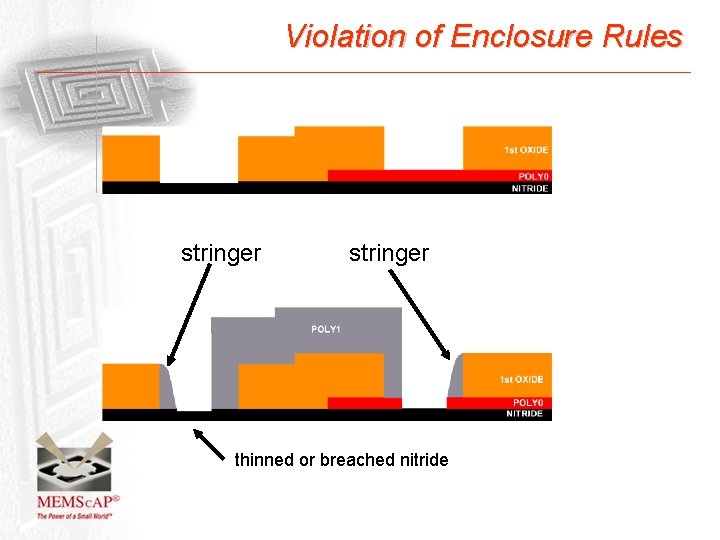
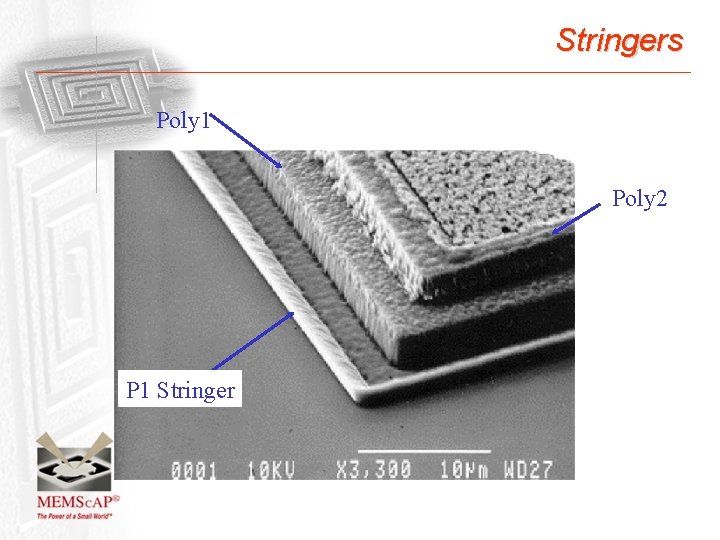
Violation of Enclosure Rules stringer thinned or breached nitride
Stringers Poly 1 Poly 2 P 1 Stringer
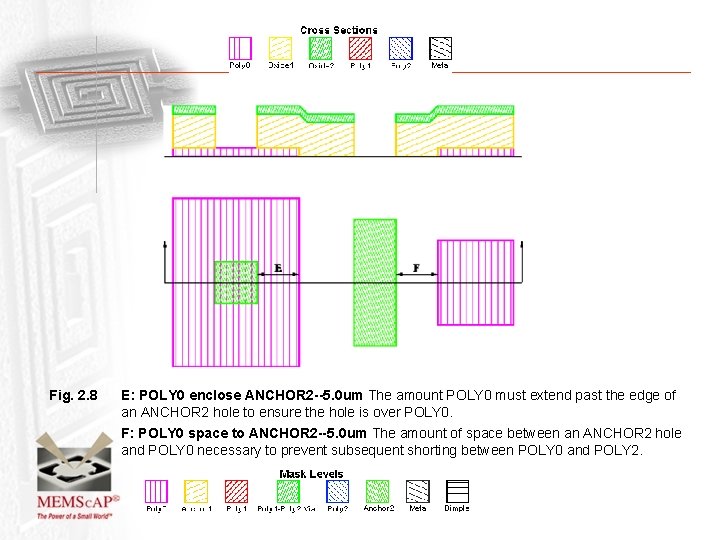
Fig. 2. 8 E: POLY 0 enclose ANCHOR 2 --5. 0 um The amount POLY 0 must extend past the edge of an ANCHOR 2 hole to ensure the hole is over POLY 0. F: POLY 0 space to ANCHOR 2 --5. 0 um The amount of space between an ANCHOR 2 hole and POLY 0 necessary to prevent subsequent shorting between POLY 0 and POLY 2.
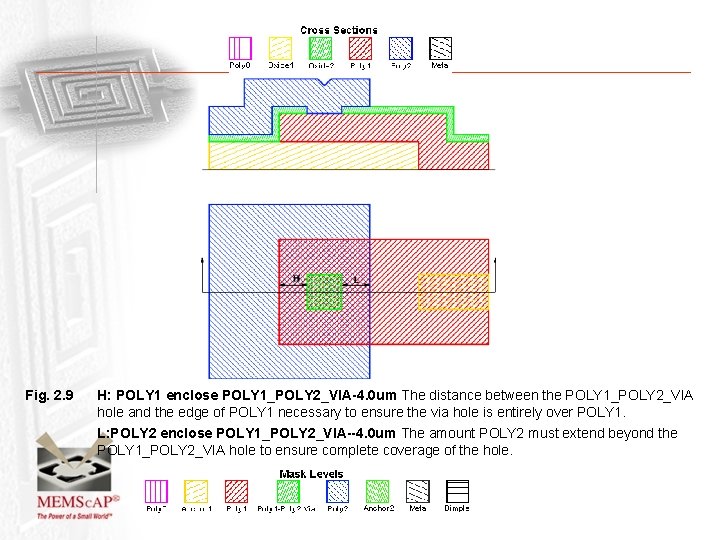
Fig. 2. 9 H: POLY 1 enclose POLY 1_POLY 2_VIA-4. 0 um The distance between the POLY 1_POLY 2_VIA hole and the edge of POLY 1 necessary to ensure the via hole is entirely over POLY 1. L: POLY 2 enclose POLY 1_POLY 2_VIA--4. 0 um The amount POLY 2 must extend beyond the POLY 1_POLY 2_VIA hole to ensure complete coverage of the hole.
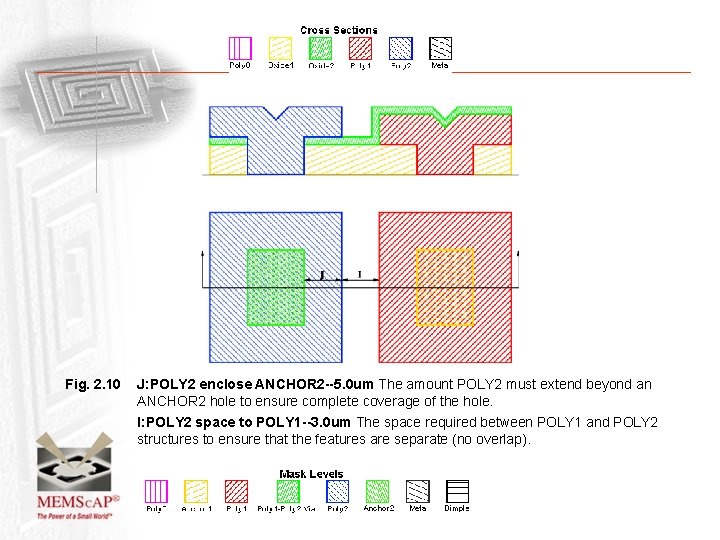
Fig. 2. 10 J: POLY 2 enclose ANCHOR 2 --5. 0 um The amount POLY 2 must extend beyond an ANCHOR 2 hole to ensure complete coverage of the hole. I: POLY 2 space to POLY 1 --3. 0 um The space required between POLY 1 and POLY 2 structures to ensure that the features are separate (no overlap).
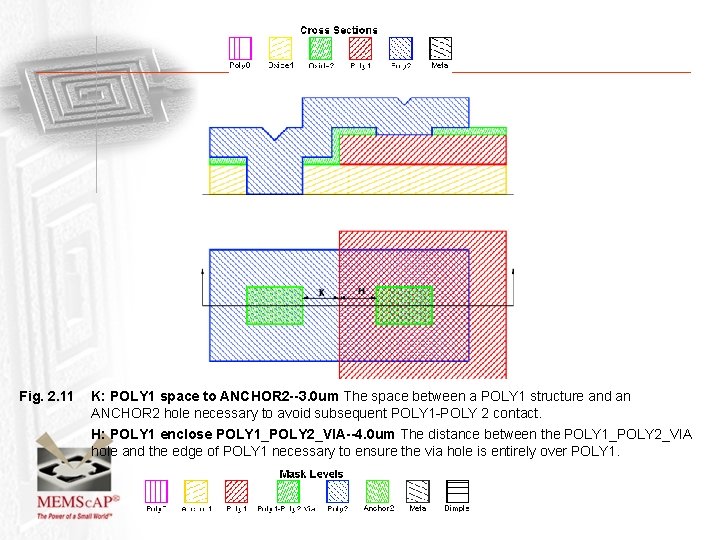
Fig. 2. 11 K: POLY 1 space to ANCHOR 2 --3. 0 um The space between a POLY 1 structure and an ANCHOR 2 hole necessary to avoid subsequent POLY 1 -POLY 2 contact. H: POLY 1 enclose POLY 1_POLY 2_VIA--4. 0 um The distance between the POLY 1_POLY 2_VIA hole and the edge of POLY 1 necessary to ensure the via hole is entirely over POLY 1.
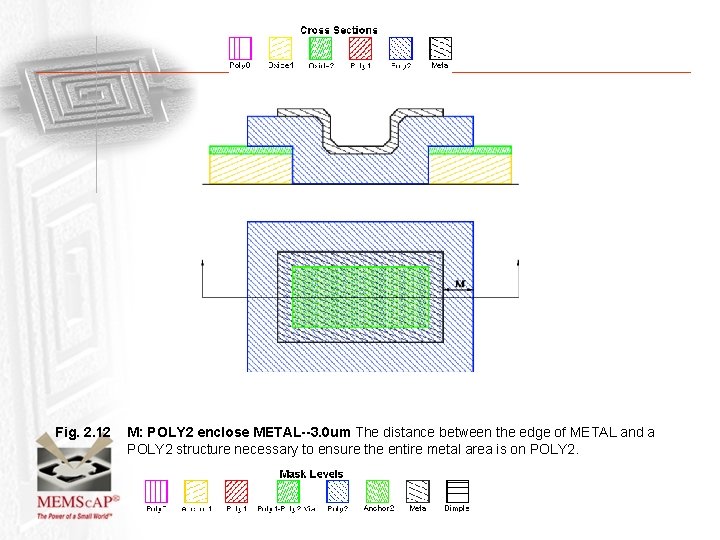
Fig. 2. 12 M: POLY 2 enclose METAL--3. 0 um The distance between the edge of METAL and a POLY 2 structure necessary to ensure the entire metal area is on POLY 2.
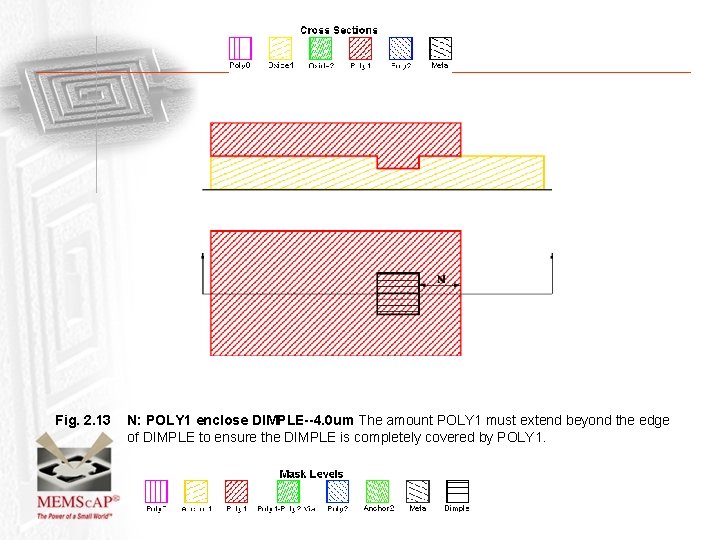
Fig. 2. 13 N: POLY 1 enclose DIMPLE--4. 0 um The amount POLY 1 must extend beyond the edge of DIMPLE to ensure the DIMPLE is completely covered by POLY 1.
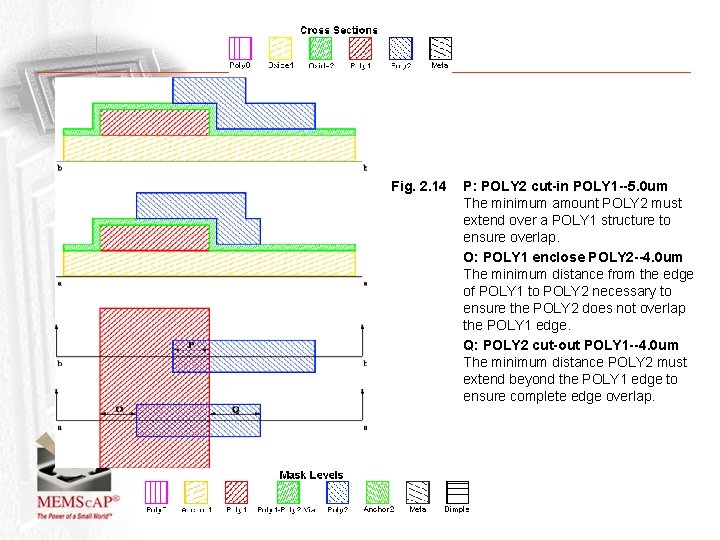
Fig. 2. 14 P: POLY 2 cut-in POLY 1 --5. 0 um The minimum amount POLY 2 must extend over a POLY 1 structure to ensure overlap. O: POLY 1 enclose POLY 2 --4. 0 um The minimum distance from the edge of POLY 1 to POLY 2 necessary to ensure the POLY 2 does not overlap the POLY 1 edge. Q: POLY 2 cut-out POLY 1 --4. 0 um The minimum distance POLY 2 must extend beyond the POLY 1 edge to ensure complete edge overlap.
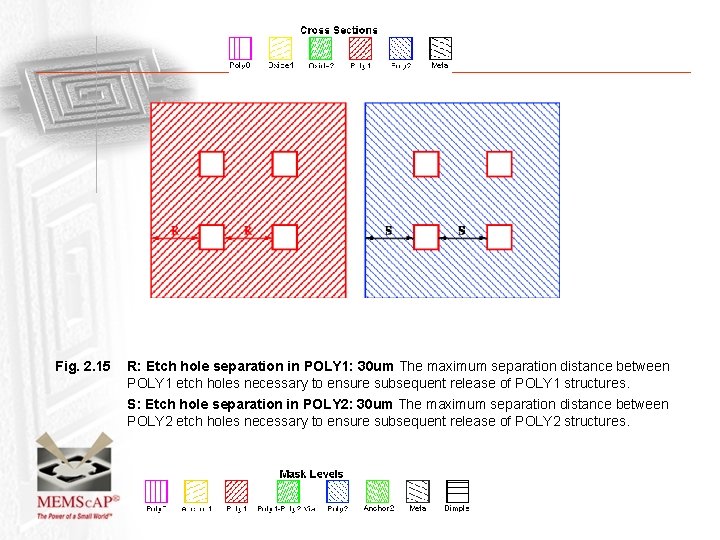
Fig. 2. 15 R: Etch hole separation in POLY 1: 30 um The maximum separation distance between POLY 1 etch holes necessary to ensure subsequent release of POLY 1 structures. S: Etch hole separation in POLY 2: 30 um The maximum separation distance between POLY 2 etch holes necessary to ensure subsequent release of POLY 2 structures.
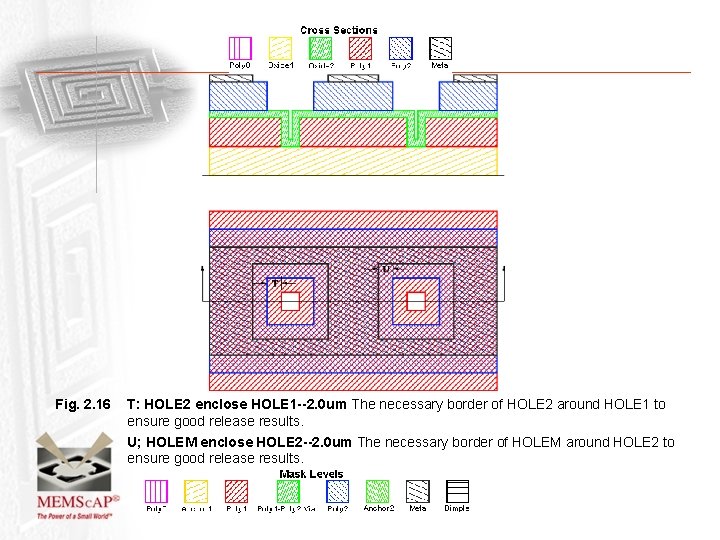
Fig. 2. 16 T: HOLE 2 enclose HOLE 1 --2. 0 um The necessary border of HOLE 2 around HOLE 1 to ensure good release results. U; HOLEM enclose HOLE 2 --2. 0 um The necessary border of HOLEM around HOLE 2 to ensure good release results.
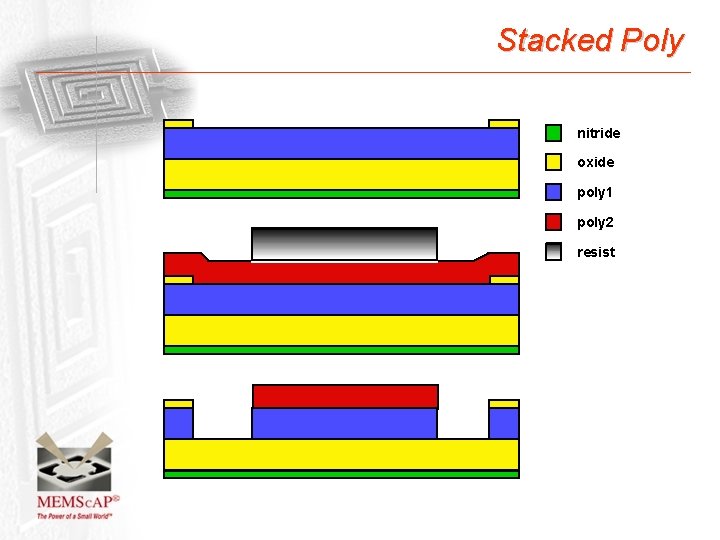
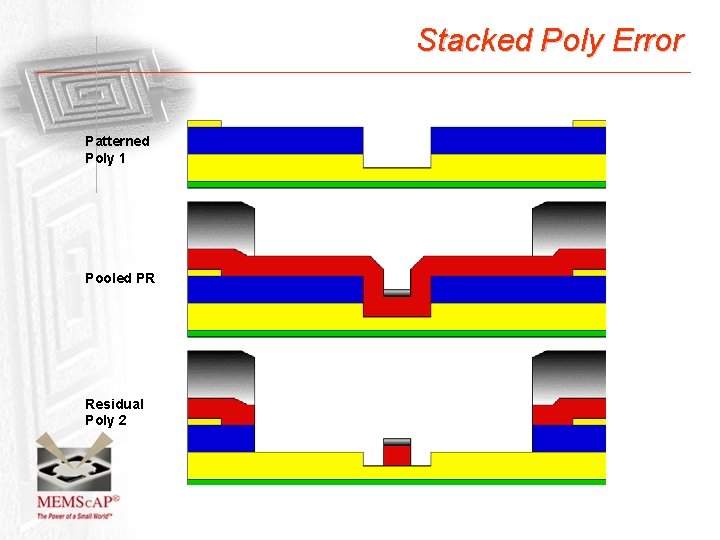
Stacked Poly nitride oxide poly 1 poly 2 resist
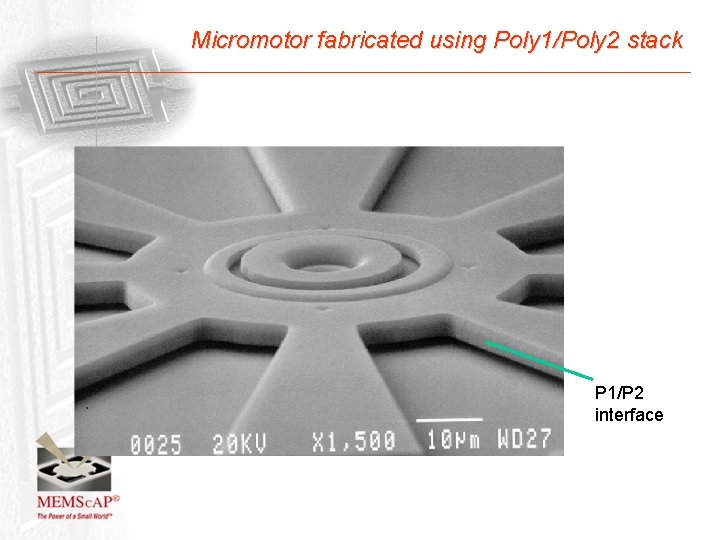
Micromotor fabricated using Poly 1/Poly 2 stack P 1/P 2 interface
Stacked Poly Error Patterned Poly 1 Pooled PR Residual Poly 2
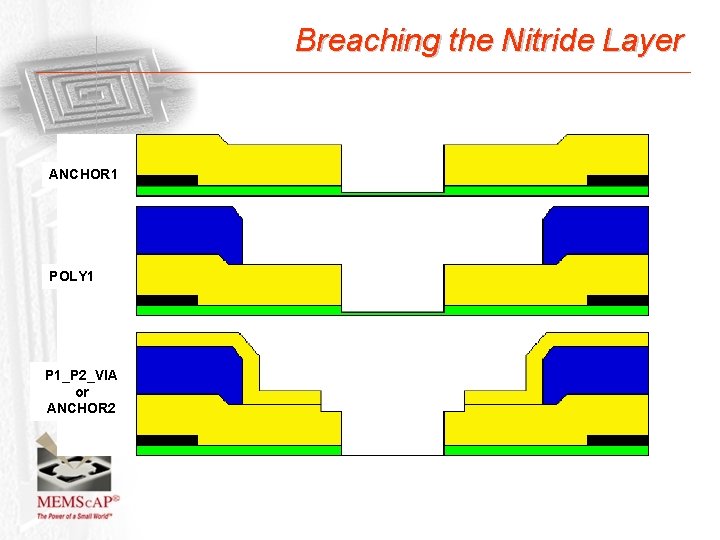
Breaching the Nitride Layer ANCHOR 1 POLY 1 P 1_P 2_VIA or ANCHOR 2
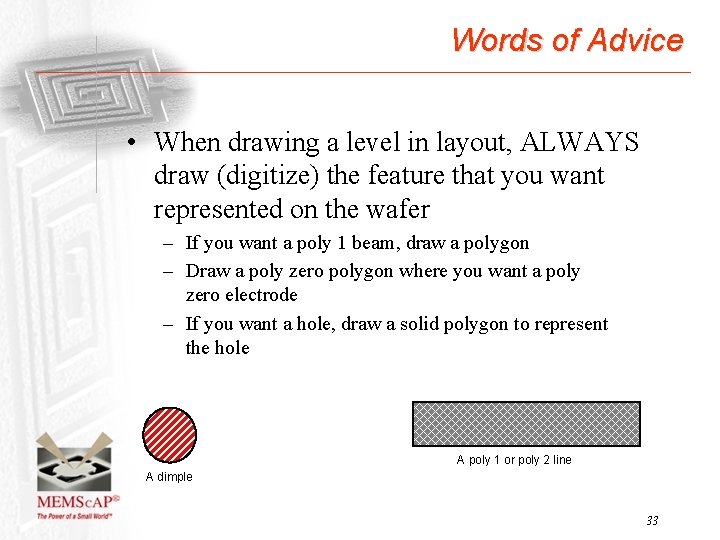
Words of Advice • When drawing a level in layout, ALWAYS draw (digitize) the feature that you want represented on the wafer – If you want a poly 1 beam, draw a polygon – Draw a poly zero polygon where you want a poly zero electrode – If you want a hole, draw a solid polygon to represent the hole A poly 1 or poly 2 line A dimple 33
ANCHOR 1+ POLY 1_POLY 2_VIA vs. ANCHOR 2 • One of the most common layout errors is the use of ANCHOR 1 + POLY 1_POLY 2_VIA instead of ANCHOR 2 – ANCHOR 1 + POLY 1_POLY 2_VIA not equal to ANCHOR 2 – ANCHOR 1 removes the oxide and allows poly 1 to contact substrate. If POLY 1 is not drawn over the hole, the polysilicon will be removed in the RIE etch and the substrate is exposed to the polysilicon etch. resulting in removal of the nitride layer or etching into the substrate. • ANCHOR 2 was created to allow connection of poly 2 with the substrate in one mask and etch step – When ANCHOR 2 is used, the substrate is protected by oxide during the polysilicon etch. There is also no misalignment between the hole in the first and second oxides. 34
FAQ Document; Galvanic Attack • http: //www. memscap. com/memsrus/docs/pol ymumps. faq. v 2. pdf • Material Data and properties, stress and specific Poly. MUMPs layer information • Galvanic Attack Effect – large metal pads near Poly 0 features leads to breakage and discoloration of poly 0. • Process specific questions • Can I do this questions? 35