Chapter Two Fundamentals of Data and Signals Data
- Slides: 45
Chapter Two Fundamentals of Data and Signals Data Communications and Computer Networks: A Business User's Approach Eighth Edition
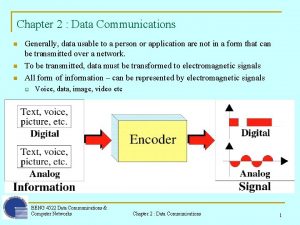
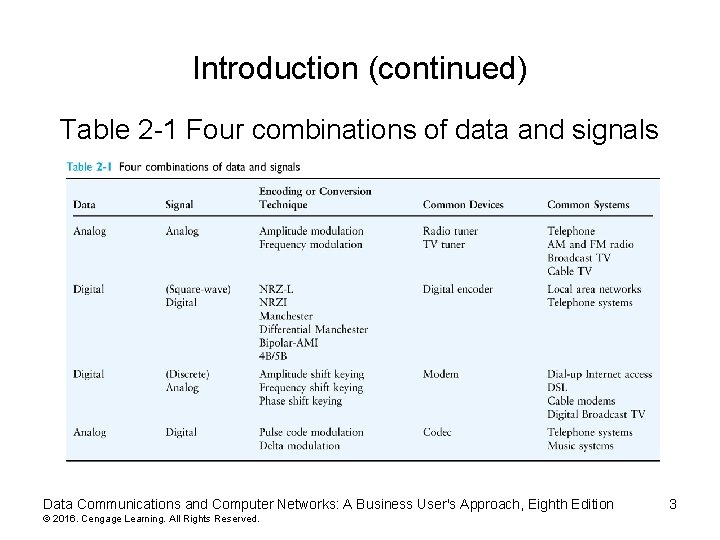
Introduction • Data are entities that convey meaning (computer files, music on CD, results from a blood gas analysis machine) • Signals are the electric or electromagnetic encoding of data (telephone conversation, web page download) • Computer networks and data/voice communication systems transmit signals • Data and signals can be analog or digital Data Communications and Computer Networks: A Business User's Approach, Eighth Edition © 2016. Cengage Learning. All Rights Reserved. 2
Introduction (continued) Table 2 -1 Four combinations of data and signals Data Communications and Computer Networks: A Business User's Approach, Eighth Edition © 2016. Cengage Learning. All Rights Reserved. 3
Data and Signals • Data are entities that convey meaning within a computer or computer system • Signals are the electric or electromagnetic impulses used to encode and transmit data Data Communications and Computer Networks: A Business User's Approach, Eighth Edition © 2016. Cengage Learning. All Rights Reserved. 4
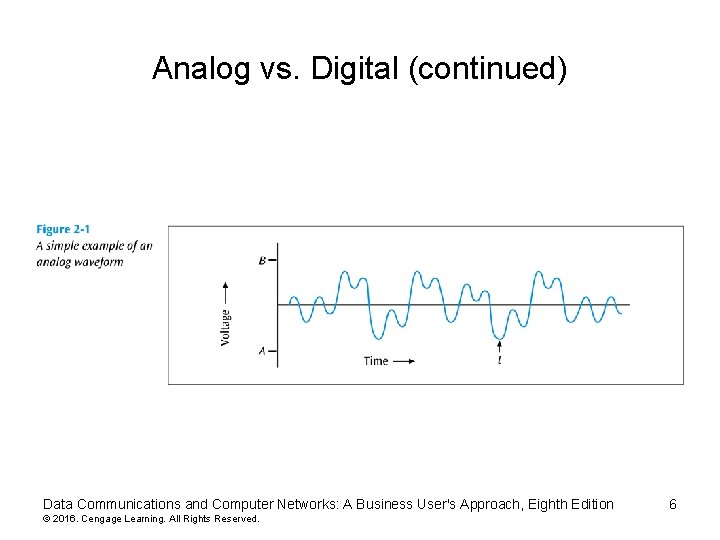
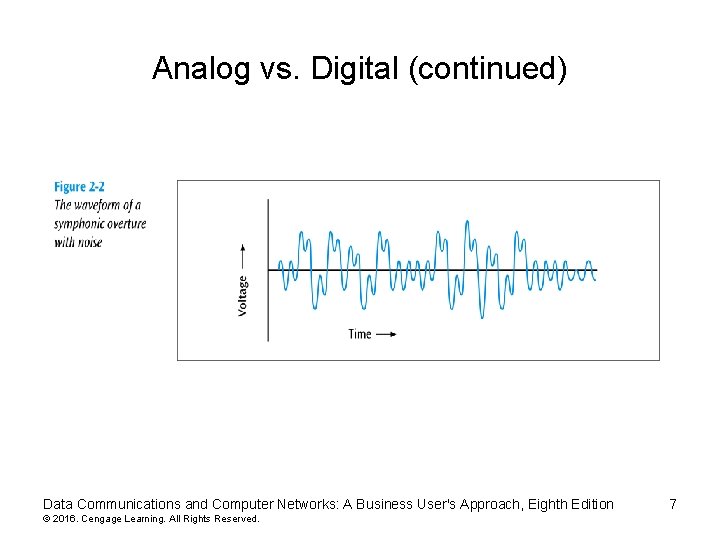
Analog vs. Digital • Data and signals can be either analog or digital • Analog is a continuous waveform, with examples such as (naturally occurring) music and voice • It is harder to separate noise from an analog signal than it is to separate noise from a digital signal (see the following two slides) Data Communications and Computer Networks: A Business User's Approach, Eighth Edition © 2016. Cengage Learning. All Rights Reserved. 5
Analog vs. Digital (continued) Data Communications and Computer Networks: A Business User's Approach, Eighth Edition © 2016. Cengage Learning. All Rights Reserved. 6
Analog vs. Digital (continued) Data Communications and Computer Networks: A Business User's Approach, Eighth Edition © 2016. Cengage Learning. All Rights Reserved. 7
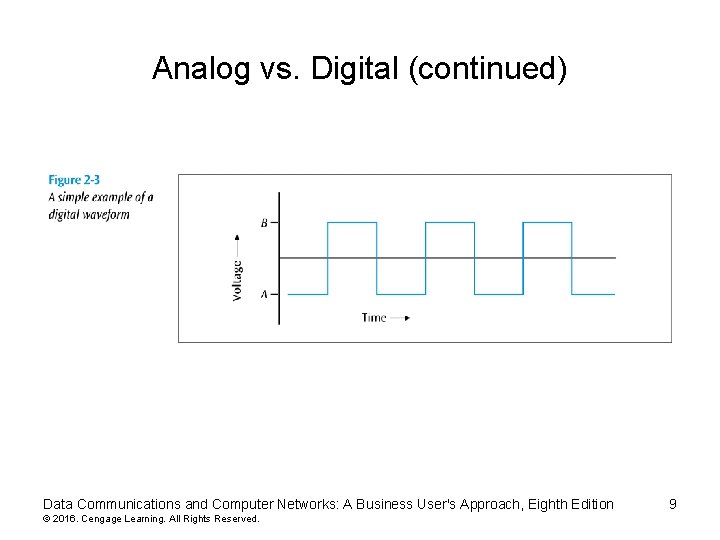
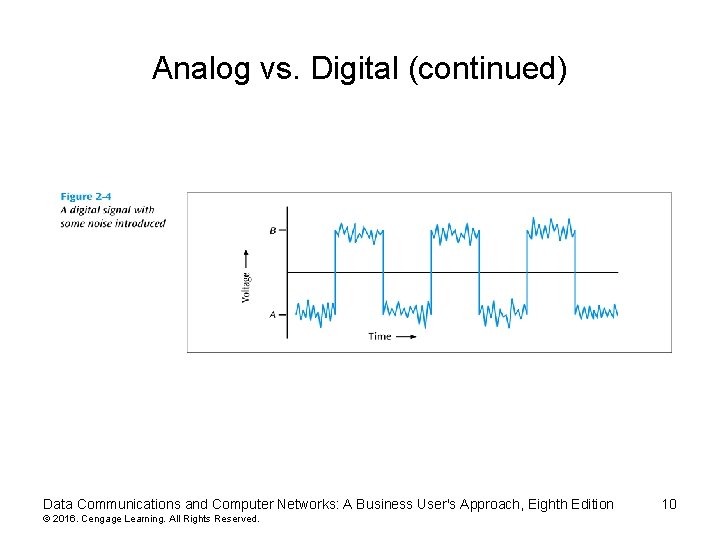
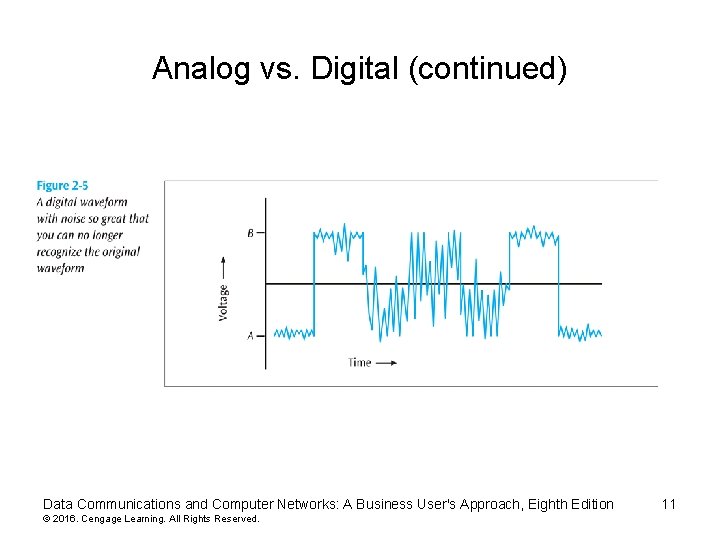
Analog vs. Digital (continued) • Digital is a discrete or non-continuous waveform • Something about the signal makes it obvious that the signal can only appear in a fixed number of forms (see next slide) • Noise in digital signal – You can still discern a high voltage from a low voltage – Too much noise – you cannot discern a high voltage from a low voltage Data Communications and Computer Networks: A Business User's Approach, Eighth Edition © 2016. Cengage Learning. All Rights Reserved. 8
Analog vs. Digital (continued) Data Communications and Computer Networks: A Business User's Approach, Eighth Edition © 2016. Cengage Learning. All Rights Reserved. 9
Analog vs. Digital (continued) Data Communications and Computer Networks: A Business User's Approach, Eighth Edition © 2016. Cengage Learning. All Rights Reserved. 10
Analog vs. Digital (continued) Data Communications and Computer Networks: A Business User's Approach, Eighth Edition © 2016. Cengage Learning. All Rights Reserved. 11
Fundamentals of Signals • All signals have three components: – Amplitude – Frequency – Phase Data Communications and Computer Networks: A Business User's Approach, Eighth Edition © 2016. Cengage Learning. All Rights Reserved. 12
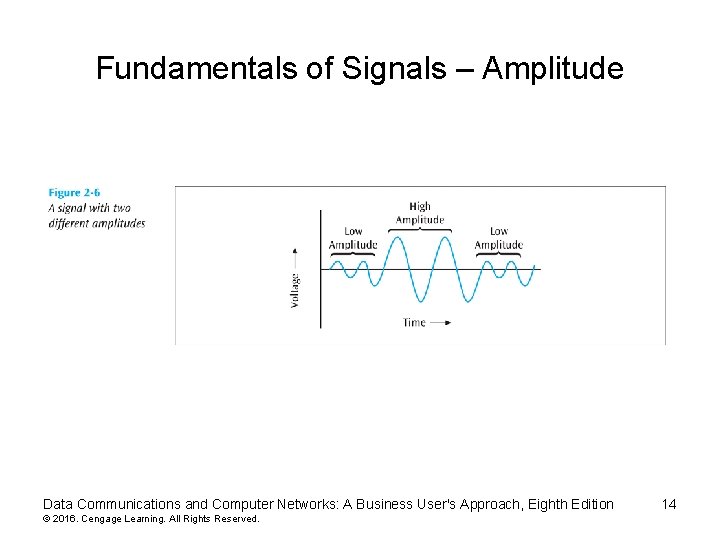
Fundamentals of Signals – Amplitude • Amplitude – The height of the wave above or below a given reference point – Amplitude is usually measured in volts Data Communications and Computer Networks: A Business User's Approach, Eighth Edition © 2016. Cengage Learning. All Rights Reserved. 13
Fundamentals of Signals – Amplitude Data Communications and Computer Networks: A Business User's Approach, Eighth Edition © 2016. Cengage Learning. All Rights Reserved. 14
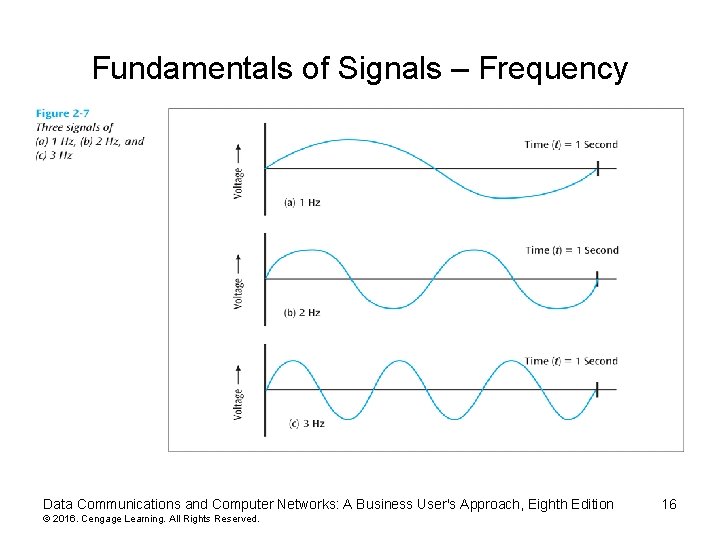
Fundamentals of Signals – Frequency • Frequency – The number of times a signal makes a complete cycle within a given time frame; frequency is measured in Hertz (Hz), or cycles per second (period = 1 / frequency) – Spectrum – Range of frequencies that a signal spans from minimum to maximum – Bandwidth – Absolute value of the difference between the lowest and highest frequencies of a signal – For example, consider an average voice • The average voice has a frequency range of roughly 300 Hz to 3100 Hz • The spectrum would be 300 – 3100 Hz • The bandwidth would be 2800 Hz Data Communications and Computer Networks: A Business User's Approach, Eighth Edition © 2016. Cengage Learning. All Rights Reserved. 15
Fundamentals of Signals – Frequency Data Communications and Computer Networks: A Business User's Approach, Eighth Edition © 2016. Cengage Learning. All Rights Reserved. 16
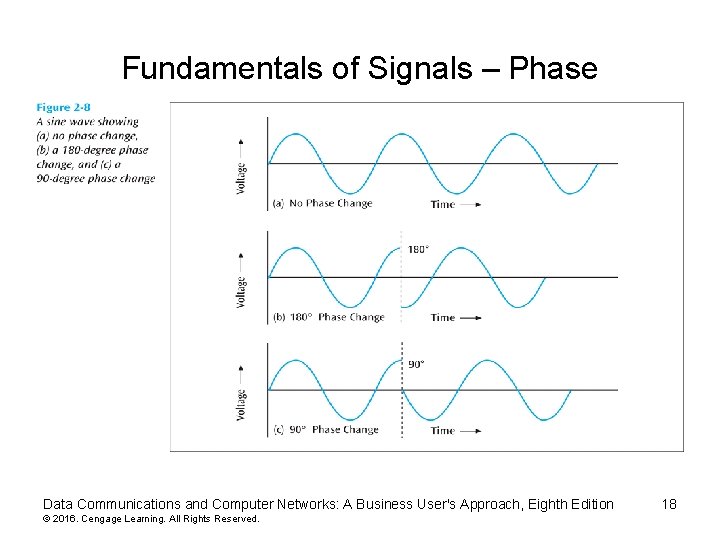
Fundamentals of Signals – Phase • Phase – The position of the waveform relative to a given moment of time or relative to time zero – A change in phase can be any number of angles between 0 and 360 degrees – Phase changes often occur on common angles, such as 45, 90, 135, etc. Data Communications and Computer Networks: A Business User's Approach, Eighth Edition © 2016. Cengage Learning. All Rights Reserved. 17
Fundamentals of Signals – Phase Data Communications and Computer Networks: A Business User's Approach, Eighth Edition © 2016. Cengage Learning. All Rights Reserved. 18
Fundamentals of Signals • Phase – If a signal can experience two different phase angles, then 1 bit can be transmitted with each signal change (each baud) – If a signal can experience four different phase angles, then 2 bits can be transmitted with each signal change (each baud) – Note: number of bits transmitted with each signal change = log 2 (number of different phase angles) – (You can replace “phase angles” with “amplitude levels” or “frequency levels”) Data Communications and Computer Networks: A Business User's Approach, Eighth Edition © 2016. Cengage Learning. All Rights Reserved. 19
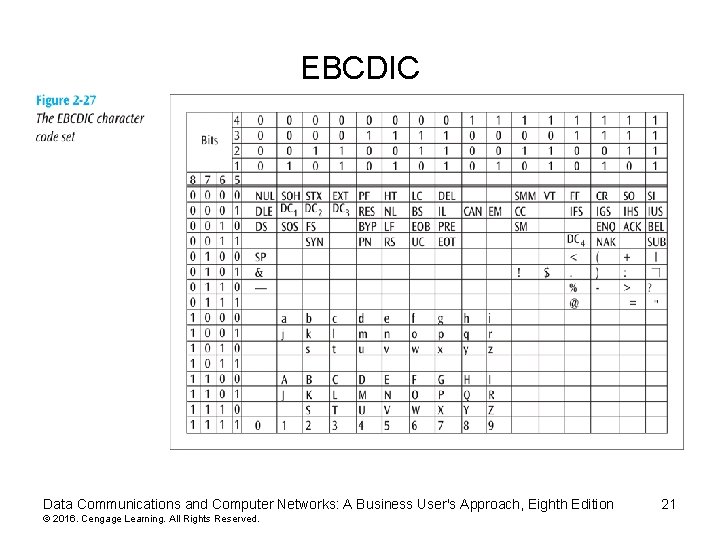
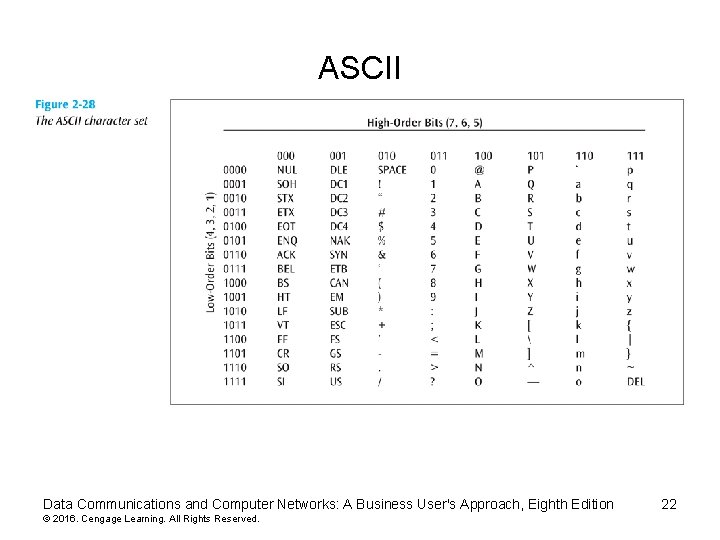
Data Codes • The set of all textual characters or symbols and their corresponding binary patterns is called a data code • There are three common data code sets: – EBCDIC – ASCII – Unicode Data Communications and Computer Networks: A Business User's Approach, Eighth Edition © 2016. Cengage Learning. All Rights Reserved. 20
EBCDIC Data Communications and Computer Networks: A Business User's Approach, Eighth Edition © 2016. Cengage Learning. All Rights Reserved. 21
ASCII Data Communications and Computer Networks: A Business User's Approach, Eighth Edition © 2016. Cengage Learning. All Rights Reserved. 22
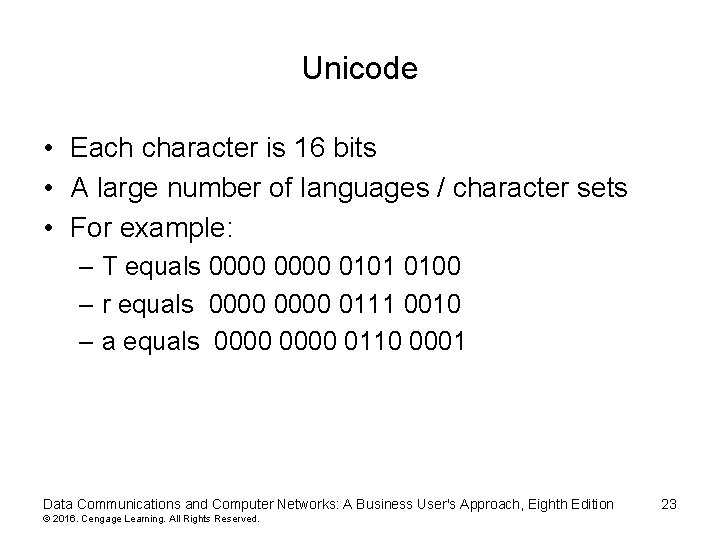
Unicode • Each character is 16 bits • A large number of languages / character sets • For example: – T equals 0000 0101 0100 – r equals 0000 0111 0010 – a equals 0000 0110 0001 Data Communications and Computer Networks: A Business User's Approach, Eighth Edition © 2016. Cengage Learning. All Rights Reserved. 23
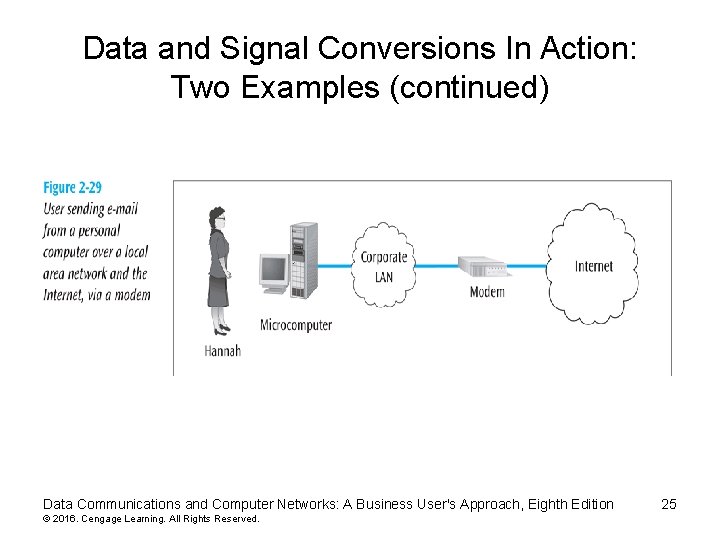
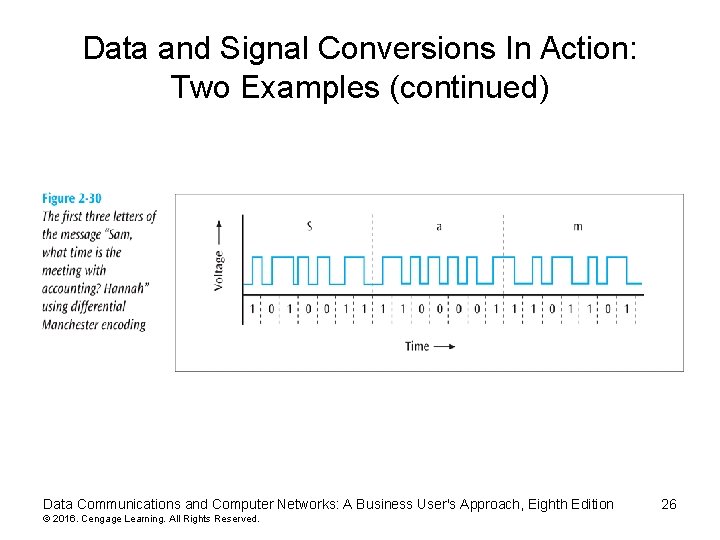
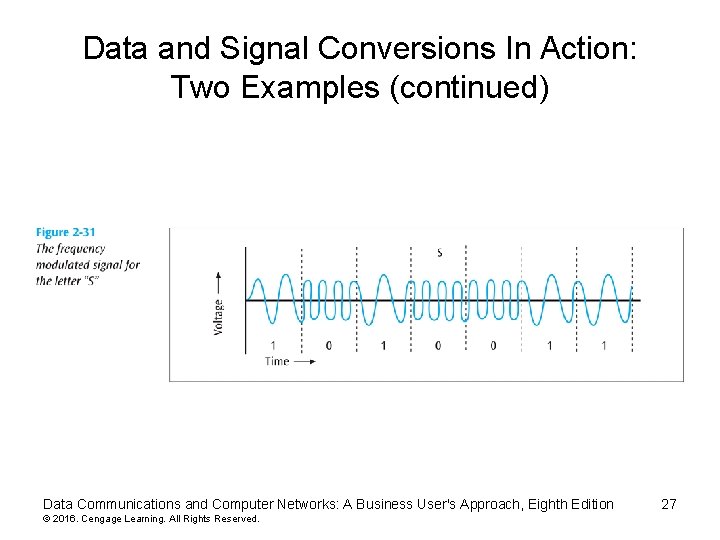
Data and Signal Conversions In Action: Two Examples • Let us transmit the message “Sam, what time is the meeting with accounting? Hannah. ” • This message leaves Hannah’s workstation and travels across a local area network Data Communications and Computer Networks: A Business User's Approach, Eighth Edition © 2016. Cengage Learning. All Rights Reserved. 24
Data and Signal Conversions In Action: Two Examples (continued) Data Communications and Computer Networks: A Business User's Approach, Eighth Edition © 2016. Cengage Learning. All Rights Reserved. 25
Data and Signal Conversions In Action: Two Examples (continued) Data Communications and Computer Networks: A Business User's Approach, Eighth Edition © 2016. Cengage Learning. All Rights Reserved. 26
Data and Signal Conversions In Action: Two Examples (continued) Data Communications and Computer Networks: A Business User's Approach, Eighth Edition © 2016. Cengage Learning. All Rights Reserved. 27
Chapter 6 Error Control Data Communications and Computer Networks: A Business User's Approach, Seventh Edition 28
Error Control • Once an error is detected, what is the receiver going to do? – Do nothing (simply toss the frame or packet) – Return an error message to the transmitter – Fix the error with no further help from the transmitter Data Communications and Computer Networks: A Business User's Approach, Eighth Edition © 2016. Cengage Learning. All Rights Reserved. 29
Do Nothing (Toss the Frame/Packet) • Seems like a strange way to control errors but some lower-layer protocols such as frame relay perform this type of error control • For example, if frame relay detects an error, it simply tosses the frame – No message is returned • Frame relay assumes a higher protocol (such as TCP/IP) will detect the tossed frame and ask for retransmission Data Communications and Computer Networks: A Business User's Approach, Eighth Edition © 2016. Cengage Learning. All Rights Reserved. 30
Return A Message • Once an error is detected, an error message is returned to the transmitter • Two basic forms: – Stop-and-wait error control – Sliding window error control Data Communications and Computer Networks: A Business User's Approach, Eighth Edition © 2016. Cengage Learning. All Rights Reserved. 31
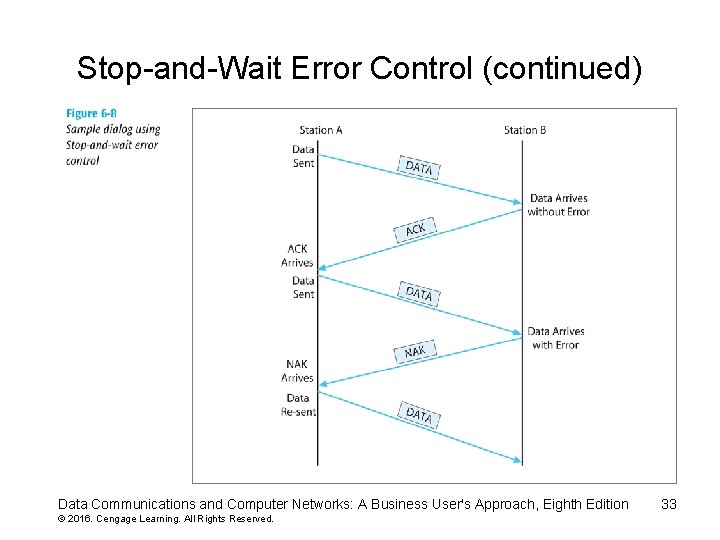
Stop-and-Wait Error Control • Stop-and-wait is the simplest of the error control protocols • A transmitter sends a frame then stops and waits for an acknowledgment – If a positive acknowledgment (ACK) is received, the next frame is sent – If a negative acknowledgment (NAK) is received, the same frame is transmitted again Data Communications and Computer Networks: A Business User's Approach, Eighth Edition © 2016. Cengage Learning. All Rights Reserved. 32
Stop-and-Wait Error Control (continued) Data Communications and Computer Networks: A Business User's Approach, Eighth Edition © 2016. Cengage Learning. All Rights Reserved. 33
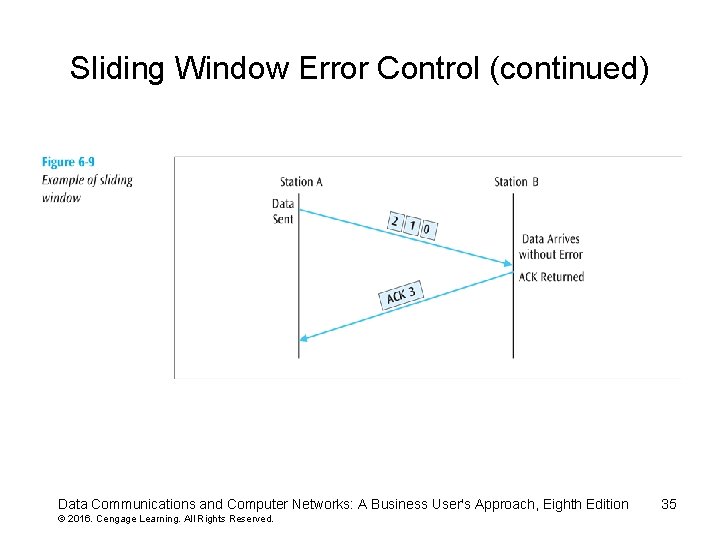
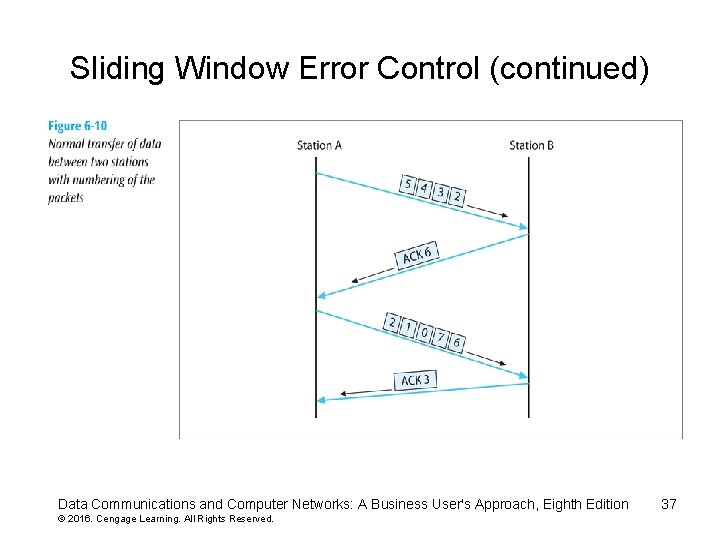
Sliding Window Error Control • These techniques assume that multiple frames are in transmission at one time • A sliding window protocol allows the transmitter to send a number of data packets at one time before receiving any acknowledgments – Depends on window size • When a receiver does acknowledge receipt, the returned ACK contains the number of the frame expected next Data Communications and Computer Networks: A Business User's Approach, Eighth Edition © 2016. Cengage Learning. All Rights Reserved. 34
Sliding Window Error Control (continued) Data Communications and Computer Networks: A Business User's Approach, Eighth Edition © 2016. Cengage Learning. All Rights Reserved. 35
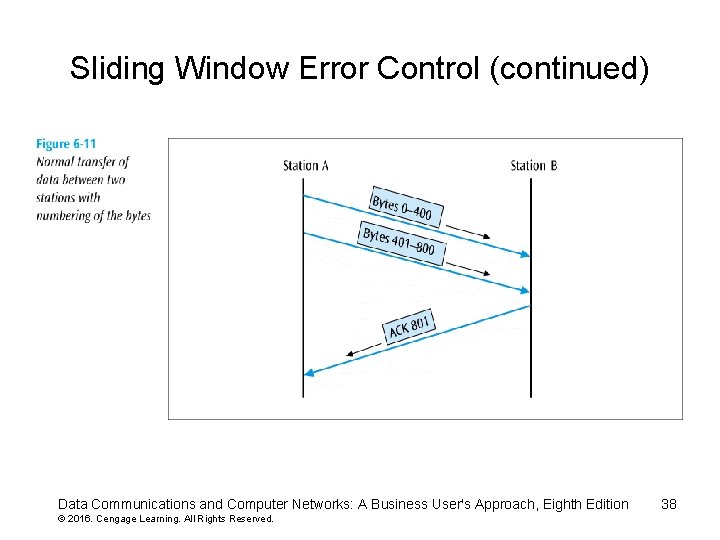
Sliding Window Error Control (continued) • Older sliding window protocols numbered each frame or packet that was transmitted • More modern sliding window protocols number each byte within a frame • An example in which the packets are numbered, followed by an example in which the bytes are numbered: Data Communications and Computer Networks: A Business User's Approach, Eighth Edition © 2016. Cengage Learning. All Rights Reserved. 36
Sliding Window Error Control (continued) Data Communications and Computer Networks: A Business User's Approach, Eighth Edition © 2016. Cengage Learning. All Rights Reserved. 37
Sliding Window Error Control (continued) Data Communications and Computer Networks: A Business User's Approach, Eighth Edition © 2016. Cengage Learning. All Rights Reserved. 38
Sliding Window Error Control (continued) • Notice that an ACK is not always sent after each frame is received – It is more efficient to wait for a few received frames before returning an ACK • How long should you wait until you return an ACK? Data Communications and Computer Networks: A Business User's Approach, Eighth Edition © 2016. Cengage Learning. All Rights Reserved. 39
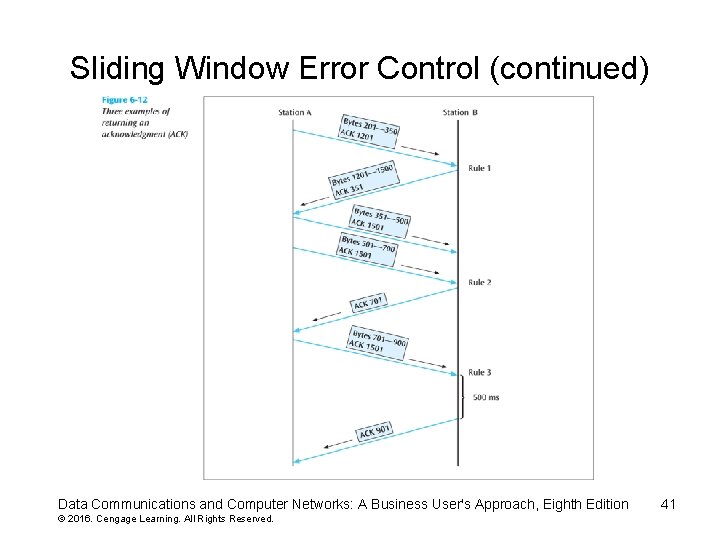
Sliding Window Error Control (continued) • Using TCP/IP, there are some basic rules concerning ACKs: – Rule 1: If a receiver just received data and wants to send its own data, piggyback an ACK along with that data – Rule 2: If a receiver has no data to return and has just ACKed the last packet, receiver waits 500 ms for another packet • If while waiting, another packet arrives, send the ACK immediately – Rule 3: If a receiver has no data to return and has just ACKed the last packet, receiver waits 500 ms • No packet, send ACK Data Communications and Computer Networks: A Business User's Approach, Eighth Edition © 2016. Cengage Learning. All Rights Reserved. 40
Sliding Window Error Control (continued) Data Communications and Computer Networks: A Business User's Approach, Eighth Edition © 2016. Cengage Learning. All Rights Reserved. 41
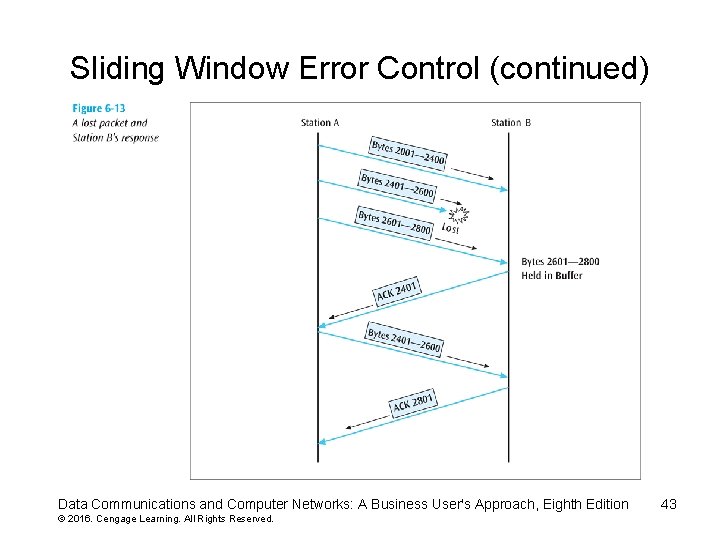
Sliding Window Error Control (continued) • What happens when a packet is lost? – As shown in the next slide, if a frame is lost, the following frame will be “out of sequence” • The receiver will hold the out of sequence bytes in a buffer and request the sender to retransmit the missing frame Data Communications and Computer Networks: A Business User's Approach, Eighth Edition © 2016. Cengage Learning. All Rights Reserved. 42
Sliding Window Error Control (continued) Data Communications and Computer Networks: A Business User's Approach, Eighth Edition © 2016. Cengage Learning. All Rights Reserved. 43
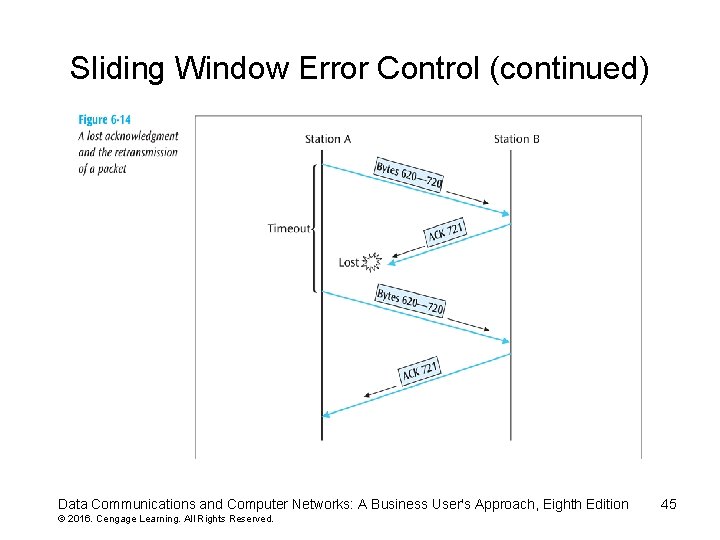
Sliding Window Error Control (continued) • What happens when an ACK is lost? – As shown in the next slide, if an ACK is lost, the sender will wait for the ACK to arrive and eventually time out • When the time-out occurs, the sender will resend the last frame Data Communications and Computer Networks: A Business User's Approach, Eighth Edition © 2016. Cengage Learning. All Rights Reserved. 44
Sliding Window Error Control (continued) Data Communications and Computer Networks: A Business User's Approach, Eighth Edition © 2016. Cengage Learning. All Rights Reserved. 45