Wireless LANs WLANs Chapter 5 Updated January 2009
![Why not using CSMA/CD? • Hidden station problem: [discussed next] • Signal fading: The](https://slidetodoc.com/presentation_image_h/1fc219f5e0a585905757d581c7d3b770/image-38.jpg "Why not using CSMA/CD? • Hidden station problem: [discussed next] • Signal fading: The")
- Slides: 54
Wireless LANs (WLANs) Chapter 5 Updated January 2009 Raymond Panko’s Business Data Networks and Telecommunications, 7 th edition May only be used by adopters of the book © 2009 Pearson Education, Inc. Publishing as Prentice Hall
Orientation • LANs Are Governed by Layer 1 and 2 Standards – So they are governed by OSI Standards • Chapter 3 (Layer 1 Transmission) • Chapter 4 – Ethernet 802. 3 standards are OSI standards • Chapter 5 – Wireless 802. 11 LAN (WLAN) standards are OSI standards – But not all wireless technologies are OSI standards – Operation, security, and management – Bluetooth and other wireless options © 2009 Pearson Education, Inc. Publishing as Prentice Hall 5 -2
Basic 802. 11 WLAN Operation © 2009 Pearson Education, Inc. Publishing as Prentice Hall
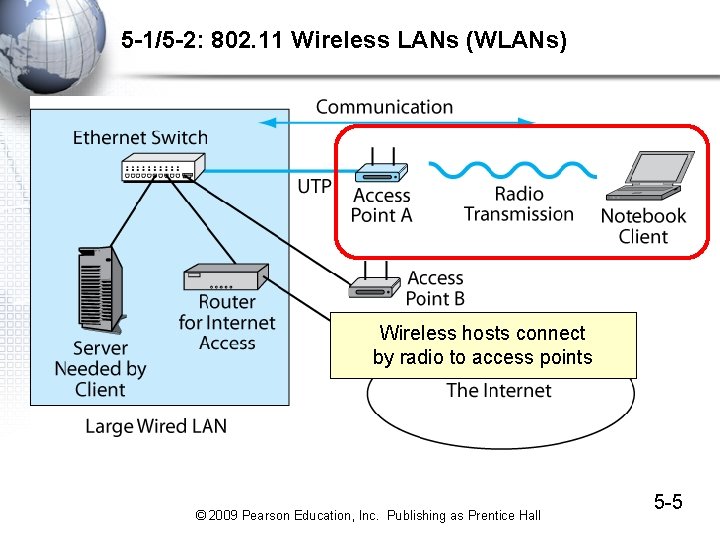
5 -1/5 -2: 802. 11 Wireless LANs (WLANs) • Wireless LAN Technology – 802. 11 is the dominant WLAN technology today – Standardized by the 802. 11 Working Group – Popularly known as Wi-Fi © 2009 Pearson Education, Inc. Publishing as Prentice Hall 5 -4
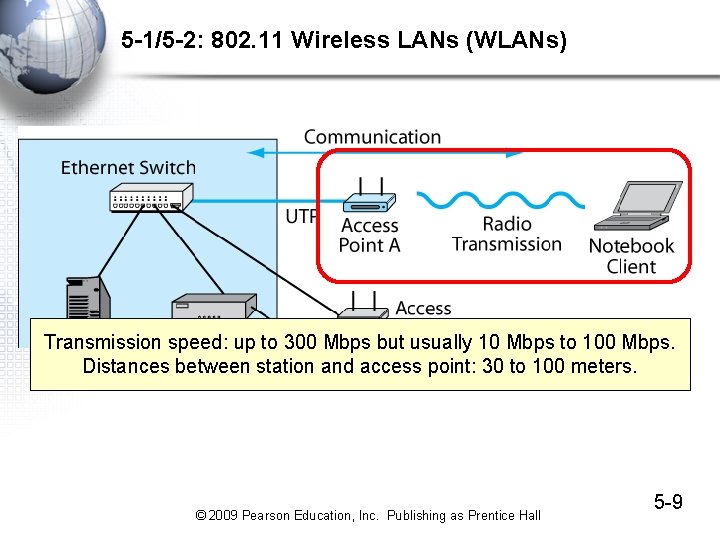
5 -1/5 -2: 802. 11 Wireless LANs (WLANs) Wireless hosts connect by radio to access points © 2009 Pearson Education, Inc. Publishing as Prentice Hall 5 -5
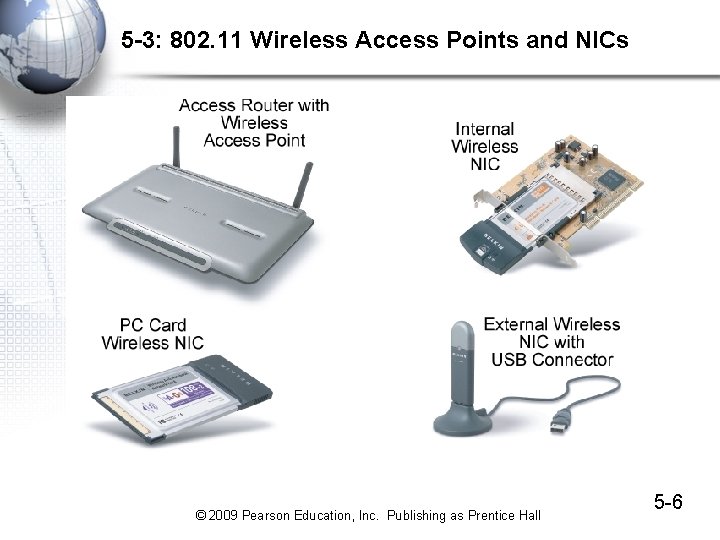
5 -3: 802. 11 Wireless Access Points and NICs © 2009 Pearson Education, Inc. Publishing as Prentice Hall 5 -6
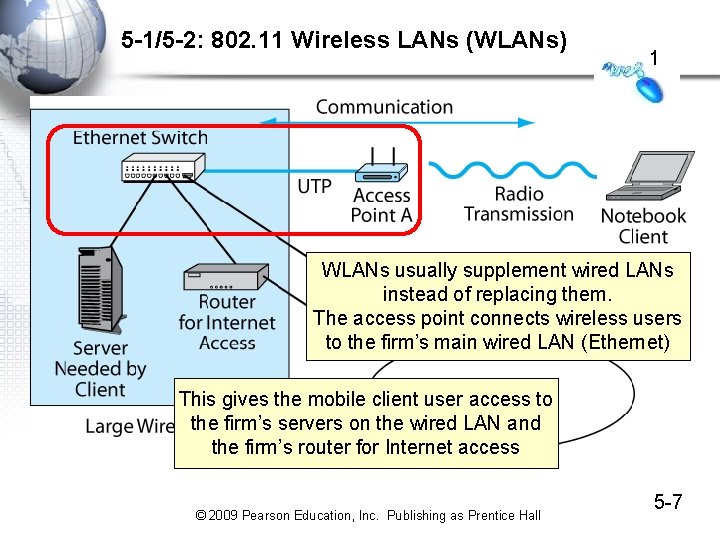
5 -1/5 -2: 802. 11 Wireless LANs (WLANs) 1 WLANs usually supplement wired LANs instead of replacing them. The access point connects wireless users to the firm’s main wired LAN (Ethernet) This gives the mobile client user access to the firm’s servers on the wired LAN and the firm’s router for Internet access © 2009 Pearson Education, Inc. Publishing as Prentice Hall 5 -7
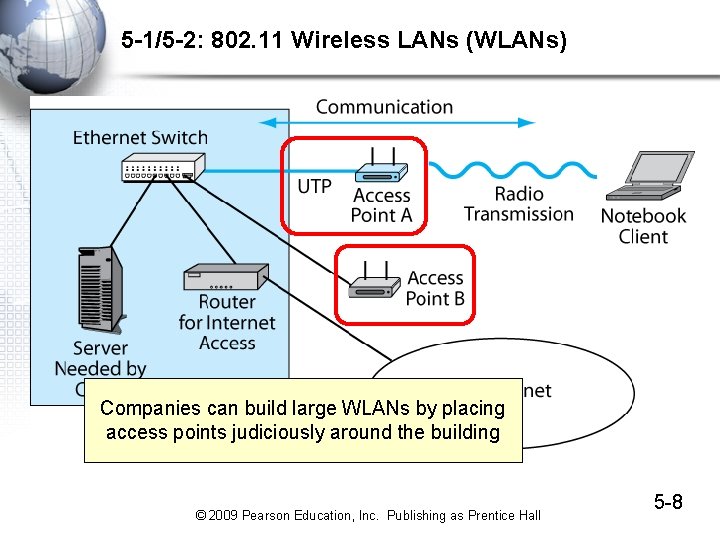
5 -1/5 -2: 802. 11 Wireless LANs (WLANs) Companies can build large WLANs by placing access points judiciously around the building © 2009 Pearson Education, Inc. Publishing as Prentice Hall 5 -8
5 -1/5 -2: 802. 11 Wireless LANs (WLANs) Transmission speed: up to 300 Mbps but usually 10 Mbps to 100 Mbps. Distances between station and access point: 30 to 100 meters. © 2009 Pearson Education, Inc. Publishing as Prentice Hall 5 -9
Wireless Transmission Concepts © 2009 Pearson Education, Inc. Publishing as Prentice Hall
5 -4: Recap of Radio Propagation Concepts • Frequency – Radio waves are measured in terms of frequency – Measured in hertz (Hz)—the number of complete cycles per second • Most Common Frequency Range for WLANs: – High megahertz to low gigahertz range © 2009 Pearson Education, Inc. Publishing as Prentice Hall 5 -11
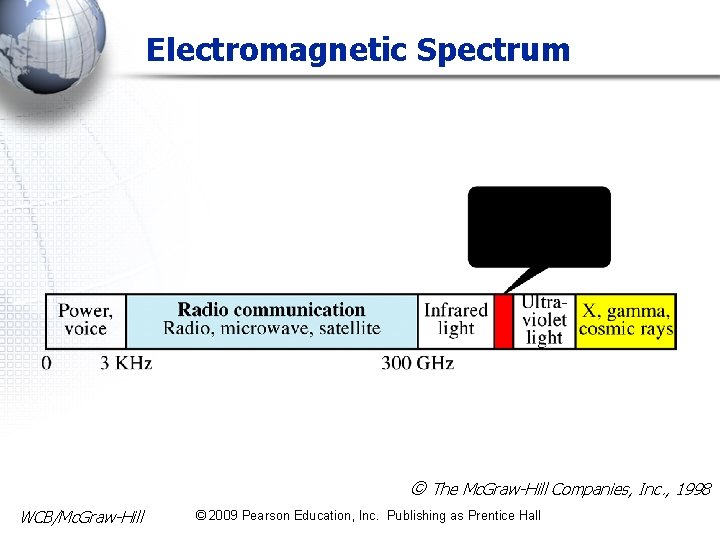
Electromagnetic Spectrum The Mc. Graw-Hill Companies, Inc. , 1998 WCB/Mc. Graw-Hill © 2009 Pearson Education, Inc. Publishing as Prentice Hall
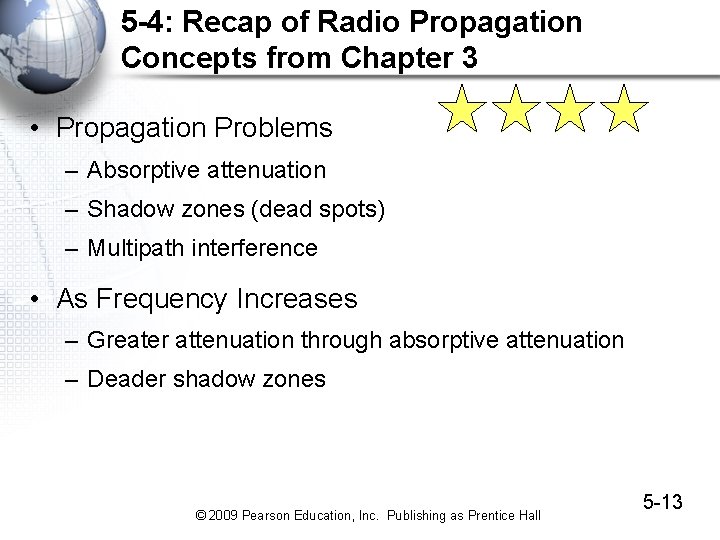
5 -4: Recap of Radio Propagation Concepts from Chapter 3 • Propagation Problems – Absorptive attenuation – Shadow zones (dead spots) – Multipath interference • As Frequency Increases – Greater attenuation through absorptive attenuation – Deader shadow zones © 2009 Pearson Education, Inc. Publishing as Prentice Hall 5 -13
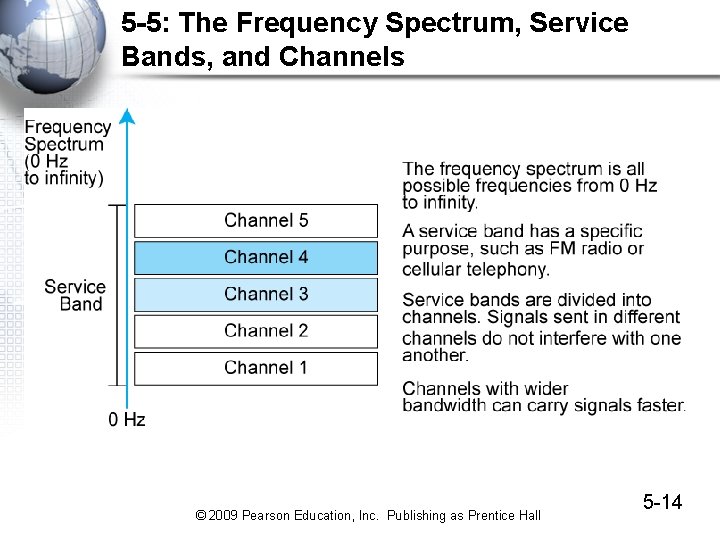
5 -5: The Frequency Spectrum, Service Bands, and Channels © 2009 Pearson Education, Inc. Publishing as Prentice Hall 5 -14
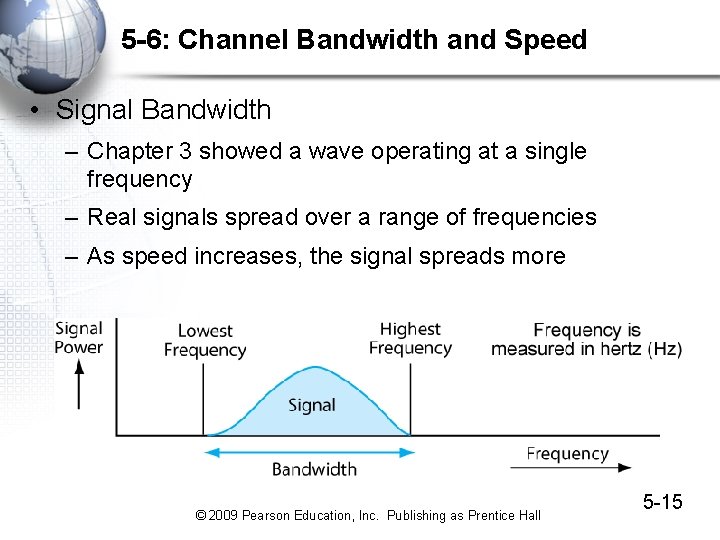
5 -6: Channel Bandwidth and Speed • Signal Bandwidth – Chapter 3 showed a wave operating at a single frequency – Real signals spread over a range of frequencies – As speed increases, the signal spreads more © 2009 Pearson Education, Inc. Publishing as Prentice Hall 5 -15
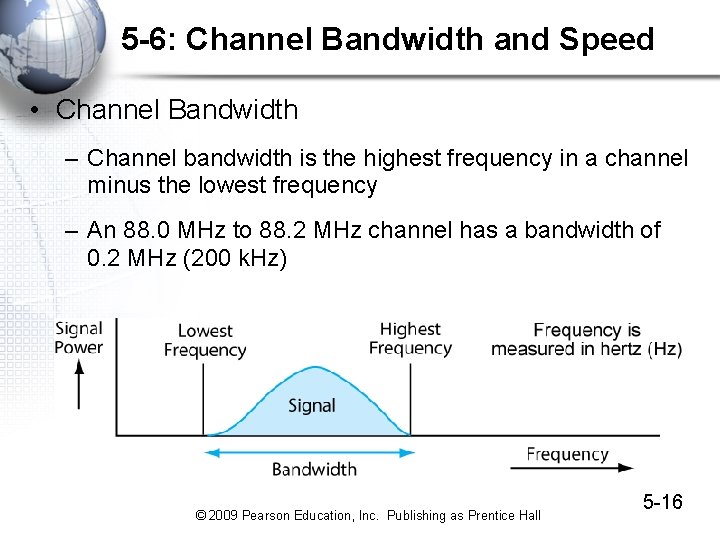
5 -6: Channel Bandwidth and Speed • Channel Bandwidth – Channel bandwidth is the highest frequency in a channel minus the lowest frequency – An 88. 0 MHz to 88. 2 MHz channel has a bandwidth of 0. 2 MHz (200 k. Hz) © 2009 Pearson Education, Inc. Publishing as Prentice Hall 5 -16
5 -6: Channel Bandwidth Speed • Broadband Narrowband Channels – Broadband means wide channel bandwidth and therefore high speed – Narrowband means narrow channel bandwidth and therefore low speed – Today, any speed, whether in channels or not, is called narrowband or broadband • Narrowband is below 200 kbps • Broadband is above 200 kbps © 2009 Pearson Education, Inc. Publishing as Prentice Hall 5 -17
5 -6: Channel Bandwidth and Speed • The Golden Zone – Most organizational radio technologies operate in the golden zone in the high megahertz to low gigahertz range – Golden zone frequencies are high enough for there to be large total bandwidth – Golden zone frequencies are low enough to allow fairly good propagation characteristics – Growing demand creates intense competition for frequencies in the Golden Zone © 2009 Pearson Education, Inc. Publishing as Prentice Hall 5 -18
5 -6: Channel Bandwidth and Speed • Channel Bandwidth and Spectrum Scarcity – Why not make all channels broadband? – There is a limited amount of spectrum at desirable frequencies – Making each channel broader than needed would mean having fewer channels or widening the service band – Service band design requires tradeoffs between speed requirements, channel bandwidth, and service band size © 2009 Pearson Education, Inc. Publishing as Prentice Hall 5 -19
Licensed and Unlicensed Bands and Spread Spectrum Transmission © 2009 Pearson Education, Inc. Publishing as Prentice Hall
5 -8: Licensed and Unlicensed Bands • Licensed Radio Bands – If two nearby radio hosts transmit in the same channel, their signals will interfere – Most radio bands are licensed bands, in which hosts need a license to transmit – The government limits licenses to avoid interference – Television bands, AM radio bands, etc. , are licensed – In cellular telephone bands, which are licensed, only the central transceivers are licensed, not the mobile phones © 2009 Pearson Education, Inc. Publishing as Prentice Hall 5 -21
5 -8: Licensed and Unlicensed Bands • Unlicensed Radio Bands – Some service bands are set aside as unlicensed bands – Hosts do not need to be licensed to be turned on or moved – 802. 11 operates in unlicensed radio bands – This allows access points and hosts to be moved freely © 2009 Pearson Education, Inc. Publishing as Prentice Hall 5 -22
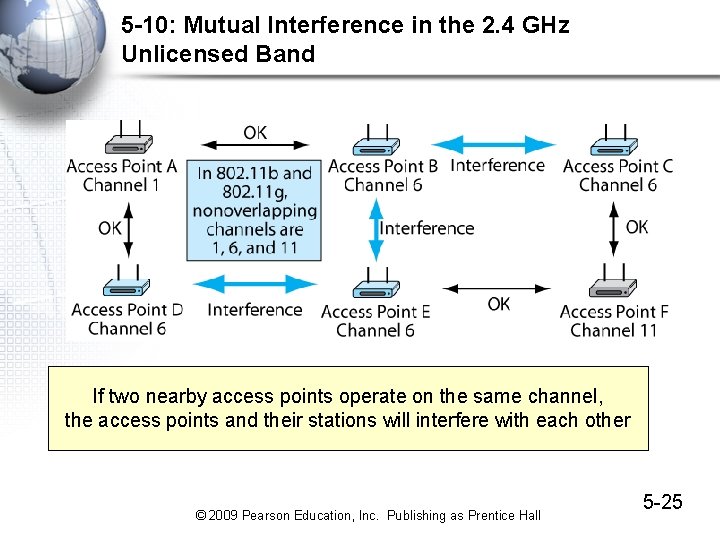
5 -9: 802. 11 in the 2. 4 GHz and 5 GHz Unlicensed Bands • The 2. 4 GHz Unlicensed Band – Defined the same in almost all countries (2. 400 GHz to 2. 485 GHz) – This sameness reduces radio costs – Propagation characteristics are good – For 20 MHz 802. 11 channels, only three nonoverlapping channels are possible • Channels 1, 6, and 11 © 2009 Pearson Education, Inc. Publishing as Prentice Hall 5 -23
5 -9: 802. 11 in the 2. 4 GHz and 5 GHz Unlicensed Bands • The 2. 4 GHz Unlicensed Band – There will be mutual channel interference between nearby access points transmitting in the same 20 MHz channel – With only 3 channels, it is difficult or impossible to put nearby access points on different channels in you have many that are near each other – Also, potential interference problems from microwave ovens, cordless telephones, etc. © 2009 Pearson Education, Inc. Publishing as Prentice Hall 5 -24
5 -10: Mutual Interference in the 2. 4 GHz Unlicensed Band If two nearby access points operate on the same channel, the access points and their stations will interfere with each other © 2009 Pearson Education, Inc. Publishing as Prentice Hall 5 -25
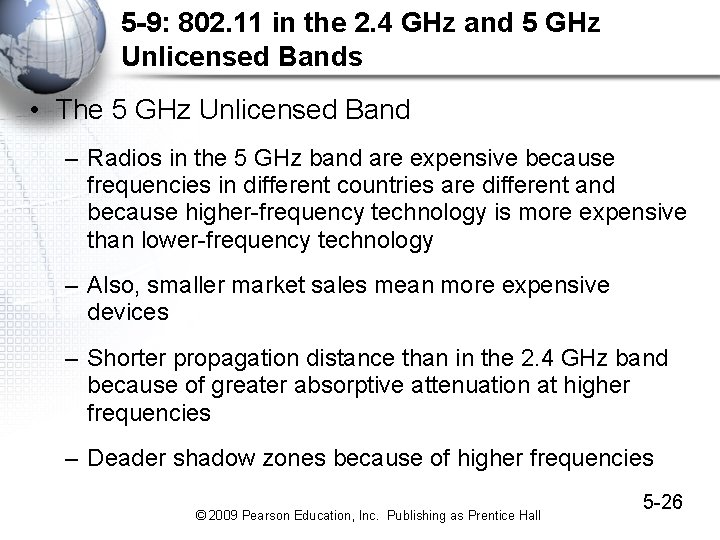
5 -9: 802. 11 in the 2. 4 GHz and 5 GHz Unlicensed Bands • The 5 GHz Unlicensed Band – Radios in the 5 GHz band are expensive because frequencies in different countries are different and because higher-frequency technology is more expensive than lower-frequency technology – Also, smaller market sales mean more expensive devices – Shorter propagation distance than in the 2. 4 GHz band because of greater absorptive attenuation at higher frequencies – Deader shadow zones because of higher frequencies © 2009 Pearson Education, Inc. Publishing as Prentice Hall 5 -26
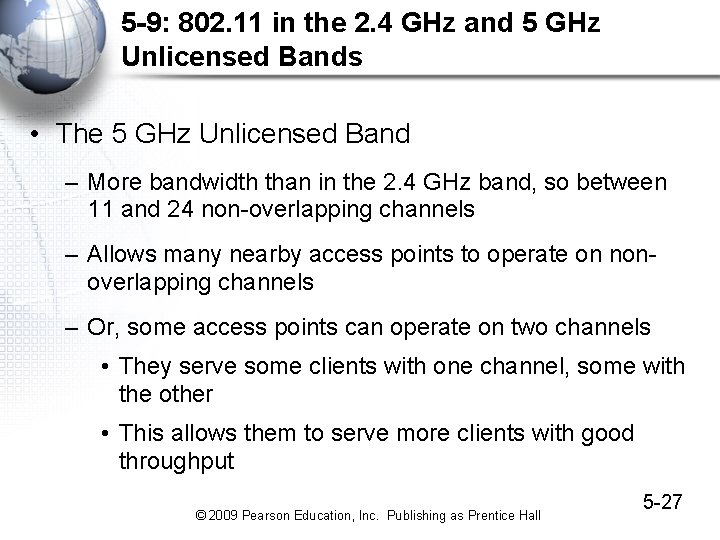
5 -9: 802. 11 in the 2. 4 GHz and 5 GHz Unlicensed Bands • The 5 GHz Unlicensed Band – More bandwidth than in the 2. 4 GHz band, so between 11 and 24 non-overlapping channels – Allows many nearby access points to operate on nonoverlapping channels – Or, some access points can operate on two channels • They serve some clients with one channel, some with the other • This allows them to serve more clients with good throughput © 2009 Pearson Education, Inc. Publishing as Prentice Hall 5 -27
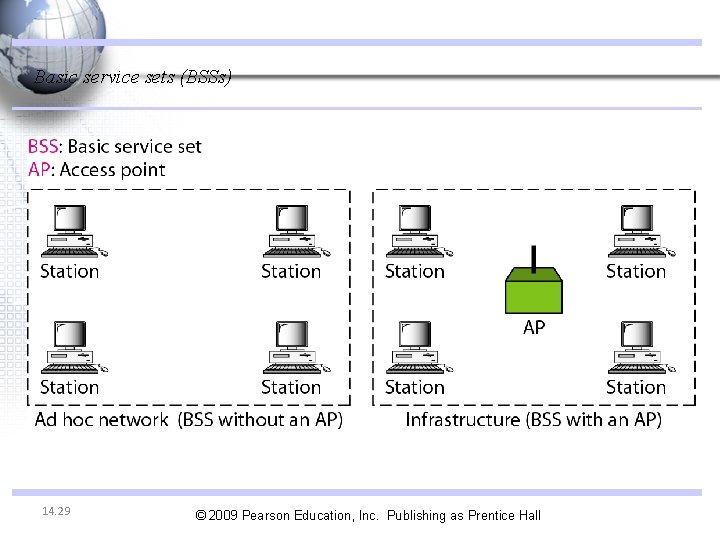
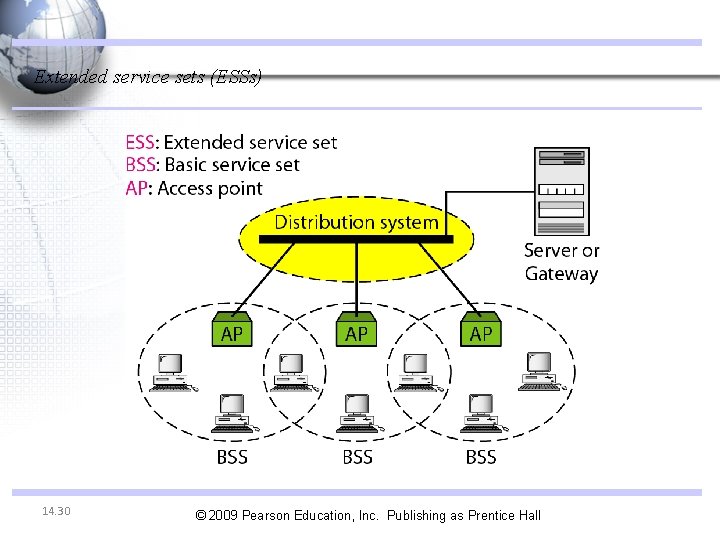
IEEE 802. 11 IEEE has defined the specifications for a wireless LAN, called IEEE 802. 11, which covers the physical and data link layers. Two kinds of services - Basic Service Set (BSS) - Extended Service Set (ESS) 14. 28 © 2009 Pearson Education, Inc. Publishing as Prentice Hall
Basic service sets (BSSs) 14. 29 © 2009 Pearson Education, Inc. Publishing as Prentice Hall
Extended service sets (ESSs) 14. 30 © 2009 Pearson Education, Inc. Publishing as Prentice Hall
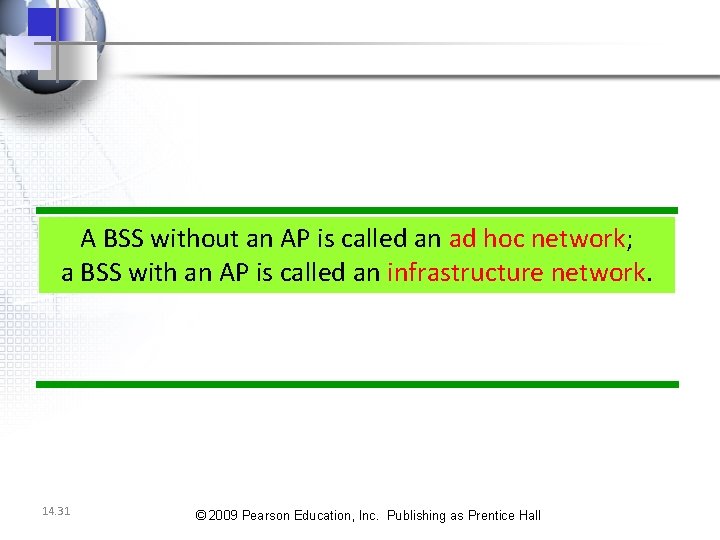
A BSS without an AP is called an ad hoc network; a BSS with an AP is called an infrastructure network. 14. 31 © 2009 Pearson Education, Inc. Publishing as Prentice Hall
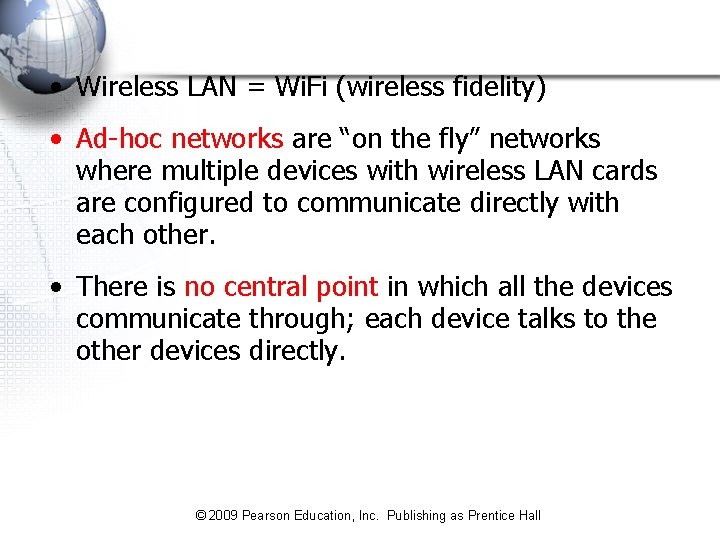
• Wireless LAN = Wi. Fi (wireless fidelity) • Ad-hoc networks are “on the fly” networks where multiple devices with wireless LAN cards are configured to communicate directly with each other. • There is no central point in which all the devices communicate through; each device talks to the other devices directly. © 2009 Pearson Education, Inc. Publishing as Prentice Hall
• Ad-hoc networks are primarily used for file sharing between two users or for playing games in mobile locations. • Although they require no hardware except two hosts with wireless NICs, there are significant limitations associated with ad-hoc networks: – No automatic IP addressing available; addresses must be manually set for each host on the network. – No Filtering: No ability to limit access to the network through the use of MAC address filtering or other security techniques – No ability to connect the wireless network to a wired network © 2009 Pearson Education, Inc. Publishing as Prentice Hall
• For these reasons, ad-hoc networks represent a small number of the networks in use today. • Even most home users have implemented infrastructure networks using access points • In an infrastructure network configuration, wireless hosts communicate through access points (APs). • An access point, sometimes referred to as a base station, is a device that connects to a wired network and bridges traffic between the wired and wireless networks. © 2009 Pearson Education, Inc. Publishing as Prentice Hall
Typical Access Point Operation © 2009 Pearson Education, Inc. Publishing as Prentice Hall
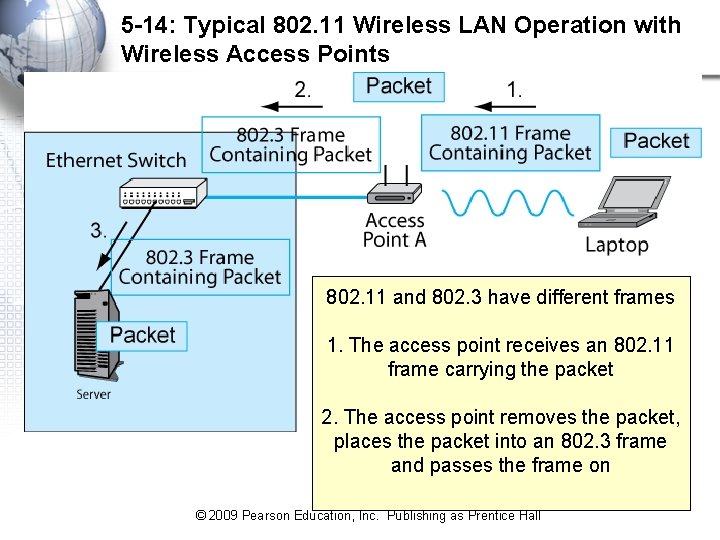
5 -14: Typical 802. 11 Wireless LAN Operation with Wireless Access Points 802. 11 and 802. 3 have different frames 1. The access point receives an 802. 11 frame carrying the packet 2. The access point removes the packet, places the packet into an 802. 3 frame and passes the frame on © 2009 Pearson Education, Inc. Publishing as Prentice Hall 5 -36
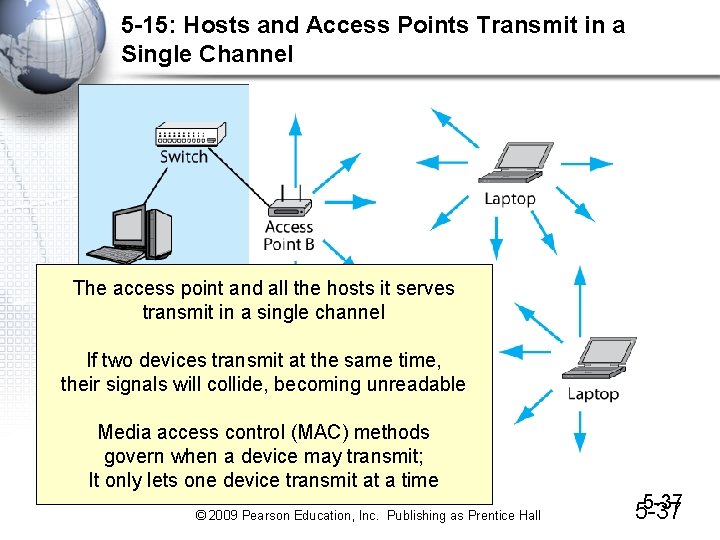
5 -15: Hosts and Access Points Transmit in a Single Channel The access point and all the hosts it serves transmit in a single channel If two devices transmit at the same time, their signals will collide, becoming unreadable Media access control (MAC) methods govern when a device may transmit; It only lets one device transmit at a time © 2009 Pearson Education, Inc. Publishing as Prentice Hall 5 -37
Why not using CSMA/CD? • Hidden station problem: [discussed next] • Signal fading: The distance between stations can be great. Signal fading could prevent a station at one end from hearing a collision at the other end. © 2009 Pearson Education, Inc. Publishing as Prentice Hall
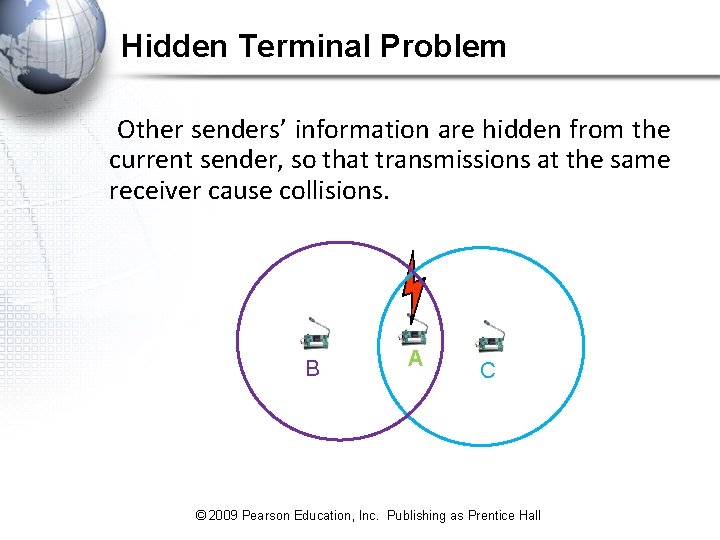
Hidden Terminal Problem Other senders’ information are hidden from the current sender, so that transmissions at the same receiver cause collisions. B A C © 2009 Pearson Education, Inc. Publishing as Prentice Hall
• The figure shows an example of the hidden station problem. • Station B has a transmission range shown by the left oval (sphere in space); every station in this range can hear any signal transmitted by station B. • Station C has a transmission range shown by the right oval (sphere in space); every station located in this range can hear any signal transmitted by C. • Station C is outside the transmission range of B; likewise, station B is outside the transmission range of C. • Station A, however, is in the area covered by both Band C; it can hear any signal transmitted by B or C. © 2009 Pearson Education, Inc. Publishing as Prentice Hall
• Assume that station B is sending data to station A. • In the middle of this transmission, station C also has data to send to station A. However, station C is out of B's range and transmissions from B cannot reach C. Therefore C thinks the medium is free. • Station C sends its data to A, which results in a collision at A because this station is receiving data from both B and C. • In this case, we say that stations Band C are hidden from each other with respect to A. • Hidden stations can reduce the capacity of the network because of the possibility of collision. © 2009 Pearson Education, Inc. Publishing as Prentice Hall
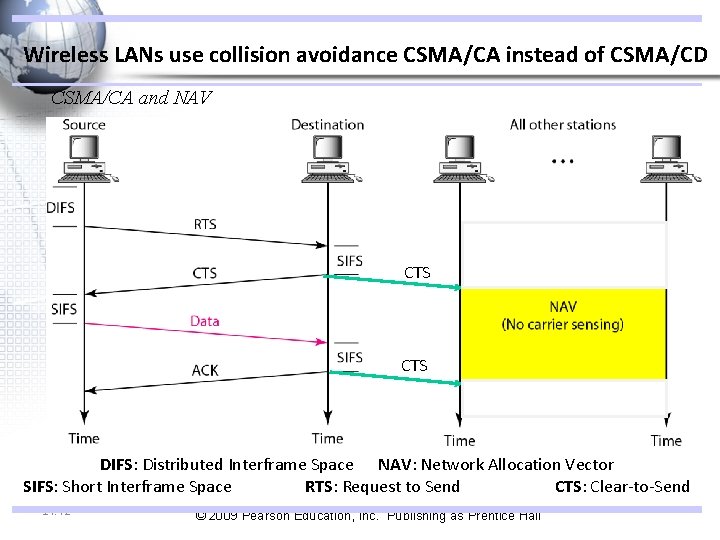
Wireless LANs use collision avoidance CSMA/CA instead of CSMA/CD CSMA/CA and NAV CTS DIFS: Distributed Interframe Space NAV: Network Allocation Vector SIFS: Short Interframe Space RTS: Request to Send CTS: Clear-to-Send 14. 42 © 2009 Pearson Education, Inc. Publishing as Prentice Hall
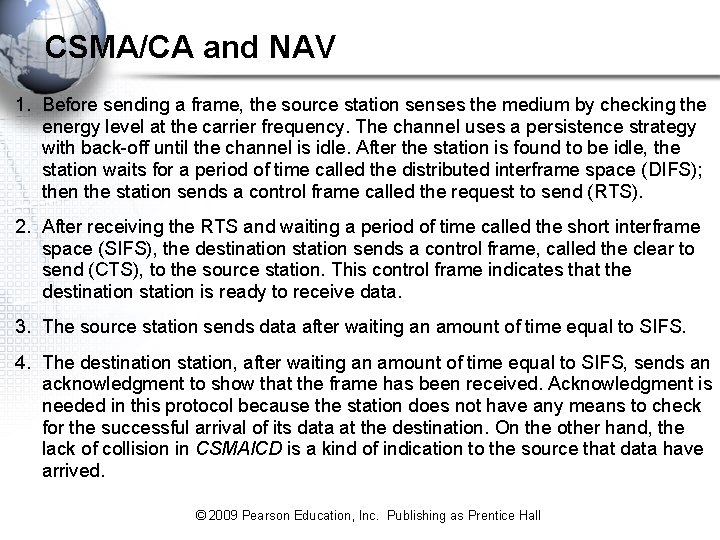
CSMA/CA and NAV 1. Before sending a frame, the source station senses the medium by checking the energy level at the carrier frequency. The channel uses a persistence strategy with back-off until the channel is idle. After the station is found to be idle, the station waits for a period of time called the distributed interframe space (DIFS); then the station sends a control frame called the request to send (RTS). 2. After receiving the RTS and waiting a period of time called the short interframe space (SIFS), the destination station sends a control frame, called the clear to send (CTS), to the source station. This control frame indicates that the destination station is ready to receive data. 3. The source station sends data after waiting an amount of time equal to SIFS. 4. The destination station, after waiting an amount of time equal to SIFS, sends an acknowledgment to show that the frame has been received. Acknowledgment is needed in this protocol because the station does not have any means to check for the successful arrival of its data at the destination. On the other hand, the lack of collision in CSMAl. CD is a kind of indication to the source that data have arrived. © 2009 Pearson Education, Inc. Publishing as Prentice Hall
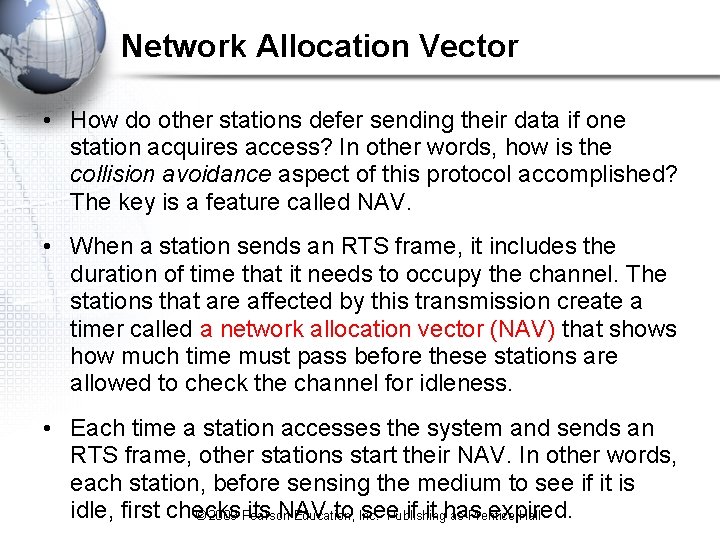
Network Allocation Vector • How do other stations defer sending their data if one station acquires access? In other words, how is the collision avoidance aspect of this protocol accomplished? The key is a feature called NAV. • When a station sends an RTS frame, it includes the duration of time that it needs to occupy the channel. The stations that are affected by this transmission create a timer called a network allocation vector (NAV) that shows how much time must pass before these stations are allowed to check the channel for idleness. • Each time a station accesses the system and sends an RTS frame, other stations start their NAV. In other words, each station, before sensing the medium to see if it is idle, first checks its NAV to see if it has expired. © 2009 Pearson Education, Inc. Publishing as Prentice Hall
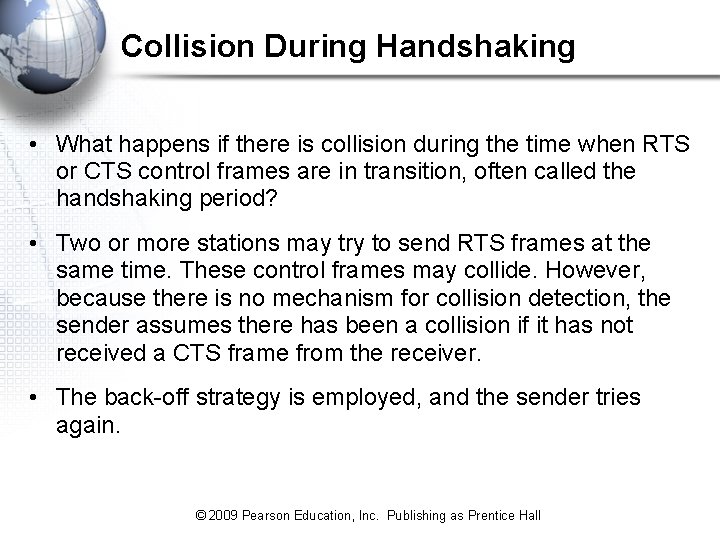
Collision During Handshaking • What happens if there is collision during the time when RTS or CTS control frames are in transition, often called the handshaking period? • Two or more stations may try to send RTS frames at the same time. These control frames may collide. However, because there is no mechanism for collision detection, the sender assumes there has been a collision if it has not received a CTS frame from the receiver. • The back-off strategy is employed, and the sender tries again. © 2009 Pearson Education, Inc. Publishing as Prentice Hall
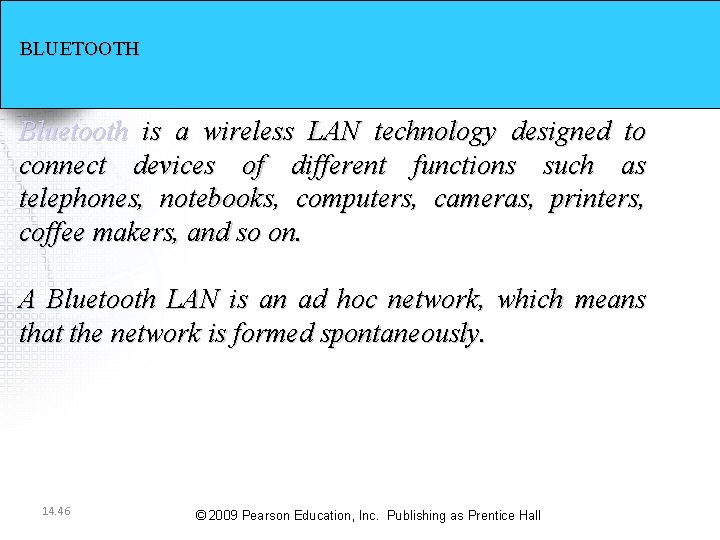
BLUETOOTH Bluetooth is a wireless LAN technology designed to connect devices of different functions such as telephones, notebooks, computers, cameras, printers, coffee makers, and so on. A Bluetooth LAN is an ad hoc network, which means that the network is formed spontaneously. 14. 46 © 2009 Pearson Education, Inc. Publishing as Prentice Hall
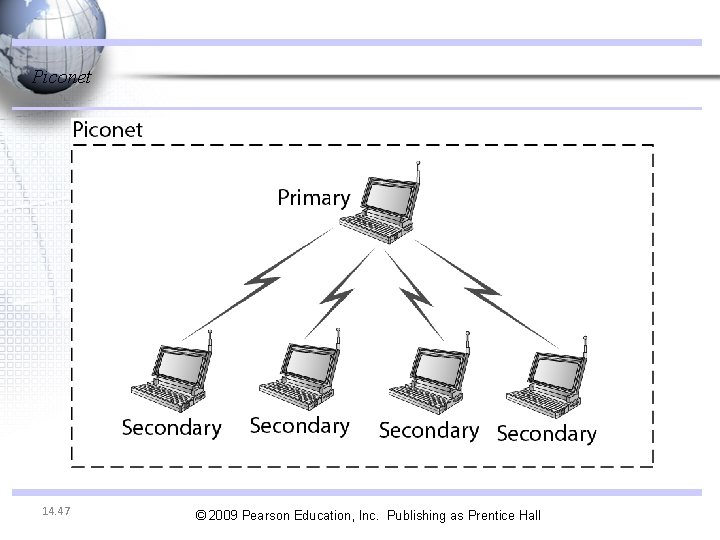
Piconet 14. 47 © 2009 Pearson Education, Inc. Publishing as Prentice Hall
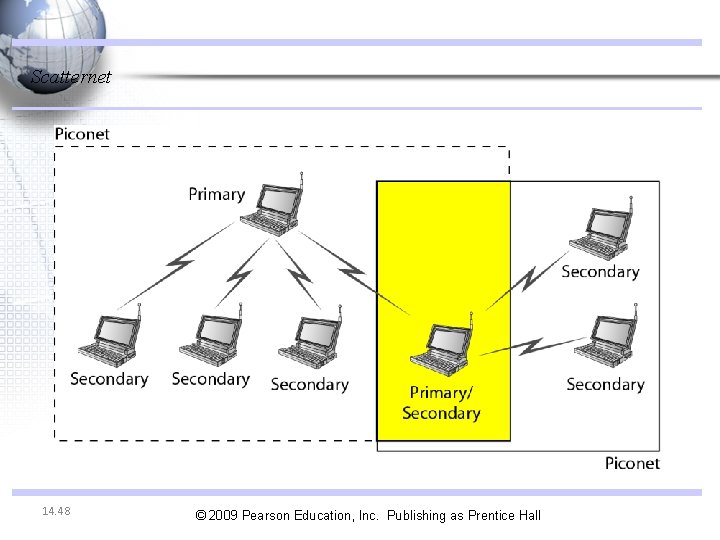
Scatternet 14. 48 © 2009 Pearson Education, Inc. Publishing as Prentice Hall
Main 802. 11 Standards © 2009 Pearson Education, Inc. Publishing as Prentice Hall
5 -18: Specific 802. 11 Wireless LAN Standards • 802. 11 g – Most popular 802. 11 standard today – 54 Mbps rated speed with much slower throughput – Generally sufficient for Web browsing – Inexpensive – All access points support it © 2009 Pearson Education, Inc. Publishing as Prentice Hall 5 -50
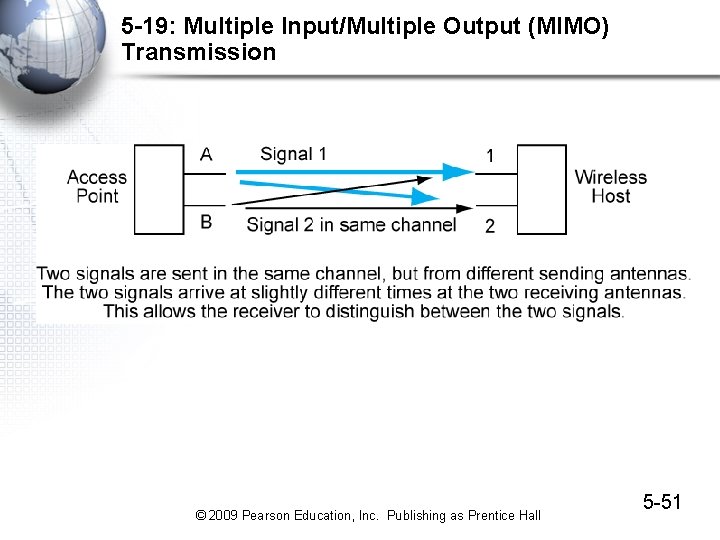
5 -19: Multiple Input/Multiple Output (MIMO) Transmission © 2009 Pearson Education, Inc. Publishing as Prentice Hall 5 -51
5 -18: Specific 802. 11 Wireless LAN Standards • 802. 11 n – Uses MIMO to give higher throughputs and longer transmission distances – Also uses 40 MHz channels instead of normal 20 MHz 802. 11 channels to further increase throughput – 100 Mbps throughputs are common – A bit of overkill for most users – Today, the standard is still in draft, so devices bought today may not be upgradeable or may be upgradeable only with more effort than most users will want to make © 2009 Pearson Education, Inc. Publishing as Prentice Hall 5 -52
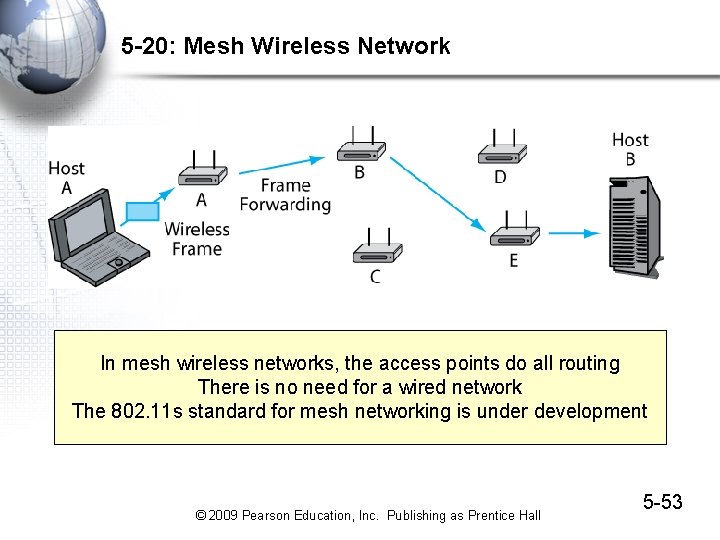
5 -20: Mesh Wireless Network In mesh wireless networks, the access points do all routing There is no need for a wired network The 802. 11 s standard for mesh networking is under development © 2009 Pearson Education, Inc. Publishing as Prentice Hall 5 -53
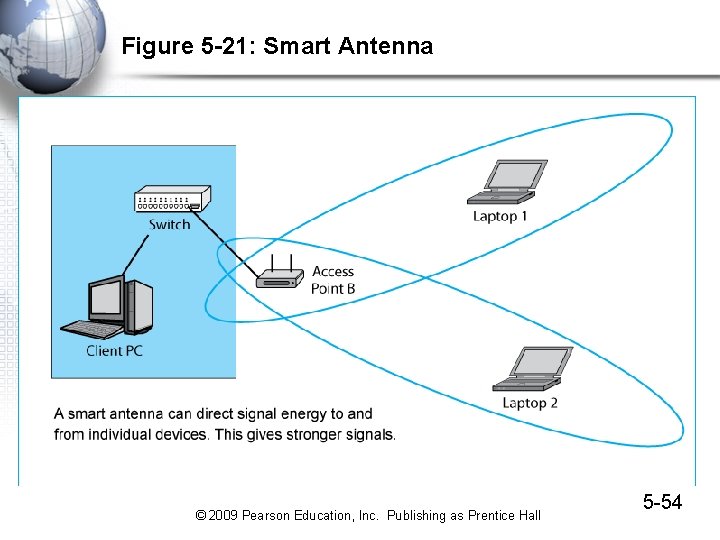
Figure 5 -21: Smart Antenna © 2009 Pearson Education, Inc. Publishing as Prentice Hall 5 -54