VICTORIA UNIVERSITY OF WELLINGTON Te Whare Wananga o
- Slides: 24
VICTORIA UNIVERSITY OF WELLINGTON Te Whare Wananga o te Upoko o te Ika a Maui Virtual Memory Lecturer : Dr. Pavle Mogin COMP 203 / NWEN 201 Computer Organisation / Computer Architectures
Plan for Virtual Memory Topic • What is a virtual memory (VM) • Virtual Memory: benefits and costs • How is Virtual Memory provided? – The page table • Address translation – from virtual to physical addresses • Writes and the dirty bit • Page replacement policies • Translation lookaside buffer • Reading 7. 4 COMP 203 / NWEN 201 2008 Virtual Memory 1
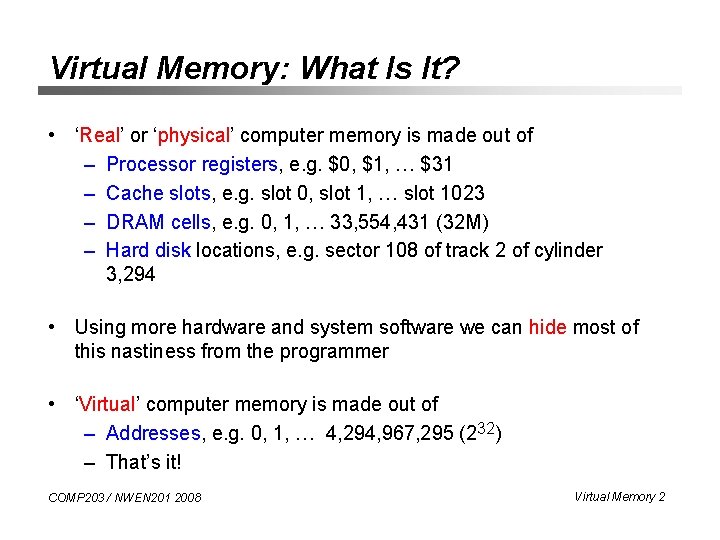
Virtual Memory: What Is It? • ‘Real’ or ‘physical’ computer memory is made out of – Processor registers, e. g. $0, $1, … $31 – Cache slots, e. g. slot 0, slot 1, … slot 1023 – DRAM cells, e. g. 0, 1, … 33, 554, 431 (32 M) – Hard disk locations, e. g. sector 108 of track 2 of cylinder 3, 294 • Using more hardware and system software we can hide most of this nastiness from the programmer • ‘Virtual’ computer memory is made out of – Addresses, e. g. 0, 1, … 4, 294, 967, 295 (232) – That’s it! COMP 203 / NWEN 201 2008 Virtual Memory 2
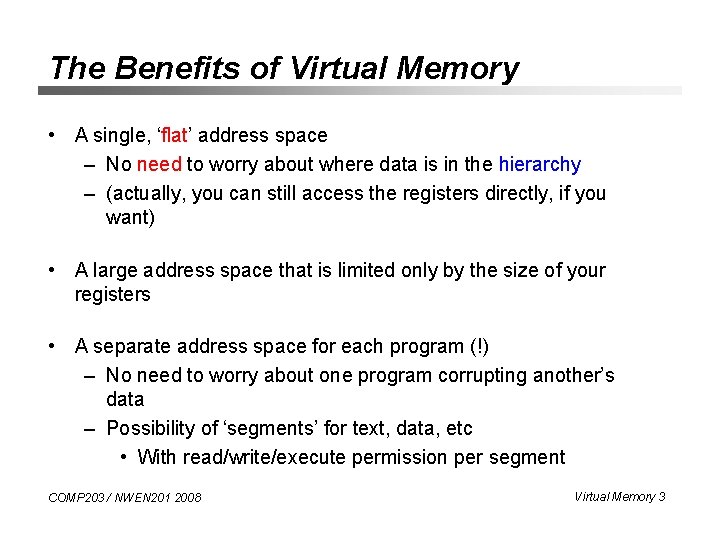
The Benefits of Virtual Memory • A single, ‘flat’ address space – No need to worry about where data is in the hierarchy – (actually, you can still access the registers directly, if you want) • A large address space that is limited only by the size of your registers • A separate address space for each program (!) – No need to worry about one program corrupting another’s data – Possibility of ‘segments’ for text, data, etc • With read/write/execute permission per segment COMP 203 / NWEN 201 2008 Virtual Memory 3
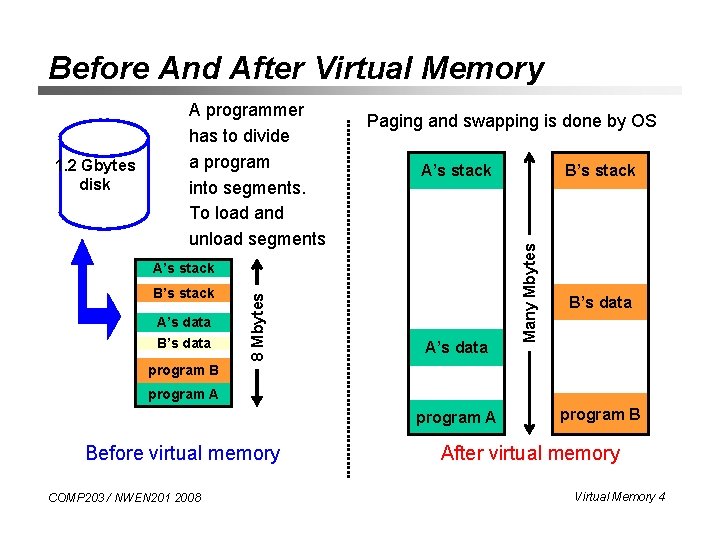
Before And After Virtual Memory Paging and swapping is done by OS A’s stack B’s stack A’s data B’s data 8 Mbytes A’s stack A’s data B’s stack Many Mbytes 1. 2 Gbytes disk A programmer has to divide a program into segments. To load and unload segments B’s data program B program A Before virtual memory COMP 203 / NWEN 201 2008 program B After virtual memory Virtual Memory 4
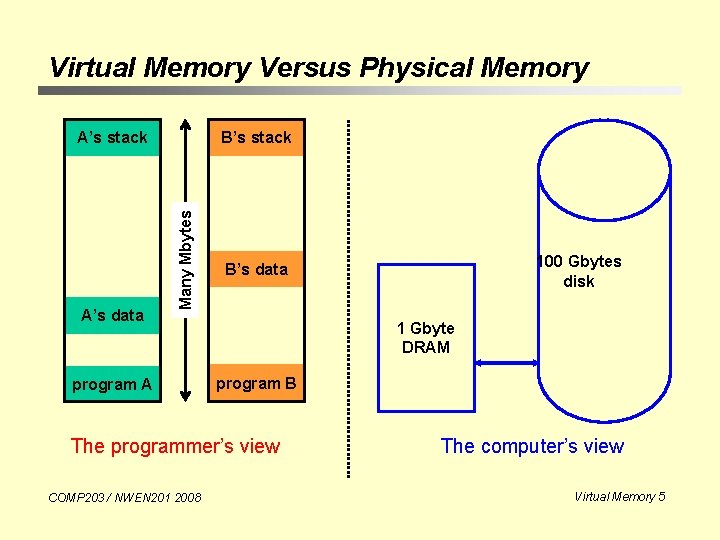
Virtual Memory Versus Physical Memory A’s data B’s stack Many Mbytes A’s stack program A 1 Gbyte DRAM program B The programmer’s view COMP 203 / NWEN 201 2008 100 Gbytes disk B’s data The computer’s view Virtual Memory 5
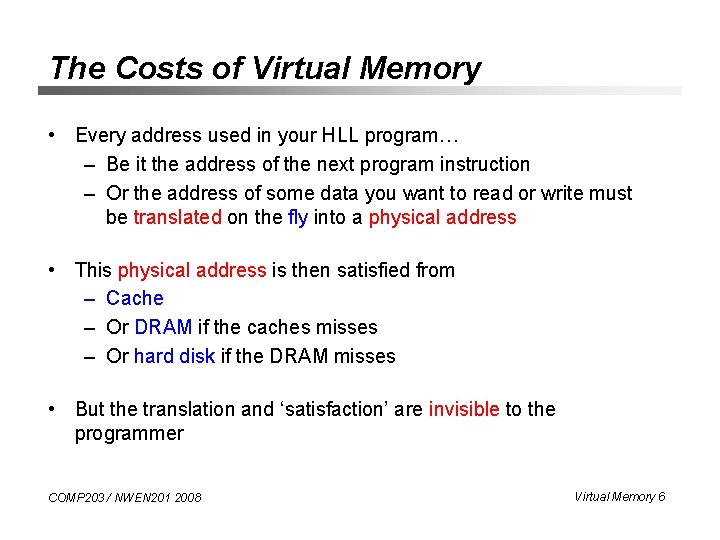
The Costs of Virtual Memory • Every address used in your HLL program… – Be it the address of the next program instruction – Or the address of some data you want to read or write must be translated on the fly into a physical address • This physical address is then satisfied from – Cache – Or DRAM if the caches misses – Or hard disk if the DRAM misses • But the translation and ‘satisfaction’ are invisible to the programmer COMP 203 / NWEN 201 2008 Virtual Memory 6
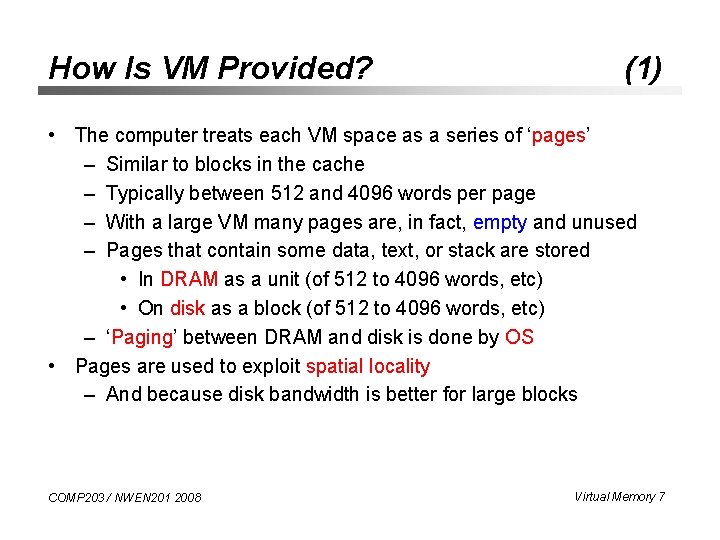
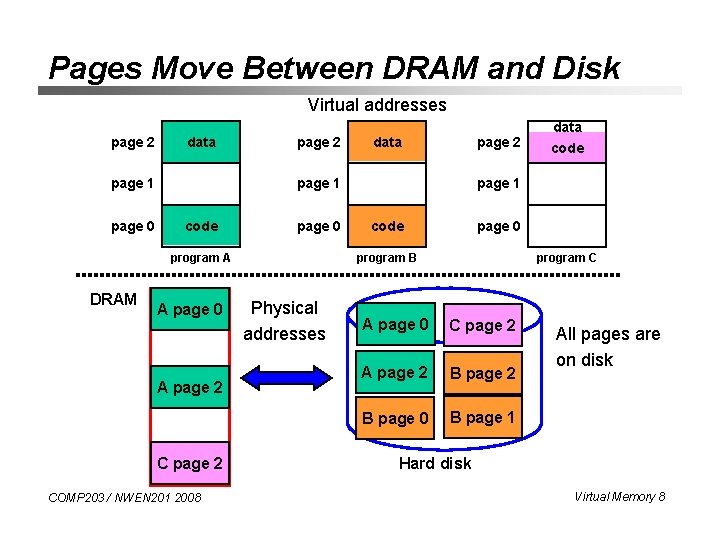
How Is VM Provided? (1) • The computer treats each VM space as a series of ‘pages’ – Similar to blocks in the cache – Typically between 512 and 4096 words per page – With a large VM many pages are, in fact, empty and unused – Pages that contain some data, text, or stack are stored • In DRAM as a unit (of 512 to 4096 words, etc) • On disk as a block (of 512 to 4096 words, etc) – ‘Paging’ between DRAM and disk is done by OS • Pages are used to exploit spatial locality – And because disk bandwidth is better for large blocks COMP 203 / NWEN 201 2008 Virtual Memory 7
Pages Move Between DRAM and Disk Virtual addresses page 2 data page 1 page 0 page 2 page 1 code page 0 program A DRAM data A page 0 A page 2 COMP 203 / NWEN 201 2008 code page 1 code page 0 program B Physical addresses data program C A page 0 C page 2 A page 2 B page 0 B page 1 All pages are on disk Hard disk Virtual Memory 8
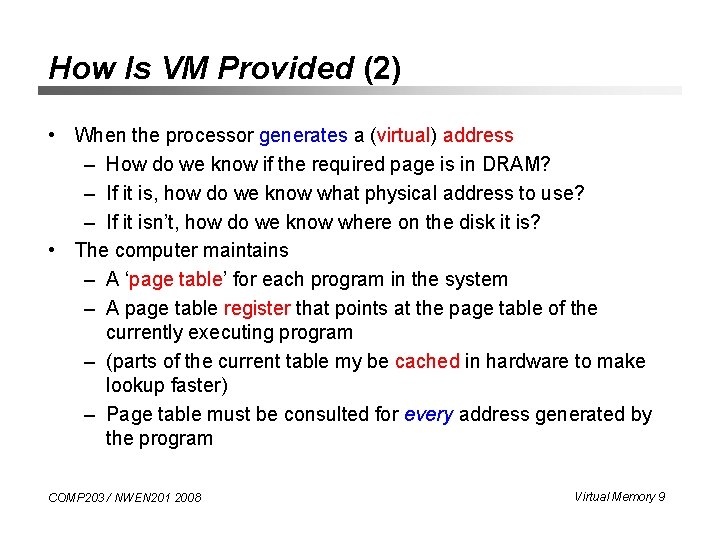
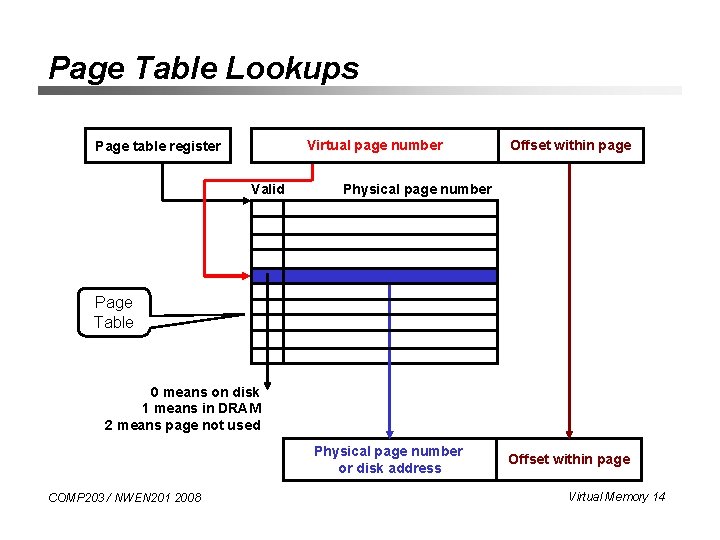
How Is VM Provided (2) • When the processor generates a (virtual) address – How do we know if the required page is in DRAM? – If it is, how do we know what physical address to use? – If it isn’t, how do we know where on the disk it is? • The computer maintains – A ‘page table’ for each program in the system – A page table register that points at the page table of the currently executing program – (parts of the current table my be cached in hardware to make lookup faster) – Page table must be consulted for every address generated by the program COMP 203 / NWEN 201 2008 Virtual Memory 9
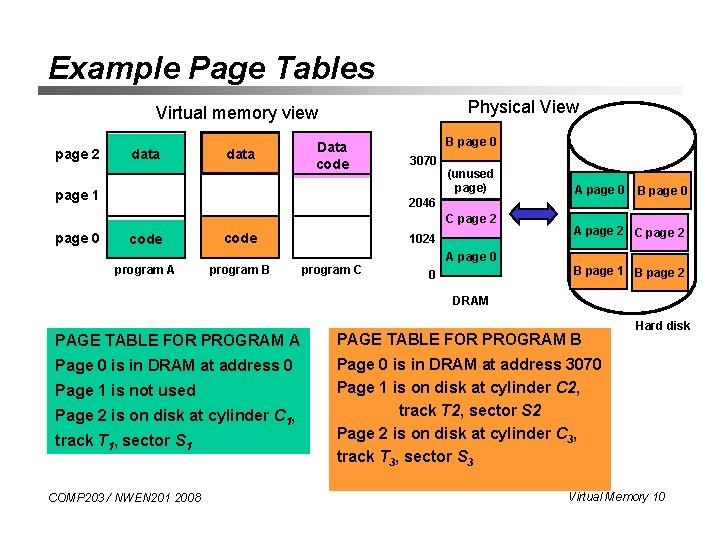
Example Page Tables Physical View Virtual memory view page 2 data Data code page 1 B page 0 3070 (unused page) 2046 C page 2 page 0 code program A program B 1024 program C A page 0 B page 0 A page 2 C page 2 A page 0 B page 1 B page 2 0 DRAM PAGE TABLE FOR PROGRAM A PAGE TABLE FOR PROGRAM B Page 0 is in DRAM at address 0 Page 0 is in DRAM at address 3070 Page 1 is on disk at cylinder C 2, track T 2, sector S 2 Page 2 is on disk at cylinder C 3, track T 3, sector S 3 Page 1 is not used Page 2 is on disk at cylinder C 1, track T 1, sector S 1 COMP 203 / NWEN 201 2008 Hard disk Virtual Memory 10
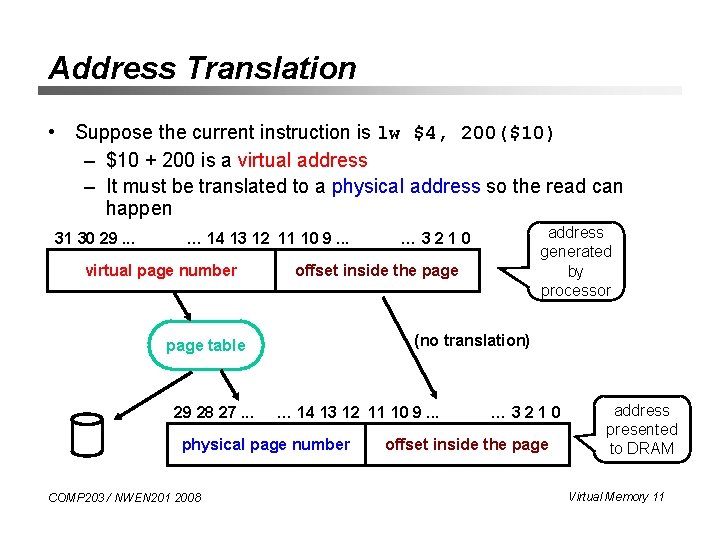
Address Translation • Suppose the current instruction is lw $4, 200($10) – $10 + 200 is a virtual address – It must be translated to a physical address so the read can happen 31 30 29. . . … 14 13 12 11 10 9. . . virtual page number offset inside the page (no translation) page table 29 28 27. . . … 14 13 12 11 10 9. . . physical page number COMP 203 / NWEN 201 2008 address generated by processor … 3210 offset inside the page address presented to DRAM Virtual Memory 11
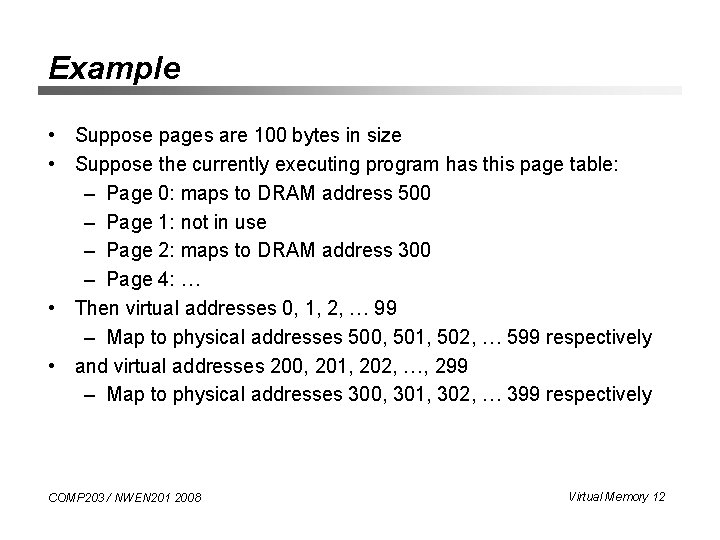
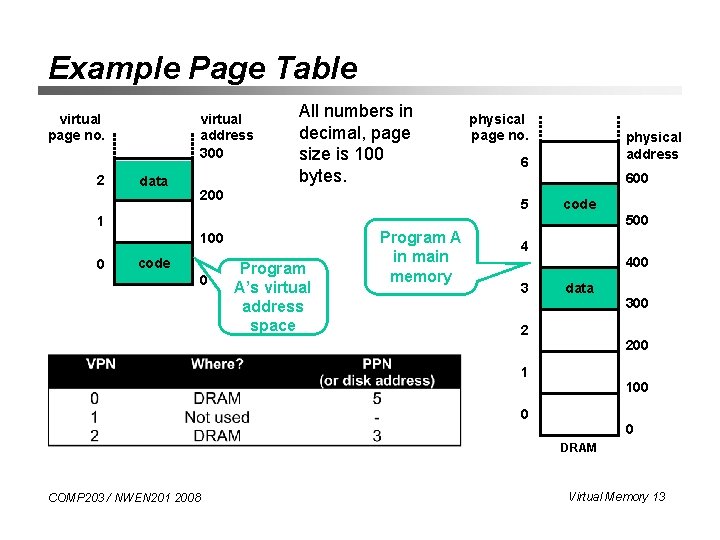
Example • Suppose pages are 100 bytes in size • Suppose the currently executing program has this page table: – Page 0: maps to DRAM address 500 – Page 1: not in use – Page 2: maps to DRAM address 300 – Page 4: … • Then virtual addresses 0, 1, 2, … 99 – Map to physical addresses 500, 501, 502, … 599 respectively • and virtual addresses 200, 201, 202, …, 299 – Map to physical addresses 300, 301, 302, … 399 respectively COMP 203 / NWEN 201 2008 Virtual Memory 12
Example Page Table virtual page no. 2 virtual address 300 data All numbers in decimal, page size is 100 bytes. 200 100 code 0 Program A’s virtual address space Program A in main memory physical address 6 600 5 1 0 physical page no. code 500 4 3 400 data 2 300 200 1 100 0 0 DRAM COMP 203 / NWEN 201 2008 Virtual Memory 13
Page Table Lookups Virtual page number Page table register Valid Offset within page Physical page number Page Table 0 means on disk 1 means in DRAM 2 means page not used Physical page number or disk address COMP 203 / NWEN 201 2008 Offset within page Virtual Memory 14
Handling Writes • Many caches use write-through, as we saw • Virtual memory uses write-back: – Since writing pages to disk is so inefficient – Writes are accumulated in the page (‘dirty’ bit is set) – On replacement, page is written back to disk – Nothing need be done if no writes to page COMP 203 / NWEN 201 2008 Virtual Memory 15
Page Replacement Policy • A ‘page miss’ means page is on disk • The operating system initiates a disk read – (this usually takes so long that it’s worth running another program in the meantime) • An important design consideration: how to make space in DRAM – i. e. what page replacement policy to use? • Possible solutions – Keep a ‘dirty’ bit in the page table, overwrite a clean page • (saves having to flush dirty page to disk) – Keep an ‘age since last access’ count in the page table • ‘least recently used (LRU)’ policy – Other policies discussed in COMP 305 COMP 203 / NWEN 201 2008 Virtual Memory 16
Where Are the Page Tables Stored? • How big are they? – Assume virtual memory space is 232 – Assume pages are 4 K in size – Each page table entry requires approx 1 word – Each page table is 232 / 212 = 220 = 1 Mwords in size • How many page tables are there? – One per program (10 s of programs) • In fact, page tables are stored in DRAM – (they even get paged out to disk - but don’t think about the implications of this) • So to translate a VM address you must first search the page table in DRAM? !? COMP 203 / NWEN 201 2008 Virtual Memory 17
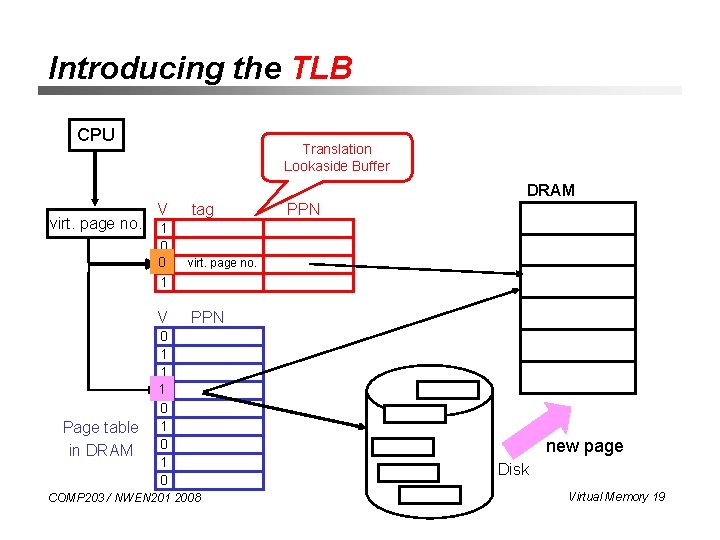
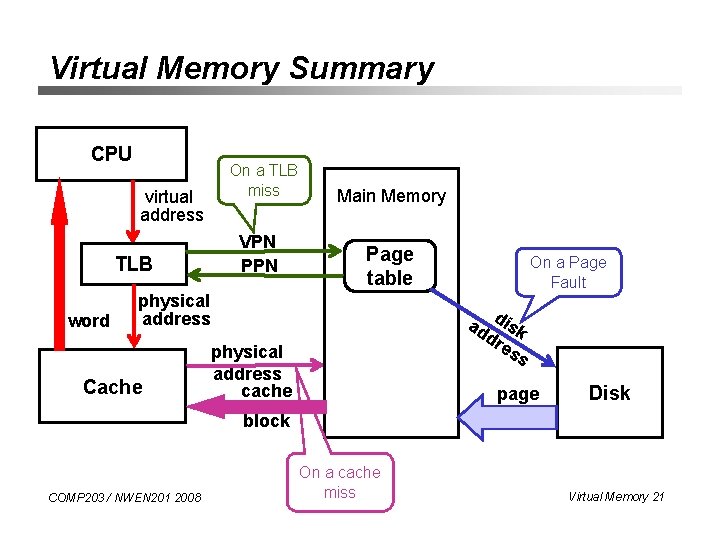
Translation Lookaside Buffer • Since page tables are stored in the main memory, each memory reference from a program requires at least one memory accesses to translate virtual into physical address and then to try to satisfy it from cache • On the cache miss, there will be two memory accesses • The key to improving access performance is to rely on locality of references to page table. When a translation for a virtual page is used, it will probably be needed again in the near future because the references to the words on that page have both temporal and spatial locality • Translation lookaside buffer - a special cache used to keep track of recently used translations COMP 203 / NWEN 201 2008 Virtual Memory 18
Introducing the TLB CPU Translation Lookaside Buffer DRAM virt. page no. V 1 0 01 1 V Page table in DRAM tag PPN virt. page no. PPN 0 1 1 10 0 1 0 COMP 203 / NWEN 201 2008 new page Disk Virtual Memory 19
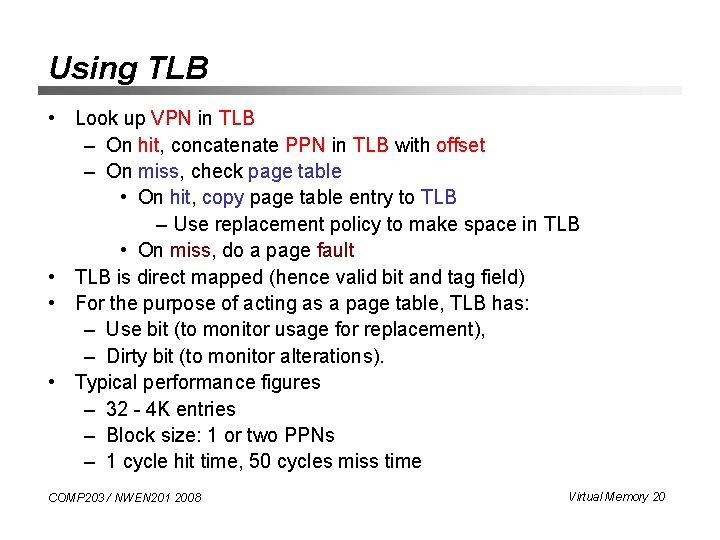
Using TLB • Look up VPN in TLB – On hit, concatenate PPN in TLB with offset – On miss, check page table • On hit, copy page table entry to TLB – Use replacement policy to make space in TLB • On miss, do a page fault • TLB is direct mapped (hence valid bit and tag field) • For the purpose of acting as a page table, TLB has: – Use bit (to monitor usage for replacement), – Dirty bit (to monitor alterations). • Typical performance figures – 32 - 4 K entries – Block size: 1 or two PPNs – 1 cycle hit time, 50 cycles miss time COMP 203 / NWEN 201 2008 Virtual Memory 20
Virtual Memory Summary CPU On a TLB miss virtual address VPN PPN TLB word Main Memory Page table physical address Cache On a Page Fault ad disk dr es s physical address cache page Disk block COMP 203 / NWEN 201 2008 On a cache miss Virtual Memory 21
Summary (1) • Virtual memory – hides the memory hierarchy – protects programs from each other – involves swapping pages between DRAM and disk • Operating system controls the virtual memory: – Executes paging between DRAM and disk – Maintains page table for every program in the execution – Controls page table register of the active program • Page table must be consulted for every address issued by the program COMP 203 / NWEN 201 2008 Virtual Memory 22
Summary (2) • Page table – Valid, dirty, last-accessed-time bits – Physical address or disk address • Address translation – Virtual address = VPN + offset – Physical address = PPN + offset • Page replacement policies • TLB: a cache for the page table COMP 203 / NWEN 201 2008 Virtual Memory 23