Real Time KVM with DPDK How to and


- Slides: 32
Real Time KVM with DPDK How to and Results Mohammed Salih
Mohammed Salih Specialist Solution Architect - Open. Stack Based out of Dubai, But covering EMEA region. telegram: @bootsha email: msalih@redhat. com 2
OVS + DPDK References : Experience with DPDK Troubleshooting http: //bit. ly/2 px. I 68 x Mastering in Troubleshooting NFV Issues http: //bit. ly/2 qq. Sr. Ia 3 Real Time KVM with DPDK How To and results.
Real Time KVM. Reference: Real Time KVM and How It Works http: //bit. ly/2 pwn. MV 0 4 Real Time KVM with DPDK How To and results.
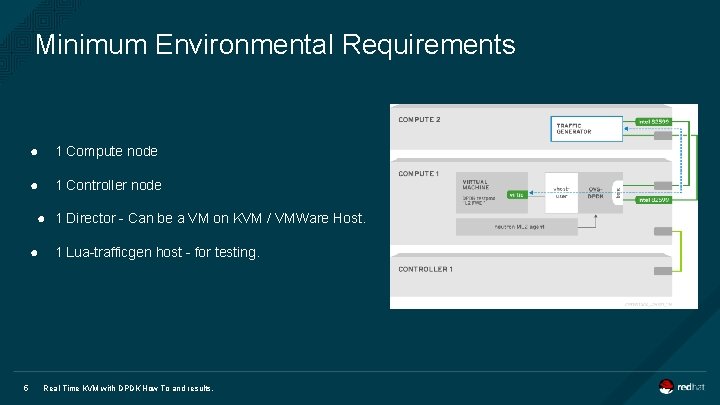
Minimum Environmental Requirements ● 1 Compute node ● 1 Controller node ● 1 Director - Can be a VM on KVM / VMWare Host. ● 5 1 Lua-trafficgen host - for testing. Real Time KVM with DPDK How To and results.
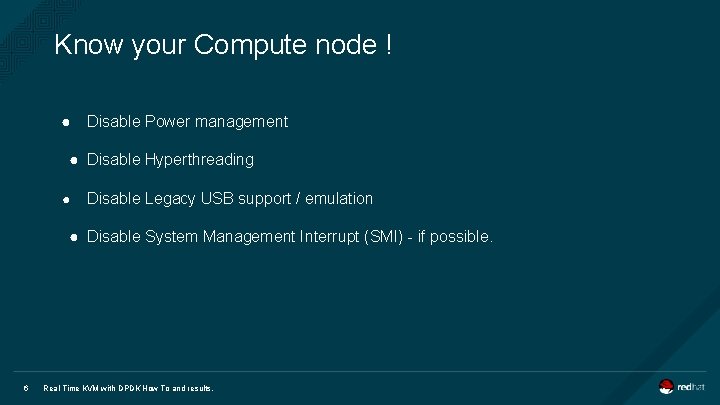
Know your Compute node ! ● Disable Power management ● Disable Hyperthreading ● Disable Legacy USB support / emulation ● Disable System Management Interrupt (SMI) - if possible. 6 Real Time KVM with DPDK How To and results.
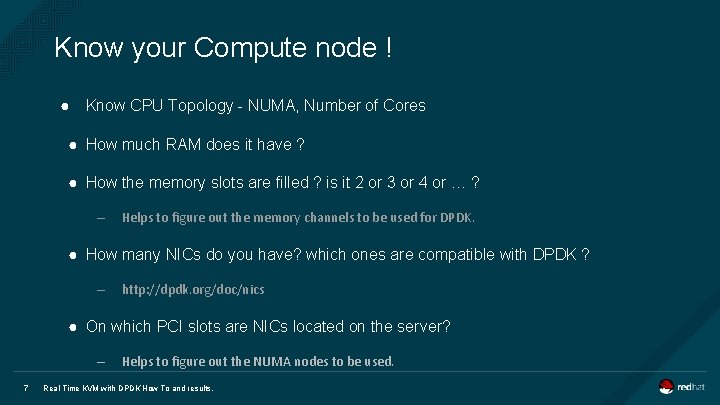
Know your Compute node ! ● Know CPU Topology - NUMA, Number of Cores ● How much RAM does it have ? ● How the memory slots are filled ? is it 2 or 3 or 4 or … ? – Helps to figure out the memory channels to be used for DPDK. ● How many NICs do you have? which ones are compatible with DPDK ? – http: //dpdk. org/doc/nics ● On which PCI slots are NICs located on the server? – 7 Helps to figure out the NUMA nodes to be used. Real Time KVM with DPDK How To and results.
Setting up heat templates. 8
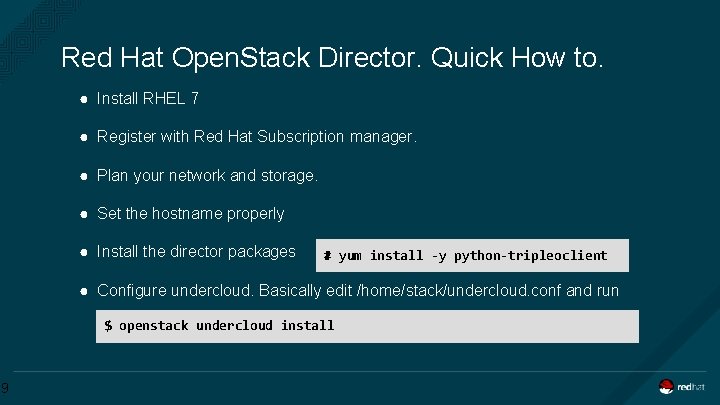
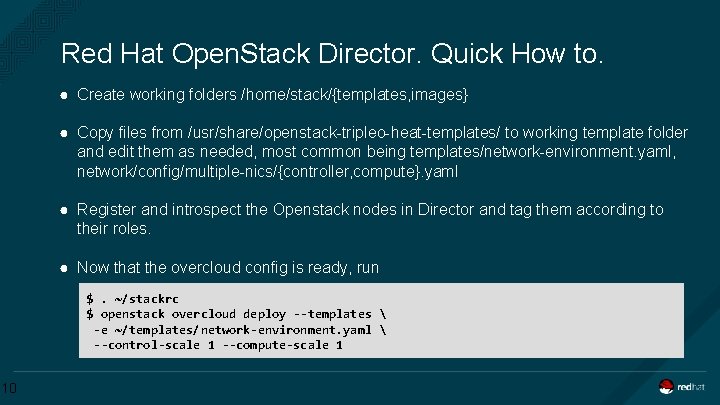
Red Hat Open. Stack Director. Quick How to. ● Install RHEL 7 ● Register with Red Hat Subscription manager. ● Plan your network and storage. ● Set the hostname properly ● Install the director packages # yum install -y python-tripleoclient ● Configure undercloud. Basically edit /home/stack/undercloud. conf and run $ openstack undercloud install 9
Red Hat Open. Stack Director. Quick How to. ● Create working folders /home/stack/{templates, images} ● Copy files from /usr/share/openstack-tripleo-heat-templates/ to working template folder and edit them as needed, most common being templates/network-environment. yaml, network/config/multiple-nics/{controller, compute}. yaml ● Register and introspect the Openstack nodes in Director and tag them according to their roles. ● Now that the overcloud config is ready, run $. ~/stackrc $ openstack overcloud deploy --templates -e ~/templates/network-environment. yaml --control-scale 1 --compute-scale 1 10
RT KVM & DPDK specific Changes to templates 11
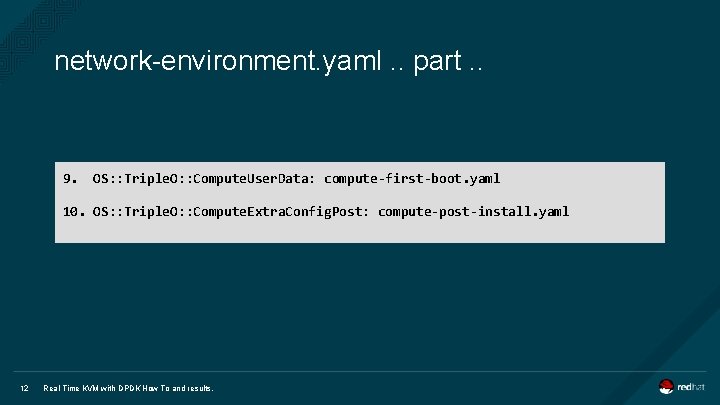
network-environment. yaml. . part. . 9. OS: : Triple. O: : Compute. User. Data: compute-first-boot. yaml 10. OS: : Triple. O: : Compute. Extra. Config. Post: compute-post-install. yaml 12 Real Time KVM with DPDK How To and results.
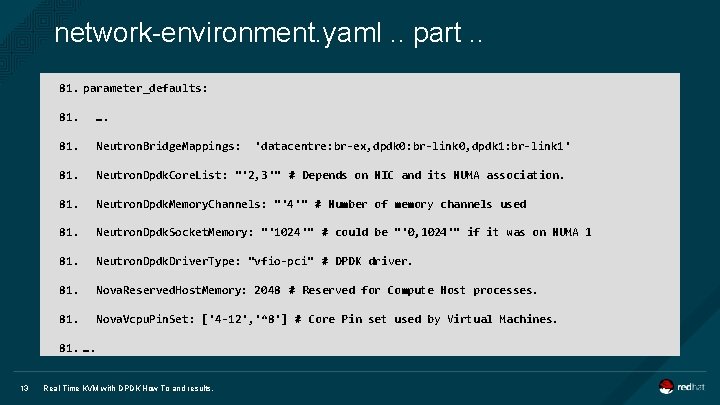
network-environment. yaml. . part. . 81. parameter_defaults: 81. …. 81. Neutron. Bridge. Mappings: 81. Neutron. Dpdk. Core. List: "'2, 3'" # Depends on NIC and its NUMA association. 81. Neutron. Dpdk. Memory. Channels: "'4'" # Number of memory channels used 81. Neutron. Dpdk. Socket. Memory: "'1024'" # could be "'0, 1024'" if it was on NUMA 1 81. Neutron. Dpdk. Driver. Type: "vfio-pci" # DPDK driver. 81. Nova. Reserved. Host. Memory: 2048 # Reserved for Compute Host processes. 81. Nova. Vcpu. Pin. Set: ['4 -12', '^8'] # Core Pin set used by Virtual Machines. 81. …. 13 Real Time KVM with DPDK How To and results. 'datacentre: br-ex, dpdk 0: br-link 0, dpdk 1: br-link 1'
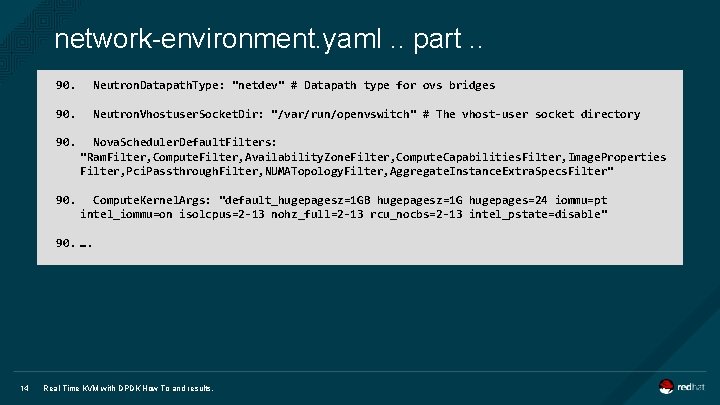
network-environment. yaml. . part. . 90. Neutron. Datapath. Type: "netdev" # Datapath type for ovs bridges 90. Neutron. Vhostuser. Socket. Dir: "/var/run/openvswitch" # The vhost-user socket directory 90. Nova. Scheduler. Default. Filters: "Ram. Filter, Compute. Filter, Availability. Zone. Filter, Compute. Capabilities. Filter, Image. Properties Filter, Pci. Passthrough. Filter, NUMATopology. Filter, Aggregate. Instance. Extra. Specs. Filter" 90. Compute. Kernel. Args: "default_hugepagesz=1 GB hugepagesz=1 G hugepages=24 iommu=pt intel_iommu=on isolcpus=2 -13 nohz_full=2 -13 rcu_nocbs=2 -13 intel_pstate=disable" 90. …. 14 Real Time KVM with DPDK How To and results.
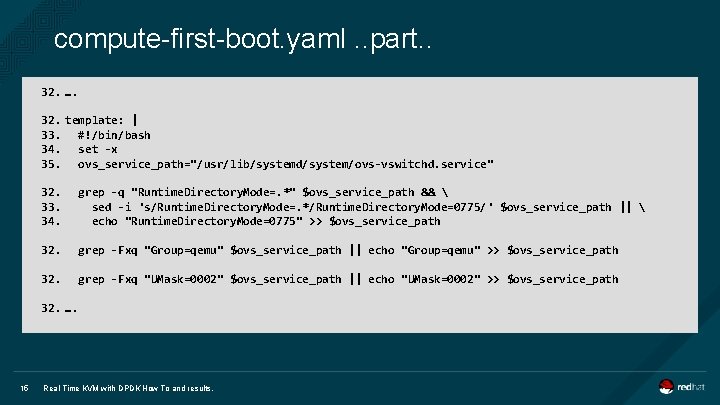
compute-first-boot. yaml. . part. . 32. …. 32. template: | 33. #!/bin/bash 34. set -x 35. ovs_service_path="/usr/lib/systemd/system/ovs-vswitchd. service" 32. 33. 34. grep -q "Runtime. Directory. Mode=. *" $ovs_service_path && sed -i 's/Runtime. Directory. Mode=. */Runtime. Directory. Mode=0775/' $ovs_service_path || echo "Runtime. Directory. Mode=0775" >> $ovs_service_path 32. grep -Fxq "Group=qemu" $ovs_service_path || echo "Group=qemu" >> $ovs_service_path 32. grep -Fxq "UMask=0002" $ovs_service_path || echo "UMask=0002" >> $ovs_service_path 32. …. 15 Real Time KVM with DPDK How To and results.
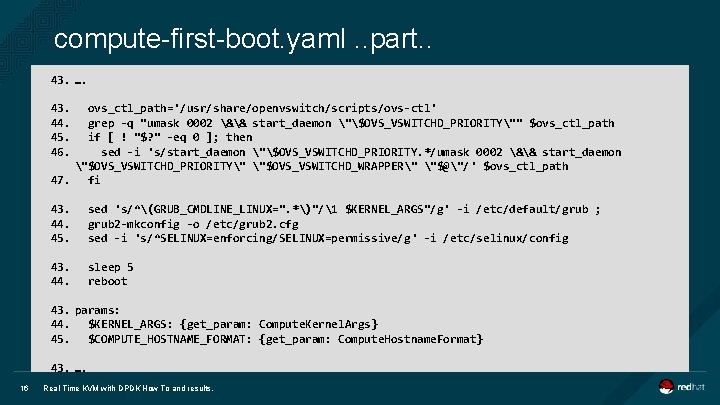
compute-first-boot. yaml. . part. . 43. …. 43. 44. 45. 46. ovs_ctl_path='/usr/share/openvswitch/scripts/ovs-ctl' grep -q "umask 0002 && start_daemon "$OVS_VSWITCHD_PRIORITY"" $ovs_ctl_path if [ ! "$? " -eq 0 ]; then sed -i 's/start_daemon "$OVS_VSWITCHD_PRIORITY. */umask 0002 && start_daemon "$OVS_VSWITCHD_PRIORITY" "$OVS_VSWITCHD_WRAPPER" "$@"/' $ovs_ctl_path 47. fi 43. 44. 45. sed 's/^(GRUB_CMDLINE_LINUX=". *)"/1 $KERNEL_ARGS"/g' -i /etc/default/grub ; grub 2 -mkconfig -o /etc/grub 2. cfg sed -i 's/^SELINUX=enforcing/SELINUX=permissive/g' -i /etc/selinux/config 43. 44. sleep 5 reboot 43. params: 44. $KERNEL_ARGS: {get_param: Compute. Kernel. Args} 45. $COMPUTE_HOSTNAME_FORMAT: {get_param: Compute. Hostname. Format} 43. …. 16 Real Time KVM with DPDK How To and results.
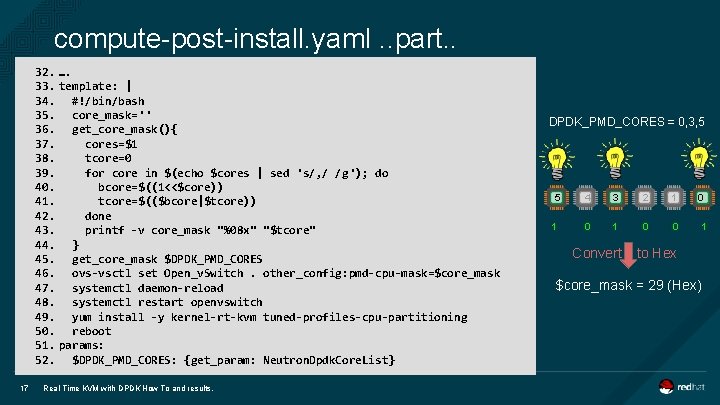
compute-post-install. yaml. . part. . 32. …. 33. template: | 34. #!/bin/bash 35. core_mask='' 36. get_core_mask(){ 37. cores=$1 38. tcore=0 39. for core in $(echo $cores | sed 's/, / /g'); do 40. bcore=$((1<<$core)) 41. tcore=$(($bcore|$tcore)) 42. done 43. printf -v core_mask "%08 x" "$tcore" 44. } 45. get_core_mask $DPDK_PMD_CORES 46. ovs-vsctl set Open_v. Switch. other_config: pmd-cpu-mask=$core_mask 47. systemctl daemon-reload 48. systemctl restart openvswitch 49. yum install -y kernel-rt-kvm tuned-profiles-cpu-partitioning 50. reboot 51. params: 52. $DPDK_PMD_CORES: {get_param: Neutron. Dpdk. Core. List} 17 Real Time KVM with DPDK How To and results. DPDK_PMD_CORES = 0, 3, 5 5 1 4 3 2 1 0 0 1 Convert to Hex $core_mask = 29 (Hex)
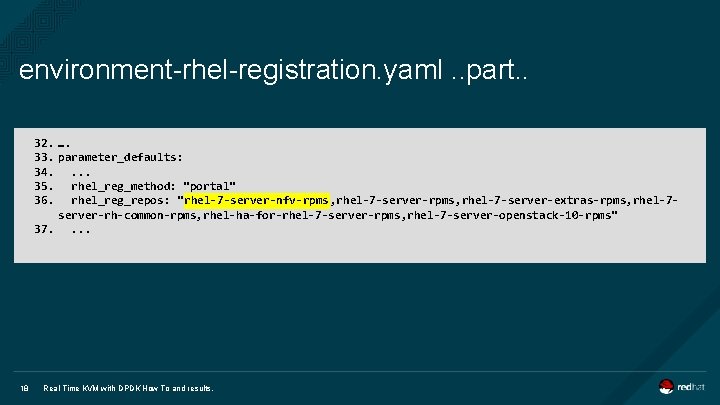
environment-rhel-registration. yaml. . part. . 32. …. 33. parameter_defaults: 34. . 35. rhel_reg_method: "portal" 36. rhel_reg_repos: "rhel-7 -server-nfv-rpms, rhel-7 -server-extras-rpms, rhel-7 server-rh-common-rpms, rhel-ha-for-rhel-7 -server-rpms, rhel-7 -server-openstack-10 -rpms" 37. . 18 Real Time KVM with DPDK How To and results.
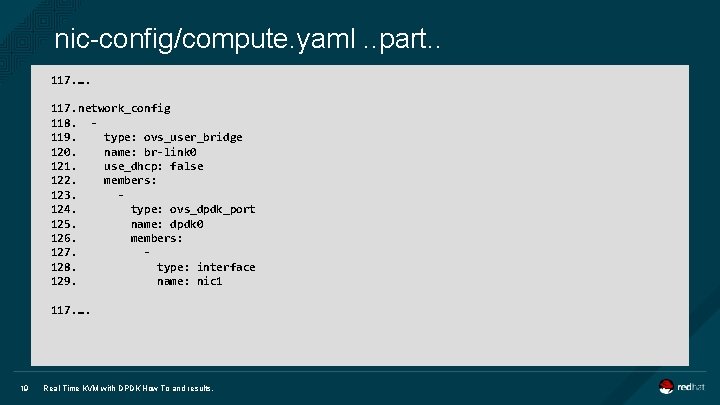
nic-config/compute. yaml. . part. . 117. …. 117. network_config 118. 119. type: ovs_user_bridge 120. name: br-link 0 121. use_dhcp: false 122. members: 123. 124. type: ovs_dpdk_port 125. name: dpdk 0 126. members: 127. 128. type: interface 129. name: nic 1 117. …. 19 Real Time KVM with DPDK How To and results.
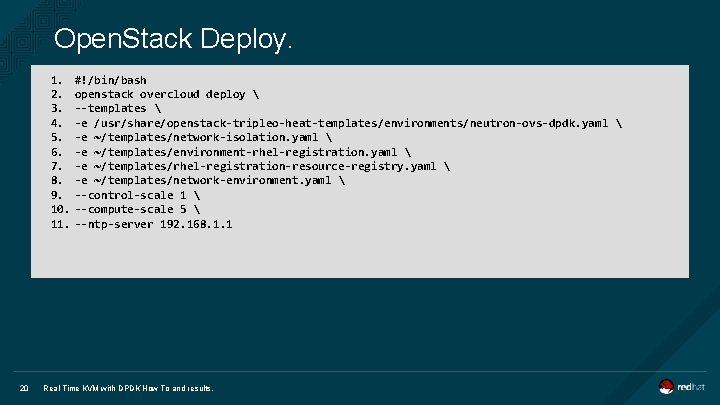
Open. Stack Deploy. 1. #!/bin/bash 2. openstack overcloud deploy 3. --templates 4. -e /usr/share/openstack-tripleo-heat-templates/environments/neutron-ovs-dpdk. yaml 5. -e ~/templates/network-isolation. yaml 6. -e ~/templates/environment-rhel-registration. yaml 7. -e ~/templates/rhel-registration-resource-registry. yaml 8. -e ~/templates/network-environment. yaml 9. --control-scale 1 10. --compute-scale 5 11. --ntp-server 192. 168. 1. 1 20 Real Time KVM with DPDK How To and results.
Post Deployment Tasks. 21 INSERT DESIGNATOR, IF NEEDED
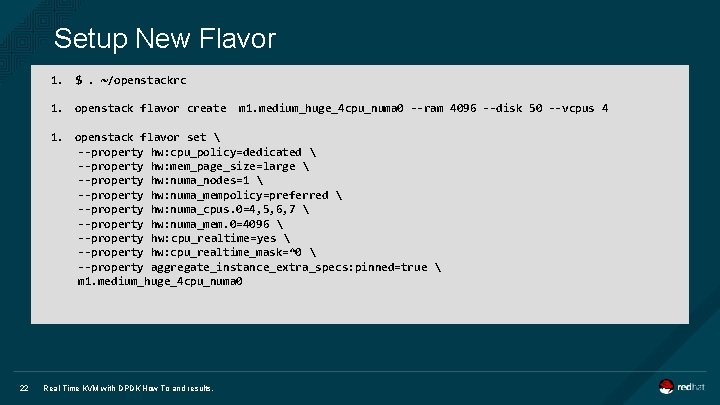
Setup New Flavor 1. $. ~/openstackrc 1. openstack flavor create m 1. medium_huge_4 cpu_numa 0 --ram 4096 --disk 50 --vcpus 4 1. openstack flavor set --property hw: cpu_policy=dedicated --property hw: mem_page_size=large --property hw: numa_nodes=1 --property hw: numa_mempolicy=preferred --property hw: numa_cpus. 0=4, 5, 6, 7 --property hw: numa_mem. 0=4096 --property hw: cpu_realtime=yes --property hw: cpu_realtime_mask=^0 --property aggregate_instance_extra_specs: pinned=true m 1. medium_huge_4 cpu_numa 0 22 Real Time KVM with DPDK How To and results.
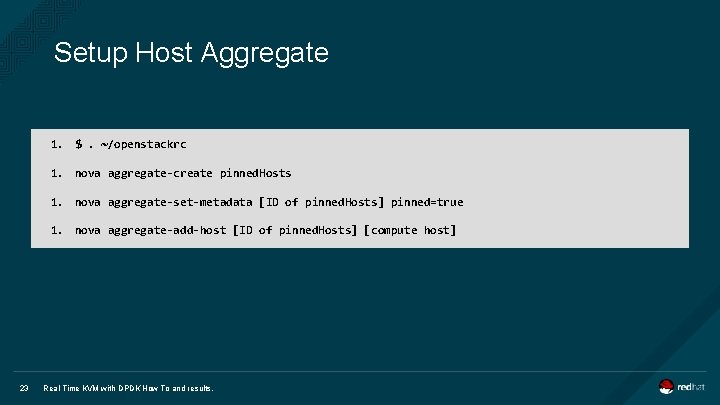
Setup Host Aggregate 1. $. ~/openstackrc 1. nova aggregate-create pinned. Hosts 1. nova aggregate-set-metadata [ID of pinned. Hosts] pinned=true 1. nova aggregate-add-host [ID of pinned. Hosts] [compute host] 23 Real Time KVM with DPDK How To and results.
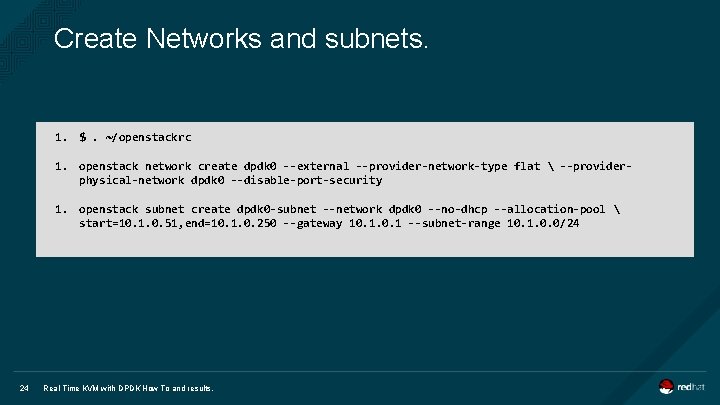
Create Networks and subnets. 1. $. ~/openstackrc 1. openstack network create dpdk 0 --external --provider-network-type flat --providerphysical-network dpdk 0 --disable-port-security 1. openstack subnet create dpdk 0 -subnet --network dpdk 0 --no-dhcp --allocation-pool start=10. 1. 0. 51, end=10. 1. 0. 250 --gateway 10. 1 --subnet-range 10. 1. 0. 0/24 24 Real Time KVM with DPDK How To and results.
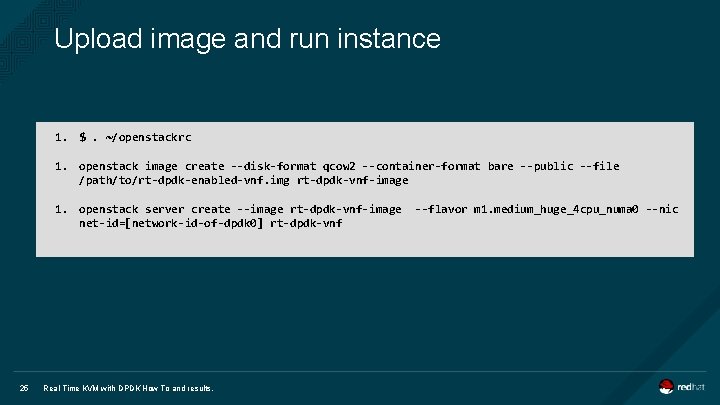
Upload image and run instance 1. $. ~/openstackrc 1. openstack image create --disk-format qcow 2 --container-format bare --public --file /path/to/rt-dpdk-enabled-vnf. img rt-dpdk-vnf-image 1. openstack server create --image rt-dpdk-vnf-image net-id=[network-id-of-dpdk 0] rt-dpdk-vnf 25 Real Time KVM with DPDK How To and results. --flavor m 1. medium_huge_4 cpu_numa 0 --nic
Measurement results 26 INSERT DESIGNATOR, IF NEEDED
Reference: Performance Testing Open. Stack Networking with DPDK and RT http: //bit. ly/2 pzw. Gl. E 27
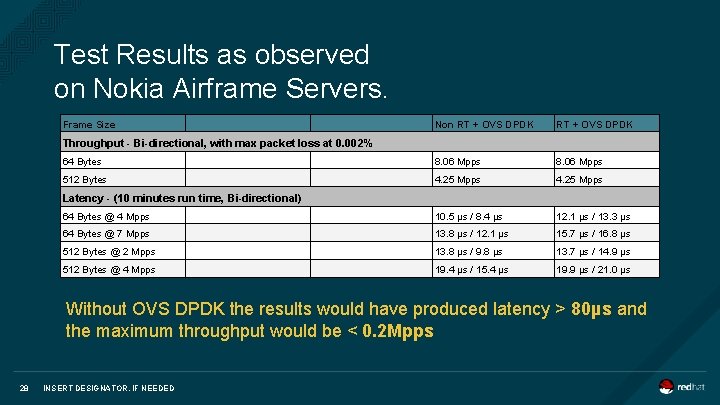
Test Results as observed on Nokia Airframe Servers. Frame Size Non RT + OVS DPDK 64 Bytes 8. 06 Mpps 512 Bytes 4. 25 Mpps 64 Bytes @ 4 Mpps 10. 5 µs / 8. 4 µs 12. 1 µs / 13. 3 µs 64 Bytes @ 7 Mpps 13. 8 µs / 12. 1 µs 15. 7 µs / 16. 8 µs 512 Bytes @ 2 Mpps 13. 8 µs / 9. 8 µs 13. 7 µs / 14. 9 µs 512 Bytes @ 4 Mpps 19. 4 µs / 15. 4 µs 19. 9 µs / 21. 0 µs Throughput - Bi-directional, with max packet loss at 0. 002% Latency - (10 minutes run time, Bi-directional) Without OVS DPDK the results would have produced latency > 80µs and the maximum throughput would be < 0. 2 Mpps 28 INSERT DESIGNATOR, IF NEEDED
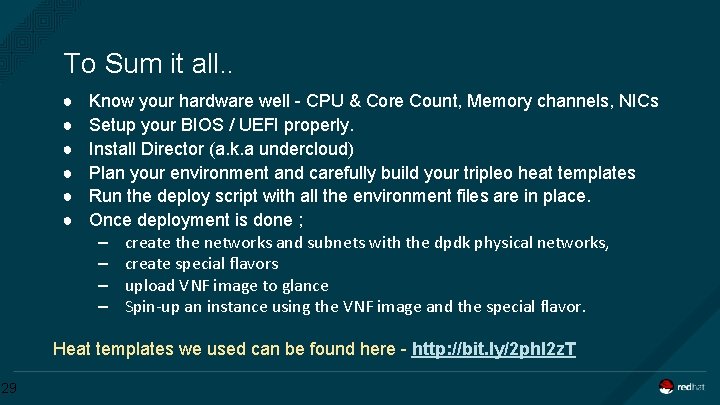
To Sum it all. . ● ● ● Know your hardware well - CPU & Core Count, Memory channels, NICs Setup your BIOS / UEFI properly. Install Director (a. k. a undercloud) Plan your environment and carefully build your tripleo heat templates Run the deploy script with all the environment files are in place. Once deployment is done ; – create the networks and subnets with the dpdk physical networks, – create special flavors – upload VNF image to glance – Spin-up an instance using the VNF image and the special flavor. Heat templates we used can be found here - http: //bit. ly/2 phl 2 z. T 29
References. ● Director Installation and Usage - https: //access. redhat. com/documentation/en/red-hatopenstack-platform/10/paged/director-installation-and-usage/ ● NFV Configuration Guide - https: //access. redhat. com/documentation/enus/red_hat_openstack_platform/10/html/network_functions_virtualization_configuration_gu ide/ ● DPDK Memory channels - http: //dpdk-guide. gitlab. io/dpdk-guide/tuning/memory. html ● KVM 4 NFV - http: //artifacts. opnfv. org/kvmfornfv/docs/all. pdf ● Configure CPU pinnging with NUMA - https: //access. redhat. com/documentation/enus/red_hat_openstack_platform/10/html/instances_and_images_guide/ch-cpu_pinning 30
Thanks to. Andrew Theurer Tapio Tallgren Franck Baudin Juha Kosonen Rafal Szmigiel Eric Lajoie 31 Mika Rautakumpu
THANK YOU plus. google. com/+Red. Hat facebook. com/redhatinc linkedin. com/company/red-hat twitter. com/Red. Hat. News youtube. com/user/Red. Hat. Videos