Operating Systems Unit 2 Computer Systems HND in
- Slides: 35
Operating Systems Unit 2 Computer Systems HND in Computing and Systems Development
Learning Outcome 1. 0 • Understand the functions of computer systems • Software: • systems software eg operating systems, utility programs, library programs, translator programs; • applications software eg special purpose software, be-spoke software; • performance factors
Learning outcomes • LO 1 Understand the function of computer systems • 1. 2 Explain the hardware, software and peripheral components of a computer system
What is an operating system? • A program that acts as an intermediary between a user of a computer and the computer hardware • Operating system goals: • Execute user programs and make solving user problems easier • Make the computer system convenient to use • Use the computer hardware in an efficient manner
Definitions • OS as a resource allocator: • Manages all resources and decides between conflicting requests for efficient and fair resource use (e. g. accessing disk or other devices) • OS as a control system: • Controls execution of programs to prevent errors and improper use of the computer (e. g. protects one user process from crashing another)
System • Computer system can be divided into four components: • Hardware: provides basic computing resources CPU, memory, I/O devices • Operating system: Controls and coordinates use of hardware among various applications and users • Application programs: define the ways in which the system resources are used to solve the computing problems of the users - word processors, compilers, web browsers, database systems, video games • Users: People, machines, other computers
Bootstrapping • Small bootstrap program is loaded at powerup or reboot • Typically stored in ROM or EPROM, generally known as firmware (e. g. BIOS) • Initializes all aspects of the system (e. g. detects connected devices, checks memory for errors, etc. ) • Loads operating system kernel and starts its execution
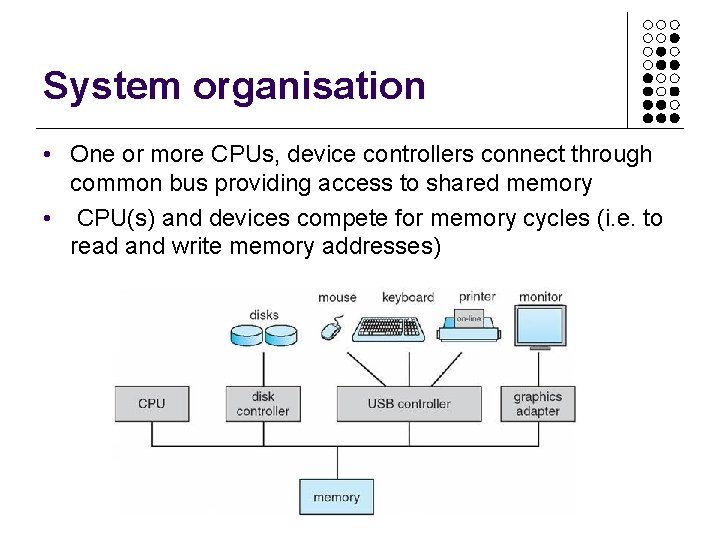
System organisation • One or more CPUs, device controllers connect through common bus providing access to shared memory • CPU(s) and devices compete for memory cycles (i. e. to read and write memory addresses)
System operation • I/O devices and the CPU can execute concurrently • Each device controller (e. g. controller chip) is in charge of a particular device type • Each device controller has a local buffer (i. e. memory store for general data and/or control registers) • CPU moves data from/to main memory to/from controller buffers (e. g. write this data to the screen, read coordinates from the mouse, etc. ) • I/O is from the device to local buffer of controller • Device controller informs CPU that it has finished its operation by causing an interrupt
Interrupts • Interrupt transfers control to the interrupt service routine generally, through the interrupt vector, which contains the addresses of all the service routines • Interrupt architecture must save the address of the interrupted instruction so original processing may be resumed • Incoming interrupts are disabled while another interrupt is being processed to prevent a lost interrupt • A trap is a software-generated interrupt caused either by an error or a user request
Storage structure • Main memory - only large storage media that the CPU can access directly • Secondary storage - extension of main memory that provides large non-volatile storage capacity • Magnetic disks - rigid metal or glass platters covered with magnetic recording material • Disk surface is logically • The disk controller determines the logical interaction between the device and the computer
Caching • Important optimisation principle, performed at many levels in a computer (in hardware, operating system, software) • Information in use copied from slower to faster storage temporarily • Faster storage (cache) checked first to determine if information is there • If it is, information used directly from the cache (fast) • If not, data copied to cache and used there • Cache often smaller than storage being cached • Cache management is an important design problem • Determining cache size and replacement policy
Multi processors • Most systems use a single general-purpose processor, but multiprocessor systems growing in use and importance • Advantages include • Increased throughput • Economy of scale • Increased reliability - graceful degradation or fault tolerance • Two architectures • Asymmetric Multiprocessing - CPUs have different roles, usually one is the master of the others • Symmetric Multiprocessing - CPUs have identical roles, sharing process queues to service ready processes.
Fault handling • Software error or request creates exception or trap, which are essentially handled as special interrupts • Division by zero, request for operating system service • Other process problems include infinite loop, processes modifying each others’ or the operating system’s code
Protection • Dual-mode operation allows OS to protect itself and other system components • User mode and kernel mode • Mode bit provided by hardware • Provides ability to distinguish when system is running user code or kernel code • Some instructions designated as privileged, only executable in kernel mode • System call changes mode to kernel, return from call resets it to user • Otherwise, a user process could manipulate hardware directly, leading to chaos.
Processes • A process is a program in execution. It is a unit of work within the system. • A program is a passive entity (e. g. the stored code), process is an active entity. • A process needs resources to accomplish its task • CPU, memory, I/O, files, initialization data • Process termination requires reclamation of any reusable resources
Threading • Single-threaded process has one program counter, specifying location of next instruction to execute • Process executes instructions sequentially, one at a time, until completion • Multi-threaded process has one program counter per thread • Concurrency of systems achieved by multiplexing the CPUs among the processes/threads
Process management • The operating system is responsible for the following activities in connection with process management: • • • Creating and deleting both user and system processes Suspending and resuming processes Providing mechanisms for process synchronization Providing mechanisms for process communication Providing mechanisms for deadlock handling
Memory management • All data must be in memory before and after processing • All instructions must be in memory in order to be executed • Memory management determines what is in memory and when • Optimizing CPU utilization and computer response to users (e. g. avoiding excessive swapping of data between disk and memory)
Memory management activities • Keeping track of which parts of memory are currently being used and by whom • Deciding which processes (or parts thereof) and data to move into and out of memory (e. g. to and from the disk - virtual memory) • Allocating and de-allocating memory space as needed
Storage Management • OS provides uniform, logical view of information storage • Abstracts physical properties to logical storage units: file and directories • Each medium is controlled by device (e. g. disk drive, tape drive) • Varying properties include access speed, capacity, data-transfer rate, access method (sequential or random)
File-System management • Access control on most systems to determine who can access what • OS activities include • Creating and deleting files and directories • Primitives (i. e. standardised functions) to manipulate files and directories • Mapping files within memory onto secondary storage
I/O Subsystems • One purpose of OS is to hide peculiarities of hardware devices from the user • I/O subsystem responsible for: • Memory management of I/O • buffering (storing data temporarily while it is being transferred), • caching (storing parts of data in faster storage for performance), • spooling (the overlapping of output of one job with input of other jobs) • Abstract device-driver interface, so driver developers know how to interface their code with the OS (e. g. network cards, storage devices for different hardware use common interfaces). • Drivers for specific hardware devices
Protection and Security • Protection - any mechanism for controlling access of processes or users to resources defined by the OS • Security - defence of the system against internal and external attacks • Huge range, including denial-of-service, worms, viruses, identity theft, theft of service
Privileges • Systems generally first distinguish among users, to determine who can do what • User identities (user IDs, security IDs) include name and associated number, one per user • User ID then associated with all files, processes of that user to determine access control • Group identifier (group ID) allows set of users to be defined and controls managed, then also associated with each process and file • Privilege escalation allows user to change to effective ID with more rights
User and Process interaction • Users interact indirectly through a collection of system programs that make up the operating system interface. • The interface could be: • A GUI, with icons and windows, etc. • A command-line interface for running processes and scripts, browsing files in directories • Processes interact by making system calls into the operating system proper (i. e. the kernel).
Services to processes: • Program execution: The system must be able to load a program into memory and to run that program, end execution, either normally or abnormally (indicating error) • I/O operations: A running program may require I/O, which may involve a file or an I/O device • File-system manipulation: Programs need to read and write files and directories, create and delete them, search them, list file information, permission management. • Interprocess Communication (IPC): Allowing processes to share data through message passing or shared memory
Services for the OS • Error handling: what if our process attempts a divide by zero or tries to access a protected region of memory, or if a device fails? • Resource allocation: Processes may compete for resources such as the CPU, memory, and I/O devices. • Accounting: e. g. how much disk space is this or that user using? how much network bandwidth are we using? • Protection and Security: control use of information, concurrent processes should not interfere with each other
OS structure
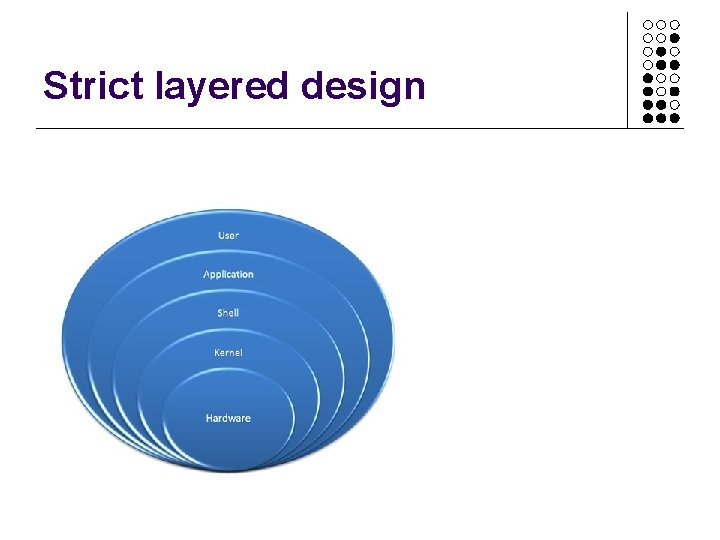
OS design • The operating system is divided into a number of layers (levels), each built on top of lower layers. • The bottom layer (layer 0), is the hardware; the highest (layer N) is the user interface. • With modularity, layers are selected such that each uses functions (operations) and services of only lower-level layers
Strict layered design
Stability, • Modern CPUs offer protected mode, which means transition between layers is controlled by hardware • Attempts of software to run instructions or access memory regions that are higher privilege will result in the CPU raising a hardware exception (e. g. divide by zero, attempt to access hardware directly, etc. ) • Layers have well-defined functionality and can be tested independently or altered with minimal impact on the rest of the OS
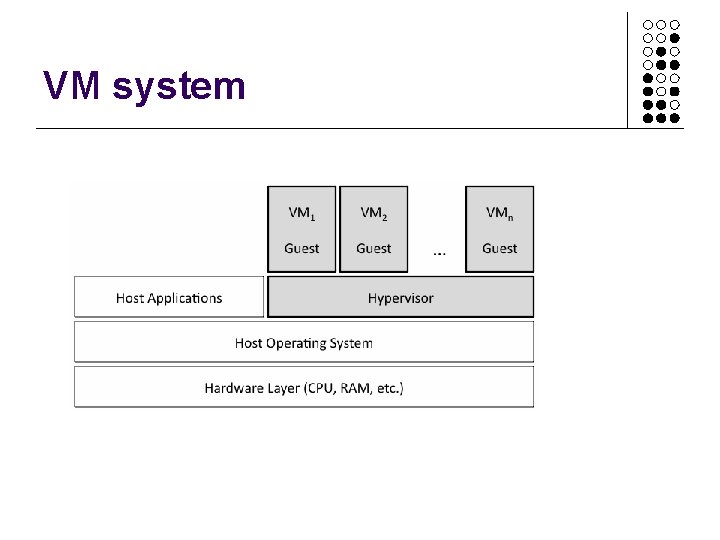
Virtual Machines • A virtual machine takes the layered approach to its logical conclusion. It treats hardware and the operating system kernel as though they were all hardware • A virtual machine provides an interface identical to the underlying bare hardware • The operating system host creates the illusion that a process has its own processor and (virtual memory) • Each guest is provided with a (virtual) copy of underlying computer, so it is possible to install, say, Windows 8 as a guest operating system on OSX.
VM system
Activity – assignment related • LO 1. 2 Explain the hardware, software and peripheral components of a computer system • Explain, with diagrams, how a modern computer operates • Hardware architecture • Operating system functions • Virtual machines and their benefits (Merit/Distinction)