Lunch and Learn 10032018 EVERYTHING YOU ALWAYS WANTED



- Slides: 35
Lunch and Learn 10/03/2018 EVERYTHING YOU ALWAYS WANTED TO KNOW ABOUT GEN 2 LIQUISHIFT* *(BUT WERE AFRAID TO ASK) MAW
• What Is It? • Liqui. Shift is the premier variable rate liquid application system on the market. • Whenever an application scenario calls for onthe-go variable flow due to speed changes (high speed planters or bars) and/or due to rate changes (variable rate prescription application), Liqui. Shift gets the job done accurately, consistently, and with no fuss.
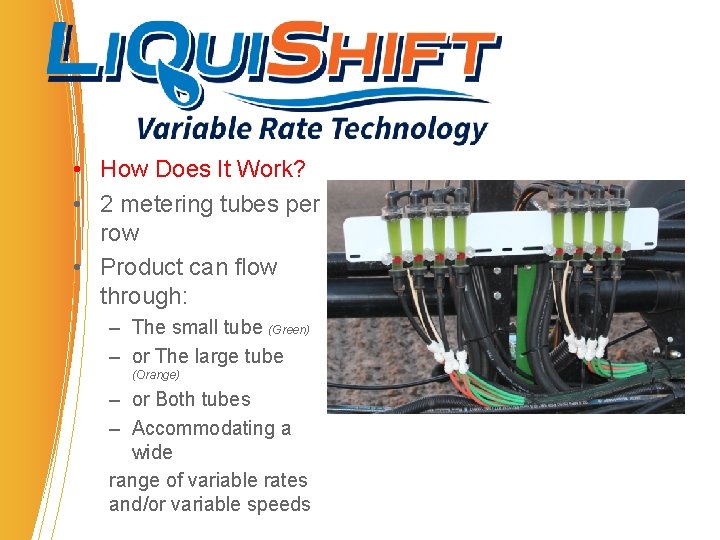
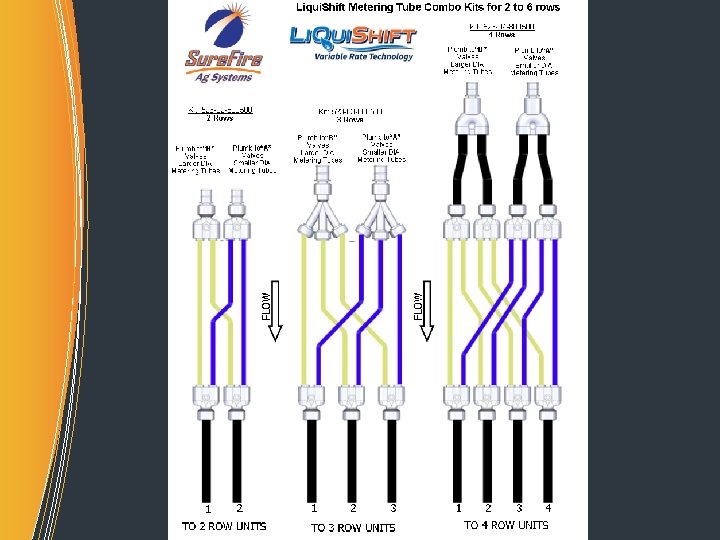
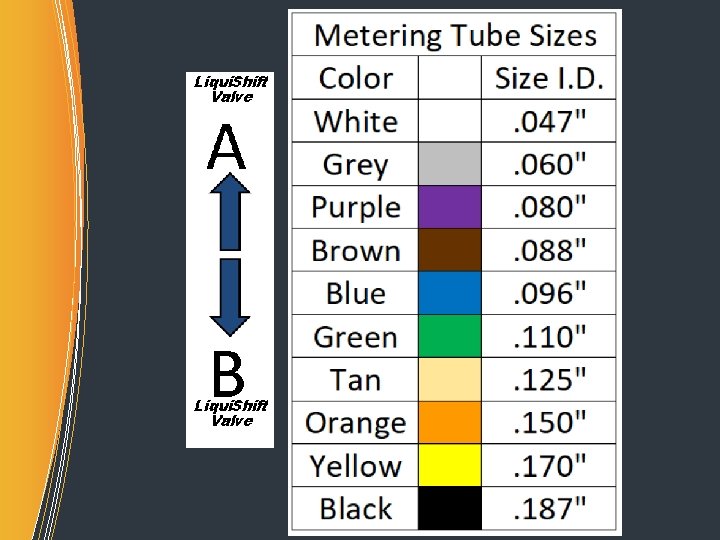
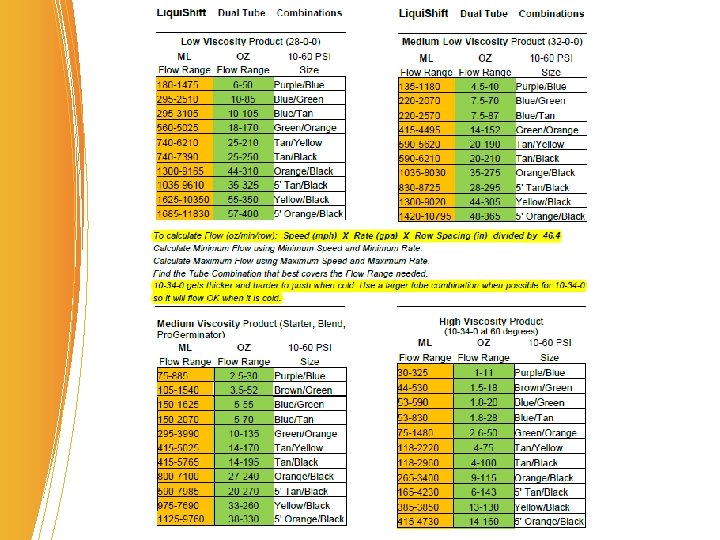
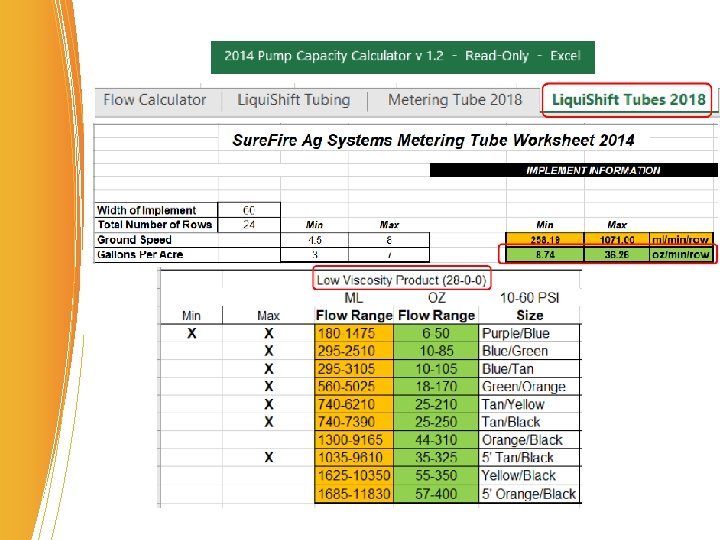
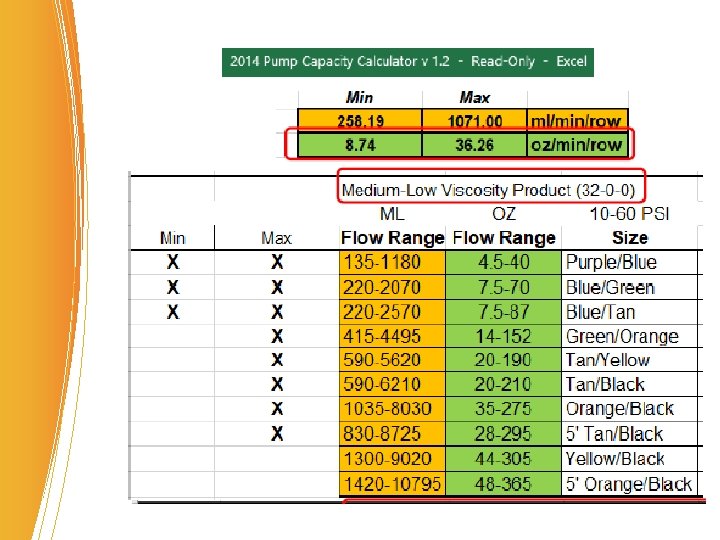
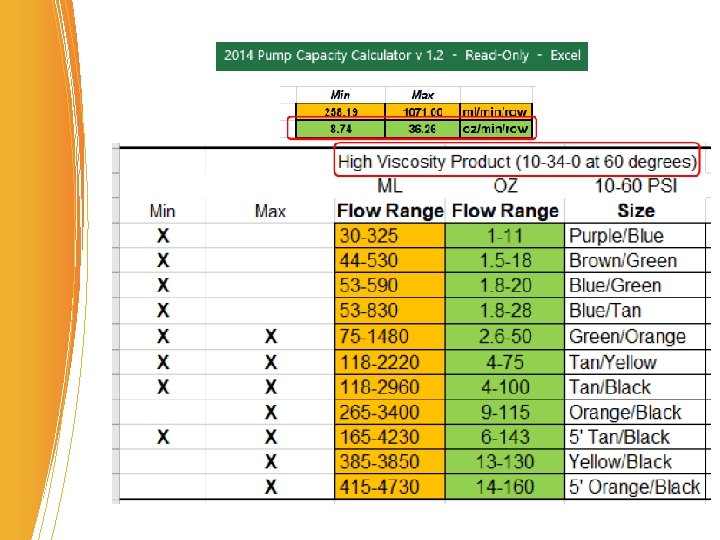
• How Does It Work? • 2 metering tubes per row • Product can flow through: – The small tube (Green) – or The large tube (Orange) – or Both tubes – Accommodating a wide range of variable rates and/or variable speeds
• Flow starts in small tube. As the flow increases: • When pressure hits the High Setpoint, flow switches to large tube • When pressure hits the High Setpoint, flow switches to both tubes • As flow decreases: • When pressure drops to the Low Setpoint, flow switches from both tubes to large tube • When pressure drops to the Low Setpoint, flow switches to small tube
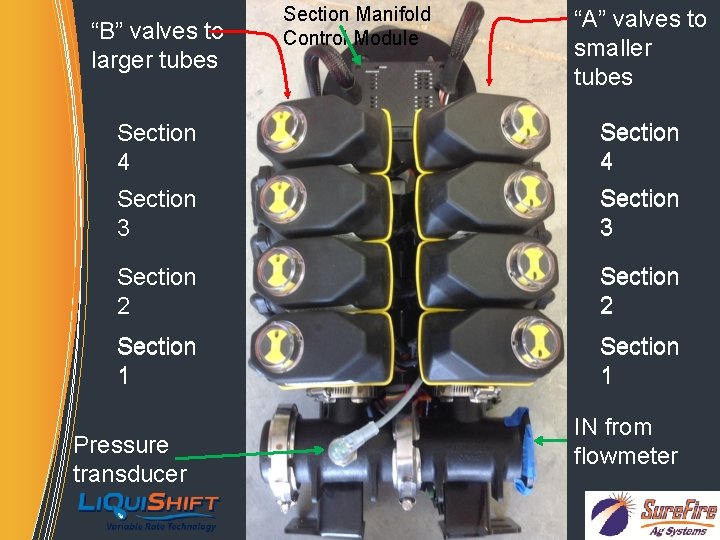
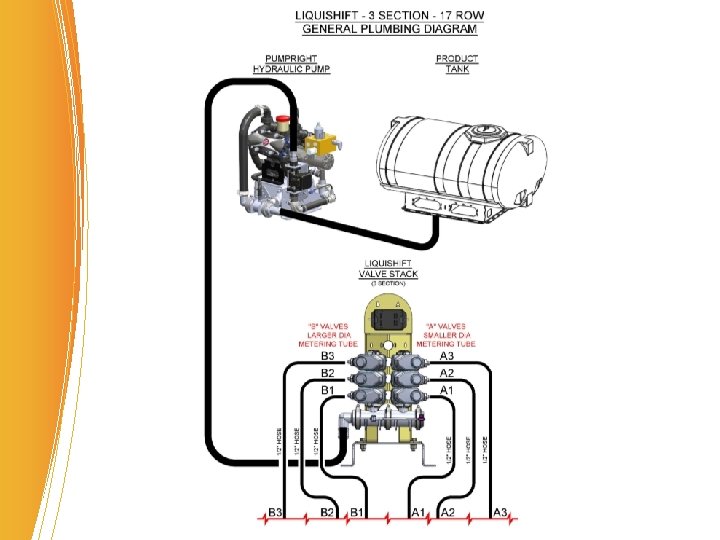
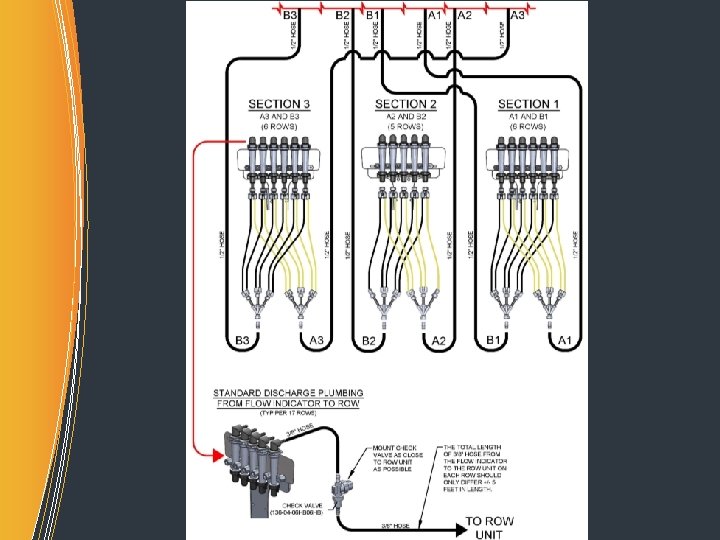
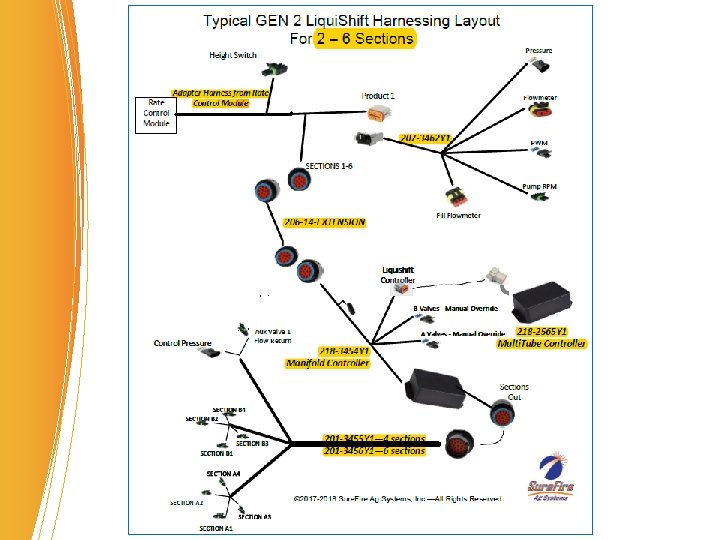
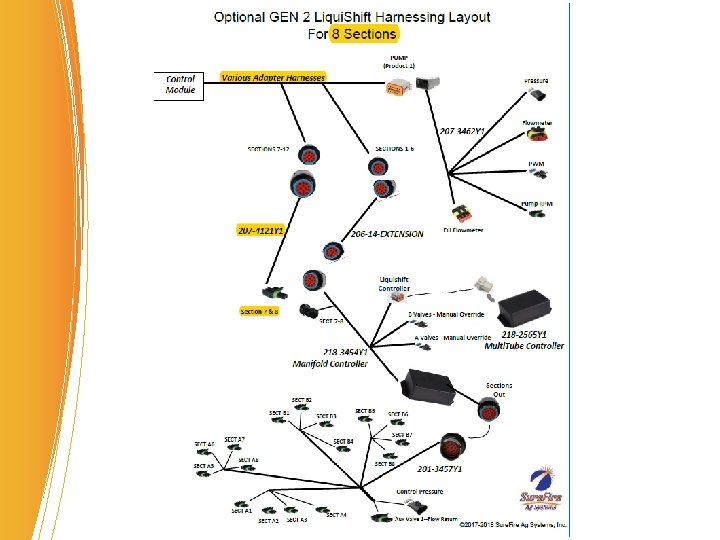
“B” valves to larger tubes Section Manifold Control Module “A” valves to smaller tubes Section 4 Section 3 Section 2 Section 1 Pressure transducer IN from flowmeter
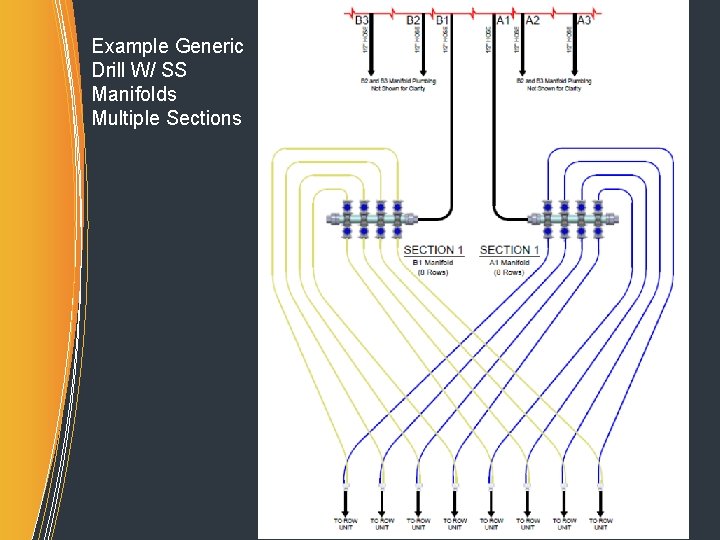
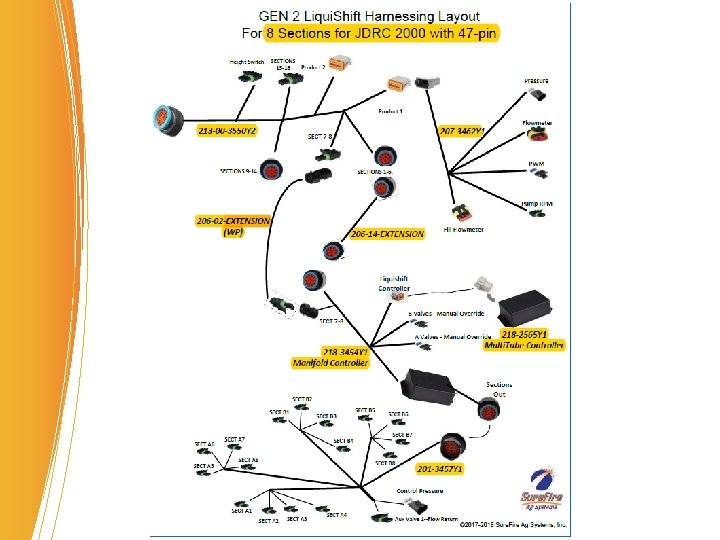
Example Generic Drill W/ SS Manifolds Multiple Sections
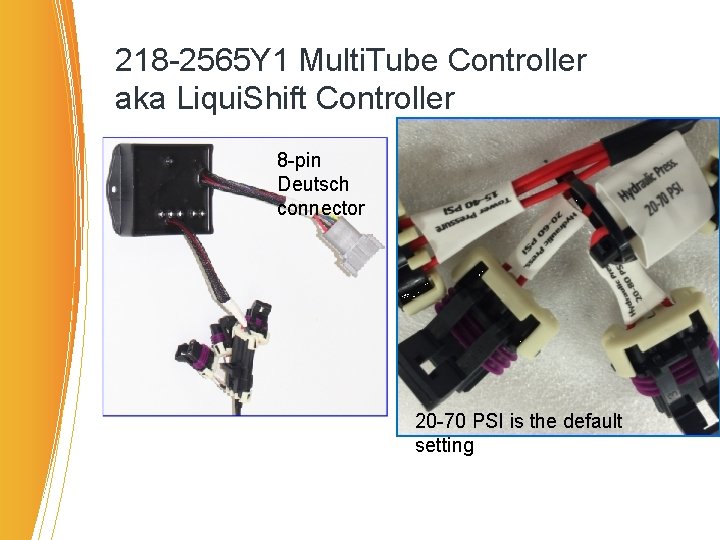
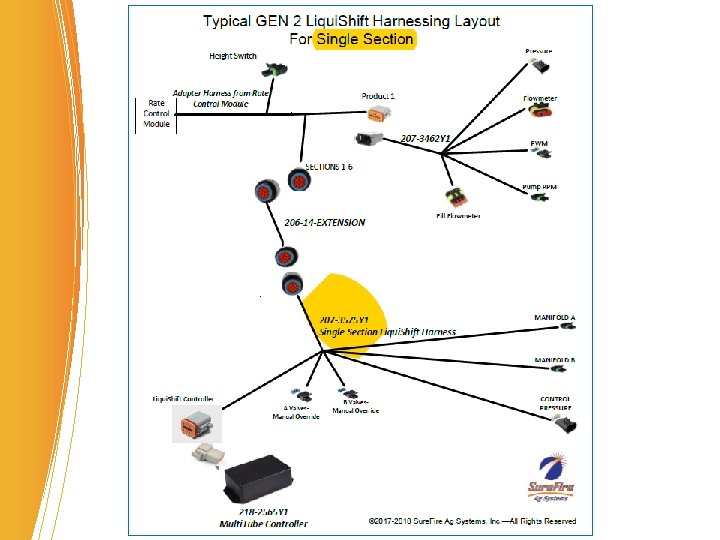
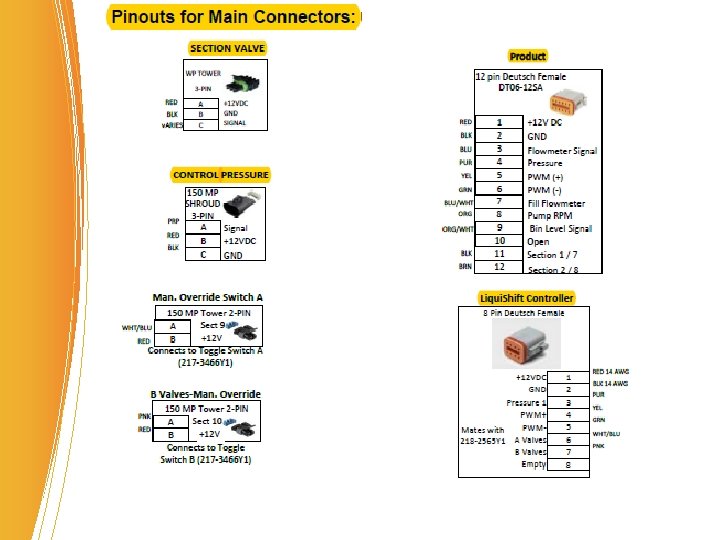
218 -2565 Y 1 Multi. Tube Controller aka Liqui. Shift Controller 8 -pin Deutsch connector 20 -70 PSI is the default setting
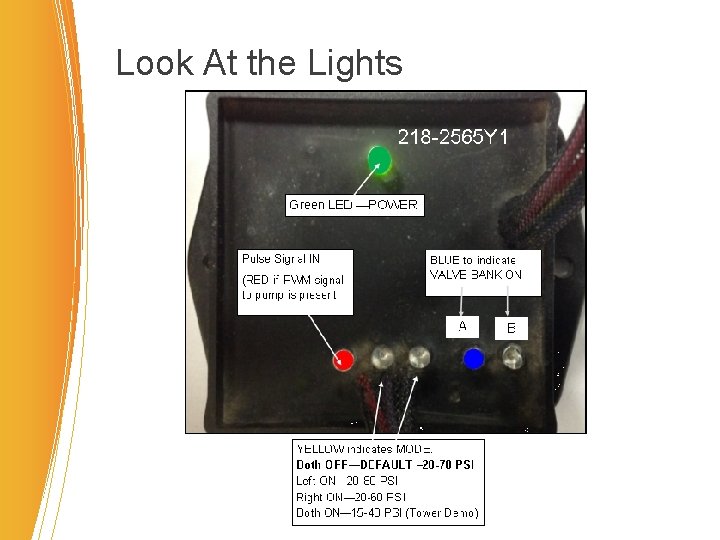
Look At the Lights
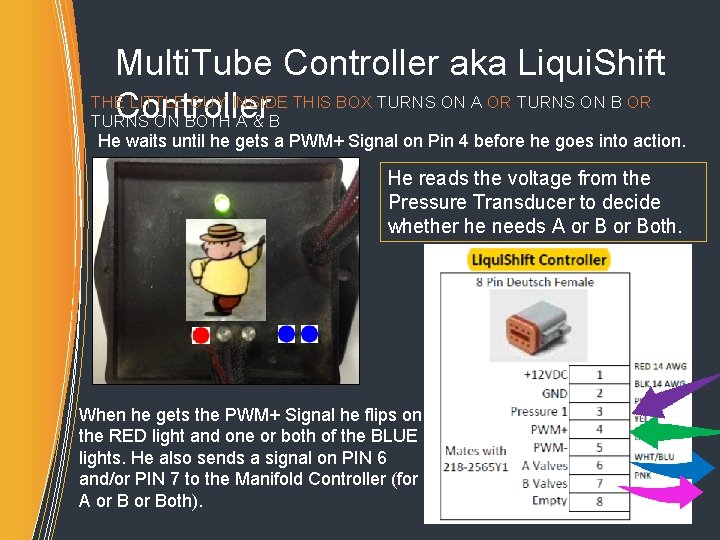
Multi. Tube Controller aka Liqui. Shift THE LITTLE GUY INSIDE THIS BOX TURNS ON A OR TURNS ON B OR Controller TURNS ON BOTH A & B He waits until he gets a PWM+ Signal on Pin 4 before he goes into action. He reads the voltage from the Pressure Transducer to decide whether he needs A or Both. When he gets the PWM+ Signal he flips on the RED light and one or both of the BLUE lights. He also sends a signal on PIN 6 and/or PIN 7 to the Manifold Controller (for A or Both).
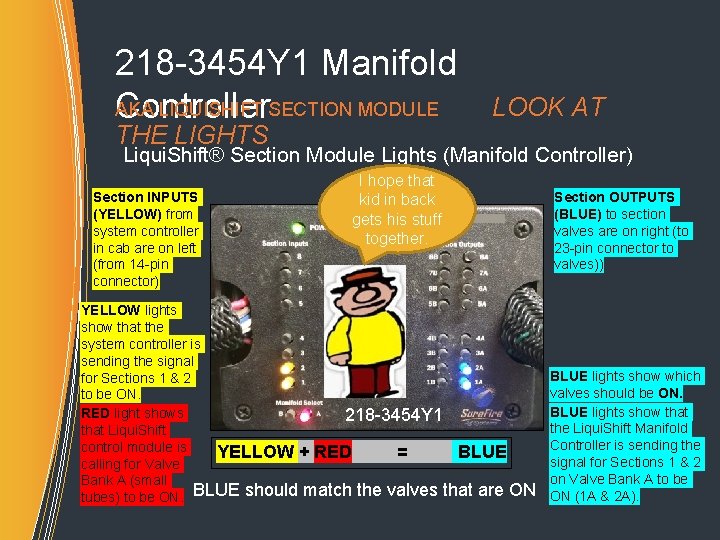
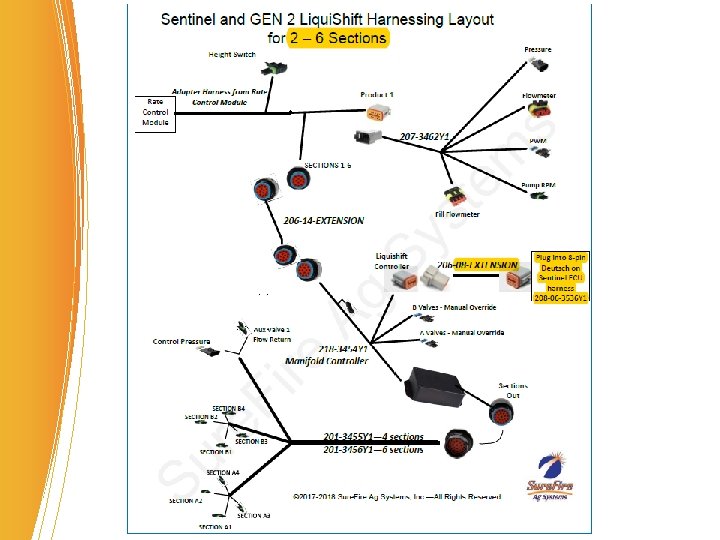
218 -3454 Y 1 Manifold AKA LIQUISHIFT SECTION MODULE LOOK AT Controller THE LIGHTS Liqui. Shift® Section Module Lights (Manifold Controller) Section INPUTS (YELLOW) from system controller in cab are on left (from 14 -pin connector) I hope that kid in back gets his stuff together. YELLOW lights show that the system controller is sending the signal for Sections 1 & 2 to be ON. RED light shows 218 -3454 Y 1 that Liqui. Shift control module is YELLOW + RED = BLUE calling for Valve Bank A (small tubes) to be ON. BLUE should match the valves that are ON Section OUTPUTS (BLUE) to section valves are on right (to 23 -pin connector to valves)) BLUE lights show which valves should be ON. BLUE lights show that the Liqui. Shift Manifold Controller is sending the signal for Sections 1 & 2 on Valve Bank A to be ON (1 A & 2 A).
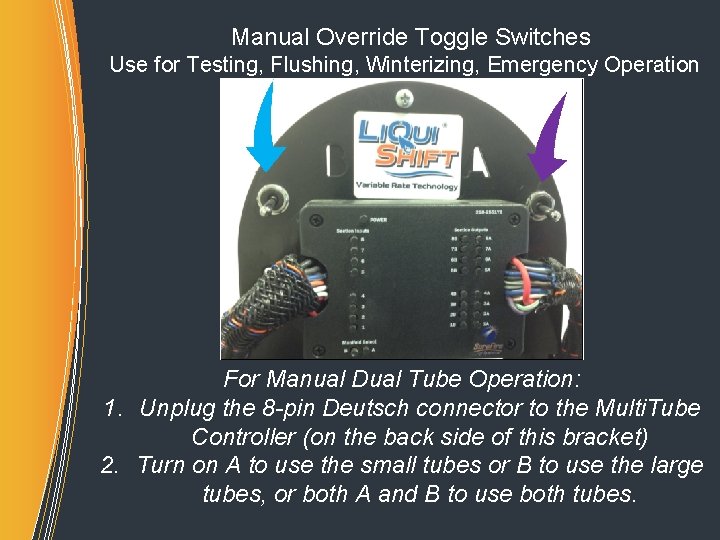
Manual Override Toggle Switches Use for Testing, Flushing, Winterizing, Emergency Operation For Manual Dual Tube Operation: 1. Unplug the 8 -pin Deutsch connector to the Multi. Tube Controller (on the back side of this bracket) 2. Turn on A to use the small tubes or B to use the large tubes, or both A and B to use both tubes.
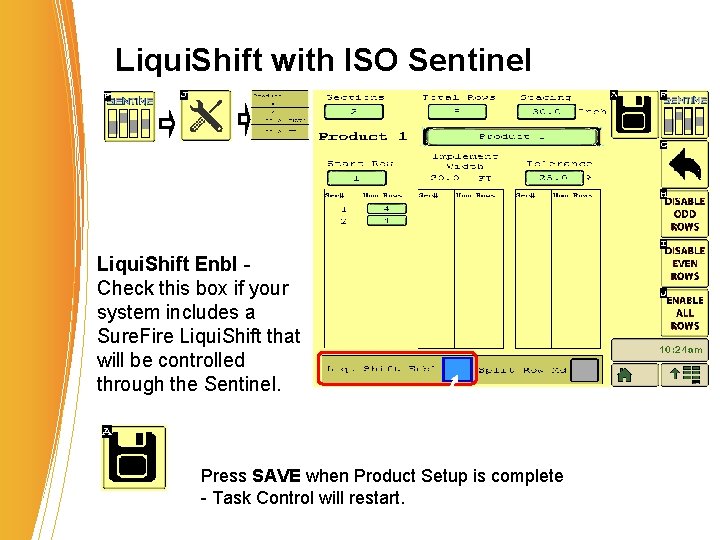
Liqui. Shift with ISO Sentinel Liqui. Shift Enbl - Check this box if your system includes a Sure. Fire Liqui. Shift that will be controlled through the Sentinel. Press SAVE when Product Setup is complete - Task Control will restart.
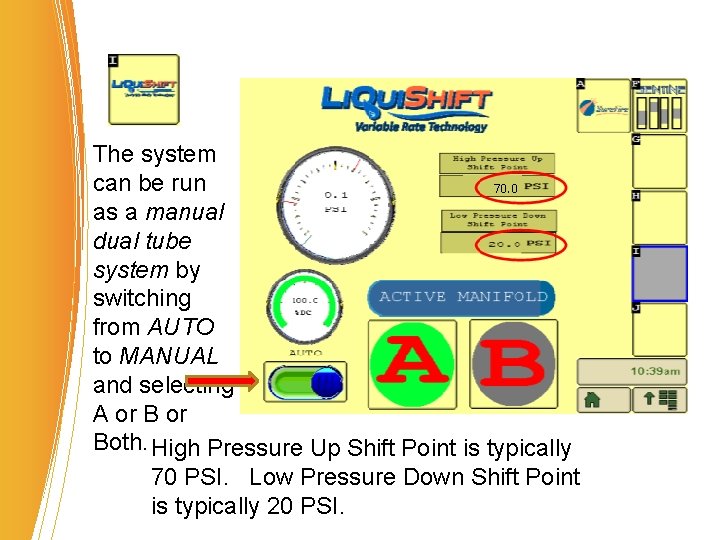
The system can be run as a manual dual tube system by switching from AUTO to MANUAL and selecting A or Both. High Pressure Up Shift Point is typically 70 PSI. Low Pressure Down Shift Point is typically 20 PSI.
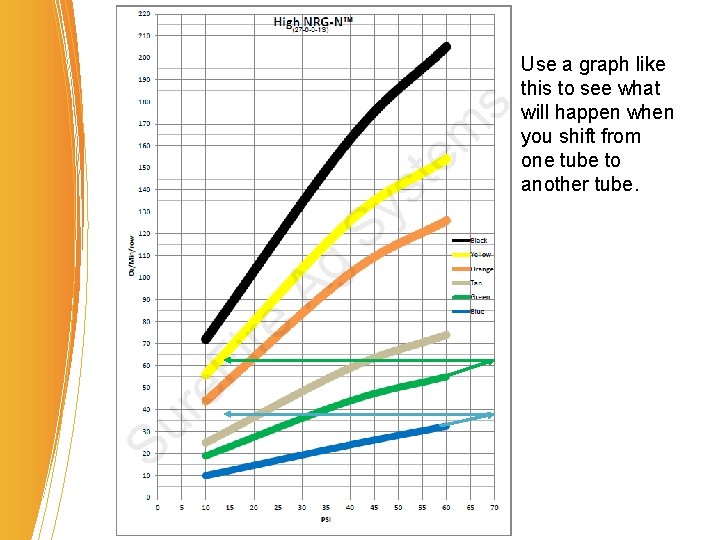
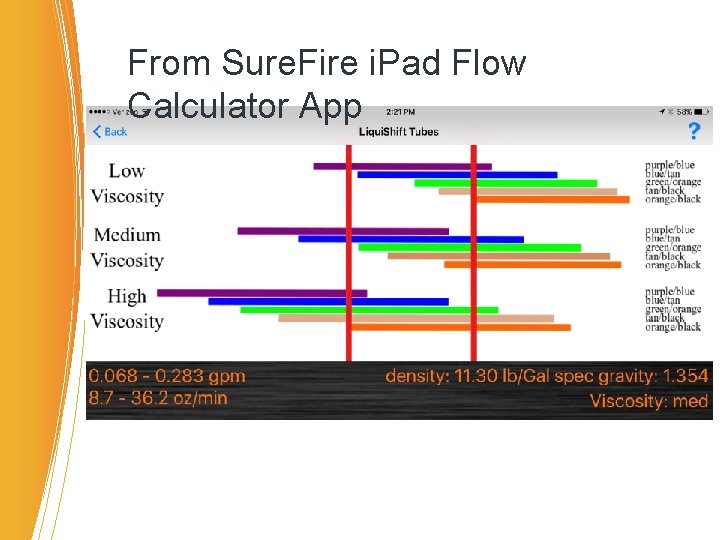
Use a graph like this to see what will happen when you shift from one tube to another tube.
From Sure. Fire i. Pad Flow Calculator App
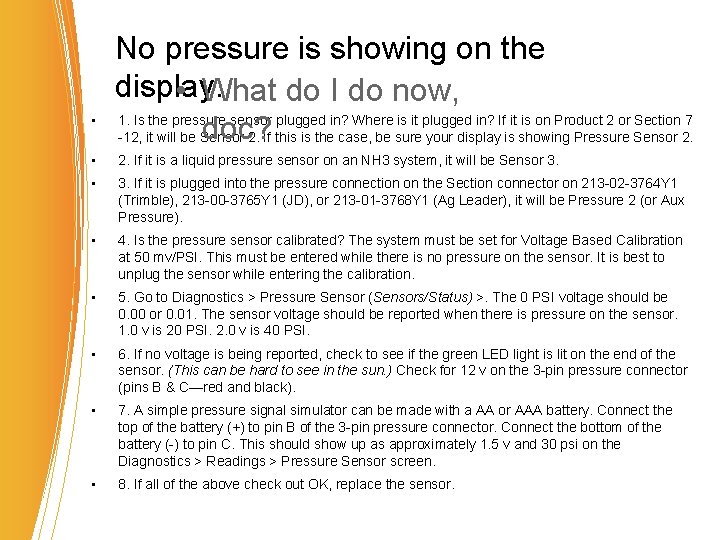
• No pressure is showing on the display. • What do I do now, 1. Is the pressure sensor plugged in? Where is it plugged in? If it is on Product 2 or Section 7 doc? -12, it will be Sensor 2. If this is the case, be sure your display is showing Pressure Sensor 2. • 2. If it is a liquid pressure sensor on an NH 3 system, it will be Sensor 3. • 3. If it is plugged into the pressure connection on the Section connector on 213 -02 -3764 Y 1 (Trimble), 213 -00 -3765 Y 1 (JD), or 213 -01 -3768 Y 1 (Ag Leader), it will be Pressure 2 (or Aux Pressure). • 4. Is the pressure sensor calibrated? The system must be set for Voltage Based Calibration at 50 mv/PSI. This must be entered while there is no pressure on the sensor. It is best to unplug the sensor while entering the calibration. • 5. Go to Diagnostics > Pressure Sensor (Sensors/Status) >. The 0 PSI voltage should be 0. 00 or 0. 01. The sensor voltage should be reported when there is pressure on the sensor. 1. 0 v is 20 PSI. 2. 0 v is 40 PSI. • 6. If no voltage is being reported, check to see if the green LED light is lit on the end of the sensor. (This can be hard to see in the sun. ) Check for 12 v on the 3 -pin pressure connector (pins B & C—red and black). • 7. A simple pressure signal simulator can be made with a AA or AAA battery. Connect the top of the battery (+) to pin B of the 3 -pin pressure connector. Connect the bottom of the battery (-) to pin C. This should show up as approximately 1. 5 v and 30 psi on the Diagnostics > Readings > Pressure Sensor screen. • 8. If all of the above check out OK, replace the sensor.
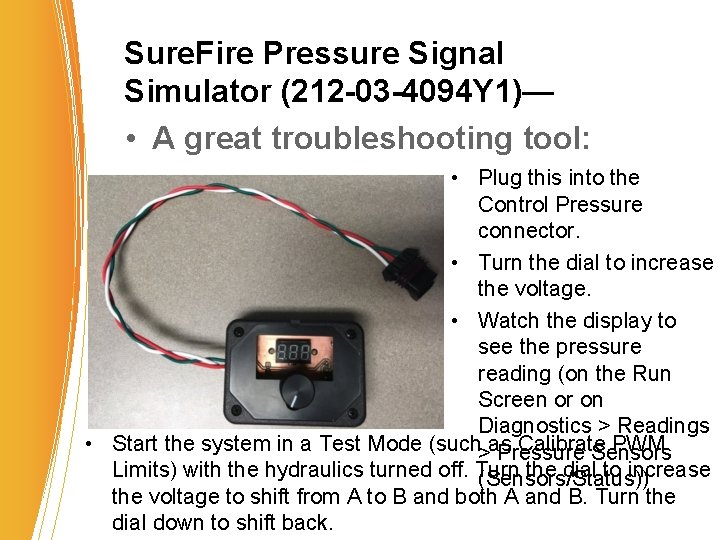
Sure. Fire Pressure Signal Simulator (212 -03 -4094 Y 1)— • A great troubleshooting tool: • Plug this into the Control Pressure connector. • Turn the dial to increase the voltage. • Watch the display to see the pressure reading (on the Run Screen or on Diagnostics > Readings • Start the system in a Test Mode (such as Calibrate PWM > Pressure Sensors Limits) with the hydraulics turned off. Turn the dial to increase (Sensors/Status)) the voltage to shift from A to B and both A and B. Turn the dial down to shift back.
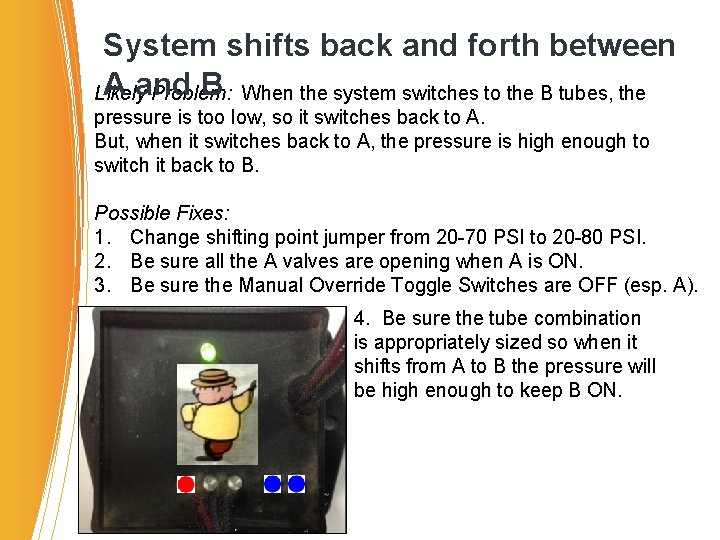
System shifts back and forth between A and B When the system switches to the B tubes, the Likely Problem: pressure is too low, so it switches back to A. But, when it switches back to A, the pressure is high enough to switch it back to B. Possible Fixes: 1. Change shifting point jumper from 20 -70 PSI to 20 -80 PSI. 2. Be sure all the A valves are opening when A is ON. 3. Be sure the Manual Override Toggle Switches are OFF (esp. A). 4. Be sure the tube combination is appropriately sized so when it shifts from A to B the pressure will be high enough to keep B ON.
Any questions? Thank you.