Lecture 3 Android Internals This work is licensed
- Slides: 28
Lecture 3 – Android Internals This work is licensed under the Creative Commons Attribution 4. 0 International License. To view a copy of this license, visit http: //creativecommons. org/licenses/by/4. 0/ or send a letter to Creative Commons, 444 Castro Street, Suite 900, Mountain View, California, 94041, USA.
Linux Kernel � ”Androidized” kernel � Hundreds of patches over the standard kernel � Device-specific functionality, fixes, enhancements � Many features get into the mainline kernel � ”Androidisms” � Wakelocks � Low-Memory Killer � Binder � Anonymous Shared Memory � Alarm � Logger Laura Gheorghe, Petre Eftime 2
Wakelocks � The Android kernel goes to sleep as often as possible � Sometimes you want to keep the system from going to sleep � Input from the user, critical operations � Wakelocks keep the system awake � A wakelock must be obtained by the application when it needs to stay awake � Apps communicate with the Power Manager Service when they require a wakelock � Device drivers call in-kernel wakelock primitives � Included in mainline Laura Gheorghe, Petre Eftime 3
Low-Memory Killer � Linux OOM killer � Prevents the activation of the OOM killer (system unlikely to run out of memory) � Kills processes with components unused for a long time � Based on OOM adjustments mechanism � Different OOM kill priorities for different processes � The userspace may control OOM killing policies � Policies applied at startup by init � Modified and enforced by Activity Manager Laura Gheorghe, Petre Eftime 4
Low-Memory Killer � Levels assigned to processes based on their components � Levels from -17 to 15 (high -> killed) � Threshold (Min. Free) for each type of process � Foreground app - application in foreground � Visible app - visible but not in foreground � Secondary server - service � Hidden app - hidden, needed by a running app � Content provider - provide data � Empty app - app not active � Starts killing when the threshold is reached Laura Gheorghe, Petre Eftime 5
Anonymous Shared Memory (ashmem) � IPC mechanism � Sys. V IPC can lead to resource leakage in the (vulnerability) � Similar to POSIX SHM, differences: kernel � Uses reference counting to destroy the memory regions � Shrink mapped regions when the system needs memory � To shrink a region it must be unpinned � First process creates region, uses Binder to share descriptor with other processes � System services rely on ashmem � Surface Flinger, Audio Flinger � Driver included in the staging tree Laura Gheorghe, Petre Eftime 6
Alarm � Uses the RTC and HRT functionalities � The setitimer() does not work when the system suspended (HRT) is � The application receives the signal when the device wakes up � Using RTC, the alarm will be fired even if the system suspended is � RTC hardware device � Uses HRT by default � When the system is about to suspend, it uses Laura Gheorghe, Petre Eftime RTC 7
Alarm character device, ioctl() � System. Clock, Alarm. Manager class rely on the driver � /dev/alarm � System. Clock - obtain and set time � Alarm. Manager - provide alarms to apps � The driver and Alarm. Manager use Wake. Locks � The app that receives the alarm runs before the system suspended again � Included in the staging is tree Laura Gheorghe, Petre Eftime 8
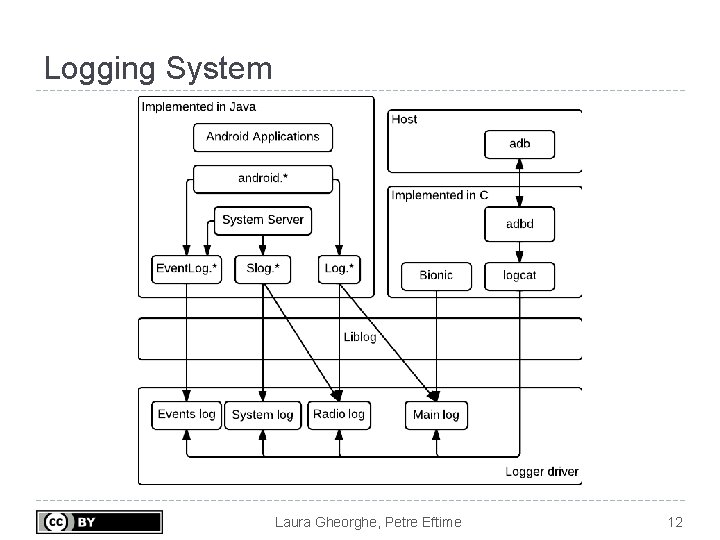
Logger � Uses kernel buffers for logging data � Circular buffers in RAM � No task switch, no writing in files (compared to syslog) � Avoiding write operations in files is critical on Android devices � Each buffer - separate entry in /dev/log (Events, System, Radio, Main) � logcat displays the Main buffer by default Laura Gheorghe, Petre Eftime 9
Logger � Log and Event. Log classes - public API � Developers use Log � Event. Log used by the system components � Diagnostic events � Slog - system use (AOSP) Laura Gheorghe, Petre Eftime 10
Logging Messages � Through liblog library � Logging from java classes � Used by logcat � Formatting and filtering � Log message � Priority, tag and data for each event � Priority: verbose, debug, info, warn, error � Tag: identifies the component that generated the message � Staging tree Laura Gheorghe, Petre Eftime 11
Logging System Laura Gheorghe, Petre Eftime 12
Binder History � RPC mechanism � Initially in Be. OS (then bought by Palm) � Open. Binder project � Open. Binder developers working in Android team � Android Binder does not derive from Open. Binder � Clean re-write of the same functionality � Open. Binder documentation for understanding the mechanism � Binder driver in the staging tree from kernel 3. 3 Laura Gheorghe, Petre Eftime 13
Binder � Remote object invocation � Remote services as objects � Interface definition and reference to it � Cornerstone of Android architecture � Apps talk to System Server � Apps talk to other service components � Developers don’t use the Binder directly � Use interfaces and stubs generated with the aidl tool Laura Gheorghe, Petre Eftime 14
Binder Driver � Part of the Binder implemented in a kernel driver � Character device � /dev/binder � Uses ioctl() calls � Transmit parcels of data (serialized) between Laura Gheorghe, Petre Eftime entities 15
Android Framework � On top of the native userspace packages, System Services, Android Runtime � Code in /frameworks directory in AOSP � Key building blocks: Service Manager, Dalvik, Zygote � android. * Laura Gheorghe, Petre Eftime 16
System Services � Form an object-oriented OS on top of Linux � System Server � All components run in the system_server process � Many Java-based services/managers, 2 C-based services � Power Manager, Activity Manager, Location Manager, etc. � Surface Flinger, Sensor Service (C/C++) � Media Server � mediaserver process � C/C++ code � Audio Flinger, Media Player Service, Camera Laura Gheorghe, Petre Eftime Service 17
Service Manager � Performs system service handle lookups � The Yellow pages book of all services � A service must be registered to the Service Manager to be available � Started by init before any other service � Opens /dev/binder and becomes the Context Manager of the Binder � Binder ID 0 = ”magic object” = Service Manager Laura Gheorghe, Petre Eftime 18
Service Manager � System Server registers every service with the Service Manager � Any app that wants to talk to a system service: � Asks the Service Manager for a handle � get. System. Service() � Invokes the methods of the service using the handle � Not used by an app to access its own service � Used by the dumpsys utility to obtain the status of system services Laura Gheorghe, Petre Eftime the 19
Dalvik � Dalvik virtual machine � Java VM optimized for mobile architectures � Lower memory footprint � Works with. dex files instead of. jar files � Incompatible with Java bytecode � Register based, not stack based � 16 bit instructions Laura Gheorghe, Petre Eftime 20
Dalvik � Includes Just-in-Time (JIT) compiler � ARM, x 86, MIPS � Translates bytecode into binary machine instructions � Code runs directly on the CPU, not one instruction at a time by the VM � The conversion is stored and used next time the application runs � Apps run much faster Laura Gheorghe, Petre Eftime 21
Zygote � Daemon used to launch apps � Listens to connections on its socket for requests to start apps � /dev/socket/zygote � When it gets a request, it forks itself and launches the app � Preloads (in RAM) all Java classes and resources needed by an app � Copy-on-write (COW) � Classes and resources are not modified, so all apps use them from Zygote (only one copy in RAM) � The System Server is started explicitly by Zygote � The PPID of all apps is the PID of Zygote Laura Gheorghe, Petre Eftime 22
Activity Manager � One of the most important services in the System Server � Handles application lifecycle � Broadcasts intents � Starting new components (activities, services) � Fetching Content Providers � Responsible with the Application Not Responding (ANR) messages � Involved in � Permission checks � OOM adjustments for the Low-Memory Killer � Task management Laura Gheorghe, Petre Eftime 23
Activity Manager � Starts the Launcher (with Intent. CATEGORY_HOME) � When an app is started from Launcher � Launcher’s on. Click() callback is called � Launcher calls the start. Activity() from Activity. Manager (through Binder) � Activity. Manager calls start. Via. Zygote() method � Opens socket to Zygote and asks to start the activity command for invoking the functionality of the Activity. Manager � am � is. User. AMonkey() Laura Gheorghe, Petre Eftime 24
Package Manager � Manages the. apk files in the systems � API for installing, uninstalling, upgrading. apk files and installd processes � Ensures that the JIT versions of the dex bytecode is available before the app is started � Resolves intents � pm command for invoking the functionality of the Package. Manager � system_server Laura Gheorghe, Petre Eftime 25
Power Manager � Control the power state of the device � Handles Wake. Locks � Includes the Wake. Lock class � acquire(), release() � Apps request Wake. Locks from Power. Manager � All calls to the Power Management (kernel) go Power. Manager � Can force device to go to sleep � Set the brightness of the backlights Laura Gheorghe, Petre Eftime through 26
Bibliography � Karim Yaghmour, Embedded Android: Porting, and Customizing, Chapter 2 Laura Gheorghe, Petre Eftime Extending, 27
Keywords � Wake. Locks � System Server � Binder � Dalvik � Low-Memory killer � Ashmem � Alarm � Logger � Service Manager � Zygote � Activity Manager � Package Manager Laura Gheorghe, Petre Eftime 28