IO and Disks Announcements Prelim tomorrow Thursday March

- Slides: 38
I/O and Disks
Announcements • Prelim tomorrow Thursday, March 8 th, 7: 30 -9: 00 pm, 1½ hour – 203 Phillips – Closed book, no calculators/PDAs/… – Bring ID • Make-up exam will be early Thursday morning, March 8 th 8: 30 am-10: 00 am. – Three people signed up so far. • Topics: Everything up to (and including) Monday, March 5 th – Lectures 1 -18, chapters 1 -9 (7 th ed) • Solutions for Homework 3 available via CMS • Joy has office hours all day today. 2
Goals for Today • I/O – How does a computer system interact with its environment? • Disks – How does a computer system permanently store data? 3
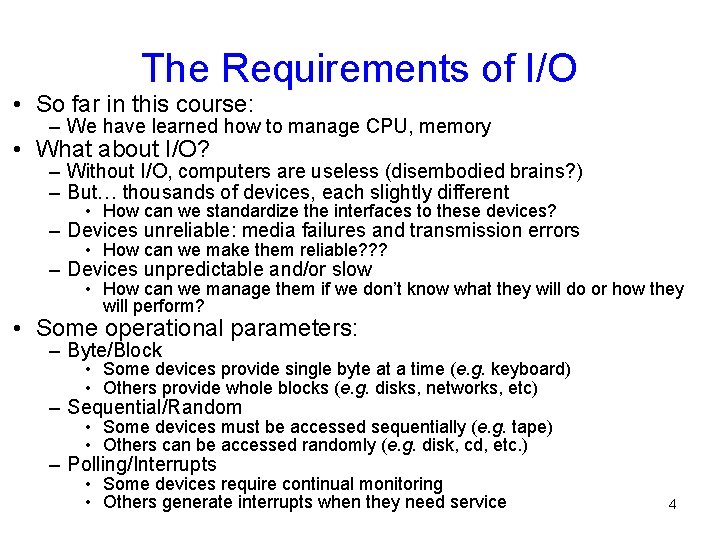
The Requirements of I/O • So far in this course: – We have learned how to manage CPU, memory • What about I/O? – Without I/O, computers are useless (disembodied brains? ) – But… thousands of devices, each slightly different • How can we standardize the interfaces to these devices? – Devices unreliable: media failures and transmission errors • How can we make them reliable? ? ? – Devices unpredictable and/or slow • How can we manage them if we don’t know what they will do or how they will perform? • Some operational parameters: – Byte/Block • Some devices provide single byte at a time (e. g. keyboard) • Others provide whole blocks (e. g. disks, networks, etc) – Sequential/Random • Some devices must be accessed sequentially (e. g. tape) • Others can be accessed randomly (e. g. disk, cd, etc. ) – Polling/Interrupts • Some devices require continual monitoring • Others generate interrupts when they need service 4
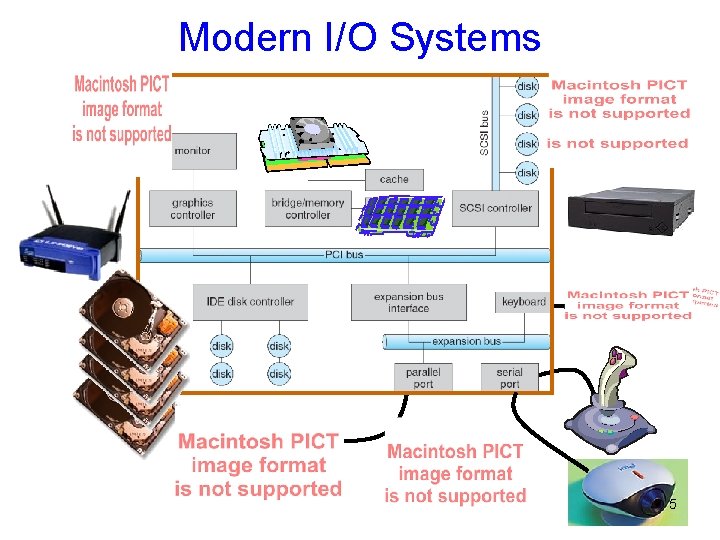
Modern I/O Systems 5
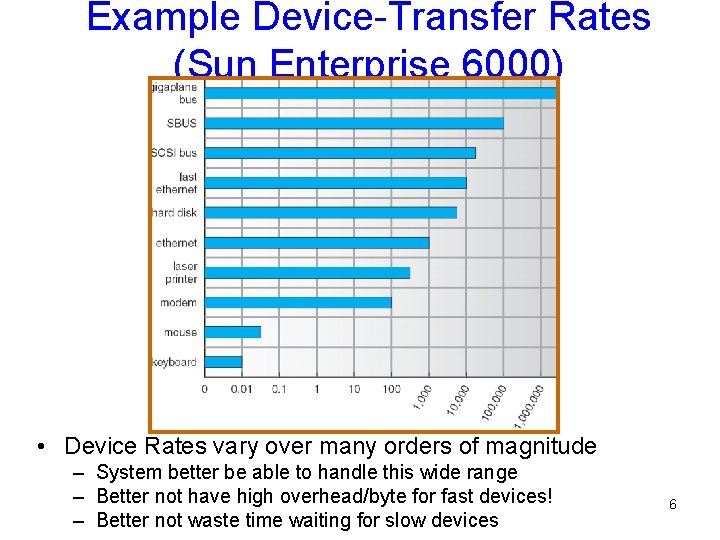
Example Device-Transfer Rates (Sun Enterprise 6000) • Device Rates vary over many orders of magnitude – System better be able to handle this wide range – Better not have high overhead/byte for fast devices! – Better not waste time waiting for slow devices 6
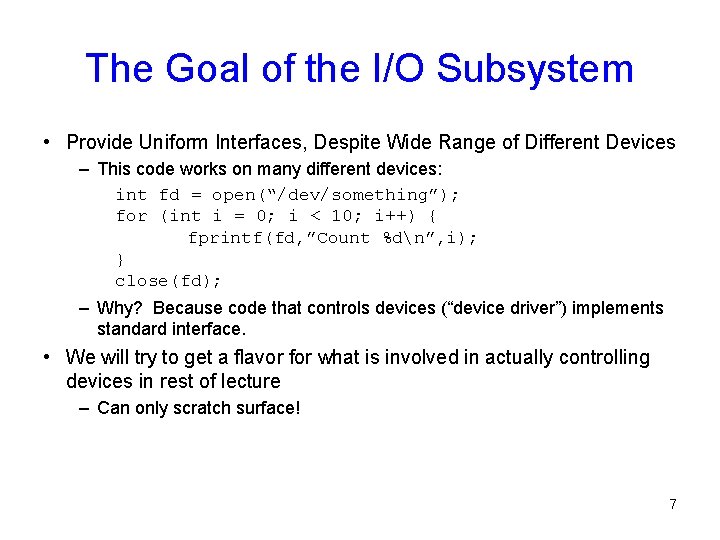
The Goal of the I/O Subsystem • Provide Uniform Interfaces, Despite Wide Range of Different Devices – This code works on many different devices: int fd = open(“/dev/something”); for (int i = 0; i < 10; i++) { fprintf(fd, ”Count %dn”, i); } close(fd); – Why? Because code that controls devices (“device driver”) implements standard interface. • We will try to get a flavor for what is involved in actually controlling devices in rest of lecture – Can only scratch surface! 7
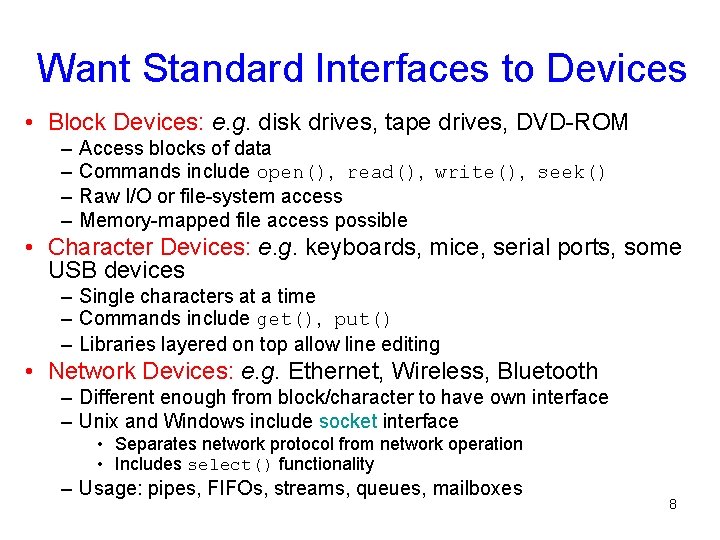
Want Standard Interfaces to Devices • Block Devices: e. g. disk drives, tape drives, DVD-ROM – – Access blocks of data Commands include open(), read(), write(), seek() Raw I/O or file-system access Memory-mapped file access possible • Character Devices: e. g. keyboards, mice, serial ports, some USB devices – Single characters at a time – Commands include get(), put() – Libraries layered on top allow line editing • Network Devices: e. g. Ethernet, Wireless, Bluetooth – Different enough from block/character to have own interface – Unix and Windows include socket interface • Separates network protocol from network operation • Includes select() functionality – Usage: pipes, FIFOs, streams, queues, mailboxes 8
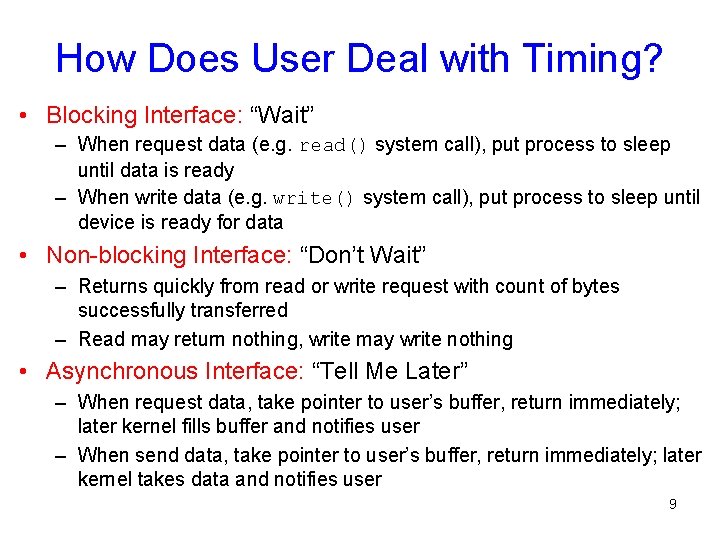
How Does User Deal with Timing? • Blocking Interface: “Wait” – When request data (e. g. read() system call), put process to sleep until data is ready – When write data (e. g. write() system call), put process to sleep until device is ready for data • Non-blocking Interface: “Don’t Wait” – Returns quickly from read or write request with count of bytes successfully transferred – Read may return nothing, write may write nothing • Asynchronous Interface: “Tell Me Later” – When request data, take pointer to user’s buffer, return immediately; later kernel fills buffer and notifies user – When send data, take pointer to user’s buffer, return immediately; later kernel takes data and notifies user 9
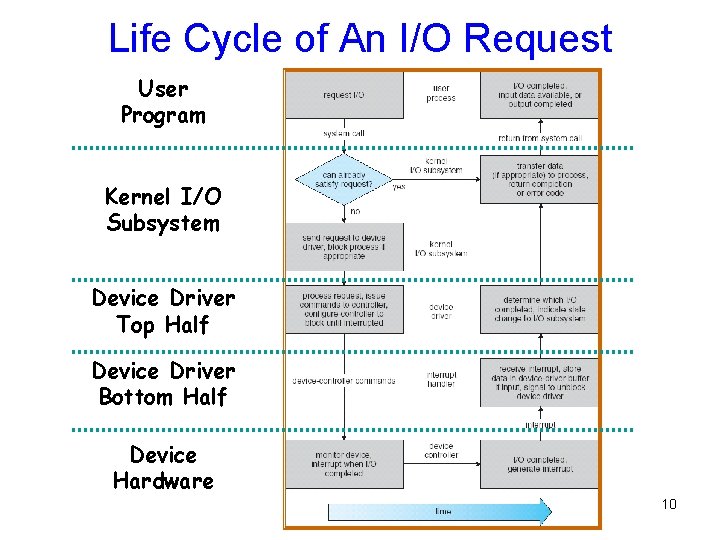
Life Cycle of An I/O Request User Program Kernel I/O Subsystem Device Driver Top Half Device Driver Bottom Half Device Hardware 10
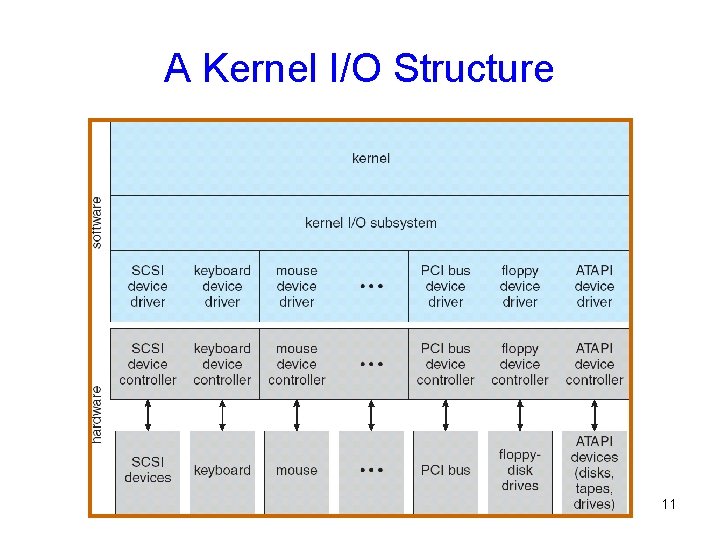
A Kernel I/O Structure 11
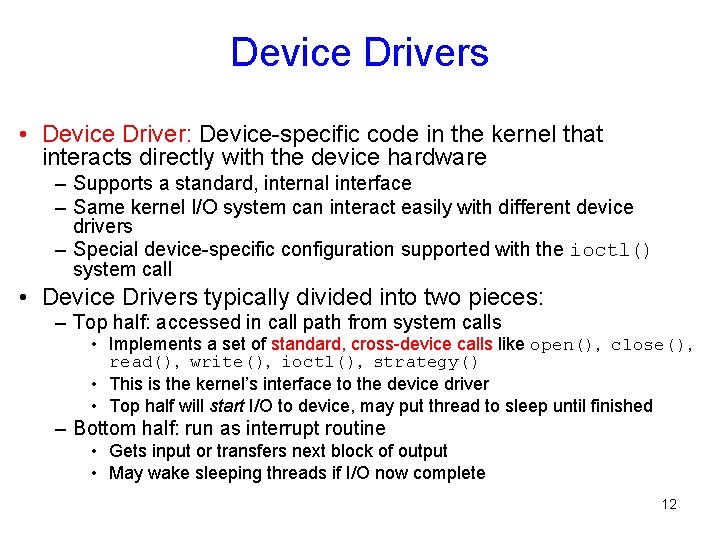
Device Drivers • Device Driver: Device-specific code in the kernel that interacts directly with the device hardware – Supports a standard, internal interface – Same kernel I/O system can interact easily with different device drivers – Special device-specific configuration supported with the ioctl() system call • Device Drivers typically divided into two pieces: – Top half: accessed in call path from system calls • Implements a set of standard, cross-device calls like open(), close(), read(), write(), ioctl(), strategy() • This is the kernel’s interface to the device driver • Top half will start I/O to device, may put thread to sleep until finished – Bottom half: run as interrupt routine • Gets input or transfers next block of output • May wake sleeping threads if I/O now complete 12
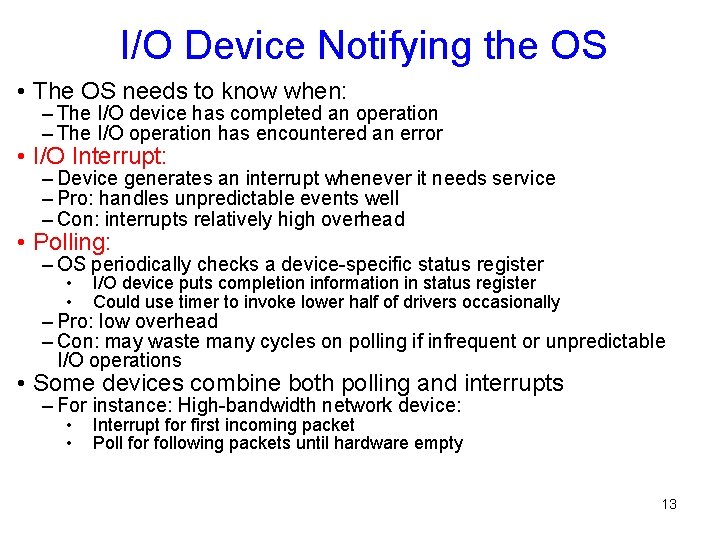
I/O Device Notifying the OS • The OS needs to know when: – The I/O device has completed an operation – The I/O operation has encountered an error • I/O Interrupt: – Device generates an interrupt whenever it needs service – Pro: handles unpredictable events well – Con: interrupts relatively high overhead • Polling: – OS periodically checks a device-specific status register • • I/O device puts completion information in status register Could use timer to invoke lower half of drivers occasionally – Pro: low overhead – Con: may waste many cycles on polling if infrequent or unpredictable I/O operations • Some devices combine both polling and interrupts – For instance: High-bandwidth network device: • • Interrupt for first incoming packet Poll for following packets until hardware empty 13
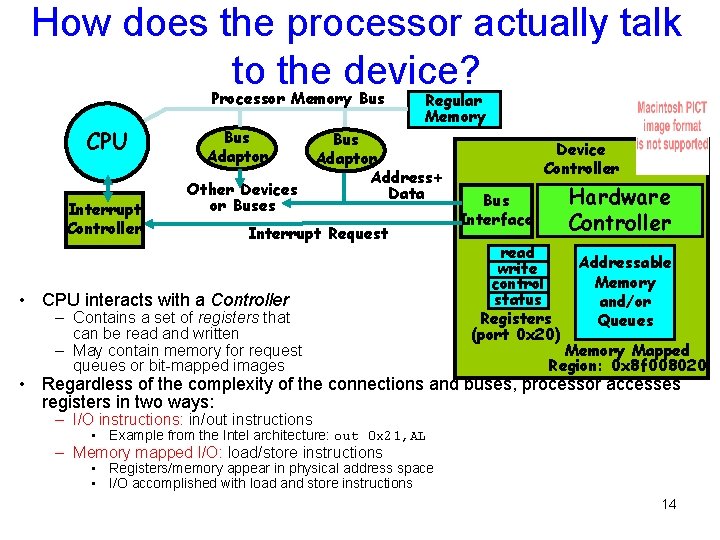
How does the processor actually talk to the device? Processor Memory Bus CPU Interrupt Controller Bus Adaptor Other Devices or Buses Regular Memory Bus Adaptor Address+ Data Interrupt Request • CPU interacts with a Controller – Contains a set of registers that can be read and written – May contain memory for request queues or bit-mapped images Device Controller Hardware Controller Bus Interface read write control status Registers (port 0 x 20) Addressable Memory and/or Queues Memory Mapped Region: 0 x 8 f 008020 • Regardless of the complexity of the connections and buses, processor accesses registers in two ways: – I/O instructions: in/out instructions • Example from the Intel architecture: out 0 x 21, AL – Memory mapped I/O: load/store instructions • Registers/memory appear in physical address space • I/O accomplished with load and store instructions 14
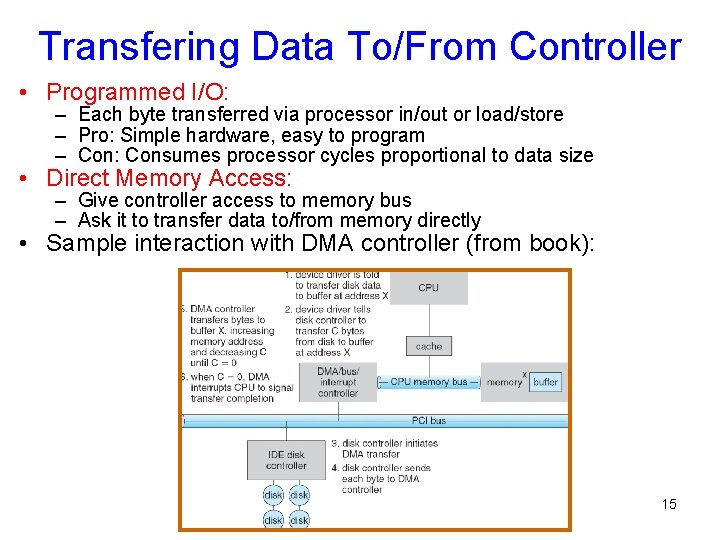
Transfering Data To/From Controller • Programmed I/O: – Each byte transferred via processor in/out or load/store – Pro: Simple hardware, easy to program – Con: Consumes processor cycles proportional to data size • Direct Memory Access: – Give controller access to memory bus – Ask it to transfer data to/from memory directly • Sample interaction with DMA controller (from book): 15
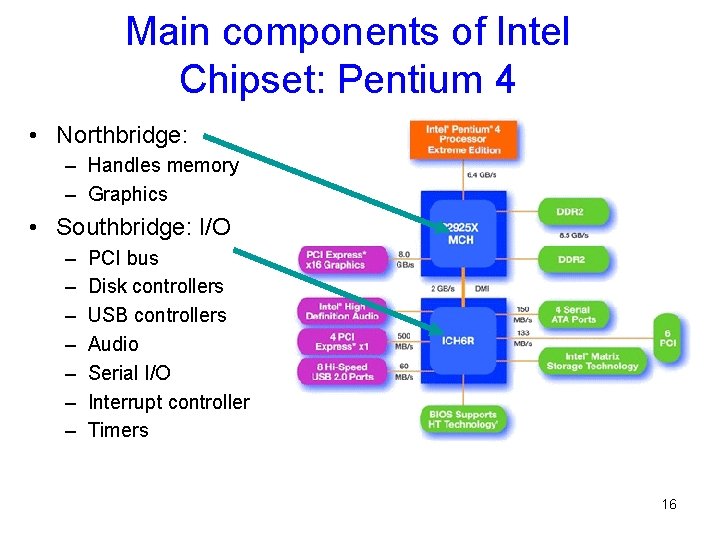
Main components of Intel Chipset: Pentium 4 • Northbridge: – Handles memory – Graphics • Southbridge: I/O – – – – PCI bus Disk controllers USB controllers Audio Serial I/O Interrupt controller Timers 16
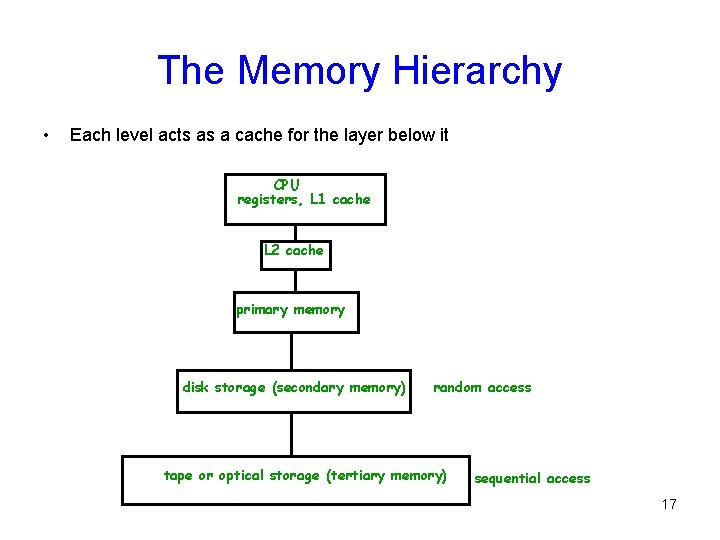
The Memory Hierarchy • Each level acts as a cache for the layer below it CPU registers, L 1 cache L 2 cache primary memory disk storage (secondary memory) random access tape or optical storage (tertiary memory) sequential access 17
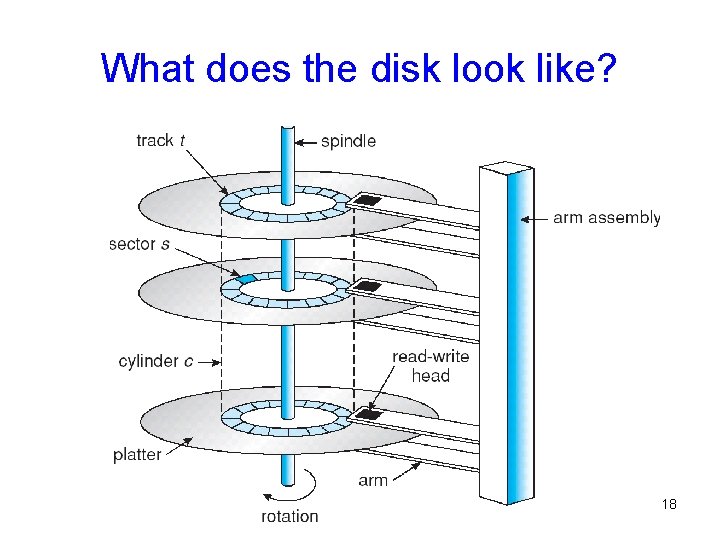
What does the disk look like? 18
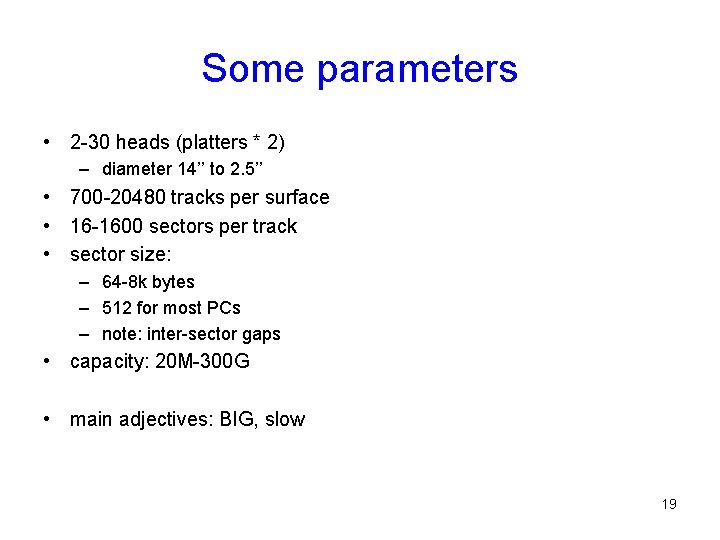
Some parameters • 2 -30 heads (platters * 2) – diameter 14’’ to 2. 5’’ • 700 -20480 tracks per surface • 16 -1600 sectors per track • sector size: – 64 -8 k bytes – 512 for most PCs – note: inter-sector gaps • capacity: 20 M-300 G • main adjectives: BIG, slow 19
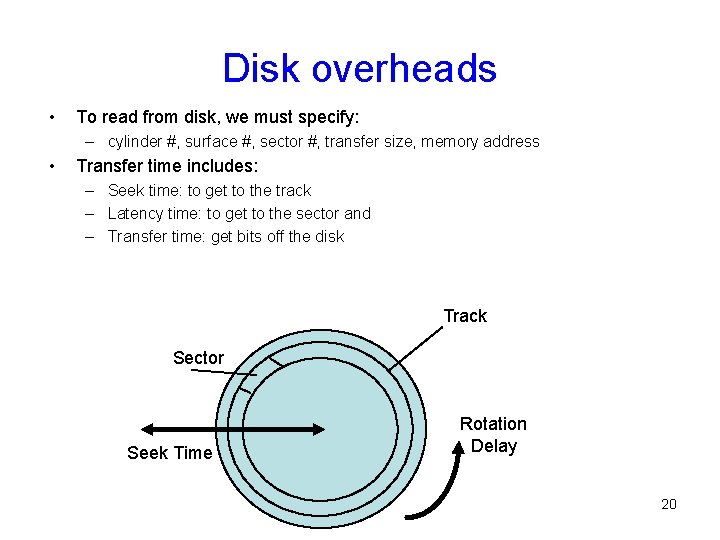
Disk overheads • To read from disk, we must specify: – cylinder #, surface #, sector #, transfer size, memory address • Transfer time includes: – Seek time: to get to the track – Latency time: to get to the sector and – Transfer time: get bits off the disk Track Sector Seek Time Rotation Delay 20
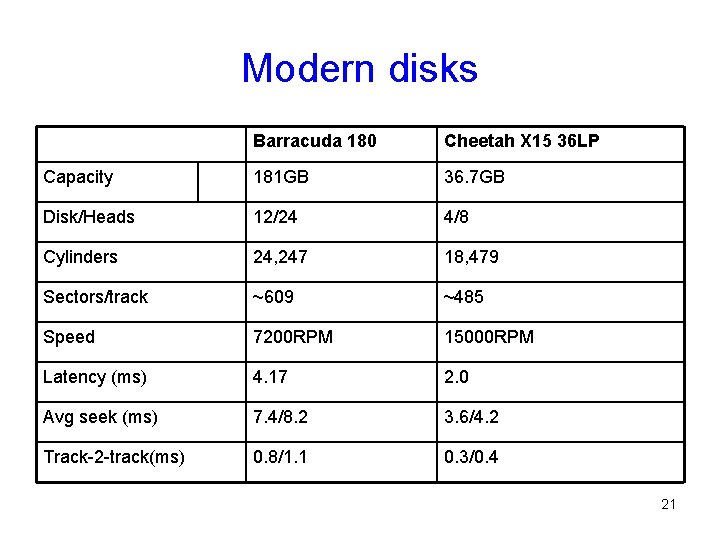
Modern disks Barracuda 180 Cheetah X 15 36 LP Capacity 181 GB 36. 7 GB Disk/Heads 12/24 4/8 Cylinders 24, 247 18, 479 Sectors/track ~609 ~485 Speed 7200 RPM 15000 RPM Latency (ms) 4. 17 2. 0 Avg seek (ms) 7. 4/8. 2 3. 6/4. 2 Track-2 -track(ms) 0. 8/1. 1 0. 3/0. 4 21
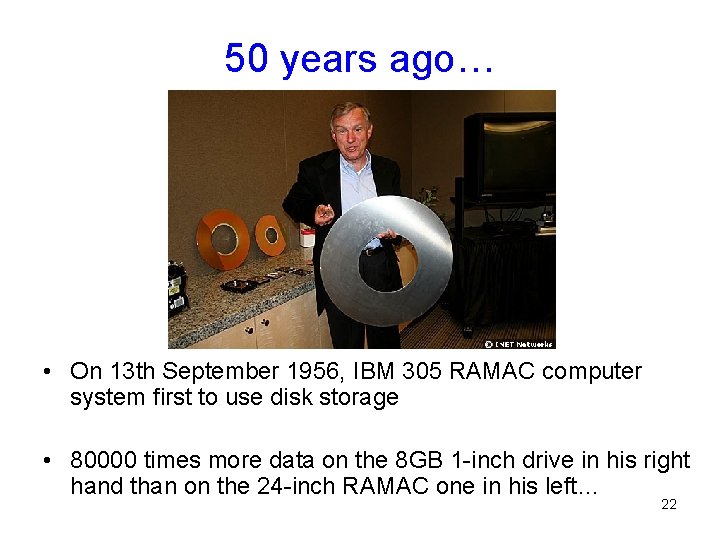
50 years ago… • On 13 th September 1956, IBM 305 RAMAC computer system first to use disk storage • 80000 times more data on the 8 GB 1 -inch drive in his right hand than on the 24 -inch RAMAC one in his left… 22
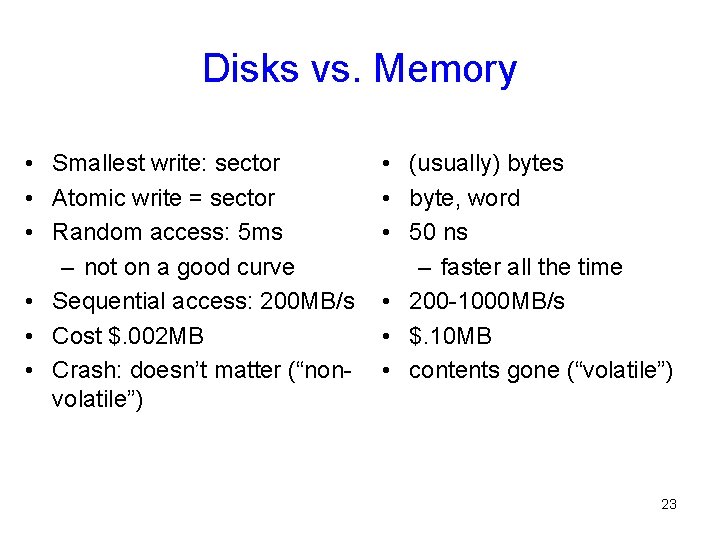
Disks vs. Memory • Smallest write: sector • Atomic write = sector • Random access: 5 ms – not on a good curve • Sequential access: 200 MB/s • Cost $. 002 MB • Crash: doesn’t matter (“nonvolatile”) • (usually) bytes • byte, word • 50 ns – faster all the time • 200 -1000 MB/s • $. 10 MB • contents gone (“volatile”) 23
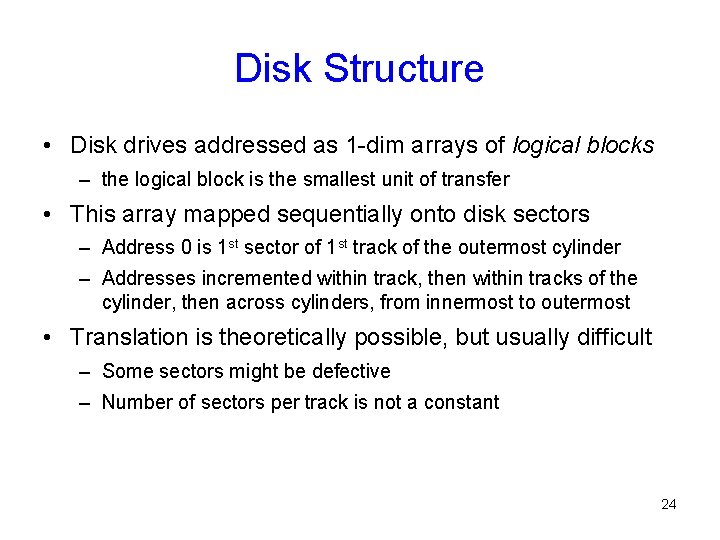
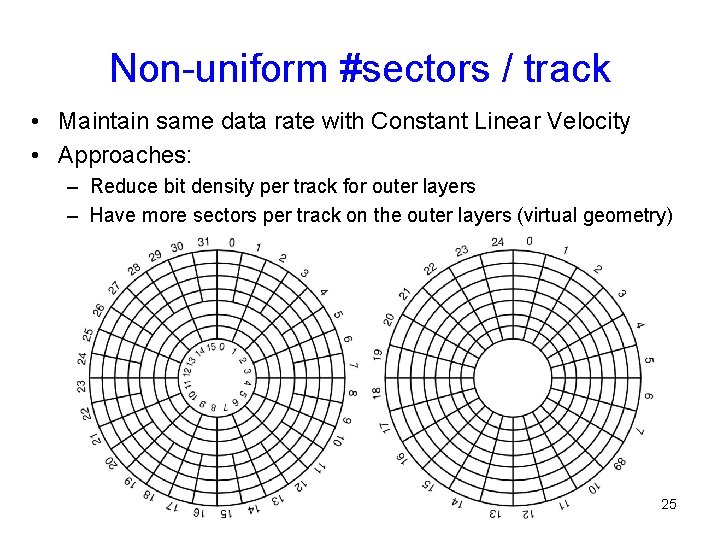
Disk Structure • Disk drives addressed as 1 -dim arrays of logical blocks – the logical block is the smallest unit of transfer • This array mapped sequentially onto disk sectors – Address 0 is 1 st sector of 1 st track of the outermost cylinder – Addresses incremented within track, then within tracks of the cylinder, then across cylinders, from innermost to outermost • Translation is theoretically possible, but usually difficult – Some sectors might be defective – Number of sectors per track is not a constant 24
Non-uniform #sectors / track • Maintain same data rate with Constant Linear Velocity • Approaches: – Reduce bit density per track for outer layers – Have more sectors per track on the outer layers (virtual geometry) 25
Disk Scheduling • The operating system tries to use hardware efficiently – for disk drives having fast access time, disk bandwidth • Access time has two major components – Seek time is time to move the heads to the cylinder containing the desired sector – Rotational latency is additional time waiting to rotate the desired sector to the disk head. • Minimize seek time • Seek time seek distance • Disk bandwidth is total number of bytes transferred, divided by the total time between the first request for service and the completion of the last transfer. 26
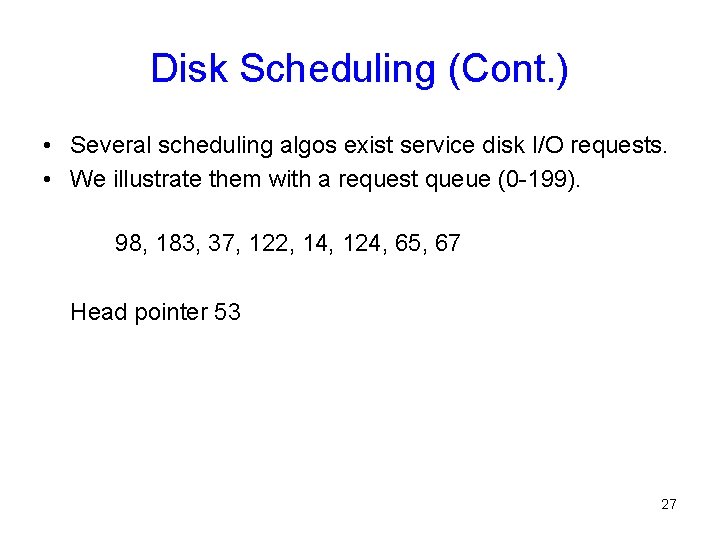
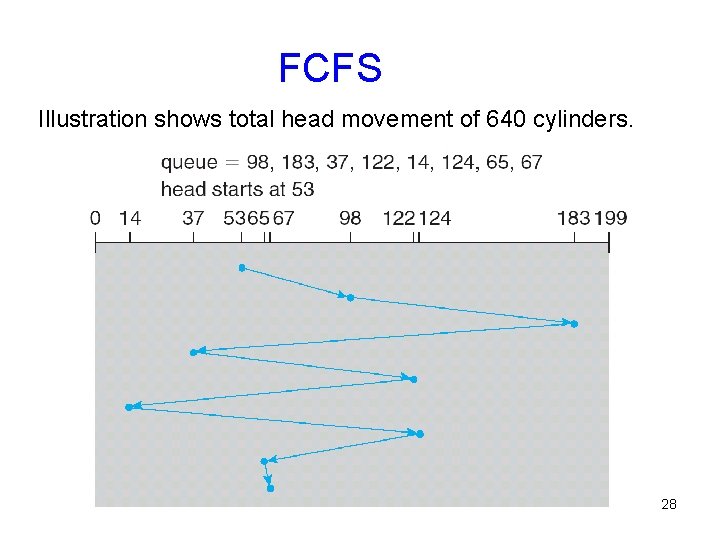
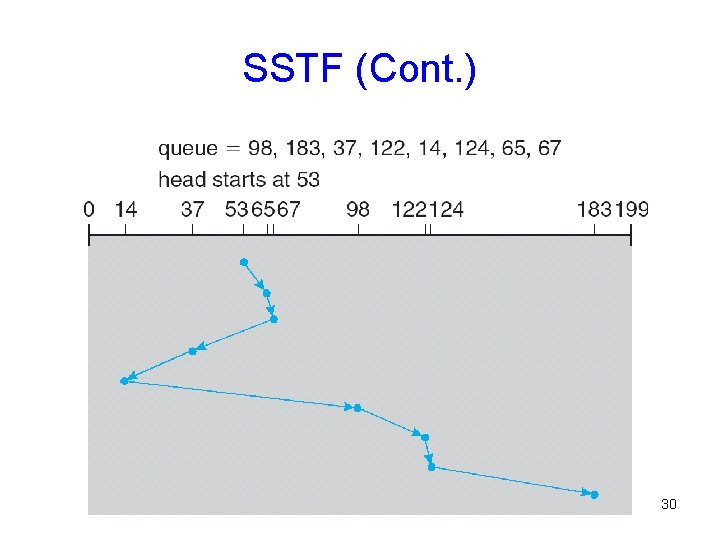
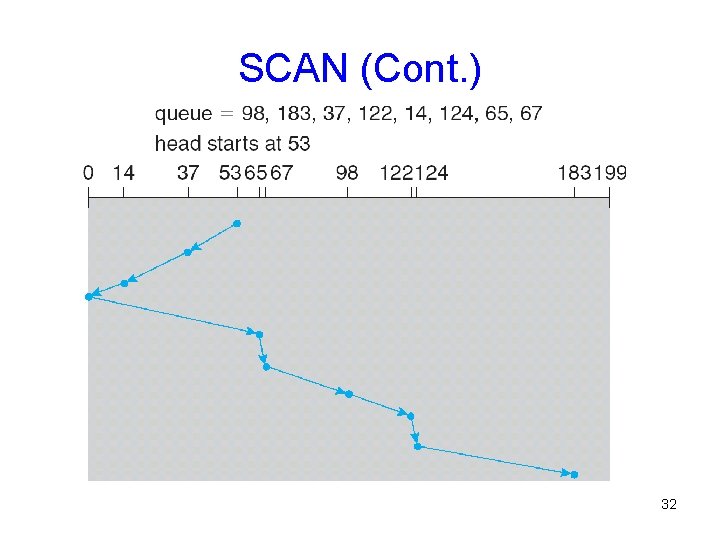
Disk Scheduling (Cont. ) • Several scheduling algos exist service disk I/O requests. • We illustrate them with a request queue (0 -199). 98, 183, 37, 122, 14, 124, 65, 67 Head pointer 53 27
FCFS Illustration shows total head movement of 640 cylinders. 28
SSTF • Selects request with minimum seek time from current head position • SSTF scheduling is a form of SJF scheduling – may cause starvation of some requests. • Illustration shows total head movement of 236 cylinders. 29
SSTF (Cont. ) 30
SCAN • The disk arm starts at one end of the disk, – moves toward the other end, servicing requests – head movement is reversed when it gets to the other end of disk – servicing continues. • Sometimes called the elevator algorithm. • Illustration shows total head movement of 208 cylinders. 31
SCAN (Cont. ) 32
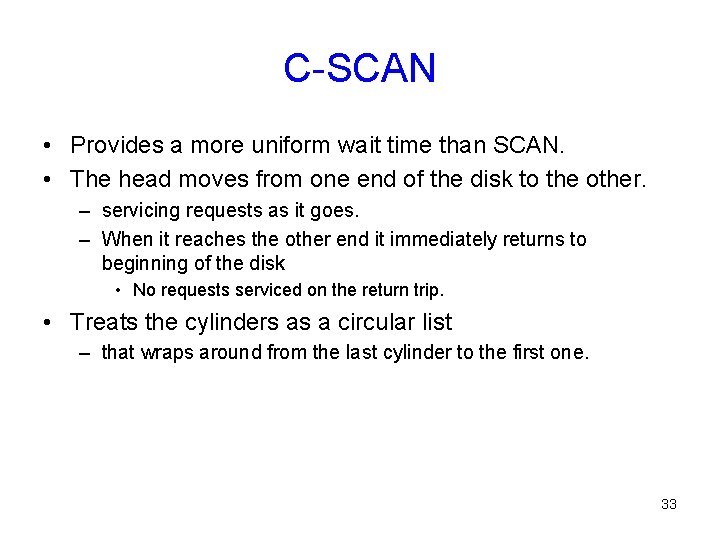
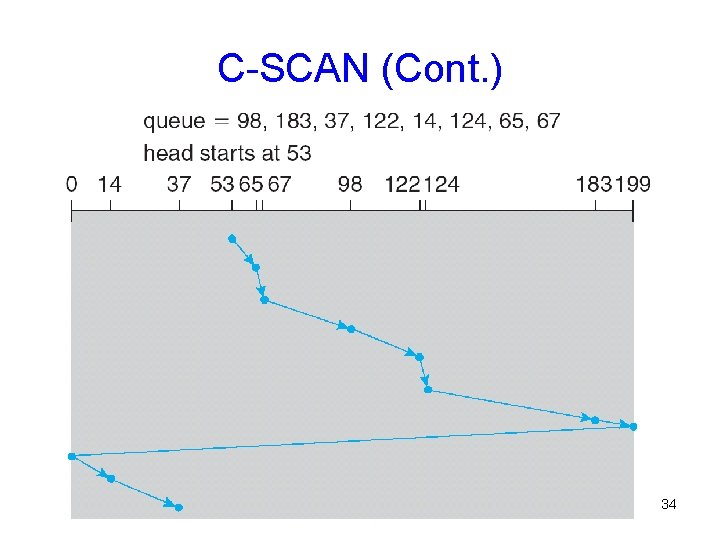
C-SCAN • Provides a more uniform wait time than SCAN. • The head moves from one end of the disk to the other. – servicing requests as it goes. – When it reaches the other end it immediately returns to beginning of the disk • No requests serviced on the return trip. • Treats the cylinders as a circular list – that wraps around from the last cylinder to the first one. 33
C-SCAN (Cont. ) 34
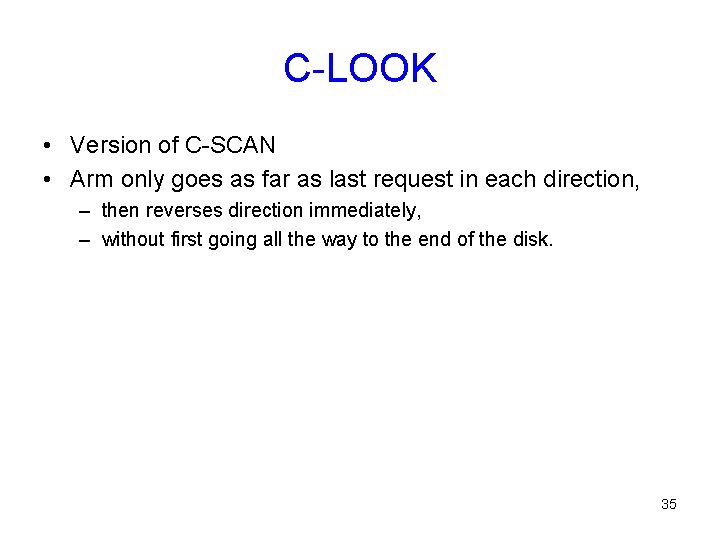
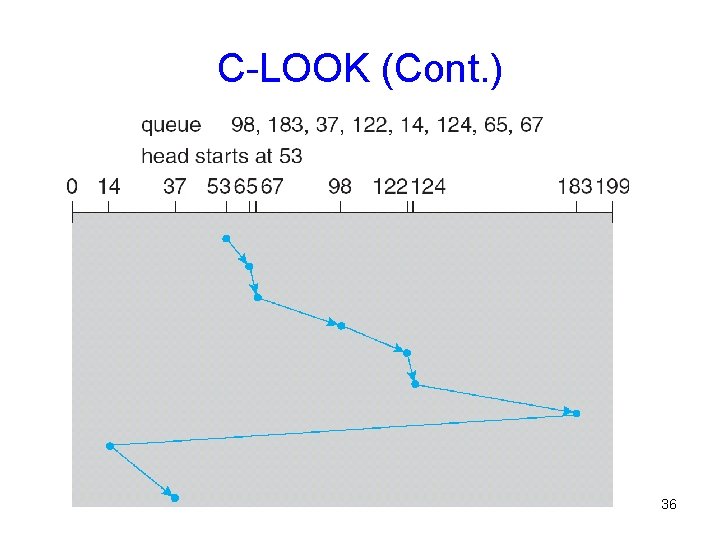
C-LOOK • Version of C-SCAN • Arm only goes as far as last request in each direction, – then reverses direction immediately, – without first going all the way to the end of the disk. 35
C-LOOK (Cont. ) 36
Selecting a Good Algorithm • SSTF is common and has a natural appeal • SCAN and C-SCAN perform better under heavy load • Performance depends on number and types of requests • Requests for disk service can be influenced by the fileallocation method. • Disk-scheduling algo should be a separate OS module – allowing it to be replaced with a different algorithm if necessary. • Either SSTF or LOOK is a reasonable default algo 37
• I/O Devices Types: Summary – Many different speeds (0. 1 bytes/sec to GBytes/sec) – Different Access Patterns: • Block Devices, Character Devices, Network Devices – Different Access Timing: • Blocking, Non-blocking, Asynchronous • I/O Controllers: Hardware that controls actual device – Processor Accesses through I/O instructions, load/store to special physical memory – Report their results through either interrupts or a status register that processor looks at occasionally (polling) • Device Driver: Device-specific code in kernel • Disks: – Latency Seek + Rotational + Transfer • Also, queuing time – Rotational latency: on average ½ rotation • Improve performance (decrease queuing time) via scheduling 38