
Application guideline for International students in Inha University

- Slides: 38
인하대학교 외국인 원서접수 방법 정리 Application guideline for International students in Inha University
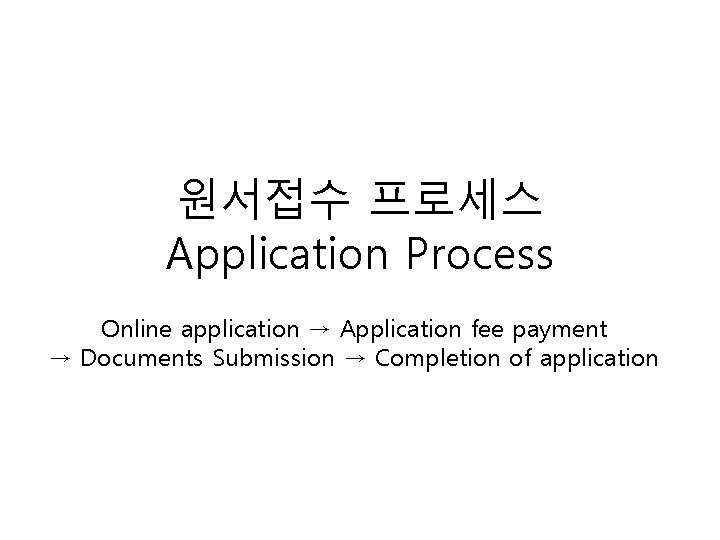
원서접수 프로세스 Application Process Online application → Application fee payment → Documents Submission → Completion of application
온라인 원서접수 Online application
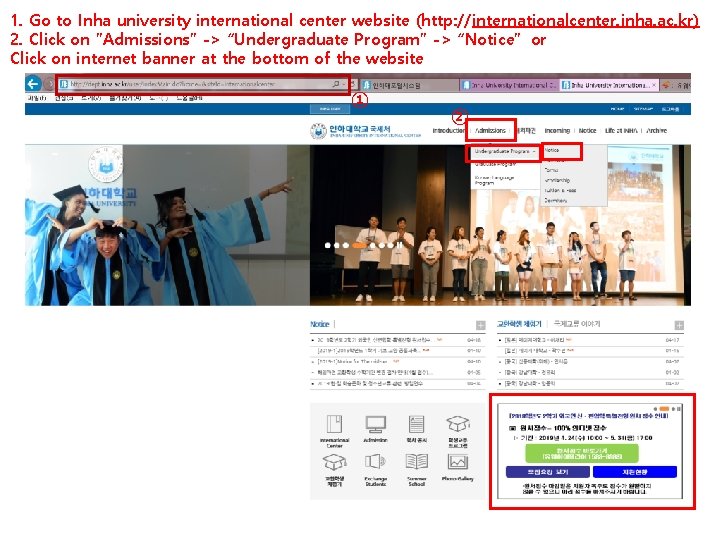
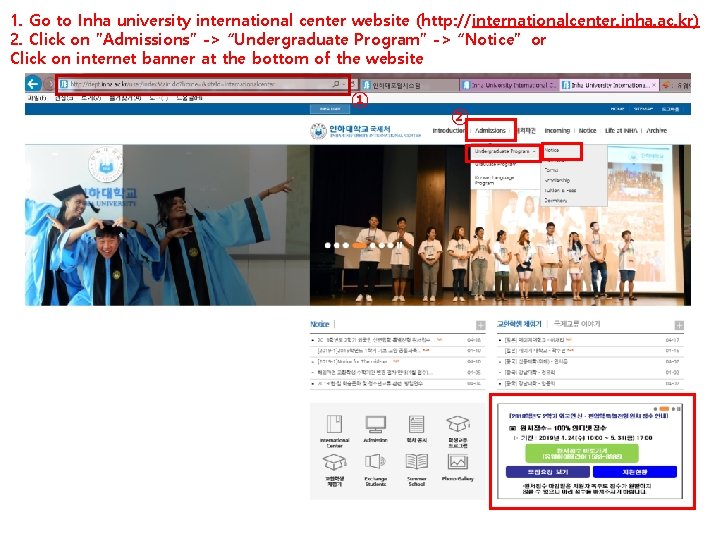
1. Go to Inha university international center website (http: //internationalcenter. inha. ac. kr) 2. Click on ”Admissions” -> “Undergraduate Program” -> “Notice” or Click on internet banner at the bottom of the website ① ②
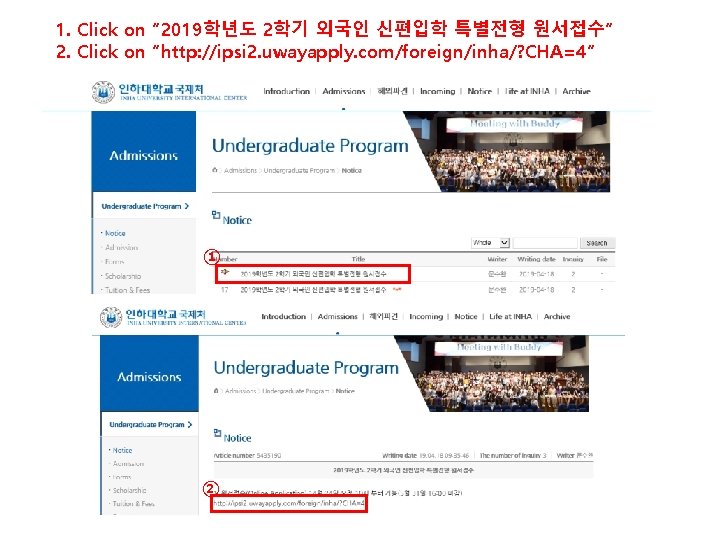
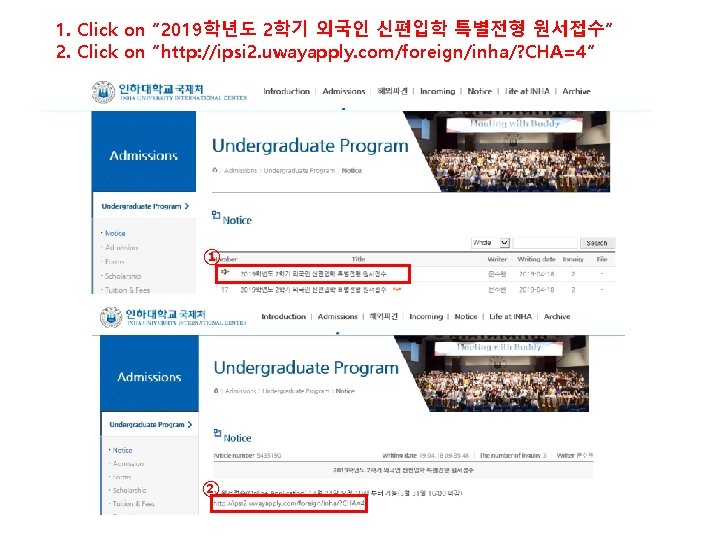
1. Click on ” 2019학년도 2학기 외국인 신편입학 특별전형 원서접수“ 2. Click on ”http: //ipsi 2. uwayapply. com/foreign/inha/? CHA=4” ① ②
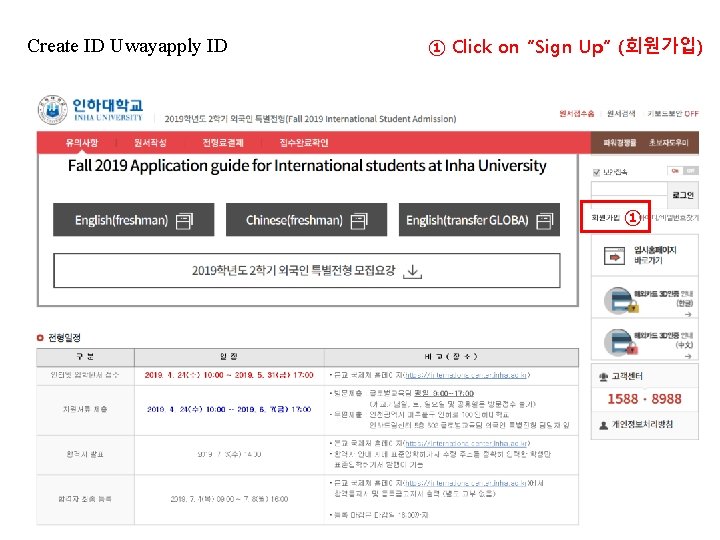
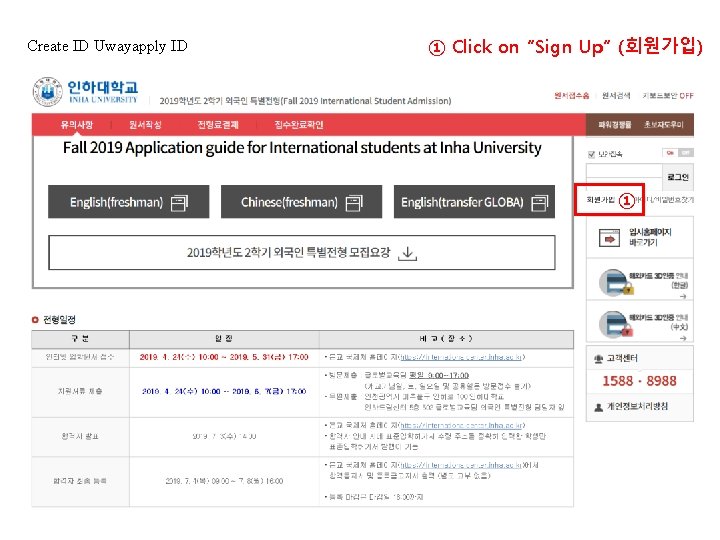
Create ID Uwayapply ID ① Click on “Sign Up” (회원가입) ①
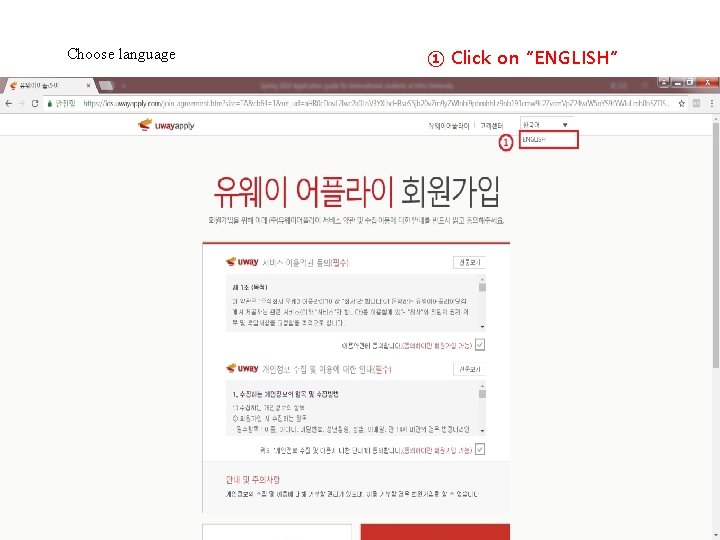
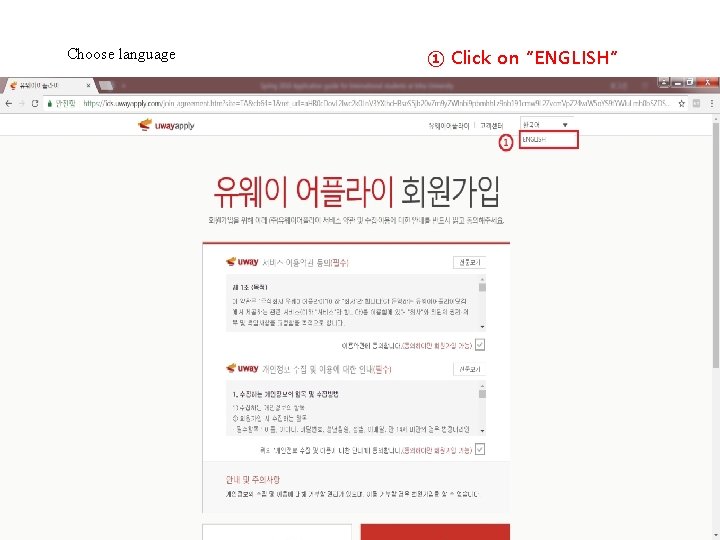
Choose language ① Click on “ENGLISH”
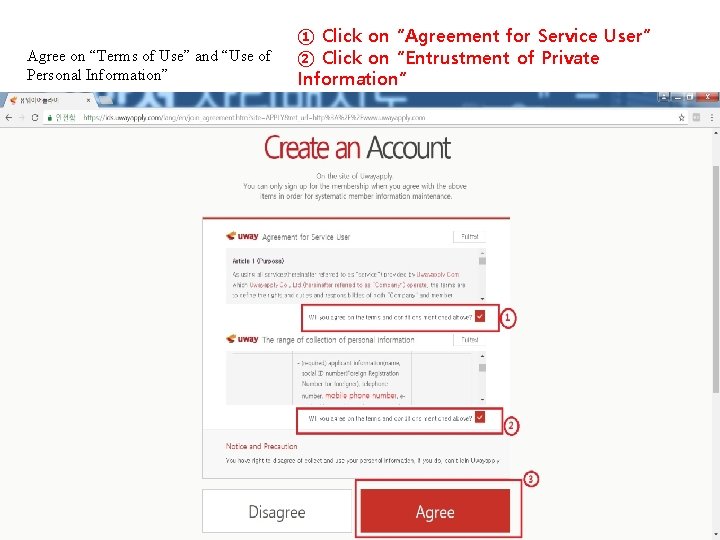
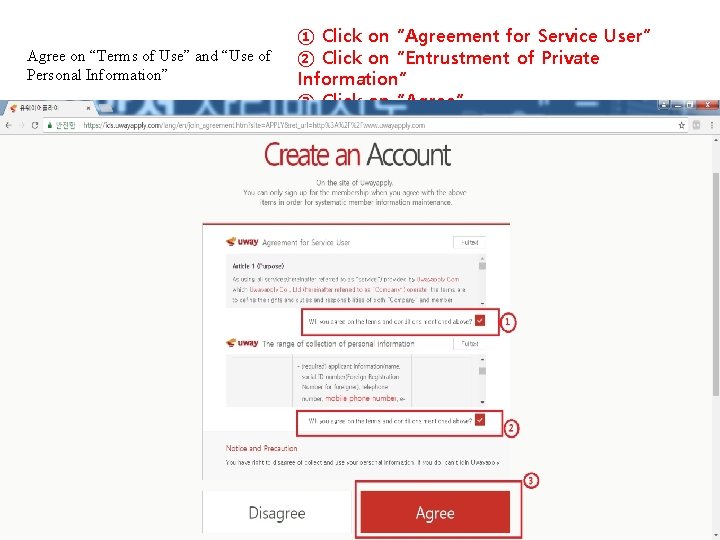
Agree on “Terms of Use” and “Use of Personal Information” ① Click on “Agreement for Service User” ② Click on “Entrustment of Private Information” ③ Click on “Agree”
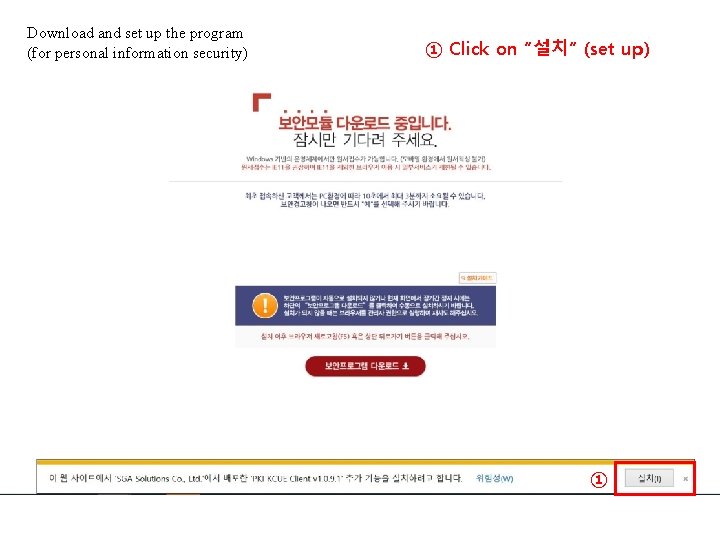
Download and set up the program (for personal information security) ① Click on “설치” (set up) ①
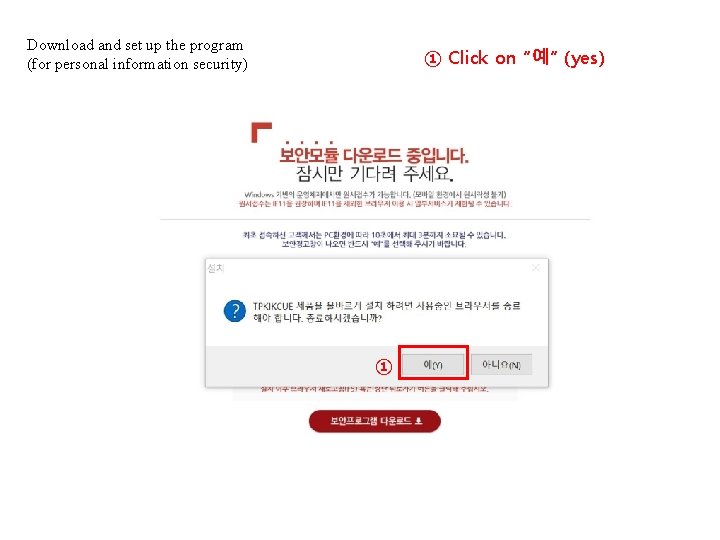
Download and set up the program (for personal information security) ① Click on “예” (yes) ①
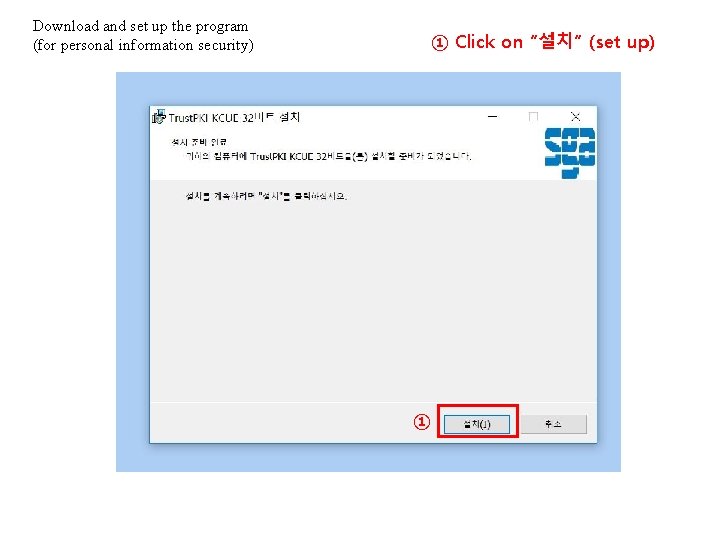
Download and set up the program (for personal information security) ① Click on “설치” (set up) ①
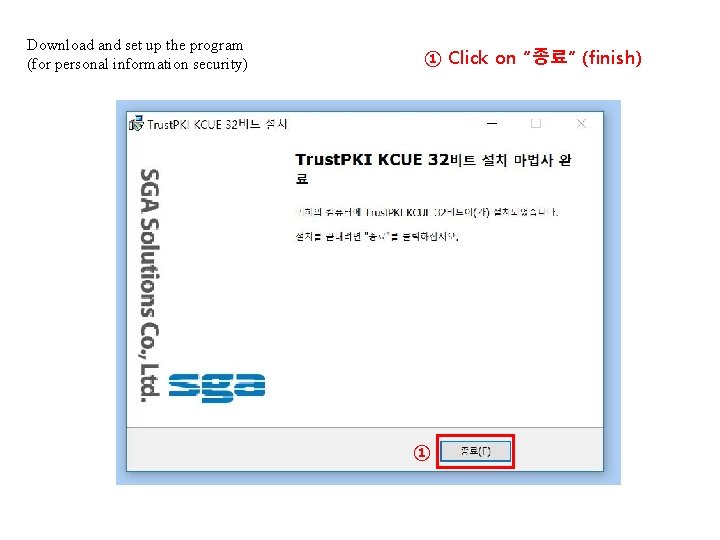
Download and set up the program (for personal information security) ① Click on “종료” (finish) ①
1. Go to Inha university international center website (http: //internationalcenter. inha. ac. kr) 2. Click on ”Admissions” -> “Undergraduate Program” -> “Notice” or Click on internet banner at the bottom of the website ① ②
1. Click on ” 2019학년도 2학기 외국인 신편입학 특별전형 원서접수“ 2. Click on ”http: //ipsi 2. uwayapply. com/foreign/inha/? CHA=4” ① ②
Create ID Uwayapply ID ① Click on “Sign Up” (회원가입) ①
Choose language ① Click on “ENGLISH”
Agree on “Terms of Use” and “Use of Personal Information” ① Click on “Agreement for Service User” ② Click on “Entrustment of Private Information” ③ Click on “Agree”
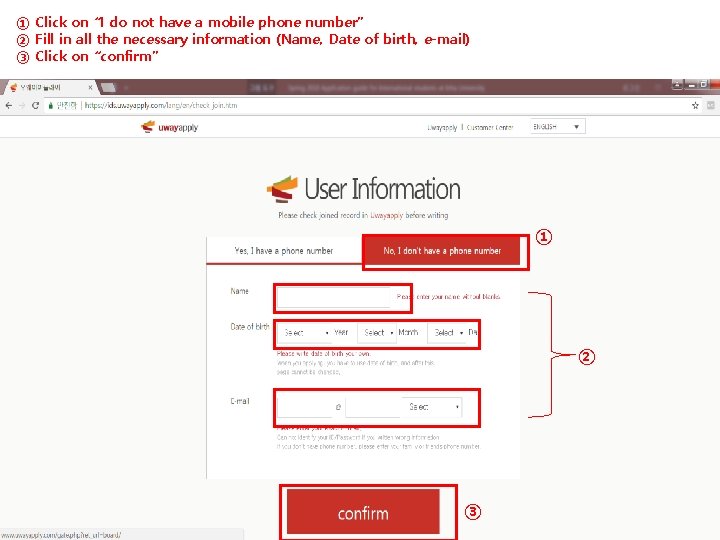
① Click on “I do not have a mobile phone number” ② Fill in all the necessary information (Name, Date of birth, e-mail) ③ Click on “confirm” ① ② ③
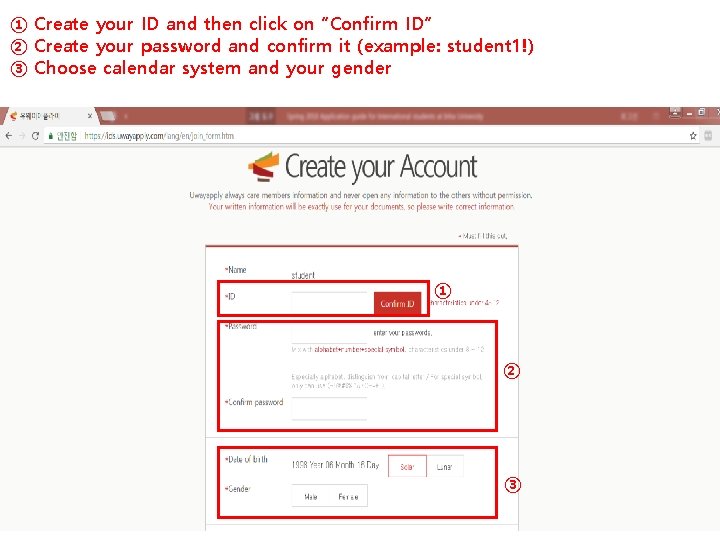
① Create your ID and then click on “Confirm ID” ② Create your password and confirm it (example: student 1!) ③ Choose calendar system and your gender ① ② ③
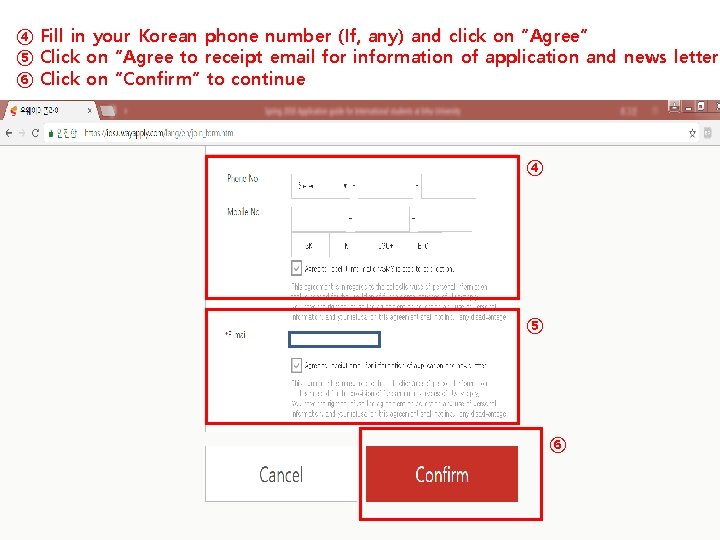
④ Fill in your Korean phone number (If, any) and click on “Agree” ⑤ Click on “Agree to receipt email for information of application and news letter” ⑥ Click on “Confirm” to continue ④ ⑤ ⑥
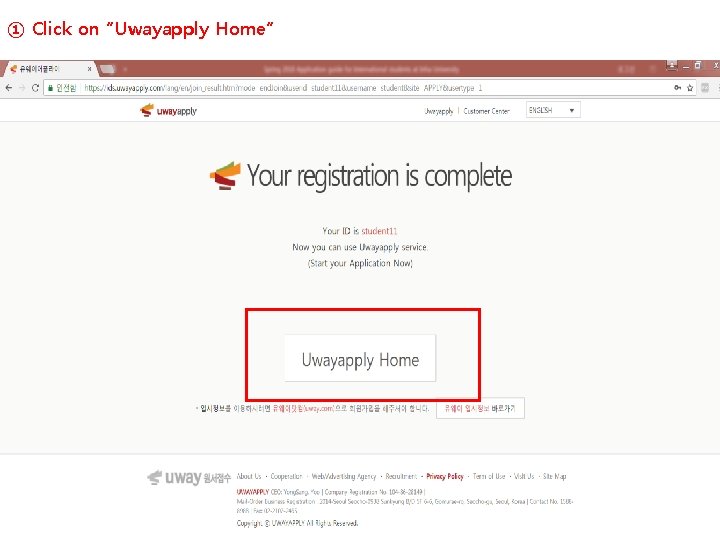
① Click on “Uwayapply Home”
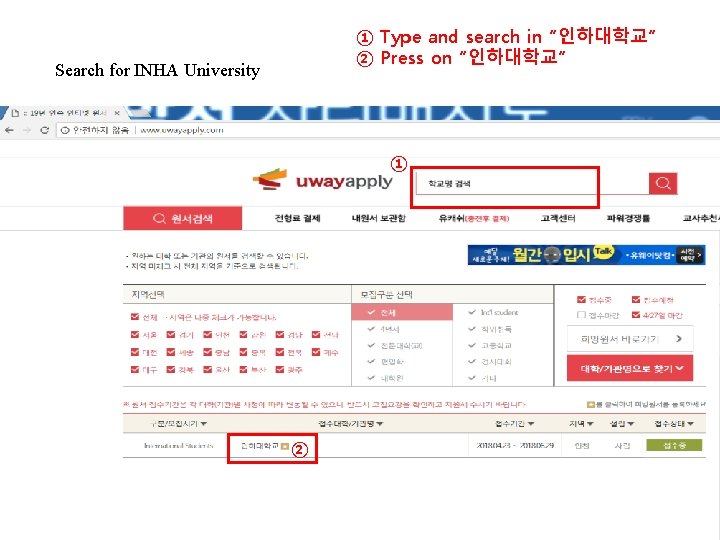
① Type and search in “인하대학교” ② Press on “인하대학교” Search for INHA University ① ②
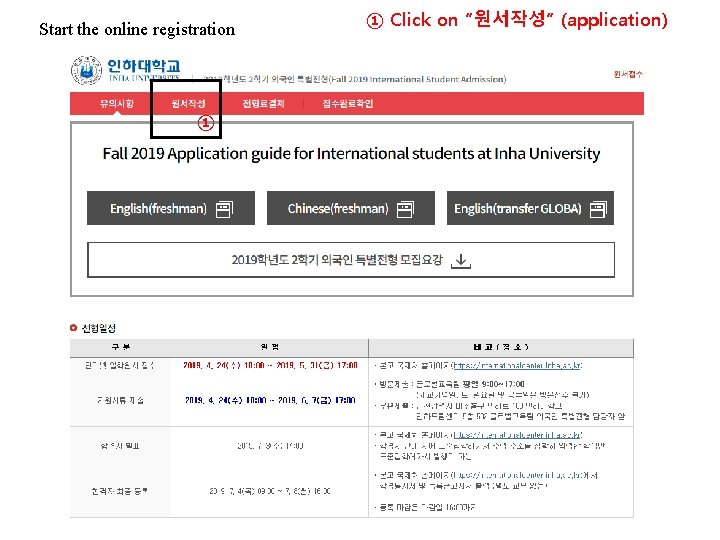
Start the online registration ① ① Click on “원서작성” (application)
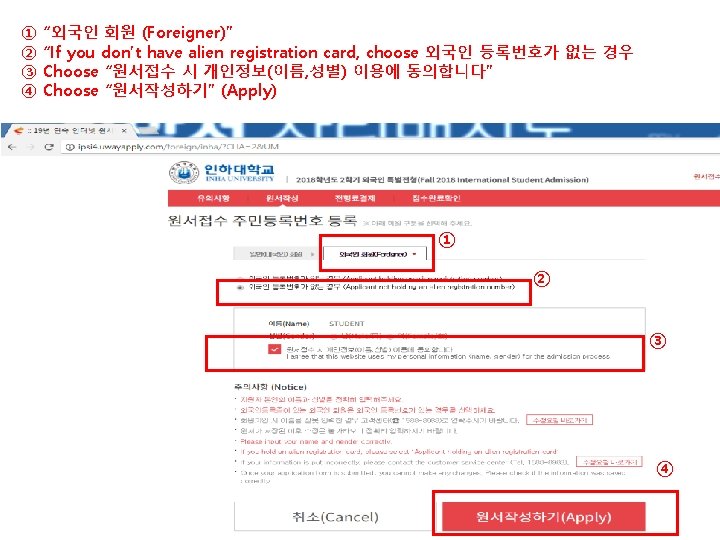
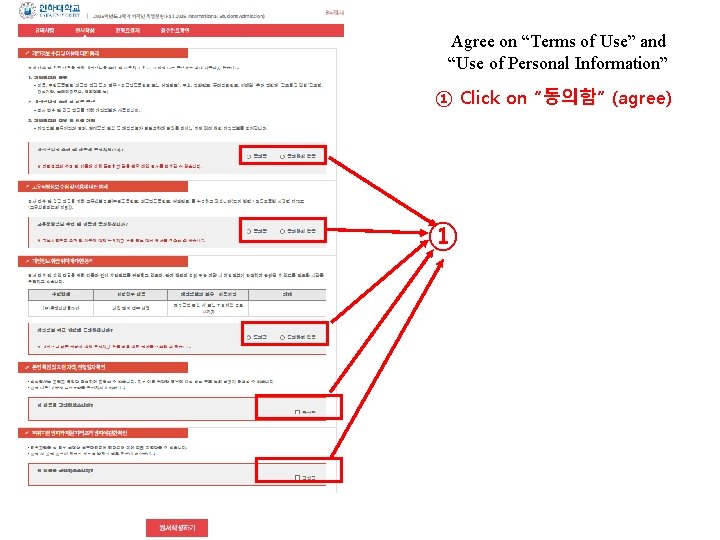
Agree on “Terms of Use” and “Use of Personal Information” ① Click on “동의함” (agree) ①
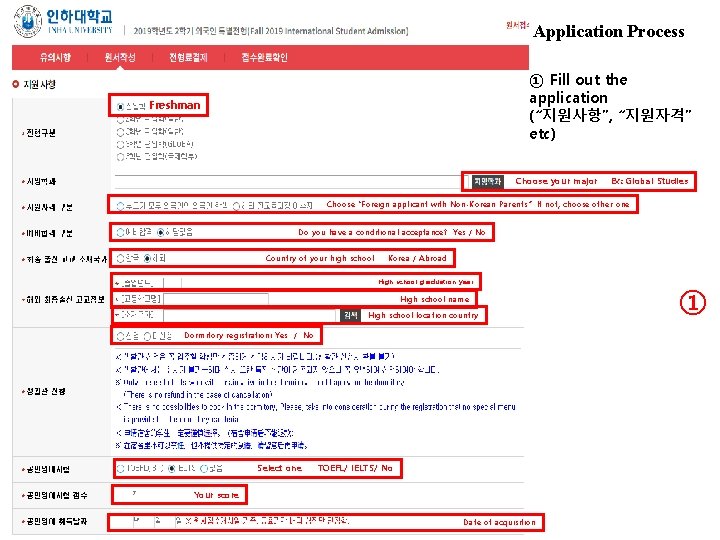
Application Process ① Fill out the application (“지원사항”, “지원자격” etc) Freshman Choose your major Ex: Global Studies Choose “Foreign applicant with Non-Korean Parents” If not, choose other one Do you have a conditional acceptance? Yes / No Country of your high school Korea / Abroad High school graduation year High school name High school location country Dormitory registration: Yes / No Select one TOEFL/ IELTS/ No Your score Date of acquisition ①
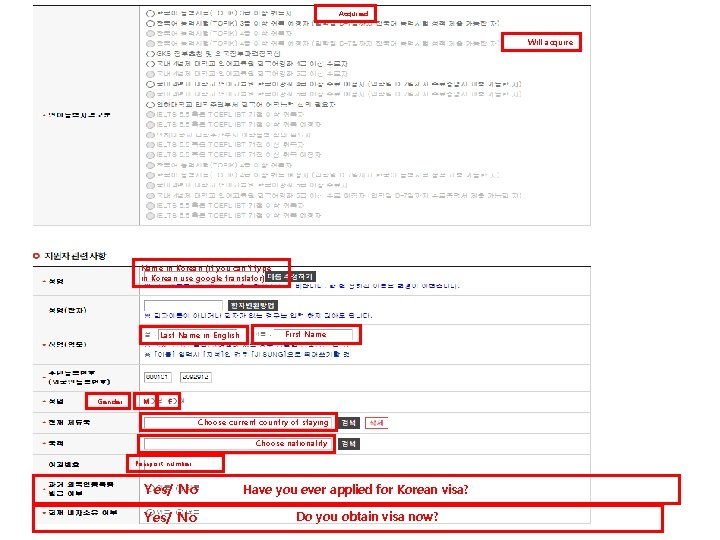
Acquired Will acquire Name in Korean (if you can’t type in Korean use google translator) Last Name in English Gender M First Name F Choose current country of staying Choose nationality Passport number Yes/ No Have you ever applied for Korean visa? Do you obtain visa now?
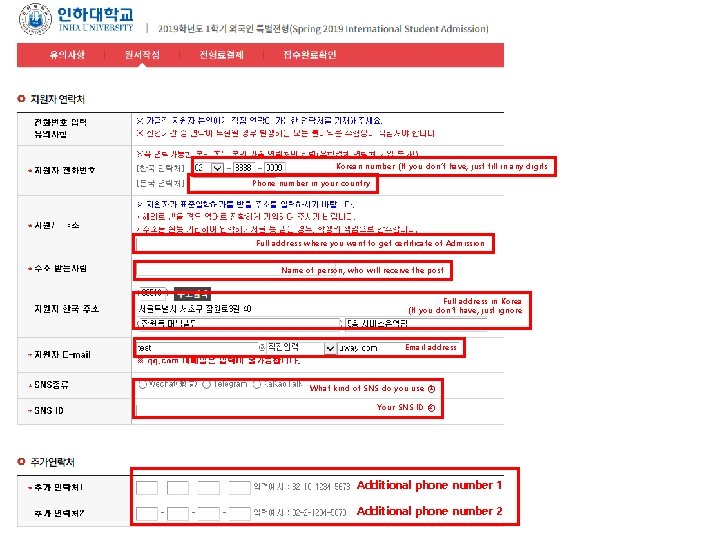
Korean number (If you don’t have, just fill in any digits Phone number in your country Full address where you want to get certificate of Admission Name of person, who will receive the post Full address in Korea (If you don’t have, just ignore Email address What kind of SNS do you use ① Your SNS ID ② Additional phone number 1 Additional phone number 2
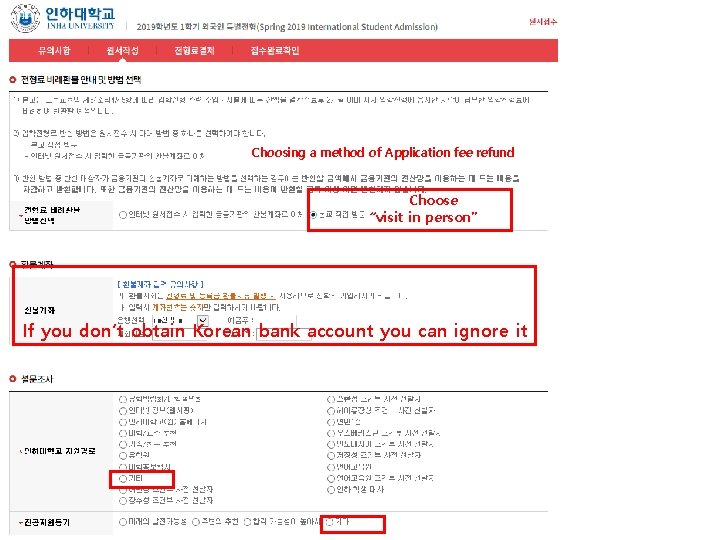
Choosing a method of Application fee refund Choose “visit in person” If you don’t obtain Korean bank account you can ignore it
① ① Confirm your information ② After confirmation click on “저장하기" ① ②
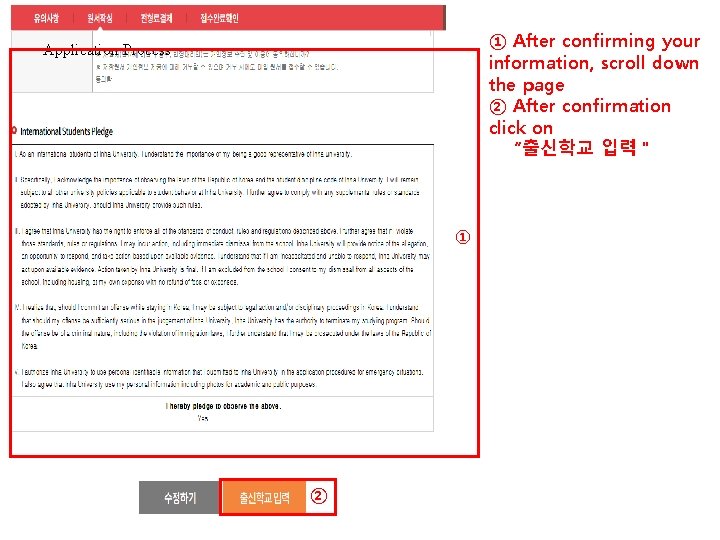
① After confirming your information, scroll down the page ② After confirmation click on “출신학교 입력" Application Process ① ②
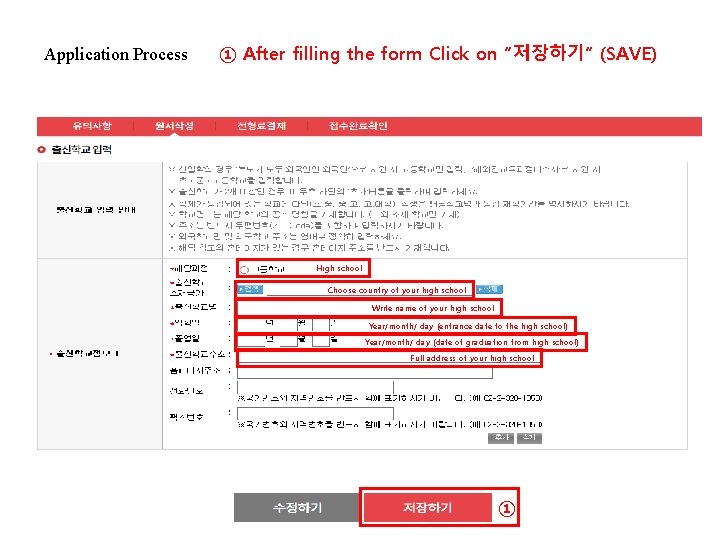
Application Process ① After filling the form Click on “저장하기” (SAVE) High school Choose country of your high school Write name of your high school Year/month/ day (entrance date to the high school) Year/month/ day (date of graduation from high school) Full address of your high school ①
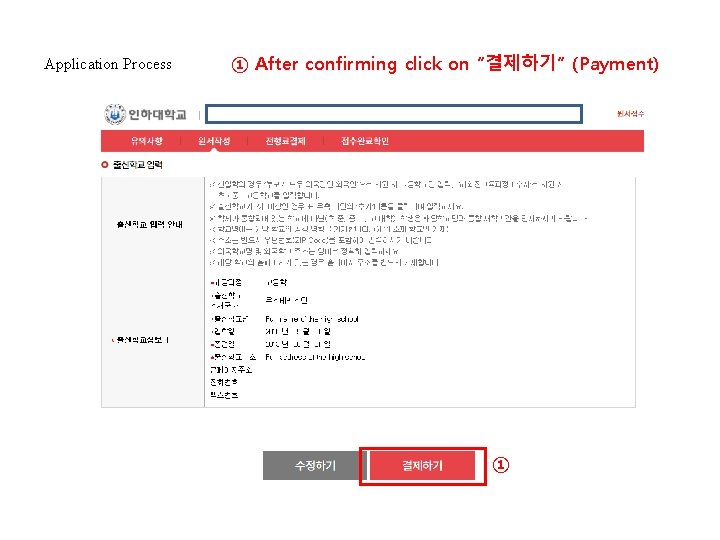
Application Process ① After confirming click on “결제하기” (Payment) ①
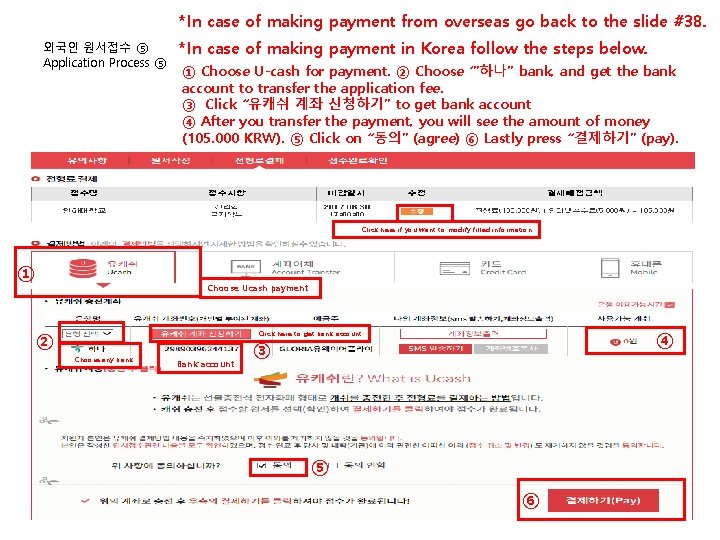
*In case of making payment from overseas go back to the slide #38. 외국인 원서접수 ⑤ Application Process ⑤ *In case of making payment in Korea follow the steps below. ① Choose U-cash for payment. ② Choose ‘”하나” bank, and get the bank account to transfer the application fee. ③ Click “유캐쉬 계좌 신청하기” to get bank account ④ After you transfer the payment, you will see the amount of money (105. 000 KRW). ⑤ Click on “동의” (agree) ⑥ Lastly press “결제하기” (pay). Click here if you want to modify filled information ① Choose Ucash payment ② ④ Click here to get bank account Choose any bank Bank account ③ ⑤ ⑥
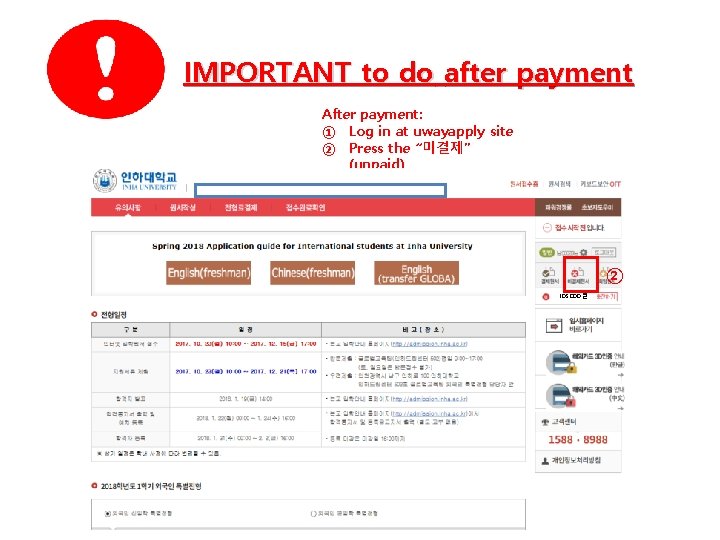
IMPORTANT to do after payment After payment: ① Log in at uwayapply site ② Press the “미결제” (unpaid) ② 105. 000 원
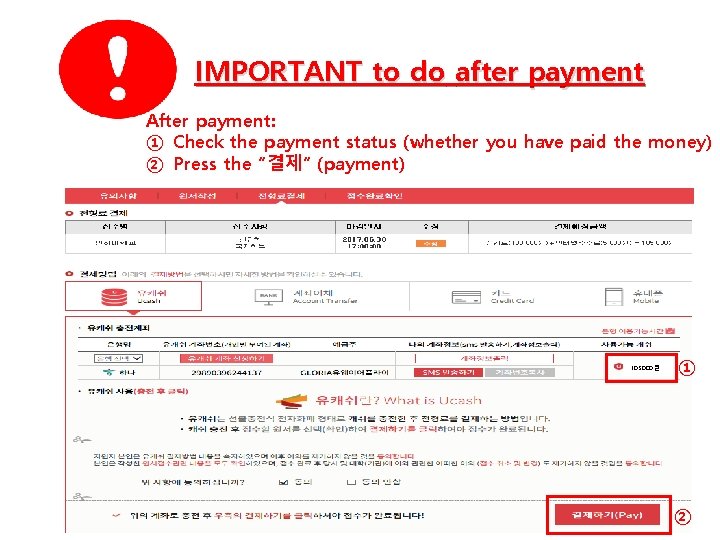
IMPORTANT to do after payment After payment: ① Check the payment status (whether you have paid the money) ② Press the “결제” (payment) 105. 000 원 ① ②
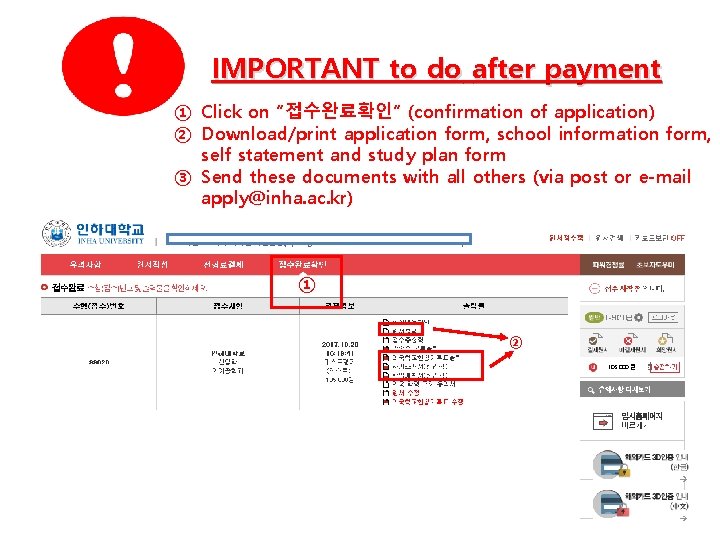
IMPORTANT to do after payment ① Click on “접수완료확인” (confirmation of application) ② Download/print application form, school information form, self statement and study plan form ③ Send these documents with all others (via post or e-mail apply@inha. ac. kr) ① ② 105. 000 원
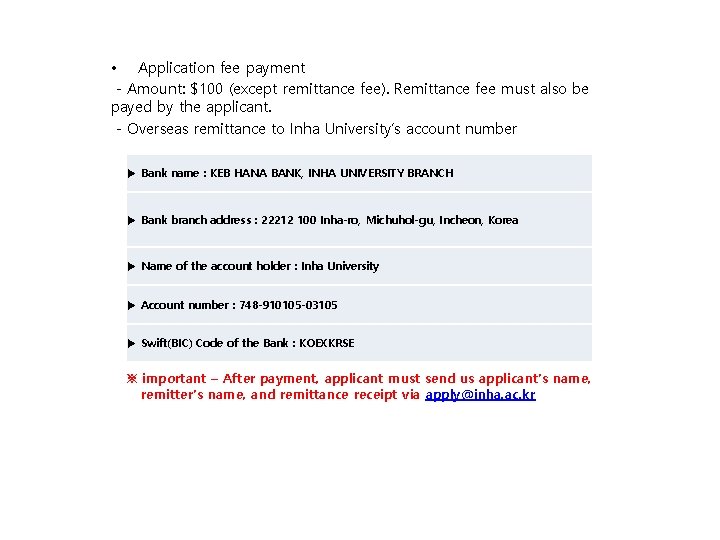
• Application fee payment - Amount: $100 (except remittance fee). Remittance fee must also be payed by the applicant. - Overseas remittance to Inha University’s account number ▶ Bank name : KEB HANA BANK, INHA UNIVERSITY BRANCH ▶ Bank branch address : 22212 100 Inha-ro, Michuhol-gu, Incheon, Korea ▶ Name of the account holder : Inha University ▶ Account number : 748 -910105 -03105 ▶ Swift(BIC) Code of the Bank : KOEXKRSE ※ important – After payment, applicant must send us applicant’s name, remitter’s name, and remittance receipt via apply@inha. ac. kr