Systems I Locality and Caching Topics n n
![Locality Example Question: Does this function have good locality? int sumarraycols(int a[M][N]) { int](https://slidetodoc.com/presentation_image/440921501be435a08e5d25a2ff61a912/image-4.jpg "Locality Example Question: Does this function have good locality? int sumarraycols(int a[M][N]) { int")
- Slides: 18
Systems I Locality and Caching Topics n n n Locality of reference Cache principles Multi-level caches
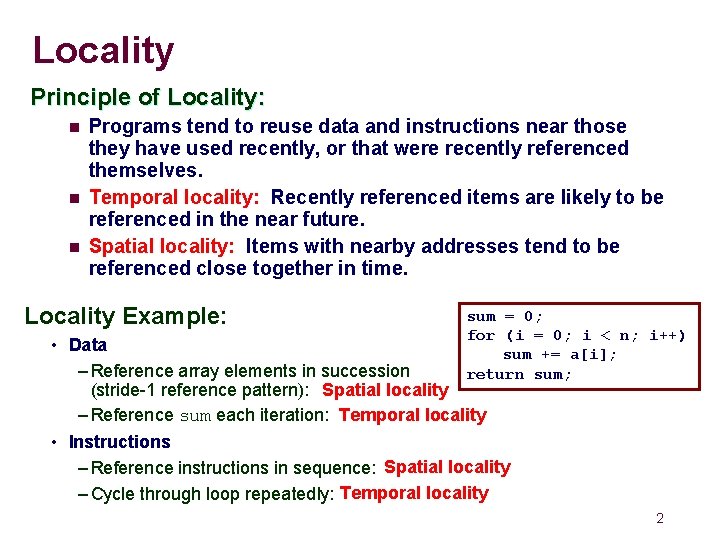
Locality Principle of Locality: n n n Programs tend to reuse data and instructions near those they have used recently, or that were recently referenced themselves. Temporal locality: Recently referenced items are likely to be referenced in the near future. Spatial locality: Items with nearby addresses tend to be referenced close together in time. Locality Example: sum = 0; for (i = 0; i < n; i++) sum += a[i]; return sum; • Data – Reference array elements in succession (stride-1 reference pattern): Spatial locality – Reference sum each iteration: Temporal locality • Instructions – Reference instructions in sequence: Spatial locality – Cycle through loop repeatedly: Temporal locality 2
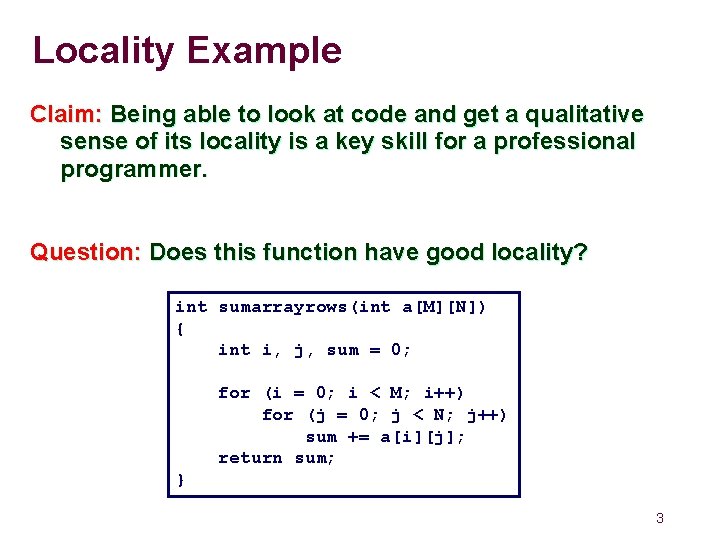
Locality Example Claim: Being able to look at code and get a qualitative sense of its locality is a key skill for a professional programmer. Question: Does this function have good locality? int sumarrayrows(int a[M][N]) { int i, j, sum = 0; for (i = 0; i < M; i++) for (j = 0; j < N; j++) sum += a[i][j]; return sum; } 3
Locality Example Question: Does this function have good locality? int sumarraycols(int a[M][N]) { int i, j, sum = 0; for (j = 0; j < N; j++) for (i = 0; i < M; i++) sum += a[i][j]; return sum; } 4
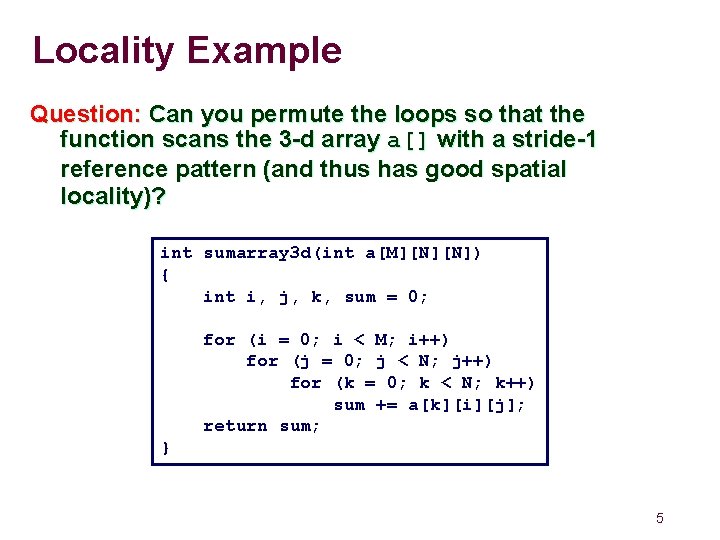
Locality Example Question: Can you permute the loops so that the function scans the 3 -d array a[] with a stride-1 reference pattern (and thus has good spatial locality)? int sumarray 3 d(int a[M][N][N]) { int i, j, k, sum = 0; for (i = 0; i < M; i++) for (j = 0; j < N; j++) for (k = 0; k < N; k++) sum += a[k][i][j]; return sum; } 5
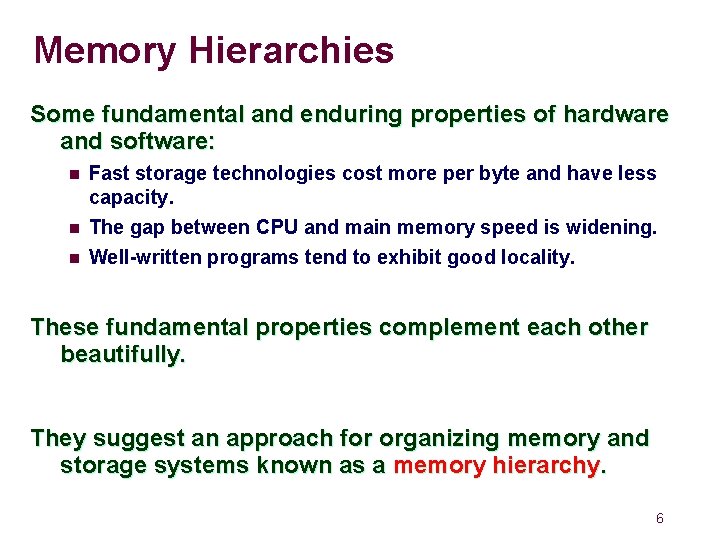
Memory Hierarchies Some fundamental and enduring properties of hardware and software: n n n Fast storage technologies cost more per byte and have less capacity. The gap between CPU and main memory speed is widening. Well-written programs tend to exhibit good locality. These fundamental properties complement each other beautifully. They suggest an approach for organizing memory and storage systems known as a memory hierarchy. 6
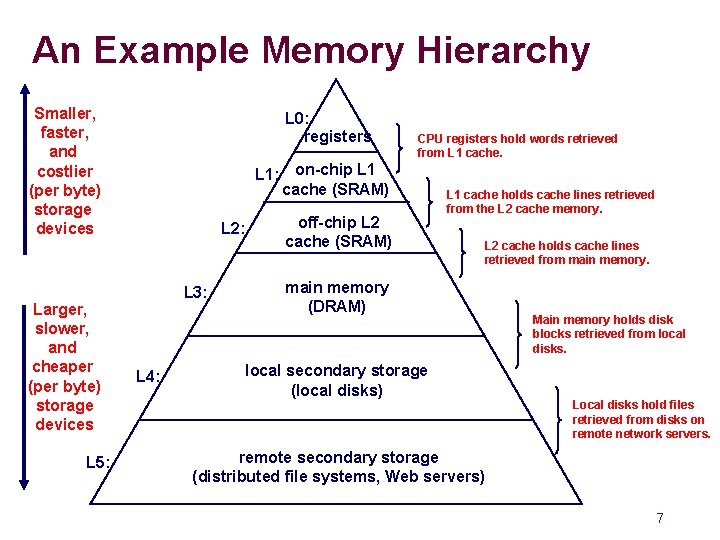
An Example Memory Hierarchy Smaller, faster, and costlier (per byte) storage devices Larger, slower, and cheaper (per byte) storage devices L 5: L 0: registers CPU registers hold words retrieved from L 1 cache. L 1: on-chip L 1 cache (SRAM) L 2: L 3: L 4: off-chip L 2 cache (SRAM) L 1 cache holds cache lines retrieved from the L 2 cache memory. L 2 cache holds cache lines retrieved from main memory (DRAM) local secondary storage (local disks) Main memory holds disk blocks retrieved from local disks. Local disks hold files retrieved from disks on remote network servers. remote secondary storage (distributed file systems, Web servers) 7
Caches Cache: A smaller, faster storage device that acts as a staging area for a subset of the data in a larger, slower device. Fundamental idea of a memory hierarchy: n For each k, the faster, smaller device at level k serves as a cache for the larger, slower device at level k+1. Why do memory hierarchies work? n n Programs tend to access the data at level k more often than they access the data at level k+1. Thus, the storage at level k+1 can be slower, and thus larger and cheaper bit. Net effect: A large pool of memory that costs as much as the cheap storage near the bottom, but that serves data to programs at the rate of the fast storage near the top. Use combination of small fast memory and big slow memory to give illusion of big fast memory. 8
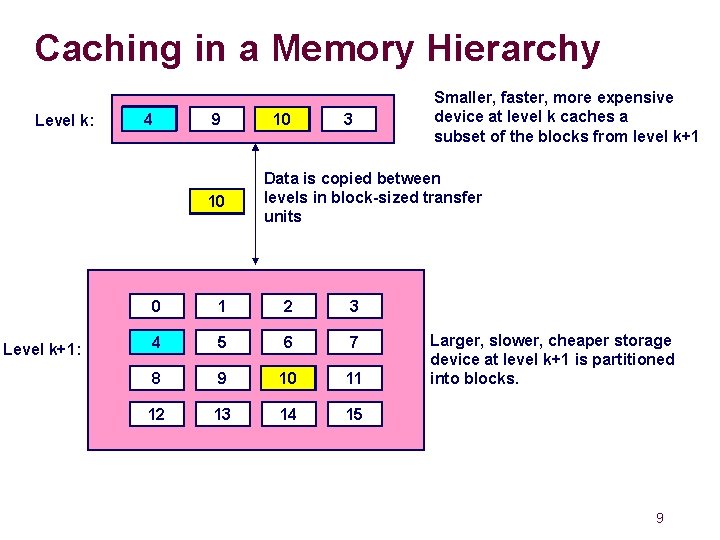
Caching in a Memory Hierarchy Level k: 8 4 9 10 4 Level k+1: 14 10 3 Smaller, faster, more expensive device at level k caches a subset of the blocks from level k+1 Data is copied between levels in block-sized transfer units 0 1 2 3 4 5 6 7 8 9 10 11 12 13 14 15 Larger, slower, cheaper storage device at level k+1 is partitioned into blocks. 9
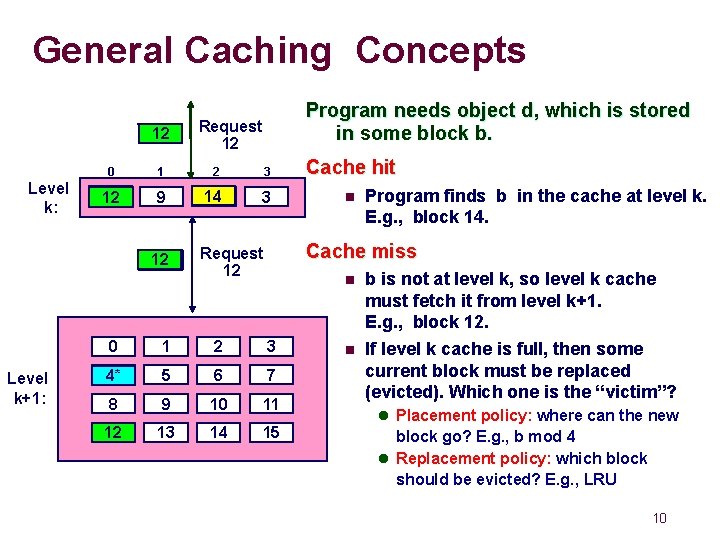
General Caching Concepts 14 12 Level k: 0 1 2 3 Cache hit 4* 12 9 14 3 n 12 4* Level k+1: Program needs object d, which is stored in some block b. Request 12 14 Program finds b in the cache at level k. E. g. , block 14. Cache miss Request 12 n 0 1 2 3 4 4* 5 6 7 8 9 10 11 12 13 14 15 n b is not at level k, so level k cache must fetch it from level k+1. E. g. , block 12. If level k cache is full, then some current block must be replaced (evicted). Which one is the “victim”? l Placement policy: where can the new block go? E. g. , b mod 4 l Replacement policy: which block should be evicted? E. g. , LRU 10
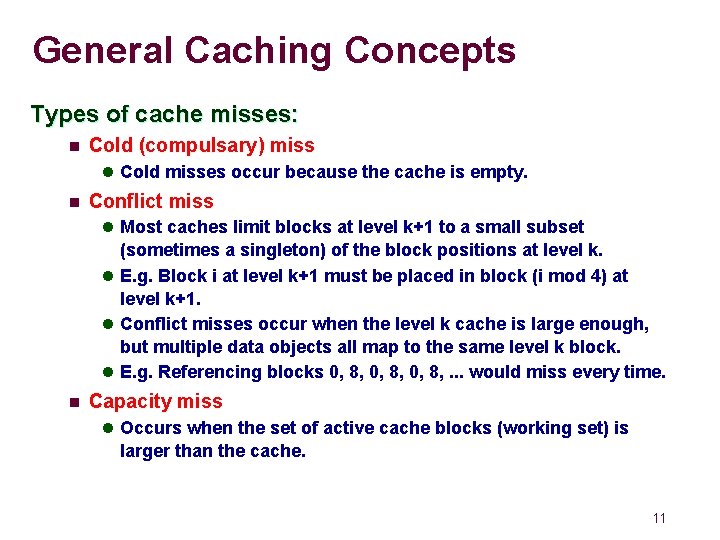
General Caching Concepts Types of cache misses: n Cold (compulsary) miss l Cold misses occur because the cache is empty. n Conflict miss l Most caches limit blocks at level k+1 to a small subset (sometimes a singleton) of the block positions at level k. l E. g. Block i at level k+1 must be placed in block (i mod 4) at level k+1. l Conflict misses occur when the level k cache is large enough, but multiple data objects all map to the same level k block. l E. g. Referencing blocks 0, 8, . . . would miss every time. n Capacity miss l Occurs when the set of active cache blocks (working set) is larger than the cache. 11
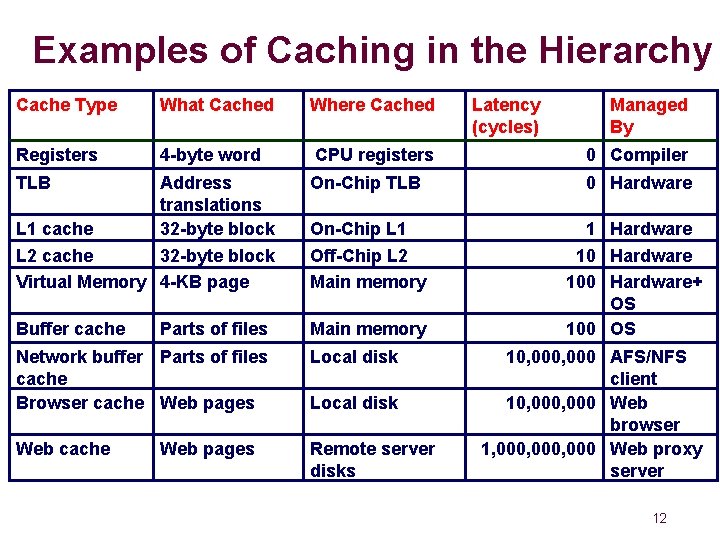
Examples of Caching in the Hierarchy Cache Type What Cached Where Cached Registers 4 -byte word CPU registers 0 Compiler Address translations L 1 cache 32 -byte block L 2 cache 32 -byte block Virtual Memory 4 -KB page On-Chip TLB 0 Hardware On-Chip L 1 Off-Chip L 2 Main memory Buffer cache Main memory 1 Hardware 100 Hardware+ OS 100 OS TLB Parts of files Network buffer Parts of files cache Browser cache Web pages Local disk Web cache Remote server disks Web pages Local disk Latency (cycles) Managed By 10, 000 AFS/NFS client 10, 000 Web browser 1, 000, 000 Web proxy server 12
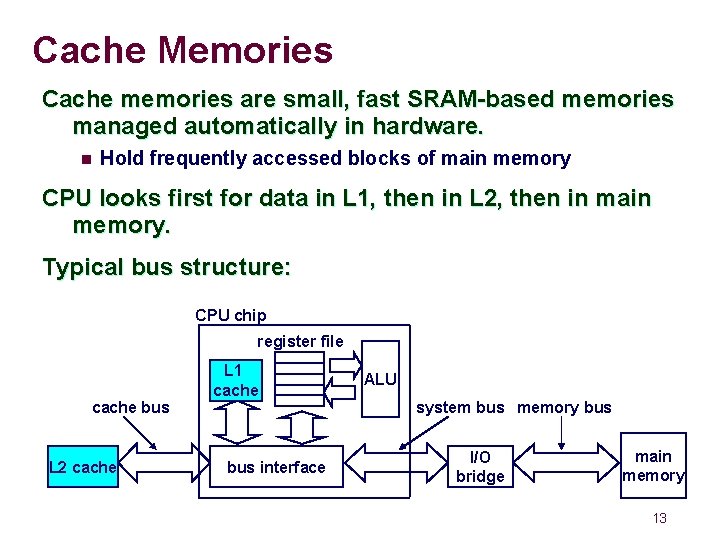
Cache Memories Cache memories are small, fast SRAM-based memories managed automatically in hardware. n Hold frequently accessed blocks of main memory CPU looks first for data in L 1, then in L 2, then in main memory. Typical bus structure: CPU chip register file cache bus L 2 cache L 1 cache bus interface ALU system bus memory bus I/O bridge main memory 13
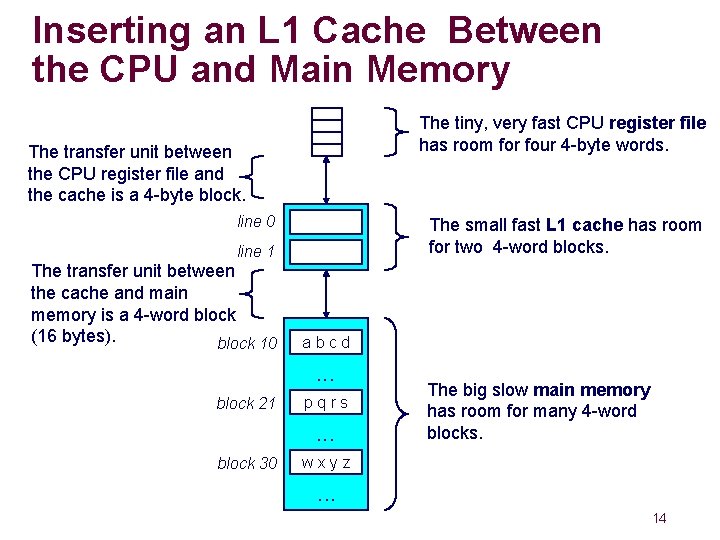
Inserting an L 1 Cache Between the CPU and Main Memory The tiny, very fast CPU register file has room for four 4 -byte words. The transfer unit between the CPU register file and the cache is a 4 -byte block. line 0 The small fast L 1 cache has room for two 4 -word blocks. line 1 The transfer unit between the cache and main memory is a 4 -word block (16 bytes). block 10 abcd . . . block 21 pqrs . . . block 30 The big slow main memory has room for many 4 -word blocks. wxyz . . . 14
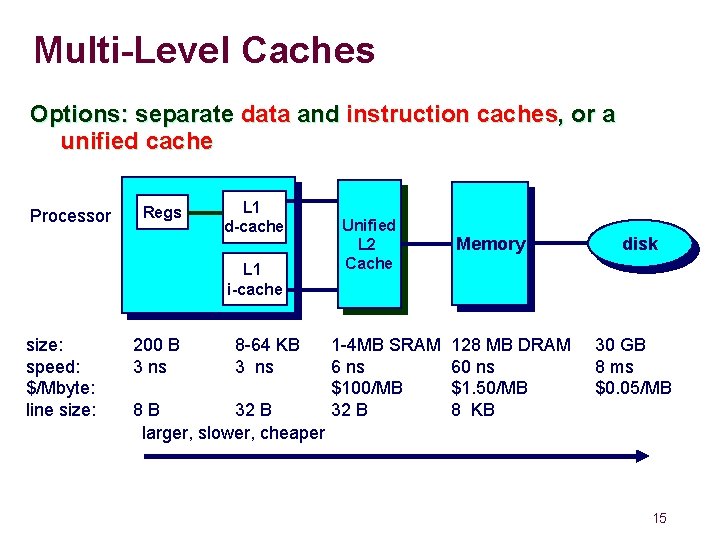
Multi-Level Caches Options: separate data and instruction caches, or a unified cache Processor Regs L 1 d-cache L 1 i-cache size: speed: $/Mbyte: line size: 200 B 3 ns 8 -64 KB 3 ns 8 B 32 B larger, slower, cheaper Unified L 2 Cache 1 -4 MB SRAM 6 ns $100/MB 32 B Memory 128 MB DRAM 60 ns $1. 50/MB 8 KB disk 30 GB 8 ms $0. 05/MB 15
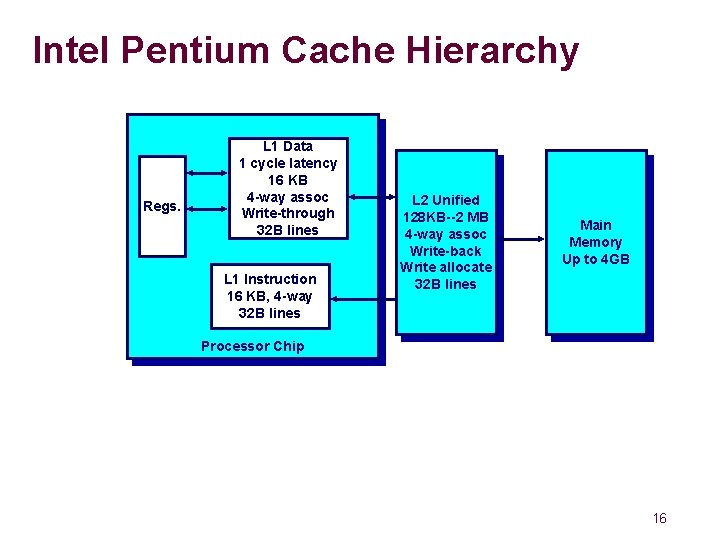
Intel Pentium Cache Hierarchy Regs. L 1 Data 1 cycle latency 16 KB 4 -way assoc Write-through 32 B lines L 1 Instruction 16 KB, 4 -way 32 B lines L 2 Unified 128 KB--2 MB 4 -way assoc Write-back Write allocate 32 B lines Main Memory Up to 4 GB Processor Chip 16
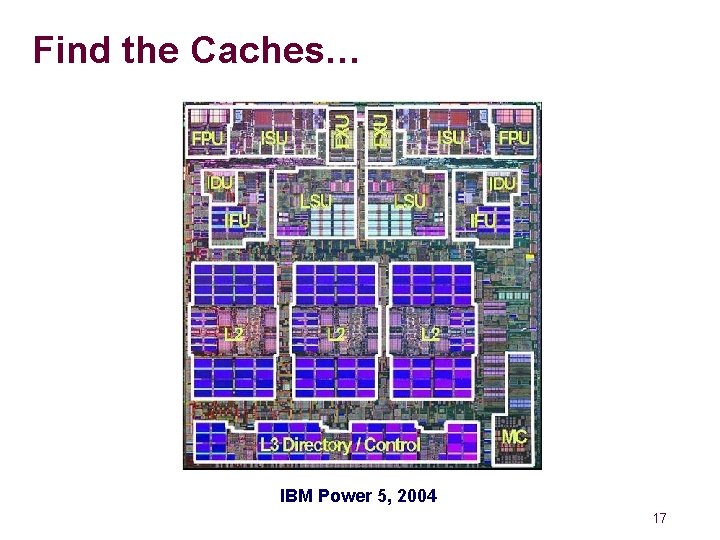
Find the Caches… IBM Power 5, 2004 17
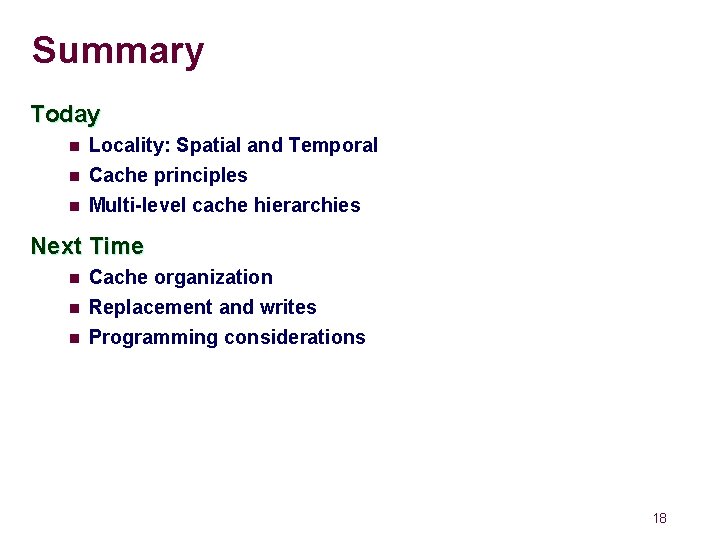
Summary Today n Locality: Spatial and Temporal n Cache principles Multi-level cache hierarchies n Next Time n n n Cache organization Replacement and writes Programming considerations 18