LOGO OSI network layer 06 Oct20 Jaringan KomputerD
- Slides: 30
LOGO OSI network layer 06 -Oct-20 Jaringan Komputer_D 3 TT 1
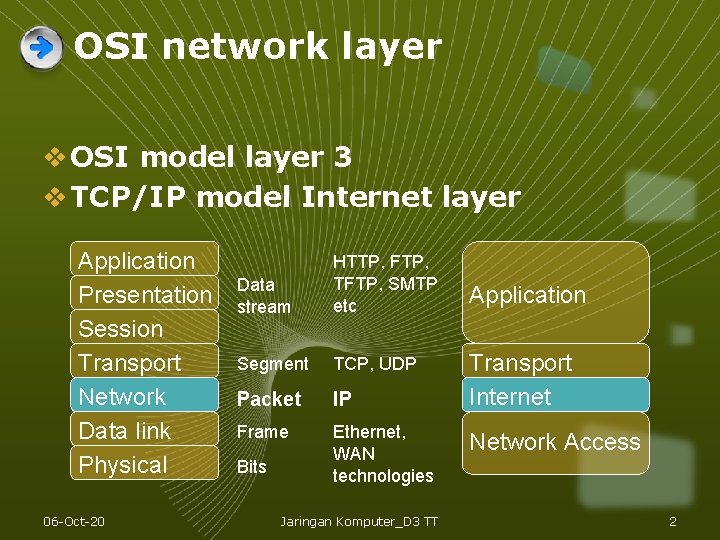
OSI network layer v OSI model layer 3 v TCP/IP model Internet layer Application Presentation Session Transport Network Data link Physical 06 -Oct-20 Data stream HTTP, FTP, TFTP, SMTP etc Segment TCP, UDP Packet IP Frame Ethernet, WAN technologies Bits Jaringan Komputer_D 3 TT Application Transport Internet Network Access 2
Network layer topics v IP version 4 – the most common layer 3 routed protocol v Dividing hosts into groups – why and how v Routing – sending packets the right way v Routing – how routers learn routes v IP addressing – in chapter 6 06 -Oct-20 Jaringan Komputer_D 3 TT 3
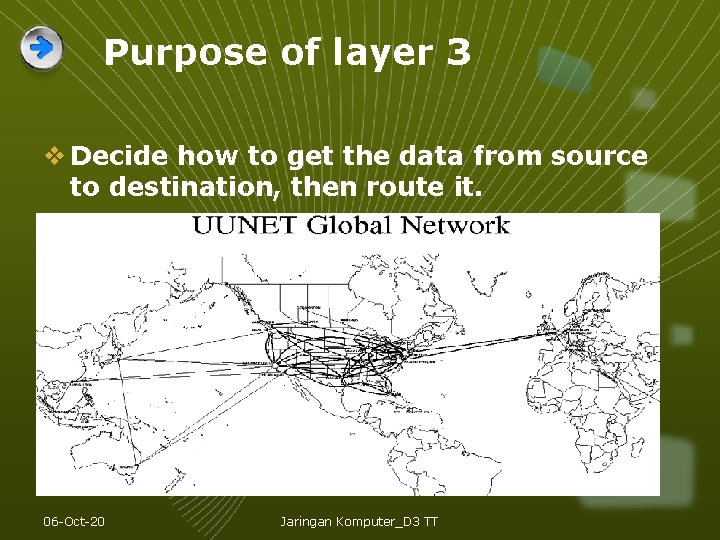
Purpose of layer 3 v Decide how to get the data from source to destination, then route it. 06 -Oct-20 Jaringan Komputer_D 3 TT
Layer 3 protocol A layer 3 protocol such as IP version 4 must: v Provide an addressing scheme to identify networks and individual hosts v Encapsulate a segment from layer 4 into a packet and include addresses v Direct the packet across one or many networks to the destination host v Decapsulate (remove the packet header) and give the segment to layer 4. 06 -Oct-20 Jaringan Komputer_D 3 TT 5
Network layer protocols v Internet Protocol version 4 (IPv 4) – the most common v Internet Protocol version 6 (IPv 6) – designed to replace version 4 eventually v Novell Internetwork Packet Exchange (IPX) v Apple. Talk v Connectionless Network Service (CLNS/DECNet) 06 -Oct-20 Jaringan Komputer_D 3 TT 6
Novell Internetwork Packet Exchange (IPX) v IPX (bahasa Inggris: Internetwork Packet Exchange) adalah protokol jaringan komputer yang digunakan oleh sistem operasi Novell Net. Ware pada akhir dekade 1980 an hingga pertengahan dekade 1990 an. IPX adalah protokol komunikasi tanpa koneksi (connectionless), seperti halnya Internet Protocol dan User Datagram Protocol pada kumpulan protokol TCP/IP. Selain membutuhkan protokol IPX, Novell Netware juga membutuhkan protokol tingkat tinggi bernama Sequenced Packet Exchange (SPX) dan Network Control Protocol (NCP). Protokol ini diturunkan oleh Novell dari protokol IDP yang terdapat di dalam Xerox Network Services. v IPX digunakan untuk melakukan pemetaan paket-paket data dari satu titik di dalam jaringan ke titik lainnya melalui sebuah internetwork. IPX beroperasi di lapisan jaringan (lapisan ketiga pada model OSI), dan dapat digunakan di dalam teknologi Ethernet, Token Ring, dan protokol lapisan data-link lainnya. IPX memang dahulu pernah digunakan pada Local Area Network (LAN) berbasis Novell Net. Ware sebelum akhirnya Novell menggantinya dengan TCP/IP saat merilis Net. Ware 5. x. Sebelum diganti dengan TCP/IP, protokol ini merupakan protokol yang sangat populer. 06 -Oct-20 Jaringan Komputer_D 3 TT 7
Apple. Talk v Apple. Talk adalah sebuah protokol jaringan yang dikembangkan khusus untuk jaringan yang terdiri atas komputer-komputer Apple Macintosh, yang mengizinkan para penggunanya untuk saling berbagi berkas dan printer agar dapat diakses oleh pengguna lainnya. v Apple. Talk merupakan teknologi yang sudah dianggap usang yang kini telah digantikan oleh Apple Open Transport, yang juga mendukung Apple. Talk itu sendiri, protokol TCP/IP dan beberapa protokol jaringan lainnya. 06 -Oct-20 Jaringan Komputer_D 3 TT 8
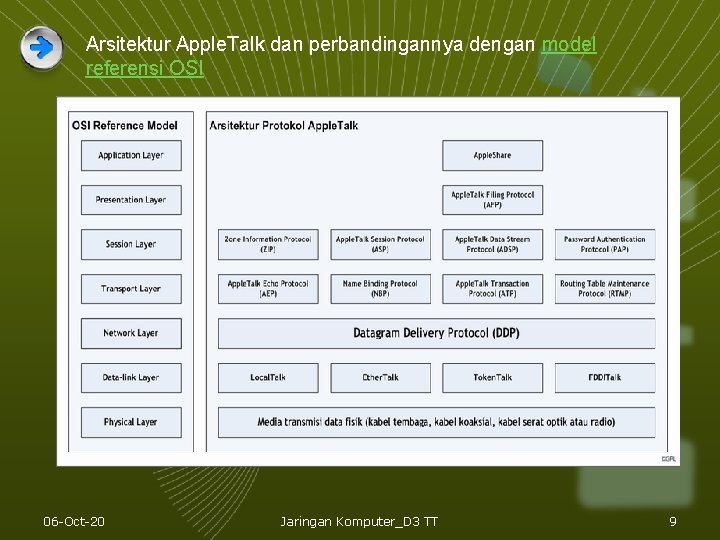
Arsitektur Apple. Talk dan perbandingannya dengan model referensi OSI 06 -Oct-20 Jaringan Komputer_D 3 TT 9
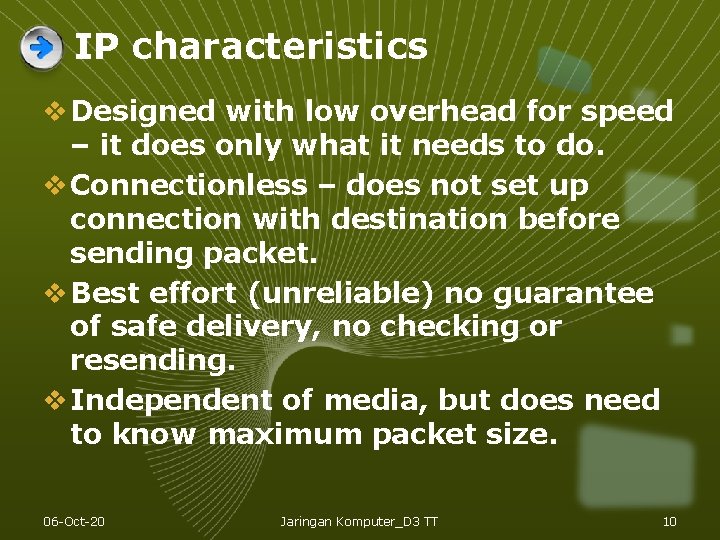
IP characteristics v Designed with low overhead for speed – it does only what it needs to do. v Connectionless – does not set up connection with destination before sending packet. v Best effort (unreliable) no guarantee of safe delivery, no checking or resending. v Independent of media, but does need to know maximum packet size. 06 -Oct-20 Jaringan Komputer_D 3 TT 10
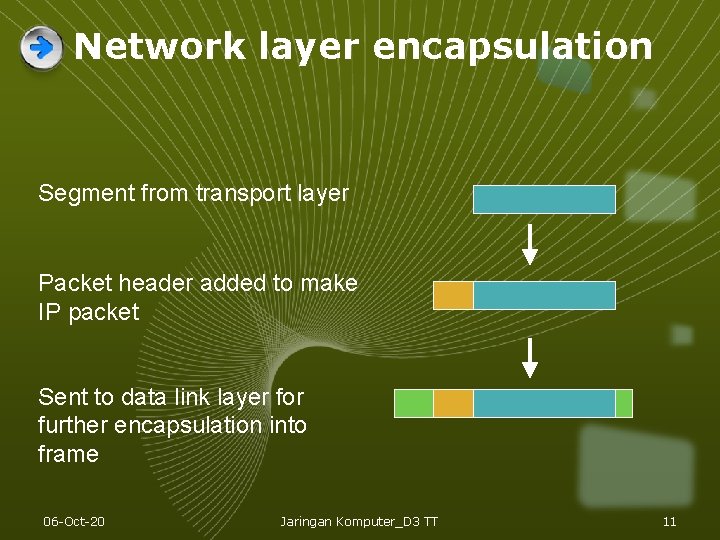
Network layer encapsulation Segment from transport layer Packet header added to make IP packet Sent to data link layer for further encapsulation into frame 06 -Oct-20 Jaringan Komputer_D 3 TT 11
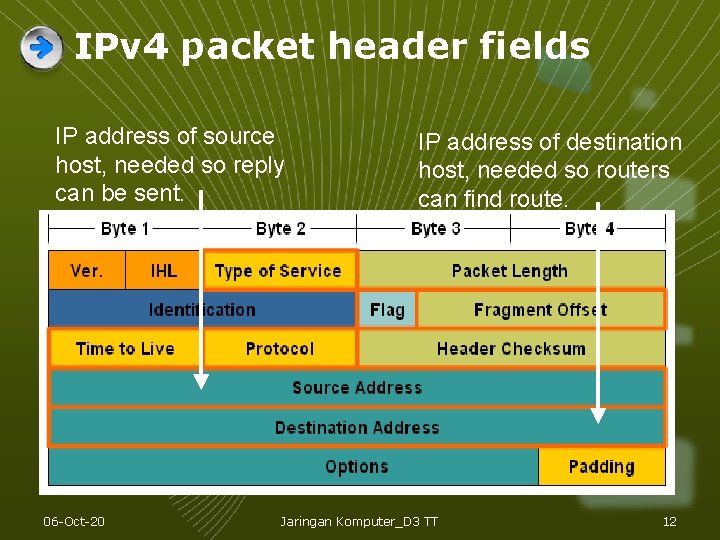
IPv 4 packet header fields IP address of source host, needed so reply can be sent. 06 -Oct-20 IP address of destination host, needed so routers can find route. Jaringan Komputer_D 3 TT 12
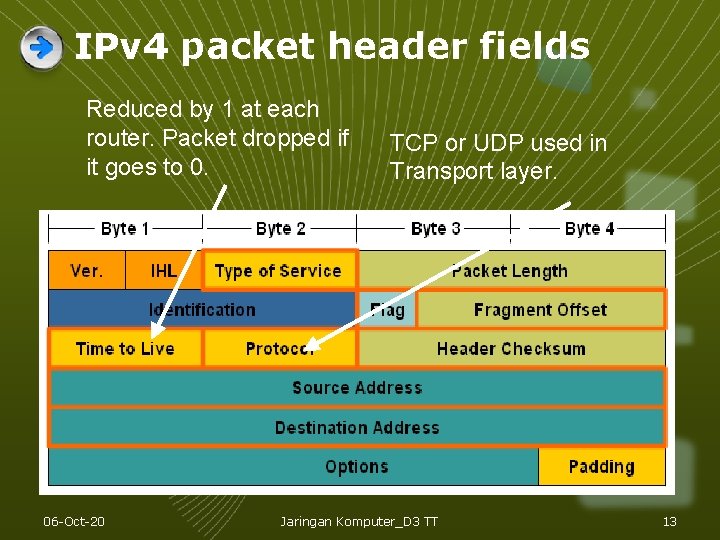
IPv 4 packet header fields Reduced by 1 at each router. Packet dropped if it goes to 0. 06 -Oct-20 TCP or UDP used in Transport layer. Jaringan Komputer_D 3 TT 13
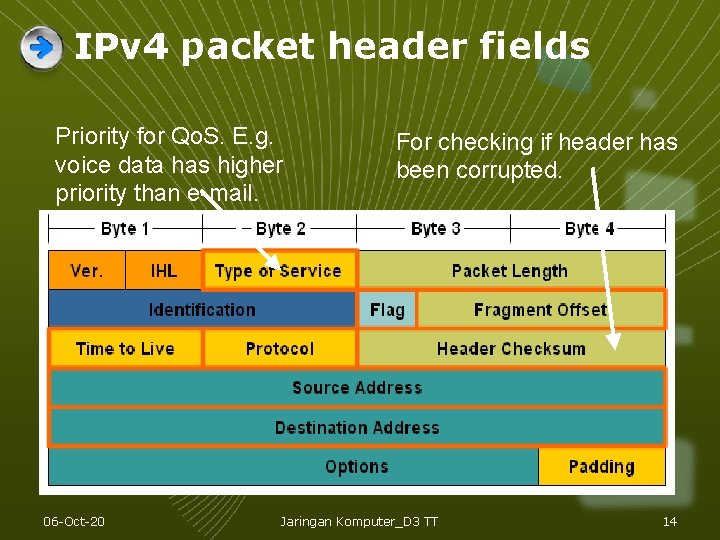
IPv 4 packet header fields Priority for Qo. S. E. g. voice data has higher priority than e-mail. 06 -Oct-20 For checking if header has been corrupted. Jaringan Komputer_D 3 TT 14
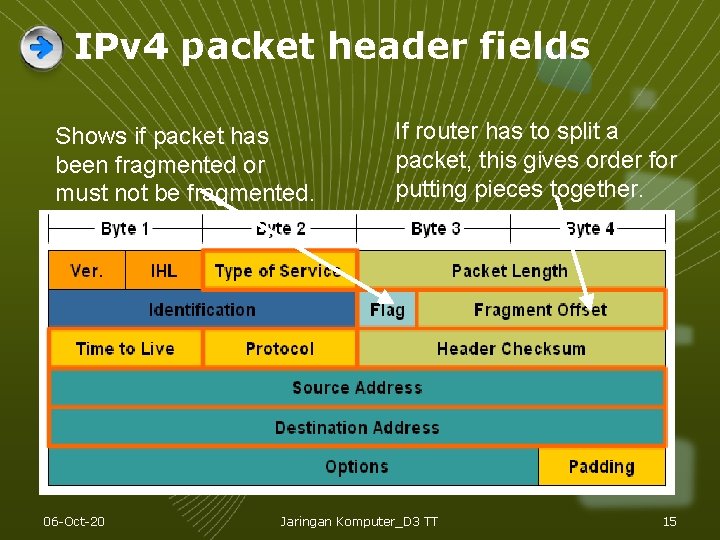
IPv 4 packet header fields Shows if packet has been fragmented or must not be fragmented. 06 -Oct-20 If router has to split a packet, this gives order for putting pieces together. Jaringan Komputer_D 3 TT 15
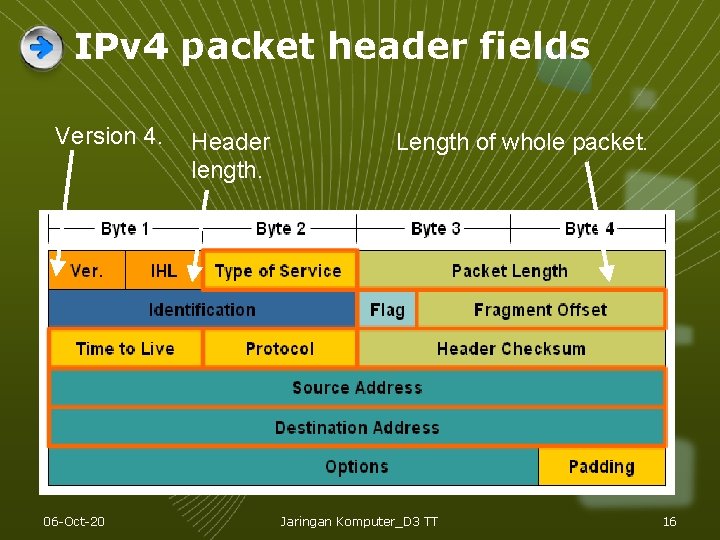
IPv 4 packet header fields Version 4. 06 -Oct-20 Header length. Length of whole packet. Jaringan Komputer_D 3 TT 16
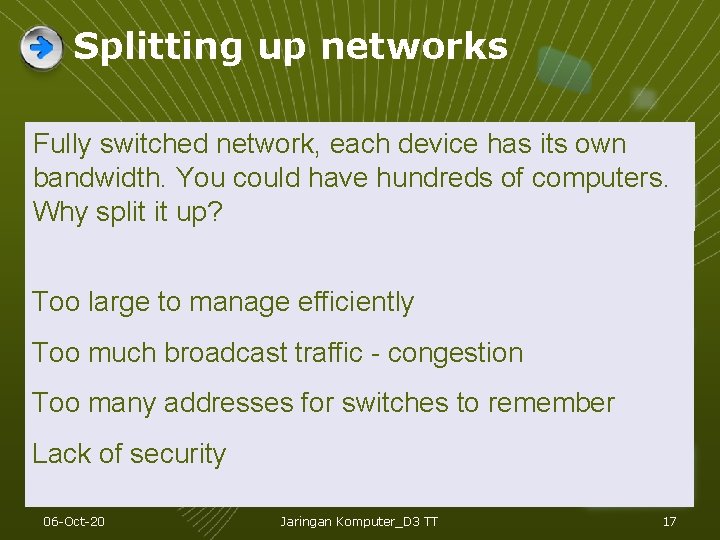
Splitting up networks Fully switched network, each device has its own bandwidth. You could have hundreds of computers. Why split it up? Too large to manage efficiently Too much broadcast traffic - congestion Too many addresses for switches to remember Lack of security 06 -Oct-20 Jaringan Komputer_D 3 TT 17
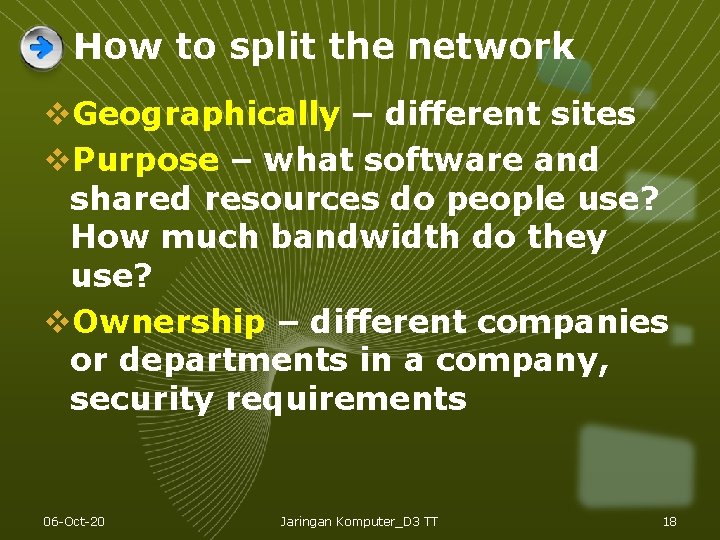
How to split the network v. Geographically – different sites v. Purpose – what software and shared resources do people use? How much bandwidth do they use? v. Ownership – different companies or departments in a company, security requirements 06 -Oct-20 Jaringan Komputer_D 3 TT 18
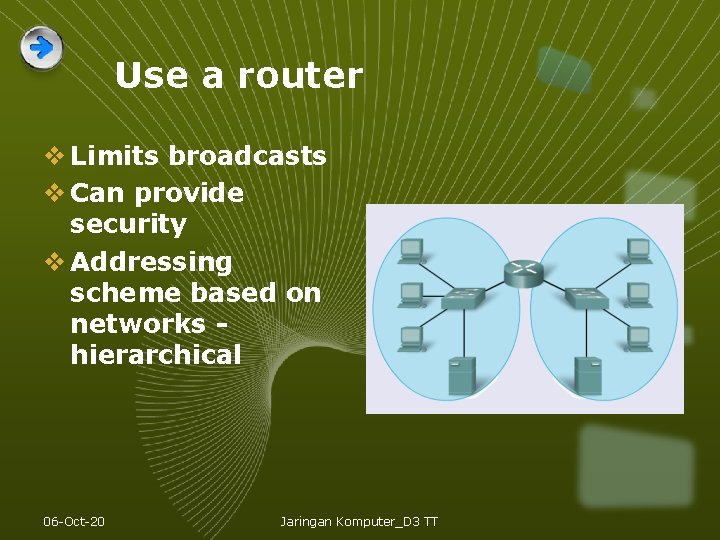
Use a router v Limits broadcasts v Can provide security v Addressing scheme based on networks hierarchical 06 -Oct-20 Jaringan Komputer_D 3 TT
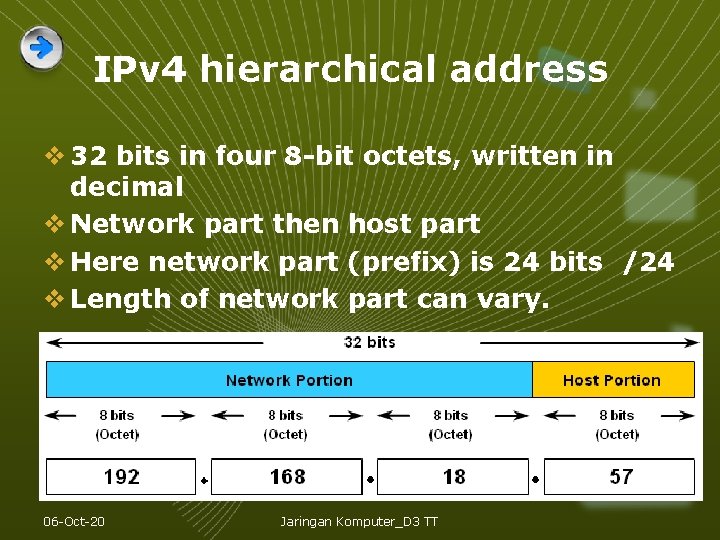
IPv 4 hierarchical address v 32 bits in four 8 -bit octets, written in decimal v Network part then host part v Here network part (prefix) is 24 bits /24 v Length of network part can vary. 06 -Oct-20 Jaringan Komputer_D 3 TT
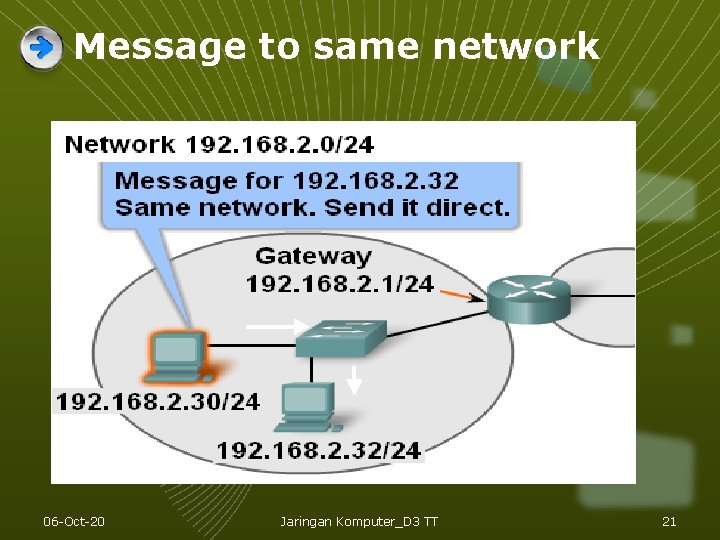
Message to same network 06 -Oct-20 Jaringan Komputer_D 3 TT 21
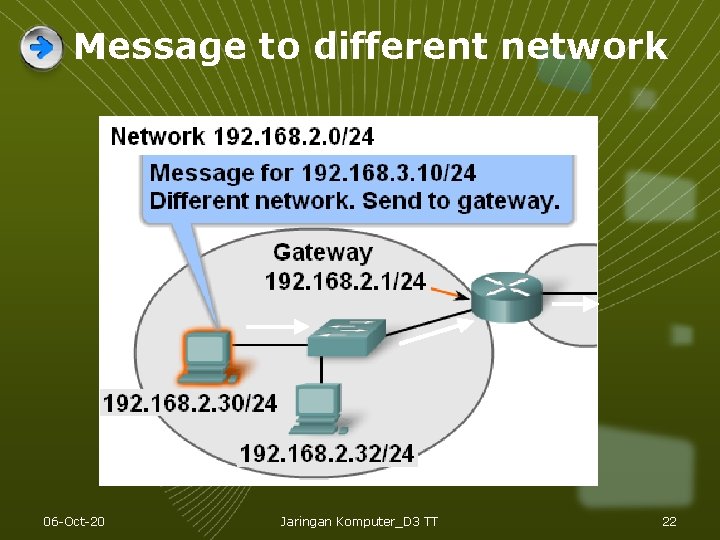
Message to different network 06 -Oct-20 Jaringan Komputer_D 3 TT 22
Default gateway v Each PC is configured with an IP address and a default gateway. v The default gateway is the IP address of a router port on the same network as the PC. v It is the router’s job to handle messages to other networks. v Each router port is on a different network and has a different IP address. 06 -Oct-20 Jaringan Komputer_D 3 TT 23
Hops v A packet may pass through many routers on its journey. v The trip from one router to the next is called a hop and the next router is called the next hop router. v Each router looks at the IP address in the packet header and decides what to do with the packet next. 06 -Oct-20 Jaringan Komputer_D 3 TT 24
Routing table and forwarding v Each router has a routing table. This contains a list of known networks and the best way to get there – outgoing port and address of next-hop router. v The router looks at the IP address of a packet. It decides which network this address is on. If it knows the network it forwards the packet. If it does not know the network it drops the packet. 06 -Oct-20 Jaringan Komputer_D 3 TT 25
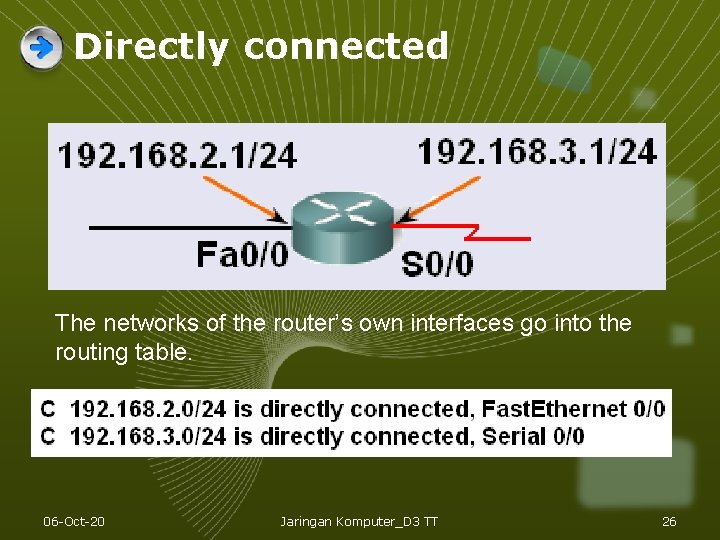
Directly connected The networks of the router’s own interfaces go into the routing table. 06 -Oct-20 Jaringan Komputer_D 3 TT 26
Other networks v Routes to other networks can be configured by an administrator (static routes) v Or they can be learned from another router using a routing protocol (dynamic routes) v A router can have a default route. Packets for unknown networks go on this route instead of being dropped. 06 -Oct-20 Jaringan Komputer_D 3 TT 27
Routing protocols v Routers learn routes from each other and put them in their routing tables. v A routing protocol is the set of rules they use to swap information. v These routes are dynamic routes 06 -Oct-20 Jaringan Komputer_D 3 TT 28
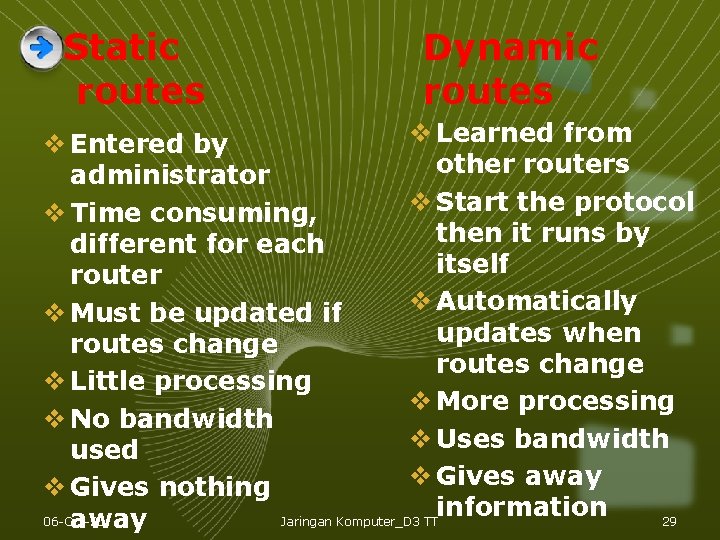
Static routes Dynamic routes v Learned from v Entered by other routers administrator v Start the protocol v Time consuming, then it runs by different for each itself router v Automatically v Must be updated if updates when routes change v Little processing v More processing v No bandwidth v Uses bandwidth used v Gives away v Gives nothing information 06 -Oct-20 Jaringan Komputer_D 3 TT 29 away
LOGO Thank You Ref: S Ward Abingdon and Witney College 06 -Oct-20 Jaringan Komputer_D 3 TT 30