
Interactive Games for the Classoom Using Kahoot and

- Slides: 11
Interactive Games for the Classoom: Using Kahoot and Quizlet Live with your students By Billie Haase
Kahoot & Quizlet What is Kahoot? • A learning game in form of a quiz • It contains a series of multiple choice questions • The number of questions is up to you • Add videos, images and diagrams to your questions to amplify engagement • Students compete against each other
Kahoot & Quizlet What is Kahoot? • • • It’s free You can register & sign in using Google Create your own Kahoots Or use Kahoots from other users Students don‘t need to register to play Each student needs a mobile, tablet or PC
Kahoot & Quizlet What does Kahoot look like?
Kahoot & Quizlet Let’s play! • Go to kahoot. it • Enter the class code & your name • We played: Billie‘s Selfie Kahoot, The Past Tense Kahoot, Body Parts Kahoot – You can find the games under my user name: Billie_Haase (the selfie game is private).
Kahoot & Quizlet What is Quizlet Live? • A collaborative learning game • Uses a Quizlet flashcard set of at least 6 unique terms • Teams of students work together to correctly match a term and definition • The first team to match all terms wins • You need at least 4 students to play
Kahoot & Quizlet What is Quizlet Live? • • • It’s free Students need a mobile, tablet or PC each You can register & sign in using Google Create your own Quizlet sets Or use/ copy sets from other users Students don‘t need to register to play
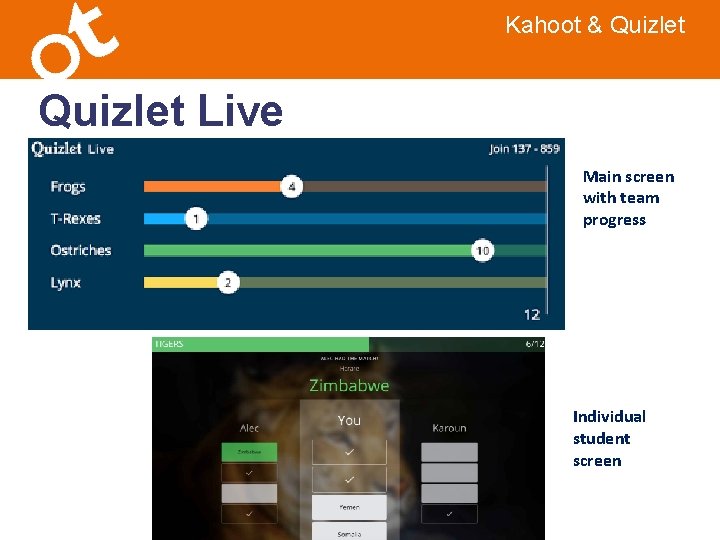
Kahoot & Quizlet Live Main screen with team progress Individual student screen
Kahoot & Quizlet Let’s play! • Go to www. quizlet. live • Enter the class code & your name • Get together with your team • You will need to use all devices and work together! • You can find the Kahoots we played in my account under: Billie_Haase. We played Play the Kitchen Vocab Quiz, Grammar Quiz, Barcelona Quiz.
Kahoot & Quizlet My Kahoot & Quizlet sets • Search for my user name: Billie_Haase • Quizlet folder: Quizlet Live • Kahoot: all the Kahoots we played and many more!