ICT Communications Lesson 1 Using the Internet and
- Slides: 7
ICT Communications Lesson 1: Using the Internet and the World Wide Web
Objectives – Lesson 1 • 2. 1. 1: Define “Internet, ” and explain how it uses protocols and data packets to enable computers to communicate. • 2. 1. 2: Identify requirements for connecting to the Internet. • 2. 1. 3: Compare various Internet connection types (e. g. , dial-up, cable, DSL, broadband, wireless, fiber-optic). • 2. 1. 4: Describe Internet addressing, including domain names, IP addresses, DNS. • 2. 1. 5: Compare various top-level domains (. com, . org, . edu, . gov, . net, . mil). • 2. 1. 6: Distinguish the Internet from the World Wide Web. • 2. 1. 7: Explain how web browsers and web servers interact to provide information to users. • 2. 1. 8: Define “Uniform Resource Locator (URL)” and identify associated protocols, including http//: , ftp//: , mailto//: . • 2. 1. 9: Use various techniques and tools to navigate and access information on the Web, including hyperlinks, webpage and browser components, file downloads.
Terminology – Lesson 1 • Client - a single user computer • Cloud – storage space on the Internet that anyone can use or access • DNS – reconciles the IP address of a web site with its common name URL • Hyperlink – a process that enables a user to mouse click a “link” on a web page and that link will take them to another location on that page, another web page or even another web site • Internet – connection of millions of devices all around the world based on TCP/IP • IP Address – the unique numerical number assigned to each device that is attached to the Internet • Modem – a device used to connect a computer or server to an ISP • Network – a group of 2 or more computers connected together to share information or resources • Packet – a piece of information • Server – any computer that 2 or more devices can connect and exchange data or resources with at the same time • TCP/IP – communication rules that enable 2 or more devices to communicate with each other as a network • URL – common name used for a web site and consists of the 1) server name 2) domain name 3) top level domain • Web browser – client based software that enables a computer to read and interact with a web site • Web page – a single file that is based on html protocol • Website – a collection of related web pages • Wi-Fi – broadband wireless (radio frequency) network connection • World Wide Web – the collection if information based on html that is accessed via the Internet
Internet vs World Wide Web Internet World Wide Web • A very large network of • A system of tools and services networks. that enable us to access the • Networks consist of servers that information on the Internet. store information accessed by • Web browsers — a tool that various clients. retrieves the information using the Internet • Essentially hardware machines and data. • Hyperlinks: a key part of the web which connect data resources together, enabling users to "browse" from page to page.
Other Services • Gaming • Instant Messaging • FTP (file upload or download) • Email • Live streaming • Home Security (Apps)
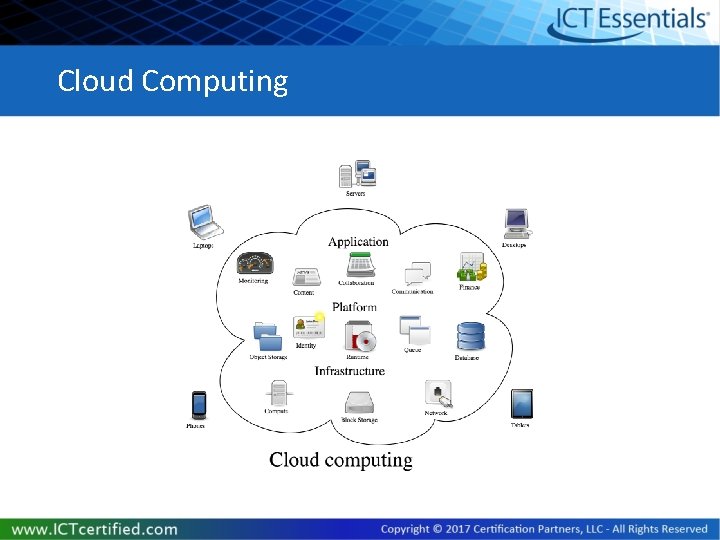
Cloud • Data is stored on servers accessed from any location with an Internet connection. • Files are in a central location, accessible regardless of their current Internet connection. • Enables people around the world to collaborate on projects without having to travel. • Need access rights to the server and a browser. • Some common cloud storage services include Google Docs, Dropbox, Microsoft Cloud, and Apple i. Cloud.
Cloud Computing