Why do we need Firewalls n Internet connectivity
- Slides: 21
Why do we need Firewalls? n Internet connectivity is a must for most people and organizations ¨ especially n for me But a convenient Internet connectivity is an invitation for intruders and hackers ¨ yet another example of tradeoff between convenience and security ¨ Question: What do we mean by “convenient” Internet connection? n Firewall basically provides us an option to play within the spectrum of this tradeoff
What is a Firewall? n Effective means of protecting local network of systems from network-based security threats from outer world ¨ while providing (limited) access to the outside world (the Internet)
Firewall Basics n The firewall is inserted between the internal network and the Internet (a choke point) ¨ Establish a controlled link and protect the network from Internet-based attacks n n keeps unauthorized users away, imposes restrictions on network services; only authorized traffic is allowed ¨ Location for monitoring security-related events n auditing, alarms can be implemented ¨ some firewalls supports IPSec, so VPNs can be implemented firewall-to-firewall ¨ some firewalls support NAT (not so security related) n Open discussion: can’t we put one firewall for each station within the local network? What are pros and cons?
Firewall Characteristics - 1 n Design goals: ¨ All traffic from inside from/to outside must pass through the firewall ¨ Only authorized traffic (defined by the local security policy) will be allowed to pass ¨ The firewall itself should be immune to penetration (use of trusted system with a secure operating system)
Firewall Characteristics - 2 n General techniques for access control ¨ Service control n Determines the types of Internet services that can be accessed ¨ n Mostly using TCP/UDP port numbers Direction of traffic is important for the decision ¨ Some services are open for outbound, but not inbound (or vice versa) ¨ User control n Controls access to a service according to which user is attempting to access it n need to authenticate users. This is easy for internal users, but what can be done for external ones? ¨ Behavior control n Controls how particular services are used (e. g. filter e-mail for spam control)
Firewall Limitations n cannot protect from attacks bypassing it ¨ typical n cannot protect against internal threats ¨ e. g. n example: dial-in, dial-out fired sysadmin cannot protect against transfer of all virus infected programs or files ¨ because file types of heavy traffic and huge range of O/S &
Types of Firewalls Packet-filtering routers n Application-level gateways n Circuit-level gateways (not common, so skipped) n
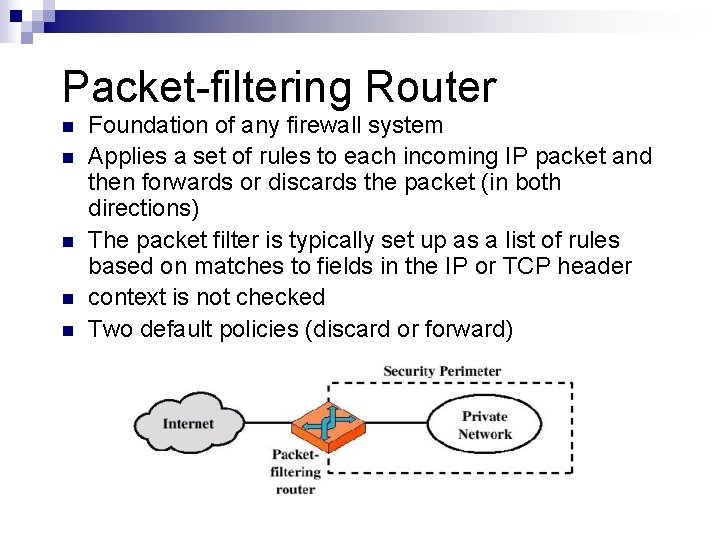
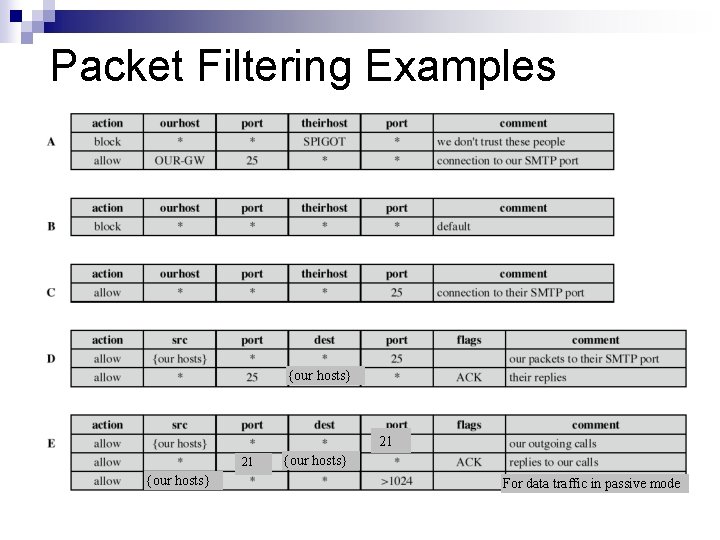
Packet-filtering Router n n n Foundation of any firewall system Applies a set of rules to each incoming IP packet and then forwards or discards the packet (in both directions) The packet filter is typically set up as a list of rules based on matches to fields in the IP or TCP header context is not checked Two default policies (discard or forward)
Packet-filtering Router n Filtering rules are based on ¨ Source and Destination IP addresses ¨ Source and destination ports (services) and transport protocols (TCP or UDP) ¨ Router’s physical interface n Rules are listed and a match is tried to be found starting with the first rule ¨ Action is either forward or discard ¨ Generally first matching rule is applied ¨ If no match, then default policy is used n Default is either discard or forward
Packet Filtering Examples {our hosts} 21 21 {our hosts} For data traffic in passive mode
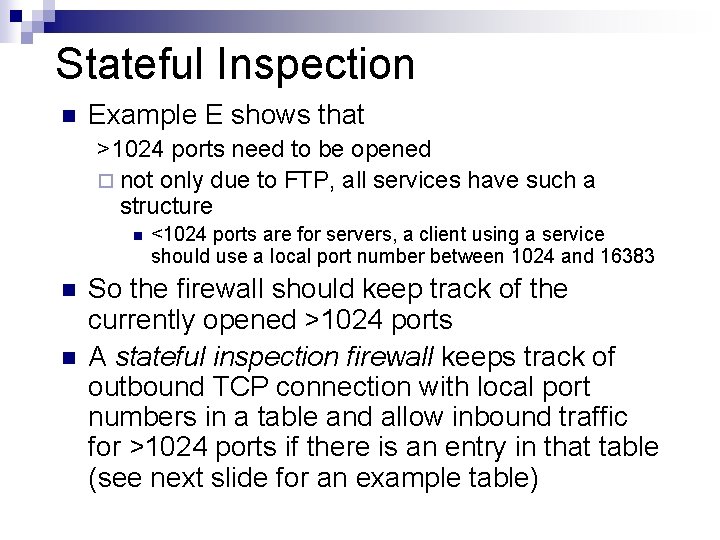
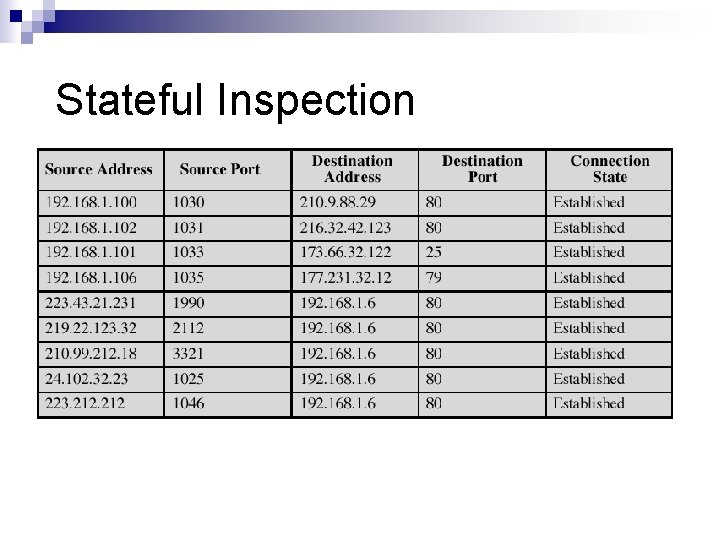
Stateful Inspection n Example E shows that >1024 ports need to be opened ¨ not only due to FTP, all services have such a structure n n n <1024 ports are for servers, a client using a service should use a local port number between 1024 and 16383 So the firewall should keep track of the currently opened >1024 ports A stateful inspection firewall keeps track of outbound TCP connection with local port numbers in a table and allow inbound traffic for >1024 ports if there is an entry in that table (see next slide for an example table)
Stateful Inspection
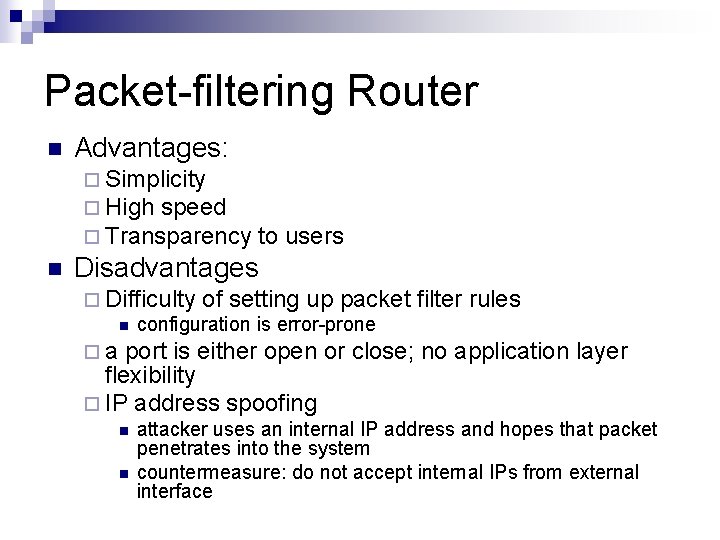
Packet-filtering Router n Advantages: ¨ Simplicity ¨ High speed ¨ Transparency n to users Disadvantages ¨ Difficulty of setting up packet filter rules n configuration is error-prone ¨ a port is either open or close; no application flexibility ¨ IP address spoofing n n layer attacker uses an internal IP address and hopes that packet penetrates into the system countermeasure: do not accept internal IPs from external interface
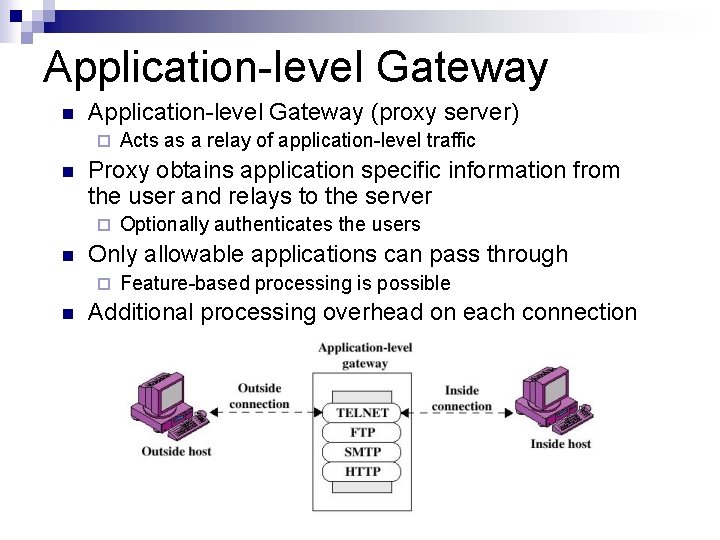
Application-level Gateway n Application-level Gateway (proxy server) ¨ n Proxy obtains application specific information from the user and relays to the server ¨ n Optionally authenticates the users Only allowable applications can pass through ¨ n Acts as a relay of application-level traffic Feature-based processing is possible Additional processing overhead on each connection
Bastion Host n A system identified by the firewall administrator as a critical strong point in the network security ¨ Used n The bastion host serves as a platform for an application-level gateway ¨ i. e. n in various firewall configuration (we’ll see now) a proxy Potentially exposed to "hostile" elements, hence is secured to withstand this ¨ Trusted system ¨ Carefully configured and maintained
Firewall Configurations n In addition to the use of simple configuration of a single system (single packet filtering router or single gateway), more complex configurations are possible
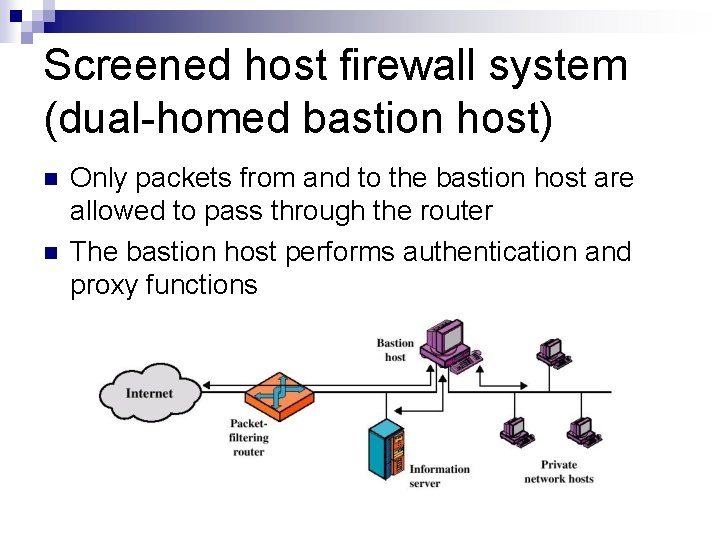
Screened host firewall system (dual-homed bastion host) n n Only packets from and to the bastion host are allowed to pass through the router The bastion host performs authentication and proxy functions
Dual-homed Bastion Host n Good security because of two reasons: ¨ This configuration implements both packet-level and application-level filtering ¨ An intruder must generally penetrate two separate systems in order to get to the internal network n This configuration also has flexibility in providing direct Internet access to a public information server, e. g. Web server ¨ by configuring the router
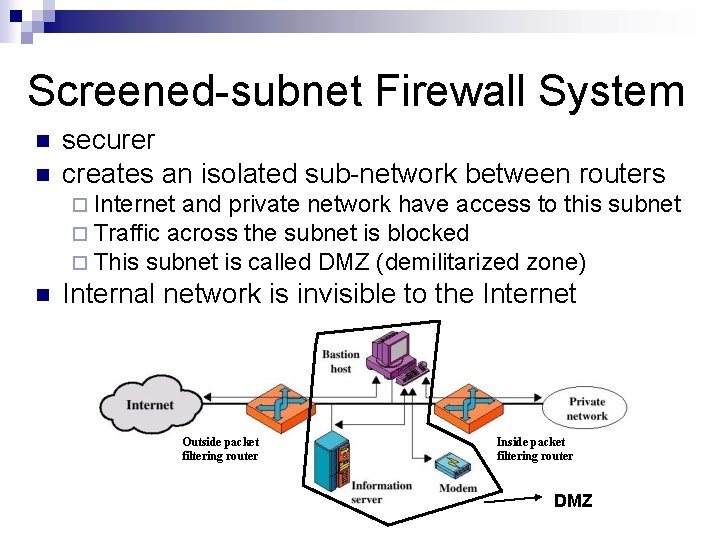
Screened-subnet Firewall System n n securer creates an isolated sub-network between routers ¨ Internet and private network have access to this ¨ Traffic across the subnet is blocked ¨ This subnet is called DMZ (demilitarized zone) n Internal network is invisible to the Internet Outside packet filtering router Inside packet filtering router DMZ subnet
Host-Based Firewalls n Software module to secure individual hosts ¨ filter packet flows ¨ Available as add-on for many OSs Often used on servers n Advantages: n ¨ additional layer of protection to organizational firewall ¨ tailored filter rules for specific host needs ¨ protection from both internal / external attacks
Personal Firewall controls traffic flow to/from PC/workstation n for both home or corporate use n software module on PC n ¨ or in home cable/ADSL router/gateway typically less complex than standalone firewalls n primary role to deny unauthorized access n ¨ may also monitor/detect/block malware activity