Introduction to Millennium Point of Care May 2
- Slides: 33
Introduction to Millennium Point of Care May 2, 2012
What is Millennium. POC? A multi-system offering designed to automate the documentation of medication administration and other care activities at the point of care, while providing notification to the user when inconsistencies that could represent potential care errors occur. The Millennium. POC solutions include: Care. Admin-tethered using Power. Chart/Surgi. Net/First. Net application © 2011 Cerner Corporation. All rights reserved. This document contains Cerner confidential and/or proprietary information which may not be reproduced or transmitted without the express written consent of Cerner. 2
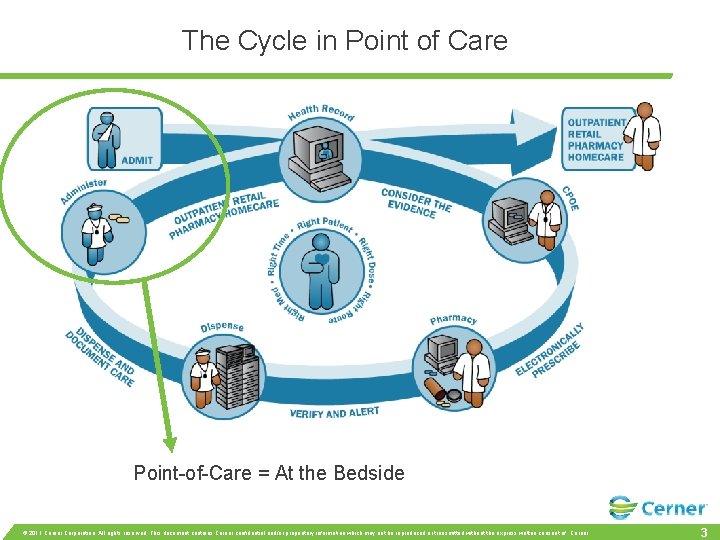
The Cycle in Point of Care Point-of-Care = At the Bedside © 2011 Cerner Corporation. All rights reserved. This document contains Cerner confidential and/or proprietary information which may not be reproduced or transmitted without the express written consent of Cerner. 3
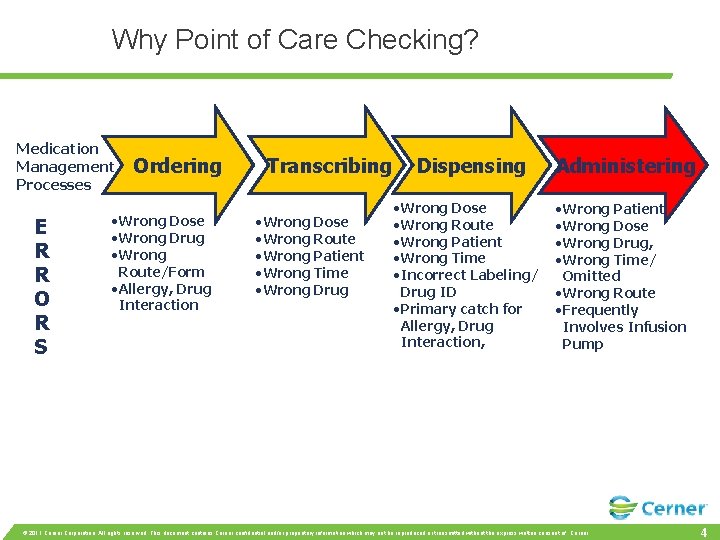
Why Point of Care Checking? Medication Management Processes E R R O R S Ordering • Wrong Dose • Wrong Drug • Wrong Route/Form • Allergy, Drug Interaction Transcribing • Wrong Dose • Wrong Route • Wrong Patient • Wrong Time • Wrong Drug Dispensing • Wrong Dose • Wrong Route • Wrong Patient • Wrong Time • Incorrect Labeling/ Drug ID • Primary catch for Allergy, Drug Interaction, Administering • Wrong Patient • Wrong Dose • Wrong Drug, • Wrong Time/ Omitted • Wrong Route • Frequently Involves Infusion Pump © 2011 Cerner Corporation. All rights reserved. This document contains Cerner confidential and/or proprietary information which may not be reproduced or transmitted without the express written consent of Cerner. 4
Scanning patient prior to medications All meds prepared prior to room entrance will need to have barcodes: Example: Crushed meds removed from packet. Nurse will have to bring package in room with her. Example: Insulin or narcotics prepared in med room. © 2011 Cerner Corporation. All rights reserved. This document contains Cerner confidential and/or proprietary information which may not be reproduced or transmitted without the express written consent of Cerner. 5
Care. Admin Workflow March 24, 2010
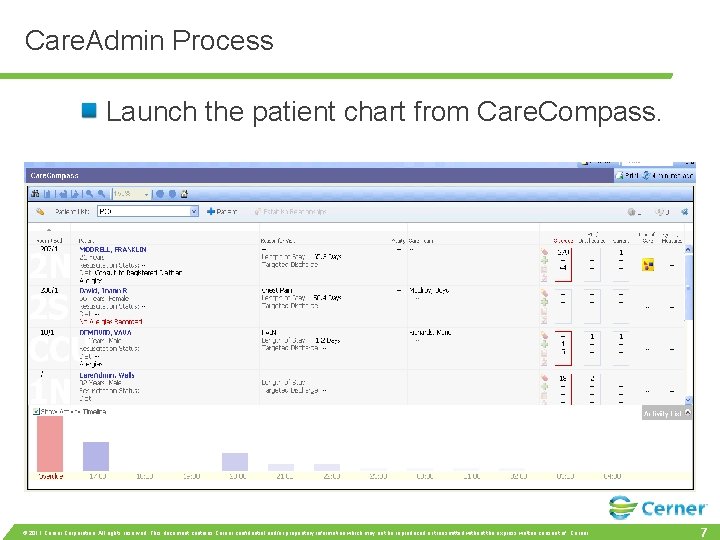
Care. Admin Process Launch the patient chart from Care. Compass. © 2011 Cerner Corporation. All rights reserved. This document contains Cerner confidential and/or proprietary information which may not be reproduced or transmitted without the express written consent of Cerner. 7
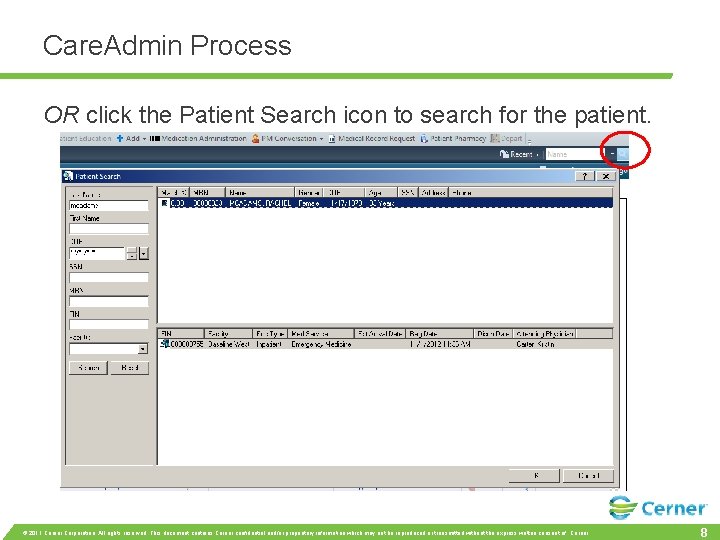
Care. Admin Process OR click the Patient Search icon to search for the patient. © 2011 Cerner Corporation. All rights reserved. This document contains Cerner confidential and/or proprietary information which may not be reproduced or transmitted without the express written consent of Cerner. 8
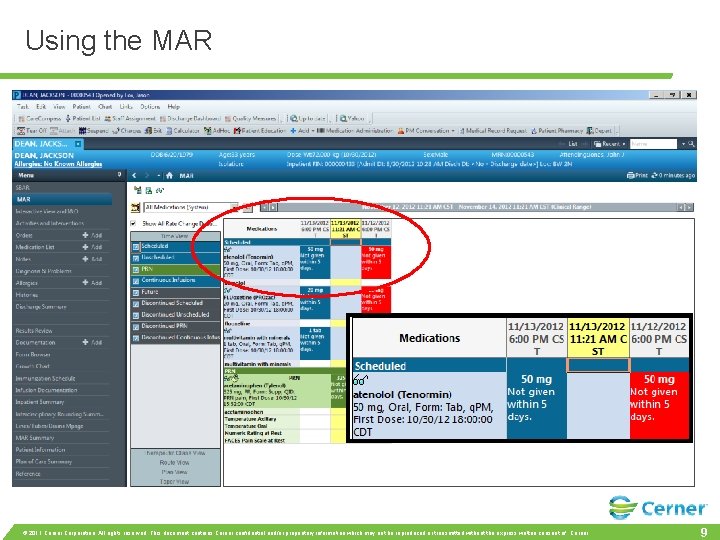
Using the MAR powe rchart MAW © 2011 Cerner Corporation. All rights reserved. This document contains Cerner confidential and/or proprietary information which may not be reproduced or transmitted without the express written consent of Cerner. 9
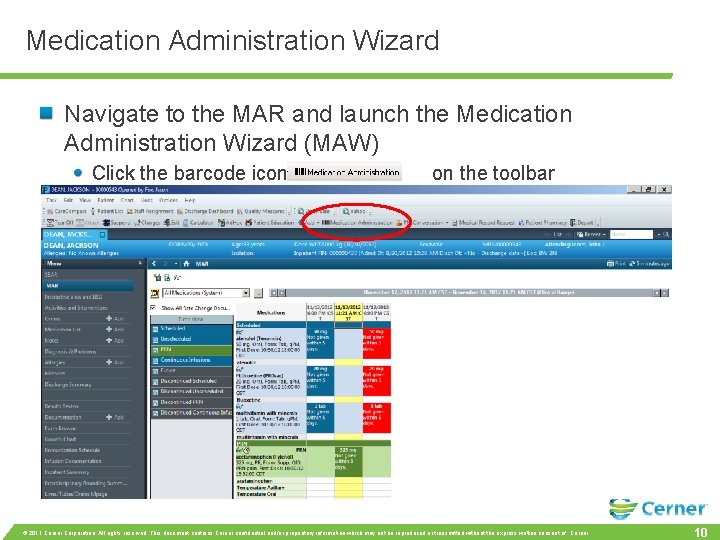
Medication Administration Wizard Navigate to the MAR and launch the Medication Administration Wizard (MAW) Click the barcode icon on the toolbar © 2011 Cerner Corporation. All rights reserved. This document contains Cerner confidential and/or proprietary information which may not be reproduced or transmitted without the express written consent of Cerner. 10
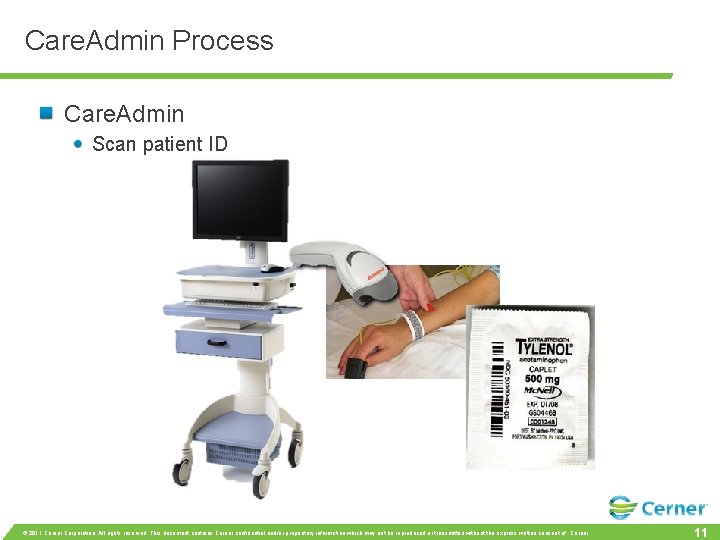
Care. Admin Process Care. Admin Scan patient ID © 2011 Cerner Corporation. All rights reserved. This document contains Cerner confidential and/or proprietary information which may not be reproduced or transmitted without the express written consent of Cerner. 11
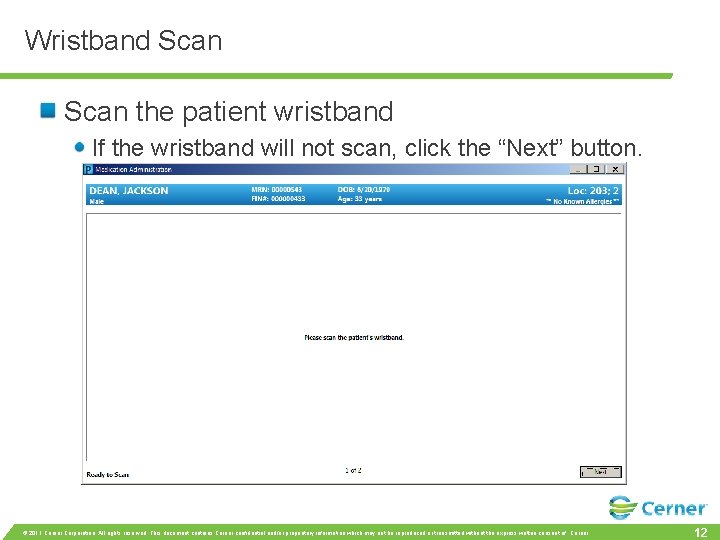
Wristband Scan the patient wristband If the wristband will not scan, click the “Next” button. © 2011 Cerner Corporation. All rights reserved. This document contains Cerner confidential and/or proprietary information which may not be reproduced or transmitted without the express written consent of Cerner. 12
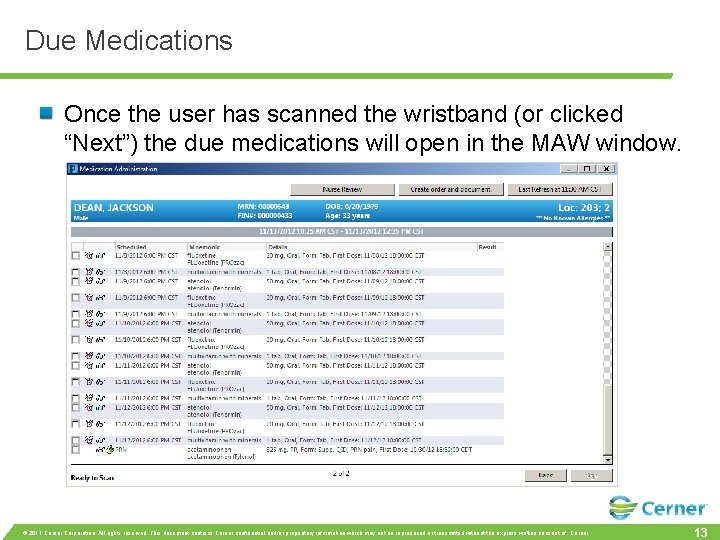
Due Medications Once the user has scanned the wristband (or clicked “Next”) the due medications will open in the MAW window. © 2011 Cerner Corporation. All rights reserved. This document contains Cerner confidential and/or proprietary information which may not be reproduced or transmitted without the express written consent of Cerner. 13
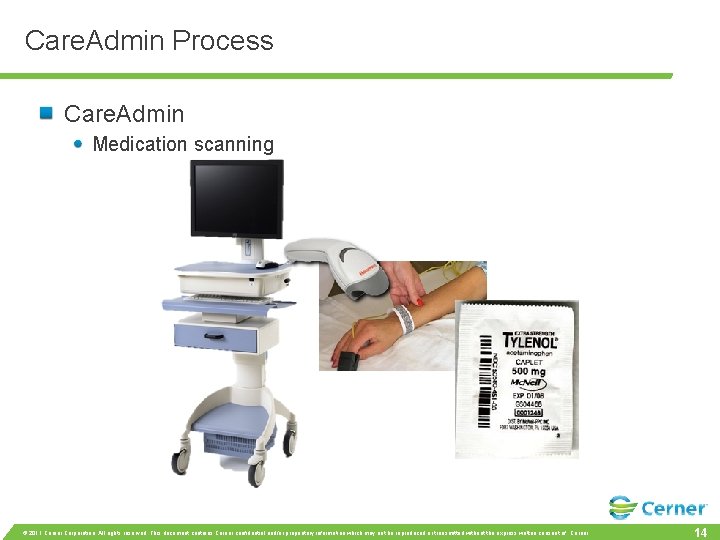
Care. Admin Process Care. Admin Medication scanning © 2011 Cerner Corporation. All rights reserved. This document contains Cerner confidential and/or proprietary information which may not be reproduced or transmitted without the express written consent of Cerner. 14
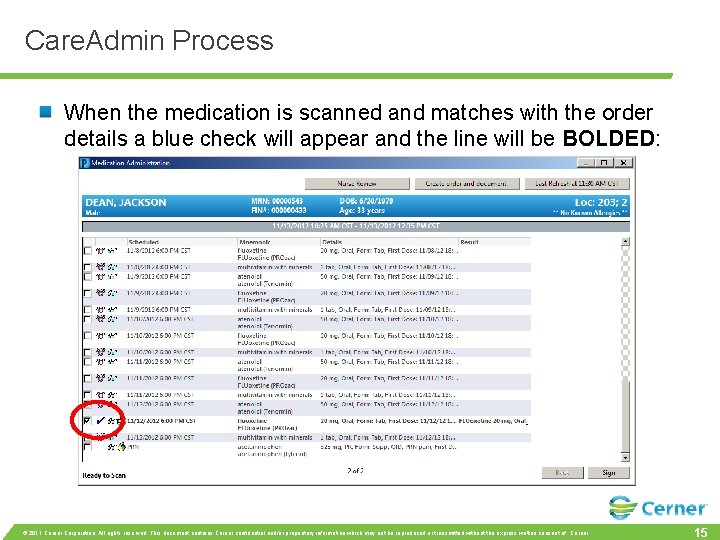
Care. Admin Process When the medication is scanned and matches with the order details a blue check will appear and the line will be BOLDED: © 2011 Cerner Corporation. All rights reserved. This document contains Cerner confidential and/or proprietary information which may not be reproduced or transmitted without the express written consent of Cerner. 15
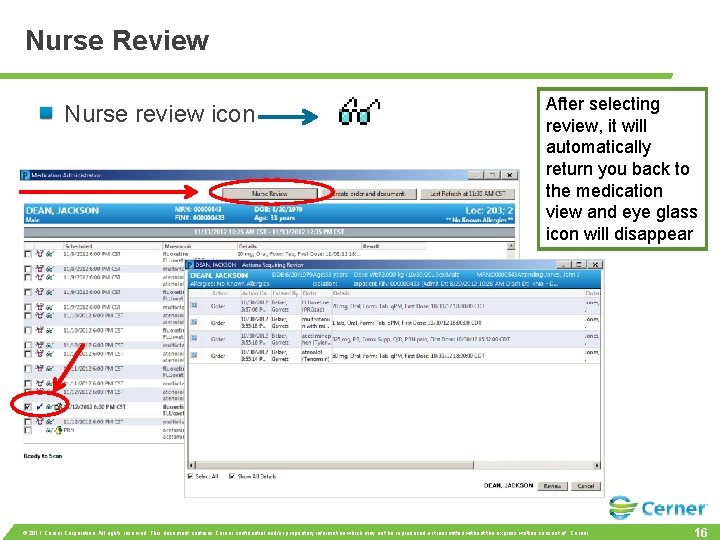
Nurse Review Nurse review icon After selecting review, it will automatically return you back to the medication view and eye glass icon will disappear. © 2011 Cerner Corporation. All rights reserved. This document contains Cerner confidential and/or proprietary information which may not be reproduced or transmitted without the express written consent of Cerner. 16
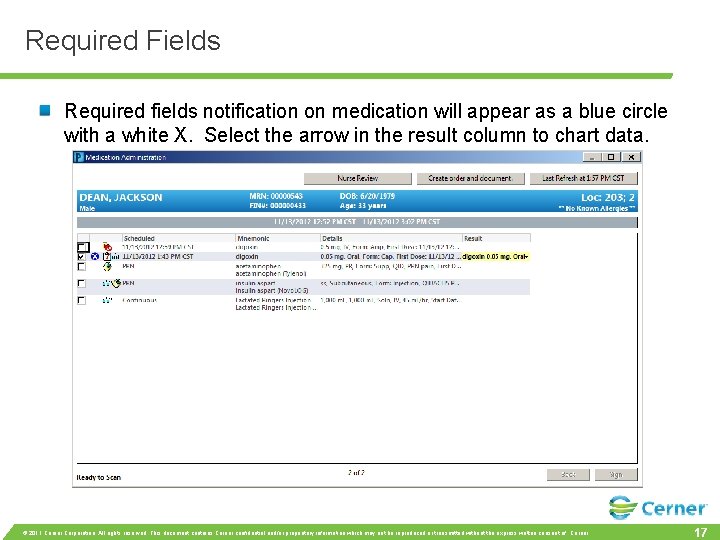
Required Fields Required fields notification on medication will appear as a blue circle with a white X. Select the arrow in the result column to chart data. © 2011 Cerner Corporation. All rights reserved. This document contains Cerner confidential and/or proprietary information which may not be reproduced or transmitted without the express written consent of Cerner. 17
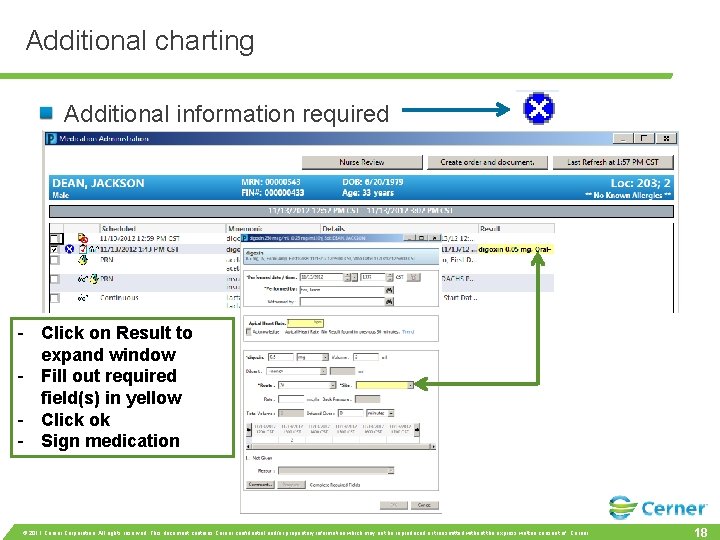
Additional charting Additional information required - Click on Result to expand window - Fill out required field(s) in yellow - Click ok - Sign medication © 2011 Cerner Corporation. All rights reserved. This document contains Cerner confidential and/or proprietary information which may not be reproduced or transmitted without the express written consent of Cerner. 18
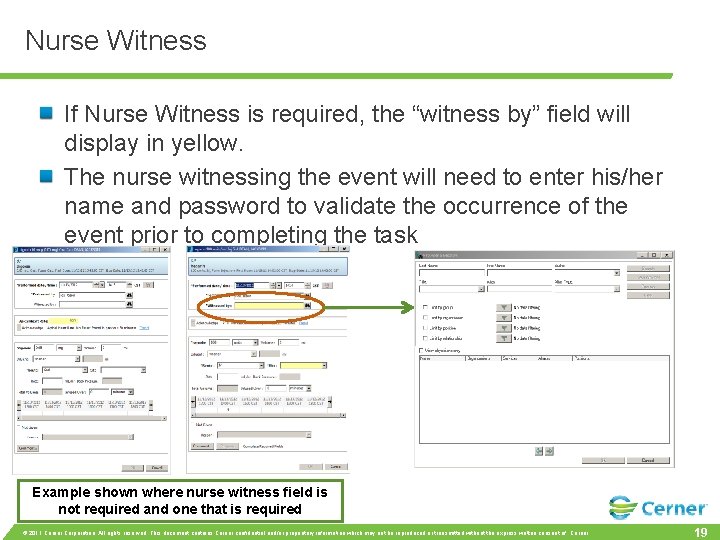
Nurse Witness If Nurse Witness is required, the “witness by” field will display in yellow. The nurse witnessing the event will need to enter his/her name and password to validate the occurrence of the event prior to completing the task Example shown where nurse witness field is not required and one that is required © 2011 Cerner Corporation. All rights reserved. This document contains Cerner confidential and/or proprietary information which may not be reproduced or transmitted without the express written consent of Cerner. 19
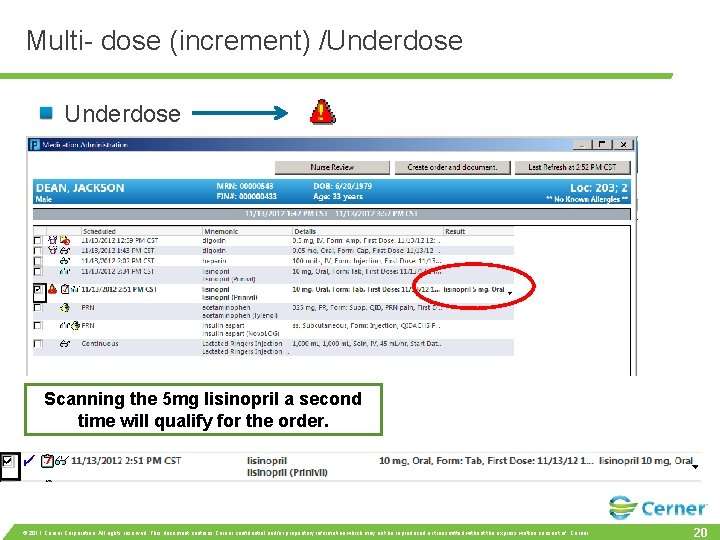
Multi- dose (increment) /Underdose Scanning the 5 mg lisinopril a second time will qualify for the order. © 2011 Cerner Corporation. All rights reserved. This document contains Cerner confidential and/or proprietary information which may not be reproduced or transmitted without the express written consent of Cerner. 20
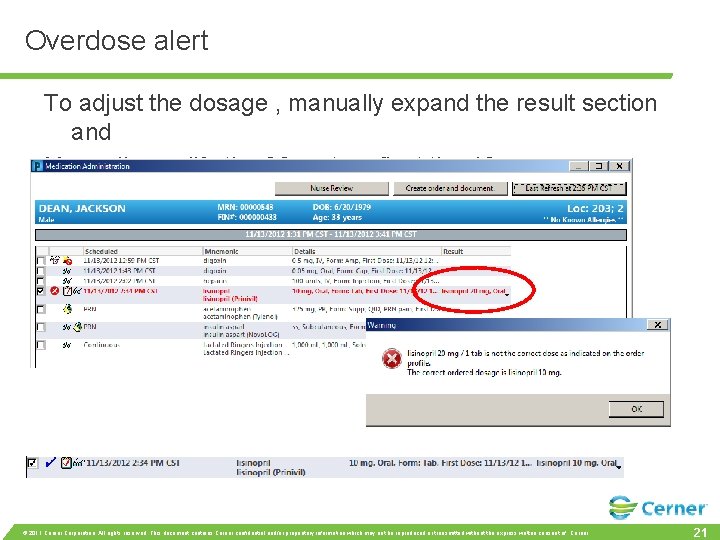
Overdose alert To adjust the dosage , manually expand the result section and Manually modify the 20 mg to reflect the 10 mg © 2011 Cerner Corporation. All rights reserved. This document contains Cerner confidential and/or proprietary information which may not be reproduced or transmitted without the express written consent of Cerner. 21
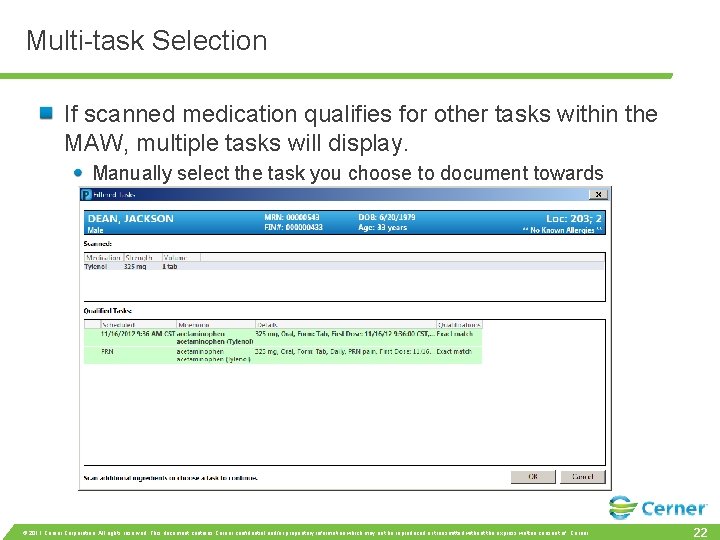
Multi-task Selection If scanned medication qualifies for other tasks within the MAW, multiple tasks will display. Manually select the task you choose to document towards © 2011 Cerner Corporation. All rights reserved. This document contains Cerner confidential and/or proprietary information which may not be reproduced or transmitted without the express written consent of Cerner. 22
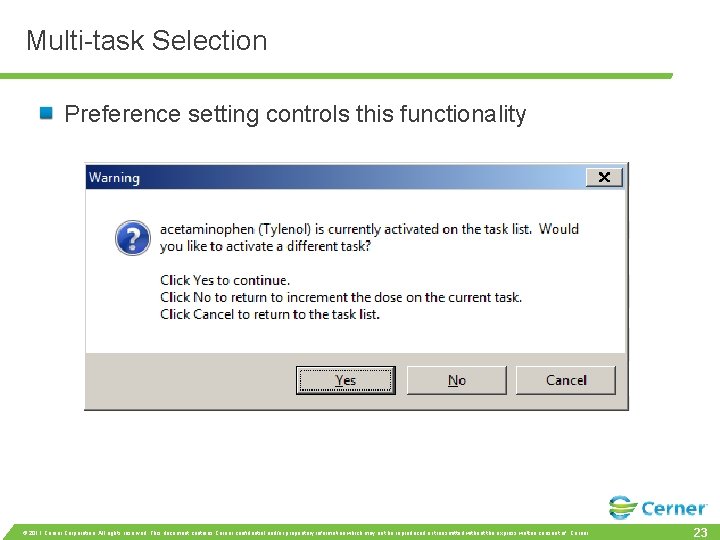
Multi-task Selection Preference setting controls this functionality © 2011 Cerner Corporation. All rights reserved. This document contains Cerner confidential and/or proprietary information which may not be reproduced or transmitted without the express written consent of Cerner. 23
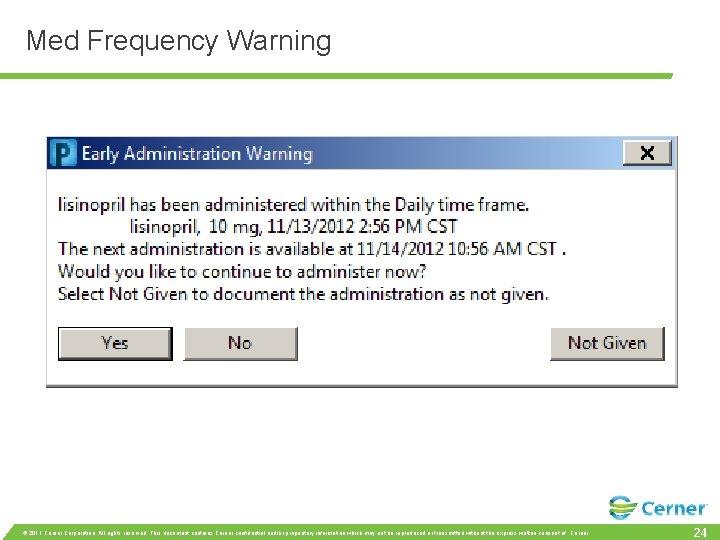
Med Frequency Warning © 2011 Cerner Corporation. All rights reserved. This document contains Cerner confidential and/or proprietary information which may not be reproduced or transmitted without the express written consent of Cerner. 24
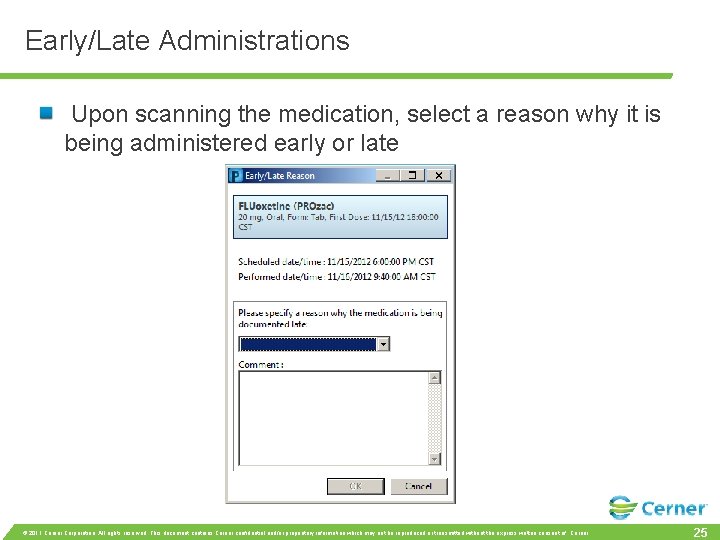
Early/Late Administrations Upon scanning the medication, select a reason why it is being administered early or late © 2011 Cerner Corporation. All rights reserved. This document contains Cerner confidential and/or proprietary information which may not be reproduced or transmitted without the express written consent of Cerner. 25
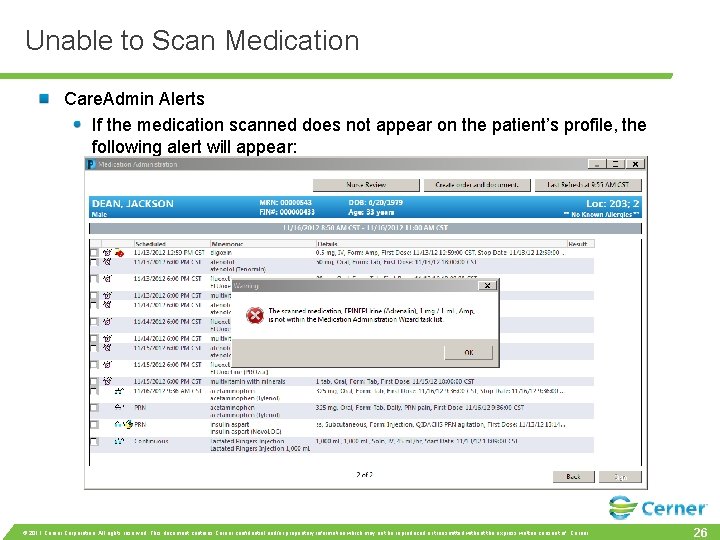
Unable to Scan Medication Care. Admin Alerts If the medication scanned does not appear on the patient’s profile, the following alert will appear: © 2011 Cerner Corporation. All rights reserved. This document contains Cerner confidential and/or proprietary information which may not be reproduced or transmitted without the express written consent of Cerner. 26
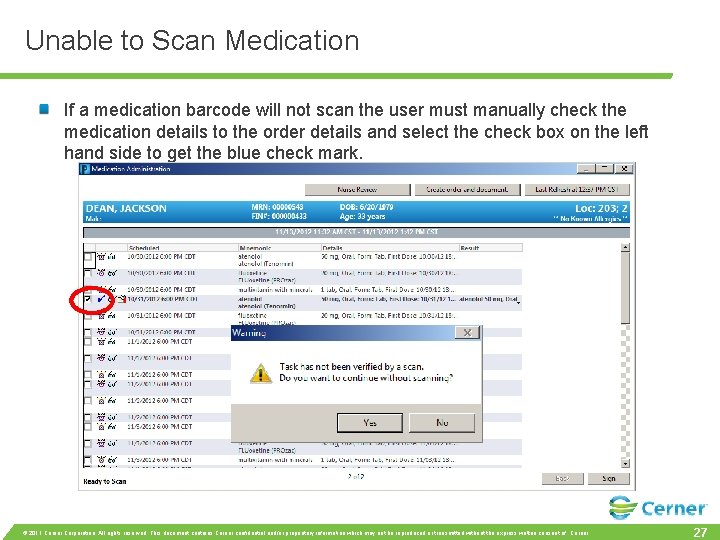
Unable to Scan Medication If a medication barcode will not scan the user must manually check the medication details to the order details and select the check box on the left hand side to get the blue check mark. © 2011 Cerner Corporation. All rights reserved. This document contains Cerner confidential and/or proprietary information which may not be reproduced or transmitted without the express written consent of Cerner. 27
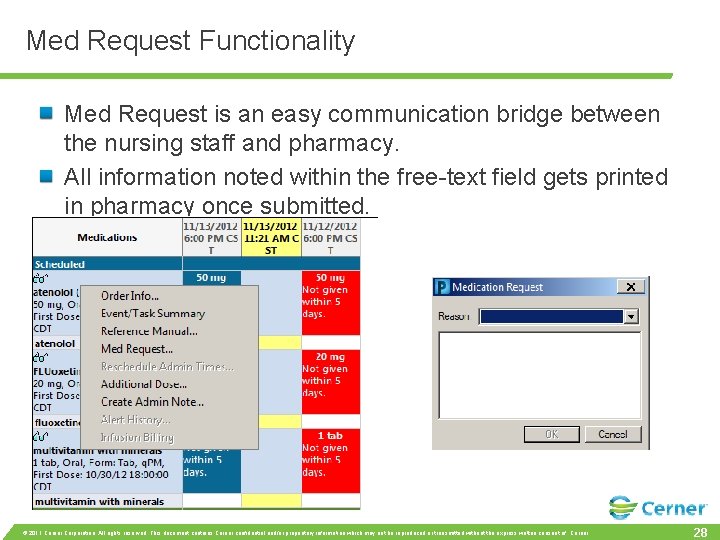
Med Request Functionality Med Request is an easy communication bridge between the nursing staff and pharmacy. All information noted within the free-text field gets printed in pharmacy once submitted. © 2011 Cerner Corporation. All rights reserved. This document contains Cerner confidential and/or proprietary information which may not be reproduced or transmitted without the express written consent of Cerner. 28
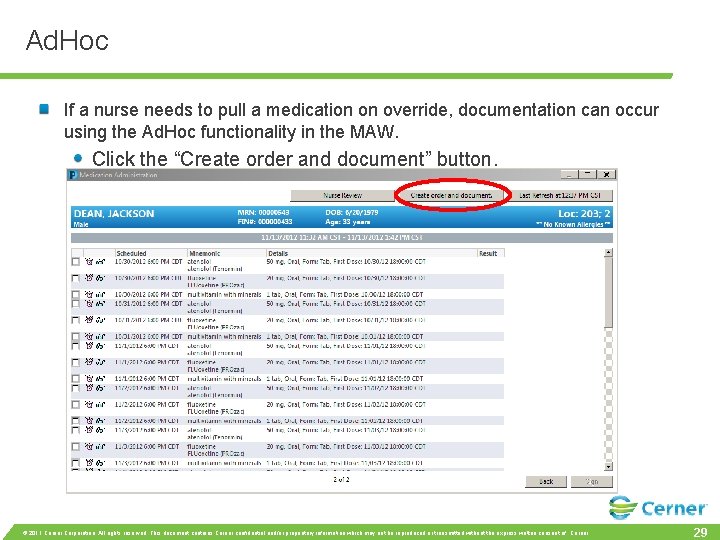
Ad. Hoc If a nurse needs to pull a medication on override, documentation can occur using the Ad. Hoc functionality in the MAW. Click the “Create order and document” button. © 2011 Cerner Corporation. All rights reserved. This document contains Cerner confidential and/or proprietary information which may not be reproduced or transmitted without the express written consent of Cerner. 29
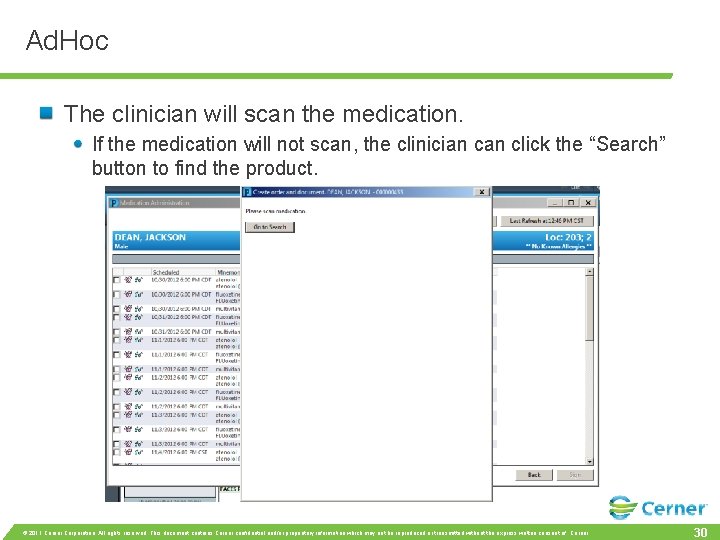
Ad. Hoc The clinician will scan the medication. If the medication will not scan, the clinician click the “Search” button to find the product. © 2011 Cerner Corporation. All rights reserved. This document contains Cerner confidential and/or proprietary information which may not be reproduced or transmitted without the express written consent of Cerner. 30
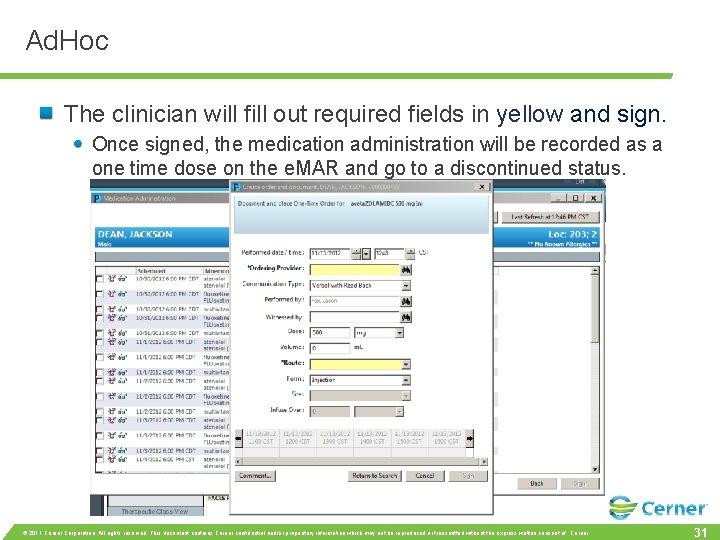
Ad. Hoc The clinician will fill out required fields in yellow and sign. Once signed, the medication administration will be recorded as a one time dose on the e. MAR and go to a discontinued status. © 2011 Cerner Corporation. All rights reserved. This document contains Cerner confidential and/or proprietary information which may not be reproduced or transmitted without the express written consent of Cerner. 31
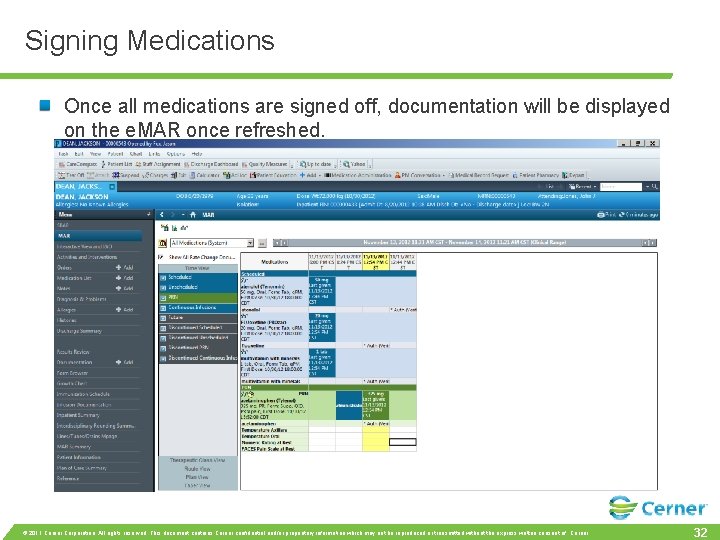
Signing Medications Once all medications are signed off, documentation will be displayed on the e. MAR once refreshed. © 2011 Cerner Corporation. All rights reserved. This document contains Cerner confidential and/or proprietary information which may not be reproduced or transmitted without the express written consent of Cerner. 32
Questions? © 2011 Cerner Corporation. All rights reserved. This document contains Cerner confidential and/or proprietary information which may not be reproduced or transmitted without the express written consent of Cerner. 33