Share Point Adoption Campaign Project Plan Template PreLaunch

- Slides: 5
Share. Point Adoption Campaign Project Plan Template
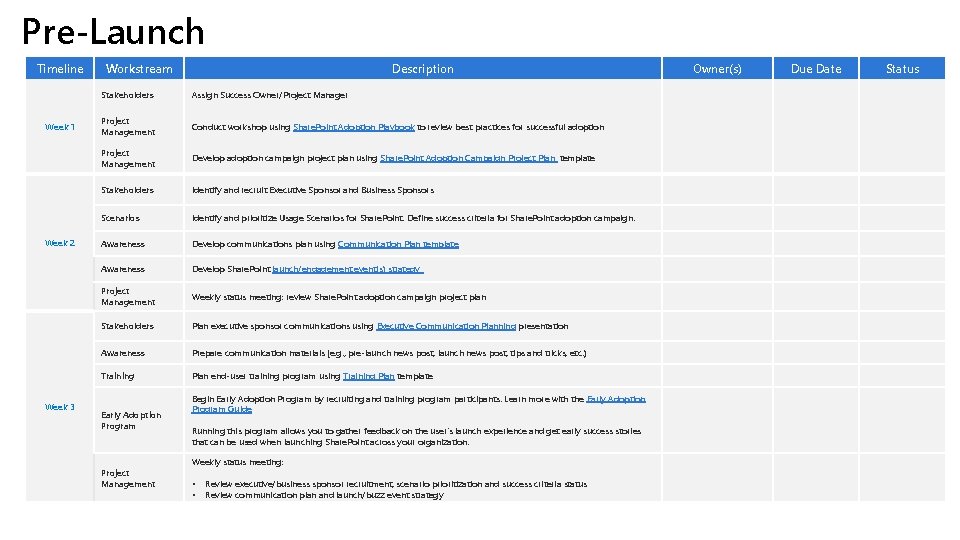
Pre-Launch Timeline Week 1 Week 2 Week 3 Workstream Description Stakeholders Assign Success Owner/Project Manager Project Management Conduct workshop using Share. Point Adoption Playbook to review best practices for successful adoption Project Management Develop adoption campaign project plan using Share. Point Adoption Campaign Project Plan template Stakeholders Identify and recruit Executive Sponsor and Business Sponsors Scenarios Identify and prioritize Usage Scenarios for Share. Point. Define success criteria for Share. Point adoption campaign. Awareness Develop communications plan using Communication Plan template Awareness Develop Share. Point launch/engagement event(s) strategy Project Management Weekly status meeting: review Share. Point adoption campaign project plan Stakeholders Plan executive sponsor communications using Executive Communication Planning presentation Awareness Prepare communication materials (e. g. , pre-launch news post, tips and tricks, etc. ) Training Plan end-user training program using Training Plan template Early Adoption Program Project Management Begin Early Adoption Program by recruiting and training program participants. Learn more with the Early Adoption Program Guide Running this program allows you to gather feedback on the user's launch experience and get early success stories that can be used when launching Share. Point across your organization. Weekly status meeting: • • Review executive/business sponsor recruitment, scenario prioritization and success criteria status Review communication plan and launch/buzz event strategy Owner(s) Due Date Status
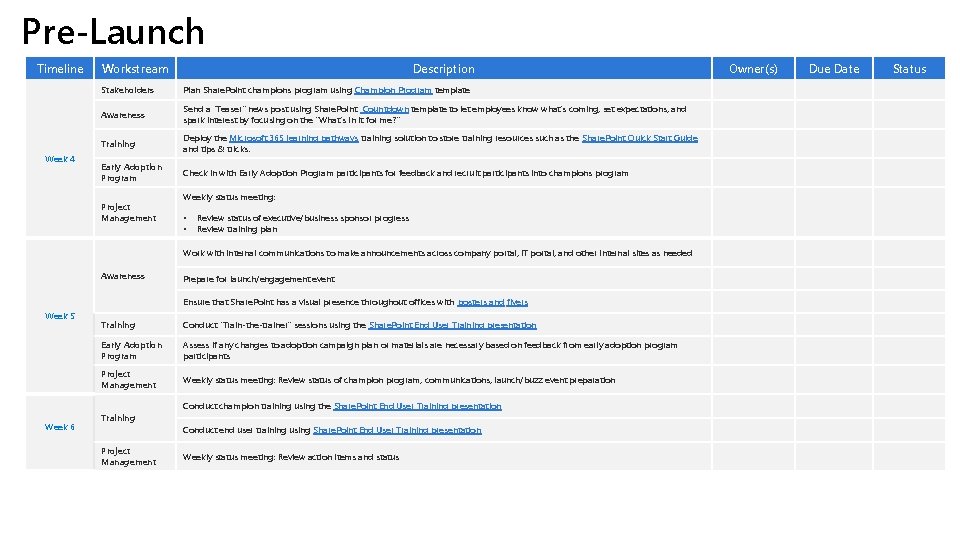
Pre-Launch Timeline Week 4 Workstream Description Stakeholders Plan Share. Point champions program using Champion Program template Awareness Send a “Teaser" news post using Share. Point Countdown template to let employees know what's coming, set expectations, and spark interest by focusing on the "What's in it for me? " Training Deploy the Microsoft 365 learning pathways training solution to store training resources such as the Share. Point Quick Start Guide and tips & tricks. Early Adoption Program Check in with Early Adoption Program participants for feedback and recruit participants into champions program Project Management Weekly status meeting: • • Review status of executive/business sponsor progress Review training plan Work with internal communications to make announcements across company portal, IT portal, and other internal sites as needed Awareness Prepare for launch/engagement event Ensure that Share. Point has a visual presence throughout offices with posters and flyers Week 5 Training Conduct “Train-the-trainer” sessions using the Share. Point End User Training presentation Early Adoption Program Assess if any changes to adoption campaign plan or materials are necessary based on feedback from early adoption program participants Project Management Weekly status meeting: Review status of champion program, communications, launch/buzz event preparation Conduct champion training using the Share. Point End User Training presentation Week 6 Training Conduct end user training using Share. Point End User Training presentation Project Management Weekly status meeting: Review action items and status Owner(s) Due Date Status
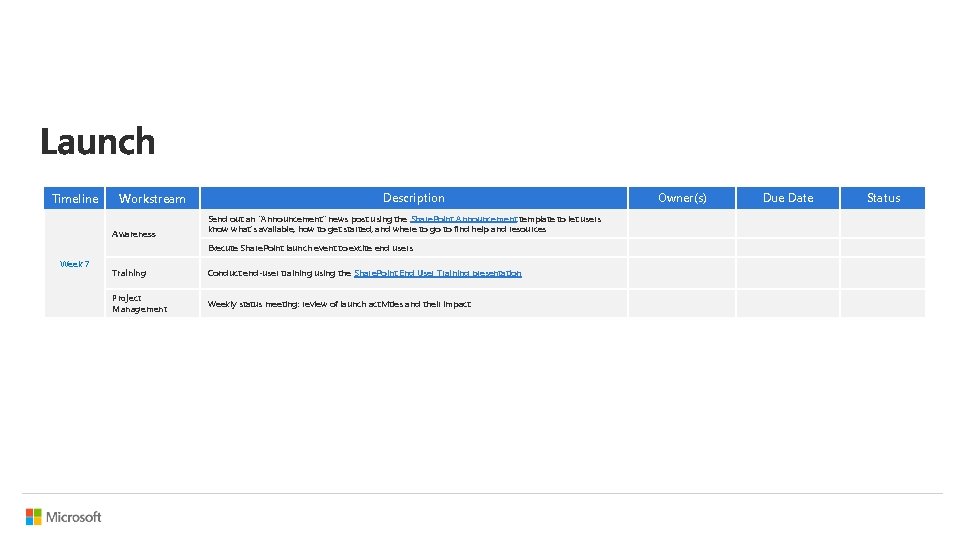
Timeline Workstream Awareness Description Send out an "Announcement" news post using the Share. Point Announcement template to let users know what's available, how to get started, and where to go to find help and resources Execute Share. Point launch event to excite end users Week 7 Training Conduct end-user training using the Share. Point End User Training presentation Project Management Weekly status meeting: review of launch activities and their impact Owner(s) Due Date Status
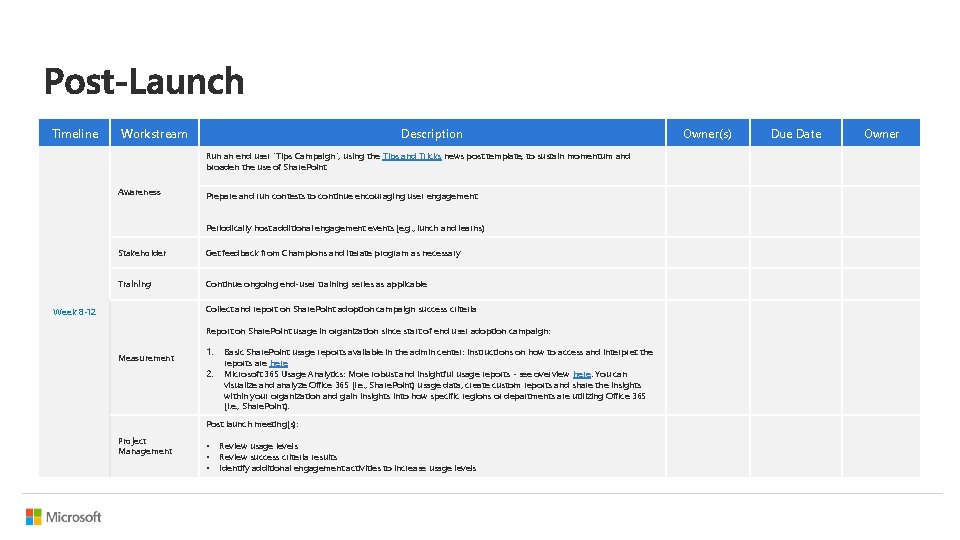
Timeline Workstream Description Run an end user "Tips Campaign“, using the Tips and Tricks news post template, to sustain momentum and broaden the use of Share. Point Awareness Prepare and run contests to continue encouraging user engagement Periodically host additional engagement events (e. g. , lunch and learns) Stakeholder Get feedback from Champions and iterate program as necessary Training Continue ongoing end-user training series as applicable Collect and report on Share. Point adoption campaign success criteria Week 8 -12 Report on Share. Point usage in organization since start of end user adoption campaign: Measurement 1. 2. Basic Share. Point usage reports available in the admin center: Instructions on how to access and interpret the reports are here Microsoft 365 Usage Analytics: More robust and insightful usage reports - see overview here. You can visualize and analyze Office 365 (i. e. , Share. Point) usage data, create custom reports and share the insights within your organization and gain insights into how specific regions or departments are utilizing Office 365 (i. e. , Share. Point). Post launch meeting(s): Project Management • • • Review usage levels Review success criteria results Identify additional engagement activities to increase usage levels Owner(s) Due Date Owner