Lecture 8 More System Verilog Features Project 3



![Using $display statements function logic [255: 0] sha 256_op(input logic [31: 0] a, b,](https://slidetodoc.com/presentation_image_h2/7ce0af42b9e68f1c3eebd8aa64089e78/image-5.jpg "Using $display statements function logic [255: 0] sha 256_op(input logic [31: 0] a, b,")


![Default Scope of Local Variables module ex_add(input logic [1: 0] a, b, c, output](https://slidetodoc.com/presentation_image_h2/7ce0af42b9e68f1c3eebd8aa64089e78/image-9.jpg "Default Scope of Local Variables module ex_add(input logic [1: 0] a, b, c, output")
![Automatic Functions module ex_add(input logic [1: 0] a, b, c, output logic [1: 0]](https://slidetodoc.com/presentation_image_h2/7ce0af42b9e68f1c3eebd8aa64089e78/image-10.jpg "Automatic Functions module ex_add(input logic [1: 0] a, b, c, output logic [1: 0]")
![Accessing Module Variables module ex_add(input logic [1: 0] a, b, c, output logic [1:](https://slidetodoc.com/presentation_image_h2/7ce0af42b9e68f1c3eebd8aa64089e78/image-11.jpg "Accessing Module Variables module ex_add(input logic [1: 0] a, b, c, output logic [1:")
![Return on Functions module ex_add(input logic [1: 0] a, b, c, output logic [1:](https://slidetodoc.com/presentation_image_h2/7ce0af42b9e68f1c3eebd8aa64089e78/image-12.jpg "Return on Functions module ex_add(input logic [1: 0] a, b, c, output logic [1:")
![Void Functions module ex_add(input logic [1: 0] a, b, c, output logic [1: 0]](https://slidetodoc.com/presentation_image_h2/7ce0af42b9e68f1c3eebd8aa64089e78/image-13.jpg "Void Functions module ex_add(input logic [1: 0] a, b, c, output logic [1: 0]")

- Slides: 14
Lecture 8: More System. Verilog Features
Project 3 • For Project 3, the SHA 256 intermediate values are provided in simplified_sha 256. xlsx • The wt values at each time t are provided in simplified_sha 256_w_values. xlsx • See links on course schedule page 2
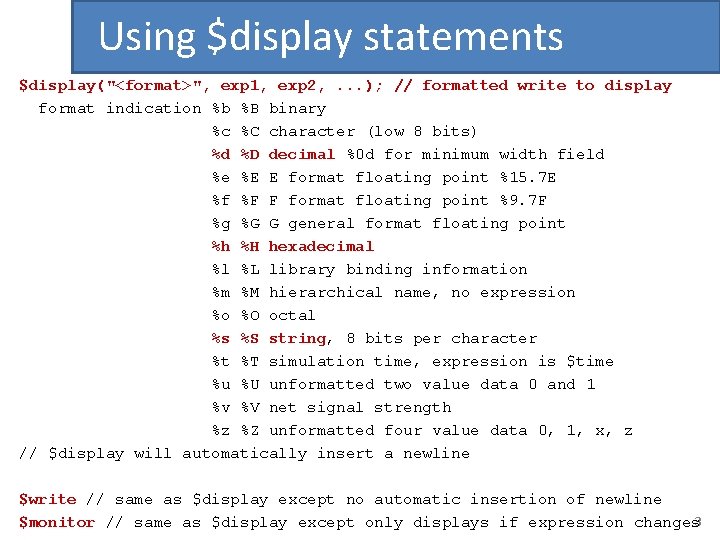
Using $display statements $display("<format>", exp 1, exp 2, . . . ); // formatted write to display format indication %b %B binary %c %C character (low 8 bits) %d %D decimal %0 d for minimum width field %e %E E format floating point %15. 7 E %f %F F format floating point %9. 7 F %g %G G general format floating point %h %H hexadecimal %l %L library binding information %m %M hierarchical name, no expression %o %O octal %s %S string, 8 bits per character %t %T simulation time, expression is $time %u %U unformatted two value data 0 and 1 %v %V net signal strength %z %Z unformatted four value data 0, 1, x, z // $display will automatically insert a newline $write // same as $display except no automatic insertion of newline $monitor // same as $display except only displays if expression changes 3
Using $display statements escape sequences, quoted characters in strings n newline t tab \ backslash " quote ddd character by octal code of 1 -3 digits (0 ≤ d ≤ 7) %% percent any other characters between the quotes are displayed the expressions are taken in order of the format indication , , in the expression list inserts one space in the output 4
Using $display statements function logic [255: 0] sha 256_op(input logic [31: 0] a, b, c, d, e, f, g, h, w, k); logic [31: 0] S 1, S 0, ch, maj, t 1, t 2; // internal signals begin S 1 = rightrotate(e, 6) ^ rightrotate(e, 11) ^ rightrotate(e, 25); ch = (e & f) ^ ((~e) & g); t 1 = ch + S 1 + h + k + w; S 0 = rightrotate(a, 2) ^ rightrotate(a, 13) ^ rightrotate(a, 22); maj = (a & b) ^ (a & c) ^ (b & c); t 2 = maj + S 0; // this displays the next values of a, b, c, d, e, f, g, h // just like the spreadsheet $display("%h %h %h", t 1 + t 2, a, b, c, d + t 1, e, f, g); sha 256_op = {t 1 + t 2, a, b, c, d + t 1, e, f, g}; endfunction always_ff @(. . . ) begin if (!reset_n) begin. . . end else begin. . . $write("%2 d ", t); {a, b, c, d, e, f, g, h} <= sha 256_op(a, b, c, d, e, f, g, h, w[15], t); . . . end 5 end
Modelsim in Command Line Mode To run Modelsim in command line mode, create a work directory: vlib work You just have to run this command once to create the work directory. To compile a design with testbench, run the following (using for example tb_fibonacci_calculator. sv and fibonacci_calculator. sv): vlog tb_fibonacci_calculator. sv If there are other System. Verilog files, include them on this command line a well. To simulate, run the following (again using the fibonacci calculator example): vsim -c -do "run -all" tb_fibonacci_calculator The simulation transcript is also saved in a file named transcript. 6
Modelsim in Command Line Mode Make sure that the command line shell can find executables vlib, vlog, and vsim by setting the appropriate environment PATH variable. This should normally be set when you install Model. Sim. For example, it might be located here: C: intel. FPGA_lite17. 1modelsim_asewin 32 aloem 7
More on Functions • This lecture provides more ways of using functions • Recall that “functions” should only be used to describe “combinational logic”, same as the way combinational logic is described in “always_comb” (combinational always statements) 8
Default Scope of Local Variables module ex_add(input logic [1: 0] a, b, c, output logic [1: 0] q); function logic [1: 0] add 3(input logic [1: 0] x, y, z); logic [1: 0] t; begin t = x + y; add 3 = t + z; endfunction assign q = add 3(a, b, c); endmodule Be Careful ! “t” is shared across all invocation of add 3 !!! 9
Automatic Functions module ex_add(input logic [1: 0] a, b, c, output logic [1: 0] q 1, q 2); function automatic logic [1: 0] add 3(input logic [1: 0] x, y, z); logic [1: 0] t; begin t = x + y; add 3 = t + z; endfunction assign q 1 = add 3(a, b, c); assign q 2 = add 3(b, b, b); endmodule “automatic” ensures that all local variables are truly local. Each invocation of “add 3” will use a different “t”. 10
Accessing Module Variables module ex_add(input logic [1: 0] a, b, c, output logic [1: 0] q); function logic [1: 0] add 3(input logic [1: 0] x); logic [1: 0] t; begin t = a + x; add 3 = t + c; endfunction assign q = add 3 (c); // will return a + c endmodule Functions can access module (global) variables 11
Return on Functions module ex_add(input logic [1: 0] a, b, c, output logic [1: 0] q); function logic [1: 0] add 3(input logic [1: 0] x, y, z); logic [1: 0] t; begin t = x + y; return t + z; // instead of add 3 = t + z; endfunction assign q = add 3(a, b, c); endmodule 12
Void Functions module ex_add(input logic [1: 0] a, b, c, output logic [1: 0] q); function void add 3(input logic [1: 0] x, y, z, output logic [1: 0] sum); local [1: 0] t; begin t = x + y; sum = t + z; // instead of add 3 = t + z; endfunction always_comb begin add 3(a, b, c, q); endmodule 13
More System. Verilog Features • The rest of this lecture will be a presentation entitled “Synthesizing System. Verilog: Busting the Myth that System. Verilog is only for Verification, ” by Stuart Sutherland Don Mills • The presentation was given at the Synopsys User Group (SNUG) meeting in Silicon Valley in 2013 • Link to the companion paper is provided on the course schedule page 14