Applying to Positions In Alexander County Schools http
- Slides: 2
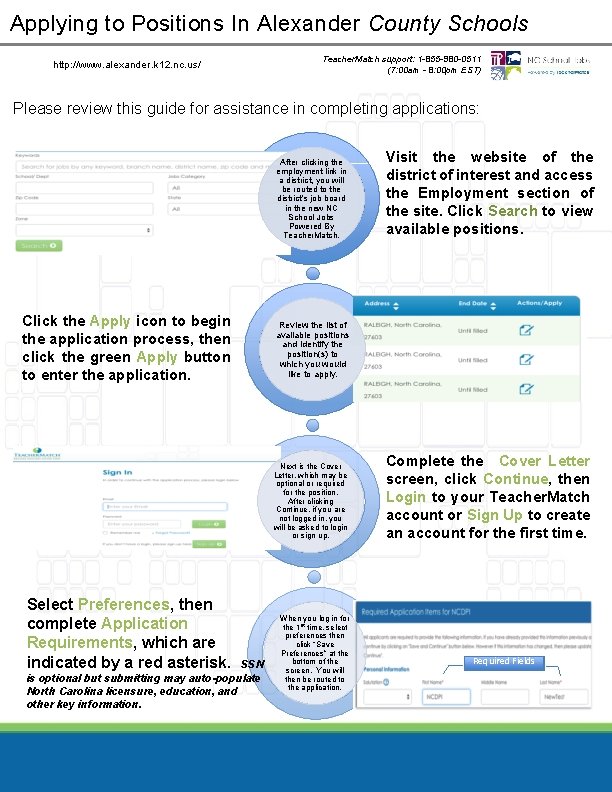
Applying to Positions In Alexander County Schools http: //www. alexander. k 12. nc. us/ Teacher. Match support: 1 -855 -980 -0511 (7: 00 am - 8: 00 pm EST) Please review this guide for assistance in completing applications: After clicking the employment link in a district, you will be routed to the district’s job board in the new NC School Jobs Powered By Teacher. Match. Click the Apply icon to begin the application process, then click the green Apply button to enter the application. Review the list of available positions and identify the position(s) to which you would like to apply. Next is the Cover Letter, which may be optional or required for the position. After clicking Continue, if you are not logged in, you will be asked to login or sign up. Select Preferences, then complete Application Requirements, which are indicated by a red asterisk. SSN is optional but submitting may auto-populate North Carolina licensure, education, and other key information. Visit the website of the district of interest and access the Employment section of the site. Click Search to view available positions. When you log in for the 1 st time, select preferences then click “Save Preferences” at the bottom of the screen. You will then be routed to the application. Complete the Cover Letter screen, click Continue, then Login to your Teacher. Match account or Sign Up to create an account for the first time. Required Fields
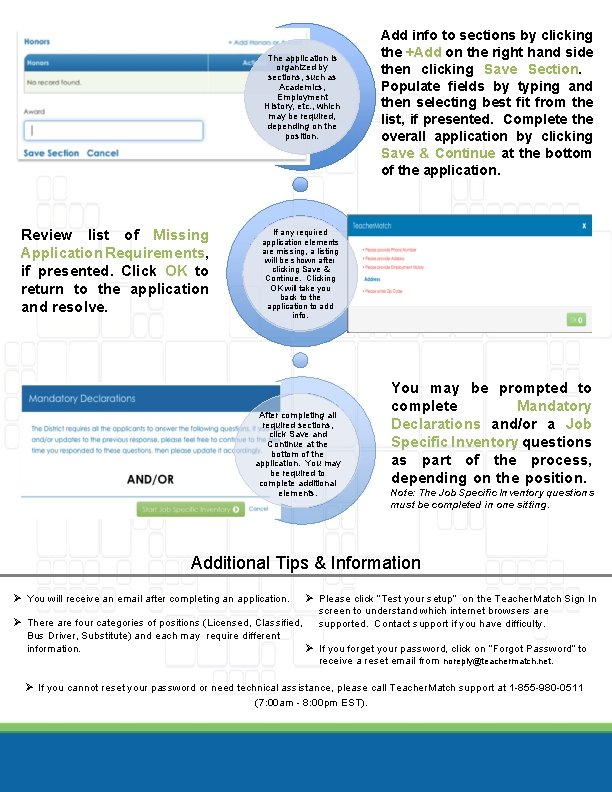
The application is organized by sections, such as Academics, Employment History, etc. , which may be required, depending on the position. Review list of Missing Application Requirements, if presented. Click OK to return to the application and resolve. Add info to sections by clicking the +Add on the right hand side then clicking Save Section. Populate fields by typing and then selecting best fit from the list, if presented. Complete the overall application by clicking Save & Continue at the bottom of the application. If any required application elements are missing, a listing will be shown after clicking Save & Continue. Clicking OK will take you back to the application to add info. After completing all required sections, click Save and Continue at the bottom of the application. You may be required to complete additional elements. You may be prompted to complete Mandatory Declarations and/or a Job Specific Inventory questions as part of the process, depending on the position. Note: The Job Specific Inventory questions must be completed in one sitting. Additional Tips & Information Ø Please click “Test your setup” on the Teacher. Match Sign In screen to understand which internet browsers are Ø There are four categories of positions (Licensed, Classified, supported. Contact support if you have difficulty. Bus Driver, Substitute) and each may require different Ø If you forget your password, click on “Forgot Password” to information. receive a reset email from noreply@teachermatch. net. Ø You will receive an email after completing an application. Ø If you cannot reset your password or need technical assistance, please call Teacher. Match support at 1 -855 -980 -0511 (7: 00 am - 8: 00 pm EST).