
Your Logo Here How to Create a Digital



- Slides: 30
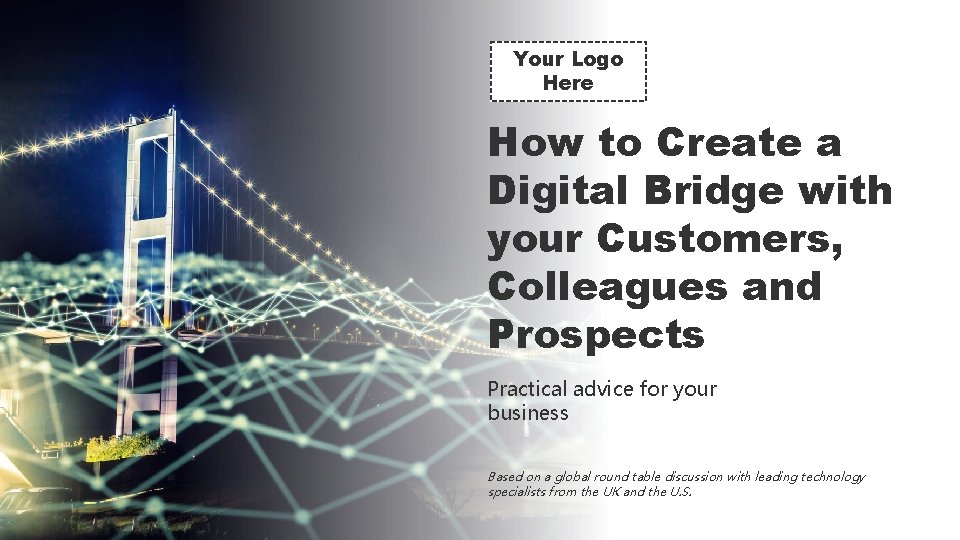
Your Logo Here How to Create a Digital Bridge with your Customers, Colleagues and Prospects Practical advice for your business Based on a global round table discussion with leading technology specialists from the UK and the U. S.
Instructions for rebranding your e-book This editable e-book has been created using Microsoft Power. Point. If you do not use Power. Point, simply complete the following actions using either Apple Keynote, or Google Slides. Please make sure you follow the instructions below in order to add your own logo to the document. This must be done via the Slide Master, not simply editing the slides outright. 1. To add your own logo • On the View tab, click Slide Master. In Slide Master View, the slide master appears at the top of the thumbnail pane with related layouts beneath it. • You will then see each chapter slide which you can click and edit. • Replace the “insert your logo here” placeholder images with your own logo from your computer (make sure to replace ALL the placeholders). • On the Slide Master tab, click Close Master View and check that your changes have been applied throughout the e-book. 2. On the final slide, add your own contact details. You can do this normally without having to follow the previous steps. 3. Save your changes, go to file → save as, and save your e-book as a PDF. You now have your own fully branded, easily shareable COVID 19 e-book. Once you have rebranded your e-book, please either delete this page, or add your own introductory text. The disclaimer used on this page relates to MFA exclusively and should not be reused in its current form. You may adapt it for your own use, but please take legal advice before doing so.
Your Logo Here Contents 4 Introduction 13 5 8 10 Building a Digital Bridge to The New Normal 15 The New Online World Does Digital Technology Hold The Key to Remote Working? 18 28 Keep Communicatio n Alive How Accounting Apps Are Delivering Essential Analytics Practical Tools For The New Normal Useful Links
Foreword by Jennifer Brazer, US based entrepreneur How to embrace the cloud in bite-sized portions… Without warning, 2020 has made digital solutions more relevant than ever before. We are faced with bridging the digital divide simply because we have no other option and we need to put the technologies and strategies in place to cope with what may be turbulent years ahead. Although many businesses have adopted some digital solutions, it is now essential to look at all of the components that are necessary to fully embrace the cloud as a platform for delivery. I know that can sound like an overwhelming proposition, so let's break it down into bite-sized portions and this e-guide is a great place to start. The answer ‘one bite at a time’ holds true with any project that looks overwhelming and certainly, creating a digital bridge is no different. Turning your business digital is an important next step and will allow for greater efficiencies and also save your customers time. At the end of this e-guide you will find my personal suggestions for how to go about this with guidance on which areas of the business to look at. It doesn’t have to be scary if you: • Take a moment to plan it out and see what you want to achieve. Talk it through with staff members • Take one step in that direction – make it a simple one such as adding each staff member to a virtual phone system • Leverage tools made by other people, so you don’t spend so much in terms of development and time Alone or in combination, the strategies and tools discussed here will position your business as savvy and supportive as you bridge the technology gap. By doing so, you can create an environment for technology to be accepted as part of the total solution you are offering. And that is good business as you and your customers prepare for greater dependence on the cloud for daily operations. I hope you find it useful. Jennifer Brazer Jennifer’s book From Cubicle to Cloud gives more advice about taking the journey to the cloud. More details can be found at: http: //jenniferbrazer. com
Your Logo Here Building a Digital Bridge to The New Normal
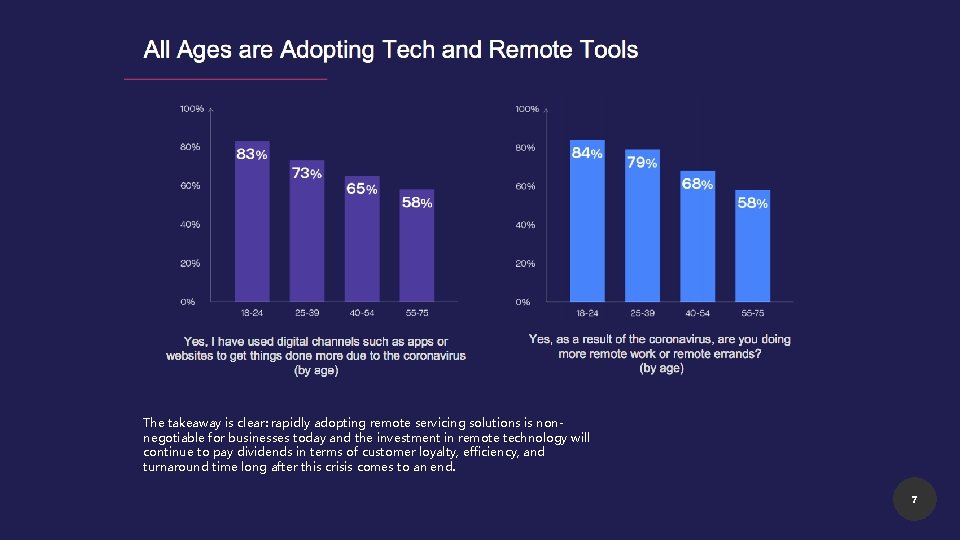
Building a digital bridge to the new normal Why on earth would I want to build a bridge you may be asking. But we’re not talking about the bricks and mortar type, the bridges we are interested in are of the digital variety. What is a digital bridge? “Technology is expected to develop at a far faster pace than ever forecast, bringing forward years of work of tech progress and if done well, will create huge cost savings just at a time when firms need it while improving customers’ digital experiences. ” EY Let’s set the scene. Almost, within a heartbeat, our lives have changed in ways we could never have envisaged. COVID-19 has disrupted every aspect and we have had to navigate a new pathway to bring about some degree of normality. Not being able to be in the same room with other people has created a gap that technology has been able to bridge. Across the generations, we have turned to digital tools that have brought us closer together and they have undoubtedly made the enforced changes seem more natural. From children logging on to remote classrooms to enterprising businesses that have taken their services online, in the short space of just a few months, there has seen a normality around using digital that has shrunk the divide. Instead of becoming isolated, we have found ways to build bridges so that we can connect with our families, friends and in the business environment with our customers, colleagues and prospects. How is this shift impacting the business world? “There is a need to connect digitally that didn’t exist before” Dan Richards, Business Development Director, My. Firms. App The fear of contagion has driven much of the world’s population indoors and businesses are adapting to the new reality. Before the coronavirus era, customers were already expressing a strong preference for frictionless online journeys. Today, they are demanding it. 84% of consumers surveyed by the American digital company, Lightico, say they expect brands to find ways to maximize digital interactions with 72% saying that companies need to invest in long-term digital solutions to minimize physical interactions. A similar percentage (74%) think the transition to a more digital environment will be a lasting trend even after the coronavirus is defeated and this is a belief held across the generations as the graph below shows. 6
The takeaway is clear: rapidly adopting remote servicing solutions is nonnegotiable for businesses today and the investment in remote technology will continue to pay dividends in terms of customer loyalty, efficiency, and turnaround time long after this crisis comes to an end. 7
Your Logo Here The New Online World
The new online world “Some companies might have needed to make those changes but were putting them off and now there is no choice open to them but to modernise. Everything is online so the first place your prospects is going to find out about you is through your website. If it’s not modern and in the place, where we are now, you will probably have found it tricky to pick up new business. ” James Byrne, Founder and CEO of Accountancy Manager We only have to look at the boost that online shopping has experienced in recent times to see how the pandemic has accelerated digital take up. During lockdown, it was only possible to go to a store for essential food shopping or to buy medical items, which has resulted in a wholesale move to online shopping for all generations. Online sales increased to an unprecedented rate of 2. 34 billion in June 2020, according to Statista, a leading provider of market and consumer data. With some many people working remotely and city centres deserted, online shopping has become more natural and experts predict that this is one shift that is here to stay. This change in habit is not restricted solely to retail and can also be seen in sectors such as insurance, banking and healthcare. That acceleration is very real and will have a major impact, but it would be naïve to believe the disruption will stop there. Business leaders are now thinking strategically about ways to use technology and data to proactively retool their organizations to prepare for the new normal and with many people quarantined in their homes, digital experiences matter more than ever. The global consultancy, Bain & Company, argues that those businesses that were working on a three-year plan to build out their digital channels, no longer have that luxury. They predict that government intervention and new regulations around the world will reshape business boundaries adding that: “If you don’t move first to improve your market position, your competitors doubtless will. ” Leading companies will go a step further, investing in their technology architecture to accelerate their digital transformation and putting themselves in a stronger position to emerge from the pandemic. They are expected to accelerate automation efforts during the crisis, simplifying as they go and using data to determine critical areas of investment and potential cost savings. 9
Your Logo Here Does Digital Technology Hold The Key to Remote Working?
Does digital technology hold the key to remote working? "The future offers a range of possible work arrangements: fully remote, fully on-site, or a hybrid model in which some employees are on premises while others work from home. Already, this new mode, made possible with the help of a ‘digital bridge’, is winning fans as it promises access to greater talent, increased productivity, small teams, lower costs and improved employee experiences". Mc. Kinsey. We are now pushing towards digital technology because we have had to and there will undoubtedly be challenges along the way to overcome. According to Jennifer Brazer, who runs a successful company she founded in the US, trying to bridge the digital divide poses a lot of questions and some of the most pressing revolve around staff working remotely, how you engage them, set goals and monitor them. While companies have to decide whether to bring staff back to the office, the reality is that many companies have noticeably improved speed, innovation and employee satisfaction during COVID-19. Productivity has increased “Teams are more agile, adaptable and better able to prioritize since Covid-19 struck’” Bain & Company Roughly 70% of white collar workers are now working remotely, a recent Bain & Company Global Retooling Survey found, and work productivity has increased with 58% reporting that it has increased or stayed the same. The fact that there is no commute is the top reason for better productivity and 55% said they are able to focus better in their homes. James Byrne, Founder of the cloud software company Accountancy Manager, said: “From March onwards, we have had to trust our employees who are working remotely, and we wouldn’t have been able to do it without a cloud-based product to bring all the team members together, so they can communicate. ” These positive results—perhaps surprising to some—have quickly elevated working from home to a credible long-term option for companies and employees. Now, as countries and cities begin to reopen, companies face not only the question of how to return to offices, but whether to do so at all. 11
Does digital technology hold the key to remote working? In Jennifer Brazer’s business, she believes that successful remote working is only possible if you are operating in a cloud environment so that staff members can work and collaborate in real-time. “Getting away from legacy software is super important - that’s the path to take. ” Companies are seeking to tap into the benefits of the work from home experiment: speed, innovation, employee satisfaction. Over the long term, more permanent remote work options may also yield benefits to a company’s access to talent, retention rates and employee engagement, while still creating options for those employees who work best from an office. For many, remote work is here to stay. Today the business world has the historic opportunity to design the optimal distributed workforce model, the one that will get the most from employees while also helping to retain and attract great talent. Encourage informal virtual interactions “It is easier in the digital world with the help of tools like Slack to have everything in one place” Jennifer Brazer, CEO and founder of a successful cloud business in the US The importance of digitalisation during these unprecedented times is clear and now, more than ever, businesses are leveraging digital to communicate with employees. Zoom and other tools such as Google Meet and Skype have been a lifeline to bridge the gap allowing multiple people in the same virtual room at once. In America, Zoom is now the number one App on App stores as Americans rely on video conferencing to keep their businesses operating and the Slack channel has benefited too with 12. 5 million daily active users. Slack is one of the new generation digital tools that Jennifer Brazer relies on. She says it is ‘a great tool’ and keeps all team members in the loop and allows them to keep in touch throughout the working day and ask questions. She also uses it to keep connected with customers by setting up individual accounts. As we all adapt to the new ways of working, bonds that would have been possible through physical presence such as shaking hands will need to be replaced with new ‘virtual’ approaches. With it no longer possible to meet a colleague in the corridor or in the cafeteria and have a chat, there is a suggestion that meetings should move away from being totally agenda driven so there is an opportunity to encourage dialogue and share ideas. 12
Your Logo Here Keep Communication Alive
Keep Communication Alive Creating meaningful touch points with customers has never been more important as this new world demands regular communication to stay in touch and to create trust. One of the questions businesses need to ask is ‘Do we arm customers with tools and how do we make it super easy for them to communicate with us? ’ There are now lots of tools that can be utilised to help businesses communicate with their customers quickly and easily. Sarah Douglas is a technology specialist who has been running her business for the last 20 years and over that time, she has come to understand that not all customers are happy to use digital technology. She advocates ‘patience’ as some may not have all those digital skills and they are literally intimidated by new technology. As we all get used to a new way of working, Apps for instant messaging such as Whats. App, Skype chat and text messages are seen to be delivering better results and proving more efficient than email. According to Sarah, she and her team routinely use them to be sure of a fast response. She says: “Our clients are fans of Whats. App, Texts and Skype chat and we find it easier to work with our customer’s preferred option, so we can be sure of a quick response. It is clear that these new methods of instant messaging are working better than emails as filter systems automatically direct what can be important messages to the junk folder where they can end up ignored. ” The challenge with these newer methods of communication in the business setting is how to save the messages so you always have a record of them. The good news is that are a number of options with functionality to export conversations from texts, Whats App messages and Instant chat and Sarah shares her favourites at the end of this e-guide. 14
Your Logo Here How Accounting Apps Are Delivering Essential Analytics
How accounting Apps are delivering essential analytics “If you don’t know who your aged debtors are, you could go under. With cloud accounting Apps you can see aged debtors quickly and easily and always know who to chase. ” Sarah Douglas Mobile applications, most commonly referred to as Apps, have become essential digital tools in recent months for keeping connected with customers and colleagues. With 95% of households now owning a mobile phone in the United Kingdom, according to Statista – they are now the go-to for businesses that need to be able to manage their finances on the move. A great example is being able to keep on top of cashflow and monitoring performance through cloud accounting Apps that are easily accessed from the home screen of the smartphone. James Byrne was an accountant before setting up his own business and he can’t stress enough the importance of managing finances on a daily basis. He says: “You can’t really understand cashflow unless you’re keeping it up to date so you can see your own performance and with the cloud, we can scale up and do it on a daily basis. No one knows what their revenue is going to look like and the pattern isn’t going to be the same as last year. We’re dealing with something totally different. ” 16
Apps to connect you with your customers “It’s all about building trust with whatever digital tools you choose to use. Pre-COVID we used screen share tools to focus a client in on the numbers and to see how they are performing and we tried to build relationships with our customers with texts and emails. We rely on valuable digital tools such as our own App to leverage conversations with new customers and use it as a door opener. We show prospects what tools we use so they understand what we do and at the same time, it shows them how technologically forward we are with very modern solutions. ” Jennifer Brazer Having the means to message customers, colleagues and prospects within an App makes it easier to stay in touch and adds an element of security as they can be sure that any message is from you and not someone claiming to be you. These ‘Push’ messages’ are created easily and sent to the recipient’s Smartphone instantly and research shows that they are nearly always read, with a 93% open rate. With the growing threat of scam emails pushing all businesses to find more secure ways of communicating with their customers, an App also offers a more trusted method for interaction. Sarah Douglas takes the view that ‘every company without an App is going to be left behind. It will be our next step. ’ It doesn’t need to be just messages that are sent to customers. Apps make it possible to share articles and content that you believe may be of interest. This personalised approach builds trust and has been particularly useful over recent months to alert customers to information that may be relevant to them. 17
Your Logo Here Practical Tools For The New Normal
Practical tools for the new normal “How do we arm customers with tools and how do we make it super easy to communicate with us. Do we give them a document scanner, so they can do it right there on their phone and not stand in front of a machine? Is it about giving them mileage trackers or time sheets or writing them a template. What can we do that’s super quick and easy and then the final piece of the puzzle – how do we leverage digital information to give customers advice? We are in a new century and have been for 20 years. Bring your customers along so they get used to new practices and once you have a digital platform and they trust you as someone who understands technology then you can be in a position to suggest ways of gaining efficiencies” Jennifer Brazer Apps are not just tools that allow businesses a more streamlined way of communicating with their customers, they also provide access to tools that can make the day-to-day running of the operation easier. Take for example firms of accountants that give their clients free tools such as mileage trackers and receipt scanners. These are instantly valuable as they allow each business trip to be recorded an immediate record is then sent to the accountant so there is no backlog at the end of the tax year to sort through. A receipt scanner on your phone means you record your purchase straight away and there’s no risk of forgetting about it. Progressive firms of accountants are gifting tools to their clients that are made available through their own Apps to make efficiency gains for both the business owner and for the accountant. 19
Digital makes it easier Getting away from legacy software and moving to a cloud environment is the first important step for any business looking to build a digital bridge. James Byrne, founder of the successful practice management cloud software solution Accountancy Manager, has first-hand experience of trying to get his father’s business over the line in terms of going digital and admits it was a struggle. He says: “My Dad’s firm was resistant to change and still using Excel to maintain a client database and task list and he was still sending letters out to clients. We looked for and couldn’t find a solution and that’s why I ended up designing one myself. My advice to others who are struggling to get across the digital line, adopt a simple solution and break it down into small segments about what you want to achieve. Tie them together and make it work for your business. Digital will change your life. My advice is block some time out and go for it. ” Jennifer Brazer says if you are considering creating a digital bridge it doesn’t have to be scary: • Take a moment to plan it out and see what you want to achieve. Talk it through with staff members • Take one step in that direction – make it a simple one such as ensuring officers who have a role in the company are included in Google directories • Leverage tools made by other people, so you don’t spend so much in terms of development and time Wise words and good luck! This e-guide is based on a ‘How create a digital bridge round table podcast with top flight presenters from the UK and the U. S. It is part of a COVID-19 Support Programme by My. Firms. App, pioneers of digital technology for accountants with more than 8000 accountants globally using their Apps 20
Practical help on how to take the first steps towards becoming a digital pioneer from James Byrne, CEO and founder of cloud software company, Accountancy Manager James suggests: 1. Be clear on what you want to achieve 2. Look at ways you can digitalise your business. There’s never a perfect solution so find something that ticks most of your boxes. and remember, business is always going to change 3. Get team members on board and share vision with the rest of your team and then, all the cogs will be moving in the same direction The key to embracing technology is picking the right software for you and your business. To make this decision, you’ve got to have a clear vision of what you want it to do. It’s easy to be distracted by the additional benefits that software can provide, but always keeping your principal purpose in mind will help you make the right decision. Select software that is simple, easy to understand provides a high level of support. It's normal that at some point, you’ll find yourself struggling to use the system you chose. Having an available support team will ensure that your business operations do not come to a halt when you run into technical difficulties. As a business leader, it’s your job to make the decisions. You have to pick what’s right for the business, but it’s your team that will ultimately decide if the software works or not. Encourage them to embrace technology and make one of your staff members the "software champion". It may be that your staff do not respond well with change but if you explain your thought process and your reasoning, they’ll appreciate how and why the decision has been made. Once you’ve improved your internal processes by integrating the right software (or possibly, a combination of multiple software packages) and your team members are embracing this, you can move on to putting solutions in place for your customers. Customers are important - some might say they need to come first, but employees are the foundation for any business. If you don't have the right team or if you haven’t established an effective working method for communication or sharing data, your staff will not work efficiently. These inefficiencies will impact the level of service that clients receive. 21
Practical help on tools and software from Sarah Douglas who has been running her own business for 20 years Sarah rates these digital tools and software as particularly useful: Accounts Software: Xero- Sage Business Cloud – Quick. Books – Free Agent. It is crucial for your practice search for an accounts cloud offering that complies with your country's laws and regulations. Payroll Software: Highly Recommend My Paye Ltd (UK) Fully cloud online for Individual and Payroll Bureau. There is a huge choice but go for one that is fully cloud for a Payroll Bureau not one that needs part saved on a laptop. I advise you check your Payroll Cloud software provides a Bureau and complies with your country’s rules in relation to taxation. Add on Apps for accounts software: Unleashed – Great for Amazon selling and stock – Other options available. Receipt Bank, Auto. Rec, Hubdoc – Document collection and Management software. Go Cardless, Stripe, Pay. Pal – For fast collection of customer payments. Esigning: Adobe DC - Editing PDF’s – Esigning - OCR Searchable Content Scanning – Converting PDF to office docs. 22
Practical help on tools and software from Sarah Douglas who has been running her own business for 20 years Online storage direct from your laptop: Online Storage with direct access to files with no web signing in: Dropbox Business - Dropbox for Shared Storage with clients. Dropbox provides Hello Sign for E-signing and a Dropbox App on your phone for Scanning documents and to PDF and Jpeg. The main advantage of Dropbox Business it offers direct access to files without logging on to the web and does not use up storage on your hard drive. The benefit for us was when we were buying new laptops we could invest in laptops with Solid-state drives. SSD boot up, run apps, and transfers files faster. We have found customers like the way Dropbox works for them. PDF converter of Data to Excel and Word: Able 2 Extract Professional: Excellent value and can be purchased at one off price. A great piece of software for OCR scanning and converting data that can be imported easily to your accounts cloud software. Password Manager: Last. Pass Enterprise (best money spent) for encrypting and sharing secure passwords with staff and time saving when working on the web. Social Media posts, Designs: Canva – Excellent for fresh designs and marketing posts. Office and Email: Microsoft 365 - Google Suite – EM Client. Both Microsoft 365 and Google Suite have excellent business apps and should be looked at. Video: Google Meet is our new favourite. 23
Practical help on tools and software from Sarah Douglas who has been running her own business for 20 years Phone Apps for work on the move: Nine Folders Email Organiser for Android, Linked. In, Microsoft Office on Phone, Google Docs on Phone, Whatsapp, Skpe. Chat, Google Business, Bing Places, Dropbox. Imazing - Transfers clients messages, files and Data in conversation format re PDF and other formats. Works on PC and Iphone. Enterprise options available for larger practices. Macroplant Iexplorer: the same functions as Imazing but cheaper option for single user. Dr. Fone: The same functions as Imazing and Macroplant but for Android Office First Aid: British Red Cross 24
How to embrace the cloud into bite sized portions from Jennifer Brazer, founder and CEO of a completely cloud based company based in the US Jennifer has come up with the following suggestions: Connecting Staff Making sure your staff are able to continue producing the work product you need to deliver to your customers is of primary importance. Everything else comes second to that. But how do you monitor, train, mentor, and incentivise staff that you cannot see from day to day? Here's how we bridge that gap: Remote Desktop Services Coupled with a VPN, any good system administrator can create a permission-based environment for staff to log in to a remote server or cloud VM (virtual machine). If your work is stored on a local server, this might be the time to consider migrating to a cloud service or managed service. Be careful to use the appropriate protections to protect the sensitive data stored on your new system. Work Tracking Software Installing a work tracker on your system allows you to see when your staff members log in to work, how long they work, what tasks are performed, and whether they are using their work time efficiently. I always suggest a business model wherein staff members are paid for time worked and incentivized with bonuses for completing more work better. Avoiding the 9 to 5 construct provides staff with more freedom to work as needed and save the employer labour costs as staff work only when there is work to do. Timesheet A timesheet can be much more than a place for staff members to record their time and billable tasks. I recommend you develop the timecard to include hourly wage information and any bonus qualifiers that are part of your incentive program. If you are giving staff members a profit share bonus for completing their work efficiently, provide a field on the timesheet that calculates that bonus. If you are providing a bonus for completing certain milestones, such as a new client onboarding, be sure to make room for that on the timesheet. If you make it easy for staff to track their earnings as they complete their work, it provides them with a greater sense of control and makes them more likely to strive to reach the goals you have set for their role. 25
How to embrace the cloud into bite sized portions from Jennifer Brazer, founder and CEO of a completely cloud based company based in the US Scope of Work This is the hardest part. It involves training your staff about the work that needs to be done, the methodologies you want them to use, and the deadlines they must meet. If you put your expectations in a written document by role, that is best. It provides a framework for the processes the staff member will be completing and a place to look at if they ever need clarity. It also makes staff expansion easier, adding new people quickly because training is a breeze. Connecting Customers Now that your staff are up and running, how do you get your clients on board? They may not have as many opportunities to interact with you digitally, but when they do, you want it to be seamless and impressive so that the experience will build trust. A clunky and difficult experience may leave them feeling insecure. Web-based Software A simple way to encourage your customers to transition to the cloud is through their accounting software. Most software solutions have web-based options now – even Excel. Getting clients accustomed to anytime-anywhere access to their bookkeeping by leveraging someone else's technology can pave the path to an open mind. Tools If you want your customers to utilize digital methods, arm them with the tools and support to do so. If you want them to submit records and receipts electronically, provide them with a mobile phone app that contains that functionality. Records Storage While web-based accounting software can acclimatise your customers to the cloud, it is nice to have something sticky that keeps them locked into using your platform, your technology, your service. You might offer records storage that they can access and use as long as they are a client of yours. Structure it as a filing cabinet to facilitate their using it for all of their financial document storage. Then give them access to it through their mobile phone and the desktop environment you host for them. 26
How to embrace the cloud into bite sized portions from Jennifer Brazer, founder and CEO of a completely cloud based company based in the US Connecting Prospects When working with prospects, if they know your firm is tech-savvy right from the start, it will be easier to bridge the technology gap when they come on board as a client. They will already be expecting you to change some things, streamline the process, and give them transparency to their bookkeeping and records. Tech Forward Giveaway One way to establish your tech prowess with prospects is to offer them something of value that is tech-forward. Pick a tool or process to share with them. Brand it to your firm and give it away as part of your brand awareness strategy. Email Touch Anyone who starts a prospect relationship with your business and shortly after that receives a helpful, quick touch base by email will be impressed. And then, when they receive another a month later, they will know that you have a relationship touch strategy, and that will position you as a savvy provider. Alone or in combination, these tools and strategies will position your business as savvy and supportive as you bridge the technology gap. 27
Your Logo Here Useful Links
Links Your Logo Here This e-guide is based on a ‘How to create a digital bridge podcast. It can be downloaded here: https: //www. buzzsprout. com/1337923/5346283 Our thanks go to leading entrepreneurs and business owners for helping with this guide Sarah Douglas Jennifer Brazer James Byrne Sources: https: //www. lightico. com/blog/new-survey-results-coronavirus-pushing-businesses-to-service-remotely-or-wither/amp/ EY: https: //www. ey. com/en_gl/innovation-realized/highlights/how-digital-transformation-accelerates-new-and-better-ways-of-working Statista: https: //www. statista. com/statistics/1112595/covid-19 -impact-retail-e-commerce-site-traffic-global/ Bain and Company, https: //www. bain. com/insights/now-that-we-know-remote-works-whats-next/ Mc. Kinsey https: //www. mckinsey. com/business-functions/organization/our-insights/reimagining-the-postpandemic-workforce EY https: //www. ey. com/en_uk/unlocking-ambitions-of-private-businesses-and-their-owners/beyond-covid-19 -three-things-business-leadersare-investing-in 29
Insert Your Contact Details Here 30