
xPod LabPod 15 Router 192 168 100 1

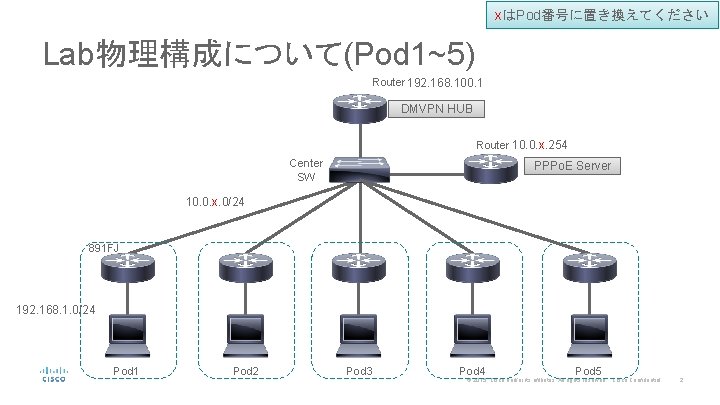
xはPod番号に置き換えてください Lab物理構成について(Pod 1~5) Router 192. 168. 100. 1 DMVPN HUB Router 10. 0. x. 254 Center SW PPPo. E Server 10. 0. x. 0/24 891 FJ 192. 168. 1. 0/24 Pod 1 Pod 2 Pod 3 Pod 4 Pod 5 © 2015 Cisco and/or its affiliates. All rights reserved. Cisco Confidential 2

xはPod番号に置き換えてください Lab物理構成について(Pod 6~10) Router 192. 168. 100. 1 DMVPN HUB Router 10. 0. x. 254 Center SW PPPo. E Server 10. 0. x. 0/24 891 FJ 192. 168. 1. 0/24 Pod 6 Pod 7 Pod 8 Pod 9 Pod 10 © 2015 Cisco and/or its affiliates. All rights reserved. Cisco Confidential 3
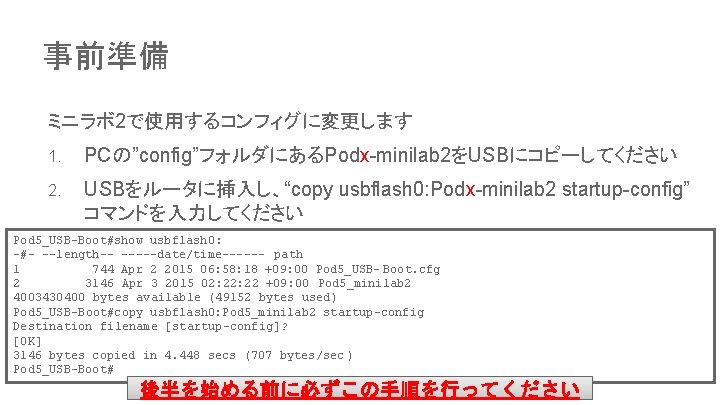
事前準備 ミニラボ 2で使用するコンフィグに変更します 1. PCの”config”フォルダにあるPodx-minilab 2をUSBにコピーしてください 2. USBをルータに挿入し、“copy usbflash 0: Podx-minilab 2 startup-config” コマンドを入力してください Pod 5_USB-Boot#show usbflash 0 : -#- --length-- -----date/time------ path 1 744 Apr 2 2015 06: 58: 18 +09: 00 Pod 5_USB- Boot. cfg 2 3146 Apr 3 2015 02: 22 +09: 00 Pod 5_minilab 2 4003430400 bytes available (49152 bytes used) Pod 5_USB-Boot#copy usbflash 0: Pod 5_minilab 2 startup-config Destination filename [startup-config] ? [OK] 3146 bytes copied in 4. 448 secs (707 bytes/sec ) Pod 5_USB-Boot# © 2015 Cisco and/or its affiliates. All rights reserved. Cisco Confidential 後半を始める前に必ずこの手順を行ってください 5
![事前準備 1. ルータの再起動後、ルータのホスト名を必ず確認してください Pod 5_USB-Boot#reload Proceed with reload? [confirm ] *Apr 3 02: 08:](http://slidetodoc.com/presentation_image_h/f6c93388ff9b94b919cecb23e6a9fcdd/image-6.jpg "事前準備 1. ルータの再起動後、ルータのホスト名を必ず確認してください Pod 5_USB-Boot#reload Proceed with reload? [confirm ] *Apr 3 02: 08:")
事前準備 1. ルータの再起動後、ルータのホスト名を必ず確認してください Pod 5_USB-Boot#reload Proceed with reload? [confirm ] *Apr 3 02: 08: 09. 699: %SYS-5 -RELOAD: Reload requested by console. Reload Reason: Reload Command. System Bootstrap, Version 15. 4(1 r)T, RELEASE SOFTWARE (fc 1 ) Technical Support: http: //www. cisco. com/ techsupport Copyright (c) 2013 by cisco Systems, Inc. <省略> *Apr 3 11: 10: 57 JST: %LINK-3 -UPDOWN: Interface Virtual-Access 2, changed state to up *Apr 3 11: 10: 57 JST: %LINEPROTO-5 -UPDOWN: Line protocol on Interface Virtual-Access 2, changed state to up Pod 5_minilab 2> ホスト名が”Podx_minilab 2”になります © 2015 Cisco and/or its affiliates. All rights reserved. Cisco Confidential 6

2 -1: IOS組込 コンフィグ管理機能 © 2015 Cisco and/or its affiliates. All rights reserved. Cisco Confidential 7
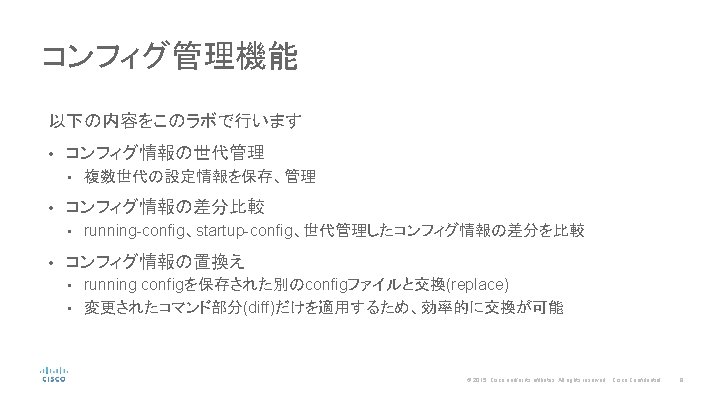
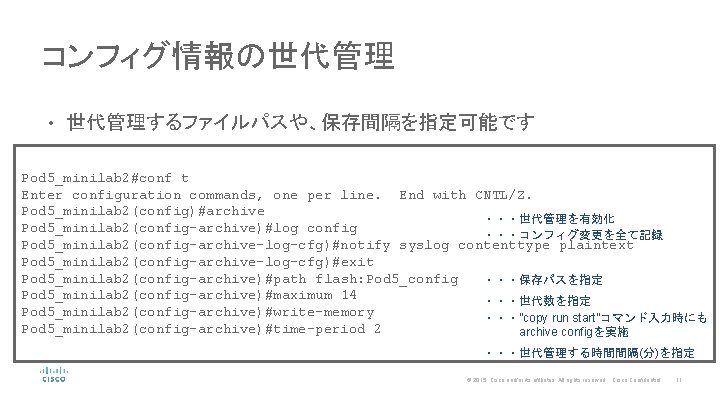
コンフィグ情報の世代管理 • 世代管理するファイルパスや、保存間隔を指定可能です Pod 5_minilab 2#conf t Enter configuration commands, one per line. End with CNTL/Z. Pod 5_minilab 2(config)#archive ・・・世代管理を有効化 Pod 5_minilab 2(config-archive)#log config ・・・コンフィグ変更を全て記録 Pod 5_minilab 2(config-archive-log-cfg)#notify syslog contenttype plaintext Pod 5_minilab 2(config-archive-log-cfg)#exit Pod 5_minilab 2(config-archive)#path flash: Pod 5_config ・・・保存パスを指定 Pod 5_minilab 2(config-archive)#maximum 14 ・・・世代数を指定 Pod 5_minilab 2(config-archive)#write-memory ・・・”copy run start”コマンド入力時にも Pod 5_minilab 2(config-archive)#time-period 2 archive configを実施 ・・・世代管理する時間間隔(分)を指定 © 2015 Cisco and/or its affiliates. All rights reserved. Cisco Confidential 11
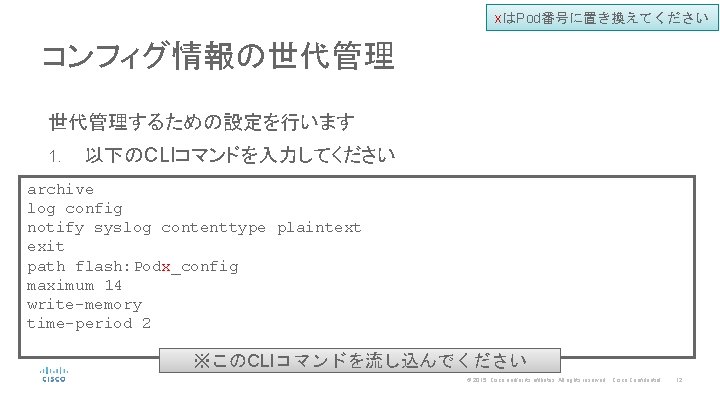
xはPod番号に置き換えてください コンフィグ情報の世代管理するための設定を行います 1. 以下のCLIコマンドを入力してください archive log config notify syslog contenttype plaintext exit path flash: Podx_config maximum 14 write-memory time-period 2 ※このCLIコマンドを流し込んでください © 2015 Cisco and/or its affiliates. All rights reserved. Cisco Confidential 12
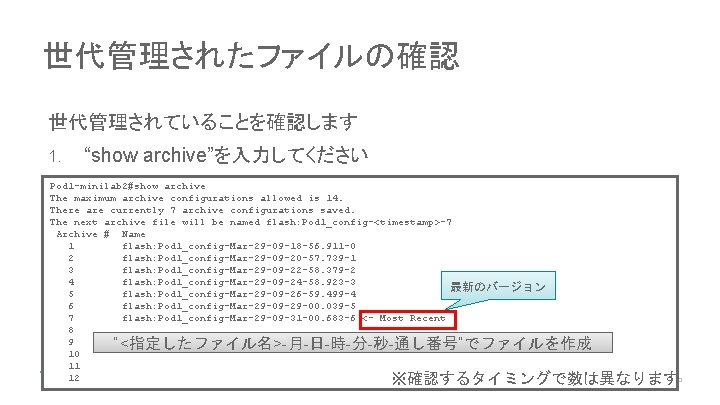
世代管理されたファイルの確認 世代管理されていることを確認します 1. “show archive”を入力してください Pod 1 -minilab 2#show archive The maximum archive configurations allowed is 14. There are currently 7 archive configurations saved. The next archive file will be named flash: Pod 1_config-<timestamp>-7 Archive # Name 1 flash: Pod 1_config-Mar-29 -09 -18 -56. 911 -0 2 flash: Pod 1_config-Mar-29 -09 -20 -57. 739 -1 3 flash: Pod 1_config-Mar-29 -09 -22 -58. 379 -2 4 flash: Pod 1_config-Mar-29 -09 -24 -58. 923 -3 最新のバージョン 5 flash: Pod 1_config-Mar-29 -09 -26 -59. 499 -4 6 flash: Pod 1_config-Mar-29 -09 -29 -00. 039 -5 7 flash: Pod 1_config-Mar-29 -09 -31 -00. 683 -6 <- Most Recent 8 9 10 11 12 © 2015 Cisco and/or its affiliates. All rights reserved. “<指定したファイル名>-月-日-時-分-秒-通し番号”でファイルを作成 ※確認するタイミングで数は異なります Cisco Confidential 13


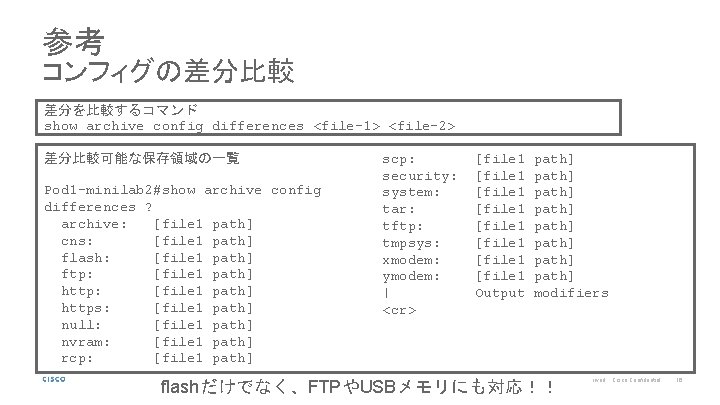
参考 コンフィグの差分比較 差分を比較するコマンド show archive config differences <file-1> <file-2> 差分比較可能な保存領域の一覧 Pod 1 -minilab 2#show archive config differences ? archive: [file 1 path] cns: [file 1 path] flash: [file 1 path] ftp: [file 1 path] https: [file 1 path] null: [file 1 path] nvram: [file 1 path] rcp: [file 1 path] security: [file 1 path] system: [file 1 path] tar: [file 1 path] tftp: [file 1 path] tmpsys: [file 1 path] xmodem: [file 1 path] ymodem: [file 1 path] | Output modifiers <cr> © 2015 Cisco and/or its affiliates. All rights reserved. Cisco Confidential flashだけでなく、FTPやUSBメモリにも対応!! 16
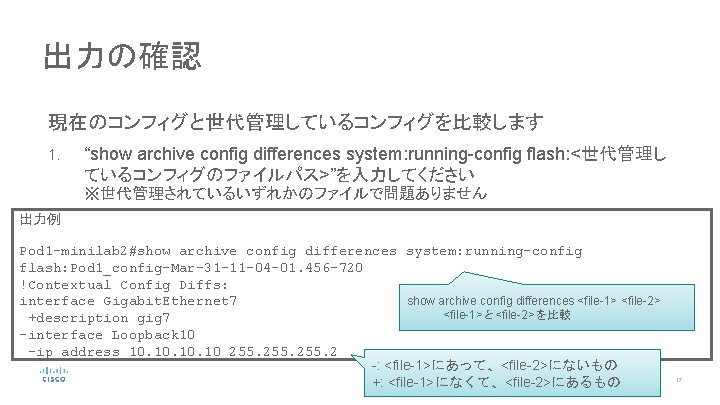
出力の確認 現在のコンフィグと世代管理しているコンフィグを比較します 1. “show archive config differences system: running-config flash: <世代管理し ているコンフィグのファイルパス>”を入力してください ※世代管理されているいずれかのファイルで問題ありません 出力例 Pod 1 -minilab 2#show archive config differences system: running-config flash: Pod 1_config-Mar-31 -11 -04 -01. 456 -720 !Contextual Config Diffs: show archive config differences <file-1> <file-2> interface Gigabit. Ethernet 7 <file-1>と<file-2>を比較 +description gig 7 -interface Loopback 10 -ip address 10. 10. 10 255. 2 -: <file-1>にあって、<file-2>にないもの © 2015 Cisco and/or its affiliates. All rights reserved. Cisco Confidential +: <file-1>になくて、<file-2>にあるもの 17
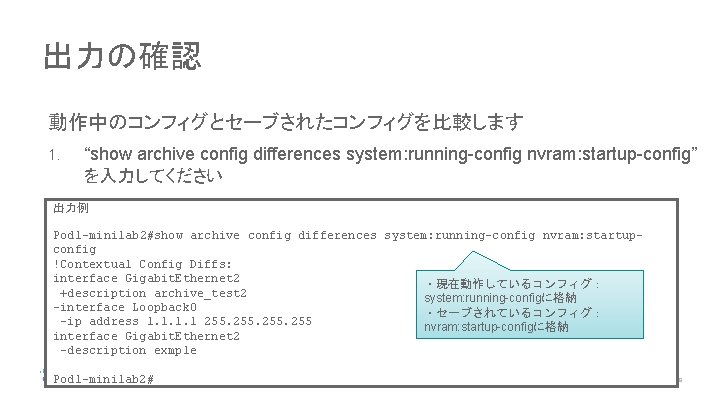
出力の確認 動作中のコンフィグとセーブされたコンフィグを比較します 1. “show archive config differences system: running-config nvram: startup-config” を入力してください 出力例 Pod 1 -minilab 2#show archive config differences system: running-config nvram: startupconfig !Contextual Config Diffs: interface Gigabit. Ethernet 2 Running-configとstartup-configの差分 ・現在動作しているコンフィグ: +description archive_test 2 system: running-configに格納 -interface Loopback 0 ・セーブされているコンフィグ: -ip address 1. 1 255 nvram: startup-configに格納 interface Gigabit. Ethernet 2 -description exmple Pod 1 -minilab 2# © 2015 Cisco and/or its affiliates. All rights reserved. Cisco Confidential 18
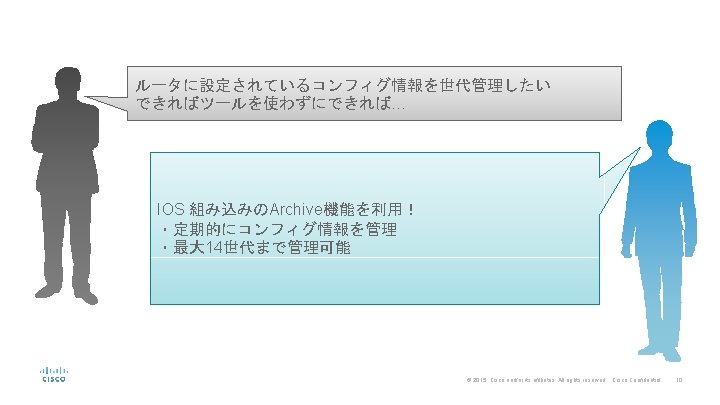
以前の設定に戻したい! 手順は簡単で、再起動はさけたい • • IOS組込のConfigure Replaceを利用! ルータの再起動なく設定情報が変更! © 2015 Cisco and/or its affiliates. All rights reserved. Cisco Confidential 19
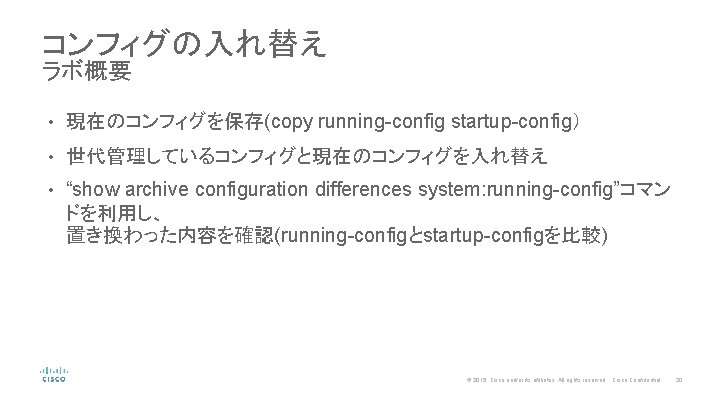
コンフィグの入れ替え ラボ概要 • 現在のコンフィグを保存(copy running-config startup-config) • 世代管理しているコンフィグと現在のコンフィグを入れ替え • “show archive configuration differences system: running-config”コマン ドを利用し、 置き換わった内容を確認(running-configとstartup-configを比較) © 2015 Cisco and/or its affiliates. All rights reserved. Cisco Confidential 20
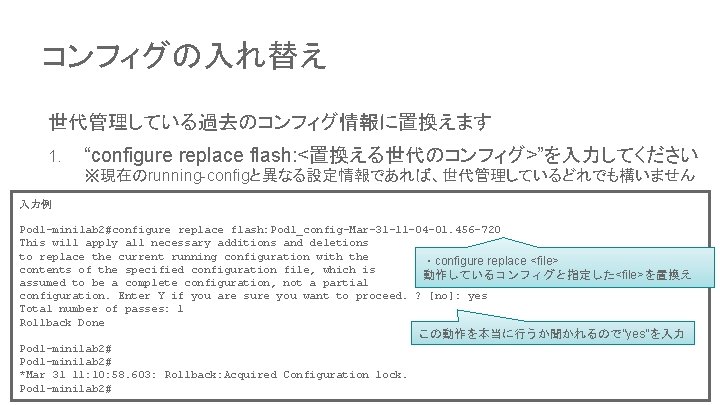
コンフィグの入れ替え 世代管理している過去のコンフィグ情報に置換えます 1. “configure replace flash: <置換える世代のコンフィグ>”を入力してください ※現在のrunning-configと異なる設定情報であれば、世代管理しているどれでも構いません 入力例 Pod 1 -minilab 2#configure replace flash: Pod 1_config-Mar-31 -11 -04 -01. 456 -720 This will apply all necessary additions and deletions to replace the current running configuration with the ・configure replace <file> contents of the specified configuration file, which is 動作しているコンフィグと指定した<file>を置換え assumed to be a complete configuration, not a partial configuration. Enter Y if you are sure you want to proceed. ? [no]: yes Total number of passes: 1 Rollback Done この動作を本当に行うか聞かれるので”yes”を入力 Pod 1 -minilab 2# *Mar 31 11: 10: 58. 603: Rollback: Acquired Configuration lock. Pod 1 -minilab 2# © 2015 Cisco and/or its affiliates. All rights reserved. Cisco Confidential 21
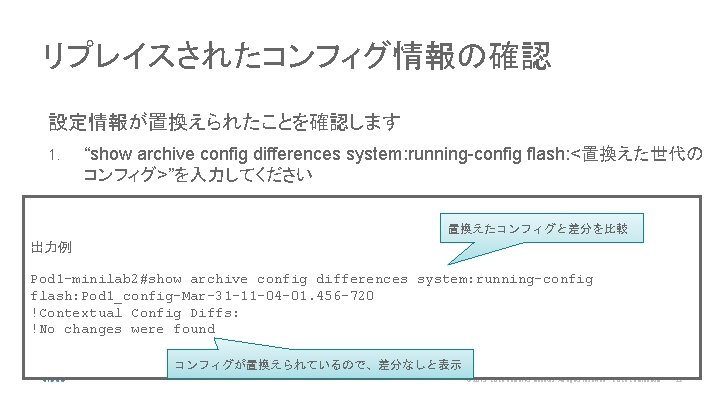
リプレイスされたコンフィグ情報の確認 設定情報が置換えられたことを確認します 1. “show archive config differences system: running-config flash: <置換えた世代の コンフィグ>”を入力してください 置換えたコンフィグと差分を比較 出力例 Pod 1 -minilab 2#show archive config differences system: running-config flash: Pod 1_config-Mar-31 -11 -04 -01. 456 -720 !Contextual Config Diffs: !No changes were found コンフィグが置換えられているので、差分なしと表示 © 2015 Cisco and/or its affiliates. All rights reserved. Cisco Confidential 22

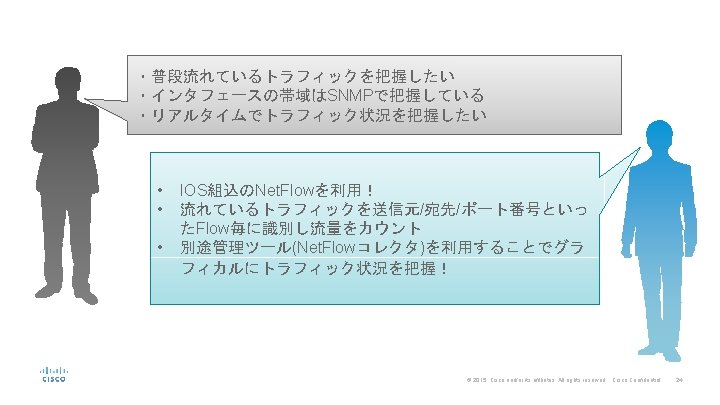
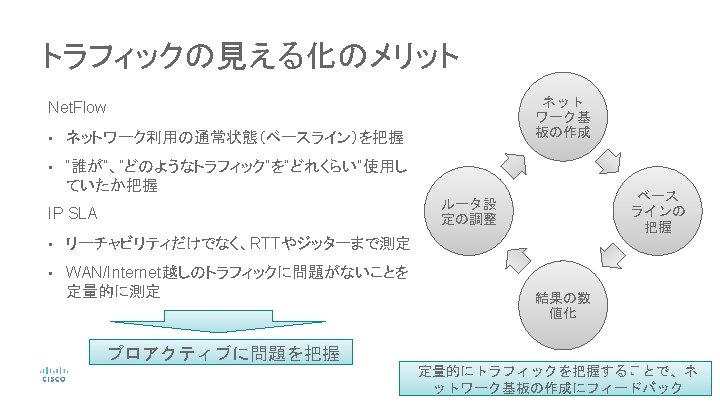
2 -2: トラフィックの見える化 © 2015 Cisco and/or its affiliates. All rights reserved. Cisco Confidential 23
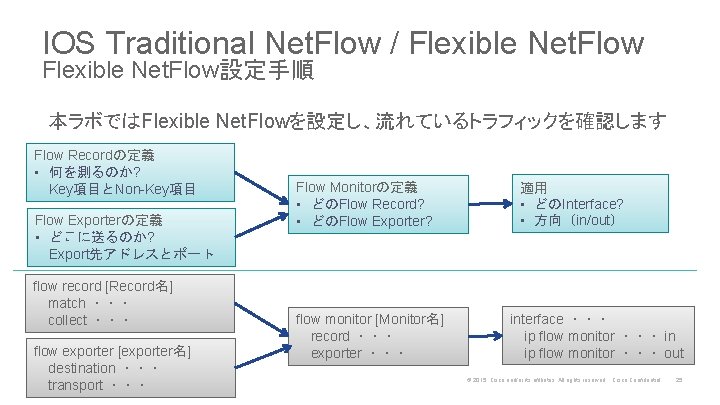
IOS Traditional Net. Flow / Flexible Net. Flow設定手順 本ラボではFlexible Net. Flowを設定し、流れているトラフィックを確認します Flow Recordの定義 • 何を測るのか? Key項目とNon-Key項目 Flow Exporterの定義 • どこに送るのか? Export先アドレスとポート flow record [Record名] match ・・・ collect ・・・ flow exporter [exporter名] destination ・・・ transport ・・・ Flow Monitorの定義 • どのFlow Record? • どのFlow Exporter? flow monitor [Monitor名] record ・・・ exporter ・・・ 適用 • どのInterface? • 方向(in/out) interface ・・・ ip flow monitor ・・・ in ip flow monitor ・・・ out © 2015 Cisco and/or its affiliates. All rights reserved. Cisco Confidential 25
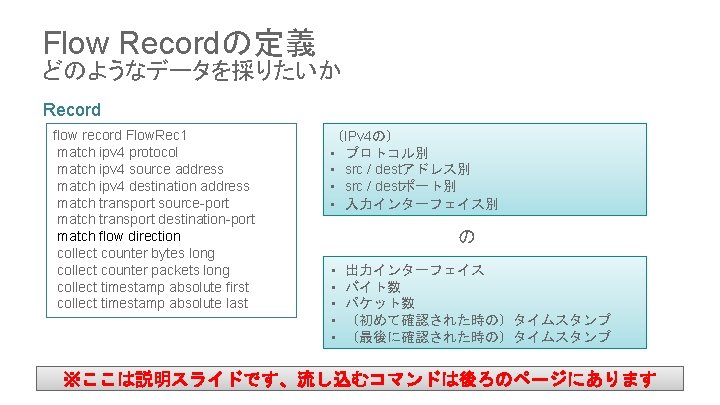
Flow Recordの定義 どのようなデータを採りたいか Record flow record Flow. Rec 1 match ipv 4 protocol match ipv 4 source address match ipv 4 destination address match transport source-port match transport destination-port match flow direction collect counter bytes long collect counter packets long collect timestamp absolute first collect timestamp absolute last (IPv 4の) • プロトコル別 • src / destアドレス別 • src / destポート別 • 入力インターフェイス別 の • • • 出力インターフェイス バイト数 パケット数 (初めて確認された時の)タイムスタンプ (最後に確認された時の)タイムスタンプ ※ここは説明スライドです、流し込むコマンドは後ろのページにあります © 2015 Cisco and/or its affiliates. All rights reserved. Cisco Confidential 26
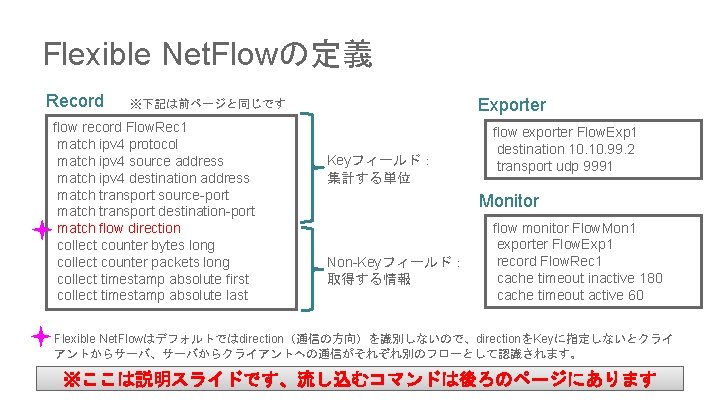
Flexible Net. Flowの定義 Record Exporter ※下記は前ページと同じです flow record Flow. Rec 1 match ipv 4 protocol match ipv 4 source address match ipv 4 destination address match transport source-port match transport destination-port match flow direction collect counter bytes long collect counter packets long collect timestamp absolute first collect timestamp absolute last Keyフィールド: 集計する単位 flow exporter Flow. Exp 1 destination 10. 99. 2 transport udp 9991 Monitor Non-Keyフィールド: 取得する情報 flow monitor Flow. Mon 1 exporter Flow. Exp 1 record Flow. Rec 1 cache timeout inactive 180 cache timeout active 60 Flexible Net. Flowはデフォルトではdirection(通信の方向)を識別しないので、directionをKeyに指定しないとクライ アントからサーバ、サーバからクライアントへの通信がそれぞれ別のフローとして認識されます。 ※ここは説明スライドです、流し込むコマンドは後ろのページにあります © 2015 Cisco and/or its affiliates. All rights reserved. Cisco Confidential 27
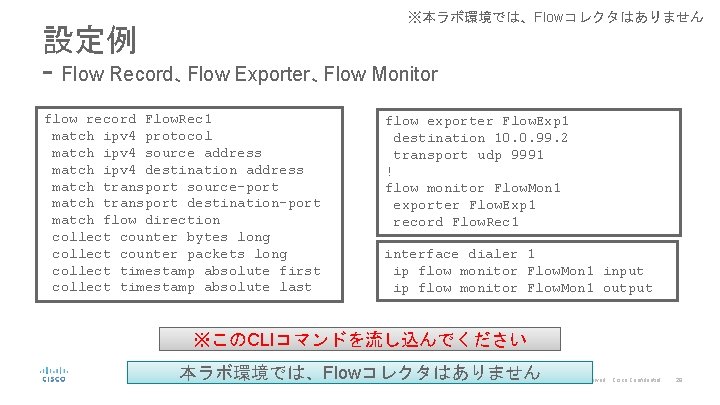
※本ラボ環境では、Flowコレクタはありません 設定例 - Flow Record、Flow Exporter、Flow Monitor flow record Flow. Rec 1 match ipv 4 protocol match ipv 4 source address match ipv 4 destination address match transport source-port match transport destination-port match flow direction collect counter bytes long collect counter packets long collect timestamp absolute first collect timestamp absolute last flow exporter Flow. Exp 1 destination 10. 0. 99. 2 transport udp 9991 ! flow monitor Flow. Mon 1 exporter Flow. Exp 1 record Flow. Rec 1 interface dialer 1 ip flow monitor Flow. Mon 1 input ip flow monitor Flow. Mon 1 output ※このCLIコマンドを流し込んでください 本ラボ環境では、Flowコレクタはありません © 2015 Cisco and/or its affiliates. All rights reserved. Cisco Confidential 28
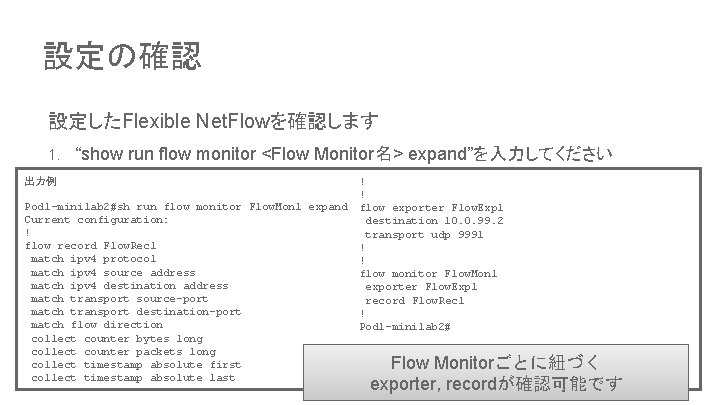
設定の確認 設定したFlexible Net. Flowを確認します 1. “show run flow monitor <Flow Monitor名> expand”を入力してください 出力例 ! ! Pod 1 -minilab 2#sh run flow monitor Flow. Mon 1 expand flow exporter Flow. Exp 1 Current configuration: destination 10. 0. 99. 2 ! transport udp 9991 flow record Flow. Rec 1 ! match ipv 4 protocol ! match ipv 4 source address flow monitor Flow. Mon 1 match ipv 4 destination address exporter Flow. Exp 1 match transport source-port record Flow. Rec 1 match transport destination-port ! match flow direction Pod 1 -minilab 2# collect counter bytes long collect counter packets long collect timestamp absolute first collect timestamp absolute last © 2015 Cisco and/or its affiliates. All rights reserved. Flow Monitorごとに紐づく exporter, recordが確認可能です Cisco Confidential 29
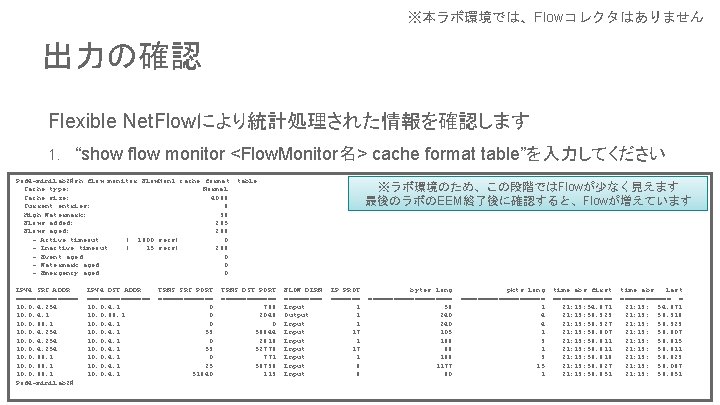
※本ラボ環境では、Flowコレクタはありません 出力の確認 Flexible Net. Flowにより統計処理された情報を確認します 1. “show flow monitor <Flow. Monitor名> cache format table”を入力してください Pod 4 -minilab 2#sh flow monitor Flow. Mon 1 cache format table Cache type: Normal Cache size: 4096 Current entries: 9 High Watermark: 38 Flows added: 295 Flows aged: 286 - Active timeout ( 1800 secs) 0 - Inactive timeout ( 15 secs) 286 - Event aged 0 - Watermark aged 0 - Emergency aged 0 IPV 4 SRC ADDR ======== 10. 0. 4. 254 10. 0. 4. 1 10. 0. 99. 1 10. 0. 4. 254 10. 0. 99. 1 Pod 4 -minilab 2# IPV 4 DST ADDR ======== 10. 0. 4. 1 10. 0. 99. 1 10. 0. 4. 1 TRNS SRC PORT ======= 0 0 0 53 0 25 51940 TRNS DST PORT ======= 769 2048 0 56844 2816 52778 771 56738 113 ※ラボ環境のため、この段階ではFlowが少なく見えます 最後のラボのEEM終了後に確認すると、Flowが増えています FLOW DIRN ===== Input Output Input Input IP PROT ======= 1 17 1 6 6 bytes long ========== 56 240 105 168 69 168 1177 60 pkts long ========== 1 4 4 1 3 15 1 time abs first ======= 21: 13: 54. 871 21: 13: 56. 323 21: 13: 56. 327 21: 13: 56. 807 21: 13: 56. 811 21: 13: 56. 819 21: 13: 56. 927 21: 13: 56. 951 time abs last ====== = 21: 13: 54. 871 21: 13: 59. 319 21: 13: 59. 323 21: 13: 56. 807 21: 13: 56. 815 21: 13: 56. 811 21: 13: 56. 823 21: 13: 59. 087 21: 13: 56. 951 © 2015 Cisco and/or its affiliates. All rights reserved. Cisco Confidential 30

IOS IP SLA © 2015 Cisco and/or its affiliates. All rights reserved. Cisco Confidential 31
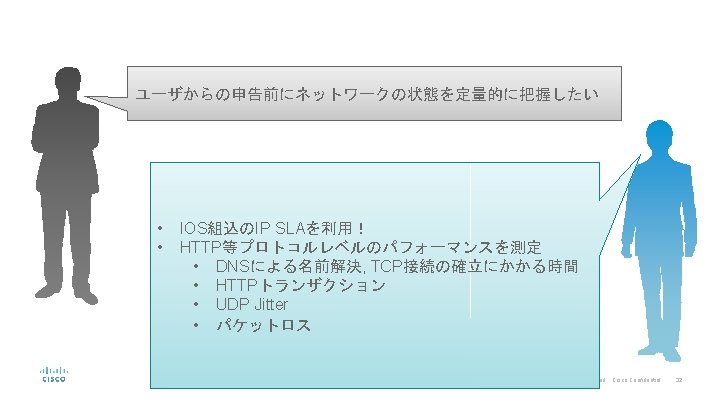
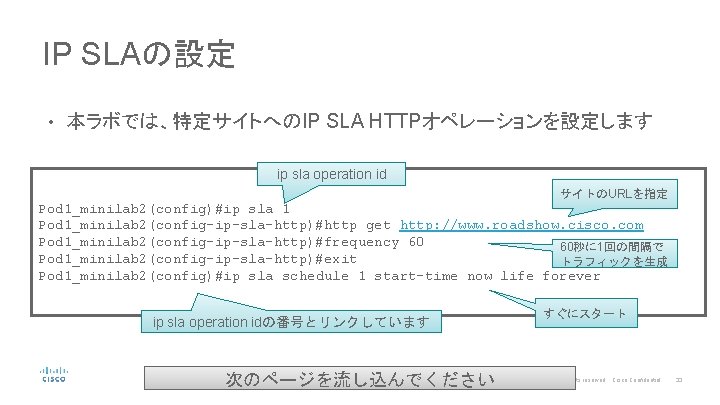
IP SLAの設定 • 本ラボでは、特定サイトへのIP SLA HTTPオペレーションを設定します ip sla operation id サイトのURLを指定 Pod 1_minilab 2(config)#ip sla 1 Pod 1_minilab 2(config-ip-sla-http)#http get http: //www. roadshow. cisco. com Pod 1_minilab 2(config-ip-sla-http)#frequency 60 60秒に 1回の間隔で Pod 1_minilab 2(config-ip-sla-http)#exit トラフィックを生成 Pod 1_minilab 2(config)#ip sla schedule 1 start-time now life forever すぐにスタート ip sla operation idの番号とリンクしています 次のページを流し込んでください © 2015 Cisco and/or its affiliates. All rights reserved. Cisco Confidential 33

IP SLAの設定 IP SLA HTTPオペレーションの設定を行います 1. 以下のコマンドを入力してください ※宛先のWebサーバはwww. roadshow. cisco. comになります ip sla 1 http get http: //www. roadshow. cisco. com frequency 60 exit ip sla schedule 1 life forever start-time now ※このCLIコマンドを流し込んでください © 2015 Cisco and/or its affiliates. All rights reserved. Cisco Confidential 34
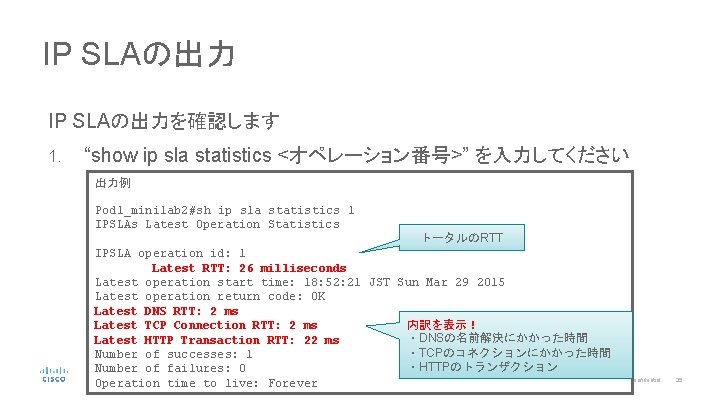
IP SLAの出力を確認します 1. “show ip sla statistics <オペレーション番号>” を入力してください 出力例 Pod 1_minilab 2#sh ip sla statistics 1 IPSLAs Latest Operation Statistics トータルのRTT IPSLA operation id: 1 Latest RTT: 26 milliseconds Latest operation start time: 18: 52: 21 JST Sun Mar 29 2015 Latest operation return code: OK Latest DNS RTT: 2 ms 内訳を表示! Latest TCP Connection RTT: 2 ms ・DNSの名前解決にかかった時間 Latest HTTP Transaction RTT: 22 ms ・TCPのコネクションにかかった時間 Number of successes: 1 ・HTTPのトランザクション Number of failures: 0 © 2015 Cisco and/or its affiliates. All rights reserved. Cisco Confidential Operation time to live: Forever 35
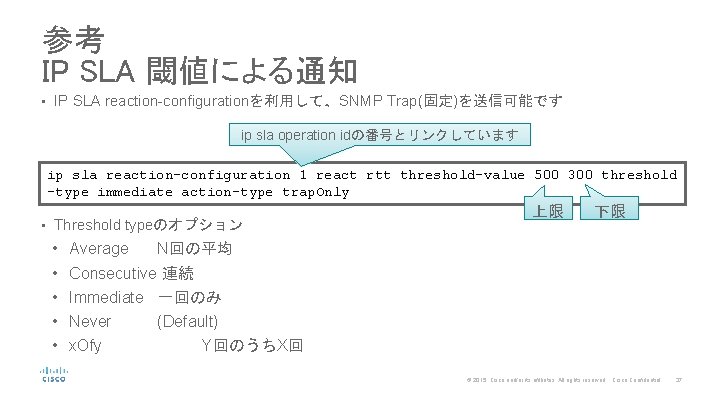
参考 IP SLA 閾値による通知 • IP SLA reaction-configurationを利用して、SNMP Trap(固定)を送信可能です ip sla operation idの番号とリンクしています ip sla reaction-configuration 1 react rtt threshold-value 500 300 threshold -type immediate action-type trap. Only • Threshold typeのオプション • • • Average 上限 下限 N回の平均 Consecutive 連続 Immediate 一回のみ Never x. Ofy (Default) Y回のうちX回 © 2015 Cisco and/or its affiliates. All rights reserved. Cisco Confidential 37

2 -3: EEM © 2015 Cisco and/or its affiliates. All rights reserved. Cisco Confidential 38

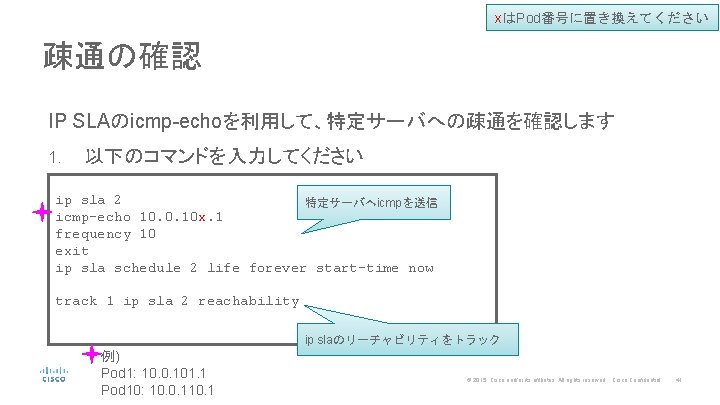
xはPod番号に置き換えてください 疎通の確認 IP SLAのicmp-echoを利用して、特定サーバへの疎通を確認します 1. 以下のコマンドを入力してください ip sla 2 特定サーバへicmpを送信 icmp-echo 10. 0. 10 x. 1 frequency 10 exit ip sla schedule 2 life forever start-time now track 1 ip sla 2 reachability ip slaのリーチャビリティをトラック 例) Pod 1: 10. 0. 101. 1 Pod 10: 10. 0. 110. 1 © 2015 Cisco and/or its affiliates. All rights reserved. Cisco Confidential 41
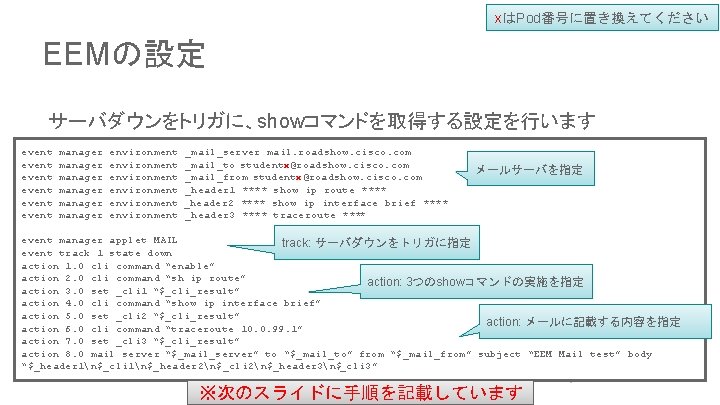
xはPod番号に置き換えてください EEMの設定 サーバダウンをトリガに、showコマンドを取得する設定を行います event manager environment _mail_server mail. roadshow. cisco. com event manager environment _mail_to studentx@roadshow. cisco. com メールサーバを指定 event manager environment _mail_from studentx@roadshow. cisco. com event manager environment _header 1 **** show ip route **** event manager environment _header 2 **** show ip interface brief **** event manager environment _header 3 **** traceroute **** event manager applet MAIL track: サーバダウンをトリガに指定 event track 1 state down action 1. 0 cli command “enable” action 2. 0 cli command “sh ip route” action: 3つのshowコマンドの実施を指定 action 3. 0 set _cli 1 “$_cli_result” action 4. 0 cli command “show ip interface brief” action 5. 0 set _cli 2 “$_cli_result” action: メールに記載する内容を指定 action 6. 0 cli command “traceroute 10. 0. 99. 1” action 7. 0 set _cli 3 “$_cli_result” action 8. 0 mail server “$_mail_server” to “$_mail_to” from “$_mail_from” subject “EEM Mail test” body “$_header 1n$_cli 1n$_header 2n$_cli 2n$_header 3n$_cli 3” © 2015 Cisco and/or its affiliates. All rights reserved. Cisco Confidential ※次のスライドに手順を記載しています 42

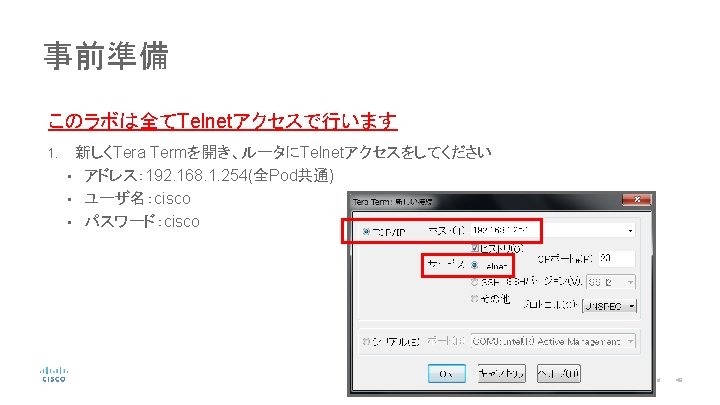
事前準備 このラボは全てTelnetアクセスで行います 1. 新しくTera Termを開き、ルータにTelnetアクセスをしてください • アドレス: 192. 168. 1. 254(全Pod共通) • ユーザ名:cisco • パスワード:cisco © 2015 Cisco and/or its affiliates. All rights reserved. Cisco Confidential 48
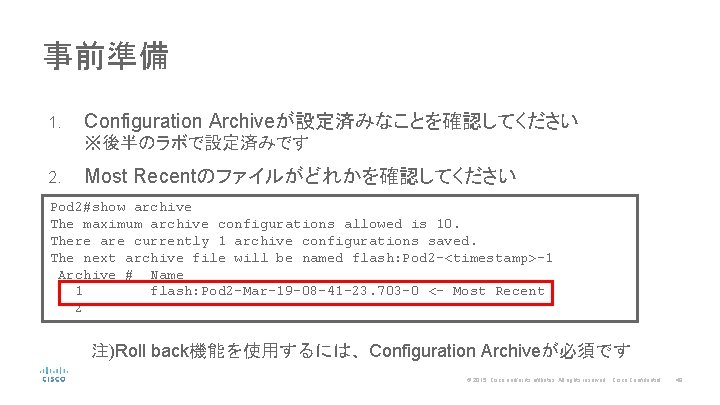
事前準備 1. Configuration Archiveが設定済みなことを確認してください ※後半のラボで設定済みです 2. Most Recentのファイルがどれかを確認してください Pod 2#show archive The maximum archive configurations allowed is 10. There are currently 1 archive configurations saved. The next archive file will be named flash: Pod 2 -<timestamp>-1 Archive # Name 1 flash: Pod 2 -Mar-19 -08 -41 -23. 703 -0 <- Most Recent 2 注)Roll back機能を使用するには、Configuration Archiveが必須です © 2015 Cisco and/or its affiliates. All rights reserved. Cisco Confidential 49
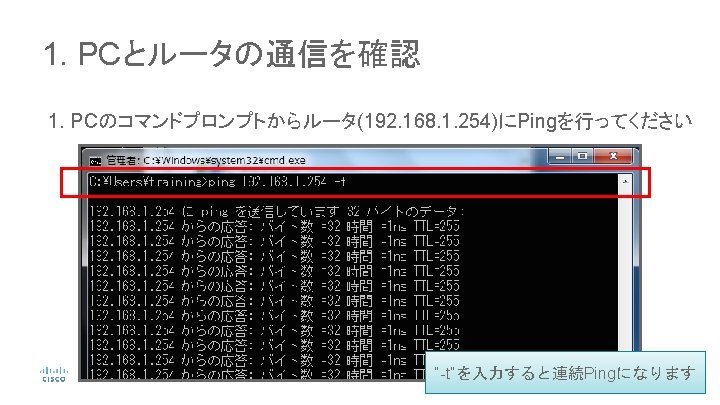
1. PCとルータの通信を確認 1. PCのコマンドプロンプトからルータ(192. 168. 1. 254)にPingを行ってください “-t”を入力すると連続Pingになります © 2015 Cisco and/or its affiliates. All rights reserved. Cisco Confidential 50
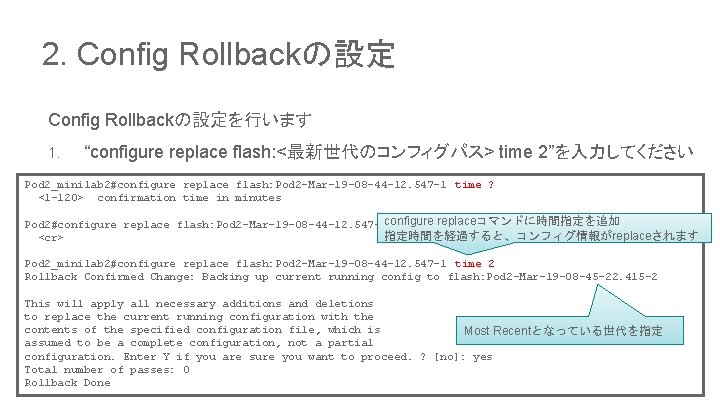
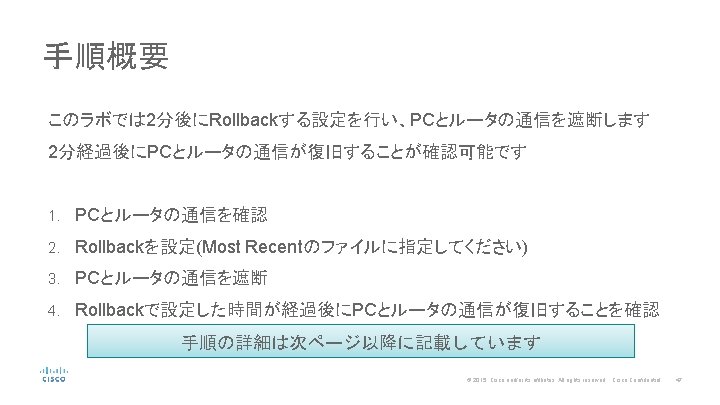
2. Config Rollbackの設定を行います 1. “configure replace flash: <最新世代のコンフィグパス> time 2”を入力してください Pod 2_minilab 2#configure replace flash: Pod 2 -Mar-19 -08 -44 -12. 547 -1 time ? <1 -120> confirmation time in minutes configure replaceコマンドに時間指定を追加 Pod 2#configure replace flash: Pod 2 -Mar-19 -08 -44 -12. 547 -1 time 2 ? 指定時間を経過すると、コンフィグ情報がreplaceされます <cr> Pod 2_minilab 2#configure replace flash: Pod 2 -Mar-19 -08 -44 -12. 547 -1 time 2 Rollback Confirmed Change: Backing up current running config to flash: Pod 2 -Mar-19 -08 -45 -22. 415 -2 This will apply all necessary additions and deletions to replace the current running configuration with the contents of the specified configuration file, which is Most Recentとなっている世代を指定 assumed to be a complete configuration, not a partial configuration. Enter Y if you are sure you want to proceed. ? [no]: yes Total number of passes: 0 © 2015 Cisco and/or its affiliates. All rights reserved. Cisco Confidential Rollback Done 51
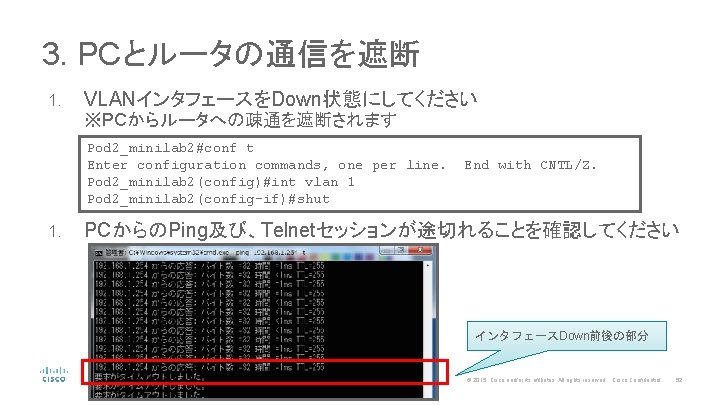
3. PCとルータの通信を遮断 1. VLANインタフェースをDown状態にしてください ※PCからルータへの疎通を遮断されます Pod 2_minilab 2#conf t Enter configuration commands, one per line. End with CNTL/Z. Pod 2_minilab 2(config)#int vlan 1 Pod 2_minilab 2(config-if)#shut 1. PCからのPing及び、Telnetセッションが途切れることを確認してください インタフェースDown前後の部分 © 2015 Cisco and/or its affiliates. All rights reserved. Cisco Confidential 52
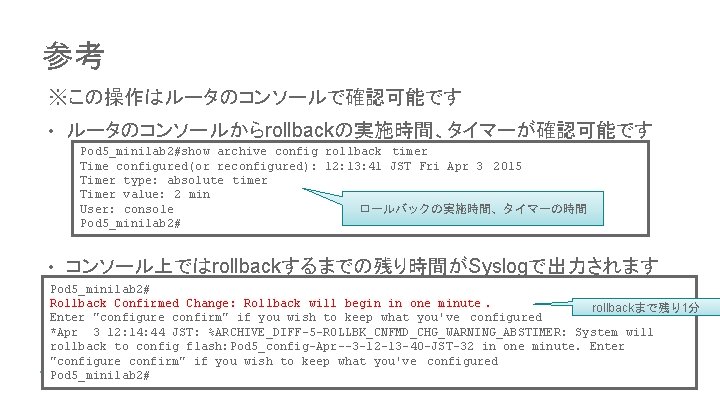
参考 ※この操作はルータのコンソールで確認可能です • ルータのコンソールからrollbackの実施時間、タイマーが確認可能です Pod 5_minilab 2#show archive config rollback timer Time configured(or reconfigured): 12: 13: 41 JST Fri Apr 3 2015 Timer type: absolute timer Timer value: 2 min User: console ロールバックの実施時間、タイマーの時間 Pod 5_minilab 2# • コンソール上ではrollbackするまでの残り時間がSyslogで出力されます Pod 5_minilab 2# Rollback Confirmed Change: Rollback will begin in one minute. rollbackまで残り1分 Enter "configure confirm" if you wish to keep what you've configured *Apr 3 12: 14: 44 JST: %ARCHIVE_DIFF-5 -ROLLBK_CNFMD_CHG_WARNING_ABSTIMER: System will rollback to config flash: Pod 5_config-Apr--3 -12 -13 -40 -JST-32 in one minute. Enter "configure confirm" if you wish to keep what you've configured Pod 5_minilab 2# © 2015 Cisco and/or its affiliates. All rights reserved. Cisco Confidential 53

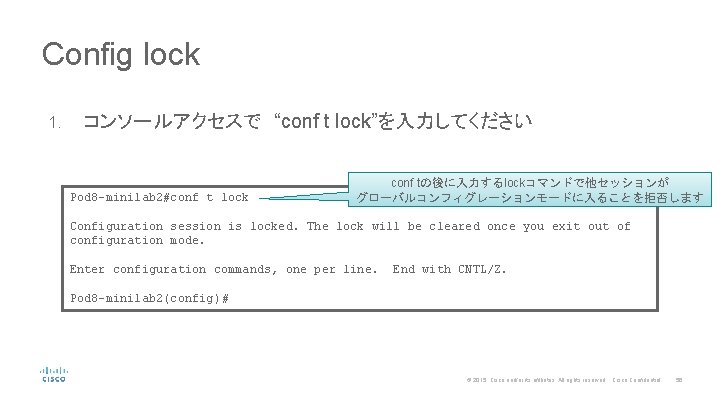
Config lock 1. コンソールアクセスで “conf t lock”を入力してください Pod 8 -minilab 2#conf t lock conf tの後に入力するlockコマンドで他セッションが グローバルコンフィグレーションモードに入ることを拒否します Configuration session is locked. The lock will be cleared once you exit out of configuration mode. Enter configuration commands, one per line. End with CNTL/Z. Pod 8 -minilab 2(config)# © 2015 Cisco and/or its affiliates. All rights reserved. Cisco Confidential 56

Config lockの確認 新しくTera Termを開き、ルータにTelnetアクセスをして ください 1. アドレスは全Pod共通で、192. 168. 1. 254です • ユーザ名:cisco • パスワード:cisco • 2. “conf t”を入力してもグローバルコンフィグレーションモードに移行出来ないことを 確認してください User Access Verification Username: cisco Password: lockされているためグローバルコンフィグレーションへ移行できません Pod 8 -minilab 2#conf t Configuration mode is locked by process '15' user 'unknown' from terminal '0'. Please try later. Pod 8 -minilab 2# 3. コンソールアクセスで”exit”を入力し、lockを解除してください © 2015 Cisco and/or its affiliates. All rights reserved. Cisco Confidential 57

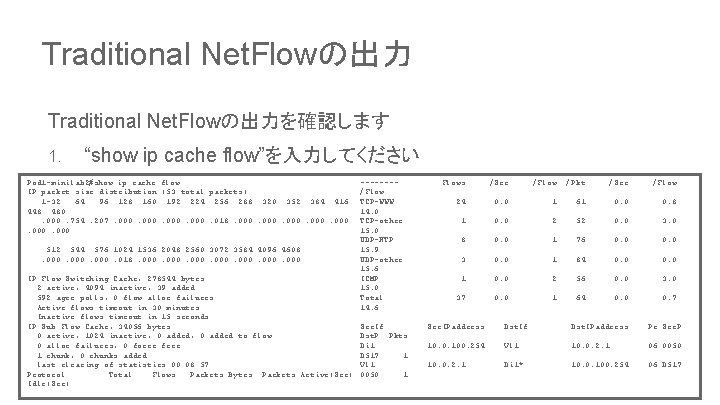
Traditional Net. Flowの出力を確認します 1. “show ip cache flow”を入力してください Pod 1 -minilab 2#show ip cache flow ---- Flows /Sec /Flow /Pkt /Sec /Flow IP packet size distribution (53 total packets): /Flow 1 -32 64 96 128 160 192 224 256 288 320 352 384 416 TCP-WWW 24 0. 0 1 61 0. 0 0. 8 448 480 14. 0 . 000. 754. 207. 000. 018. 000 TCP-other 1 0. 0 2 52 0. 0 3. 0 . 000 15. 0 UDP-NTP 8 0. 0 1 76 0. 0 512 544 576 1024 1536 2048 2560 3072 3584 4096 4608 15. 9 . 000. 018. 000 UDP-other 3 0. 0 1 84 0. 0 15. 6 IP Flow Switching Cache, 278544 bytes ICMP 1 0. 0 2 56 0. 0 3. 0 2 active, 4094 inactive, 39 added 15. 0 592 ager polls, 0 flow alloc failures Total: 37 0. 0 1 64 0. 0 0. 7 Active flows timeout in 30 minutes 14. 6 Inactive flows timeout in 15 seconds IP Sub Flow Cache, 34056 bytes Src. If Src. IPaddress Dst. If Dst. IPaddress Pr Src. P 0 active, 1024 inactive, 0 added to flow Dst. P Pkts 0 alloc failures, 0 force free Di 1 10. 0. 100. 254 Vl 1 10. 0. 2. 1 06 0050 1 chunk, 0 chunks added D 517 1 last clearing of statistics 00: 08: 57 Vl 1 10. 0. 2. 1 Di 1* 10. 0. 100. 254 06 D 517 Protocol Total Flows Packets Bytes Packets Active(Sec) 0050 1 © 2015 Cisco and/or its affiliates. All rights reserved. Cisco Confidential 60 Idle(Sec)
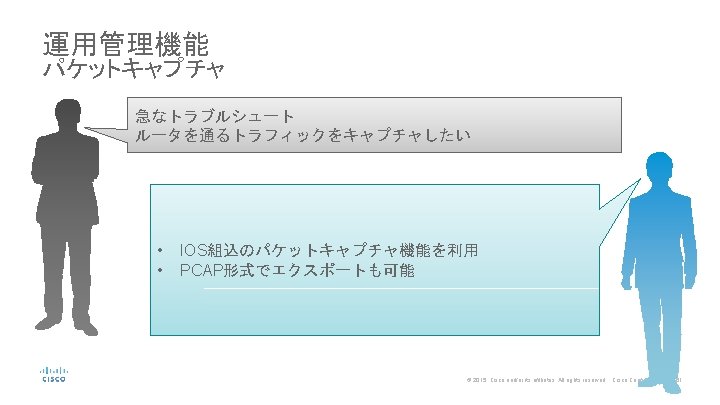
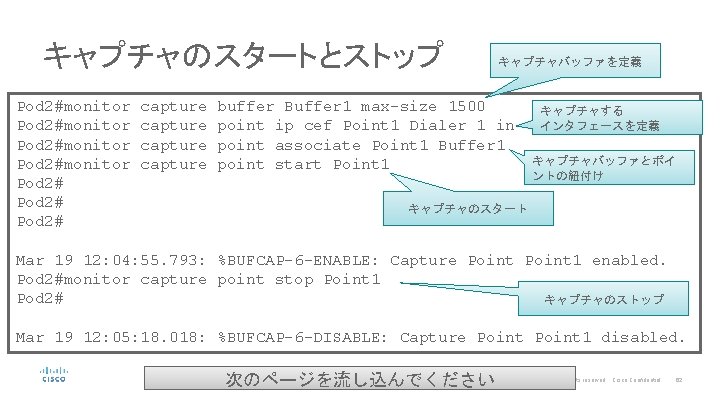
キャプチャのスタートとストップ キャプチャバッファを定義 Pod 2#monitor capture buffer Buffer 1 max-size 1500 キャプチャする インタフェースを定義 Pod 2#monitor capture point ip cef Point 1 Dialer 1 in Pod 2#monitor capture point associate Point 1 Buffer 1 キャプチャバッファとポイ Pod 2#monitor capture point start Point 1 ントの紐付け Pod 2# キャプチャのスタート Pod 2# Mar 19 12: 04: 55. 793: %BUFCAP-6 -ENABLE: Capture Point 1 enabled. Pod 2#monitor capture point stop Point 1 Pod 2# キャプチャのストップ Mar 19 12: 05: 18. 018: %BUFCAP-6 -DISABLE: Capture Point 1 disabled. 次のページを流し込んでください © 2015 Cisco and/or its affiliates. All rights reserved. Cisco Confidential 62
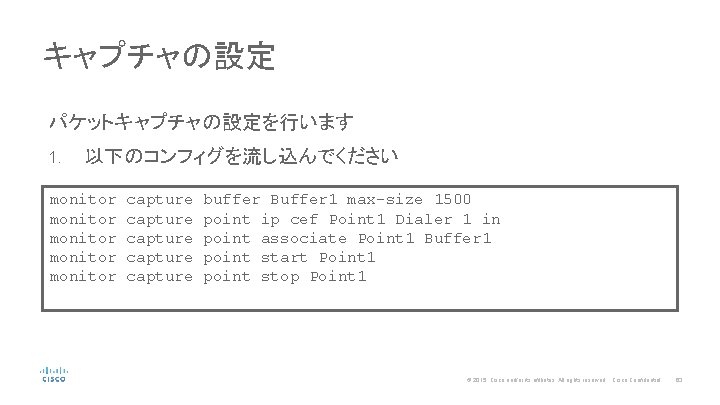
キャプチャの設定 パケットキャプチャの設定を行います 1. 以下のコンフィグを流し込んでください monitor capture buffer Buffer 1 max-size 1500 monitor capture point ip cef Point 1 Dialer 1 in monitor capture point associate Point 1 Buffer 1 monitor capture point start Point 1 monitor capture point stop Point 1 © 2015 Cisco and/or its affiliates. All rights reserved. Cisco Confidential 63
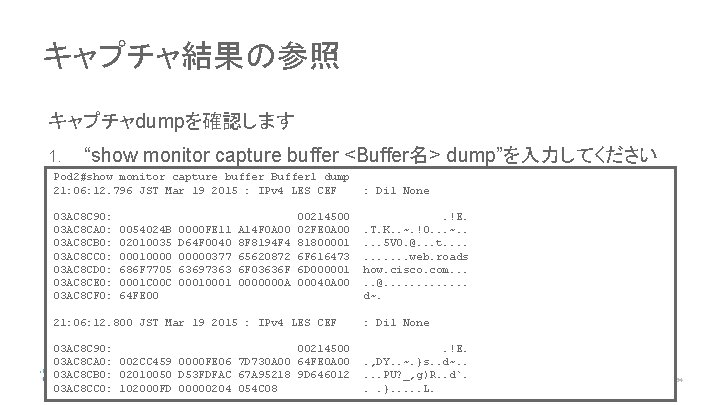
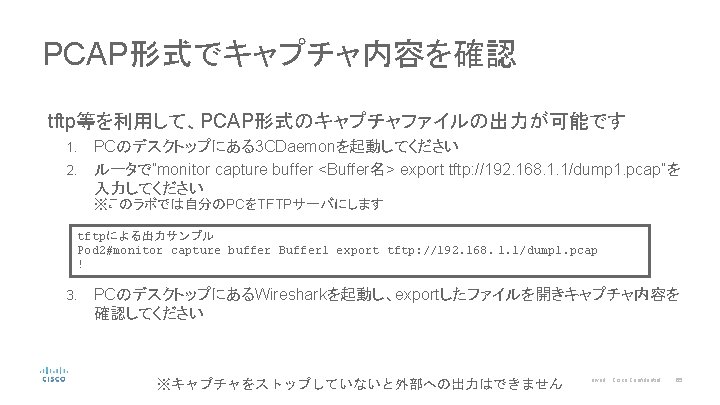
キャプチャ結果の参照 キャプチャdumpを確認します 1. “show monitor capture buffer <Buffer名> dump”を入力してください Pod 2#show monitor capture buffer Buffer 1 dump 21: 06: 12. 796 JST Mar 19 2015 : IPv 4 LES CEF : Di 1 None 03 AC 8 C 90: 00214500 . !E. 03 AC 8 CA 0: 0054024 B 0000 FE 11 A 14 F 0 A 00 02 FE 0 A 00 . T. K. . ~. !O. . . ~. . 03 AC 8 CB 0: 02010035 D 64 F 0040 8 F 8194 F 4 81800001 . . . 5 VO. @. . . t. . 03 AC 8 CC 0: 000100000377 65620872 6 F 616473 . . . . web. roads 03 AC 8 CD 0: 686 F 7705 63697363 6 F 03636 F 6 D 000001 how. cisco. com. . . 03 AC 8 CE 0: 0001 C 00010001 0000000 A 00040 A 00 . . @. . . 03 AC 8 CF 0: 64 FE 00 d~. 21: 06: 12. 800 JST Mar 19 2015 : IPv 4 LES CEF : Di 1 None 03 AC 8 C 90: 00214500 . !E. 03 AC 8 CA 0: 002 CC 459 0000 FE 06 7 D 730 A 00 64 FE 0 A 00 . , DY. . ~. }s. . d~. . 03 AC 8 CB 0: 02010050 D 53 FDFAC 67 A 95218 9 D 646012 . . . PU? _, g)R. . d`. © 2015 03 AC 8 CC 0: 102000 FD 00000204 054 C 08 . . }. . . L. Cisco and/or its affiliates. All rights reserved. Cisco Confidential 64

- Slides: 66