
XP Tutorial 11 Working with Objects Creating an
XP Tutorial 11 Working with Objects Creating an Animated Web Page Tutorial 11 New Perspectives on HTML, XHTML, and DHTML, Comprehensive 1
XP Objectives • Define DHTML and describe its uses • Understand objects, properties, methods, and the document object model • Distinguish between different object models • Work with object references and object collections Tutorial 11 New Perspectives on HTML, XHTML, and DHTML, Comprehensive 2
Objectives XP • Modify an object’s properties • Apply a method to an object • Create a cross-browser Web site using object detection Tutorial 11 New Perspectives on HTML, XHTML, and DHTML, Comprehensive 3
Objectives XP • Work with the style object to change the styles associated with an object • Write functions to apply positioning styles to an object Tutorial 11 New Perspectives on HTML, XHTML, and DHTML, Comprehensive 4
Objectives XP • Insert event handlers to run a script in response to an event • Place a Java. Script command in a link • Run timed-delay and timed-interval commands • Work with the properties of the display window • Describe the techniques of linear and path animation Tutorial 11 New Perspectives on HTML, XHTML, and DHTML, Comprehensive 5
Introduction to DHTML XP • Developers began to look for ways to create dynamic pages • New approach, in which the HTML code itself supported dynamic elements • Known collectively as dynamic HTML, or DHTML Tutorial 11 New Perspectives on HTML, XHTML, and DHTML, Comprehensive 6
Introduction to DHTML XP • Interaction of three aspects – A page’s HTML/XHTML code – A style sheet that defines the styles used in the page – A script to control the behavior of elements on the page Tutorial 11 New Perspectives on HTML, XHTML, and DHTML, Comprehensive 7
Introduction to DHTML XP • Some uses – – Animated text Pop-up menus Rollovers Web pages that retrieve their content from external data sources – Elements that can be dragged and dropped Tutorial 11 New Perspectives on HTML, XHTML, and DHTML, Comprehensive 8
XP Understanding Java. Script Objects • Java. Script is an object-based language • An object is any item associated with a Web page or Web browser • Each object has – Properties – Methods Tutorial 11 New Perspectives on HTML, XHTML, and DHTML, Comprehensive 9
XP Exploring the Document Object Model • The organized structure of objects and events is called the document object model, or DOM • Every object related to documents or to browsers should be part of the document object model • In practice, browsers differ in the objects that their document object models support Tutorial 11 New Perspectives on HTML, XHTML, and DHTML, Comprehensive 10
XP Exploring the Document Object Model • Development of a Common DOM – Basic model, or DOM Level 0 – Supported browser window, Web document, and the browser itself – Development followed two paths: one adopted by Netscape and the other adopted by Internet Explorer – Internet Explorer DOM also provided for capturing events Tutorial 11 New Perspectives on HTML, XHTML, and DHTML, Comprehensive 11
XP Exploring the Document Object Model • Development of a Common DOM – World Wide Web Consortium (W 3 C) stepped in to develop specifications for a common document object model • DOM Level 1 • DOM Level 2 • DOM Level 3 Tutorial 11 New Perspectives on HTML, XHTML, and DHTML, Comprehensive 12
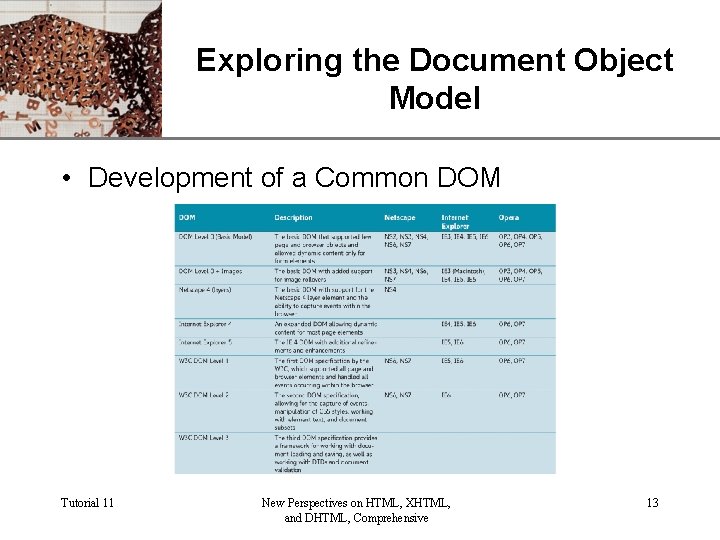
XP Exploring the Document Object Model • Development of a Common DOM Tutorial 11 New Perspectives on HTML, XHTML, and DHTML, Comprehensive 13
XP Exploring the Document Object Model • Development of a Common DOM – Within each DOM, particular features may not be supported by every browser – Code should be compatible with • Netscape 4 • Internet Explorer 5 • W 3 C DOM Level 1 and 2 Tutorial 11 New Perspectives on HTML, XHTML, and DHTML, Comprehensive 14
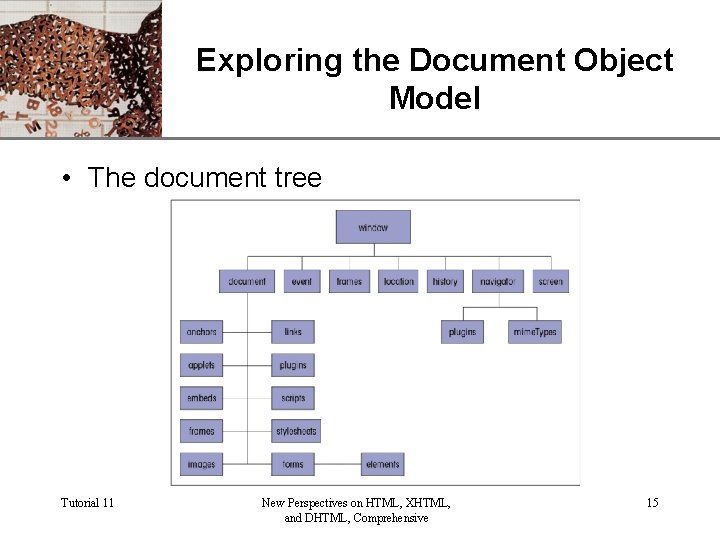
XP Exploring the Document Object Model • The document tree Tutorial 11 New Perspectives on HTML, XHTML, and DHTML, Comprehensive 15
Referencing Objects XP • A DOM can be used by any scripting language including Java. Script and Java Tutorial 11 New Perspectives on HTML, XHTML, and DHTML, Comprehensive 16
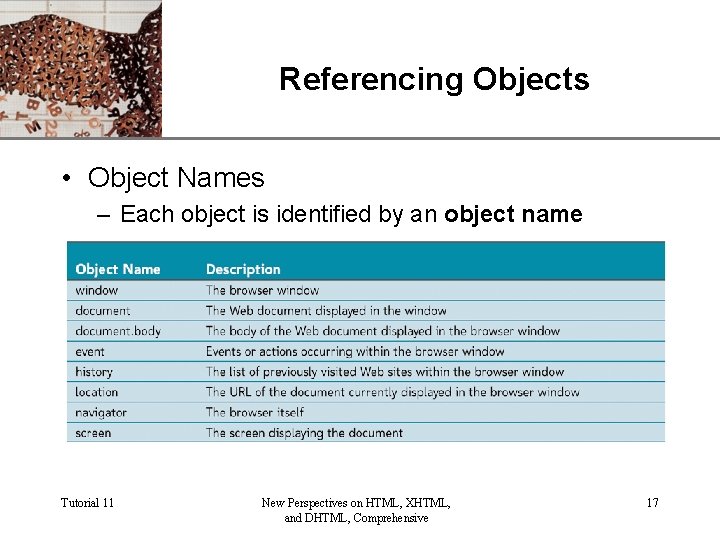
Referencing Objects XP • Object Names – Each object is identified by an object name Tutorial 11 New Perspectives on HTML, XHTML, and DHTML, Comprehensive 17
Referencing Objects XP • Object Names – General form is object 1. object 2. object 3… – To reference the history you would use the form window. history – For the body, you would use document. body Tutorial 11 New Perspectives on HTML, XHTML, and DHTML, Comprehensive 18
Referencing Objects XP • Working with Object Collections – Objects are organized into arrays called object collections document. collection Tutorial 11 New Perspectives on HTML, XHTML, and DHTML, Comprehensive 19
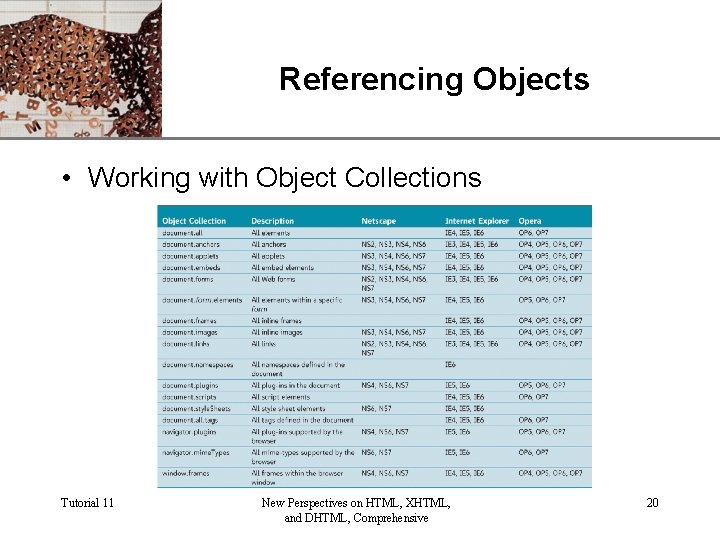
Referencing Objects XP • Working with Object Collections Tutorial 11 New Perspectives on HTML, XHTML, and DHTML, Comprehensive 20
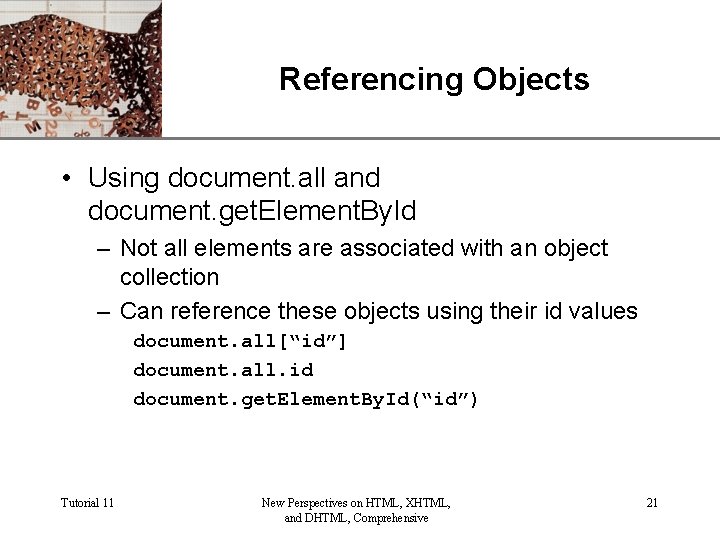
Referencing Objects XP • Using document. all and document. get. Element. By. Id – Not all elements are associated with an object collection – Can reference these objects using their id values document. all[“id”] document. all. id document. get. Element. By. Id(“id”) Tutorial 11 New Perspectives on HTML, XHTML, and DHTML, Comprehensive 21
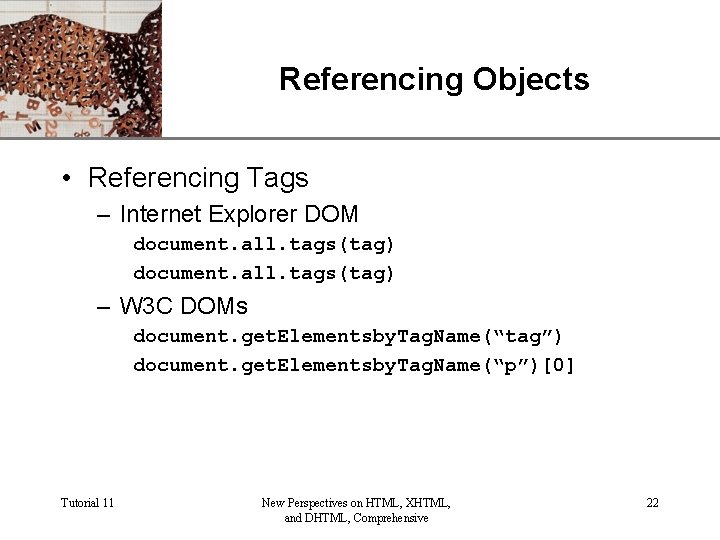
Referencing Objects XP • Referencing Tags – Internet Explorer DOM document. all. tags(tag) – W 3 C DOMs document. get. Elementsby. Tag. Name(“tag”) document. get. Elementsby. Tag. Name(“p”)[0] Tutorial 11 New Perspectives on HTML, XHTML, and DHTML, Comprehensive 22
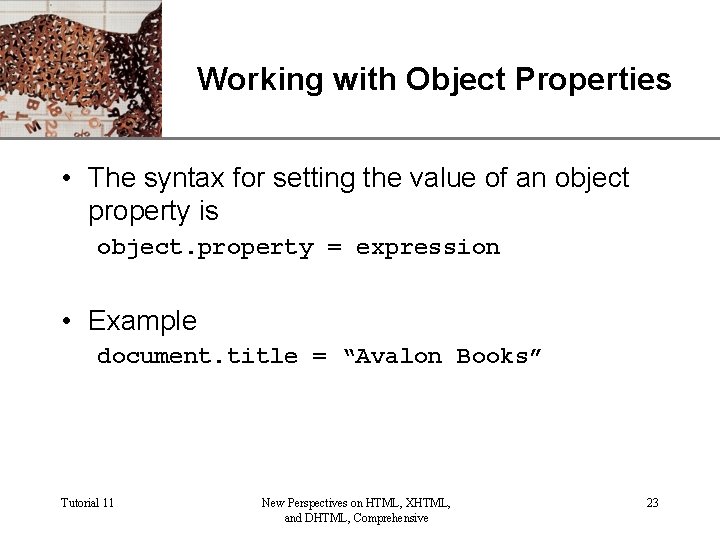
XP Working with Object Properties • The syntax for setting the value of an object property is object. property = expression • Example document. title = “Avalon Books” Tutorial 11 New Perspectives on HTML, XHTML, and DHTML, Comprehensive 23
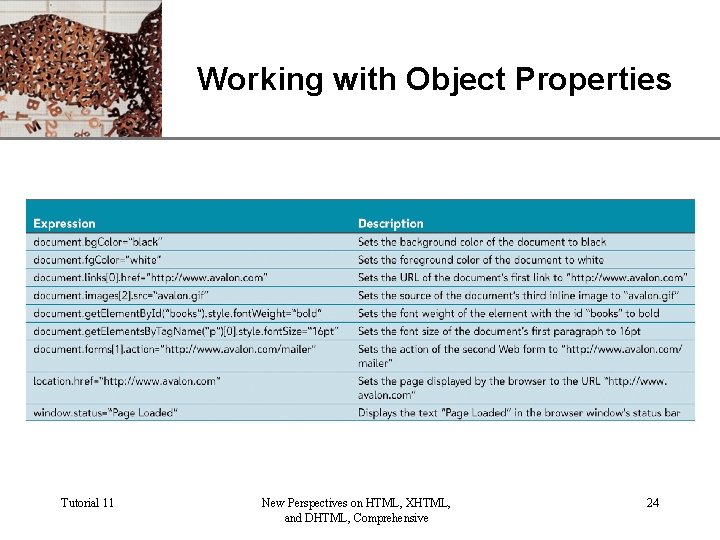
XP Working with Object Properties Tutorial 11 New Perspectives on HTML, XHTML, and DHTML, Comprehensive 24
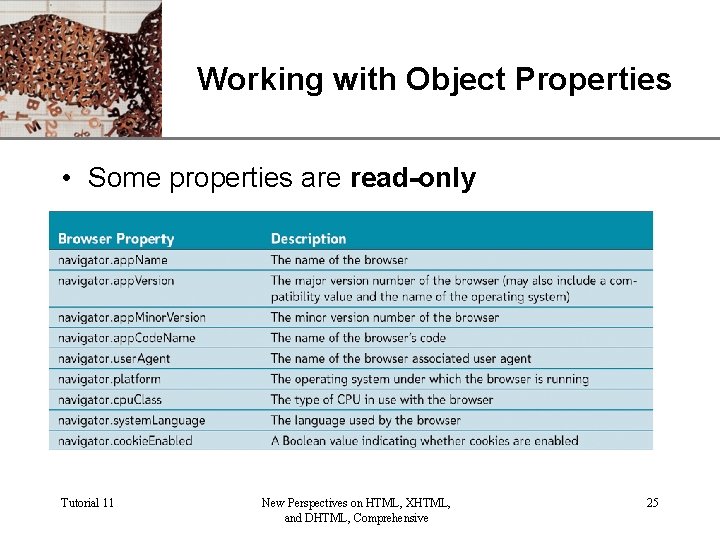
XP Working with Object Properties • Some properties are read-only Tutorial 11 New Perspectives on HTML, XHTML, and DHTML, Comprehensive 25
XP Working with Object Properties • Storing a Property in a Variable variable = object. property • Using Properties in a Conditional Expressions if(document. bg. Color==“black”) { document. fg. Color=“white” } else { document. fg. Color=“black” } Tutorial 11 New Perspectives on HTML, XHTML, and DHTML, Comprehensive 26
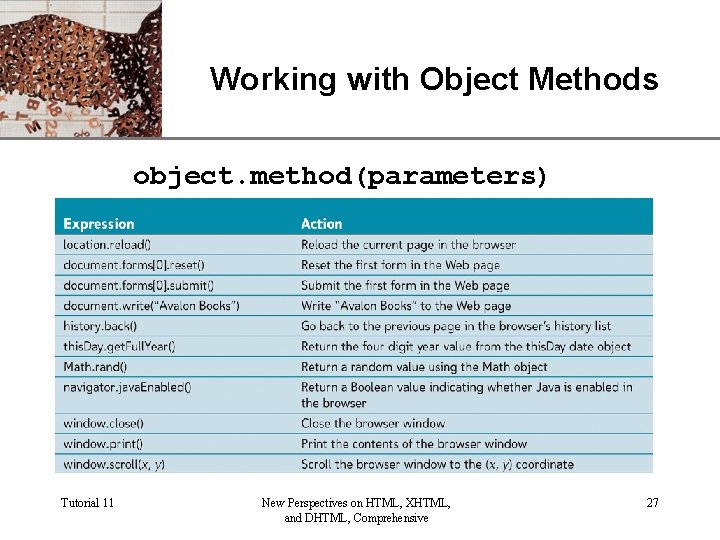
XP Working with Object Methods object. method(parameters) Tutorial 11 New Perspectives on HTML, XHTML, and DHTML, Comprehensive 27
Creating a Cross-Browser Web. XP Site • You can create this kind of code, known as cross-browser code, using two different approaches: browser detection or object detection Tutorial 11 New Perspectives on HTML, XHTML, and DHTML, Comprehensive 28
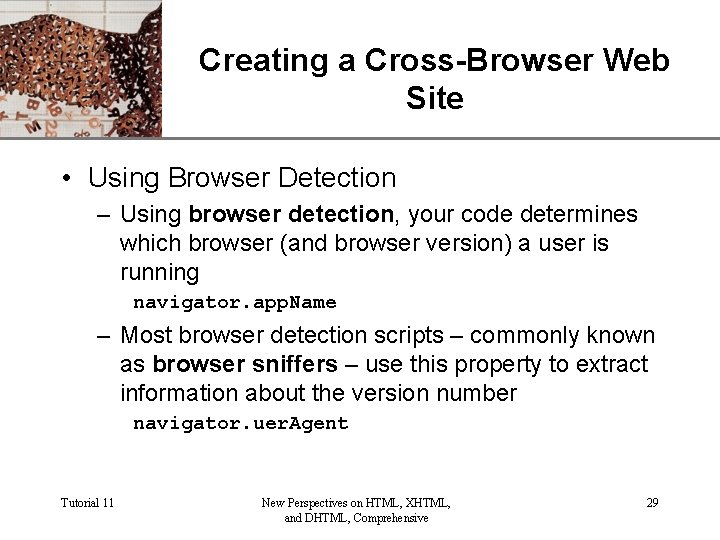
Creating a Cross-Browser Web. XP Site • Using Browser Detection – Using browser detection, your code determines which browser (and browser version) a user is running navigator. app. Name – Most browser detection scripts – commonly known as browser sniffers – use this property to extract information about the version number navigator. uer. Agent Tutorial 11 New Perspectives on HTML, XHTML, and DHTML, Comprehensive 29
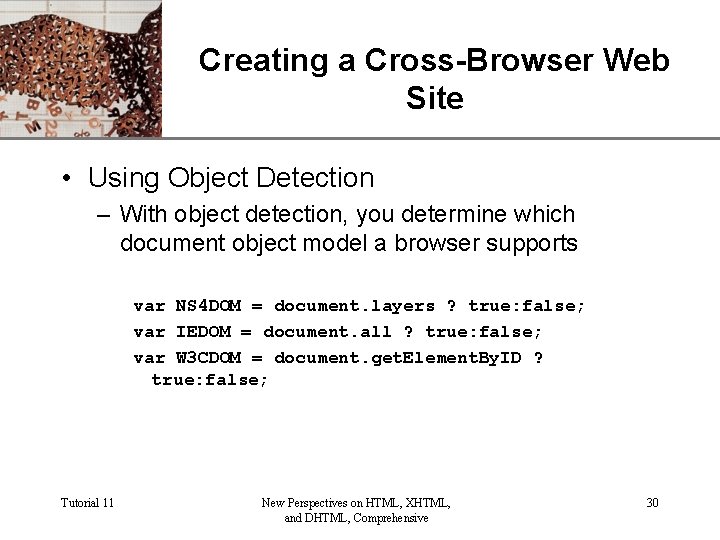
Creating a Cross-Browser Web. XP Site • Using Object Detection – With object detection, you determine which document object model a browser supports var NS 4 DOM = document. layers ? true: false; var IEDOM = document. all ? true: false; var W 3 CDOM = document. get. Element. By. ID ? true: false; Tutorial 11 New Perspectives on HTML, XHTML, and DHTML, Comprehensive 30
Creating a Cross-Browser Web. XP Site • Employing Cross-Browser Strategies – One strategy, called page branching, creates separate pages for each browser along with an initial page – A script determines the capabilities of the user’s browser and automatically loads the appropriate page Tutorial 11 New Perspectives on HTML, XHTML, and DHTML, Comprehensive 31
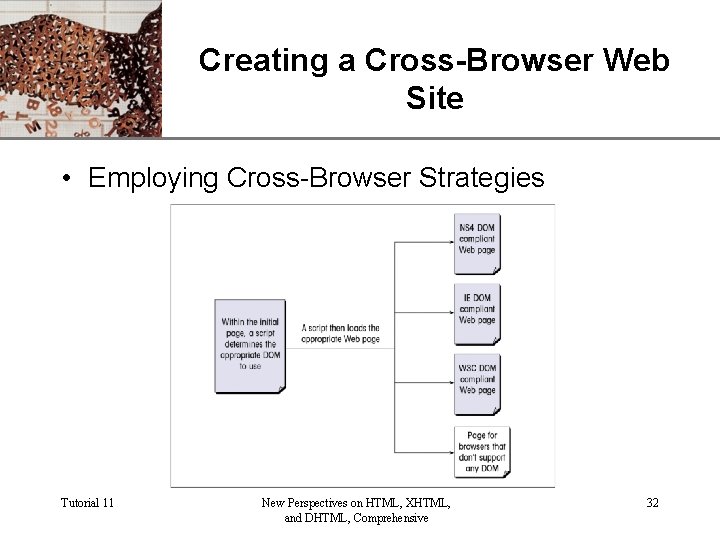
Creating a Cross-Browser Web. XP Site • Employing Cross-Browser Strategies Tutorial 11 New Perspectives on HTML, XHTML, and DHTML, Comprehensive 32
Creating a Cross-Browser Web. XP Site • Employing Cross-Browser Strategies – To automatically load a page into a browser based on the type of the browser detected, use the command location. href = url; – A second cross-browser strategy is to use internal branching – Most web developers apply a third cross-browser strategy • Application programming interface or API Tutorial 11 New Perspectives on HTML, XHTML, and DHTML, Comprehensive 33
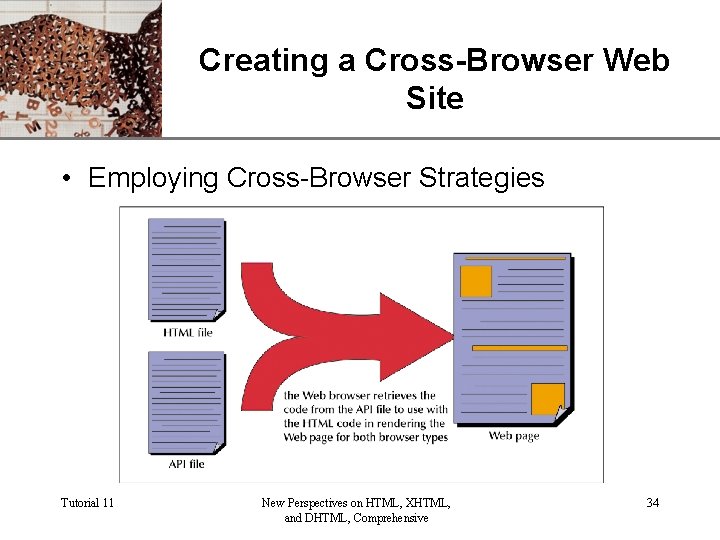
Creating a Cross-Browser Web. XP Site • Employing Cross-Browser Strategies Tutorial 11 New Perspectives on HTML, XHTML, and DHTML, Comprehensive 34
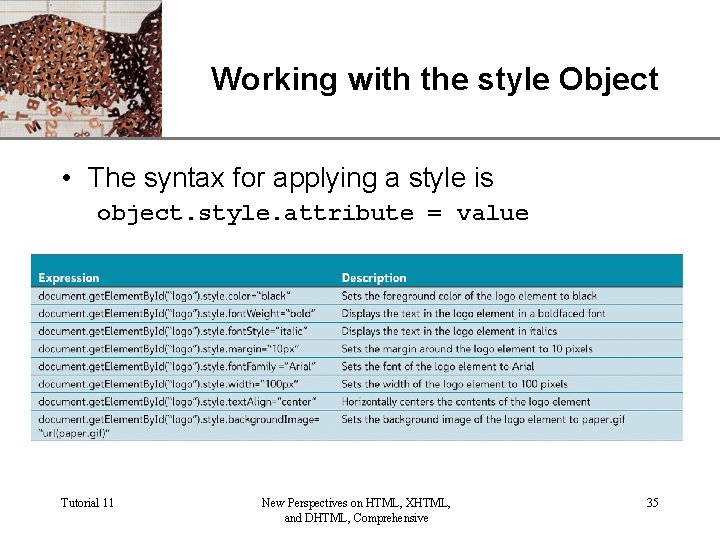
XP Working with the style Object • The syntax for applying a style is object. style. attribute = value Tutorial 11 New Perspectives on HTML, XHTML, and DHTML, Comprehensive 35
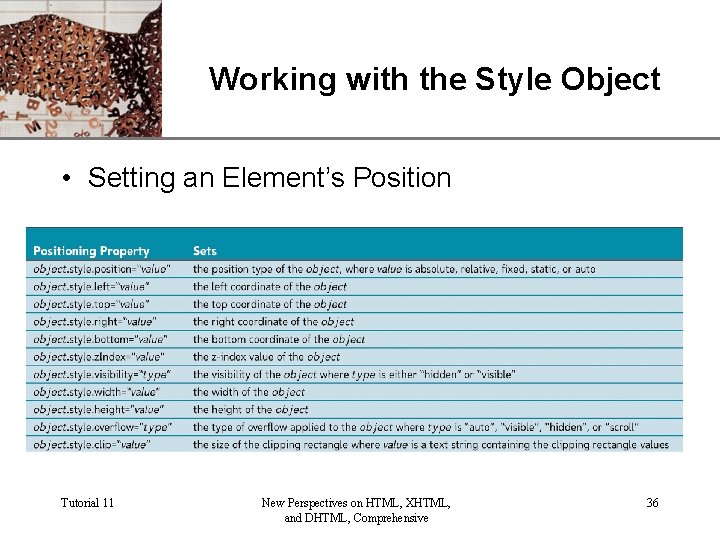
XP Working with the Style Object • Setting an Element’s Position Tutorial 11 New Perspectives on HTML, XHTML, and DHTML, Comprehensive 36
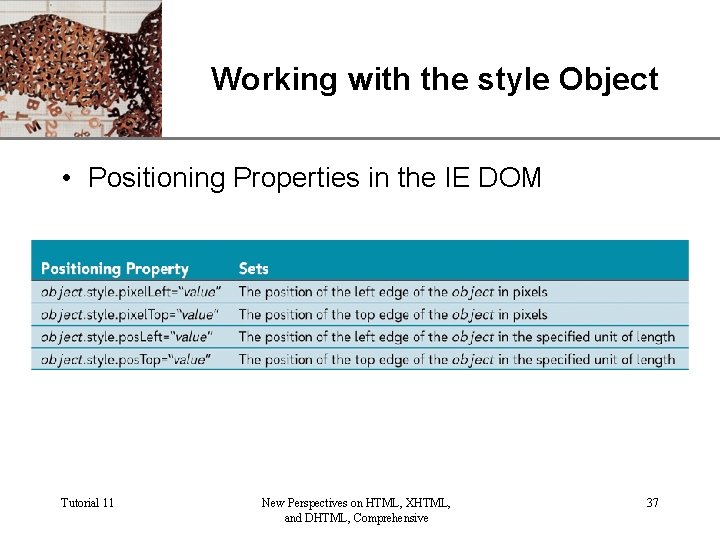
XP Working with the style Object • Positioning Properties in the IE DOM Tutorial 11 New Perspectives on HTML, XHTML, and DHTML, Comprehensive 37
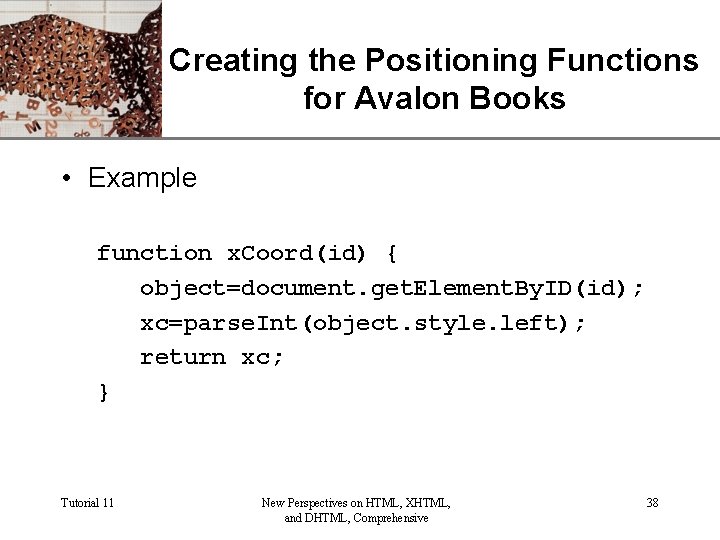
XP Creating the Positioning Functions for Avalon Books • Example function x. Coord(id) { object=document. get. Element. By. ID(id); xc=parse. Int(object. style. left); return xc; } Tutorial 11 New Perspectives on HTML, XHTML, and DHTML, Comprehensive 38
Working with Event Handlers XP • An event handler is an attribute added to an element that specifies a program to be run in response to an event Tutorial 11 New Perspectives on HTML, XHTML, and DHTML, Comprehensive 39
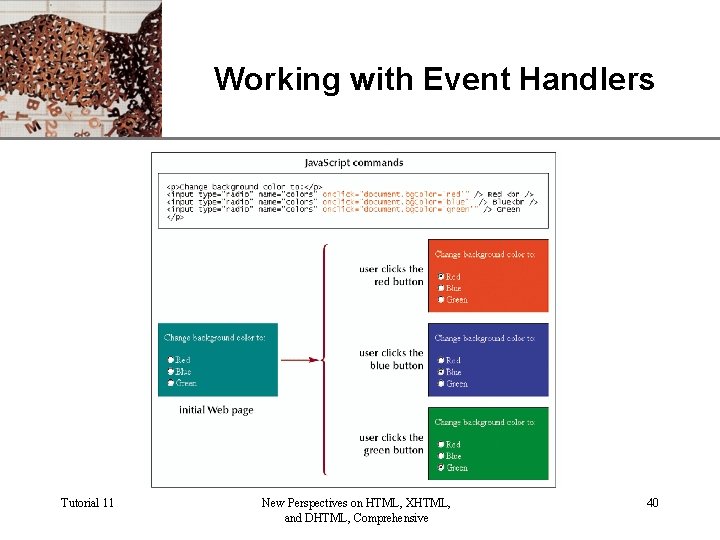
Working with Event Handlers Tutorial 11 New Perspectives on HTML, XHTML, and DHTML, Comprehensive XP 40
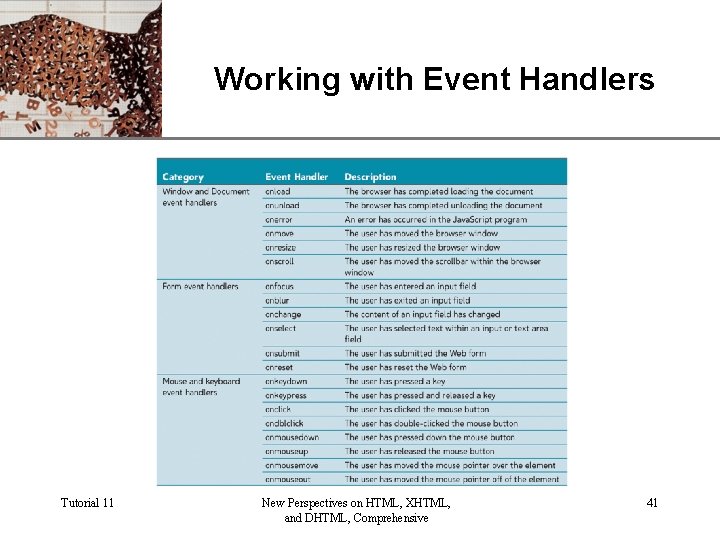
Working with Event Handlers Tutorial 11 New Perspectives on HTML, XHTML, and DHTML, Comprehensive XP 41
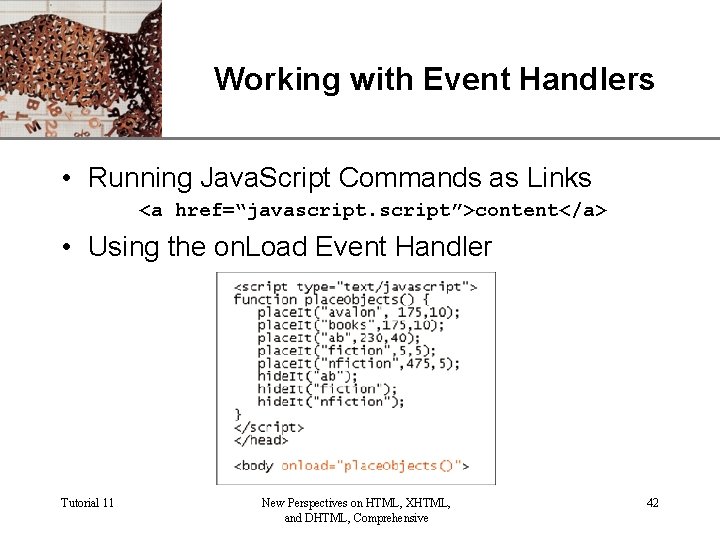
Working with Event Handlers XP • Running Java. Script Commands as Links <a href=“javascript”>content</a> • Using the on. Load Event Handler Tutorial 11 New Perspectives on HTML, XHTML, and DHTML, Comprehensive 42
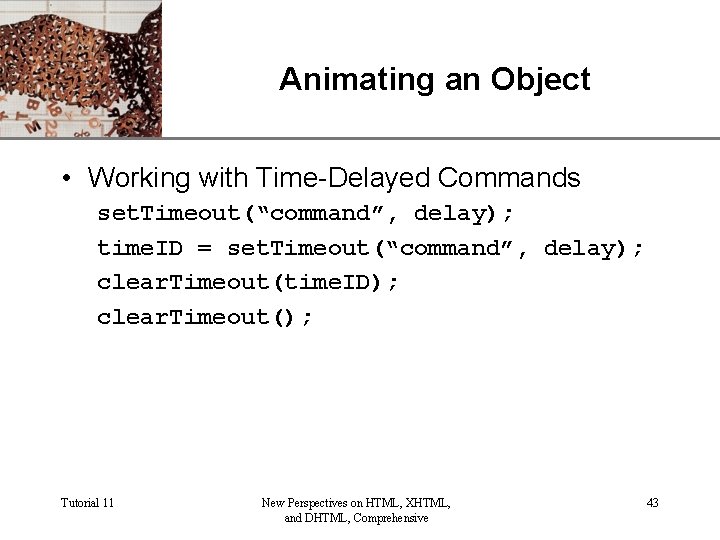
Animating an Object XP • Working with Time-Delayed Commands set. Timeout(“command”, delay); time. ID = set. Timeout(“command”, delay); clear. Timeout(time. ID); clear. Timeout(); Tutorial 11 New Perspectives on HTML, XHTML, and DHTML, Comprehensive 43
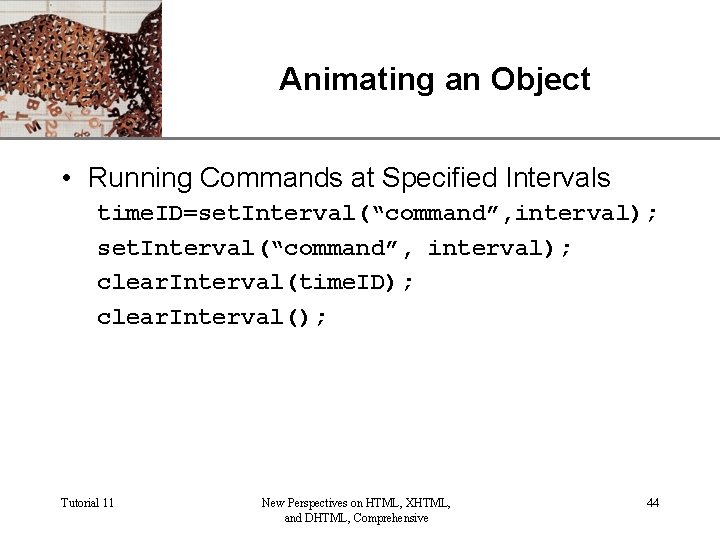
Animating an Object XP • Running Commands at Specified Intervals time. ID=set. Interval(“command”, interval); clear. Interval(time. ID); clear. Interval(); Tutorial 11 New Perspectives on HTML, XHTML, and DHTML, Comprehensive 44
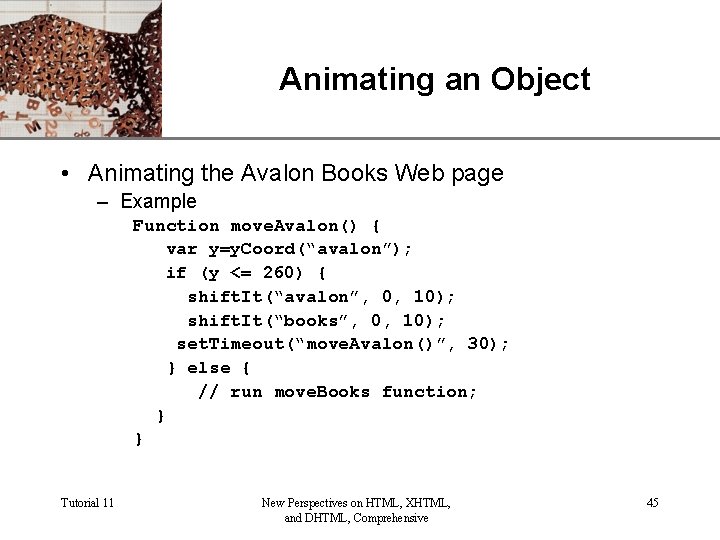
Animating an Object XP • Animating the Avalon Books Web page – Example Function move. Avalon() { var y=y. Coord(“avalon”); if (y <= 260) { shift. It(“avalon”, 0, 10); shift. It(“books”, 0, 10); set. Timeout(“move. Avalon()”, 30); } else { // run move. Books function; } } Tutorial 11 New Perspectives on HTML, XHTML, and DHTML, Comprehensive 45
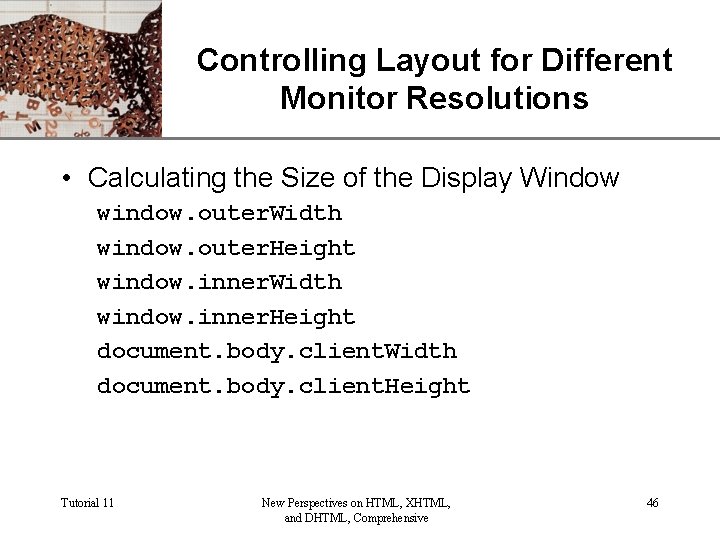
XP Controlling Layout for Different Monitor Resolutions • Calculating the Size of the Display Window window. outer. Width window. outer. Height window. inner. Width window. inner. Height document. body. client. Width document. body. client. Height Tutorial 11 New Perspectives on HTML, XHTML, and DHTML, Comprehensive 46
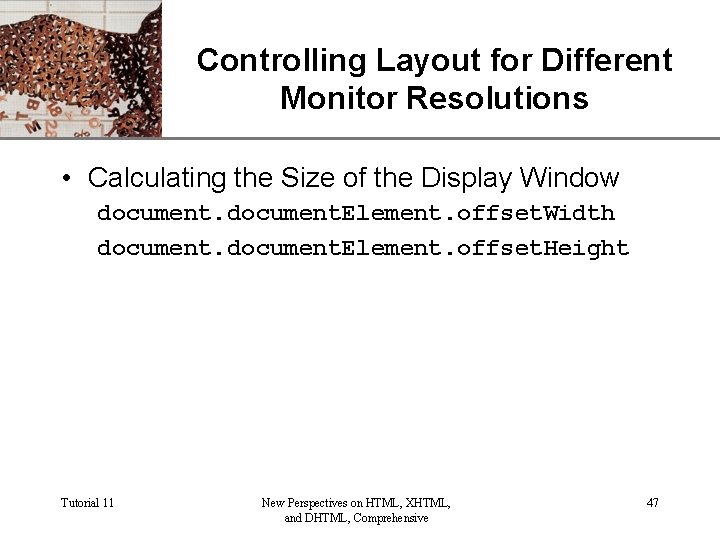
XP Controlling Layout for Different Monitor Resolutions • Calculating the Size of the Display Window document. Element. offset. Width document. Element. offset. Height Tutorial 11 New Perspectives on HTML, XHTML, and DHTML, Comprehensive 47
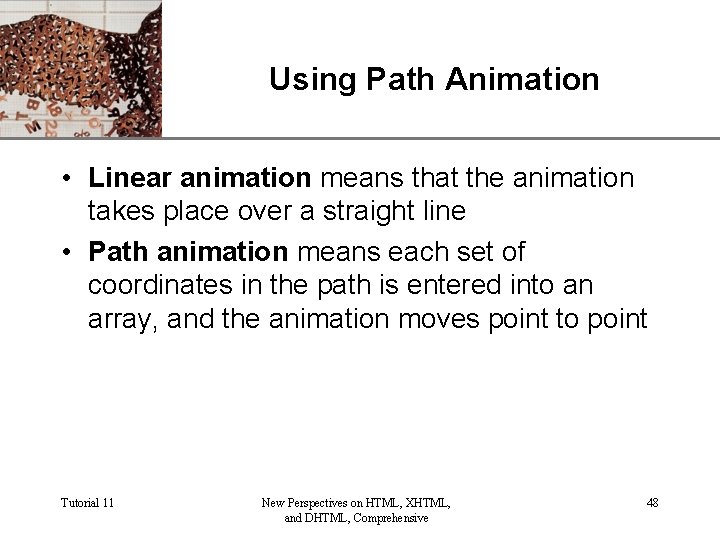
XP Using Path Animation • Linear animation means that the animation takes place over a straight line • Path animation means each set of coordinates in the path is entered into an array, and the animation moves point to point Tutorial 11 New Perspectives on HTML, XHTML, and DHTML, Comprehensive 48
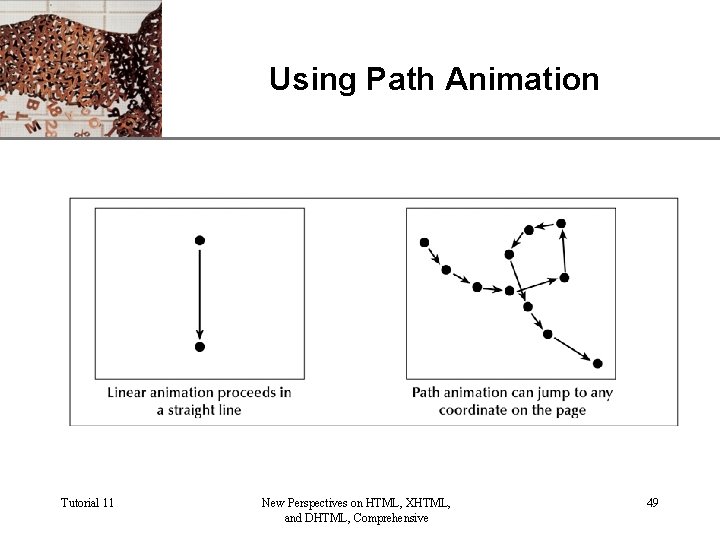
Using Path Animation Tutorial 11 New Perspectives on HTML, XHTML, and DHTML, Comprehensive XP 49
XP Tips for working with Java. Script Objects and DHTML • If your code reuses the same object reference, store the object in a variable • Place your customized functions in external files • Use object detection • Use path animation and create interesting visual effects • Break up your animated effects into separate functions Tutorial 11 New Perspectives on HTML, XHTML, and DHTML, Comprehensive 50
- Slides: 50