
XML Algebra Comparison between XPERANTO NIAGARA 1 Part
XML Algebra Comparison between: XPERANTO NIAGARA 1
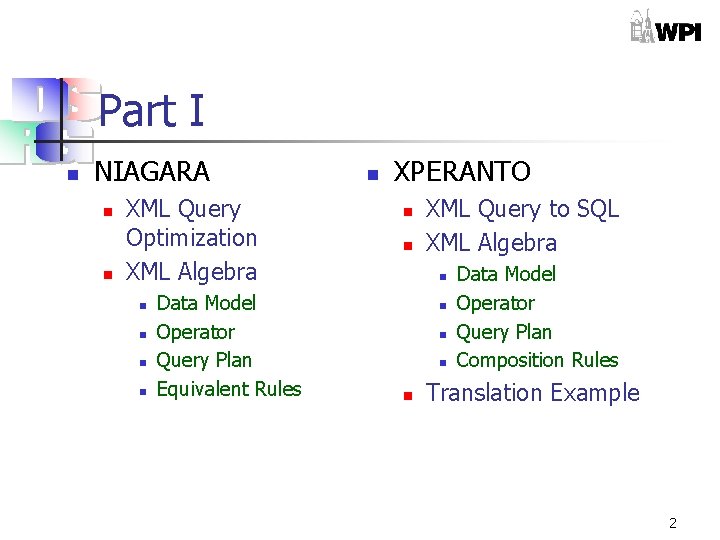
Part I n NIAGARA n n XML Query Optimization XML Algebra n n Data Model Operator Query Plan Equivalent Rules n XPERANTO n n XML Query to SQL XML Algebra n n n Data Model Operator Query Plan Composition Rules Translation Example 2
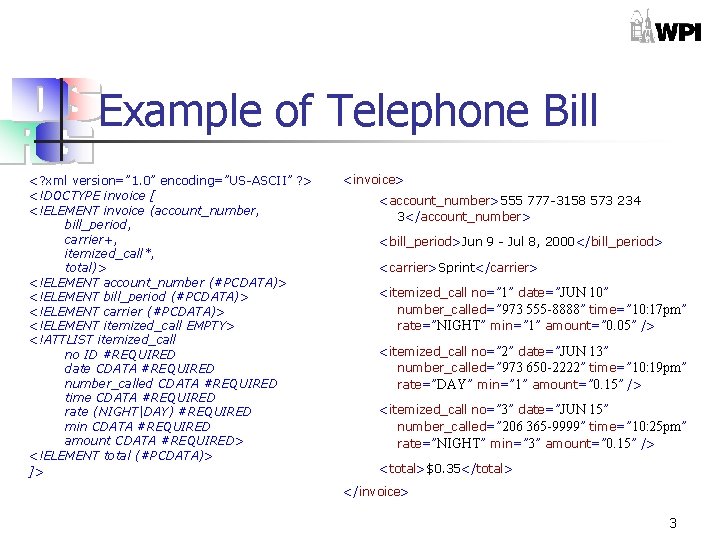
Example of Telephone Bill <? xml version=” 1. 0” encoding=”US-ASCII” ? > <!DOCTYPE invoice [ <!ELEMENT invoice (account_number, bill_period, carrier+, itemized_call*, total)> <!ELEMENT account_number (#PCDATA)> <!ELEMENT bill_period (#PCDATA)> <!ELEMENT carrier (#PCDATA)> <!ELEMENT itemized_call EMPTY> <!ATTLIST itemized_call no ID #REQUIRED date CDATA #REQUIRED number_called CDATA #REQUIRED time CDATA #REQUIRED rate (NIGHT|DAY) #REQUIRED min CDATA #REQUIRED amount CDATA #REQUIRED> <!ELEMENT total (#PCDATA)> ]> <invoice> <account_number>555 777 -3158 573 234 3</account_number> <bill_period>Jun 9 - Jul 8, 2000</bill_period> <carrier>Sprint</carrier> <itemized_call no=” 1” date=”JUN 10” number_called=” 973 555 -8888” time=” 10: 17 pm” rate=”NIGHT” min=” 1” amount=” 0. 05” /> <itemized_call no=” 2” date=”JUN 13” number_called=” 973 650 -2222” time=” 10: 19 pm” rate=”DAY” min=” 1” amount=” 0. 15” /> <itemized_call no=” 3” date=”JUN 15” number_called=” 206 365 -9999” time=” 10: 25 pm” rate=”NIGHT” min=” 3” amount=” 0. 15” /> <total>$0. 35</total> </invoice> 3
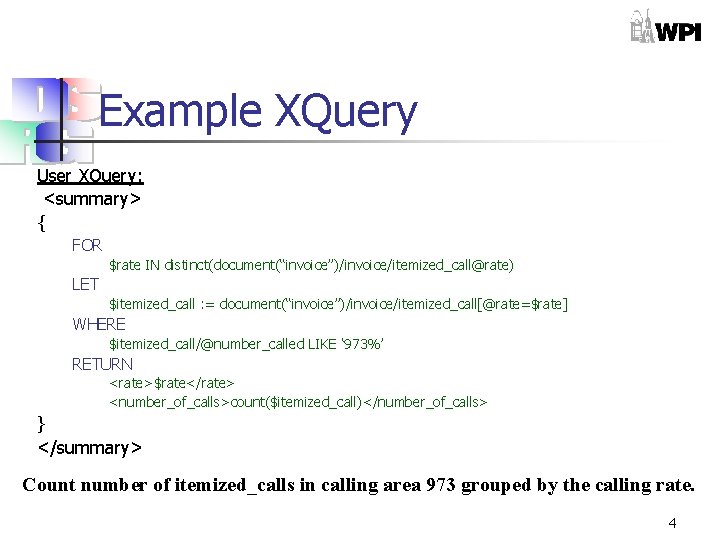
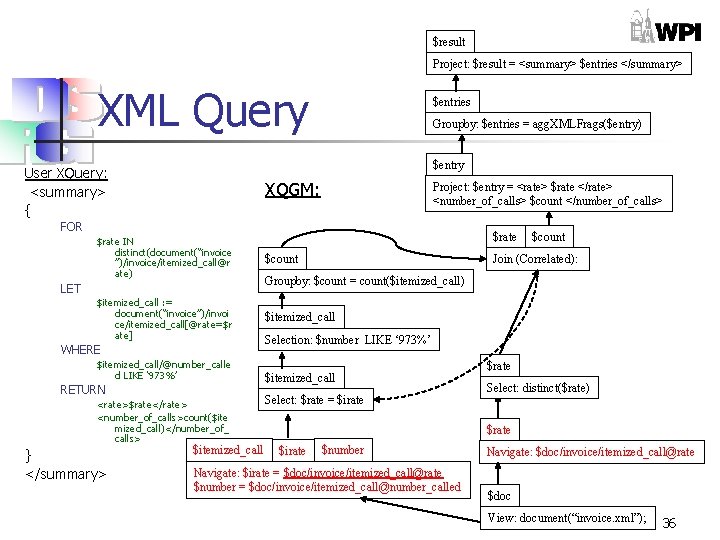
Example XQuery User XQuery: <summary> { FOR $rate IN distinct(document(“invoice”)/invoice/itemized_call@rate) LET $itemized_call : = document(“invoice”)/invoice/itemized_call[@rate=$rate] WHERE $itemized_call/@number_called LIKE ‘ 973%’ RETURN <rate>$rate</rate> <number_of_calls>count($itemized_call)</number_of_calls> } </summary> Count number of itemized_calls in calling area 973 grouped by the calling rate. 4

NIAGARA n n Title : Following the paths of XML Data: An algebraic framework for XML query evaluation By : Leonidas Galanis, Efstratios Viglas, David J. De. Witt, Jeffrey. F. Naughton, and David Maier. 5
Goals n n Be independent of schema information Query on both structure and content Generate simple, flexible, yet powerful algebraic expressions Allow re-use of traditional optimization techniques 6
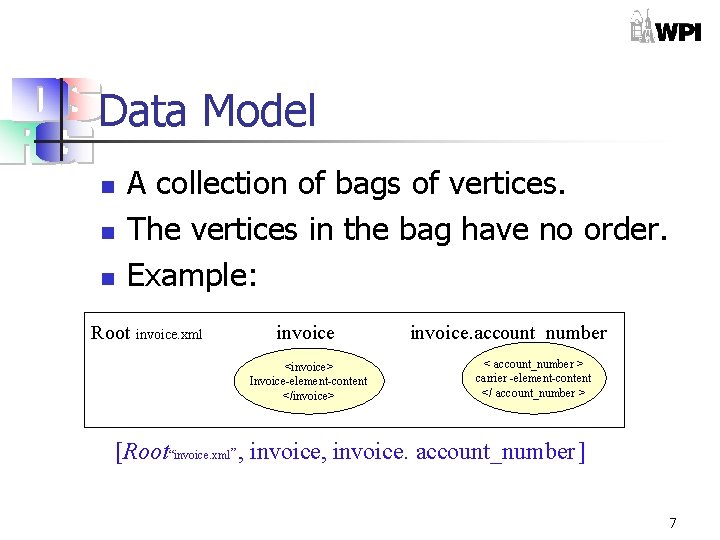
Data Model n n n A collection of bags of vertices. The vertices in the bag have no order. Example: Root invoice. xml invoice <invoice> Invoice-element-content </invoice> invoice. account_number < account_number > carrier -element-content </ account_number > [Root“invoice. xml”, invoice. account_number ] 7
Data Model n n Bag elements are reachable by path expressions. The path expression consists of two parts : n n n An entry point A relative forward part Example : account_number: invoice 8
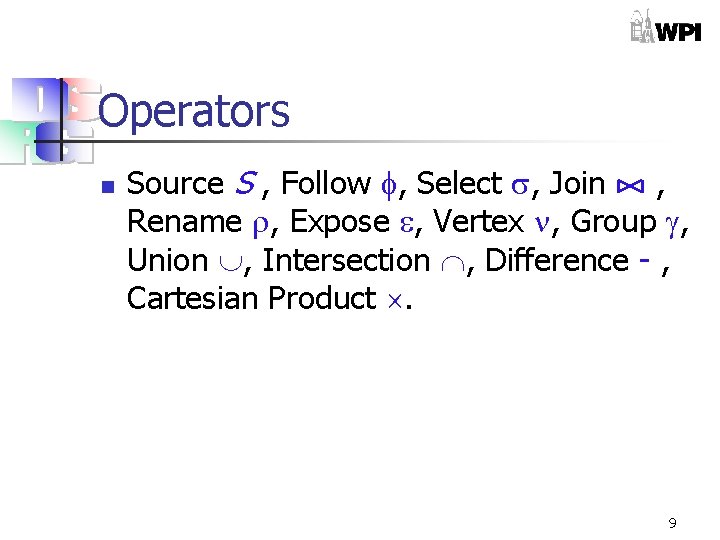
Operators n Source S , Follow , Select , Join , Rename , Expose , Vertex , Group , Union , Intersection , Difference - , Cartesian Product . 9
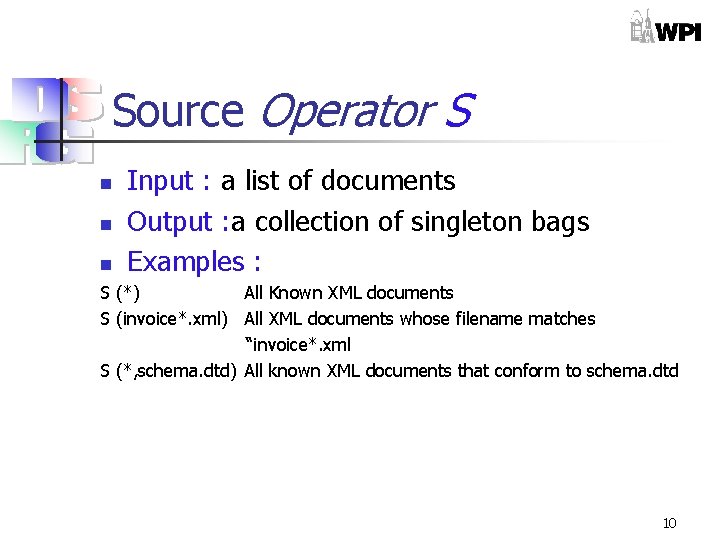
Source Operator S n n n Input : a list of documents Output : a collection of singleton bags Examples : S (*) All Known XML documents S (invoice*. xml) All XML documents whose filename matches “invoice*. xml S (*, schema. dtd) All known XML documents that conform to schema. dtd 10
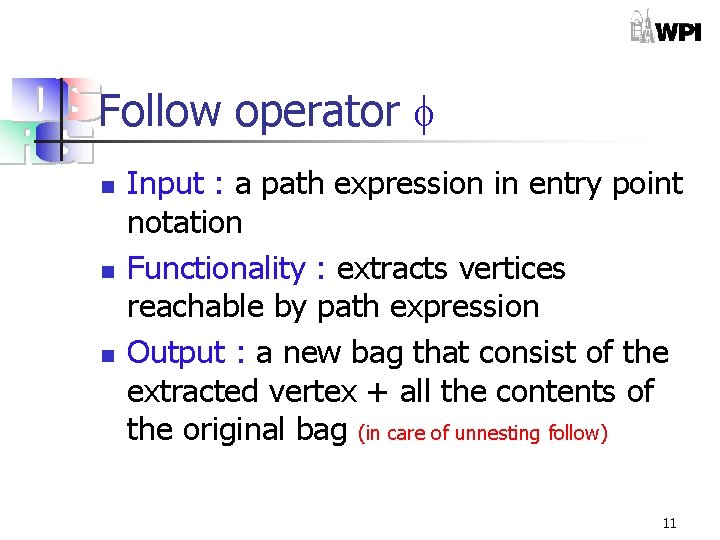
Follow operator n n n Input : a path expression in entry point notation Functionality : extracts vertices reachable by path expression Output : a new bag that consist of the extracted vertex + all the contents of the original bag (in care of unnesting follow) 11
![Follow operator (Example*) {[Root invoice. xml , invoice, invoice. carrier]} invoice. xml invoice. carrier](http://slidetodoc.com/presentation_image_h2/f293f76cab41dfb0c3610c8ecd901542/image-12.jpg "Follow operator (Example*) {[Root invoice. xml , invoice, invoice. carrier]} invoice. xml invoice. carrier")
Follow operator (Example*) {[Root invoice. xml , invoice, invoice. carrier]} invoice. xml invoice. carrier <carrier> carrier -element-content </carrier > <invoice> Invoice-element-content </invoice> (carrier: invoice) Root *Unnesting Follow invoice. xml <invoice> Invoice-element-content </invoice> {[Root invoice. xml , invoice]} 12
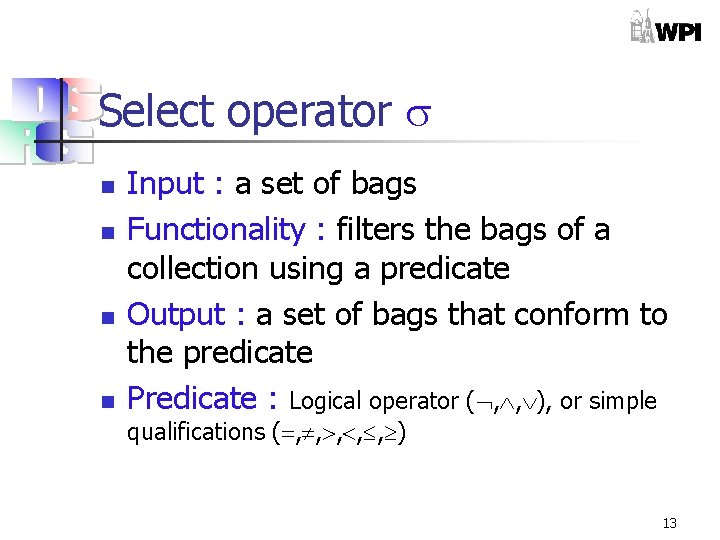
Select operator n n Input : a set of bags Functionality : filters the bags of a collection using a predicate Output : a set of bags that conform to the predicate Predicate : Logical operator ( , , ), or simple qualifications ( , , , ) 13
![Select operator (Example) {[Root invoice. xml , invoice. xml invoice], … } invoice <invoice>](http://slidetodoc.com/presentation_image_h2/f293f76cab41dfb0c3610c8ecd901542/image-14.jpg "Select operator (Example) {[Root invoice. xml , invoice. xml invoice], … } invoice <invoice>")
Select operator (Example) {[Root invoice. xml , invoice. xml invoice], … } invoice <invoice> Invoice-element-content </invoice> invoice. carrier =Sprint Root invoice. xml invoice Root <invoice> Invoice-element-content </invoice> {[Root invoice. xml , invoice], [Root invoice. xml invoice <invoice> Invoice-element-content </invoice> invoice. xml , invoice], ……………} 14
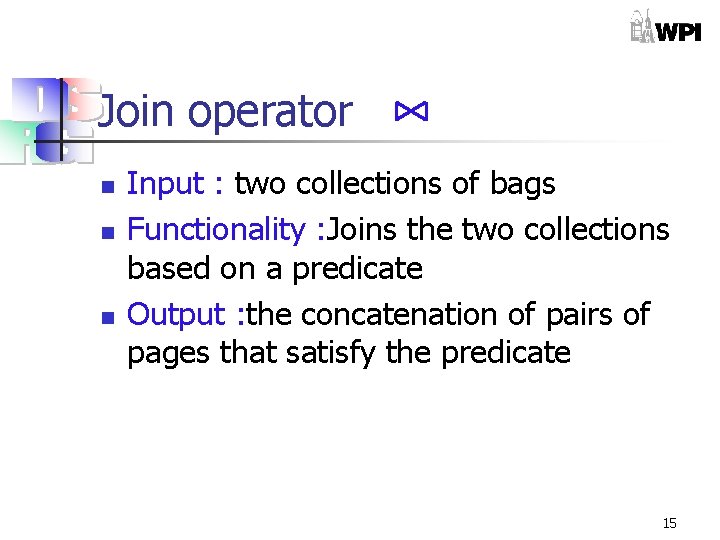
Join operator n n n Input : two collections of bags Functionality : Joins the two collections based on a predicate Output : the concatenation of pairs of pages that satisfy the predicate 15
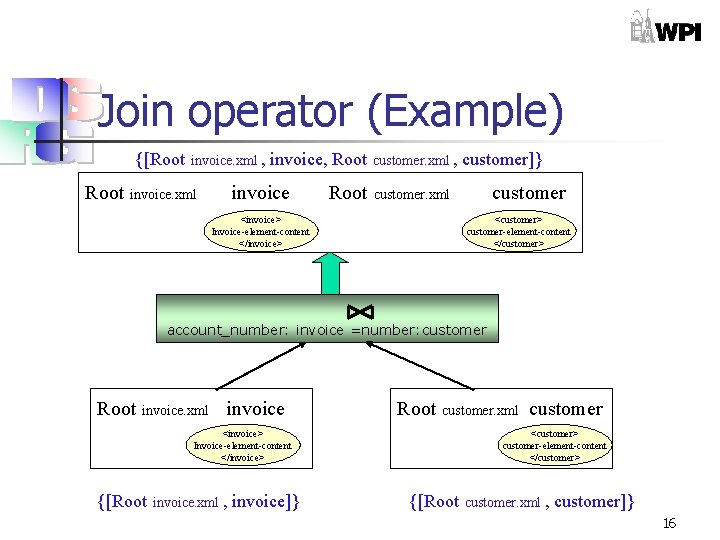
Join operator (Example) {[Root invoice. xml , invoice, Root invoice. xml Root customer. xml , customer]} customer. xml <invoice> Invoice-element-content </invoice> <customer> customer-element-content </customer> account_number: invoice =number: customer Root invoice. xml invoice Root customer. xml <invoice> Invoice-element-content </invoice> {[Root invoice. xml , invoice]} customer <customer> customer-element-content </customer> {[Root customer. xml , customer]} 16
Expose operator n n Input : a list of path expressions of vertices to be exposed Output : a set of bags that contains vertices in the parameter list with the same order 17
![Expose operator (Example) {[Root invoice. xml , invoice. bill_period, invoice. carrier]} invoice. bill_period <carrier>](http://slidetodoc.com/presentation_image_h2/f293f76cab41dfb0c3610c8ecd901542/image-18.jpg "Expose operator (Example) {[Root invoice. xml , invoice. bill_period, invoice. carrier]} invoice. bill_period <carrier>")
Expose operator (Example) {[Root invoice. xml , invoice. bill_period, invoice. carrier]} invoice. bill_period <carrier> bill_period -element-content </carrier > invoice. carrier <invoice> carrier-element-content </invoice> (bill_period, carrier) Root invoice. xml invoice. carrier <invoice> Invoice-element-content </invoice> {[Root invoice. xml , <invoice> carrier-element-content </invoice> invoice. bill_period <carrier> bill_period -element-content </carrier > invoice, invoice. carrier, invoice. bill_period]} 18
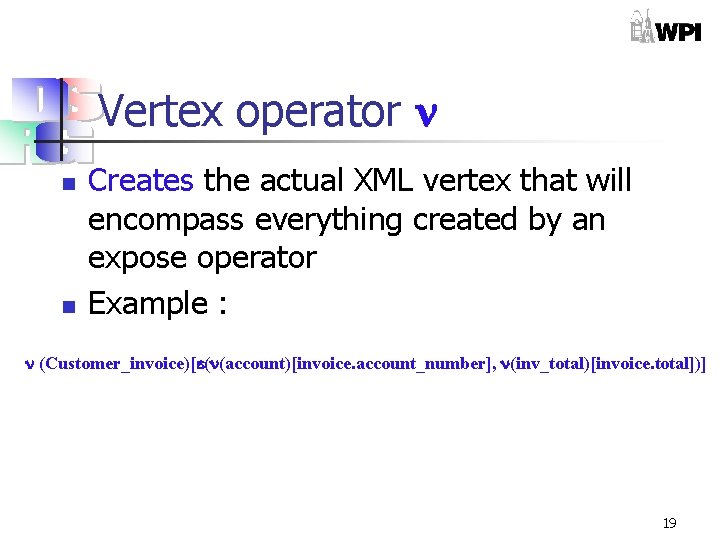
Vertex operator n n Creates the actual XML vertex that will encompass everything created by an expose operator Example : (Customer_invoice)[ ( (account)[invoice. account_number], (inv_total)[invoice. total])] 19
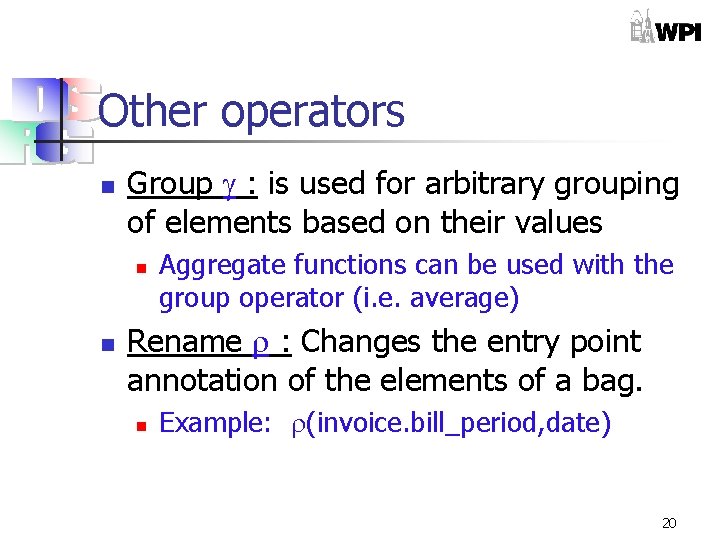
Other operators n Group : is used for arbitrary grouping of elements based on their values n n Aggregate functions can be used with the group operator (i. e. average) Rename : Changes the entry point annotation of the elements of a bag. n Example: (invoice. bill_period, date) 20
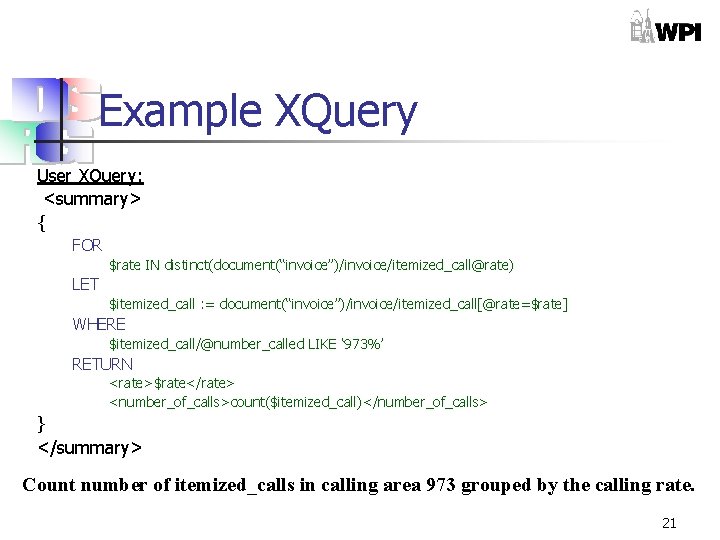
Example XQuery User XQuery: <summary> { FOR $rate IN distinct(document(“invoice”)/invoice/itemized_call@rate) LET $itemized_call : = document(“invoice”)/invoice/itemized_call[@rate=$rate] WHERE $itemized_call/@number_called LIKE ‘ 973%’ RETURN <rate>$rate</rate> <number_of_calls>count($itemized_call)</number_of_calls> } </summary> Count number of itemized_calls in calling area 973 grouped by the calling rate. 21
![Query Plan: Algebra υ(summary)[ ε(υ(rate)[rate] υ(number_of_calls)[number]) [ ρ(rate: invoice. itemized_call, rate), ρ(count(invoice. itemized_call), number)](http://slidetodoc.com/presentation_image_h2/f293f76cab41dfb0c3610c8ecd901542/image-22.jpg "Query Plan: Algebra υ(summary)[ ε(υ(rate)[rate] υ(number_of_calls)[number]) [ ρ(rate: invoice. itemized_call, rate), ρ(count(invoice. itemized_call), number)")
Query Plan: Algebra υ(summary)[ ε(υ(rate)[rate] υ(number_of_calls)[number]) [ ρ(rate: invoice. itemized_call, rate), ρ(count(invoice. itemized_call), number) [γ(rate: invoice. itemized_call, count(invoice. itemized_call)) [σ number called: invoice. itemized_call ►” 973%” [Φμ(invoice. itemized_call) [s(invoice. xml)]]]]]] 22
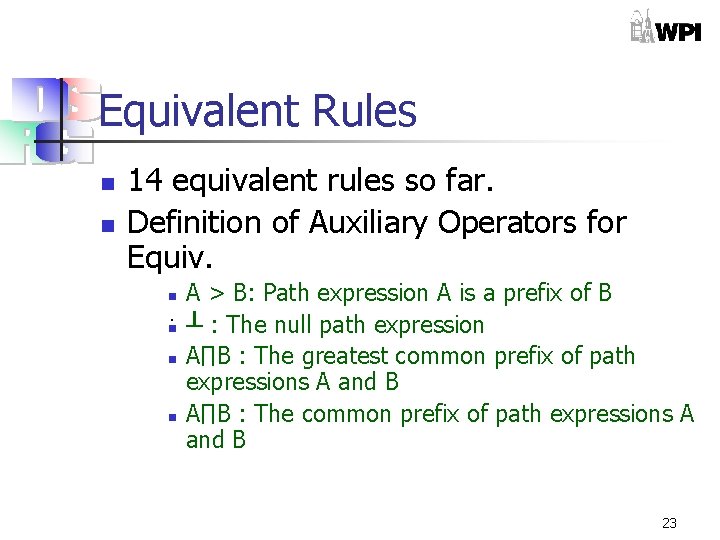
Equivalent Rules n n 14 equivalent rules so far. Definition of Auxiliary Operators for Equiv. A > B: Path expression A is a prefix of B. n ┴ : The null path expression n A∏B : The greatest common prefix of path expressions A and B n A∏B : The common prefix of path expressions A and B n 23
![Equivalent Rules Examples n Rule applications n Follow ordering n Φμ(A) [Φμ(B)] = Φμ](http://slidetodoc.com/presentation_image_h2/f293f76cab41dfb0c3610c8ecd901542/image-24.jpg "Equivalent Rules Examples n Rule applications n Follow ordering n Φμ(A) [Φμ(B)] = Φμ")
Equivalent Rules Examples n Rule applications n Follow ordering n Φμ(A) [Φμ(B)] = Φμ (B)[Φμ (A)]. n iff C < A, C < B: C = A∏B, or A∏B = ┴ C A X B A X. . . B 24
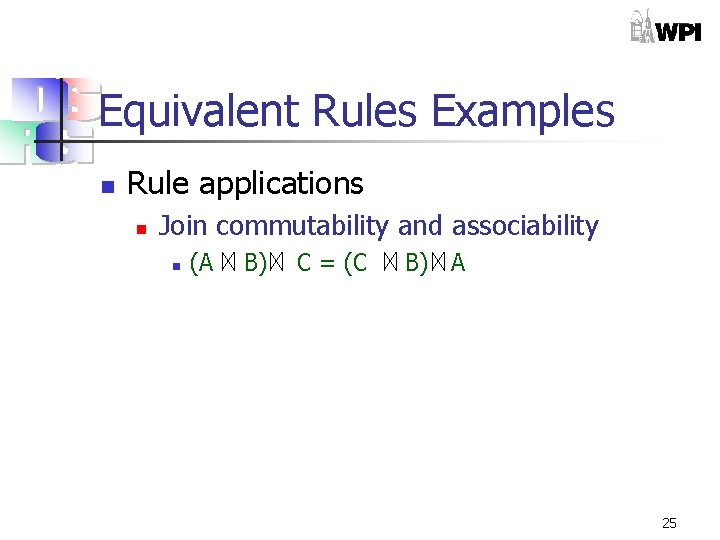
Equivalent Rules Examples n Rule applications n Join commutability and associability n (A B) C = (C B) A 25
![Equivalent Rules Examples n Rule applications n Selection distribution and interchangeability n σc[A B]](http://slidetodoc.com/presentation_image_h2/f293f76cab41dfb0c3610c8ecd901542/image-26.jpg "Equivalent Rules Examples n Rule applications n Selection distribution and interchangeability n σc[A B]")
Equivalent Rules Examples n Rule applications n Selection distribution and interchangeability n σc[A B] = σc 1[A] σc 2[B] n where c is a conjoin of the conditions c 1 and c 2, each of which only refers to one of the join inputs 26
![Equivalent Rules Examples n Rule applications n Elimination of unused bag elements n ε(P)(J[A])](http://slidetodoc.com/presentation_image_h2/f293f76cab41dfb0c3610c8ecd901542/image-27.jpg "Equivalent Rules Examples n Rule applications n Elimination of unused bag elements n ε(P)(J[A])")
Equivalent Rules Examples n Rule applications n Elimination of unused bag elements n ε(P)(J[A]) = J(ε(P[A])) n iff J uses only elements exposed by P 27
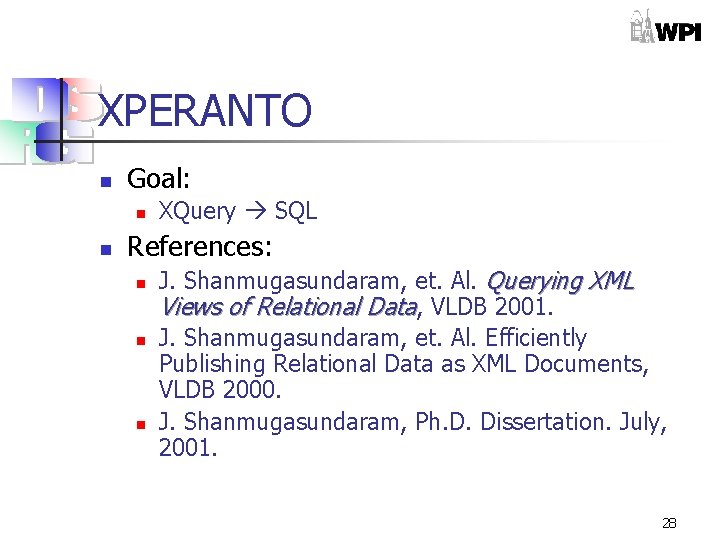
XPERANTO n Goal: n n XQuery SQL References: n n n J. Shanmugasundaram, et. Al. Querying XML Views of Relational Data, VLDB 2001. J. Shanmugasundaram, et. Al. Efficiently Publishing Relational Data as XML Documents, VLDB 2000. J. Shanmugasundaram, Ph. D. Dissertation. July, 2001. 28
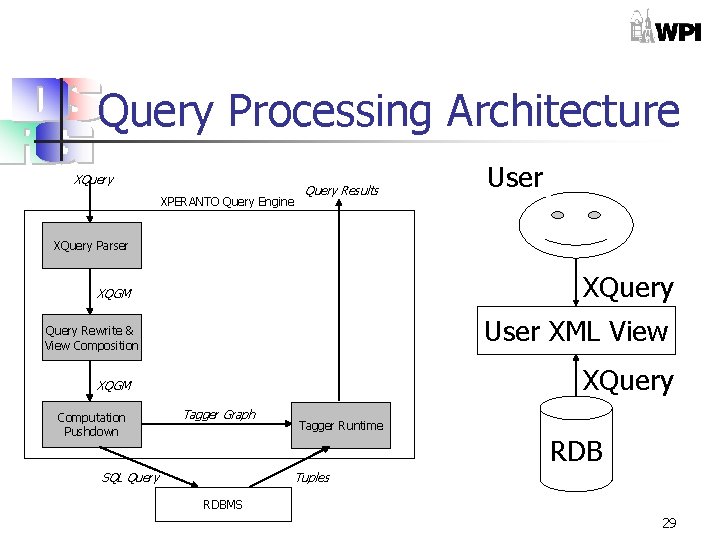
Query Processing Architecture XQuery XPERANTO Query Engine Query Results User XQuery Parser XQuery XQGM User XML View Query Rewrite & View Composition XQuery XQGM Computation Pushdown Tagger Graph Tagger Runtime RDB SQL Query Tuples RDBMS 29
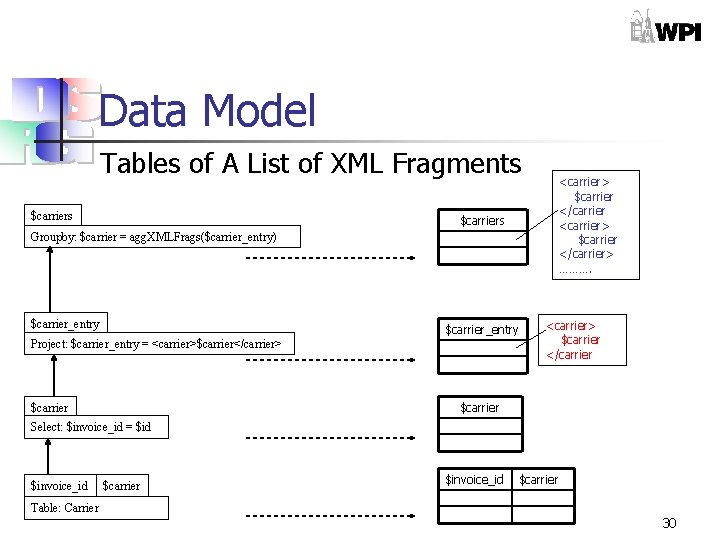
Data Model Tables of A List of XML Fragments $carriers <carrier> $carrier </carrier> ………. $carriers Groupby: $carrier = agg. XMLFrags($carrier_entry) $carrier_entry Project: $carrier_entry = <carrier>$carrier</carrier> <carrier> $carrier </carrier $carrier Select: $invoice_id = $id $invoice_id Table: Carrier $carrier $invoice_id $carrier 30
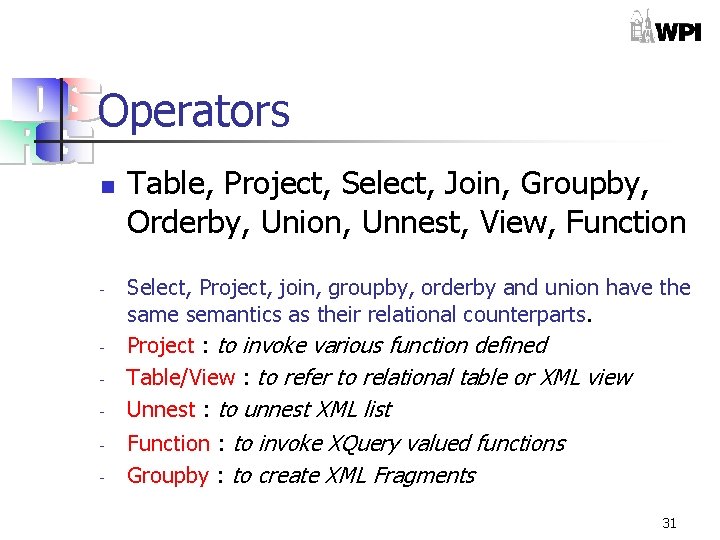
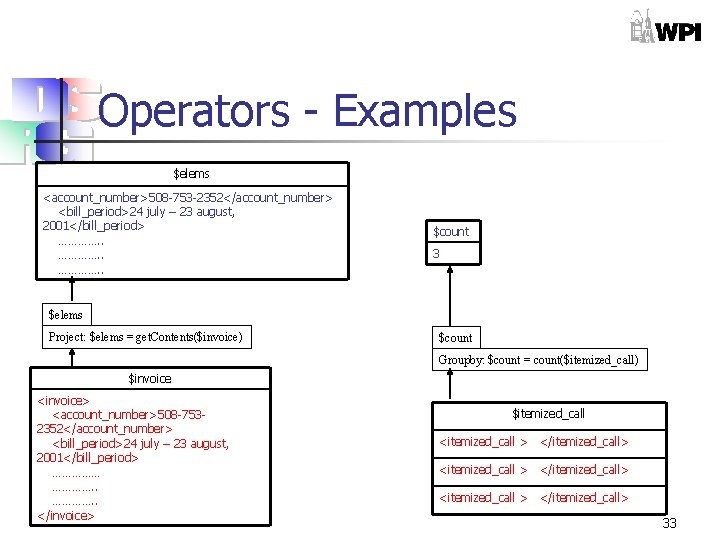
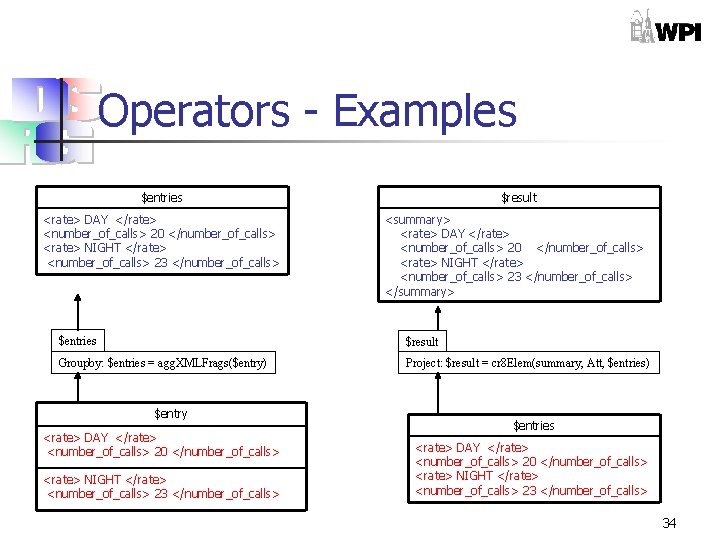
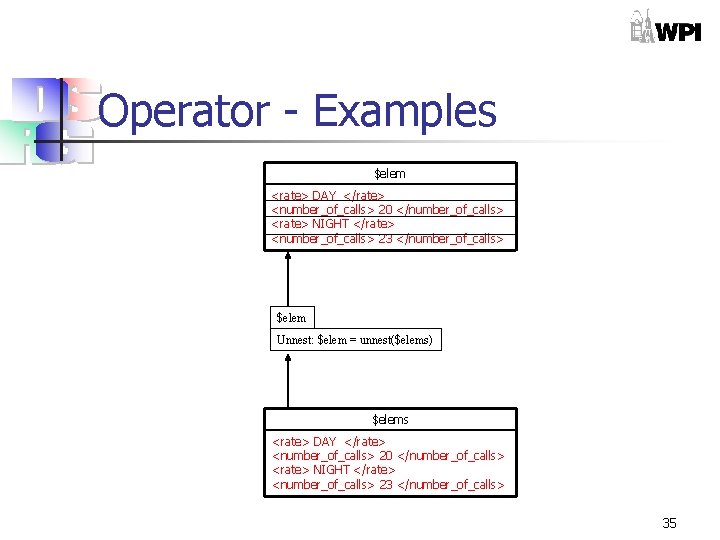
Operators n - - Table, Project, Select, Join, Groupby, Orderby, Union, Unnest, View, Function Select, Project, join, groupby, orderby and union have the same semantics as their relational counterparts. Project : to invoke various function defined Table/View : to refer to relational table or XML view Unnest : to unnest XML list Function : to invoke XQuery valued functions Groupby : to create XML Fragments 31
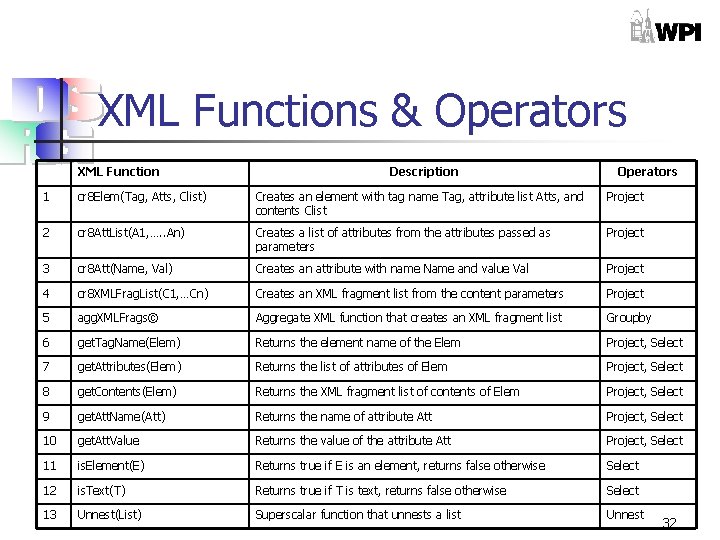
XML Functions & Operators XML Function Description Operators 1 cr 8 Elem(Tag, Atts, Clist) Creates an element with tag name Tag, attribute list Atts, and contents Clist Project 2 cr 8 Att. List(A 1, …. . An) Creates a list of attributes from the attributes passed as parameters Project 3 cr 8 Att(Name, Val) Creates an attribute with name Name and value Val Project 4 cr 8 XMLFrag. List(C 1, …Cn) Creates an XML fragment list from the content parameters Project 5 agg. XMLFrags© Aggregate XML function that creates an XML fragment list Groupby 6 get. Tag. Name(Elem) Returns the element name of the Elem Project, Select 7 get. Attributes(Elem) Returns the list of attributes of Elem Project, Select 8 get. Contents(Elem) Returns the XML fragment list of contents of Elem Project, Select 9 get. Att. Name(Att) Returns the name of attribute Att Project, Select 10 get. Att. Value Returns the value of the attribute Att Project, Select 11 is. Element(E) Returns true if E is an element, returns false otherwise Select 12 is. Text(T) Returns true if T is text, returns false otherwise Select 13 Unnest(List) Superscalar function that unnests a list Unnest 32
Operators - Examples $elems <account_number>508 -753 -2352</account_number> <bill_period>24 july – 23 august, 2001</bill_period> …………. . $count 3 $elems Project: $elems = get. Contents($invoice) $count Groupby: $count = count($itemized_call) $invoice <invoice> <account_number>508 -7532352</account_number> <bill_period>24 july – 23 august, 2001</bill_period> ……………. . </invoice> $itemized_call <itemized_call > </itemized_call> 33
Operators - Examples $entries <rate> DAY </rate> <number_of_calls> 20 </number_of_calls> <rate> NIGHT </rate> <number_of_calls> 23 </number_of_calls> $result <summary> <rate> DAY </rate> <number_of_calls> 20 </number_of_calls> <rate> NIGHT </rate> <number_of_calls> 23 </number_of_calls> </summary> $entries $result Groupby: $entries = agg. XMLFrags($entry) Project: $result = cr 8 Elem(summary, Att, $entries) $entry <rate> DAY </rate> <number_of_calls> 20 </number_of_calls> <rate> NIGHT </rate> <number_of_calls> 23 </number_of_calls> $entries <rate> DAY </rate> <number_of_calls> 20 </number_of_calls> <rate> NIGHT </rate> <number_of_calls> 23 </number_of_calls> 34
Operator - Examples $elem <rate> DAY </rate> <number_of_calls> 20 </number_of_calls> <rate> NIGHT </rate> <number_of_calls> 23 </number_of_calls> $elem Unnest: $elem = unnest($elems) $elems <rate> DAY </rate> <number_of_calls> 20 </number_of_calls> <rate> NIGHT </rate> <number_of_calls> 23 </number_of_calls> 35
$result Project: $result = <summary> $entries </summary> XML Query $entries Groupby: $entries = agg. XMLFrags($entry) $entry User XQuery: <summary> { XQGM: Project: $entry = <rate> $rate </rate> <number_of_calls> $count </number_of_calls> FOR $rate IN distinct(document(“invoice ”)/invoice/itemized_call@r ate) $count $itemized_call : = document(“invoice”)/invoi ce/itemized_call[@rate=$r ate] $itemized_call LET WHERE $itemized_call/@number_calle d LIKE ‘ 973%’ RETURN <rate>$rate</rate> <number_of_calls>count($ite mized_call)</number_of_ calls> } </summary> $itemized_call $count Join (Correlated): Groupby: $count = count($itemized_call) Selection: $number LIKE ‘ 973%’ $itemized_call Select: $rate = $irate $rate Select: distinct($rate) $rate $irate $number Navigate: $irate = $doc/invoice/itemized_call@rate $number = $doc/invoice/itemized_call@number_called Navigate: $doc/invoice/itemized_call@rate $doc View: document(“invoice. xml”); 36
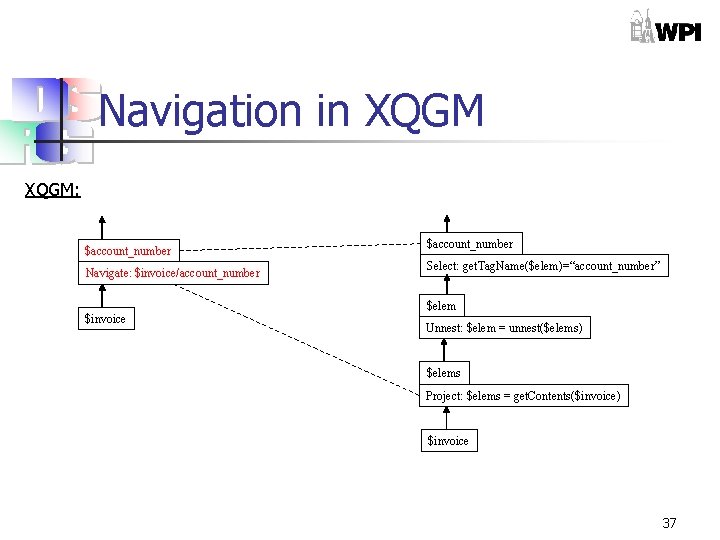
Navigation in XQGM: $account_number Navigate: $invoice/account_number $invoice $account_number Select: get. Tag. Name($elem)=“account_number” $elem Unnest: $elem = unnest($elems) $elems Project: $elems = get. Contents($invoice) $invoice 37
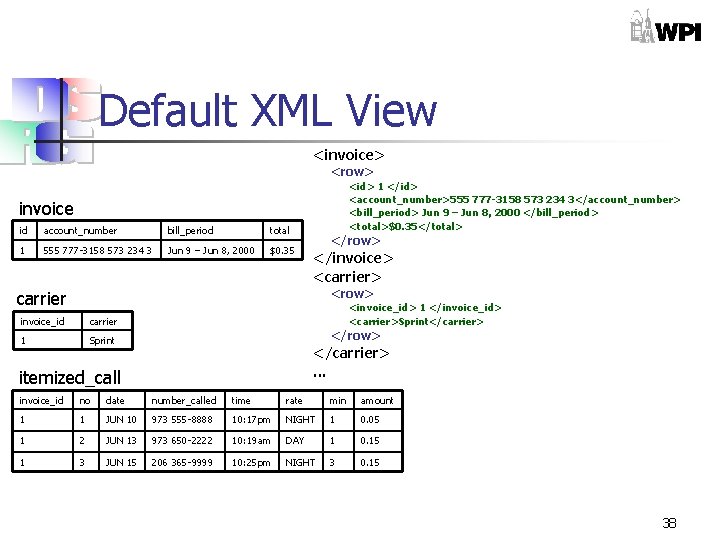
Default XML View <invoice> <row> <id> 1 </id> <account_number>555 777 -3158 573 234 3</account_number> <bill_period> Jun 9 – Jun 8, 2000 </bill_period> <total>$0. 35</total> invoice id account_number bill_period total 1 555 777 -3158 573 234 3 Jun 9 – Jun 8, 2000 $0. 35 </row> </invoice> <carrier> <row> carrier invoice_id carrier 1 Sprint <invoice_id> 1 </invoice_id> <carrier>Sprint</carrier> </row> </carrier>. . . itemized_call invoice_id no date number_called time rate min amount 1 1 JUN 10 973 555 -8888 10: 17 pm NIGHT 1 0. 05 1 2 JUN 13 973 650 -2222 10: 19 am DAY 1 0. 15 1 3 JUN 15 206 365 -9999 10: 25 pm NIGHT 3 0. 15 38
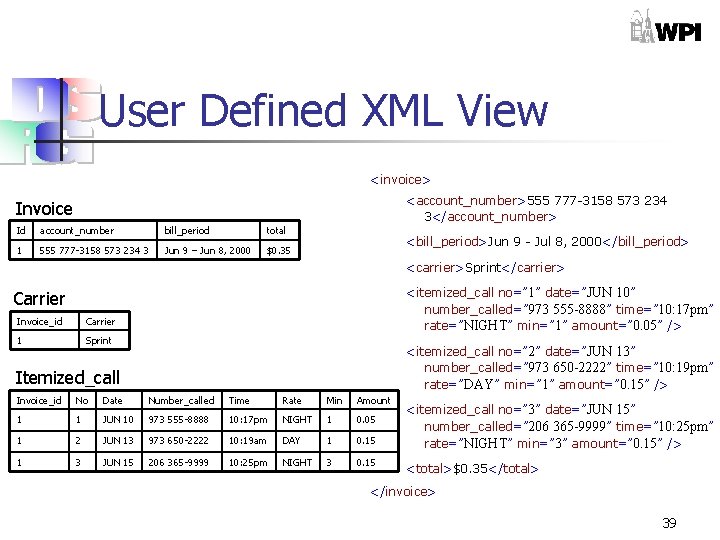
User Defined XML View <invoice> <account_number>555 777 -3158 573 234 3</account_number> Invoice Id account_number bill_period total 1 555 777 -3158 573 234 3 Jun 9 – Jun 8, 2000 $0. 35 <bill_period>Jun 9 - Jul 8, 2000</bill_period> <carrier>Sprint</carrier> <itemized_call no=” 1” date=”JUN 10” number_called=” 973 555 -8888” time=” 10: 17 pm” rate=”NIGHT” min=” 1” amount=” 0. 05” /> Carrier Invoice_id Carrier 1 Sprint <itemized_call no=” 2” date=”JUN 13” number_called=” 973 650 -2222” time=” 10: 19 pm” rate=”DAY” min=” 1” amount=” 0. 15” /> Itemized_call Invoice_id No Date Number_called Time Rate Min Amount 1 1 JUN 10 973 555 -8888 10: 17 pm NIGHT 1 0. 05 1 2 JUN 13 973 650 -2222 10: 19 am DAY 1 0. 15 1 3 JUN 15 206 365 -9999 10: 25 pm NIGHT 3 0. 15 <itemized_call no=” 3” date=”JUN 15” number_called=” 206 365 -9999” time=” 10: 25 pm” rate=”NIGHT” min=” 3” amount=” 0. 15” /> <total>$0. 35</total> </invoice> 39
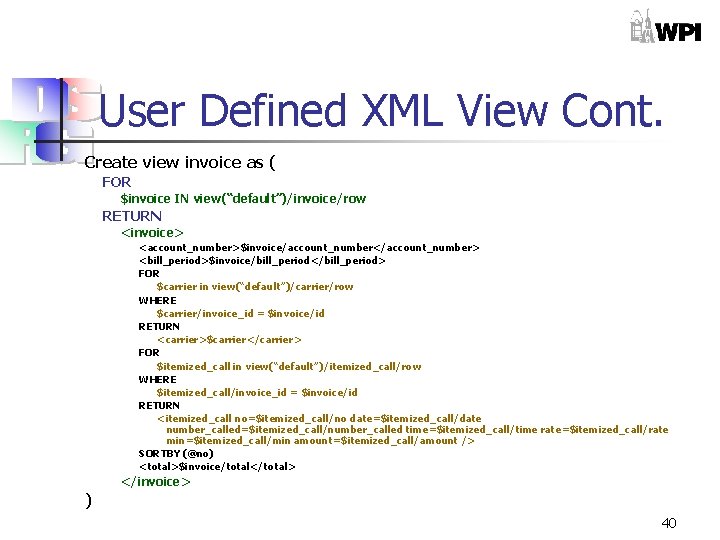
User Defined XML View Cont. Create view invoice as ( FOR $invoice IN view(“default”)/invoice/row RETURN <invoice> <account_number>$invoice/account_number</account_number> <bill_period>$invoice/bill_period</bill_period> FOR $carrier in view(“default”)/carrier/row WHERE $carrier/invoice_id = $invoice/id RETURN <carrier>$carrier</carrier> FOR $itemized_call in view(“default”)/itemized_call/row WHERE $itemized_call/invoice_id = $invoice/id RETURN <itemized_call no=$itemized_call/no date=$itemized_call/date number_called=$itemized_call/number_called time=$itemized_call/time rate=$itemized_call/rate min=$itemized_call/min amount=$itemized_call/amount /> SORTBY (@no) <total>$invoice/total</total> </invoice> ) 40
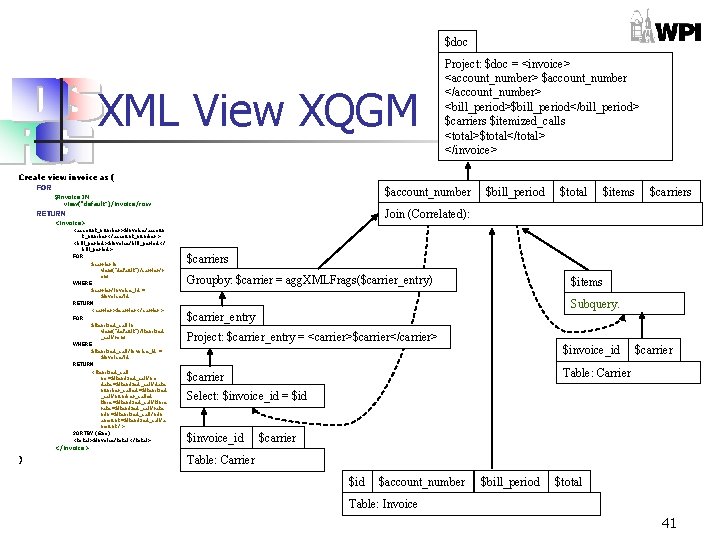
$doc XML View XQGM Project: $doc = <invoice> <account_number> $account_number </account_number> <bill_period>$bill_period</bill_period> $carriers $itemized_calls <total>$total</total> </invoice> Create view invoice as ( FOR $account_number $invoice IN view(“default”)/invoice/row $total $items $carriers Join (Correlated): RETURN <invoice> <account_number>$invoice/accoun t_number</account_number> <bill_period>$invoice/bill_period</ bill_period> FOR $carrier in view(“default”)/carrier/r ow WHERE $carrier/invoice_id = $invoice/id RETURN <carrier>$carrier</carrier> FOR $itemized_call in view(“default”)/itemized _call/row WHERE $itemized_call/invoice_id = $invoice/id RETURN <itemized_call no=$itemized_call/no date=$itemized_call/date number_called=$itemized _call/number_called time=$itemized_call/time rate=$itemized_call/rate min=$itemized_call/min amount=$itemized_call/a mount /> SORTBY (@no) <total>$invoice/total</total> $bill_period $carriers Groupby: $carrier = agg. XMLFrags($carrier_entry) $items Subquery. $carrier_entry Project: $carrier_entry = <carrier>$carrier</carrier> $invoice_id $carrier Table: Carrier $carrier Select: $invoice_id = $id $invoice_id $carrier </invoice> ) Table: Carrier $id $account_number $bill_period $total Table: Invoice 41
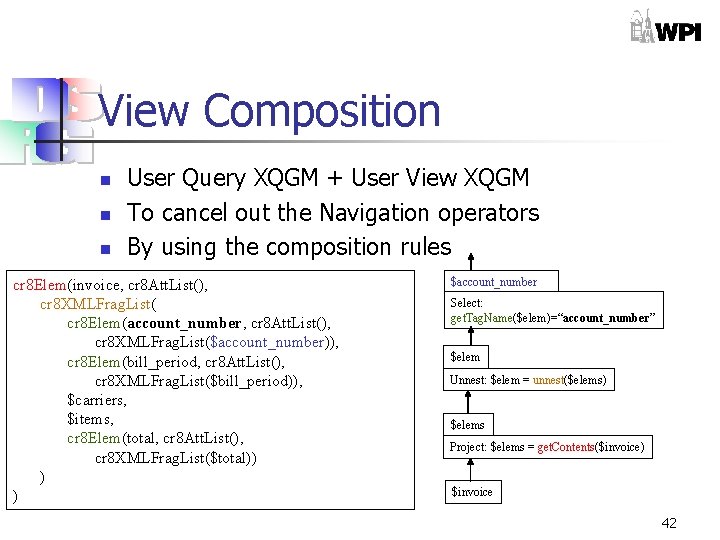
View Composition n User Query XQGM + User View XQGM To cancel out the Navigation operators By using the composition rules cr 8 Elem(invoice, cr 8 Att. List(), cr 8 XMLFrag. List( cr 8 Elem(account_number, cr 8 Att. List(), cr 8 XMLFrag. List($account_number)), cr 8 Elem(bill_period, cr 8 Att. List(), cr 8 XMLFrag. List($bill_period)), $carriers, $items, cr 8 Elem(total, cr 8 Att. List(), cr 8 XMLFrag. List($total)) ) ) $account_number Select: get. Tag. Name($elem)=“account_number” $elem Unnest: $elem = unnest($elems) $elems Project: $elems = get. Contents($invoice) $invoice 42
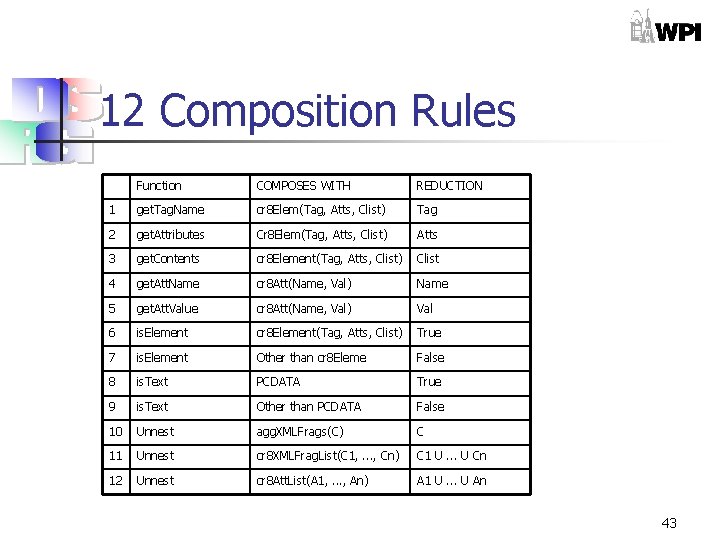
12 Composition Rules Function COMPOSES WITH REDUCTION 1 get. Tag. Name cr 8 Elem(Tag, Atts, Clist) Tag 2 get. Attributes Cr 8 Elem(Tag, Atts, Clist) Atts 3 get. Contents cr 8 Element(Tag, Atts, Clist) Clist 4 get. Att. Name cr 8 Att(Name, Val) Name 5 get. Att. Value cr 8 Att(Name, Val) Val 6 is. Element cr 8 Element(Tag, Atts, Clist) True 7 is. Element Other than cr 8 Eleme False 8 is. Text PCDATA True 9 is. Text Other than PCDATA False 10 Unnest agg. XMLFrags(C) C 11 Unnest cr 8 XMLFrag. List(C 1, . . . , Cn) C 1 U. . . U Cn 12 Unnest cr 8 Att. List(A 1, . . . , An) A 1 U. . . U An 43
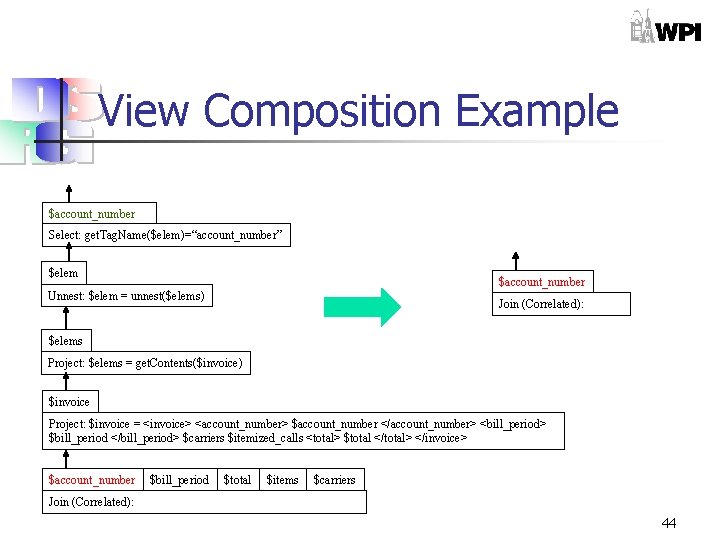
View Composition Example $account_number Select: get. Tag. Name($elem)=“account_number” $elem $account_number Unnest: $elem = unnest($elems) Join (Correlated): $elems Project: $elems = get. Contents($invoice) $invoice Project: $invoice = <invoice> <account_number> $account_number </account_number> <bill_period> $bill_period </bill_period> $carriers $itemized_calls <total> $total </total> </invoice> $account_number $bill_period $total $items $carriers Join (Correlated): 44
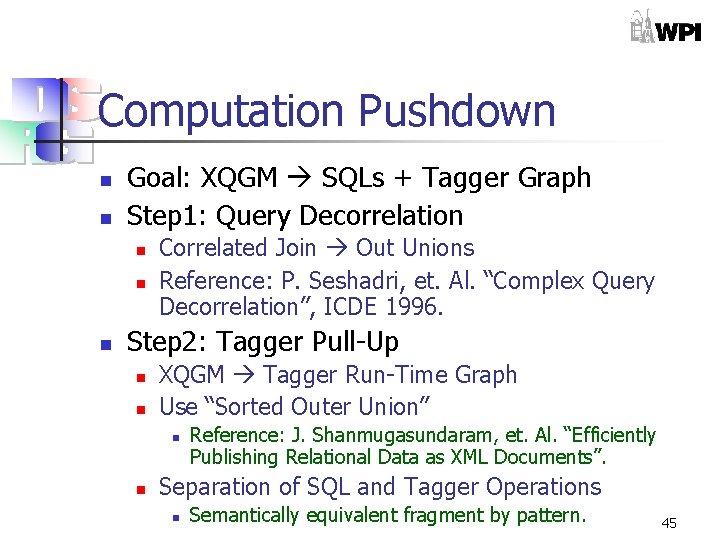
Computation Pushdown n n Goal: XQGM SQLs + Tagger Graph Step 1: Query Decorrelation n Correlated Join Out Unions Reference: P. Seshadri, et. Al. “Complex Query Decorrelation”, ICDE 1996. Step 2: Tagger Pull-Up n n XQGM Tagger Run-Time Graph Use “Sorted Outer Union” n n Reference: J. Shanmugasundaram, et. Al. “Efficiently Publishing Relational Data as XML Documents”. Separation of SQL and Tagger Operations n Semantically equivalent fragment by pattern. 45
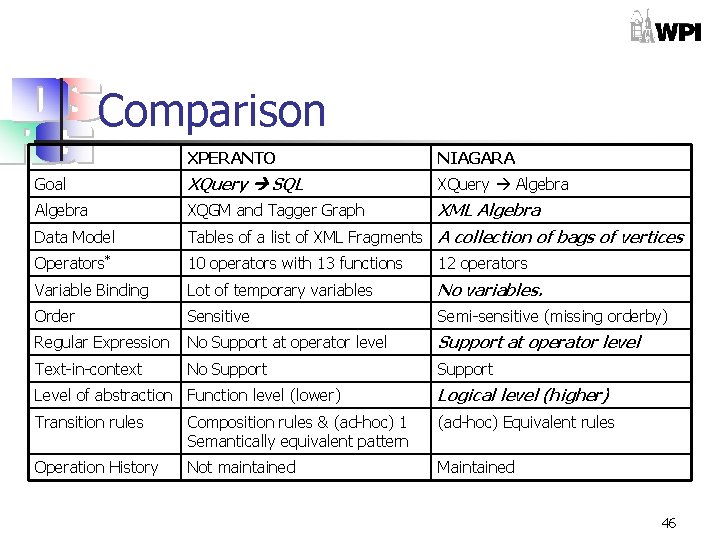
Comparison XPERANTO NIAGARA Goal XQuery SQL XQuery Algebra XQGM and Tagger Graph XML Algebra Data Model Tables of a list of XML Fragments A collection of bags of vertices Operators* 10 operators with 13 functions 12 operators Variable Binding Lot of temporary variables No variables. Order Sensitive Semi-sensitive (missing orderby) Regular Expression No Support at operator level Text-in-context No Support Level of abstraction Function level (lower) Logical level (higher) Transition rules Composition rules & (ad-hoc) 1 Semantically equivalent pattern (ad-hoc) Equivalent rules Operation History Not maintained Maintained 46

Conclusions and Future Work n n WE NEED OUR OWN ALGEBRA. More Reading n n David Beech, et. Al. A Formal Data Model and Algebra for XML. Mary Fernandez, et. Al. An Algebra for XML Query. 47
- Slides: 47