
XHTML CSS 2 By Trevor Adams Last week
XHTML & CSS 2 By Trevor Adams
Last week l XHTML l e. Xtensible Hyper. Text Mark-up Language l The beginning – HTML l Web Standards l Concept and syntax l l l Elements (tags) Attributes Document Types Document level elements – structure of an HTML document CSS l Cascading Style Sheets l Purpose of styles l Defining styles l Understanding selectors

Topics Covered l XHTML l l Parent / Child Elements Hierarchical structure that facilitates styles that ‘cascade’ Block-level and inline elements CSS l l Inheritance The box model l Major CSS Concept
XHTML l Standards compliant mark-up should be well formed and valid l l l Hopefully you have become familiar with the validation tool @ http: //validator. w 3. org/ Part of being well formed and valid is to have properly nested and appropriate elements The concept of parent / child elements has been used already l l Might not have noticed <ul>, <li> elements of the bullet list are a good example
XHTML – Parent / Child l l l The ‘eldest’ element in an XHTML document is <html> An element is said to be a parent when it encompasses other elements An element is said to be a child when it is contained within another element l l <body> is a child of <html> <li> is child to <ul>, making <ul> a parent <ul> is child to <body>, which makes <body> a parent also It is possible for an element to be both a child and parent
XHTML – Parent / Child l Certain elements have to be children l l l Particularly where the structure of an element demands this And <li> must be a child of a <ul> element, logically and semantically Table cells could not exist validly outside of a table element
XHTML – Block / Inline Elements l l All elements in XHTML are rendered as either block-level or inline It is important to understand what these descriptions mean l l Assists with understanding XHTML validity Affords an understanding of CSS rules applied to each type
XHTML – Block-level Elements l l l A block-level element is always as wide as its container It always forces new content onto a new line Examples of block elements l l <p>, <h 1> - <h 6>, <ul>, <li> They can contain other block level elements and / or inline elements
XHTML – Inline Elements l l l Inline elements are contained within a blocklevel element and flow as part of the content Inline mark-up does not break on to a new line automatically (except the ) Examples of inline elements l <a>, <strong>, <em>, <abbr>, <acronym>
Question? Is an <img> element inline or block-level?
CSS - Inheritance l A major advantage of CSS – Inheritance l l l E. g. setting <body> font-family to Arial l l Setting properties for parent elements Automatically passing them down to children Has a knock on effect of setting child elements to the same No need to specify a rule for each child element also Can change the setting with one line in the CSS The more specific rules override the more general ones l Nice and easy to see what is going on
CSS – The Box Model l Everything in XHTML / CSS is treated as a box Both inline and block level elements The box is made up of l l l Border Margin Padding
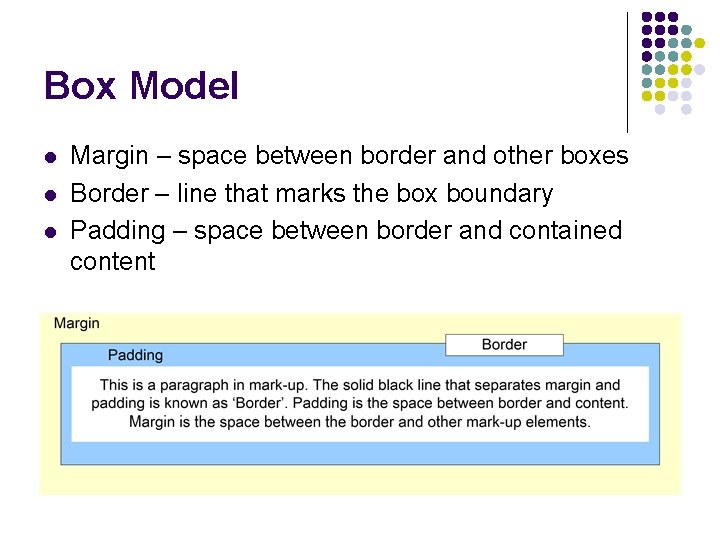
Box Model l Margin – space between border and other boxes Border – line that marks the box boundary Padding – space between border and contained content
Summary l XHTML concepts are important l l They define how you describe your information Remember, information is paramount, presentation is secondary l l Aim to achieve both, but presentation with information is generally useless CSS – Cascading Style Sheets l l Become familiar with the Box model and property inheritance Corner stone concepts of CSS
Where is it going? l These topics are of little use to you when just listening about them l l Engage with the tutorial material and learn to use these concepts in real examples and exercises l l Need to practice skill, learn the behaviour and develop using the parent/child and box model concepts mindset Do not do, then forget. This is a skill which needs visiting many times over to see how it applies to different projects Examine any previous work and see how the techniques discussed here could be applied l Think about the steps involved in turning an older standard / non-standard site into a professional job
Questions? Thank you for taking part!
- Slides: 16