
xfy with XBRL Extends Financial Application Kunio OHNO
xfy with XBRL Extends Financial Application Kunio OHNO Justsystems, Inc.
Agenda • 1. Introduction • 2. “xfy for XBRL” Technology • 3. ”xfy for XBRL” Prototype System – Financial Reporting – Financial Analysis – Loan Analysis • 4. Conclusion
Introduction
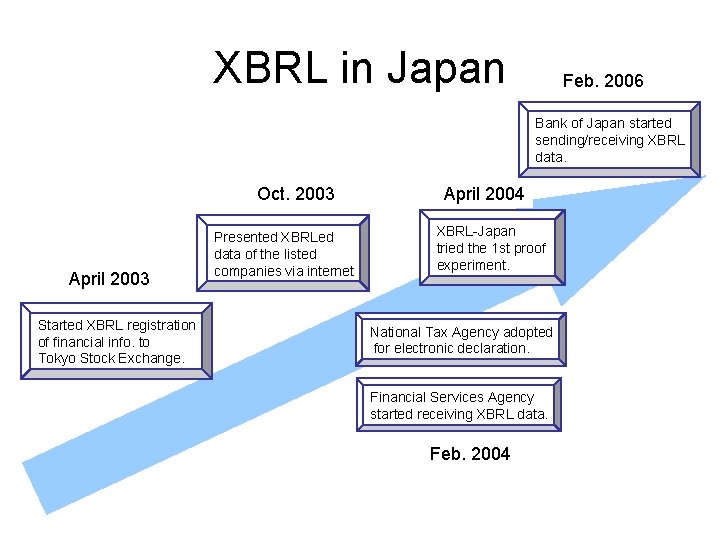
XBRL in Japan Feb. 2006 Bank of Japan started sending/receiving XBRL data. Oct. 2003 April 2003 Started XBRL registration of financial info. to Tokyo Stock Exchange. Presented XBRLed data of the listed companies via internet April 2004 XBRL-Japan tried the 1 st proof experiment. National Tax Agency adopted for electronic declaration. Financial Services Agency started receiving XBRL data. Feb. 2004
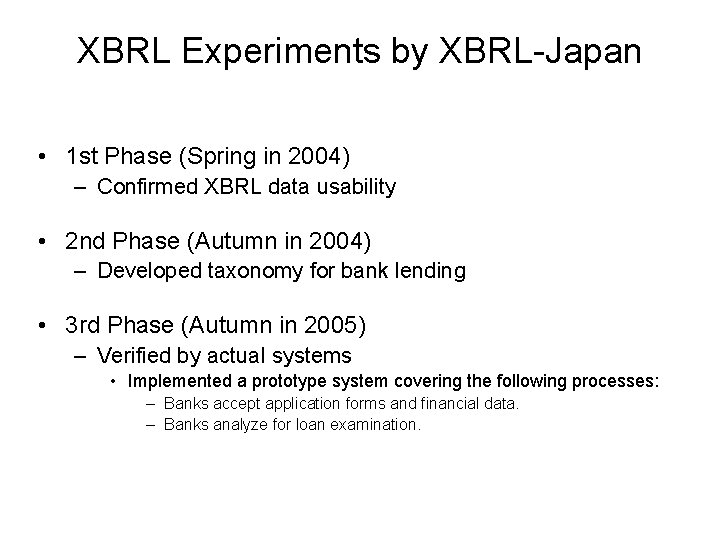
XBRL Experiments by XBRL-Japan • 1 st Phase (Spring in 2004) – Confirmed XBRL data usability • 2 nd Phase (Autumn in 2004) – Developed taxonomy for bank lending • 3 rd Phase (Autumn in 2005) – Verified by actual systems • Implemented a prototype system covering the following processes: – Banks accept application forms and financial data. – Banks analyze for loan examination.
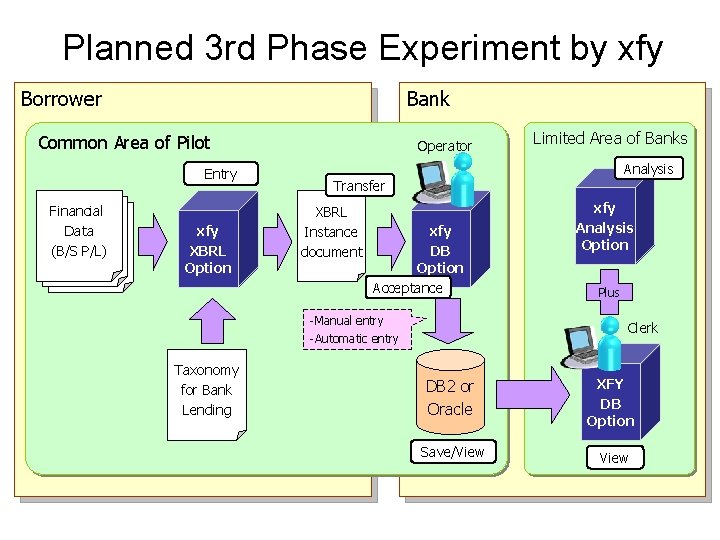
Planned 3 rd Phase Experiment by xfy Borrower Bank Common Area of Pilot Entry Financial 電子申告用 Data 財務情報 (B/S P/L) B/SP/L xfy XBRL Option Operator Analysis Transfer XBRL Instance document xfy DB Option Acceptance -Manual entry -Automatic entry Taxonomy for Bank Lending Limited Area of Banks xfy Analysis Option Plus Clerk DB 2 or Oracle XFY DB Option Save/View
xfy for XBRL Technology
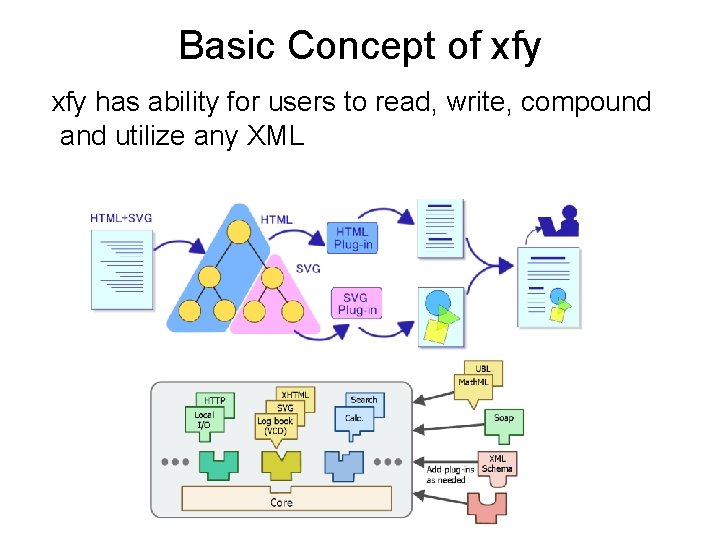
Basic Concept of xfy has ability for users to read, write, compound and utilize any XML
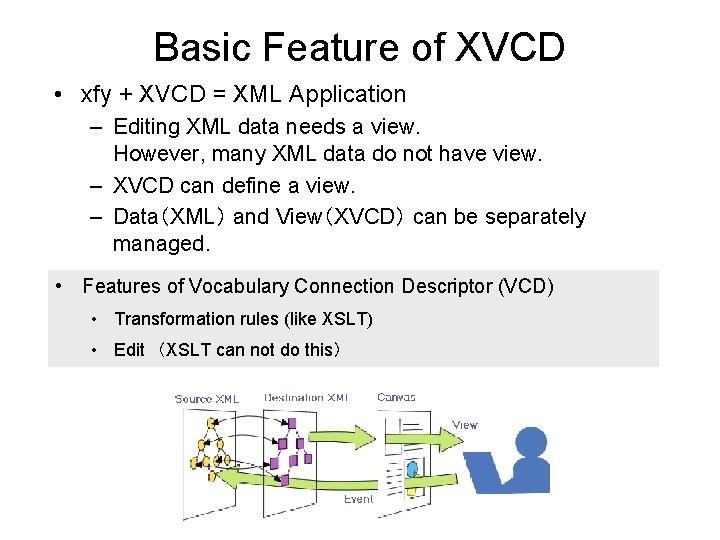
Basic Feature of XVCD • xfy + XVCD = XML Application – Editing XML data needs a view. However, many XML data do not have view. – XVCD can define a view. – Data(XML) and View(XVCD) can be separately managed. • Features of Vocabulary Connection Descriptor (VCD) • Transformation rules (like XSLT) • Edit (XSLT can not do this)
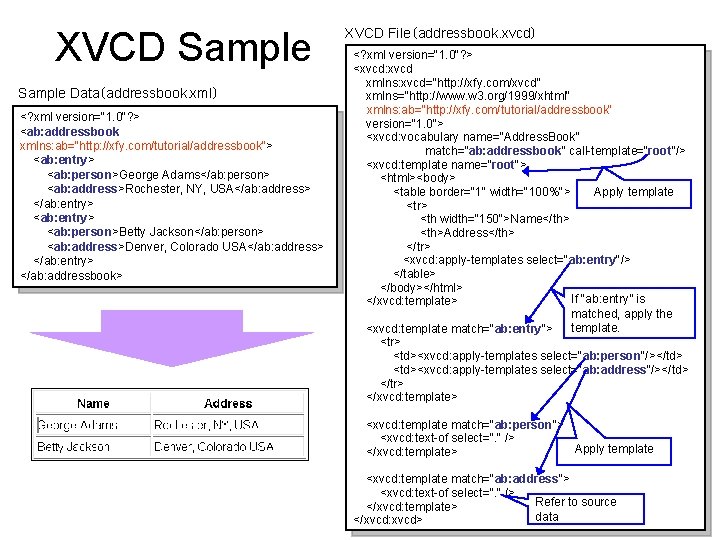
XVCD Sample Data(addressbook. xml) <? xml version="1. 0"? > <ab: addressbook xmlns: ab="http: //xfy. com/tutorial/addressbook"> <ab: entry> <ab: person>George Adams</ab: person> <ab: address>Rochester, NY, USA</ab: address> </ab: entry> <ab: person>Betty Jackson</ab: person> <ab: address>Denver, Colorado USA</ab: address> </ab: entry> </ab: addressbook> XVCD File(addressbook. xvcd) <? xml version="1. 0"? > <xvcd: xvcd xmlns: xvcd="http: //xfy. com/xvcd" xmlns="http: //www. w 3. org/1999/xhtml" xmlns: ab="http: //xfy. com/tutorial/addressbook" version="1. 0"> <xvcd: vocabulary name=“Address. Book” match="ab: addressbook" call-template="root"/> <xvcd: template name="root"> <html><body> Apply template <table border="1" width="100%"> <tr> <th width="150">Name</th> <th>Address</th> </tr> <xvcd: apply-templates select="ab: entry"/> </table> </body></html> If “ab: entry” is </xvcd: template> matched, apply the template. <xvcd: template match="ab: entry"> <tr> <td><xvcd: apply-templates select="ab: person"/></td> <td><xvcd: apply-templates select="ab: address"/></td> </tr> </xvcd: template> <xvcd: template match="ab: person"> <xvcd: text-of select=". " /> Apply template </xvcd: template> <xvcd: template match="ab: address"> <xvcd: text-of select=". " /> Refer to source </xvcd: template> data </xvcd: xvcd>
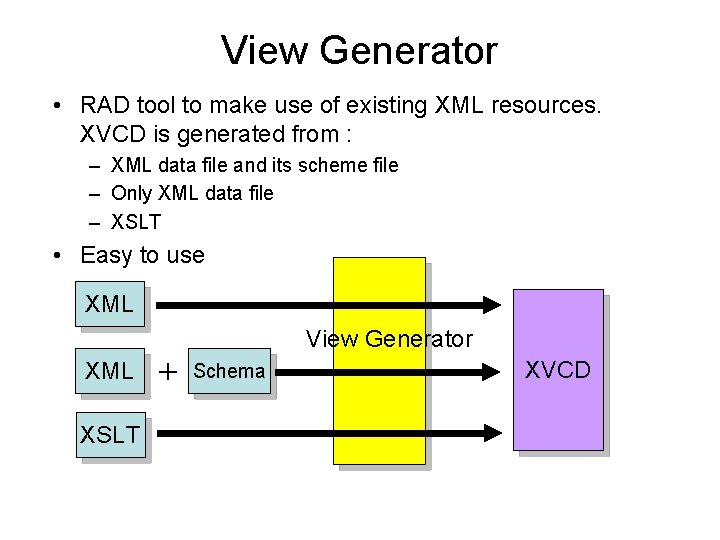
View Generator • RAD tool to make use of existing XML resources. XVCD is generated from : – XML data file and its scheme file – Only XML data file – XSLT • Easy to use XML View Generator XML + Schema XSLT XVCD
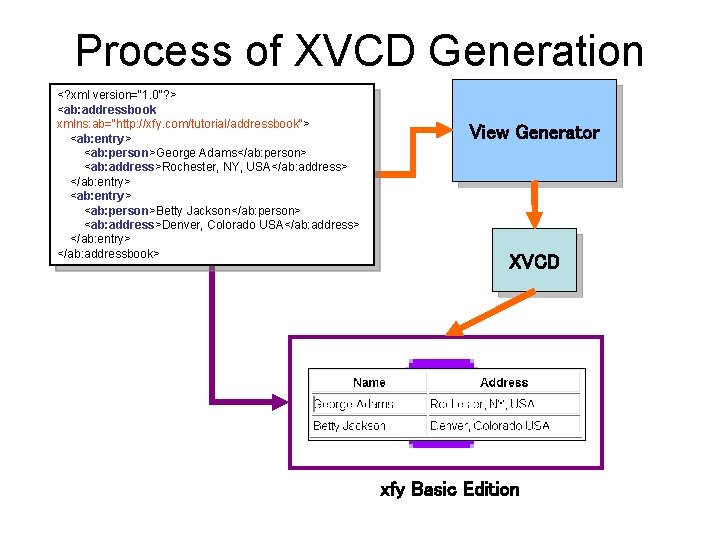
Process of XVCD Generation <? xml version="1. 0"? > <ab: addressbook xmlns: ab="http: //xfy. com/tutorial/addressbook"> <ab: entry> <ab: person>George Adams</ab: person> <ab: address>Rochester, NY, USA</ab: address> </ab: entry> <ab: person>Betty Jackson</ab: person> <ab: address>Denver, Colorado USA</ab: address> </ab: entry> </ab: addressbook> View Generator XVCD xfy Basic Edition
”xfy for XBRL” Prototype System - Financial Reporting - Financial Analysis - Loan Analysis
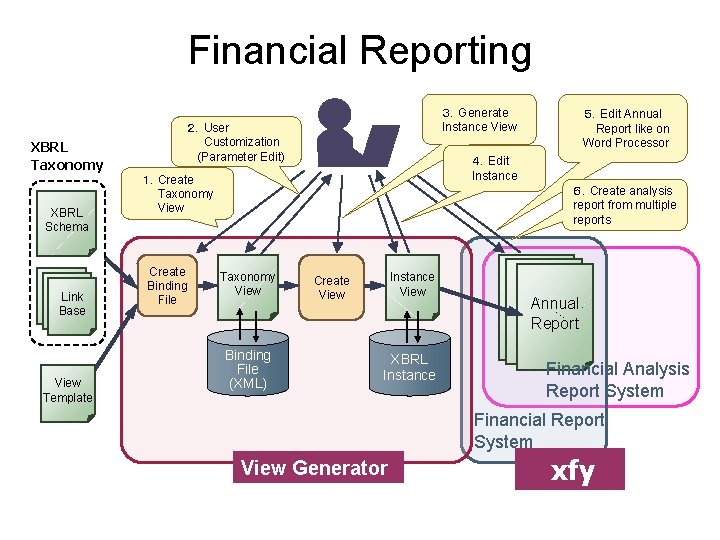
Financial Reporting XBRL Taxonomy XBRL Schema Link Base View Template 3.Generate Instance View 2.User Customization (Parameter Edit) 4.Edit Instance 1.Create Taxonomy View Create Binding File 5.Edit Annual Report like on Word Processor 6.Create analysis report from multiple reports Taxonomy View Binding File (XML) Instance View Create View XBRL Instance 財務 財務 Annual 報告書 Report Financial Analysis Report System Financial Report System View Generator xfy
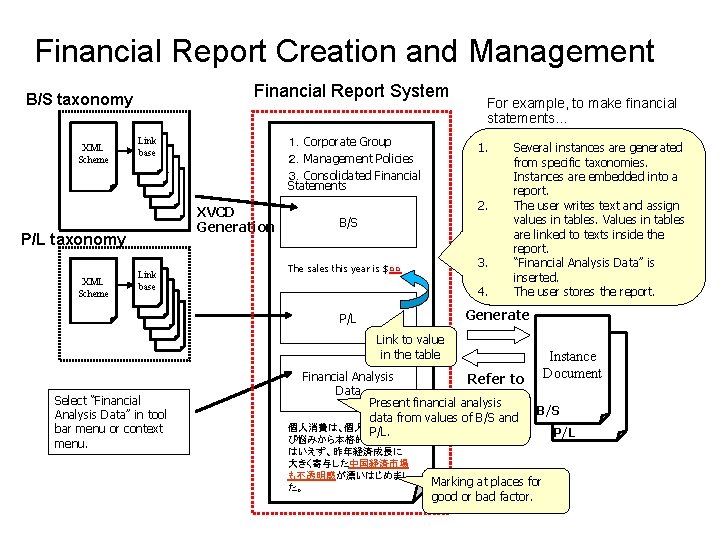
Financial Report Creation and Management Financial Report System B/S taxonomy XML Scheme XVCD Generation P/L taxonomy XML Scheme 1.Corporate Group 2.Management Policies 3.Consolidated Financial Statements Link base 計算 表示 名称 順序 参照 For example, to make financial statements… 1. 2. B/S 3. The sales this year is $○○ 4. Several instances are generated from specific taxonomies. Instances are embedded into a report. The user writes text and assign values in tables. Values in tables are linked to texts inside the report. “Financial Analysis Data” is inserted. The user stores the report. Generate P/L Link to value in the table Select “Financial Analysis Data” in tool bar menu or context menu. Financial Analysis Refer to Data Present financial analysis data from values of B/S and 個人消費は、個人所得の伸 P/L. び悩みから本格的な回復と はいえず、昨年経済成長に 大きく寄与した中国経済市場 も不透明感が漂いはじめまし た。 Instance Document B/S Marking at places for good or bad factor. P/L
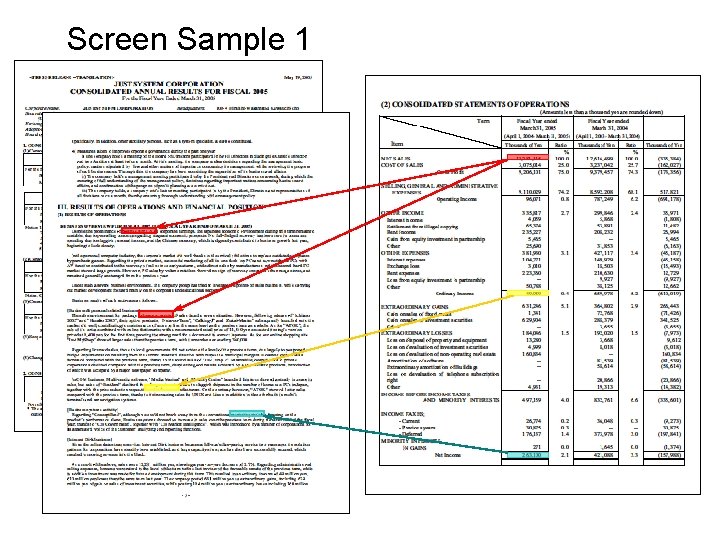
Screen Sample 1
![Screen Sample 2 [Business & personal related business] The sales environment for package software](http://slidetodoc.com/presentation_image/1233c20b334d7196197de1f4cf405e83/image-17.jpg "Screen Sample 2 [Business & personal related business] The sales environment for package software")
Screen Sample 2 [Business & personal related business] The sales environment for package software at points-of-sales faced a severe situation. However, following release of “Ichitaro 2005” and “Hanako 2005”, their option products; “Neta-no-Tane”, “Calking-J” and “Zukai-Master” subsequently launched onto the market did well, contributing to maintenance of more or less the same level as the previous term as a whole. As for “ATOK”, the sale of its series combined with online dictionaries with a recommended retail price of 11, 550 yen exceeded its single version
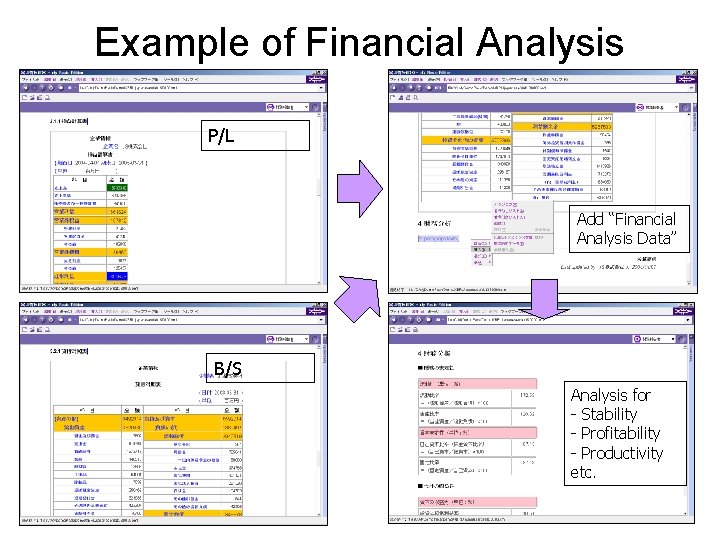
Example of Financial Analysis P/L Add “Financial Analysis Data” B/S Analysis for - Stability - Profitability - Productivity etc.
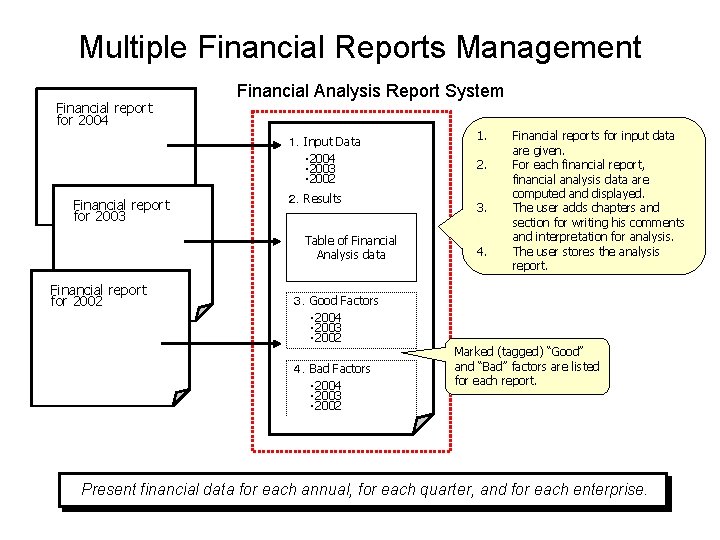
Multiple Financial Reports Management Financial report for 2004 Financial Analysis Report System 1.Input Data ・ 2004 ・ 2003 ・ 2002 Financial report for 2003 2.Results Table of Financial Analysis data Financial report for 2002 1. 2. 3. 4. Financial reports for input data are given. For each financial report, financial analysis data are computed and displayed. The user adds chapters and section for writing his comments and interpretation for analysis. The user stores the analysis report. 3.Good Factors ・ 2004 ・ 2003 ・ 2002 4.Bad Factors ・ 2004 ・ 2003 ・ 2002 Marked (tagged) “Good” and “Bad” factors are listed for each report. Present financial data for each annual, for each quarter, and for each enterprise.
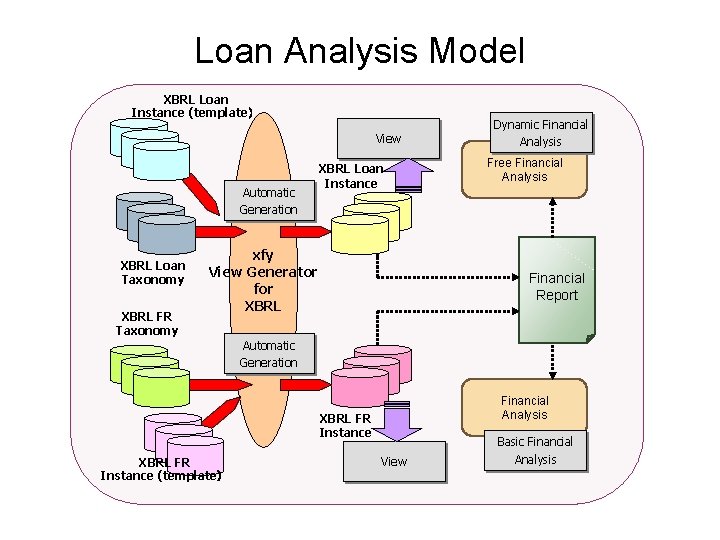
Loan Analysis Model XBRL Loan Instance (template) View Automatic Generation XBRL Loan Taxonomy XBRL FR Taxonomy XBRL Loan Instance xfy View Generator for XBRL Dynamic Financial Analysis Free Financial Analysis Financial Report Automatic Generation Financial Analysis XBRL FR Instance (template) View Basic Financial Analysis
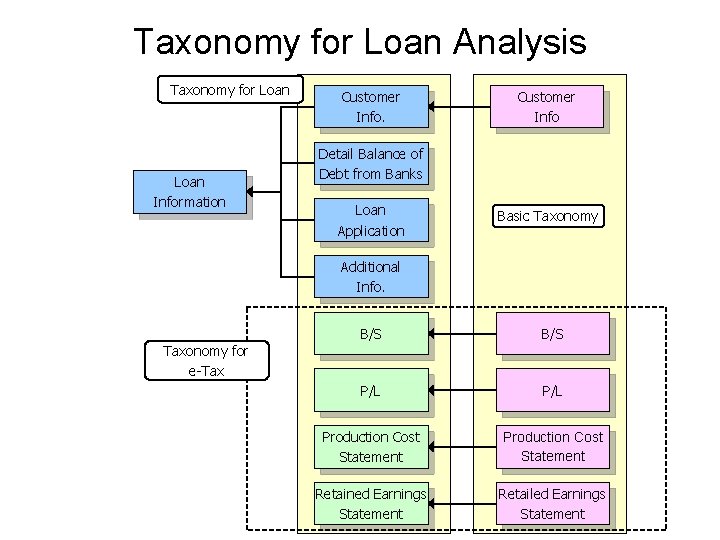
Taxonomy for Loan Analysis Taxonomy for Loan Information Customer Info Detail Balance of Debt from Banks Loan Application Basic Taxonomy Additional Info. Taxonomy for e-Tax B/S P/L Production Cost Statement Retained Earnings Statement Retailed Earnings Statement
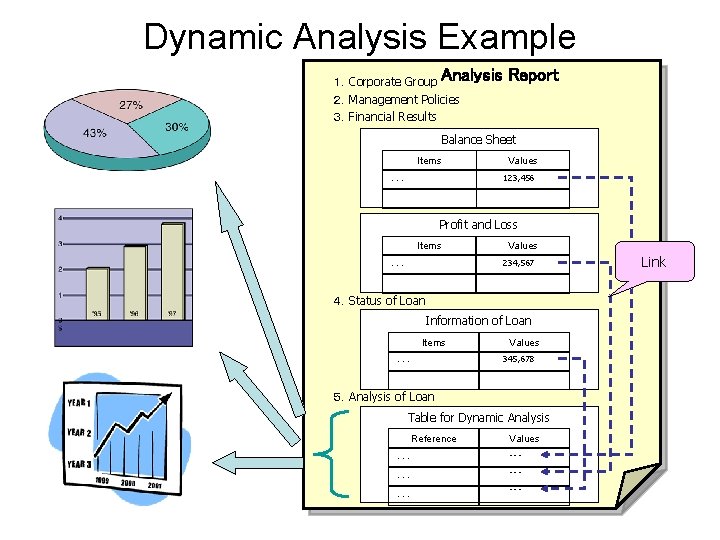
Dynamic Analysis Example 1.Corporate Group Analysis 2.Management Policies 3.Financial Results Report Balance Sheet Items Values 123, 456 ・・・ Profit and Loss Items Values 234, 567 ・・・ 4.Status of Loan Information of Loan Items Values 345, 678 ・・・ 5.Analysis of Loan Table for Dynamic Analysis Reference ・・・ ・・・ Values ・・・ ・・・ Link
Conclusion
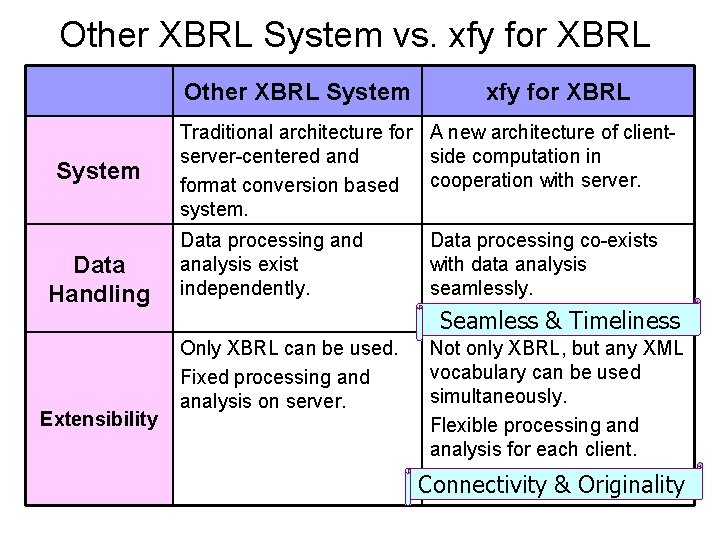
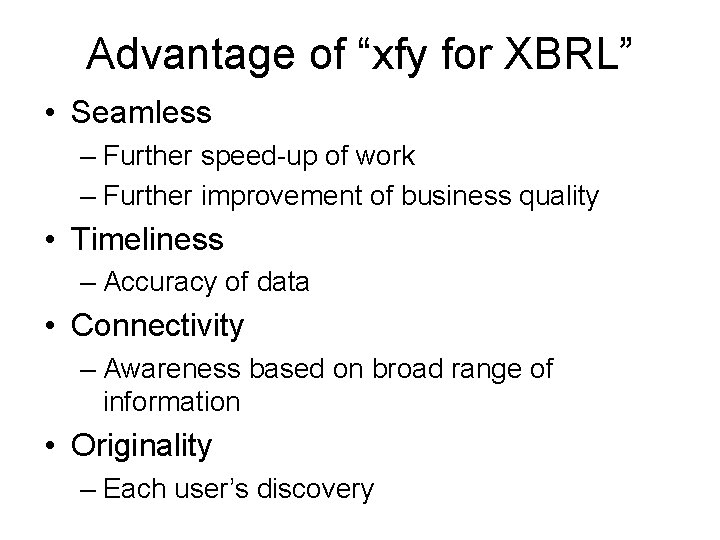
Other XBRL System vs. xfy for XBRL Other XBRL System Data Handling Extensibility xfy for XBRL Traditional architecture for A new architecture of clientserver-centered and side computation in cooperation with server. format conversion based system. Data processing and analysis exist independently. Data processing co-exists with data analysis seamlessly. Seamless & Timeliness Only XBRL can be used. Fixed processing and analysis on server. Not only XBRL, but any XML vocabulary can be used simultaneously. Flexible processing and analysis for each client. Connectivity & Originality
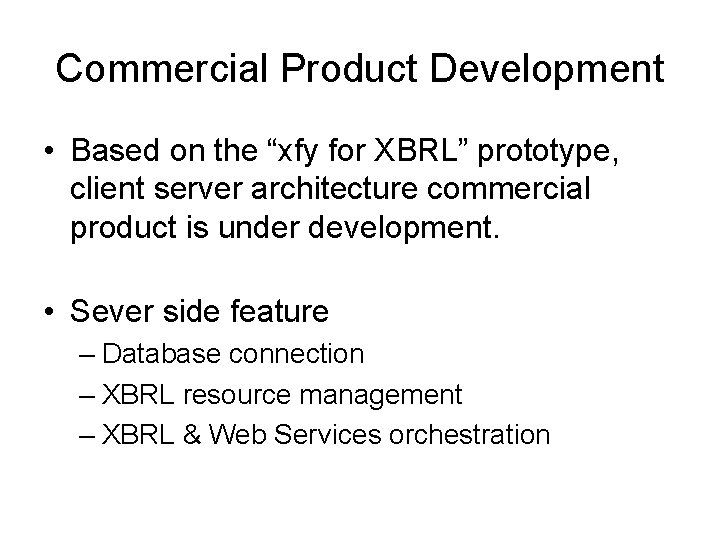
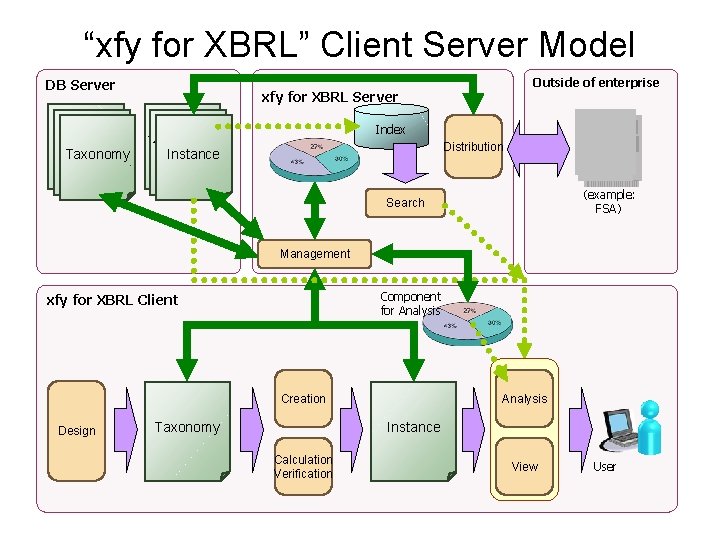
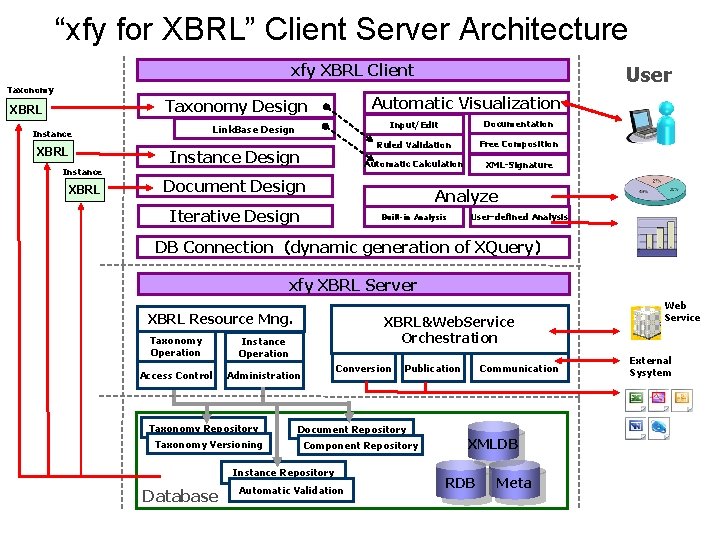
Commercial Product Development • Based on the “xfy for XBRL” prototype, client server architecture commercial product is under development. • Sever side feature – Database connection – XBRL resource management – XBRL & Web Services orchestration
“xfy for XBRL” Client Server Model DB Server タクソノミー 文書 Taxonomy 文書 Outside of enterprise xfy for XBRL Server Index インスタンス 文書 Instance 文書 Distribution (example: FSA) Search Management Component for Analysis xfy for XBRL Client Creation Design Taxonomy Analysis Instance Calculation Verification View User
“xfy for XBRL” Client Server Architecture xfy XBRL Client Taxonomy Automatic Visualization Taxonomy Design XBRL Link. Base Design Instance XBRL User Instance Design Input/Edit Documentation Ruled Validation Free Composition Automatic Calculation XML-Signature Document Design Analyze Iterative Design Built-in Analysis User-defined Analysis DB Connection(dynamic generation of XQuery) xfy XBRL Server XBRL Resource Mng. Taxonomy Operation Access Control XBRL&Web. Service Orchestration Instance Operation Conversion Administration Taxonomy Repository Taxonomy Versioning Document Repository Component Repository Instance Repository Database Communication Publication Automatic Validation XMLDB RDB Meta Web Service External Sysytem
Advantage of “xfy for XBRL” • Seamless – Further speed-up of work – Further improvement of business quality • Timeliness – Accuracy of data • Connectivity – Awareness based on broad range of information • Originality – Each user’s discovery

See the Future ? www. xfytec. com
- Slides: 29