
www oasisopen org Key Management Interoperability Protocol KMIP
www. oasis-open. org Key Management Interoperability Protocol (KMIP)
Agenda n n n The Need for Interoperable Key Management KMIP Overview KMIP Specification KMIP Use Cases KMIP Interoperability Demonstration
The Need for Interoperable Key Management n n Today’s enterprises operate in increasingly complex, multivendor environments. Enterprises need to deploy better encryption across the enterprise. A key hurdle in IT managers deploying encryption is their ability to recover the encrypted data. Today, many companies deploy separate encryption systems for different business uses – laptops, storage, databases and applications – resulting in: l l Cumbersome, often manual efforts to manage encryption keys Increased costs for IT Challenges meeting audit and compliance requirements Lost data
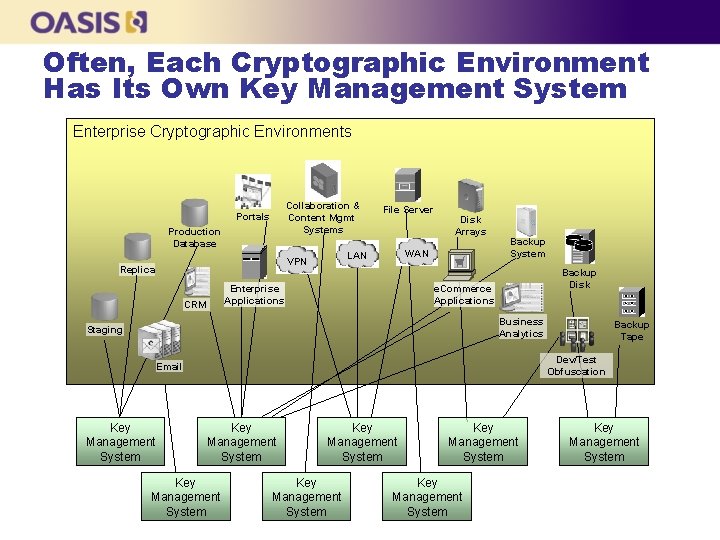
Often, Each Cryptographic Environment Has Its Own Key Management System Enterprise Cryptographic Environments Collaboration & Content Mgmt Systems Portals Production Database Enterprise Applications CRM Disk Arrays WAN LAN VPN Replica File Server Backup System Backup Disk e. Commerce Applications Business Analytics Staging Dev/Test Obfuscation Email Key Management System Backup Tape Key Management System Key Management System

Often, Each Cryptographic Environment Has Its Own Protocol Enterprise Cryptographic Environments Collaboration & Content Mgmt Systems Portals Production Database Enterprise Applications CRM Disk Arrays WAN LAN VPN Replica File Server Backup System Backup Disk e. Commerce Applications Business Analytics Staging Backup Tape Dev/Test Obfuscation Email Disparate, Often Proprietary Protocols Key Management System Key Management System
KMIP Overview
What is KMIP n n The Key Management Interoperability Protocol (KMIP) enables key lifecycle management. KMIP supports legacy and new encryption applications, supporting symmetric keys, asymmetric keys, digital certificates, and other "shared secrets. " KMIP offers developers templates to simplify the development and use of KMIP-enabled applications. KMIP defines the protocol for encryption client and keymanagement server communication. Key lifecycle operations supported include generation, submission, retrieval, and deletion of cryptographic keys. Vendors will deliver KMIP-enabled encryption applications that support communication with compatible KMIP key-management servers.
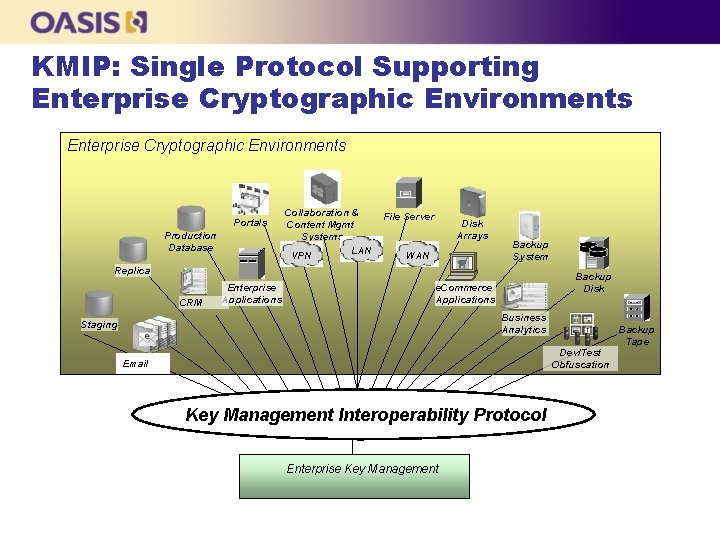
KMIP: Single Protocol Supporting Enterprise Cryptographic Environments Portals Production Database Collaboration & Content Mgmt Systems LAN VPN File Server Disk Arrays WAN Backup System Replica CRM Enterprise Applications Backup Disk e. Commerce Applications Business Analytics Staging Backup Tape Dev/Test Obfuscation Email Key Management Interoperability Protocol Enterprise Key Management
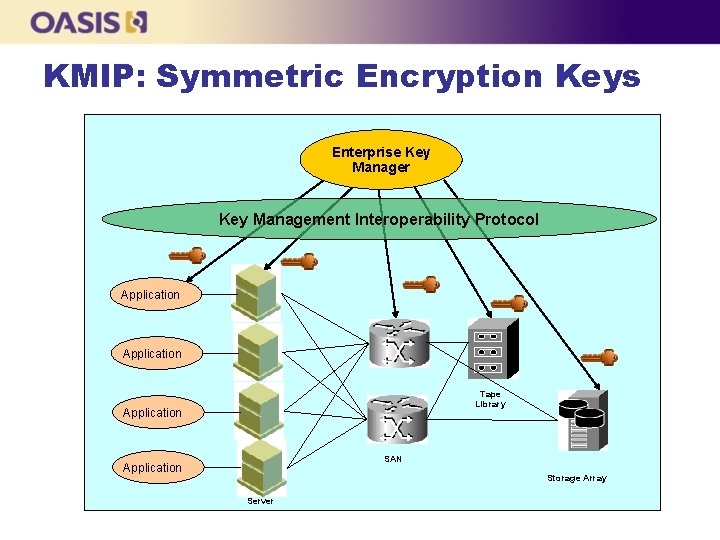
KMIP: Symmetric Encryption Keys Enterprise Key Manager Key Management Interoperability Protocol Application Tape Library Application SAN Application Storage Array Server
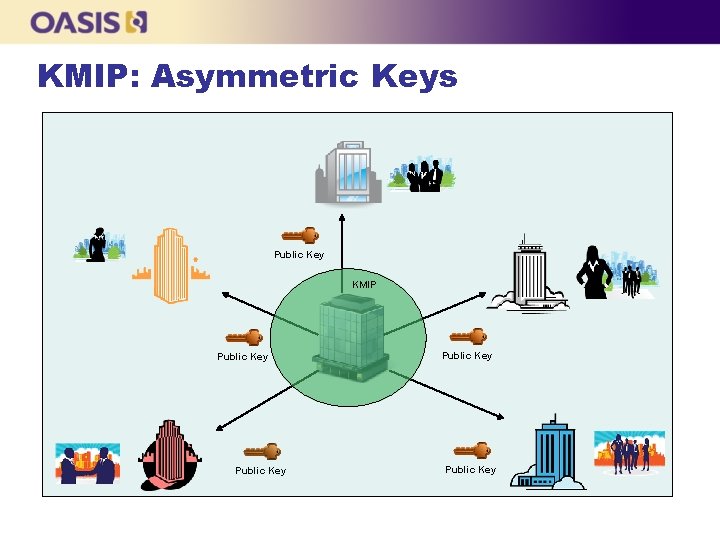
KMIP: Asymmetric Keys Public Key KMIP Public Key
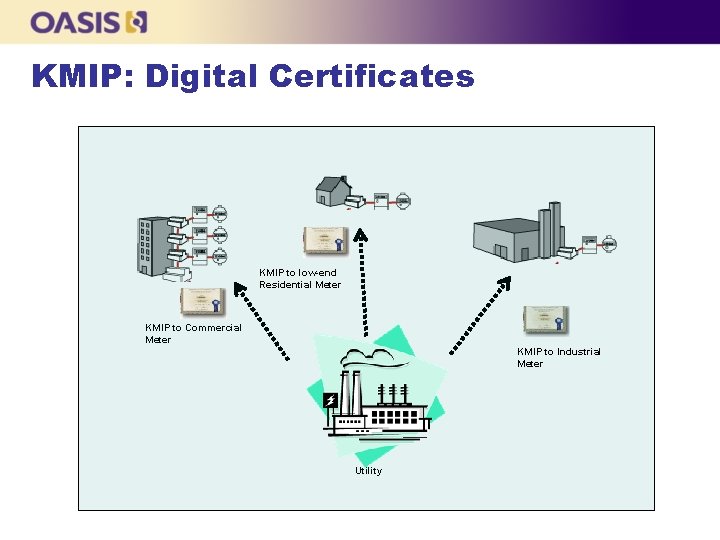
KMIP: Digital Certificates KMIP to low-end Residential Meter KMIP to Commercial Meter KMIP to Industrial Meter Utility
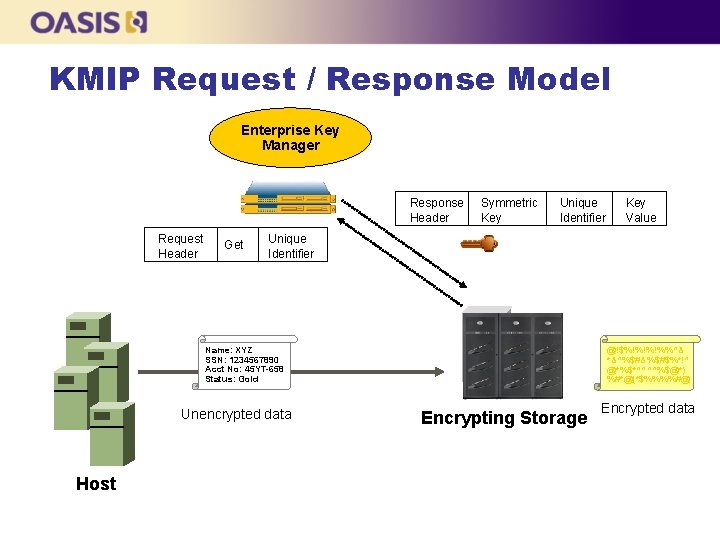
KMIP Request / Response Model Enterprise Key Manager Response Header Request Header Get Symmetric Key Unique Identifier Name: XYZ SSN: 1234567890 Acct No: 45 YT-658 Status: Gold Unencrypted data Host Key Value @!$%!%!%!%%^& *&^%$#&%$#$%*!^ @*%$*^^^^%$@*) %#*@(*$%%%%#@ Encrypting Storage Encrypted data
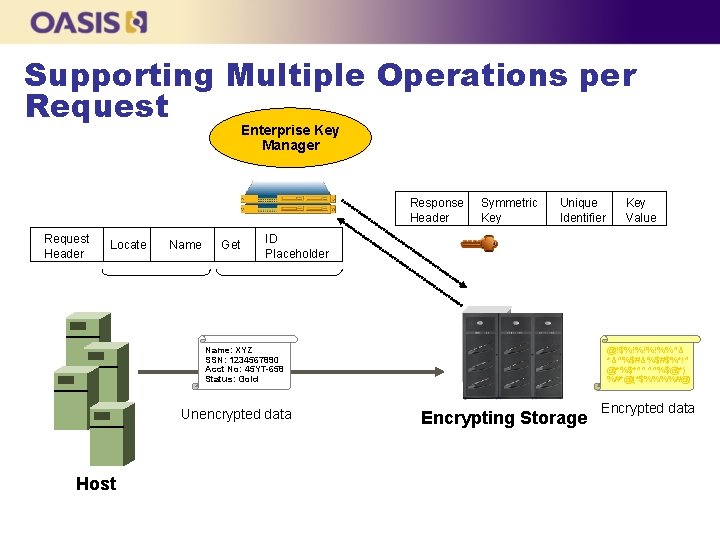
Supporting Multiple Operations per Request Enterprise Key Manager Response Header Request Header Locate Name Get Symmetric Key Unique Identifier ID Placeholder Name: XYZ SSN: 1234567890 Acct No: 45 YT-658 Status: Gold Unencrypted data Host Key Value @!$%!%!%!%%^& *&^%$#&%$#$%*!^ @*%$*^^^^%$@*) %#*@(*$%%%%#@ Encrypting Storage Encrypted data
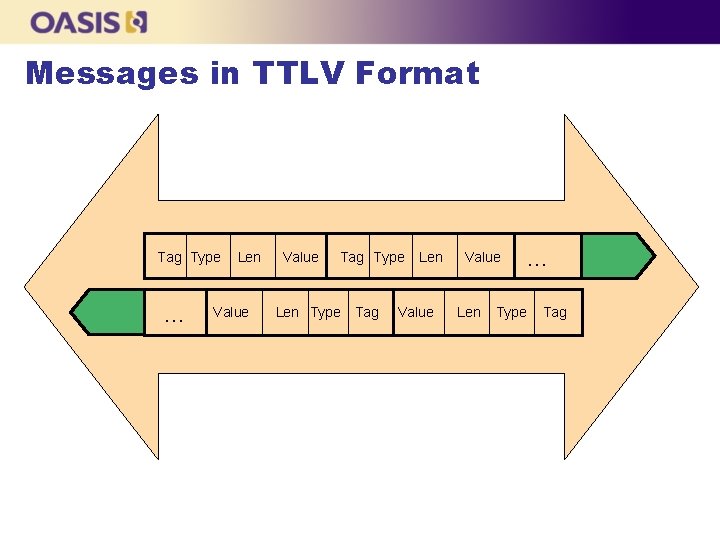
Messages in TTLV Format Tag Type … Len Value Tag Type Len Type Tag Len Value Len … Type Tag
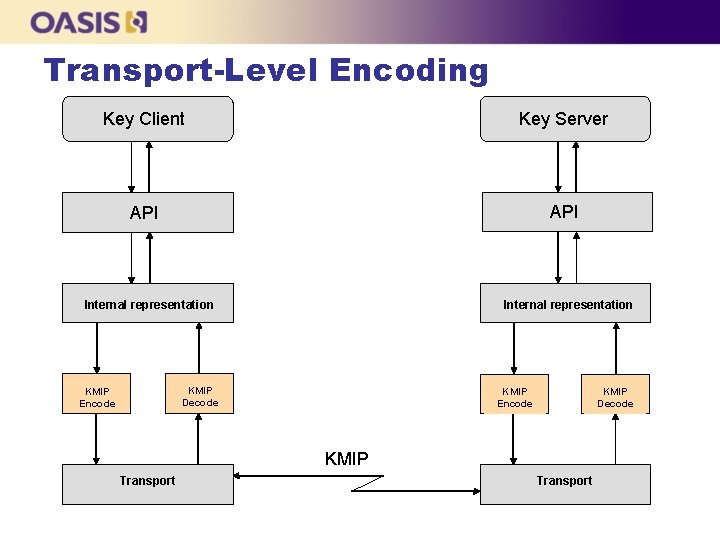
Transport-Level Encoding Key Client Key Server API Internal representation KMIP Decode KMIP Encode KMIP Decode KMIP Transport
OASIS KMIP Technical Committee n n OASIS (Organization for the Advancement of Structured Information Standards) is a not-for-profit consortium that drives the development, convergence and adoption of open standards for the global information society. KMIP Technical Committee chartered in March 2009 l “The KMIP TC will develop specification(s) for the interoperability of Enterprise Key Management (EKM) services with EKM clients. The specifications will address anticipated customer requirements for key lifecycle management (generation, refresh, distribution, tracking of use, life-cycle policies including states, archive, and destruction), key sharing, and long-term availability of cryptographic objects of all types (public/private keys and certificates, symmetric keys, and other forms of “shared secrets”) and related areas. ” KMIP TC IPR mode is Royalty Free on RAND
KMIP status n KMIP Technical Committee was established in OASIS in April 2009 l l n Submissions included at the time of TC creation included draft specification, usage guide and use cases Initial membership included most significant vendors in cryptographic solutions and key management and has continued to grow. KMIP V 1. 0 standard approved end-September 2010 l l l Revision of initial submissions April-October 2009 First public review Nov/Dec 2009 Revision of documents Jan-April 2010 Second public review May/June 2010. Approval of KMIP V 1. 0 docs as OASIS standard Sept 2010
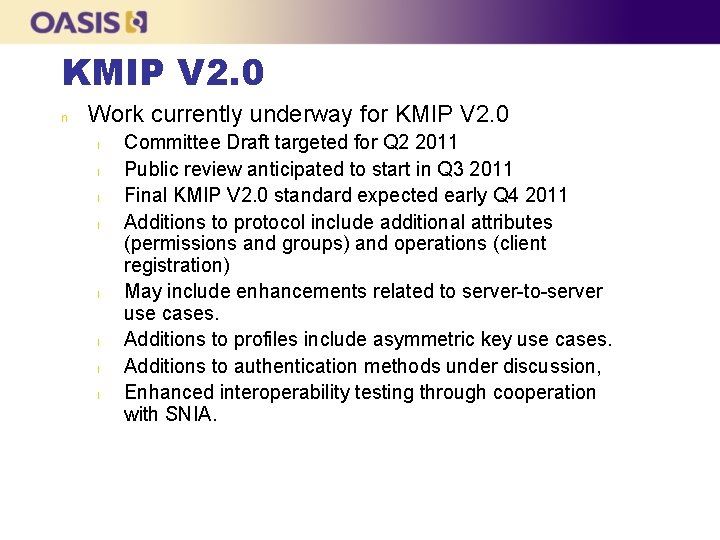
KMIP V 2. 0 n Work currently underway for KMIP V 2. 0 l l l l Committee Draft targeted for Q 2 2011 Public review anticipated to start in Q 3 2011 Final KMIP V 2. 0 standard expected early Q 4 2011 Additions to protocol include additional attributes (permissions and groups) and operations (client registration) May include enhancements related to server-to-server use cases. Additions to profiles include asymmetric key use cases. Additions to authentication methods under discussion, Enhanced interoperability testing through cooperation with SNIA.

OASIS KMIP l Reading material: n n http: //xml. coverpages. org/KMIP-FAQ. pdf http: //docs. oasis-open. org/kmip/ug/v 1. 0/
KMIP Specification http: //docs. oasis-open. org/kmip/spec/v 1. 0/
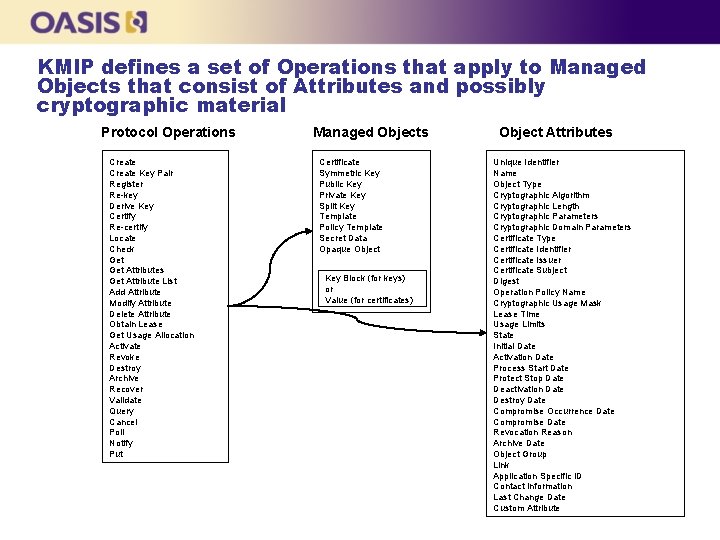
KMIP defines a set of Operations that apply to Managed Objects that consist of Attributes and possibly cryptographic material Protocol Operations Create Key Pair Register Re-key Derive Key Certify Re-certify Locate Check Get Attributes Get Attribute List Add Attribute Modify Attribute Delete Attribute Obtain Lease Get Usage Allocation Activate Revoke Destroy Archive Recover Validate Query Cancel Poll Notify Put Managed Objects Certificate Symmetric Key Public Key Private Key Split Key Template Policy Template Secret Data Opaque Object Key Block (for keys) or Value (for certificates) Object Attributes Unique Identifier Name Object Type Cryptographic Algorithm Cryptographic Length Cryptographic Parameters Cryptographic Domain Parameters Certificate Type Certificate Identifier Certificate Issuer Certificate Subject Digest Operation Policy Name Cryptographic Usage Mask Lease Time Usage Limits State Initial Date Activation Date Process Start Date Protect Stop Date Deactivation Date Destroy Date Compromise Occurrence Date Compromise Date Revocation Reason Archive Date Object Group Link Application Specific ID Contact Information Last Change Date Custom Attribute
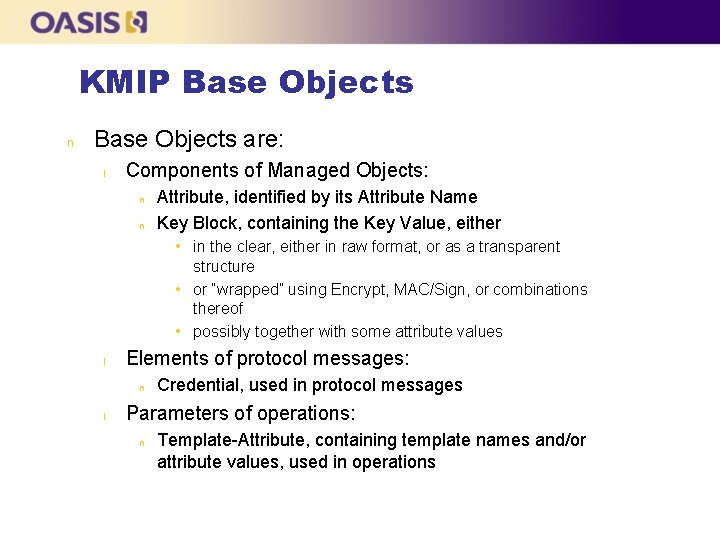
KMIP Base Objects n Base Objects are: l Components of Managed Objects: n n Attribute, identified by its Attribute Name Key Block, containing the Key Value, either • in the clear, either in raw format, or as a transparent structure • or “wrapped” using Encrypt, MAC/Sign, or combinations thereof • possibly together with some attribute values l Elements of protocol messages: n l Credential, used in protocol messages Parameters of operations: n Template-Attribute, containing template names and/or attribute values, used in operations
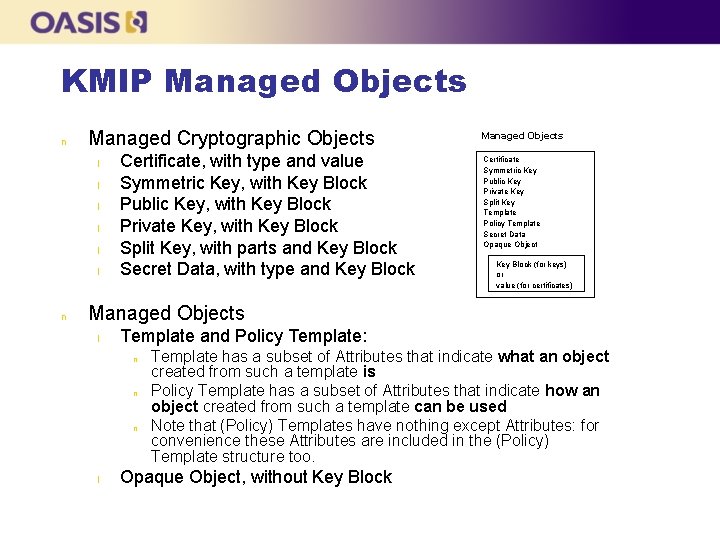
KMIP Managed Objects n Managed Cryptographic Objects l l l n Certificate, with type and value Symmetric Key, with Key Block Public Key, with Key Block Private Key, with Key Block Split Key, with parts and Key Block Secret Data, with type and Key Block Managed Objects Certificate Symmetric Key Public Key Private Key Split Key Template Policy Template Secret Data Opaque Object Key Block (for keys) or value (for certificates) Managed Objects l Template and Policy Template: n n n l Template has a subset of Attributes that indicate what an object created from such a template is Policy Template has a subset of Attributes that indicate how an object created from such a template can be used Note that (Policy) Templates have nothing except Attributes: for convenience these Attributes are included in the (Policy) Template structure too. Opaque Object, without Key Block
KMIP Attributes n Attributes contain the “meta data” of a Managed Object l l n Its Unique Identifier, State, etc Attributes can be searched with the Locate operation, as opposed to the content of the Managed Object Setting/modifying/deleting Attributes l Only some of the Attributes are set with specific values at object creation, depending on the object type n l Some Attributes are implicitly set by certain operations n l Certificate Type cannot be set by the client Not all Attributes can be added, or subsequently modified or deleted once set n l Certificate Type is implicitly set by Register, Certify, and Re-certify Client can set explicitly some of the Attributes n l For instance, the Certificate Type Attribute only exists for Certificate objects Certificate Type cannot added, modified or deleted Some Attributes can have multiple values (or instances) organized with indices n For instance, a Symmetric Key object may belong to multiple groups, hence its Object Group Attribute will have multiple values
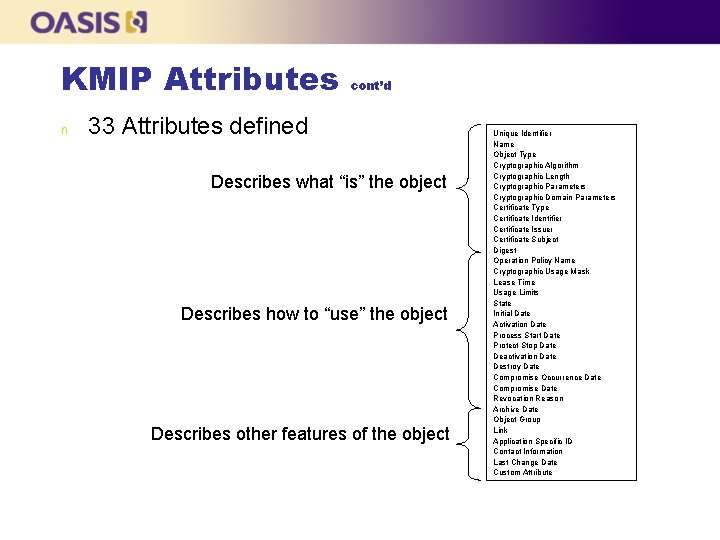
KMIP Attributes n cont’d 33 Attributes defined Describes what “is” the object Describes how to “use” the object Describes other features of the object Unique Identifier Name Object Type Cryptographic Algorithm Cryptographic Length Cryptographic Parameters Cryptographic Domain Parameters Certificate Type Certificate Identifier Certificate Issuer Certificate Subject Digest Operation Policy Name Cryptographic Usage Mask Lease Time Usage Limits State Initial Date Activation Date Process Start Date Protect Stop Date Deactivation Date Destroy Date Compromise Occurrence Date Compromise Date Revocation Reason Archive Date Object Group Link Application Specific ID Contact Information Last Change Date Custom Attribute
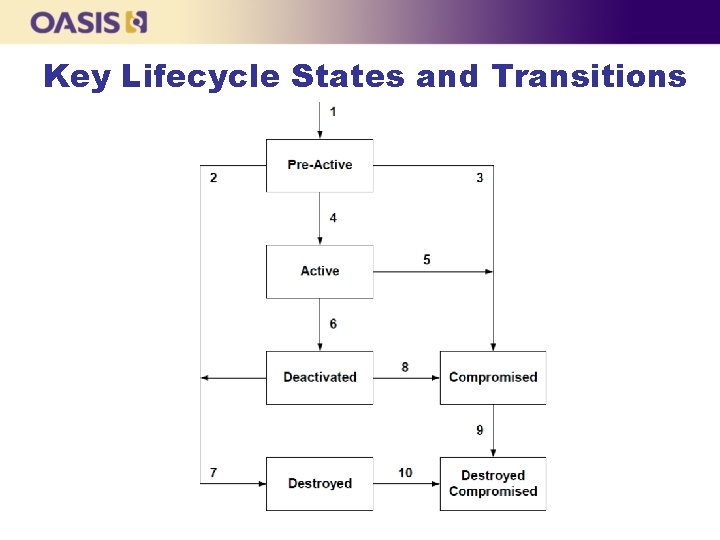
Key Lifecycle States and Transitions
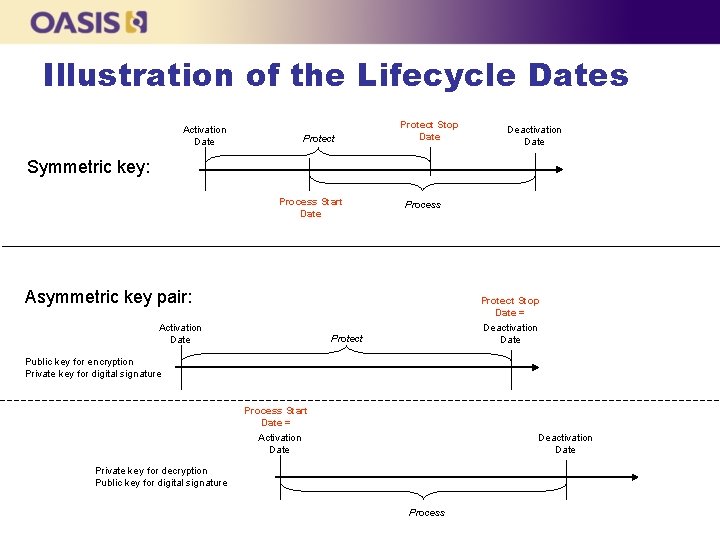
Illustration of the Lifecycle Dates Activation Date Protect Stop Date Deactivation Date Symmetric key: Process Start Date Process Asymmetric key pair: Protect Stop Date = Activation Date Deactivation Date Protect Public key for encryption Private key for digital signature Process Start Date = Activation Date Deactivation Date Private key for decryption Public key for digital signature Process
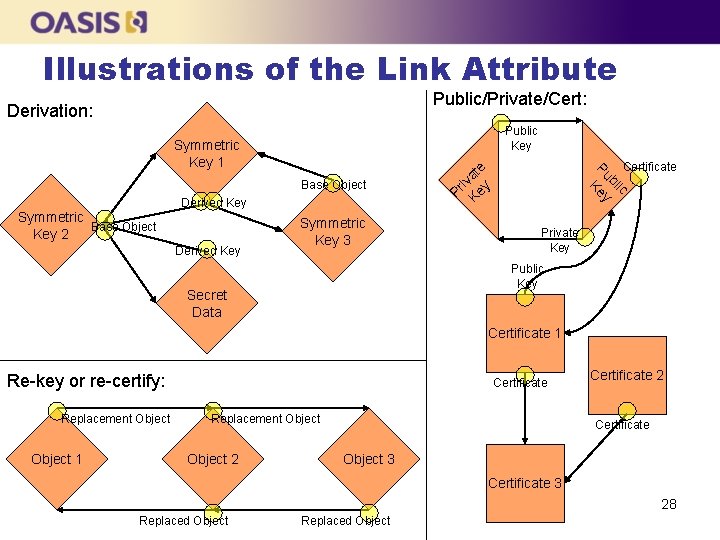
Illustrations of the Link Attribute Public/Private/Cert: Derivation: Public Key Symmetric Base Object Key 2 Derived Key Symmetric Key 3 Pr i Ke vate y Base Object Certificate ic bl P u K ey Symmetric Key 1 Private Key Public Key Secret Data Certificate 1 Re-key or re-certify: Replacement Object 1 Certificate Replacement Object 2 Certificate Object 3 Certificate 3 28 Replaced Object
Client-to-server Operations n n Operation consists of a request from client followed by server response Multiple operations can be batched in a single request-response pair l l n n ID Placeholder can be used to propagate the value of the object’s Unique Identifier among operations in the same batch Can be used to implement atomicity Requests may contain Template-Attribute structures with the desired values of certain attributes Responses contain the attribute values that have been set differently than as requested by the client
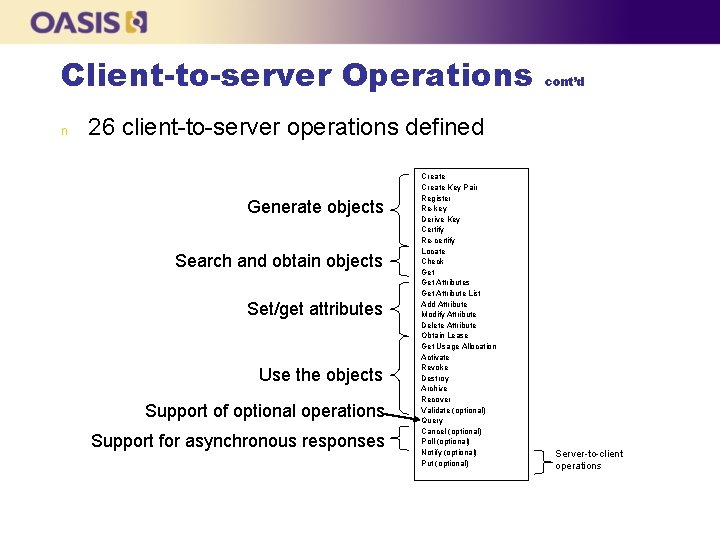
Client-to-server Operations n cont’d 26 client-to-server operations defined Generate objects Search and obtain objects Set/get attributes Use the objects Support of optional operations Support for asynchronous responses Create Key Pair Register Re-key Derive Key Certify Re-certify Locate Check Get Attributes Get Attribute List Add Attribute Modify Attribute Delete Attribute Obtain Lease Get Usage Allocation Activate Revoke Destroy Archive Recover Validate (optional) Query Cancel (optional) Poll (optional) Notify (optional) Put (optional) Server-to-client operations
Server-to-client Operations n Unsolicited messages from the server to the client with the following operations: l l Notify operation, used by server to inform client about attribute-value changes Push operation, used by server to provide an object and attributes to client, indicating whether the new object is replacing an existing object or not Batching can be used Support is optional
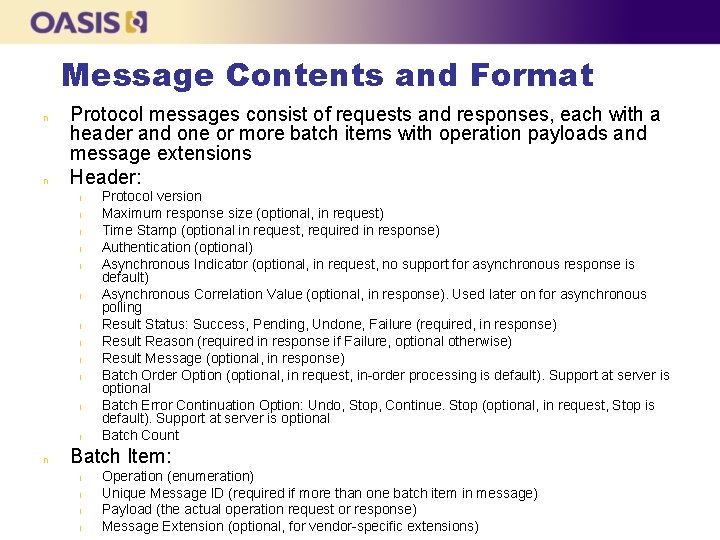
Message Contents and Format n n Protocol messages consist of requests and responses, each with a header and one or more batch items with operation payloads and message extensions Header: l l l n Protocol version Maximum response size (optional, in request) Time Stamp (optional in request, required in response) Authentication (optional) Asynchronous Indicator (optional, in request, no support for asynchronous response is default) Asynchronous Correlation Value (optional, in response). Used later on for asynchronous polling Result Status: Success, Pending, Undone, Failure (required, in response) Result Reason (required in response if Failure, optional otherwise) Result Message (optional, in response) Batch Order Option (optional, in request, in-order processing is default). Support at server is optional Batch Error Continuation Option: Undo, Stop, Continue. Stop (optional, in request, Stop is default). Support at server is optional Batch Count Batch Item: l l Operation (enumeration) Unique Message ID (required if more than one batch item in message) Payload (the actual operation request or response) Message Extension (optional, for vendor-specific extensions)
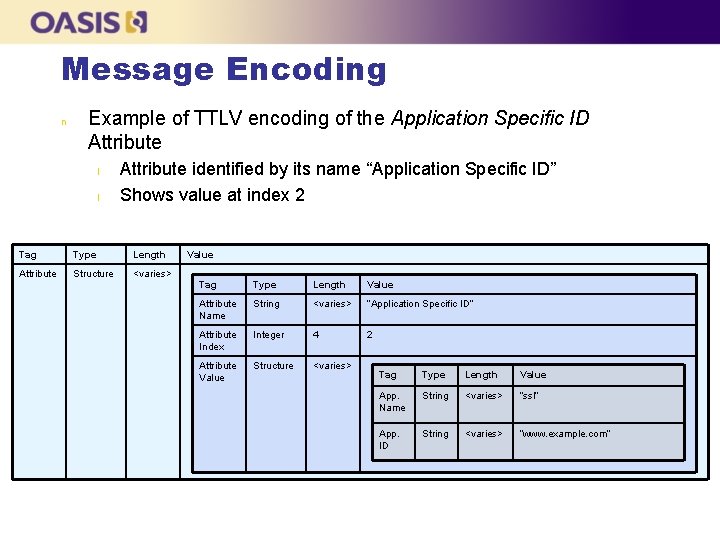
Message Encoding n Example of TTLV encoding of the Application Specific ID Attribute l l Attribute identified by its name “Application Specific ID” Shows value at index 2 Tag Type Length Attribute Structure <varies> Value Tag Type Length Value Attribute Name String <varies> “Application Specific ID” Attribute Index Integer 4 2 Attribute Value Structure <varies> Tag Type Length Value App. Name String <varies> “ssl” App. ID String <varies> “www. example. com”
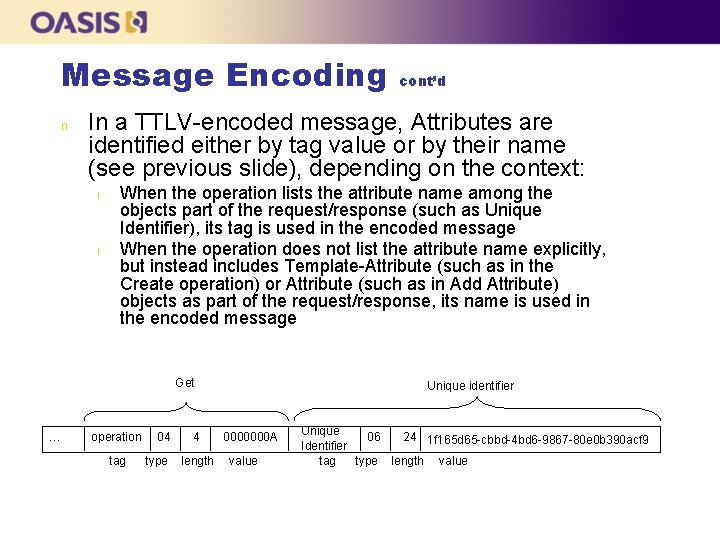
Message Encoding n In a TTLV-encoded message, Attributes are identified either by tag value or by their name (see previous slide), depending on the context: l l When the operation lists the attribute name among the objects part of the request/response (such as Unique Identifier), its tag is used in the encoded message When the operation does not list the attribute name explicitly, but instead includes Template-Attribute (such as in the Create operation) or Attribute (such as in Add Attribute) objects as part of the request/response, its name is used in the encoded message Get … cont’d operation tag 04 4 type length Unique identifier 0000000 A value Unique 06 24 1 f 165 d 65 -cbbd-4 bd 6 -9867 -80 e 0 b 390 acf 9 Identifier tag type length value
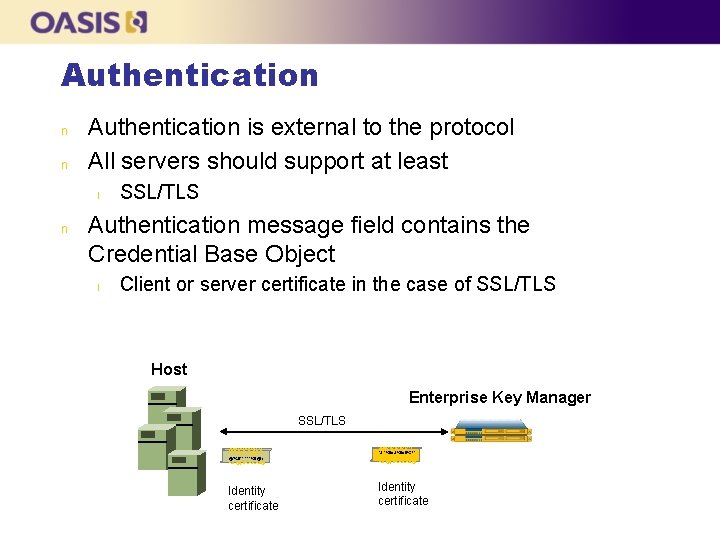
Authentication n n Authentication is external to the protocol All servers should support at least l n SSL/TLS Authentication message field contains the Credential Base Object l Client or server certificate in the case of SSL/TLS Host Enterprise Key Manager SSL/TLS @!$%!%!%!%%^& *&^%$#&%$#$%*!^ @*%$*^^^^%$@*) %#*@(*$%%%%#@ Identity certificate
KMIP Use Cases http: //docs. oasis-open. org/kmip/usecases/v 1. 0/
KMIP Use Cases n n Purpose: provide examples of message exchanges for common use cases Categories l l l l n basic functionality (create, get, register, delete of sym. keys and templates) life-cycle support (key states) auditing and reporting key exchange asymmetric keys key roll-over archival vendor-specific message extensions Details of the message composition and TTLV encoding (encoded bytes included)
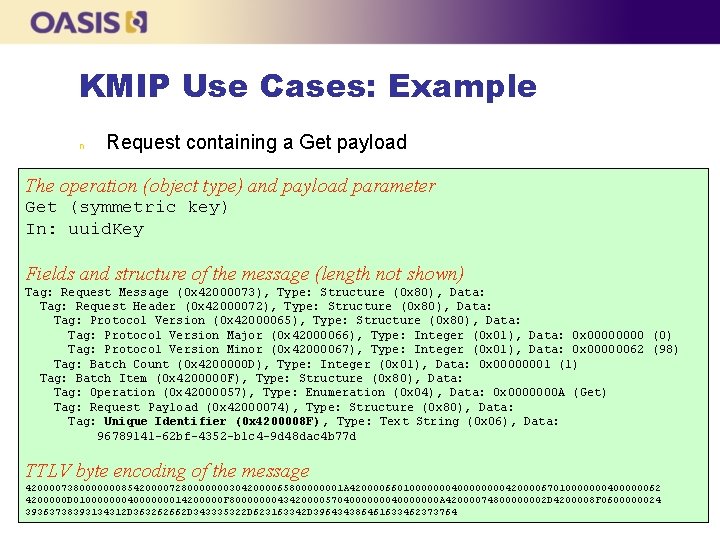
KMIP Use Cases: Example n Request containing a Get payload The operation (object type) and payload parameter Get (symmetric key) In: uuid. Key Fields and structure of the message (length not shown) Tag: Request Message (0 x 42000073), Type: Structure (0 x 80), Data: Tag: Request Header (0 x 42000072), Type: Structure (0 x 80), Data: Tag: Protocol Version (0 x 42000065), Type: Structure (0 x 80), Data: Tag: Protocol Version Major (0 x 42000066), Type: Integer (0 x 01), Data: 0 x 0000 (0) Tag: Protocol Version Minor (0 x 42000067), Type: Integer (0 x 01), Data: 0 x 00000062 (98) Tag: Batch Count (0 x 4200000 D), Type: Integer (0 x 01), Data: 0 x 00000001 (1) Tag: Batch Item (0 x 4200000 F), Type: Structure (0 x 80), Data: Tag: Operation (0 x 42000057), Type: Enumeration (0 x 04), Data: 0 x 0000000 A (Get) Tag: Request Payload (0 x 42000074), Type: Structure (0 x 80), Data: Tag: Unique Identifier (0 x 4200008 F) , Type: Text String (0 x 06), Data: 96789141 -62 bf-4352 -b 1 c 4 -9 d 48 dac 4 b 77 d TTLV byte encoding of the message 42000073800000008542000072800000003042000065800000001 A 420000660100000004000042000067010000000400000062 4200000 D 0100000004000000014200000 F 800000004342000057040000000 A 42000074800000002 D 4200008 F 0600000024 39363738393134312 D 363262662 D 343335322 D 623163342 D 396434386461633462373764
KMIP Interoperability Demonstration
KMIP Interop Demo n n n Demonstrate protocol functionality using multiple independent implementations Scenarios from the KMIP Use Cases document Scenarios from Vendor Products 40
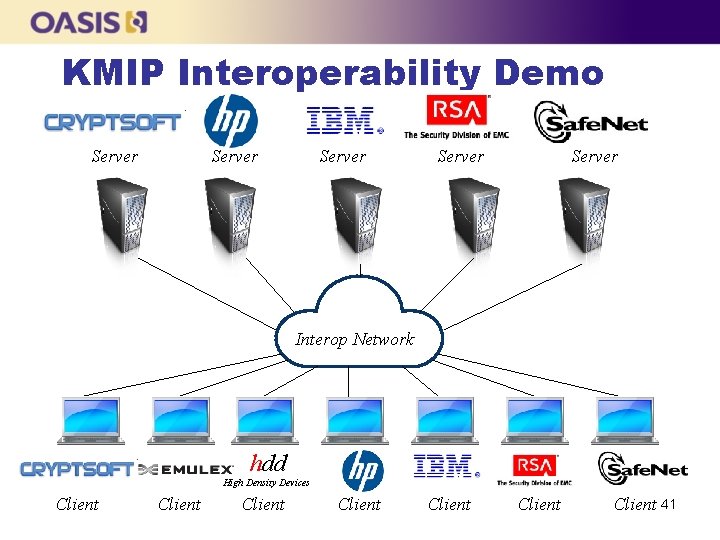
KMIP Interoperability Demo Server Server Interop Network hdd High Density Devices Client Client 41
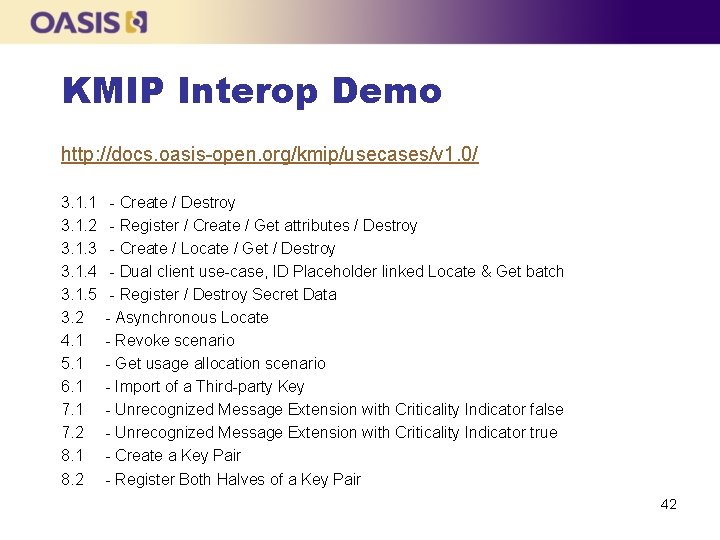
KMIP Interop Demo http: //docs. oasis-open. org/kmip/usecases/v 1. 0/ 3. 1. 1 - Create / Destroy 3. 1. 2 - Register / Create / Get attributes / Destroy 3. 1. 3 - Create / Locate / Get / Destroy 3. 1. 4 - Dual client use-case, ID Placeholder linked Locate & Get batch 3. 1. 5 - Register / Destroy Secret Data 3. 2 - Asynchronous Locate 4. 1 - Revoke scenario 5. 1 - Get usage allocation scenario 6. 1 - Import of a Third-party Key 7. 1 - Unrecognized Message Extension with Criticality Indicator false 7. 2 - Unrecognized Message Extension with Criticality Indicator true 8. 1 - Create a Key Pair 8. 2 - Register Both Halves of a Key Pair 42
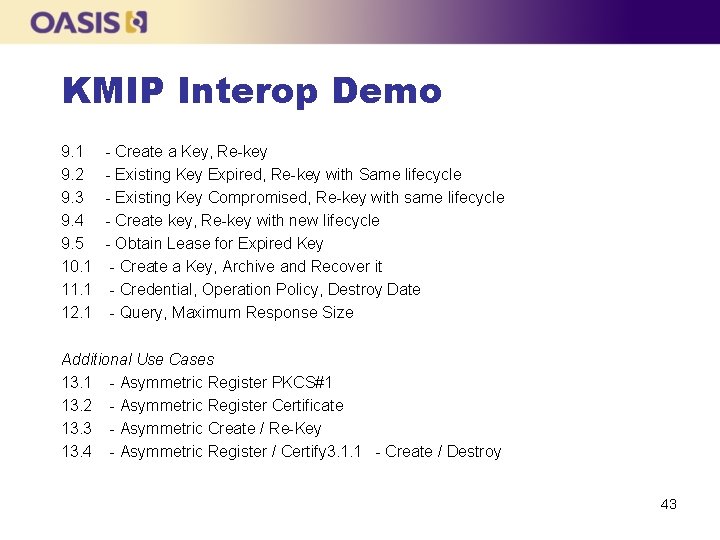
KMIP Interop Demo 9. 1 - Create a Key, Re-key 9. 2 - Existing Key Expired, Re-key with Same lifecycle 9. 3 - Existing Key Compromised, Re-key with same lifecycle 9. 4 - Create key, Re-key with new lifecycle 9. 5 - Obtain Lease for Expired Key 10. 1 - Create a Key, Archive and Recover it 11. 1 - Credential, Operation Policy, Destroy Date 12. 1 - Query, Maximum Response Size Additional Use Cases 13. 1 - Asymmetric Register PKCS#1 13. 2 - Asymmetric Register Certificate 13. 3 - Asymmetric Create / Re-Key 13. 4 - Asymmetric Register / Certify 3. 1. 1 - Create / Destroy 43
Use Case 3. 1. 1 (1/3) n n The client asks the server to create a 128 -bit symmetric key, using the AES algorithm, to be used for encryption and decryption After the key has been created, the client asks the server to destroy the created key 44
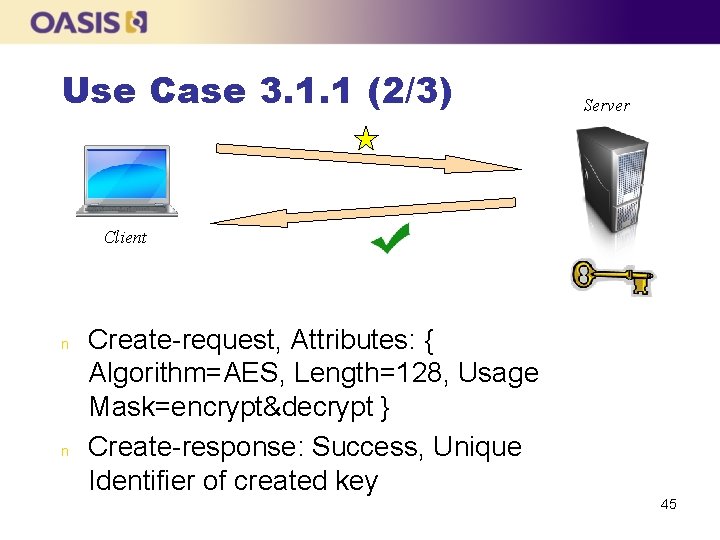
Use Case 3. 1. 1 (2/3) Server Client n n Create-request, Attributes: { Algorithm=AES, Length=128, Usage Mask=encrypt&decrypt } Create-response: Success, Unique Identifier of created key 45
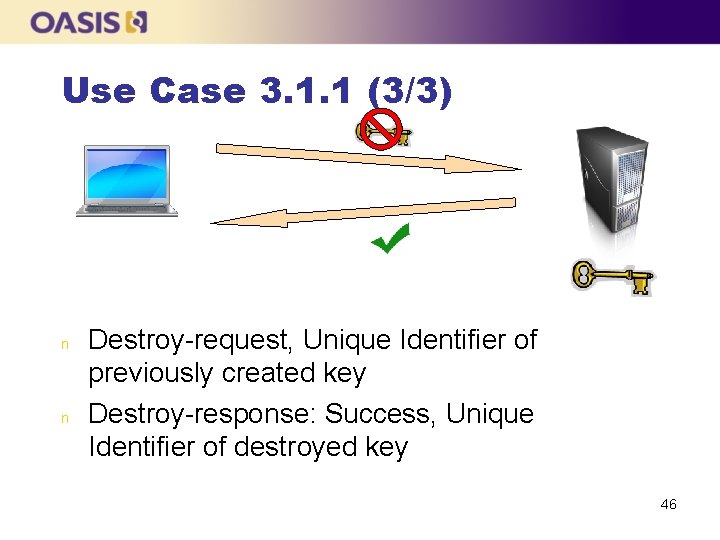
Use Case 3. 1. 1 (3/3) n n Destroy-request, Unique Identifier of previously created key Destroy-response: Success, Unique Identifier of destroyed key 46
Use Case 3. 1. 2 (1/4) n n The client registers a template with attributes The client asks the server to create a symmetric key with the attributes specified in the previously registered template The client retrieves a subset of the attributes of the key to verify they were set according to the template Note: Operations already shown previous are not illustrated 47
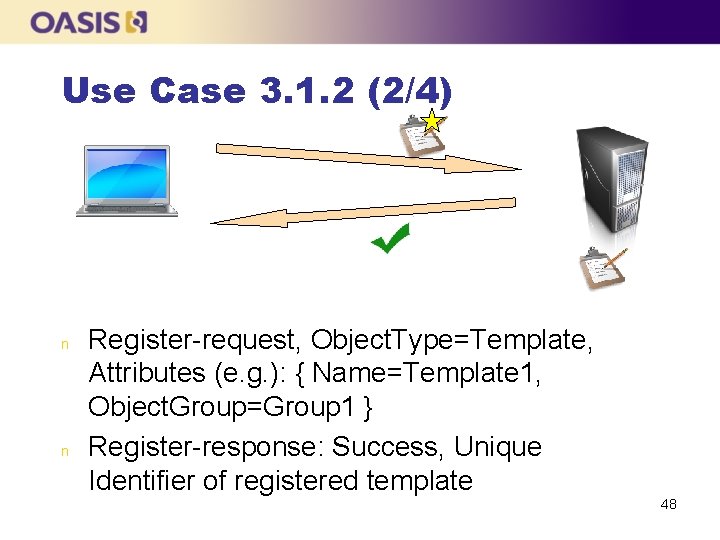
Use Case 3. 1. 2 (2/4) n n Register-request, Object. Type=Template, Attributes (e. g. ): { Name=Template 1, Object. Group=Group 1 } Register-response: Success, Unique Identifier of registered template 48
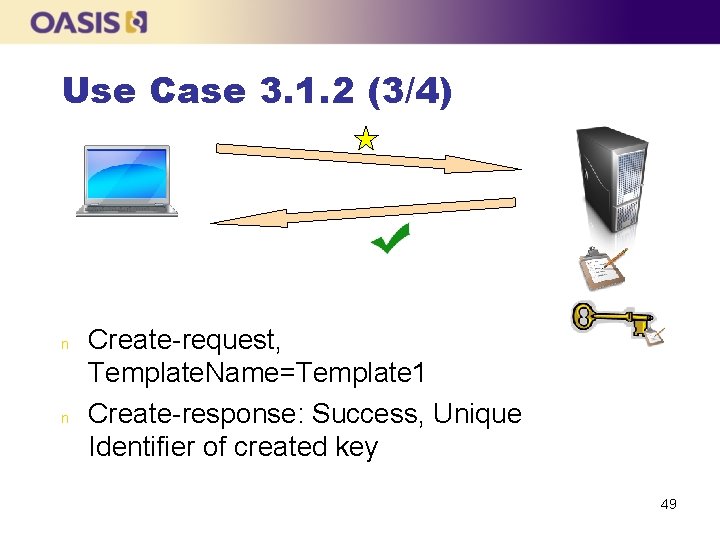
Use Case 3. 1. 2 (3/4) n n Create-request, Template. Name=Template 1 Create-response: Success, Unique Identifier of created key 49
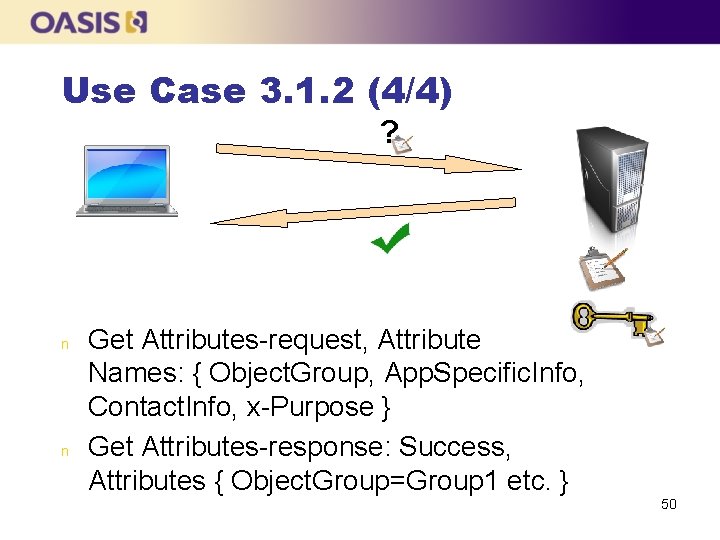
Use Case 3. 1. 2 (4/4) ? n n Get Attributes-request, Attribute Names: { Object. Group, App. Specific. Info, Contact. Info, x-Purpose } Get Attributes-response: Success, Attributes { Object. Group=Group 1 etc. } 50
Use Case 3. 1. 3 (1/3) n n n The client asks the server to create a key and specifies a Name attribute value The client then performs a Locate operation, supplying the Name, to which the server responds with the Unique Identifier of the created key The client retrieves the created key using its Unique Identifier 51
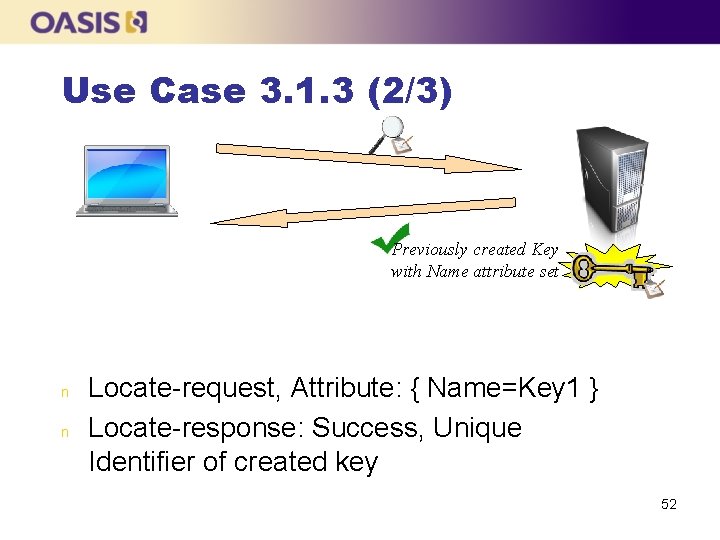
Use Case 3. 1. 3 (2/3) Previously created Key with Name attribute set n n Locate-request, Attribute: { Name=Key 1 } Locate-response: Success, Unique Identifier of created key 52
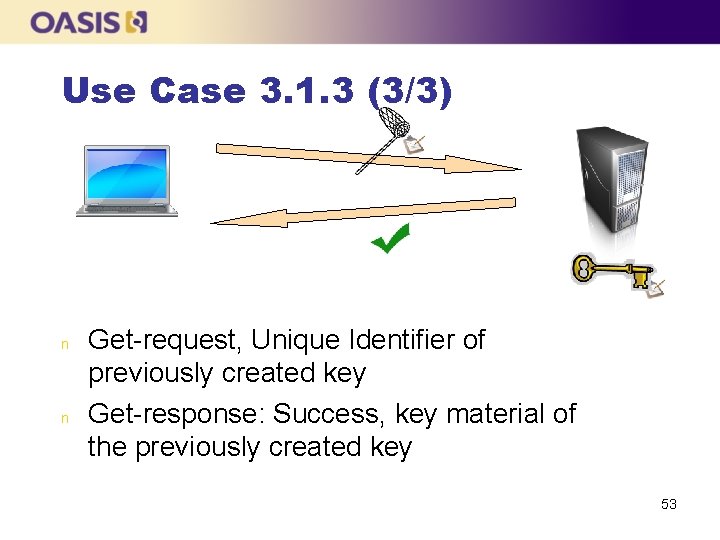
Use Case 3. 1. 3 (3/3) n n Get-request, Unique Identifier of previously created key Get-response: Success, key material of the previously created key 53
Use Case 3. 1. 4 n n n This use-case has two clients performing operations on the same key. The first client registers a template and creates a symmetric key using that template. The second client then does a batched Locate and Get using the ID Placeholder to retrieve the key. 54
Use Case 3. 1. 4 (cont) n n The second client thereafter performs a number of operations on the key before the first client finally destroys the key and the template. The first client also tries to Get the key and the template after they have been destroyed, but the Get operation fails in both cases. 55
Use Case 3. 1. 5 n n In this use-case the client issues a Register request containing a Secret Data object, whereby the server registers the object and returns the Unique Identifier. To clean up, the client then performs a Destroy operation to destroy the object. 56
Use Case 3. 2 n n This use-case tests the asynchronous capabilities of KMIP using the Locate operation. A key is created and then a Locate request is sent containing the Name of the created key and with the message header Asynchronous Indicator-field set to True. 57
Use Case 3. 2 (cont) n n If the server returns an asynchronous response to the Locate, the client then polls the server until the operation is ready. If the server responded asynchronously, a subsequent Locate operation that is also handled asynchronously is then Cancelled, before the key is finally destroyed. 58
Use Case 4. 1 (1/4) n n The client asks the server to create a key The client gets the State attribute to confirm that the key is initially in the Pre. Active state The client performs an Activate operation to change the state to Active The client performs a Revoke operation to change the state to Compromised 59
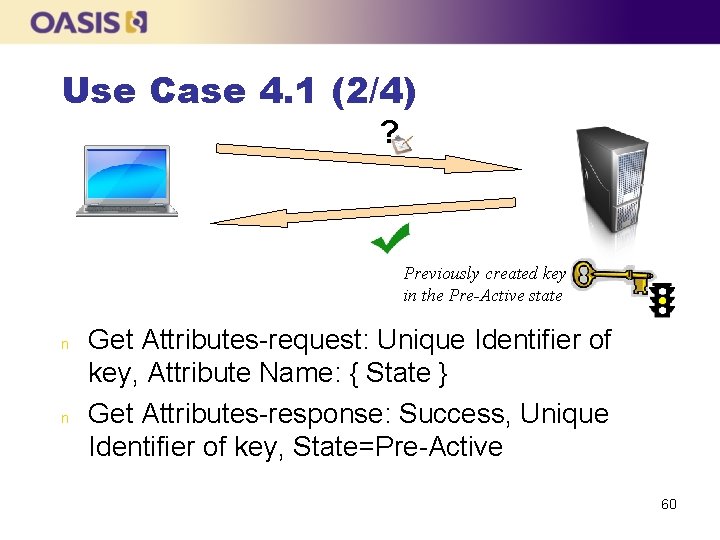
Use Case 4. 1 (2/4) ? Previously created key in the Pre-Active state n n Get Attributes-request: Unique Identifier of key, Attribute Name: { State } Get Attributes-response: Success, Unique Identifier of key, State=Pre-Active 60
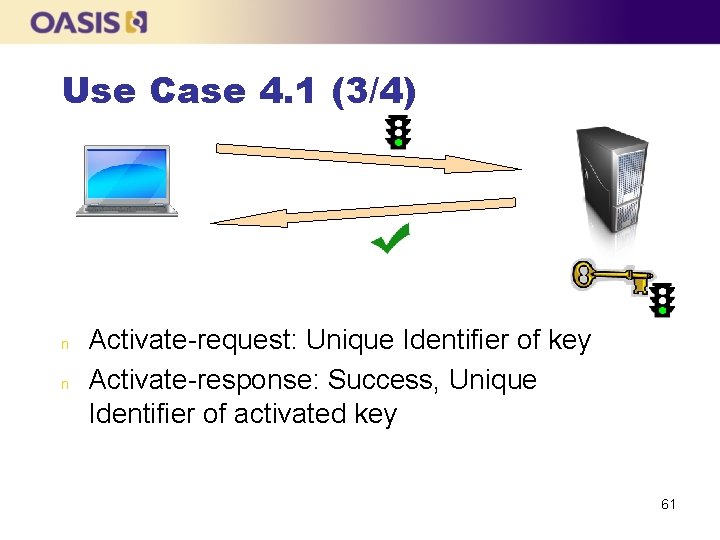
Use Case 4. 1 (3/4) n n Activate-request: Unique Identifier of key Activate-response: Success, Unique Identifier of activated key 61
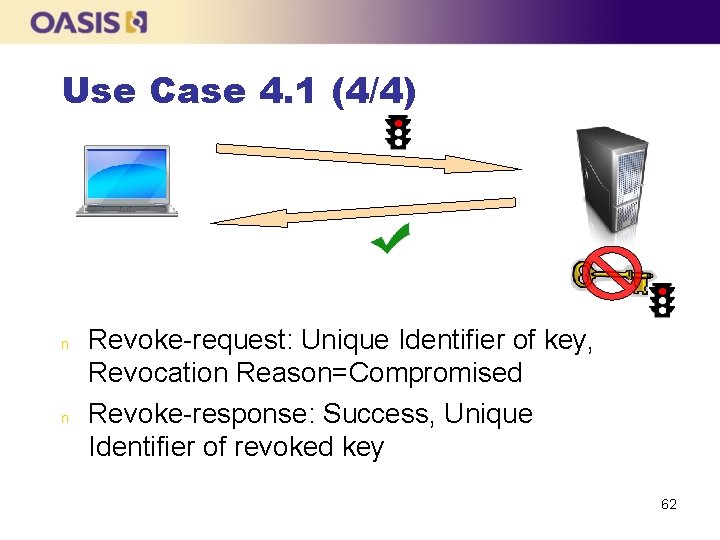
Use Case 4. 1 (4/4) n n Revoke-request: Unique Identifier of key, Revocation Reason=Compromised Revoke-response: Success, Unique Identifier of revoked key 62
Use Case 5. 1 (1/4) n n The client asks the server to create a key, activates it and sets a certain amount of Usage Allocation (1000 MB) The client gets some Usage Allocation so that it can use the key e. g. for encrypting data Once it has been used up, the client requests some more usage allocation When the usage allocation has been used up, the key cannot be used for encryption anymore 63
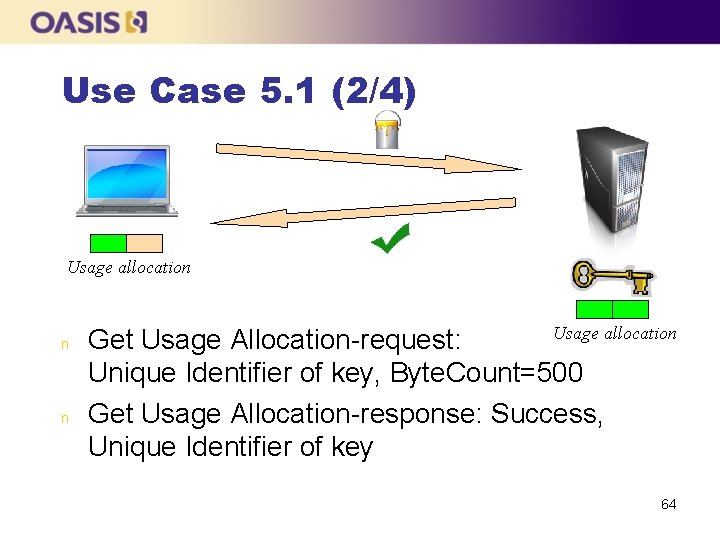
Use Case 5. 1 (2/4) Usage allocation n n Get Usage Allocation-request: Usage allocation Unique Identifier of key, Byte. Count=500 Get Usage Allocation-response: Success, Unique Identifier of key 64
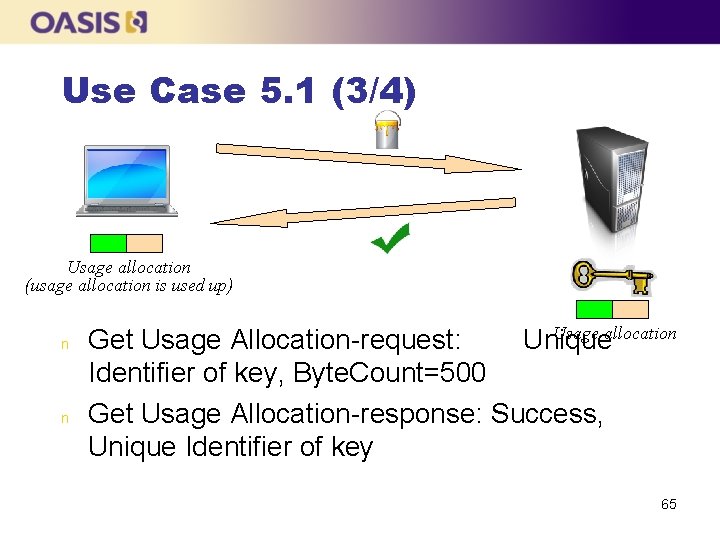
Use Case 5. 1 (3/4) Usage allocation (usage allocation is used up) n n Usage allocation Get Usage Allocation-request: Unique Identifier of key, Byte. Count=500 Get Usage Allocation-response: Success, Unique Identifier of key 65
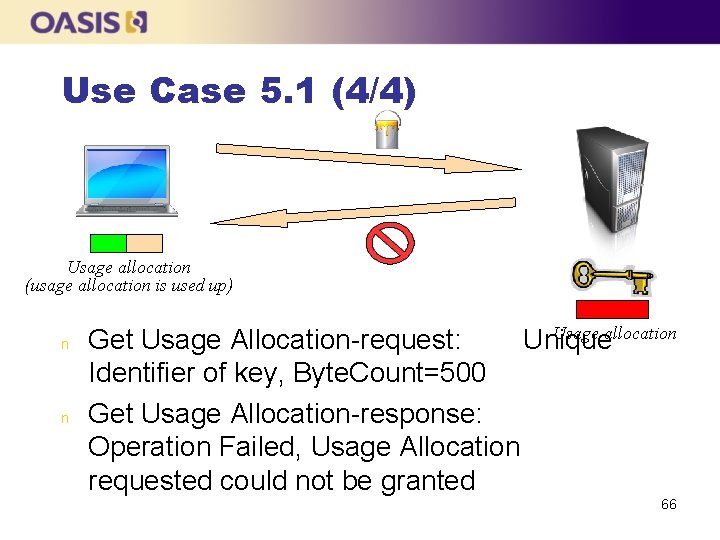
Use Case 5. 1 (4/4) Usage allocation (usage allocation is used up) n n Usage allocation Get Usage Allocation-request: Unique Identifier of key, Byte. Count=500 Get Usage Allocation-response: Operation Failed, Usage Allocation requested could not be granted 66
Use Case 6. 1 n n n This use-case tests the import of a foreign key using the Register operation. To validate that the registered key is treated the same as a locally created key, an attribute is added to the key and then modified. Finally, the key is destroyed. 67
Use Case 7. 1 n n n A create request is issued and the request contains a Message Extension with the Criticality Indicator set to false. The server does not understand the extension, but since it is non-critical, the create request is processed normally. Subsequently, the created key is deleted. 68
Use Case 7. 2 n n A create request is issued and the request contains a Message Extension with the Criticality Indicator set to true. The server does not understand the extension, and since it is critical, the create request fails and an error is returned. 69
Use Case 8. 1 n n n Create a new private/public key pair. Make sure they are linked correctly by issuing Locate commands with the assigned Unique Identifiers. Finally delete both key halves. 70
Use Case 8. 2 n n n Register a private key and a public key and set the Link attribute to point to each other. Verify the links were set correctly by locating the keys based on the link attributes Delete both objects. 71
Use Case 9. 1 n n n Create a symmetric key with a specific name, and then use Locate to find the key. After using Re-key to create a new key, verify that the name was removed from the existing key and copied to the new key. Also verify that the key material for the old key is still retrievable. To clean up, both keys are deleted. 72
Use Case 9. 2 n n Create a new symmetric key. Then add the Activation Date and Deactivation Date attributes based on the timestamp in the response to the Create request. The Activation Date is set to a time in the past and the Deactivation Date to a time in the near future. 73
Use Case 9. 2 (cont) n n Repeated Get Attribute calls are performed to verify that the state is first “Active”, then subsequently “Deactivated”. Then issue a Re-key request, including an Activation Date attribute with the value set to the previously specified Deactivation Date of the existing key. 74
Use Case 9. 2 (cont) n n n Verify from the response that the Activation Date and Deactivation Date attributes were set correctly (if they are not returned, issue a Get Attribute request). Do a Get Attribute operation to verify that the state of the new key is “Active”. To clean up, both keys are deleted. 75
Use Case 9. 3 n n n Create a new symmetric key with the Activation Date in the past. Do a Get Attribute operation on the State attribute to verify the key is “Active”. Then revoke the key as compromised, verify that the state has changed to “Compromised”. 76
Use Case 9. 3 (cont) n n n Create a replacement key using Rekey with the offset to ‘ 0’ to indicate that the times are to be copied from the existing key. Do a Get Attribute operation to verify that the state of the new key is “Active”. To clean up, both keys are deleted. 77
Use Case 9. 4 n n n Create a symmetric key with a specific name, then use Locate to find the key. After using Re-key to create a new key, verify that the name was removed from the existing key and copied to the new key. To clean up, both keys are deleted. 78
Use Case 9. 5 n n Create a symmetric key with a specific name and obtain a lease. Revoke the key with state “Compromised” and re-key the key. Try to obtain a lease on the old key which fails. Locate the new key with the original name. Get the new key and obtain a lease. 79
Use Case 10. 1 n n Create a symmetric key with a specified name, then use Locate to find the key and get the key. Archive the key (asynchronous operation, use Poll until it completes) and use Get and Locate on it, but both fail. 80
Use Case 10. 1 (cont) n n n Add the Storage Status Mask to the Locate-command, indicating to the server to search in both online and archived storage. The Locate finds the key. Recover the key from the archive (also asynchronous), both Locate and Get succeed. 81
Use Case 11. 1 n n Pass a Credential object in the message header in all requests for identification purposes Create a symmetric key and set the Operation Policy Name attribute to “default”. 82
Use Case 11. 1 (cont) n n Using another Credential, attempt to perform a Get operation batched with a Get Attribute List on the created symmetric key - both these request SHALL fail, as Batch Error Continuation Option set to “Continue”, the client gets both response payloads. Using the initially used Credential, destroy the object and get the Destroy Date attribute. 83
Use Case 12. 1 n n Perform a Query operation, querying the Operations and Objects supported by the server, with a restriction on the Maximum Response Size set in the request header. Since the resulting Query response is too big, an error is returned. 84
Use Case 12. 1 n Increase the Maximum Response Size, resubmit the Query request, and get a successful response. 85
Use Case 13. 1 n n Register a public/private RSA key pair Otherwise the same as 8. 2, but with PKCS #1 format and additional Get operations to verify keys were registered correctly 86
Use Case 13. 2 n n n Register a public/private RSA key pair and associated X. 509 certificate Set links between key pair and certificate Verify certificate attributes are set correctly 87
Use Case 13. 3 n n n Create a public/private RSA key pair, get the keys in PKCS #1 format Re-key pair (proposed v 2. 0 operation) Locate on name to make sure Name attribute was transferred to new keys Get new keys in Transparent RSA key format Get link attributes 88
Use Case 13. 4 n n n Register a public/private RSA key pair in PKCS #1 format Set links Certify the public key using PKCS #10 CSR Get certificate (X. 509 format), Get certificate attributes Get links 89
Conclusion
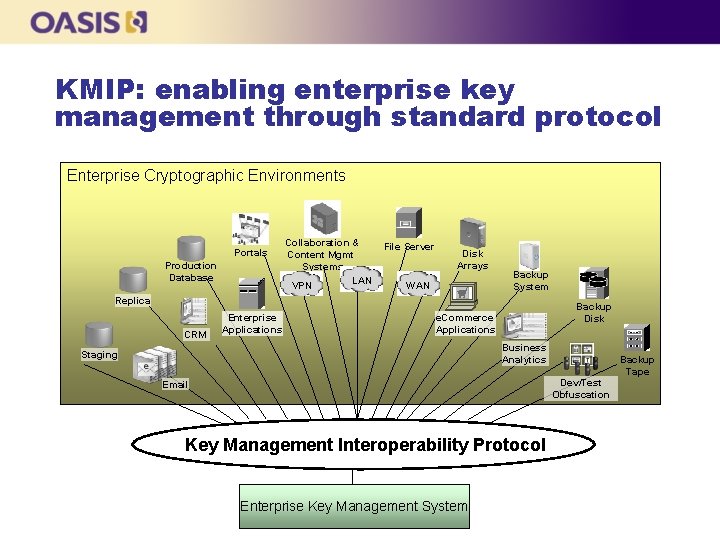
KMIP: enabling enterprise key management through standard protocol Enterprise Cryptographic Environments Portals Production Database Collaboration & Content Mgmt Systems LAN VPN File Server Disk Arrays WAN Backup System Replica CRM Enterprise Applications Backup Disk e. Commerce Applications Business Analytics Staging Backup Tape Dev/Test Obfuscation Email Key Management Interoperability Protocol Enterprise Key Management System

Q&A
- Slides: 92