
www bsc es COMPSs Tutorial February 20 th
www. bsc. es COMPSs Tutorial February 20 th 2014, Barcelona Rosa M. Badia, Carlos Diaz, Jorge Ejarque Daniele Lezzi, Francesc Lordan Roger Rafanell, Raül Sirvent Enric Tejedor
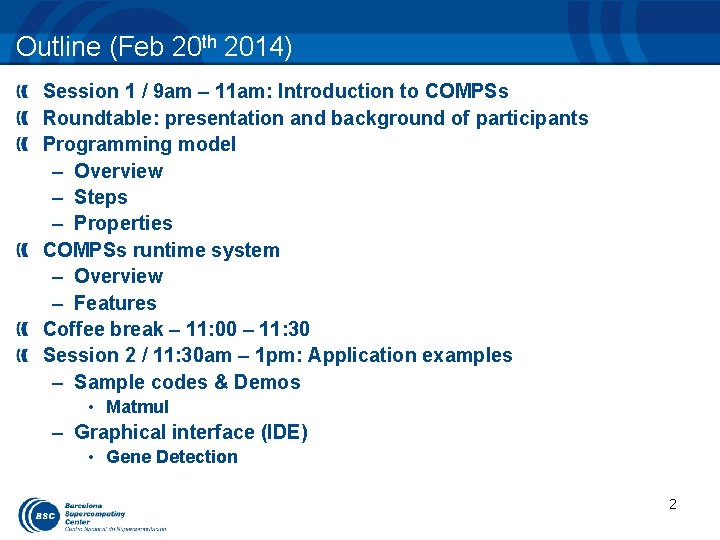
Outline (Feb 20 th 2014) Session 1 / 9 am – 11 am: Introduction to COMPSs Roundtable: presentation and background of participants Programming model – Overview – Steps – Properties COMPSs runtime system – Overview – Features Coffee break – 11: 00 – 11: 30 Session 2 / 11: 30 am – 1 pm: Application examples – Sample codes & Demos • Matmul – Graphical interface (IDE) • Gene Detection 2
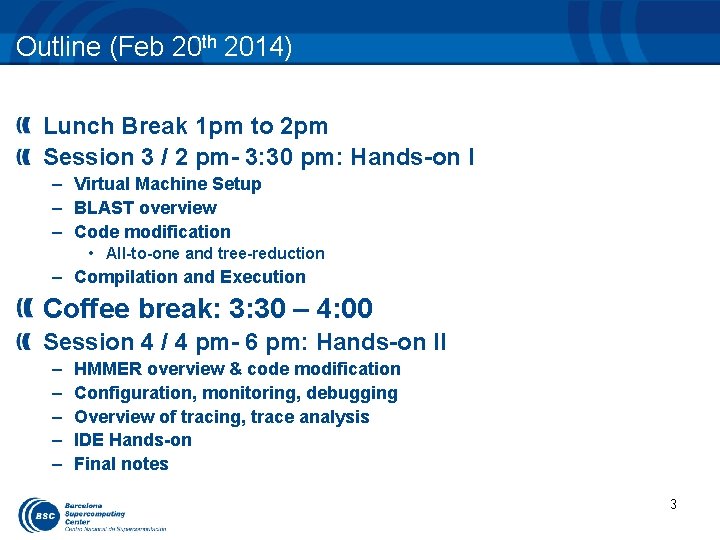
Outline (Feb 20 th 2014) Lunch Break 1 pm to 2 pm Session 3 / 2 pm- 3: 30 pm: Hands-on I – Virtual Machine Setup – BLAST overview – Code modification • All-to-one and tree-reduction – Compilation and Execution Coffee break: 3: 30 – 4: 00 Session 4 / 4 pm- 6 pm: Hands-on II – – – HMMER overview & code modification Configuration, monitoring, debugging Overview of tracing, trace analysis IDE Hands-on Final notes 3
COMPSS PROGRAMMING MODEL

The Star. Ss programming model Star. Ss Cell. Ss SMPSs GPUSs Cluster. Ss Clear. Speed. Ss Omp. Ss Star. Ss – – Sequential code + Annotations Task-Based Simple linear address space Support for SMP, GPUs, Cluster Open. Source – http: //compss. bsc. es Grid. Ss Cluster. Ss COMPSs Programmability/Portability “Same” source code runs on “any” machine Incremental parallelization/restructure Focus in the problem, not in the hardware Performance Intelligent Runtime Locality awareness. Automatic detection of parallelism Matches computation to resource features
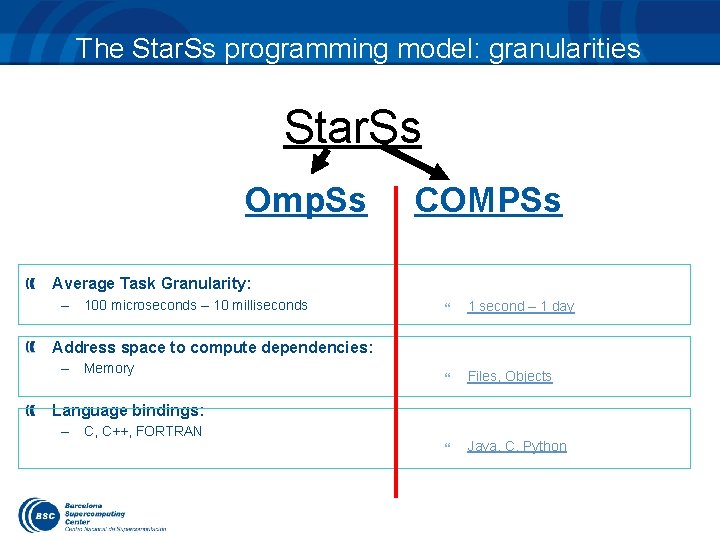
The Star. Ss programming model: granularities Star. Ss Omp. Ss COMPSs Average Task Granularity: – 100 microseconds – 10 milliseconds 1 second – 1 day Files, Objects Java, C, Python Address space to compute dependencies: – Memory Language bindings: – C, C++, FORTRAN
Overview: Objectives Reduce the development complexity of Grid/Cluster/Cloud applications to the minimum – Writing an application for a computational distributed infrastructure may be as easy as writing a sequential application Target applications: composed of tasks, most of them repetitive – Granularity of the tasks or programs – Data: files, objects, arrays and primitive types 7
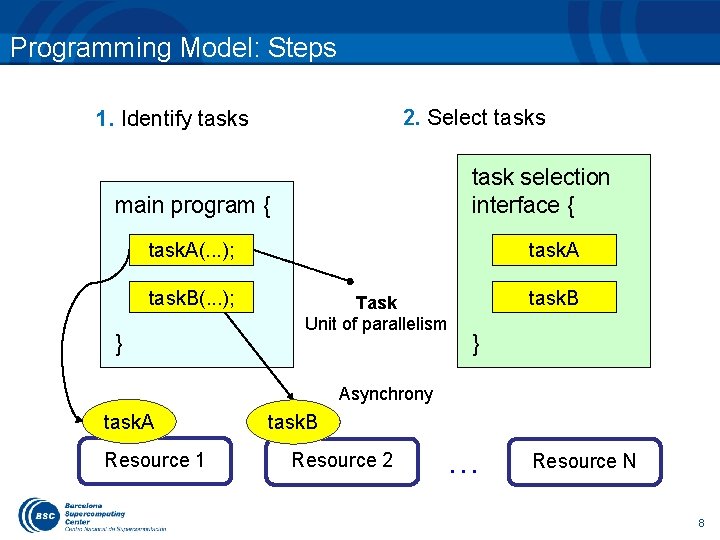
Programming Model: Steps 2. Select tasks 1. Identify tasks task selection interface { main program { task. A(. . . ); task. B(. . . ); } task. A Task Unit of parallelism task. B } Asynchrony task. A Resource 1 task. B Resource 2 . . . Resource N 8
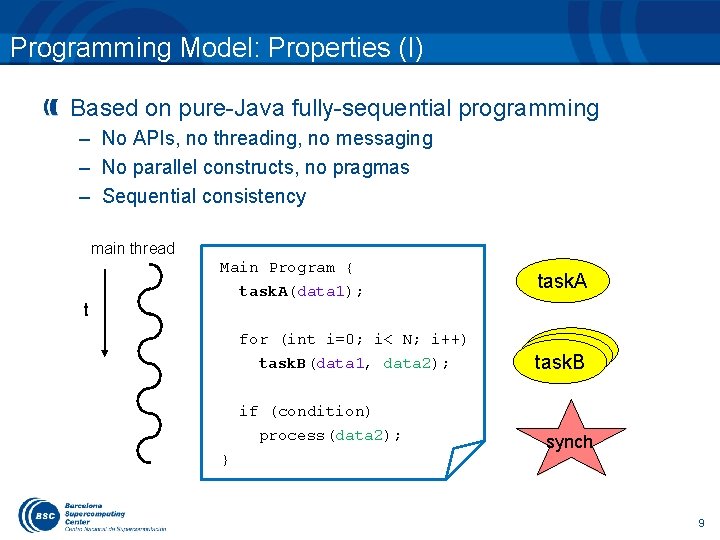
Programming Model: Properties (I) Based on pure-Java fully-sequential programming – No APIs, no threading, no messaging – No parallel constructs, no pragmas – Sequential consistency main thread t Main Program { task. A(data 1); for (int i=0; i< N; i++) task. B(data 1, data 2); if (condition) process(data 2); } task. A task. B synch 9
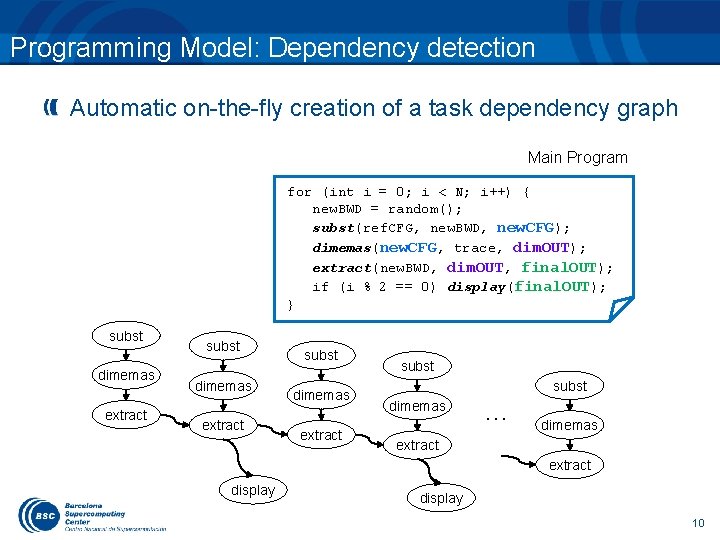
Programming Model: Dependency detection Automatic on-the-fly creation of a task dependency graph Main Program for (int i = 0; i < N; i++) { new. BWD = random(); subst(ref. CFG, new. BWD, new. CFG); dimemas(new. CFG, trace, dim. OUT); extract(new. BWD, dim. OUT, final. OUT); if (i % 2 == 0) display(final. OUT); } subst dimemas extract subst dimemas … dimemas extract display 10
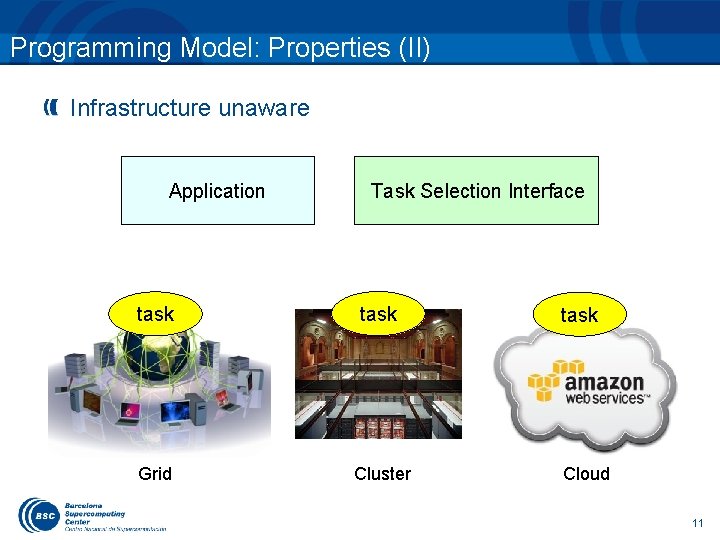
Programming Model: Properties (II) Infrastructure unaware Application Task Selection Interface task Grid Cluster task Cloud 11
Introduction to COMPSs
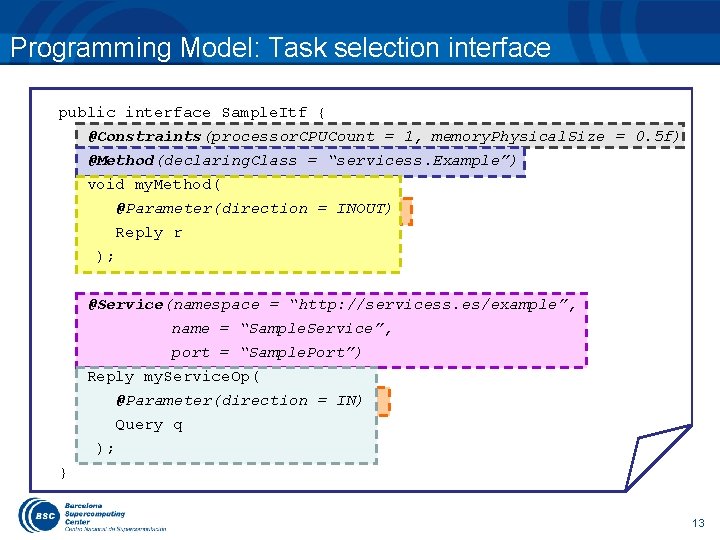
Programming Model: Task selection interface public interface Sample. Itf { @Constraints(processor. CPUCount = 1, memory. Physical. Size = 0. 5 f) @Method(declaring. Class = “servicess. Example”) void my. Method( @Parameter(direction = INOUT) Reply r ); @Service(namespace = “http: //servicess. es/example”, name = “Sample. Service”, port = “Sample. Port”) Reply my. Service. Op( @Parameter(direction = IN) Query q ); } 13
![Programming Model: Regular Main program public class App { public static void main(String[] args)](http://slidetodoc.com/presentation_image_h2/be1784284a4eea3ff6eeafc668e40ca4/image-14.jpg "Programming Model: Regular Main program public class App { public static void main(String[] args)")
Programming Model: Regular Main program public class App { public static void main(String[] args) { Query query = new Query(…); Reply reply = my. Service. Op(query); my. Method(reply); Service task call Method task call reply. print. To. Log(); } my. Service. Op } Synchronization my. Method 14
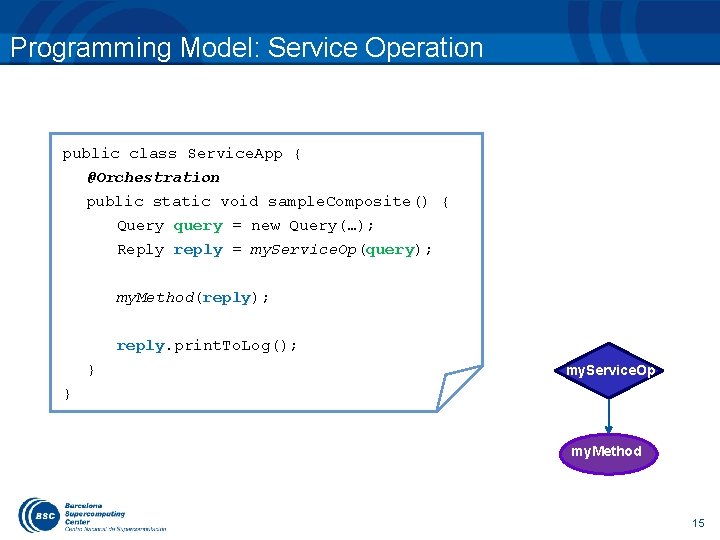
Programming Model: Service Operation public class Service. App { @Orchestration public static void sample. Composite() { Query query = new Query(…); Reply reply = my. Service. Op(query); my. Method(reply); reply. print. To. Log(); } my. Service. Op } my. Method 15
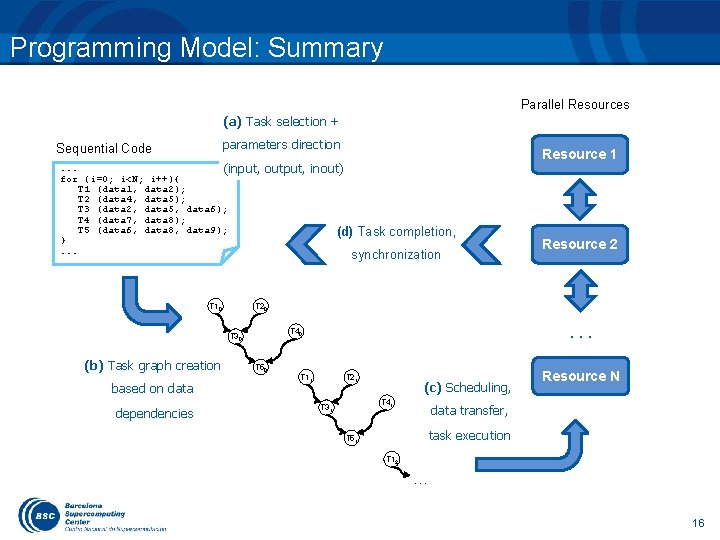
Programming Model: Summary Parallel Resources (a) Task selection + parameters direction Sequential Code . . . (input, for (i=0; i<N; i++){ T 1 (data 1, data 2); T 2 (data 4, data 5); T 3 (data 2, data 5, data 6); T 4 (data 7, data 8); T 5 (data 6, data 8, data 9); }. . . T 10 output, inout) based on data dependencies (d) Task completion, synchronization Resource 2 T 20 . . . T 40 T 30 (b) Task graph creation Resource 1 T 50 T 11 T 21 (c) Scheduling, T 41 T 31 Resource N data transfer, task execution T 51 T 12 … 16
![Programming Model: Sample Application public static void main(String[] args) { String counter 1 =](http://slidetodoc.com/presentation_image_h2/be1784284a4eea3ff6eeafc668e40ca4/image-17.jpg "Programming Model: Sample Application public static void main(String[] args) { String counter 1 =")
Programming Model: Sample Application public static void main(String[] args) { String counter 1 = args[0], counter 2 = args[1], counter 3 = args[2]; Main program initialize. Counters(counter 1, counter 2, counter 3); for (i = 0; i < 3; i++) { increment(counter 1); increment(counter 2); increment(counter 3); } } Subroutine public static void increment(String counter. File) { int value = read. Counter(counter. File); value++; write. Counter(counter. File, value); } 17
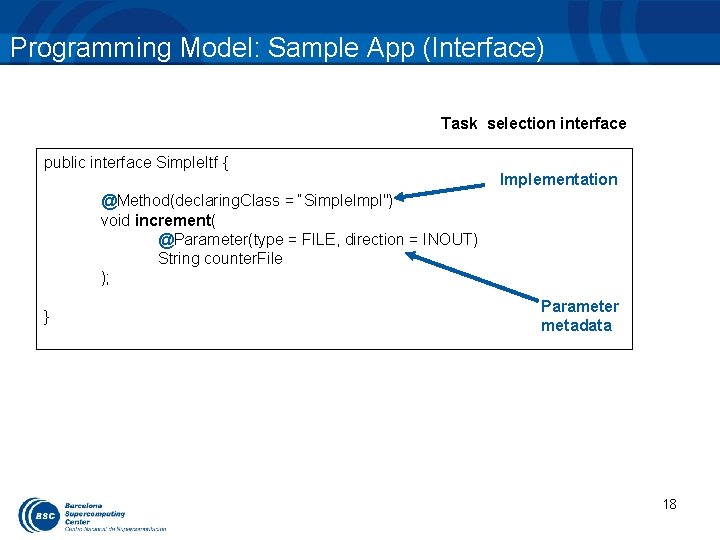
Programming Model: Sample App (Interface) Task selection interface public interface Simple. Itf { Implementation @Method(declaring. Class = “Simple. Impl") void increment( @Parameter(type = FILE, direction = INOUT) String counter. File ); } Parameter metadata 18
![Programming Model: Final App Code public static void main(String[] args) { String counter 1](http://slidetodoc.com/presentation_image_h2/be1784284a4eea3ff6eeafc668e40ca4/image-19.jpg "Programming Model: Final App Code public static void main(String[] args) { String counter 1")
Programming Model: Final App Code public static void main(String[] args) { String counter 1 = args[0], counter 2 = args[1], counter 3 = args[2]; Main program of the application NO CHANGES! initialize. Counters(counter 1, counter 2, counter 3); for (i = 0; i < 3; i++) { increment(counter 1); increment(counter 2); increment(counter 3); } } 19
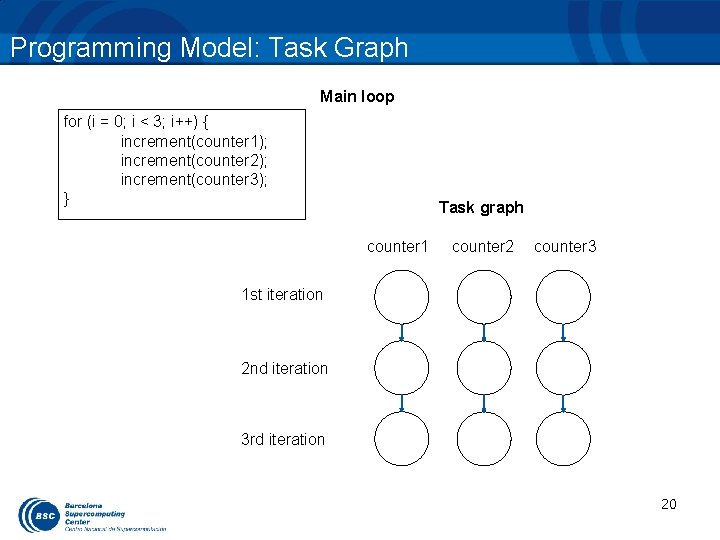
Programming Model: Task Graph Main loop for (i = 0; i < 3; i++) { increment(counter 1); increment(counter 2); increment(counter 3); } Task graph counter 1 counter 2 counter 3 1 st iteration 2 nd iteration 3 rd iteration 20
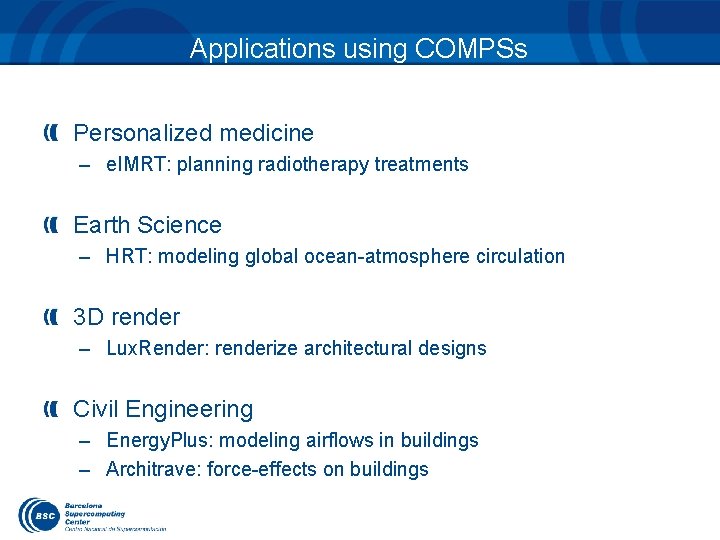
Applications using COMPSs Personalized medicine – e. IMRT: planning radiotherapy treatments Earth Science – HRT: modeling global ocean-atmosphere circulation 3 D render – Lux. Render: renderize architectural designs Civil Engineering – Energy. Plus: modeling airflows in buildings – Architrave: force-effects on buildings
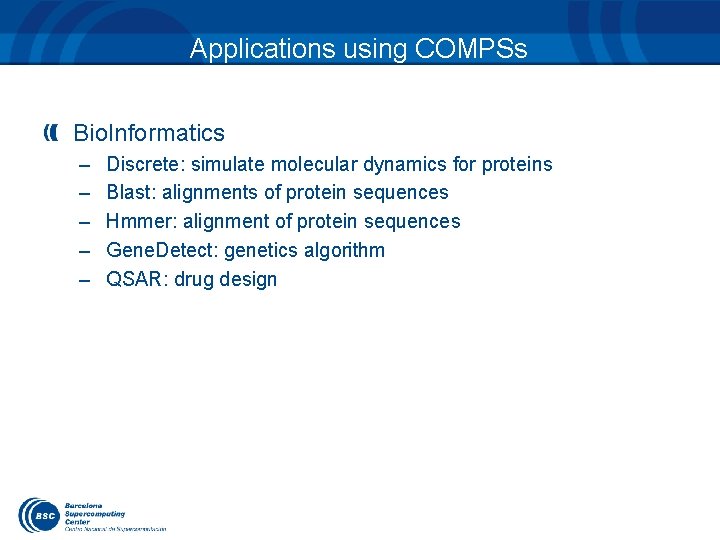
Applications using COMPSs Bio. Informatics – – – Discrete: simulate molecular dynamics for proteins Blast: alignments of protein sequences Hmmer: alignment of protein sequences Gene. Detect: genetics algorithm QSAR: drug design
COMPSS RUNTIME SYSTEM
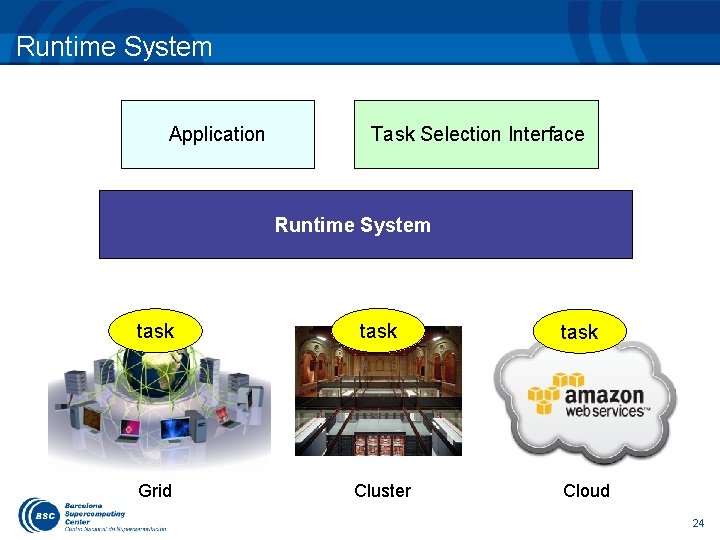
Runtime System Application Task Selection Interface Runtime System task Grid Cluster task Cloud 24
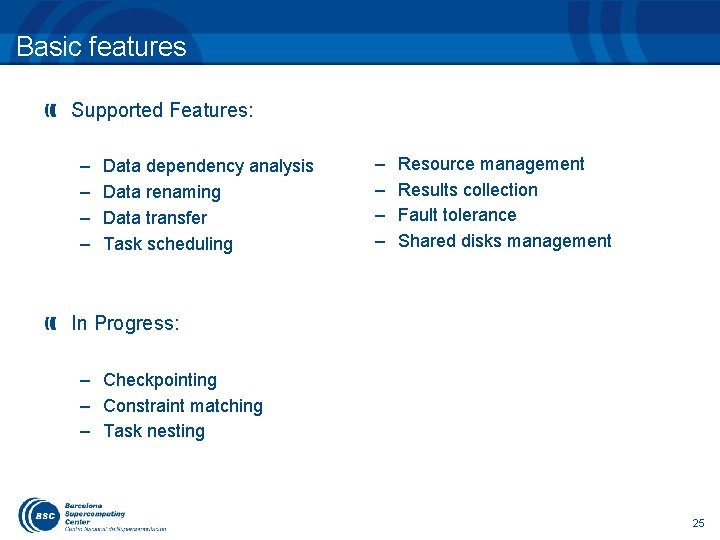
Basic features Supported Features: – – Data dependency analysis Data renaming Data transfer Task scheduling – – Resource management Results collection Fault tolerance Shared disks management In Progress: – Checkpointing – Constraint matching – Task nesting 25
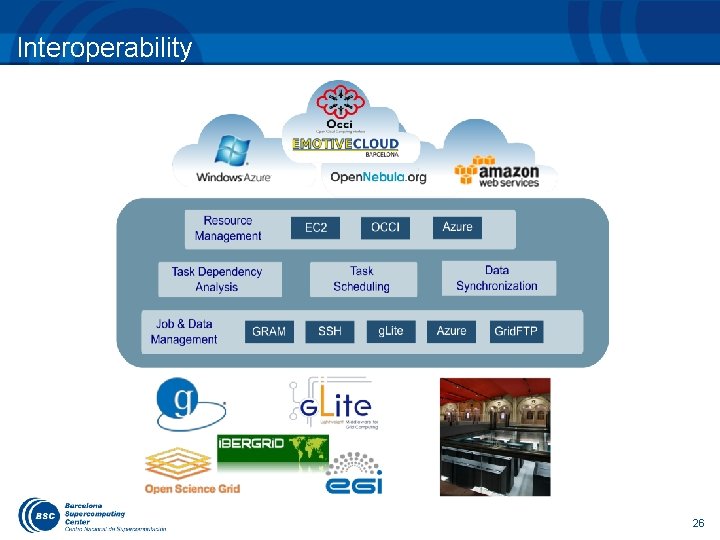
Interoperability 26
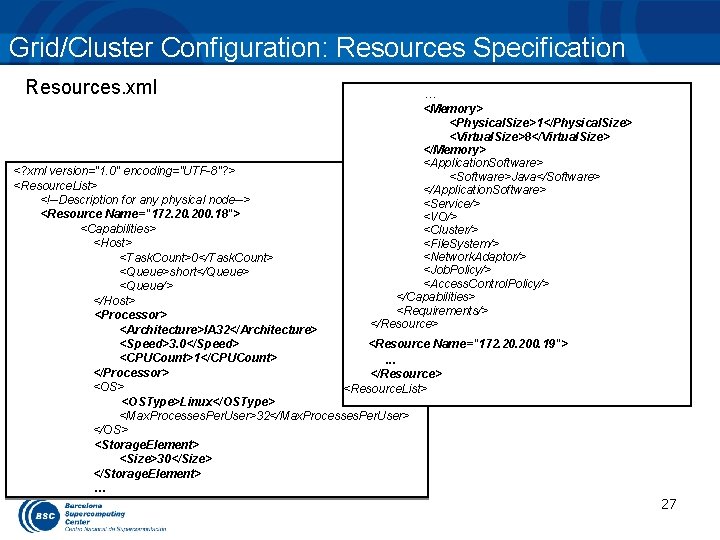
Grid/Cluster Configuration: Resources Specification Resources. xml … <Memory> <Physical. Size>1</Physical. Size> <Virtual. Size>8</Virtual. Size> </Memory> <Application. Software> <Software>Java</Software> </Application. Software> <Service/> <VO/> <Cluster/> <File. System/> <Network. Adaptor/> <Job. Policy/> <Access. Control. Policy/> </Capabilities> <Requirements/> </Resource> <? xml version="1. 0" encoding="UTF-8"? > <Resource. List> <!--Description for any physical node--> <Resource Name="172. 200. 18"> <Capabilities> <Host> <Task. Count>0</Task. Count> <Queue>short</Queue> <Queue/> </Host> <Processor> <Architecture>IA 32</Architecture> <Speed>3. 0</Speed> <Resource Name="172. 200. 19"> <CPUCount>1</CPUCount>. . . </Processor> </Resource> <OS> <Resource. List> <OSType>Linux</OSType> <Max. Processes. Per. User>32</Max. Processes. Per. User> </OS> <Storage. Element> <Size>30</Size> </Storage. Element> … 27
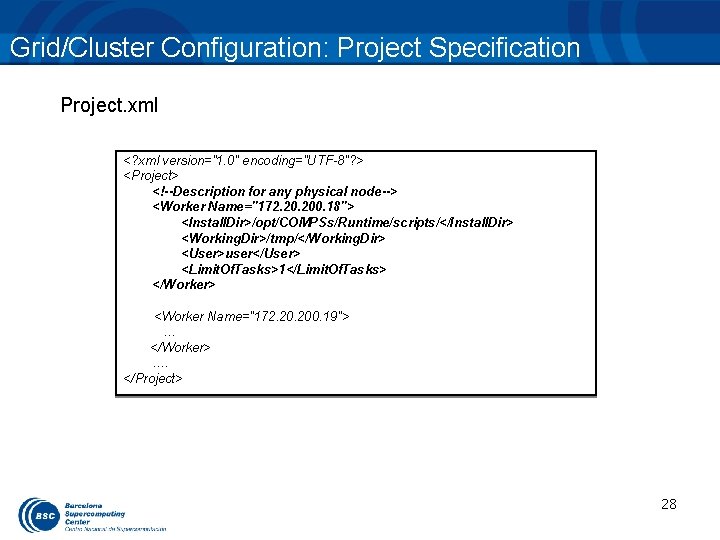
Grid/Cluster Configuration: Project Specification Project. xml <? xml version="1. 0" encoding="UTF-8"? > <Project> <!--Description for any physical node--> <Worker Name="172. 200. 18"> <Install. Dir>/opt/COMPSs/Runtime/scripts/</Install. Dir> <Working. Dir>/tmp/</Working. Dir> <User>user</User> <Limit. Of. Tasks>1</Limit. Of. Tasks> </Worker> <Worker Name="172. 200. 19"> … </Worker> …. </Project> 28
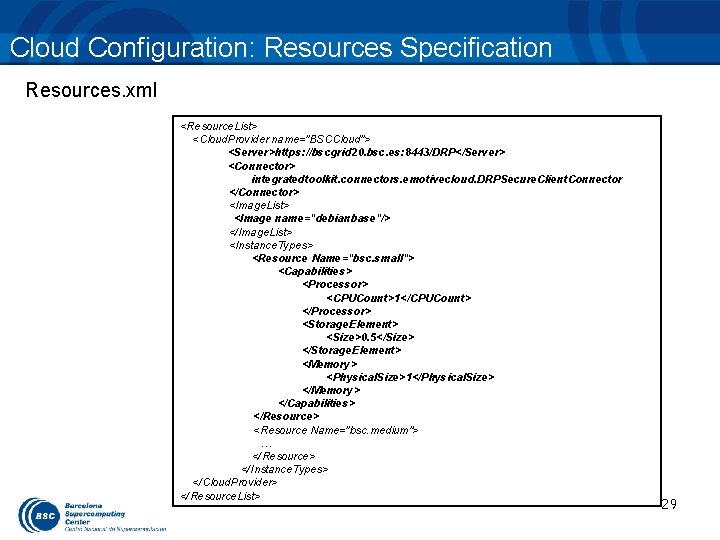
Cloud Configuration: Resources Specification Resources. xml <Resource. List> <Cloud. Provider name="BSCCloud"> <Server>https: //bscgrid 20. bsc. es: 8443/DRP</Server> <Connector> integratedtoolkit. connectors. emotivecloud. DRPSecure. Client. Connector </Connector> <Image. List> <Image name="debianbase"/> </Image. List> <Instance. Types> <Resource Name="bsc. small"> <Capabilities> <Processor> <CPUCount>1</CPUCount> </Processor> <Storage. Element> <Size>0. 5</Size> </Storage. Element> <Memory> <Physical. Size>1</Physical. Size> </Memory> </Capabilities> </Resource> <Resource Name="bsc. medium"> … </Resource> </Instance. Types> </Cloud. Provider> </Resource. List> 29
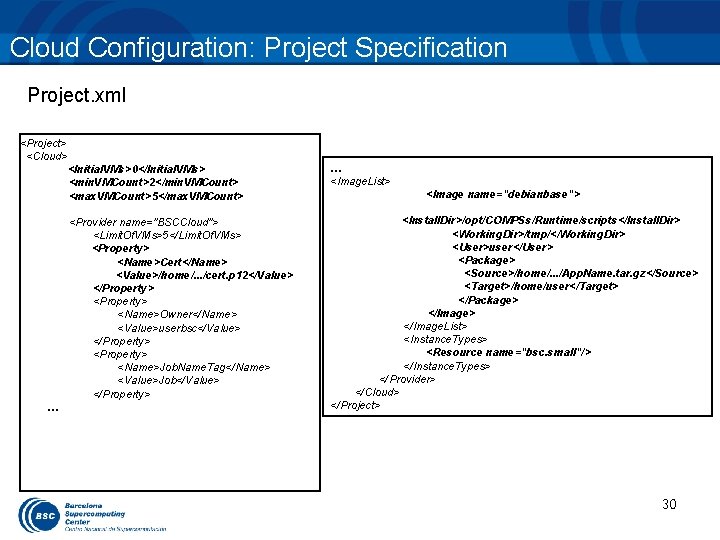
Cloud Configuration: Project Specification Project. xml <Project> <Cloud> … <Initial. VMs>0</Initial. VMs> <min. VMCount>2</min. VMCount> <max. VMCount>5</max. VMCount> … <Image. List> <Provider name="BSCCloud"> <Limit. Of. VMs>5</Limit. Of. VMs> <Property> <Name>Cert</Name> <Value>/home/. . . /cert. p 12</Value> </Property> <Name>Owner</Name> <Value>userbsc</Value> </Property> <Name>Job. Name. Tag</Name> <Value>Job</Value> </Property> <Install. Dir>/opt/COMPSs/Runtime/scripts</Install. Dir> <Working. Dir>/tmp/</Working. Dir> <User>user</User> <Package> <Source>/home/. . . /App. Name. tar. gz</Source> <Target>/home/user</Target> </Package> </Image. List> <Instance. Types> <Resource name="bsc. small"/> </Instance. Types> </Provider> </Cloud> </Project> <Image name="debianbase"> 30
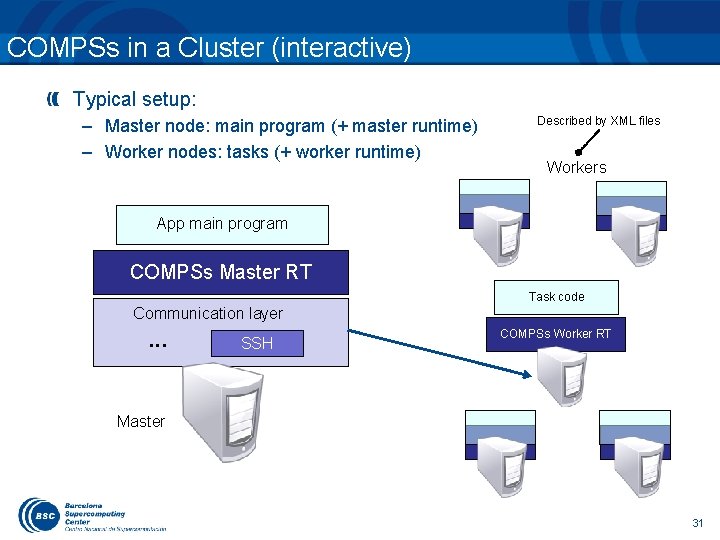
COMPSs in a Cluster (interactive) Typical setup: – Master node: main program (+ master runtime) – Worker nodes: tasks (+ worker runtime) Described by XML files Workers App main program COMPSs Master RT Task code Communication layer . . . SSH COMPSs Worker RT Master 31
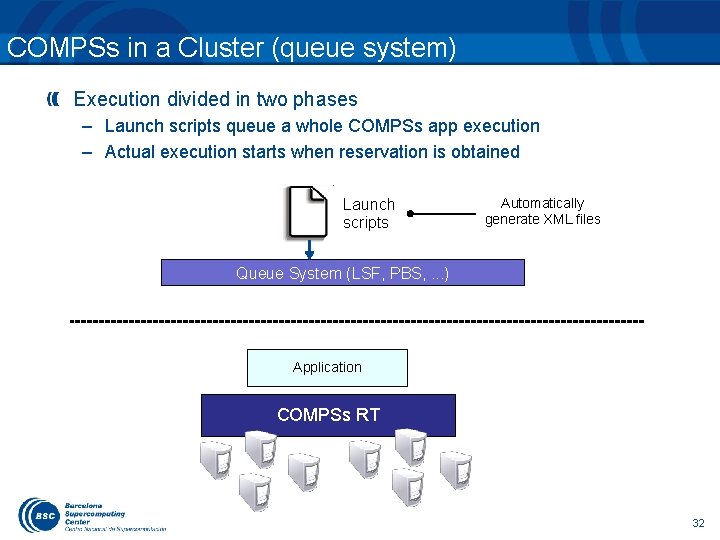
COMPSs in a Cluster (queue system) Execution divided in two phases – Launch scripts queue a whole COMPSs app execution – Actual execution starts when reservation is obtained Launch scripts Automatically generate XML files Queue System (LSF, PBS, . . . ) Application COMPSs RT 32
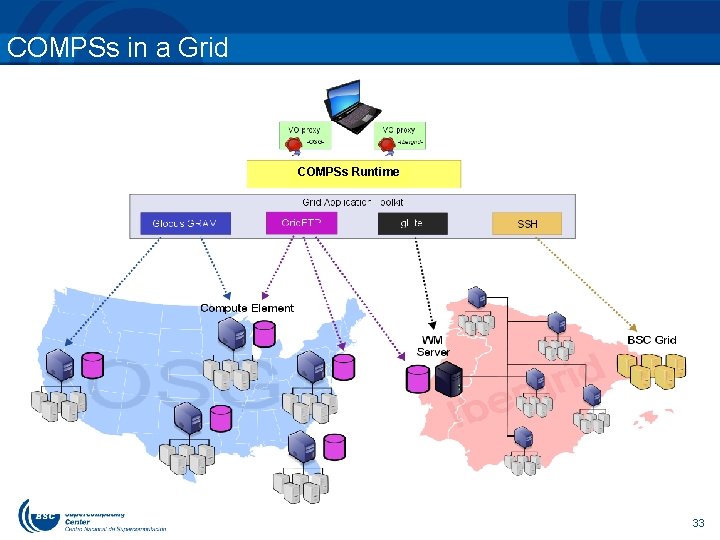
COMPSs in a Grid COMPSs Runtime 33
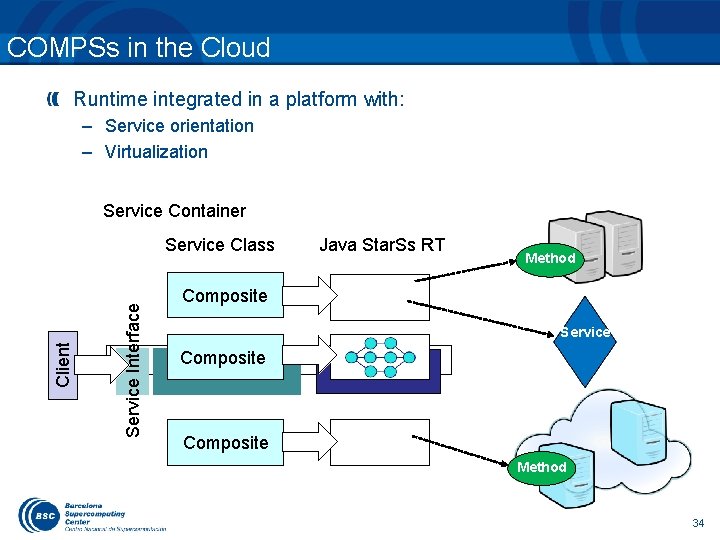
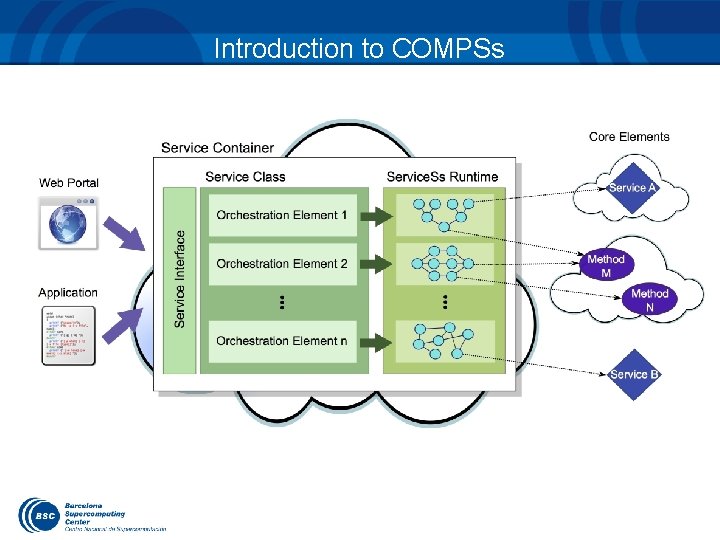
COMPSs in the Cloud Runtime integrated in a platform with: – Service orientation – Virtualization Service Container Java Star. Ss RT Method Composite Service . . . Composite . . . Service Interface Client Service Class Composite Method 34
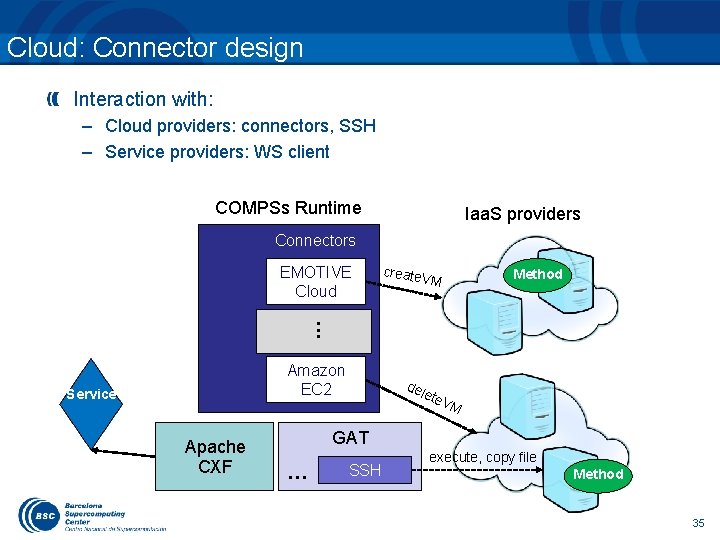
Cloud: Connector design Interaction with: – Cloud providers: connectors, SSH – Service providers: WS client COMPSs Runtime Iaa. S providers Connectors create Method VM . . . EMOTIVE Cloud Amazon EC 2 Service Apache CXF del ete V M GAT . . . SSH execute, copy file Method 35
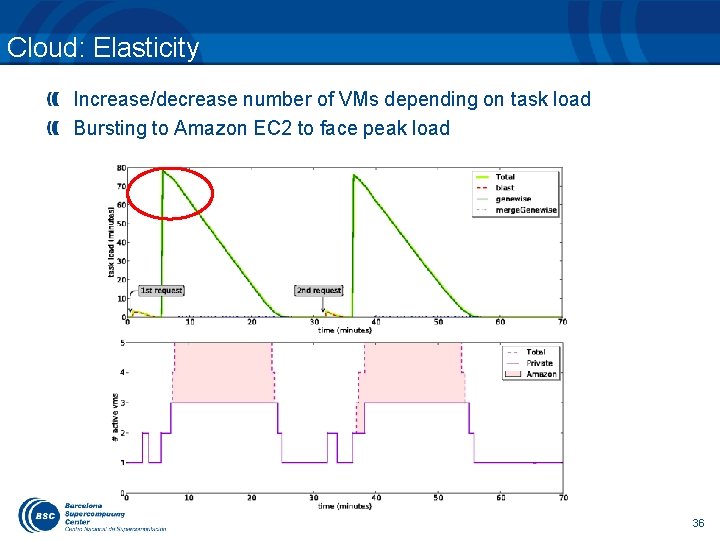
Cloud: Elasticity Increase/decrease number of VMs depending on task load Bursting to Amazon EC 2 to face peak load 36
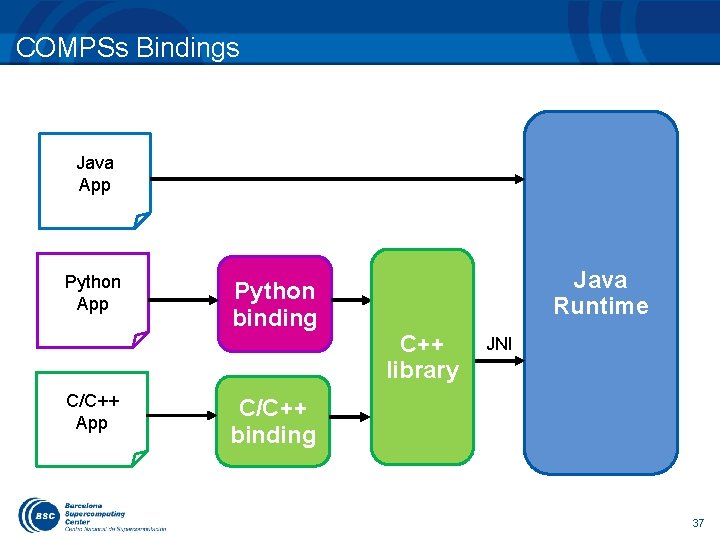
COMPSs Bindings Java App Python App C/C++ App Python binding Java Runtime C++ library JNI C/C++ binding 37
DEMOS
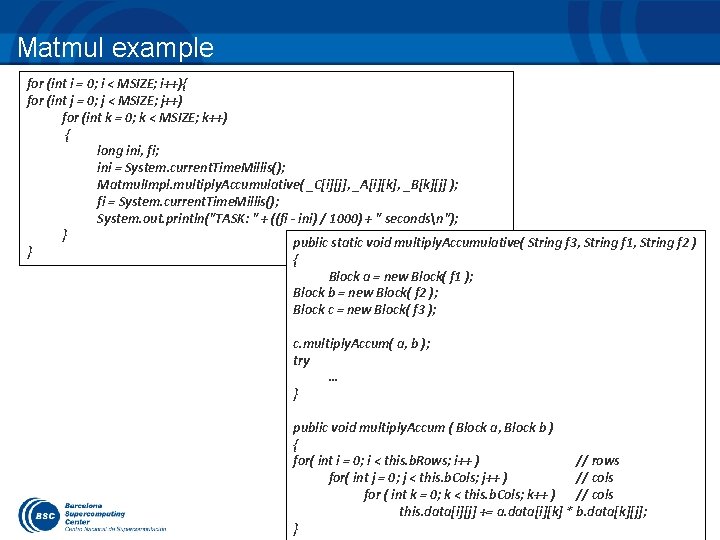
Matmul example for (int i = 0; i < MSIZE; i++){ for (int j = 0; j < MSIZE; j++) for (int k = 0; k < MSIZE; k++) { long ini, fi; ini = System. current. Time. Millis(); Matmul. Impl. multiply. Accumulative( _C[i][j], _A[i][k], _B[k][j] ); fi = System. current. Time. Millis(); System. out. println("TASK: " + ((fi - ini) / 1000) + " secondsn"); } public static void multiply. Accumulative( String f 3, String f 1, String f 2 ) } { Block a = new Block( f 1 ); Block b = new Block( f 2 ); Block c = new Block( f 3 ); c. multiply. Accum( a, b ); try … } public void multiply. Accum ( Block a, Block b ) { for( int i = 0; i < this. b. Rows; i++ ) // rows for( int j = 0; j < this. b. Cols; j++ ) // cols for ( int k = 0; k < this. b. Cols; k++ ) // cols this. data[i][j] += a. data[i][k] * b. data[k][j]; } 39
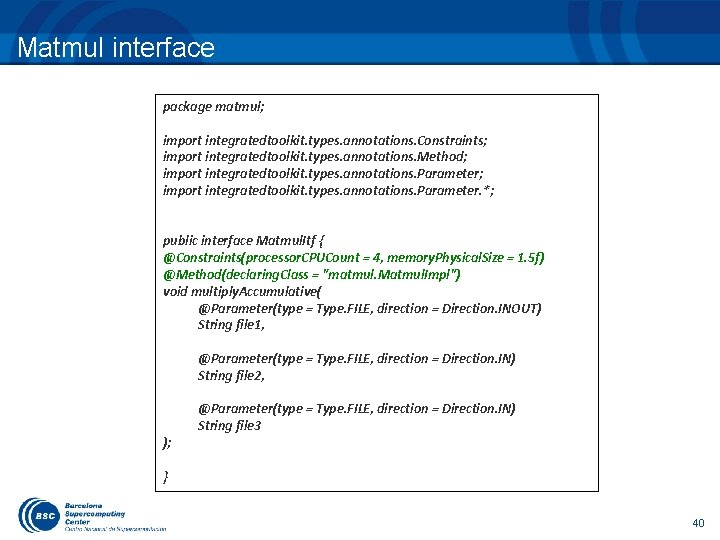
Matmul interface package matmul; import integratedtoolkit. types. annotations. Constraints; import integratedtoolkit. types. annotations. Method; import integratedtoolkit. types. annotations. Parameter. *; public interface Matmul. Itf { @Constraints(processor. CPUCount = 4, memory. Physical. Size = 1. 5 f) @Method(declaring. Class = "matmul. Matmul. Impl") void multiply. Accumulative( @Parameter(type = Type. FILE, direction = Direction. INOUT) String file 1, @Parameter(type = Type. FILE, direction = Direction. IN) String file 2, ); @Parameter(type = Type. FILE, direction = Direction. IN) String file 3 } 40
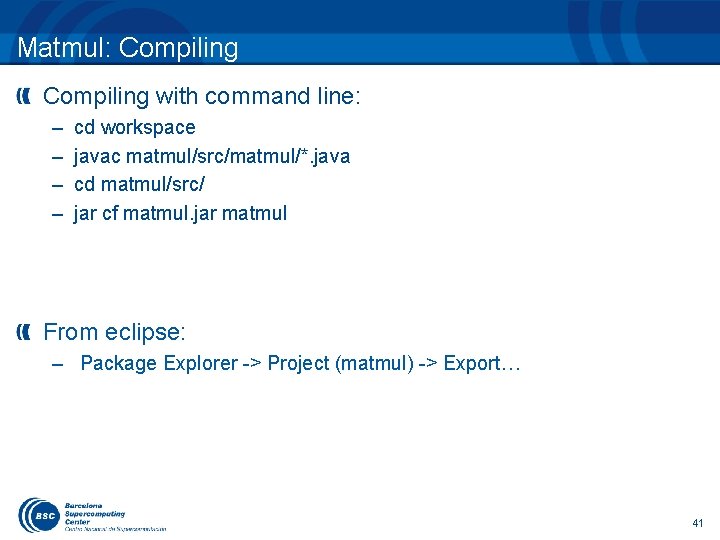
Matmul: Compiling with command line: – – cd workspace javac matmul/src/matmul/*. java cd matmul/src/ jar cf matmul. jar matmul From eclipse: – Package Explorer -> Project (matmul) -> Export… 41
Matmul: Deploying In this case, in the same machine – Copy to home directory – cd – cp. /matmul/src/matmul. jar. In remote machines – Code needs to be transfer to machine that will host main code 42
Matmul: Executing Set CLASSPATH – export CLASSPATH=$CLASSPATH: /home/user/matmul. jar – runcompss matmul. Matmul 4 43
Matmul: Monitoring execution Browse – http: //localhost: 8080/compss-monitor 44
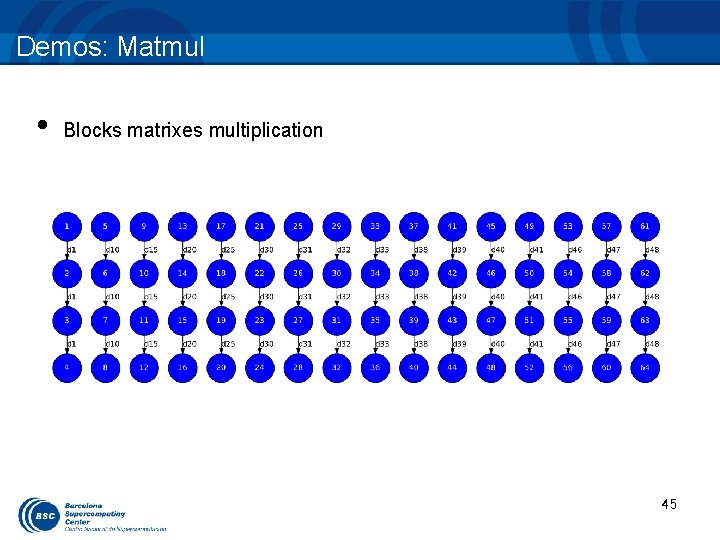
Demos: Matmul • Blocks matrixes multiplication 45
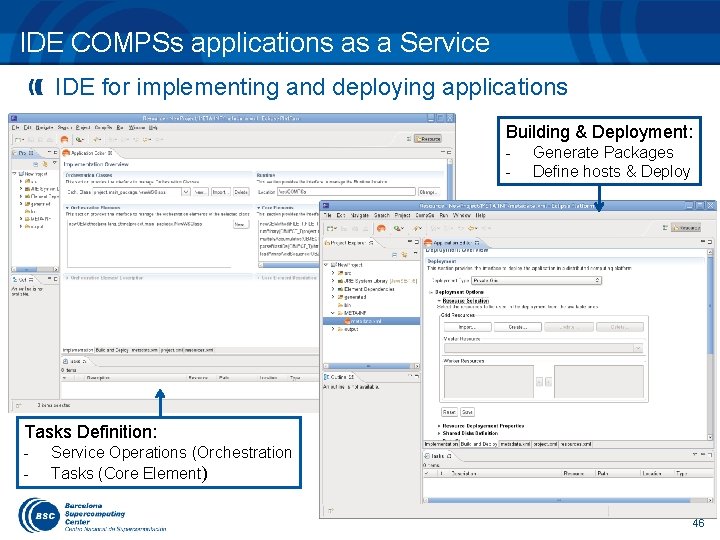
IDE COMPSs applications as a Service IDE for implementing and deploying applications Building & Deployment: - Generate Packages Define hosts & Deploy Tasks Definition: - Service Operations (Orchestration Tasks (Core Element) 46
Demos: Gene Detection Application Gene Detection algorithm designed by the BSC Life Sciences department – Automatic Homology-based gene detection and analysis Combine services with computations – – Example that shows different capabilities of COMPSs Implicit Synchronization points Different method and service call types Objects and files as parameters
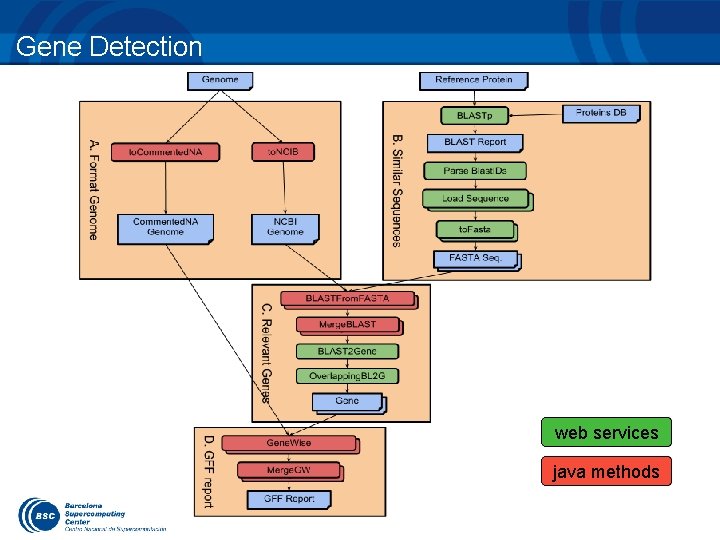
Gene Detection web services java methods
HANDS-ON
Hands-On: Overview • • COMPSs Virtual Machine setup Applications Overview (BLAST, HMMER, …) • • • Code modification Configuration, compilation & execution Monitoring, debugging Overview of tracing and trace performance analysis IDE 50
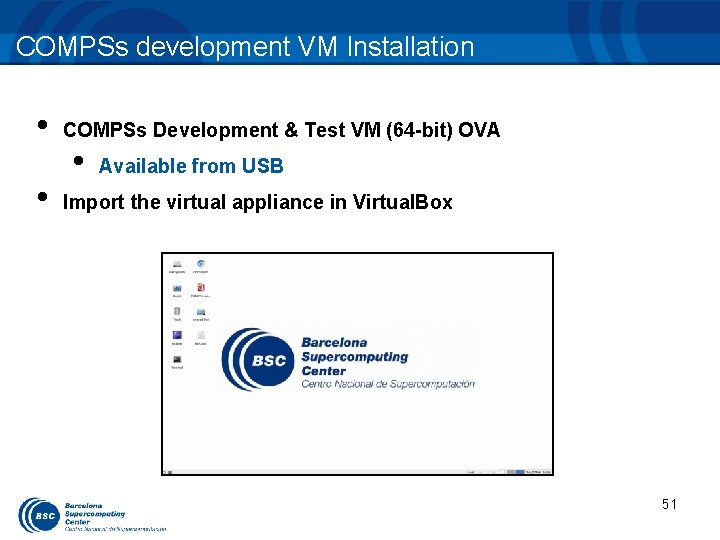
COMPSs development VM Installation • • COMPSs Development & Test VM (64 -bit) OVA • Available from USB Import the virtual appliance in Virtual. Box 51
BLAST: Hands-on
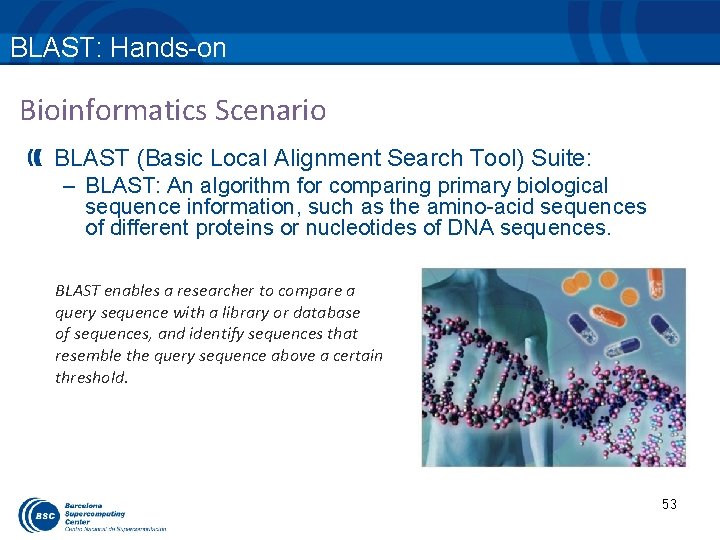
BLAST: Hands-on Bioinformatics Scenario BLAST (Basic Local Alignment Search Tool) Suite: – BLAST: An algorithm for comparing primary biological sequence information, such as the amino-acid sequences of different proteins or nucleotides of DNA sequences. BLAST enables a researcher to compare a query sequence with a library or database of sequences, and identify sequences that resemble the query sequence above a certain threshold. 53
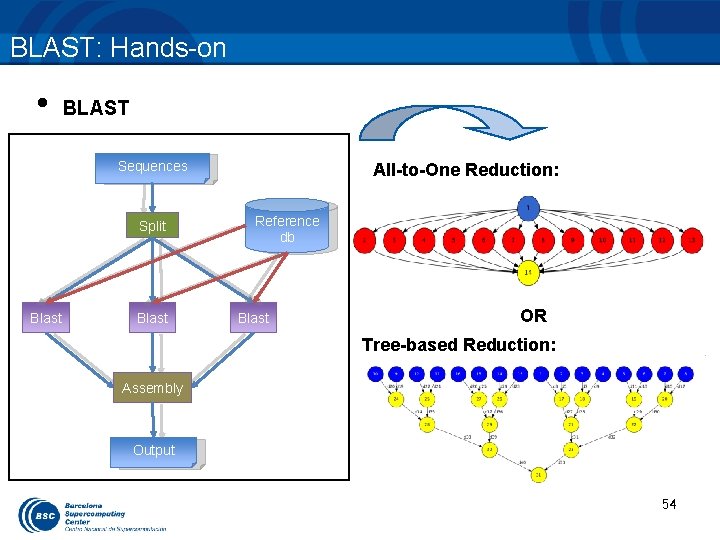
BLAST: Hands-on • BLAST Sequences Split Blast All-to-One Reduction: Reference db Blast OR Tree-based Reduction: Assembly Output 54
![BLAST: All-to-One reduction • Main Application (All-to-One): public static void main(String args[]) throws Exception](http://slidetodoc.com/presentation_image_h2/be1784284a4eea3ff6eeafc668e40ca4/image-55.jpg "BLAST: All-to-One reduction • Main Application (All-to-One): public static void main(String args[]) throws Exception")
BLAST: All-to-One reduction • Main Application (All-to-One): public static void main(String args[]) throws Exception { sequences[] = split. Sequences(input. File, n. Frags); for (partition: sequences) { Blast. Impl. align(database, partition. Output, blast. Binary, command. Args); partition. Outputs. add(partition. Output); } } assembly. Partitions(partial. Outputs, output. File. Name, temp. Dir, n. Frags); 55
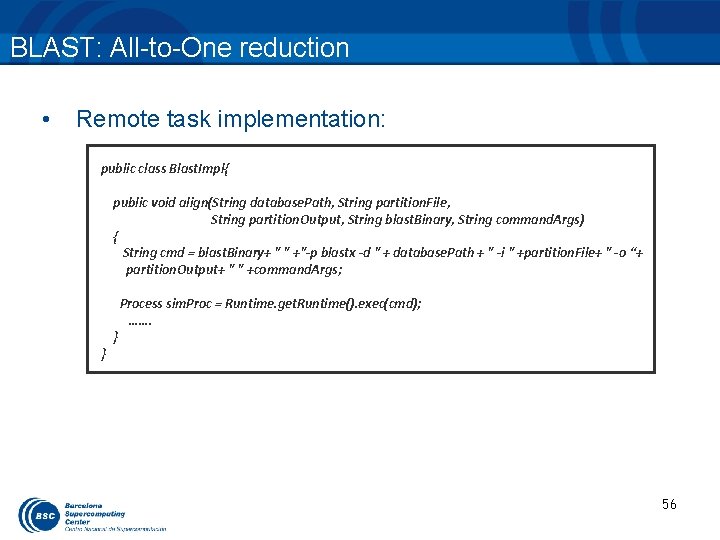
BLAST: All-to-One reduction • Remote task implementation: public class Blast. Impl{ public void align(String database. Path, String partition. File, String partition. Output, String blast. Binary, String command. Args) { String cmd = blast. Binary+ " " +"-p blastx -d " + database. Path + " -i " +partition. File+ " -o “+ partition. Output+ " " +command. Args; } } Process sim. Proc = Runtime. get. Runtime(). exec(cmd); ……. 56
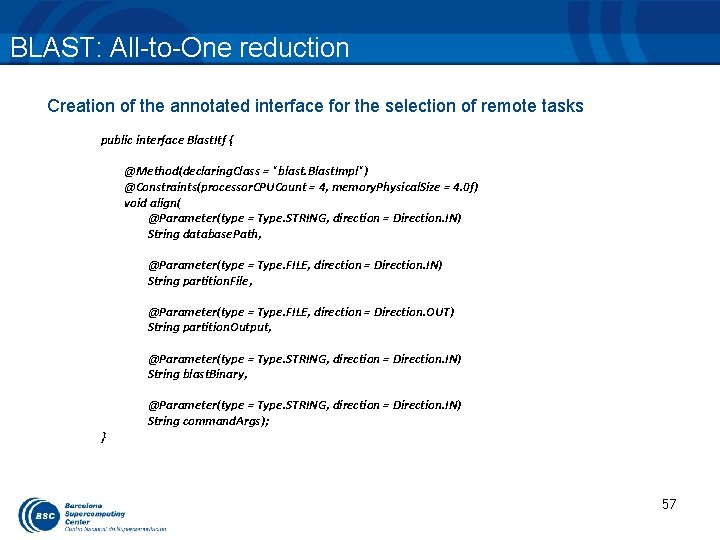
BLAST: All-to-One reduction Creation of the annotated interface for the selection of remote tasks public interface Blast. Itf { @Method(declaring. Class = "blast. Blast. Impl") @Constraints(processor. CPUCount = 4, memory. Physical. Size = 4. 0 f) void align( @Parameter(type = Type. STRING, direction = Direction. IN) String database. Path, @Parameter(type = Type. FILE, direction = Direction. IN) String partition. File, @Parameter(type = Type. FILE, direction = Direction. OUT) String partition. Output, @Parameter(type = Type. STRING, direction = Direction. IN) String blast. Binary, } @Parameter(type = Type. STRING, direction = Direction. IN) String command. Args); 57
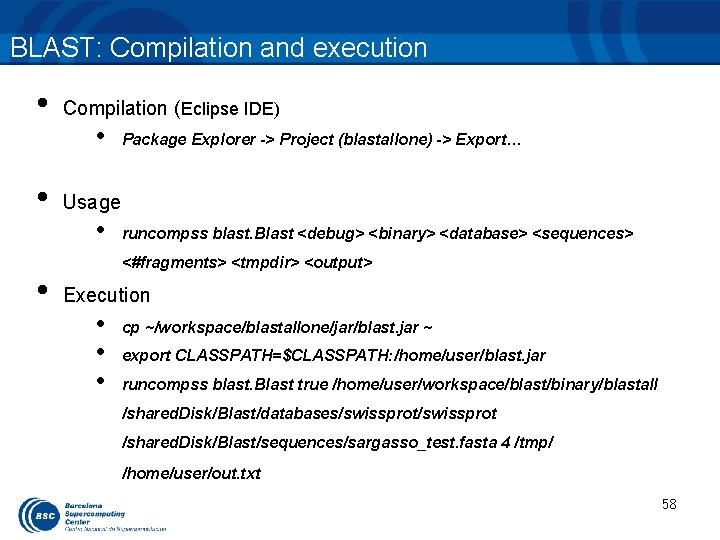
BLAST: Compilation and execution • • • Compilation (Eclipse IDE) • Package Explorer -> Project (blastallone) -> Export… Usage • runcompss blast. Blast <debug> <binary> <database> <sequences> <#fragments> <tmpdir> <output> Execution • • • cp ~/workspace/blastallone/jar/blast. jar ~ export CLASSPATH=$CLASSPATH: /home/user/blast. jar runcompss blast. Blast true /home/user/workspace/blast/binary/blastall /shared. Disk/Blast/databases/swissprot /shared. Disk/Blast/sequences/sargasso_test. fasta 4 /tmp/ /home/user/out. txt 58
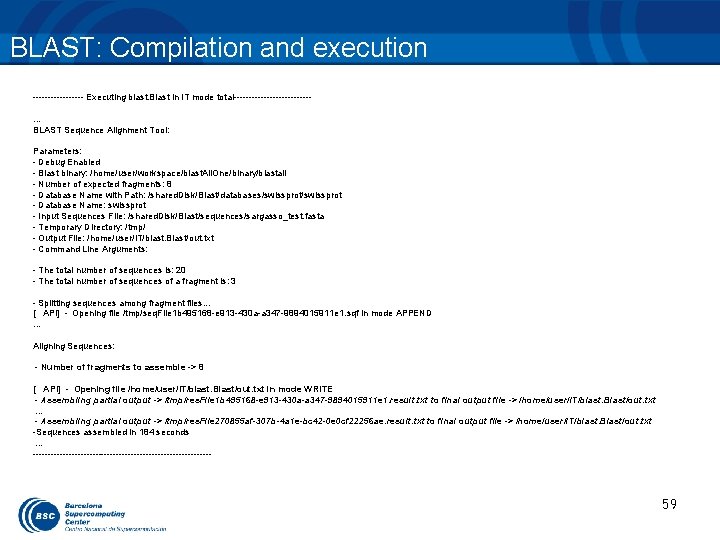
BLAST: Compilation and execution --------- Executing blast. Blast in IT mode total-------------… BLAST Sequence Alignment Tool: Parameters: - Debug Enabled - Blast binary: /home/user/workspace/blast. All. One/binary/blastall - Number of expected fragments: 8 - Database Name with Path: /shared. Disk/Blast/databases/swissprot - Database Name: swissprot - Input Sequences File: /shared. Disk/Blast/sequences/sargasso_test. fasta - Temporary Directory: /tmp/ - Output File: /home/user/IT/blast. Blast/out. txt - Command Line Arguments: - The total number of sequences is: 20 - The total number of sequences of a fragment is: 3 - Splitting sequences among fragment files. . . [ API] - Opening file /tmp/seq. File 1 b 495168 -e 913 -430 a-a 347 -9894015911 e 1. sqf in mode APPEND … Aligning Sequences: - Number of fragments to assemble -> 8 [ API] - Opening file /home/user/IT/blast. Blast/out. txt in mode WRITE - Assembling partial output -> /tmp/res. File 1 b 495168 -e 913 -430 a-a 347 -9894015911 e 1. result. txt to final output file -> /home/user/IT/blast. Blast/out. txt … - Assembling partial output -> /tmp/res. File 270855 af-307 b-4 a 1 e-bc 42 -0 e 0 cf 22256 ae. result. txt to final output file -> /home/user/IT/blast. Blast/out. txt -Sequences assembled in 184 seconds … ------------------------------ 59
BLAST: All-to-One (work) • Generate the final graph • Launch BLAST (All-to-One) 60
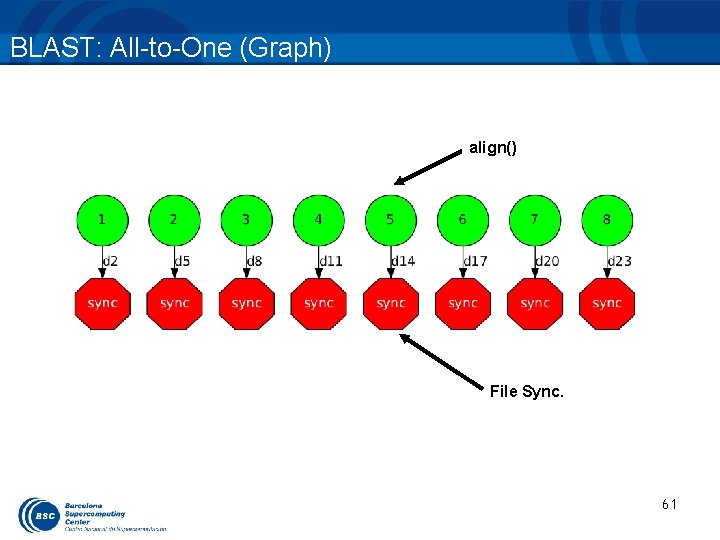
BLAST: All-to-One (Graph) align() File Sync. 61
BLAST: Tree-based reduction (work) • Code the final reduction and its interface. 62
![BLAST: Tree-based reduction • Main Application (Tree-based): public static void main(String args[]) throws Exception](http://slidetodoc.com/presentation_image_h2/be1784284a4eea3ff6eeafc668e40ca4/image-63.jpg "BLAST: Tree-based reduction • Main Application (Tree-based): public static void main(String args[]) throws Exception")
BLAST: Tree-based reduction • Main Application (Tree-based): public static void main(String args[]) throws Exception { sequences[] = split. Sequences(input. File, n. Frags); for (partition: sequences) { Blast. Impl. align(database, partition. Output, blast. Binary, command. Args); partition. Outputs. add(partition. Output); } } //Final Assembly process -> Merge 2 by 2 int neighbour=1; while (neighbour<partial. Outputs. size()){ for (int result=0; result<partial. Outputs. size(); result+=2*neighbour){ if (result+neighbour < partial. Outputs. size()){ Blast. Impl. assembly. Partitions(partial. Outputs. get(result), partial. Outputs. get(result+neighbor)); last. Merge = partial. Outputs. get(result); } } neighbor*=2; } 63
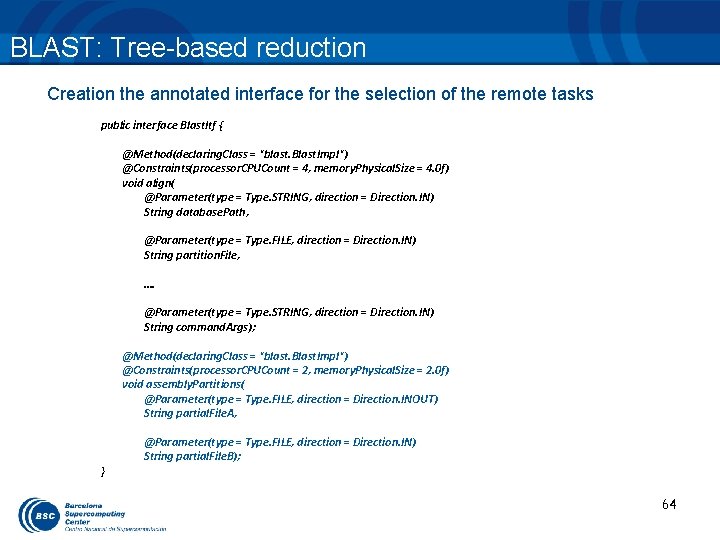
BLAST: Tree-based reduction Creation the annotated interface for the selection of the remote tasks public interface Blast. Itf { @Method(declaring. Class = "blast. Blast. Impl") @Constraints(processor. CPUCount = 4, memory. Physical. Size = 4. 0 f) void align( @Parameter(type = Type. STRING, direction = Direction. IN) String database. Path, @Parameter(type = Type. FILE, direction = Direction. IN) String partition. File, …. @Parameter(type = Type. STRING, direction = Direction. IN) String command. Args); @Method(declaring. Class = "blast. Blast. Impl") @Constraints(processor. CPUCount = 2, memory. Physical. Size = 2. 0 f) void assembly. Partitions( @Parameter(type = Type. FILE, direction = Direction. INOUT) String partial. File. A, } @Parameter(type = Type. FILE, direction = Direction. IN) String partial. File. B); 64
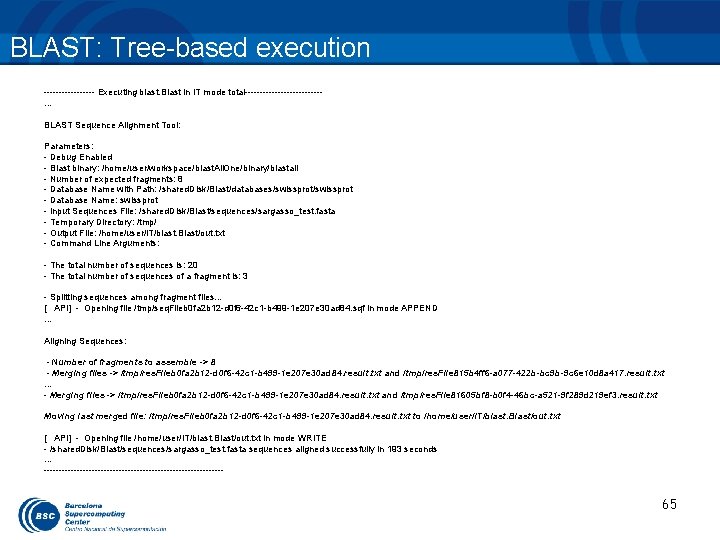
BLAST: Tree-based execution --------- Executing blast. Blast in IT mode total-------------… BLAST Sequence Alignment Tool: Parameters: - Debug Enabled - Blast binary: /home/user/workspace/blast. All. One/binary/blastall - Number of expected fragments: 8 - Database Name with Path: /shared. Disk/Blast/databases/swissprot - Database Name: swissprot - Input Sequences File: /shared. Disk/Blast/sequences/sargasso_test. fasta - Temporary Directory: /tmp/ - Output File: /home/user/IT/blast. Blast/out. txt - Command Line Arguments: - The total number of sequences is: 20 - The total number of sequences of a fragment is: 3 - Splitting sequences among fragment files. . . [ API] - Opening file /tmp/seq. Fileb 0 fa 2 b 12 -d 0 f 6 -42 c 1 -b 499 -1 e 207 e 30 ad 84. sqf in mode APPEND … Aligning Sequences: - Number of fragments to assemble -> 8 - Merging files -> /tmp/res. Fileb 0 fa 2 b 12 -d 0 f 6 -42 c 1 -b 499 -1 e 207 e 30 ad 84. result. txt and /tmp/res. File 815 b 4 ff 6 -a 077 -422 b-bc 9 b-9 c 6 e 10 d 8 a 417. result. txt … - Merging files -> /tmp/res. Fileb 0 fa 2 b 12 -d 0 f 6 -42 c 1 -b 499 -1 e 207 e 30 ad 84. result. txt and /tmp/res. File 81605 bf 8 -b 0 f 4 -46 bc-a 521 -9 f 289 d 219 ef 3. result. txt Moving last merged file: /tmp/res. Fileb 0 fa 2 b 12 -d 0 f 6 -42 c 1 -b 499 -1 e 207 e 30 ad 84. result. txt to /home/user/IT/blast. Blast/out. txt [ API] - Opening file /home/user/IT/blast. Blast/out. txt in mode WRITE - /shared. Disk/Blast/sequences/sargasso_test. fasta sequences aligned successfully in 193 seconds … ------------------------------ 65
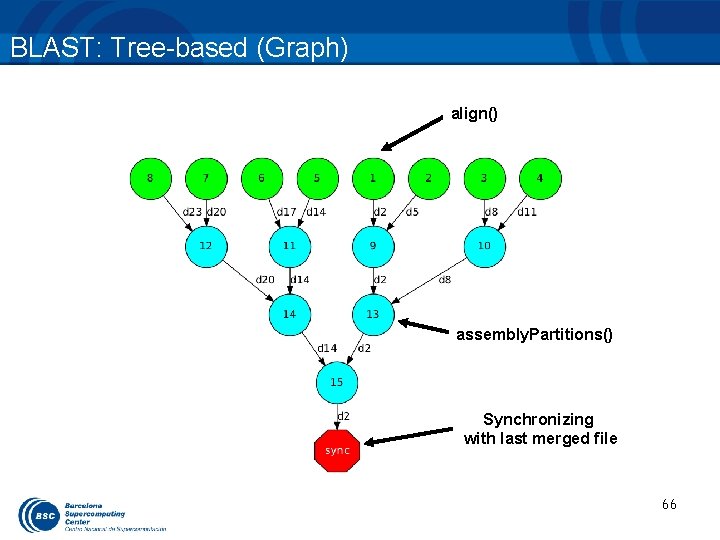
BLAST: Tree-based (Graph) align() assembly. Partitions() Synchronizing with last merged file 66
HMMER: Hands-on
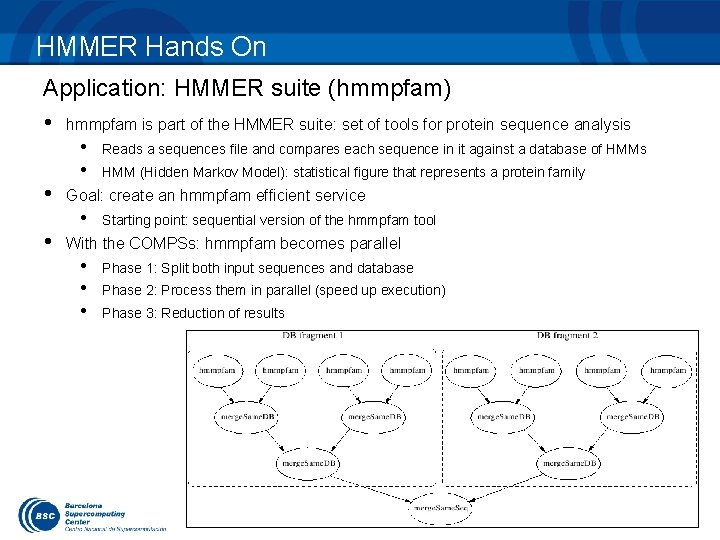
HMMER Hands On Application: HMMER suite (hmmpfam) • hmmpfam is part of the HMMER suite: set of tools for protein sequence analysis • • Reads a sequences file and compares each sequence in it against a database of HMMs HMM (Hidden Markov Model): statistical figure that represents a protein family Goal: create an hmmpfam efficient service • Starting point: sequential version of the hmmpfam tool With the COMPSs: hmmpfam becomes parallel • • • Phase 1: Split both input sequences and database Phase 2: Process them in parallel (speed up execution) Phase 3: Reduction of results 17
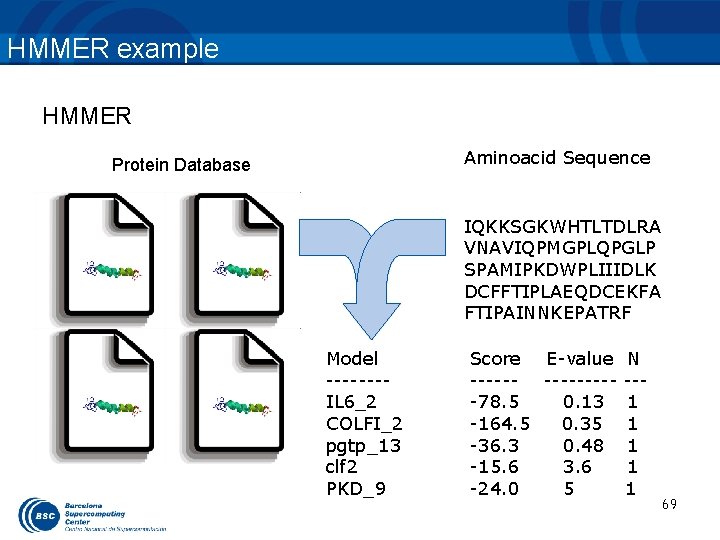
HMMER example HMMER Aminoacid Sequence Protein Database IQKKSGKWHTLTDLRA VNAVIQPMGPLQPGLP SPAMIPKDWPLIIIDLK DCFFTIPLAEQDCEKFA FTIPAINNKEPATRF Model -------IL 6_2 COLFI_2 pgtp_13 clf 2 PKD_9 Score E-value N --------- ---78. 5 0. 13 1 -164. 5 0. 35 1 -36. 3 0. 48 1 -15. 6 3. 6 1 -24. 0 5 1 69
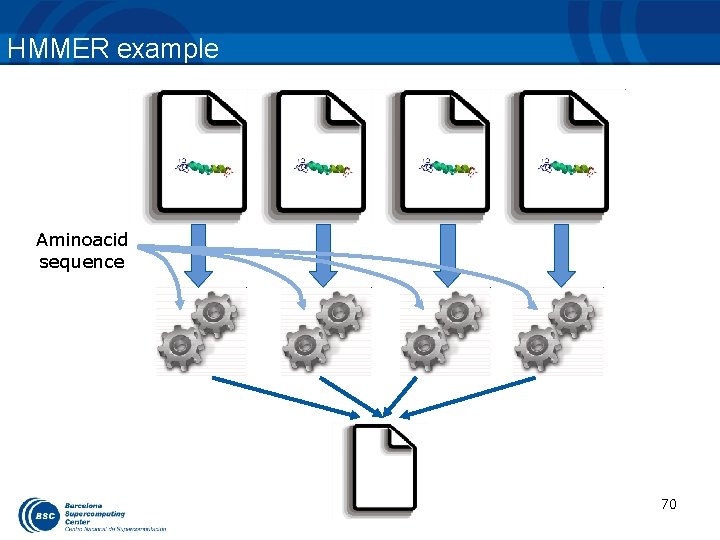
HMMER example Aminoacid sequence 70
![HMMER example (code) String[] outputs = new String[num. DBFrags]; //Process for (String db. Frag](http://slidetodoc.com/presentation_image_h2/be1784284a4eea3ff6eeafc668e40ca4/image-71.jpg "HMMER example (code) String[] outputs = new String[num. DBFrags]; //Process for (String db. Frag")
HMMER example (code) String[] outputs = new String[num. DBFrags]; //Process for (String db. Frag : db. Frags) { outputs[db. Num]= HMMPfam. Impl. hmmpfam(sequence, db. Frag); } //Merge all DB outputs of the same DB fragment int neighbour = 1; while (neighbour < num. DBFrags) { for (int db = 0; db < num. DBFrags; db += 2 * neighbour) { if (db + neighbour < num. DBFrags) { HMMPfam. Impl. merge. Same. DB(outputs[db], outputs[db + neighbour]); } } neighbour *= 2; } 71
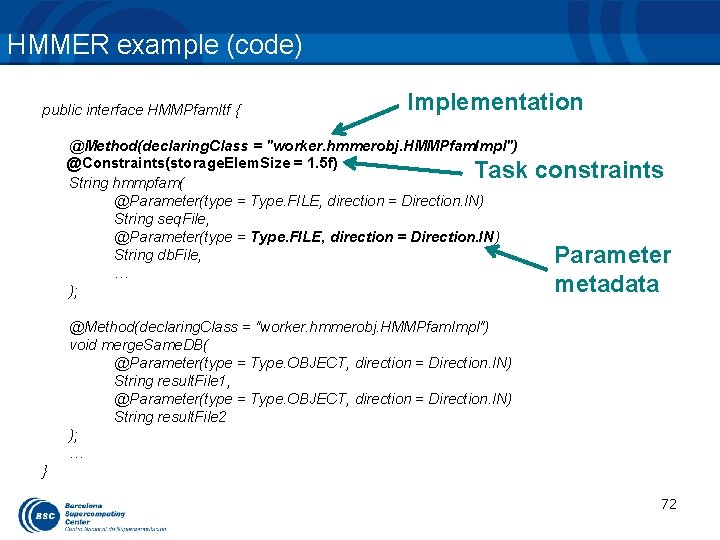
HMMER example (code) public interface HMMPfam. Itf { Implementation @Method(declaring. Class = "worker. hmmerobj. HMMPfam. Impl") @Constraints(storage. Elem. Size = 1. 5 f) String hmmpfam( @Parameter(type = Type. FILE, direction = Direction. IN) String seq. File, @Parameter(type = Type. FILE, direction = Direction. IN) String db. File, … ); Task constraints Parameter metadata @Method(declaring. Class = "worker. hmmerobj. HMMPfam. Impl") void merge. Same. DB( @Parameter(type = Type. OBJECT, direction = Direction. IN) String result. File 1, @Parameter(type = Type. OBJECT, direction = Direction. IN) String result. File 2 ); … } 72
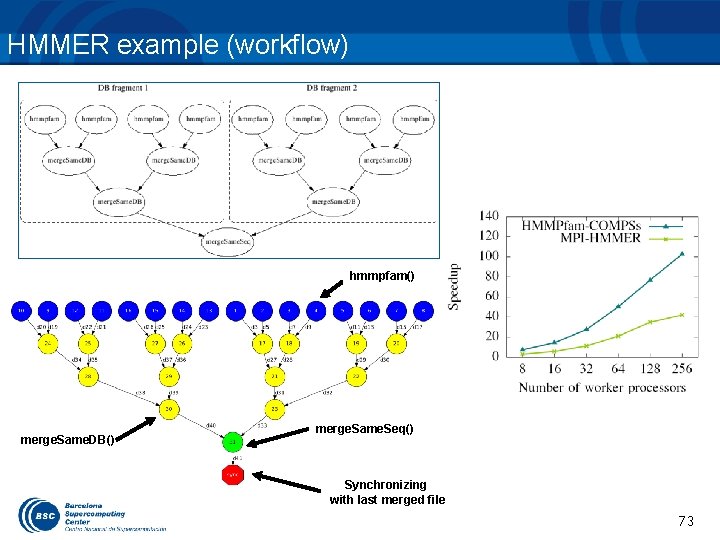
HMMER example (workflow) hmmpfam() merge. Same. DB() merge. Same. Seq() Synchronizing with last merged file 73 73
HMMER: Task Selection (work) • Complete the hmmpfam & merge. Same. Seq method interfaces. 74
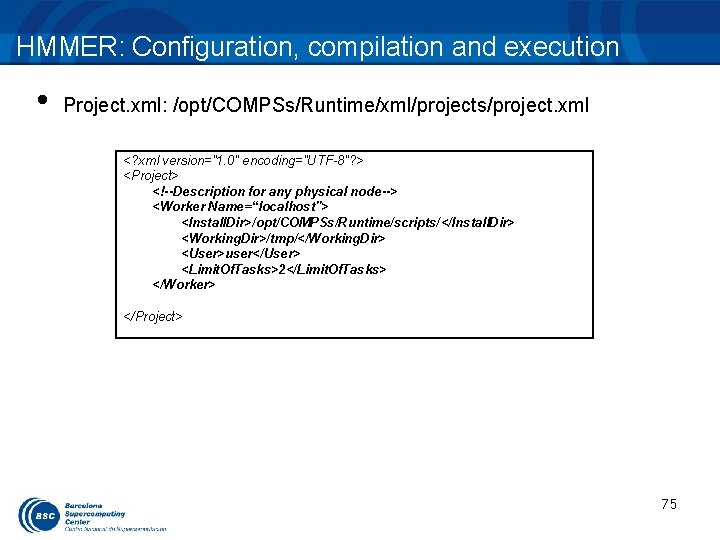
HMMER: Configuration, compilation and execution • Project. xml: /opt/COMPSs/Runtime/xml/projects/project. xml <? xml version="1. 0" encoding="UTF-8"? > <Project> <!--Description for any physical node--> <Worker Name=“localhost"> <Install. Dir>/opt/COMPSs/Runtime/scripts/</Install. Dir> <Working. Dir>/tmp/</Working. Dir> <User>user</User> <Limit. Of. Tasks>2</Limit. Of. Tasks> </Worker> </Project> 75
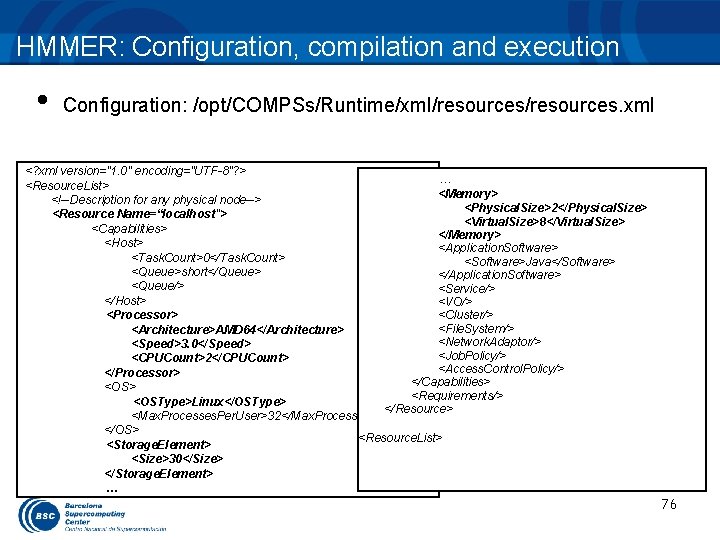
HMMER: Configuration, compilation and execution • Configuration: /opt/COMPSs/Runtime/xml/resources. xml <? xml version="1. 0" encoding="UTF-8"? > … <Resource. List> <Memory> <!--Description for any physical node--> <Physical. Size>2</Physical. Size> <Resource Name=“localhost"> <Virtual. Size>8</Virtual. Size> <Capabilities> </Memory> <Host> <Application. Software> <Task. Count>0</Task. Count> <Software>Java</Software> <Queue>short</Queue> </Application. Software> <Queue/> <Service/> </Host> <VO/> <Processor> <Cluster/> <File. System/> <Architecture>AMD 64</Architecture> <Network. Adaptor/> <Speed>3. 0</Speed> <Job. Policy/> <CPUCount>2</CPUCount> <Access. Control. Policy/> </Processor> </Capabilities> <OS> <Requirements/> <OSType>Linux</OSType> </Resource> <Max. Processes. Per. User>32</Max. Processes. Per. User> </OS> <Resource. List> <Storage. Element> <Size>30</Size> </Storage. Element> … 76
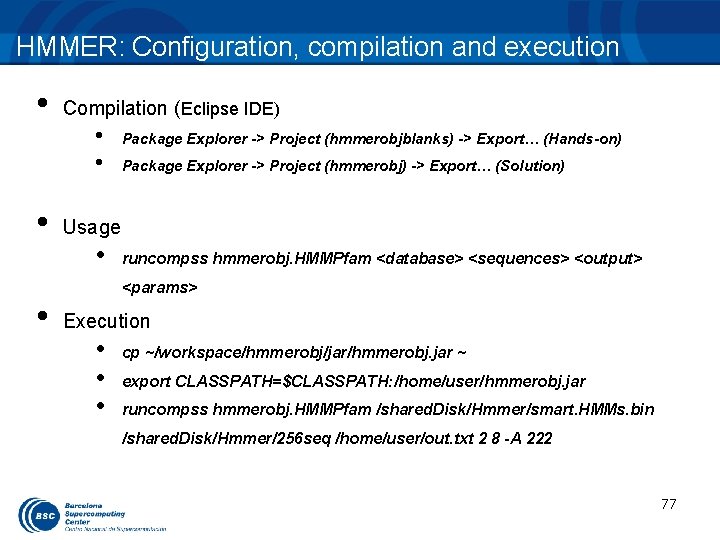
HMMER: Configuration, compilation and execution • • • Compilation (Eclipse IDE) • • Package Explorer -> Project (hmmerobjblanks) -> Export… (Hands-on) Package Explorer -> Project (hmmerobj) -> Export… (Solution) Usage • runcompss hmmerobj. HMMPfam <database> <sequences> <output> <params> Execution • • • cp ~/workspace/hmmerobj/jar/hmmerobj. jar ~ export CLASSPATH=$CLASSPATH: /home/user/hmmerobj. jar runcompss hmmerobj. HMMPfam /shared. Disk/Hmmer/smart. HMMs. bin /shared. Disk/Hmmer/256 seq /home/user/out. txt 2 8 -A 222 77
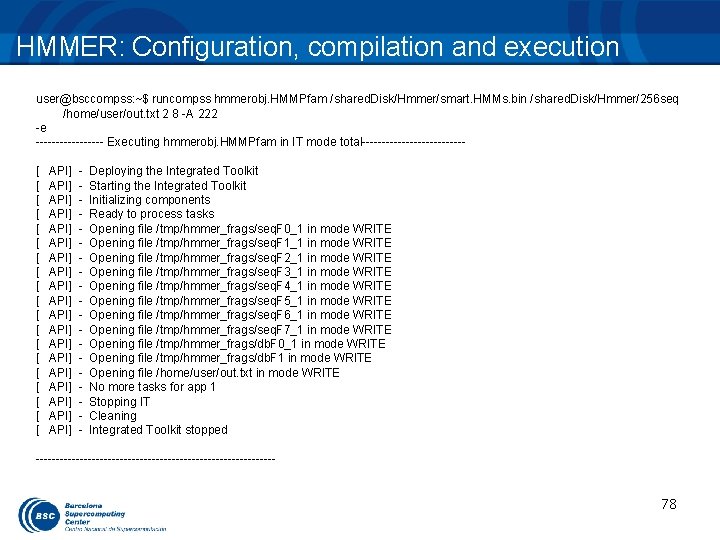
HMMER: Configuration, compilation and execution user@bsccompss: ~$ runcompss hmmerobj. HMMPfam /shared. Disk/Hmmer/smart. HMMs. bin /shared. Disk/Hmmer/256 seq /home/user/out. txt 2 8 -A 222 -e --------- Executing hmmerobj. HMMPfam in IT mode total-------------[ [ [ [ [ API] API] API] API] API] - Deploying the Integrated Toolkit Starting the Integrated Toolkit Initializing components Ready to process tasks Opening file /tmp/hmmer_frags/seq. F 0_1 in mode WRITE Opening file /tmp/hmmer_frags/seq. F 1_1 in mode WRITE Opening file /tmp/hmmer_frags/seq. F 2_1 in mode WRITE Opening file /tmp/hmmer_frags/seq. F 3_1 in mode WRITE Opening file /tmp/hmmer_frags/seq. F 4_1 in mode WRITE Opening file /tmp/hmmer_frags/seq. F 5_1 in mode WRITE Opening file /tmp/hmmer_frags/seq. F 6_1 in mode WRITE Opening file /tmp/hmmer_frags/seq. F 7_1 in mode WRITE Opening file /tmp/hmmer_frags/db. F 0_1 in mode WRITE Opening file /tmp/hmmer_frags/db. F 1 in mode WRITE Opening file /home/user/out. txt in mode WRITE No more tasks for app 1 Stopping IT Cleaning Integrated Toolkit stopped ------------------------------ 78
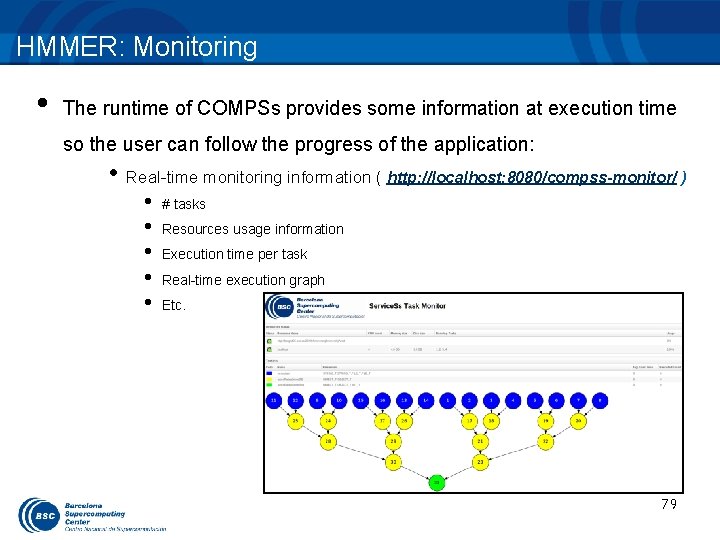
HMMER: Monitoring • The runtime of COMPSs provides some information at execution time so the user can follow the progress of the application: • Real-time monitoring information ( http: //localhost: 8080/compss-monitor/ ) • • • # tasks Resources usage information Execution time per task Real-time execution graph Etc. 79
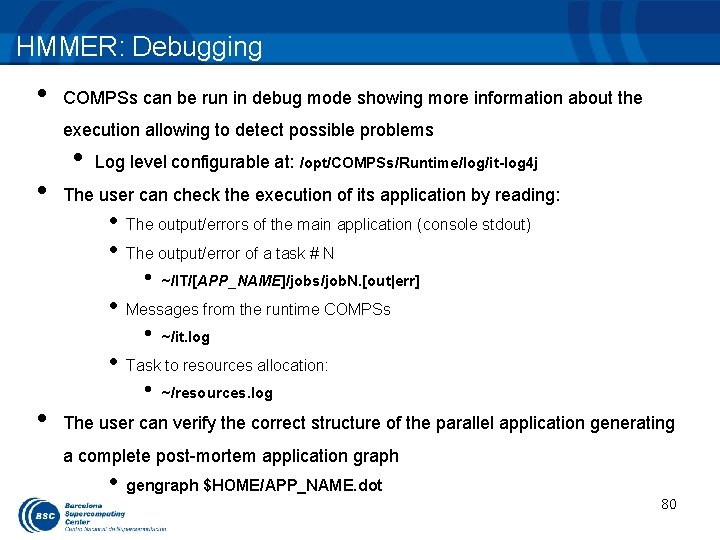
HMMER: Debugging • COMPSs can be run in debug mode showing more information about the execution allowing to detect possible problems • • Log level configurable at: /opt/COMPSs/Runtime/log/it-log 4 j The user can check the execution of its application by reading: • The output/errors of the main application (console stdout) • The output/error of a task # N • ~/IT/[APP_NAME]/jobs/job. N. [out|err] • ~/it. log • ~/resources. log • Messages from the runtime COMPSs • Task to resources allocation: • The user can verify the correct structure of the parallel application generating a complete post-mortem application graph • gengraph $HOME/APP_NAME. dot 80
Tracing: Overview COMPSs can generate post-execution traces of the distributed execution of the application – Useful for performance analysis and diagnosis How it works? – Task execution and file transfers are application events – An XML file is created at workers to keep track of these events – At the end of the execution all the XML files are merged to get the final trace file – Instrumentation and Visualization tools from BSC are needed. 81
Tracing: Instrumentation COMPSs uses Extrae tool to dynamically instrument the application – In a worker: • Extrae keeps track of the events in an intermediate file – In the master: • Extrae merges the intermediate files to get the final trace file – For more information about Extrae visit: • http: //www. bsc. es/computer-sciences/extrae 82
![Tracing: Instrumentation --------- Executing hmmerobj. HMMPfam -------------[ API] - Deploying the Integrated Toolkit [](http://slidetodoc.com/presentation_image_h2/be1784284a4eea3ff6eeafc668e40ca4/image-83.jpg "Tracing: Instrumentation --------- Executing hmmerobj. HMMPfam -------------[ API] - Deploying the Integrated Toolkit [")
Tracing: Instrumentation --------- Executing hmmerobj. HMMPfam -------------[ API] - Deploying the Integrated Toolkit [ API] - Starting the Integrated Toolkit [ API] - Initializing components COMPSs runtime starts Welcome to Extrae 2. 4. 3 rc 4 (revision 311 based on framework/trunk/files/extrae) Extrae: Generating intermediate files for Paraver traces. Extrae: Intermediate files will be stored in /home/user/IT/hmmerobj. HMMPfam Extrae: Tracing buffer can hold 500000 events Extrae: Tracing mode is set to: Detail. Extrae: Successfully initiated with 1 tasks Extrae starts before the user application execution [ API] - Ready to process tasks … … … Extrae keeps tracing events in background 83
![Tracing: Instrumentation [ API] - No more tasks for app 1 [ API] -](http://slidetodoc.com/presentation_image_h2/be1784284a4eea3ff6eeafc668e40ca4/image-84.jpg "Tracing: Instrumentation [ API] - No more tasks for app 1 [ API] -")
Tracing: Instrumentation [ API] - No more tasks for app 1 [ API] - Stopping IT [ API] - Cleaning Extrae: Application has ended. Tracing has been terminated. … The application finishes and the tracing process ends The merge process starts merger: Output trace format is: Paraver merger: Extrae 2. 4. 3 rc 4 (revision 311 based on framework/trunk/files/extrae) … [ API] - Integrated Toolkit stopped … COMPSs runtime ends mpi 2 prv: Selected output trace format is Paraver Intermediate trace files are processed mpi 2 prv: Parsing intermediate files The final trace file is generated mpi 2 prv: Generating tracefile (intermediate buffers of 1342156 events) mpi 2 prv: Congratulations! hmmerobj. HMMPfam_compss_trace_1392736225. prv has been generated. ------------------------------ 84
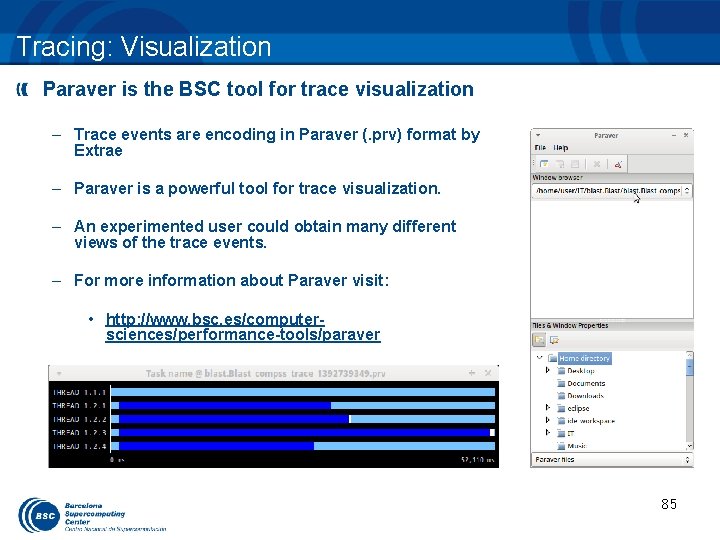
Tracing: Visualization Paraver is the BSC tool for trace visualization – Trace events are encoding in Paraver (. prv) format by Extrae – Paraver is a powerful tool for trace visualization. – An experimented user could obtain many different views of the trace events. – For more information about Paraver visit: • http: //www. bsc. es/computersciences/performance-tools/paraver 85
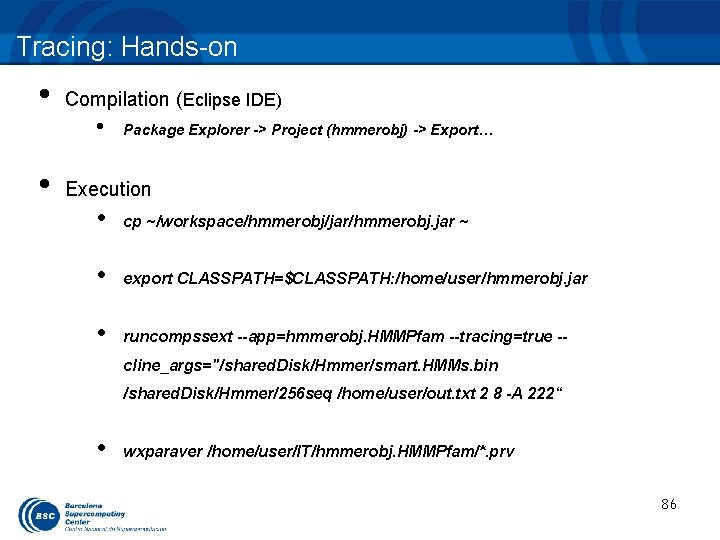
Tracing: Hands-on • • Compilation (Eclipse IDE) • Package Explorer -> Project (hmmerobj) -> Export… Execution • cp ~/workspace/hmmerobj/jar/hmmerobj. jar ~ • export CLASSPATH=$CLASSPATH: /home/user/hmmerobj. jar • runcompssext --app=hmmerobj. HMMPfam --tracing=true -cline_args="/shared. Disk/Hmmer/smart. HMMs. bin /shared. Disk/Hmmer/256 seq /home/user/out. txt 2 8 -A 222“ • wxparaver /home/user/IT/hmmerobj. HMMPfam/*. prv 86
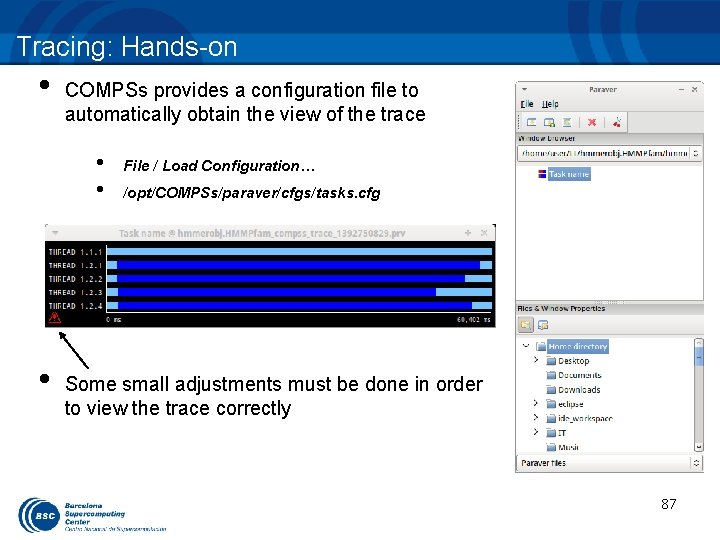
Tracing: Hands-on • COMPSs provides a configuration file to automatically obtain the view of the trace • • • File / Load Configuration… /opt/COMPSs/paraver/cfgs/tasks. cfg Some small adjustments must be done in order to view the trace correctly 87
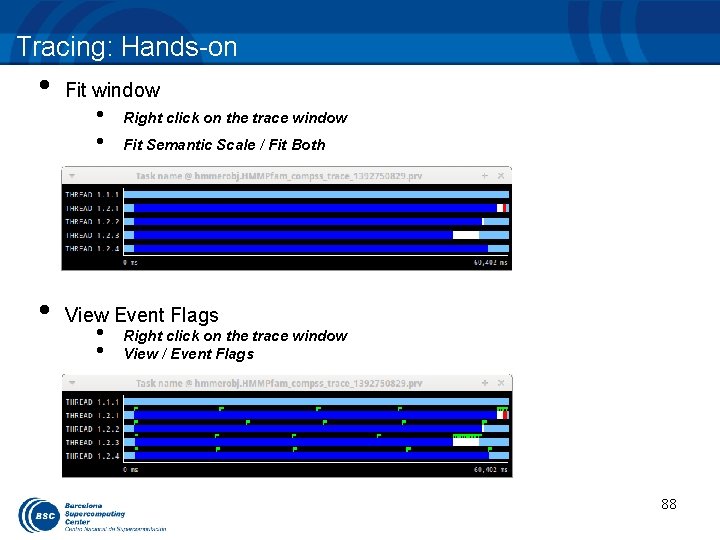
Tracing: Hands-on • • Fit window • • Right click on the trace window Fit Semantic Scale / Fit Both View Event Flags • • Right click on the trace window View / Event Flags 88
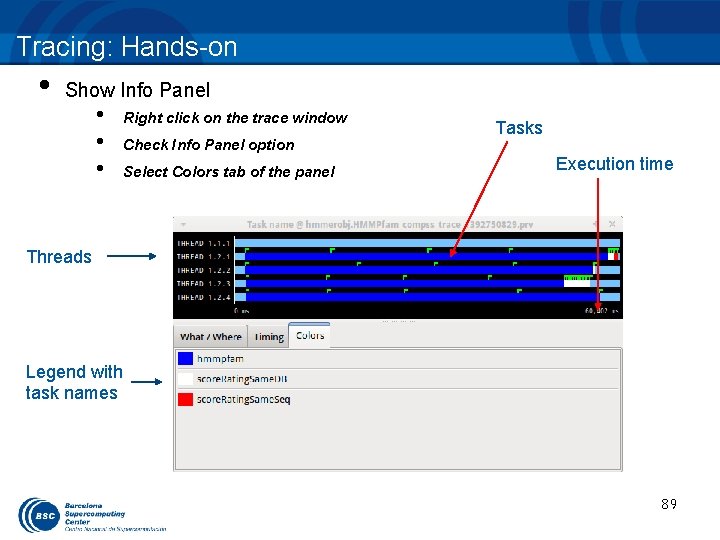
Tracing: Hands-on • Show Info Panel • • • Right click on the trace window Check Info Panel option Select Colors tab of the panel Tasks Execution time Threads Legend with task names 89
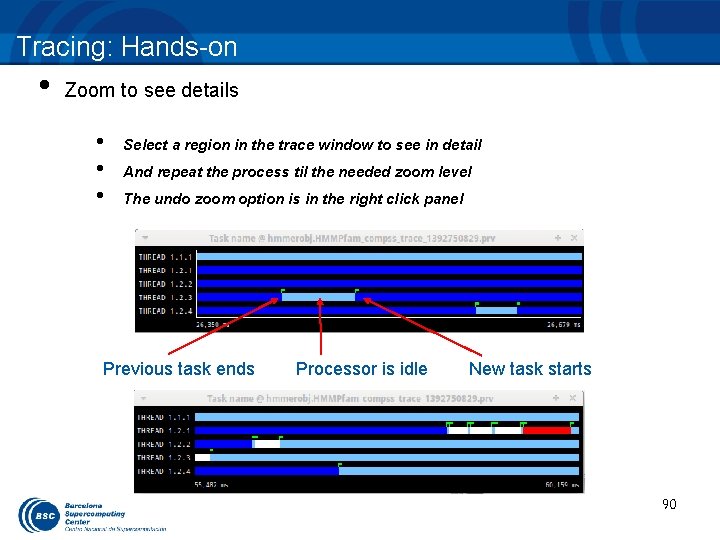
Tracing: Hands-on • Zoom to see details • • • Select a region in the trace window to see in detail And repeat the process til the needed zoom level The undo zoom option is in the right click panel Previous task ends Processor is idle New task starts 90
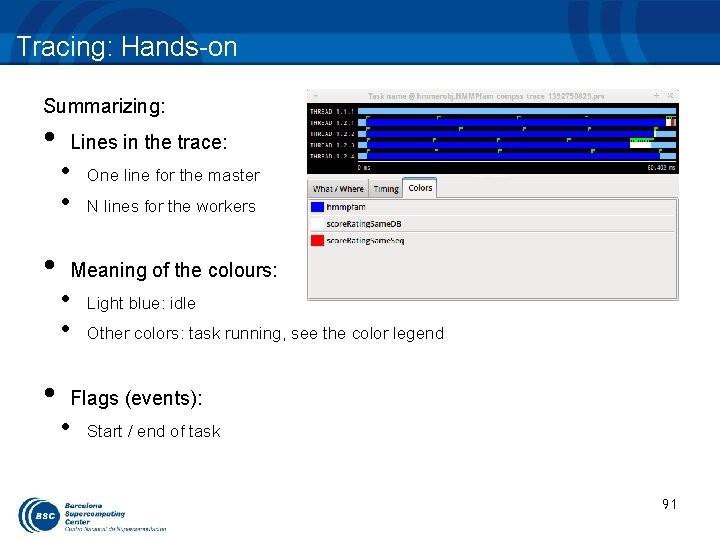
Tracing: Hands-on Summarizing: • • • Lines in the trace: • • One line for the master N lines for the workers Meaning of the colours: • • Light blue: idle Other colors: task running, see the color legend Flags (events): • Start / end of task 91
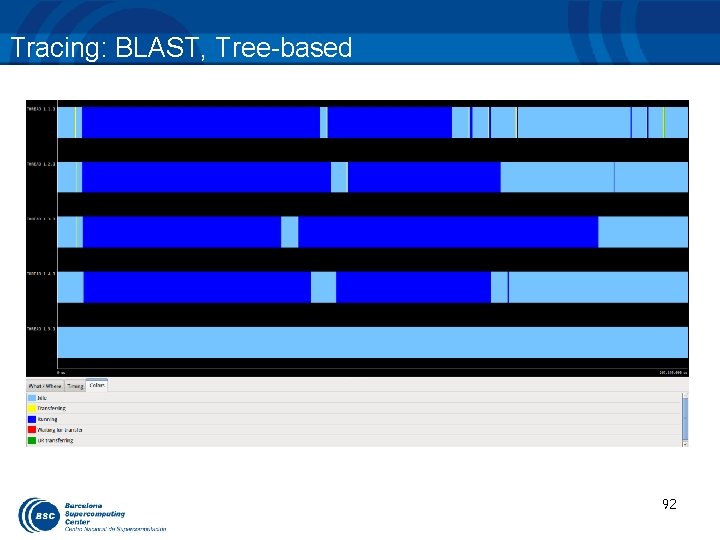
Tracing: BLAST, Tree-based 92
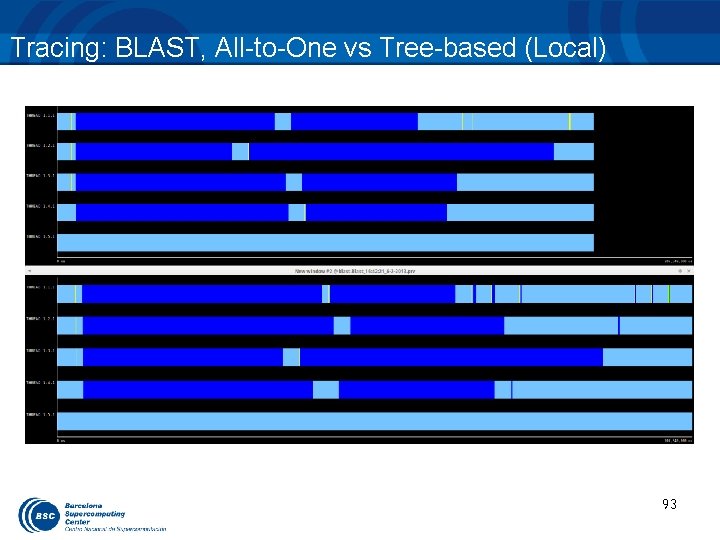
Tracing: BLAST, All-to-One vs Tree-based (Local) 93
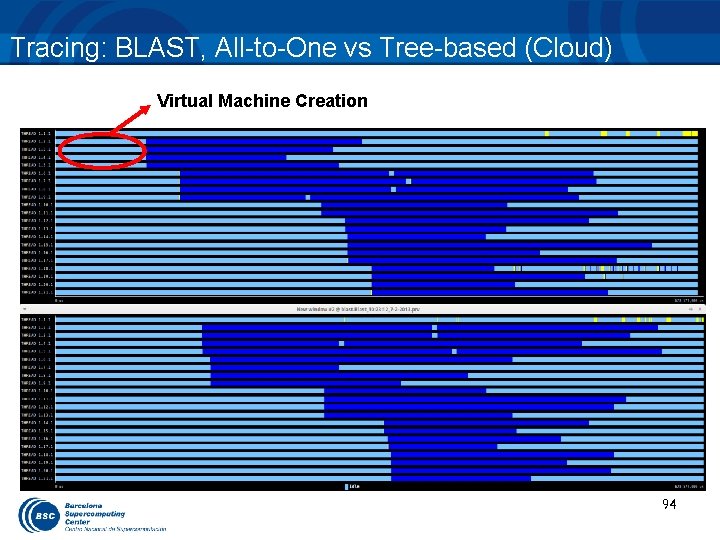
Tracing: BLAST, All-to-One vs Tree-based (Cloud) Virtual Machine Creation 94
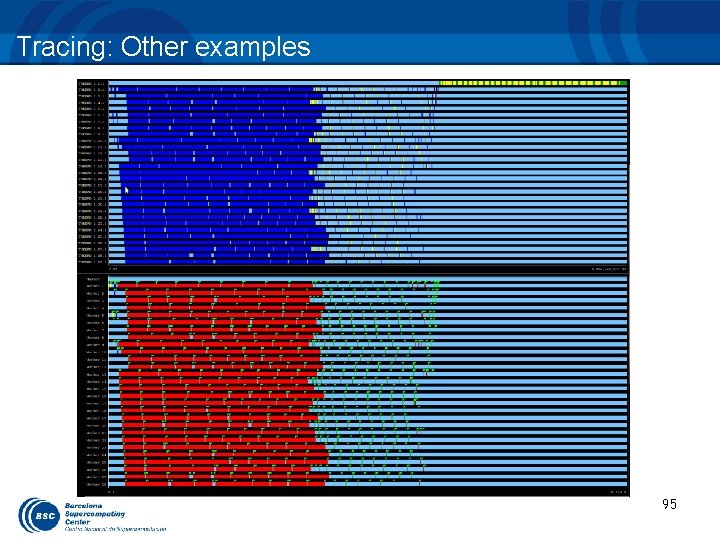
Tracing: Other examples 95
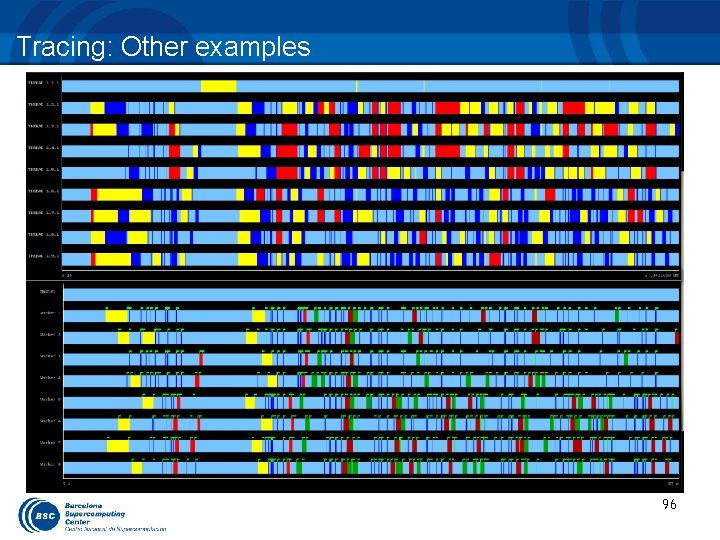
Tracing: Other examples 96
INTEGRATED DEVELOPMENT ENVIRONMENT HANDS-ON
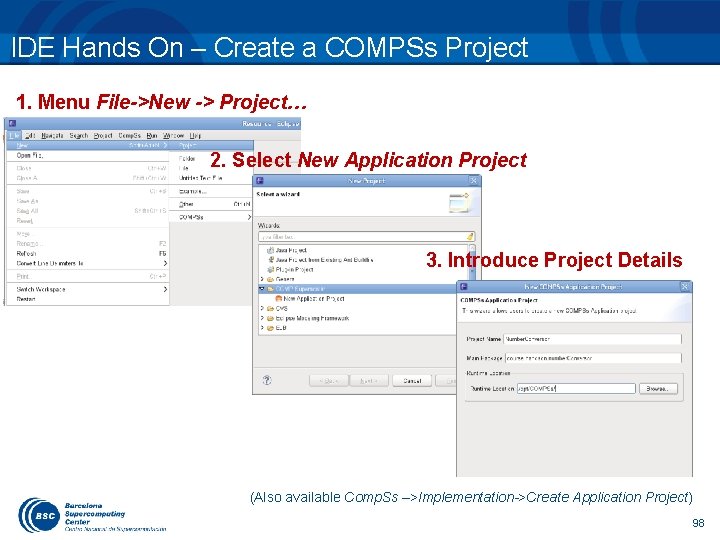
IDE Hands On – Create a COMPSs Project 1. Menu File->New -> Project… 2. Select New Application Project 3. Introduce Project Details (Also available Comp. Ss –>Implementation->Create Application Project) 98
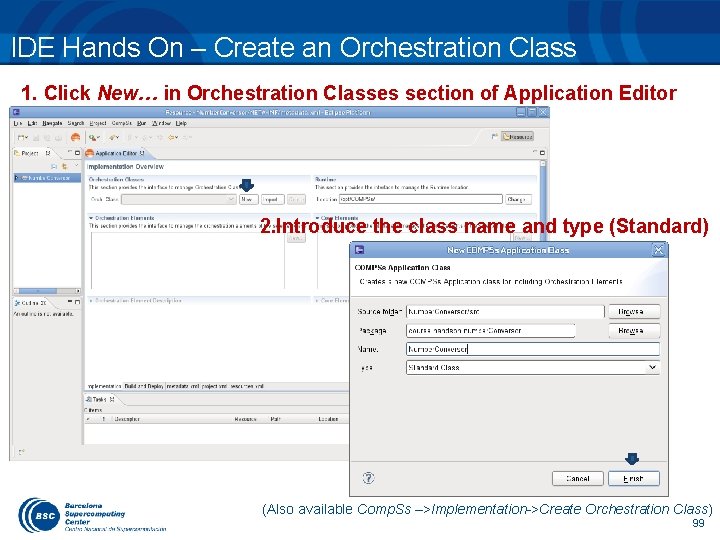
IDE Hands On – Create an Orchestration Class 1. Click New… in Orchestration Classes section of Application Editor 2. Introduce the class name and type (Standard) (Also available Comp. Ss –>Implementation->Create Orchestration Class) 99
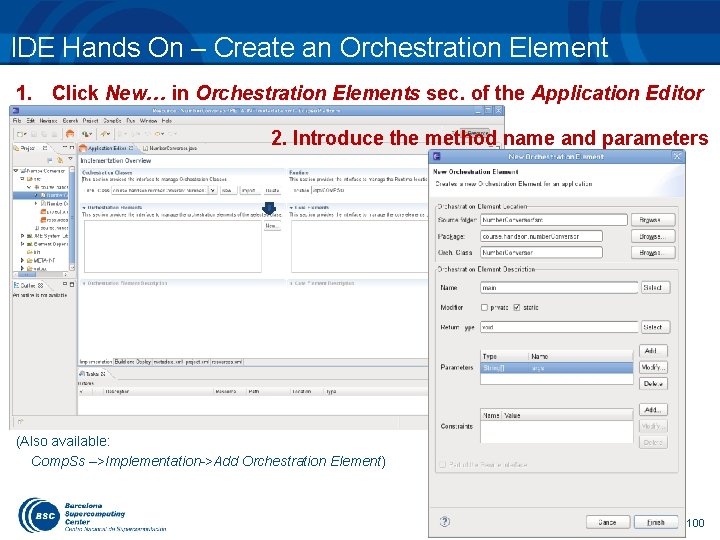
IDE Hands On – Create an Orchestration Element 1. Click New… in Orchestration Elements sec. of the Application Editor 2. Introduce the method name and parameters (Also available: Comp. Ss –>Implementation->Add Orchestration Element) 100
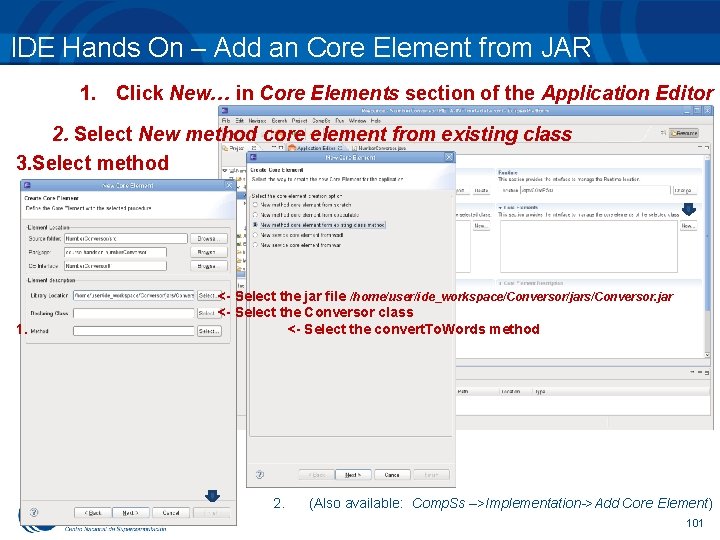
IDE Hands On – Add an Core Element from JAR 1. Click New… in Core Elements section of the Application Editor 2. Select New method core element from existing class 3. Select method 1. <- Select the jar file /home/user/ide_workspace/Conversor/jars/Conversor. jar <- Select the Conversor class <- Select the convert. To. Words method 2. (Also available: Comp. Ss –>Implementation->Add Core Element) 101
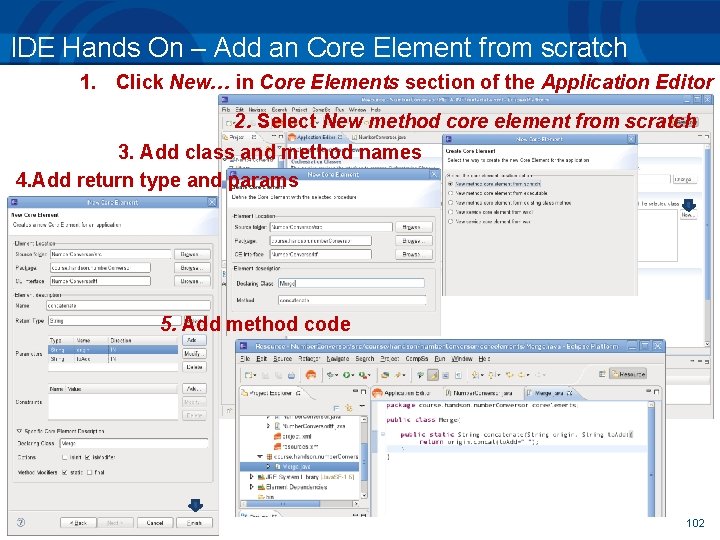
IDE Hands On – Add an Core Element from scratch 1. Click New… in Core Elements section of the Application Editor 2. Select New method core element from scratch 3. Add class and method names 4. Add return type and params 5. Add method code 102
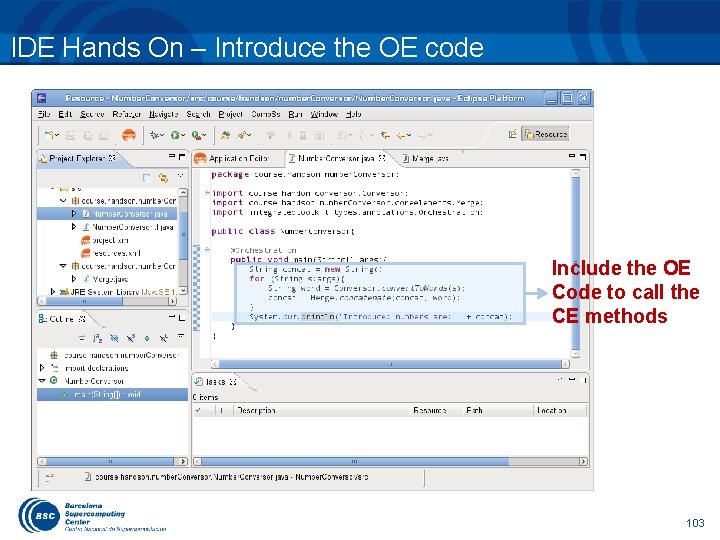
IDE Hands On – Introduce the OE code Include the OE Code to call the CE methods 103
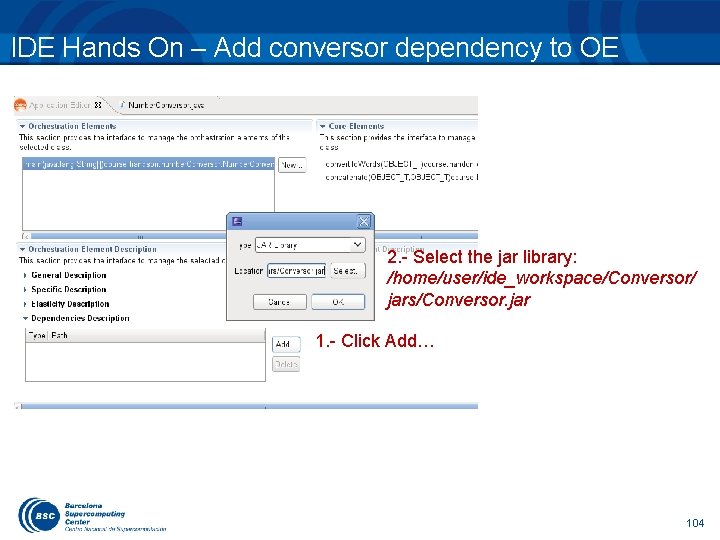
IDE Hands On – Add conversor dependency to OE 2. - Select the jar library: /home/user/ide_workspace/Conversor/ jars/Conversor. jar 1. - Click Add… 104
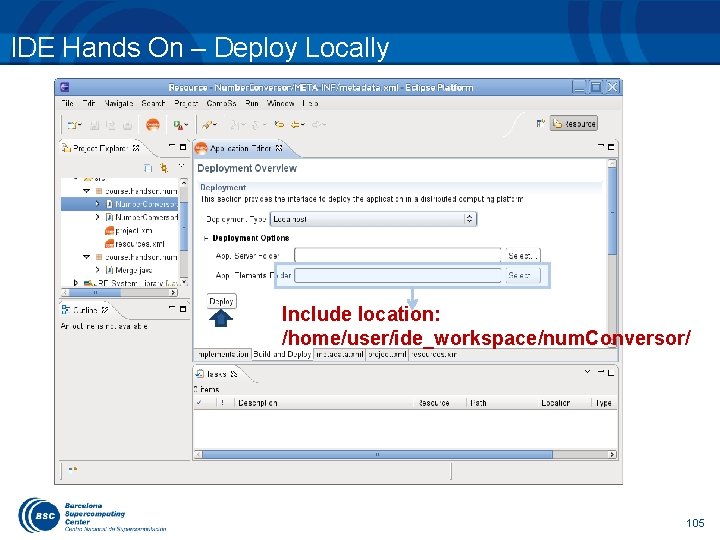
IDE Hands On – Deploy Locally Include location: /home/user/ide_workspace/num. Conversor/ 105
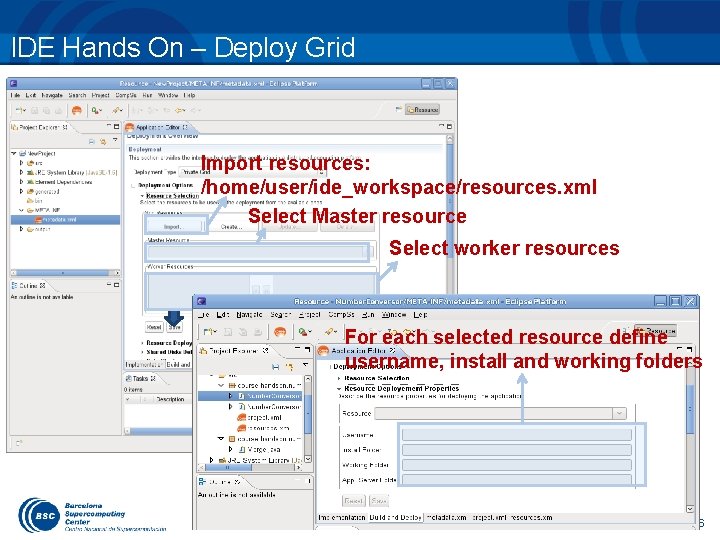
IDE Hands On – Deploy Grid Import resources: /home/user/ide_workspace/resources. xml Select Master resource Select worker resources For each selected resource define username, install and working folders 106
Final Notes • • Sequential programming approach Parallelization at task level Transparent data management and remote execution Can operate on different infrastructures: • • Cluster Grid Cloud (Public/Private) • Paa. S • Iaa. S Web services 107
Final notes • • Project page: http: //www. bsc. es/compss Direct downloads page: http: //www. bsc. es/computer-sciences/grid-computing/comp-superscalar/download • Sample applications & development virtual appliances • Tutorials • Red-Hat & Debian based installation packages • … 108
www. bsc. es Thank you! For further information please contact support-compss@bsc. es
- Slides: 109