
Workflows with HTCondors DAGMan Wednesday July 22 Lauren

- Slides: 44
Workflows with HTCondor’s DAGMan Wednesday, July 22 Lauren Michael
Goals for this Session • Why create a workflow? • Describe workflows as directed acyclic graphs (DAGs) • Workflow execution via DAGMan (DAG Manager) • Node-level options in a DAG • Modular organization of DAG components • Additional DAGMan Features OSG Virtual School Pilot 2020 2
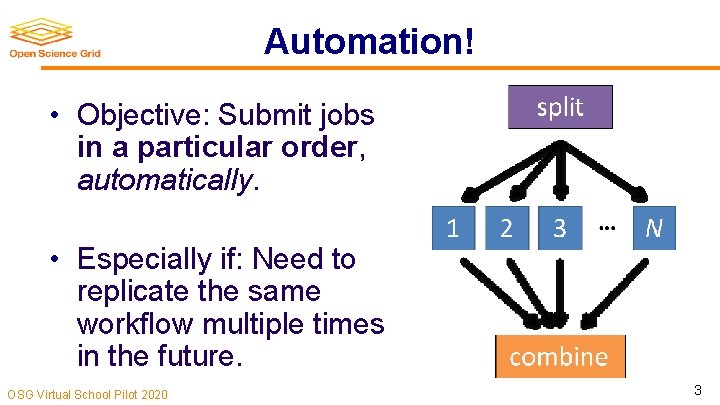
Automation! • Objective: Submit jobs in a particular order, automatically. • Especially if: Need to replicate the same workflow multiple times in the future. OSG Virtual School Pilot 2020 3
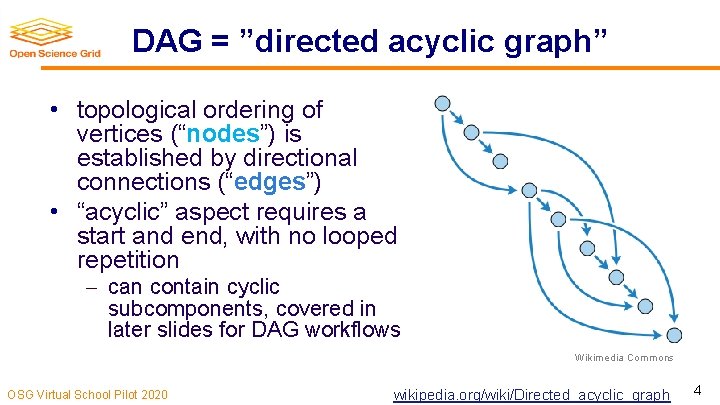
DAG = ”directed acyclic graph” • topological ordering of vertices (“nodes”) is established by directional connections (“edges”) • “acyclic” aspect requires a start and end, with no looped repetition can contain cyclic subcomponents, covered in later slides for DAG workflows Wikimedia Commons OSG Virtual School Pilot 2020 wikipedia. org/wiki/Directed_acyclic_graph 4
DESCRIBING WORKFLOWS WITH DAGMAN OSG Virtual School Pilot 2020 5
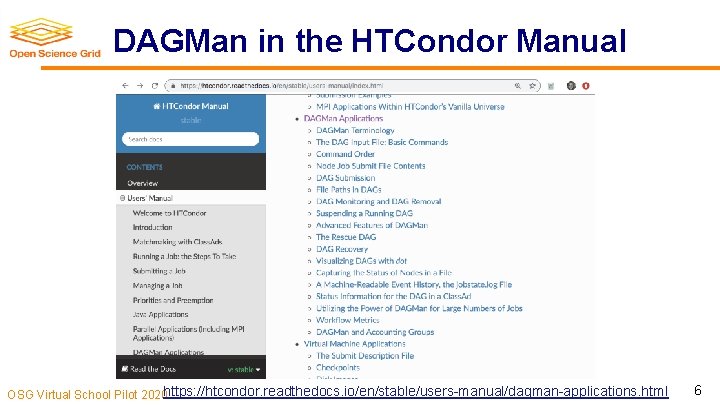
DAGMan in the HTCondor Manual OSG Virtual School Pilot 2020 https: //htcondor. readthedocs. io/en/stable/users-manual/dagman-applications. html 6
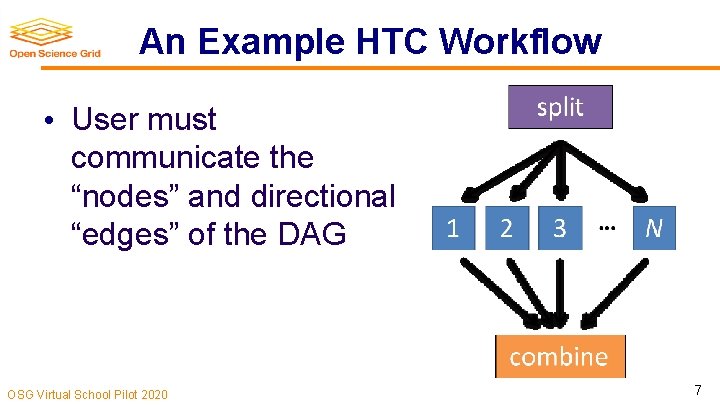
An Example HTC Workflow • User must communicate the “nodes” and directional “edges” of the DAG OSG Virtual School Pilot 2020 7
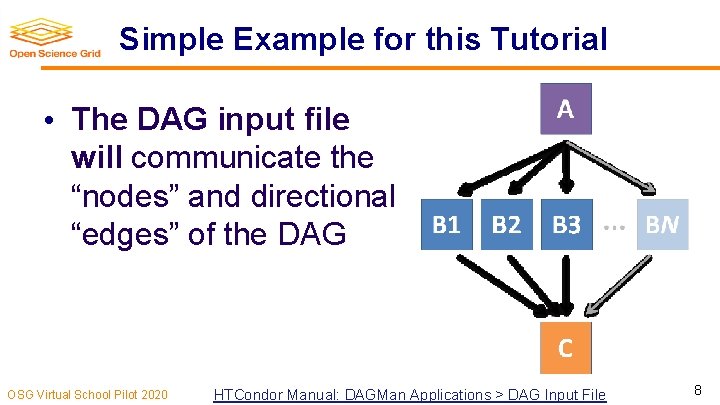
Simple Example for this Tutorial • The DAG input file will communicate the “nodes” and directional “edges” of the DAG OSG Virtual School Pilot 2020 HTCondor Manual: DAGMan Applications > DAG Input File 8
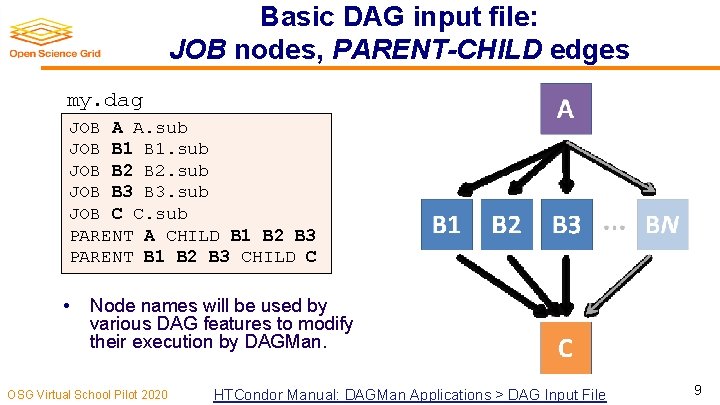
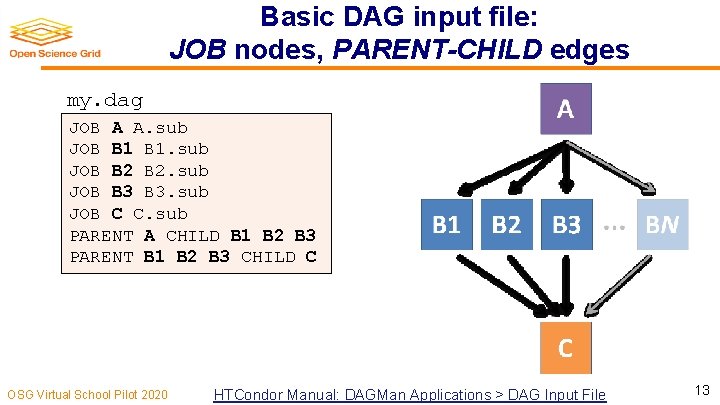
Basic DAG input file: JOB nodes, PARENT-CHILD edges my. dag JOB A A. sub JOB B 1. sub JOB B 2. sub JOB B 3. sub JOB C C. sub PARENT A CHILD B 1 B 2 B 3 PARENT B 1 B 2 B 3 CHILD C • Node names will be used by various DAG features to modify their execution by DAGMan. OSG Virtual School Pilot 2020 HTCondor Manual: DAGMan Applications > DAG Input File 9
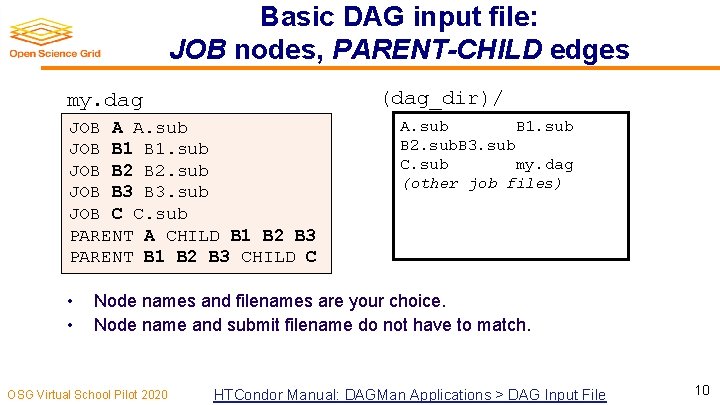
Basic DAG input file: JOB nodes, PARENT-CHILD edges (dag_dir)/ my. dag JOB A A. sub JOB B 1. sub JOB B 2. sub JOB B 3. sub JOB C C. sub PARENT A CHILD B 1 B 2 B 3 PARENT B 1 B 2 B 3 CHILD C • • A. sub B 1. sub B 2. sub. B 3. sub C. sub my. dag (other job files) Node names and filenames are your choice. Node name and submit filename do not have to match. OSG Virtual School Pilot 2020 HTCondor Manual: DAGMan Applications > DAG Input File 10
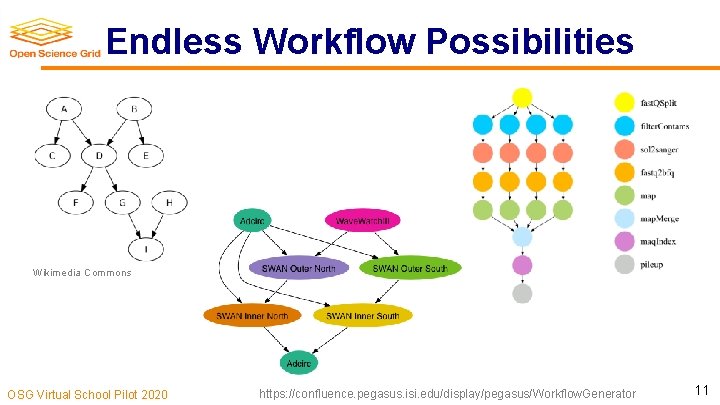
Endless Workflow Possibilities Wikimedia Commons OSG Virtual School Pilot 2020 https: //confluence. pegasus. isi. edu/display/pegasus/Workflow. Generator 11
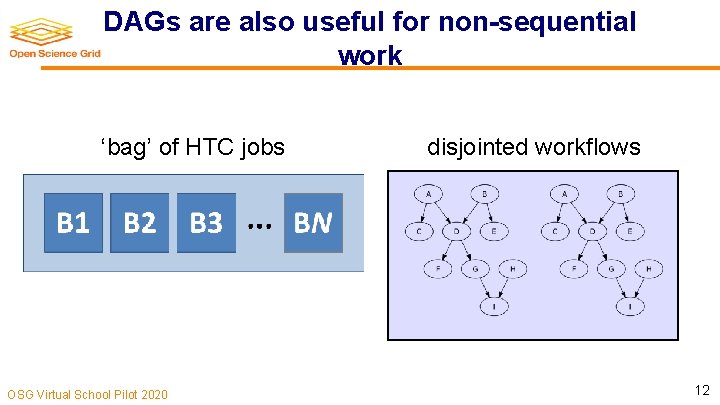
DAGs are also useful for non-sequential work ‘bag’ of HTC jobs OSG Virtual School Pilot 2020 disjointed workflows 12
Basic DAG input file: JOB nodes, PARENT-CHILD edges my. dag JOB A A. sub JOB B 1. sub JOB B 2. sub JOB B 3. sub JOB C C. sub PARENT A CHILD B 1 B 2 B 3 PARENT B 1 B 2 B 3 CHILD C OSG Virtual School Pilot 2020 HTCondor Manual: DAGMan Applications > DAG Input File 13
SUBMITTING AND MONITORING A DAGMAN WORKFLOW OSG Virtual School Pilot 2020 14
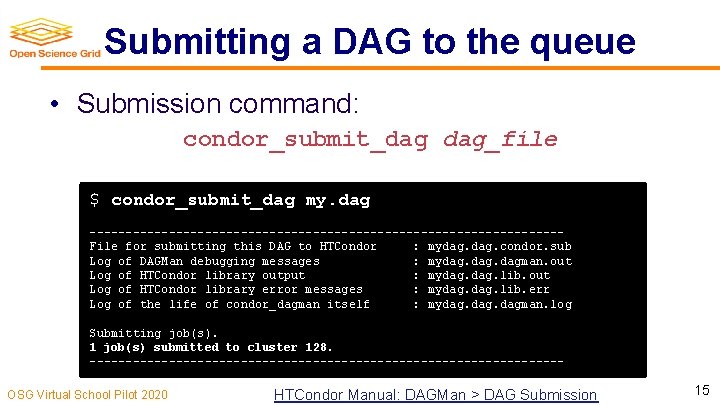
Submitting a DAG to the queue • Submission command: condor_submit_dag dag_file $ condor_submit_dag my. dag ---------------------------------File for submitting this DAG to HTCondor : mydag. condor. sub Log of DAGMan debugging messages : mydag. dagman. out Log of HTCondor library output : mydag. lib. out Log of HTCondor library error messages : mydag. lib. err Log of the life of condor_dagman itself : mydag. dagman. log Submitting job(s). 1 job(s) submitted to cluster 128. ---------------------------------OSG Virtual School Pilot 2020 HTCondor Manual: DAGMan > DAG Submission 15
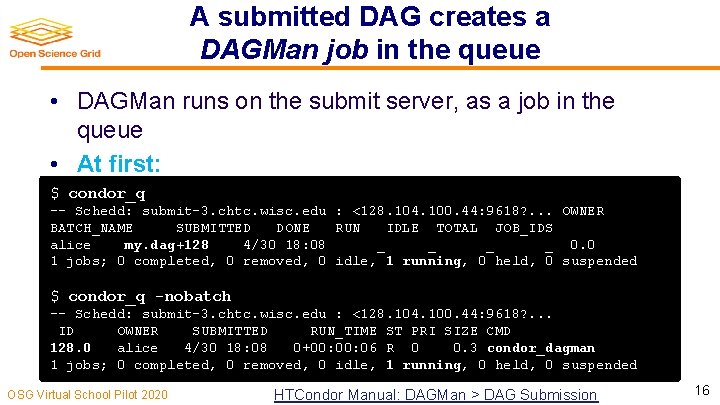
A submitted DAG creates a DAGMan job in the queue • DAGMan runs on the submit server, as a job in the queue • At first: $ condor_q -- Schedd: submit-3. chtc. wisc. edu : <128. 104. 100. 44: 9618? . . . OWNER BATCH_NAME SUBMITTED DONE RUN IDLE TOTAL JOB_IDS alice my. dag+128 4/30 18: 08 _ _ 0. 0 1 jobs; 0 completed, 0 removed, 0 idle, 1 running, 0 held, 0 suspended $ condor_q -nobatch -- Schedd: submit-3. chtc. wisc. edu : <128. 104. 100. 44: 9618? . . . ID OWNER SUBMITTED RUN_TIME ST PRI SIZE CMD 128. 0 alice 4/30 18: 08 0+00: 06 R 0 0. 3 condor_dagman 1 jobs; 0 completed, 0 removed, 0 idle, 1 running, 0 held, 0 suspended OSG Virtual School Pilot 2020 HTCondor Manual: DAGMan > DAG Submission 16
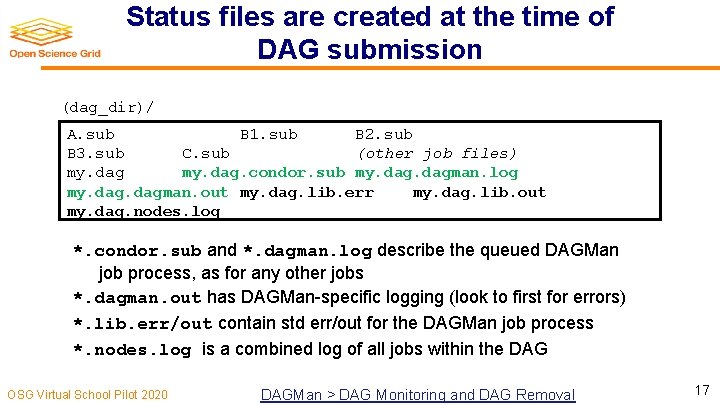
Status files are created at the time of DAG submission (dag_dir)/ A. sub B 1. sub B 2. sub B 3. sub C. sub (other job files) my. dag. condor. sub my. dagman. log my. dagman. out my. dag. lib. err my. dag. lib. out my. dag. nodes. log *. condor. sub and *. dagman. log describe the queued DAGMan job process, as for any other jobs *. dagman. out has DAGMan-specific logging (look to first for errors) *. lib. err/out contain std err/out for the DAGMan job process *. nodes. log is a combined log of all jobs within the DAG OSG Virtual School Pilot 2020 DAGMan > DAG Monitoring and DAG Removal 17
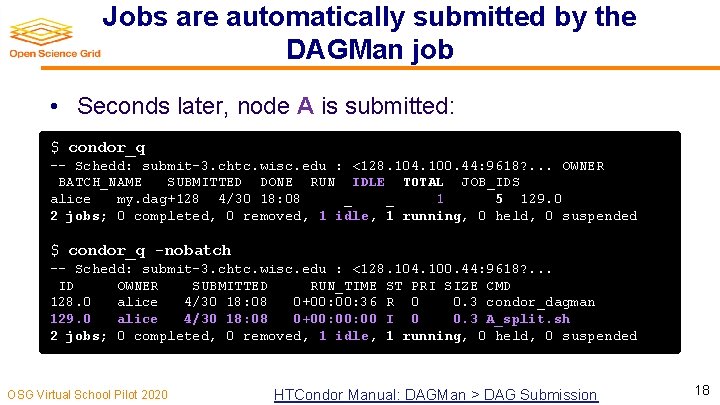
Jobs are automatically submitted by the DAGMan job • Seconds later, node A is submitted: $ condor_q -- Schedd: submit-3. chtc. wisc. edu : <128. 104. 100. 44: 9618? . . . OWNER BATCH_NAME SUBMITTED DONE RUN IDLE TOTAL JOB_IDS alice my. dag+128 4/30 18: 08 _ _ 1 5 129. 0 2 jobs; 0 completed, 0 removed, 1 idle, 1 running, 0 held, 0 suspended $ condor_q -nobatch -- Schedd: submit-3. chtc. wisc. edu : <128. 104. 100. 44: 9618? . . . ID OWNER SUBMITTED RUN_TIME ST PRI SIZE CMD 128. 0 alice 4/30 18: 08 0+00: 36 R 0 0. 3 condor_dagman 129. 0 alice 4/30 18: 08 0+00: 00 I 0 0. 3 A_split. sh 2 jobs; 0 completed, 0 removed, 1 idle, 1 running, 0 held, 0 suspended OSG Virtual School Pilot 2020 HTCondor Manual: DAGMan > DAG Submission 18
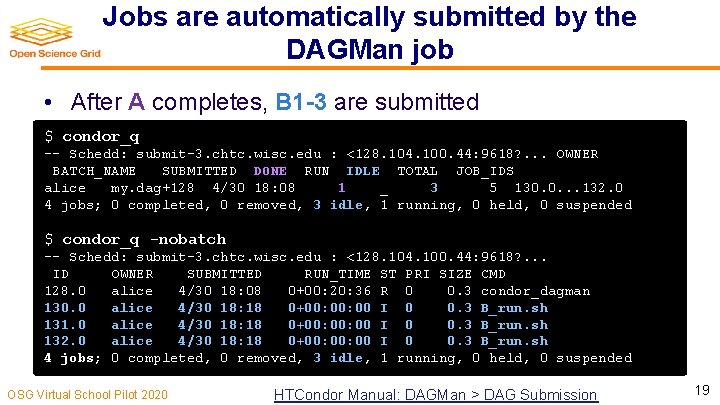
Jobs are automatically submitted by the DAGMan job • After A completes, B 1 -3 are submitted $ condor_q -- Schedd: submit-3. chtc. wisc. edu : <128. 104. 100. 44: 9618? . . . OWNER BATCH_NAME SUBMITTED DONE RUN IDLE TOTAL JOB_IDS alice my. dag+128 4/30 18: 08 1 _ 3 5 130. 0. . . 132. 0 4 jobs; 0 completed, 0 removed, 3 idle, 1 running, 0 held, 0 suspended $ condor_q -nobatch -- Schedd: submit-3. chtc. wisc. edu : <128. 104. 100. 44: 9618? . . . ID OWNER SUBMITTED RUN_TIME ST PRI SIZE CMD 128. 0 alice 4/30 18: 08 0+00: 20: 36 R 0 0. 3 condor_dagman 130. 0 alice 4/30 18: 18 0+00: 00 I 0 0. 3 B_run. sh 131. 0 alice 4/30 18: 18 0+00: 00 I 0 0. 3 B_run. sh 132. 0 alice 4/30 18: 18 0+00: 00 I 0 0. 3 B_run. sh 4 jobs; 0 completed, 0 removed, 3 idle, 1 running, 0 held, 0 suspended OSG Virtual School Pilot 2020 HTCondor Manual: DAGMan > DAG Submission 19
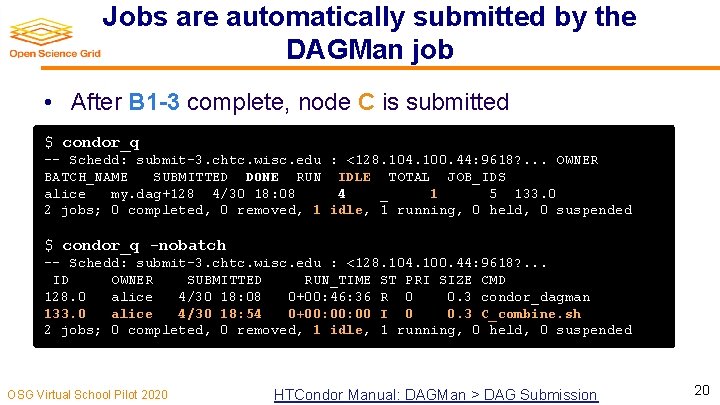
Jobs are automatically submitted by the DAGMan job • After B 1 -3 complete, node C is submitted $ condor_q -- Schedd: submit-3. chtc. wisc. edu : <128. 104. 100. 44: 9618? . . . OWNER BATCH_NAME SUBMITTED DONE RUN IDLE TOTAL JOB_IDS alice my. dag+128 4/30 18: 08 4 _ 1 5 133. 0 2 jobs; 0 completed, 0 removed, 1 idle, 1 running, 0 held, 0 suspended $ condor_q -nobatch -- Schedd: submit-3. chtc. wisc. edu : <128. 104. 100. 44: 9618? . . . ID OWNER SUBMITTED RUN_TIME ST PRI SIZE CMD 128. 0 alice 4/30 18: 08 0+00: 46: 36 R 0 0. 3 condor_dagman 133. 0 alice 4/30 18: 54 0+00: 00 I 0 0. 3 C_combine. sh 2 jobs; 0 completed, 0 removed, 1 idle, 1 running, 0 held, 0 suspended OSG Virtual School Pilot 2020 HTCondor Manual: DAGMan > DAG Submission 20
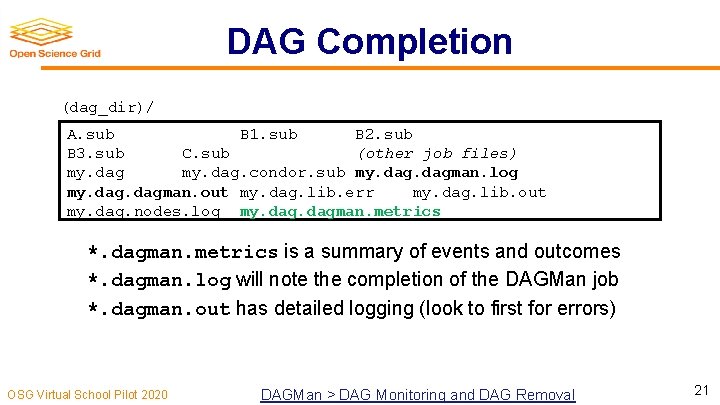
DAG Completion (dag_dir)/ A. sub B 1. sub B 2. sub B 3. sub C. sub (other job files) my. dag. condor. sub my. dagman. log my. dagman. out my. dag. lib. err my. dag. lib. out my. dag. nodes. log my. dagman. metrics *. dagman. metrics is a summary of events and outcomes *. dagman. log will note the completion of the DAGMan job *. dagman. out has detailed logging (look to first for errors) OSG Virtual School Pilot 2020 DAGMan > DAG Monitoring and DAG Removal 21
, STOPPING, RESTARTING, AND TROUBLESHOOTING OSG Virtual School Pilot 2020 22
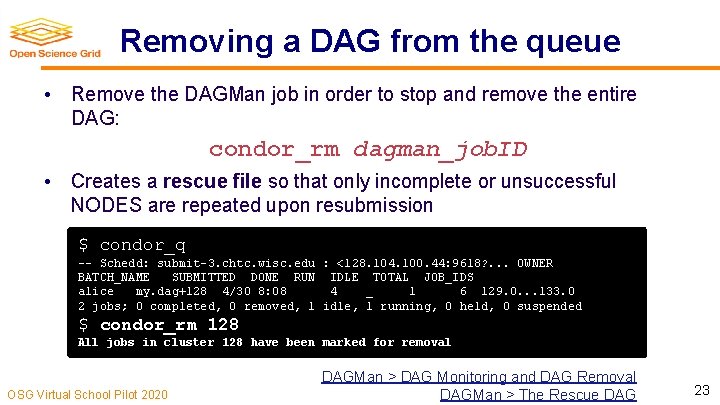
Removing a DAG from the queue • Remove the DAGMan job in order to stop and remove the entire DAG: condor_rm dagman_job. ID • Creates a rescue file so that only incomplete or unsuccessful NODES are repeated upon resubmission $ condor_q -- Schedd: submit-3. chtc. wisc. edu : <128. 104. 100. 44: 9618? . . . OWNER BATCH_NAME SUBMITTED DONE RUN IDLE TOTAL JOB_IDS alice my. dag+128 4/30 8: 08 4 _ 1 6 129. 0. . . 133. 0 2 jobs; 0 completed, 0 removed, 1 idle, 1 running, 0 held, 0 suspended $ condor_rm 128 All jobs in cluster 128 have been marked for removal OSG Virtual School Pilot 2020 DAGMan > DAG Monitoring and DAG Removal DAGMan > The Rescue DAG 23
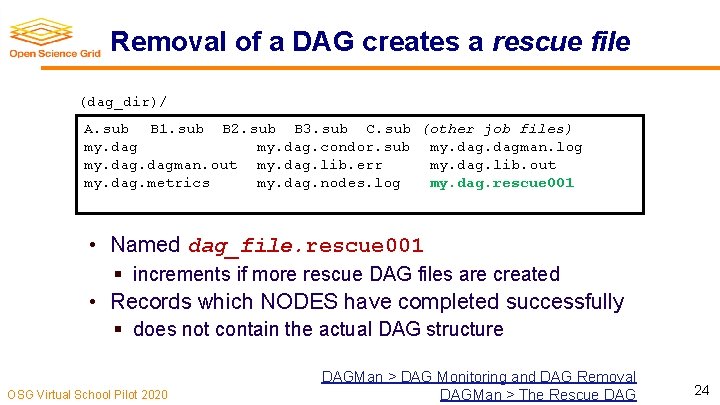
Removal of a DAG creates a rescue file (dag_dir)/ A. sub B 1. sub B 2. sub B 3. sub C. sub (other job files) my. dag. condor. sub my. dagman. log my. dagman. out my. dag. lib. err my. dag. lib. out my. dag. metrics my. dag. nodes. log my. dag. rescue 001 • Named dag_file. rescue 001 § increments if more rescue DAG files are created • Records which NODES have completed successfully § does not contain the actual DAG structure OSG Virtual School Pilot 2020 DAGMan > DAG Monitoring and DAG Removal DAGMan > The Rescue DAG 24
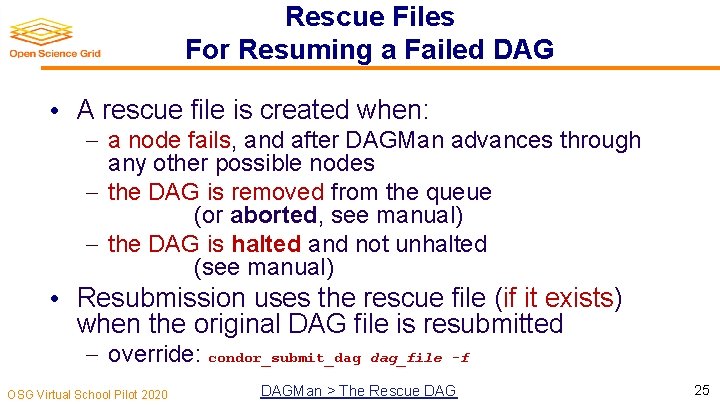
Rescue Files For Resuming a Failed DAG • A rescue file is created when: a node fails, and after DAGMan advances through any other possible nodes the DAG is removed from the queue (or aborted, see manual) the DAG is halted and not unhalted (see manual) • Resubmission uses the rescue file (if it exists) when the original DAG file is resubmitted override: condor_submit_dag OSG Virtual School Pilot 2020 dag_file -f DAGMan > The Rescue DAG 25
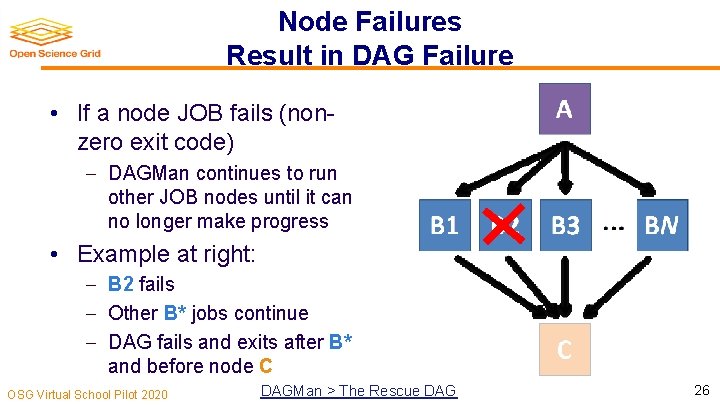
Node Failures Result in DAG Failure • If a node JOB fails (nonzero exit code) DAGMan continues to run other JOB nodes until it can no longer make progress • Example at right: B 2 fails Other B* jobs continue DAG fails and exits after B* and before node C OSG Virtual School Pilot 2020 DAGMan > The Rescue DAG 26
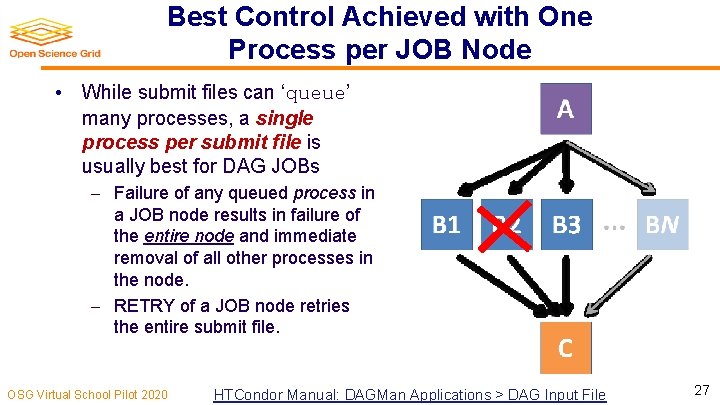
Best Control Achieved with One Process per JOB Node • While submit files can ‘queue’ many processes, a single process per submit file is usually best for DAG JOBs Failure of any queued process in a JOB node results in failure of the entire node and immediate removal of all other processes in the node. RETRY of a JOB node retries the entire submit file. OSG Virtual School Pilot 2020 HTCondor Manual: DAGMan Applications > DAG Input File 27
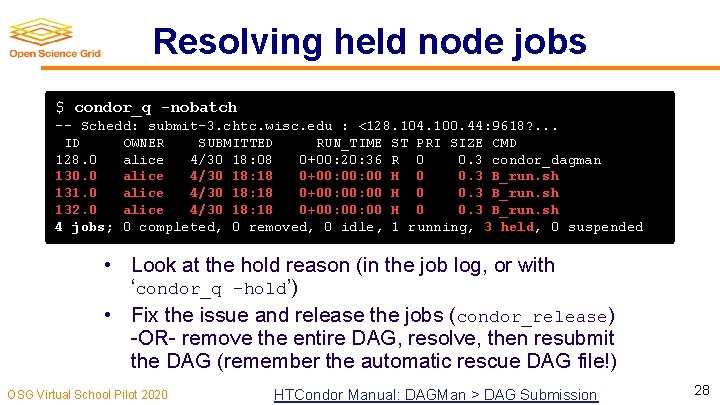
Resolving held node jobs $ condor_q -nobatch -- Schedd: submit-3. chtc. wisc. edu : <128. 104. 100. 44: 9618? . . . ID OWNER SUBMITTED RUN_TIME ST PRI SIZE CMD 128. 0 alice 4/30 18: 08 0+00: 20: 36 R 0 0. 3 condor_dagman 130. 0 alice 4/30 18: 18 0+00: 00 H 0 0. 3 B_run. sh 131. 0 alice 4/30 18: 18 0+00: 00 H 0 0. 3 B_run. sh 132. 0 alice 4/30 18: 18 0+00: 00 H 0 0. 3 B_run. sh 4 jobs; 0 completed, 0 removed, 0 idle, 1 running, 3 held, 0 suspended • Look at the hold reason (in the job log, or with ‘condor_q -hold’) • Fix the issue and release the jobs (condor_release) -OR- remove the entire DAG, resolve, then resubmit the DAG (remember the automatic rescue DAG file!) OSG Virtual School Pilot 2020 HTCondor Manual: DAGMan > DAG Submission 28
BEYOND THE BASIC DAG: NODE-LEVEL MODIFIERS OSG Virtual School Pilot 2020 29
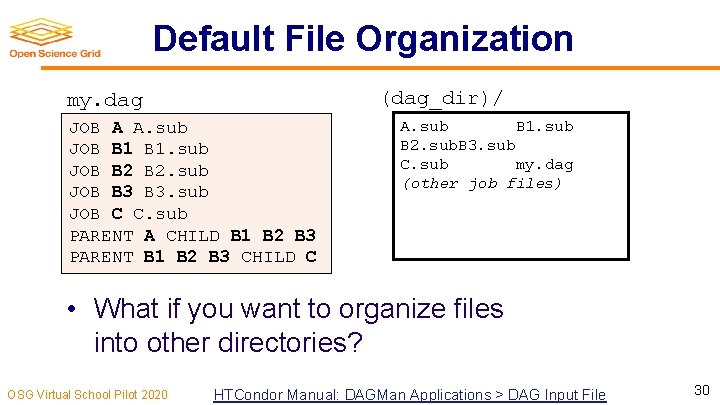
Default File Organization (dag_dir)/ my. dag JOB A A. sub JOB B 1. sub JOB B 2. sub JOB B 3. sub JOB C C. sub PARENT A CHILD B 1 B 2 B 3 PARENT B 1 B 2 B 3 CHILD C A. sub B 1. sub B 2. sub. B 3. sub C. sub my. dag (other job files) • What if you want to organize files into other directories? OSG Virtual School Pilot 2020 HTCondor Manual: DAGMan Applications > DAG Input File 30
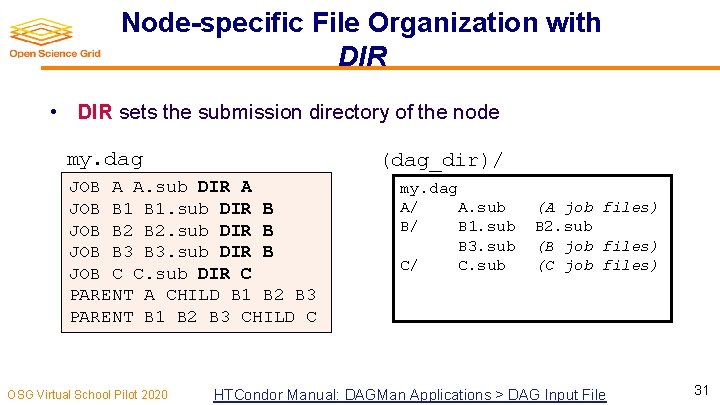
Node-specific File Organization with DIR • DIR sets the submission directory of the node my. dag (dag_dir)/ JOB A A. sub DIR A JOB B 1. sub DIR B JOB B 2. sub DIR B JOB B 3. sub DIR B JOB C C. sub DIR C PARENT A CHILD B 1 B 2 B 3 PARENT B 1 B 2 B 3 CHILD C OSG Virtual School Pilot 2020 my. dag A/ A. sub B/ B 1. sub B 3. sub C/ C. sub (A job files) B 2. sub (B job files) (C job files) HTCondor Manual: DAGMan Applications > DAG Input File 31
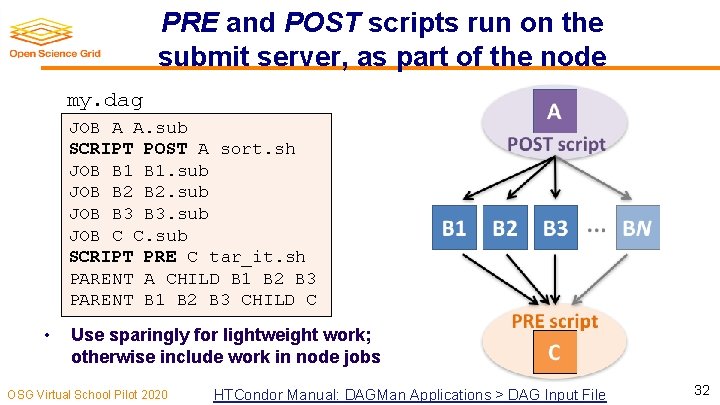
PRE and POST scripts run on the submit server, as part of the node my. dag JOB A A. sub SCRIPT POST A sort. sh JOB B 1. sub JOB B 2. sub JOB B 3. sub JOB C C. sub SCRIPT PRE C tar_it. sh PARENT A CHILD B 1 B 2 B 3 PARENT B 1 B 2 B 3 CHILD C • Use sparingly for lightweight work; otherwise include work in node jobs OSG Virtual School Pilot 2020 HTCondor Manual: DAGMan Applications > DAG Input File 32
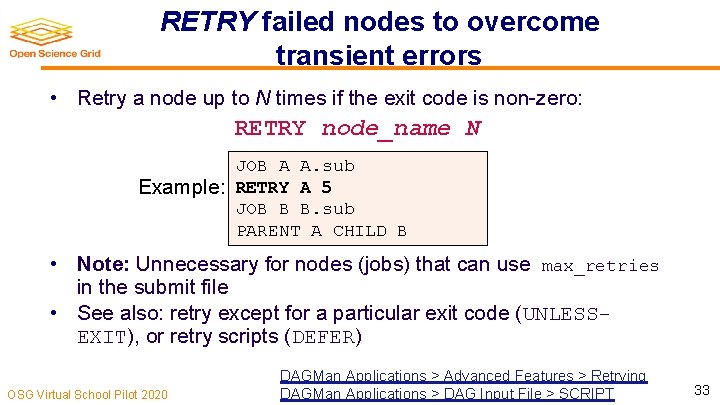
RETRY failed nodes to overcome transient errors • Retry a node up to N times if the exit code is non-zero: RETRY node_name N JOB A A. sub Example: RETRY A 5 JOB B B. sub PARENT A CHILD B • Note: Unnecessary for nodes (jobs) that can use max_retries in the submit file • See also: retry except for a particular exit code (UNLESSEXIT), or retry scripts (DEFER) OSG Virtual School Pilot 2020 DAGMan Applications > Advanced Features > Retrying DAGMan Applications > DAG Input File > SCRIPT 33
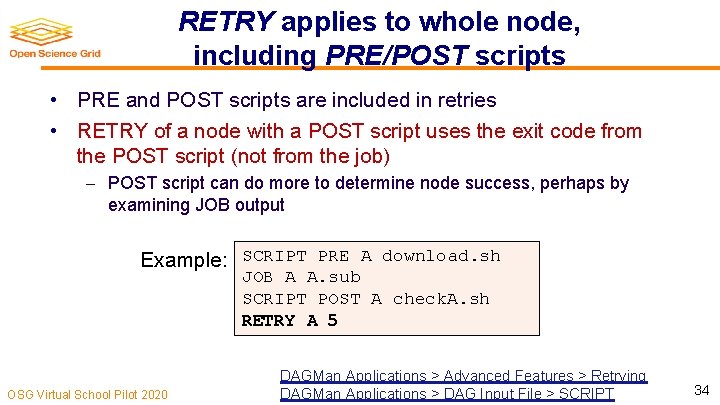
RETRY applies to whole node, including PRE/POST scripts • PRE and POST scripts are included in retries • RETRY of a node with a POST script uses the exit code from the POST script (not from the job) POST script can do more to determine node success, perhaps by examining JOB output Example: SCRIPT PRE A download. sh JOB A A. sub SCRIPT POST A check. A. sh RETRY A 5 OSG Virtual School Pilot 2020 DAGMan Applications > Advanced Features > Retrying DAGMan Applications > DAG Input File > SCRIPT 34
MODULAR ORGANIZATION OF DAG COMPONENTS OSG Virtual School Pilot 2020 35
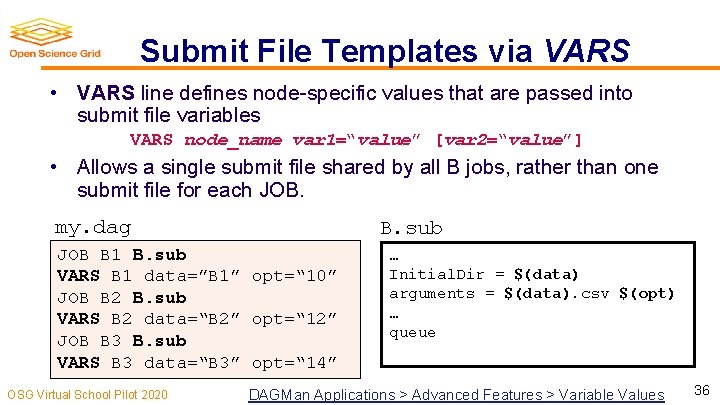
Submit File Templates via VARS • VARS line defines node-specific values that are passed into submit file variables VARS node_name var 1=“value” [var 2=“value”] • Allows a single submit file shared by all B jobs, rather than one submit file for each JOB. my. dag B. sub JOB B 1 B. sub VARS B 1 data=”B 1” opt=“ 10” JOB B 2 B. sub VARS B 2 data=“B 2” opt=“ 12” JOB B 3 B. sub VARS B 3 data=“B 3” opt=“ 14” OSG Virtual School Pilot 2020 … Initial. Dir = $(data) arguments = $(data). csv $(opt) … queue DAGMan Applications > Advanced Features > Variable Values 36
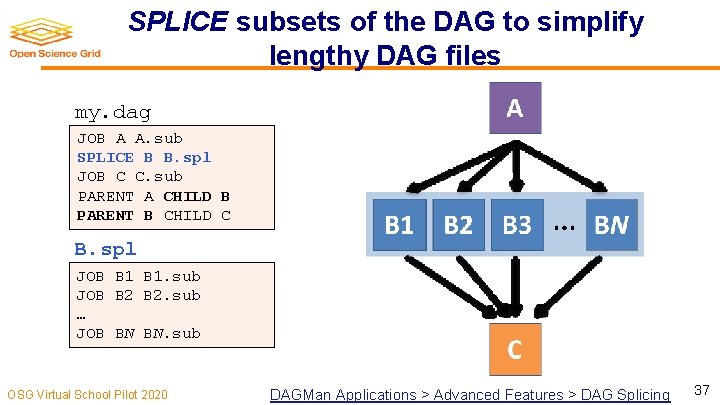
SPLICE subsets of the DAG to simplify lengthy DAG files my. dag JOB A A. sub SPLICE B B. spl JOB C C. sub PARENT A CHILD B PARENT B CHILD C B. spl JOB B 1. sub JOB B 2. sub … JOB BN BN. sub OSG Virtual School Pilot 2020 DAGMan Applications > Advanced Features > DAG Splicing 37
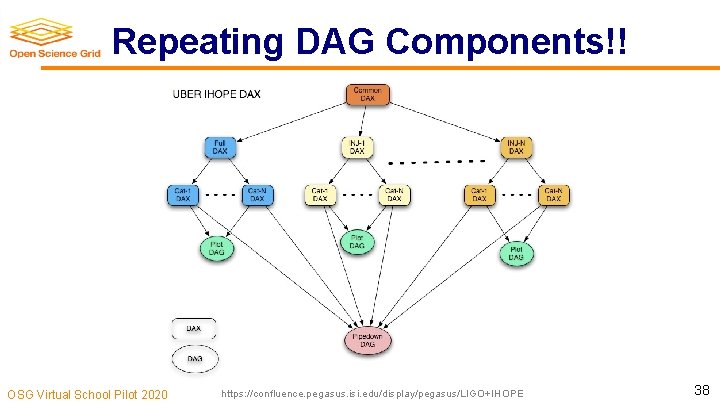
Repeating DAG Components!! OSG Virtual School Pilot 2020 https: //confluence. pegasus. isi. edu/display/pegasus/LIGO+IHOPE 38
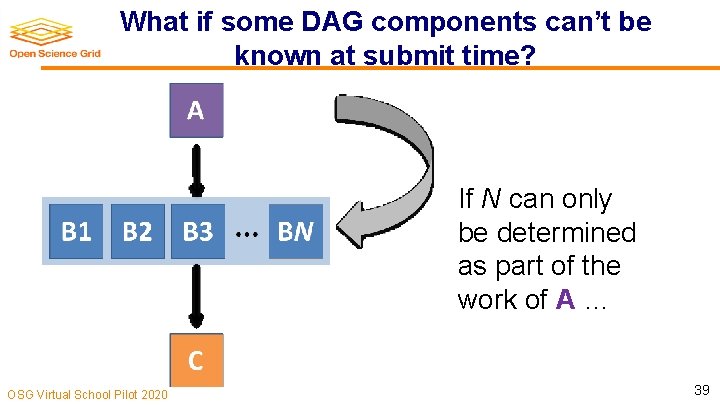
What if some DAG components can’t be known at submit time? If N can only be determined as part of the work of A … OSG Virtual School Pilot 2020 39
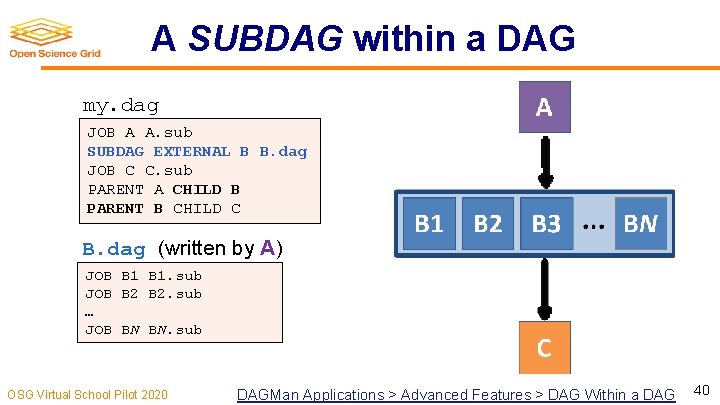
A SUBDAG within a DAG my. dag JOB A A. sub SUBDAG EXTERNAL B B. dag JOB C C. sub PARENT A CHILD B PARENT B CHILD C B. dag (written by A) JOB B 1. sub JOB B 2. sub … JOB BN BN. sub OSG Virtual School Pilot 2020 DAGMan Applications > Advanced Features > DAG Within a DAG 40
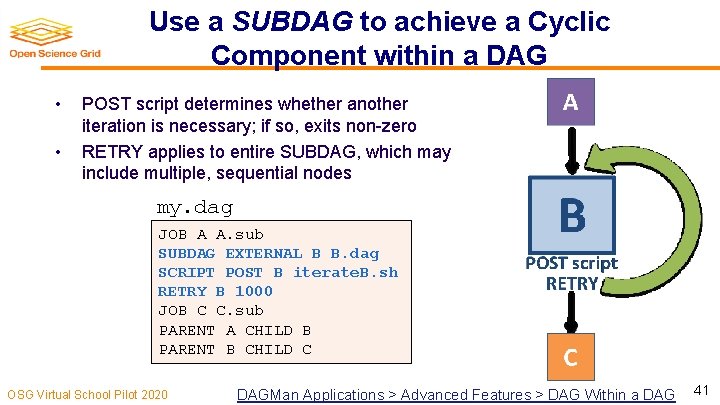
Use a SUBDAG to achieve a Cyclic Component within a DAG • • POST script determines whether another iteration is necessary; if so, exits non-zero RETRY applies to entire SUBDAG, which may include multiple, sequential nodes my. dag JOB A A. sub SUBDAG EXTERNAL B B. dag SCRIPT POST B iterate. B. sh RETRY B 1000 JOB C C. sub PARENT A CHILD B PARENT B CHILD C OSG Virtual School Pilot 2020 DAGMan Applications > Advanced Features > DAG Within a DAG 41
More in the HTCondor Manual and the HTCondor Week DAGMan Tutorial!!!
YOUR TURN! OSG Virtual School Pilot 2020 43
DAGMan Exercises! • Essential: Exercises 1 -4 • Ask questions! ‘See you in Slack! OSG Virtual School Pilot 2020 44