
WorkdayYale Community Update October 2 2020 INTRODUCTION WORKDAYYALE
Workday@Yale Community Update October 2, 2020
INTRODUCTION WORKDAY@YALE OVERVIEW & TIMELINE -2 -
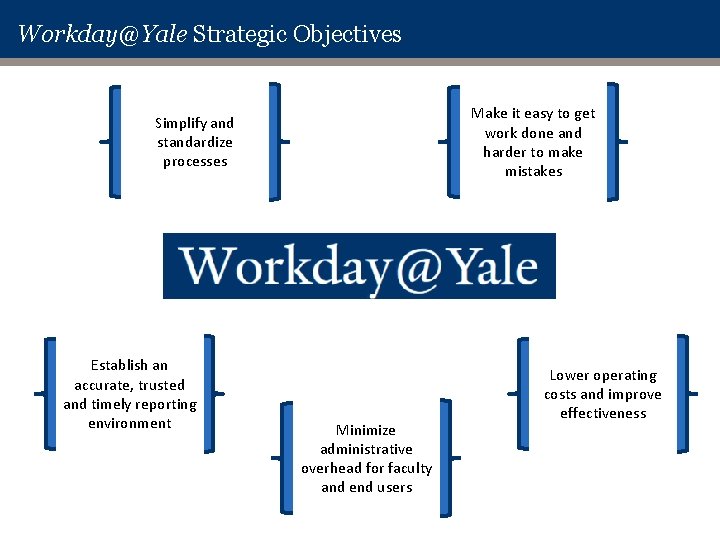
Workday@Yale Strategic Objectives Make it easy to get work done and harder to make mistakes Simplify and standardize processes Establish an accurate, trusted and timely reporting environment Minimize administrative overhead for faculty and end users Lower operating costs and improve effectiveness
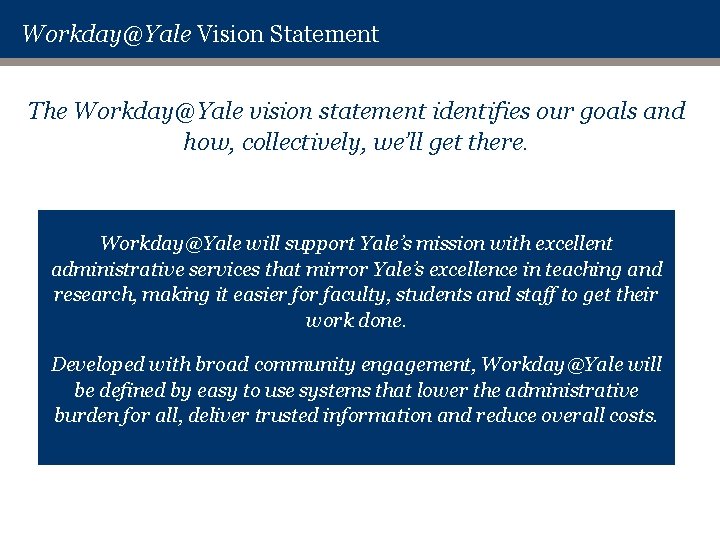
Workday@Yale Vision Statement The Workday@Yale vision statement identifies our goals and how, collectively, we’ll get there. Workday@Yale will support Yale’s mission with excellent administrative services that mirror Yale’s excellence in teaching and research, making it easier for faculty, students and staff to get their work done. Developed with broad community engagement, Workday@Yale will be defined by easy to use systems that lower the administrative burden for all, deliver trusted information and reduce overall costs.
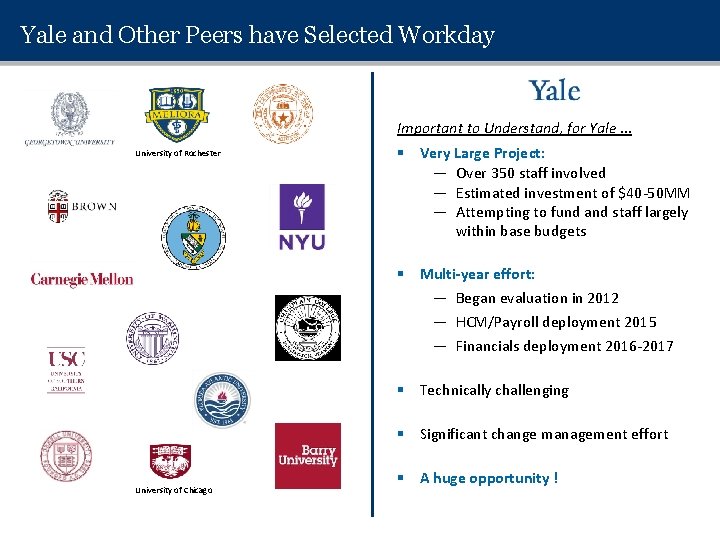
Yale and Other Peers have Selected Workday Important to Understand, for Yale … University of Rochester § Very Large Project: — Over 350 staff involved — Estimated investment of $40 -50 MM — Attempting to fund and staff largely within base budgets § Multi-year effort: — Began evaluation in 2012 — HCM/Payroll deployment 2015 — Financials deployment 2016 -2017 § Technically challenging § Significant change management effort University of Chicago § A huge opportunity !
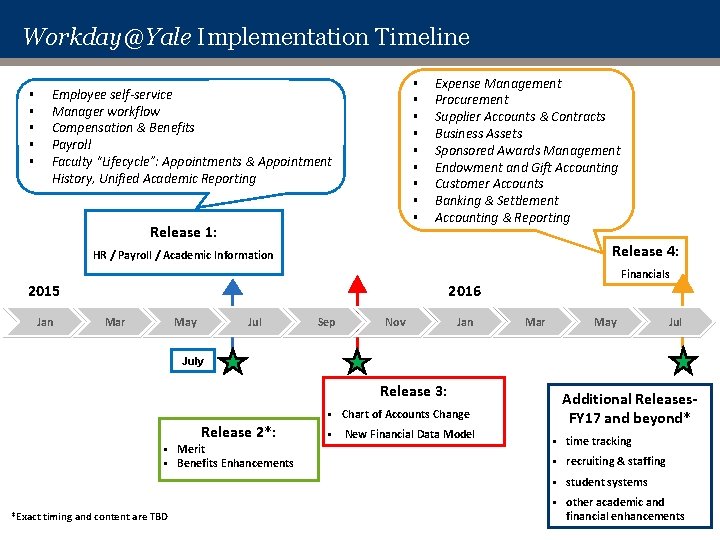
Workday@Yale Implementation Timeline § § § § Employee self-service Manager workflow Compensation & Benefits Payroll Faculty “Lifecycle”: Appointments & Appointment History, Unified Academic Reporting Release 1: Expense Management Procurement Supplier Accounts & Contracts Business Assets Sponsored Awards Management Endowment and Gift Accounting Customer Accounts Banking & Settlement Accounting & Reporting Release 4: HR / Payroll / Academic Information Financials 2016 2015 Jan Mar May Jul Sep Nov Jan Mar May July Release 3: Release 2*: § § *Exact timing and content are TBD Merit Benefits Enhancements § Chart of Accounts Change § New Financial Data Model Additional Releases. FY 17 and beyond* § time tracking § recruiting & staffing § student systems § other academic and financial enhancements
WHAT’S CHANGING -7 -
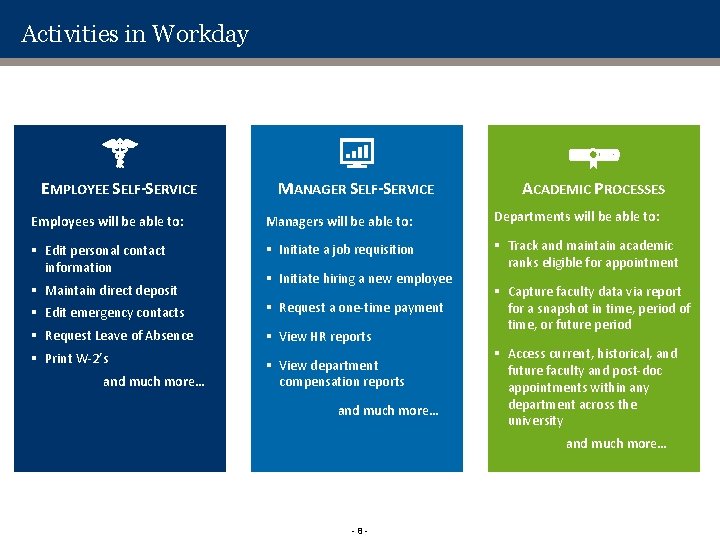
Activities in Workday EMPLOYEE SELF-SERVICE MANAGER SELF-SERVICE ACADEMIC PROCESSES Employees will be able to: Managers will be able to: Departments will be able to: § Edit personal contact information § Initiate a job requisition § Track and maintain academic ranks eligible for appointment § Maintain direct deposit § Initiate hiring a new employee § Edit emergency contacts § Request a one-time payment § Request Leave of Absence § View HR reports § Print W-2’s § View department compensation reports and much more… § Capture faculty data via report for a snapshot in time, period of time, or future period § Access current, historical, and future faculty and post-doc appointments within any department across the university and much more… -8 -
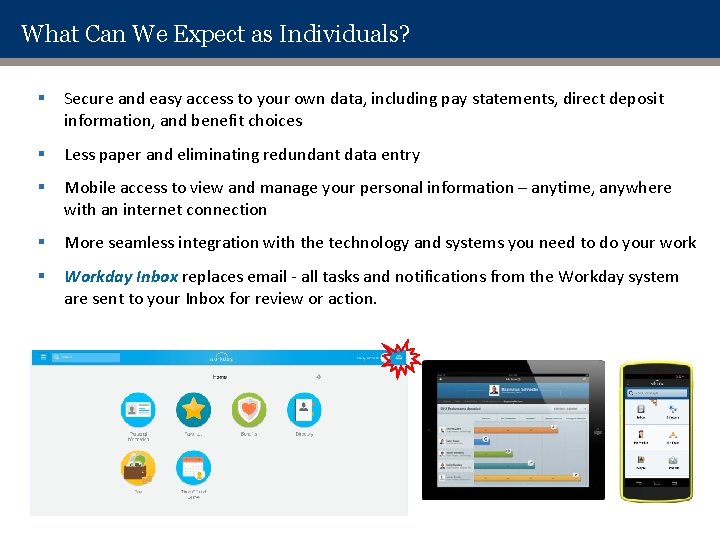
What Can We Expect as Individuals? § Secure and easy access to your own data, including pay statements, direct deposit information, and benefit choices § Less paper and eliminating redundant data entry § Mobile access to view and manage your personal information – anytime, anywhere with an internet connection § More seamless integration with the technology and systems you need to do your work § Workday Inbox replaces email - all tasks and notifications from the Workday system are sent to your Inbox for review or action.
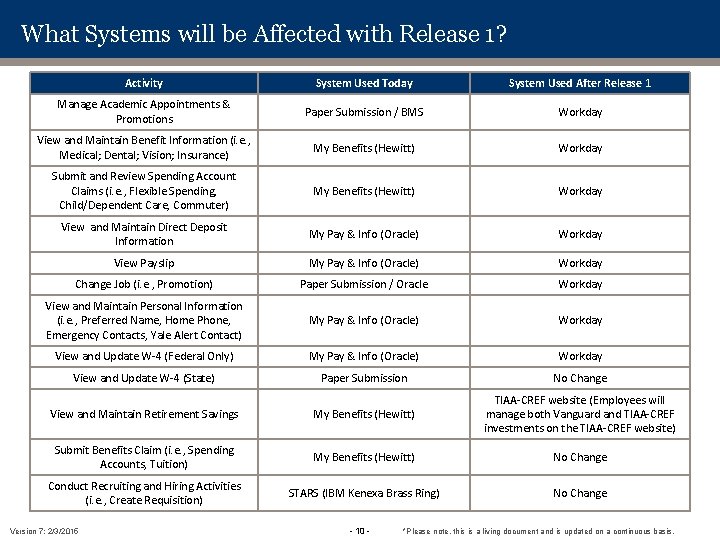
What Systems will be Affected with Release 1? Activity System Used Today System Used After Release 1 Manage Academic Appointments & Promotions Paper Submission / BMS Workday View and Maintain Benefit Information (i. e. , Medical; Dental; Vision; Insurance) My Benefits (Hewitt) Workday Submit and Review Spending Account Claims (i. e. , Flexible Spending, Child/Dependent Care, Commuter) My Benefits (Hewitt) Workday View and Maintain Direct Deposit Information My Pay & Info (Oracle) Workday View Payslip My Pay & Info (Oracle) Workday Change Job (i. e. , Promotion) Paper Submission / Oracle Workday View and Maintain Personal Information (i. e. , Preferred Name, Home Phone, Emergency Contacts, Yale Alert Contact) My Pay & Info (Oracle) Workday View and Update W-4 (Federal Only) My Pay & Info (Oracle) Workday View and Update W-4 (State) Paper Submission No Change View and Maintain Retirement Savings My Benefits (Hewitt) TIAA-CREF website (Employees will manage both Vanguard and TIAA-CREF investments on the TIAA-CREF website) Submit Benefits Claim (i. e. , Spending Accounts, Tuition) My Benefits (Hewitt) No Change Conduct Recruiting and Hiring Activities (i. e. , Create Requisition) STARS (IBM Kenexa Brass Ring) No Change Version 7: 2/3/2015 - 10 - *Please note, this is a living document and is updated on a continuous basis.
WORKDAY CONCEPTS - 11 -
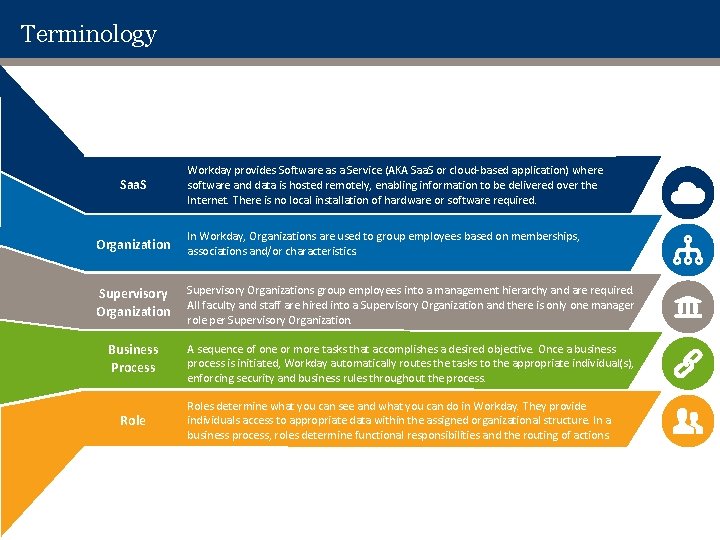
Terminology Saa. S Workday provides Software as a Service (AKA Saa. S or cloud-based application) where software and data is hosted remotely, enabling information to be delivered over the Internet. There is no local installation of hardware or software required. Organization In Workday, Organizations are used to group employees based on memberships, associations and/or characteristics. Supervisory Organizations group employees into a management hierarchy and are required. All faculty and staff are hired into a Supervisory Organization and there is only one manager role per Supervisory Organization. Business Process A sequence of one or more tasks that accomplishes a desired objective. Once a business process is initiated, Workday automatically routes the tasks to the appropriate individual(s), enforcing security and business rules throughout the process. Roles determine what you can see and what you can do in Workday. They provide individuals access to appropriate data within the assigned organizational structure. In a business process, roles determine functional responsibilities and the routing of actions.

Icons Overview Icons Workday’s use of icons allows navigation in the system to be even more intuitive. Related Actions that are available to you (based on security) will become visible upon hovering and can be selected to open the available actions. Prompt Any time you see this symbol, you can click to expand a box that will contain a list of available options. Menu The Main Menu drop down icon houses landing pages, dashboards, and documentation from Workday Community. Home Page At any time, you can click the Workday logo at the top center of the screen to return to the Home Page. Inbox All tasks and notifications from the Workday system are sent to your Inbox for review or action. For more information on the Workday Inbox, click here to review the Inbox Core Concept.
NAVIGATION IN WORKDAY - 14 -
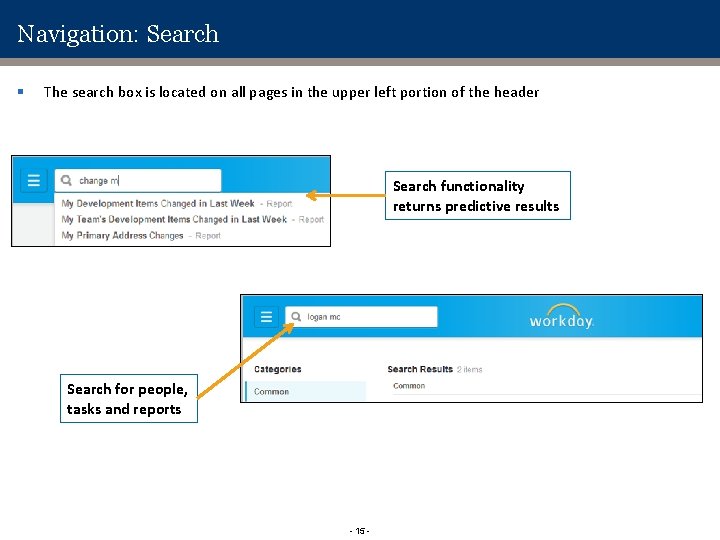
Navigation: Search § The search box is located on all pages in the upper left portion of the header Search functionality returns predictive results Search for people, tasks and reports - 15 -
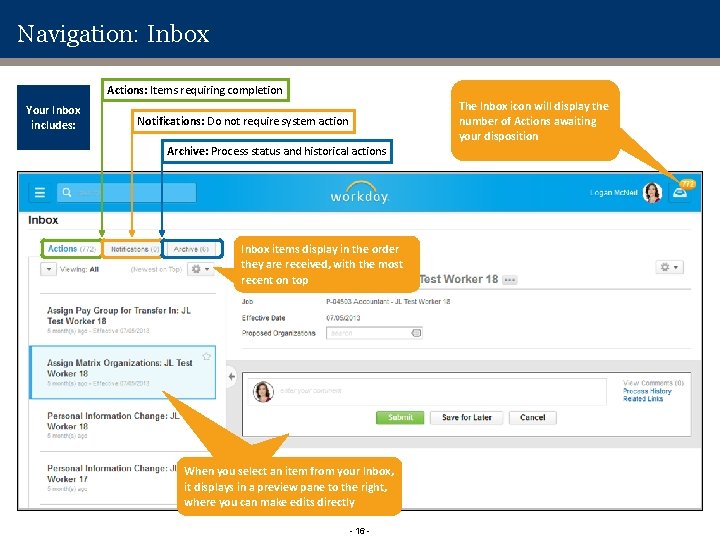
Navigation: Inbox Actions: Items requiring completion Your Inbox includes: The Inbox icon will display the number of Actions awaiting your disposition Notifications: Do not require system action Archive: Process status and historical actions Inbox items display in the order they are received, with the most recent on top When you select an item from your Inbox, it displays in a preview pane to the right, where you can make edits directly - 16 -
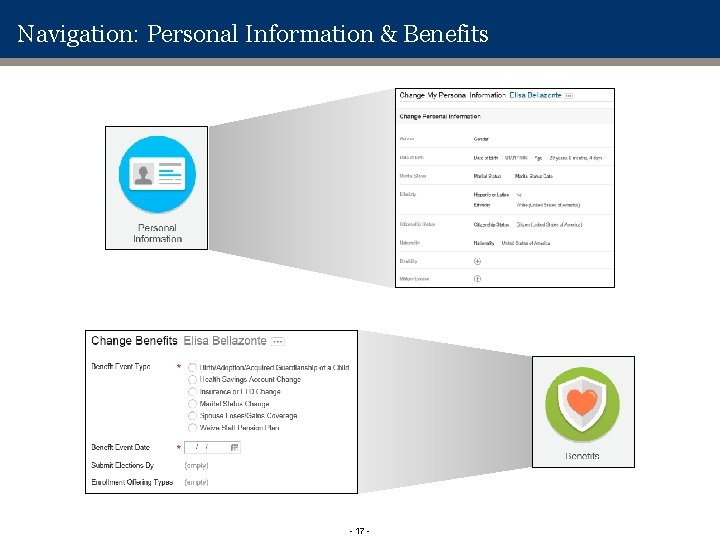
Navigation: Personal Information & Benefits - 17 -
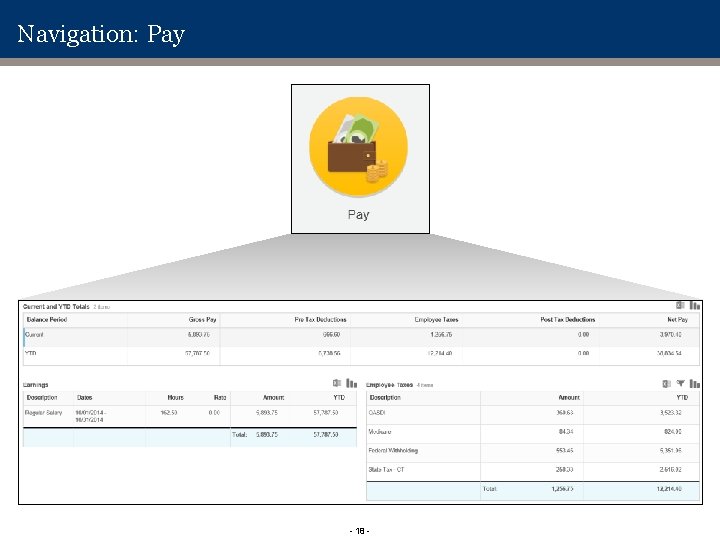
Navigation: Pay - 18 -
COMMUNITY ENGAGEMENT & TRAINING APPROACH
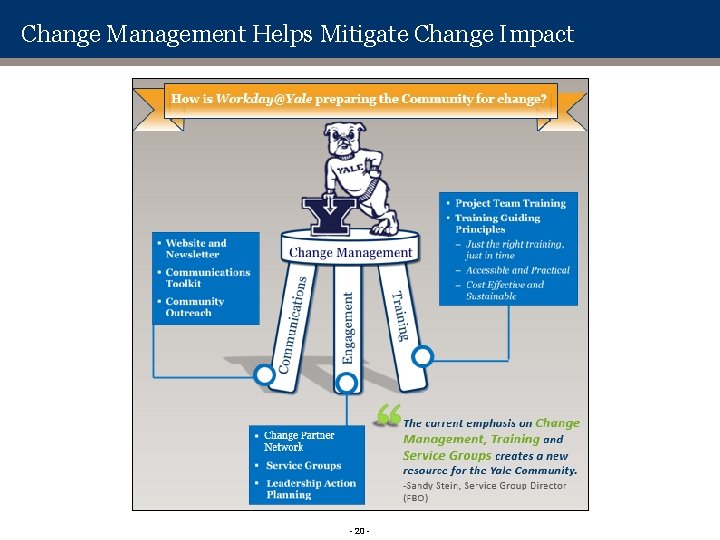
Change Management Helps Mitigate Change Impact - 20 -
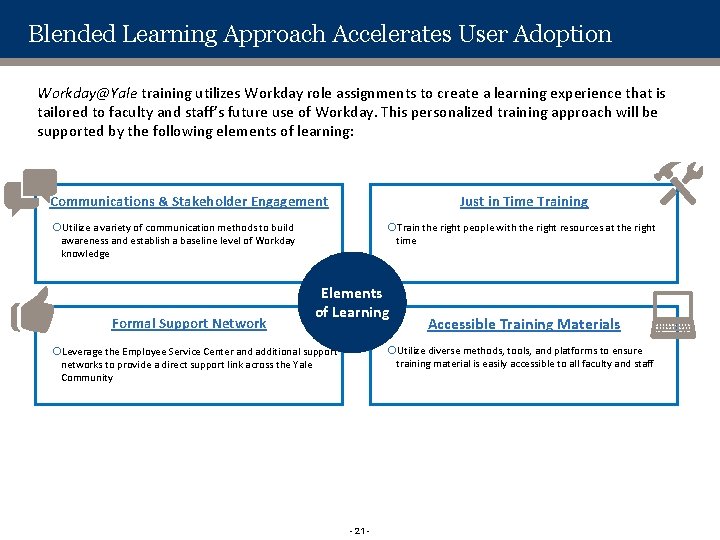
Blended Learning Approach Accelerates User Adoption Workday@Yale training utilizes Workday role assignments to create a learning experience that is tailored to faculty and staff’s future use of Workday. This personalized training approach will be supported by the following elements of learning: Communications & Stakeholder Engagement Just in Time Training Utilize a variety of communication methods to build awareness and establish a baseline level of Workday knowledge Formal Support Network Train the right people with the right resources at the right time Elements of Learning Accessible Training Materials Utilize diverse methods, tools, and platforms to ensure training material is easily accessible to all faculty and staff Leverage the Employee Service Center and additional support networks to provide a direct support link across the Yale Community - 21 -
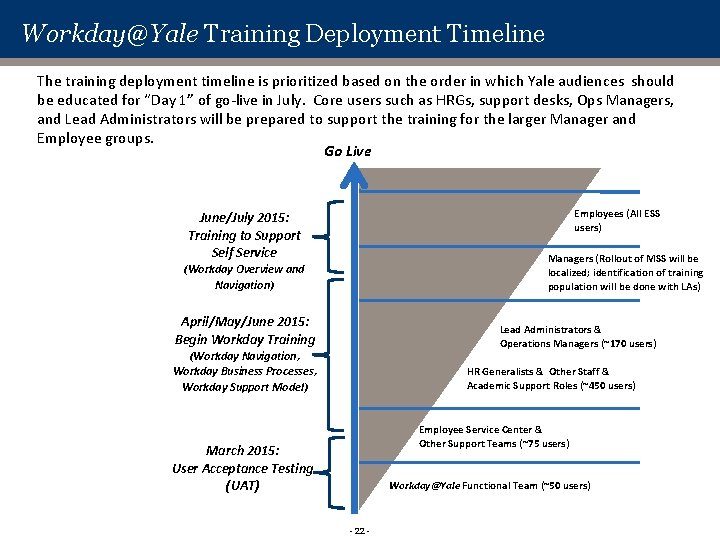
Workday@Yale Training Deployment Timeline The training deployment timeline is prioritized based on the order in which Yale audiences should be educated for “Day 1” of go-live in July. Core users such as HRGs, support desks, Ops Managers, and Lead Administrators will be prepared to support the training for the larger Manager and Employee groups. Go Live Employees (All ESS users) June/July 2015: Training to Support Self Service Managers (Rollout of MSS will be localized; identification of training population will be done with LAs) (Workday Overview and Navigation) April/May/June 2015: Begin Workday Training Lead Administrators & Operations Managers (~170 users) (Workday Navigation, Workday Business Processes, Workday Support Model) HR Generalists & Other Staff & Academic Support Roles (~450 users) Employee Service Center & Other Support Teams (~75 users) March 2015: User Acceptance Testing (UAT) Workday@Yale Functional Team (~50 users) - 22 -
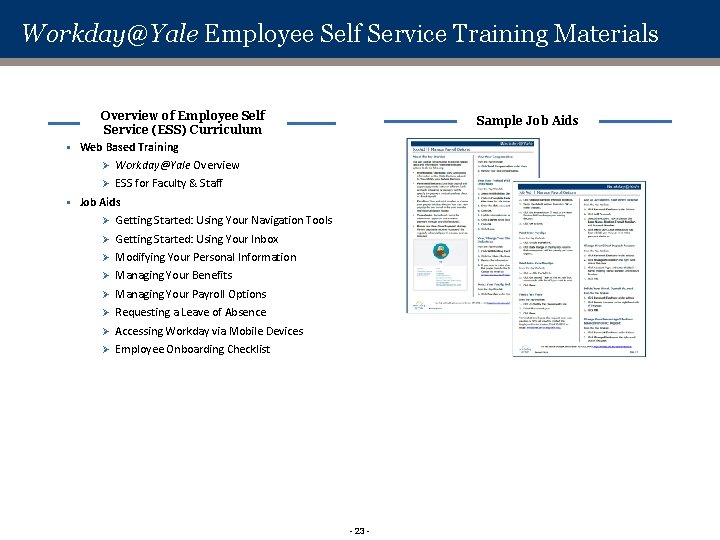
Workday@Yale Employee Self Service Training Materials Overview of Employee Self Service (ESS) Curriculum § Web Based Training Sample Job Aids Ø Workday@Yale Overview Ø ESS for Faculty & Staff § Job Aids Ø Getting Started: Using Your Navigation Tools Ø Getting Started: Using Your Inbox Ø Modifying Your Personal Information Ø Managing Your Benefits Ø Managing Your Payroll Options Ø Requesting a Leave of Absence Ø Accessing Workday via Mobile Devices Ø Employee Onboarding Checklist - 23 -
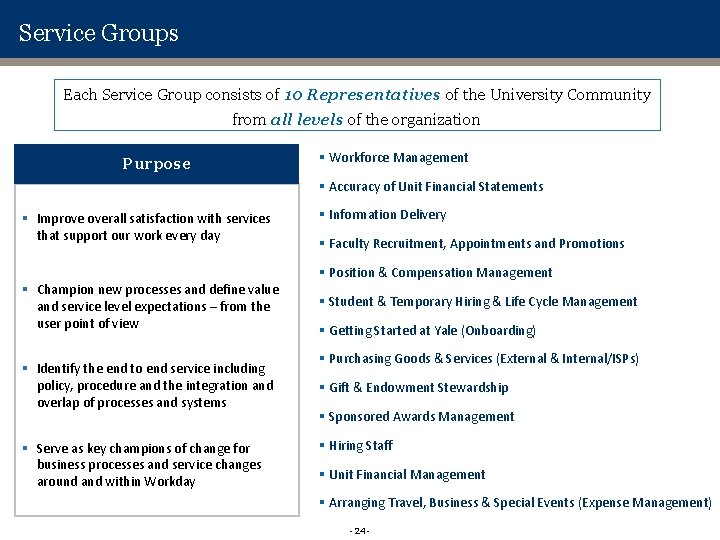
Service Groups Each Service Group consists of 10 Representatives of the University Community from all levels of the organization Purpose § Workforce Management § Accuracy of Unit Financial Statements § Improve overall satisfaction with services that support our work every day § Information Delivery § Faculty Recruitment, Appointments and Promotions § Position & Compensation Management § Champion new processes and define value and service level expectations – from the user point of view § Identify the end to end service including policy, procedure and the integration and overlap of processes and systems § Serve as key champions of change for business processes and service changes around and within Workday § Student & Temporary Hiring & Life Cycle Management § Getting Started at Yale (Onboarding) § Purchasing Goods & Services (External & Internal/ISPs) § Gift & Endowment Stewardship § Sponsored Awards Management § Hiring Staff § Unit Financial Management § Arranging Travel, Business & Special Events (Expense Management) - 24 -
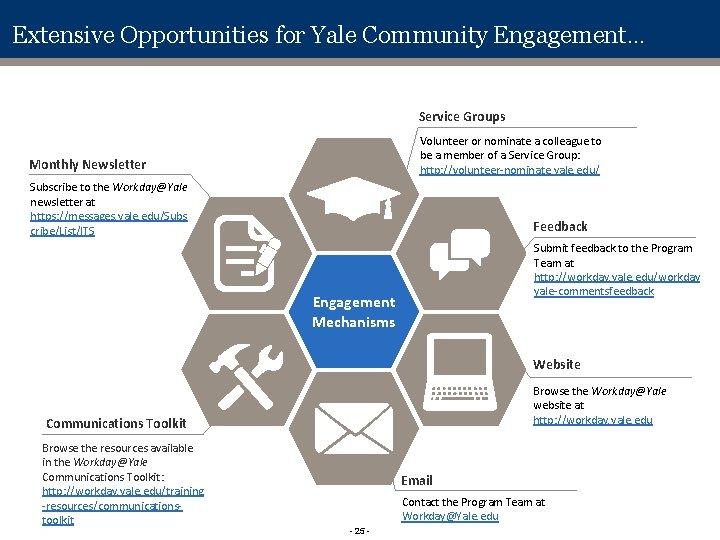
Extensive Opportunities for Yale Community Engagement… Service Groups Volunteer or nominate a colleague to be a member of a Service Group: http: //volunteer-nominate. yale. edu/ Monthly Newsletter Subscribe to the Workday@Yale newsletter at https: //messages. yale. edu/Subs cribe/List/ITS Feedback Submit feedback to the Program Team at http: //workday. yale. edu/workday yale-commentsfeedback Engagement Mechanisms Website Browse the Workday@Yale website at http: //workday. yale. edu Communications Toolkit Browse the resources available in the Workday@Yale Communications Toolkit: http: //workday. yale. edu/training -resources/communicationstoolkit Email Contact the Program Team at Workday@Yale. edu - 25 -

Questions ?
APPENDIX
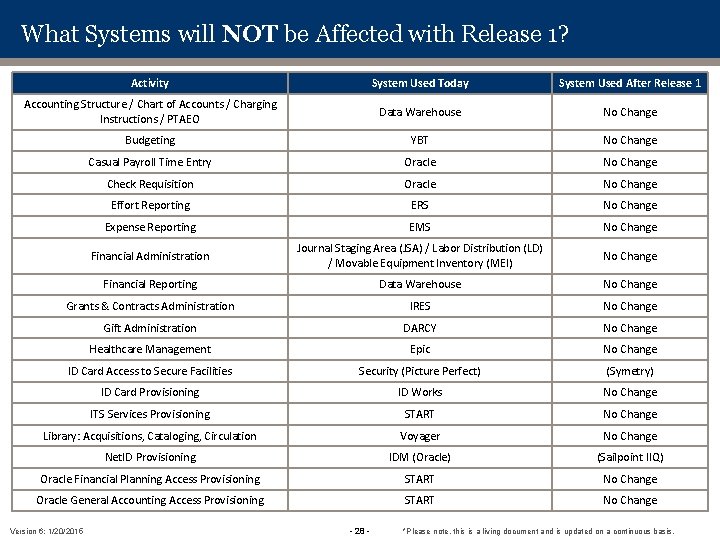
What Systems will NOT be Affected with Release 1? Activity System Used Today System Used After Release 1 Accounting Structure / Chart of Accounts / Charging Instructions / PTAEO Data Warehouse No Change Budgeting YBT No Change Casual Payroll Time Entry Oracle No Change Check Requisition Oracle No Change Effort Reporting ERS No Change Expense Reporting EMS No Change Financial Administration Journal Staging Area (JSA) / Labor Distribution (LD) / Movable Equipment Inventory (MEI) No Change Financial Reporting Data Warehouse No Change Grants & Contracts Administration IRES No Change Gift Administration DARCY No Change Healthcare Management Epic No Change ID Card Access to Secure Facilities Security (Picture Perfect) (Symetry) ID Card Provisioning ID Works No Change ITS Services Provisioning START No Change Library: Acquisitions, Cataloging, Circulation Voyager No Change Net. ID Provisioning IDM (Oracle) (Sailpoint IIQ) Oracle Financial Planning Access Provisioning START No Change Oracle General Accounting Access Provisioning START No Change Version 6: 1/20/2015 - 28 - *Please note, this is a living document and is updated on a continuous basis.
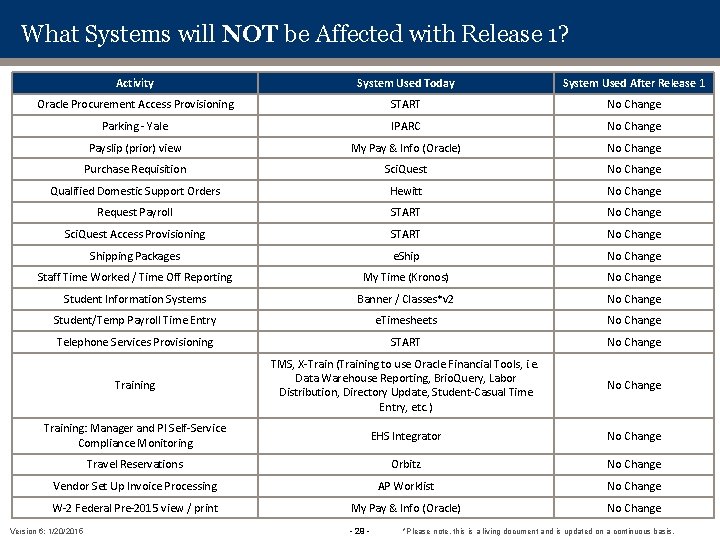
What Systems will NOT be Affected with Release 1? Activity System Used Today System Used After Release 1 Oracle Procurement Access Provisioning START No Change Parking - Yale IPARC No Change Payslip (prior) view My Pay & Info (Oracle) No Change Purchase Requisition Sci. Quest No Change Qualified Domestic Support Orders Hewitt No Change Request Payroll START No Change Sci. Quest Access Provisioning START No Change Shipping Packages e. Ship No Change Staff Time Worked / Time Off Reporting My Time (Kronos) No Change Student Information Systems Banner / Classes*v 2 No Change Student/Temp Payroll Time Entry e. Timesheets No Change Telephone Services Provisioning START No Change Training TMS, X-Train (Training to use Oracle Financial Tools, i. e. Data Warehouse Reporting, Brio. Query, Labor Distribution, Directory Update, Student-Casual Time Entry, etc. ) No Change Training: Manager and PI Self-Service Compliance Monitoring EHS Integrator No Change Travel Reservations Orbitz No Change Vendor Set Up Invoice Processing AP Worklist No Change W-2 Federal Pre-2015 view / print My Pay & Info (Oracle) No Change Version 6: 1/20/2015 - 29 - *Please note, this is a living document and is updated on a continuous basis.
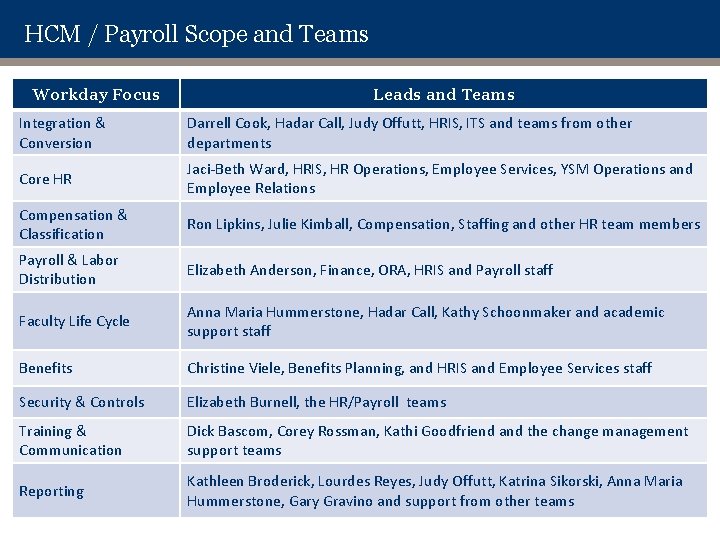
HCM / Payroll Scope and Teams Workday Focus Leads and Teams Integration & Conversion Darrell Cook, Hadar Call, Judy Offutt, HRIS, ITS and teams from other departments Core HR Jaci-Beth Ward, HRIS, HR Operations, Employee Services, YSM Operations and Employee Relations Compensation & Classification Ron Lipkins, Julie Kimball, Compensation, Staffing and other HR team members Payroll & Labor Distribution Elizabeth Anderson, Finance, ORA, HRIS and Payroll staff Faculty Life Cycle Anna Maria Hummerstone, Hadar Call, Kathy Schoonmaker and academic support staff Benefits Christine Viele, Benefits Planning, and HRIS and Employee Services staff Security & Controls Elizabeth Burnell, the HR/Payroll teams Training & Communication Dick Bascom, Corey Rossman, Kathi Goodfriend and the change management support teams Reporting Kathleen Broderick, Lourdes Reyes, Judy Offutt, Katrina Sikorski, Anna Maria Hummerstone, Gary Gravino and support from other teams
- Slides: 30