
WorkdayYale Community Update March 6 2021 INTRODUCTION WORKDAYYALE

- Slides: 29
Workday@Yale Community Update March 6, 2021
INTRODUCTION WORKDAY@YALE OVERVIEW & TIMELINE -2 -
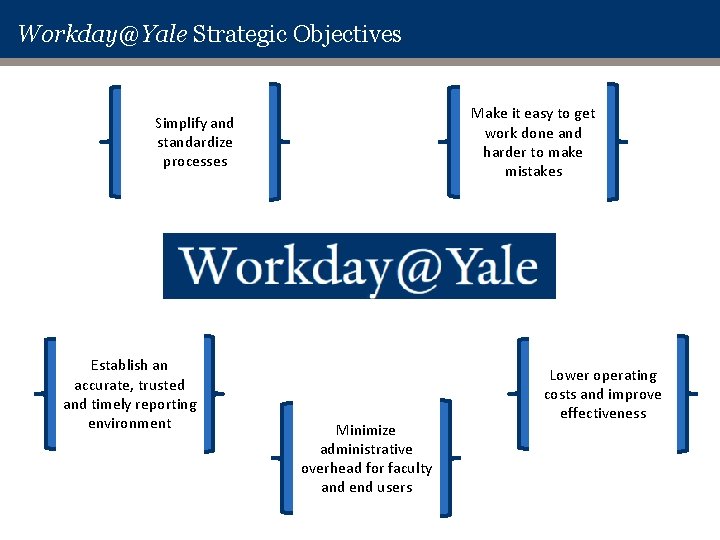
Workday@Yale Strategic Objectives Make it easy to get work done and harder to make mistakes Simplify and standardize processes Establish an accurate, trusted and timely reporting environment Minimize administrative overhead for faculty and end users Lower operating costs and improve effectiveness
Workday@Yale Vision Statement The Workday@Yale vision statement identifies where we’re trying to go and how, collectively, we’ll get there: Workday@Yale will support Yale’s mission with excellent administrative services that mirror Yale’s excellence in teaching and research, making it easier for faculty, students and staff to get their work done. Developed with broad community engagement, Workday@Yale will be defined by easy to use systems that lower the administrative burden for all, deliver trusted information and reduce overall costs.
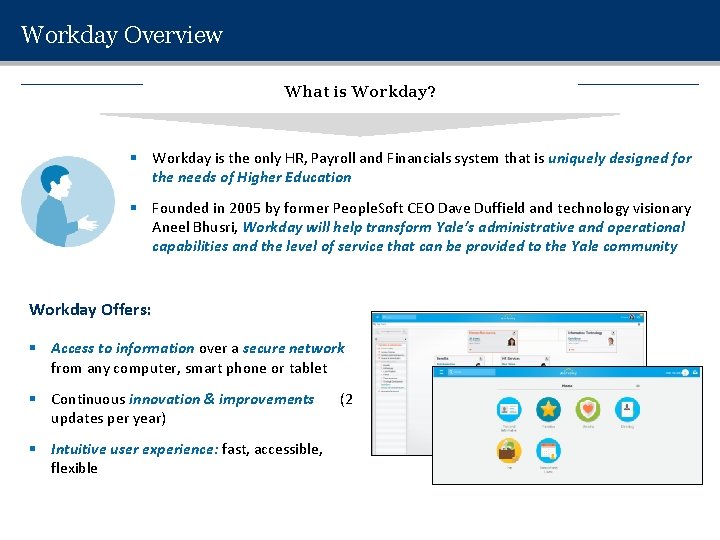
Workday Overview What is Workday? § Workday is the only HR, Payroll and Financials system that is uniquely designed for the needs of Higher Education § Founded in 2005 by former People. Soft CEO Dave Duffield and technology visionary Aneel Bhusri, Workday will help transform Yale’s administrative and operational capabilities and the level of service that can be provided to the Yale community Workday Offers: § Access to information over a secure network from any computer, smart phone or tablet § Continuous innovation & improvements updates per year) § Intuitive user experience: fast, accessible, flexible (2
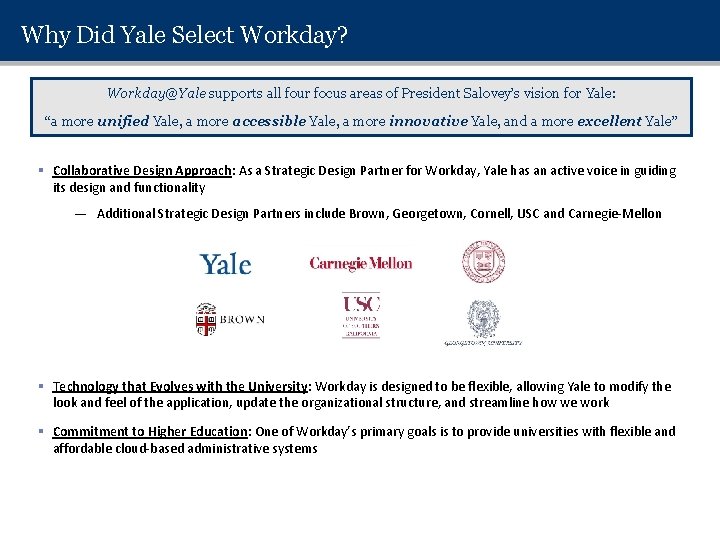
Why Did Yale Select Workday? Workday@Yale supports all four focus areas of President Salovey’s vision for Yale: “a more unified Yale, a more accessible Yale, a more innovative Yale, and a more excellent Yale” § Collaborative Design Approach: As a Strategic Design Partner for Workday, Yale has an active voice in guiding its design and functionality — Additional Strategic Design Partners include Brown, Georgetown, Cornell, USC and Carnegie-Mellon § Technology that Evolves with the University: Workday is designed to be flexible, allowing Yale to modify the look and feel of the application, update the organizational structure, and streamline how we work § Commitment to Higher Education: One of Workday’s primary goals is to provide universities with flexible and affordable cloud-based administrative systems
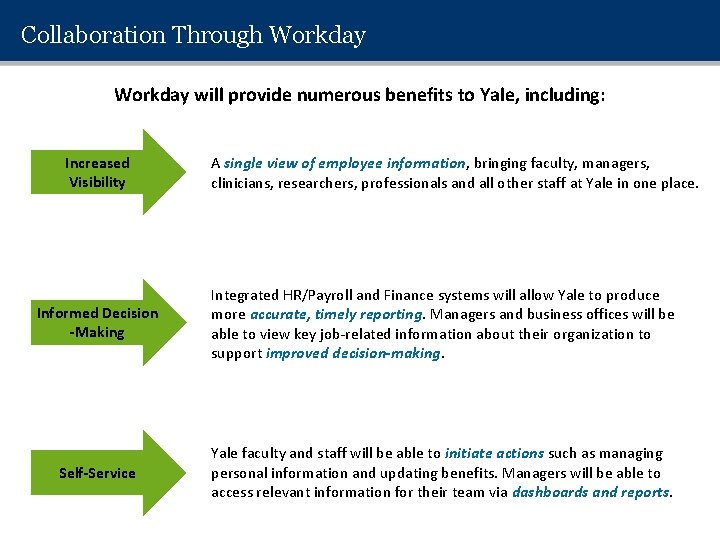
Collaboration Through Workday will provide numerous benefits to Yale, including: Increased Visibility A single view of employee information, bringing faculty, managers, clinicians, researchers, professionals and all other staff at Yale in one place. Informed Decision -Making Integrated HR/Payroll and Finance systems will allow Yale to produce more accurate, timely reporting. Managers and business offices will be able to view key job-related information about their organization to support improved decision-making. Self-Service Yale faculty and staff will be able to initiate actions such as managing personal information and updating benefits. Managers will be able to access relevant information for their team via dashboards and reports.
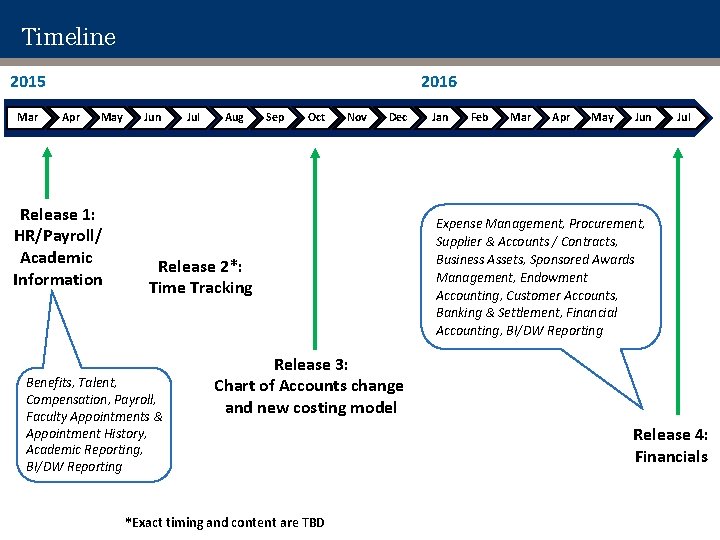
Timeline 2015 Mar 2016 Apr May Release 1: HR/Payroll/ Academic Information Jul Aug Sep Oct Nov Dec Release 2*: Time Tracking Benefits, Talent, Compensation, Payroll, Faculty Appointments & Appointment History, Academic Reporting, BI/DW Reporting Jan Feb Mar Apr May Jun Jul Expense Management, Procurement, Supplier & Accounts / Contracts, Business Assets, Sponsored Awards Management, Endowment Accounting, Customer Accounts, Banking & Settlement, Financial Accounting, BI/DW Reporting Release 3: Chart of Accounts change and new costing model *Exact timing and content are TBD Release 4: Financials
WHAT’S CHANGING -9 -
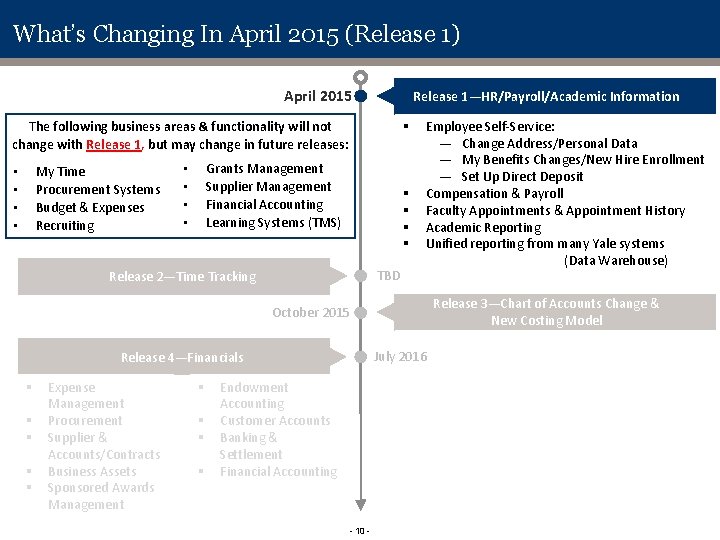
What’s Changing In April 2015 (Release 1) April 2015 Release 1—HR/Payroll/Academic Information § The following business areas & functionality will not change with Release 1, but may change in future releases: My Time Procurement Systems Budget & Expenses Recruiting • • Grants Management Supplier Management Financial Accounting Learning Systems (TMS) • • § § TBD Release 2—Time Tracking Employee Self-Service: — Change Address/Personal Data — My Benefits Changes/New Hire Enrollment — Set Up Direct Deposit Compensation & Payroll Faculty Appointments & Appointment History Academic Reporting Unified reporting from many Yale systems (Data Warehouse) Release 3—Chart of Accounts Change & New Costing Model October 2015 July 2016 Release 4—Financials § § § Expense Management Procurement Supplier & Accounts/Contracts Business Assets Sponsored Awards Management § § Endowment Accounting Customer Accounts Banking & Settlement Financial Accounting - 10 -
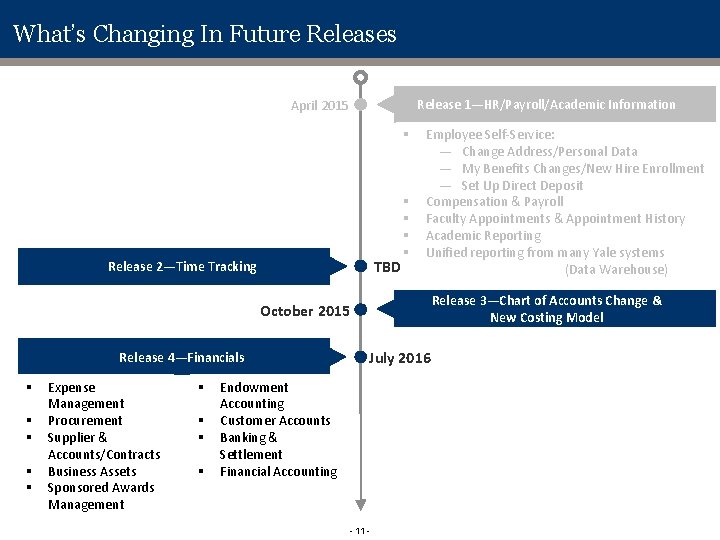
What’s Changing In Future Releases Release 1—HR/Payroll/Academic Information April 2015 § TBD Release 2—Time Tracking § § Employee Self-Service: — Change Address/Personal Data — My Benefits Changes/New Hire Enrollment — Set Up Direct Deposit Compensation & Payroll Faculty Appointments & Appointment History Academic Reporting Unified reporting from many Yale systems (Data Warehouse) Release 3—Chart of Accounts Change & New Costing Model October 2015 Release 4—Financials § § § Expense Management Procurement Supplier & Accounts/Contracts Business Assets Sponsored Awards Management § § July 2016 Endowment Accounting Customer Accounts Banking & Settlement Financial Accounting - 11 -
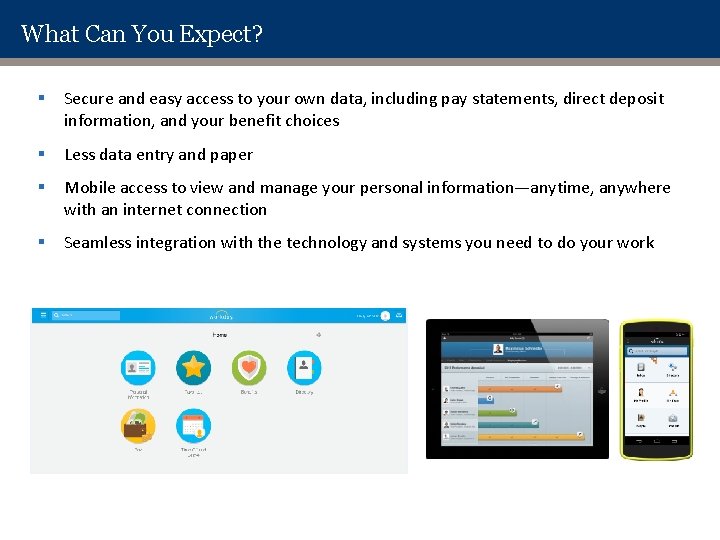
What Can You Expect? § Secure and easy access to your own data, including pay statements, direct deposit information, and your benefit choices § Less data entry and paper § Mobile access to view and manage your personal information—anytime, anywhere with an internet connection § Seamless integration with the technology and systems you need to do your work
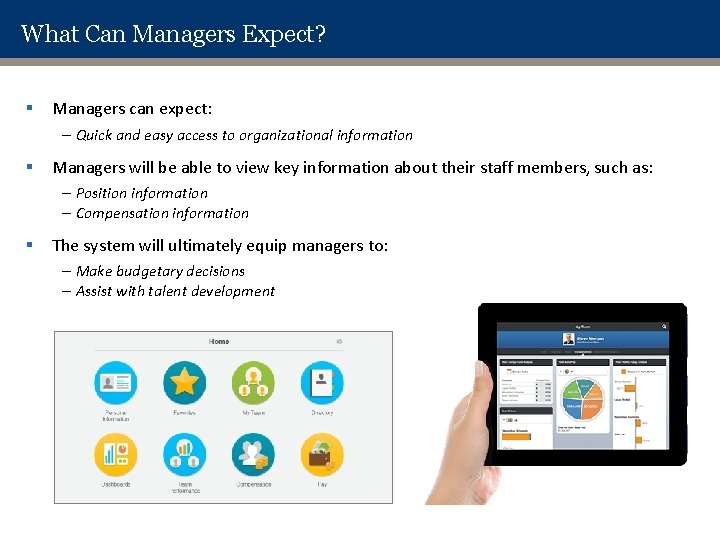
What Can Managers Expect? § Managers can expect: ‒ Quick and easy access to organizational information § Managers will be able to view key information about their staff members, such as: ‒ Position information ‒ Compensation information § The system will ultimately equip managers to: ‒ Make budgetary decisions ‒ Assist with talent development
NAVIGATION IN WORKDAY - 14 -
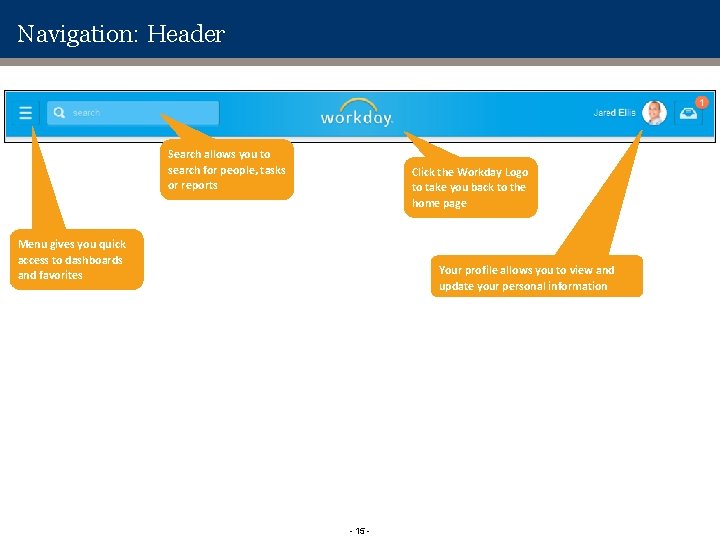
Navigation: Header Search allows you to search for people, tasks or reports Click the Workday Logo to take you back to the home page Menu gives you quick access to dashboards and favorites Your profile allows you to view and update your personal information - 15 -
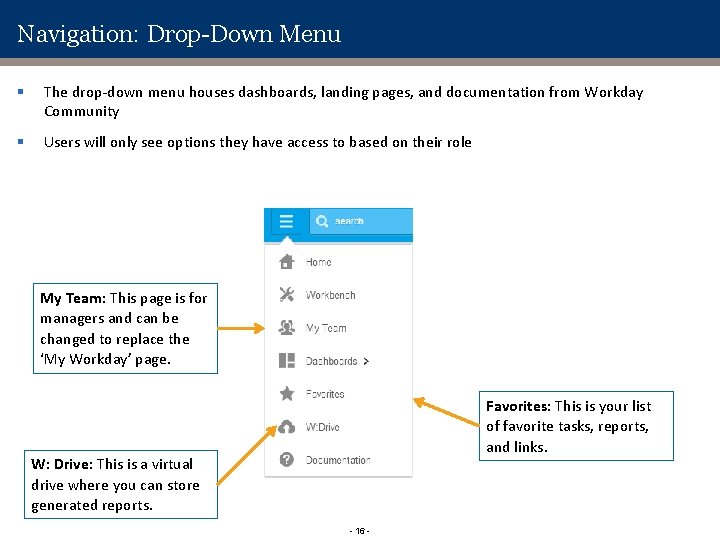
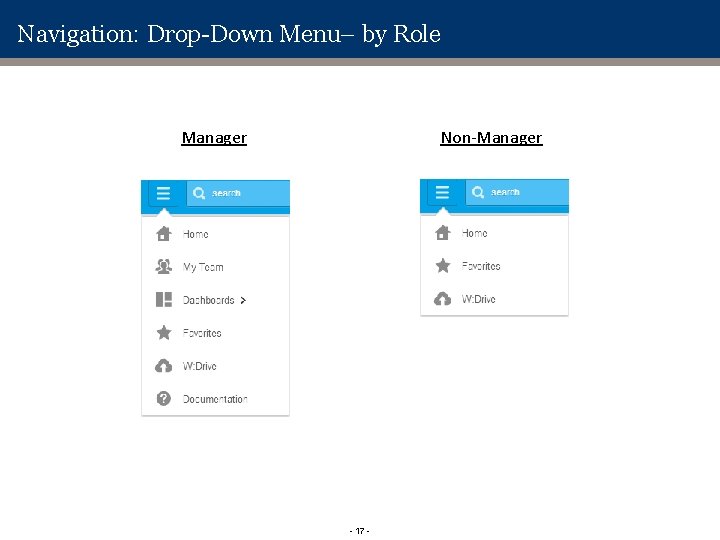
Navigation: Drop-Down Menu § The drop-down menu houses dashboards, landing pages, and documentation from Workday Community § Users will only see options they have access to based on their role My Team: This page is for managers and can be changed to replace the ‘My Workday’ page. Favorites: This is your list of favorite tasks, reports, and links. W: Drive: This is a virtual drive where you can store generated reports. - 16 -
Navigation: Drop-Down Menu– by Role Manager Non-Manager - 17 -
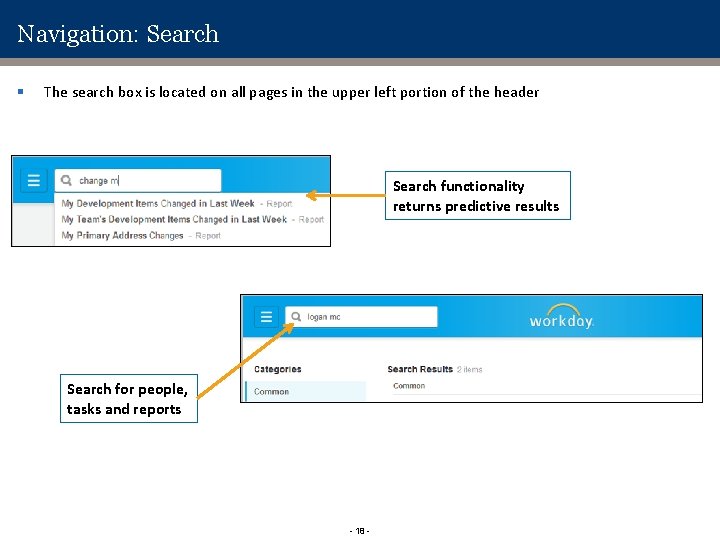
Navigation: Search § The search box is located on all pages in the upper left portion of the header Search functionality returns predictive results Search for people, tasks and reports - 18 -
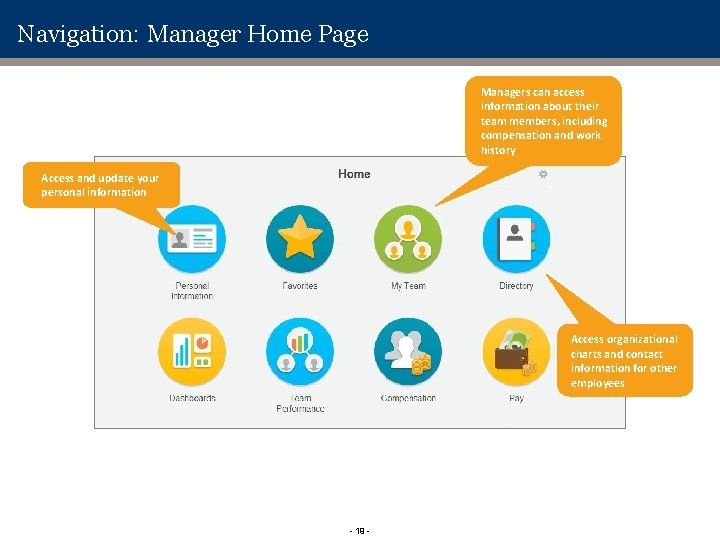
Navigation: Manager Home Page Managers can access information about their team members, including compensation and work history Access and update your personal information Access organizational charts and contact information for other employees - 19 -
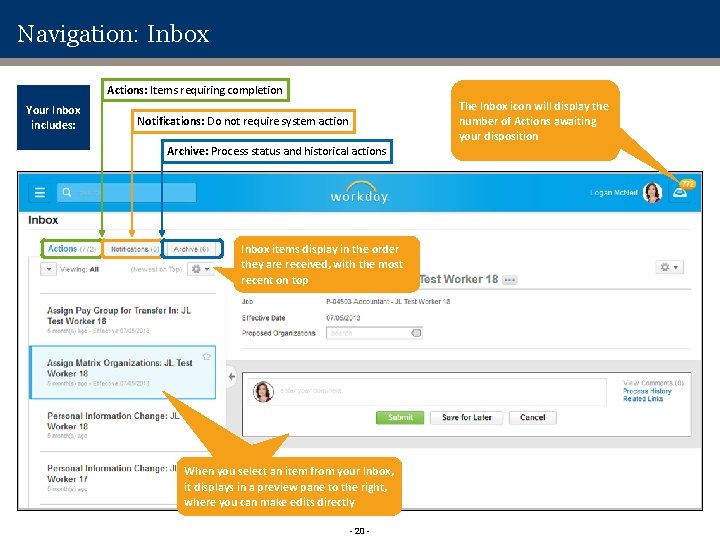
Navigation: Inbox Actions: Items requiring completion Your Inbox includes: The Inbox icon will display the number of Actions awaiting your disposition Notifications: Do not require system action Archive: Process status and historical actions Inbox items display in the order they are received, with the most recent on top When you select an item from your Inbox, it displays in a preview pane to the right, where you can make edits directly - 20 -
COMMUNITY ENGAGEMENT
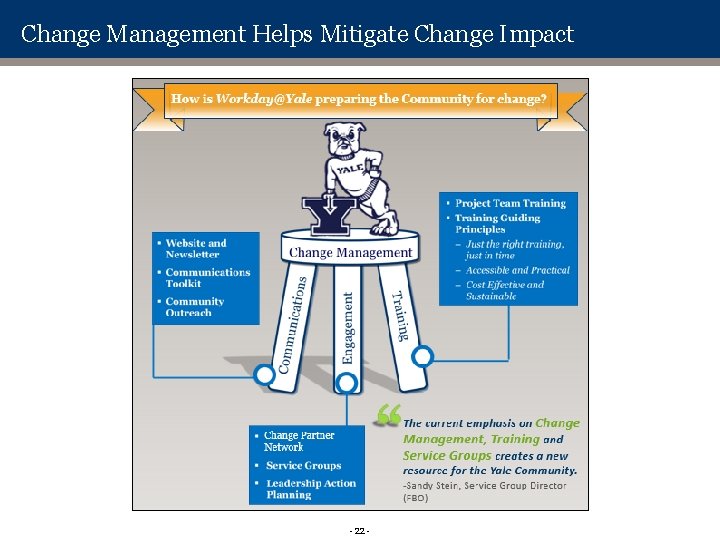
Change Management Helps Mitigate Change Impact - 22 -
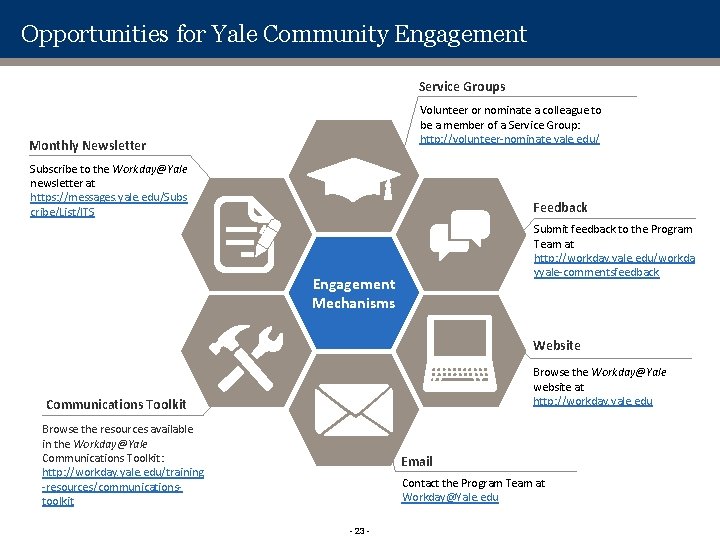
Opportunities for Yale Community Engagement Service Groups Volunteer or nominate a colleague to be a member of a Service Group: http: //volunteer-nominate. yale. edu/ Monthly Newsletter Subscribe to the Workday@Yale newsletter at https: //messages. yale. edu/Subs cribe/List/ITS Feedback Submit feedback to the Program Team at http: //workday. yale. edu/workda yyale-commentsfeedback Engagement Mechanisms Website Browse the Workday@Yale website at http: //workday. yale. edu Communications Toolkit Browse the resources available in the Workday@Yale Communications Toolkit: http: //workday. yale. edu/training -resources/communicationstoolkit Email Contact the Program Team at Workday@Yale. edu - 23 -
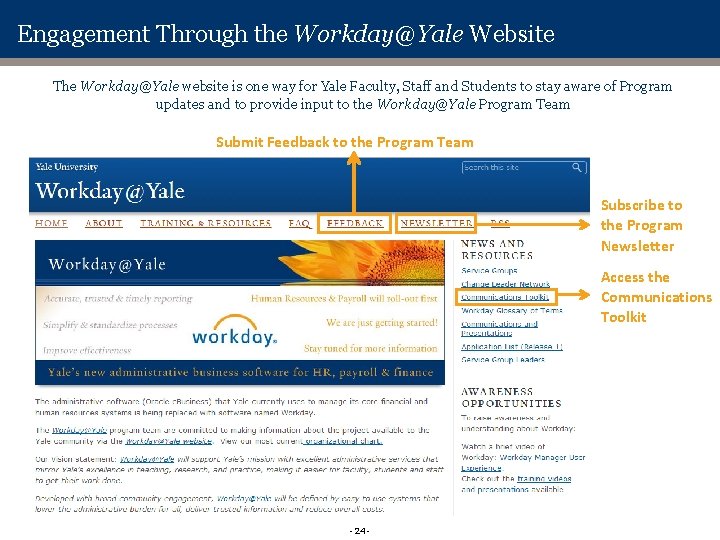
Engagement Through the Workday@Yale Website The Workday@Yale website is one way for Yale Faculty, Staff and Students to stay aware of Program updates and to provide input to the Workday@Yale Program Team Submit Feedback to the Program Team Subscribe to the Program Newsletter Access the Communications Toolkit - 24 -
Questions ?
APPENDIX
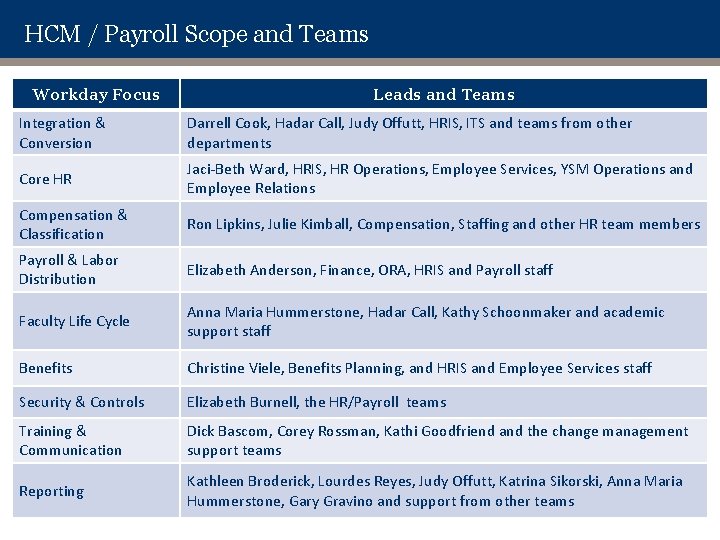
HCM / Payroll Scope and Teams Workday Focus Leads and Teams Integration & Conversion Darrell Cook, Hadar Call, Judy Offutt, HRIS, ITS and teams from other departments Core HR Jaci-Beth Ward, HRIS, HR Operations, Employee Services, YSM Operations and Employee Relations Compensation & Classification Ron Lipkins, Julie Kimball, Compensation, Staffing and other HR team members Payroll & Labor Distribution Elizabeth Anderson, Finance, ORA, HRIS and Payroll staff Faculty Life Cycle Anna Maria Hummerstone, Hadar Call, Kathy Schoonmaker and academic support staff Benefits Christine Viele, Benefits Planning, and HRIS and Employee Services staff Security & Controls Elizabeth Burnell, the HR/Payroll teams Training & Communication Dick Bascom, Corey Rossman, Kathi Goodfriend and the change management support teams Reporting Kathleen Broderick, Lourdes Reyes, Judy Offutt, Katrina Sikorski, Anna Maria Hummerstone, Gary Gravino and support from other teams
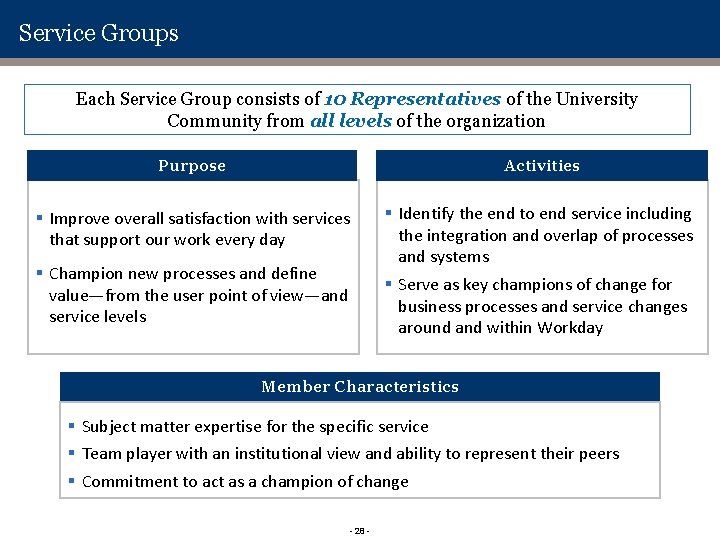
Service Groups Each Service Group consists of 10 Representatives of the University Community from all levels of the organization Purpose Activities § Improve overall satisfaction with services that support our work every day § Identify the end to end service including the integration and overlap of processes and systems § Serve as key champions of change for business processes and service changes around and within Workday § Champion new processes and define value—from the user point of view—and service levels Member Characteristics § Subject matter expertise for the specific service § Team player with an institutional view and ability to represent their peers § Commitment to act as a champion of change - 28 -
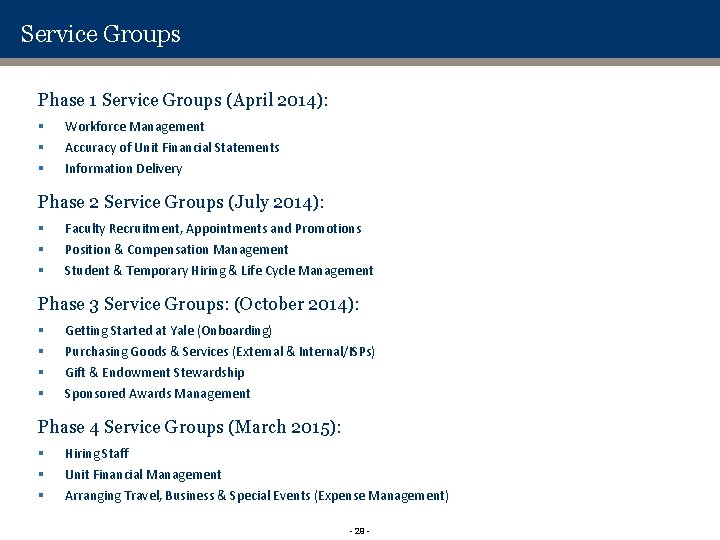
Service Groups Phase 1 Service Groups (April 2014): § § § Workforce Management Accuracy of Unit Financial Statements Information Delivery Phase 2 Service Groups (July 2014): § § § Faculty Recruitment, Appointments and Promotions Position & Compensation Management Student & Temporary Hiring & Life Cycle Management Phase 3 Service Groups: (October 2014): § § Getting Started at Yale (Onboarding) Purchasing Goods & Services (External & Internal/ISPs) Gift & Endowment Stewardship Sponsored Awards Management Phase 4 Service Groups (March 2015): § § § Hiring Staff Unit Financial Management Arranging Travel, Business & Special Events (Expense Management) - 29 -