
WMG Summer School 2016 Sponsored by ICSAT Building
WMG Summer School 2016 Sponsored by ICSAT Building on KS 3 Electronics for GCSE Brian P Smith
Welcome • Good morning and welcome to the Building on KS 3 Electronics for GCSE Workshop • I’m Brian Smith and I have been teaching electronics and computing for 34 years and have created a number of commercial products – Kidschip, Learn & Go, e. Chip • This session is sponsored by ICSAT – CPD provider and Resources developer run by 3 ‘grumpy’ old men (Brian Russell, Brian Smith & George Asquith) • In the next 2: 35 hrs we will be taking a look at Electronics from KS 3 and move it into KS 4 using Programmable Components to evolve tasks and projects. It will be a ‘hands on’ session •
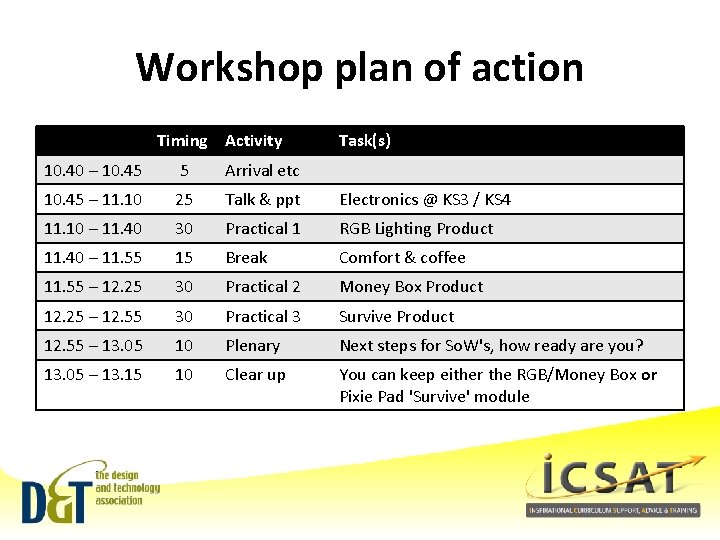
Workshop plan of action Timing Activity Task(s) 10. 40 – 10. 45 5 Arrival etc 10. 45 – 11. 10 25 Talk & ppt Electronics @ KS 3 / KS 4 11. 10 – 11. 40 30 Practical 1 RGB Lighting Product 11. 40 – 11. 55 15 Break Comfort & coffee 11. 55 – 12. 25 30 Practical 2 Money Box Product 12. 25 – 12. 55 30 Practical 3 Survive Product 12. 55 – 13. 05 10 Plenary Next steps for So. W's, how ready are you? 13. 05 – 13. 15 10 Clear up You can keep either the RGB/Money Box or Pixie Pad 'Survive' module

Building on KS 3 Electronics for GCSE WHAT ARE WE REQUIRED TO TEACH
Electronics in the past • • • Simple circuits with little complexity and functionality – low value Complex circuits and functionality difficult to achieve Didn’t match student expectations – could buy better for under £ 10. 00 Focussed on ‘out of date’ technologies, design and making processes Often done very badly, not much success for learners Sir – it doesn’t work! • • • Frustrating for staff – lack of training, support, resources Limited scope in other D&T facets For schools seen as being very expensive, difficult to justify Seen as hard and not very fun! Limited use of PICs has made a small start, but education has got left behind Now it’s time to catch up Brian P Smith 5
The new requirements for 2014 • The key requirement are: • KS 2 - apply their understanding of computing to program, monitor and control their products. • KS 3 - apply computing and use electronics to embed intelligence in products that respond to inputs such as sensors, and control outputs such as actuators, using programmable components such as microcontrollers. Brian P Smith 6

GCSE 2017 Technical Content • • how electronic systems provide functionality to products and processes, including: sensors and control devices to respond to a variety of inputs, and devices to produce a range of outputs the use of programmable components to embed functionality into products in order to enhance and customise their operation • the functions of mechanical devices, to produce different sorts of movement, changing the magnitude and direction of forces • These are core Technical requirements within the new GCSE D&T Specifications, drawn from the statutory content requirements. The new Specifications include these core aspects, they are also linked back to KS 2 & KS 3 – so the delivery of Electronics & Programmable Components is vital in these Key Stages for Pupil Progress and Attainment at GCSE.
Building on KS 3 Electronics for GCSE 21 ST CENTURY ELECTRONICS
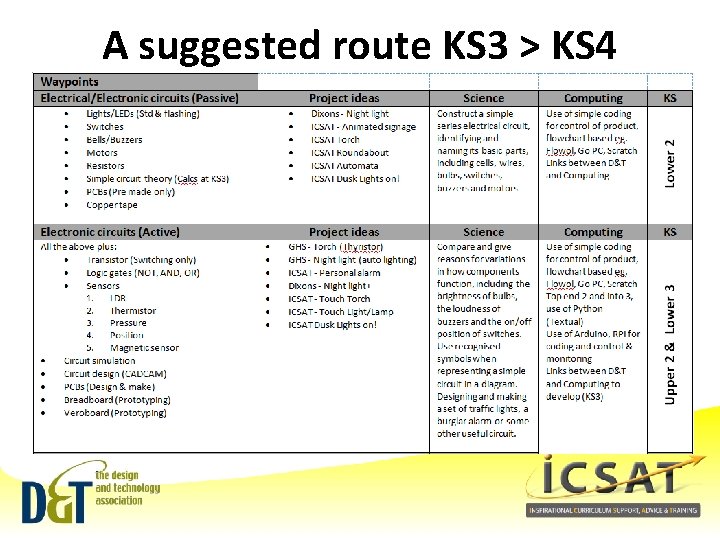
A suggested route KS 3 > KS 4
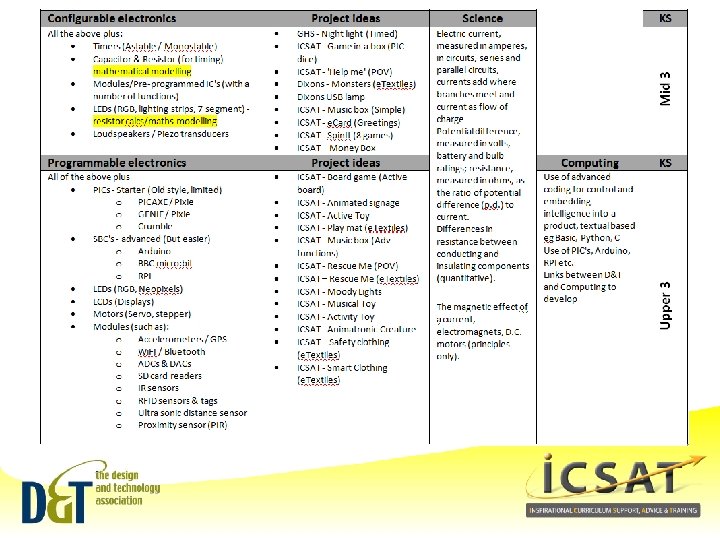
Chips with everything • • • The requirement to use and teach Programmable Components, fills many D&T teachers with foreboding and a dread of electronics. This need not be the case, in fact, this makes electronics easier since they make use of chips such as PIC's, Arduino's to name but two. The complexity that was electronics has now moved into these chips as software, which is easy to write using flowcharts or script based coding - with massive support online. This results in the electronics outside the chip being a great deal simpler, easier to understand create using standard circuit blocks which connect to LEDs, motors etc. It's time to move away from the old ways of 555 timers and move to programmable components, which offer simpler to make systems, which have greater flexibility and capacity, with fewer components - less soldering - fewer mistakes - more success. Embedded electronics enable the design and making of products with intelligence and high value matching the needs and demands of the learner.
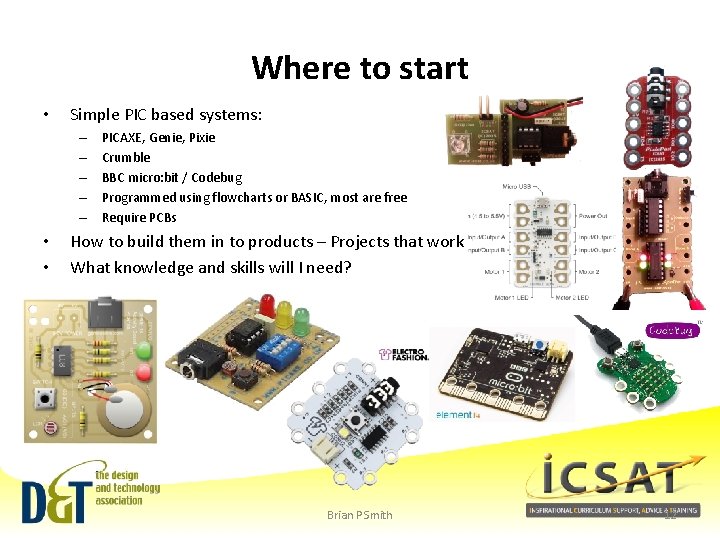
Where to start • Simple PIC based systems: – – – • • PICAXE, Genie, Pixie Crumble BBC micro: bit / Codebug Programmed using flowcharts or BASIC, most are free Require PCBs How to build them in to products – Projects that work What knowledge and skills will I need? Brian P Smith 12
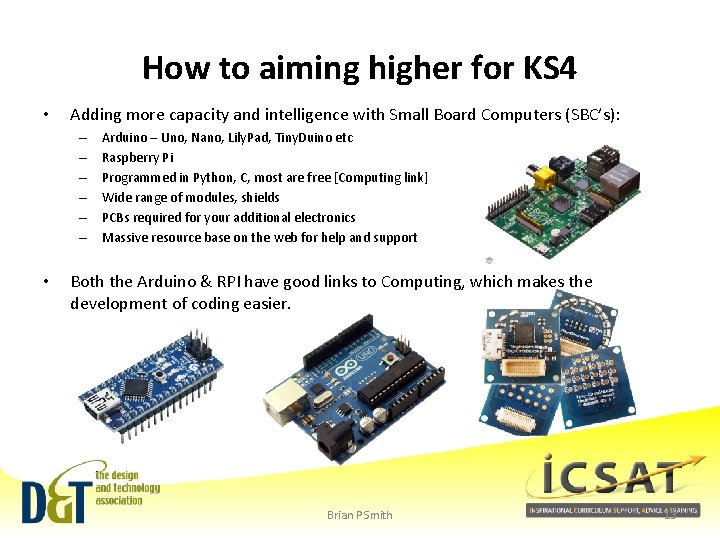
How to aiming higher for KS 4 • Adding more capacity and intelligence with Small Board Computers (SBC’s): – – – • Arduino – Uno, Nano, Lily. Pad, Tiny. Duino etc Raspberry Pi Programmed in Python, C, most are free [Computing link] Wide range of modules, shields PCBs required for your additional electronics Massive resource base on the web for help and support Both the Arduino & RPI have good links to Computing, which makes the development of coding easier. Brian P Smith 13

Building on KS 3 Electronics for GCSE ‘PRODUCT’ IDEAS
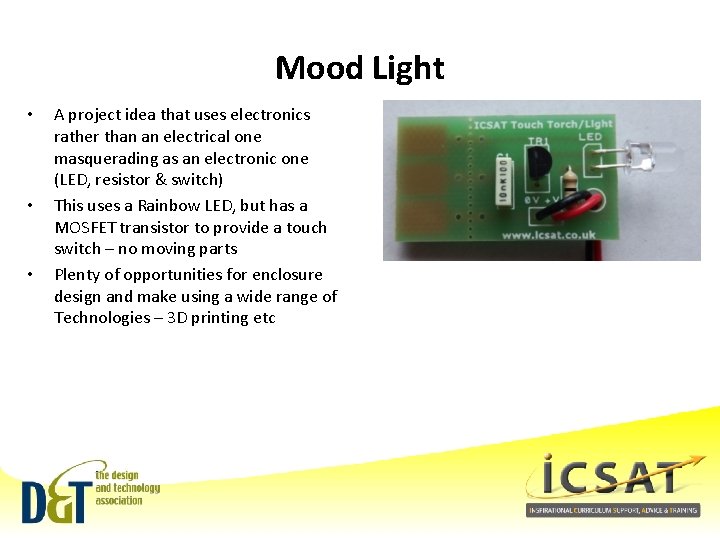
Mood Light • • • A project idea that uses electronics rather than an electrical one masquerading as an electronic one (LED, resistor & switch) This uses a Rainbow LED, but has a MOSFET transistor to provide a touch switch – no moving parts Plenty of opportunities for enclosure design and make using a wide range of Technologies – 3 D printing etc
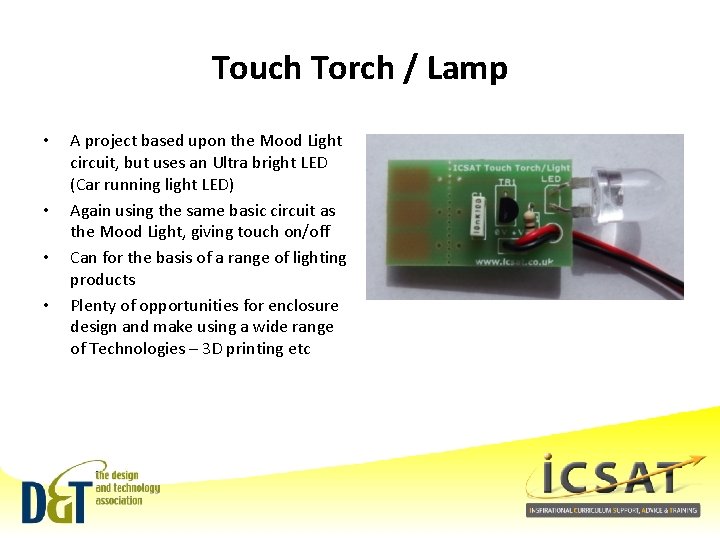
Touch Torch / Lamp • • A project based upon the Mood Light circuit, but uses an Ultra bright LED (Car running light LED) Again using the same basic circuit as the Mood Light, giving touch on/off Can for the basis of a range of lighting products Plenty of opportunities for enclosure design and make using a wide range of Technologies – 3 D printing etc
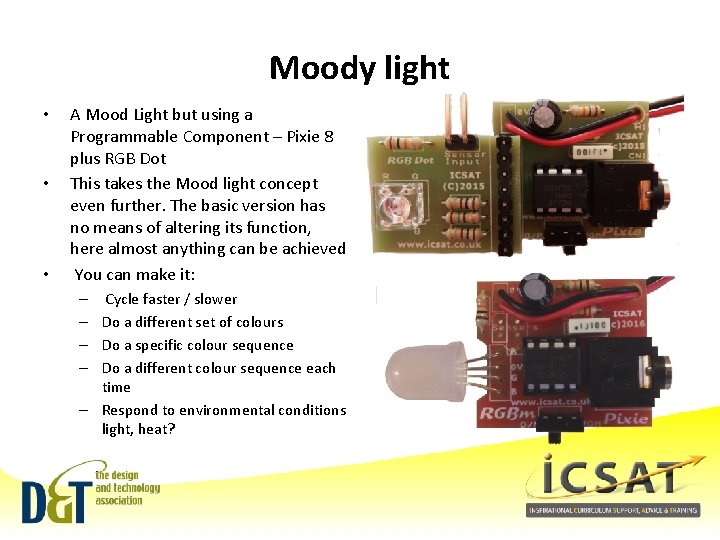
Moody light • • • A Mood Light but using a Programmable Component – Pixie 8 plus RGB Dot This takes the Mood light concept even further. The basic version has no means of altering its function, here almost anything can be achieved You can make it: – Cycle faster / slower – Do a different set of colours – Do a specific colour sequence – Do a different colour sequence each time – Respond to environmental conditions light, heat?
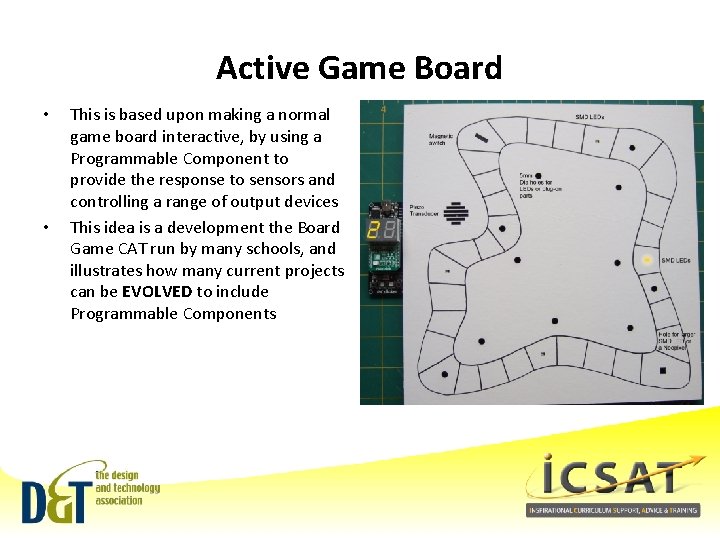
Active Game Board • • This is based upon making a normal game board interactive, by using a Programmable Component to provide the response to sensors and controlling a range of output devices This idea is a development the Board Game CAT run by many schools, and illustrates how many current projects can be EVOLVED to include Programmable Components
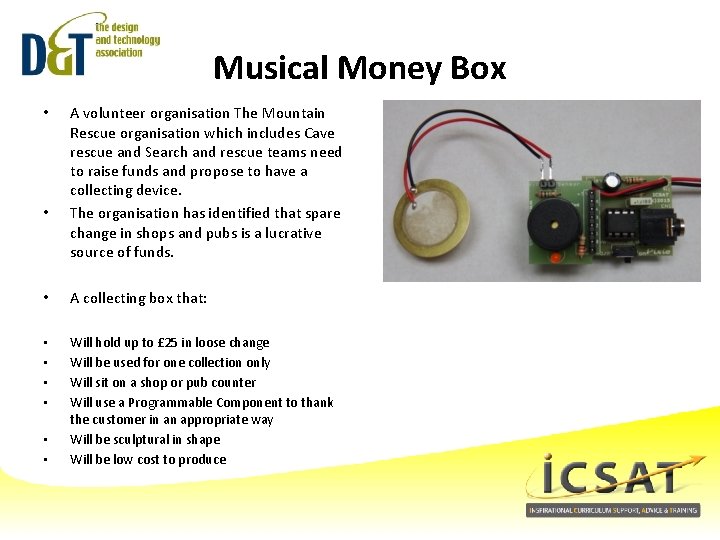
Musical Money Box • • A volunteer organisation The Mountain Rescue organisation which includes Cave rescue and Search and rescue teams need to raise funds and propose to have a collecting device. The organisation has identified that spare change in shops and pubs is a lucrative source of funds. • A collecting box that: • • Will hold up to £ 25 in loose change Will be used for one collection only Will sit on a shop or pub counter Will use a Programmable Component to thank the customer in an appropriate way Will be sculptural in shape Will be low cost to produce • •
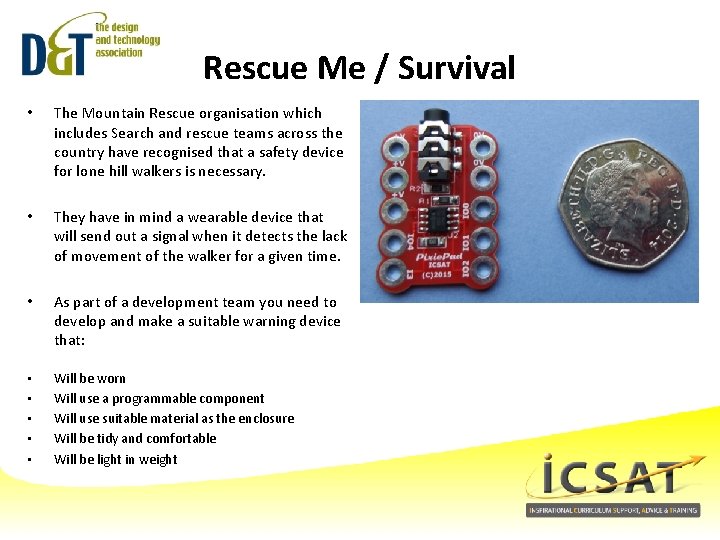
Rescue Me / Survival • The Mountain Rescue organisation which includes Search and rescue teams across the country have recognised that a safety device for lone hill walkers is necessary. • They have in mind a wearable device that will send out a signal when it detects the lack of movement of the walker for a given time. • As part of a development team you need to develop and make a suitable warning device that: • • • Will be worn Will use a programmable component Will use suitable material as the enclosure Will be tidy and comfortable Will be light in weight
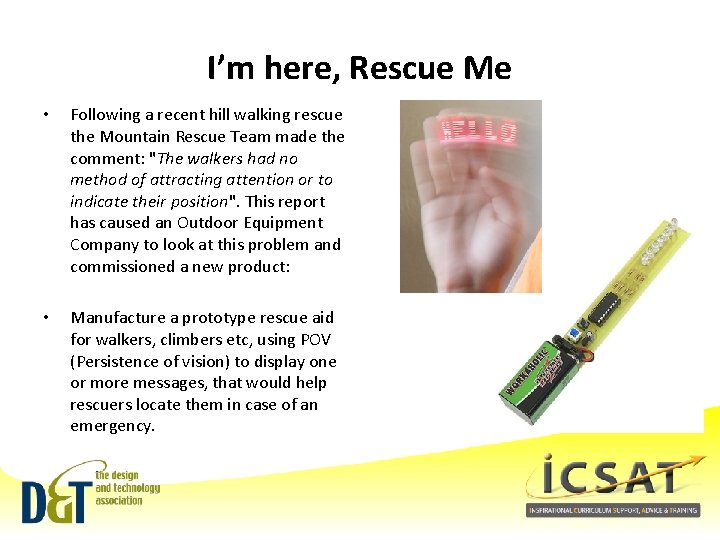
I’m here, Rescue Me • Following a recent hill walking rescue the Mountain Rescue Team made the comment: "The walkers had no method of attracting attention or to indicate their position". This report has caused an Outdoor Equipment Company to look at this problem and commissioned a new product: • Manufacture a prototype rescue aid for walkers, climbers etc, using POV (Persistence of vision) to display one or more messages, that would help rescuers locate them in case of an emergency.

Building on KS 3 Electronics for GCSE LET’S HAVE A GO!
Building on KS 3 Electronics for GCSE PRACTICAL 1 – MOOD LIGHT PRODUCT
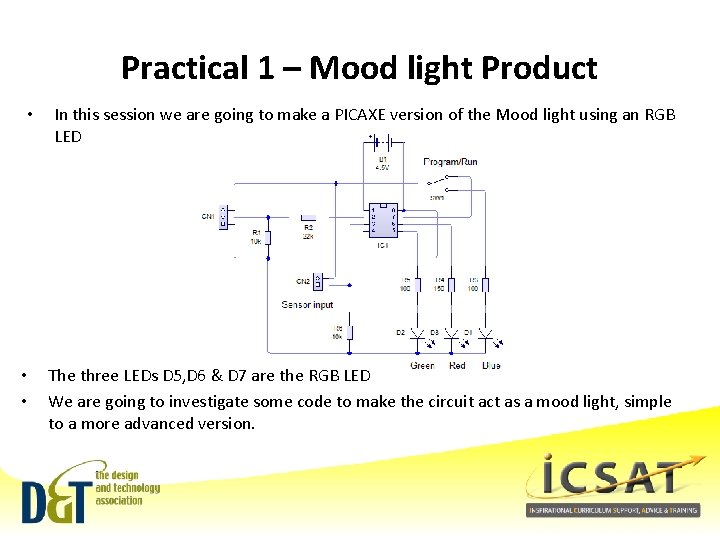
Practical 1 – Mood light Product • • • In this session we are going to make a PICAXE version of the Mood light using an RGB LED The three LEDs D 5, D 6 & D 7 are the RGB LED We are going to investigate some code to make the circuit act as a mood light, simple to a more advanced version.
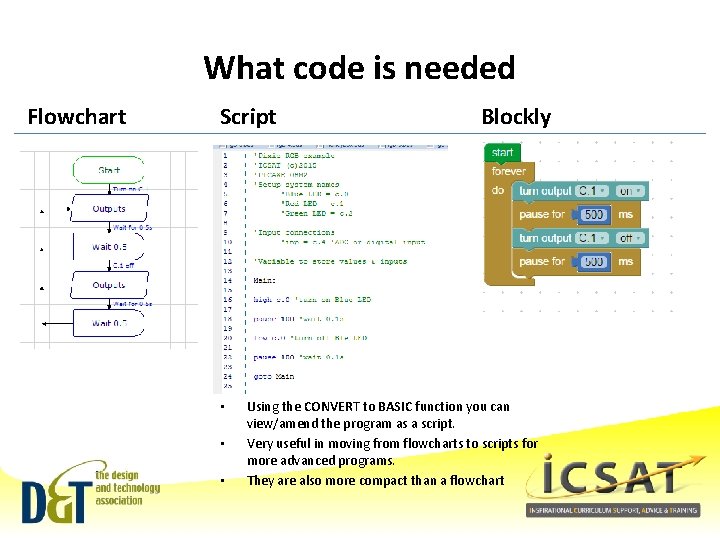
What code is needed Flowchart Script • • • Blockly Using the CONVERT to BASIC function you can view/amend the program as a script. Very useful in moving from flowcharts to scripts for more advanced programs. They are also more compact than a flowchart
RGB 1 Code specification • To create a program / code to create a simple RGB Mood light using Blue, Red & Green • • Outputs: C. 0 = Blue LED C. 1 = Red LED C. 2 = Green LED
What code is needed (1 -3 LEDs) • Flowchart • Script • Blockly
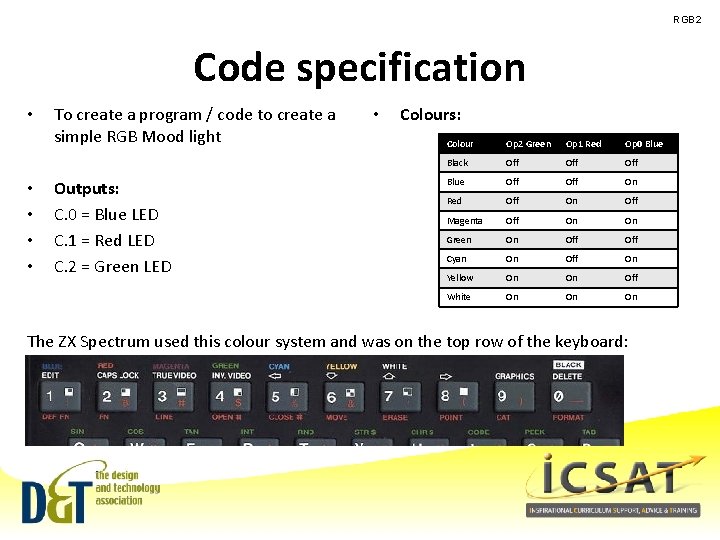
RGB 2 Code specification • • • To create a program / code to create a simple RGB Mood light Outputs: C. 0 = Blue LED C. 1 = Red LED C. 2 = Green LED • Colours: Colour Op 2 Green Op 1 Red Op 0 Blue Black Off Off Blue Off On Red Off On Off Magenta Off On On Green On Off Cyan On Off On Yellow On On Off White On On On The ZX Spectrum used this colour system and was on the top row of the keyboard:
What code is needed (Colours) • Flowchart • Script • Blockly
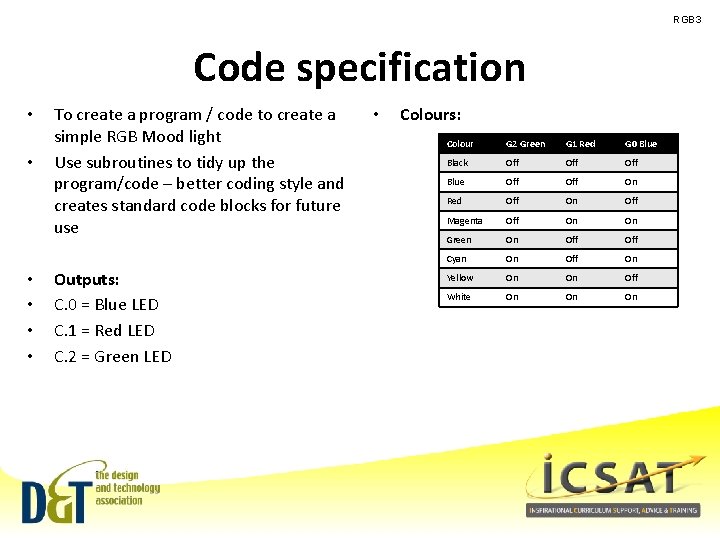
RGB 3 Code specification • • • To create a program / code to create a simple RGB Mood light Use subroutines to tidy up the program/code – better coding style and creates standard code blocks for future use Outputs: C. 0 = Blue LED C. 1 = Red LED C. 2 = Green LED • Colours: Colour G 2 Green G 1 Red G 0 Blue Black Off Off Blue Off On Red Off On Off Magenta Off On On Green On Off Cyan On Off On Yellow On On Off White On On On
What code is needed (Subroutines) • Flowchart • Script • Blockly
Key points from your experience • Positives • Things to target / develop • What are your concerns?
Time for a break (15 mins) Brian P Smith 33
Building on KS 3 Electronics for GCSE PRACTICAL 2 – MONEY BOX PRODUCT
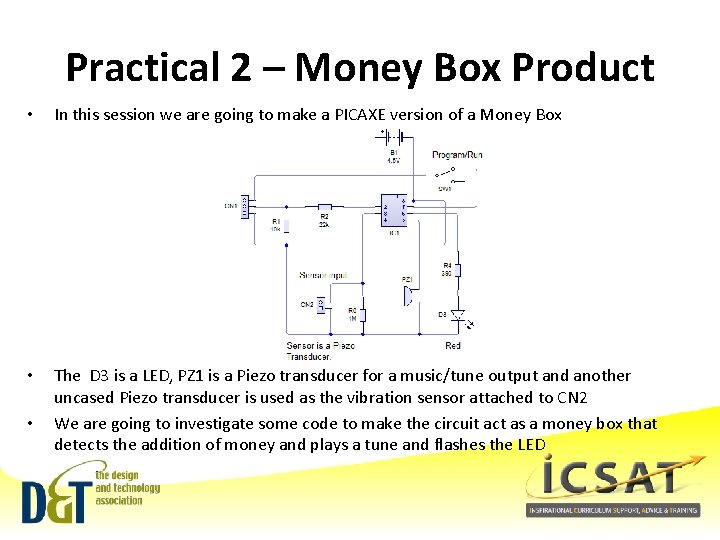
Practical 2 – Money Box Product • In this session we are going to make a PICAXE version of a Money Box • The D 3 is a LED, PZ 1 is a Piezo transducer for a music/tune output and another uncased Piezo transducer is used as the vibration sensor attached to CN 2 We are going to investigate some code to make the circuit act as a money box that detects the addition of money and plays a tune and flashes the LED •
RGB 1 Code specification • To create a program / code to create a simple Money Box module that plays a tune and flashes a LED when money is put into the money box • • • Outputs: C. 0 = Not used C. 1 = Red LED C. 2 = Piezo transducer – Sound output C. 4 = Piezo transducer – vibration input (analogue signal)
What code is needed (Money Box) • Flowchart • Script • Blockly
Key points from your experience • Positives • Things to target / develop • What are your concerns?
Building on KS 3 Electronics for GCSE PRACTICAL 3 – SURVIVAL
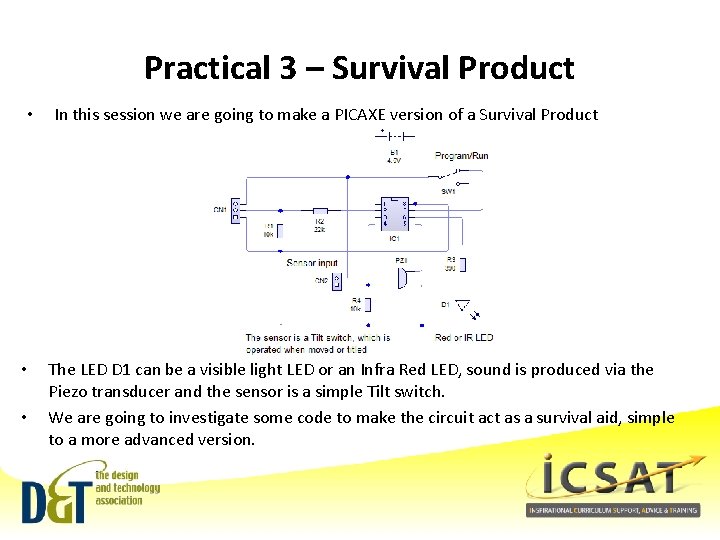
Practical 3 – Survival Product • • • In this session we are going to make a PICAXE version of a Survival Product The LED D 1 can be a visible light LED or an Infra Red LED, sound is produced via the Piezo transducer and the sensor is a simple Tilt switch. We are going to investigate some code to make the circuit act as a survival aid, simple to a more advanced version.
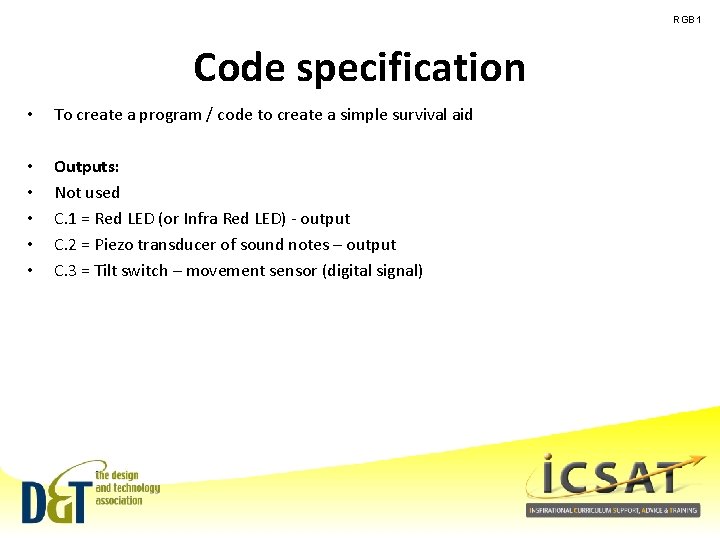
RGB 1 Code specification • To create a program / code to create a simple survival aid • • • Outputs: Not used C. 1 = Red LED (or Infra Red LED) - output C. 2 = Piezo transducer of sound notes – output C. 3 = Tilt switch – movement sensor (digital signal)
What code is needed (Survival) • Flowchart • Script • Blockly
Key points from your experience • Positives • Things to target / develop • What are your concerns?
Building on KS 3 Electronics for GCSE IT’S A WRAP
Key points • New requirement for Sept 2014 – DATA is offering guidance courses and the Key materials • New GCSE Requirement from Sept 2017 – DATA , Awarding Bodies & ICSAT will be offering guidance courses • Range of starting points – Genie, PICAXE, Pixie, Crumble, Micro: bit, Codebug - beginners – Arduino – for advanced work (Raspberry Pi not really a D&T device) • Embedded electronics allows learners to aim high – this is the expectation – Learners can develop their own projects and solutions • Links with Computing can be developed to share the development of coding skills – Discussions with Computing and SLT might be needed • Allows learners to develop projects using a wide range of modules that add lift them from the mundane to outstanding – Just take a look at any Arduino, Rasp Pi, Maker forums • Allows the use of other advanced technologies – Laser cutting, 3 D printing etc Brian P Smith 45
Connecting with Computing • D&T contributes to the Computing POS: – Developing algorithms / methods for problem solving – Apply IT technologies such as CADCAM, web-based researching – Control and programming of products that have been design and made – Be creative users of IT for the development of new products • There is a clear synergy between D&T and Computing, they are both applied Technologies and as such support and feed upon each other, we see this in everyday in the products we use and rely upon. • We need to develop this linkage in the projects and work we do, for our mutual benefit and that of the learner. The supporting booklet opposite is very helpful in this regard Brian P Smith 46
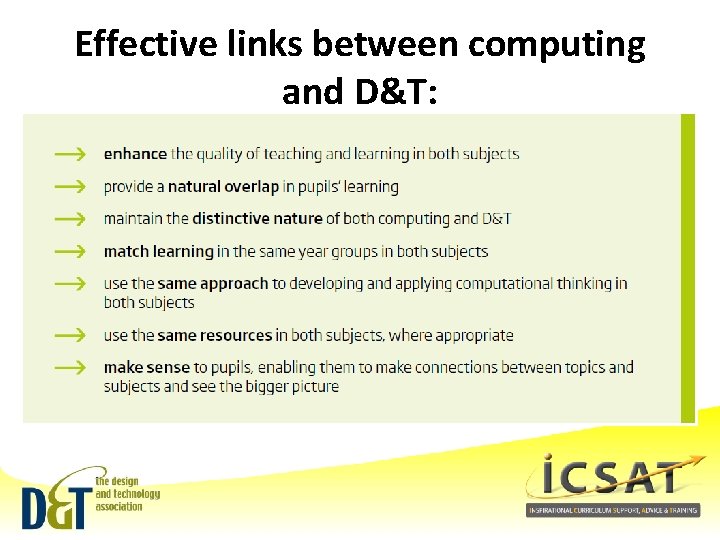
Effective links between computing and D&T:
Why the link? • • • Through programming and controlling physical systems, D&T offers real, relevant and practical contexts for pupils to develop and apply both computational thinking and coding skills. Creating programs in order to control products that pupils have designed and made themselves is a highly motivating, tangible experience, enabling them to test out and develop their capability in computer science within a range of authentic contexts. The application of computer science enhances learning in D&T by challenging pupils to improve the effectiveness of their products. Importantly, it has the potential to ensure that what pupils design and make in the classroom reflects the design and technology they encounter in the wider world – at home, in school, in the local community and in industry. As part of everyday life, pupils come into contact with hi-tech products that are controlled by computers, including embedded microprocessors. Both computing and D&T should build on these experiences if they are to prepare pupils adequately for later life.
The challenges ahead • In developing this area the following will be needed: – – New subject knowledge Skills Training Teacher support Curriculum materials • • Schemes of Work How to guides Example Projects Case studies – Advice to SLT – Developing links with Computing/ICT – Developing a support network Brian P Smith 49
Building on KS 3 Electronics for GCSE SUPPORT RESOURCES
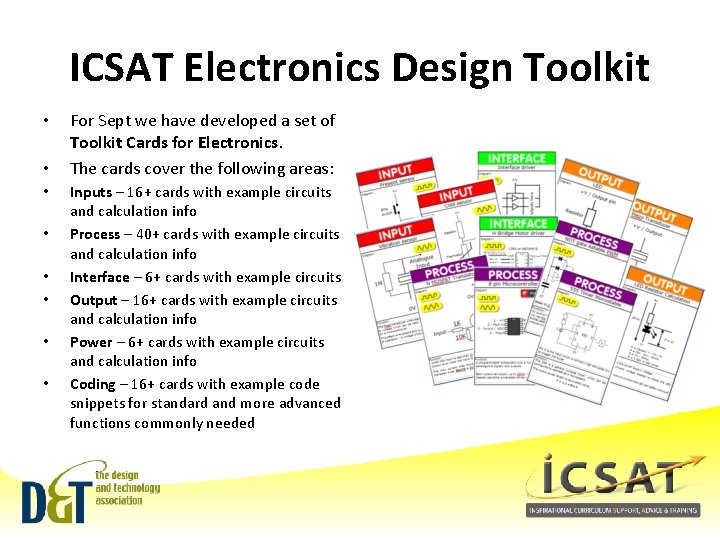
ICSAT Electronics Design Toolkit • • For Sept we have developed a set of Toolkit Cards for Electronics. The cards cover the following areas: Inputs – 16+ cards with example circuits and calculation info Process – 40+ cards with example circuits and calculation info Interface – 6+ cards with example circuits Output – 16+ cards with example circuits and calculation info Power – 6+ cards with example circuits and calculation info Coding – 16+ cards with example code snippets for standard and more advanced functions commonly needed
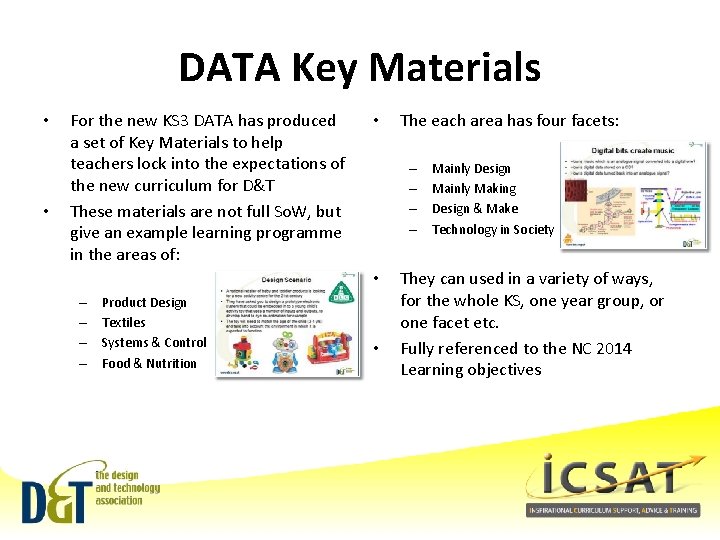
DATA Key Materials • • For the new KS 3 DATA has produced a set of Key Materials to help teachers lock into the expectations of the new curriculum for D&T These materials are not full So. W, but give an example learning programme in the areas of: • – – • – – Product Design Textiles Systems & Control Food & Nutrition The each area has four facets: • Mainly Design Mainly Making Design & Make Technology in Society They can used in a variety of ways, for the whole KS, one year group, or one facet etc. Fully referenced to the NC 2014 Learning objectives

• Thank you for your time • We are D&T Association Consultants • Course for Electronics & PIC’s, Crumble & Arduino next term • • Look on our website: www. icsat. co. uk Checkout our e. Shop: www. eshop. icsat. co. uk • If you don’t see what you are looking for talk to us, we can tailor course and meetings to suit your needs. We can help with all aspects of D&T from KS 1 to KS 5, NC to GCSE/GCE and with ITT via Subject Enhancement courses. • • Tell your colleagues about us.
Electronics and Programmable Components for KS 3 and GCSE SUPPORT RESOURCES
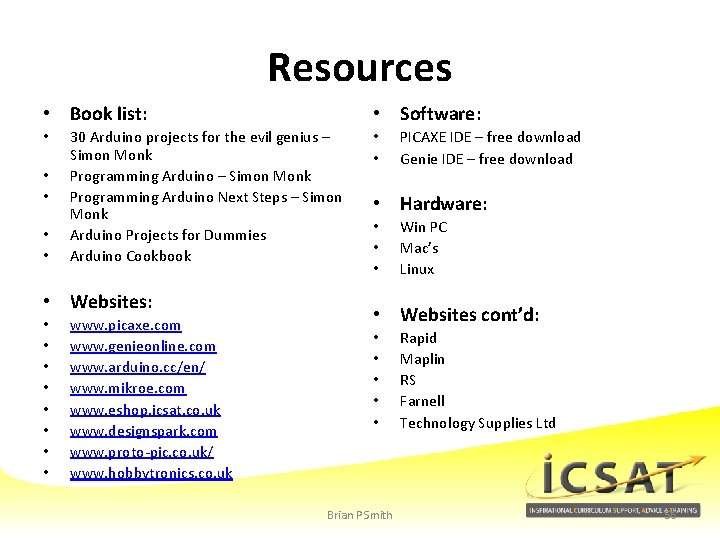
Resources • Book list: • • • 30 Arduino projects for the evil genius – Simon Monk Programming Arduino Next Steps – Simon Monk Arduino Projects for Dummies Arduino Cookbook • Websites: • • • Software: www. picaxe. com www. genieonline. com www. arduino. cc/en/ www. mikroe. com www. eshop. icsat. co. uk www. designspark. com www. proto-pic. co. uk/ www. hobbytronics. co. uk • • PICAXE IDE – free download Genie IDE – free download • Hardware: • • • Win PC Mac’s Linux • Websites cont’d: • • • Brian P Smith Rapid Maplin RS Farnell Technology Supplies Ltd 56
Path to Programmable Components with PICAXE 101
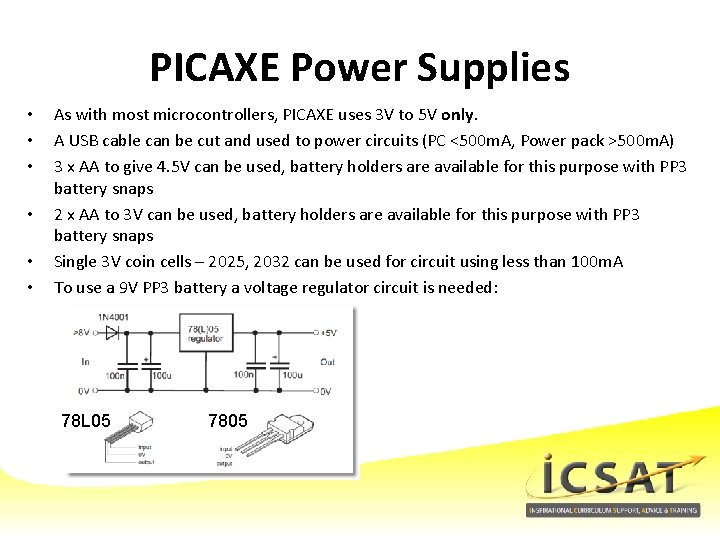
PICAXE Power Supplies • • • As with most microcontrollers, PICAXE uses 3 V to 5 V only. A USB cable can be cut and used to power circuits (PC <500 m. A, Power pack >500 m. A) 3 x AA to give 4. 5 V can be used, battery holders are available for this purpose with PP 3 battery snaps 2 x AA to 3 V can be used, battery holders are available for this purpose with PP 3 battery snaps Single 3 V coin cells – 2025, 2032 can be used for circuit using less than 100 m. A To use a 9 V PP 3 battery a voltage regulator circuit is needed: 78 L 05 7805
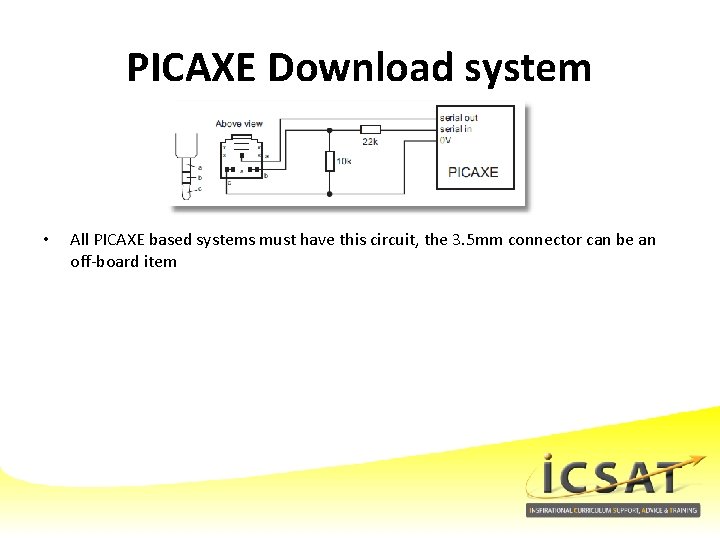
PICAXE Download system • All PICAXE based systems must have this circuit, the 3. 5 mm connector can be an off-board item
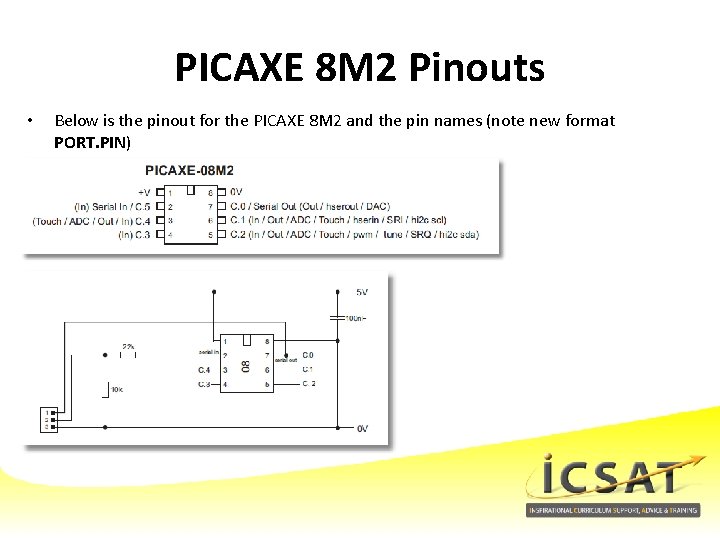
PICAXE 8 M 2 Pinouts • Below is the pinout for the PICAXE 8 M 2 and the pin names (note new format PORT. PIN)
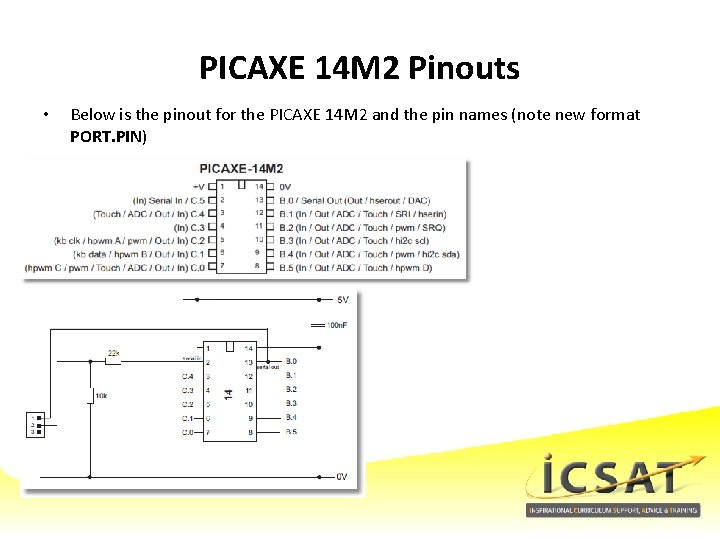
PICAXE 14 M 2 Pinouts • Below is the pinout for the PICAXE 14 M 2 and the pin names (note new format PORT. PIN)
- Slides: 61