
WIRING HARDWARE SETTING Between the PC and multiple

WIRING & HARDWARE SETTING Between the PC and multiple devices that communicate via TCP/IP or Serial Communication ► IDTECK Home ► e-Training Center ► Catalog ► Manual► Installation Guide ► Troubleshooting ► Purchase Order
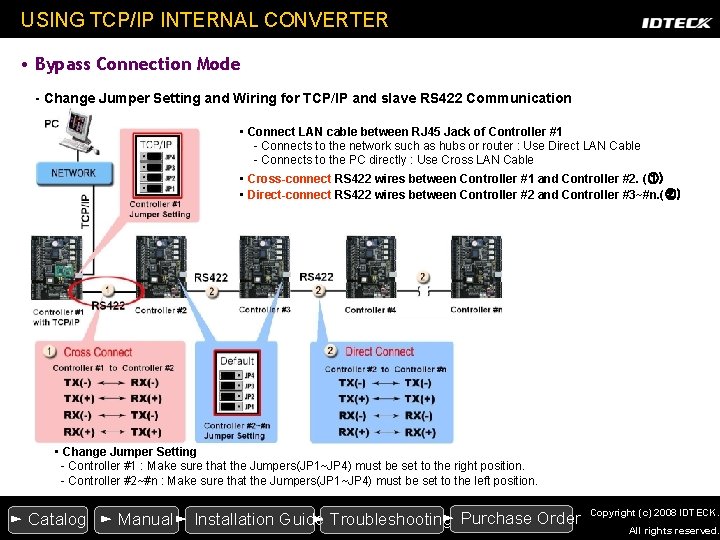
USING TCP/IP INTERNAL CONVERTER • Bypass Connection Mode - Change Jumper Setting and Wiring for TCP/IP and slave RS 422 Communication • Connect LAN cable between RJ 45 Jack of Controller #1 - Connects to the network such as hubs or router : Use Direct LAN Cable - Connects to the PC directly : Use Cross LAN Cable • Cross-connect RS 422 wires between Controller #1 and Controller #2. (①) • Direct-connect RS 422 wires between Controller #2 and Controller #3~#n. (②) • Change Jumper Setting - Controller #1 : Make sure that the Jumpers(JP 1~JP 4) must be set to the right position. - Controller #2~#n : Make sure that the Jumpers(JP 1~JP 4) must be set to the left position. ► Purchase Order ► Catalog ► Manual► Installation Guide ► Troubleshooting Copyright (c) 2008 IDTECK. All rights reserved.
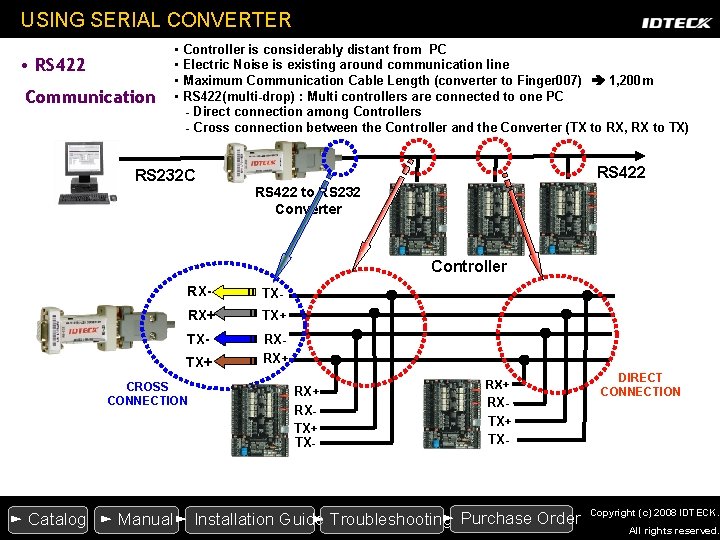
USING SERIAL CONVERTER • RS 422 Communication • Controller is considerably distant from PC • Electric Noise is existing around communication line • Maximum Communication Cable Length (converter to Finger 007) 1, 200 m • RS 422(multi-drop) : Multi controllers are connected to one PC - Direct connection among Controllers - Cross connection between the Controller and the Converter (TX to RX, RX to TX) RS 232 C RS 422 to RS 232 Converter Controller RX- TX- RX+ TX- RXRX+ TX+ CROSS CONNECTION RX+ RXTX+ TX- ► Purchase Order ► Catalog ► Manual► Installation Guide ► Troubleshooting DIRECT CONNECTION Copyright (c) 2008 IDTECK. All rights reserved.

For more information, Contact us at techsupport@idteck. com Thank you. Copyright (c) 2008 IDTECK. All rights reserved.
- Slides: 4