
Wireless PAN Chapter 4 1 Prof Inwhee Joe
- Slides: 51
Wireless PAN Chapter 4 -1 Prof. Inwhee Joe
IEEE 802. 15 WPAN • IEEE 802. 15 WG (Working Group) is deriving a Wireless Personal Area Network (WPAN) Standard based on the Bluetooth v 1. 0 Foundation Standard. • 1999. 7: started • 2001. 3: first standard
PAN Personal Area Network: • Short-range wireless network • All of the devices are controlled by a single user or a family • Devices: cellar phone, PDA, laptop, watch, digital camera, game device, MP 3 player etc.
IEEE 802. 15 Wireless PAN • 802. 15. 1: Bluetooth • 802. 15. 2: Coexistence MAC & PHY modeling • 802. 15. 3: High Rate (20 Mbps or greater) with Security • 802. 15. 4: Low Price and Low Power with Low Speed at 300 Kbps
IEEE 802. 15 Working Group The IEEE 802. 15 Working Group provides, in the IEEE 802 family, standards for low-complexity and low-power consumption wireless connectivity. • 802. 15. 1: 1 Mb/s Bluetooth v 1. 1 • 802. 15. 1 a: Bluetooth v 1. 2 derivative work • 802. 15. 2: Recommended Practice for Coexistence in Unlicensed Bands • 802. 15. 3: High Rate (55 Mb/s) WPAN for Multimedia and Digital Imaging • 802. 15. 3 a: Higher Rate (110 Mb/s) Alternative PHY for 802. 15. 3 • 802. 15. 4: Low Price and Low Power with Low Speed at (250 kb/s max) for interactive toys, sensor and automation needs • 802. 15. 5: Mesh topology
IEEE 802. 15 (WPAN) • 802. 15. 1 derived a WPAN (Wireless Personal Area Network) Standard based on the Bluetooth v 1. 0 Foundation Standard. – 1999. 7 started & 2002. 3 final standard based on Bluetooth v 1. 1 – 2. 4 GHz ISM band – 1 Mbps • 802. 15. 2 : standardized in 2003. 8 => a set of Coexistence Mechanisms to facilitate coexistence of 802. 11 (WLAN) and 802. 15 (WPAN) devices. • 802. 15. 3 WPAN-HR (High Rate) – 2. 4 GHz – 11/22/56 Mbps
• 802. 15. 3 a : Higher Rate than 802. 15. 3 – standardizing UWB (Ultra Wide Band) – More than 110 Mbps • 802. 15. 4 WPAN-LR (Low Rate) – Multi-month and multi-year battery life – 868~/902~/2400~MHz – 2/20/40/250 Kbps • 802. 15. 5 – Mesh topology
Bluetooth now lives up to hype, IHT Sep 11 -12, 2004 • It has been six years since it was noticed. • It’s built into laptop computers, mobile phone, digital pens, car systems, medical scanners, bar-code readers, headphones, photo kiosks and a pedometer. • Global shipments of Bluetooth equipment now exceed 3 M units/week, and this just three months after hitting 2 M units/week threshold. • It was a long time coming, from promise to product. And it will be another long time before Bluetooth is truly pervasive.
IEEE 802. 15. 1 a • The original version of 802. 15. 1 was based upon portions of the Bluetooth v 1. 1 Specification. The Bluetooth Special Interest Group (SIG) published v 1. 2 of their specification. The purpose of this Task Group is to review the SIG changes and update the 802. 15. 1 standard to parallel the Bluetooth specification. • 802. 15. 1 a corresponds to the changes made in the new Bluetooth Spec, but retains the IEEE-specific information included in the original Standard.
Bluetooth v 1. 2 • 2003. 11 Bluetooth v 1. 2 announced. • Adaptive Frequency Hopping (AFH) – AFH was explicitly designed to reduce interference between wireless technologies sharing the 2. 4 GHz spectrum. Cordless telephones, microwave ovens and certain Wireless Local Area Networking (WLAN) technologies, including IEEE 802. 11 b and IEEE 802. 11 g, generally share the same wireless frequencies as Bluetooth wireless technology. • Enhanced Voice Processing – This feature is designed to improve the quality of voice connections, particularly in noisy environments, using channel coding methods. • Faster Connection Setup – This version of the wireless technology allows for even faster connections to other Bluetooth wireless devices, thus improving the user experience. � • Backward Compatible – As a core feature, the new version of the Bluetooth Core Specification is backward compatible with 1. 1 Bluetooth Core Specification Version 1. 1 products.
IEEE 802. 15. 2 • Standardized in 2003. 8 • "Coexistence of Wireless Personal Area Networks with Other Wireless Devices Operating in Unlicensed Frequency Bands. " • This recommended practice describes multiple methods that can be used to enhance the coexistence of IEEE 802. 15. 1 and IEEE 802. 11 wireless local area networks, especially IEEE 802. 11 b and IEEE 802. 11 g WLANs operating in the 2. 4 GHz unlicensed band. Tutorial: http: //grouper. ieee. org/groups/802_tutorials/july 04/802 Coexistenc e. Tutorial. July 04 a. pdf
IEEE 802. 15. 3 (High Rate) • • Standardized in 2003. 8 Allows a WPAN to link as many as 245 wireless consumer devices in a home at data rates to 55 Mbps at distances from a few centimeters to 100 meters. • High-rate wireless connectivity in the 2. 4 GHz unlicensed frequency band among fixed and portable devices. • Data Rates: 11, 22, 33, 44, & 55 Mbps. – The rate chosen affects typical transmission range, for example, as much as 50 m at 55 Mbps and 100 m at 22 Mbps. – The highest rate accommodates low-latency, multimedia connections and large-file-transfer, – while 11 and 22 Mbps provide long-range connectivity for audio devices. • Reliable Qo. S. – It uses TDMA (time division multiple access) to allocate channel time among devices to prevent conflicts and only provides new allocations for an application if enough bandwidth is available.
IEEE 802. 15. 3 (cont. ) • Ad-hoc peer-to-peer networking – Devices that implement 802. 15. 3 connect in an ad-hoc manner and communicate by peer-to-peer networking • Security – Data in the network may be protected using AES 128 (Advanced Encryption Standard), which was approved by US government in 2001 to replace the older DES (Data Encryption Standard). • Networks formed under IEEE 802. 15. 3 are configured so they coexist with other IEEE 802. 15 WPANs, such as Blue. Tooth systems, and with IEEE 802. 11 wireless local area networks, such as Wi-Fi systems.
IEEE 802. 15. 3 a • 802. 15. 3 a: Higher Rate than 802. 15. 3 • The IEEE 802. 15 High Rate Alternative PHY Task Group (TG 3 a) for Wireless Personal Area Networks (WPANs) is working to define a project to provide a higher speed PHY enhancement amendment to 802. 15. 3 for applications such as digital imaging and multimedia. – standardizing UWB (Ultra Wide Band) – It received 20 technical proposals, including SONY, in 2003. 3. – working to provide a higher speed PHY enhancement amendment to 802. 15. 3 for applications which involve imaging and multimedia – at least 110 Mb/s at 10 meters and 200 Mb/s at 4 meters
IEEE 802. 15. 4 (Low Rate) • Sep. 2, 2003: A new standard from the IEEE opens the world of wireless communications to inexpensive applications from sensors and switches for industrial and residential use to smart tags and badges, interactive toys, inventory tracking and much more. The standard, IEEE 802. 15. 4, provides for low-data-rate connectivity among relatively simple devices that consume minimal power and typically connect at distances of 10 meters (30 feet) or less. • IEEE 802. 15. 4, "Wireless Medium Access Control (MAC) and Physical Layer (PHY) Specifications for Low Rate Wireless Personal Area Networks (LRWPANs), " addresses fixed, portable and moving devices that operate at data rates of 10 to 250 kbps. It allows devices to form short-range ad hoc networks within which they can interact directly. • "This is an enabling standard, " says Pat Kinney, Chair of IEEE 802. 15 Task Group 4. "It builds a framework so existing low-end wired devices can participate in wireless networks and also creates a path for many new applications. The potential uses have several things in common. They all involve relatively simple, low-speed wireless links that need so little power that a set of AA batteries might last three to five years or even longer.
IEEE 802. 15. 4 a • Starts in 2004. 5 • IEEE P 802. 15. 4 a(TM), "Wireless Medium Access Control (MAC) and Physical Layer (PHY) Specifications: Alternate Physical Layer Extension for Low Rate Wireless Personal Area Network (WPAN), " will provide an alternate WPAN PHY to meet evolving user needs for ultra-low-complexity, ultra-low-cost, ultra-low-power WPAN communications. • It will provide for precision ranging accurate to one meter or less, improved communication range, improved link robustness and the ability to support mobility. • It also will continue to support coexisting networks of sensors, controllers, and logistic and peripheral devices in multiple, compliant co-located systems.
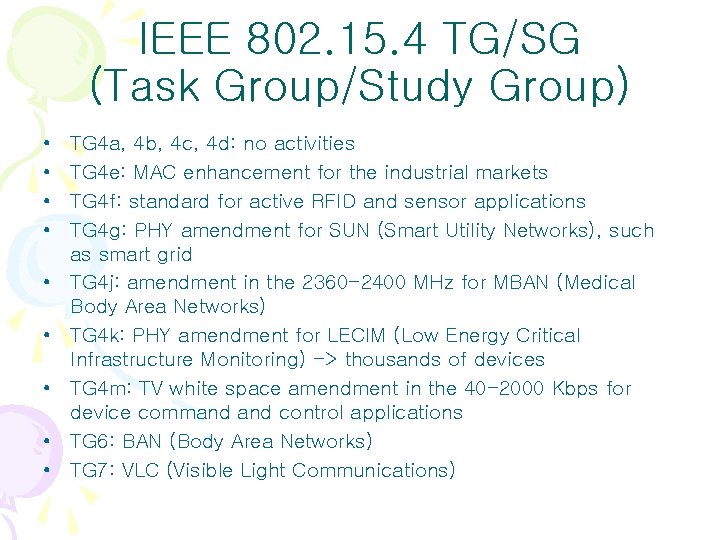
IEEE 802. 15. 4 TG/SG (Task Group/Study Group) • • • TG 4 a, 4 b, 4 c, 4 d: no activities TG 4 e: MAC enhancement for the industrial markets TG 4 f: standard for active RFID and sensor applications TG 4 g: PHY amendment for SUN (Smart Utility Networks), such as smart grid TG 4 j: amendment in the 2360 -2400 MHz for MBAN (Medical Body Area Networks) TG 4 k: PHY amendment for LECIM (Low Energy Critical Infrastructure Monitoring) -> thousands of devices TG 4 m: TV white space amendment in the 40 -2000 Kbps for device command control applications TG 6: BAN (Body Area Networks) TG 7: VLC (Visible Light Communications)
Zig. Bee • 2002. 10: founded consortium, Zig. Bee. • Over 35 companies are actively working to define the Zig. Bee standard, including five promoter companies (Honeywell, Invensys, Mitsubishi, Motorola and Philips) and over 30 participant companies including semiconductor manufacturers, wireless IP providers and OEMs. • Zig. Bee Alliance members are defining global standards for reliable, cost-effective, low power wireless applications based on IEEE 802. 15. 4. • The Zig. Bee technology is an international standard for wireless data communications for telemetry and remote control applications • http: //www. zigbee. org
Zig. Bee (2) Applications • Lighting controls • Automatic Meter Reading • Wireless smoke and CO detectors • HVAC (Heating, Ventilating, and Air Conditioning) control • Home security • Blind, drapery and shade controls • Medical sensing and monitoring • Universal Remote Control to a Set-Top Box which includes Home Control • Industrial and building automation
Bluetooth • Wireless RF communication in 2. 4 GHz spectrum • Optimized for: – Short-range communication – Low power consumption – Low cost wireless radio • Why not wireless LAN – Power: Wireless LANs consume a lot of power. – Cost: Bluetooth aims at less than a few dollars.
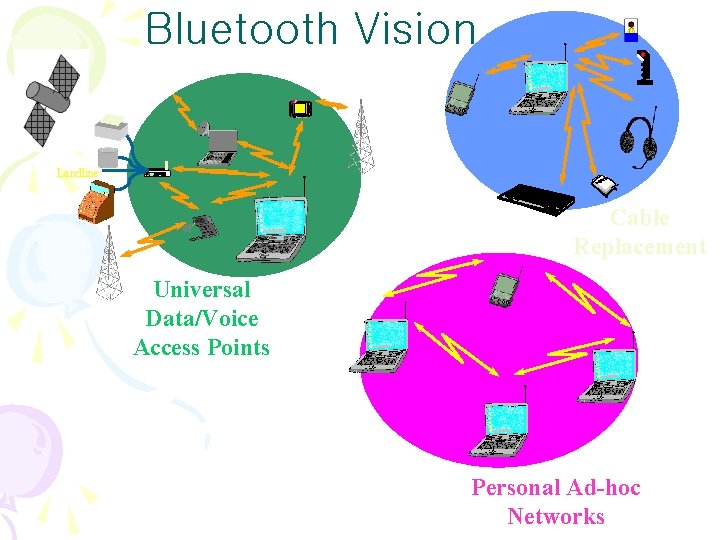
Bluetooth Vision Landline Cable Replacement Universal Data/Voice Access Points Personal Ad-hoc Networks
Bluetooth Application Areas • Data and voice access points – Real-time voice and data transmissions • Cable replacement – Eliminates need for numerous cable attachments for connection • Ad hoc networking – Device with Bluetooth radio can establish connection with another when in range
Bluetooth Standards Documents • Core specifications – Details of various layers of Bluetooth protocol architecture • Profile specifications – Use of Bluetooth technology to support various applications
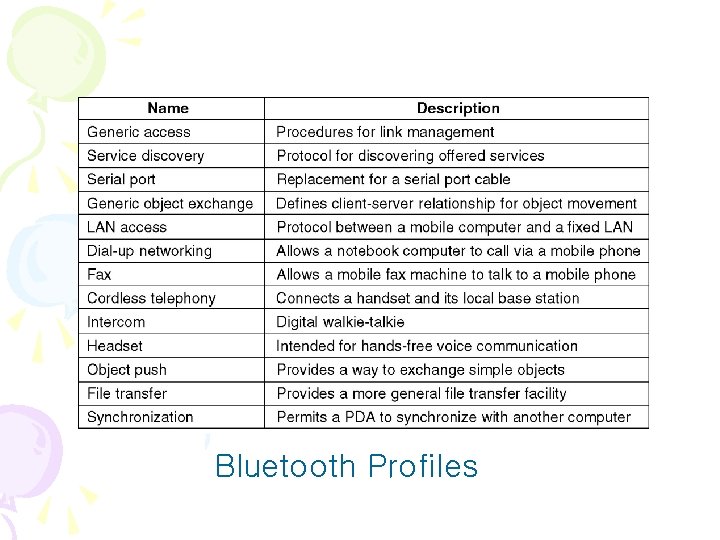
Bluetooth Profiles
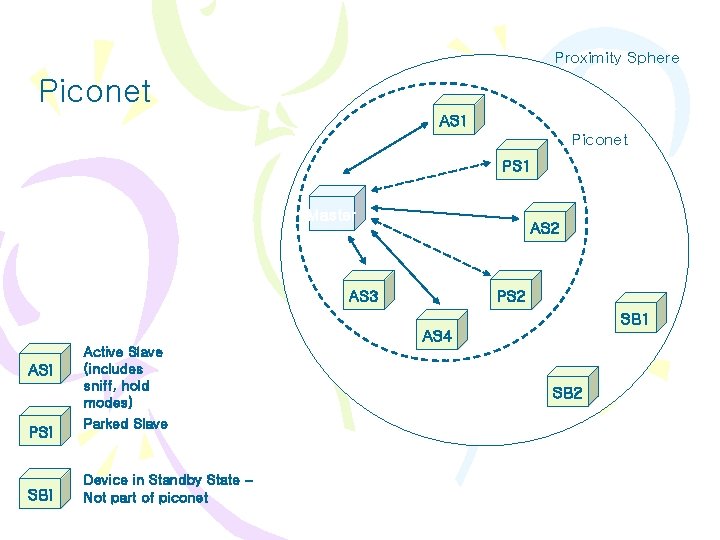
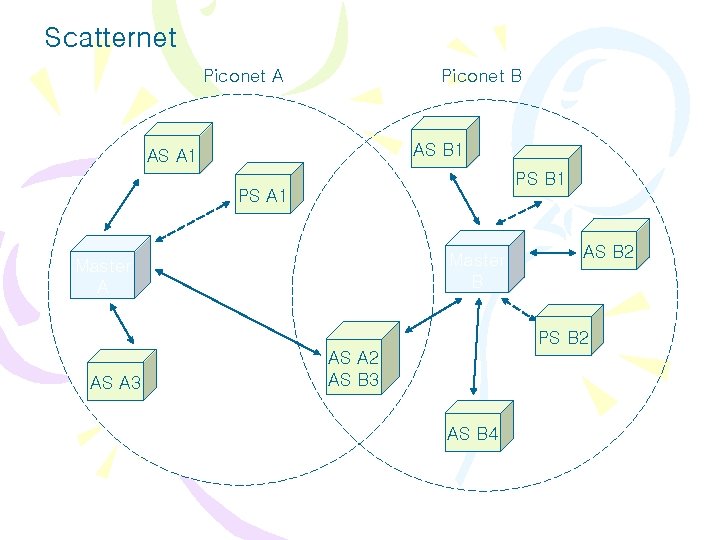
Bluetooth architecture • 1 Mbps, Max 10 m • ISM(2. 4 GHz), 79 channels x 1 MHz bandwidth, Frequency Hopping (1600 hops/sec) • The basic unit of a Bluetooth system is a piconet. • The piconet consists of only one master node and up to seven active slave nodes within a distance of 10 meters. • An interconnected collection of piconets is called a scatternet. • All communication is between the master and a slave • Direct slave-slave communication is not possible.
• In addition to 7 active slave nodes in a piconet, there can be up to 255 parked nodes in the network. These are devices that the master has switched to a low-power state. • In parked state, a device cannot do anything except for the response to an activation or beacon signal from the master. • There also two intermediate power states, hold and sniff. • The master controls the clock and determines which device gets to communicate in which time slot under a centralized polling system.
• Bluetooth devices may be built to operate only as masters or only slaves, but the specification generally assumes that a Bluetooth device is capable of acting both as a master and as a slave. • In order to make Bluetooth chips under $5, the slaves are fairly dumb, basically doing whatever the master tells them to do.
Piconets and Scatternets • Piconet – Basic unit of Bluetooth networking – Master and one to seven slave devices – Master determines channel and phase • Scatternet – Device in one piconet may exist as master or slave in another piconet – Allows many devices to share same area – Makes efficient use of bandwidth
Proximity Sphere Piconet AS 1 Piconet PS 1 Master AS 2 PS 2 AS 3 SB 1 AS 4 ASi PSi SBi Active Slave (includes sniff, hold modes) Parked Slave Device in Standby State – Not part of piconet SB 2
Scatternet Piconet A Piconet B AS B 1 AS A 1 PS B 1 PS A 1 Master B Master A AS B 2 PS B 2 AS A 3 AS A 2 AS B 3 AS B 4
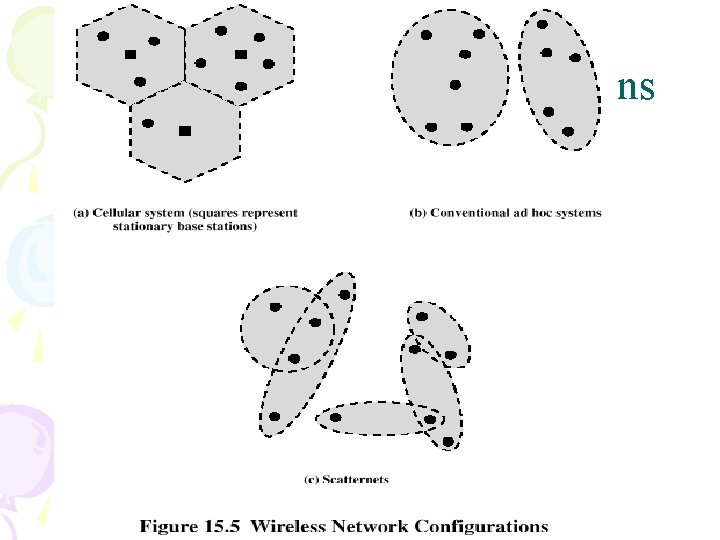
Wireless Network Configurations
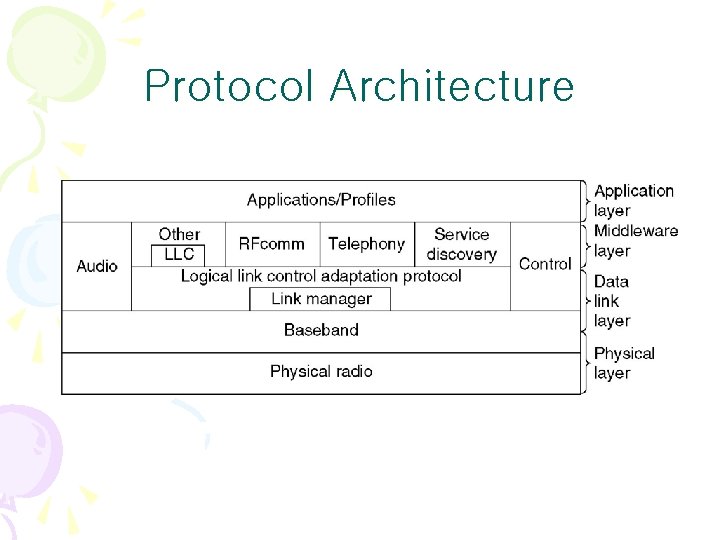
Protocol Architecture
Protocol Architecture • Bluetooth is a layered protocol architecture – Core protocols – Cable replacement and telephony control protocols – Adopted protocols • Core protocols – – – Radio Baseband Link manager protocol (LMP) Logical link control and adaptation protocol (L 2 CAP) Service discovery protocol (SDP)
Protocol Architecture • Cable replacement protocol – RFCOMM • Telephony control protocol – Telephony control specification – binary (TCS BIN) • Adopted protocols – – PPP TCP/UDP/IP OBEX WAE/WAP
Bluetooth Protocol Stack • The Bluetooth standard has many protocols grouped loosely into layers. • The layer structure does not follow any known model such as OSI model, TCP/IP model, or 802 model. • However, IEEE is working on modifying Bluetooth to make it fit into 802 model better.
Bluetooth Protocol Stack (2) • Physical radio layer: deals with radio transmission and modulation. Major concerns are to make the system inexpensive. • Baseband layer: somewhat analogous to the MAC sublayer but also includes elements of the physical layer. It deals with how the master controls time slots and how these slots are grouped into frames.
Bluetooth Protocol Stack (3) • Link manager: handles the establishment of logical channels between devices, including power management, authentication, and quality of service. • Logical link control adaptation protocol (L 2 CAP): shields the upper layer from the details of transmission. It is analogous to 802 LLC, but technically different from it. • Audio and Control protocol: deals with audio and control, respectively. The application can get to the baseband without going through L 2 CAP.
Bluetooth Protocol Stack (4) Middleware Layer • LLC: inserted here by IEEE for compatibility with its protocols. • RFcomm (Radio Frequency communication): emulates the standard serial port found on PCs for connecting the keyboard, mouse and modem, among other devices. • Telephony: a real-time protocol used for the three speech oriented profiles. It also manages call setup and termination. • Service discovery protocols: used to locate services within the network.
Radio Specification • Classes of transmitters – Class 1: Outputs 100 m. W for maximum range • Power control mandatory • Provides greatest distance – Class 2: Outputs 2. 5 m. W at maximum • Power control optional – Class 3: Nominal output is 1 m. W • Lowest power
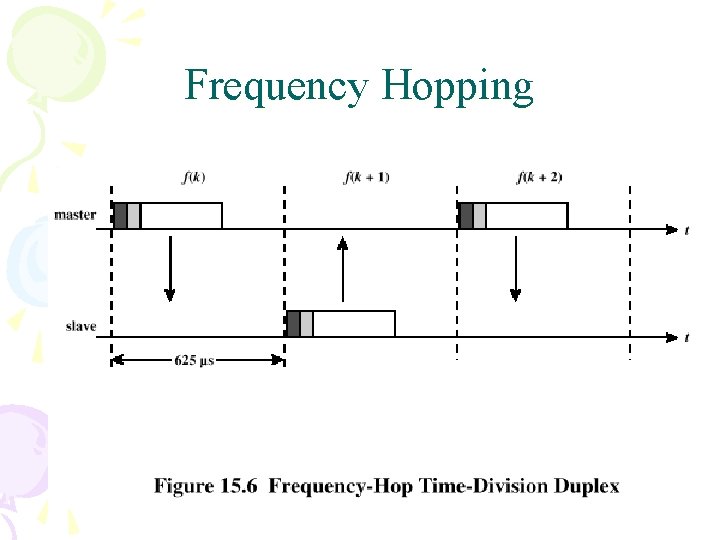
Frequency Hopping • Total bandwidth divided into 1 MHz physical channels • FH occurs by jumping from one channel to another in pseudorandom sequence • Hopping sequence shared with all devices on piconet • Piconet access: – Bluetooth devices use time division duplex (TDD) – Access technique is polling – FH-TDD-Polling
Frequency Hopping
Physical Links between Master and Slave • Synchronous connection oriented (SCO) – Allocates fixed bandwidth between point-to-point connection of master and slave – Master maintains link using reserved slots – Master can support three simultaneous links • Asynchronous connectionless (ACL) – Point-to-multipoint link between master and all slaves – Only single ACL link can exist
Bluetooth Frame Structure
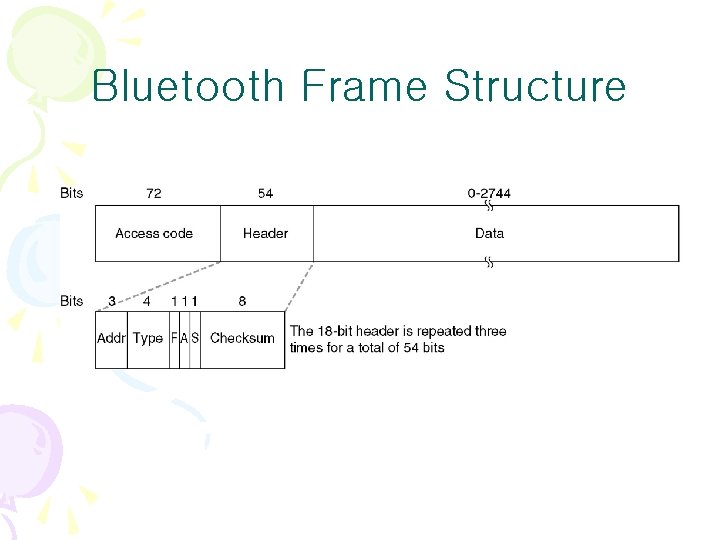
Bluetooth Frame Fields • Access code – used for timing synchronization, offset compensation, paging, and inquiry • Header – used to identify packet type and carry protocol control information • Payload – contains user voice or data and payload header, if present
ARQ Scheme Elements • Error detection – destination detects errors, discards packets • Positive acknowledgment – destination returns positive acknowledgment • Retransmission after timeout – source retransmits if packet unacknowledged • Negative acknowledgment and retransmission – destination returns negative acknowledgement for packets with errors, source retransmits
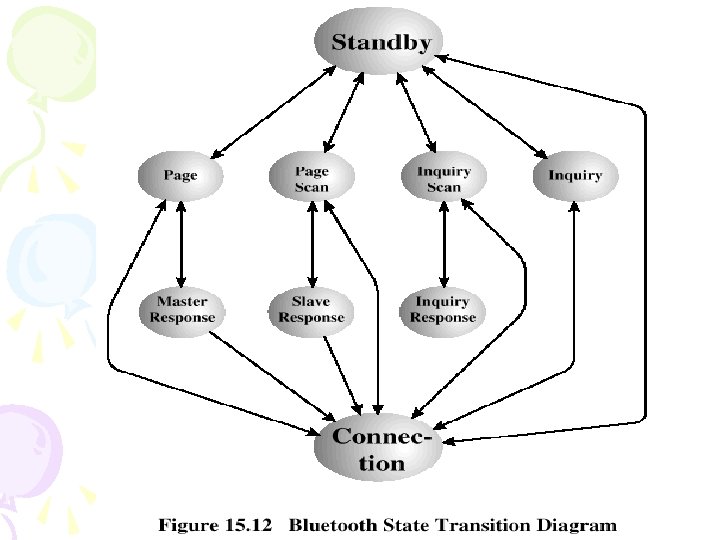
Channel Control • States of operation of a piconet during link establishment and maintenance • Major states – Standby – default state – Connection – device connected
Channel Control • Interim substates for adding new slaves – Page – device issued a page (used by master) – Page scan – device is listening for a page – Master response – master receives a page response from slave – Slave response – slave responds to a page from master – Inquiry – device has issued an inquiry for identity of devices within range – Inquiry scan – device is listening for an inquiry – Inquiry response – device receives an inquiry response
State Transition Diagram
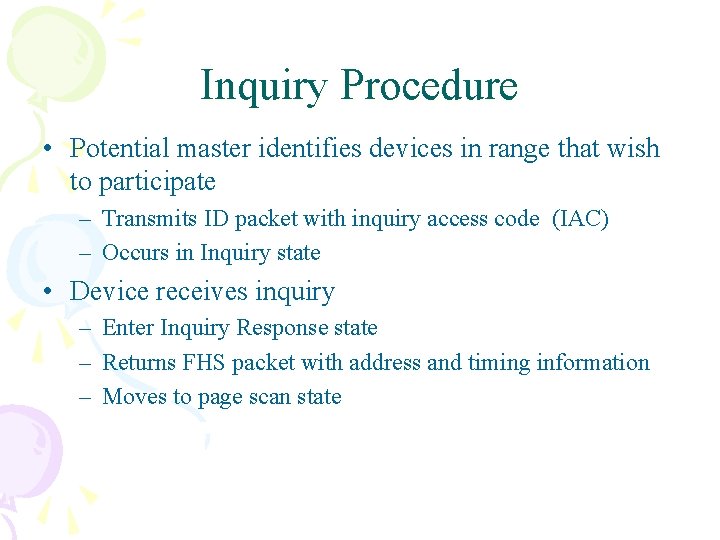
Inquiry Procedure • Potential master identifies devices in range that wish to participate – Transmits ID packet with inquiry access code (IAC) – Occurs in Inquiry state • Device receives inquiry – Enter Inquiry Response state – Returns FHS packet with address and timing information – Moves to page scan state
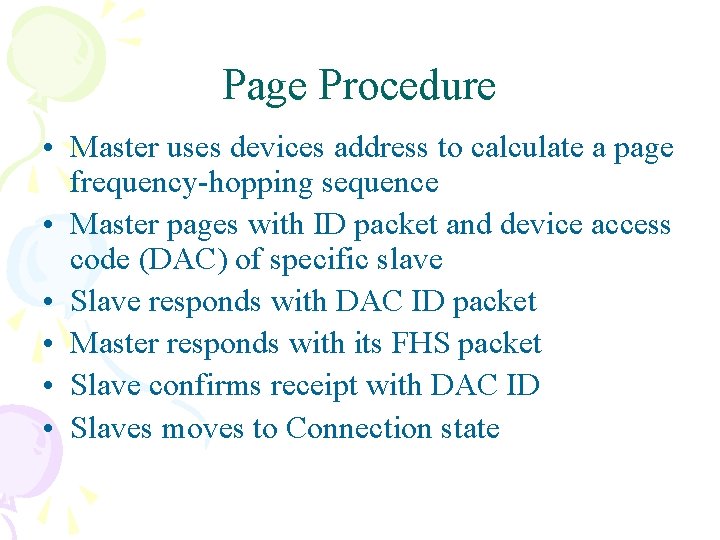
Page Procedure • Master uses devices address to calculate a page frequency-hopping sequence • Master pages with ID packet and device access code (DAC) of specific slave • Slave responds with DAC ID packet • Master responds with its FHS packet • Slave confirms receipt with DAC ID • Slaves moves to Connection state
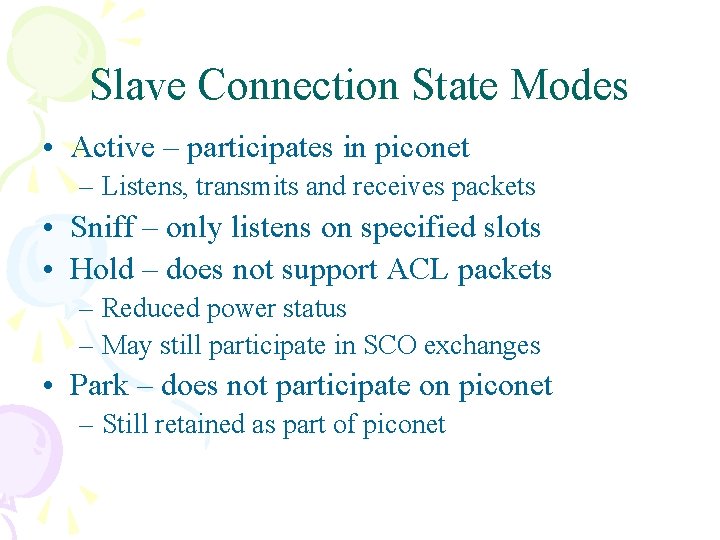
Slave Connection State Modes • Active – participates in piconet – Listens, transmits and receives packets • Sniff – only listens on specified slots • Hold – does not support ACL packets – Reduced power status – May still participate in SCO exchanges • Park – does not participate on piconet – Still retained as part of piconet