
Wireless Networks and Mobile Communication Systems NET 332
Wireless Networks and Mobile Communication Systems NET 332 D (PRIMER)
AGENDA › Computer Networks › Elements of a Computer Network › Classification of Networks › Types of Communication › Communication Media › Ways to connect Network Devices › Protocol Architecture/Network Architecture › Wireless Networks
AGENDA › Why is Wireless Different than Wired Networks? › Elements of a wireless Network › Examples of Wireless Networks
Computer Network Fundamentals › Definition › Two or more devices connected together to share resources. › Devices: Laptops, PC, Tablet, Network Enabled Printers, mobile phones etc. › Connected via Media: Twisted Pair, Coaxial Cable, Ethernet Cable, Wireless link › Resources: Files, Webpages, Songs, Video, Facebook Statuses › Elements of a Network › › Sender/Receiver (Nodes) Transmission Media Shared Resources Protocols
Classification of Networks › Host Role › Geographical Proximity/Scale › Signaling › Network Topology › Network Architecture/Protocol architecture › Type of Medium

Classification of Networks Host Roles › Client Server Model: › Defined Roles of nodes: Client requests/consumes and host provides network resources. › Peer to Peer Model: › Hosts can provide and consume network resources. Geographical Proximity/Scale – Local Area Network – Metropolitan area Network – Wide Area Network – PAN
Classification of Networks Signaling › Baseband Networks : One signal at a time on the channel, Entire channel bandwidth utilized by one signal, No multiplexing. Example Old PSTN. – Broadband Networks: Medium bandwidth divided into multiple channels. Multiplexing, Multiple signals being transmitted on the channel at the same time. Network Topology › Ring, Star, Bus, Mesh and Hybrid topology. Network Architecture – Classification of a network Architecture/Protocol Architecture. based on the Network
Classification of Networks › In a data transmission system, the transmission medium is the physical path between transmitter and receiver. Types of Media Bounded Media/Guided Media › Coaxial Cable (Not commonly used now) › Data rate limited to 10 Mb/s › Twisted Pair Cable(UTP ) › Used in Wired Ethernet standard so called Ethernet Cable. › Suffers from EMI › Flexible and Inexpensive › Shielded Twisted Pair (STP) › Rates Cat 3 10 -16 Mbps › Rates Cat 5 100 -1000 Mb/s › Rates Cat 5 c 10, 000 Mbps › Fiber Optic cable › No EMI › Very expensive Hard installation › Not flexible (Breaks and bends easily)
Classification of Networks Unguided Medium For unguided media, wireless transmission occurs through the atmosphere, outer space, or water. › The characteristics and quality of a data transmission are determined both by the characteristics of the medium and the characteristics of the signal. › › In the case of guided media, the medium itself is more important in determining the limitations of transmission. › For unguided media, the bandwidth of the signal produced by the transmitting antenna is more important than the medium in determining transmission characteristics.
Classification of Networks › Key Design concerns for a data transmission systems – Data rate – Distance – ( the greater the data rate and distance the better) › Design factors relating to the transmission medium and the signal determine the data rate and distance. – Bandwidth: All other factors remaining constant, the greater the bandwidth of a signal, the higher the data rate that can be achieved. – Transmission impairments: Impairments, such as attenuation, limit the distance. Guided media, twisted pair suffers more impairment than coaxial cable, which in turn suffers more than optical fiber. – Interference: Interference from competing signals in overlapping frequency bands can distort or wipe out a signal. More problematic for unguided media, but is also a problem with guided media. – Number of receivers: A guided medium can be used to construct a point to- point link or a shared link with multiple attachments. In the latter case, each attachment introduces some attenuation and distortion on the line, limiting distance and/or data
Classification of Networks › Protocol architecture/network architecture – Protocol › Protocol: Language or the Rules of communication – Standards › Standards are protocols that have gone through a standardization process and after standardization it has been documented by some organization – Standardization Agencies › › › Internet society International organization for standardization (ISO) IEEE Institute of Electrical and Electronics Engineer ANSI American Standards Institute ETSI Euro Telecomm Standards Institute ITU International Telecomm Union
Classification of Networks › Protocol architecture/network architecture – Network architecture › Each network can be defined and thus be classified as a set of protocol and layers. › Such a set of protocols is called the Network or Protocol architecture. › Network architecture is a set of layer and associated protocols that can achieve complete communication among the nodes in that network. – How to study a network › Define the network Layers › Define all the layers › Define interconnection between layers
Types of Communication › Simplex – (one way communication, Example: Broadcast Radio) › Half Duplex – (Two way communication but not at the same time, Example: CB Radio) › Full Duplex: – Two way communication but at the same time. Example Telephone and cellular phones.
Ways to connect Network Devices › Ways to connect network device › Infrared Light – Infrared light can be used to create a wireless link between devices (Not commonly used now) – Data transfer rate 4 Mbps – Short Range – LOS – No security (Encryption) › Bluetooth to create a PAN – – Small network design to create a PAN to synchronize data Uses short range wireless Communication Frequency of operation 2. 45 GHz Distance/ Range Ideal 30 feet – Encryption (128 bit encryption)
Ways to connect Network Devices › Ethernet Cable – Ethernet cable is the STP or the UTP so the same rates are supported › Wireless LAN – Frequency : 2. 4 GHz – IEEE 802. 11 standard used to implement the Wireless LANS – Variants of IEEE 802. 11 Standard – 802. 11 b (Data rate 11 Mbps, Frequency: 2. 4 GHz-2. 4835 GHz, Range 280300 Feet) – 802. 11 g (Data rate 54 Mbps, Frequency 2. 4 GHz, Range 280 -300 Feet ideally)
Wireless Networks Wireless networks use radio waves as a medium to transfer data. – For wireless networks the Frequency ranges are specified by the FCC (Federal Communication Commission). – ISM Frequencies is an unlicensed frequency band used for Industrial, Scientific and Medical applications.
Why is wireless different than wired? › Noisy, time-varying channel – Environnemental conditions affect transmission › Shared medium – Other users create interference – Must develop ways to share the channel › Bandwidth is limited – FCC determines how spectrum is allocated – ISM band for unlicensed use (902 -928 MHz, 2. 4 -2. 5 GHz and 5. 725 -5. 875 GHz) – Requires intelligent way to make efficient use of limited bandwidth in error-prone environment › Major differences due to broadcast nature of wireless communication – Transmitted signals can be received by an arbitrary (and perhaps unknown) number of other users – Cannot guarantee a link from every transmitting node to every intended receiving node › Each transmitted message utilizes scares resources (BW) – Need to provide means for fair and efficient utilization of available bandwidth among transmitting nodes › Transmitted signal power important parameter – Require enough signal power to reach destination node. – Want to limit signal power to minimize interference and max battery life.
WIRED VERSUS WIRELESS Advantages: People want connectivity anywhere anytime for example, at airports, hotels, customers place, or group of people wants to share data at any location. Such requirements have made the wireless connectivity indispensable. – Convenience: Access your network resources from any location within your wireless network's coverage area or a wireless hot spot – Mobility: You're no longer tied to your desk, as you were with a wired connection. You and your employees can go online in conference room meetings, for example. – Productivity: Wireless access to the Internet and to your company's key applications and resources helps your staff get the job done and encourages collaboration. – Easy setup: You don't have to string cables, so installation can be quick and cost-effective. – Expandable: You can easily expand wireless networks with existing equipment, while a wired network might require additional wiring. – Cost. Because wireless networks eliminate or reduce wiring costs, they can cost less to operate than wired networks.
WIRED VERSUS WIRELESS Disadvantages: – Wireless LANs using 802. 11 b support a maximum theoretical bandwidth of 11 Mbps, roughly the same as that of old, traditional Ethernet. 802. 11 a and 802. 11 g WLANs support 54 Mbps , that is approximately one-half the bandwidth of Fast Ethernet. – In theory, wireless LANs are less secure than wired LANs, because wireless communication signals travel through the air and can easily be intercepted. – Wireless LANs suffer a few more reliability problems than wired LANs, though perhaps not enough to be a significant concern. 802. 11 b and 802. 11 g wireless signals are subject to interference. – One medium shared by all the users. – Signal attenuation is high – High interference i. e noise; co-channel interference; adjacent channel interference etc
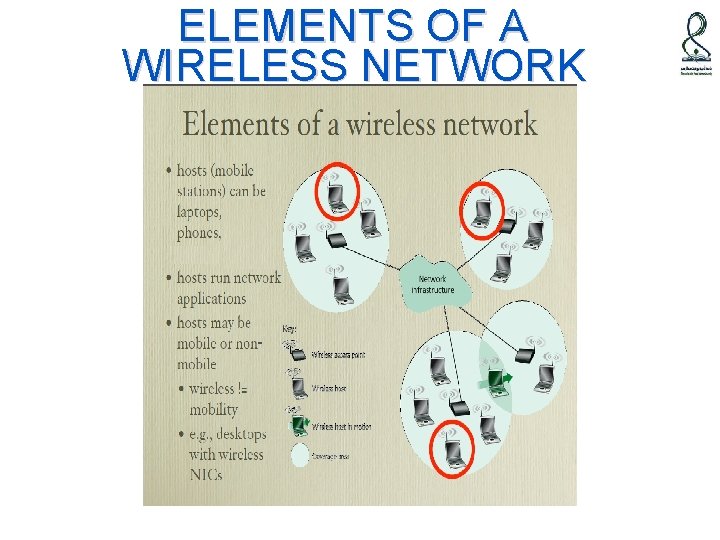
ELEMENTS OF A WIRELESS NETWORK
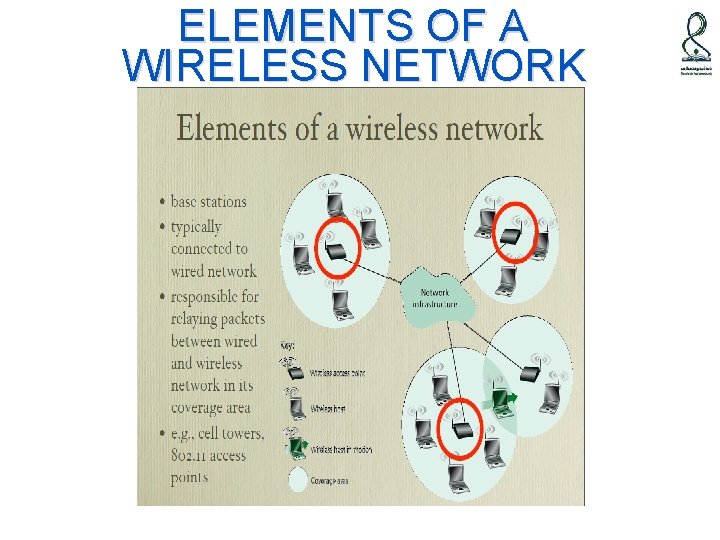
ELEMENTS OF A WIRELESS NETWORK
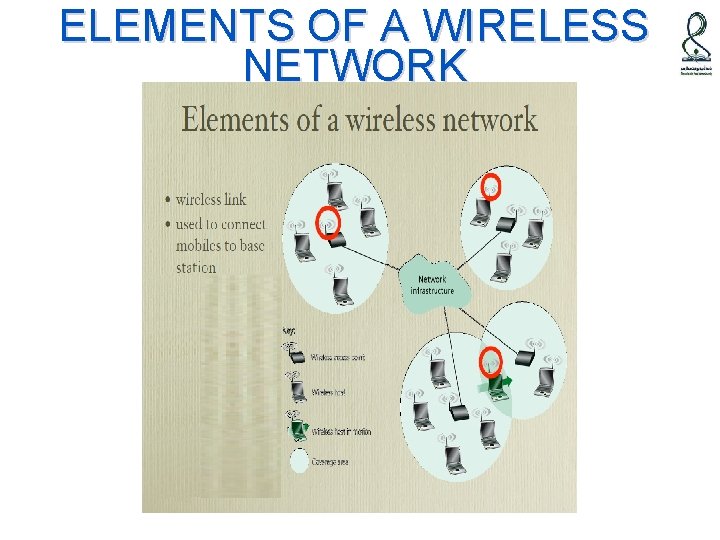
ELEMENTS OF A WIRELESS NETWORK
Types of Wireless Networks › Wireless Local area Networks (IEEE 802. 11) › Wireless Personal Area Networks Blue Tooth standard (IEEE 802. 15) › Cellular Mobile Networks › Satellite Networks › Terrestrial Microwave
- Slides: 23