
Wireless LAN IEEE 802 11 Tutorial Maximilian Riegel
- Slides: 84
Wireless LAN IEEE 802. 11 Tutorial Maximilian Riegel ICM Networks, Advanced Standardization
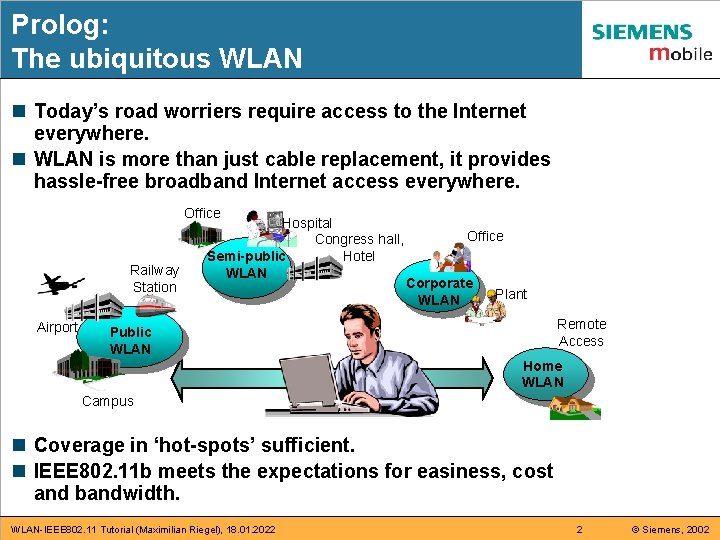
Prolog: The ubiquitous WLAN n Today’s road worriers require access to the Internet everywhere. n WLAN is more than just cable replacement, it provides hassle-free broadband Internet access everywhere. Office Railway Station Airport Hospital Congress hall, Hotel Semi-public WLAN Office Corporate WLAN Plant Remote Access Public WLAN Home WLAN Campus n Coverage in ‘hot-spots’ sufficient. n IEEE 802. 11 b meets the expectations for easiness, cost and bandwidth. WLAN-IEEE 802. 11 Tutorial (Maximilian Riegel), 18. 01. 2022 2 © Siemens, 2002
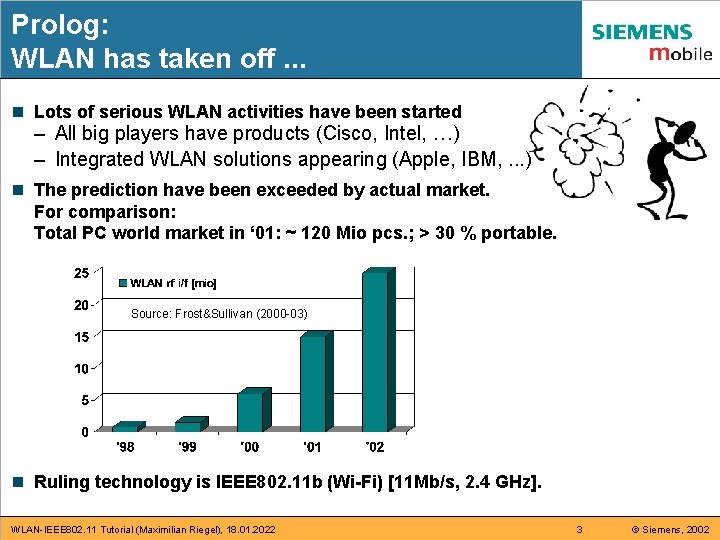
Prolog: WLAN has taken off. . . n Lots of serious WLAN activities have been started – All big players have products (Cisco, Intel, …) – Integrated WLAN solutions appearing (Apple, IBM, . . . ) n The prediction have been exceeded by actual market. For comparison: Total PC world market in ‘ 01: ~ 120 Mio pcs. ; > 30 % portable. Source: Frost&Sullivan (2000 -03) n Ruling technology is IEEE 802. 11 b (Wi-Fi) [11 Mb/s, 2. 4 GHz]. WLAN-IEEE 802. 11 Tutorial (Maximilian Riegel), 18. 01. 2022 3 © Siemens, 2002
Outline n Part 1: Wireless Internet System Architecture n Part 2: IEEE 802. 11 Overview n Part 3: Physical Layer n Part 4: Medium Access Control n Part 5: MAC Layer Management n Part 6: WLAN Mobility n Part 7: WLAN Security n Part 8: Public Hotspot Operations n Part 9: WLAN – UMTS Interworking WLAN-IEEE 802. 11 Tutorial (Maximilian Riegel), 18. 01. 2022 4 © Siemens, 2002
Part 1: Wireless Internet system architecture n n n Generic Internet network architecture Layering means encapsulation IEEE 802. 11 – seamless integration into the Internet IP based network architecture Wireless LAN IEEE 802. 11 basic architecture What is unique about wireless? WLAN-IEEE 802. 11 Tutorial (Maximilian Riegel), 18. 01. 2022 5 © Siemens, 2002
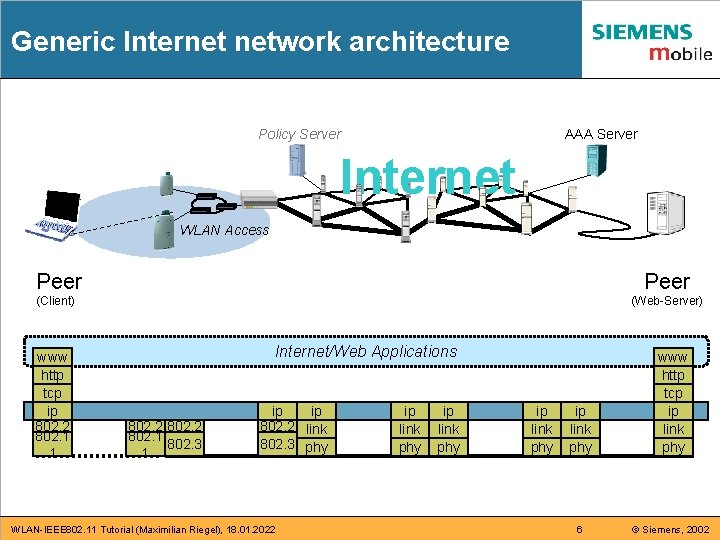
Generic Internet network architecture Policy Server AAA Server Internet WLAN Access Peer (Client) www http tcp ip 802. 2 802. 1 1 (Web-Server) Internet/Web Applications 802. 2 802. 1 802. 3 1 ip ip 802. 2 link 802. 3 phy WLAN-IEEE 802. 11 Tutorial (Maximilian Riegel), 18. 01. 2022 ip link phy www http tcp ip link phy 6 © Siemens, 2002
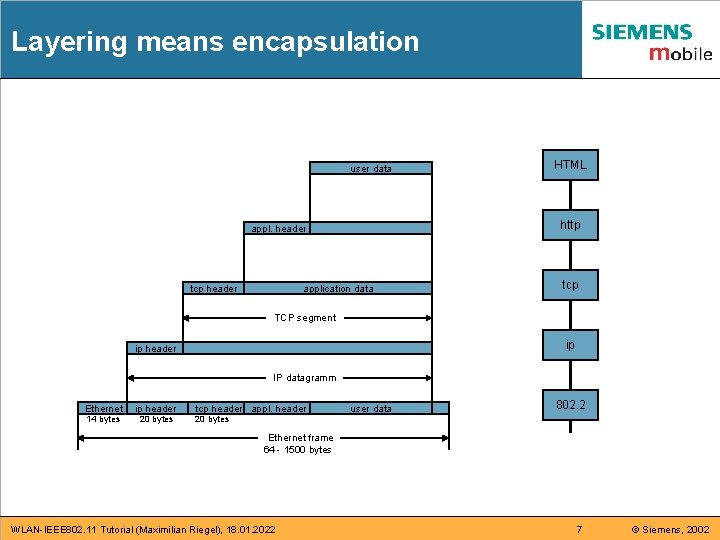
Layering means encapsulation user data http appl. header tcp header HTML application data tcp TCP segment ip ip header IP datagramm Ethernet ip header 14 bytes 20 bytes tcp header appl. header user data 802. 2 20 bytes Ethernet frame 64 - 1500 bytes WLAN-IEEE 802. 11 Tutorial (Maximilian Riegel), 18. 01. 2022 7 © Siemens, 2002
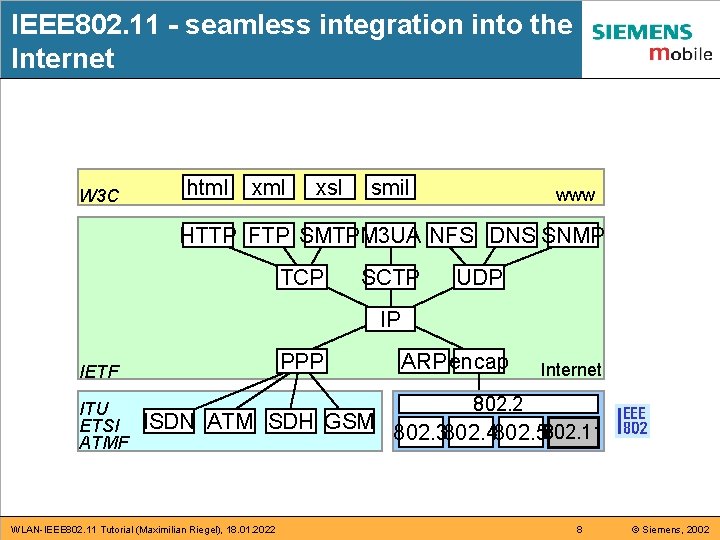
IEEE 802. 11 - seamless integration into the Internet W 3 C html xsl smil www HTTP FTP SMTPM 3 UA NFS DNS SNMP TCP SCTP UDP IP PPP IETF ITU ETSI ATMF ISDN ATM SDH GSM WLAN-IEEE 802. 11 Tutorial (Maximilian Riegel), 18. 01. 2022 ARP encap Internet 802. 2 802. 3802. 4802. 5802. 11 8 © Siemens, 2002
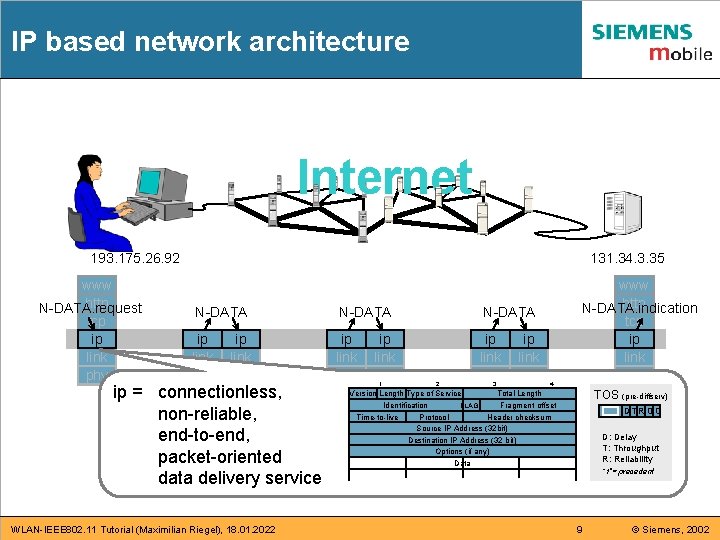
IP based network architecture Internet 193. 175. 26. 92 www http N-DATA. request tcp ip link phy 131. 34. 3. 35 N-DATA ip link phy ip = connectionless, non-reliable, end-to-end, packet-oriented data delivery service WLAN-IEEE 802. 11 Tutorial (Maximilian Riegel), 18. 01. 2022 N-DATA ip link phy 1 www http N-DATA. indication tcp ip link phy N-DATA 2 ip link phy 3 ip link phy 4 TOS (pre-diffserv) Version Length Type of Service Total Length FLAGS Identification Fragment offset Time-to-live Protocol Header checksum Source IP Address (32 bit) Destination IP Address (32 bit) Options (if any) Data DTR 0 0 D: Delay T: Throughput R: Reliability “ 1”= precedent 9 © Siemens, 2002
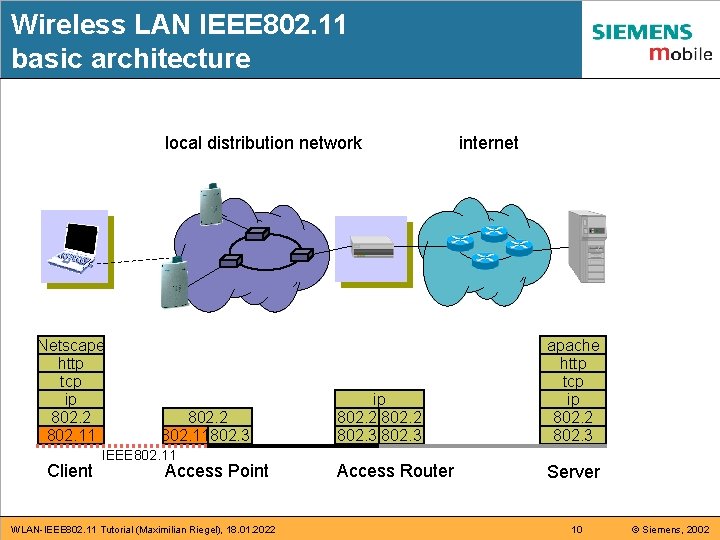
Wireless LAN IEEE 802. 11 basic architecture local distribution network Netscape http tcp ip 802. 2 ppp Bluetooth 802. 11 Client 802. 2 802. 11802. 3 IEEE 802. 11 Access Point WLAN-IEEE 802. 11 Tutorial (Maximilian Riegel), 18. 01. 2022 ip 802. 2 802. 3 Access Router internet apache http tcp ip 802. 2 ppp Bluetooth 802. 3 Server 10 © Siemens, 2002
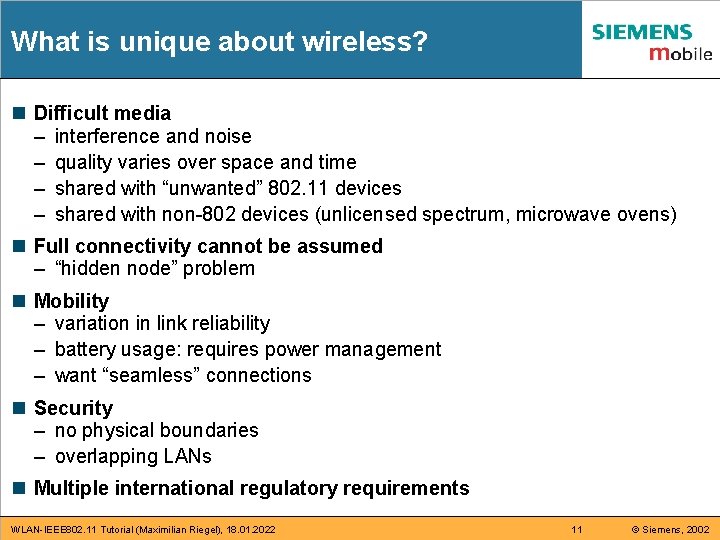
What is unique about wireless? n Difficult media – interference and noise – quality varies over space and time – shared with “unwanted” 802. 11 devices – shared with non-802 devices (unlicensed spectrum, microwave ovens) n Full connectivity cannot be assumed – “hidden node” problem n Mobility – variation in link reliability – battery usage: requires power management – want “seamless” connections n Security – no physical boundaries – overlapping LANs n Multiple international regulatory requirements WLAN-IEEE 802. 11 Tutorial (Maximilian Riegel), 18. 01. 2022 11 © Siemens, 2002
Part 2: IEEE 802. 11 Overview n n n Wireless IEEE 802. 11 Standard IEEE 802. 11 Configurations IEEE 802. 11 Architecture Overview IEEE 802. 11 Protocol Architecture Wireless LAN Standardization WLAN-IEEE 802. 11 Tutorial (Maximilian Riegel), 18. 01. 2022 12 © Siemens, 2002
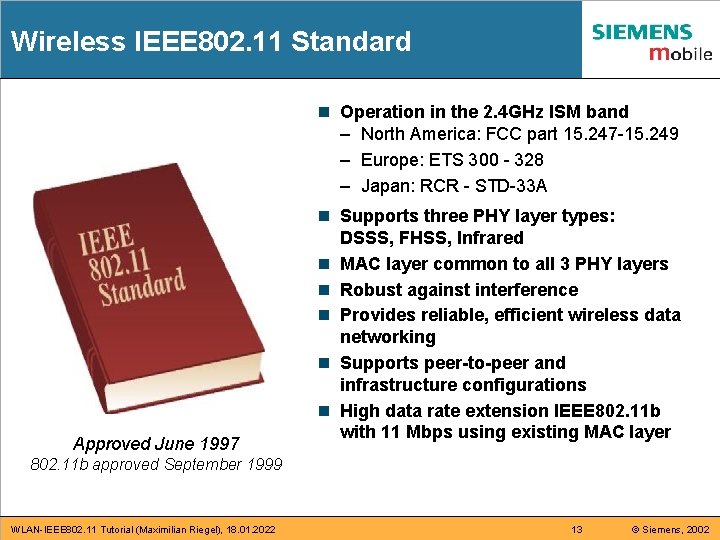
Wireless IEEE 802. 11 Standard n Operation in the 2. 4 GHz ISM band – North America: FCC part 15. 247 -15. 249 – Europe: ETS 300 - 328 – Japan: RCR - STD-33 A Approved June 1997 n Supports three PHY layer types: DSSS, FHSS, Infrared n MAC layer common to all 3 PHY layers n Robust against interference n Provides reliable, efficient wireless data networking n Supports peer-to-peer and infrastructure configurations n High data rate extension IEEE 802. 11 b with 11 Mbps using existing MAC layer 802. 11 b approved September 1999 WLAN-IEEE 802. 11 Tutorial (Maximilian Riegel), 18. 01. 2022 13 © Siemens, 2002
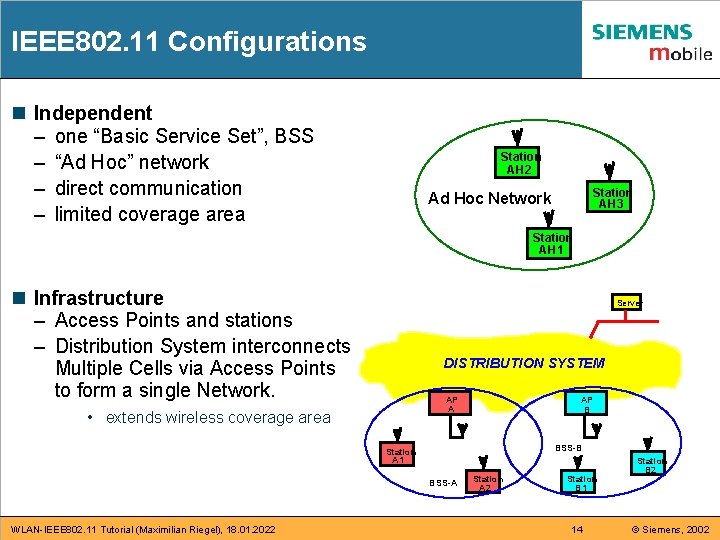
IEEE 802. 11 Configurations n Independent – one “Basic Service Set”, BSS – “Ad Hoc” network – direct communication – limited coverage area Station AH 2 Station AH 3 Ad Hoc Network Station AH 1 n Infrastructure – Access Points and stations – Distribution System interconnects Multiple Cells via Access Points to form a single Network. Server DISTRIBUTION SYSTEM AP B AP A • extends wireless coverage area BSS-B Station A 1 BSS-A WLAN-IEEE 802. 11 Tutorial (Maximilian Riegel), 18. 01. 2022 Station A 2 Station B 1 14 Station B 2 © Siemens, 2002
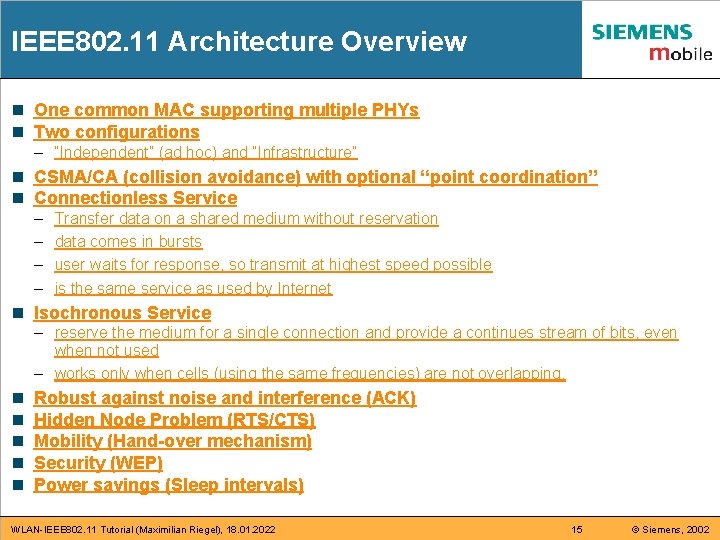
IEEE 802. 11 Architecture Overview n One common MAC supporting multiple PHYs n Two configurations – “Independent” (ad hoc) and “Infrastructure” n CSMA/CA (collision avoidance) with optional “point coordination” n Connectionless Service – – Transfer data on a shared medium without reservation data comes in bursts user waits for response, so transmit at highest speed possible is the same service as used by Internet n Isochronous Service – reserve the medium for a single connection and provide a continues stream of bits, even when not used – works only when cells (using the same frequencies) are not overlapping. n n n Robust against noise and interference (ACK) Hidden Node Problem (RTS/CTS) Mobility (Hand-over mechanism) Security (WEP) Power savings (Sleep intervals) WLAN-IEEE 802. 11 Tutorial (Maximilian Riegel), 18. 01. 2022 15 © Siemens, 2002
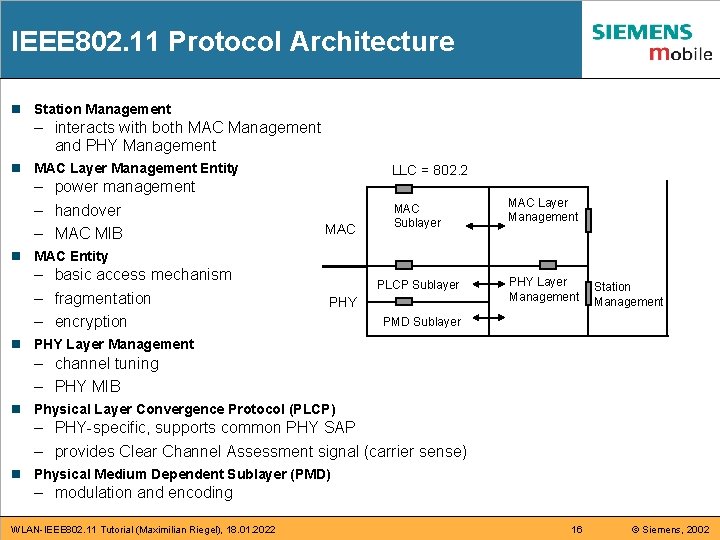
IEEE 802. 11 Protocol Architecture n Station Management – interacts with both MAC Management and PHY Management n MAC Layer Management Entity – power management – handover – MAC MIB LLC = 802. 2 MAC Sublayer MAC Layer Management PLCP Sublayer PHY Layer Management n MAC Entity – basic access mechanism – fragmentation – encryption PHY Station Management PMD Sublayer n PHY Layer Management – channel tuning – PHY MIB n Physical Layer Convergence Protocol (PLCP) – PHY-specific, supports common PHY SAP – provides Clear Channel Assessment signal (carrier sense) n Physical Medium Dependent Sublayer (PMD) – modulation and encoding WLAN-IEEE 802. 11 Tutorial (Maximilian Riegel), 18. 01. 2022 16 © Siemens, 2002
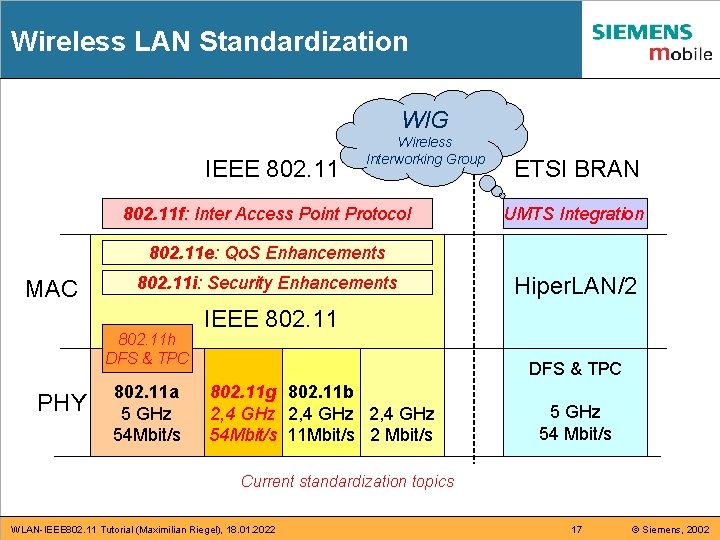
Wireless LAN Standardization WIG IEEE 802. 11 Wireless Interworking Group 802. 11 f: Inter Access Point Protocol ETSI BRAN UMTS Integration 802. 11 e: Qo. S Enhancements MAC 802. 11 i: Security Enhancements 802. 11 h DFS & TPC PHY 802. 11 a 5 GHz 54 Mbit/s Hiper. LAN/2 IEEE 802. 11 DFS & TPC 802. 11 g 802. 11 b 2, 4 GHz 54 Mbit/s 11 Mbit/s 2 Mbit/s 5 GHz 54 Mbit/s Current standardization topics WLAN-IEEE 802. 11 Tutorial (Maximilian Riegel), 18. 01. 2022 17 © Siemens, 2002
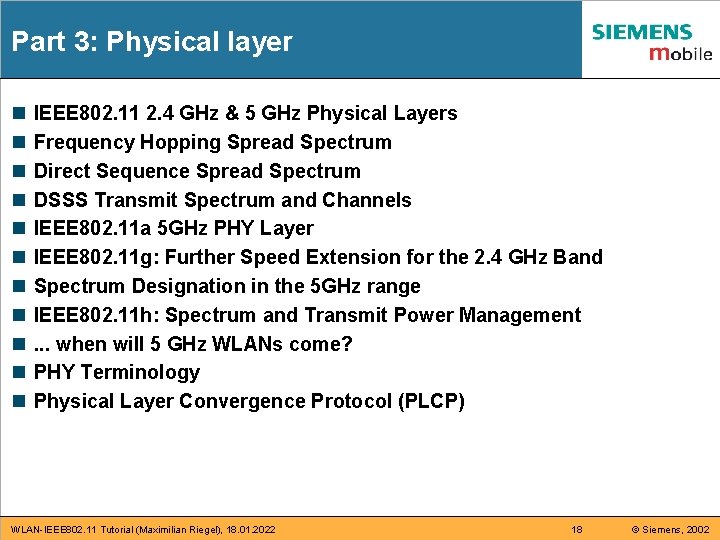
Part 3: Physical layer n n n IEEE 802. 11 2. 4 GHz & 5 GHz Physical Layers Frequency Hopping Spread Spectrum Direct Sequence Spread Spectrum DSSS Transmit Spectrum and Channels IEEE 802. 11 a 5 GHz PHY Layer IEEE 802. 11 g: Further Speed Extension for the 2. 4 GHz Band Spectrum Designation in the 5 GHz range IEEE 802. 11 h: Spectrum and Transmit Power Management. . . when will 5 GHz WLANs come? PHY Terminology Physical Layer Convergence Protocol (PLCP) WLAN-IEEE 802. 11 Tutorial (Maximilian Riegel), 18. 01. 2022 18 © Siemens, 2002
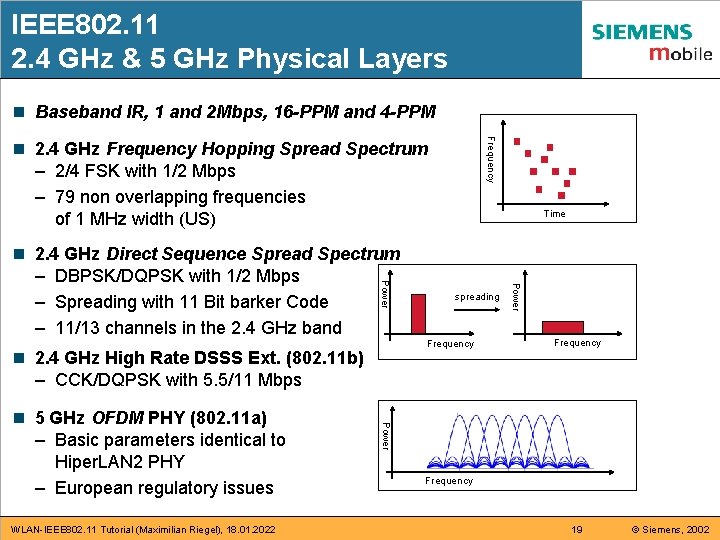
IEEE 802. 11 2. 4 GHz & 5 GHz Physical Layers n Baseband IR, 1 and 2 Mbps, 16 -PPM and 4 -PPM Frequency n 2. 4 GHz Frequency Hopping Spread Spectrum – 2/4 FSK with 1/2 Mbps – 79 non overlapping frequencies of 1 MHz width (US) n 2. 4 GHz High Rate DSSS Ext. (802. 11 b) – CCK/DQPSK with 5. 5/11 Mbps WLAN-IEEE 802. 11 Tutorial (Maximilian Riegel), 18. 01. 2022 Frequency Power n 5 GHz OFDM PHY (802. 11 a) – Basic parameters identical to Hiper. LAN 2 PHY – European regulatory issues spreading Power n 2. 4 GHz Direct Sequence Spread Spectrum – DBPSK/DQPSK with 1/2 Mbps – Spreading with 11 Bit barker Code – 11/13 channels in the 2. 4 GHz band Time Frequency 19 © Siemens, 2002
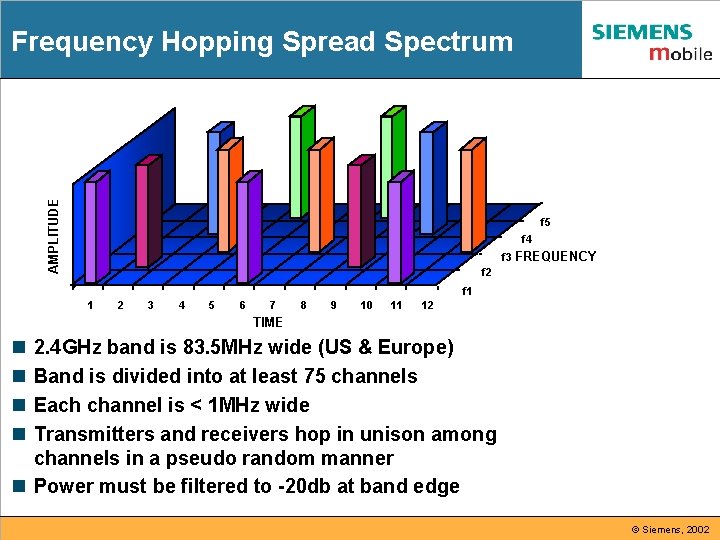
AMPLITUDE Frequency Hopping Spread Spectrum f 5 f 4 f 3 FREQUENCY f 2 f 1 1 2 3 4 5 6 7 8 9 10 11 12 TIME n n 2. 4 GHz band is 83. 5 MHz wide (US & Europe) Band is divided into at least 75 channels Each channel is < 1 MHz wide Transmitters and receivers hop in unison among channels in a pseudo random manner n Power must be filtered to -20 db at band edge © Siemens, 2002
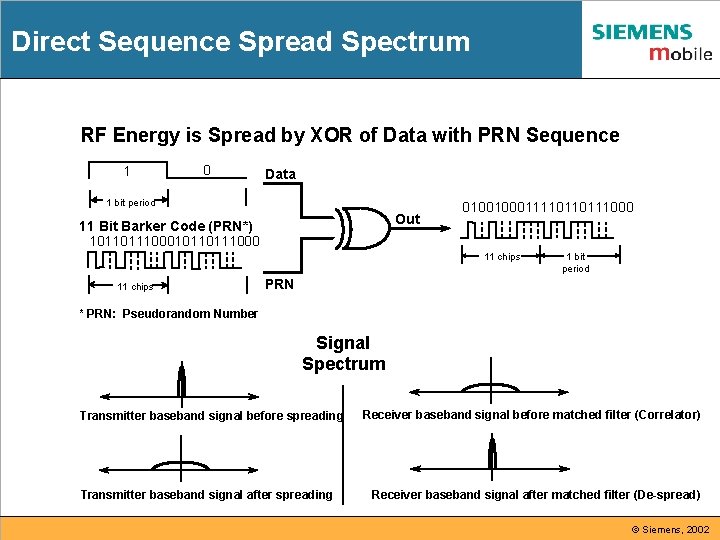
Direct Sequence Spread Spectrum RF Energy is Spread by XOR of Data with PRN Sequence 1 0 Data 1 bit period Out 11 Bit Barker Code (PRN*) 10110111000 0100100011110110111000 11 chips 1 bit period PRN * PRN: Pseudorandom Number Signal Spectrum Transmitter baseband signal before spreading Transmitter baseband signal after spreading Receiver baseband signal before matched filter (Correlator) Receiver baseband signal after matched filter (De-spread) © Siemens, 2002
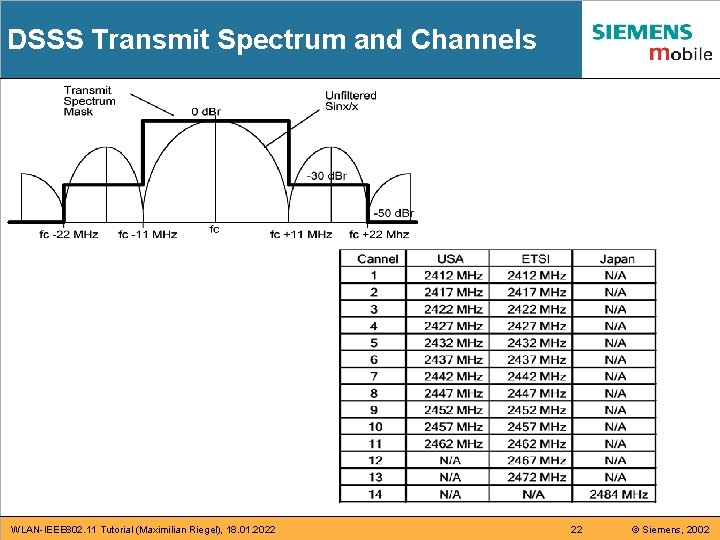
DSSS Transmit Spectrum and Channels WLAN-IEEE 802. 11 Tutorial (Maximilian Riegel), 18. 01. 2022 22 © Siemens, 2002
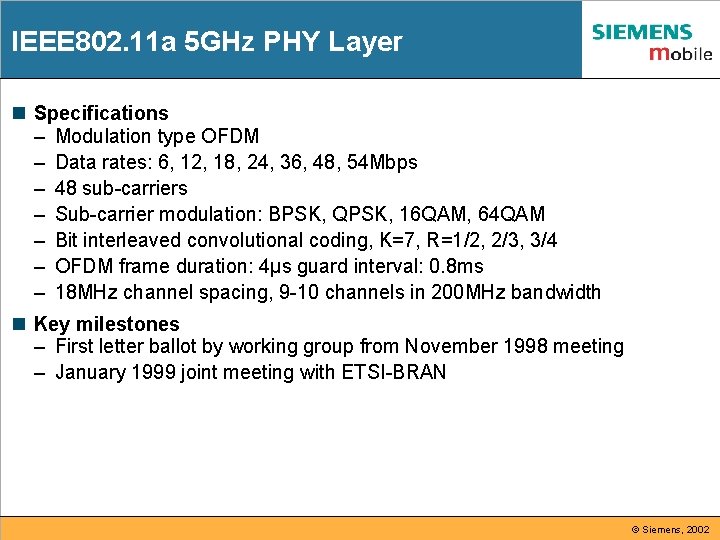
IEEE 802. 11 a 5 GHz PHY Layer n Specifications – Modulation type OFDM – Data rates: 6, 12, 18, 24, 36, 48, 54 Mbps – 48 sub-carriers – Sub-carrier modulation: BPSK, QPSK, 16 QAM, 64 QAM – Bit interleaved convolutional coding, K=7, R=1/2, 2/3, 3/4 – OFDM frame duration: 4µs guard interval: 0. 8 ms – 18 MHz channel spacing, 9 -10 channels in 200 MHz bandwidth n Key milestones – First letter ballot by working group from November 1998 meeting – January 1999 joint meeting with ETSI-BRAN © Siemens, 2002
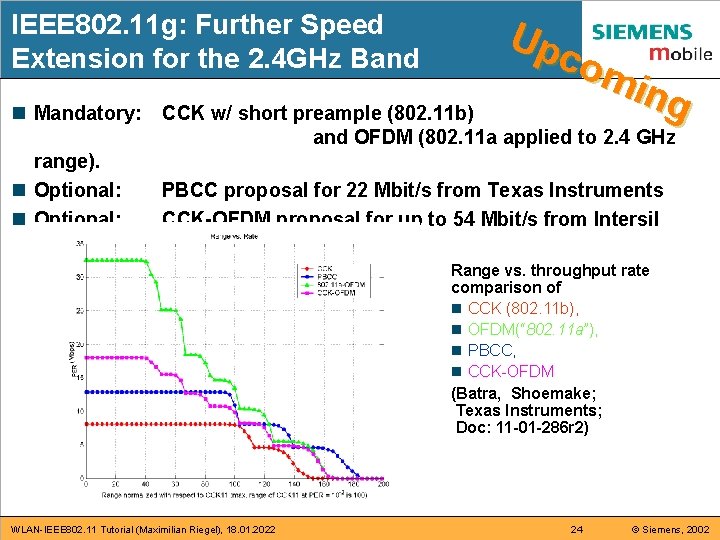
IEEE 802. 11 g: Further Speed Extension for the 2. 4 GHz Band n Mandatory: range). n Optional: Up com ing CCK w/ short preample (802. 11 b) and OFDM (802. 11 a applied to 2. 4 GHz PBCC proposal for 22 Mbit/s from Texas Instruments CCK-OFDM proposal for up to 54 Mbit/s from Intersil Range vs. throughput rate comparison of n CCK (802. 11 b), n OFDM(“ 802. 11 a”), n PBCC, n CCK-OFDM (Batra, Shoemake; Texas Instruments; Doc: 11 -01 -286 r 2) WLAN-IEEE 802. 11 Tutorial (Maximilian Riegel), 18. 01. 2022 24 © Siemens, 2002
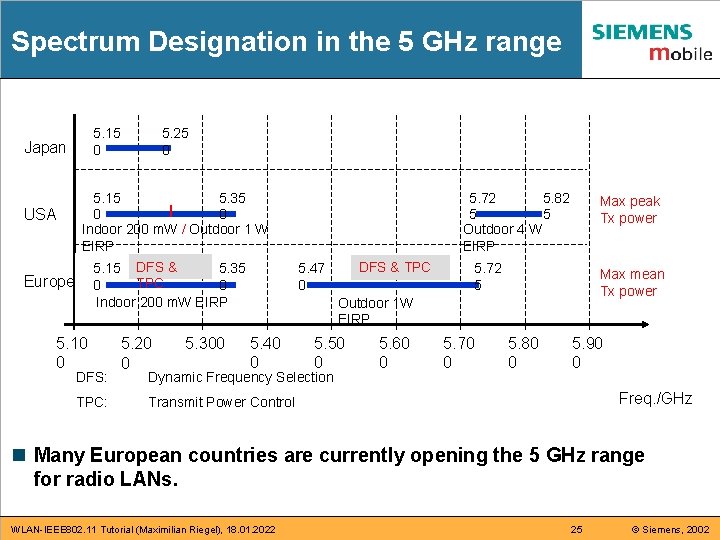
Spectrum Designation in the 5 GHz range 5. 15 0 Japan USA 5. 25 0 5. 15 5. 35 0 0 Indoor 200 m. W / Outdoor 1 W EIRP 5. 35 5. 15 DFS & TPC 0 0 Indoor 200 m. W EIRP Europe 5. 10 0 DFS: TPC: 5. 20 0 5. 300 5. 72 5. 82 5 5 Outdoor 4 W EIRP DFS & TPC 5. 47 0 Max peak Tx power 5. 72 5 Max mean Tx power Outdoor 1 W EIRP 5. 40 0 5. 50 0 Dynamic Frequency Selection 5. 60 0 5. 70 0 5. 80 0 5. 90 0 Freq. /GHz Transmit Power Control n Many European countries are currently opening the 5 GHz range for radio LANs. WLAN-IEEE 802. 11 Tutorial (Maximilian Riegel), 18. 01. 2022 25 © Siemens, 2002
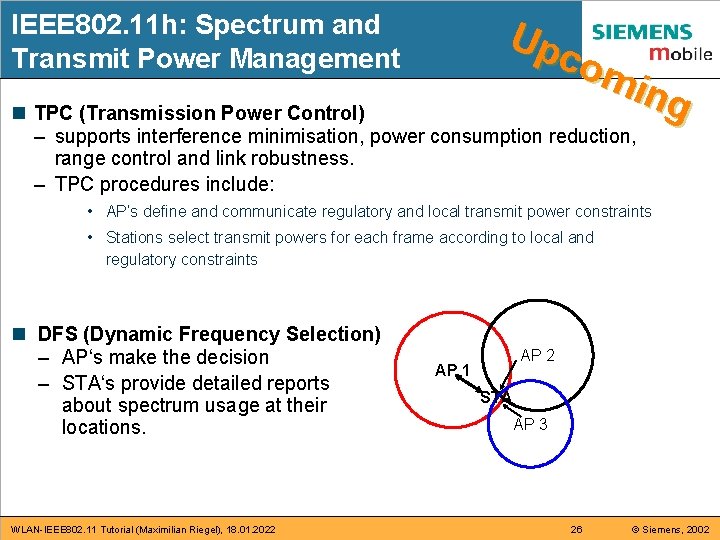
IEEE 802. 11 h: Spectrum and Transmit Power Management Up com ing n TPC (Transmission Power Control) – supports interference minimisation, power consumption reduction, range control and link robustness. – TPC procedures include: • AP‘s define and communicate regulatory and local transmit power constraints • Stations select transmit powers for each frame according to local and regulatory constraints n DFS (Dynamic Frequency Selection) – AP‘s make the decision – STA‘s provide detailed reports about spectrum usage at their locations. WLAN-IEEE 802. 11 Tutorial (Maximilian Riegel), 18. 01. 2022 AP 1 STA AP 3 26 © Siemens, 2002
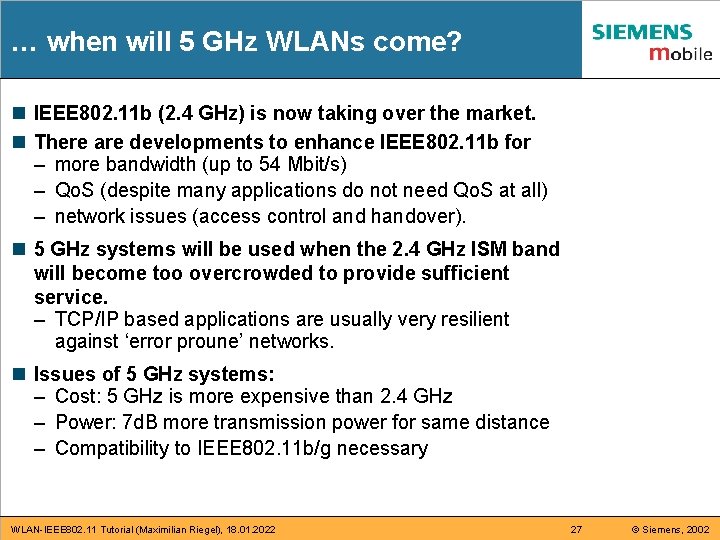
… when will 5 GHz WLANs come? n IEEE 802. 11 b (2. 4 GHz) is now taking over the market. n There are developments to enhance IEEE 802. 11 b for – more bandwidth (up to 54 Mbit/s) – Qo. S (despite many applications do not need Qo. S at all) – network issues (access control and handover). n 5 GHz systems will be used when the 2. 4 GHz ISM band will become too overcrowded to provide sufficient service. – TCP/IP based applications are usually very resilient against ‘error proune’ networks. n Issues of 5 GHz systems: – Cost: 5 GHz is more expensive than 2. 4 GHz – Power: 7 d. B more transmission power for same distance – Compatibility to IEEE 802. 11 b/g necessary WLAN-IEEE 802. 11 Tutorial (Maximilian Riegel), 18. 01. 2022 27 © Siemens, 2002
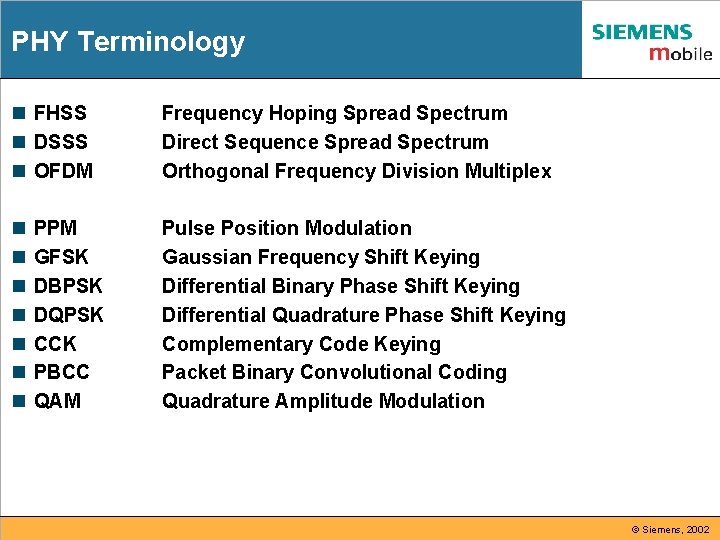
PHY Terminology n FHSS n DSSS n OFDM Frequency Hoping Spread Spectrum Direct Sequence Spread Spectrum Orthogonal Frequency Division Multiplex n n n n Pulse Position Modulation Gaussian Frequency Shift Keying Differential Binary Phase Shift Keying Differential Quadrature Phase Shift Keying Complementary Code Keying Packet Binary Convolutional Coding Quadrature Amplitude Modulation PPM GFSK DBPSK DQPSK CCK PBCC QAM © Siemens, 2002
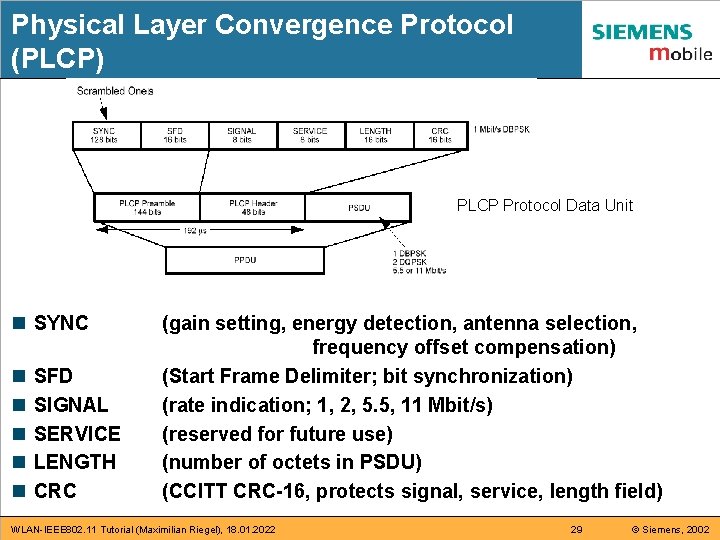
Physical Layer Convergence Protocol (PLCP) PLCP Protocol Data Unit n SYNC n n n SFD SIGNAL SERVICE LENGTH CRC (gain setting, energy detection, antenna selection, frequency offset compensation) (Start Frame Delimiter; bit synchronization) (rate indication; 1, 2, 5. 5, 11 Mbit/s) (reserved for future use) (number of octets in PSDU) (CCITT CRC-16, protects signal, service, length field) WLAN-IEEE 802. 11 Tutorial (Maximilian Riegel), 18. 01. 2022 29 © Siemens, 2002
Part 4: Medium Access Control n n n Basic Access Protocol Features CSMA/CA Explained CSMA/CA + ACK protocol Distributed Coordination Function (DCF) „Hidden Node“ Provisions IEEE 802. 11 e: MAC Enhancements for Quality of Service (EDCF) Point Coordination Function (PCF) IEEE 802. 11 e: MAC Enhancements for Quality of Service (HCF) Frame Formats Address Field Description Summary: MAC Protocol Features WLAN-IEEE 802. 11 Tutorial (Maximilian Riegel), 18. 01. 2022 30 © Siemens, 2002
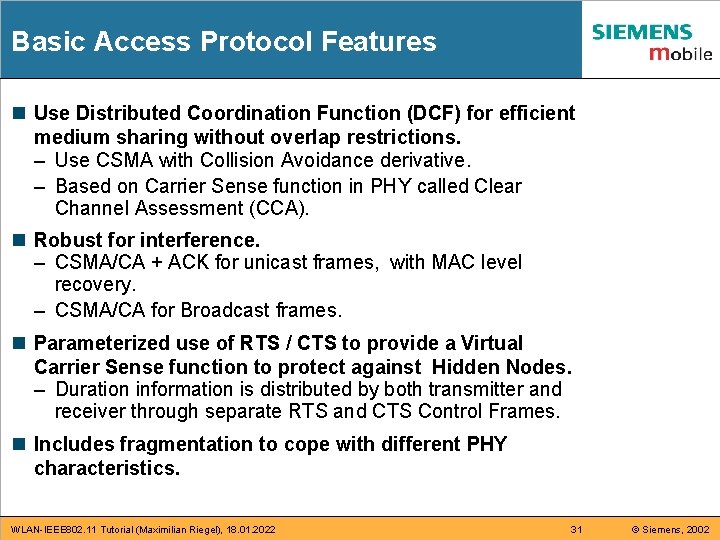
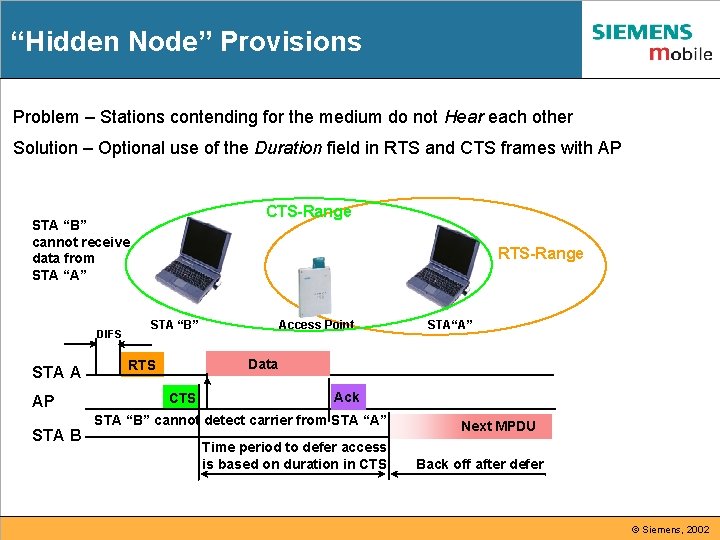
Basic Access Protocol Features n Use Distributed Coordination Function (DCF) for efficient medium sharing without overlap restrictions. – Use CSMA with Collision Avoidance derivative. – Based on Carrier Sense function in PHY called Clear Channel Assessment (CCA). n Robust for interference. – CSMA/CA + ACK for unicast frames, with MAC level recovery. – CSMA/CA for Broadcast frames. n Parameterized use of RTS / CTS to provide a Virtual Carrier Sense function to protect against Hidden Nodes. – Duration information is distributed by both transmitter and receiver through separate RTS and CTS Control Frames. n Includes fragmentation to cope with different PHY characteristics. WLAN-IEEE 802. 11 Tutorial (Maximilian Riegel), 18. 01. 2022 31 © Siemens, 2002
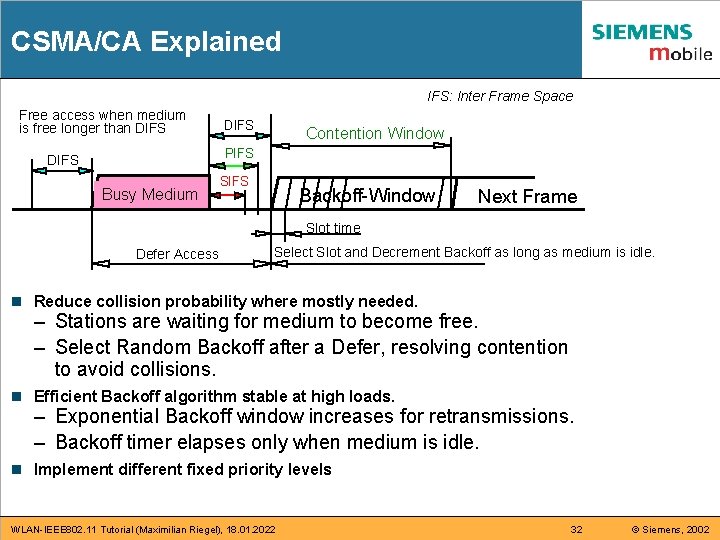
CSMA/CA Explained IFS: Inter Frame Space Free access when medium is free longer than DIFS Contention Window PIFS DIFS Busy Medium SIFS Backoff-Window Next Frame Slot time Defer Access Select Slot and Decrement Backoff as long as medium is idle. n Reduce collision probability where mostly needed. – Stations are waiting for medium to become free. – Select Random Backoff after a Defer, resolving contention to avoid collisions. n Efficient Backoff algorithm stable at high loads. – Exponential Backoff window increases for retransmissions. – Backoff timer elapses only when medium is idle. n Implement different fixed priority levels WLAN-IEEE 802. 11 Tutorial (Maximilian Riegel), 18. 01. 2022 32 © Siemens, 2002
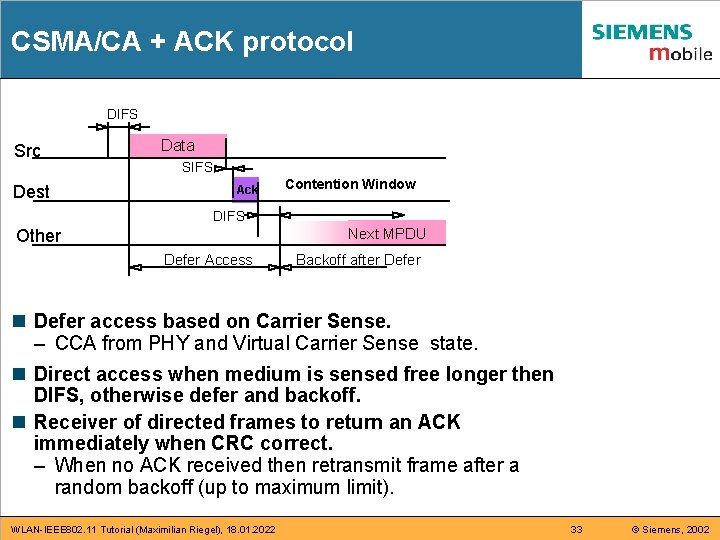
CSMA/CA + ACK protocol DIFS Src Dest Data SIFS Ack Contention Window DIFS Other Next MPDU Defer Access Backoff after Defer n Defer access based on Carrier Sense. – CCA from PHY and Virtual Carrier Sense state. n Direct access when medium is sensed free longer then DIFS, otherwise defer and backoff. n Receiver of directed frames to return an ACK immediately when CRC correct. – When no ACK received then retransmit frame after a random backoff (up to maximum limit). WLAN-IEEE 802. 11 Tutorial (Maximilian Riegel), 18. 01. 2022 33 © Siemens, 2002
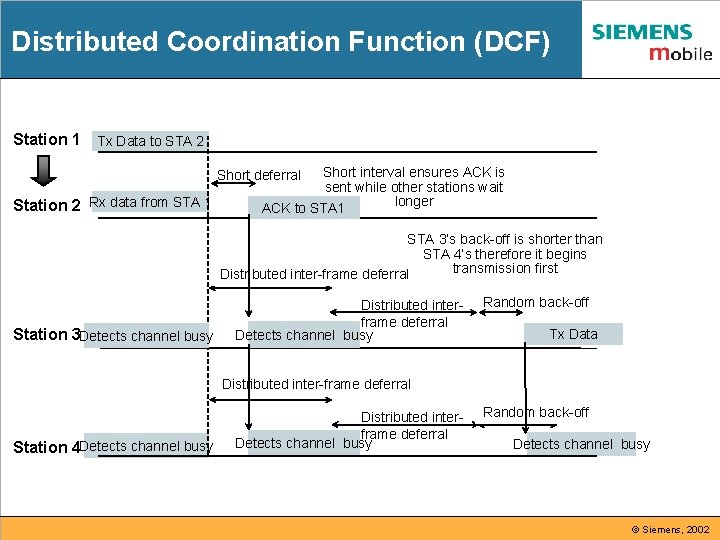
Distributed Coordination Function (DCF) Station 1 Tx Data to STA 2 Short interval ensures ACK is sent while other stations wait longer ACK to STA 1 Short deferral Station 2 Rx data from STA 1 STA 3’s back-off is shorter than STA 4’s therefore it begins transmission first Distributed inter-frame deferral Station 3 Detects channel busy Distributed interframe deferral Detects channel busy Random back-off Tx Data Distributed inter-frame deferral Station 4 Detects channel busy Distributed interframe deferral Detects channel busy Random back-off Detects channel busy © Siemens, 2002
“Hidden Node” Provisions Problem – Stations contending for the medium do not Hear each other Solution – Optional use of the Duration field in RTS and CTS frames with AP CTS-Range STA “B” cannot receive data from STA “A” DIFS STA A AP STA B RTS-Range STA “B” Access Point STA“A” Data RTS CTS Ack STA “B” cannot detect carrier from STA “A” Time period to defer access is based on duration in CTS Next MPDU Back off after defer © Siemens, 2002
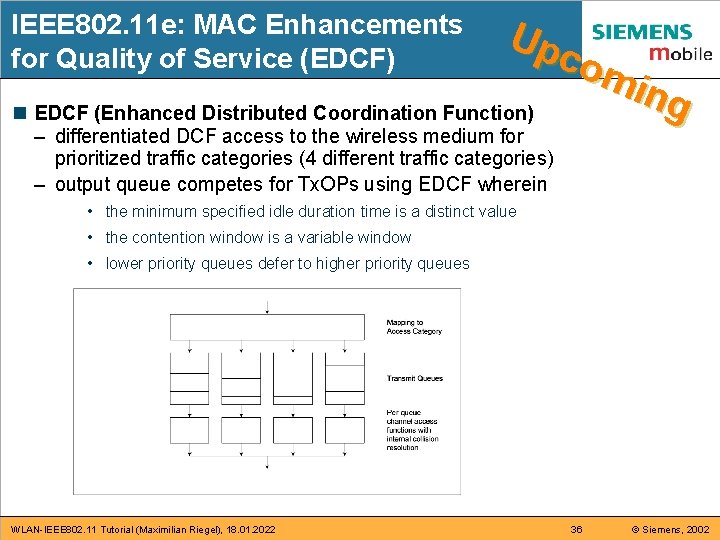
IEEE 802. 11 e: MAC Enhancements for Quality of Service (EDCF) Up com ing n EDCF (Enhanced Distributed Coordination Function) – differentiated DCF access to the wireless medium for prioritized traffic categories (4 different traffic categories) – output queue competes for Tx. OPs using EDCF wherein • the minimum specified idle duration time is a distinct value • the contention window is a variable window • lower priority queues defer to higher priority queues WLAN-IEEE 802. 11 Tutorial (Maximilian Riegel), 18. 01. 2022 36 © Siemens, 2002
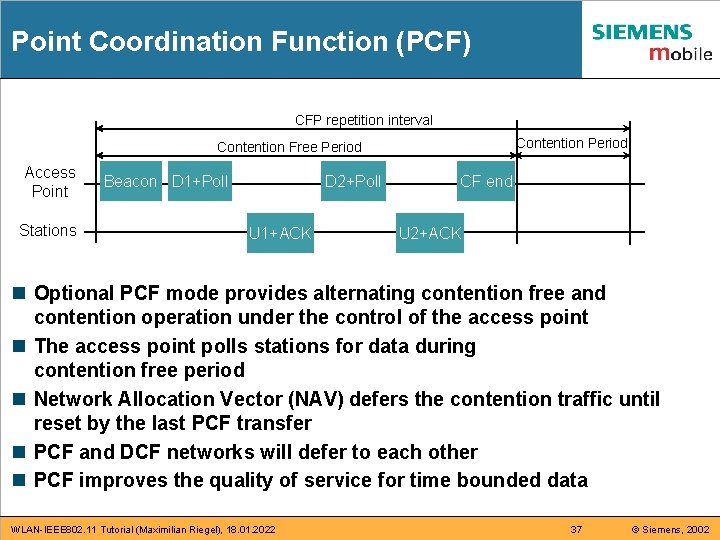
Point Coordination Function (PCF) CFP repetition interval Contention Period Contention Free Period Access Point Stations Beacon D 1+Poll D 2+Poll U 1+ACK CF end U 2+ACK n Optional PCF mode provides alternating contention free and contention operation under the control of the access point n The access point polls stations for data during contention free period n Network Allocation Vector (NAV) defers the contention traffic until reset by the last PCF transfer n PCF and DCF networks will defer to each other n PCF improves the quality of service for time bounded data WLAN-IEEE 802. 11 Tutorial (Maximilian Riegel), 18. 01. 2022 37 © Siemens, 2002
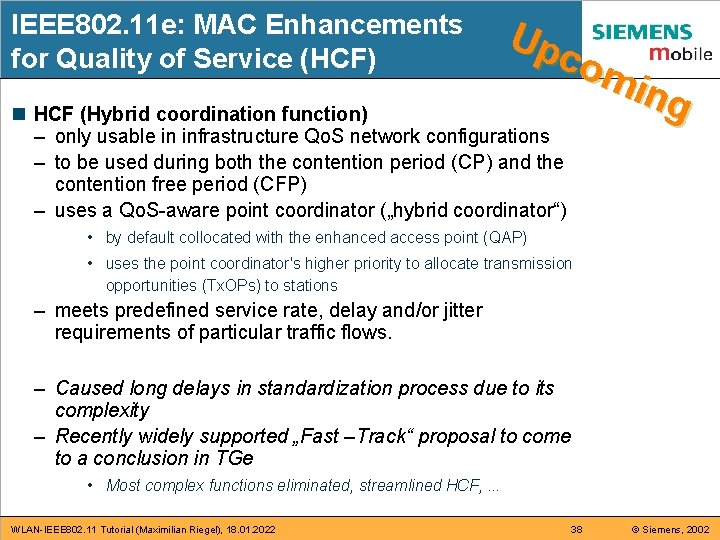
IEEE 802. 11 e: MAC Enhancements for Quality of Service (HCF) Up com ing n HCF (Hybrid coordination function) – only usable in infrastructure Qo. S network configurations – to be used during both the contention period (CP) and the contention free period (CFP) – uses a Qo. S-aware point coordinator („hybrid coordinator“) • by default collocated with the enhanced access point (QAP) • uses the point coordinator's higher priority to allocate transmission opportunities (Tx. OPs) to stations – meets predefined service rate, delay and/or jitter requirements of particular traffic flows. – Caused long delays in standardization process due to its complexity – Recently widely supported „Fast –Track“ proposal to come to a conclusion in TGe • Most complex functions eliminated, streamlined HCF, . . . WLAN-IEEE 802. 11 Tutorial (Maximilian Riegel), 18. 01. 2022 38 © Siemens, 2002
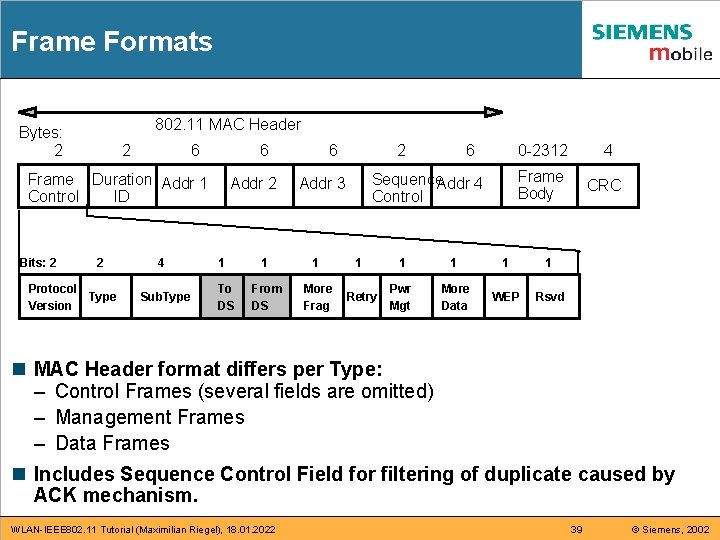
Frame Formats 802. 11 MAC Header Bytes: 2 2 6 6 Frame Duration Addr 1 Control ID Bits: 2 2 Protocol Type Version 4 Sub. Type Addr 2 1 To DS 6 2 6 Sequence. Addr 4 Control Addr 3 0 -2312 4 Frame Body CRC 1 1 1 1 From DS More Frag Retry Pwr Mgt More Data WEP Rsvd n MAC Header format differs per Type: – Control Frames (several fields are omitted) – Management Frames – Data Frames n Includes Sequence Control Field for filtering of duplicate caused by ACK mechanism. WLAN-IEEE 802. 11 Tutorial (Maximilian Riegel), 18. 01. 2022 39 © Siemens, 2002
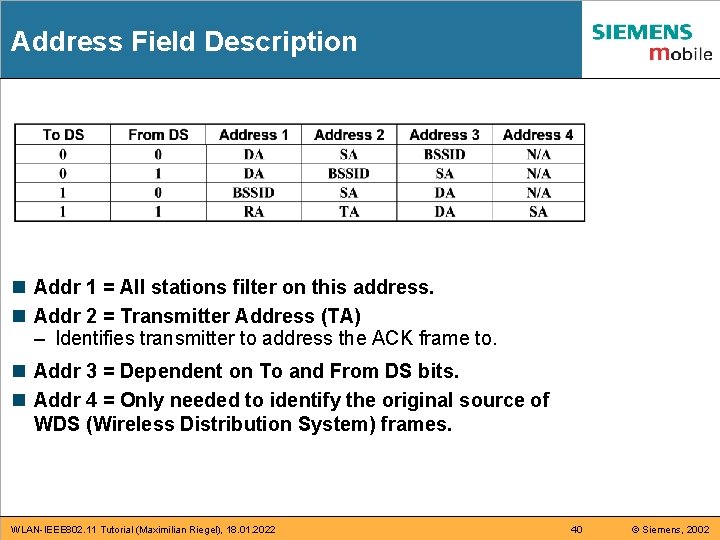
Address Field Description n Addr 1 = All stations filter on this address. n Addr 2 = Transmitter Address (TA) – Identifies transmitter to address the ACK frame to. n Addr 3 = Dependent on To and From DS bits. n Addr 4 = Only needed to identify the original source of WDS (Wireless Distribution System) frames. WLAN-IEEE 802. 11 Tutorial (Maximilian Riegel), 18. 01. 2022 40 © Siemens, 2002
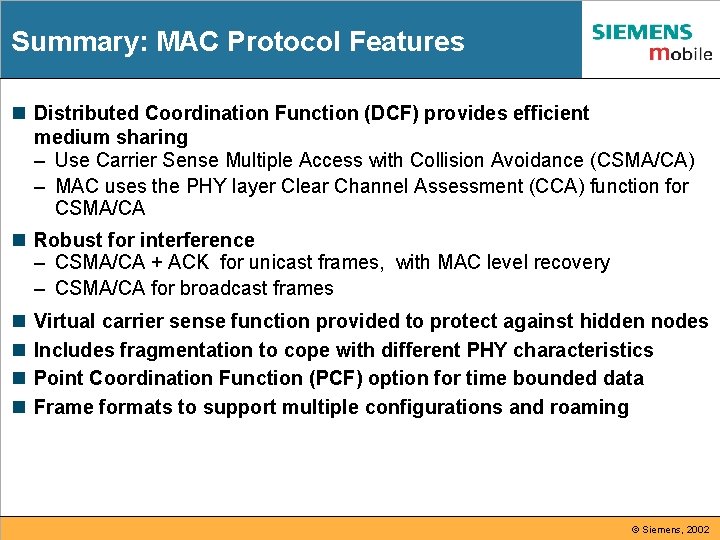
Summary: MAC Protocol Features n Distributed Coordination Function (DCF) provides efficient medium sharing – Use Carrier Sense Multiple Access with Collision Avoidance (CSMA/CA) – MAC uses the PHY layer Clear Channel Assessment (CCA) function for CSMA/CA n Robust for interference – CSMA/CA + ACK for unicast frames, with MAC level recovery – CSMA/CA for broadcast frames n n Virtual carrier sense function provided to protect against hidden nodes Includes fragmentation to cope with different PHY characteristics Point Coordination Function (PCF) option for time bounded data Frame formats to support multiple configurations and roaming © Siemens, 2002
Part 5: MAC layer management n n n n Infrastructure Beacon Generation Timing Synchronization Function Scanning Active Scanning Example Power Management Considerations Power Management Approach Power Management Procedure MAC Management Frames WLAN-IEEE 802. 11 Tutorial (Maximilian Riegel), 18. 01. 2022 42 © Siemens, 2002
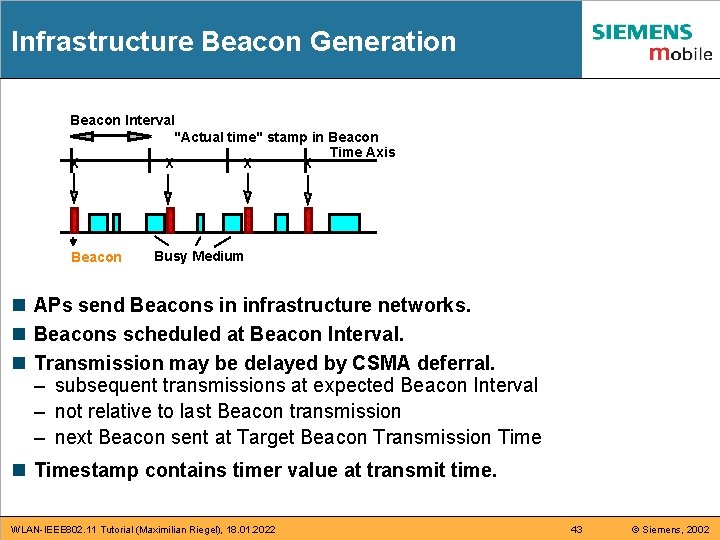
Infrastructure Beacon Generation Beacon Interval "Actual time" stamp in Beacon Time Axis X X Beacon Busy Medium n APs send Beacons in infrastructure networks. n Beacons scheduled at Beacon Interval. n Transmission may be delayed by CSMA deferral. – subsequent transmissions at expected Beacon Interval – not relative to last Beacon transmission – next Beacon sent at Target Beacon Transmission Timestamp contains timer value at transmit time. WLAN-IEEE 802. 11 Tutorial (Maximilian Riegel), 18. 01. 2022 43 © Siemens, 2002
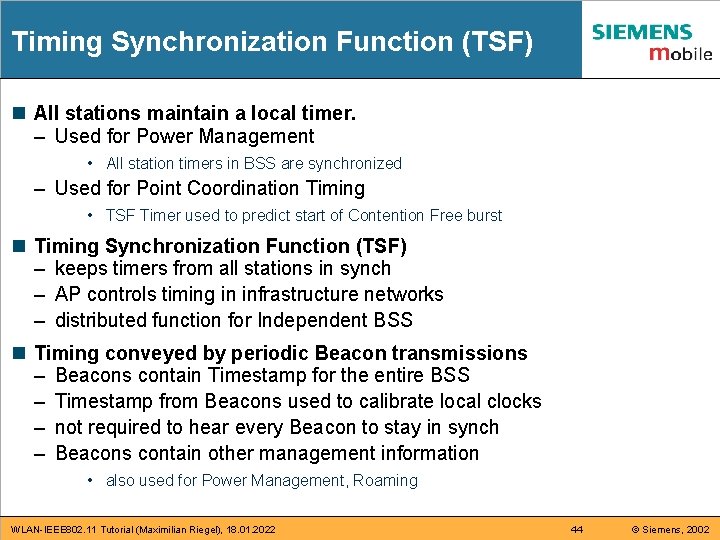
Timing Synchronization Function (TSF) n All stations maintain a local timer. – Used for Power Management • All station timers in BSS are synchronized – Used for Point Coordination Timing • TSF Timer used to predict start of Contention Free burst n Timing Synchronization Function (TSF) – keeps timers from all stations in synch – AP controls timing in infrastructure networks – distributed function for Independent BSS n Timing conveyed by periodic Beacon transmissions – Beacons contain Timestamp for the entire BSS – Timestamp from Beacons used to calibrate local clocks – not required to hear every Beacon to stay in synch – Beacons contain other management information • also used for Power Management, Roaming WLAN-IEEE 802. 11 Tutorial (Maximilian Riegel), 18. 01. 2022 44 © Siemens, 2002
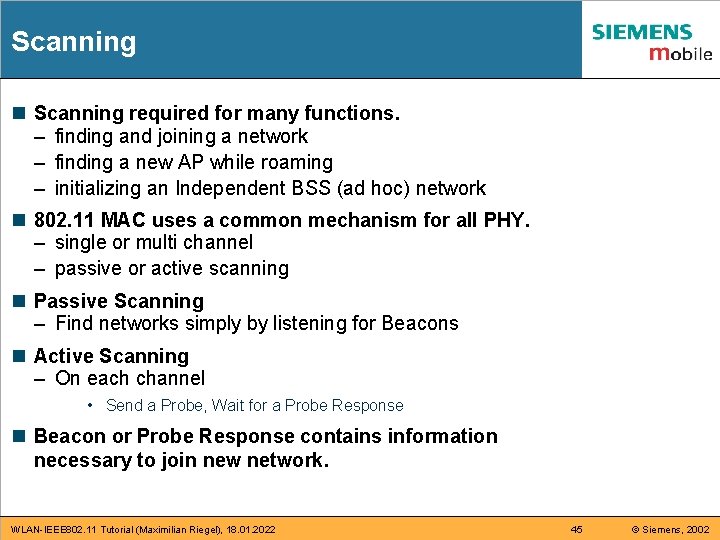
Scanning n Scanning required for many functions. – finding and joining a network – finding a new AP while roaming – initializing an Independent BSS (ad hoc) network n 802. 11 MAC uses a common mechanism for all PHY. – single or multi channel – passive or active scanning n Passive Scanning – Find networks simply by listening for Beacons n Active Scanning – On each channel • Send a Probe, Wait for a Probe Response n Beacon or Probe Response contains information necessary to join new network. WLAN-IEEE 802. 11 Tutorial (Maximilian Riegel), 18. 01. 2022 45 © Siemens, 2002
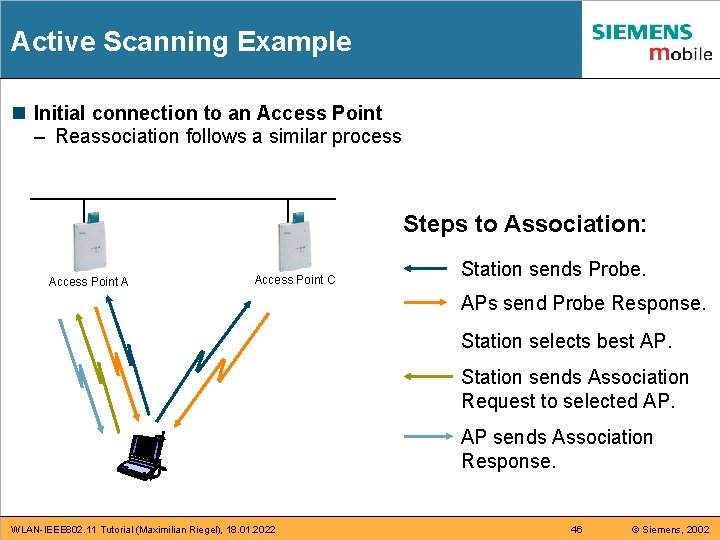
Active Scanning Example n Initial connection to an Access Point – Reassociation follows a similar process Steps to Association: Access Point A Access Point C Station sends Probe. APs send Probe Response. Station selects best AP. Station sends Association Request to selected AP. AP sends Association Response. WLAN-IEEE 802. 11 Tutorial (Maximilian Riegel), 18. 01. 2022 46 © Siemens, 2002
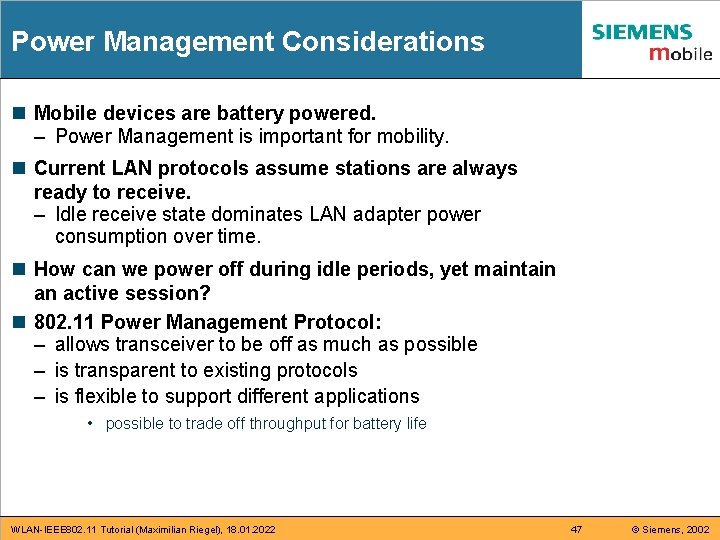
Power Management Considerations n Mobile devices are battery powered. – Power Management is important for mobility. n Current LAN protocols assume stations are always ready to receive. – Idle receive state dominates LAN adapter power consumption over time. n How can we power off during idle periods, yet maintain an active session? n 802. 11 Power Management Protocol: – allows transceiver to be off as much as possible – is transparent to existing protocols – is flexible to support different applications • possible to trade off throughput for battery life WLAN-IEEE 802. 11 Tutorial (Maximilian Riegel), 18. 01. 2022 47 © Siemens, 2002
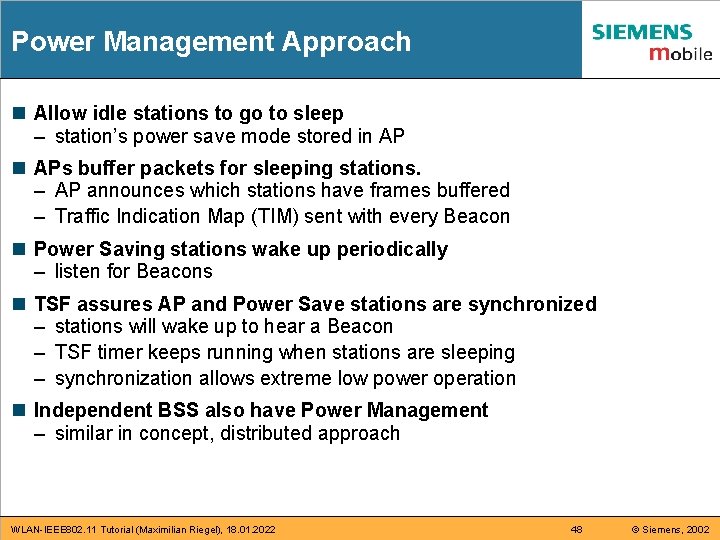
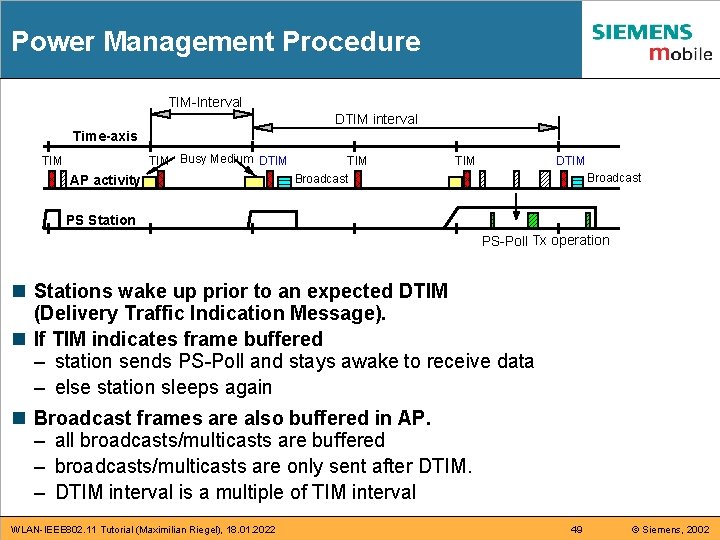
Power Management Approach n Allow idle stations to go to sleep – station’s power save mode stored in APs buffer packets for sleeping stations. – AP announces which stations have frames buffered – Traffic Indication Map (TIM) sent with every Beacon n Power Saving stations wake up periodically – listen for Beacons n TSF assures AP and Power Save stations are synchronized – stations will wake up to hear a Beacon – TSF timer keeps running when stations are sleeping – synchronization allows extreme low power operation n Independent BSS also have Power Management – similar in concept, distributed approach WLAN-IEEE 802. 11 Tutorial (Maximilian Riegel), 18. 01. 2022 48 © Siemens, 2002
Power Management Procedure TIM-Interval DTIM interval Time-axis TIM Busy Medium DTIM AP activity TIM DTIM Broadcast PS Station PS-Poll Tx operation n Stations wake up prior to an expected DTIM (Delivery Traffic Indication Message). n If TIM indicates frame buffered – station sends PS-Poll and stays awake to receive data – else station sleeps again n Broadcast frames are also buffered in AP. – all broadcasts/multicasts are buffered – broadcasts/multicasts are only sent after DTIM. – DTIM interval is a multiple of TIM interval WLAN-IEEE 802. 11 Tutorial (Maximilian Riegel), 18. 01. 2022 49 © Siemens, 2002
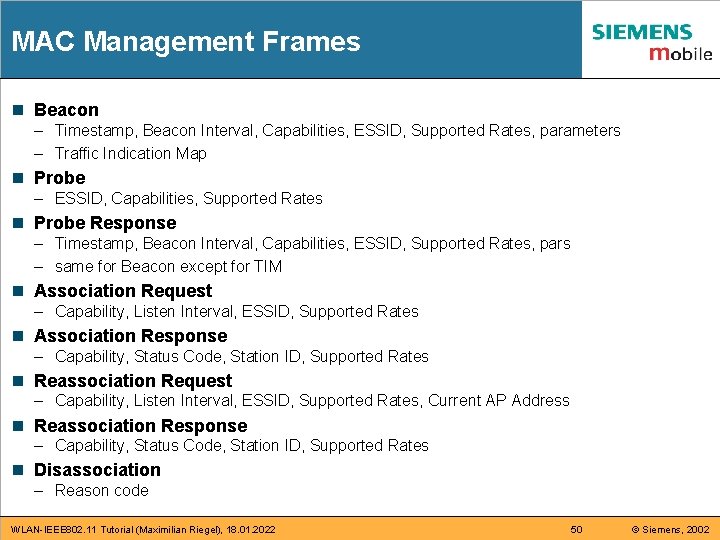
MAC Management Frames n Beacon – Timestamp, Beacon Interval, Capabilities, ESSID, Supported Rates, parameters – Traffic Indication Map n Probe – ESSID, Capabilities, Supported Rates n Probe Response – Timestamp, Beacon Interval, Capabilities, ESSID, Supported Rates, pars – same for Beacon except for TIM n Association Request – Capability, Listen Interval, ESSID, Supported Rates n Association Response – Capability, Status Code, Station ID, Supported Rates n Reassociation Request – Capability, Listen Interval, ESSID, Supported Rates, Current AP Address n Reassociation Response – Capability, Status Code, Station ID, Supported Rates n Disassociation – Reason code WLAN-IEEE 802. 11 Tutorial (Maximilian Riegel), 18. 01. 2022 50 © Siemens, 2002
Part 6: WLAN Mobility n n IEEE 802. 11 Ad Hoc Mode IEEE 802. 11 Infrastructure Mode Mobility inside a WLAN ‚hotspot‘ by link layer functions. . . IEEE 802. 11 f: Inter-Access Point Protocol (IAPP) WLAN-IEEE 802. 11 Tutorial (Maximilian Riegel), 18. 01. 2022 51 © Siemens, 2002
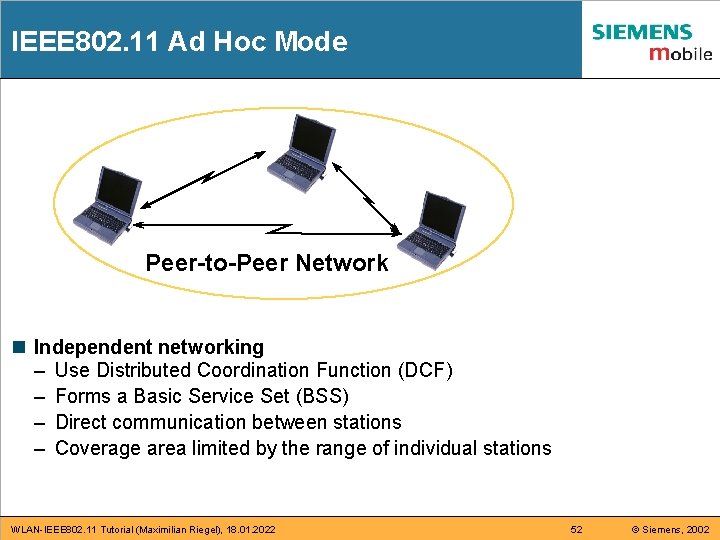
IEEE 802. 11 Ad Hoc Mode Peer-to-Peer Network n Independent networking – Use Distributed Coordination Function (DCF) – Forms a Basic Service Set (BSS) – Direct communication between stations – Coverage area limited by the range of individual stations WLAN-IEEE 802. 11 Tutorial (Maximilian Riegel), 18. 01. 2022 52 © Siemens, 2002
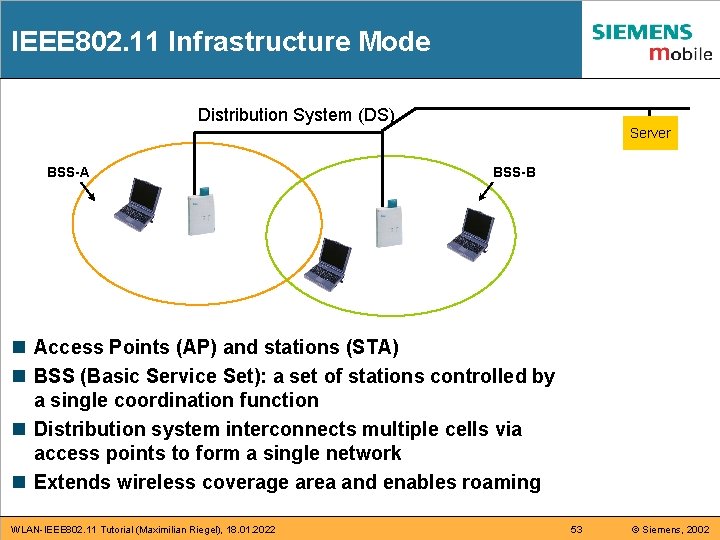
IEEE 802. 11 Infrastructure Mode Distribution System (DS) BSS-A Server BSS-B n Access Points (AP) and stations (STA) n BSS (Basic Service Set): a set of stations controlled by a single coordination function n Distribution system interconnects multiple cells via access points to form a single network n Extends wireless coverage area and enables roaming WLAN-IEEE 802. 11 Tutorial (Maximilian Riegel), 18. 01. 2022 53 © Siemens, 2002
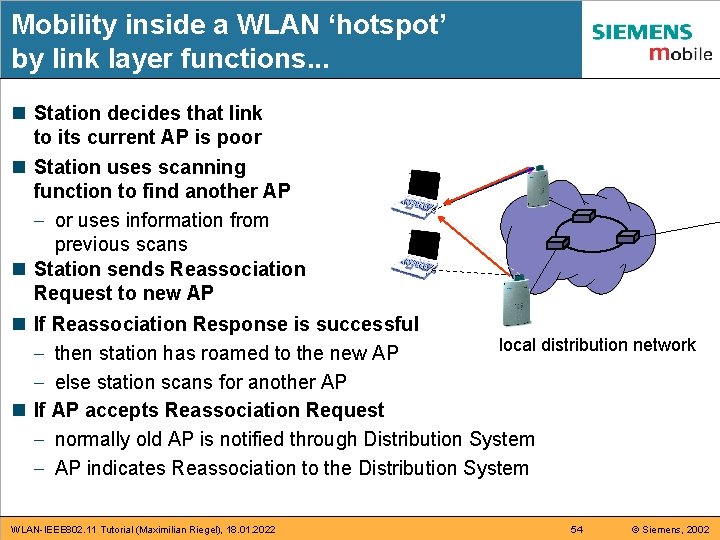
Mobility inside a WLAN ‘hotspot’ by link layer functions. . . n Station decides that link to its current AP is poor n Station uses scanning function to find another AP - or uses information from previous scans n Station sends Reassociation Request to new AP n If Reassociation Response is successful local distribution network - then station has roamed to the new AP - else station scans for another AP n If AP accepts Reassociation Request - normally old AP is notified through Distribution System - AP indicates Reassociation to the Distribution System WLAN-IEEE 802. 11 Tutorial (Maximilian Riegel), 18. 01. 2022 54 © Siemens, 2002
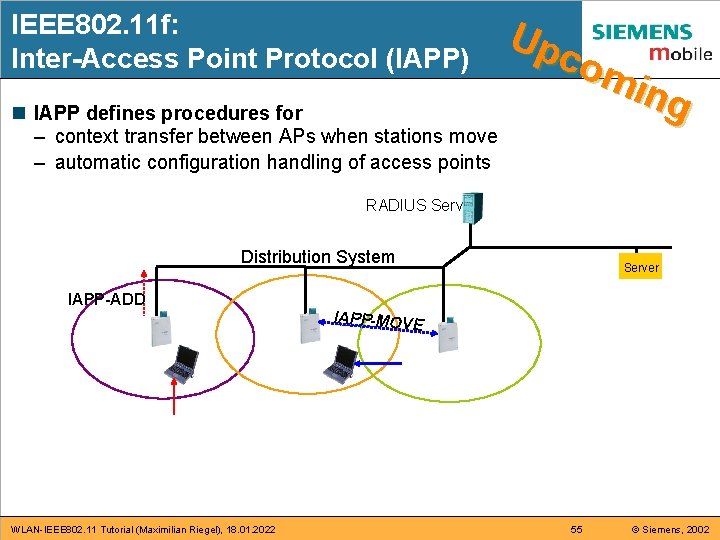
IEEE 802. 11 f: Inter-Access Point Protocol (IAPP) n IAPP defines procedures for – context transfer between APs when stations move – automatic configuration handling of access points Up com ing RADIUS Server Distribution System IAPP-ADD WLAN-IEEE 802. 11 Tutorial (Maximilian Riegel), 18. 01. 2022 Server IAPP-MOVE 55 © Siemens, 2002
Part 7: WLAN security n n n n IEEE 802. 11 Privacy and Access Control WEP privacy mechanism Shared key authentication Shortcomings of plain WEP security IEEE 802. 11 i: Robust Security Network (RSN) A last word about WLAN security: Summary: MAC Functionality WLAN-IEEE 802. 11 Tutorial (Maximilian Riegel), 18. 01. 2022 56 © Siemens, 2002
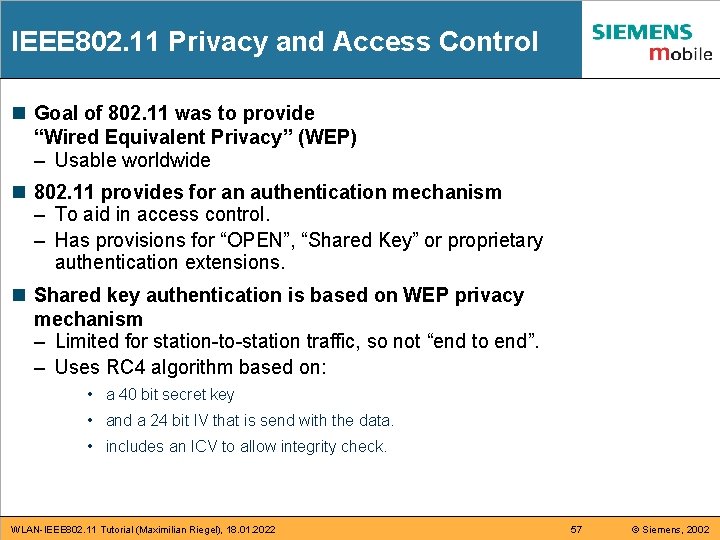
IEEE 802. 11 Privacy and Access Control n Goal of 802. 11 was to provide “Wired Equivalent Privacy” (WEP) – Usable worldwide n 802. 11 provides for an authentication mechanism – To aid in access control. – Has provisions for “OPEN”, “Shared Key” or proprietary authentication extensions. n Shared key authentication is based on WEP privacy mechanism – Limited for station-to-station traffic, so not “end to end”. – Uses RC 4 algorithm based on: • a 40 bit secret key • and a 24 bit IV that is send with the data. • includes an ICV to allow integrity check. WLAN-IEEE 802. 11 Tutorial (Maximilian Riegel), 18. 01. 2022 57 © Siemens, 2002
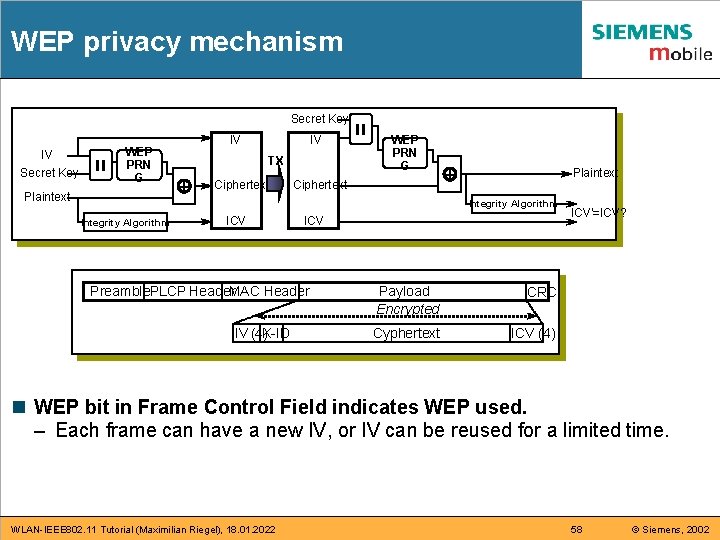
WEP privacy mechanism Secret Key IV Secret Key WEP PRN G Plaintext IV IV TX + Ciphertext WEP PRN G Ciphertext + Plaintext Integrity Algorithm ICV Preamble. PLCP Header. MAC Header IV (4)K-ID Payload Encrypted CRC Cyphertext ICV (4) ICV'=ICV? n WEP bit in Frame Control Field indicates WEP used. – Each frame can have a new IV, or IV can be reused for a limited time. WLAN-IEEE 802. 11 Tutorial (Maximilian Riegel), 18. 01. 2022 58 © Siemens, 2002
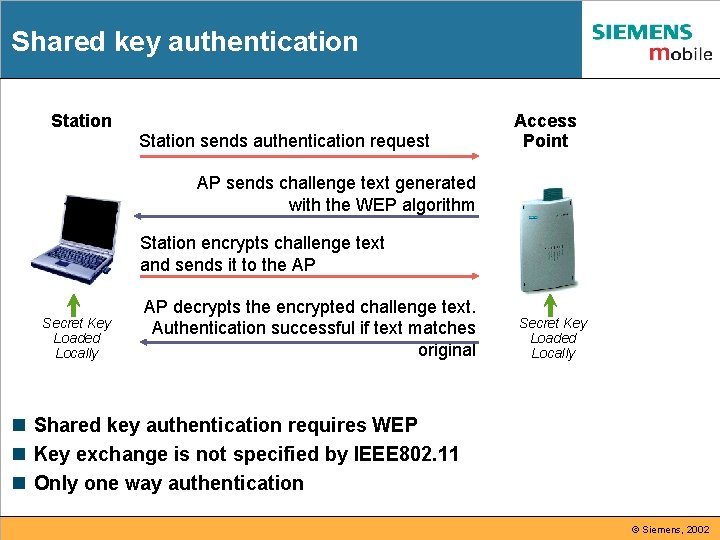
Shared key authentication Station sends authentication request Access Point AP sends challenge text generated with the WEP algorithm Station encrypts challenge text and sends it to the AP Secret Key Loaded Locally AP decrypts the encrypted challenge text. Authentication successful if text matches original Secret Key Loaded Locally n Shared key authentication requires WEP n Key exchange is not specified by IEEE 802. 11 n Only one way authentication © Siemens, 2002
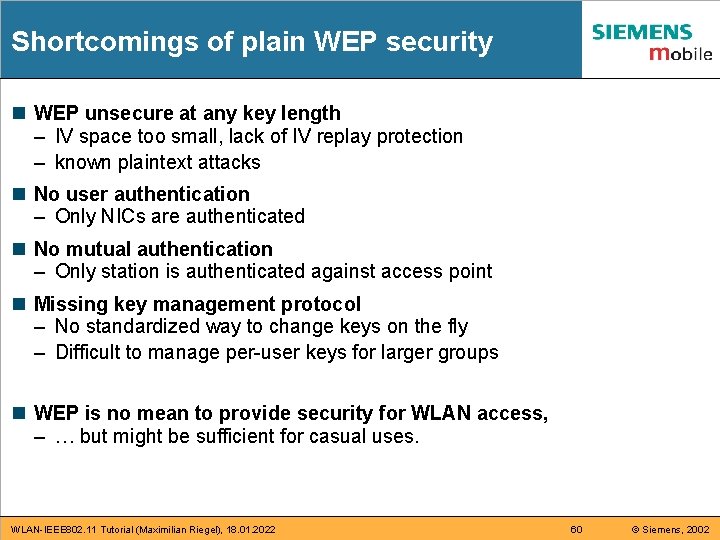
Shortcomings of plain WEP security n WEP unsecure at any key length – IV space too small, lack of IV replay protection – known plaintext attacks n No user authentication – Only NICs are authenticated n No mutual authentication – Only station is authenticated against access point n Missing key management protocol – No standardized way to change keys on the fly – Difficult to manage per-user keys for larger groups n WEP is no mean to provide security for WLAN access, – … but might be sufficient for casual uses. WLAN-IEEE 802. 11 Tutorial (Maximilian Riegel), 18. 01. 2022 60 © Siemens, 2002
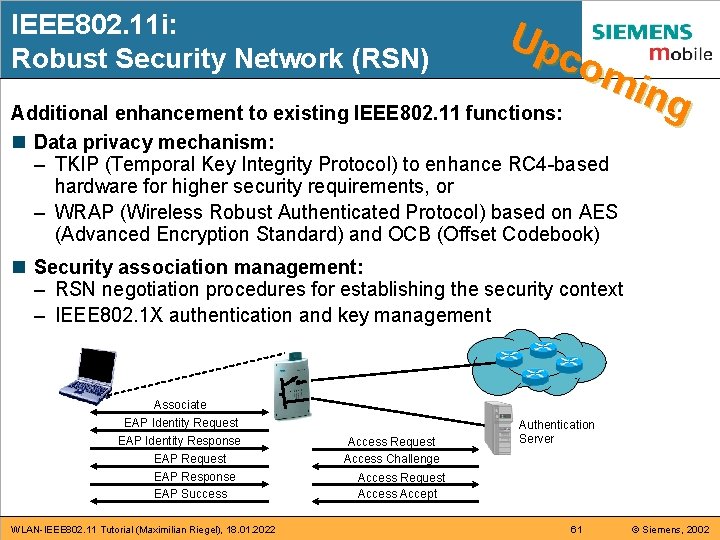
IEEE 802. 11 i: Robust Security Network (RSN) Up com ing Additional enhancement to existing IEEE 802. 11 functions: n Data privacy mechanism: – TKIP (Temporal Key Integrity Protocol) to enhance RC 4 -based hardware for higher security requirements, or – WRAP (Wireless Robust Authenticated Protocol) based on AES (Advanced Encryption Standard) and OCB (Offset Codebook) n Security association management: – RSN negotiation procedures for establishing the security context – IEEE 802. 1 X authentication and key management Associate EAP Identity Request EAP Identity Response EAP Request EAP Response EAP Success WLAN-IEEE 802. 11 Tutorial (Maximilian Riegel), 18. 01. 2022 Access Request Access Challenge Authentication Server Access Request Access Accept 61 © Siemens, 2002
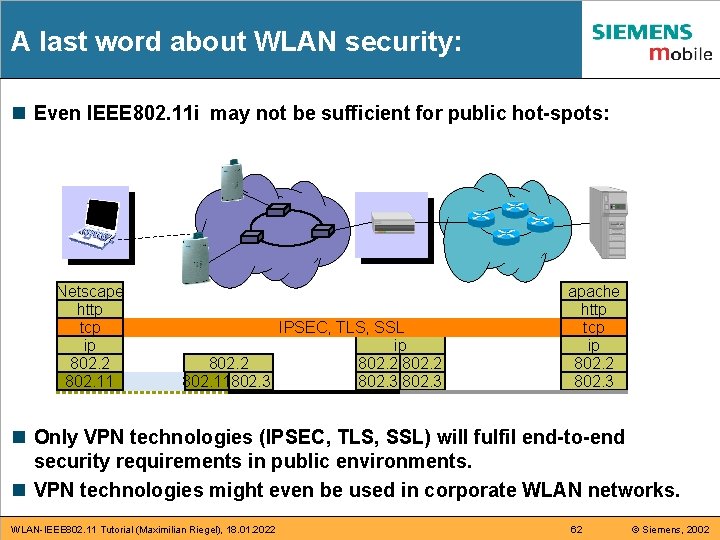
A last word about WLAN security: n Even IEEE 802. 11 i may not be sufficient for public hot-spots: Netscape http tcp IPSEC, TLS, SSL ip ip 802. 2 ppp 802. 2 802. 11 WEP 802. 11802. 3 apache http tcp ip 802. 2 ppp Bluetooth 802. 3 n Only VPN technologies (IPSEC, TLS, SSL) will fulfil end-to-end security requirements in public environments. n VPN technologies might even be used in corporate WLAN networks. WLAN-IEEE 802. 11 Tutorial (Maximilian Riegel), 18. 01. 2022 62 © Siemens, 2002
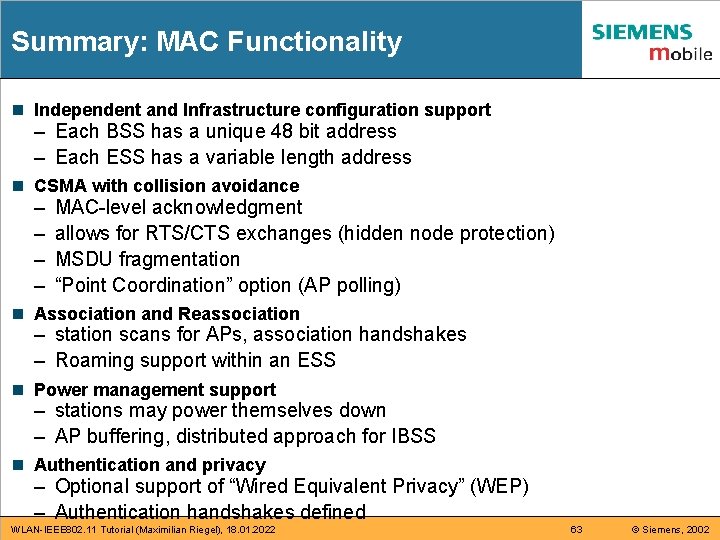
Summary: MAC Functionality n Independent and Infrastructure configuration support – Each BSS has a unique 48 bit address – Each ESS has a variable length address n CSMA with collision avoidance – – MAC-level acknowledgment allows for RTS/CTS exchanges (hidden node protection) MSDU fragmentation “Point Coordination” option (AP polling) n Association and Reassociation – station scans for APs, association handshakes – Roaming support within an ESS n Power management support – stations may power themselves down – AP buffering, distributed approach for IBSS n Authentication and privacy – Optional support of “Wired Equivalent Privacy” (WEP) – Authentication handshakes defined WLAN-IEEE 802. 11 Tutorial (Maximilian Riegel), 18. 01. 2022 63 © Siemens, 2002
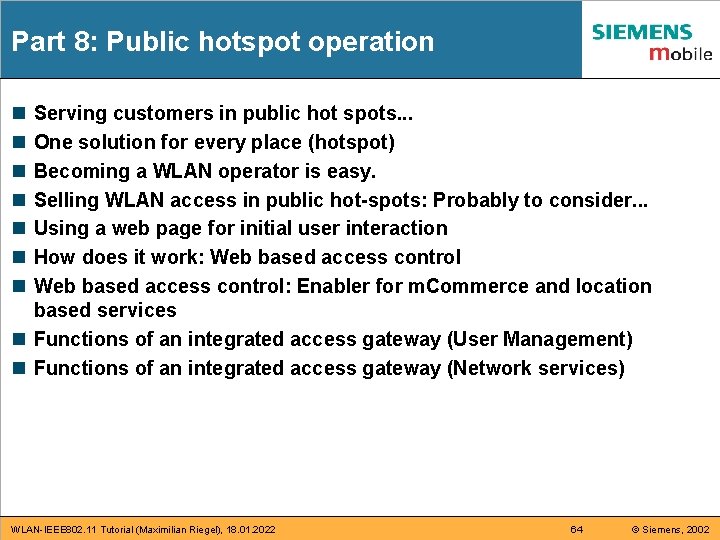
Part 8: Public hotspot operation n n n Serving customers in public hot spots. . . One solution for every place (hotspot) Becoming a WLAN operator is easy. Selling WLAN access in public hot-spots: Probably to consider. . . Using a web page for initial user interaction How does it work: Web based access control: Enabler for m. Commerce and location based services n Functions of an integrated access gateway (User Management) n Functions of an integrated access gateway (Network services) WLAN-IEEE 802. 11 Tutorial (Maximilian Riegel), 18. 01. 2022 64 © Siemens, 2002
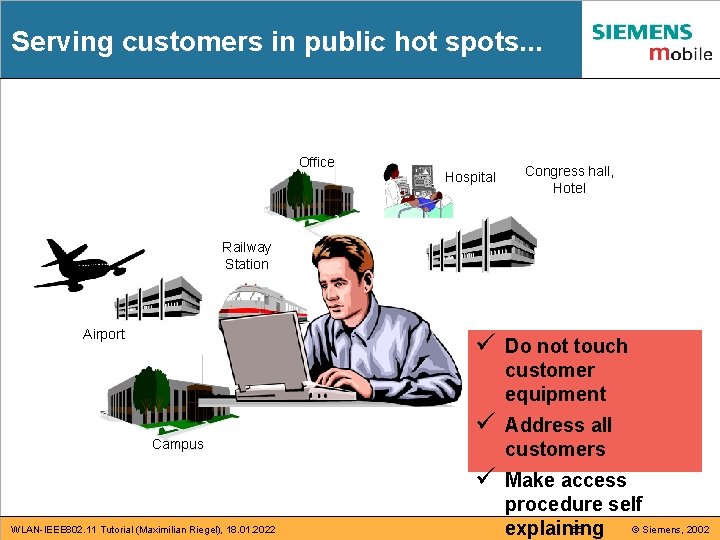
Serving customers in public hot spots. . . Office Hospital Congress hall, Hotel Railway Station Airport Campus WLAN-IEEE 802. 11 Tutorial (Maximilian Riegel), 18. 01. 2022 ü Do not touch customer equipment ü Address all customers ü Make access procedure self 65 © Siemens, 2002 explaining
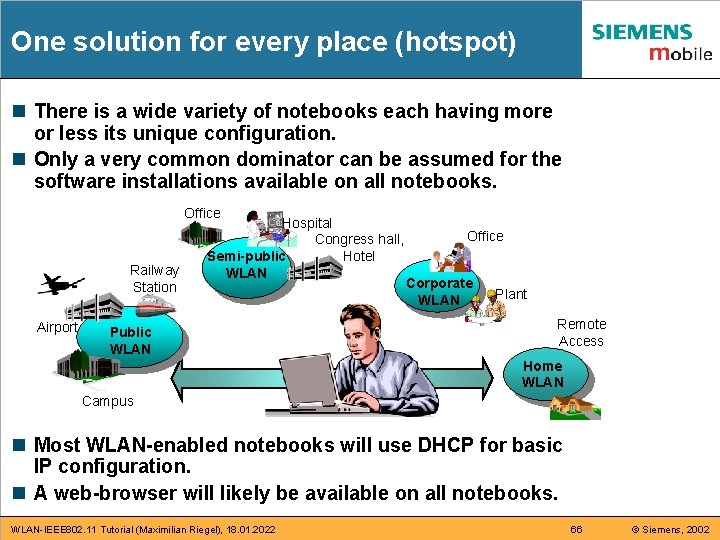
One solution for every place (hotspot) n There is a wide variety of notebooks each having more or less its unique configuration. n Only a very common dominator can be assumed for the software installations available on all notebooks. Office Railway Station Airport Hospital Congress hall, Hotel Semi-public WLAN Public WLAN Office Corporate WLAN Plant Remote Access Home WLAN Campus n Most WLAN-enabled notebooks will use DHCP for basic IP configuration. n A web-browser will likely be available on all notebooks. WLAN-IEEE 802. 11 Tutorial (Maximilian Riegel), 18. 01. 2022 66 © Siemens, 2002
Becoming a WLAN operator is easy. n Legal aspects (in Germany): – Usage of license free spectrum (2, 4 GHz ISM band) – No telecommunication license necessary, as long as • not providing telephony services, • not providing network access across borders of private premises. n Cost issues: – The lower bound: Investment: WLAN Access Point /w DSL Router (~ 350 €) Monthly operation cost: ~ 60 € for DSL Flat Rate – Most commercial installations are much more expensive due to charging and billing. n It is very easy and extremely cheap to become a WLAN operator, but most people did not yet know about it. . but wait until they have installed WLAN in their living rooms! WLAN-IEEE 802. 11 Tutorial (Maximilian Riegel), 18. 01. 2022 67 © Siemens, 2002
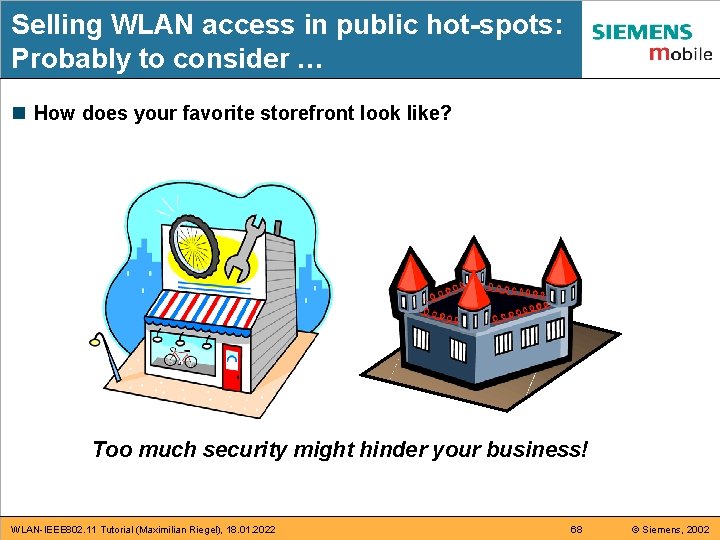
Selling WLAN access in public hot-spots: Probably to consider … n How does your favorite storefront look like? Too much security might hinder your business! WLAN-IEEE 802. 11 Tutorial (Maximilian Riegel), 18. 01. 2022 68 © Siemens, 2002
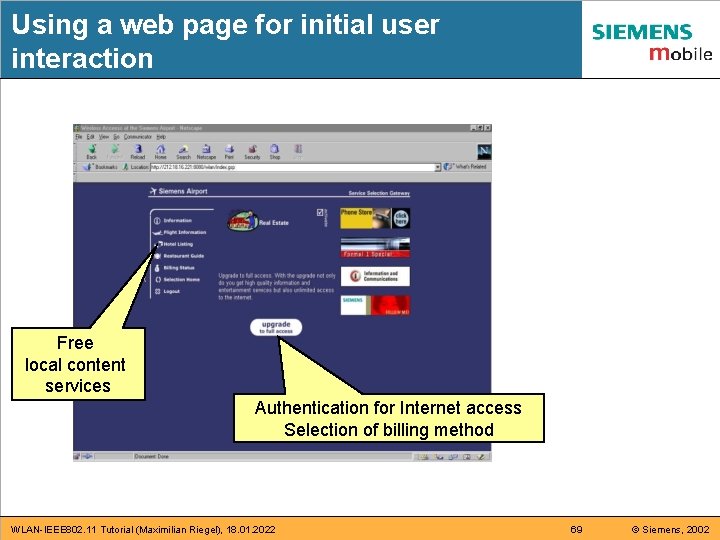
Using a web page for initial user interaction Free local content services Authentication for Internet access Selection of billing method WLAN-IEEE 802. 11 Tutorial (Maximilian Riegel), 18. 01. 2022 69 © Siemens, 2002
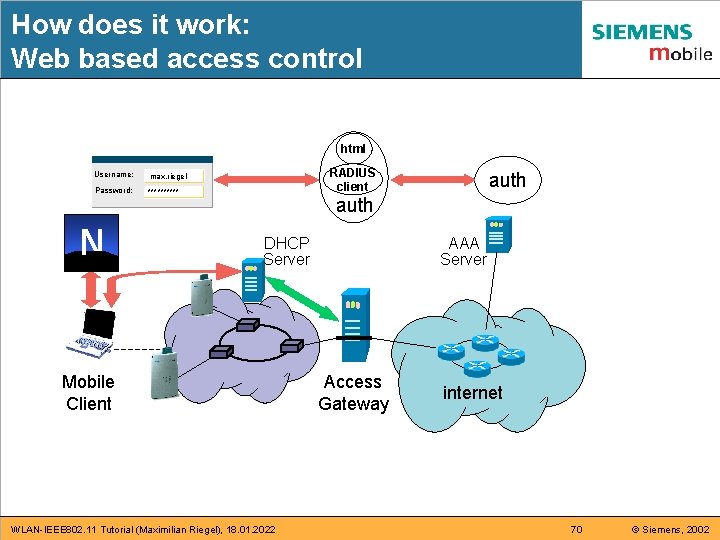
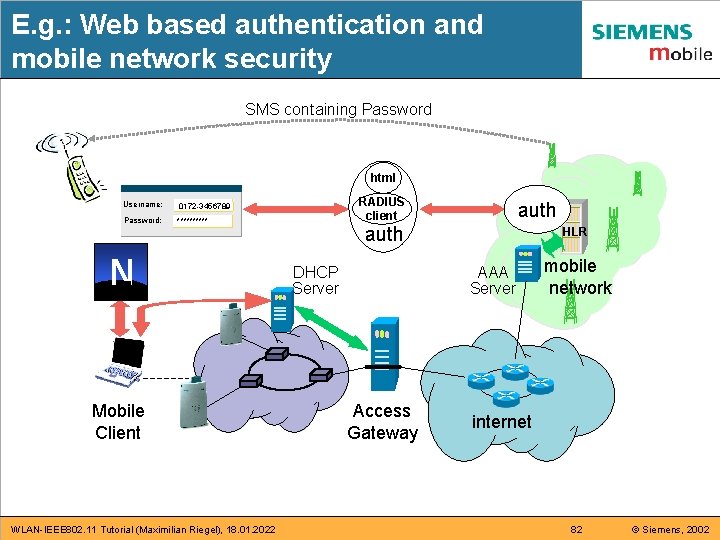
How does it work: Web based access control html Username: max. riegel Password: ***** N RADIUS client auth DHCP Server Mobile Client WLAN-IEEE 802. 11 Tutorial (Maximilian Riegel), 18. 01. 2022 AAA Server Access Gateway internet 70 © Siemens, 2002
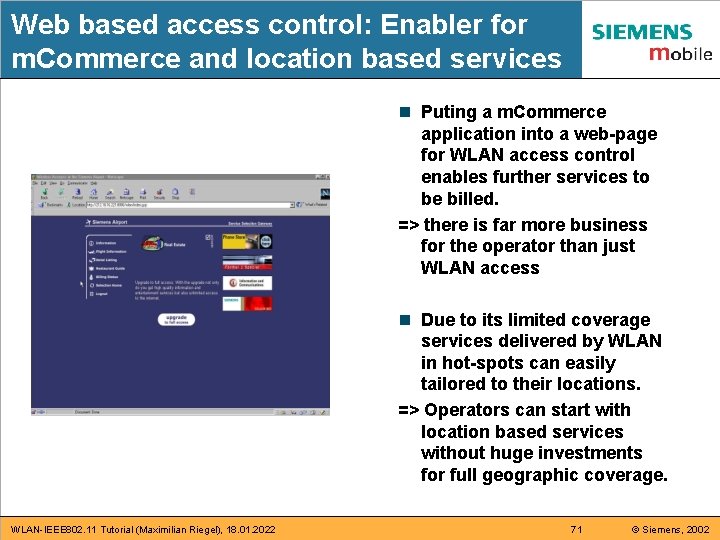
Web based access control: Enabler for m. Commerce and location based services n Puting a m. Commerce application into a web-page for WLAN access control enables further services to be billed. => there is far more business for the operator than just WLAN access n Due to its limited coverage services delivered by WLAN in hot-spots can easily tailored to their locations. => Operators can start with location based services without huge investments for full geographic coverage. WLAN-IEEE 802. 11 Tutorial (Maximilian Riegel), 18. 01. 2022 71 © Siemens, 2002
Functions of an integrated access gateway (User management) n Authentication via secure (HTTPS) web-based GUI for registered and unknown users based on – External database, supports ISP roaming via RADIUS – Integrated LDAP directory – GSM phone (Transmission of one-time passwords by SMS) – Credit card n Authorization based on user profiles assigned to different user groups having particular access – Dynamic subscribtion to additional services – Personalized portal page n Real-time accounting based on service, duration and volume – Instant user feedback on portal page or by SMS WLAN-IEEE 802. 11 Tutorial (Maximilian Riegel), 18. 01. 2022 72 © Siemens, 2002
Functions of an integrated access gateway (Network services) n DHCP server for assigning IP addresses to WLAN clients – Retaining session if user is temporarily out of WLAN coverage – Detection of session end n Policy engine – Loadable user profiles – User-specific routing configuration – Dynamic firewalling rules n IP router with NAT engine – Assignment of private addresses for free services – Must allow IPSEC connections WLAN-IEEE 802. 11 Tutorial (Maximilian Riegel), 18. 01. 2022 73 © Siemens, 2002
Part 9: WLAN – UMTS Interworking n n n n n UMTS and Wireless LAN are different WLAN – UMTS Interworking: Ancient approach: ‚tight coupling‘ WLAN as an exension of a mobile network WLAN is much cheaper than 2 G/3 G Conclusions for Mobile Network Operators WLAN – UMTS Interworking: Now widely accepted: ‚loose coupling‘ WLAN loosely coupled to a Mobile Network E. g. : Web based authentication and mobile network security Standards for WLAN – UMTS Interworking WLAN-IEEE 802. 11 Tutorial (Maximilian Riegel), 18. 01. 2022 74 © Siemens, 2002
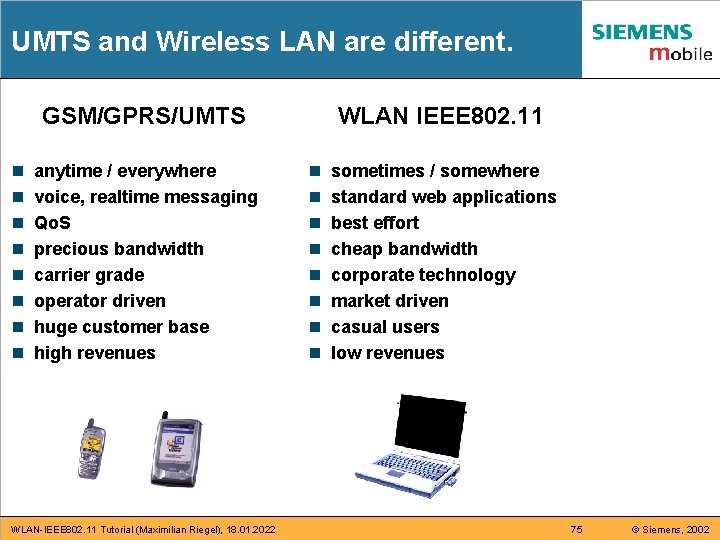
UMTS and Wireless LAN are different. GSM/GPRS/UMTS n n n n anytime / everywhere voice, realtime messaging Qo. S precious bandwidth carrier grade operator driven huge customer base high revenues WLAN-IEEE 802. 11 Tutorial (Maximilian Riegel), 18. 01. 2022 WLAN IEEE 802. 11 n n n n sometimes / somewhere standard web applications best effort cheap bandwidth corporate technology market driven casual users low revenues 75 © Siemens, 2002
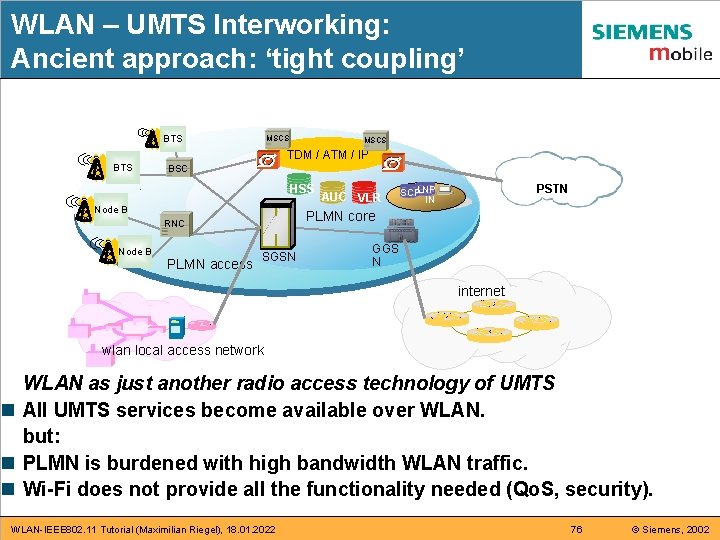
WLAN – UMTS Interworking: Ancient approach: ‘tight coupling’ BTS MSCS TDM / ATM / IP BTS BSC HSS Node B PLMN access PSTN SCPLNP IN PLMN core RNC Node B AUC VLR SGSN GGS N internet wlan local access network WLAN as just another radio access technology of UMTS n All UMTS services become available over WLAN. but: n PLMN is burdened with high bandwidth WLAN traffic. n Wi-Fi does not provide all the functionality needed (Qo. S, security). WLAN-IEEE 802. 11 Tutorial (Maximilian Riegel), 18. 01. 2022 76 © Siemens, 2002
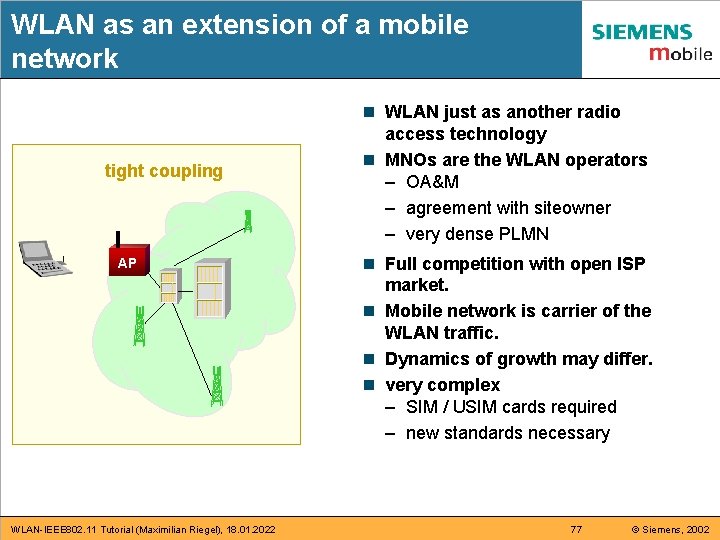
WLAN as an extension of a mobile network tight coupling AP WLAN-IEEE 802. 11 Tutorial (Maximilian Riegel), 18. 01. 2022 n WLAN just as another radio access technology n MNOs are the WLAN operators – OA&M – agreement with siteowner – very dense PLMN n Full competition with open ISP market. n Mobile network is carrier of the WLAN traffic. n Dynamics of growth may differ. n very complex – SIM / USIM cards required – new standards necessary 77 © Siemens, 2002
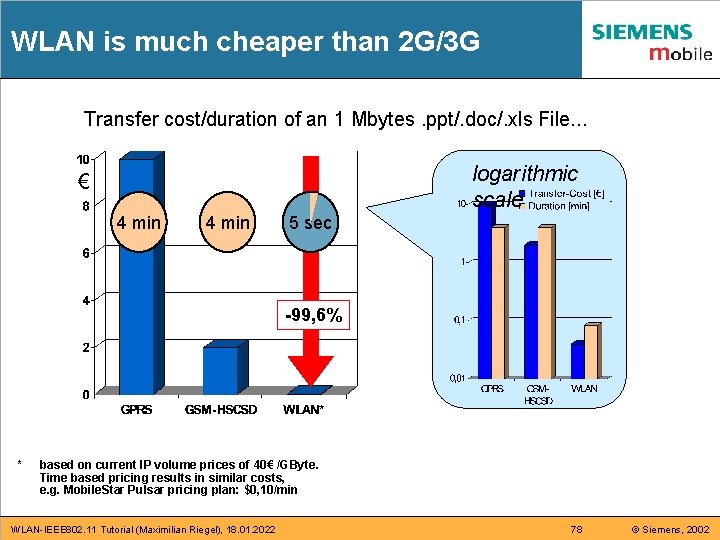
WLAN is much cheaper than 2 G/3 G Transfer cost/duration of an 1 Mbytes. ppt/. doc/. xls File. . . logarithmic scale € 4 min 5 sec -99, 6% * based on current IP volume prices of 40€ /GByte. Time based pricing results in similar costs, e. g. Mobile. Star Pulsar pricing plan: $0, 10/min WLAN-IEEE 802. 11 Tutorial (Maximilian Riegel), 18. 01. 2022 78 © Siemens, 2002
Conclusions for Mobile Network Operators When you can’t stop them, when you can’t beat them, then you should join them. n The most complicated and appealing task of a WLAN operator is charging and billing. n MNOs have large customer bases, secure authentication and accounting facilities and they like to go into mobile business. n Providing electronic payment services to WLAN operators can be an important market entry into mobile business for MNOs. n There is no time to wait! The WLAN access market is exploding, and WLAN access may be ‘for free’ in many hot-spots in a few years (~3 -5 years). WLAN-IEEE 802. 11 Tutorial (Maximilian Riegel), 18. 01. 2022 79 © Siemens, 2002
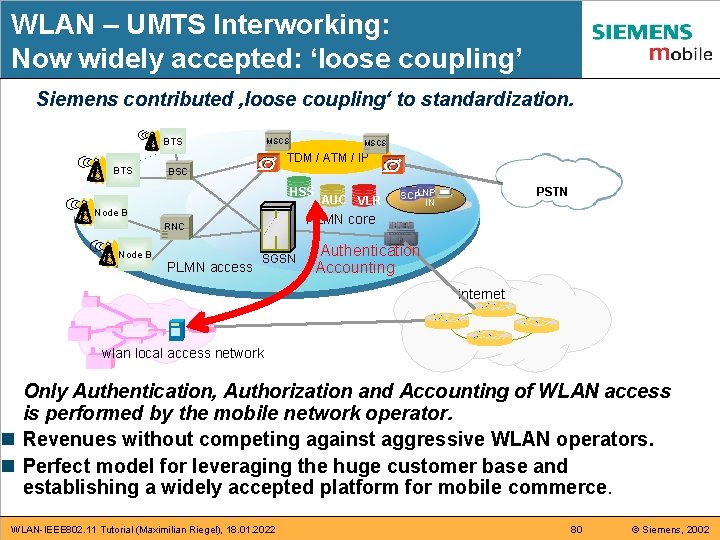
WLAN – UMTS Interworking: Now widely accepted: ‘loose coupling’ Siemens contributed ‚loose coupling‘ to standardization. BTS MSCS TDM / ATM / IP BTS BSC HSS Node B PLMN access PSTN SCPLNP IN PLMN core RNC Node B AUC VLR SGSN Authentication Accounting internet wlan local access network Only Authentication, Authorization and Accounting of WLAN access is performed by the mobile network operator. n Revenues without competing against aggressive WLAN operators. n Perfect model for leveraging the huge customer base and establishing a widely accepted platform for mobile commerce. WLAN-IEEE 802. 11 Tutorial (Maximilian Riegel), 18. 01. 2022 80 © Siemens, 2002
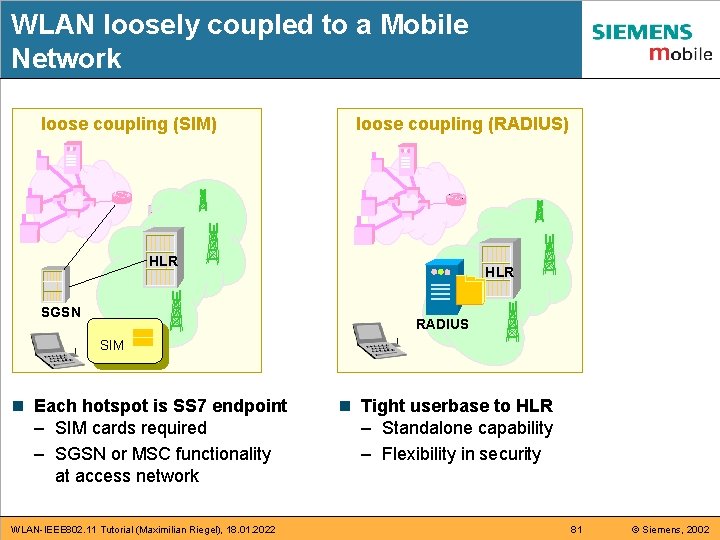
WLAN loosely coupled to a Mobile Network loose coupling (SIM) loose coupling (RADIUS) HLR SGSN HLR RADIUS SIM n Each hotspot is SS 7 endpoint – SIM cards required – SGSN or MSC functionality at access network WLAN-IEEE 802. 11 Tutorial (Maximilian Riegel), 18. 01. 2022 n Tight userbase to HLR – Standalone capability – Flexibility in security 81 © Siemens, 2002
E. g. : Web based authentication and mobile network security SMS containing Password html Username: 0172 -3456789 Password: ***** N Mobile Client WLAN-IEEE 802. 11 Tutorial (Maximilian Riegel), 18. 01. 2022 RADIUS client auth DHCP Server HLR AAA Server Access Gateway mobile network internet 82 © Siemens, 2002
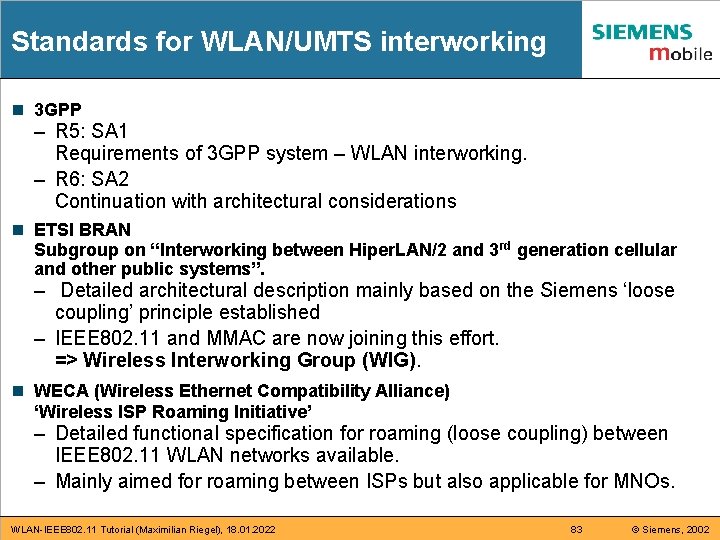
Standards for WLAN/UMTS interworking n 3 GPP – R 5: SA 1 Requirements of 3 GPP system – WLAN interworking. – R 6: SA 2 Continuation with architectural considerations n ETSI BRAN Subgroup on “Interworking between Hiper. LAN/2 and 3 rd generation cellular and other public systems”. – Detailed architectural description mainly based on the Siemens ‘loose coupling’ principle established – IEEE 802. 11 and MMAC are now joining this effort. => Wireless Interworking Group (WIG). n WECA (Wireless Ethernet Compatibility Alliance) ‘Wireless ISP Roaming Initiative’ – Detailed functional specification for roaming (loose coupling) between IEEE 802. 11 WLAN networks available. – Mainly aimed for roaming between ISPs but also applicable for MNOs. WLAN-IEEE 802. 11 Tutorial (Maximilian Riegel), 18. 01. 2022 83 © Siemens, 2002
The end n Thank you for your attention. n Questions and comments? Maximilian Riegel (maximilian. riegel@icn. siemens. de) Literature: n The IEEE 802. 11 Handbook – A Designer‘s Companion Bob O‘Hara, Al Patrick; IEEE press, ISBN 0 -7381 -1855 -9 n 802. 11 Wireless Networks – The Definitive Guide Matthew S. Gast; O‘ Reilly, ISBN 0 -596 -00183 -5 WLAN-IEEE 802. 11 Tutorial (Maximilian Riegel), 18. 01. 2022 84 © Siemens, 2002