
Wireless Communication and Networks Applications of Wireless Communication



- Slides: 46
Wireless Communication and Networks Applications of Wireless Communication Technologies Wireless Networking and Mobile IP Wireless Local Area Networks Student Presentations and Research Papers Wireless Medium Access http: //web. uettaxila. edu. pk/CMS/AUT 2012/te. WCNms/
Outline l Network and Application Layer Enhancements l Microsoft Case Studies l l Multi. Net/Virtual Wi. Fi Profiler
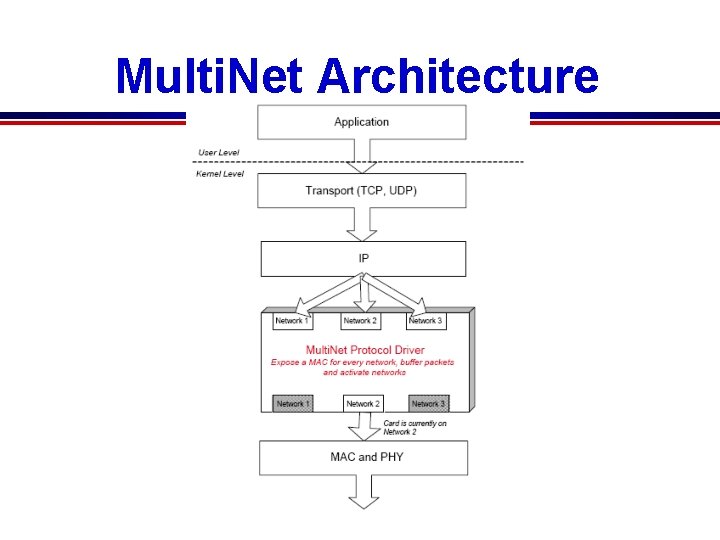
Multi. Net: Connecting to Multiple IEEE 802. 11 Networks Using a Single Wireless Card l l l There a number of scenarios where it is desirable to have a wireless device connect to multiple networks simultaneously. Currently, this is possible only by using multiple wireless network cards in the device. Unfortunately, using multiple wireless cards causes excessive energy drain and consequent reduction of lifetime in battery operated devices. Microsoft Research’s Multi. Net facilitates simultaneous connections to multiple networks by virtualizing a single wireless card. The wireless card is virtualized by introducing an intermediate layer below IP, which continuously switches the card across multiple networks. The goal of the switching algorithm is to be transparent to the user who sees his machine as being connected to
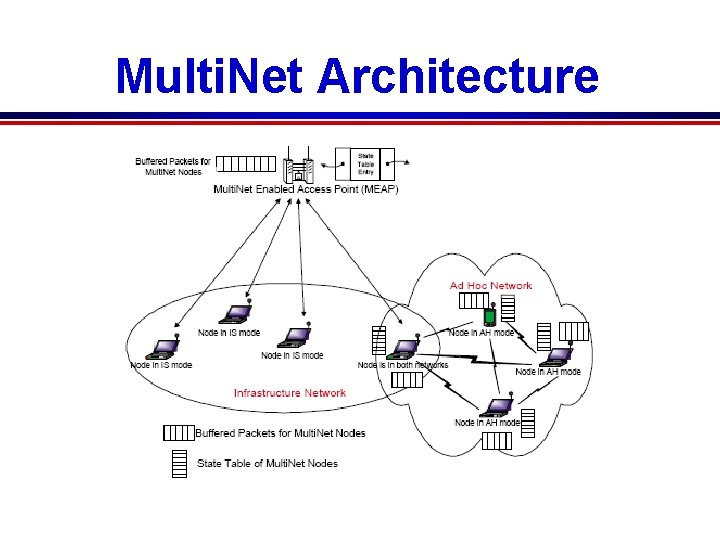
Motivation behind Multi. Net l l The Multi. Net virtualization architecture enables several new applications that were earlier not possible using a single wireless card e. g. : Concurrent Connectivity: l A user can connect her machine to an ad hoc network, while staying on her authorized infrastructure network. l For example, consider the case where Kisco’s employees conduct a business meeting with Macrosoft’s employees at Macrosoft’s headquarters. l With Multi. Net and a single wireless network card, Kisco employees can share documents, presentations, and data with Macrosoft’s employees over an ad hoc network. l Macrosoft’s employees can stay connected to their internal network via the access point infrastructure while sharing electronic information with Kisco’s employees. l Macrosoft does not have to give Kisco employees access in their internal network in order for the two parties to communicate.
Motivation behind Multi. Net l Network Elasticity: l The range of an infrastructure network can be extended by allowing border nodes to act as relays for authorized nodes that are outside the range of the Access Point (AP). l For example, a node X, associated to a home AP, is being used to browse the web. l Another node Y is moving while connected to the same AP and looses its connection because it goes out of range. l With Multi. Net, if X is within range of Y, it can connect to Y over an ad hoc network, and forward Y’s traffic on to the AP.
Motivation behind Multi. Net l Gateway Node: l. A node that is part of a wireless ad hoc network and close to an AP, connected to the Internet, can become a gateway node for the ad hoc network. l This node becomes a bridge for other nodes on the ad hoc network, passing their packets to and from the Internet.
Motivation behind Multi. Net l Network Security: l Different groups (e. g. human resources personnel, secretaries, developers etc. ) within a company may be given different permissions to access data servers. l These servers could be on physically different networks. l For a privileged user, who has permission to access different networks, having Multi. Net is valuable. l S/he would not have to disconnect and reconnect between networks every time s/he wishes to access resources on different networks.
Motivation behind Multi. Net l Increased Capacity: l The capacity of ad hoc networks can be increased when nodes within interference range can communicate by switching on orthogonal channels. l Virtual Machines: l Users can connect different virtual machines, to physically different wireless networks.
Multi. Net Architecture
Multi. Net Architecture
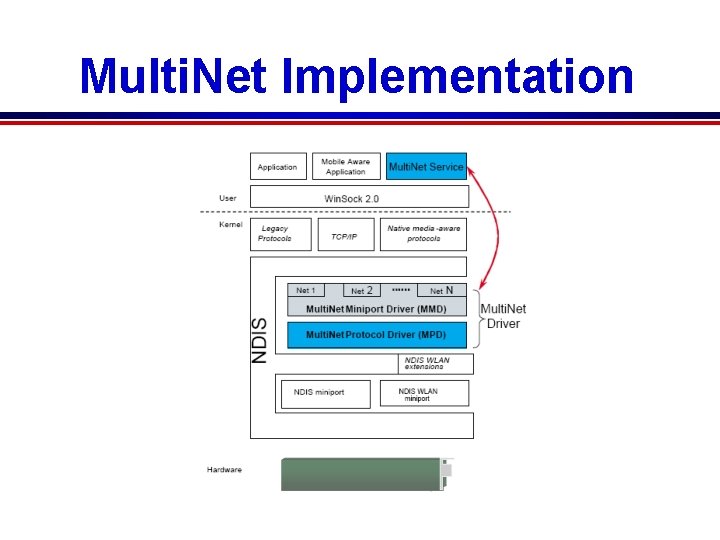
Multi. Net Implementation
Virtual Wi. Fi related Publications l "A Virtualization Architecture for Wireless Network Cards" Ranveer Chandra Ph. D Thesis, Cornell University, September 2005. l "Multi. Net: Connecting to Multiple IEEE 802. 11 Networks Using a Single Wireless Card" Ranveer Chandra, Paramvir Bahl and Pradeep Bahl Proceedings of IEEE Infocom 2004, Hong Kong, March 7 -11, 2004. Infocom Presentation l Multi. Net: Enabling Simultaneous Connections to Multiple Wireless Networks Using a Single Radio Ranveer Chandra, Paramvir Bahl and Pradeep Bahl Demo and Poster in ACM/USENIX Mobi. Sys, San Francisco, May 5 -8, 2003 Poster in Mesh Networking Summit, Snoqualmie, WA, June 23 -24, 2004 l Multi. Net: Enabling Simultaneous Connections to Multiple Wireless Networks Using a Single Radio Paramvir Bahl, Pradeep Bahl and Ranveer Chandra Microsoft Tech Report, MSR-TR-2003 -46, June 2003
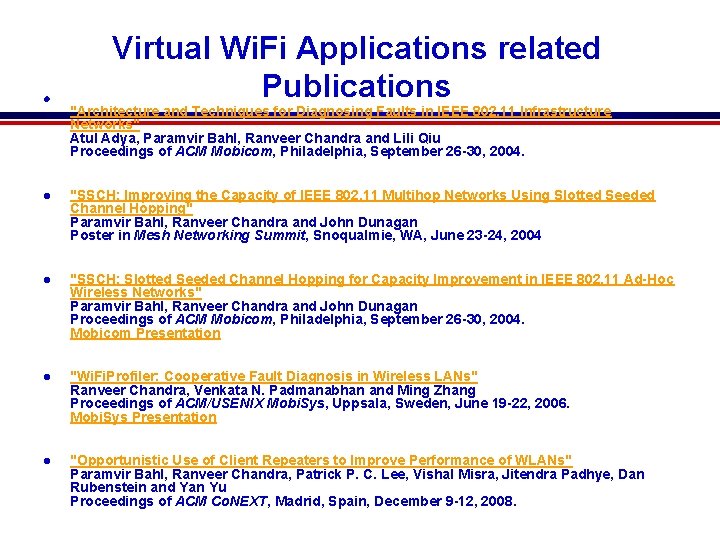
l Virtual Wi. Fi Applications related Publications "Architecture and Techniques for Diagnosing Faults in IEEE 802. 11 Infrastructure Networks" Atul Adya, Paramvir Bahl, Ranveer Chandra and Lili Qiu Proceedings of ACM Mobicom, Philadelphia, September 26 -30, 2004. l "SSCH: Improving the Capacity of IEEE 802. 11 Multihop Networks Using Slotted Seeded Channel Hopping" Paramvir Bahl, Ranveer Chandra and John Dunagan Poster in Mesh Networking Summit, Snoqualmie, WA, June 23 -24, 2004 l "SSCH: Slotted Seeded Channel Hopping for Capacity Improvement in IEEE 802. 11 Ad-Hoc Wireless Networks" Paramvir Bahl, Ranveer Chandra and John Dunagan Proceedings of ACM Mobicom, Philadelphia, September 26 -30, 2004. Mobicom Presentation l "Wi. Fi. Profiler: Cooperative Fault Diagnosis in Wireless LANs" Ranveer Chandra, Venkata N. Padmanabhan and Ming Zhang Proceedings of ACM/USENIX Mobi. Sys, Uppsala, Sweden, June 19 -22, 2006. Mobi. Sys Presentation l "Opportunistic Use of Client Repeaters to Improve Performance of WLANs" Paramvir Bahl, Ranveer Chandra, Patrick P. C. Lee, Vishal Misra, Jitendra Padhye, Dan Rubenstein and Yan Yu Proceedings of ACM Co. NEXT, Madrid, Spain, December 9 -12, 2008.
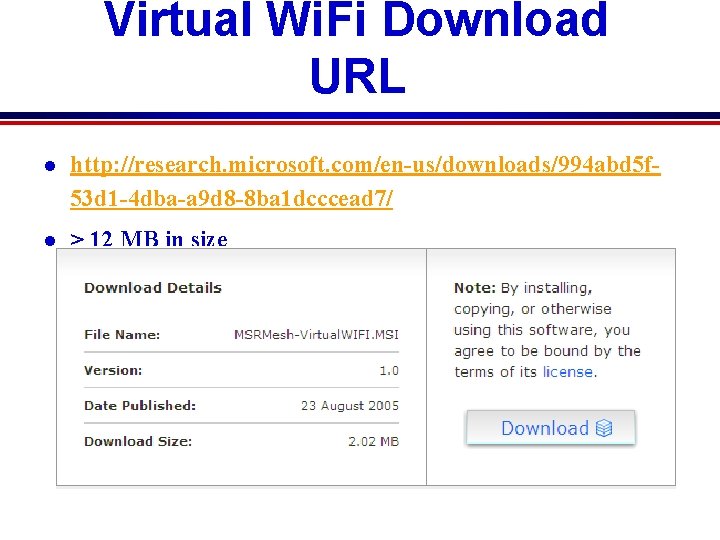
Virtual Wi. Fi Download URL l http: //research. microsoft. com/en-us/downloads/994 abd 5 f 53 d 1 -4 dba-a 9 d 8 -8 ba 1 dcccead 7/ l > 12 MB in size
Wireless LAN Enhancements In Windows 7 Microsoft Research
Market Drivers Pervasiveness of Wi. Fi networks High penetration of laptops with Wi. Fi Proliferation of Wi. Fi capable devices Ever increasing growth in mobile workers Emergence of innovative scenarios based on IP endpoints Wireless ubiquity + mobile computing = Mobile Wireless PAN
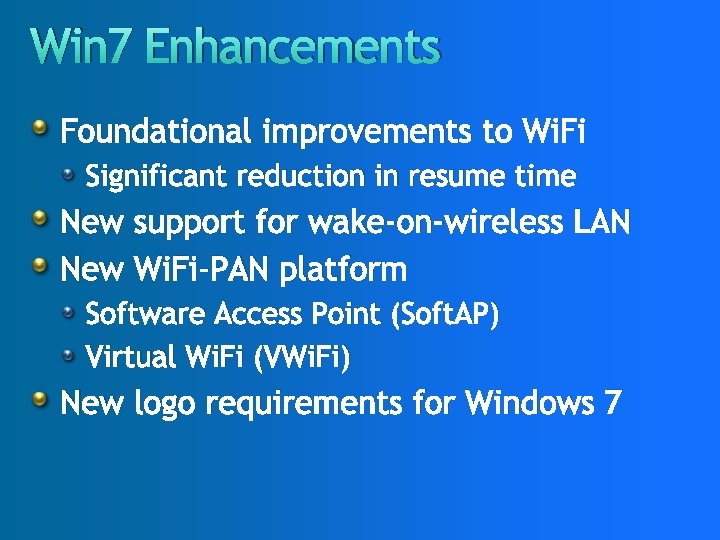
Win 7 Enhancements Foundational improvements to Wi. Fi Significant reduction in resume time New support for wake-on-wireless LAN New Wi. Fi-PAN platform Software Access Point (Soft. AP) Virtual Wi. Fi (VWi. Fi) New logo requirements for Windows 7
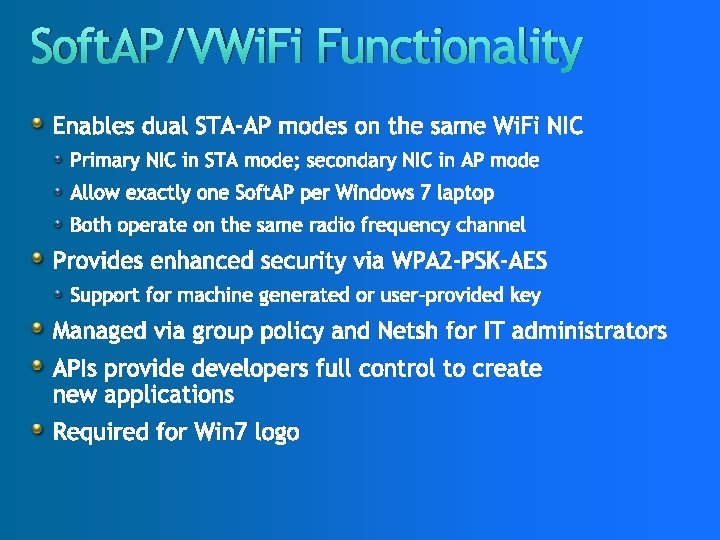
Soft. AP/VWi. Fi Functionality Enables dual STA-AP modes on the same Wi. Fi NIC Primary NIC in STA mode; secondary NIC in AP mode Allow exactly one Soft. AP per Windows 7 laptop Both operate on the same radio frequency channel Provides enhanced security via WPA 2 -PSK-AES Support for machine generated or user-provided key Managed via group policy and Netsh for IT administrators APIs provide developers full control to create new applications Required for Win 7 logo
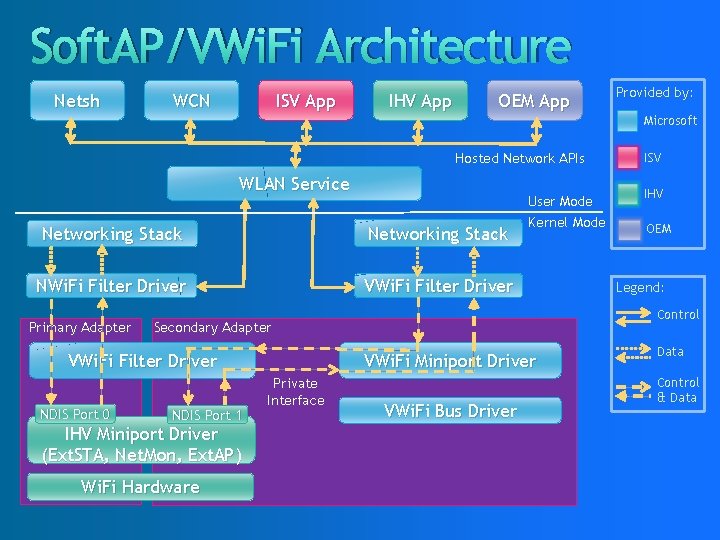
Soft. AP/VWi. Fi Architecture Netsh WCN ISV App IHV App OEM App Provided by: Microsoft Hosted Network APIs WLAN Service Networking Stack NWi. Fi Filter Driver VWi. Fi Filter Driver Primary Adapter VWi. Fi Miniport Driver NDIS Port 1 IHV Miniport Driver (Ext. STA, Net. Mon, Ext. AP) Wi. Fi Hardware Private Interface IHV OEM Legend: Control Secondary Adapter VWi. Fi Filter Driver NDIS Port 0 User Mode Kernel Mode ISV VWi. Fi Bus Driver Data Control & Data
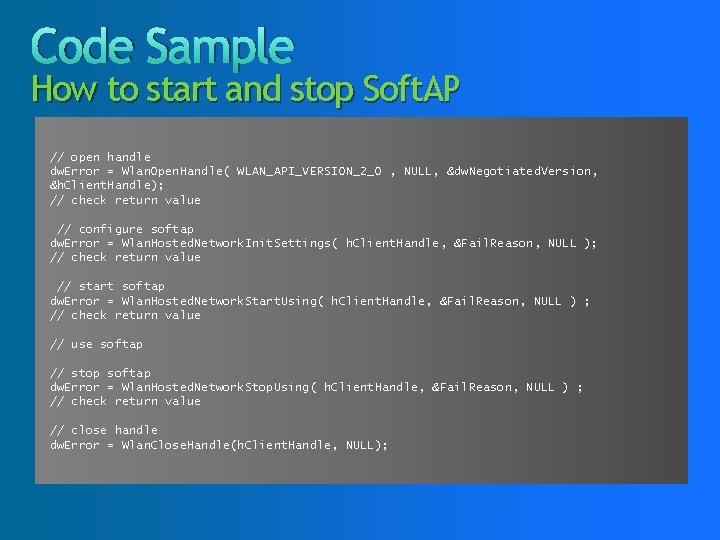
Code Sample How to start and stop Soft. AP // open handle dw. Error = Wlan. Open. Handle( WLAN_API_VERSION_2_0 , NULL, &dw. Negotiated. Version, &h. Client. Handle); // check return value // configure softap dw. Error = Wlan. Hosted. Network. Init. Settings( h. Client. Handle, &Fail. Reason, NULL ); // check return value // start softap dw. Error = Wlan. Hosted. Network. Start. Using( h. Client. Handle, &Fail. Reason, NULL ) ; // check return value // use softap // stop softap dw. Error = Wlan. Hosted. Network. Stop. Using( h. Client. Handle, &Fail. Reason, NULL ) ; // check return value // close handle dw. Error = Wlan. Close. Handle(h. Client. Handle, NULL);
© 2008 Microsoft Corporation. All rights reserved. Microsoft, Windows Vista and other product names are or may be registered trademarks and/or trademarks in the U. S. and/or other countries. The information herein is for informational purposes only and represents the current view of Microsoft Corporation as of the date of this presentation. Because Microsoft must respond to changing market conditions, it should not be interpreted to be a commitment on the part of Microsoft, and Microsoft cannot guarantee the accuracy of any information provided after the date of this presentation. MICROSOFT MAKES NO WARRANTIES, EXPRESS, IMPLIED OR STATUTORY, AS TO THE INFORMATION IN THIS PRESENTATION.
Wi. Fi. Profiler: Cooperative Diagnosis in Wireless LANs Microsoft Research
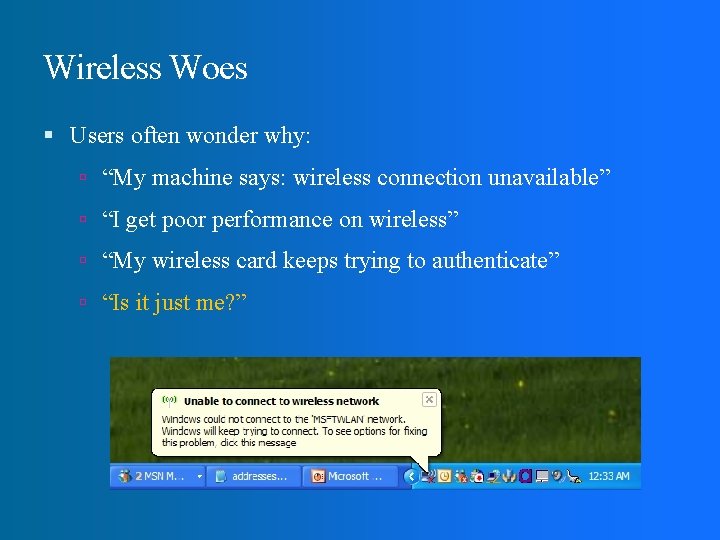
Wireless Woes Users often wonder why: “My machine says: wireless connection unavailable” “I get poor performance on wireless” “My wireless card keeps trying to authenticate” “Is it just me? ”
Wireless Woes Users often wonder why: “My machine says: wireless connection unavailable” “I get poor performance on wireless” “My wireless card keeps trying to authenticate” “Is it just me? ” Many places have no/minimal network admin Hotspots: cafes, airports Transient networks: conferences, IETF meetings
Prior Work: Operator View Infrastructure-based monitoring (Aruba, DAIR) Focuses on operator perspective (e. g. , rogue APs) Monitoring at clients (e. g. , [Adya 2004]) Fault diagnosis using infrastructure support Also focuses on operator perspective Correlate client observations at AP (MOJO) Detect PHY level anomalies
Wi. Fi. Profiler Goal: User View Enable clients to diagnose network failures without requiring admin/infrastructure support: Reduce user frustration Reduce load on admin, when there is one Help users help themselves
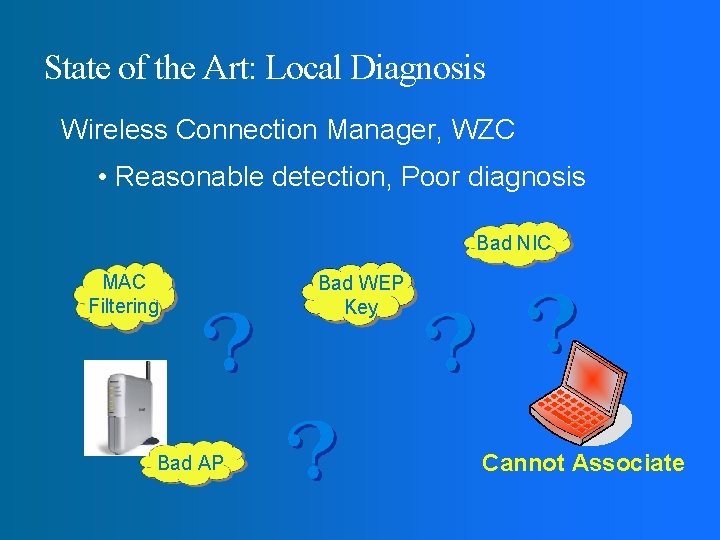
State of the Art: Local Diagnosis Wireless Connection Manager, WZC • Reasonable detection, Poor diagnosis Bad NIC MAC Filtering Bad AP Bad WEP Key Cannot Associate
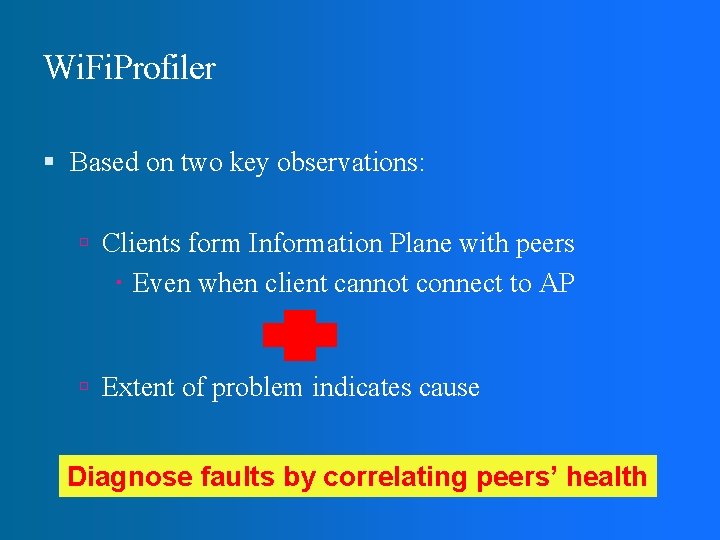
Wi. Fi. Profiler Based on two key observations: Clients form Information Plane with peers Even when client cannot connect to AP Extent of problem indicates cause Diagnose faults by correlating peers’ health
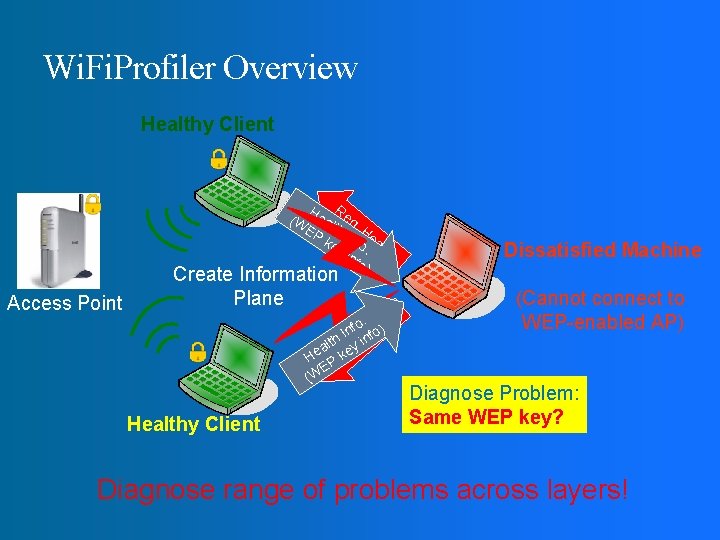
Wi. Fi. Profiler Overview Healthy Client H R (W eal eq. EP th I H ke nfo ealt yi. h nfo ) Access Point Create Information Plane . lth nfo feoa) I n. H h alt eyq. i e H P Rk e E (W Healthy Client Dissatisfied Machine (Cannot connect to WEP-enabled AP) Diagnose Problem: Same WEP key? Diagnose range of problems across layers!
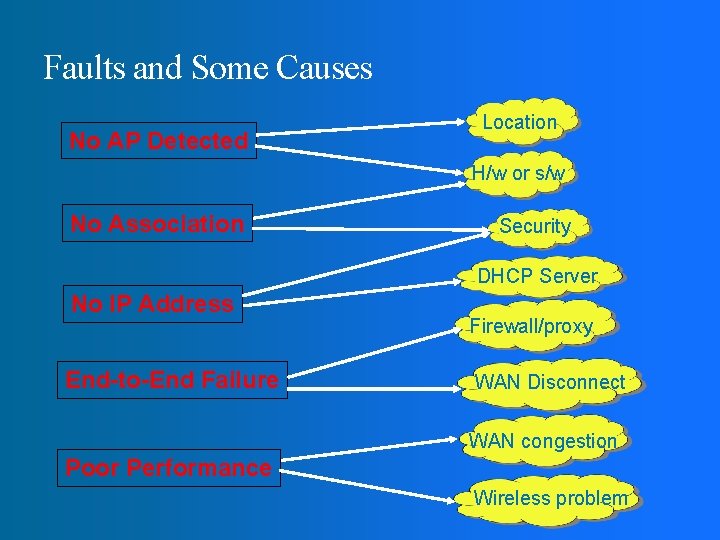
Faults and Some Causes No AP Detected Location H/w or s/w No Association Security DHCP Server No IP Address End-to-End Failure Firewall/proxy WAN Disconnect WAN congestion Poor Performance Wireless problem
Wi. Fi. Profiler Design Goals Transparency: Minimal user impact/involvement Deployability: Work with off-the-shelf cards and unmodified drivers Scalability: Work with a large number of clients Security: Prevent compromise of clients and AP
Wi. Fi. Profiler Architecture Sensing: What is monitored? Communication: How is it shared? Diagnosis: How are faults diagnosed?
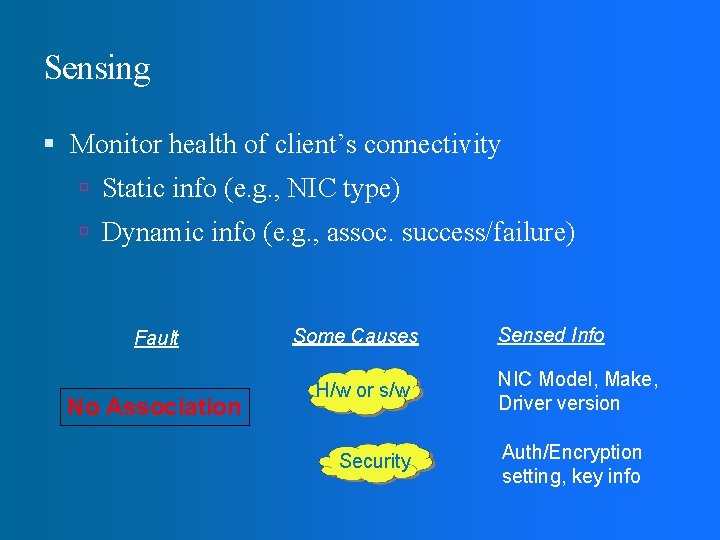
Sensing Monitor health of client’s connectivity Static info (e. g. , NIC type) Dynamic info (e. g. , assoc. success/failure) Fault No Association Some Causes H/w or s/w Security Sensed Info NIC Model, Make, Driver version Auth/Encryption setting, key info
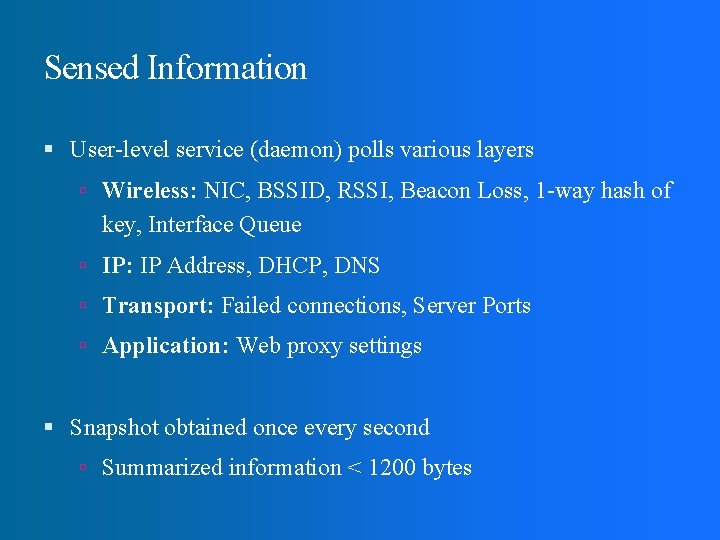
Sensed Information User-level service (daemon) polls various layers Wireless: NIC, BSSID, RSSI, Beacon Loss, 1 -way hash of key, Interface Queue IP: IP Address, DHCP, DNS Transport: Failed connections, Server Ports Application: Web proxy settings Snapshot obtained once every second Summarized information < 1200 bytes
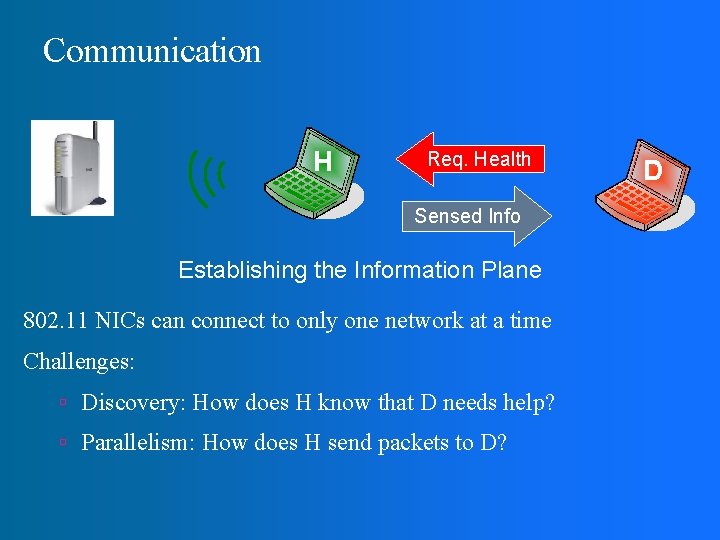
Communication H Req. Health Sensed Info Establishing the Information Plane 802. 11 NICs can connect to only one network at a time Challenges: Discovery: How does H know that D needs help? Parallelism: How does H send packets to D? D
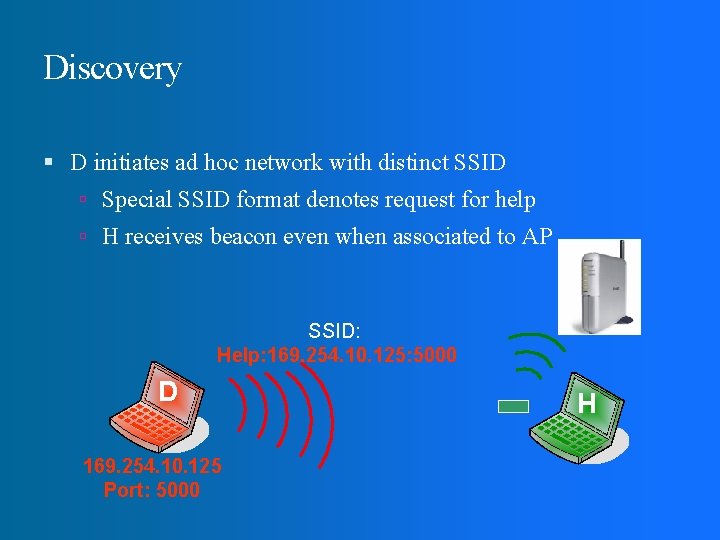
Discovery D initiates ad hoc network with distinct SSID Special SSID format denotes request for help H receives beacon even when associated to AP SSID: Help: 169. 254. 10. 125: 5000 D 169. 254. 10. 125 Port: 5000 H
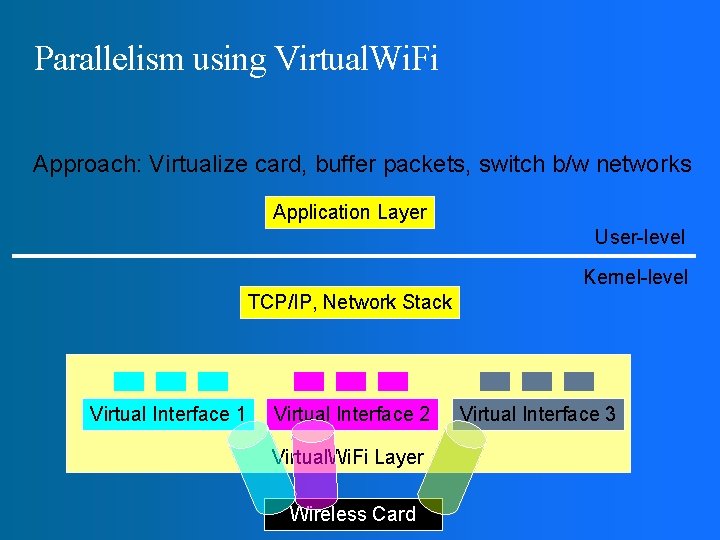
Parallelism using Virtual. Wi. Fi Approach: Virtualize card, buffer packets, switch b/w networks Application Layer User-level Kernel-level TCP/IP, Network Stack Virtual Interface 1 Virtual Interface 2 Virtual. Wi. Fi Layer Wireless Card Virtual Interface 3
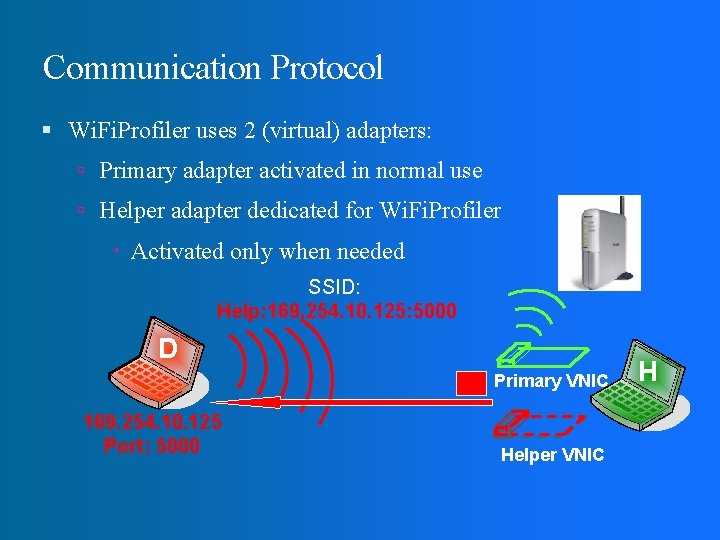
Communication Protocol Wi. Fi. Profiler uses 2 (virtual) adapters: Primary adapter activated in normal use Helper adapter dedicated for Wi. Fi. Profiler Activated only when needed SSID: Help: 169. 254. 10. 125: 5000 D Primary VNIC 169. 254. 10. 125 Port: 5000 Helper VNIC H
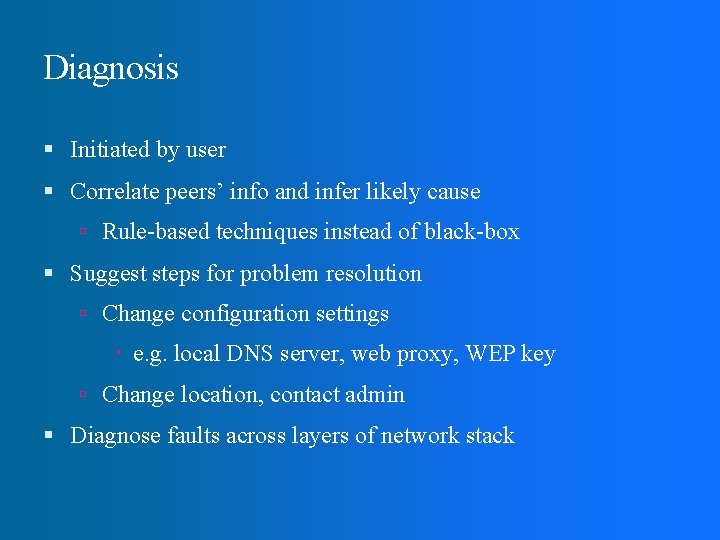
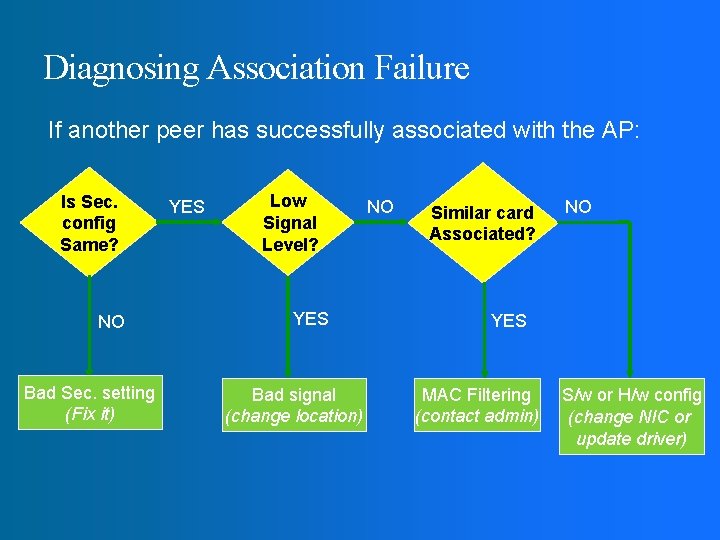
Diagnosis Initiated by user Correlate peers’ info and infer likely cause Rule-based techniques instead of black-box Suggest steps for problem resolution Change configuration settings e. g. local DNS server, web proxy, WEP key Change location, contact admin Diagnose faults across layers of network stack
Diagnosing Association Failure If another peer has successfully associated with the AP: Is Sec. config Same? NO Bad Sec. setting (Fix it) YES Low Signal Level? YES Bad signal (change location) NO Similar card Associated? NO YES MAC Filtering (contact admin) S/w or H/w config (change NIC or update driver)
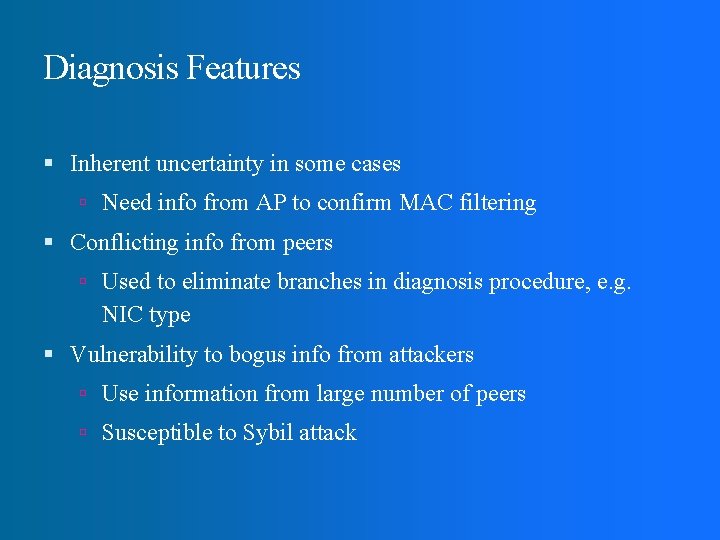
Diagnosis Features Inherent uncertainty in some cases Need info from AP to confirm MAC filtering Conflicting info from peers Used to eliminate branches in diagnosis procedure, e. g. NIC type Vulnerability to bogus info from attackers Use information from large number of peers Susceptible to Sybil attack
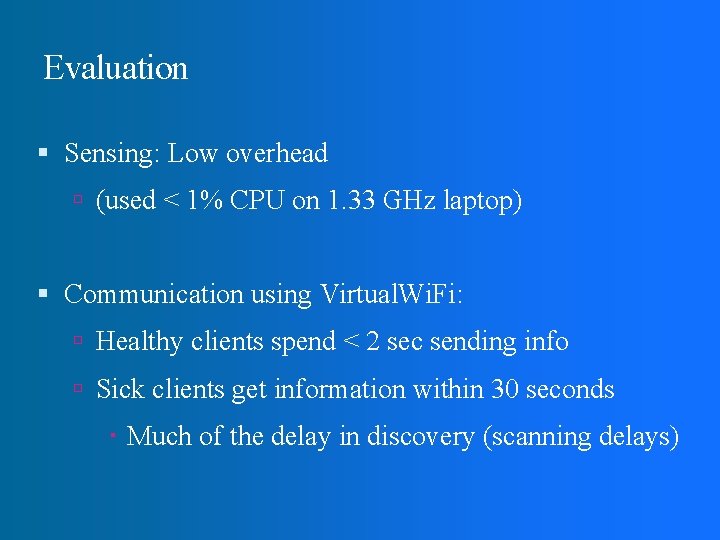
Evaluation Sensing: Low overhead (used < 1% CPU on 1. 33 GHz laptop) Communication using Virtual. Wi. Fi: Healthy clients spend < 2 sec sending info Sick clients get information within 30 seconds Much of the delay in discovery (scanning delays)
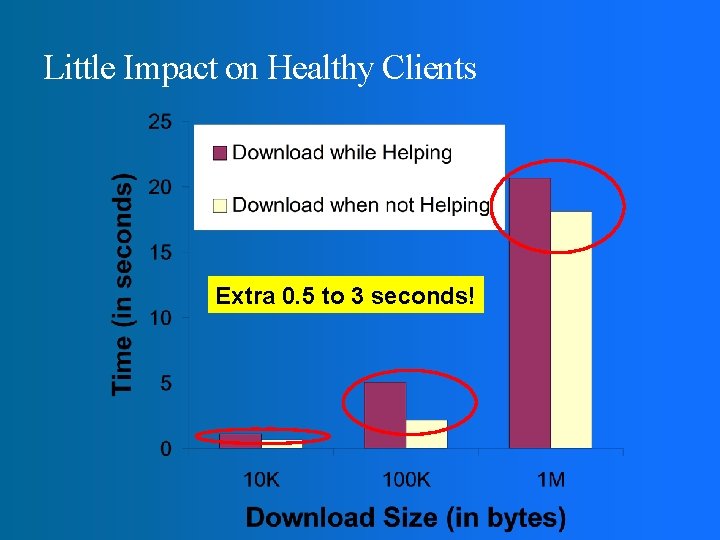
Little Impact on Healthy Clients Extra 0. 5 to 3 seconds!
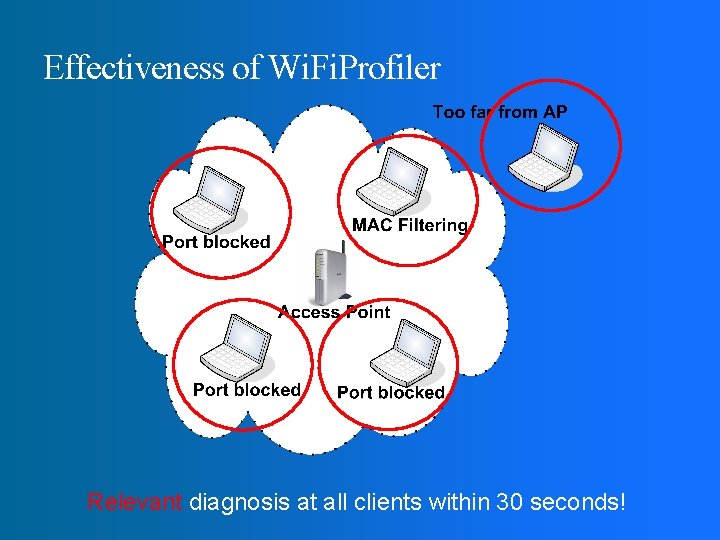
Effectiveness of Wi. Fi. Profiler Relevant diagnosis at all clients within 30 seconds!
Wi. Fi. Profiler Summary Enables cooperative diagnosis in WLANs Without infrastructure support, low overhead Working system on Windows XP Future work: Security: Privacy, Sybil Attacks, Passive Mode Long-term Profiling
Q&A l ?