
Windows 7 Mobile Broadband APIs For Application Development
Windows 7: Mobile Broadband APIs For Application Development Anurag Choudhary Program Manager Wireless WAN Microsoft Corporation
Agenda Mobile Broadband in Windows 7 API Overview Supported Functionality API Object Model Call to Action Demo
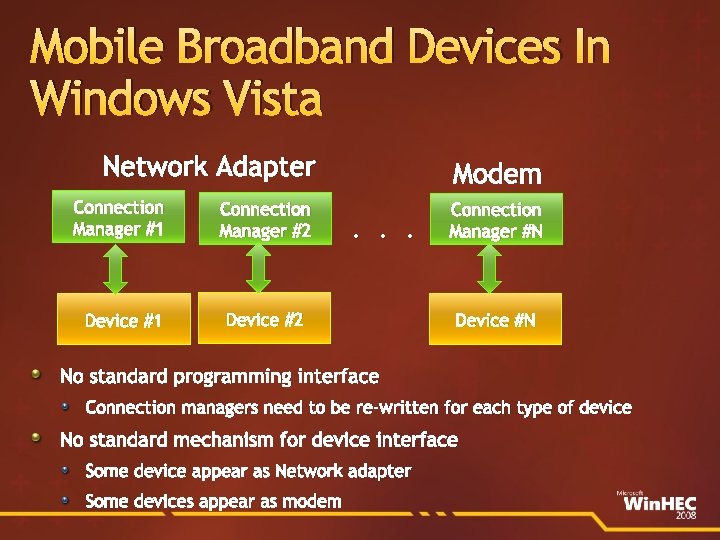
Mobile Broadband Devices In Windows Vista Network Adapter Connection Manager #1 Connection Manager #2 Device #1 Device #2 Modem. . . Connection Manager #N Device #N No standard programming interface Connection managers need to be re-written for each type of device No standard mechanism for device interface Some device appear as Network adapter Some devices appear as modem
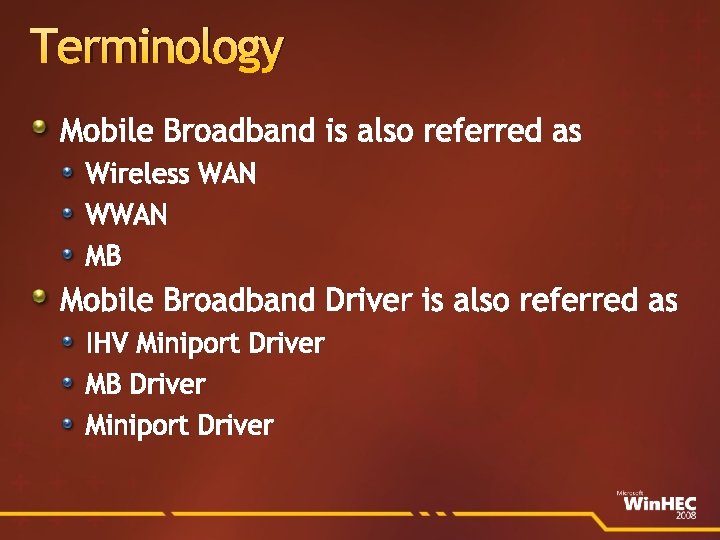
Terminology Mobile Broadband is also referred as Wireless WAN WWAN MB Mobile Broadband Driver is also referred as IHV Miniport Driver MB Driver Miniport Driver
Mobile Broadband In Windows 7 Network connectivity through packet switched (3 GPP/3 GPP 2) technologies New Feature in Windows 7 New Driver Model for Mobile Broadband devices New logo program for Mobile Broadband devices New API for application development
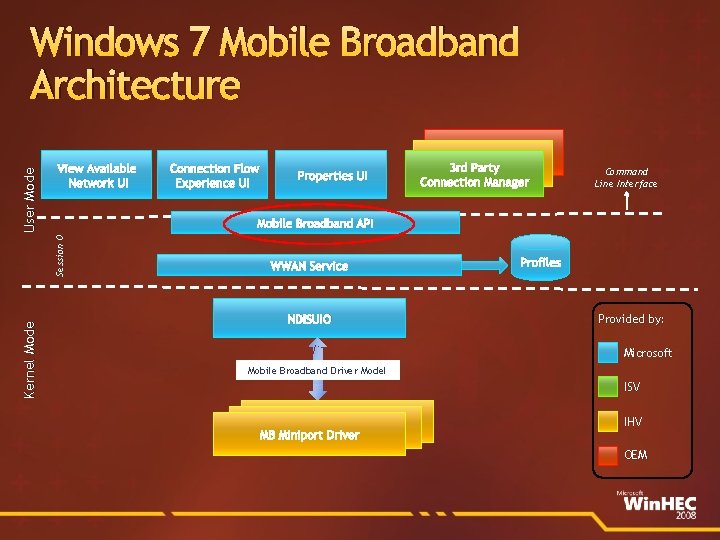
View Available Network UI Kernel Mode Connection Flow Experience UI Properties UI 3 rd Party Connection Manager Command Line Interface Mobile Broadband API Session 0 User Mode Windows 7 Mobile Broadband Architecture WWAN Service NDISUIO Profiles Provided by: Microsoft Mobile Broadband Driver Model ISV WWAN Miniport Driver MB Miniport Driver IHV OEM
Overview Device agnostic application programming interface to manage Mobile Broadband connectivity COM based API Will be available as part of Windows 7 SDK Can be directly called from unmanaged applications (C++) Can be called from managed applications (C#) through COM interoperability
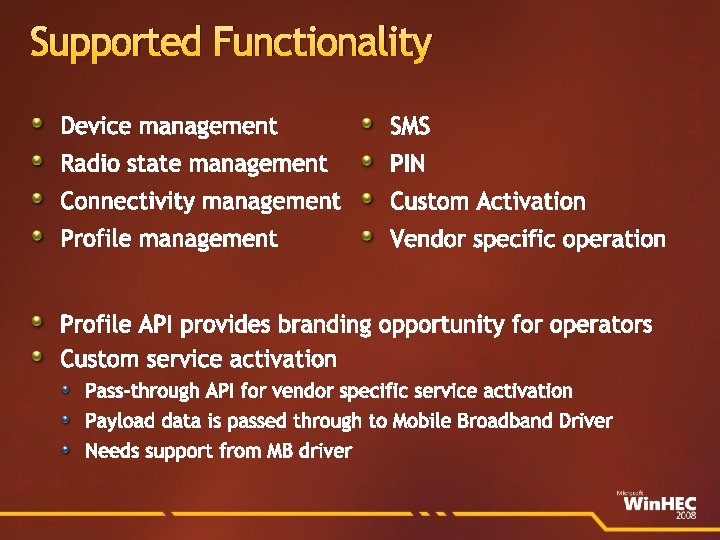
Supported Functionality Device management SMS Radio state management PIN Connectivity management Custom Activation Profile management Vendor specific operation Profile API provides branding opportunity for operators Custom service activation Pass-through API for vendor specific service activation Payload data is passed through to Mobile Broadband Driver Needs support from MB driver
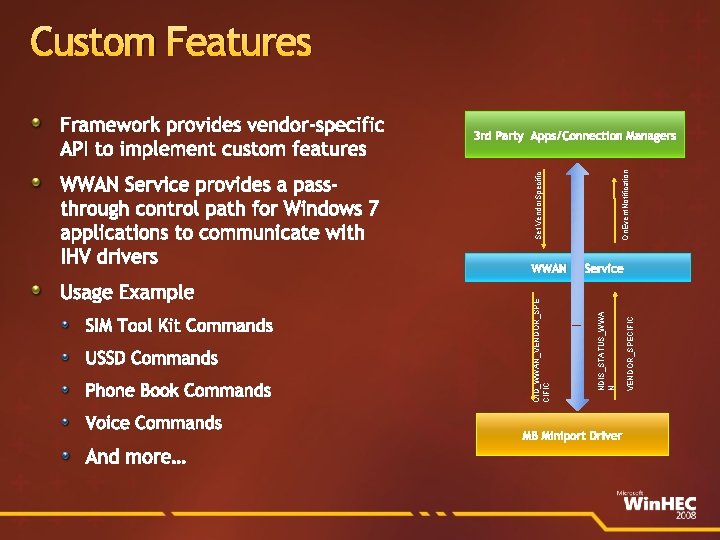
Custom Features USSD Commands Phone Book Commands Voice Commands And more… On. Event. Notification Service MB Miniport Driver VENDOR_SPECIFIC SIM Tool Kit Commands WWAN NDIS_STATUS_WWA N_ Usage Example Set Vendor. Specific WWAN Service provides a passthrough control path for Windows 7 applications to communicate with IHV drivers 3 rd Party Apps/Connection Managers OID_WWAN_VENDOR_SPE CIFIC Framework provides vendor-specific API to implement custom features
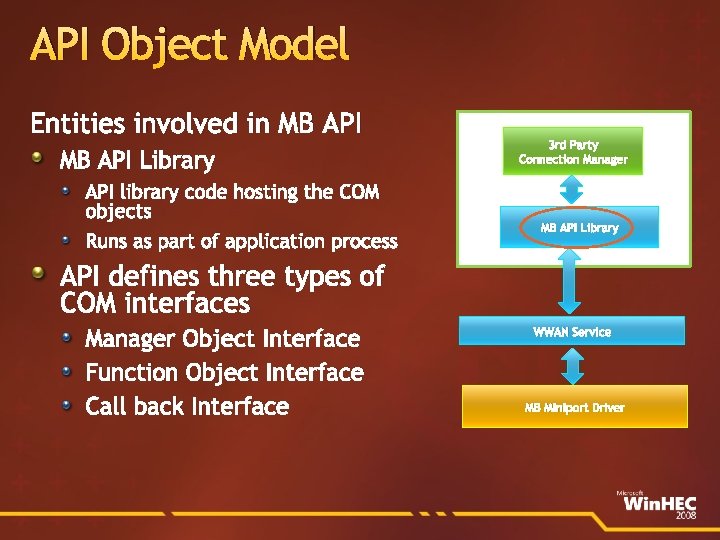
API Object Model Entities involved in MB API Library API library code hosting the COM objects Runs as part of application process 3 rd Party Connection Manager MB API Library API defines three types of COM interfaces Manager Object Interface Function Object Interface Call back Interface WWAN Service MB Miniport Driver
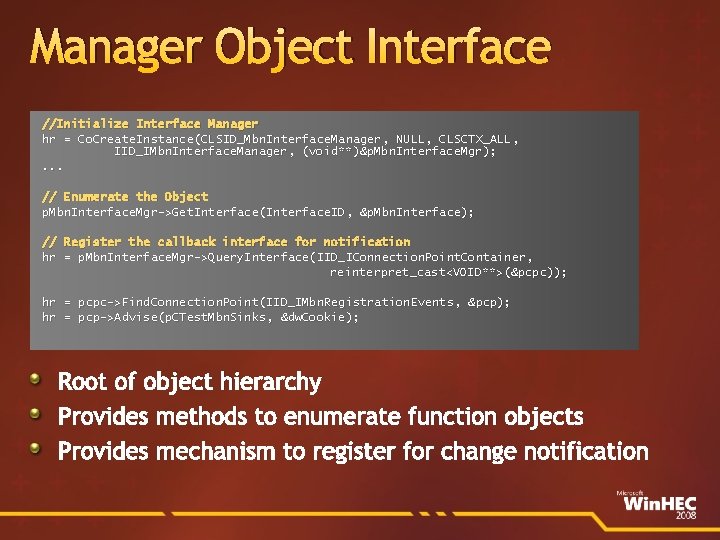
Manager Object Interface //Initialize Interface Manager hr = Co. Create. Instance(CLSID_Mbn. Interface. Manager, NULL, CLSCTX_ALL, IID_IMbn. Interface. Manager, (void**)&p. Mbn. Interface. Mgr); . . . // Enumerate the Object p. Mbn. Interface. Mgr->Get. Interface(Interface. ID, &p. Mbn. Interface); // Register the callback interface for notification hr = p. Mbn. Interface. Mgr->Query. Interface(IID_IConnection. Point. Container, reinterpret_cast<VOID**>(&pcpc)); hr = pcpc->Find. Connection. Point(IID_IMbn. Registration. Events, &pcp); hr = pcp->Advise(p. CTest. Mbn. Sinks, &dw. Cookie); Root of object hierarchy Provides methods to enumerate function objects Provides mechanism to register for change notification
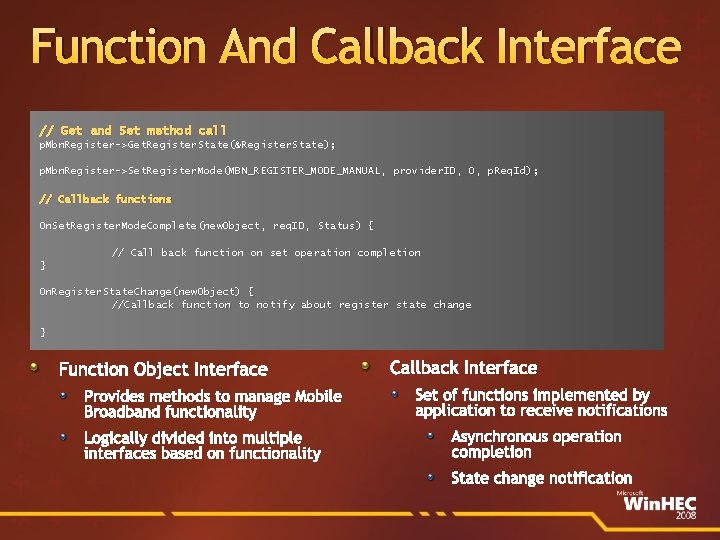
Function And Callback Interface // Get and Set method call p. Mbn. Register->Get. Register. State(&Register. State); p. Mbn. Register->Set. Register. Mode(MBN_REGISTER_MODE_MANUAL, provider. ID, 0, p. Req. Id); // Callback functions On. Set. Register. Mode. Complete(new. Object, req. ID, Status) { // Call back function on set operation completion } On. Register. State. Change(new. Object) { //Callback function to notify about register state change } Function Object Interface Provides methods to manage Mobile Broadband functionality Logically divided into multiple interfaces based on functionality Callback Interface Set of functions implemented by application to receive notifications Asynchronous operation completion State change notification
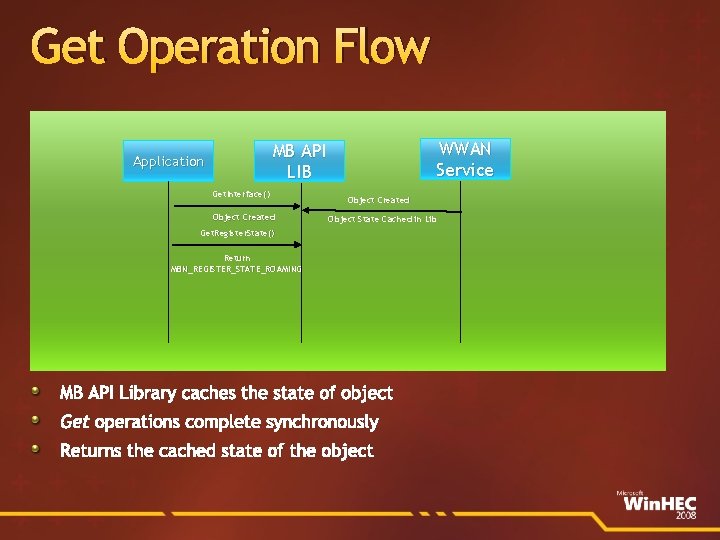
Get Operation Flow WWAN Service MB API LIB Application Get. Interface() Object Created Object State Cached in Lib Get. Register. State() Return MBN_REGISTER_STATE_ROAMING MB API Library caches the state of object Get operations complete synchronously Returns the cached state of the object
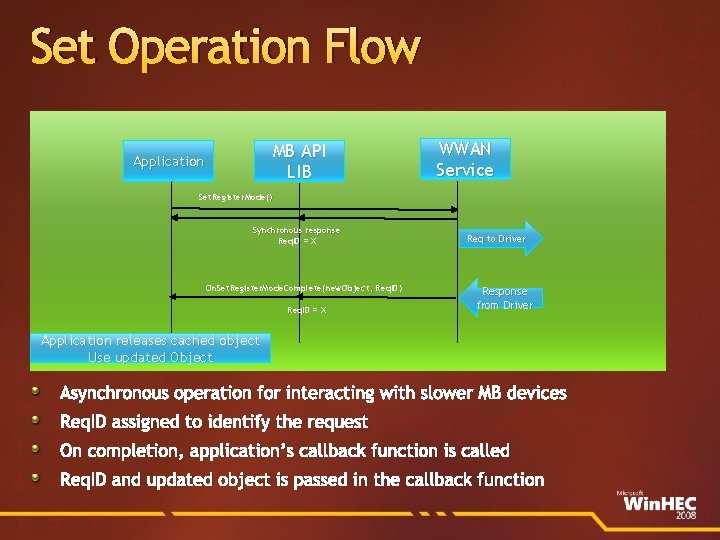
Set Operation Flow MB API LIB Application WWAN Service Set. Register. Mode() Synchronous response Req. ID = X On. Set. Register. Mode. Complete(new. Object, Req. ID) Req. ID = X Req to Driver Response from Driver Application releases cached object Use updated Object Asynchronous operation for interacting with slower MB devices Req. ID assigned to identify the request On completion, application’s callback function is called Req. ID and updated object is passed in the callback function
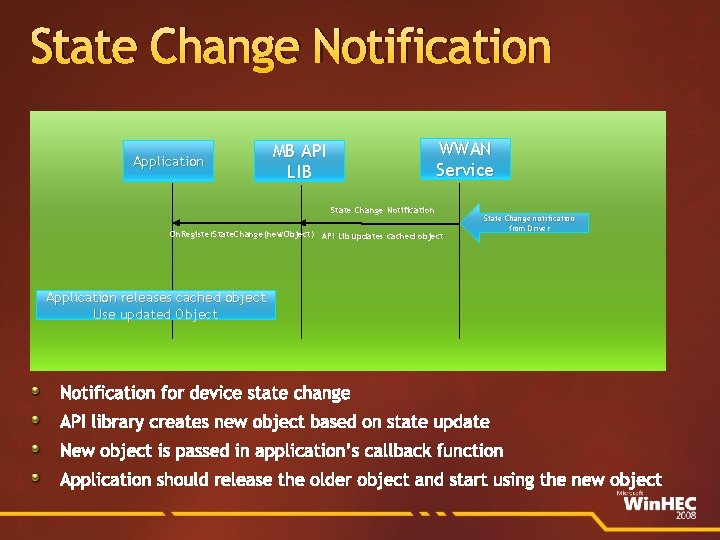
State Change Notification Application WWAN Service MB API LIB State Change Notification On. Register. State. Change(new. Object) API Lib updates cached object State Change notification from Driver Application releases cached object Use updated Object Notification for device state change API library creates new object based on state update New object is passed in application’s callback function Application should release the older object and start using the new object
Call To Action Develop your applications using Mobile Broadband API Contact us at win 7 mb@microsoft. com
Additional Resources MSDN Online Documentation COM Overview: http: //msdn. microsoft. com/enus/library/ms 680573(VS. 85). aspx. NET interoperability with unmanaged code http: //msdn. microsoft. com/en-us/library/sd 10 k 43 k%28 VS. 80%29. aspx Resources part of Win 7 beta release SDK Mobile Broadband API documentation Sample code for Mobile Broadband API WHDC Web site at http: //www. microsoft. com/whdc/default. mspx White Paper: Using Mobile Broadband API from managed code Win. HEC 2008 Resources TS 602: Mobile Broadband Driver Development in Windows 7
Related Sessions Session MBL-C 660: New Windows Logo Program for Mobile Broadband Devices Date and Time 7 th Nov Fri. 11 AM– 12 Noon
Demo Windows 7 Mobile Broadband with Option products Ray Octaviano Director Field Engineering OPTION N. V.
Windows 7 and Option products Option partnered with Microsoft in development of Mobile Broadband drivers for Option devices for Windows 7 All new Option products can be controlled by Windows 7 built-in Mobile Broadband connection See overview of current portfolio on the next page Watch the news for announcement of new products in the coming months All existing Option products are made compatible with Windows 7 by using Option Connection Manager for Windows 7
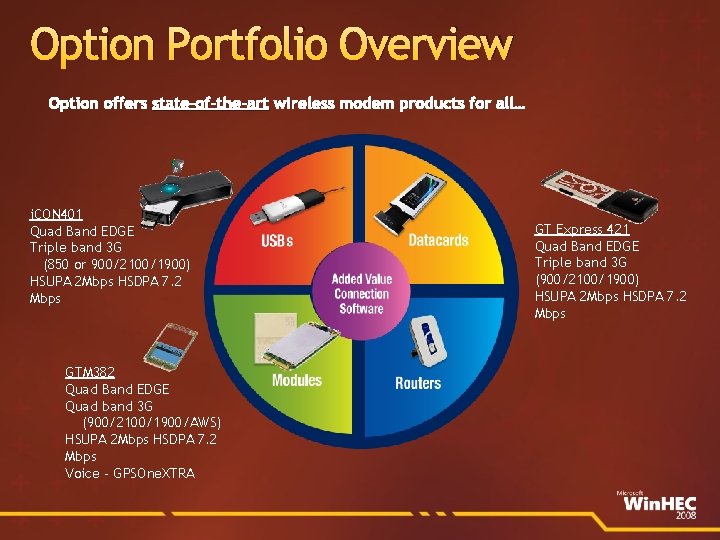
Option Portfolio Overview Option offers state-of-the-art wireless modem products for all… i. CON 401 Quad Band EDGE Triple band 3 G (850 or 900/2100/1900) HSUPA 2 Mbps HSDPA 7. 2 Mbps GTM 382 Quad Band EDGE Quad band 3 G (900/2100/1900/AWS) HSUPA 2 Mbps HSDPA 7. 2 Mbps Voice - GPSOne. XTRA GT Express 421 Quad Band EDGE Triple band 3 G (900/2100/1900) HSUPA 2 Mbps HSDPA 7. 2 Mbps
Please Complete A Session Evaluation Form Your input is important! Visit the Win. HEC Comm. Net and complete a Session Evaluation for this session and be entered to win one of 150 Maxtor® Black. Armor™ 160 GB External Hard Drives 50 drives will be given away daily! Black. Armor Hard Drives provided by: http: //www. winhec 2008. com

© 2008 Microsoft Corporation. All rights reserved. Microsoft, Windows Vista and other product names are or may be registered trademarks and/or trademarks in the U. S. and/or other countries. The information herein is for informational purposes only and represents the current view of Microsoft Corporation as of the date of this presentation. Because Microsoft must respond to changing market conditions, it should not be interpreted to be a commitment on the part of Microsoft, and Microsoft cannot guarantee the accuracy of any information provided after the date of this presentation. MICROSOFT MAKES NO WARRANTIES, EXPRESS, IMPLIED OR STATUTORY, AS TO THE INFORMATION IN THIS PRESENTATION.
- Slides: 24