
William Stallings Computer Organization and Architecture 7 th
![Relative Dynamic Frequency of High. Level Language Operations Study Language Workload [HUCK 83] Pascal](https://slidetodoc.com/presentation_image_h/91382018d70eed2fd2265d2e1e1cdfc3/image-73.jpg "Relative Dynamic Frequency of High. Level Language Operations Study Language Workload [HUCK 83] Pascal")
- Slides: 77
William Stallings Computer Organization and Architecture 7 th Edition Chapter 4 Cache Memory
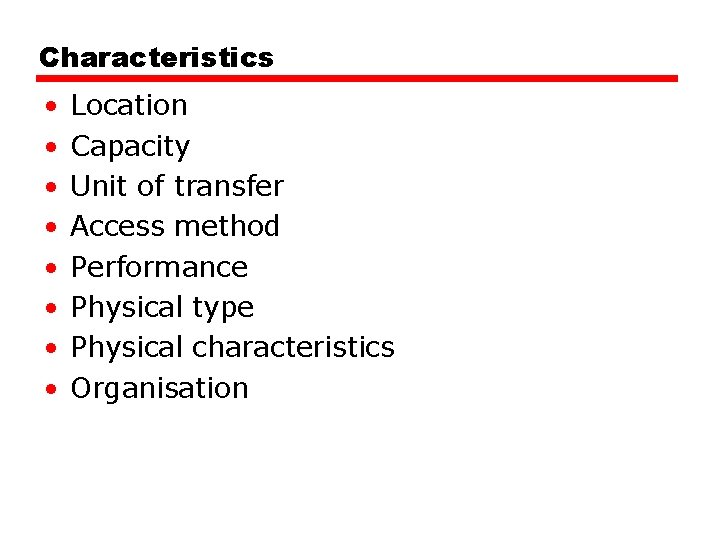
Characteristics • • Location Capacity Unit of transfer Access method Performance Physical type Physical characteristics Organisation
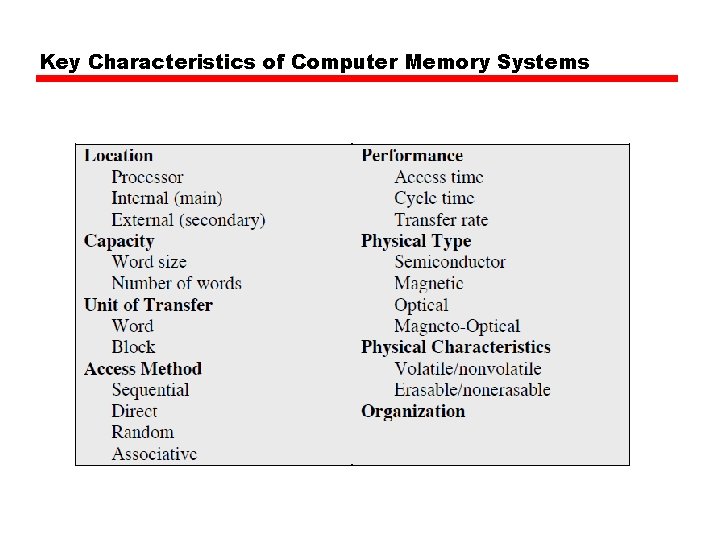
Key Characteristics of Computer Memory Systems
Location • CPU • Internal • External
Capacity • Word size —The natural unit of organisation • Number of words —or Bytes
Unit of Transfer • Internal —Usually governed by data bus width • External —Usually a block which is much larger than a word • Addressable unit —Smallest location which can be uniquely addressed —Word internally —Cluster on M$ disks
Access Methods (1) • Sequential —Start at the beginning and read through in order —Access time depends on location of data and previous location —e. g. tape • Direct —Individual blocks have unique address —Access is by jumping to vicinity plus sequential search —Access time depends on location and previous location —e. g. disk
Access Methods (2) • Random —Individual addresses identify locations exactly —Access time is independent of location or previous access —e. g. RAM • Associative —Data is located by a comparison with contents of a portion of the store —Access time is independent of location or previous access —e. g. cache
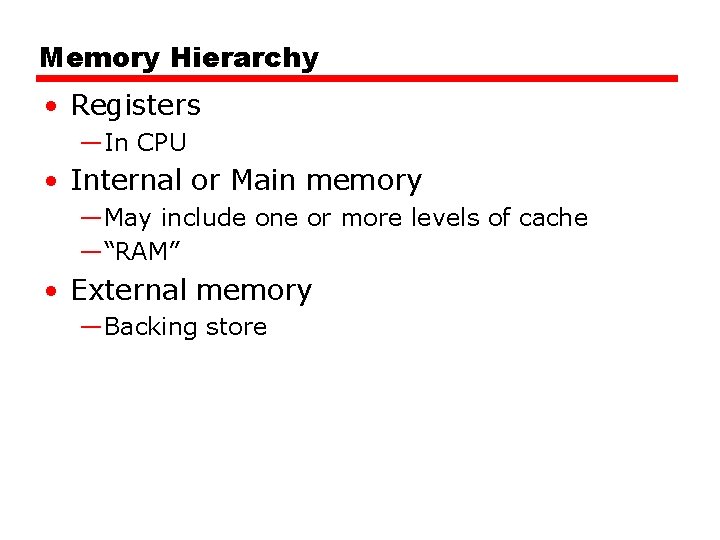
Memory Hierarchy • Registers —In CPU • Internal or Main memory —May include one or more levels of cache —“RAM” • External memory —Backing store
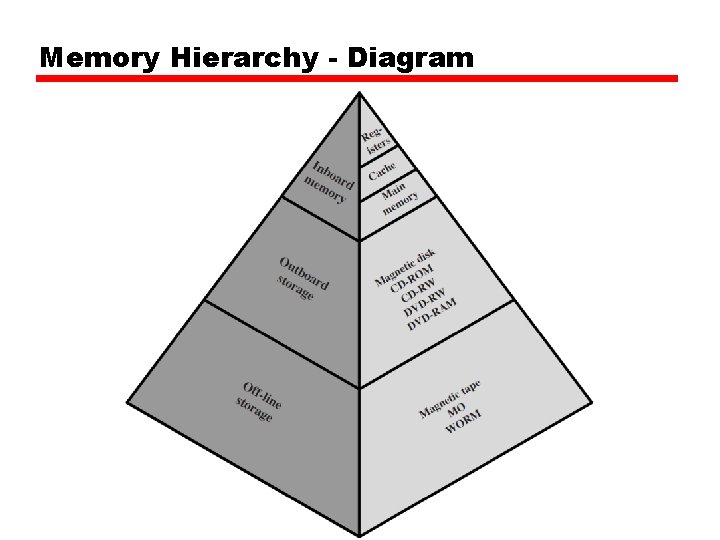
Memory Hierarchy - Diagram
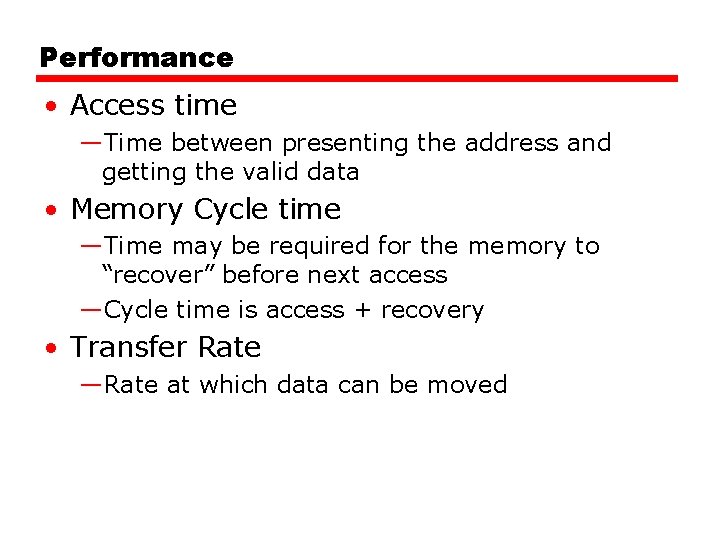
Performance • Access time —Time between presenting the address and getting the valid data • Memory Cycle time —Time may be required for the memory to “recover” before next access —Cycle time is access + recovery • Transfer Rate —Rate at which data can be moved
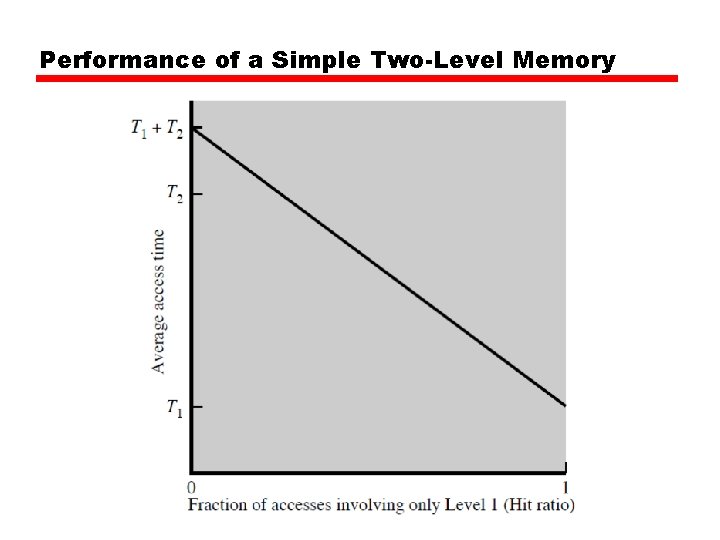
Performance of a Simple Two-Level Memory
Physical Types • Semiconductor —RAM • Magnetic —Disk & Tape • Optical —CD & DVD • Others —Bubble —Hologram
Physical Characteristics • • Decay Volatility Erasable Power consumption
Organisation • Physical arrangement of bits into words • Not always obvious • e. g. interleaved
The Bottom Line • How much? —Capacity • How fast? —Time is money • How expensive?
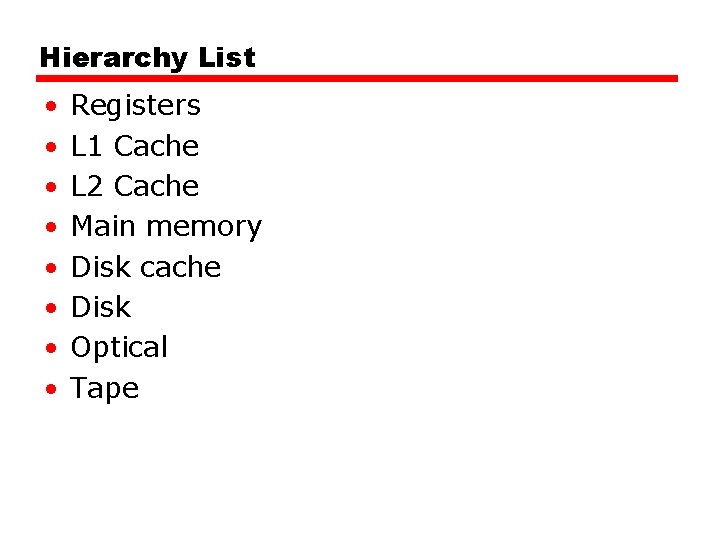
Hierarchy List • • Registers L 1 Cache L 2 Cache Main memory Disk cache Disk Optical Tape
So you want fast? • It is possible to build a computer which uses only static RAM (see later) • This would be very fast • This would need no cache —How can you cache? • This would cost a very large amount
Locality of Reference • During the course of the execution of a program, memory references tend to cluster • e. g. loops
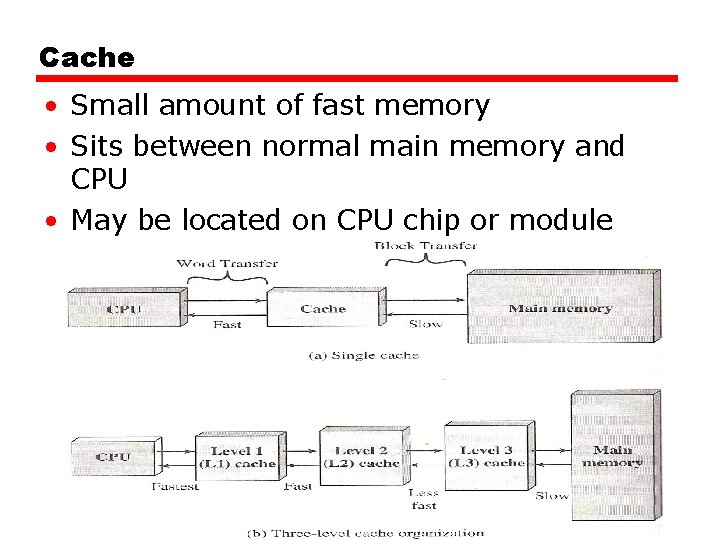
Cache • Small amount of fast memory • Sits between normal main memory and CPU • May be located on CPU chip or module
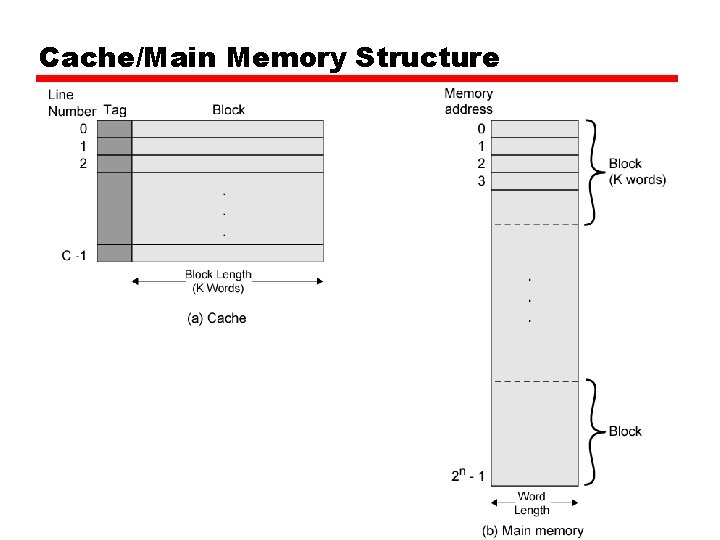
Cache/Main Memory Structure
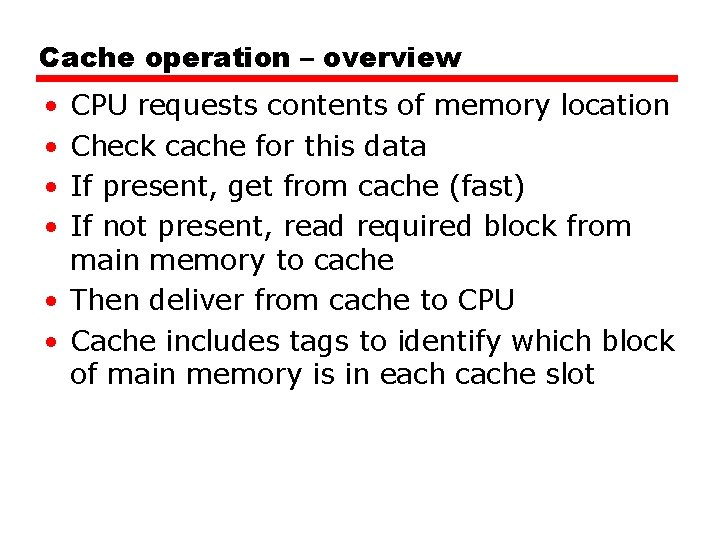
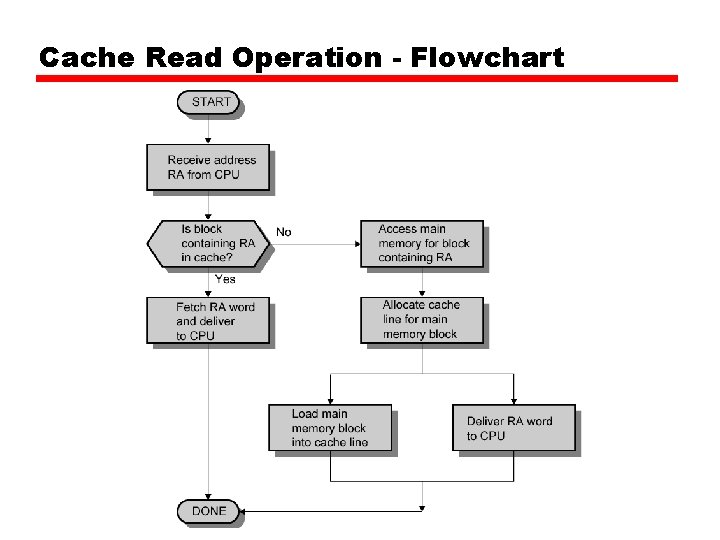
Cache operation – overview • • CPU requests contents of memory location Check cache for this data If present, get from cache (fast) If not present, read required block from main memory to cache • Then deliver from cache to CPU • Cache includes tags to identify which block of main memory is in each cache slot
Cache Read Operation - Flowchart
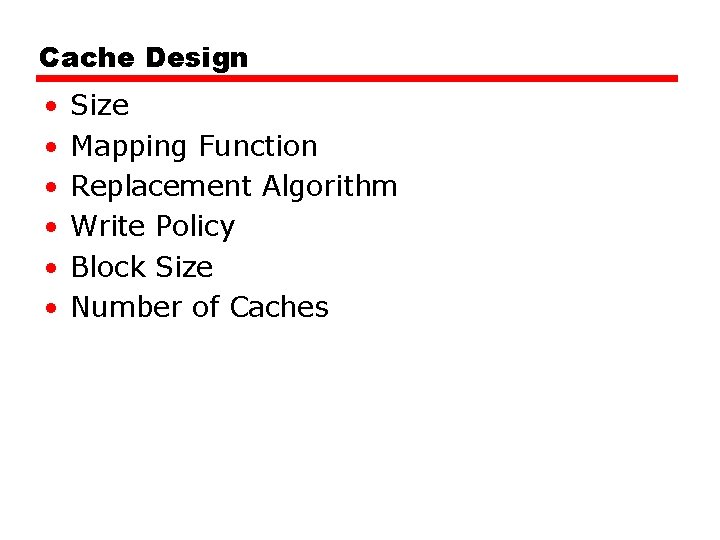
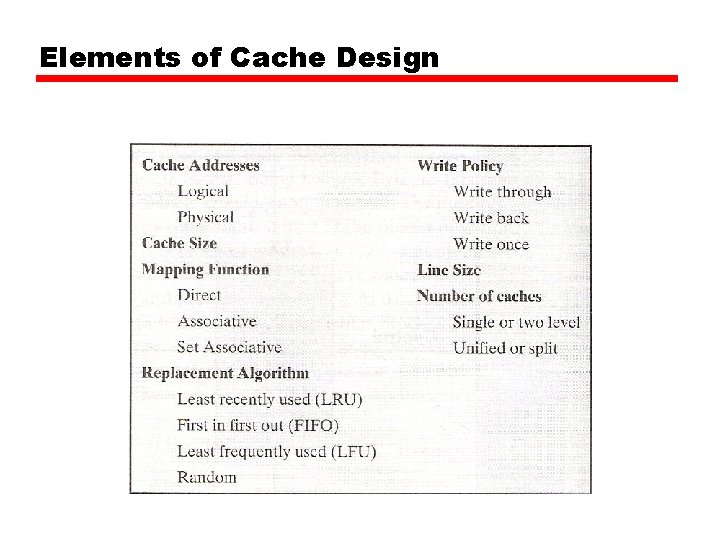
Cache Design • • • Size Mapping Function Replacement Algorithm Write Policy Block Size Number of Caches
Size does matter • Cost —More cache is expensive • Speed —More cache is faster (up to a point) —Checking cache for data takes time
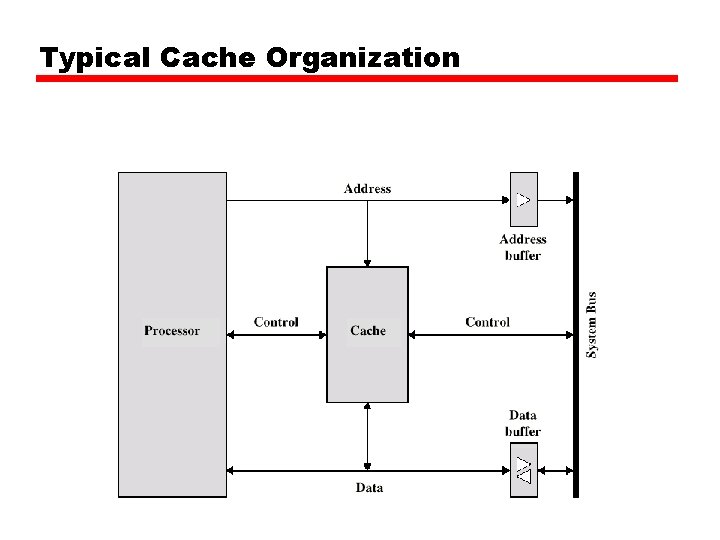
Typical Cache Organization
Elements of Cache Design
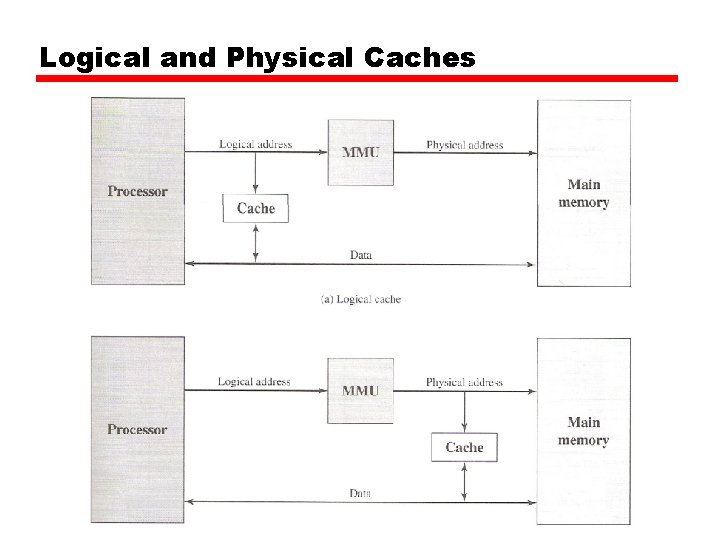
Logical and Physical Caches
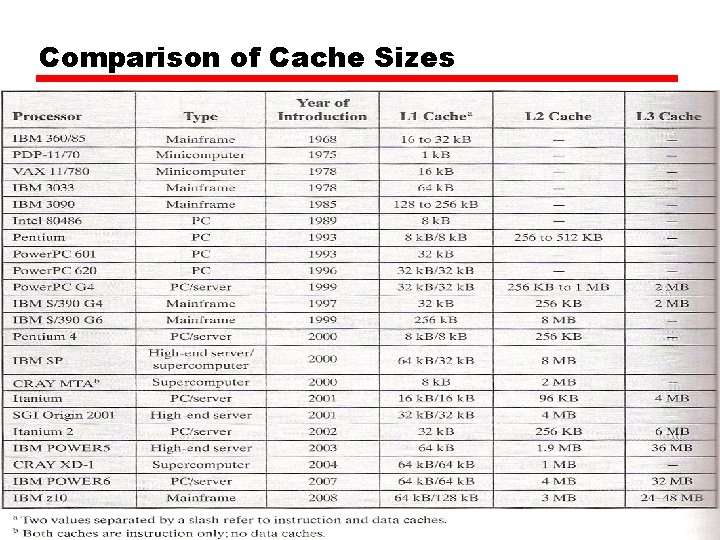
Comparison of Cache Sizes
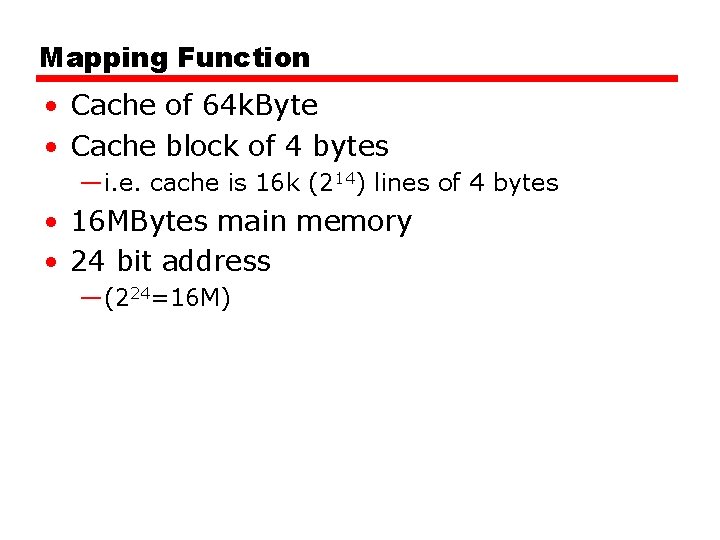
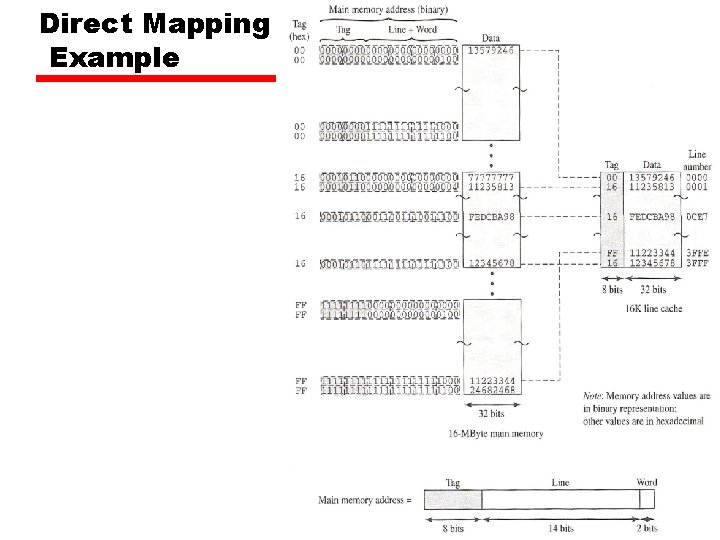
Mapping Function • Cache of 64 k. Byte • Cache block of 4 bytes —i. e. cache is 16 k (214) lines of 4 bytes • 16 MBytes main memory • 24 bit address —(224=16 M)
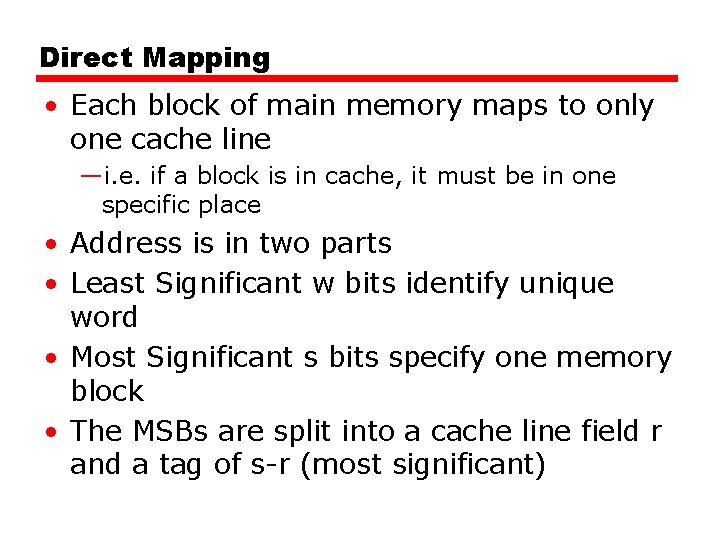
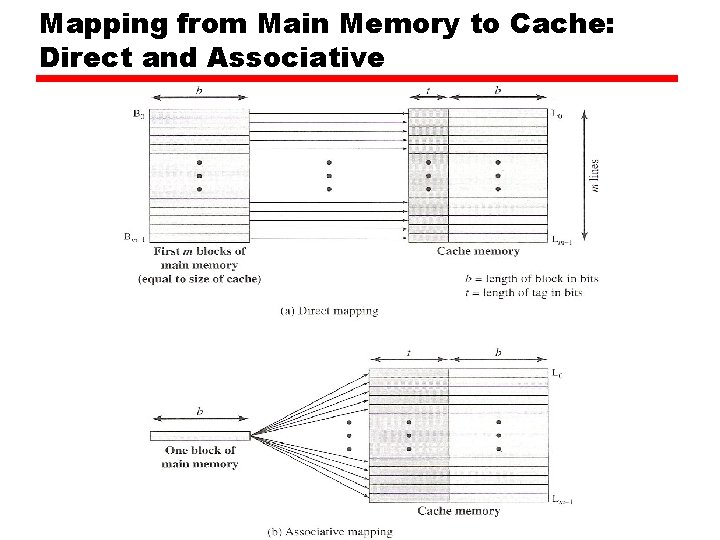
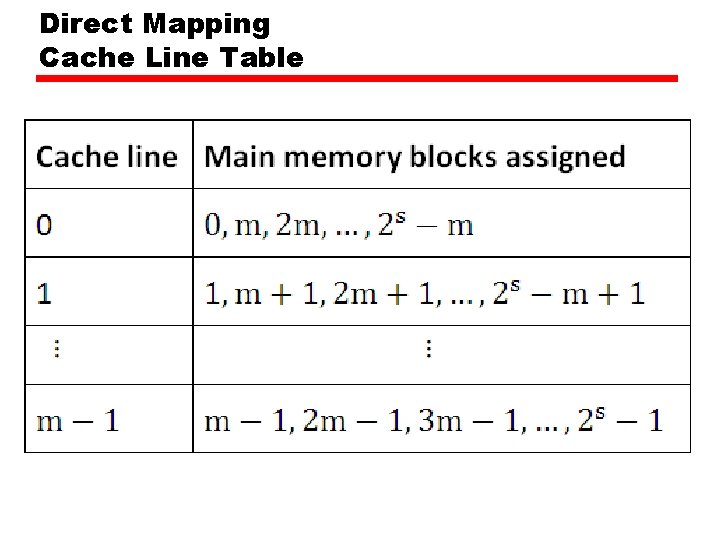
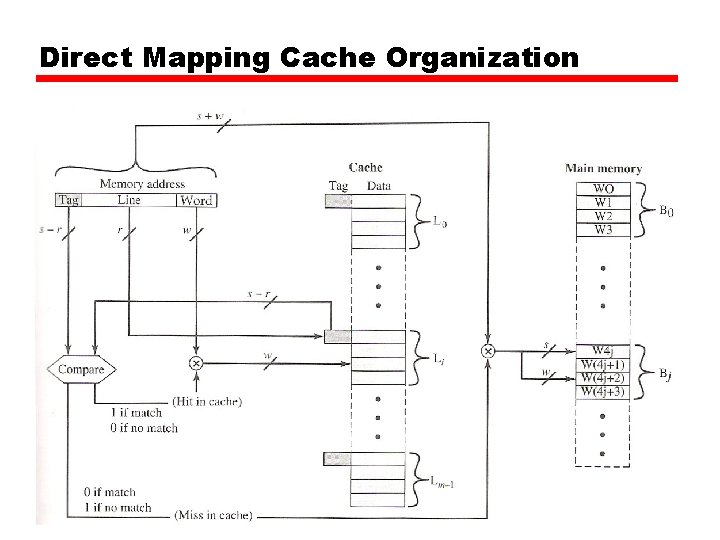
Direct Mapping • Each block of main memory maps to only one cache line —i. e. if a block is in cache, it must be in one specific place • Address is in two parts • Least Significant w bits identify unique word • Most Significant s bits specify one memory block • The MSBs are split into a cache line field r and a tag of s-r (most significant)
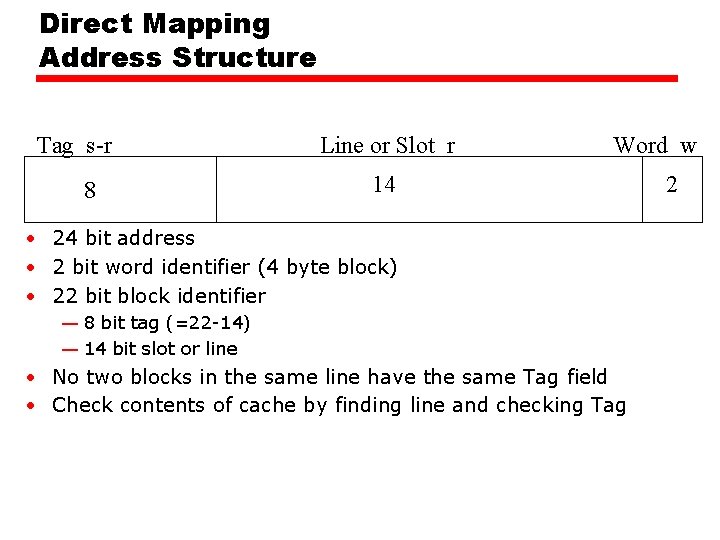
Direct Mapping Address Structure Tag s-r 8 Line or Slot r Word w 14 • 24 bit address • 2 bit word identifier (4 byte block) • 22 bit block identifier — 8 bit tag (=22 -14) — 14 bit slot or line • No two blocks in the same line have the same Tag field • Check contents of cache by finding line and checking Tag 2
Mapping from Main Memory to Cache: Direct and Associative
Direct Mapping Cache Line Table
Direct Mapping Cache Organization
Direct Mapping Example
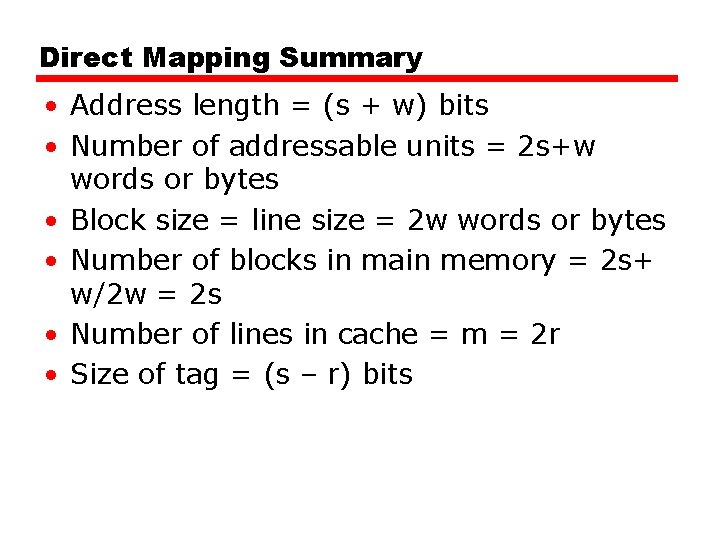
Direct Mapping Summary • Address length = (s + w) bits • Number of addressable units = 2 s+w words or bytes • Block size = line size = 2 w words or bytes • Number of blocks in main memory = 2 s+ w/2 w = 2 s • Number of lines in cache = m = 2 r • Size of tag = (s – r) bits
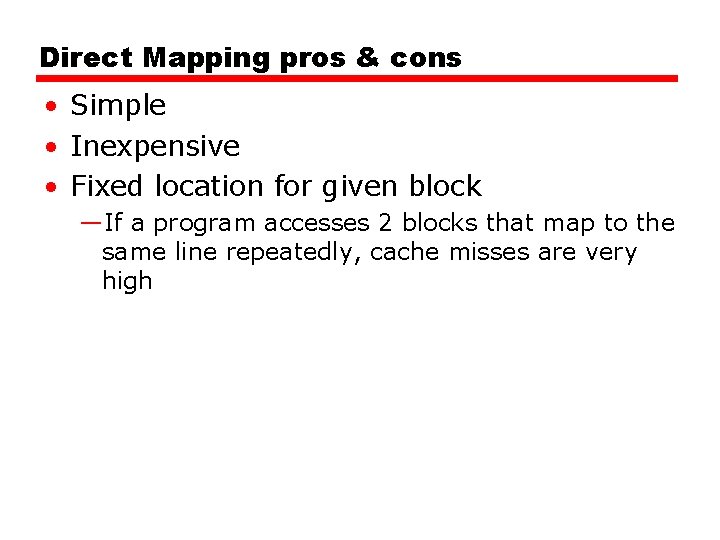
Direct Mapping pros & cons • Simple • Inexpensive • Fixed location for given block —If a program accesses 2 blocks that map to the same line repeatedly, cache misses are very high
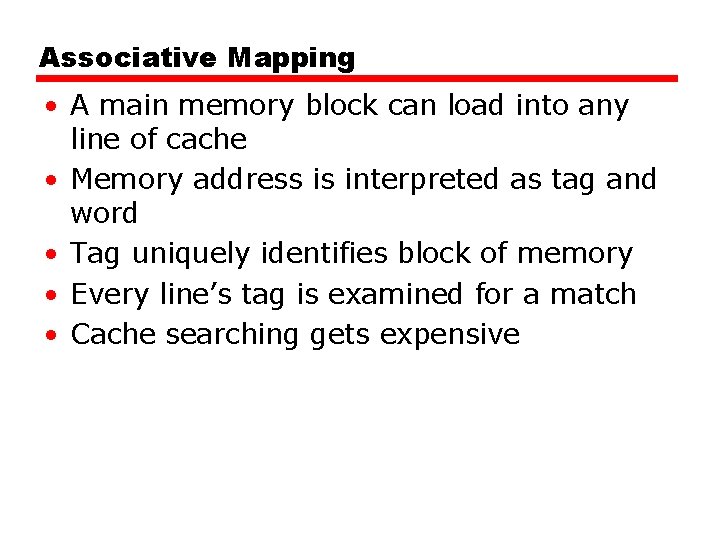
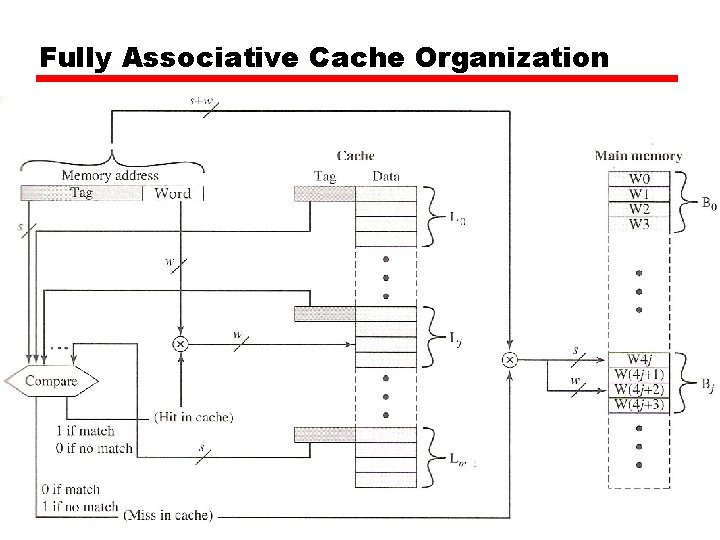
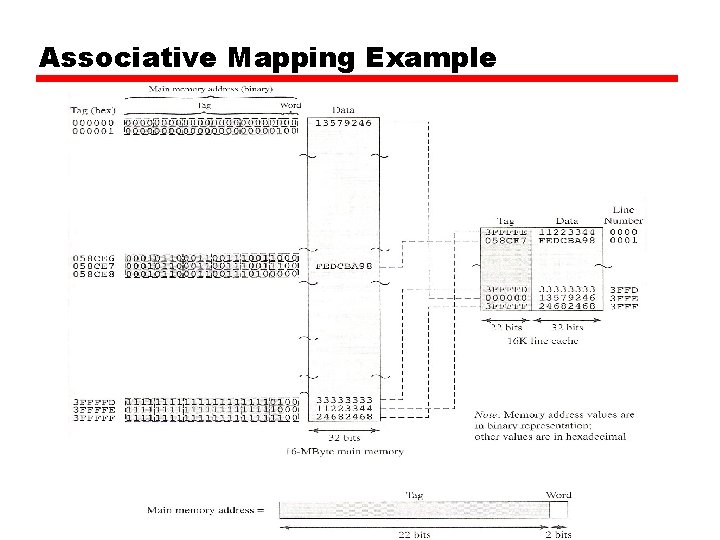
Associative Mapping • A main memory block can load into any line of cache • Memory address is interpreted as tag and word • Tag uniquely identifies block of memory • Every line’s tag is examined for a match • Cache searching gets expensive
Fully Associative Cache Organization
Associative Mapping Example
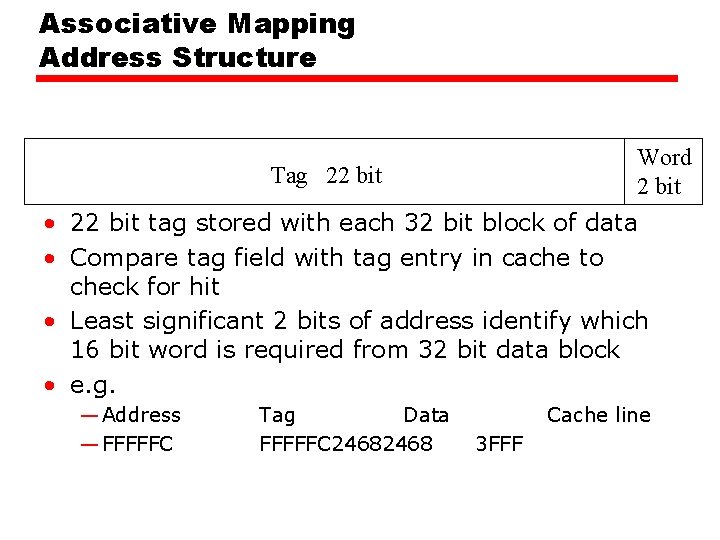
Associative Mapping Address Structure Word 2 bit Tag 22 bit • 22 bit tag stored with each 32 bit block of data • Compare tag field with tag entry in cache to check for hit • Least significant 2 bits of address identify which 16 bit word is required from 32 bit data block • e. g. — Address — FFFFFC Tag Data FFFFFC 2468 Cache line 3 FFF
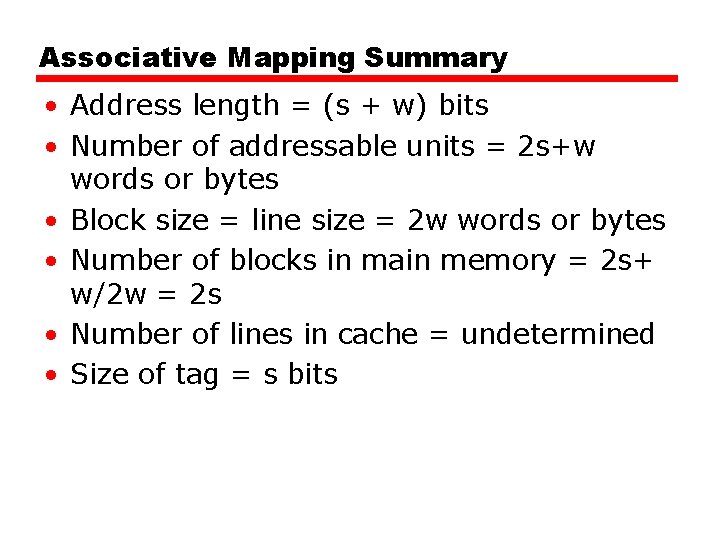
Associative Mapping Summary • Address length = (s + w) bits • Number of addressable units = 2 s+w words or bytes • Block size = line size = 2 w words or bytes • Number of blocks in main memory = 2 s+ w/2 w = 2 s • Number of lines in cache = undetermined • Size of tag = s bits
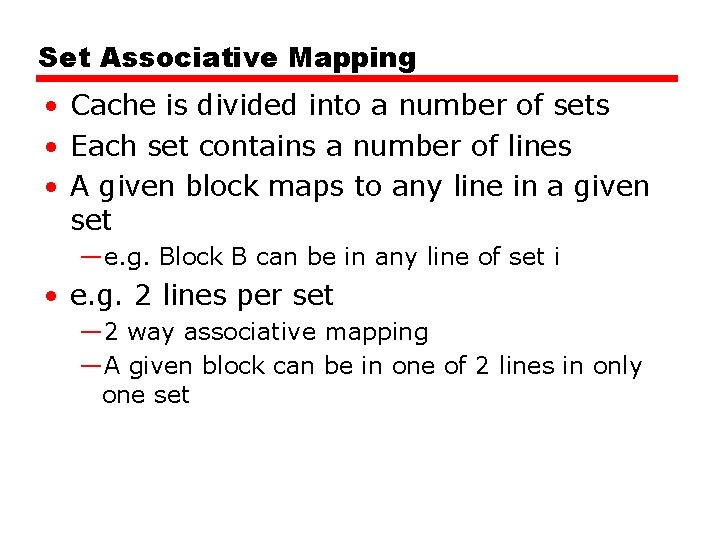
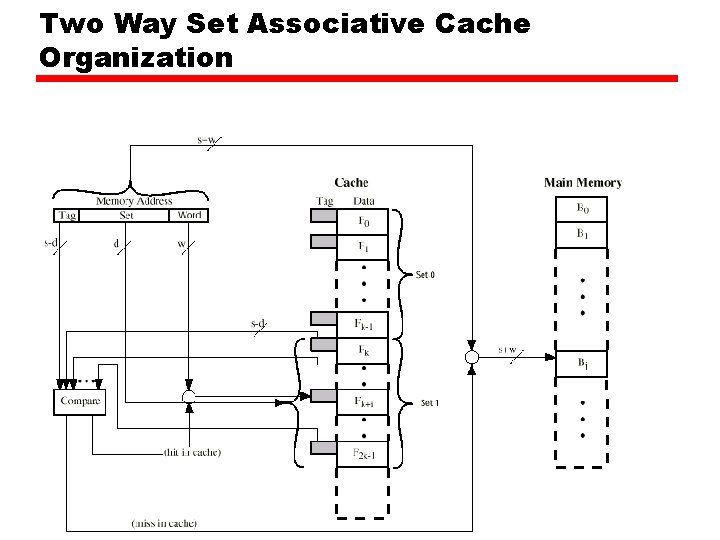
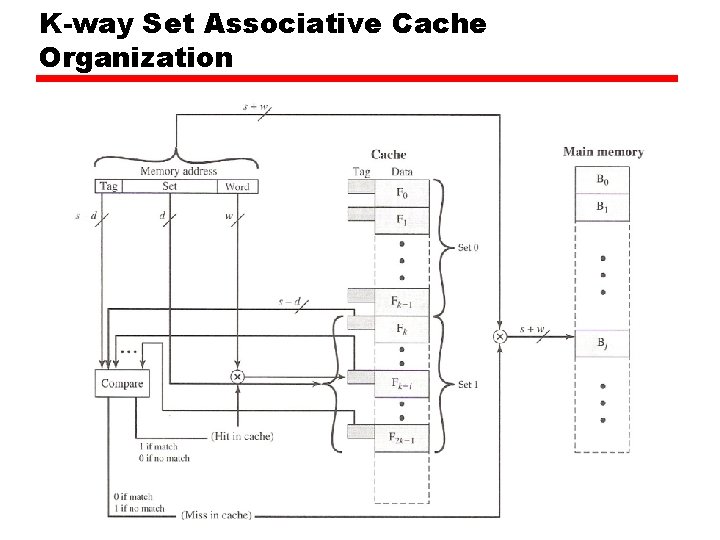
Set Associative Mapping • Cache is divided into a number of sets • Each set contains a number of lines • A given block maps to any line in a given set —e. g. Block B can be in any line of set i • e. g. 2 lines per set — 2 way associative mapping —A given block can be in one of 2 lines in only one set
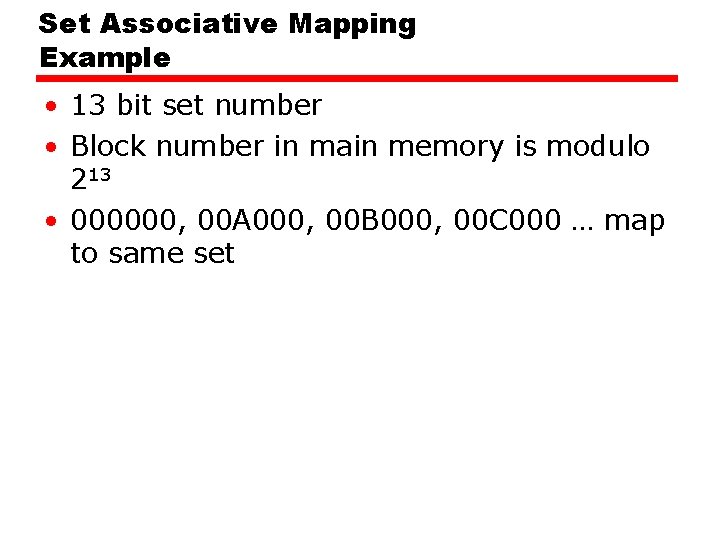
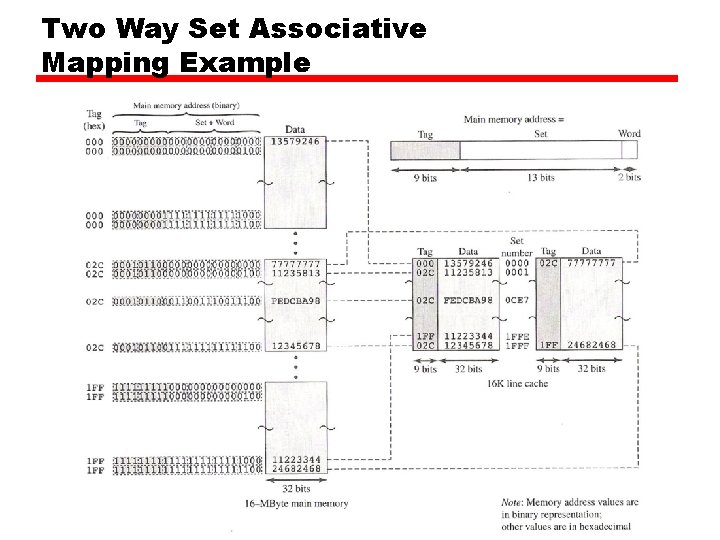
Set Associative Mapping Example • 13 bit set number • Block number in main memory is modulo 213 • 000000, 00 A 000, 00 B 000, 00 C 000 … map to same set
Two Way Set Associative Cache Organization
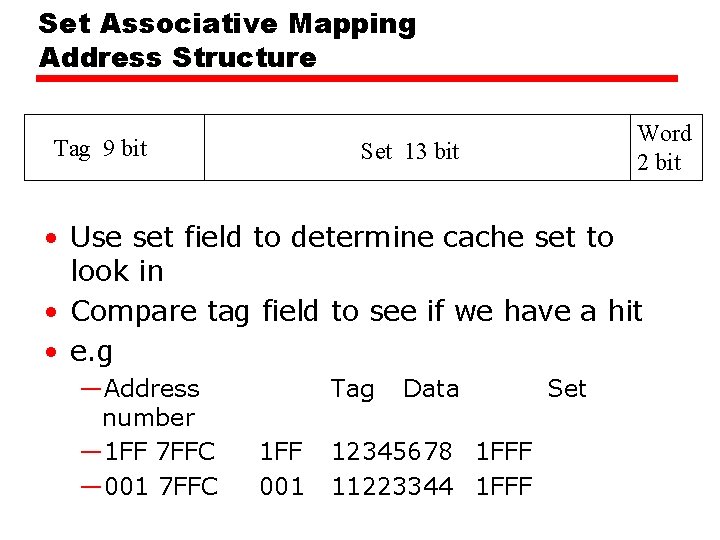
Set Associative Mapping Address Structure Tag 9 bit Word 2 bit Set 13 bit • Use set field to determine cache set to look in • Compare tag field to see if we have a hit • e. g —Address number — 1 FF 7 FFC — 001 7 FFC Tag 1 FF 001 Data 12345678 1 FFF 11223344 1 FFF Set
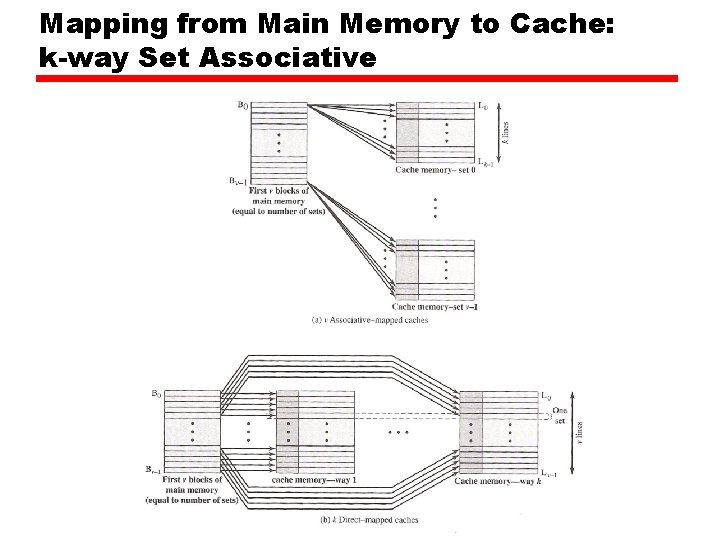
Mapping from Main Memory to Cache: k-way Set Associative
K-way Set Associative Cache Organization
Two Way Set Associative Mapping Example
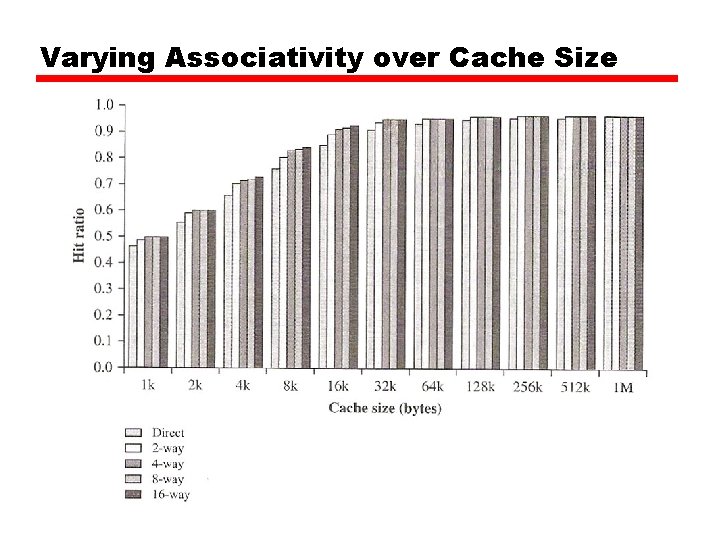
Varying Associativity over Cache Size
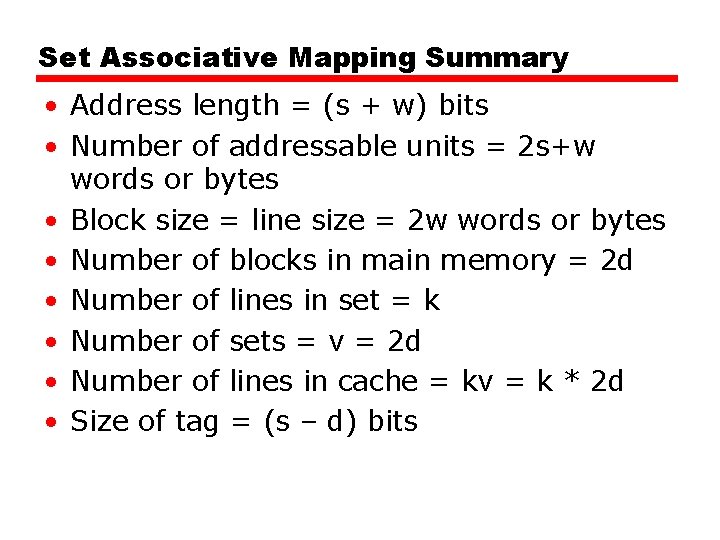
Set Associative Mapping Summary • Address length = (s + w) bits • Number of addressable units = 2 s+w words or bytes • Block size = line size = 2 w words or bytes • Number of blocks in main memory = 2 d • Number of lines in set = k • Number of sets = v = 2 d • Number of lines in cache = kv = k * 2 d • Size of tag = (s – d) bits
Replacement Algorithms (1) Direct mapping • No choice • Each block only maps to one line • Replace that line
Replacement Algorithms (2) Associative & Set Associative • Hardware implemented algorithm (speed) • Least Recently used (LRU) • e. g. in 2 way set associative —Which of the 2 block is lru? • First in first out (FIFO) —replace block that has been in cache longest • Least frequently used —replace block which has had fewest hits • Random
Write Policy • Must not overwrite a cache block unless main memory is up to date • Multiple CPUs may have individual caches • I/O may address main memory directly
Write through • All writes go to main memory as well as cache • Multiple CPUs can monitor main memory traffic to keep local (to CPU) cache up to date • Lots of traffic • Slows down writes • Remember bogus write through caches!
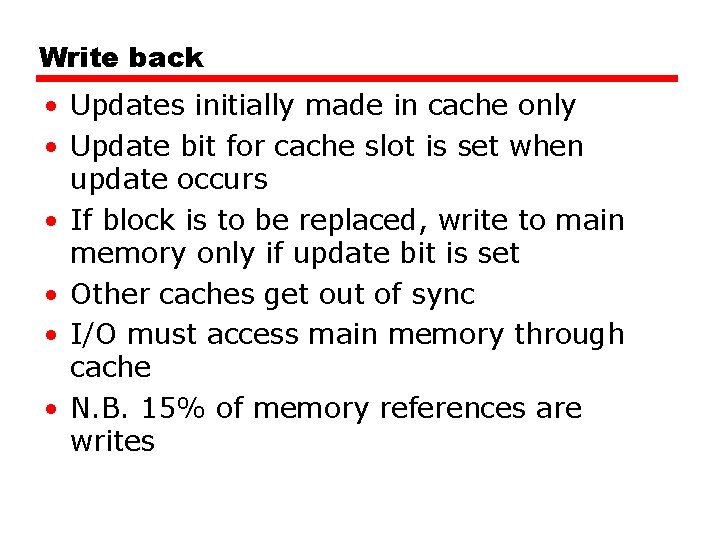
Write back • Updates initially made in cache only • Update bit for cache slot is set when update occurs • If block is to be replaced, write to main memory only if update bit is set • Other caches get out of sync • I/O must access main memory through cache • N. B. 15% of memory references are writes
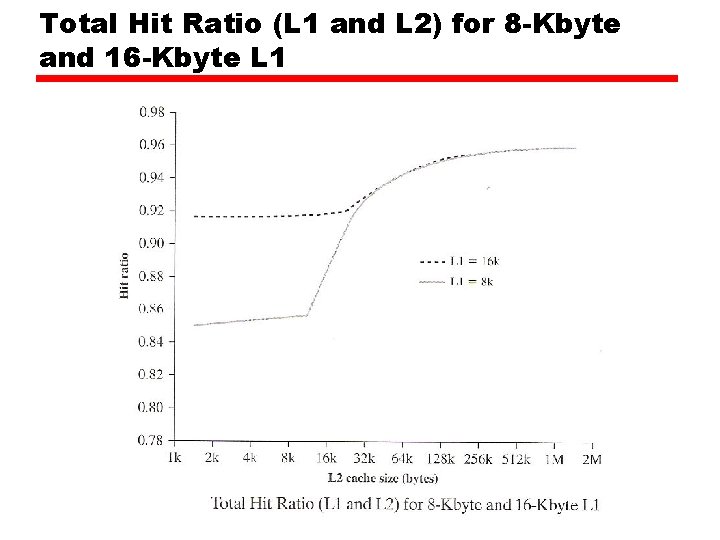
Total Hit Ratio (L 1 and L 2) for 8 -Kbyte and 16 -Kbyte L 1
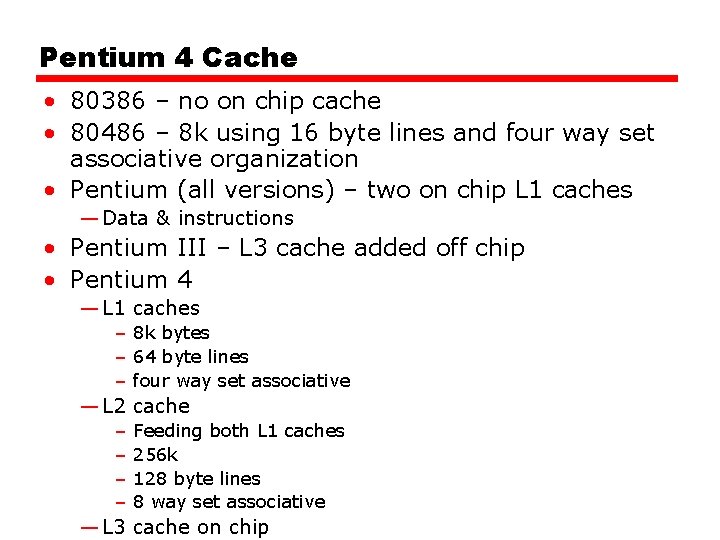
Pentium 4 Cache • 80386 – no on chip cache • 80486 – 8 k using 16 byte lines and four way set associative organization • Pentium (all versions) – two on chip L 1 caches — Data & instructions • Pentium III – L 3 cache added off chip • Pentium 4 — L 1 caches – 8 k bytes – 64 byte lines – four way set associative — L 2 cache – – Feeding both L 1 caches 256 k 128 byte lines 8 way set associative — L 3 cache on chip
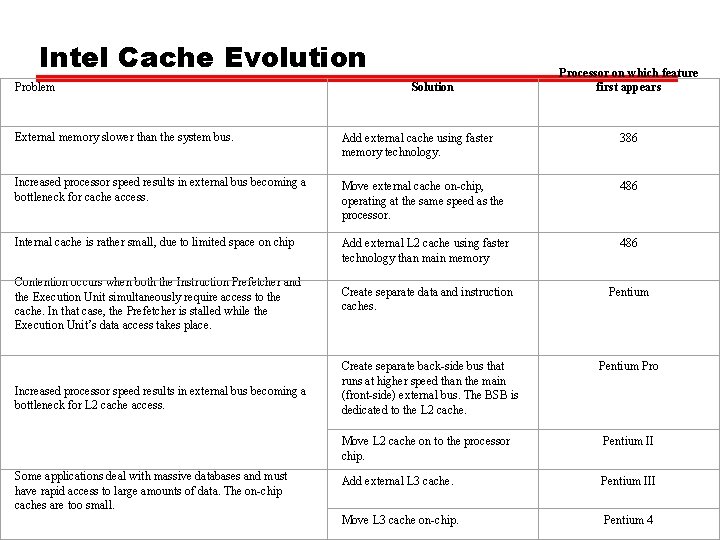
Intel Cache Evolution Problem Solution Processor on which feature first appears External memory slower than the system bus. Add external cache using faster memory technology. 386 Increased processor speed results in external bus becoming a bottleneck for cache access. Move external cache on-chip, operating at the same speed as the processor. 486 Internal cache is rather small, due to limited space on chip Add external L 2 cache using faster technology than main memory 486 Create separate data and instruction caches. Pentium Create separate back-side bus that runs at higher speed than the main (front-side) external bus. The BSB is dedicated to the L 2 cache. Pentium Pro Contention occurs when both the Instruction Prefetcher and the Execution Unit simultaneously require access to the cache. In that case, the Prefetcher is stalled while the Execution Unit’s data access takes place. Increased processor speed results in external bus becoming a bottleneck for L 2 cache access. Some applications deal with massive databases and must have rapid access to large amounts of data. The on-chip caches are too small. Move L 2 cache on to the processor chip. Pentium II Add external L 3 cache. Pentium III Move L 3 cache on-chip. Pentium 4
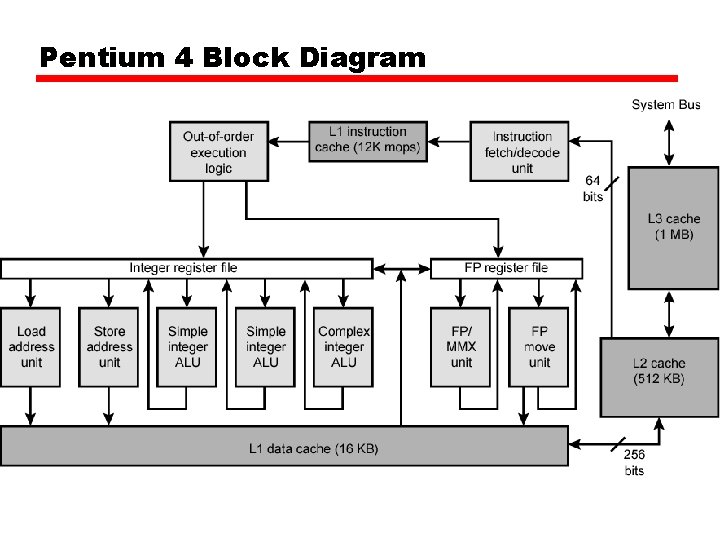
Pentium 4 Block Diagram
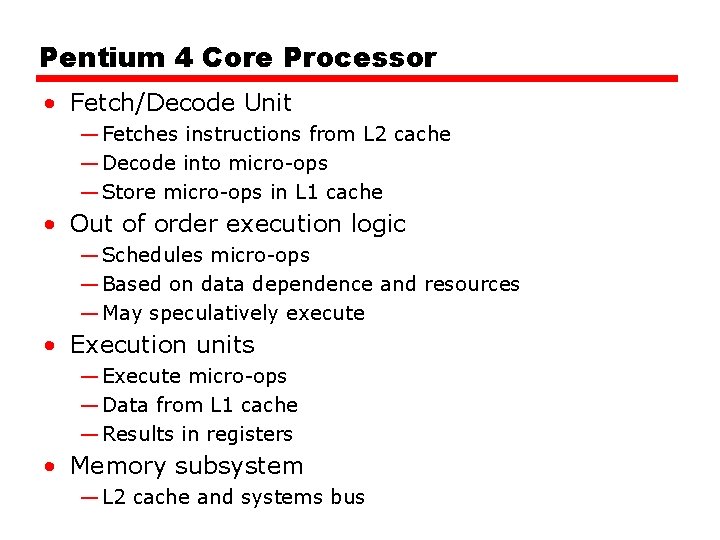
Pentium 4 Core Processor • Fetch/Decode Unit — Fetches instructions from L 2 cache — Decode into micro-ops — Store micro-ops in L 1 cache • Out of order execution logic — Schedules micro-ops — Based on data dependence and resources — May speculatively execute • Execution units — Execute micro-ops — Data from L 1 cache — Results in registers • Memory subsystem — L 2 cache and systems bus
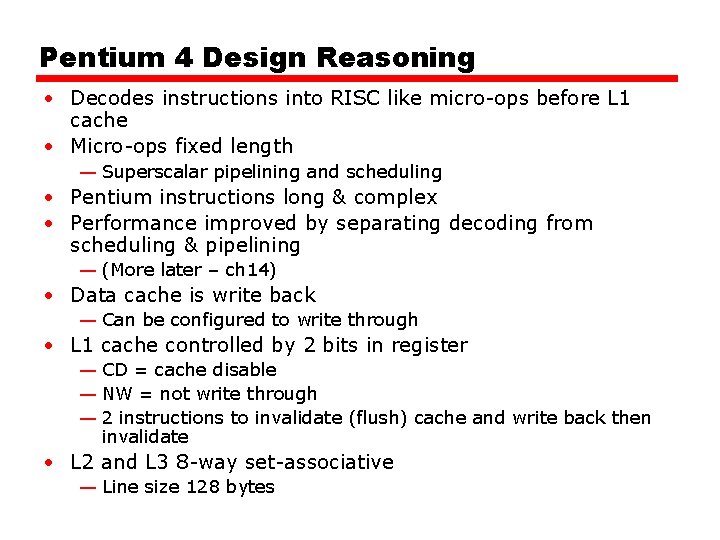
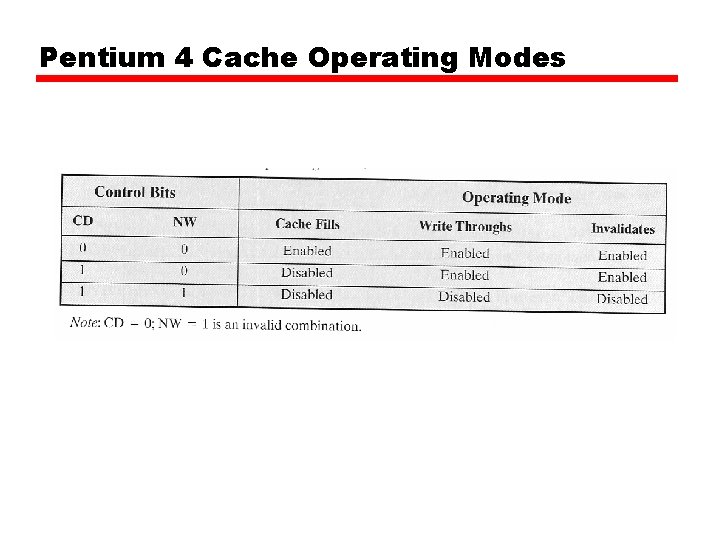
Pentium 4 Design Reasoning • Decodes instructions into RISC like micro-ops before L 1 cache • Micro-ops fixed length — Superscalar pipelining and scheduling • Pentium instructions long & complex • Performance improved by separating decoding from scheduling & pipelining — (More later – ch 14) • Data cache is write back — Can be configured to write through • L 1 cache controlled by 2 bits in register — CD = cache disable — NW = not write through — 2 instructions to invalidate (flush) cache and write back then invalidate • L 2 and L 3 8 -way set-associative — Line size 128 bytes
Pentium 4 Cache Operating Modes
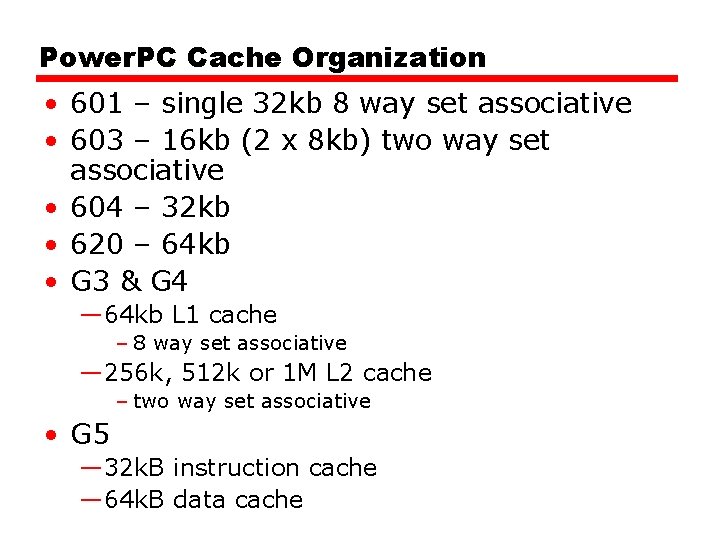
Power. PC Cache Organization • 601 – single 32 kb 8 way set associative • 603 – 16 kb (2 x 8 kb) two way set associative • 604 – 32 kb • 620 – 64 kb • G 3 & G 4 — 64 kb L 1 cache – 8 way set associative — 256 k, 512 k or 1 M L 2 cache – two way set associative • G 5 — 32 k. B instruction cache — 64 k. B data cache
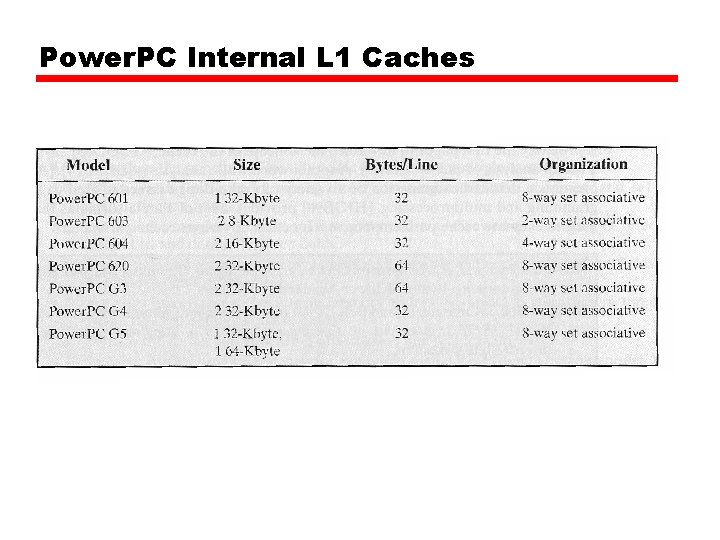
Power. PC Internal L 1 Caches
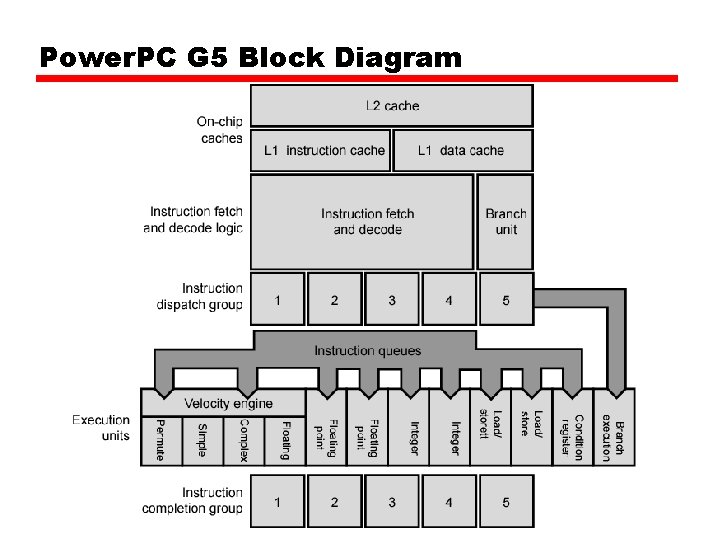
Power. PC G 5 Block Diagram
Internet Sources • Manufacturer sites —Intel —IBM/Motorola • Search on cache
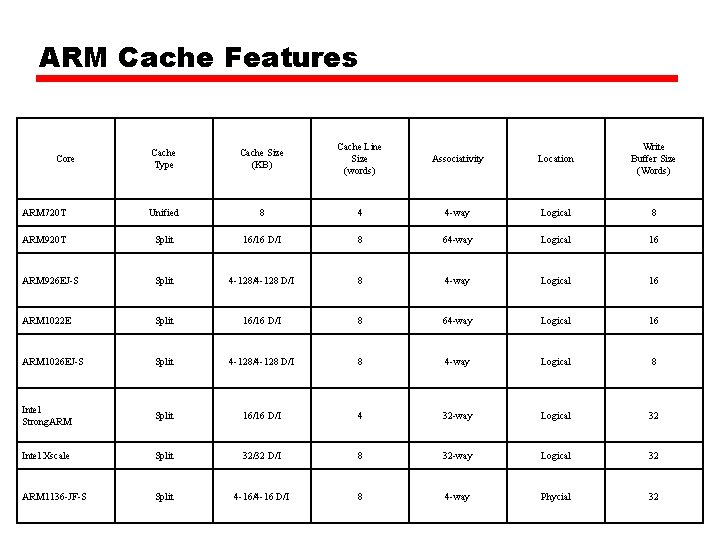
ARM Cache Features Cache Type Cache Size (KB) Cache Line Size (words) Associativity Location Write Buffer Size (Words) ARM 720 T Unified 8 4 4 -way Logical 8 ARM 920 T Split 16/16 D/I 8 64 -way Logical 16 ARM 926 EJ-S Split 4 -128/4 -128 D/I 8 4 -way Logical 16 ARM 1022 E Split 16/16 D/I 8 64 -way Logical 16 ARM 1026 EJ-S Split 4 -128/4 -128 D/I 8 4 -way Logical 8 Intel Strong. ARM Split 16/16 D/I 4 32 -way Logical 32 Intel Xscale Split 32/32 D/I 8 32 -way Logical 32 ARM 1136 -JF-S Split 4 -16/4 -16 D/I 8 4 -way Phycial 32 Core
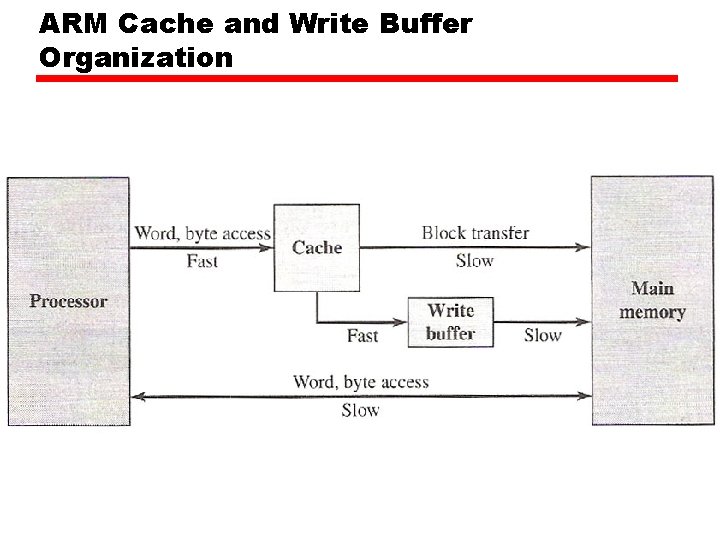
ARM Cache and Write Buffer Organization
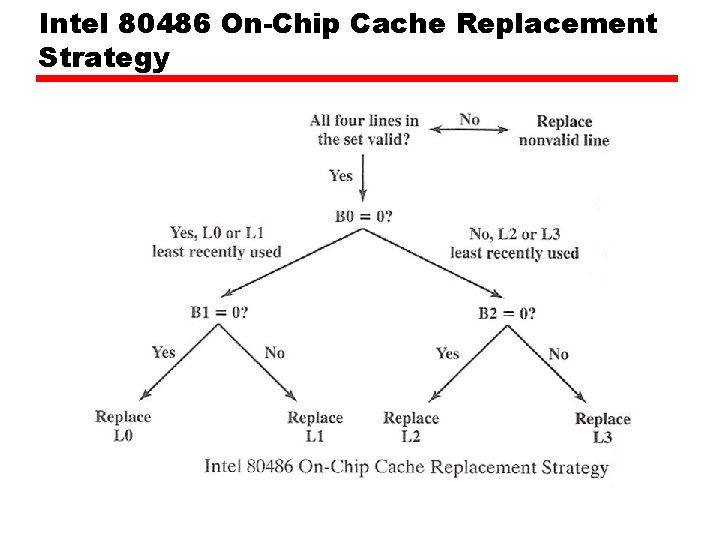
Intel 80486 On-Chip Cache Replacement Strategy
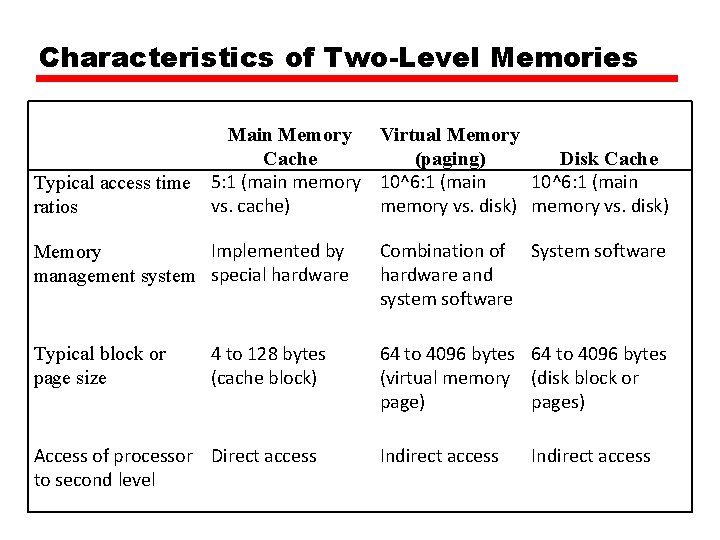
Characteristics of Two-Level Memories Main Memory Virtual Memory Cache (paging) Disk Cache 10^6: 1 (main Typical access time 5: 1 (main memory 10^6: 1 (main vs. cache) memory vs. disk) ratios Implemented by Memory management system special hardware Typical block or page size 4 to 128 bytes (cache block) Access of processor Direct access to second level Combination of System software hardware and system software 64 to 4096 bytes (virtual memory (disk block or page) pages) Indirect access
Relative Dynamic Frequency of High. Level Language Operations Study Language Workload [HUCK 83] Pascal Scientific [KNUT 71] FORTRAN Student Assign 74 Loop [PATT 82 a] [TANE 78] SAL System Pascal System C System 67 45 38 42 4 3 5 3 4 Call 1 3 15 12 12 IF 20 11 29 43 36 GOTO 2 9 - 3 - Other - 7 6 1 6
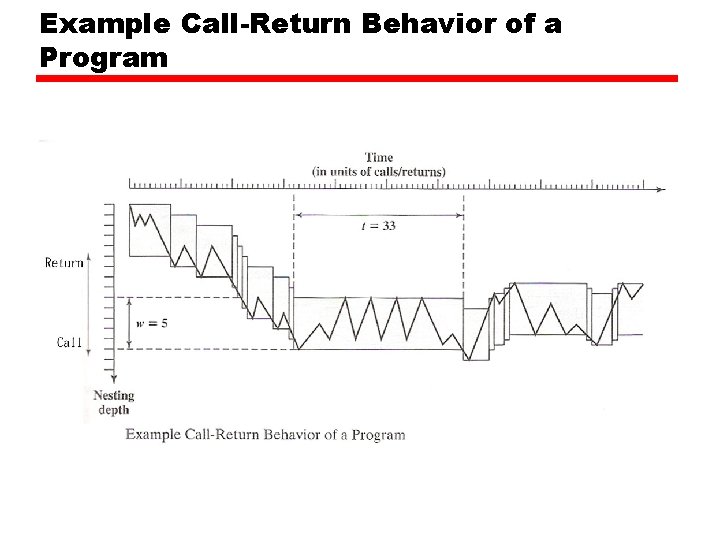
Example Call-Return Behavior of a Program
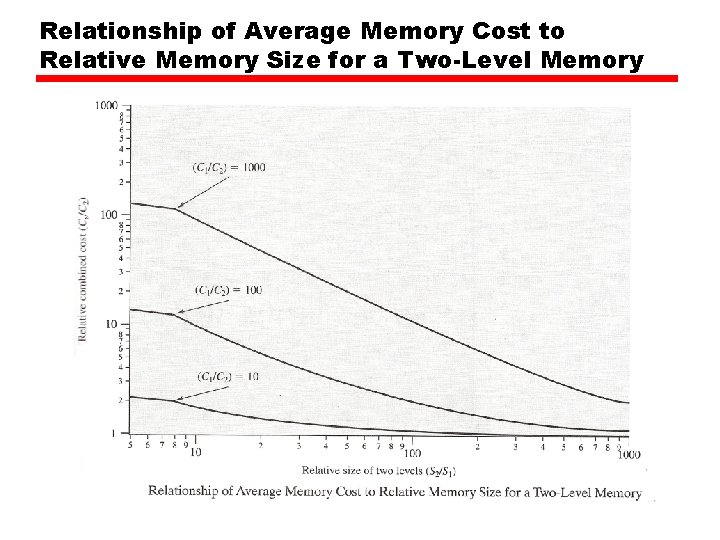
Relationship of Average Memory Cost to Relative Memory Size for a Two-Level Memory
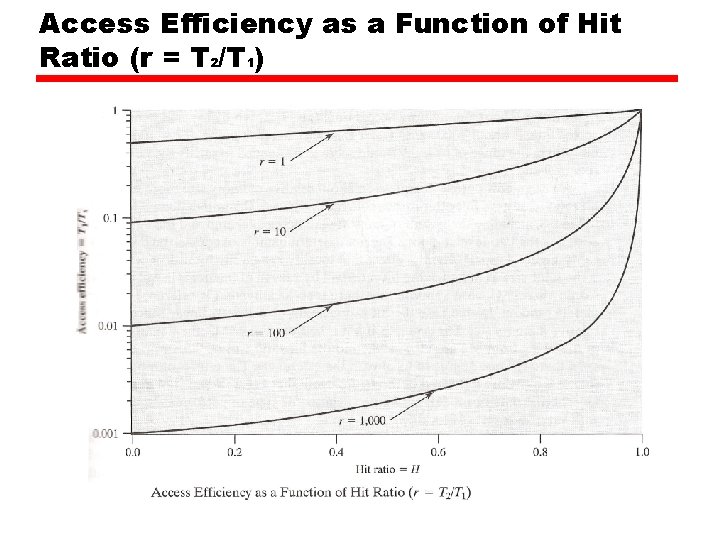
Access Efficiency as a Function of Hit Ratio (r = T 2/T 1)
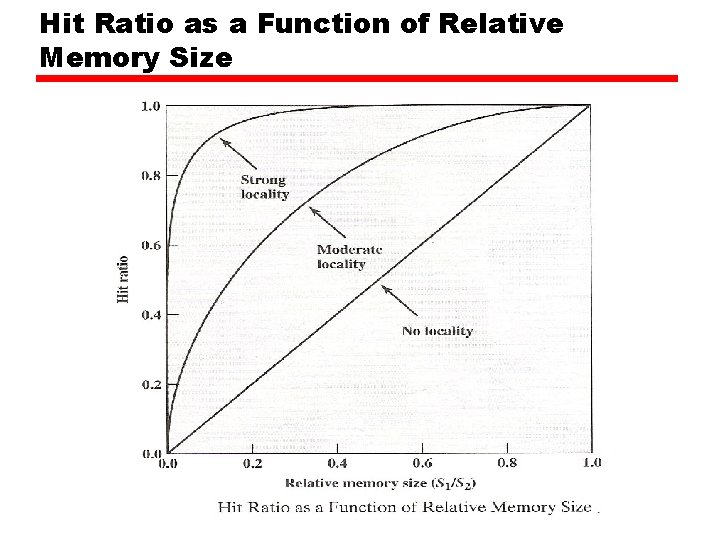
Hit Ratio as a Function of Relative Memory Size