
Wide Area Networks Intro to Frame Relay Using
- Slides: 31
Wide Area Networks Intro to Frame Relay Using Packet Switching Technology to connect LANs across long distances CIS V 2008. 4 mtaylor@ecpi. edu
Objectives n Describe Frame Relay n Frame Relay Terminology n Features/Advantages of Frame Relay n Implementing Frame Relay n Verifying and Troubleshooting Frame Relay
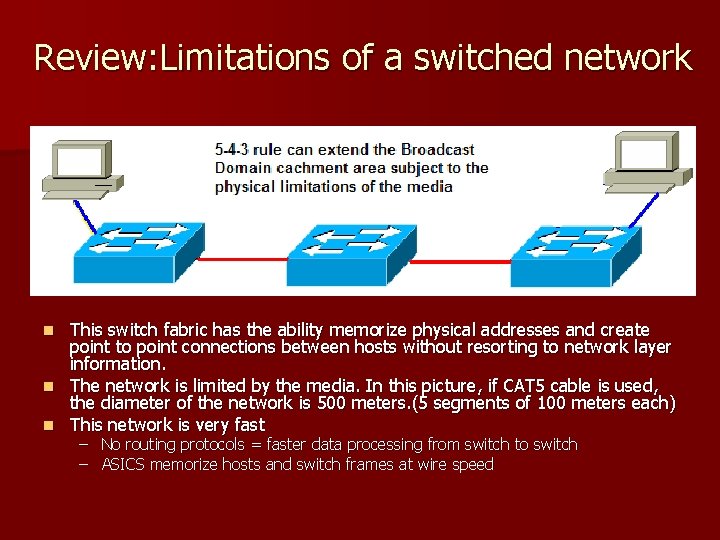
Review: Limitations of a switched network This switch fabric has the ability memorize physical addresses and create point to point connections between hosts without resorting to network layer information. n The network is limited by the media. In this picture, if CAT 5 cable is used, the diameter of the network is 500 meters. (5 segments of 100 meters each) n This network is very fast n – No routing protocols = faster data processing from switch to switch – ASICS memorize hosts and switch frames at wire speed
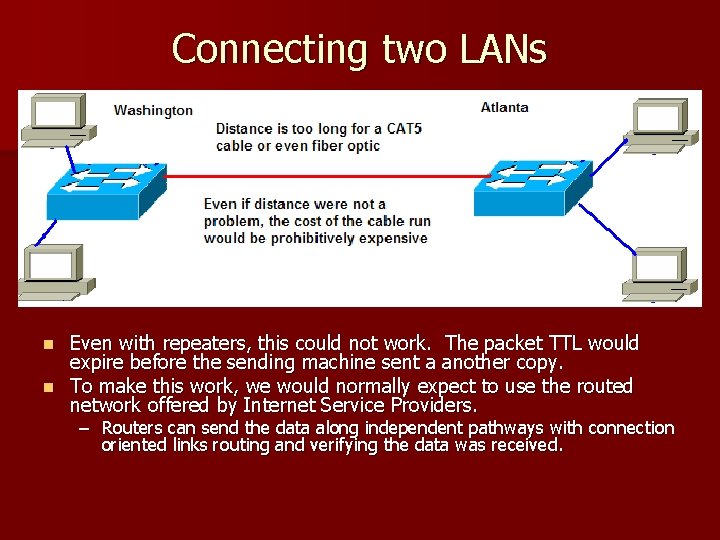
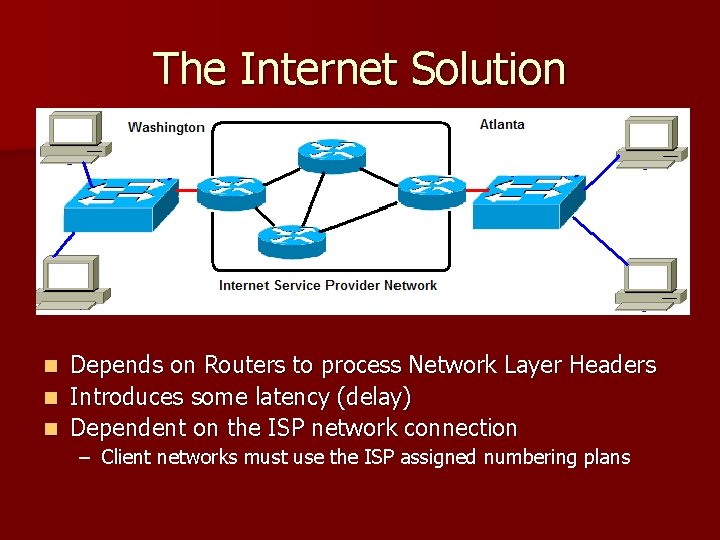
Connecting two LANs Even with repeaters, this could not work. The packet TTL would expire before the sending machine sent a another copy. n To make this work, we would normally expect to use the routed network offered by Internet Service Providers. n – Routers can send the data along independent pathways with connection oriented links routing and verifying the data was received.
The Internet Solution Depends on Routers to process Network Layer Headers n Introduces some latency (delay) n Dependent on the ISP network connection n – Client networks must use the ISP assigned numbering plans
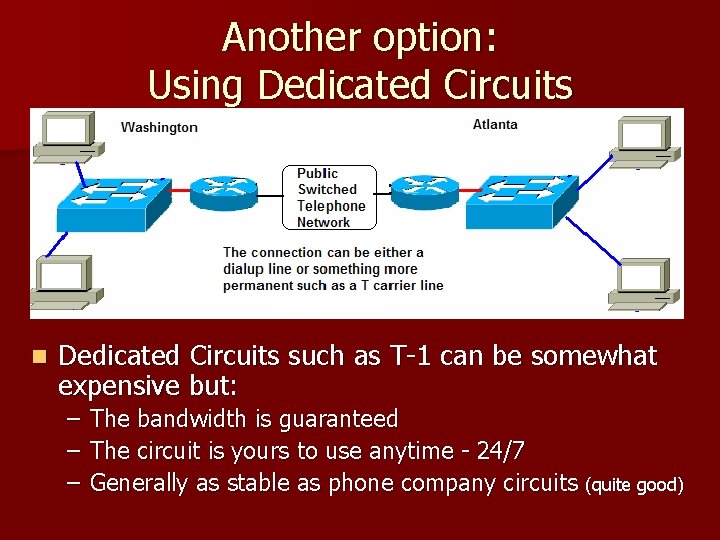
Another option: Using Dedicated Circuits n Dedicated Circuits such as T-1 can be somewhat expensive but: – – – The bandwidth is guaranteed The circuit is yours to use anytime - 24/7 Generally as stable as phone company circuits (quite good)
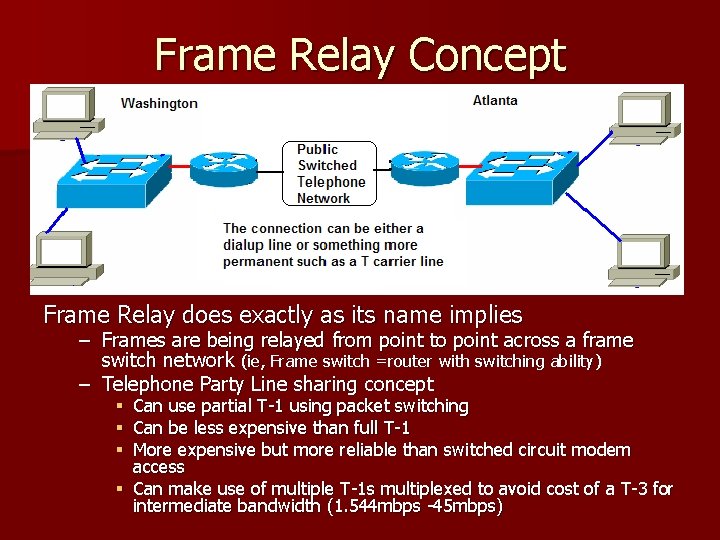
Frame Relay Concept Frame Relay does exactly as its name implies – Frames are being relayed from point to point across a frame switch network (ie, Frame switch =router with switching ability) – Telephone Party Line sharing concept Can use partial T-1 using packet switching Can be less expensive than full T-1 More expensive but more reliable than switched circuit modem access § Can make use of multiple T-1 s multiplexed to avoid cost of a T-3 for intermediate bandwidth (1. 544 mbps -45 mbps) § § §
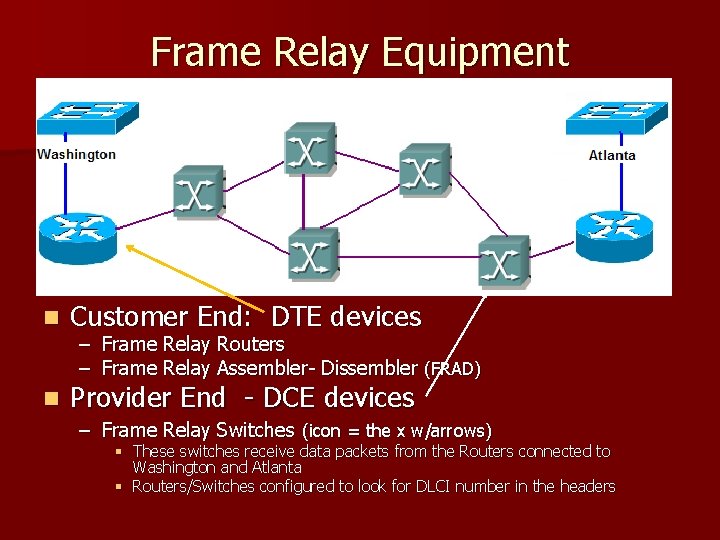
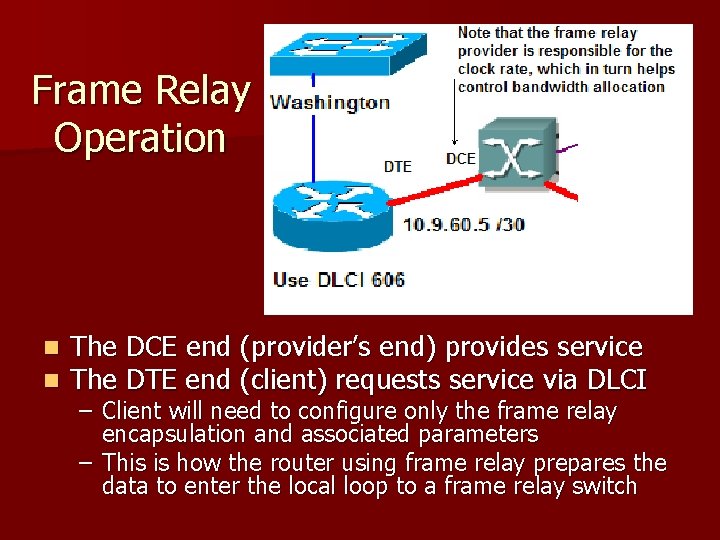
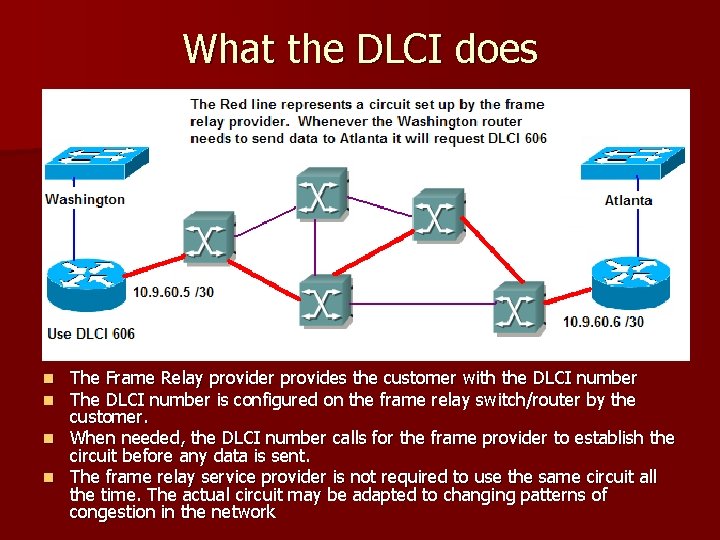
Frame Relay Equipment n Customer End: DTE devices n Provider End - DCE devices – – Frame Relay Routers Frame Relay Assembler- Dissembler (FRAD) – Frame Relay Switches (icon = the x w/arrows) § These switches receive data packets from the Routers connected to Washington and Atlanta § Routers/Switches configured to look for DLCI number in the headers
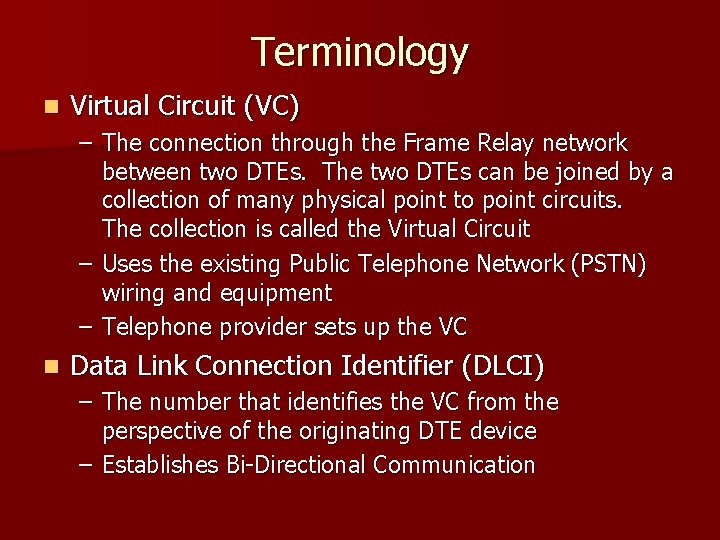
Terminology n Virtual Circuit (VC) – The connection through the Frame Relay network between two DTEs. The two DTEs can be joined by a collection of many physical point to point circuits. The collection is called the Virtual Circuit – Uses the existing Public Telephone Network (PSTN) wiring and equipment – Telephone provider sets up the VC n Data Link Connection Identifier (DLCI) – The number that identifies the VC from the perspective of the originating DTE device – Establishes Bi-Directional Communication
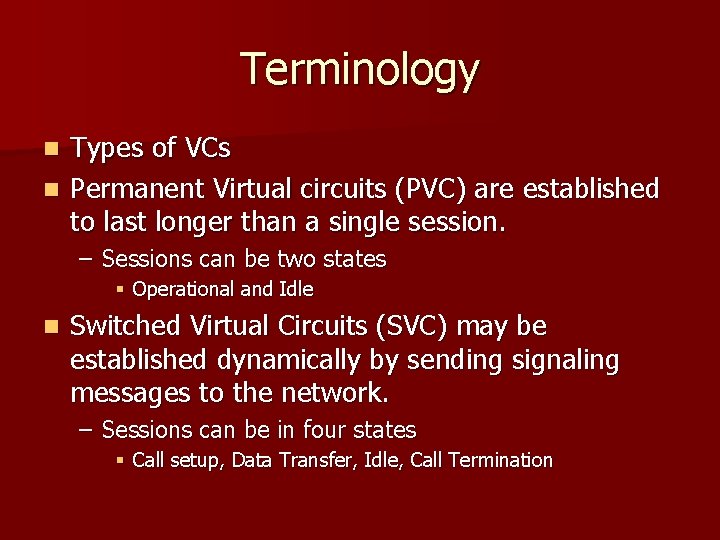
Terminology Types of VCs n Permanent Virtual circuits (PVC) are established to last longer than a single session. n – Sessions can be two states § Operational and Idle n Switched Virtual Circuits (SVC) may be established dynamically by sending signaling messages to the network. – Sessions can be in four states § Call setup, Data Transfer, Idle, Call Termination
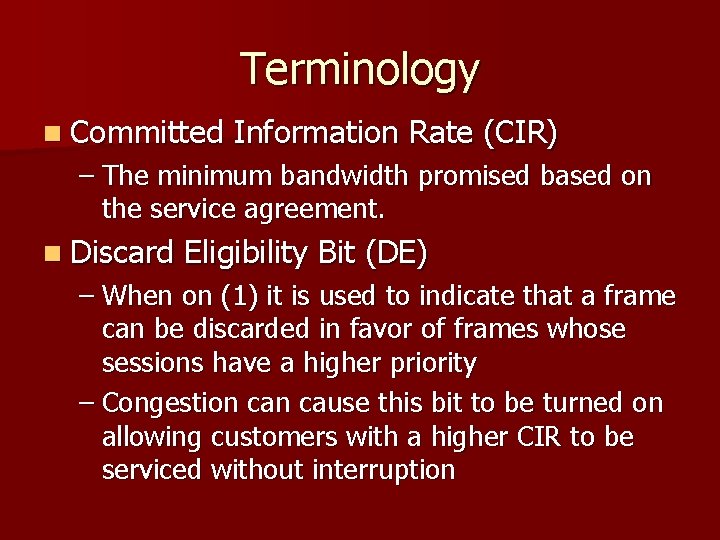
Terminology n Committed Information Rate (CIR) – The minimum bandwidth promised based on the service agreement. n Discard Eligibility Bit (DE) – When on (1) it is used to indicate that a frame can be discarded in favor of frames whose sessions have a higher priority – Congestion cause this bit to be turned on allowing customers with a higher CIR to be serviced without interruption
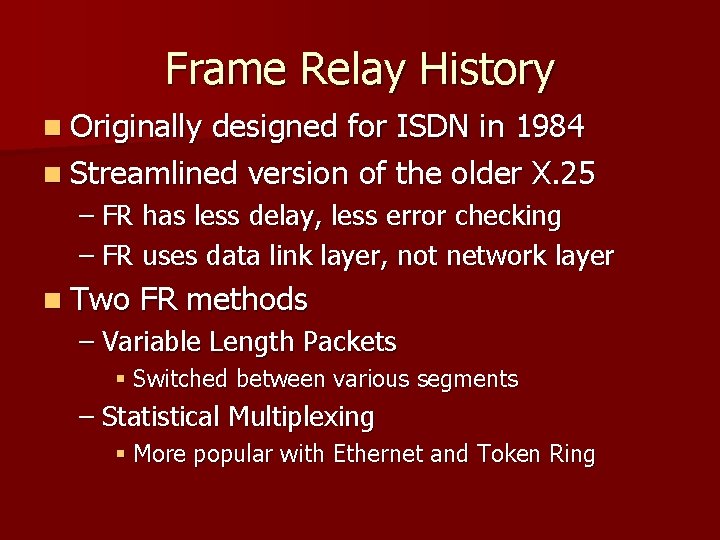
Frame Relay History n Originally designed for ISDN in 1984 n Streamlined version of the older X. 25 – FR has less delay, less error checking – FR uses data link layer, not network layer n Two FR methods – Variable Length Packets § Switched between various segments – Statistical Multiplexing § More popular with Ethernet and Token Ring
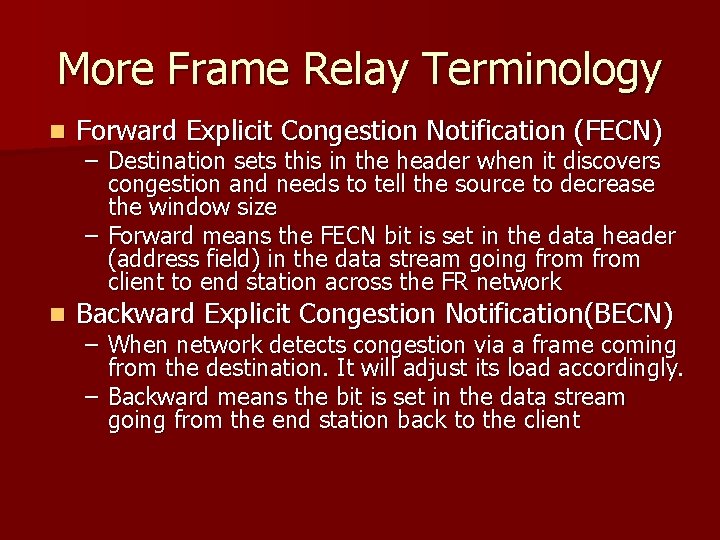
More Frame Relay Terminology n Forward Explicit Congestion Notification (FECN) n Backward Explicit Congestion Notification(BECN) – Destination sets this in the header when it discovers congestion and needs to tell the source to decrease the window size – Forward means the FECN bit is set in the data header (address field) in the data stream going from client to end station across the FR network – When network detects congestion via a frame coming from the destination. It will adjust its load accordingly. – Backward means the bit is set in the data stream going from the end station back to the client
Frame Relay History - LMI n (1990) Cisco/ DEC/ Nortel / Stratacom – Frame Relay needed interoperability – Consortium of 4 developed a series of extensions to the frame relay header – Extensions allowed different vendors usage of frame relay to be interoperable – Extensions were collectively referred to as the “Local Management Interface” (LMI) – Specifies connection status of PVCs – Allows for multicasting, global addressing
Frame Relay Operation n n The DCE end (provider’s end) provides service The DTE end (client) requests service via DLCI – Client will need to configure only the frame relay encapsulation and associated parameters – This is how the router using frame relay prepares the data to enter the local loop to a frame relay switch
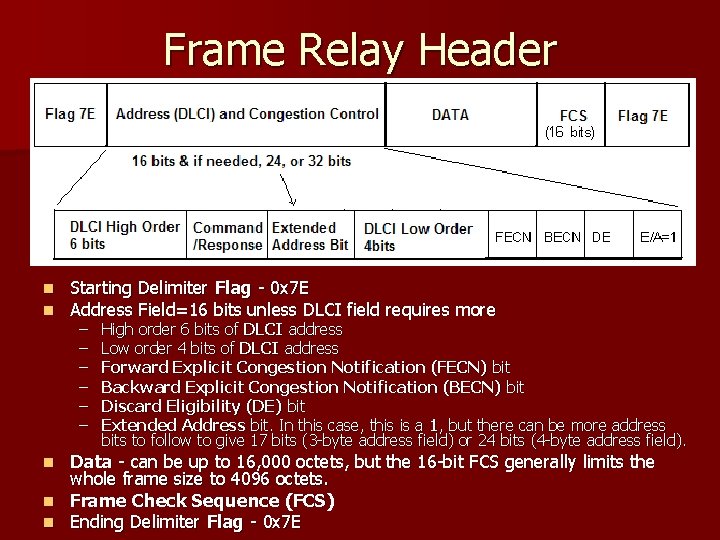
Frame Relay Header n n Starting Delimiter Flag - 0 x 7 E Address Field=16 bits unless DLCI field requires more – – – High order 6 bits of DLCI address Low order 4 bits of DLCI address Forward Explicit Congestion Notification (FECN) bit Backward Explicit Congestion Notification (BECN) bit Discard Eligibility (DE) bit Extended Address bit. In this case, this is a 1, but there can be more address bits to follow to give 17 bits (3 -byte address field) or 24 bits (4 -byte address field). Data - can be up to 16, 000 octets, but the 16 -bit FCS generally limits the whole frame size to 4096 octets. n Frame Check Sequence (FCS) n Ending Delimiter Flag - 0 x 7 E n
What the DLCI does The Frame Relay provider provides the customer with the DLCI number The DLCI number is configured on the frame relay switch/router by the customer. n When needed, the DLCI number calls for the frame provider to establish the circuit before any data is sent. n The frame relay service provider is not required to use the same circuit all the time. The actual circuit may be adapted to changing patterns of congestion in the network n n
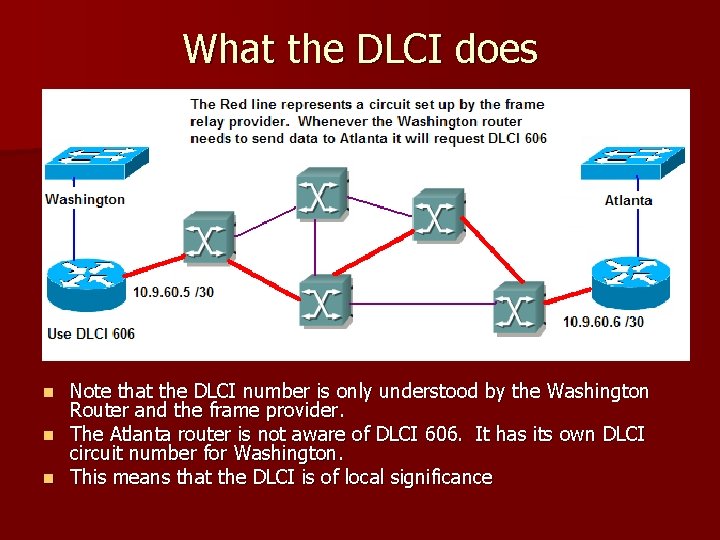
What the DLCI does Note that the DLCI number is only understood by the Washington Router and the frame provider. n The Atlanta router is not aware of DLCI 606. It has its own DLCI circuit number for Washington. n This means that the DLCI is of local significance n
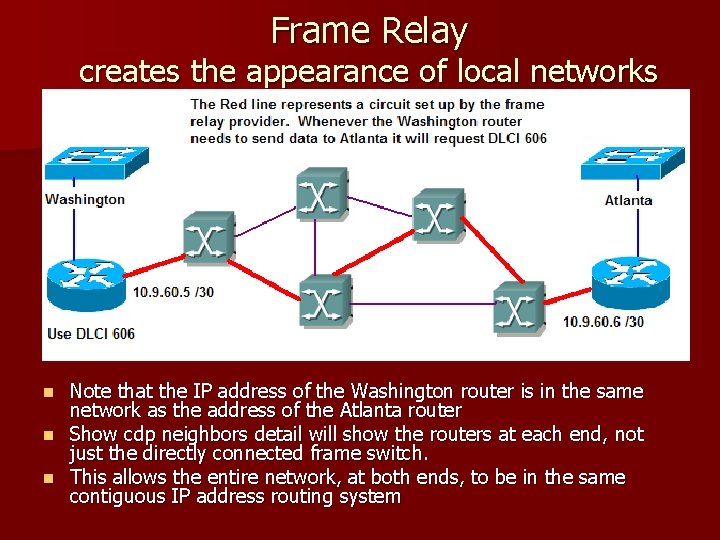
Frame Relay creates the appearance of local networks Note that the IP address of the Washington router is in the same network as the address of the Atlanta router n Show cdp neighbors detail will show the routers at each end, not just the directly connected frame switch. n This allows the entire network, at both ends, to be in the same contiguous IP address routing system n
Benefits of Frame Relay n Reduced WAN Network Costs n Better Performance n Better interoperability with E 1/J 1 international line types n Protocol Independent – Does not care whether the network protocol is IP, IPX, Appletalk, etc.
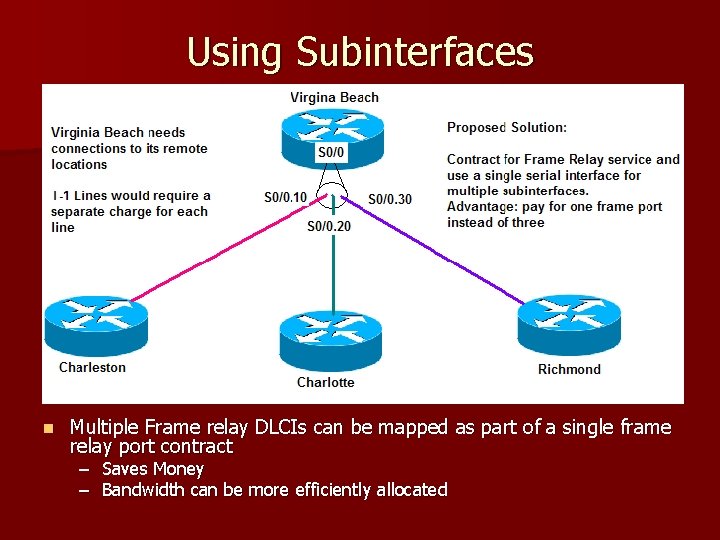
Using Subinterfaces n Multiple Frame relay DLCIs can be mapped as part of a single frame relay port contract – Saves Money – Bandwidth can be more efficiently allocated
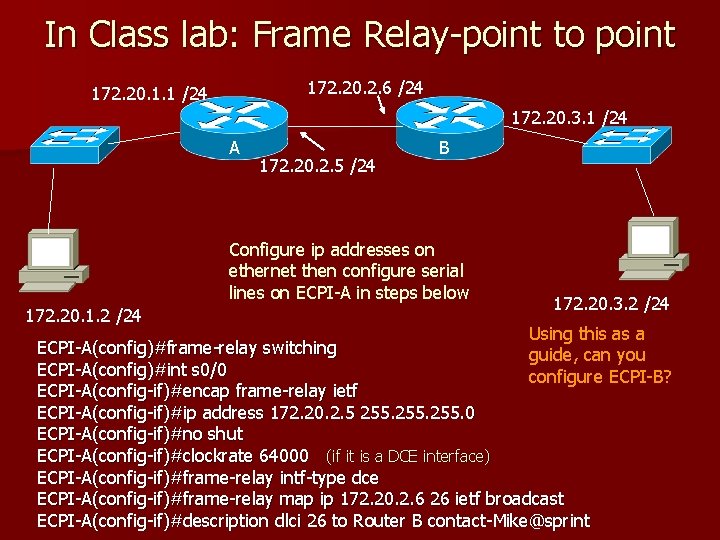
In Class lab: Frame Relay-point to point 172. 20. 2. 6 /24 172. 20. 1. 1 /24 172. 20. 3. 1 /24 A 172. 20. 2. 5 /24 B Configure ip addresses on ethernet then configure serial lines on ECPI-A in steps below 172. 20. 1. 2 /24 172. 20. 3. 2 /24 Using this as a guide, can you configure ECPI-B? ECPI-A(config)#frame-relay switching ECPI-A(config)#int s 0/0 ECPI-A(config-if)#encap frame-relay ietf ECPI-A(config-if)#ip address 172. 20. 2. 5 255. 0 ECPI-A(config-if)#no shut ECPI-A(config-if)#clockrate 64000 (if it is a DCE interface) ECPI-A(config-if)#frame-relay intf-type dce ECPI-A(config-if)#frame-relay map ip 172. 20. 2. 6 26 ietf broadcast ECPI-A(config-if)#description dlci 26 to Router B contact-Mike@sprint
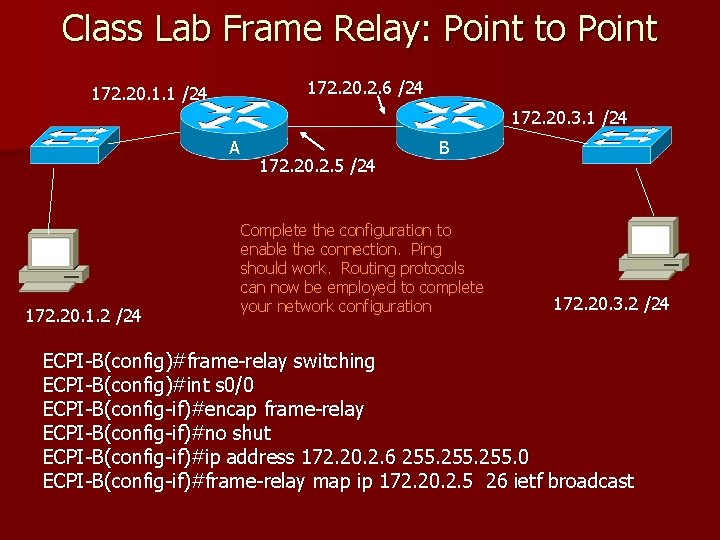
Class Lab Frame Relay: Point to Point 172. 20. 2. 6 /24 172. 20. 1. 1 /24 172. 20. 3. 1 /24 A 172. 20. 1. 2 /24 172. 20. 2. 5 /24 B Complete the configuration to enable the connection. Ping should work. Routing protocols can now be employed to complete your network configuration 172. 20. 3. 2 /24 ECPI-B(config)#frame-relay switching ECPI-B(config)#int s 0/0 ECPI-B(config-if)#encap frame-relay ECPI-B(config-if)#no shut ECPI-B(config-if)#ip address 172. 20. 2. 6 255. 0 ECPI-B(config-if)#frame-relay map ip 172. 20. 2. 5 26 ietf broadcast
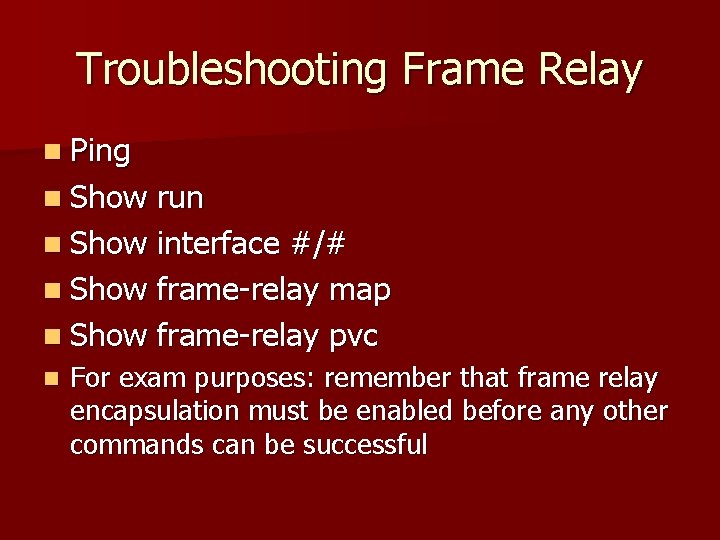
Troubleshooting Frame Relay n Ping n Show run n Show interface #/# n Show frame-relay map n Show frame-relay pvc n For exam purposes: remember that frame relay encapsulation must be enabled before any other commands can be successful
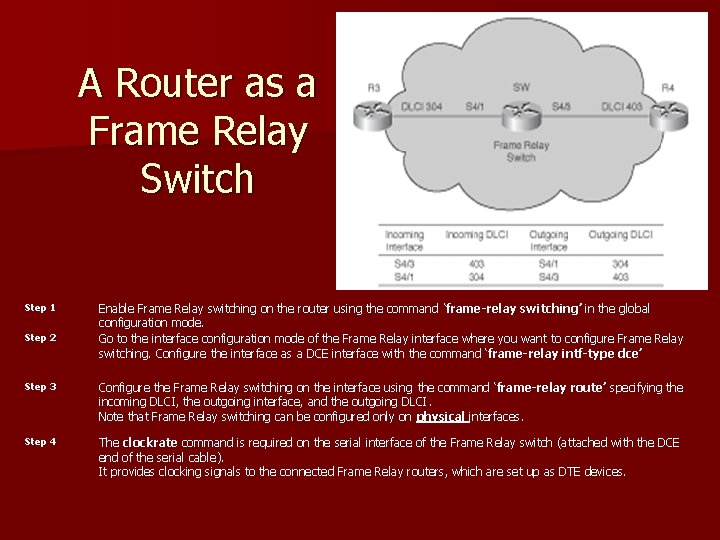
A Router as a Frame Relay Switch Step 1 Step 2 Enable Frame Relay switching on the router using the command ‘frame-relay switching’ in the global configuration mode. Go to the interface configuration mode of the Frame Relay interface where you want to configure Frame Relay switching. Configure the interface as a DCE interface with the command ‘frame-relay intf-type dce’ Step 3 Configure the Frame Relay switching on the interface using the command ‘frame-relay route’ specifying the incoming DLCI, the outgoing interface, and the outgoing DLCI. Note that Frame Relay switching can be configured only on physical interfaces. Step 4 The clockrate command is required on the serial interface of the Frame Relay switch (attached with the DCE end of the serial cable). It provides clocking signals to the connected Frame Relay routers, which are set up as DTE devices.
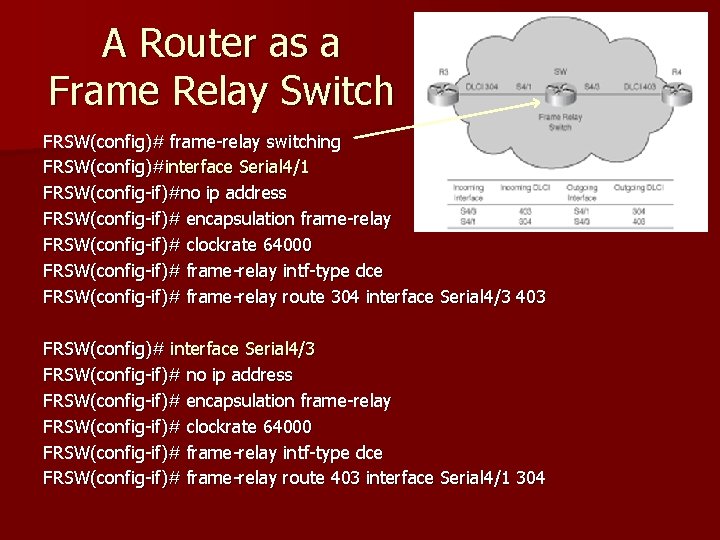
A Router as a Frame Relay Switch FRSW(config)# frame-relay switching FRSW(config)#interface Serial 4/1 FRSW(config-if)#no ip address FRSW(config-if)# encapsulation frame-relay FRSW(config-if)# clockrate 64000 FRSW(config-if)# frame-relay intf-type dce FRSW(config-if)# frame-relay route 304 interface Serial 4/3 403 FRSW(config)# interface Serial 4/3 FRSW(config-if)# no ip address FRSW(config-if)# encapsulation frame-relay FRSW(config-if)# clockrate 64000 FRSW(config-if)# frame-relay intf-type dce FRSW(config-if)# frame-relay route 403 interface Serial 4/1 304
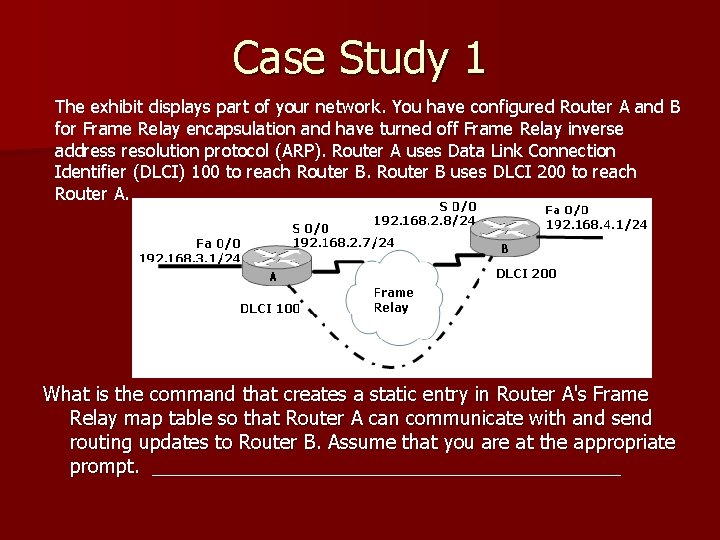
Case Study 1 The exhibit displays part of your network. You have configured Router A and B for Frame Relay encapsulation and have turned off Frame Relay inverse address resolution protocol (ARP). Router A uses Data Link Connection Identifier (DLCI) 100 to reach Router B uses DLCI 200 to reach Router A. What is the command that creates a static entry in Router A's Frame Relay map table so that Router A can communicate with and send routing updates to Router B. Assume that you are at the appropriate prompt. ______________________
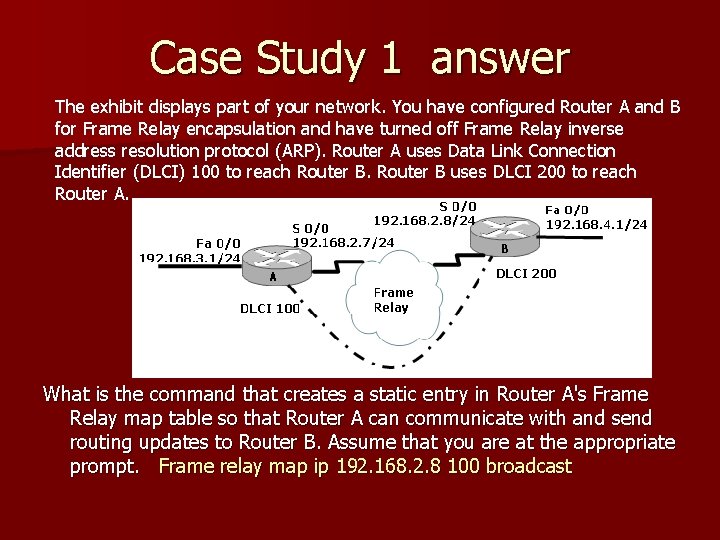
Case Study 1 answer The exhibit displays part of your network. You have configured Router A and B for Frame Relay encapsulation and have turned off Frame Relay inverse address resolution protocol (ARP). Router A uses Data Link Connection Identifier (DLCI) 100 to reach Router B uses DLCI 200 to reach Router A. What is the command that creates a static entry in Router A's Frame Relay map table so that Router A can communicate with and send routing updates to Router B. Assume that you are at the appropriate prompt. Frame relay map ip 192. 168. 2. 8 100 broadcast
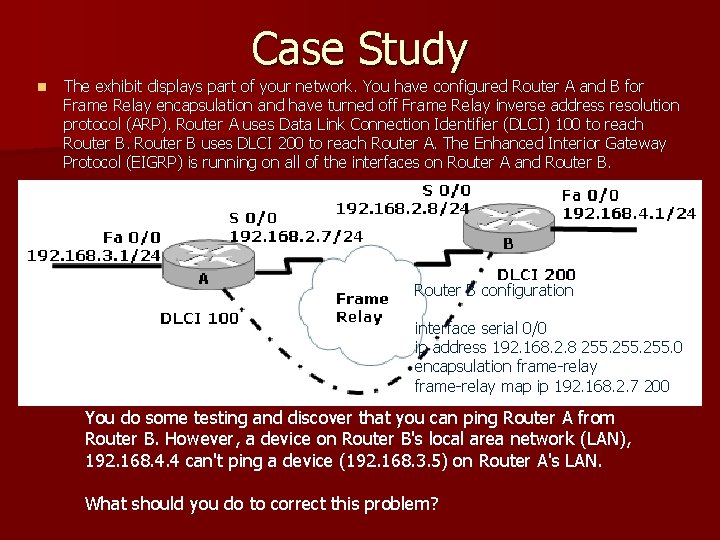
Case Study n The exhibit displays part of your network. You have configured Router A and B for Frame Relay encapsulation and have turned off Frame Relay inverse address resolution protocol (ARP). Router A uses Data Link Connection Identifier (DLCI) 100 to reach Router B uses DLCI 200 to reach Router A. The Enhanced Interior Gateway Protocol (EIGRP) is running on all of the interfaces on Router A and Router B configuration interface serial 0/0 ip address 192. 168. 2. 8 255. 0 encapsulation frame-relay map ip 192. 168. 2. 7 200 You do some testing and discover that you can ping Router A from Router B. However, a device on Router B's local area network (LAN), 192. 168. 4. 4 can't ping a device (192. 168. 3. 5) on Router A's LAN. What should you do to correct this problem?
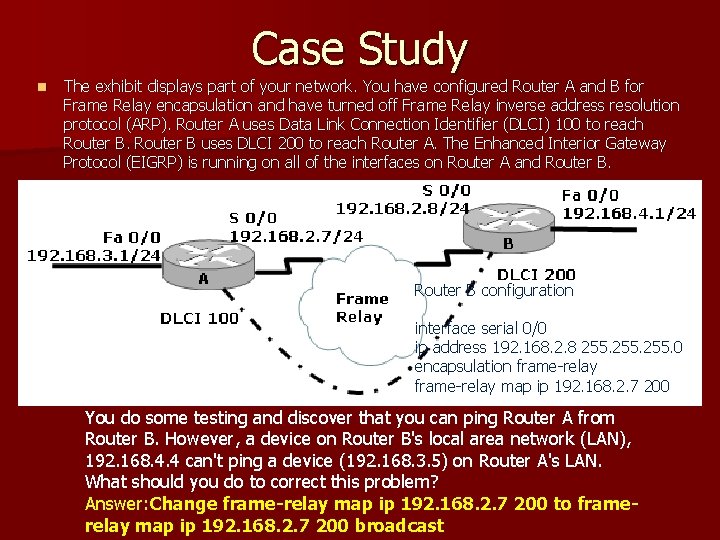
Case Study n The exhibit displays part of your network. You have configured Router A and B for Frame Relay encapsulation and have turned off Frame Relay inverse address resolution protocol (ARP). Router A uses Data Link Connection Identifier (DLCI) 100 to reach Router B uses DLCI 200 to reach Router A. The Enhanced Interior Gateway Protocol (EIGRP) is running on all of the interfaces on Router A and Router B configuration interface serial 0/0 ip address 192. 168. 2. 8 255. 0 encapsulation frame-relay map ip 192. 168. 2. 7 200 You do some testing and discover that you can ping Router A from Router B. However, a device on Router B's local area network (LAN), 192. 168. 4. 4 can't ping a device (192. 168. 3. 5) on Router A's LAN. What should you do to correct this problem? Answer: Change frame-relay map ip 192. 168. 2. 7 200 to framerelay map ip 192. 168. 2. 7 200 broadcast
Summary n What can cause Frame Relay to be faster than other technologies? n What information will the customer need from the provider in order to configure his frame relay devices? n What relationship does the CIR have to the DE? n How bandwidth play into the use of subinterfaces?